
This is a video of jazz pianist Vince Guaraldi’s first televised performance of the classic ‘Linus And Lucy’ he composed for Peanuts (I also work for peanuts). This was way back in 1964, a year before A Charlie Brown Christmas, and long before I was around. At least in this plane of existence. I was already cruising lots of other planes by that time though. The things I’ve seen! Mostly erotica.
Category Archives: Technology
OpenAI Calls In the Consultants For Its Enterprise Push
OpenAI has formed a multi-year “Frontier Alliance” with four consulting heavyweights to accelerate enterprise adoption of its no-code AI agent platform, OpenAI Frontier. TechCrunch reports: The alliance includes multi-year partnerships between OpenAI and four major consulting firms, Boston Consulting Group (BCG), McKinsey, Accenture and Capgemini, to sell its enterprise products. OpenAI’s Forward Deployed Engineering team will work with the consulting giants to help them implement OpenAI’s enterprise-focused technologies like OpenAI Frontier into customers’ tech stacks.
The company launched OpenAI Frontier in early February. The no-code open software allows users to build, deploy, and manage AI agents both built on OpenAI’s AI models and beyond. OpenAI argues in its latest announcement that consultants are the right avenue to get enterprises on board.
“AI alone does not drive transformation. It must be linked to strategy, built into redesigned processes, and adopted at scale with aligned incentives and culture to deliver sustained outcomes,” BCG CEO Christoph Schweizer said in OpenAI’s blog post. “Our expanded partnership combines OpenAI’s Frontier platform with BCG’s deep industry, functional, and tech expertise and BCG X’s build-and-scale capabilities to drive measurable impact with safeguards from day one.”


Read more of this story at Slashdot.
Panasonic Will No Longer Make Its Own TVs
Panasonic is handing over the manufacturing, marketing, and sales of its TVs to Shenzhen-based Skyworth, effectively exiting in-house TV production. Ars Technica reports: Skyworth is a Shenzhen-headquartered TV brand. The company claims to be “a top three global provider of the Android TV platform.” In July, research firm Omdia reported that Skyworth was one of the top-five TV brands by sales revenue in Q1 2025; however, Skyworth hasn’t been able to maintain that position regularly. Panasonic made its announcement at a “launch event,” FlatpanelsHD reported today. During the event, a Panasonic representative reportedly said: “Under the agreement the new partner will lead sales, marketing, and logistics across the region, while Panasonic provide expertise and quality assurance to uphold its renowned audiovisual standards with full joint development on top-end OLED models.”
Panasonic also said that it will provide support “for all Panasonic TVs sold up to March 2026 and all those available from April.” Skyworth-made Panasonic TVs will be sold in the US and Europe. In the latter geography, the companies are aiming for double-digit market share. […] The news means there’s virtually no TV production happening in Japan anymore, as other Japanese companies, like Sharp, Toshiba, Hitachi, and Pioneer, have already exited TV production. Earlier this year, Sony announced that it was ceding control of its TV hardware business to TCL.


Read more of this story at Slashdot.
Pentagon buyer: We’re happy with our launch industry, but payloads are lagging
DALLAS—The Space Force officer tasked with overseeing more than $24 billion in research and development spending says the Pentagon is more interested in supporting startups building new space sensors and payloads than adding yet another rocket company to its portfolio.
The statement, made at a space finance conference in Dallas last week, was one of several points Maj. Gen. Stephen Purdy wanted to get across to a room full of investors and commercial space executives.
The other points on Purdy’s agenda were that the Space Force is more interested in high-volume production than spending money to develop the latest technologies, and that the military has, at least for now, lost one of its most important tools for supporting and diversifying the space industrial base.
ASML Unveils EUV Light Source Advance That Could Yield 50% More Chips By 2030
An anonymous reader quotes a report from Reuters: Researchers at ASML Holding say they have found a way to boost the power of the light source in a key chip making machine to turn out up to 50% more chips by decade’s end, to help retain the Dutch company’s edge over emerging U.S. and Chinese rivals. ASML is the world’s only maker of commercial extreme ultraviolet lithography (EUV) machines, a critical tool for chipmakers such as TSMC, Intel and others in producing advanced computing chips. “It’s not a parlor trick or something like this, where we demonstrate for a very short time that it can work,” Michael Purvis, ASML’s lead technologist for its EUV source light, said in an interview. “It’s a system that can produce 1,000 watts under all the same requirements that you could see at a customer,” he added, speaking at the company’s California facilities near San Diego. […]
With the technological advance revealed on Monday, which is being reported here for the first time, ASML aims to outdistance any would-be rivals by improving the most technologically challenging aspect of the machines. This is the quest to generate EUV light with the right power and properties to turn out chips at high volume. The company’s researchers have found a way to boost the power of the EUV light source to 1,000 watts from 600 watts now. The chief advantage is that greater power translates into the ability to make more chips every hour, helping to lower the cost of each. Chips are printed similar to a photograph, where the EUV light is shone on a silicon wafer coated with special chemicals called a photoresist. With a more powerful EUV light source, chip factories need shorter exposure times. “We’d like to make sure that our customers can keep on using EUV at a much lower cost,” Teun van Gogh, executive vice president for the NXE line of EUV machines at ASML, told Reuters. Van Gogh said customers should be able to process about 330 silicon wafers an hour on each machine by the end of the decade, up from 220 now. Depending on the size of a chip, each wafer can hold anywhere from scores to thousands of the devices.
ASML got the power boost by doubling down on an approach that already places its machines among the most complex inventions of humans. To produce light with a wavelength of 13.5 nanometers, ASML’s machine shoots a stream of molten droplets of tin through a chamber, where a massive carbon dioxide laser heats them into plasma. This is a superheated state of matter in which the tin droplets become hotter than the sun and emit EUV light, to be collected by precision optic equipment supplied by Germany’s Carl Zeiss AG and fed into the machine to print chips. The key advancements in Monday’s disclosure involved doubling the number of tin drops to about 100,000 every second, and shaping them into plasma using two smaller laser bursts, as opposed to today’s machines that use a single shaping burst. […] ASML believes the techniques it used to hit 1,000 watts will unlock continued advances in the future, Purvis said, adding, “We see a reasonably clear path toward 1,500 watts, and no fundamental reason why we couldn’t get to 2,000 watts.”


Read more of this story at Slashdot.
Data center builders thought farmers would willingly sell land, learn otherwise
It seems that tech giants eyeing rural zones for data center development have underestimated how attached American farmers have grown to their lands in the decades they’ve been nurturing them.
Across the country, several farmers have firmly rejected eye-popping offers—sometimes in the tens of millions. These offers dwarf the value of their properties, but farmers have refused to put a price on the lands that they love most.
In a report on Monday, The Guardian highlighted a handful of cases nationwide where farmers’ refusals have frustrated plans to build data centers in areas long deemed rural.
Beaver Biting Down A Tree To Build A Dam
This is a clip from BBC Studios of a beaver in Yellowstone National Park felling a cottonwood tree and building a dam with it. Apparently beavers can take down a tree like this in a few hours, and a single beaver can fell several hundred trees a year. It’s amazing there are any trees left, and Mr. Beaver better not come anywhere near my tree fort. It’s the one with the ‘NO GURLZ ALOUD’ sign. *shrug* I was a dumb kid. Don’t get me wrong, I’m still a dumb kid LARPing as an average adult, but I’m at least smart enough now not to exclude women from any gathering they’re willing to be a part of.
Panasonic, the former plasma king, will no longer make its own TVs
Panasonic, once revered for its plasma TVs, is giving up on making its own TV sets. Today, it announced that Chinese company Skyworth will take over manufacturing, marketing, and selling Panasonic-branded TVs.
Skyworth is a Shenzhen-headquartered TV brand. The company claims to be “a top three global provider of the Android TV platform.” In July, research firm Omdia reported that Skyworth was one of the top-five TV brands by sales revenue in Q1 2025; however, Skyworth hasn’t been able to maintain that position regularly.
Panasonic made its announcement at a “launch event,” FlatpanelsHD reported today. During the event, a Panasonic representative reportedly said:
IBM Shares Crater 13% After Anthropic Says Claude Code Can Tackle COBOL Modernization
IBM shares plunged nearly 13% on Monday after Anthropic published a blog post arguing that its Claude Code tool could automate much of the complex analysis work involved in modernizing COBOL, the decades-old programming language that still underpins an estimated 95% of ATM transactions in the United States and runs on the kind of mainframe systems IBM has sold for generations.
Anthropic said the shrinking pool of developers who understand COBOL had long made modernization cost-prohibitive, and that AI could now flip that equation by mapping dependencies and documenting workflows across thousands of lines of legacy code. The sell-off deepened a rough 2026 for IBM, whose shares are now down more than 22% year to date.


Read more of this story at Slashdot.
This Solar-Powered Garmin Watch Is $200 Off Right Now
We may earn a commission from links on this page. Deal pricing and availability subject to change after time of publication.
Garmin is known for its GPS smartwatches designed for rugged outdoor adventures and camping trips. The Garmin Instinct 2X Solar Tactical Watch is one of the brand’s best solar-charged options—an right now, it’s 40% off on Amazon, dropping its price from $499.99 to $299.99.

Compared to its predecessor, the Garmin Instinct Solar 2X produces up to 50% more energy from the sun thanks to the Power Glass lens, which is particularly helpful in GPS mode, which can drain the battery quickly. It’s also 0.8 mm thinner, has a built-in LED flashlight, a compass, and an altimeter. It also has a number of health- and fitness-tracking features, including Pulse Ox, heart rate monitoring, and sleep monitoring stats that are meant to help you train and recover more efficiently. The watch also contains integrated sports apps.
TrackBack is another helpful feature that lets you use location readings to keep track of where you last left your car or where you started your hike, for example. That said, this device doesn’t have a touchscreen; users are limited to a button-based interface, and app support on the Garmin Connect IQ app is somewhat limited. The display is also somewhat bare-bones compared to more vibrant AMOLED options like the Samsung Galaxy Watch Ultra (that said, there are some benefits to an MIP screen over AMOLED.)
Our Best Editor-Vetted Tech Deals Right Now
Deals are selected by our commerce team
Anthropic accuses three Chinese AI labs of abusing Claude to improve their own models
Anthropic is issuing a call to action against AI “distillation attacks,” after accusing three AI companies of misusing its Claude chatbot. On its website, Anthropic claimed that DeepSeek, Moonshot and MiniMax have been conducting “industrial-scale campaigns…to illicitly extract Claude’s capabilities to improve their own models.”
Distillation in the AI world refers to when less capable models lean on the responses of more powerful ones to train themselves. While distillation isn’t a bad thing across the board, Anthropic said that these types of attacks can be used in a more nefarious way. According to Anthropic, these three Chinese AI firms were responsible for more than “16 million exchanges with Claude through approximately 24,000 fraudulent accounts.” From Anthropic’s perspective, these competing companies were using Claude as a shortcut to develop more advanced AI models, which could also lead to circumventing certain safeguards.
Anthropic said in its post that it was able to link each of these distilling attack campaigns to the specific companies with “high confidence” thanks to IP address correlation, metadata requests and infrastructure indicators, along with corroborating with others in the AI industry who have noticed similar behaviors.
Early last year, OpenAI made similar claims of rival firms distilling its models and banned suspected accounts in response. As for Anthropic, the company behind Claude said it would upgrade its system to make distillation attacks harder to do and easier to identify. While Anthropic is pointing fingers at these other firms, it’s also facing a lawsuit from music publishers who accused the AI company of using illegal copies of songs to train its Claude chatbot.
This article originally appeared on Engadget at https://www.engadget.com/ai/anthropic-accuses-three-chinese-ai-labs-of-abusing-claude-to-improve-their-own-models-205210613.html?src=rss
AMD Zen 6 And Intel Nova Lake-S May Both Debut In 2027 For A Next-Gen CPU Showdown

This year’s CES was pretty lean on exciting announcements, at least for enthusiats. Intel’s Core Ultra 300 series, the chips codenamed Panther Lake, are pretty cool, but that was really about it. Next year is looking to be a lot more exciting, though. According to the latest rumors, Intel and AMD may be having a metaphorical knife fight at
Wispr Flow Brings AI Dictation App To Android With A New Floating Bubble UI
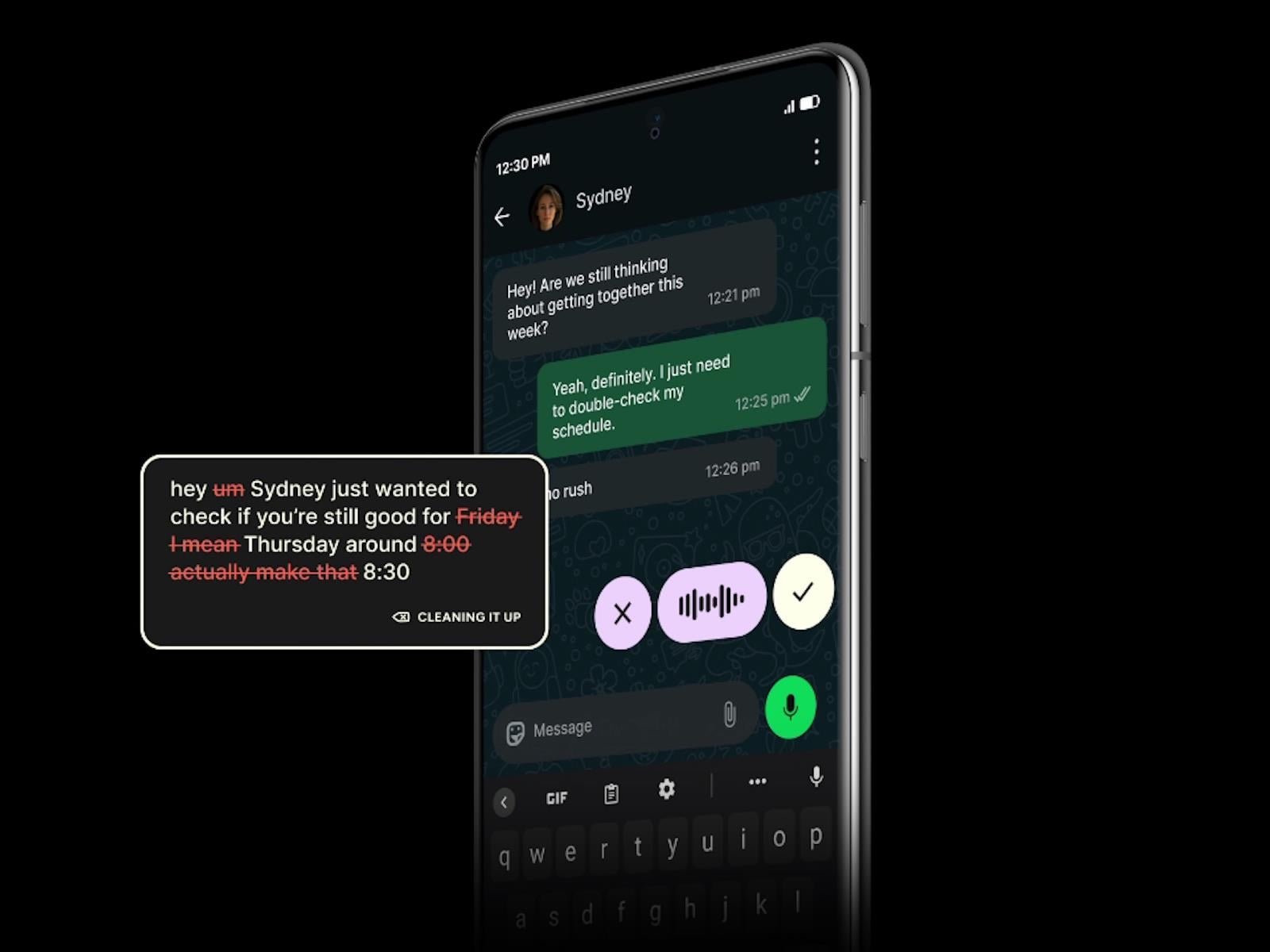
Wispr Flow, a dictation app that taps into AI, launched last year across Windows, Mac and iOS, but is now finally making its way to Android. The company says that it this isn’t just a straight port of what’s found on other platforms, and that the development team has gone the extra mile to create an experience that’s “optimized for Android’s
Predator Spyware Evades iOS Privacy Protections To Attack iPhone Owners

iOS users may already be aware of the commercial spyware dubbed Predator, but may not know exactly what it’s capable. Fortunately, malware researchers Nir Avraham and Hu Ke have published a detailed write-up on how the Predator spyware works, including how “a single hook defeats both camera and microphone indicators simultaneously.” The Predator
Nothing reveals the Phone 4a ahead of schedule
Nothing has been slow-dripping news about the upcoming Phone 4a for a few days now, with a promise to reveal the handset on March 5. However, the company jumped the gun a bit and just posted an actual photo of the hardware. It looks pretty nifty, even if we don’t have any real-deal specs just yet.
The image shows the handset from behind, displaying the company’s trademark transparent design. The picture also features the redesigned Glyph Bar, which was first teased last week. This is a light-based notification system that features individually controlled mini-LEDs that light up in various ways to notify the user of missed calls and stuff like that. You can spot it next to the camera bump.
Built different.
Phone (4a). 5 March, 10:30 GMT. pic.twitter.com/n3ZtbTmYIv— Nothing (@nothing) February 23, 2026
That’s about all we know right now, though there are plenty of industry rumors. It’s been reported that the Nothing Phone 4a will feature a Snapdragon 7-series chip and that the reveal will be accompanied by a Pro model with a more powerful camera. The Nothing Phone 3a was also launched alongside the 3a Pro.
We loved the 3a and 3a Pro, calling both “an easy recommendation.” Let’s hope this carries through for the 4a. Also, you didn’t miss a release of the actual Nothing Phone 4. The company likes to release the a-series handsets before the flagship. Past as prologue, we’ll likely see that one in early summer.
This article originally appeared on Engadget at https://www.engadget.com/mobile/smartphones/nothing-reveals-the-phone-4a-ahead-of-schedule-181905011.html?src=rss
Anthropic Accuses Chinese Companies of Siphoning Data From Claude
U.S. artificial-intelligence startup Anthropic said three Chinese AI companies set up more than 24,000 fraudulent accounts with its Claude AI model to help their own systems catch up. From a report: The three companies — DeepSeek, Moonshot AI and MiniMax — prompted Claude more than 16 million times, siphoning information from Anthropic’s system to train and improve their own products, Anthropic said in a blog post Monday.
Earlier this month, an Anthropic rival, OpenAI, sent a memo to House lawmakers accusing DeepSeek of using the same tactic, called distillation, to mimic OpenAI’s products. Anthropic said distillation had legitimate uses — companies use it to build smaller versions of their own products, for example — but it could also be used to build competitive products “in a fraction of the time, and at a fraction of the cost.” The scale of the different companies’ distillation activity varied. DeepSeek engaged in 150,000 interactions with Claude, whereas Moonshot and MiniMax had more than 3.4 million and 13 million, respectively, Anthropic said.


Read more of this story at Slashdot.
10 Hacks Every PS5 Gamer Should Know
We may earn a commission from links on this page.
Sony’s PlayStation 5 is a powerful machine, but if you just plugged it right into your TV and never bothered to go into the settings, there’s a chance you’re not seeing its full potential. From enabling 120 fps gameplay to customizing your Welcome hub, there’s a lot you can do with the PS5, if you’re willing to tinker a little bit. Here are the 10 best tips and tricks to getting the most out of Sony’s current gaming console.
Enable 120Hz and 4K on your PS5
Just because you bought a fancy new PS5 doesn’t automatically mean you’re getting the best performance out of it possible. If you have a 4K TV or a monitor that can support a 120Hz refresh rate or above, you’ll want to double check your video output settings to ensure your console is taking advantage of it.
First, before even turning on your device, make sure it’s connected via an HDMI 2.1 cable. This is necessary for frame rates above 60 at 4K. Your PS5 should have come with one, and you’ll know if it’s the right one if it has a boxy rectangle on either side of the cable. Also ensure that you’re plugging your cable into a port that can accept HDMI 2.1, which will look different based on your screen. On my LG C1 TV, this port says “4K @ 120Hz” above it.
Next, while your console may detect what your screen can handle and adjust its settings accordingly, head to Settings > Screen and Video to manually check them and make some adjustments that need some human fine tuning. I like to leave most of the settings on this page to Automatic to allow the PS5 to pick the best choices for the wide variety of content it can play, but you can select any of the settings on this page to see your options and force an output. If you don’t see 4K (labeled as 2160p) or 120Hz as options here, this is your sign you might need to swap your HDMI cable.
To see what settings your PS5 is using at any particular moment, select “Current Video Output Signal” at the top of this page to check your work. While I mostly like to rely on the PS5’s Automatic settings, one specific change you might want to make would be applying VRR to unsupported games, which could improve fidelity at the cost of introducing instability. If you scroll down far enough on this page, you can also adjust when your console displays HDR, and go through an HDR setup wizard by selecting “Adjust HDR.”
You can also customize your console’s display area by selecting Screen from the sidebar on the left, which is handy if your display has an unusual aspect ratio. While you’re here, you can adjust how long you need to be away from your controller before the console dims your screen.
Finally, if you have a PS5 Pro, you can up the graphics quality on some supported PS4 games. This is under Settings > Screen and Video > Video Output > Enhance Image Quality for PS4 games.

Mute the PS5’s startup beep
Let’s say you’re having trouble sleeping, and instead of rolling around in bed, you decide to sneak out to the PS5 for a secret gaming session. Except, uh-oh, the nasty beep that the console plays at startup alerts your partner, and now you have some explaining to do. To keep this from happening, let’s turn off that beep ahead of time.
Under Settings > System > Beep and Light, toggle on Mute Beep Sound to get rid of the sound your PS5 plays at startup. Or, if you just want to make it quieter, you can do that under Volume.
While you’re here, you can also customize how bright the LED strip on the front of the console gets, under Power indicator > Brightness. Unfortunately, there isn’t a way to turn it off entirely.
Change the widgets on your PS5’s home screen
Credit: Sony
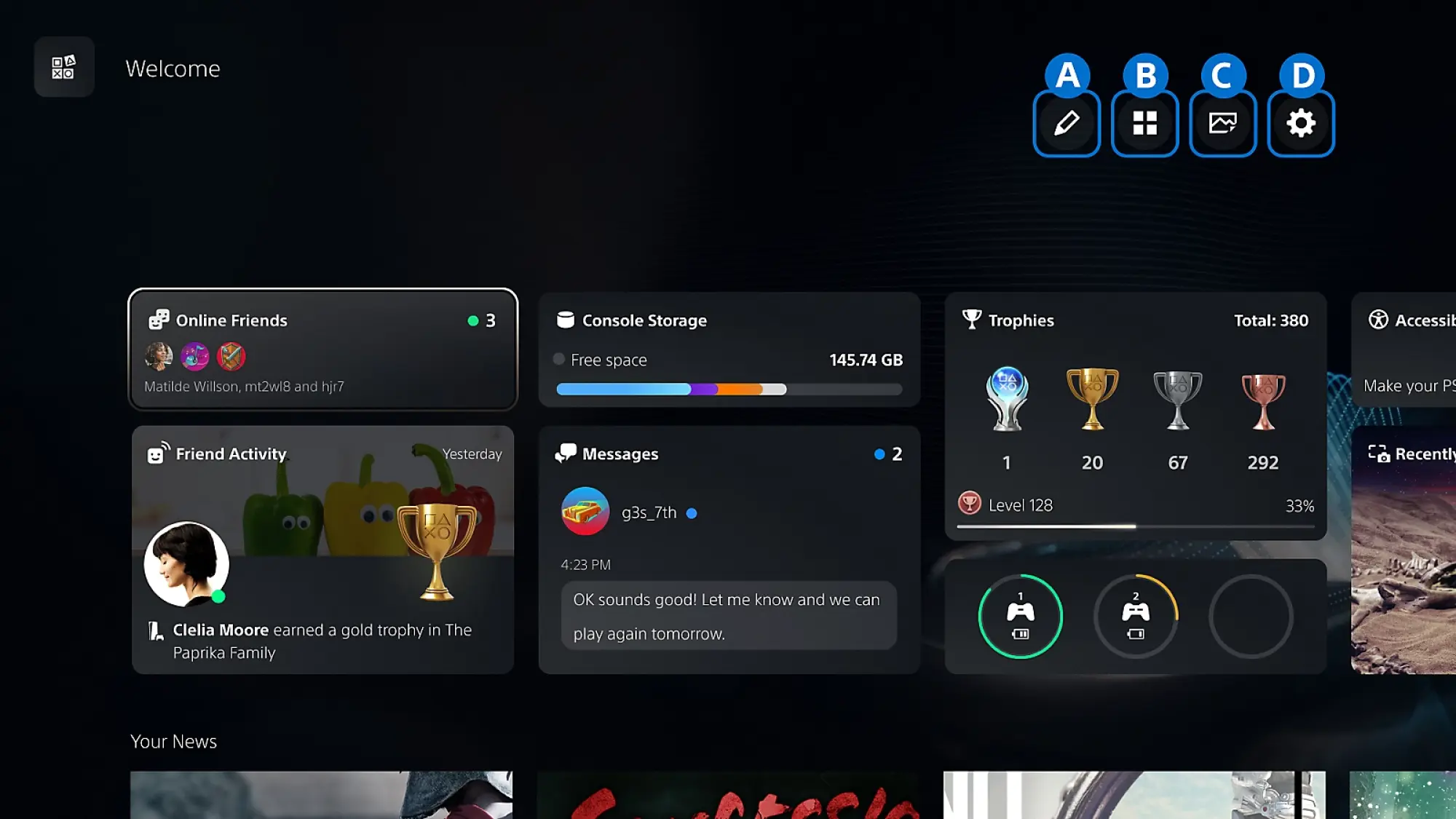
See all those widgets at the bottom of the Welcome Hub when you turn your PS5 on? Did you know that you can actually customize them? It’s especially handy if you’re like me and can’t stand seeing what are essentially ads taking up more than half of your display.
To adjust your PS5 Welcome Hub widgets, simply press X while hovering over the Welcome Hub tile, then navigate to the controls in the top-right corner. Here, you can select Presets to choose from various options set up by Sony, or select Edit Widgets to toggle specific widgets on and off. Personally, I disabled the News, PlayStation Plus, Wishlist, and PlayStation Store widgets, since they’re pretty much only there to sell you things.
Once you’re done selecting the widgets you want to see, before leaving Welcome Hub setup, navigate to the Settings cog and choose if you want to enable the carousel-like Large Layout, where you want notifications (Temporary Widgets) to show up, and if you want your widgets to match your broader System Appearance settings (more on that later). If you have the News widget active, you can also customize which games show news here.
Finally, to the left of the Settings cog, you can choose a background for the Welcome Hub, picking from options either prepared by Sony, bundled with certain games you own, or pulled from your Media Gallery.
Turn on your PS5’s surround sound and connect Bluetooth headphones
Your PS5 can do more than basic stereo sound, even if you don’t own a physical surround sound setup. That’s thanks to the power of various virtual surround sound codecs, which come baked into the console. To turn these on, head over to Settings > Sound > Audio Output > Audio Format (Priority). Here, you can choose between Linear PCM, Dolby Atmos, Dolby Audio, and DTS. Not all of these options support virtual surround sound, and I’ll admit I’m not enough of an audiophile to know the best one for every setup, but because it supports height data, Dolby Atmos has been the most versatile pick for my soundbar.
Alternatively, you can also use Sony’s own 3D Audio technology by selecting 3D Audio (TV) or 3D Audio (Headphones) from the sidebar. Personally, I haven’t found the results here to be as rich as Dolby Atmos, but that makes sense. These are built for gamers using TV speakers or headphones, so they aren’t the best option if you’ve got a soundbar or external speaker setup. Still, they’re worth trying out if you listen over your TV’s internal speakers or via a headset. Note that only Sony’s own headsets will connect to the console wirelessly by themselves, but there are ways around that, which my colleague Jake Peterson has written about here.
Make rumble more responsive on the PS5
Sony’s so proud of the rumble and haptics in the PS5 controller that it updated its classic DualShock branding to DualSense alongside the controller’s launch. But weirdly, the haptics aren’t as strong as they could be out of the box. That’s because the PS5 controller has a microphone built-in, and Sony has intentionally weakened its haptics to prevent interference from being picked up on the mic.
If you’re like me, and you barely use the microphone in your controller, there are two ways to fix that. The first is more temporary, and simply involves pressing the clear button above the microphone icon on your controller to mute it, which will strengthen the haptics until you turn it back on. It’ll also display an orange light while the mic is off.
The second doesn’t require you to manually flip your mic on and off, and will get rid of that orange light. You can enable it by toggling on Mute under Settings > Sound > Microphone > Microphone Status When Logged In, but know that you’ll need to toggle this back to On if you need to use the microphone again.
Turn off (or reduce) the PS5’s DualSense trigger haptics

Credit: Michelle Ehrhardt
Sony might be proud of the haptics in its brand new controller, but personally, I think they’re a little bit too strong, especially when it comes to the triggers. With the PS5, Sony introduced its new adaptive triggers, which add resistance to trigger pulls in certain games for heightened realism. But while having the controller fight back against you the first time you try to tighten a bowstring in a Horizon game might be a fun novelty, it gets tiring pretty quick.
Luckily, you can customize this, as well as fine tune any of the other haptics. Under Settings > Accessories > Controller (General), select Trigger Effect Intensity to choose how strong the adaptive trigger resistance should be, and select Vibration Intensity to set the strength for more general rumble. Personally, I have Vibration Intensity set to Strong, and Trigger Effect Intensity turned off.
Install SSD or use HDD for PS4 games or offloaded PS5 games
The PS5 comes with a good amount of storage by default, and while amounts differ depending on your model, it’s usually enough for five to seven AAA games. But if you want more storage, you can actually install a supported M.2 SSD into your PS5 without much hassle. Sony has exact installation instructions here, plus a guide on determining if an SSD is supported. While specific steps will vary depending on your PS5 model and which SSD you get, you generally only need a screwdriver to complete installation. Even better? The new SSD won’t replace your existing internal storage, so you can use them in tandem.
To install games to your SSD once it’s installed, you’ll first need to change your Installation Location to M.2 SSD under Settings > Storage. Then, simply install a game as usual. If you want to move games that are already installed on your PS5’s internal storage to your SSD, head to your Game Library, highlight the games you want to move, press the Options button, and select Move Games and Apps. If you’re also using expanded USB storage, select Movable to M.2 SSD Storage after this step.
Speaking of USB storage, the PS5 also supports external USB drives. You can see requirements here—not every device is guaranteed to work. Also note that while you can play PS4 games directly off USB storage, PS5 games need to be installed to an SSD to work. However, you can keep a PS5 game offloaded to USB storage and then load it onto either your console’s SSD or your custom M.2 SSD when you’re ready to play, bypassing the need for a download.
Quickly customize game difficulty, subtitles, and graphics on the PS5
The first thing I do whenever I boot up a new game isn’t start my adventure, but dive deep into the settings to see what I can customize. It’s not the best first impression, but there’s usually a switch I can flip that will make the game play much better for me, especially if it ups the frame rate. Luckily, Sony’s aware of this optimization sickness I suffer from, and is doing its best to help.
Under Settings > Saved Data and Game/App Settings > Game Presets, you can set a number of preferences for how your games should play ahead of time, and your PS5 will automatically configure them for you when you boot up a supported game. It’s not a fully robust selection, since Sony can’t predict every game’s needs, but you can choose a preferred difficulty here, whether the game should be played in first-person or third-person (if both are available), which language you’d like to play in, whether subtitles should be turned on, your online multiplayer permissions, and most crucially for me, whether your games prefer Performance Mode or Quality Mode (called Resolution Mode here). Finally, I can set my PS5 games to default to smooth performance over the prettiest visuals.
Get hints from the PS5’s Game Help feature
Let’s say you’re struggling in a game, but you don’t want to bother to pull up an internet browser and look up a walkthrough. This is where the PS5’s Game Help feature comes in. It’s not available for every game, but if you’re stuck, it’s worth looking for. Just press the PlayStation logo button on your controller, and if it’s there, select the Game Help card. From here, your PS5 will suggest hints towards specific goals based on where you are in your game, and might even show you videos from other players. It’ll also warn you if you’re about to see spoilers, so you can back out before looking at a hint.
It’s fairly self explanatory, and while the hints aren’t always detailed enough for my needs, I do appreciate that Game Help also estimates how long it’ll take you to complete certain goals, as well as show you your progress towards them. As a busy 30-something, it’s a great way to know how long my play sessions might be ahead of time.
As for where Game Help gets its gameplay videos, it’s from players who’ve opted in to share them. To start sending videos to Game Help, head to Settings > Captures and Broadcasts > Auto-captures > Community Game Help. Select On next to Participate, and Sony may occasionally look at your gameplay and upload select sections from it to its servers to serve as a guide towards other players. Voice or party chat audio won’t be recorded and uploaded videos won’t take up space on your console, but depending on the game, usernames or text-based chat messages shown in gameplay footage might be shared.
Change your PS5 console’s theme to a retro style
Credit: Sony
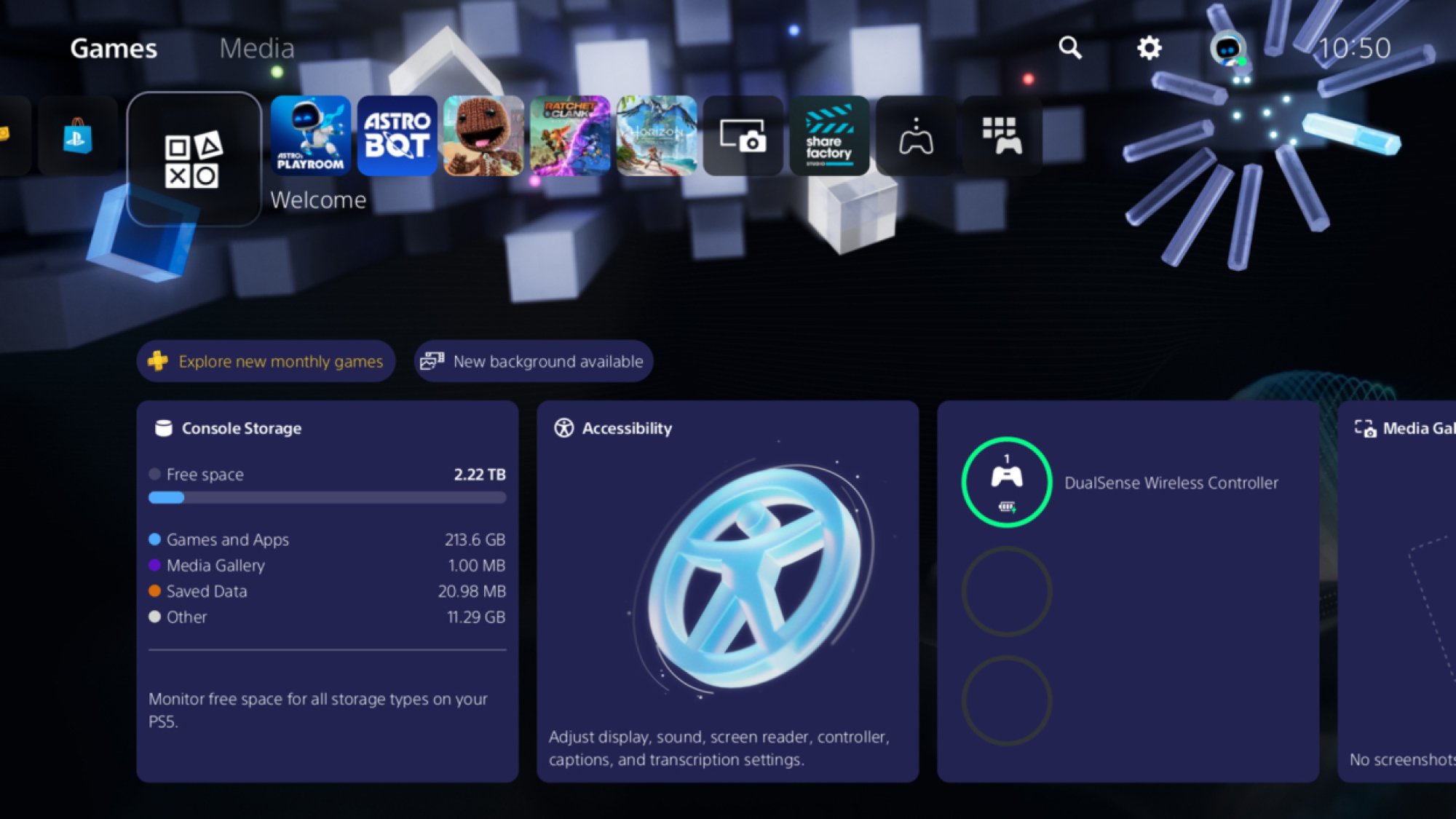
Finally, this one’s just for fun. Back in 2024, Sony introduced themes to the PS5 home screen that mimicked the look of the PS1, PS2, PS3, and PS4. These left the system shortly afterwards, but came back for good in April of last year. To try them out, head to Settings > System > Appearance > Appearance and Sound and choose a console you’d like to mimic. Personally, I like the PS2 theme, but I’ve gone for the PS3 look for now, because my husband has a lot of fondness for that console’s XMB menu. Now, if only Sony would add even more themes to the list. Maybe an Astro Bot look?
Intel Aims To Hire A Unified Core Engineer, What Does This Mean For Hybrid Designs?

Enthusiast and frequent leak-spotter Gray (@Olrak29_ on Xwitter) spied a fresh job posting from Intel that’s got the tight-knit community of hardware nerds buzzing with speculation on Chipzilla’s plans. Intel’s on the lookout for a Senior CPU Verification Engineer to join the team in Austin, Texas. Base pay kicks off at around $142K (the national
Ball x Pit will land on iOS and Android on March 12
Ball x Pit, a delightful roguelite that was one of our favorite games of last year, is on the way to mobile devices. The chaotic brick-breaking action is coming to iOS and Android on March 12. There will be a free trial with no ads, and you can unlock the full game with an in-app purchase. This is Ball x Pit “for your pants pocket,” according to the latest trailer.
For the uninitiated, Ball x Pit is sort of a mix of Breakout and Vampire Survivors with some base building (and elements of many other genres) blended in. It’s all about finding powerful synergies between the character(s) you select, passive abilities and the balls you use to take out enemies before they get too close to damage you. These balls are regular ones that deal damage on impact (aka baby balls) or special balls that are infused with a range of effects and powers, such as Lightning, Ghost and Poison. These special balls can be fused to combine their effects or evolved into more powerful versions.
BALL x PIT is going MOBILE! ��
�️ Launching on iOS & Android March 12
� Try-before-you-buy: try it for free, no ads! Love it? Unlock the full game with a single in-app purchase and keep BALLing forever!
Pre-order now on the App Store and Google Play! pic.twitter.com/3MmJ6dGNzp
— BALL x PIT � REGAL UPDATE OUT NOW (@BALLxPIT) February 23, 2026
On each run, you’ll collect blueprints and resources that you’ll use to reconstruct a fallen town. Buildings unlock new characters and abilities that can aid you on your next run. Everything synergizes beautifully in Ball x Pit.
Ball x Pit should work well with touch controls on mobile. You can set the balls to fire automatically, so all you really need to worry about is moving your character and aiming, as well as choosing your next upgrade when you earn enough experience gems.
The first of three planned updates for this year arrived in January. I’m still waiting for developer Kenny Sun to add cross-progression since I’ve already plowed dozens of hours into this game on PS5, PC and Xbox — it’s available on Nintendo Switch and Switch 2 as well. Ball x Pit is also currently on Game Pass Ultimate and PC Game Pass.
This article originally appeared on Engadget at https://www.engadget.com/gaming/ball-x-pit-will-land-on-ios-and-android-on-march-12-175159137.html?src=rss
New Microsoft gaming chief has “no tolerance for bad AI”
Last week’s surprise departure of Phil Spencer from Microsoft led to the promotion of Asha Sharma, who comes to head Microsoft’s gaming division after two years as president of the company’s CoreAI Product group. Despite that recent history, Sharma says in a new interview that she has “no tolerance for bad AI” in game development.
Speaking with Variety, Sharma noted that “AI has long been part of gaming and will continue to be,” before adding that “great stories are created by humans.” The interview comes after Sharma promised in an introductory memo: “We will not chase short-term efficiency or flood our ecosystem with soulless AI slop. Games are and always will be art, crafted by humans, and created with the most innovative technology provided by us.”
Those statements seem like a clear line in the sand from Sharma against the use of AI tools in Microsoft’s first-party game development, at the very least. But what separates “bad AI” and “soulless AI slop” from “innovative technology” that humans can use to create artful games is a matter of some significant debate in the gaming world.