Peloton Just Launched a 12-Week Hyrox Training Program

If you’ve been eyeing a Hyrox race, but weren’t sure how to train for one, Peloton may have just solved your problem. The fitness platform announced today the launch of a 12-week Hyrox training program, timed specifically for athletes preparing for the upcoming Hyrox NYC events taking place May 28-31 and June 4-7, 2026. And if you’re not racing in New York, don’t worry—the program lives in Peloton’s library for all members, meaning you can start it 12 weeks out from any Hyrox event on your calendar.

What is Hyrox, anyway?

Before diving into the program, a quick primer for the uninitiated. As my colleague Beth Skwarecki explains here, your friend who used to be obsessed with Crossfit is probably now obsessed with Hyrox (unofficially short for “hybrid rockstar”). Hyrox is a fitness competition designed for athletes who don’t quite see themselves as pure endurance athletes or pure strength athletes, but something in between. 

What seems to make Hyrox unique—or at least, uniquely appealing—is its consistency. Unlike Crossfit competitions, where the format can change dramatically from event to event, every single Hyrox race follows the same predictable structure: eight 1-kilometer runs, with a functional fitness station in between each one. Those stations include things like sled pushes, wall balls, rowing, and ski erg work, adding up to roughly 5 miles of running plus eight rounds of serious effort. Because the format never changes, you can compare your finish time against anyone else who has ever raced Hyrox, much like comparing marathon times.

But one thing that sets Hyrox training apart from something like classic marathon prep is that it’s inherently communal. While you can train for a race on your own with nothing but a good pair of shoes, Hyrox training requires access to a rowing machine, a ski erg, a sled, and a wall ball target—in other words, the sort of equipment that’s hard to come by outside of gyms geared toward this kind of training. (For the record, most Crossfit gyms and a growing number of commercial gyms can accommodate these types of workouts, but it’s worth calling ahead.) That shared training environment tends to foster a community that athletes say is a big part of the draw.

What Peloton’s Hyrox program offers

Peloton’s new 12-week program is structured around six training days per week, with many days including both a strength and a run component. Classes include strength, running, rowing, tread bootcamps, mobility and stretching, and meditation. As a regular ol’ race runner myself, I’m drawn to the ways these classes cover so many different disciplines.
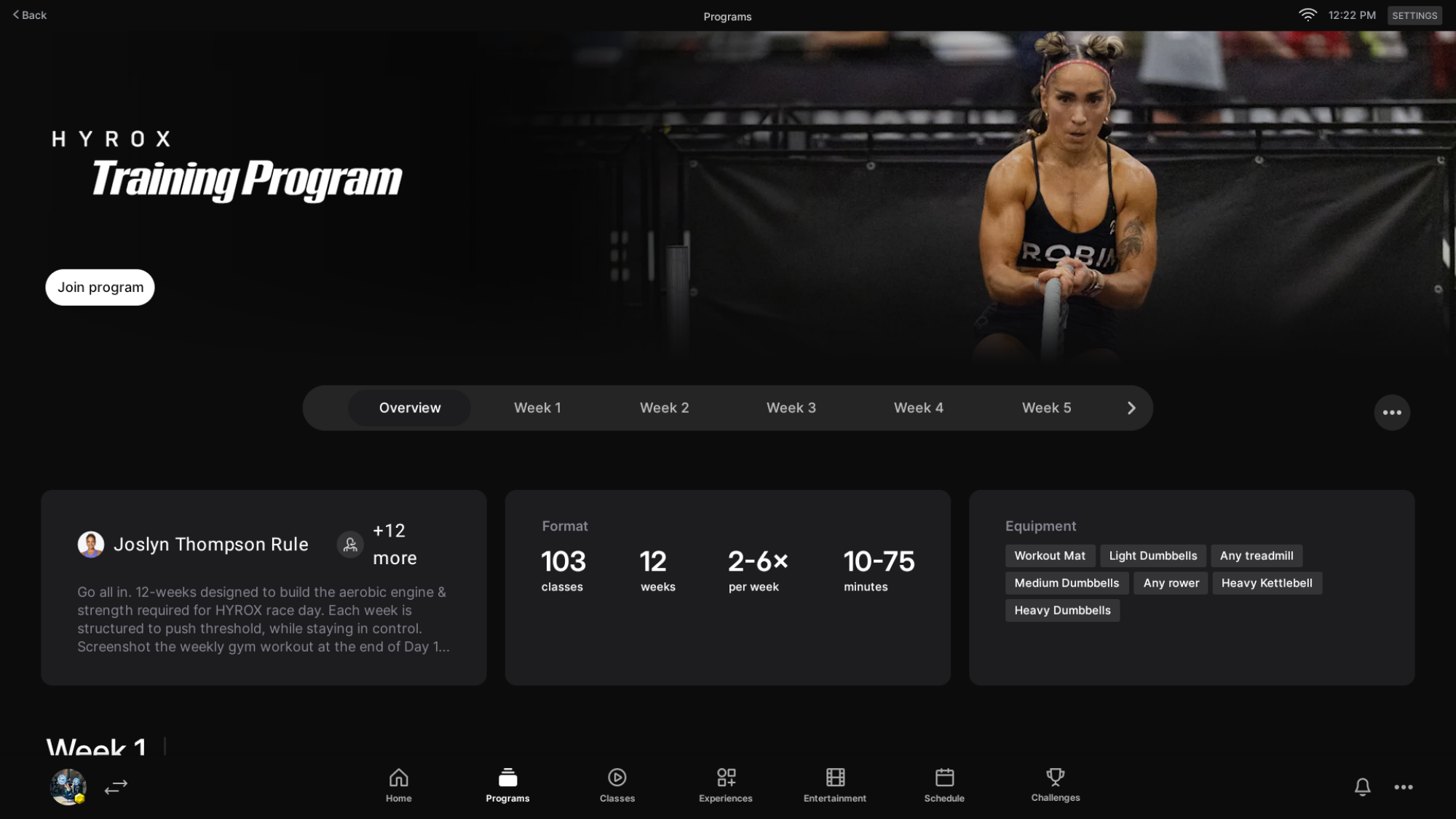
Overview of the Peloton Hyrox training program.
My colleague Beth shares a screenshot of the Peloton Hyrox training program.
Credit: Beth Skwarecki

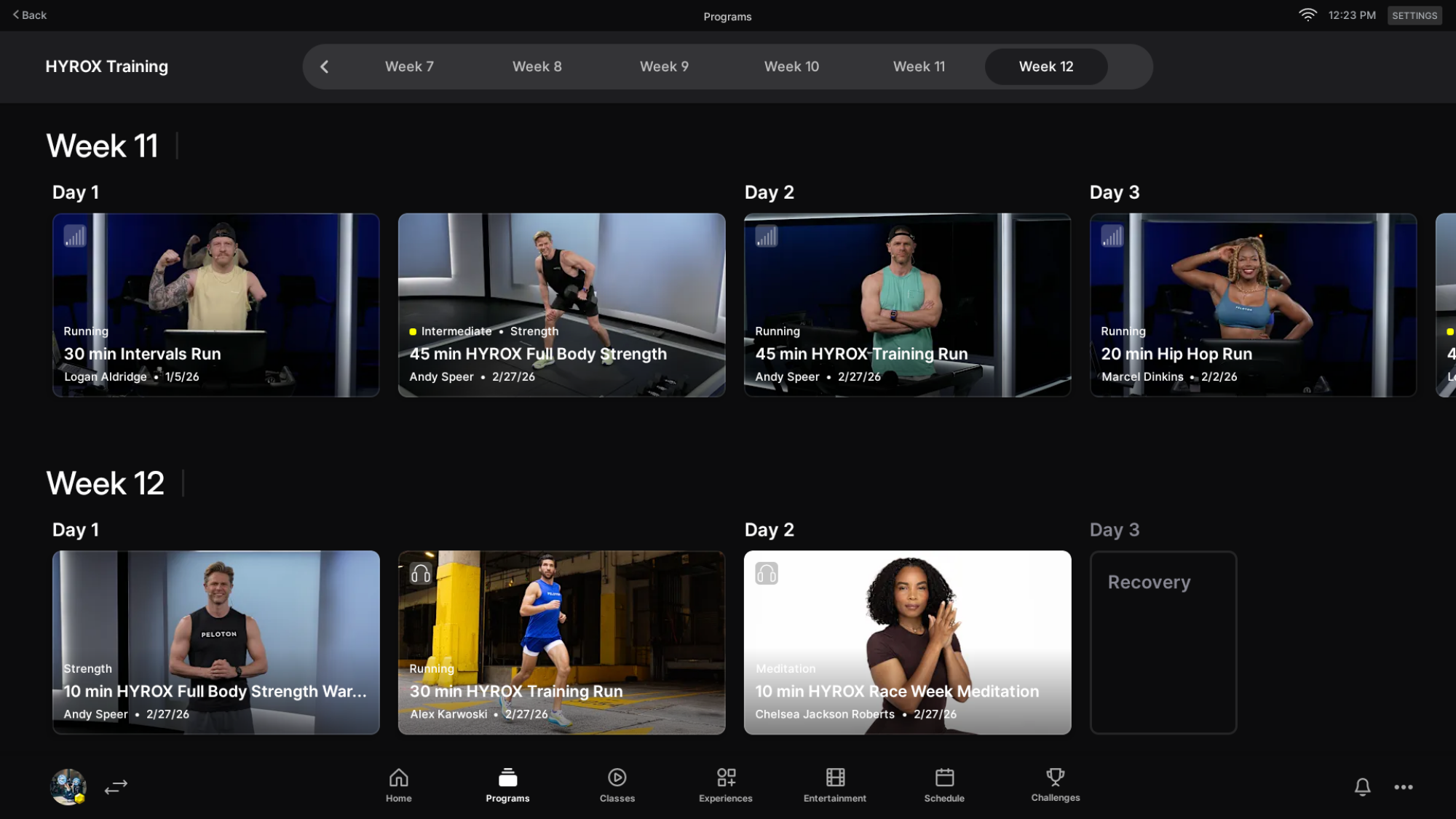
Week 12 is race week, so the training load lightens considerably as athletes taper toward the starting line. There aren’t many workouts that final week, but one notable inclusion is a Hyrox pre-race meditation, which I find speaks to the program’s whole community-based philosophy. 
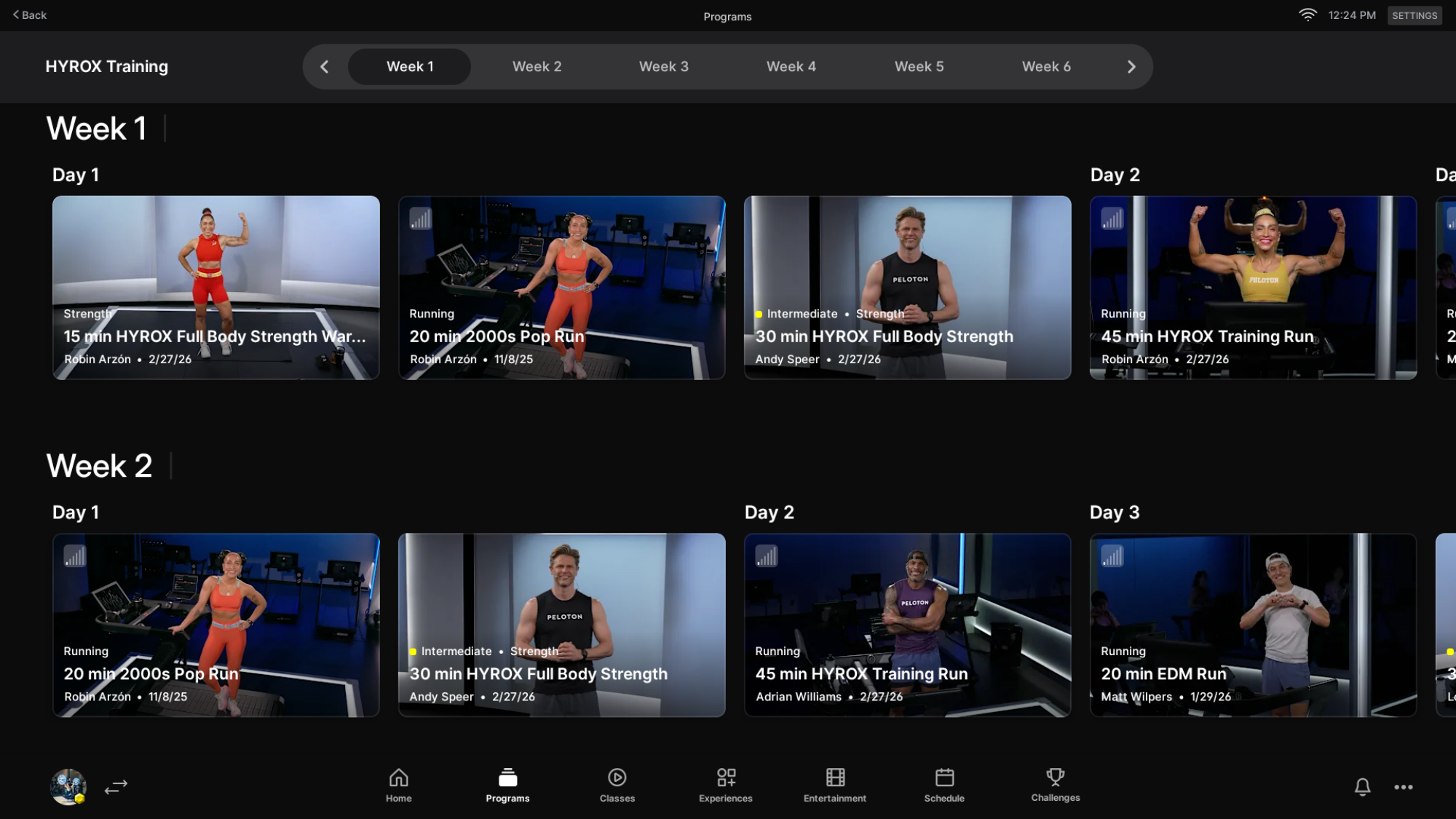
Week one of the Peloton Hyrox training program.
Credit: Beth Skwarecki

Week 12 of the Peloton Hyrox training program.
Credit: Beth Skwarecki

How Peloton’s Hyrox program is built

The program is grounded in five core principles that Peloton describes as the five pillars of Hyrox performance:

  • Aerobic Power: Threshold work starts on Day 1, teaching athletes how to manage effort and develop sustainable high gears over time.

  • Simple Tools, High Impact: The program leans on running, the erg, and strength training as its primary vehicles for building hybrid endurance.

  • Efficiency Over Speed: Rather than chasing raw pace, the focus is on smart pacing and clean technique that conserves energy across transitions.

  • Progressive Volume: Training load builds deliberately over the weeks, developing the ability to perform under cumulative fatigue.

  • Performance Drivers: Recovery, fueling, and mindset are treated as training components, not afterthoughts.

Taking a look at the program here, its structure reflects these principles in a clear arc. The first six weeks focus on building what Peloton calls the “aerobic engine” and establishing threshold control, laying the foundation before intensity picks up. By Week 7, athletes complete a 75-minute simulation designed to test their pacing strategy and transition skills under realistic race conditions. The final weeks then shift toward what the program describes as “real demand” training, simulating the fatigue carryover of heavy sled pushes and wall balls bleeding into running. Like with any good training program, the goal is to arrive at race day sharp and well-prepared, not worn down.

How to join the Peloton Hyrox training program

Needless to say, you need an active Peloton membership. And for now, the Hyrox program can only be joined from the Peloton app or Peloton hardware like the Peloton Bikes, Tread, Row, and Guide. You can’t join from the Peloton website or TV apps. To find it on your device, you can browse the programs area, find the Hyrox Training program, and hit join. 

OpenAI Secures $110 Billion From Amazon, NVIDIA And Softbank For A Big AI Expansion

OpenAI Secures $110 Billion From Amazon, NVIDIA And Softbank For A Big AI Expansion
The AI money spigot shows no signs of being turned off any time soon, as OpenAI shared that it has received $110B of investment in a new round of funding. OpenAI says these investments will enable it to meet the demand for its services, and that “providing everyone access to our products requires three things: compute, distribution, and capital.”

This

AirSnitch Attack Shows Hackers Can Easily Intercept Encrypted Wi‑Fi Traffic

AirSnitch Attack Shows Hackers Can Easily Intercept Encrypted Wi‑Fi Traffic
AirSnitch is a newly-revealed attack on Wi-Fi networks that work across all major router brands and firmwares, including DD-WRT and OpenWrt. In an alarming turn for cybersecurity, researchers revealed a form of Wi-Fi attack that can entirely bypass client isolation on Wi-Fi, which is typically the only thing preventing attackers from intercepting

AI Mistakes Are Infuriating Gamers as Developers Seek Savings

The $200 billion video game industry is caught between studios eager to cut ballooning development costs through AI and a player base that has grown openly hostile to the technology after a string of visible blunders.

As Bloomberg news, Arc Raiders, a surprise hit from Stockholm-based Embark Studios that sold 12 million copies in three months, was briefly vilified online for its robotic-sounding auto-generated voices — even as CEO Patrick Soderlund insists AI was only used for non-essential elements. EA’s Battlefield 6 and Activision’s Call of Duty: Black Ops 7 both drew gamer anger this winter over thematically mismatched or poorly generated graphics, and Valve’s Steam has added labels to flag games made using AI.

Some 47% of developers polled by research house Omdia said they expect generative AI to reduce game quality, and PC gamers — now facing inflated hardware prices from AI-driven demand for graphics chips — have turned reflexively antagonistic.


Read more of this story at Slashdot.

The PS5 Pro is getting upgraded upscaling tech in March

After suggesting a version of AMD’s FSR 4 could be ported to the PS5 Pro last year, it looks like Sony is finally rolling out an update with the upscaling tech in March. Mark Cerny, the lead architect of the PS4, PS5 and PS5 Pro, shared via a blog post that the PS5 Pro will be updated with a new version of the company’s PSSR (PlayStation Spectral Super Resolution) upscaling tech next month, and Resident Evil Requiem is one of the first games to use it.

PSSR is “an AI library that analyzes game images pixel by pixel as it upscales them,” Cerny says, which boosts the visual fidelity of games on the PS5 Pro, while running them at a less demanding resolution. The upgraded version of PSSR “takes a very different approach to not only the neural network but also the overall algorithm,” and is now able to keep both framerate and image quality high when it’s enabled.

Cerny’s blog post includes comparison images if you’re curious about the visual differences the new PSSR is able to achieve. Masaru Ijuin, a Senior Manager from Capcom’s Engine Development Support Section R&D Foundational Technology Department, also provided comments on how the new upscaling tech improves Resident Evil Requiem:

With Resident Evil Requiem, we focused on enhancing the presentation quality of the protagonist through an upgraded version of RE Engine to deepen the player’s immersion in horror. For example, each individual strand of hair and beard is rendered as a polygon, allowing it to move realistically in response to body motion and wind. The way light passes through his hair changes depending on how the strands of hair are overlapped as well. This detailed expression of texture is one of the many details that we would especially love for our fans to see.

The upgraded PSSR has allowed us to elevate our expressiveness by successfully processing these details and textural particularities, which are traditionally difficult to upscale because of their intricacy. We hope you will experience this unprecedented level of horror and visual fidelity, and the new gameplay feel it delivers.

Sony and AMD formally announced “Project Amethyst,” their collaboration to develop machine-learning technology to improve graphics and gameplay, in 2024. The partnership has already benefitted both companies: Cerny says Sony contributed to the development of AMD’s FSR 4 and similar improvements are now trickling back to the PS5 Pro. Both companies’ plans to improve everything from upscaling performance to energy efficiency could also pay further dividends in future consoles and GPUs. 

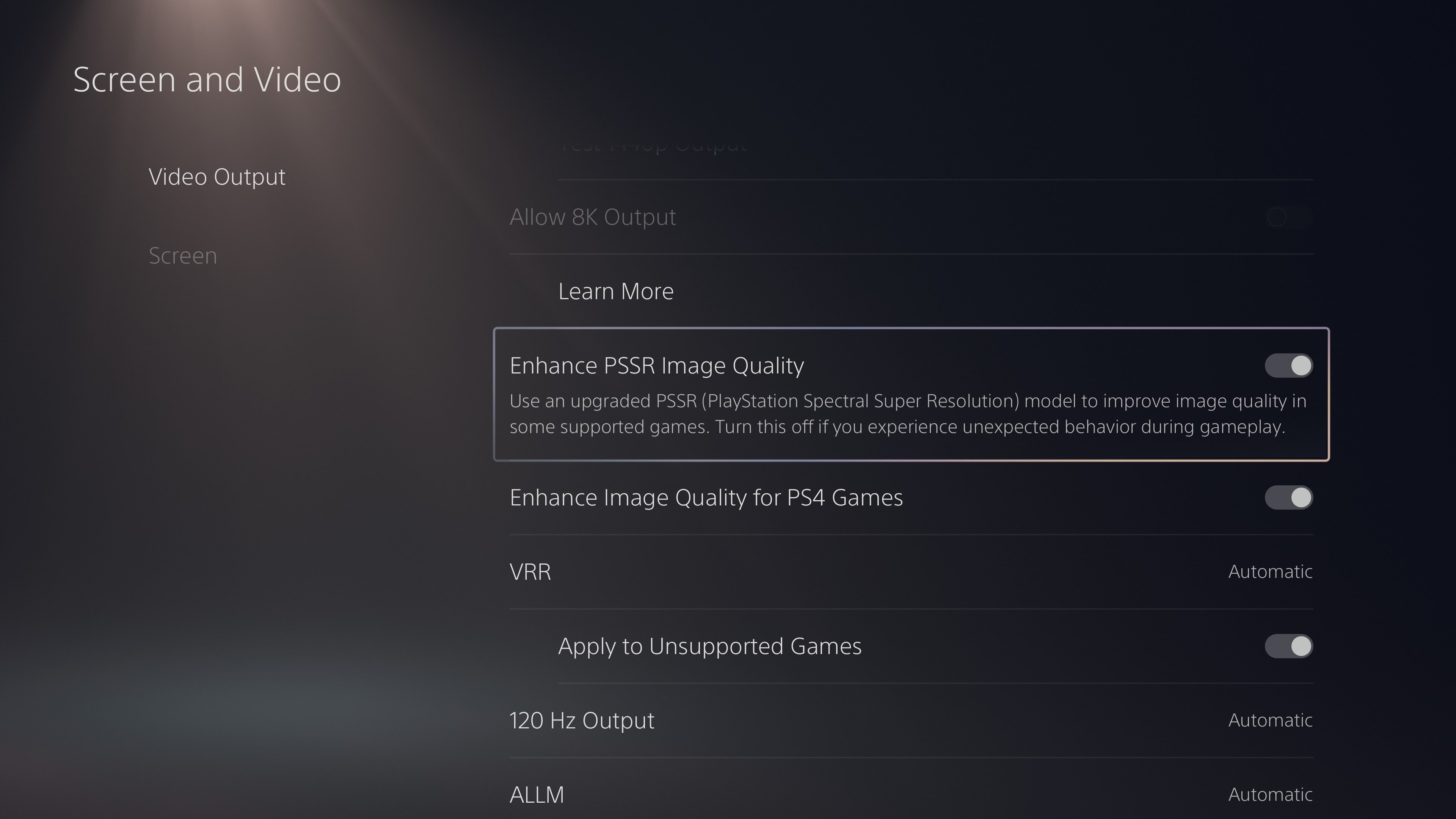
The new toggle for the upgraded version of PSSR that's coming to PS5 Pro consoles.
Sony Interactive Entertainment

The upgraded PSSR will roll out to PS5 Pro owners as part of a software update in March, and will be able to be toggled on and off in the console’s settings, according to Cerny. Around the same time, multiple PS5 games are also supposed to be updated to support the upscaling tech. While the graphical improvements are still incremental over a normal PS5, the fact that Sony’s still squeezing more performance out of its console should at least be reassuring to anyone who spent $700 (or now $750) on a PS5 Pro.

This article originally appeared on Engadget at https://www.engadget.com/gaming/playstation/the-ps5-pro-is-getting-upgraded-upscaling-tech-in-march-200105816.html?src=rss

10 Hacks Every Meta Quest User Should Know

We may earn a commission from links on this page.

Meta’s strategy for its Quest 3 and 3S VR headsets is clearly to make virtual and mixed reality as easy, fun, and affordable as possible, but they might have done the job a little too well. All that user-friendliness has left a lot of power on the table. Casual Questers don’t know that the Snapdragon XR2 Gen 2 processor is powerful enough to handle spatial computing and multitasking that rivals some laptops, and that they can link their headset to a PC for close-to-4K visuals that rival much more expensive headsets. With the right software and a little bit of monkeying around with (often-hidden) settings, you can take the Quest 3 and 3S way beyond its the out-of-the-box performance. Below are ten hacks every Meta Quest user should know to get the most out of their headset.

Download the Quest Games Optimizer for Your Meta Quest 3

If you choose just one hack, it should be downloading Quest Game Optimizer. QGO is a third-party utility that lets you control a ton of hidden settings for any Quest game or app. Meta typically locks its hardware to conservative clock speeds to preserve battery and thermal headroom, but QGO lets you force the Quest’s chip to work at its maximum power. Most impressively, it lets you to increase the internal render resolution up to 300%, effectively “supersampling” your games to match the high-fidelity density of the Quest 3’s pancake lenses. It really makes a difference.

As you might have guessed, you won’t find QGO on the official Meta Store, and it takes some lightly hacker-ish work to set up. To get it running, you’ll need to:

  • Purchase the software. It’s currently $9.99 on itch.io.

  • Create a developer account with Meta. This is free, and you can do it from inside your headset.

  • Enable Developer Mode on your Meta account.

  • Uncompress the QGO app. Either sideload the compressed Android file on your PC using a tool like SideQuest, or unzip it straight in the headset using a file manager like AnExplorer or Mobile VR Station.

  • Grant Accessibility Permissions within the headset to allow the optimizer to override system defaults.

That’s the gist, but check out these deeper guides for how to do all of the above with just your Quest headset, with SideQuest and a PC, and through Meta Quest’s developer’s mode.

Link your Quest to your PC

You can take the Quest 3 beyond standalone by linking it to your PC, either tethered or with a virtual link. This offloads the computing to a more powerful processor, turns your headset into a high-def display, and lets you use programs like Half-Life: Alyx or Microsoft Flight Simulator that would be impossible to run natively. You’ll seriously be shocked at how good they look and how smoothly they run. You can do this in two ways:

Wired

This is the best choice for the highest possible fidelity visuals and the easiest set-up, plus you don’t have to worry about how fast your wifi works.

Wireless

This is the choice if you want the freedom of wireless connection and you have really reliably wifi.

  • For best results, connect your PC to your router via Ethernet, make sure your Quest 3 is on a 5GHz or 6GHz (Wi-Fi 6E) band, and use the Quest and PC in the same room.

  • Run Meta Horizon Link on your PC.

  • In the Quest, go to “quick settings” and select the “Link” tile.

  • Switch “Use Air Link” to “On,” select your PC, and hit “Pair.”

  • Click “Launch” and you’ll be streaming directly from your PC to your face computer.

Unlock experimental features on the Meta Quest 3

Meta lets users test out “coming soon” features in its experimental menu and get an early look at “quality-of-life” improvements, most of which will be heading to the Quest soon. Among other improvements, the current experimental menu contains a couple of bangers: “lying down mode,” and “Meta AI” integration. Here’s how to check it out:

  • Open the “Settings” menu.

  • Scroll down to the Experimental tab on the left-hand sidebar.

  • Toggle the features you want to try.

Try the Meta Quest 3’s new spatial locking feature

This brand new (as of February 2026) feature is evidence of how hard Meta is leaning into mixed reality. Spatial locking lets you anchor windows wherever you want in physical space, so you can look at your real television and see a virtual one, have three virtual monitors extending your workspace, or create a window to YouTube over your sink for when you’re washing dishes. Bonus: The Quest will remember where these windows are when you restart it.

Here’s how it works:

  • Make sure you’re in pass-through mode.

  • Open a window in your headset.

  • Grab the window with the control bar at the bottom and move it where you’d like.

  • Select the “anchor” icon on the control bar.

  • This won’t work with travel mode. But speaking of travel mode…

Enable travel mode on the Meta Quest 3

Yes, you’ll look sort of dorky on a plane, but the Quest 3’s travel mode makes it possible to use your Quest on the road by creating a stationary boundary, and setting the Quest to ignore external velocity and rely only on head movements. Here’s how to turn it on:

  • Go to the “Settings” menu.

  • Click on “Environmental Set Up.”

  • Click on “Travel Mode.”

Install Bigscreen Beta streaming app on the Meta Quest 3

Bigscreen Beta is the go-to video streaming app on Quest headsets. It allows you to sit in a highly detailed virtual environment—a cozy modern living room, a massive outdoor drive-in, another planet, etc.—and stream video. You can use the Bigscreen Remote Desktop tool on your PC to stream content from Netflix, Disney+ or just about anywhere else directly into your virtual environment. Not only that, you can stream content directly from Bigscreen into your private space, invite friends over to watch with you, or watch movies and TV with strangers in shared virtual theaters.

Play Xbox games on the Meta Quest 3 in mixed reality

If you have an Xbox Live account, you can play (2D) Xbox games right from your VR headset, giving you a portable game console with a 100″ screen. Here’s how it works:

  • Download the XBox app on your Quest headset.

  • Pair a controller with your Quest. Quest controllers aren’t made to work with XBox games, so you’ll have to use Bluetooth to pair a game controller to your Quest. You can use an XBox controller, a PS5 controller, a Switch 2 controller, and a ton of generic controllers.

  • Run the Xbox app and choose a game.

  • Enable passthrough. This lets you play your game on as big a screen as you’d like while still being in the “real” world.

  • There can be some latency, as the game is being run from the cloud, but it’s surprisingly smooth in my experience.

Explore WebXR on the Meta Quest 3

WebXR might be the Quest’s biggest secret. It lets you use a seemingly infinite number of games and apps that are not available in the Meta store, and are almost all free. Since WebXR apps are browser based, all you have to do is point your Meta browser to a site that hosts a WebXR program and hit go. If you like experimental little tests and whatnot, you’ll never run out. Here are some to check out:

  • Moon Rider: A totally free, open-source alternative to Beat Sabre.

  • Silkbrush: A web-based version of the famous Tilt Brush that lets you paint in 3D space.

  • Above Par-adowski: A surprisingly deep browser-based miniature golf game.

Master the Meta Horizon mobile app

You can do a lot with your Quest without even turning it on. The Meta Horizon mobile app lets you manage your library, download games, change your settings, and more, all without strapping anything to your face. Browsing the Meta store feels way more natural on the app, and it’s easier to navigate and change setting there too. Plus, the app can tell you how much charge is left in your battery, whether your friends are online, download screenshots and videos, and cast what’s going on in your headset to another screen.

Invest in a third-party battery strap for the Meta Quest 3

The Meta Quest 3 is ergonomically fine for shorter sessions, but if you wear it long enough, you realize how much the design is a battle between comfort and performance, and it compromises on both ends—it’s kind of heavy and the battery life is kind of short. The front-weighted design puts pressure on your face and the battery life rarely survives a two-hour session, but there’s a solution to both problems: Trade the stock fabric strap for a third-party “Elite” style strap with a built in extra battery, like the KIWI design H4 Boost or the BOBOVR S3 Pro. These move the extra weight to the back of your head, balancing the ergonomics, and they have swappable extra batteries so you can use your headset as long as you’d like.

Google and OpenAI employees sign open letter in ‘solidarity’ with Anthropic

Hundreds of employees at Google and OpenAI have signed an open letter urging their companies to stand with Anthropic in its standoff with the Pentagon over military applications for AI tools like Claude.

The letter, titled “We Will Not Be Divided,” calls on the leadership of both companies to “put aside their differences and stand together to continue to refuse the Department of War’s current demands for permission to use our models for domestic mass surveillance and autonomously killing people without human oversight.” These are two lines that Anthropic CEO Dario Amodei has said should not be crossed by his or any other AI company.

As of publication, the letter has over 450 signatures, almost 400 of which come from Google employees and the rest from OpenAI. Currently, roughly 50 percent of all participants have chosen to attach their names to the cause, with the rest remaining anonymous. All are verified as current employees of these companies. The original organizers of the letter aren’t Google or OpenAI employees; they say are unaffiliated with any AI company, political party or advocacy group.

The open letter is the latest development in the saga between Anthropic and US Defense Secretary Pete Hegseth, who threatened to label the company a “supply chain risk” if it did not agree to withdraw certain guardrails for classified work. The Pentagon has also been in talks with Google and OpenAI about using their models for classified work, with xAI coming on board earlier this week. The letter argues the government is “trying to divide each company with fear that the other will give in.”

OpenAI CEO Sam Altman told his employees on Friday that the ChatGPT maker will draw the same red lines as Anthropic, according to an internal memo seen by Axios. He told CNBC on the same day that he doesn’t “personally think the Pentagon should be threatening DPA against these companies.”

This article originally appeared on Engadget at https://www.engadget.com/ai/google-and-openai-employees-sign-open-letter-in-solidarity-with-anthropic-194957274.html?src=rss

Smartphone Market To Decline 13% in 2026, Marking the Largest Drop Ever Due To the Memory Shortage Crisis

An anonymous reader shares a report: Worldwide smartphone shipments are forecast to decline 12.9% year-on-year (YoY) in 2026 to 1.1 billion units, according to the International Data Corporation (IDC) Worldwide Quarterly Mobile Phone Tracker. This decline will bring the smartphone market to its lowest annual shipment volume in more than a decade. The current forecast represents a sharp decline from our November forecast amid the intensifying memory shortage crisis.


Read more of this story at Slashdot.

12 Inexpensive Weekend Projects That Will Boost Your Home’s Curb Appeal

We may earn a commission from links on this page.

If you own a home, it’s never a bad time to be thinking about its curb appeal. That’s a given when it’s time to sell, but making a series of smaller upgrades over time will leave you with less to worry about once it comes time to list it, at which point you’ll probably be more focused on interior renovations. Plus, that way you’ll get to enjoy coming home to a prettier, well-kept exterior every single day until then.

The math around the cost of improvements and their potential return on investment is always complex, but less so when the upgrades don’t cost much to begin with. You can handle a lot of projects yourself in a few hours on the weekend, and with modest budgets (often less than $100). Here are a dozen of the best ways to boost your home’s curb appeal without draining your bank account.

Add a coat of paint or stain to beautify your front door

The front door of your house is one of the first things people see, and it has a huge impact on the home’s perceived value. Installing a new front door can have an ROI of almost 200%, but if the average cost of about $2,300 is a bit too rich for your blood, simply painting or staining the door can add thousands of dollars to your home’s value at a cost of less than $100 in materials, and a few hours of your time.

Add an awning over the front door

Installing an awning over your front door or other entrances isn’t an expensive or difficult project, and it can add both beauty and practicality to the exterior of your house, protecting you from rain and drips from your roof line. It also makes your front door more welcoming to guests, who won’t have to stand in the elements waiting for you to answer their knock.

Patch and seal your driveway before small cracks become a big problem

Your driveway should be considered part of your landscaping, because its condition is part of the first impression people form about your house. A cracked, crumbling, stained driveway says all the wrong things (and is a warning of a big repair bill coming sooner rather than later), so cleaning it up and sealing it will go a long way.

  1. Sweep away dirt and debris

  2. Clean thoroughly with a power wash (you can use dish soap and your garden hose in a pinch)

  3. Fill in cracks with a quality crack filler product for asphalt or concrete.

  4. Seal the concrete or asphalt with an appropriate product.

The total cost will be around $300.

Hang exterior art to make your home stand out

An easy, affordable way to make the exterior of your home stand out is to hang some outside wall art. For just a few bucks (this dog-themed piece is just $16, for example) you can give the exterior of your home a bit of your personality, eliminate boring blank space, and make your outdoor spaces more visually interesting. That will prompt guests or potential buyers to think of those spaces as finished, and invite them to imagine themselves using those spaces.

Plant some trees to increase your property value

An easy way to spruce up the exterior of your home is to plant some trees—and trees definitely add to your home’s curb appeal and property value. Trees provide shade, which makes outdoor spaces more comfortable (and can even help keep your interior cooler by blocking some of the sun), and they make an outdoor space feel organic and comfortable. It can even be a $0 investment, because many cities and towns offer free tree programs, so if you’re willing to put in the sweat equity, the project doesn’t have to cost you a thing.

Upgrade your mailbox

If your house has a mailbox on the edge of your property, upgrading it has a lot of advantages. For one, a larger mailbox can accommodate packages, meaning fewer crushed items and “we missed you” slips. And a new, stylish mailbox will be a little boost to the overall curb appeal of the house.

While you’re at it, consider creating a mailbox garden, if there’s space for it. Building a simple raised garden bed around the mailbox and filling it with native flowers or spreading plants will enhance the mailbox and extend the influence of your landscaping.

Refresh your garage door with new hardware and paint

Your garage door is literally a huge aspect of your home’s curb appeal—typically anywhere from 50 to several hundred square feet of exterior space. If it’s looking a bit dingy, no amount of landscaping or other tricks will make your house look good. Luckily, upgrading your garage door doesn’t require an expensive replacement, as long as the door is in good physical shape. A coat of good-quality exterior paint can do a world of good. And you can also give your garage door a more lux look by adding some faux hardware whether permanently attached or using magnetic versions. Doing both will come in under $100.

Add or replace your exterior lighting

If your front door is a dark and gloomy place, adding some lighting (or replacing what’s there) will make your home seem a lot more inviting. You don’t need to spend hundreds of bucks and hire an electrician, either—you can pick up a battery– or solar-powered exterior light that installs with a few screws. Not only will this make your exterior a little nicer, it also means not fumbling with your phone’s flashlight when you get home late and can’t quite see your keys.

Replace your house numbers with something stylish

If your home’s address is difficult to read, it can be hard to find. And if your home’s address numbers are faded or rusted, it reflects poorly on the rest of the home’s curb appeal. Replacing those numbers is pretty easy—and you have an incredibly wide range of styles to choose from, so you can really match or augment your home’s exterior style. You can get custom address plates made, of course, but you can find address numbers that attach via screws or adhesive if you’re not in the mood to break out the power drill.

Install window plant boxes to hide your outdated windows

Whether your windows are brand new or a bit weathered, you can easily upgrade their look (and thus the look of the whole house) with the addition of window garden boxes. They extend your landscaping up onto the vertical space, creating a unified, cohesive look, and they help frame your windows with color and architectural interest. You can just place freestanding boxes on the sill if there’s room, or install something more permanent for a more upscale look.

Install ornamental shutters to add visual interest

Just like wall art, shutters can fill up the empty space on your exterior walls and create visual interest. They also imply a certain fanciness (that’s a technical real estate term) that can make the whole house look and feel a bit more expensive. But, secretly, they’re an inexpensive and easy upgrade: You can buy a pair of durable, paintable vinyl shutters for under $100, and they install easily, instantly transforming your exterior look and feel.

Paint your gutters to make them pop

If your gutters are the standard white, they’re an opportunity to make your home’s exterior pop a little more—because you can paint your gutters as easily as anything else. Choose a strong accent color, pick an exterior paint that’s appropriate for your gutter material (plastic or metal, typically), and transform them by spending a few hours painting (being super careful if you’re on a ladder, of course).

Whoops: US military laser strike takes down CBP drone near Mexican border

The US military mistakenly shot down a Customs and Border Protection (CBP) drone near the Mexican border in a strike that reportedly used a laser-based anti-drone system. The CBP uses drones to track people crossing the border.

“Congressional aides told Reuters the Pentagon used the high-energy laser system to shoot down a Customs and Border Protection drone near the Mexican border, in an area that often has incursions from Mexican drones used by drug cartels,” Reuters reported last night.

The FAA closed some airspace along the border with Mexico in Fort Hancock, Texas, on Thursday with a notice announcing temporary flight restrictions for special security reasons. The restrictions are in place until June 24 but could be lifted earlier. There are conflicting reports on which day the strike happened, with The New York Times reporting that the strike occurred Thursday and Bloomberg writing that the Federal Aviation Administration (FAA) “was notified Wednesday after the event occurred.”

Read full article

Comments

The AI apocalypse is nigh in Good Luck, Have Fun, Don’t Die

We haven’t had a new film from Gore Verbinski for nine years. But the director who brought us the first three Pirates of the Caribbean movies, the nightmare-inducing horror of The Ring (2002), and the Oscar-winning hijinks of Rango (2011) is back in peak form with Good Luck, Have Fun, Don’t Die. It’s a darkly satirical, inventive, and hugely entertaining time-loop adventure that also serves as a cautionary tale about our widespread online technology addiction.

(Some spoilers below but no major reveals.)

Sam Rockwell stars as an otherwise unnamed man who shows up at a Norms diner in Los Angeles looking like a homeless person but claiming to be a time traveler from an apocalyptic future. He’s there to recruit the locals into his war against a rogue AI, although the diner patrons are understandably dubious about his sanity. (“I come from a nightmare apocalypse,” he assures the crowd about his grubby appearance. “This is the height of f*@ing fashion!”)

Read full article

Comments

10 Hacks Every Instagram User Should Know

Ever since I deleted my Facebook account, Instagram has taken its place as the social network I visit most often to check what my friends are up to. I’ve been on the app for something like 15 years now, and during this time, I’ve learned a trick or two that improve the experience (or at least make it less annoying). Here are 10 Instagram hacks that will enhance your privacy, reduce the amount of junk in your feed, help you reset your algorithm, and more.

Use Instagram filters to block spam messages and comments and clean up your feed

On every social media app, I like to set up filters to mute offensive keywords, but you can use keywords to block almost anything you don’t want to see. On Instagram, you can use filters to easily block spammy comments and offensive messages. While you can customize your filter list, I just looked up a list of offensive phrases, and quickly added it to my IG account, then added a few additional terms.

You can do the same thing by going to your Instagram profile page, and tapping the three-lines menu in the top-right corner in Instagram. This opens the Settings and activity page, where you can select Hidden Words. It lets you add multiple words, as long as you separate them with a comma. Once added, Instagram will block comments and messages containing those terms.

You can also add mute keywords for posts appearing in your feed. Go to Instagram Settings > Content preferences > Specific words and phrases. On the Content preferences page, go to Sensitive content and Political content, and you can limit those types of posts and videos from showing up on your feed too.

Reset your Instagram algorithm

Every once in a while, my Instagram algorithm goes haywire and I’m forced to reset it. After all, I mostly open this app to see my friends’ updates and cat videos, and once my feed starts showing me too much Hyrox content (a “sport” I couldn’t care less about), I know I’m in trouble. If something like this happens to you, there are two ways to reprogram your feed. The easy option is to just look for a reel you enjoy (such as a cat video), and swipe upwards a few times till you reach a non-cat video, then navigate away. Repeat this process a few times and your feed will be back to more cat videos and less Hyrox (or anything else).

If that doesn’t work, or if your feed is too far gone in the wrong direction, then you can go to Instagram Settings > Content preferences > Reset suggested content to reboot it entirely.

Remove tracking links from Instagram

When you share any post, reel, story, or other type of content on Instagram, the app tracks who you’re sharing it with, even if you send the link outside Instagram. You can see this by tapping the Share button on any post, and selecting Copy link: Paste this link in any text editor, such as Apple Notes or Google Keep, and you’ll see that the link has tracking parameters at the end, such as “?igsh=…” or “?utm…”. That helps Instagram identify that you’ve shared the link.

There’s no way to disable this tracking, but you can manually remove it from each link before you send it to someone. Just paste the URL it as usual, then delete everything after the question mark.

Force Instagram to open DM links in your preferred browser

Open message links in external browser in Instagra,

Credit: Pranay Parab

Whenever you open a link in Instagram, the app opens it in an in-app browser. This is the least privacy friendly option, as Instagram can then track which websites you’re visiting quite easily. You can partially stop this by tapping the three-dots button in the top-right corner of Instagram’s in-app browser and selecting Open in external browser.

There’s no way to make this the default setting for all links, but you can set it as default for links you receive via DM. To do this, go to Instagram Settings > App website permissions > Message links and turn on Open in external browser.

Limit your Instagram notifications

After you post something, Instagram loves to spam you with notifications every time a few people interact with the post. Even if you don’t use Instagram for a day or two, you’ll still get a deluge of notifications from the app. I don’t face this problem because I never allow Instagram permission to send any notifications on my devices, but that’s not an option for everyone. If you don’t want to turn off notifications entire, you can choose to receive only the useful notifications from Instagram. To do this, go to Instagram Settings > Notifications and review all the options available to you. I particularly like the Messages only option, which only sends me an alert when someone DMs viaon the app.

To further limit notifications, go to the Following and followers section on this page, and disable Account suggestions. Similarly, you can go to Messages and disable Message reminders and all varieties of channel notification settings. You can also go to the Calls section and turn off Video chats, which has the added bonus of disabling video calls on Instagram, which I’ve never wanted to use.

Hide your online status and disable read receipts on Instagram

For some reason, Instagram shows other people when you’re online. If you want to be more discreet, go to Instagram Settings > Messages and story replies > Show activity status and turn the setting off. (On the previous page, you can select Show read receipts and turn it off to stop people seeing if you’ve read their messages too.)

Hide the “typing” indicator in Instagram messages

When someone is messaging you on Instagram, the app shows you an animation to tell you that the other person is typing. More often than not, this feature only makes me keep the app open longer while the other person types their message, which is probably why Instagram’s added it in the first place. If you don’t want to see the typing indicator in a chat, you can disable it: Open any chat in Instagram and tap the contact’s name up top. Go to Privacy and safety and turn off Typing indicator. Sadly, you’ll need to do this manually for each of your Instagram chats.

Enable end-to-end encryption to make Instagram more secure

End-to-end encryption in Instagram

Credit: Pranay Parab

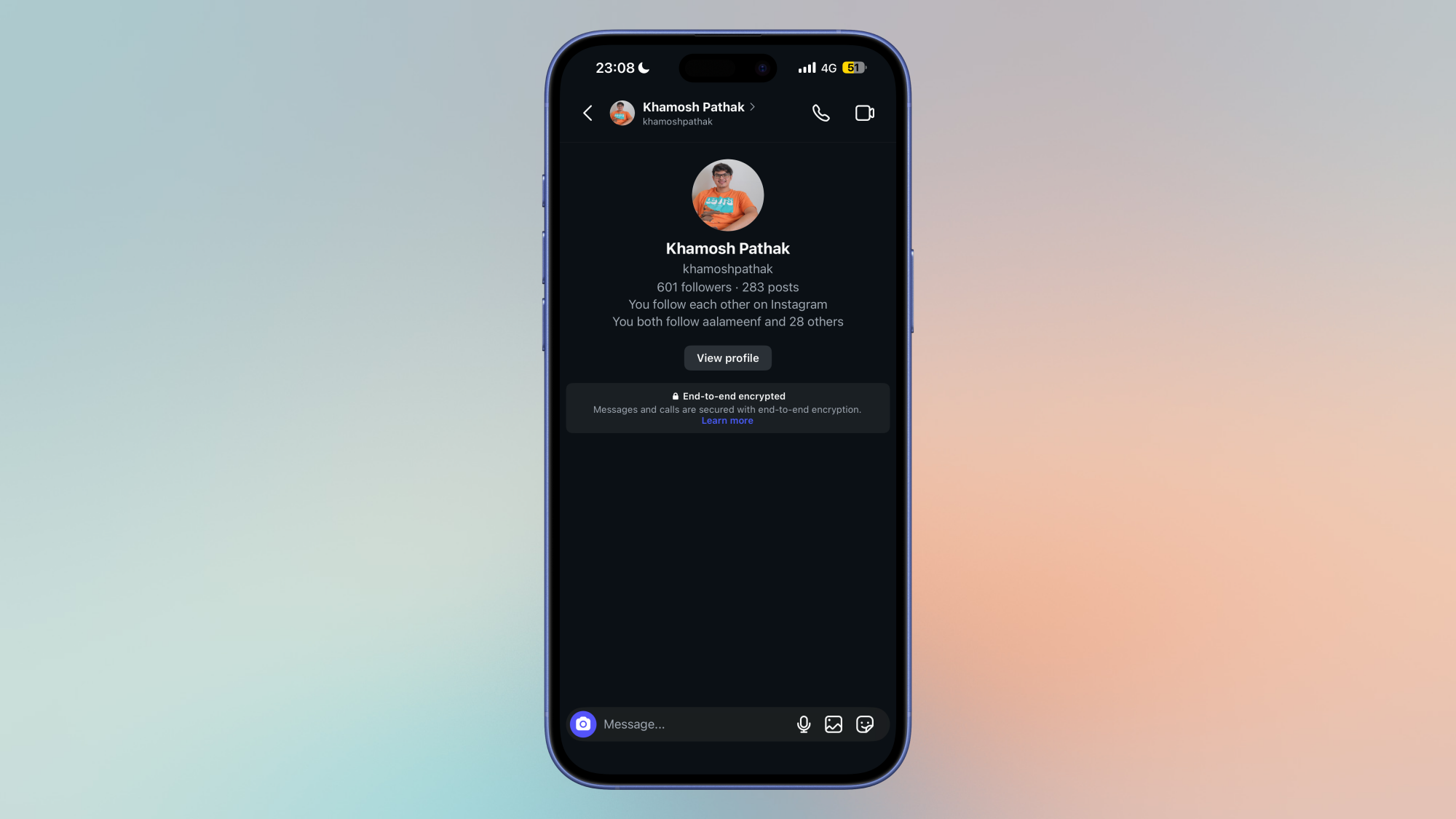
Instagram chats are not encrypted by default, which means that the company can read all your messages. If you want to beef up your security, consider using end-to-end encryption for your chats. Just like Telegram, Instagram hides its end-to-end encrypted chat feature, and makes you enable it manually for each chat. You can do so by opening any chat in Instagram, tapping the contact’s name up top, selecting Privacy and safety > Use end-to-end encryption.

Automatically clear your Instagram search history

Your Instagram search history shows up whenever you try to search for anything on Instagram. This can be embarrassing if you’ve looked up something really silly (or slightly naughty), and someone else sees it. to prevent this, you can clear your searches by tapping the search bar in Instagram, and selecting Clear all, or tapping the x next to each search term.

However, there’s also a way to automatically clear your search history on Instagram: Go to Instagram Settings > Accounts Center > Your information and permissions > Search history > Keep searches for, and select 3 days, which is the minimum time for automatically deleting your searches.

Reset your Instagram ad preferences to protect your data

There’s no way to block ads on Instagram, but you can reduce the amount of your data that Instagram uses to show you those ads. Just go to Instagram Settings > Accounts Center > Ad preferences > Manage info. You can go through each option on this page and turn off everything you can. Under Categories used to reach you, select Remove on every option.

You can choose Don’t allow us… in these two categories: Ads in other apps and Ads about Meta. Finally, you can select Activity information from ad partners > Review setting, and pick No, don’t make my ads more relevant.

Nasa Announces Artemis III Mission No Longer Aims To Send Humans To Moon

Nasa announced on Friday radical changes to its delayed Artemis III mission to land humans back on the moon, as the US space agency grapples with technical glitches and criticism that it is trying to do too much too soon. From a report: The abrupt shift in strategy was laid out by the space agency’s recently confirmed administrator, Jared Isaacman. Announcing the changes on Friday, he said that Nasa would introduce at least one new moon flight before attempting to put humans back on the lunar surface for the first time in more than half a century, in 2028.

The new, more incremental approach would give the Nasa team a chance to test flight and refine its technology. As part of the changes, the Artemis II mission to fly humans around the moon this year, without landing, would also be pushed back from its latest scheduled launch on 6 March to 1 April at the earliest.

“Everybody agrees this is the only way forward,” Isaacman told reporters at a news conference. “I know this is how Nasa changed the world, and this is how Nasa is going to do it again.”


Read more of this story at Slashdot.

Intel Bartlett Lake-S CPU Spotted On An ASUS ROG Z790 Motherboard

Intel Bartlett Lake-S CPU Spotted On An ASUS ROG Z790 Motherboard
You’re probably expecting us to be talking about one of the extant Bartlett Lake processors based on re-reheated Raptor Lake silicon. Nope! This is a Core 9 273PQE, one of the long-rumored 12 P-core LGA 1700 CPUs. However, lest you accuse us of clickbait, we’ll get the disappointing part out of the way early: it doesn’t work in the board it

Hyperion author Dan Simmons dies from stroke at 77

Dan Simmons, the author of more than three dozen books, including the famed Hyperion Cantos, has died from a stroke. He was 77.

Simmons, who worked in elementary education before becoming an author in the 1980s, produced a broad portfolio of writing that spanned several genres, including horror fiction, historical fiction, and science fiction. Often his books included elements of all of these. This obituary will focus on what is generally considered his greatest work, and what I believe is possibly the greatest science fiction novel of all time, Hyperion.

Published in 1989, Hyperion is set in a far-flung future in which human settlement spans hundreds of planets. The novel feels both familiar, in that its structure follows Chaucer’s Canterbury Tales, and utterly unfamiliar in its strange, far-flung setting.

Read full article

Comments

You Can Preorder the New Samsung Galaxy Buds 4 and Get Up to a $30 Amazon Gift Card

We may earn a commission from links on this page. Deal pricing and availability subject to change after time of publication.

Samsung just announced its new earbuds during the Samsung Unpacked 2026 event earlier this week, and Amazon is already offering a pretty sweet deal to preorder them. The Samsung Galaxy Buds 4 are $179.99 and come with a $20 Amazon gift card, and the Samsung Galaxy Buds 4 Pro go for $249.99 and come with a $30 Amazon gift card. Both will be released on March 11, but you can pre-order them now. Considering these will be their flagship earbuds for some time, it’s a great opportunity for any Samsung fan or anyone curious about Samsung’s new earbuds to snatch them up.

Samsung wants to compete with Apple, with a similar design, features, and even price point. The Samsung Galaxy Buds 4 are strikingly similar to the Apple AirPods 4 in their design, with noise cancellation and the absence of silicone eartips that go inside your ears. They come with Hi-Res audio, IP54 for water-resistance, a Live Translation feature similar to Apple’s, a new design, improvements in call quality, and direct access to ask questions to AI and receive responses through the earbuds. The controls are swipe and pinch, and the charging case comes in black or white.

It’s also easy to draw the similarities between the Samsung Galaxy Buds 4 Pro and the Apple AirPods Pro 3. Apart from both being $249, the most obvious similarity is the in-ear silicone tip design that helps seal the noise and improve ANC. The Pros have all of the same features as the Buds 4, and are supposed to be more comfortable, have better ANC which Samsung calls ANC 2.0, have a better water resistance with an IP57 rating, which handles immersion in water up to 1 meter, and perhaps more importantly, a two-way speaker (as opposed to a one-way on the Buds 4) that is meant to delivers better, high-fidelity sound, superior separation of frequencies, and reduced distortion. But we will only know if these claims are true when we get our hands on them for a review.

Our Best Editor-Vetted Tech Deals Right Now

Deals are selected by our commerce team

Changes to Amazon Wish Lists Could Reveal Your Home Address to Strangers

Amazon’s Wish List feature is a versatile way to tell other people what gifts you’re interested in. That might be a gift registry for a baby shower, or letting your friends and family know what you want for your birthday. But it’s also commonly used for online creators to receive gifts from fans or for someone in need to receive donated items from strangers online who want to help. Up until now, we could rely on Wish List as a secure way for strangers to send items, without worrying about setting up a post office box. But going forward, Wish List now runs the risk of telling fans exactly where the creator lives—unless the creator takes action.

Amazon is putting addresses at risk with changes to Wish List

As reported by 404 Media, Amazon is recommending customers that use Wish Lists to change their shipping addresses to either P.O. boxes or non-residential delivery addresses. The company is making changes to Wish Lists, which could reveal the address you have on file for the feature. By leaving it as your home address, you are putting yourself at risk of doxxing—or revealing your personal address to strangers on the internet.

That’s because Amazon is now removing the option to block purchases from third-party sellers for Wish List items. As such, anyone who buys items off your Wish List to send to you will be able to buy them from third-party sellers, and those sellers will have access to your delivery address. From Amazon’s point of view, these changes give buyers more flexibility over the items they can buy from your list, but that unfortunately comes with an impact on your personal privacy. But it’s not just sellers who will have access to this address: Buyers will, too, as they may see your address in shipping updates they receive throughout the buying process.

As 404 Media highlights, major shippers don’t usually reveal addresses in these situations. But Amazon’s changes mean that third-party sellers have it in their power to share this information themselves. What’s more, if the delivery person ends up taking photos of the package to confirm delivery, that could leak even more of your personal details than you’d want—such as what your front door or driveway look like.

These changes aren’t effective immediately, so if you use Amazon’s Wish Lists, you don’t have to worry about your home address leaking on the internet just yet. However, the company has set a deadline for March 25, so it’s important to act fast if you want to protect yourself.

Below, you can read the email Amazon is sending the following email to Wish List users:

“We’re writing to inform you about an upcoming change to Amazon Lists. Starting March 25, 2026, we will remove the option to restrict purchases from third-party sellers for list items. When this change takes effect, gift purchasers will be able to purchase items sold by third-party sellers from your lists and your delivery address will be shared with the seller for fulfillment. This change will provide gift purchasers with access to a wider selection of items when shopping from your lists…Important note: When gifts are purchased from your shared or public lists, Amazon needs to provide your shipping address to sellers and delivery partners to fulfill these orders. During the delivery process, your address may become visible to gift purchasers through delivery updates and tracking information. To help protect your privacy, we recommend using a PO Box or non-residential address for any list you share with public audiences.”

How to prevent buyers from seeing your address from your Amazon Wish List

If you have an online presence and want to protect your address, you’ll need to update your address in Wish List settings. Head to this link, then choose “manage list.” Here, you can adjust your Wish List settings to make it private, or to choose specific users to share it with. Otherwise, you can adjust your address if you have a P.O. box or alternative address to select.

A Chinese Official’s Use of ChatGPT Accidentally Revealed a Global Intimidation Operation

A sprawling Chinese influence operation — accidentally revealed by a Chinese law enforcement official’s use of ChatGPT — focused on intimidating Chinese dissidents abroad, including by impersonating US immigration officials, according to a new report from ChatGPT-maker OpenAI. From a report: The Chinese law enforcement official used ChatGPT like a diary to document the alleged covert campaign of suppression, OpenAI said. In one instance, Chinese operators allegedly disguised themselves as US immigration officials to warn a US-based Chinese dissident that their public statements had supposedly broken the law, according to the ChatGPT user. In another case, they describe an effort to use forged documents from a US county court to try to get a Chinese dissident’s social media account taken down.

The report offers one of the most vivid examples yet of how authoritarian regimes can use AI tools to document their censorship efforts. The influence operation appeared to involve hundreds of Chinese operators and thousands of fake online accounts on various social media platforms, according to OpenAI.


Read more of this story at Slashdot.

Metacritic Will Kick Out Media Attempting To Submit AI Generated Reviews

An anonymous reader shares a report: While some see AI as a tool to be used, its specific use and how it is deployed responsibly is being heavily debated online across a wide range of industries. In terms of journalistic content, and in this particular instance, reviews, review aggregator Metacritic has taken a firm stance on content published and submitted to their platform, that have been generated by artificial intelligence in some way.

In a statement by co-founder Marc Doyle, sent to Gamereactor, he says this: “Metacritic has been a reputable review source for a quarter century and has maintained a rigorous vetting process when adding new publications to our slate of critics. However, in certain instances such as a publication being sold or a writing staff having turned over, problems can arise such as plagiarism, theft, or other forms of fraud including AI-generated reviews. Metacritic’s policy is to never include an AI-generated critic review on Metacritic and if we discover that one has been posted, we’ll remove it immediately and sever ties with that publication indefinitely pending a thorough investigation.”

So, what is this about specifically? Well, it’s probably a sound guess, that this pertains to Videogamer’s review of Resident Evil 9: Requiem, which was removed from the platform after a barrage of comments accusing the review of being AI-written, and for the author of being made up.


Read more of this story at Slashdot.

Here’s your first look at Kratos and Atreus in Amazon’s upcoming God of War TV adaptation

With the likes of The Last of Us and Fallout out of the way for a bit, Amazon has seized its opportunity to put the spotlight on the next big video game adaptation, its currently-in-production God of War show. Today we got our first look at Ryan Hurst and Callum Vinson as Kratos and Atreus.

The image released by Amazon shows the eponymous God of War standing next to a tree as he watches his son — who notably looks a bit younger than the video game version of 11-year-old Atreus we first met in 2018’s God of War — take aim with his bow. Exactly what they’re hunting is unclear, but we know that the developing relationship between father and son that was such a big part of the PS4 game is also going to be at the heart of the show.

Whether Sony Pictures Television and Amazon MGM Studios have nailed the looks of its central characters is a matter of opinion. Personally I think Hurst’s Kratos in particular looks a little bit off here, but there’s every chance it all comes together later in production. Or when we first hear him angrily exclaim “boy!”

The Sons of Anarchy star was cast as Kratos back in January, and earlier this week we learned that Deadpool’s Ed Skrein will play Baldur in the Amazon show. The rest of the cast includes Mandy Patinkin as Odin, Max Parker and Heimfall, Ólafur Darri Ólafsson as Thor, Teresa Palmer as Sif, Alastair Duncan as Mimir, Jeff Gulka as Sindri and Danny Woodburn as Brok.

No release date has been announced yet, but a second season of God of War has already been confirmed.

This article originally appeared on Engadget at https://www.engadget.com/entertainment/streaming/heres-your-first-look-at-kratos-and-atreus-in-amazons-upcoming-god-of-war-tv-adaptation-172251366.html?src=rss