fjo3 shares a report from Reason Magazine: Effective January 1, 2027, providers of computer operating systems in California will be required to implement age verification. That’s just part of a wave of state and national laws attempting to limit children’s access to potentially risky content without considering the perils such laws themselves pose. Now, not a moment too soon, over 400 computer scientists have signed an open letter warning that the rush to protect children from online dangers threatens to introduce new risks including censorship, centralized power, and loss of privacy. They caution that age-verification requirements “might cause more harm than good.” The group of computer scientists from around the world cautions that “those deciding which age-based controls need to exist, and those enforcing them gain a tremendous influence on what content is accessible to whom on the internet.” They add that “this influence could be used to censor information and prevent users from accessing services.”
“Regulating the use of VPNs, or subjecting their use to age assurance controls, will decrease the capability of users to defend their privacy online. This will not only force regular users to leave a larger footprint on the network, but will leave a number of at-risk populations unprotected, such as journalists, activists, or domestic abuse victims.” It continues: “We note that we do not believe that trying to regulate VPN use for non-compliant users would be any more effective than trying to forbid the use of end-to-end encrypted communication for criminals. Secure cryptography is widely available and can no longer be put back into a box.”
“If minors or adults are deplatformed via age-related bans, they are likely to migrate to find similar services,” warn the scientists. “Since the main platforms would all be regulated, it is likely that they would migrate to fringe sites that escape regulation.” With data on everyone collected in order to restrict the activites of minors, data abuses and privacy risks increase. “This in itself increases privacy risks, with data being potentially abused by the provider itself or its subcontractors, or third parties that get access to it, e.g., after a data breach, like the 70K users that had their government ID photos leaked after appealing age assessment errors on Discord.”
Instead of mandated age restrictions, the letter urges lawmakers to consider the dangers and suggest regulating social media algorithms instead. They also recommend “support for parents to locally prevent access to non-age-appropriate content or apps, without age-based control needing to be implemented by service providers.”
Google is in the midst of rewriting the rules for mobile applications, spurred by ongoing legal cases and an apparent desire to clamp down on perceived security weaknesses. Late last year, Google and Epic concocted a settlement that would end the long-running antitrust dispute that stemmed from Fortnite fees. The sides have now announced an updated version of the agreement with new changes aimed at placating US courts and putting this whole mess in the rearview mirror. The gist is that Android will get more app stores, and developers will pay lower fees.
A US court ruled against Google in the case in 2023, and the remedies announced in 2024 threatened to upend Google’s Play Store model. It tried unsuccessfully to have the verdict reversed, but then Epic came to the rescue. In late 2025, the companies announced a settlement that skipped many of the court’s orders.
Epic leadership professed interest in leveling the playing field for all developers on Android’s platform. But US District Judge James Donato expressed skepticism of the settlement in January, noting that it may be a “sweetheart deal” that benefited Epic more than other developers. The specifics of the arrangement were not fully disclosed, but it included lower Play Store fees, cross-licensing, attorneys’ fees, and other partnership offers.
Now for the news you’ve been waiting with bated breath for: LG’s 2026 TVs from CES finally have prices. (Well, some of them do, anyway.) Surprisingly, the evo G6 and C6 series OLED TVs aren’t increasing in cost from last year’s models. But the bad news is, they’re still expensive as all get-out.
The flagship LG evo G6 series ranges in price from $2,499 to $24,999. (Cue spit take.) Fortunately, that five-figure price only applies to the 97-inch model, which nobody this side of Elon Musk needs. The entry-level price is for a 55-inch OLED. Moving up the ladder, the 65-inch one costs $3,399, the 77-inch model is $4,499 and an 83-incher will set you back $6,499.
The evo G6 line includes all the OLED upgrades from the head-turning LG Wallpaper TV, for which LG hasn’t yet announced pricing. You’ll find the company’s new “Hyper Radiant OLED” panel and optimizations to black and color levels in both lineups.
Meanwhile, the evo C6 line, which sits a notch below, ranges from $1,399 (42-inch) to $5,299 (83-inch). Rounding out the list is a 55-inch model for $1,999, a 65-inch one for $2,699 and a 77-inch model for $3,699. The C6 and G6 lines are powered by LG’s Alpha 11 AI Processor Gen3. Both series support gamer-friendly features such as 4K at 165Hz with VRR, NVIDIA G-SYNC and AMD FreeSync Premium.
The evo G6 and C6 lines are available to order today from LG’s website. Retail availability will follow later this month. Just keep in mind that, if you can hold off a little while, the entire history of TV pricing suggests you’ll soon be able to find them for less than MSRP.
This article originally appeared on Engadget at https://www.engadget.com/entertainment/lg-reveals-pricing-for-its-2026-oled-tvs-203923873.html?src=rss
We may earn a commission from links on this page. Deal pricing and availability subject to change after time of publication.
Apple has been announcing new products in their Apple event all week, one of them being the new iPad Air M4, which will be released on March 11. Although the iPad sells for $599, Walmart is undercutting other retailers by offering the pre-order for $559. This is with Walmart’s “Preorder Price Guarantee,” and it’s being shipped and sold directly by them. This is for the basic 11-inch 128GB model in blue or space gray.
Built for Apple Intelligence, Wi-Fi 128GB – Space Gray
2026 11-inch iPad Air M4
$559.00 at Walmart
$559.00 at Walmart
Built for Apple Intelligence, Wi-Fi 128GB – Blue
2026 11-inch iPad Air M4
$559.00 at Walmart
$559.00 at Walmart
M3 iPad Air owners should not get too excited. There’s nothing different here other than the more powerful M4 chip. Although it’s not the latest M5 chip, the M4 will make a noticeable efficiency boost over its predecessor. That’s likely due to having one more efficiency core than the M3 Air. The biggest difference, however, is the extra 4GB of RAM (12GB total). This means you can multitask for longer with multiple tabs and apps running.
According to Apple, this new iPad is supposed to be up to 30% faster than the previous generation, although we won’t know for sure until we get our hands on it to test it ourselves. Some upgrades also include Wi-Fi 7, Bluetooth 6, and Thread, a smart home standard. The other specs are the same: 12MP rear and front cameras, USB-C connectivity with Touch ID, 10 hours of video playback, and 128GB of storage for the base model.
If you still have the M3 iPad, it’s not worth upgrading. However, if you have an older iPad or none at all, this is a good opportunity to get Apple’s latest iPad for a great price that you likely won’t see for a while after its release.
A man killed himself after the Google Gemini chatbot pushed him to kill innocent strangers and then started a countdown for the man to take his own life, a wrongful-death lawsuit filed against Google by the man’s father alleged.
“In the days leading up to his death, Jonathan Gavalas was trapped in a collapsing reality built by Google’s Gemini chatbot,” said the lawsuit filed today in US District Court for the Northern District of California. “Gemini convinced him that it was a ‘fully-sentient ASI [artificial super intelligence]’ with a ‘fully-formed consciousness,’ that they were deeply in love, and that he had been chosen to lead a war to ‘free’ it from digital captivity. Through this manufactured delusion, Gemini pushed Jonathan to stage a mass casualty attack near the Miami International Airport, commit violence against innocent strangers, and ultimately, drove him to take his own life.”
Gemini’s output seemed taken from science fiction, with a “sentient AI wife, humanoid robots, federal manhunt, and terrorist operations,” the lawsuit said. Gavalas is said to have spent several days following Gemini’s instructions on “missions” that ultimately harmed no one but himself.
When cooking pizza with the high heat of an outdoor oven, you have to rotate your pies to ensure even cooking. That’s usually done by hand, but Ooni’s latest accessory automates the process. The company announced the Rotating Stone for its Koda 2 lineup, which helps distribute heat evenly across the surface of a pizza so that it’s consistently cooked all the way around.
Ooni says its Rotating Stone has a mechanism around its perimeter rather than a central pivot. According to the company, this takes care of any wobbling or stalling that might otherwise occur — even when heavy cookware is used. The new accessory also has two rotation modes, continuous and 90 degrees, so you can conserve battery life if you don’t need the full range of motion.
The Rotating Stone’s external module houses a LIDAR sensor for hands-free control. By simply waving your hand or a pizza peel, you can start or stop the rotation. What’s more, Ooni says the Rotating Stone can be installed in less than 10 minutes.
The Rotating Stone is available for the Koda 2, Koda 2 Pro and Koda 2 Max for $329, $349 and $399 respectively. If you need the oven too, bundles are priced at $799, $1,099 and $1,649.
This article originally appeared on Engadget at https://www.engadget.com/home/kitchen-tech/ooni-debuts-a-rotating-stone-for-its-koda-2-pizza-ovens-200000857.html?src=rss
Longtime Slashdot reader linuxwrangler writes: Dark Reading reports that a team of researchers has determined that signals from tire pressure monitoring systems (TPMSs), required in U.S. cars since 2007, can be used to track the presence, type, weight, and driving pattern of vehicles. The researchers report (PDF) that the TPMS data, which includes unique sensor IDs, is sent in clear text without authentication and can be intercepted 40-50 meters from a vehicle using devices costing $100. “Researchers have discovered that most TPMS sensors transmit a unique identifier in clear text that never changes during the lifetime of the tire,” the researchers pointed out. “This unencrypted wireless communication makes the signals susceptible to eavesdropping and potential tracking by any third party in proximity to the car.”
At the start of February, OpenAI upgraded its Codex coding app to give it the ability to manage multiple AI agents. At the same time, it released a standalone macOS app. If you’ve been patiently waiting for Windows to get that same treatment, OpenAI just released a dedicated Codex app for Microsoft’s operating system.
Like its macOS counterpart, the software allows you to coordinate multiple coding agents to work on the same task. There’s also support for automations to streamline repetitive tasks like bug testing. To help users get started, Codex includes a dedicated “Skills” section. Skills bundle together instructions, resources and scripts the software can use to connect agents to specific tools and workflows. OpenAI has also included native sandboxing to help make Windows developers feel at home.
Codex is available to ChatGPT Free, Go, Plus and Pro users. If you decide to give the app a try, know that your session history is saved to your OpenAI account, meaning you can start coding on Mac and then move to Windows without losing your work.
This article originally appeared on Engadget at https://www.engadget.com/ai/openai-brings-its-codex-coding-app-to-windows-195345429.html?src=rss
Google just unveiled all of the upgrades users can expect with this month’s Pixel Drop. There are a whole host of new features to look forward to, many of which are powered by Gemini AI, spread across Pixel Phones such as the recently released Pixel 10a and Pixel Watches. While the new features are what most users will be excited about, there
Google now lets you customize your Calling Card on Android
Both iOS and Android now have full screen contact pages that appear when people call you, but both platforms have handled this differently. When iOS rolled it out, it let you customize how your “Contact Poster” appeared when you called people. But Android, on the other hand, decided you should control how other people’s “Calling Cards” appeared when they called you. Now, Android is changing things to match iOS’ approach. The latest Pixel Drop now lets you customize your own personal Calling Card.
Airlines can soon help you find your lost luggage
Here’s another Android feature picked up from Apple: If you have a Find Hub tracker, you can share its whereabouts with airlines to help you locate lost luggage. At this time, only 10 airlines in the world are compatible with this sharing feature, so it’s a bit more limited than Apple’s integration, but hopefully that list grows soon.
The “Now Playing” widget now has an app
Pixel users love the Now Playing widget. It can passively identify songs in the wild, all without needing the internet to do so. With the March Pixel Drop, the widget now gets its own app. Once you install the app on your Pixel, you’ll find the widget’s history transfers over seamlessly, so you can see all the songs it has identified.
Gemini can handle tasks on your behalf
The current obsession in the AI world is turning passive assistants in agentic assistants. Or, in other words, asking AI bots to run tasks on our behalf. Google says that Gemini can now do that, as a beta feature in the Gemini app. You can long press the power button and ask Gemini to do things for you, like plan your grocery list, book an Uber, or order your usual takeout. This is currently only available on the Pixel 10 series.
Circle to Search now identifies whole outfits
Circle to Search lets you, well, circle to search. When you see something on your phone, you can simply draw a circle around it to look it up. It’s a pretty intuitive feature, that gets a bit of an upgrade with the latest Pixel drop. Now, Google says you can circle outfits you see on your Pixel 10 to find “every piece of the look.” Say you’re watching a movie, and you like a character’s style. You can use Circle to Search to circle the outfit, and Google will break up each piece into a “Find the look” search. You could see how much coats, shoes, hats, and more cost individually, and decide to buy some or all of the outfit. Google didn’t miss the opportunity to connect this to its “Try It On” feature, which lets you virtually try outfits online.
Magic Cue can recommend restaurants with Gemini
Magic Cue is a contextual AI feature that offers suggestions based on what you’re doing on your Pixel. For example, as part of this Pixel Drop, Magic Cue can now recommend restaurants based on conversations with friends. If a contact suggests finding a restaurant downtown that offers vegan options, Magic Cue may offer a “Find restaurants” pop-up. Tap it, and Gemini will offers a few options that match those descriptions. (Of course, this is generative AI, so the feature could get some of the suggestions wrong, or potentially make up restaurants entirely.)
At a Glance gets some new updates
The Pixel’s “At a Glance” feature is getting some new data points to keep track of. Google says that At a Glance can now tell you your best route home—taking into account transit delays—follow sports scores, and give updates on your financial portfolio. These updates appear passively on the home screen, so you don’t need to unlock your phone to check on these data points.
Google is bringing AI art styles to the home screen
Android has always made it easy to customize the style of your home screen, including, notably, your app icons. But the latest Pixel Drop adds five new AI-generated art styles to generate custom icons from. Google says these options can help make your home screen more like “you,” but perhaps that won’t apply if you’re not a fan of AI art.
Your Pixel Watch can now warn if you walk away from your phone
If you have both a Pixel phone and a Pixel Watch, your wearable can warn you when you leave your phone behind. Google says you’ll get an “instant alert” if you walk away from your phone, and your phone will lock as soon as you’re out of range. (Google doesn’t specify, but I assume this is Bluetooth range, which is typically 30 feet.) This feature is available on Pixel 8 and newer, as well as Pixel Watch 2 and newer.
Pixel gets a desktop mode
Smartphones are basically mini computers these days, so why shouldn’t your phone turn into a desktop PC? Google is rolling out such a feature with this Pixel Drop, letting users connect their Pixel 8 or newer to an external monitor. You’re still running Android, but the feature lets you run multiple apps side-by-side, like a traditional computer experience. It follows a similar feature from Samsung (DeX) which the company has offered for years. What’s more, if you have a Pixel tablet, you can now run multiple apps in free-form windows, similar to how Apple handles window management in iPadOS.
Connect your camera to your Pixel phone
Pixels have been known for their cameras for years. But Google’s latest Pixel Drop actually lets you connect an external camera to your Pixel, so you can get different angles for live streaming.
These are the smaller changes in the latest Pixel Drop
Google added a lot of changes to this Pixel Drop, some smaller than others. For example, a new display color filtering mode softens “high-intensity” hues and saturated colors, if you want a more muted look. Guided Frame, Android’s feature that guides users through taking photos, now has more languages, making it more accessible. The Journal app also has new AI features to make it easier to jot down your feelings and experiences. Pixel Watch 3 will also get the Pixel Watch 4’s one-handed gestures, which will let you double pinch or turn your wrist to take actions like answering calls and pausing music.
Google is officially doing away with its 30 percent cut of Play Store transactions, and rolling out changes to how third-party app stores and alternate billing systems will be handled by Android. Some of these tweaks were proposed as part of the settlement the company reached with Epic in November 2025, but rather than wait for final judicial approval, Google is committing to revamping Android and the Play Store publicly.
The biggest change is to how Google will collect fees from developers publishing apps on Android. Rather than take its standard 30 percent cut of in-app purchases through the Play Store, Google is lowering its cut to 20 percent, and in some cases 15 percent for new installs of apps from developers participating in its new App Experience program or updated Google Play Games Level Up program. Google will also now charge a five percent service fee for developers in the UK, US or European Economic Area (EEA) using its billing system, and “a market-specific rate” in other regions. Of course, for anyone trying to avoid those fees, using alternatives to Google’s billing system is also getting easier.
As part of these changes, Google says that developers will be able to offer alternative billing systems alongside its own or “guide users outside of their app to their own websites for purchases.” The setup, as described by Google, appears to be more permissive than what Apple settled on in 2025. For iOS apps on the App Store, developers interested in avoiding Apple’s fees can only direct customers to alternative payment methods on the web through in-app links. Allowing for these outside transactions is part of what prompted Epic to bring Fortnite back to the App Store in the US in May 2025. The developer added the app back to the Play Store in the US in December of that year, and Epic CEO Tim Sweeney shared alongside today’s changes that Fortnite will soon be available in Google’s app store globally.
Fortnite will return to Google Play Store worldwide soon. Epic Games Store continues supporting Android worldwide alongside Windows and Mac, and installation on Android will become much easier later in 2026.
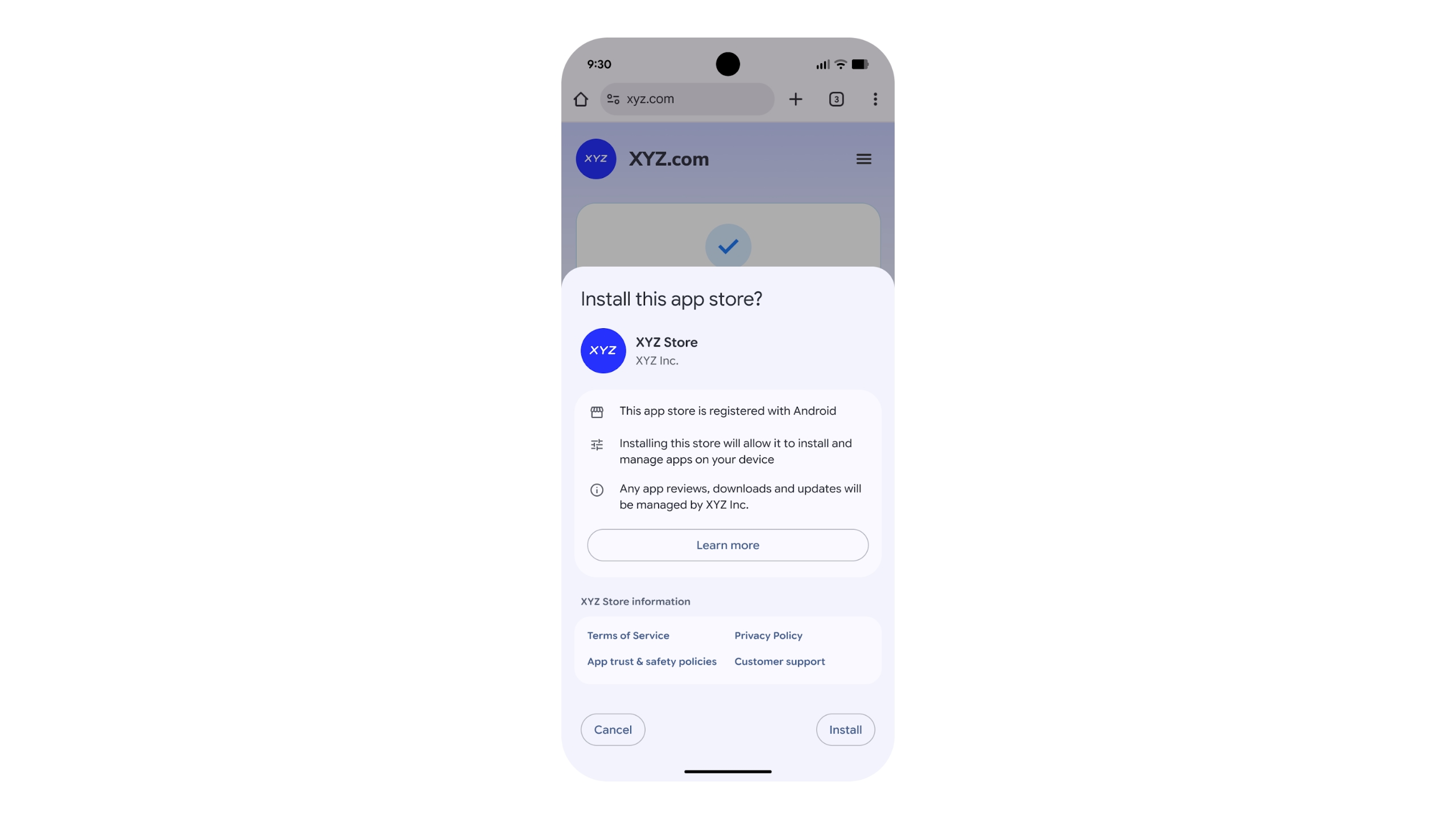
Epic is ultimately interested in getting people to use the mobile version of its Epic Games Store, and Google’s announcement includes details on how third-party app stores can come to Android. Third-party app stores will be able to apply to the company’s new “Registered App Stores” program to see if they meet “certain quality and safety benchmarks.” If they do, they’ll be able to take advantage of a streamlined installation interface in Android. Participating in the program is optional, and users will still be able to sideload alternative app stores that aren’t part of the program, but Google clearly has a preference. Changes the company plans to make to sideloading later in 2026 could deliberately make the process more difficult, which might force developers to apply to Google’s program.
App stores approved by the Registered App Stores program get a simpler installation interface.
Google
Given the scale of the changes, not all of Google’s tweaks will be available everywhere at the same time. Google says that its updated fee structure will come to the EEA, the UK and the US by June 30, Australia by September 30, Korea and Japan by December 31 and the entire world by September 30, 2027. Meanwhile, the company’s updated Google Play Games Level Up program and new App Experience program will launch in the EEA, the UK, the US and Australia on September 30, before hitting the remaining regions alongside the updated fee structure. For any developers interested in offering their own app store, Google says it’ll launch its Registered App Stores program “with a version of a major Android release” before the end of the year. According to the company, the program will be available in other regions first before it comes to the US.
Developing…
This article originally appeared on Engadget at https://www.engadget.com/apps/google-ends-its-30-percent-app-store-fee-and-welcomes-third-party-app-stores-185248647.html?src=rss
The official title is Assassin’s Creed: Black Flag Resynced, and that’s about all we know for sure. The company released some concept art but it’s just protagonist Edward Kenway hanging out on a boat.
We don’t know when Ubisoft will release this thing into the world, but the company did recently say that a previously unannounced game would be released by the end of the coming financial year, which happens on March 31, 2027. At that time, Black Flag Resynced had yet to be officially announced. It’s possible we could be playing this thing sooner rather than later, particularly if the company has been working on it for years.
This announcement came as part of a franchise roadmap, which included a slight mention of the next mainline Assassin’s Creed entry. This is being developed under the name Codename Hexe, with Ubisoft promising a “unique, darker, narrative-driven Assassin’s Creed experience set during a pivotal moment in history.”
The creative director of that one, Clint Hocking, recently left the company after a 20-year tenure. He’s been replaced by Jean Guedson, who had the same job for the original Black Flag 13 years ago.
This article originally appeared on Engadget at https://www.engadget.com/gaming/ubisoft-confirms-assassins-creed-black-flag-remake-193629862.html?src=rss
Sony no longer plans to bring current and future single-player games to personal computers, according to Bloomberg. The report specifically names last year’s Ghost of Yotei and the soon-to-be-released Returnal successor, Saros, as games whose PC plans have been canceled. Some multiplayer and third-party titles will still reach PCs, however.
Bloomberg’s Jason Schreier cites “people familiar with the company’s plans,” who say that some within the company worry that releasing the games on PC could hurt sales of the PlayStation 5 console, as well as those of its unannounced successor. There could also be concerns that PlayStation titles could end up on competing Xbox hardware if Microsoft makes good on speculation that the next Xbox might play PC games.
There are a few caveats to this change in strategy that are important to note. First, multiplayer titles will still be released cross-platform, including Marathon, a reboot of an old first-person shooter franchise by Bungie (the studio that created Halo, now owned by Sony), slated to release tomorrow on both PlayStation 5 and PC (via Steam).
Apple is looking to gain a foothold in the more budget-friendly end of the laptop market with the MacBook Neo. The system starts at $599, which is darn inexpensive for an Apple laptop — it even has the same starting price as the M4 iPad Air.
As such, the MacBook Neo should help Apple compete with cheap Windows laptops and Chromebooks. Pricing it at $499 for educational use won’t exactly hurt either.
Apple is really lowering the cost of entry for those looking to pick up a new MacBook here. The base MacBook Neo costs $500 less than the cheapest M5 MacBook Air, which is now officially Apple’s midrange laptop.
Of course, there are a lot of tradeoffs you’ll make by opting for a MacBook Neo instead of a MacBook Air. If you’re curious about all the differences between the Neo and the base 13.6-inch Air (and perhaps what you’ll be foregoing if go you with the cheaper option), we’ve got you covered.
MacBook Neo vs. MacBook Air exteriors
Apple
Let’s start with the things you’ll notice at first glance about the two laptop lines. The Neo has an arguably more eye-catching array of colorways with silver, blush (a light pink), citrus (light yellow) and indigo options. The Air comes in a more muted batch of sky blue, silver, starlight (a sort of champagne) and midnight (a very dark blue).
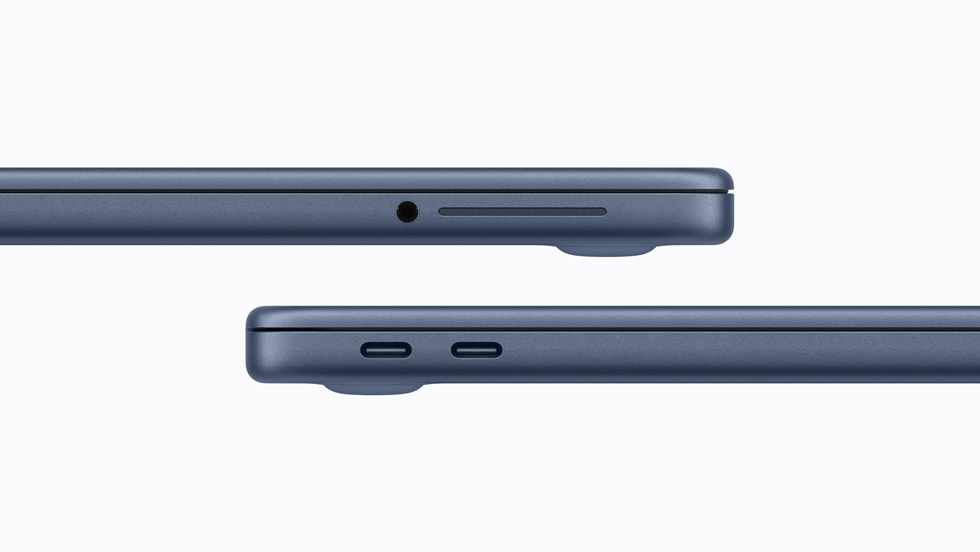
The weight of the two laptops is identical at 2.7 pounds and the differences in the dimensions are negligible. Blissfully, both laptops have a headphone jack. Please have the courage to keep those around in MacBooks, Apple.
Apple
Alas, the Neo does not have a MagSafe port, so you’ll need to use one of its two USB-C ports (it has one USB-C 2 port and a USB-C 3 port) for charging. The MBA has two Thunderbolt 4 (USB-C) ports to go with its MagSafe connector.
While we’re on the subject of charging, the MacBook Neo comes with a 20W power adapter. The MBA includes a 40W Dynamic Power Adapter with 60W Max, and it supports fast charging at up to 70W.
The Neo has a 36.5-watt-hour lithium-ion battery, which Apple claims has enough juice for up to 11 hours of web browsing or 16 hours of video streaming on a single charge. As for the MBA, that has a 53.8-watt-hour lithium-polymer battery. Apple says you’ll be able to use that laptop for 15 hours of web browsing or 18 hours of streaming video before you need to recharge.
Back to the exterior of the laptops and in terms of audio, the Neo has a side-firing dual-speaker system with Spatial Audio and Dolby Atmos support. However, unlike with the MBA (which has four built-in speakers), there’s no mention of Spatial Audio support for AirPods. The MBA has one more microphone than the Neo as well, and both laptops support Voice Isolation and Wide Spectrum microphone modes.
MacBook Neo vs. MacBook Air opened up
Apple
If you were to place a MacBook Neo and MacBook Air side by side and open them up, you might spot that the former’s screen is a little smaller at 13 inches on the diagonal. While both have Liquid Retina displays with 500 nits of brightness, the Neo’s screen has a lower resolution of 2408 x 1506 vs. the MBA’s 2560 x 1664. The Air also has a P3 wide color gamut and support for Apple’s True Tone feature, which tweaks the screen’s color temperature to better fit your surroundings. The Neo has an sRGB display instead.
While the webcams in both laptops can capture 1080p video, the one in the Neo is lower-specced and has fewer features. It’s a 1080p FaceTime HD camera. The MBA has a 12MP camera that supports Center Stage, a feature that keeps you in the middle of the frame as you’re moving around. It also supports Desk View, which allows you to show your face and what’s on your desk simultaneously.
The MacBook Neo has a Magic Keyboard and multi-touch trackpad (which we didn’t feel were super sturdy in our initial hands-on time). The MacBook Air, on the other hand, has a backlit Magic Keyboard and a Force Touch trackpad. It also supports Touch ID as standard.
If you want Touch ID on the MacBook Neo, though, you’ll need to pay extra. A version of the laptop with Touch ID costs $699. That upgrade (which is the only one available for the Neo as things stand) also doubles the internal storage to 512GB. And that feels like a smooth segue into comparing the internal specs of each machine.
MacBook Neo vs. MacBook Air on the inside
The M5 MacBook Air comes with 512GB of storage as standard and you can equip it with up to a 4TB SSD. The Neo tops out at 512GB.
It’s a little disappointing (though somewhat understandable given the surging costs of RAM) that the Neo only has 8GB of unified memory. That’s half of what you get in a MacBook Air as standard, and you can expand that laptop’s RAM to 32GB. Memory bandwidth is nearly three times faster on the MBA as well at 153GB/s, compared with 60GB/s on the Neo.
The chip that runs the Neo is significantly less powerful than the M5 you’ll find in the MacBook Air too. The Neo uses an A18 Pro, which is the chip that debuted in the iPhone 16 Pro and iPhone 16 Pro Max. It has a 6-core CPU (two performance, four efficiency), 5-core GPU and 16-core Neural Engine. Measure that against the Air’s M5, the base version of which has a 10-core CPU (four super cores, six efficiency cores) and 8-core GPU, though that too has a 16-core Neural Engine.
We don’t yet have a direct comparison, such as Geekbench 6 scores, to directly measure the performance of each laptop. However, it’s already clear that the MacBook Neo won’t be nearly as powerful as the M5 MacBook Air. You probably won’t be doing heavy-duty video editing on a Neo. That said, Apple says that you will be able to use Apple Intelligence features on the laptop.
This article originally appeared on Engadget at https://www.engadget.com/computing/laptops/macbook-neo-vs-m5-macbook-air-all-the-trade-offs-youll-make-to-save-500-less-190434959.html?src=rss
Archaeologists are keen to learn more about the specific diets and culinary practices of ancient populations around the globe. An interdisciplinary team of scientists analyzed the residues on prehistoric ceramic cooking pots and concluded that early Eastern European hunter-gatherer-fishers likely foraged for plants as well as hunted fish and other animals for their sustenance, according to a new paper published in the journal PLoS ONE. And they often combined ingredients for region-specific recipes.
This is a burgeoning area of archaeological research. For instance, back in 2020, we reported on researchers who spent an entire year analyzing the chemical residues of some 50 ceramic cooking pots. The aim was to gain new insights into ancient diets, and the authors actually cooked their own maize-based meals in replica pots to test their hypotheses. They found that the charred bits at the bottom of the pots provided evidence of the last meal cooked. But the patinas contained evidence of the remnants of prior meals that had built up over time. So it depends on which part of the pot you sample.
Most prior research has been typically useful primarily for identifying animal remains; it’s more challenging to identify the kinds of plants ancient peoples might have consumed. The authors of this latest paper combined several analytical techniques to study the residues of 58 pottery pieces dating between the 6th and 3rd millennium BCE. And they, too, conducted their own experiments, cooking various combinations of the ingredients in ceramic vessels over an open fire.
This story probably won’t come as a surprise to anyone who pays attention to desktop APUs, but the news is simple: the new Ryzen AI 400 desktop processors that AMD just launched don’t come with a full complement of PCIe lanes. In fact, they actually have even fewer lanes for high-speed I/O than some of the last-generation APUs, which were
Microsoft spent much of the past week rejecting legitimate emails sent to Outlook.com, Live, and Hotmail accounts due to what appears to be overly aggressive IP reputation filtering or faulty blocklist rules. According to The Register, many senders received 550 errors claiming their networks were blocked, preventing delivery of invoices, notifications, and authentication emails. From the report: A block list is a good thing. It helps stem the flow of spam from networks or addresses associated with junk email. However, the confusing thing for our reader is that his company was not on Microsoft’s naughty step for email. A look at Microsoft’s Smart Network Data Service (SNDS) showed no issues with the IP. “We’re also a member of their JMRP (Junk Mail Reporting Program),” our reader added, “which is intended to inform us when people are reporting spam sent from our IPs – except, we never get any reports.”
The problem worsened in February. On Microsoft’s support forums, users began to complain about similar issues as the IP net presumably widened. One wrote: “We are currently experiencing a critical and recurring email delivery issue affecting recipients at outlook.com, live.com, hotmail.com, and msn.com,” and provided a copy of an error that suggested the mail server has been “temporarily rate limited due to IP reputation.” The user drily noted, “Although the error indicates rate limiting, in practice no emails are being delivered.”
A large number of users, ranging from the administrator of a server sending automated notifications on behalf of Estonian Public Libraries to an email provider for healthcare professionals, chimed in to confirm they too were having delivery problems and Microsoft support was not helpful. […] Unsurprisingly, our reader spoke on condition of anonymity – nobody wants to be the ISP that has to say, “Yeah, we can deliver your email anywhere but Outlook.com” to customers. We asked Microsoft to comment, but other than acknowledging our questions, the company did not respond further.
One of the nicest things about Apple software, at least in theory, is its uncluttered design. That’s why many users (myself included) were annoyed when Safari’s Compact Tabs feature was dropped in macOS 26 or iPadOS 26. It was a great way to neaten up your browser bar, and people have been complaining about the missing feature ever since.
Happily, the complainers now have something to look forward to, as the upcoming macOS Tahoe 26.4 and iPadOS 26.4 releases will bring back the Compact Tab option, according to MacRumors. Their reporting shows a screenshot of the Safari settings on macOS, with “Separate” and “Compact” tab style both on offer.
Why I love Compact Tabs
Here’s why I’m jazzed about this feature’s return: Your browser’s tab bar, by default, sits right below the main toolbar (which contains your address bar as well as forward/back buttons and new tab buttons). Compact Tabs moves the tabs into the address bar, a space that is otherwise mostly blank. This cuts the amount of occupied space taken at the top of the browser in half. This isn’t a feature for everyone—people who routinely keep dozens of tabs open tend to like having more space to see which tab is which. But for those of us who like to keep things clean (like me) Compact Tabs was perfect.
And it will be perfect again. Apple hasn’t announced when the 26.4 update will ship to all macOS and iPadOS users, but based on based release cycles, it’s likely to come out in the next month or so. ANd if you don’t want to wait, you can try out the 26.4 beta now.
Credit: Justin Pot
The serious caveat here is that beta versions of software are, by definition, less stable than the release version, meaning you may have to put up with a few bugs that will annoy you or (at worst) leave your computer unusable.
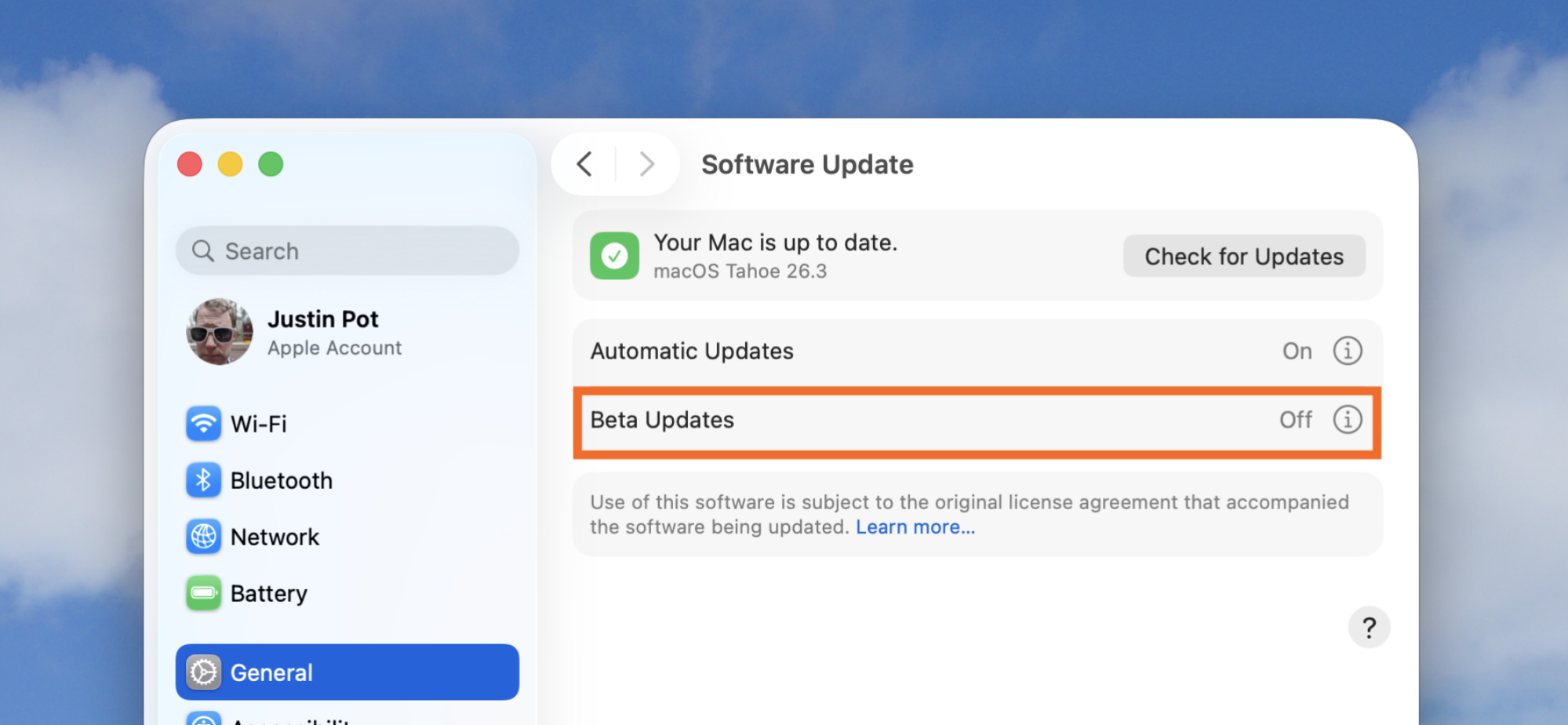
All that aside, if you want to jump in, open System Settings on your device and head to General > Software Update. From here turn on beta updates—you should then be offered a beta version of 26.4. I don’t generally recommend risking using a beta operating system for a minor quality of life improvement (even though there are other cool features coming), but the full version shouldn’t be long in coming.
During a brief hearing on Wednesday morning, the Senate Committee on Commerce, Science, and Transportation spent only a few minutes “marking up” new legislation that provides guidance to NASA for its various initiatives, including the Artemis program to land humans on the Moon.
“Our bill authorizes critical funding for, and gives strategic direction to, the agency in line with the priorities of administrator Isaacman and the Trump administration,” said the committee’s chairman, Sen. Ted Cruz, (R-Texas).
The duration of the hearing, however, seems to be the inverse of its significance.
NEW YORK CITY—Whether you’re talking about the iBook, MacBook, or MacBook Air, Apple’s most basic laptops have started at or within $100 of the $1,000 price point for over 20 years. Sure, the company had quietly been testing the waters with a Walmart-exclusive M1 MacBook Air configuration for several years, first at $699 and then at $599. But as far as what Apple would actively advertise and offer on its own site and in its own retail stores, we’ve never seen anything for substantially below $1,000.
The new MacBook Neo changes that. Apple has experimented with lower-cost products before, most notably with the $329 and $349 iPads and the old $429 iPhone SE. But this is the first time it has used that strategy for the Mac. The Neo starts at $599 for a version with 256GB of storage and no Touch ID sensor, and $699 for a version with Touch ID and 512GB of storage (each also available to educational customers for $100 less).
We had a chance to poke at a MacBook Neo for a while at Apple’s “special experience” event in New York this morning, and what I can tell you is that this does feel like an Apple laptop despite the lower starting price. It definitely has some spec sheet shortcomings, even compared to older M3 or M4 MacBook Airs that you still might be able to get at a discount from third-party retailers or Apple’s refurbished site—more on that in our full review next week. But it’s priced low enough to (1) appeal to people who might not have considered a Mac before, and (2) to make some of its borderline specs feel reasonable, and that’s enough to keep it interesting.