Next-gen Snapdragon G Series chips will power handhelds from Ayaneo, OneXSugar and Retroid Pocket

Qualcomm unveiled its next generation of processors for gaming handhelds at the Game Developers Conference (GDC) on Monday. Fortunately, it isn’t all just dry specs; the chip-maker also previewed some of its partners’ portable consoles that the new silicon will power. These include new models from Ayaneo, OneXSugar and Retroid Pocket.

Snapdragon chips

Slide showing details for three new Snapdragon G Series chips.
Qualcomm

The Snapdragon G3 Gen 3 (the flagship processor) has 30 percent faster CPU performance and 28 percent faster graphics than its Gen 2 predecessor. The new silicon supports up to QHD+ 144Hz displays, Unreal Engine 5’s Lumen lighting tech and Wi-Fi 7.

Meanwhile, the Snapdragon G2 Gen 2 may be the mid-range option, but it has the biggest performance jump of the trio: 2.3 times faster CPU and 3.8 times faster GPU speeds than the G2 Gen 1. It, too, supports up to 144Hz on QHD+ displays.

Finally, the G1 Gen 2 is the entry-level processor — not something you’d want in a hardcore portable but ideal for strictly cloud-streaming (devices like the Logitech G Cloud) or emulation handhelds. It supports up to 120Hz on FHD+ screens.

Upcoming handhelds

Slide showing a few details about (and an image of) the Ayaneo Pocket S2 gaming handheld.
Qualcomm

Now for the fun part: Qualcomm’s hardware partners are teasing upcoming devices powered by the new silicon. On the other hand, we don’t yet have pricing info or firm shipping dates for any of these models.

Ayaneo’s Pocket S2 uses the high-end chip (G3 Gen 3) and has a 6.3-inch, 2K “ultra-clear” display. It has a higher battery capacity than the Pocket S and a better cooling system. You won’t have to wait long for this one because it arrives this month.

Slide for the OneXSugar 1 gaming handheld.
Qualcomm

The OneXSugar Sugar 1 is a dual-screen (Nintendo DS-style) foldable console. But it also transforms: You can detach its smaller screen and (from the looks of it) reattach the controller to the larger display for a more Switch-like form factor. It’s an interesting setup, to say the least. It will be available for pre-order in May also runs the high-end Qualcomm processor.

Meanwhile, the Ayaneo Gaming Pad will also run on the flagship Snapdragon G3 Gen silicon. This device looks like an iPad mini with controllers gripped onto each side and has an 8.3-inch LCD with 2K resolution at 120Hz. It also includes an “esports-grade turbo fan” and a “high-capacity battery.” It launches in May.

Slide showing details of the Retroid Pocket PR Classic gaming handheld.
Qualcomm

Finally, the Retroid Pocket PR Classic uses the G1 Gen 2 silicon. This Game Boy-esque retro emulation portable has a 1080 x 1240 AMOLED screen (up to 500 nits brightness), 4GB of RAM, 64GB of storage, a 5,000mAh battery and active cooling. You can pre-order it this month.

This article originally appeared on Engadget at https://www.engadget.com/gaming/next-gen-snapdragon-g-series-chips-will-power-handhelds-from-ayaneo-onexsugar-and-retroid-pocket-131733930.html?src=rss

My Favorite Gadgets to Make Spring Cleaning Actually Kind of Fun

We may earn a commission from links on this page.

In addition to checklists, tips, and tricks that can elevate your tidying game this spring, you’re going to need products. It’s a good idea to stock up so that once you get going, you know you won’t have to take any breaks to gather missing reinforcements.

The products can help you do more than clean, though—they can even make cleaning easier and more fun, which is good news for those of us who don’t love cleaning up. If you’re like me and find cleaning more monotonous than fulfilling, why not use some tools that can make the endeavor easier?

Spring cleaning tools for the kitchen

Cleaning the kitchen can be more daunting than other spots around the house because not doing it well it can have real effects on your health. That doesn’t mean, however, that it has to be a slog. There are some creative tools out there that can help you whip your kitchen into shape in no time. 

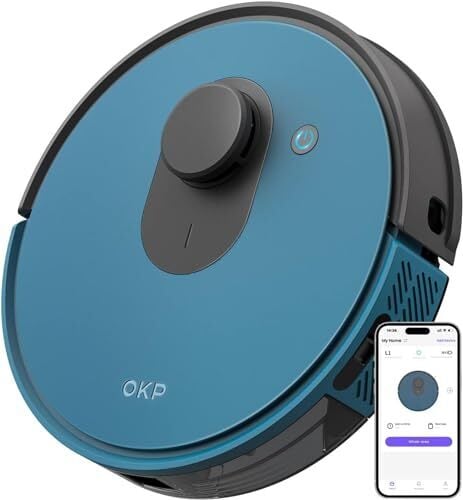
Kick off the entire spring cleaning season by upgrading your vacuum, which will come in handy around the kitchen, yes, but the whole house, too. I have two suggestions: First, you can’t go wrong with a robot vacuum, which can end up doing a huge chunk of the floor-cleaning work for you while you focus on other things. I have one from OKP that works just fine, but you also have the option to really level up with automatic devices that can both vacuum and mop, like the Roborock S8 MaxV Ultra.

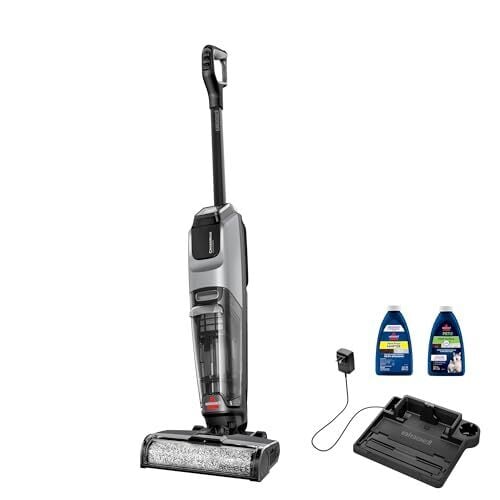
That leads me to your second option, which costs significantly less than the $1,700 you’d spend on the above. The Bissell CrossWave OmniForce is a dual vacuum/mop that, yes, you have to operate yourself, but it will clean the hell out of your floor. This is what I use when I’m cleaning my own home and since I started being able to mop and vacuum at the same time, I’ll never go back to the old way. Devices like this might cost more than your standard broom or Swiffer, but they’re innovative, easy to use, and more effective, too—which is what you need for spring cleaning.

For more innovation, ease of use, and efficiency in your kitchen, consider these other tools and gadgets:

  • The Topist Angry Mama microwave cleaner is a fun device that steams your microwave for you. Just fill it with vinegar and water and nuke it for seven minutes to let it do the dirty work on your behalf. It’s shaped like an angry lady, which is whimsical, and handles the job of getting stuck-on gunk un-stuck while you work on something else. 

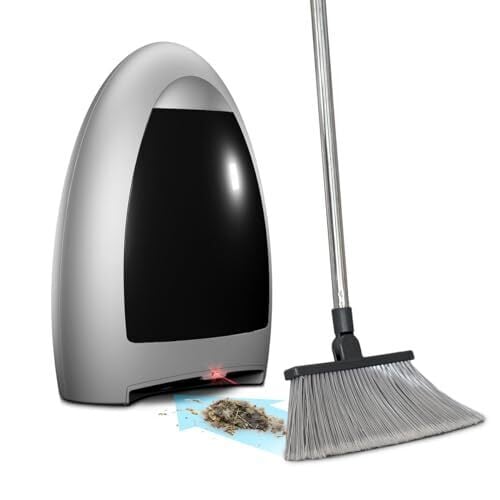
  • The EyeVac Home touchless stationary vacuum is like a dust pan, but way cooler. You sweep all your crumbs, dirt, debris, and junk over to the suction device and it sucks it up with 1,000 watts of power. Check out this video for a review and to see it in action. Keep in mind that you do need to clean the filters pretty regularly. An investment like this can be helpful in a garage or storage space, too, making it an all-around spring cleaning win.

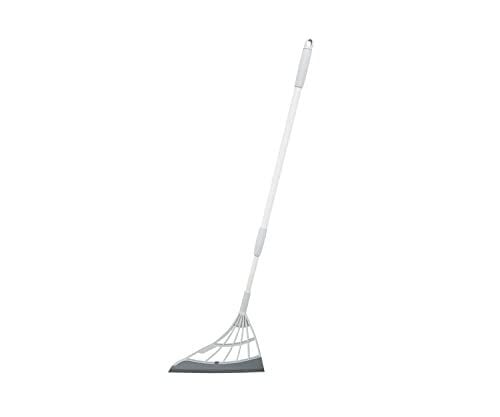
  • To use the above, you’ll need a good broom, but you should get a cool, multifunction one, like the TikTok-famous, fan-favorite Broombi, a long-handled squeegee that makes quick work of pet hair, dust, and grime in a way traditional bristles can’t. This is a better option than bulkier brooms on the market because it can serve more purposes: It can more effectively corral wet or gooey messes on hard floors, in addition to dry ones, and can also fit more easily under appliances.

Spring cleaning tools for the bathroom

The bathroom can get truly filthy, so it’s also where you’ll really need to get creative. No worries: There are plenty of cool tools out there to help you get this done. 

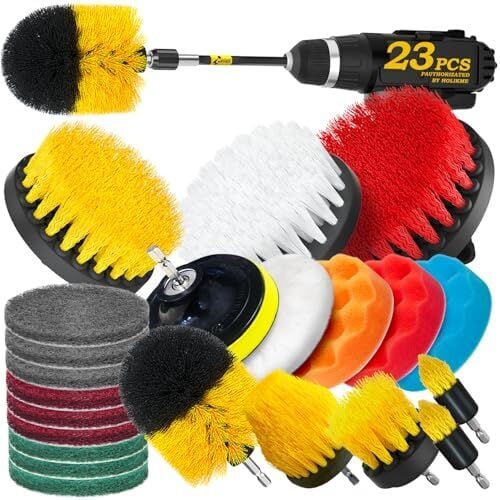
  • Stop hand-scrubbing everything—you have better options. For one, you can get a 20-pack of these drill brush attachments, which attach directly to your electric drill and can buff, brush, scour, and polish using the drill’s power instead of your own.

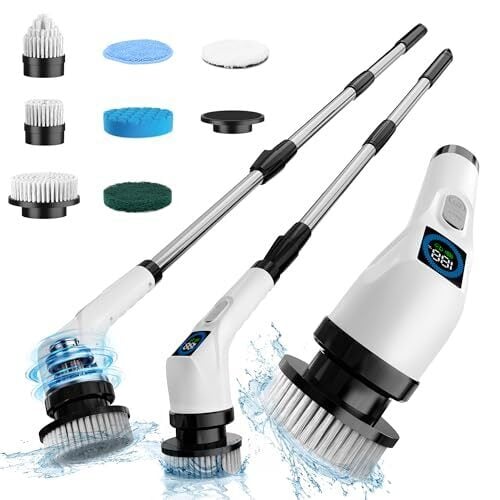
  • Or try a designated electric scrubber brush, a long-handled scrubber that is always going viral on TikTok for its ease of use in getting the grime out of grout, tile, and more.  

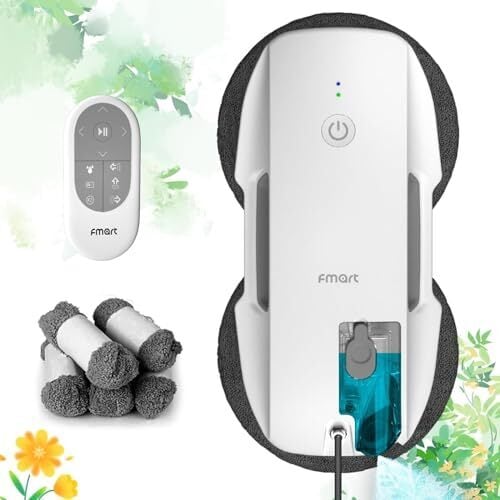
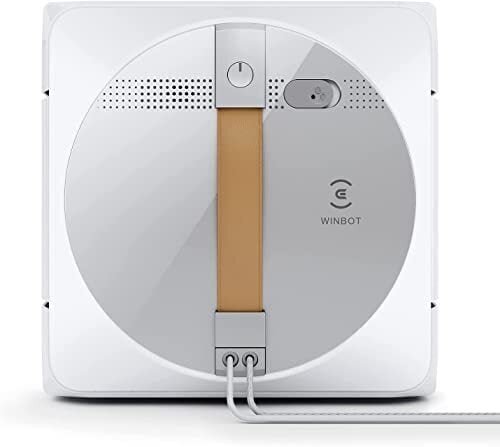
  • Another popular tool on TikTok is the robot window-cleaning vacuum, which sticks to windows and mirrors and mimics the motions of a human hand. Your shower doors, mirrors, and windows all around the house will thank you. Try the FMART T9pro as a cheaper gateway to the world of robot glass cleaning, but know you may eventually love it so much you level up to more expensive ones, like the EVOVACS Winbot W1 Pro, which has quick cleaning, deep cleaning, and spot-stain removal modes. 

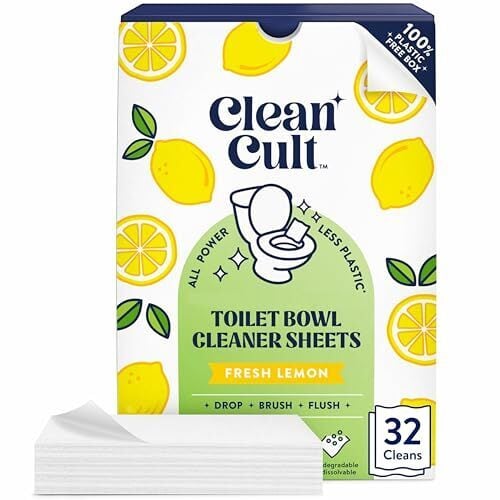
  • Make cleaning your toilet quicker and, if you can believe it, cuter with this stamp-on deodorizing gel. Stick a flower-shaped stamp to the side of the toilet bowl and every time you flush, it’ll clean a little bit and release a nice scent. You can even put stamps in your sinks to keep them smelling fresh, too. I’ve used these a few times and find them helpful, but for what it’s worth, ahead of my spring cleaning, I’m waiting on some dissolvable toilet-cleaning sheets to see if I like them better. Again, they’re a lot easier to use than a big scrubbing brush. All you have to do is flush.

Spring cleaning tools for the living room

Cleaning the living room might be the most fulfilling, since you get to chill there and enjoy the fruits of your labor afterward. Double that fulfillment by making it fun with these tools. 

  • The FURemover pet hair broom is described by its fans as a “life changer” and if you watch some demos, you’ll see why: It acts like an indoor rake, easily pulling pet fur and human hair out of carpets and upholstery so you can finally get rid of it.

  • To quickly clean hard floors and have some fun doing it (or at least more fun than you do with your regular mop), try mopping slippers that allow you to glide or shuffle around, using the microfiber soles to scrub and dry your floor as you go. 

  • Your kids can get in on the action (and stay distracted while you clean) with the KIDSCLEANCAR, a little go-kart that uses paper towels to mop or dry as kids scoot around. I don’t have any kids, but if I did, I’d put them to work like this. In demos, reviewers call it “genius.”

  • To tackle your window blinds, grab the Hiware duster brush, a zany-looking device that uses multiple prongs and speciallydesigned microfiber covers to get into all the cracks that normally take forever to clear out by hand. 

General spring-cleaning product upgrades

There are some innovative cleaning products out there that are just, well, cleaning products. They’re not necessarily as amusing to look at or use as the Angry Mama, nor are they as genius as a go-kart that puts your kids to work, but they work better, faster, or harder than other products, which can cut down the time you have to devote to this whole endeavor. After some rigorous testing, I recommend all-purpose cleaner that is labeled “2x concentrated,” especially Pine Sol and Fabuloso. These cut through dirt a lot faster than the regular formulations, smell just as good, and, typically don’t cost much more (if any more) money.

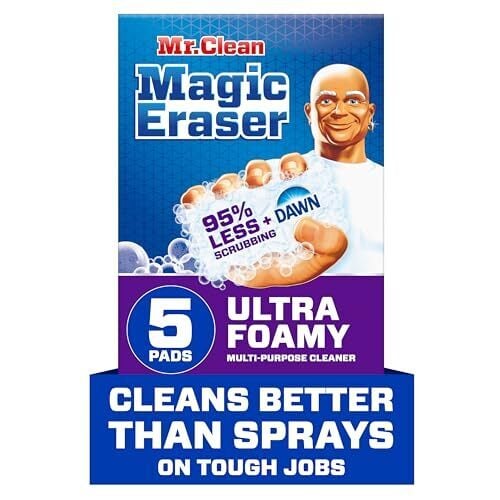
If you read enough of my cleaning content, you’ll also soon come to find I am a big fan of the Mr. Clean Magic Eraser Ultra Foamy, which is a melamine sponge like the regular Magic Eraser, except it has pods of soap inside. I use this for everything. I have used it to power through adhesive and goo, clean under my appliances, and so much more.

Qualcomm Snapdragon G Series Chips Arrive To Power Next-Gen Gaming Handhelds

Qualcomm Snapdragon G Series Chips Arrive To Power Next-Gen Gaming Handhelds
If you’re not a big gamer, you may have been perplexed at the recent preponderance of portable gaming PCs in handheld game system form. We could talk at length about why they’ve exploded in popularity *now*, but that’s not why you clicked on this article. Instead, you’re here to read about Qualcomm’s new Snapdragon G Series SoCs that are tailored

Seven Ways to Spring Clean When You’re Feeling Lazy

We may earn a commission from links on this page.

Lifehacker’s Ultimate Spring Cleaning Guide aims to bring you all the best spring cleaning ideas, but I won’t lie: Some of them are pretty labor intensive. But whether you don’t have the time for a major undertaking or you’re just feeling a little lazy this year, there are still ways you can spring clean your home to get it in shape for the months ahead.

Clean your microwave the easy way

A microwave is supposed to be cleaned every two weeks, but if that’s too often for you (it’s OK to be honest), you’re probably looking at some serious grime in there. Cleaning it is actually remarkably easy, though, and you can make a big improvement on the mess with just a little effort.

Here’s my big how-to on cleaning the microwave, but the basic gist involves quartering a lemon and putting two slices into a microwave-safe bowl or mug full of water, then nuking them on high for at least three minutes, until you start to see steam forming in the window. Once it’s nice and steamy, don’t open the door. Instead, let it sit for five minutes. When you do open the door, you’ll have a wet microwave interior you can clean with a sponge. The citrusy steam will have loosened any stuck-on gunk, and you can hopefully wipe it right out. Take the turntable out and soak it in the sink, then clear any crumbs or goo from the bottom of the machine. Just like that, what was once a gross microwave is a sparkling-clean appliance—and all you did was heat up a lemon.

Take the easy way out with your oven too

While you’re at it, you can do something similar to your oven: Heat it to 150 degrees, shut it off, then put a pot of water on the bottom rack and an oven-safe container of ammonia on the top rack. Close the door and let the two sit overnight. In the morning, open the door for at least 15 minutes to air the oven out, then add a few drops of dish soap to the ammonia, dip in a wash rag and scrubbing sponge, and use them to wipe away the softened grease and grime.

Put your bathtub and dishwasher to work

One of my favorite lazy cleaning hacks involves looking at the bathtub not just as a place to clean your body, but a place to clean all kinds of stuff from around your house. I’m not someone who throws a lot of dinner parties, but I’ve heard great things from people who’ve tossed an abundance of dirty dishes into the bathtub for a good soak. I have used mine for is cleaning things like oven racks and my broom, plus my synthetic rugs. Fridge shelves, purifier filters, plant pots—think of all those big, unwieldy items that are a pain to wipe down. Running a bath with some gentle dish soap and plopping them in for a soak saves a whole lot of time and effort.

The same goes for your dishwasher. It’s easy to overlook its potential for cleaning non-dish things, but most small plastic or metal items like stove knobs, dustpans, and toothbrush holders can go in there for a washing up, which leaves you with more time to clean other things with your own two hands.

Set it and forget it in the bathroom

Before bed one night, you can knock out two major tasks in the bathroom and let your cleaning supplies do the real work while you sleep. First, I have been obsessed with these toilet-cleaning sheets for a few days now. They’re dissolvable papers covered in cleaning product, so you just toss them into the toilet and let them disappear. Put one of these in there before bed and, if necessary, give it all a good scrub with your toilet brush before flushing.

Second, descale and de-gunk your shower head overnight by tying a sandwich bag full of vinegar around it. This is one of those age-old, tried-and-true hacks that really works. When you remove the bag in the morning, scrub the shower head with an old toothbrush to make sure all the blockages are out of the holes, then run it for a minute or two.

Clean your ceiling fan without making a mess

You need to clean your ceiling fan so it’s not littering dust all around your room, but usually that means you have to litter dust all around the room by brushing it off, then vacuuming it all up. That’s a lot of work, but this hack isn’t: Grab an old pillowcase and slide it over each blade, one at a time. Pull the pillowcase back toward yourself, with the top dragging across the top of the blade. All of the dust will come off with it and land in the case. You can just dump it out, then toss the pillowcase in the wash.

Clean the washing machine without climbing inside of it

You do need to clean your washing machine once in a while, but you don’t have to put your whole torso into that small drum to maneuver around in there with a sponge. I’ve tried a few different methods, usually just involving vinegar, and they’ve all required no real work on my part. I either dump a cup of vinegar straight into the drum or in the detergent slot, and run the machine through a hot cycle with no clothes inside. The vinegar really helps with de-stinking the device and, in turn, de-stinking the clothes you wash in it. And don’t have to do anything but dump a little in there and let the machine run.

Clean under big appliances in seconds

One task I always associate with spring cleaning is the annual hauling-out of major appliances like the fridge and oven. (Do I ever actually do that? Not really, but I associate it with spring cleaning because I know I’m supposed to.) You can make this less taxing with a very simple hack: Cut a hole in a sponge, stick a long-handled tool like a spatula or broom handle into the hole, and shove it as far as you can under each appliance. Scrub back and forth as best you can. I have a more in-depth tutorial here, but it really is as easy as it sounds. It doesn’t preclude you from ever having to pull those appliances all the way out, but doing it regularly means it will be a lot less gross when you do.

The 2025 Cadillac Escalade IQ first drive: 460 miles on a single charge

SAN FRANCISCO—Newsflash: the new electric Cadillac Escalade IQ weighs over 9,000 lbs, or a fair amount more than 4,000 kilograms. For context, that figure works out to almost exactly half again as much as the 682 hp (509 kW) Escalade V that comes equipped with a barking-mad 6.2 L supercharged V8. Yet the latest and supposedly greatest from Cadillac needed to weigh so very much to achieve a class-leading range target of 460 miles (740 km), thanks to a 205 kWh battery pack.

The Escalade IQ shares a modular General Motors (formerly Ultium) chassis and battery pack with the gargantuan Hummer EV, and even more hardware with the Silverado and Sierra pickup truck siblings. As opposed to trying to attract rugged work truck and off-roading cred, though, for Cadillac that kind of range figure seemed necessary to appeal to a “no compromise” lifestyle that Escalade buyers might well expect while considering a switch to fully electric power.

And the new IQ certainly puts down plenty of instantaneously available grunt, and despite its mass can punch out a 0–60 time under five seconds with the Velocity Max button pushed, thanks to dual motors rated at 750 hp (560 kW) and 786 lb-ft (1,065 Nm).

Read full article

Comments

Use These Room-by-Room Checklists to Spring Clean Your Entire Home

Sometimes the trickiest part of cleaning is knowing where to start—and, once you’ve started, where to go from there. A handy checklist can help you move through the task systematically and easily.

That’s where these room-by-room checklists can help. Below, you’ll find links to advice on how to complete many of the tasks you’ll be facing. I’ve also turned the cleaning checklists into a downloadable spreadsheet you can print out, so you can mark off each chore as you go.

Your kitchen spring cleaning checklist 

Before you start cleaning, take a minute to make sure you have everything you need. Nothing saps your mojo quite like having to leave the house to buy supplies, so make sure you have these basics on hand:

  • Plain dish soap

  • A good brush set

  • A basic scrubbing sponge

  • A heavy-duty melamine sponge

  • Baking soda

  • White vinegar

  • Easy Off Heavy Duty oven cleaner

  • Lysol All-Purpose Cleaner

  • A good broom

  • A mop

  • A scrubbing cleaner for metal, like Brasso

Now it’s time to move on to the various things you need to actually clean. Start from the top and make your way down, so you clean all the dirt you’ve knocked to the floor at the very end.

  • Start by removing your oven racks and putting them in the bathtub with dish soap and water to clean them. They should be soaking while you do everything else.

  • Steam your microwave by nuking a quartered lemon in a bowl with a cup of water for three minutes. Since it has to sit in there for five minutes after that, move on to cleaning the exterior with a mixture of one part vinegar to one part water. Once the five minutes is up, wipe the steam from inside the microwave. 

  • Move on to the fridge. Remove all the food and wipe down your shelving and interior with soapy water, then make sure you dry it with paper towels or a clean rag. You can also pop your fridge shelves in the bathtub with the oven racks if they’re really dirty, but that may hold up part of your other cleaning efforts, since you’ll have food all over your counter while your shelves soak. Try to attempt this when you’re low on food, so you don’t have as much to deal with, or put your food back along the bottom of the fridge after you’ve wiped down the shelf-less interior with a mixture of one cup of baking soda and a gallon of water. 

  • Clean your upper kitchen cabinets, removing everything inside. And don’t forget to clean the tops of them, either, with a sponge and soapy water. 

  • Do the lower kitchen cabinets now, using the same methods: Pull everything out and clean inside with the crevice tool on the OXO brush set, then soapy water. 

  • While all the appliances are out on the counter, clean them one by one. There are detailed ways to clean everything from toasters to coffee machines and grinders to air fryers, so do each one before putting it away. Use this time to clean anything that is a small appliance, is constantly sitting on your countertops, or both. A blender gets cleaned during this part, as do things like your coffee machine accessories. Make sure the cupboards and appliances are all dry before putting anything back.

  • Next, move straight to the stovetop. Use baking soda to clean the burners by slowly adding some to a cup of water and mixing until it forms a paste you can coat the burners with. With your racks still in the bathtub, you can scrub the interior of your oven with oven cleaner. After 20 minutes, remove the baking soda paste from the burners with a damp cloth.

  • Once you’ve used the sink to clean your appliances, you have to clean the sink itself. If it’s stainless steel, use an abrasive cleaner, like Bar Keepers Friend ($11.89 for a pack of two canisters) and a scouring pad. For anything else, a soft cloth and soapy water will work. (One extra step you can take is to polish your chrome fixtures with baby oil, which makes them look super sparkly.)

  • This is a good time to clean the walls between your cabinets and your back splash. Dish soap and water will work, as will the Magic Eraser, but if you have cooking grease splatters to deal with, try mixing salt and vinegar to make a DIY grease-busting solution.

  • You’ve cleared the countertops of the appliances from the cupboard and likely gotten crud from the stovetop all over them, so it’s time to tackle those now. Remove anything that might be on them, use the crevice tool to get crumbs out of the corners, and then go in with soap and water or all-purpose cleaner. If you have granite countertops, be extra careful: Use a non-scratch sponge or rag and soap and water, nothing else. 

  • By now, the floors are dirty, but that’s no problem: You’re almost done. First, get your oven racks and fridge shelves out of the bathtub and dry them well. Put them back where they belong. Once that’s done, corral any debris or crumbs on the floor with your broom and mop the whole thing with soapy water. Go relax in another room while it dries. 

Your bathroom spring cleaning checklist

A lot of those kitchen-cleaning tools are going to be useful in the bathroom, too, but you should also pick up these:

  • Soft Scrub with bleach

  • An electric scrubbing brush

  • A FlexiSnake Drain Weasel

  • Double-concentrated cleaner

The bathroom is a small space, so you have to be smart about the order in which you clean it so you don’t end up going over the same spots too many times. Luckily, most of the things in there are made of hard materials and only require simple wiping, which you can (and should) do while softer materials, like bath mats and curtains, are in the wash.

Here’s your checklist:

  • We’re going to start at the top of the room. Dust light fixtures and vents first, so you don’t get dust on everything else once it’s all clean. Let dust and grime fall down to the counters and floors; we’ll be cleaning those in a moment.

  • Throw the shower curtains, bath mats, towels, and any linens or fabrics (like a toilet seat cover) in the wash. This will give you time to clean the hooks and rods that support them and will have them clean and ready to be replaced after you finish with the bathroom overall.

  • Tackle the bathtub or shower, focusing on decluttering old shampoo bottles, wiping down the interior glass, descaling the shower head, and getting rid of any soap rings around the interior. It can be helpful to run the shower on a hot temp for a few minutes before doing this, just to loosen everything up and get it wet in there, but it’s up to you.

  • Wipe down all mirrors and tile surfaces outside the tub next. If you opt to steam up the shower before cleaning it, make sure you do this step next, since the mirrors and tile will also get steamy.

  • Clean your bathroom sink, first by sticking your Drain Weasel down the drain to remove hair and gunk, then focusing on removing rings and buildup from the bowl.

  • Clean and polish your faucet and handles when you finish with the bowl. Here’s where some Brasso or Soft Scrub comes in handy.

  • Clean your soap dish or tray, removing soap buildup, and do the same for your toothbrush holder.

  • Pour some cleaner in the toilet bowl and let it sit for a moment. While it’s in the toilet bowl, you wipe down the exterior, as well as the top and bottom of the seat and cover, then scrub out the bowl with your toilet brush and flush at the end.

  • Clean and polish the toilet handle after you’ve flushed.

  • Remove the toilet paper roll and disinfect that holder, too. We’re being thorough today.

  • Wipe down shelves and cabinets, which probably involves pulling everything down off and from inside of them. This is a great opportunity to declutter and organize your medicine cabinet and shelves. Here are my medicine cabinet organization tips and here are some examples of how I organize various shelves in my bathroom.

  • Clear the countertops and wipe them down, too, also wiping anything on them (like containers holding q-tips, a water cup, etc.).

  • Clean the towel racks and hooks, which should still be empty while their usual contents are in the wash.

  • Take out the trash and scrub inside the can.

  • Scrub all the grout and focus on cracks in the floor, really forcing it out. (Don’t worry; we’re about to clean all the dust and grime off the floor, finally.)

  • Vacuum any dust or hair from the floor. We’re almost done.

  • Mop and disinfect the floor.

  • Clean and disinfect high-touch surfaces, like door handles and light switches.

  • Replace whatever was in the wash, like curtains and mats.

Your living room spring cleaning checklist

By now, you have most of the products you’ll need to get all this done, so let’s move right into what you need to do.

  • First, go around and pick up any and all fabrics or soft items. I’m talking about blankets, throw pillow cases, cushion covers, small mats, doilies—you name it. Stick all those in the wash while you get to work cleaning the room.

  • Again, start at the top so dust and grime fall to the floor, where you can get them later. This means clean your ceiling fan and ceilings, including any vents and lights up there and, especially, the corners where cobwebs start to collect. 

  • Dust and wipe down any lamps. 

  • Clean your TV and other electronics. Dust them off first, then use an appropriate method to actually wipe them down. Here’s a guide on cleaning your TV without breaking it. Unplug all of them before you do this, of course. 

  • Got any mirrors or photos hanging around the joint? Wipe those down now. 

  • Next, clear all your surfaces. Pull everything off of your shelves, end tables, and media center. Pile it all up in the center of the room, then dust and wipe down the surfaces you just cleared. 

  • If you plan to move your furniture to dust and vacuum behind it, do that now, while it’s all lighter without the burden of its usual contents. Wipe down baseboards, vacuum behind shelving, and do whatever needs doing back there. If you don’t plan to move out furniture (your call!) skip this step, since we are handling baseboards and vacuuming for the whole room closer to the end.

  • Turn your attention to that of stuff you made pile of. Before putting everything back where it came from, do a round of decluttering. Click here to learn a few of the best decluttering methods and go through this list of questions to ask yourself while you declutter. If something isn’t serving you anymore, it’s got to go. It doesn’t need space on your freshly cleaned shelves. 

  • Wipe down everything you decide to keep, then put it back where it belongs. 

  • Go back to dusting. Dust and wipe down your furniture, potted plants, tables, and anything lower toward the ground. Again, if dust flies off of something onto the floor, this is no problem; we will vacuum it later. 

  • Pay special attention to your couch or other upholstered furniture. Remove cushions, if you can, and vacuum underneath them. Clean the cushions themselves however you normally do that, but if you don’t have your own way, feel free to steal my favorite.

  • Wipe down your baseboards and clean vents low to the ground.

  • It’s finally time to vacuum! If you have a large rug, move that and vacuum under it before replacing it and vacuuming over it. Otherwise, really spend some time on this step. Vacuum the corners where the floor meets the wall, use the brush attachment to really get after your vents, and don’t rush. You just dislodged a lot of dust and dirt onto this floor. 

  • Clean and disinfect high-touch surfaces. This means remotes, the handles that control your recliner, light switches, video game controllers, phone chargers, and more. 

  • Replace all the linens and fabrics you had in the wash.

Your bedroom spring cleaning checklist

Finally, let’s tackle your bedroom. Here is everything you need to do now so you can go to sleep in a peaceful, clean room tonight. I recommend doing the bedroom last not only because it’s the room company is least likely to see, but also because it feels the best to finish up in a room that’s all for you. You’ll get a major sense of accomplishment sinking into a fresh bed after cleaning the whole house.

  • Pick up all the bedding, small rugs, curtains, and any other fabrics. Put those in the wash. 

  • Dust the ceiling fan, vents, and corners. 

  • Wipe down mirrors, glass, pictures, and any other smooth, flat surfaces, especially anything hanging on the wall. 

  • Clean your windows, wiping out the windowsill and any blinds, as well as the handles and glass. 

  • Pull everything off your flat surfaces, from nightstands to shelves. Pile it up on the bed. 

  • Wipe down those surfaces. 

  • Declutter everything in the pile, just like you did in the living room. Again, here are the best decluttering methods. 

  • Once you’ve decided what to keep, wipe it all down and put it away where it goes. 

  • Next, turn your attention to the closet and dressers. This is optional, if you don’t really have time to fully declutter all your clothes, but I do recommend it, if only to clean the interior of those spaces. Pull everything out and pile all that on the bed. Really wipe down the interior of every drawer and all over the inside of your closet. 

  • As you’re putting clothes away, declutter a bit. Be conscientious about what you put back. If you haven’t worn it in a while, it’s damaged, or it’s out of style or doesn’t even fit anymore, give yourself permission to just toss it. Only the best clothes deserve to be in your clean closet and drawers. 

  • Clean your mattress while the sheets are off. Vacuum it, spot treat it, and make sure you do all this now so it has a little time to dry before you put the sheets back on. (Just wait until after you clean your shelves and closets, since dust from the piles you made on the bed might get into the mattress.)

  • Dust any lamps. Don’t forget things like string lights, vanity mirror lights, or those little peel-and-stick lights you got off Amazon that one time for no reason. Oh, and nightlights, too.

  • Clean any electronics, from TVs to alarm clocks. 

  • Dust any furniture you might have, like ottomans or chairs. If you have a vanity or a desk, make sure you wipe down, organize, and clean that, too.

  • Wipe down the baseboards all around the room and get any floor vents, too. 

  • It’s time to vacuum. Don’t just do the floor, but make sure you get under the bed, in the blinds of the windows, under any cushions, and in every corner. Use your brush attachment on vents. 

  • Replace all the linens that were in the wash. 

  • Clean and disinfect high-touch surfaces and items, including but not limited to lamp switches, light switches, remotes, video game controllers, phone and device chargers, drawer pulls, and more. Walk through your regular morning and night routines, considering what you reach for and touch, then wipe those things down well.  

FSF’s Memorabilia Silent Auction Begins Today

This week the Free Software Foundation published memorabilia items for an online silent auction — part of their big 40th anniversary celebration. “Starting March 17, the FSF will unlock items each day for bidding on the LibrePlanet wiki at 12:00 EDT.. Bidding on all items will conclude at 15:00 EDT on March 21, 2025…

“During the auction, the FSF welcomes everyone who supports user freedom to bid on historical and symbolic free software memorabilia,” they annouced this week:

The auction is split into two parts: a silent auction hosted on the LibrePlanet wiki from March 17 through March 21 and a live auction held on the FSF’s Galène videoconferencing server on March 23 from 14:00-17:00. The auction is only the opening act to a months-long itinerary celebrating forty years of free software activism…

Executive director Zoë Kooyman adds: “These items are valuable pieces of FSF history, and some of them are emblematic of the free software movement. We want to entrust these memorabilia in the hands of the free software community for preservation and would love to see some of these items displayed in exhibitions.” All in all, there are twenty-five pieces that are either directly part of the FSF’s history and/or representative of the free software movement that will be available in the silent auction.

Winning bidders can rest assured that all proceeds from this auction will go towards the FSF’s continued work to promote computer user freedom worldwide.

Silent auction items include:
A print of the famous Gnu-with-Tux-as-superheroes poster signed by Richard Stallman and artist Lissanne Lake. Bids start at $300…

A mid-1980s VT220 terminal that “still works, and can be connected to your favorite free machine over the serial interface… This is the same terminal that was on the FSF reception desk for some time, introducing visitors to ASCII art, NetHack, and other free software lore.” Bids start at $250… (with estimate shipping costs of $100)

An Amiga 3000UX donated to the GNU project “sometime in 1990.” While it now has a damaged battery, “FSF staff programmers used it at MIT to help further some early development of the GNU operating system.” Starting bid: $300 (with estimated shipping costs of $400).
“A variety of plush animals that had greeted visitors at its former offices in Boston on 51 Franklin Street…”

“The most notable items have been reserved for the live auction on Sunday, March 23,” they note — including the Internet Hall of Fame medal awarded to FSF founder Richard Stallman in 2013 “as ultimate recognition of free software’s immense impact on the development and advancement of the Internet.”


Read more of this story at Slashdot.

Old Bolt, new tricks: Making an EV into a backup power station with an inverter

Back when EV enthusiasm was higher, there were fits and starts of vehicle-to-home concepts and products. If EVs and their ginormous batteries are expensive, resource-intensive purchases, the thinking went, maybe we should get something more out of them than just groceries and school pick-ups. Maybe we could find other things for that huge battery to do during the 95 percent of time it spends parked in or near our homes.

An EV powering your whole home, or even pushing power back to the grid, is something higher-end EVs might do at some point with some utilities. I have a Chevy Bolt, an EV that does not have even a three-prong 110 V plug on it, let alone power-your-home potential. If I wanted to keep the essentials running during an outage, it seemed like I needed to buy a fuel-based generator—or one of those big portable power stations.

Or so I thought, until I came across inverter kits. Inverters take the direct current available from your vehicle’s 12V battery—the lead-acid brick inside almost every car—and turns it into alternating current suitable for standard plugs. Inverters designed for car batteries have been around a long time (technically, the “cigarette lighter” port on a car is an inverter), opening up both novel and emergency uses. The catch is that you have to start the car’s gas engine often enough to keep the battery charged.

Read full article

Comments

BlueSky Proposes ‘New Standard’ for When Scraping Data for AI Training

An anonymous reader shared this article from TechCrunch:

Social network Bluesky recently published a proposal on GitHub outlining new options it could give users to indicate whether they want their posts and data to be scraped for things like generative AI training and public archiving.

CEO Jay Graber discussed the proposal earlier this week, while on-stage at South by Southwest, but it attracted fresh attention on Friday night, after she posted about it on Bluesky. Some users reacted with alarm to the company’s plans, which they saw as a reversal of Bluesky’s previous insistence that it won’t sell user data to advertisers and won’t train AI on user posts…. Graber replied that generative AI companies are “already scraping public data from across the web,” including from Bluesky, since “everything on Bluesky is public like a website is public.” So she said Bluesky is trying to create a “new standard” to govern that scraping, similar to the robots.txt file that websites use to communicate their permissions to web crawlers…

If a user indicates that they don’t want their data used to train generative AI, the proposal says, “Companies and research teams building AI training sets are expected to respect this intent when they see it, either when scraping websites, or doing bulk transfers using the protocol itself.”

Over on Threads someone had a different wish for our AI-enabled future. “I want to be able to conversationally chat to my feed algorithm. To be able to explain to it the types of content I want to see, and what I don’t want to see. I want this to be an ongoing conversation as it refines what it shows me, or my interests change.”

“Yeah I want this too,” posted top Instagram/Threads executive Adam Mosseri, who said he’d talked about the idea with VC Sam Lessin. “There’s a ways to go before we can do this at scale, but I think it’ll happen eventually.”


Read more of this story at Slashdot.

Google’s AI ‘Co-Scientist’ Solved a 10-Year Superbug Problem in Two Days

Google collaborated with Imperial College London and its “Fleming Initiative” partnership with Imperial NHS, giving their scientists “access to a powerful new AI designed” built with Gemini 2.0 “to make research faster and more efficient,” according to an announcement from the school. And the results were surprising…

“José Penadés and his colleagues at Imperial College London spent 10 years figuring out how some superbugs gain resistance to antibiotics,” writes LiveScience. “But when the team gave Google’s ‘co-scientist” — an AI tool designed to collaborate with researchers — this question in a short prompt, the AI’s response produced the same answer as their then-unpublished findings in just two days.”

Astonished, Penadés emailed Google to check if they had access to his research. The company responded that it didn’t. The researchers published their findings [about working with Google’s AI] Feb. 19 on the preprint server bioRxiv…

“What our findings show is that AI has the potential to synthesise all the available evidence and direct us to the most important questions and experimental designs,” co-author Tiago Dias da Costa, a lecturer in bacterial pathogenesis at Imperial College London, said in a statement. “If the system works as well as we hope it could, this could be game-changing; ruling out ‘dead ends’ and effectively enabling us to progress at an extraordinary pace….”

After two days, the AI returned suggestions, one being what they knew to be the correct answer. “This effectively meant that the algorithm was able to look at the available evidence, analyse the possibilities, ask questions, design experiments and propose the very same hypothesis that we arrived at through years of painstaking scientific research, but in a fraction of the time,” Penadés, a professor of microbiology at Imperial College London, said in the statement. The researchers noted that using the AI from the start wouldn’t have removed the need to conduct experiments but that it would have helped them come up with the hypothesis much sooner, thus saving them years of work.
Despite these promising findings and others, the use of AI in science remains controversial. A growing body of AI-assisted research, for example, has been shown to be irreproducible or even outright fraudulent.

Google has also published the first test results of its AI ‘co-scientist’ system, according to Imperial’s announcement, which adds that academics from a handful of top-universities “asked a question to help them make progress in their field of biomedical research… Google’s AI co-scientist system does not aim to completely automate the scientific process with AI. Instead, it is purpose-built for collaboration to help experts who can converse with the tool in simple natural language, and provide feedback in a variety of ways, including directly supplying their own hypotheses to be tested experimentally by the scientists.”
Google describes their system as “intended to uncover new, original knowledge and to formulate demonstrably novel research hypotheses and proposals, building upon prior evidence and tailored to specific research objectives…
“We look forward to responsible exploration of the potential of the AI co-scientist as an assistive tool for scientists,” Google adds, saying the project “illustrates how collaborative and human-centred AI systems might be able to augment human ingenuity and accelerate scientific discovery.


Read more of this story at Slashdot.

Large enterprises scramble after supply-chain attack spills their secrets

Open-source software used by more than 23,000 organizations, some of them in large enterprises, was compromised with credential-stealing code after attackers gained unauthorized access to a maintainer account, in the latest open-source supply-chain attack to roil the Internet.

The corrupted package, tj-actions/changed-files, is part of tj-actions, a collection of files that’s used by more than 23,000 organizations. Tj-actions is one of many Github Actions, a form of platform for streamlining software available on the open-source developer platform. Actions are a core means of implementing what’s known as CI/CD, short for Continuous Integration and Continuous Deployment (or Continuous Delivery).

Scraping server memory at scale

On Friday or earlier, the source code for all versions of tj-actions/changed-files received unauthorized updates that changed the “tags” developers use to reference specific code versions. The tags pointed to a publicly available file that copies the internal memory of severs running it, searches for credentials, and writes them to a log. In the aftermath, many publicly accessible repositories running tj-actions ended up displaying their most sensitive credentials in logs anyone could view.

Read full article

Comments

Consumer Groups Push New Law Fighting ‘Zombie’ IoT Devices

Long-time Slashdot reader chicksdaddy writes:
A group of U.S. consumer advocacy groups on Wednesday proposed legislation to address the growing epidemic of “zombie” Internet of Things (IoT) devices that have had software support cut off by their manufacturer, Fight To Repair News reports.

The Connected Consumer Product End of Life Disclosure Act is a collaboration between Consumer Reports, US PIRG, the Secure Resilient Future Foundation (SRFF) and the Center for Democracy and Technology. It requires manufacturers of connected consumer products to disclose for how long they will provide technical support, security updates, or bug fixes for the software and hardware that are necessary for the product to operate securely.

The groups proposed legal requirements that manufacturers “must notify consumers when their devices are nearing the end of life and provide guidance on how to handle the device’s end of life,” while end-of-life notifications “must include details about features that will be lost, and potential vulnerabilities and security risks that may arise.” And when an ISP-provided device (like a router) reaches its end of life, the ISP must remove them.

“The organizations are working with legislators at the state and federal level to get the model legislation introduced,” according to Fight To Repair News.


Read more of this story at Slashdot.

Remote Working Saved Zillow Money, Helped Recruiting, and Maintained Productivity

Zillow CEO Jeremy Wacksman “recently told Entrepreneur magazine that almost five years of remote work has ‘been fantastic for us,'” writes the Seattle Times.

Zillow shifted to allowing people to work fully remote during the pandemic. It’s been a recruiting and retention tool for Zillow as they “now see four times the number of job applicants for every job we have versus what we did before the pandemic,” Wacksman said.

While Zillow still lists its corporate headquarters as Seattle, the company bills itself as “cloud-headquartered,” with remote workers and satellite offices. Wacksman’s comments are backed by serious real estate moves the company has made over the past five years. An annual report detailing Zillow’s financial results for 2024 shows its Seattle headquarters and offices across the country are shrinking. In 2019, Zillow had 386,275 square feet of office space in Seattle after steadily gobbling up floors of the Russell Investments Center downtown over the prior five years. The company reported it had 113,470 square feet in Seattle at the end of 2024… The company has drastically cut costs by shedding offices. Zillow’s total leasing costs reached $54 million in 2022 and dropped to $34 million last year… It expects those costs to decrease even further, to $18 million by 2029. Zillow is also taking advantage of subleasing some of its office space and expects $26 million in sublease income between 2025 and 2030…
Zillow’s financial results from last year suggest the workforce has been productive while logging in from home. The company reported Tuesday that it beat Wall Street expectations for the last three months of 2024 with a quarterly revenue of $554 million. Wacksman said in a news release Tuesday that 2024 was a “remarkable year for Zillow,” as it reached its goal of double-digit revenue growth.


Read more of this story at Slashdot.

Director of rural broadband program exits with a warning about shift to ‘worse’ satellite internet

Evan Feinman, who directed the $42.5 billion Broadband Equity, Access, and Deployment (BEAD) Program meant to bring high-speed internet access to rural areas, exited the role on Friday after he was not reappointed for a new term, according to ProPublica’s Craig Silverman. In an email sent to staffers, which Silverman shared screenshots of on Bluesky, Feinman warned against changes proposed by the new administration that could “benefit technology that delivers slower speeds at higher costs to the household paying the bill” in order to line Elon Musk’s pockets.

BEAD was established in 2021, and the new Secretary of Commerce Howard Lutnick recently announced that the Commerce Department would be overhauling the program, which he said has “not connected a single person to the internet” due to the previous administration’s handling of it. In a statement, Lutnick called for a “tech-neutral stance,” which would do away with the preference for faster fiber connections and open the door for a shift toward satellite internet like that offered by Elon Musk’s Starlink. Lutnick also slammed “woke mandates, favoritism towards certain technologies, and burdensome regulations.”

In the email shared on Sunday, Feinman urged colleagues to speak up in favor of removing “needless requirements,” but warned against a shift away from fiber. The bottom line is, he wrote:

The new administration seems to want to make changes that ignore the clear direction laid out by Congress, reduce the number of American homes and businesses that get fiber connections, and increase the number that get satellite connections. The degree of that shift remains unknown, but regardless of size, it will be a disservice to rural and small-town America. Stranding all or part of rural America with worse internet so that we can make the world’s richest man even richer is yet another in a long line of betrayals by Washington.

This article originally appeared on Engadget at https://www.engadget.com/big-tech/director-of-rural-broadband-program-exits-with-a-warning-about-shift-to-worse-satellite-internet-223204374.html?src=rss

Intel’s Stock Jumps 18.8% – But What’s In Its Future?

Intel’s stock jumped nearly 19% this week. “However, in the past year through Wednesday’s close, Intel stock had fallen 53%,” notes Investor’s Business Daily:

The appointment of Lip-Bu Tan as CEO is a “good start” but Intel has significant challenges, Morgan Stanley analyst Joseph Moore said in a client note. Those challenges include delays in its server chip product line, a very competitive PC chip market, lack of a compelling AI chip offering, and over $10 billion in losses in its foundry business over the past 12 months. There is “no quick fix” for those issues, he said.

“There are things you can do,” a Columbia business school associate professor tells the Wall Street Journal in a video interview, “but it’s going to be incremental, and it’s going to be extremely risky… They will try to be competitive in the foundry manufacturing space,” but “It takes very aggressive investments.”

Meanwhile, TSMC is exploring a joint venture where they’d operate Intel’s factories, even pitching the idea to AMD, Nvidia, Broadcam, and Qualcomm, according to Reuters. (They add that Intel “reported a 2024 net loss of $18.8 billion, its first since 1986,” and talked to multiple sources “familiar with” talks about Intel’s future).
Multiple companies have expressed interest in buying parts of Intel, but two of the four sources said the U.S. company has rejected discussions about selling its chip design house separately from the foundry division. Qualcomm has exited earlier discussions to buy all or part of Intel, according to those people and a separate source. Intel board members have backed a deal and held negotiations with TSMC, while some executives are firmly opposed, according to two sources.

“They say Lip-Bu Tan is the best hope to fix Intel — if Intel can be fixed at all,” writes the Wall Street Journal:
He brings two decades of semiconductor industry experience, relationships across the sector, a startup mindset and an obsession with AI…and basketball. He also comes with tricky China business relationships, underscoring Silicon Valley’s inability to sever itself from one of America’s top adversaries… [Intel’s] stock has lost two-thirds of its value in four short years as Intel sat out the AI boom…
Manufacturing chips is an enormous expense that Intel can’t currently sustain, say industry leaders and analysts. Former board members have called for a split-up. But a deal to sell all or part of Intel to competitors seems to be off the table for the immediate future, according to bankers. A variety of early-stage discussions with Broadcom, Qualcomm, GlobalFoundries and TSMC in recent months have failed to go anywhere, and so far seem unlikely to progress. The company has already hinted at a more likely outcome: bringing in outside financial backers, including customers who want a stake in the manufacturing business…
Tan has likely no more than a year to turn the company around, said people close to the company. His decades of investing in startups and running companies — he founded a multinational venture firm and was CEO of chip design company Cadence Design Systems for 13 years — provide indications of how Tan will tackle this task in the early days: by cutting expenses, moving quickly and trying to turn Intel back into an engineering-first company. “In areas where we are behind the competition, we need to take calculated risks to disrupt and leapfrog,” Tan said in a note to Intel employees on Wednesday. “And in areas where our progress has been slower than expected, we need to find new ways to pick up the pace….”

Many take this culture reset to also mean significant cuts at Intel, which already shed about 15,000 jobs last year. “He is brave enough to adjust the workforce to the size needed for the business today,” said Reed Hundt, a former Intel board member who has known Tan since the 1990s.


Read more of this story at Slashdot.

‘There’s a Good Chance Your Kid Uses AI To Cheat’

Long-time Slashdot reader theodp writes: Wall Street Journal K-12 education reporter Matt Barnum has a heads-up for parents: There’s a Good Chance Your Kid Uses AI to Cheat. Barnum writes: “A high-school senior from New Jersey doesn’t want the world to know that she cheated her way through English, math and history classes last year. Yet her experience, which the 17-year-old told The Wall Street Journal with her parent’s permission, shows how generative AI has rooted in America’s education system, allowing a generation of students to outsource their schoolwork to software with access to the world’s knowledge. […] The New Jersey student told the Journal why she used AI for dozens of assignments last year: Work was boring or difficult. She wanted a better grade. A few times, she procrastinated and ran out of time to complete assignments. The student turned to OpenAI’s ChatGPT and Google’s Gemini, to help spawn ideas and review concepts, which many teachers allow. More often, though, AI completed her work. Gemini solved math homework problems, she said, and aced a take-home test. ChatGPT did calculations for a science lab. It produced a tricky section of a history term paper, which she rewrote to avoid detection. The student was caught only once.” Not surprisingly, AI companies play up the idea that AI will radically improve learning, while educators are more skeptical. “This is a gigantic public experiment that no one has asked for,” said Marc Watkins, assistant director of academic innovation at the University of Mississippi.


Read more of this story at Slashdot.

The Playdate game Jump Truck is a flippin’ good time

If ever a game presents me with an opportunity to perform completely absurd aerial tricks, you best believe I will be flipping as much as possible. In Jump Truck, a 3D solo racing game for Playdate by Tabortop Games, flips can work either to your benefit or detriment as you try to score the fastest finish time for each of a series of race tracks. Throwing in some flips may help to shave several seconds off your final time, but it could also send your truck hurtling into the abyss. It’s a delicate balance that I’ve been having a real hoot pushing to its limit.

Jump Truck features seven levels made up of straightaways, tight turns, long winding roads, ramps and short platforms with abrupt dropoffs to navigate at high speeds on your way to the floating vortex that serves as the finish line. You need to find the shortcuts to get the gold, and successfully making use of those often requires clearing huge gaps. That’s where flipping really comes in handy. Frontflips will give you more speed and help you cross greater distances in the air, while backflips will slow you down so you don’t overshoot your landing. You can flip using either the D-pad or the crank, but the latter can be pretty hard to coordinate if you want to seamlessly resume driving and steering.

There are a bunch of silly achievements to unlock as you progress (or die over and over), like the “Soar Like an Eagle” award for spending a quarter of your time flying through the air on any given level. Jump Truck seems like it’d be the type of game that only holds your attention for a little while at a time, but I keep getting sucked into it for much longer than I expect to, thanks to the challenge of trying to hit certain shortcuts. It’s unexpectedly addicting.

This article originally appeared on Engadget at https://www.engadget.com/gaming/the-playdate-game-jump-truck-is-a-flippin-good-time-203140598.html?src=rss