Trump plan to fund Musk’s Starlink over fiber called “betrayal” of rural US

A federal broadband official departed the US government with a warning that a Trump administration plan will strand rural Americans with worse Internet access in order to help Elon Musk secure public money for Starlink.

“Stranding all or part of rural America with worse Internet so that we can make the world’s richest man even richer is yet another in a long line of betrayals by Washington,” wrote Evan Feinman, who had been a Commerce Department official and director of the $42.45 billion Broadband Equity, Access, and Deployment (BEAD) program since 2022.

As Politico reported, Feinman made the statement in “a blistering email to his former colleagues on his way out the door Sunday warning that the Trump administration is poised to unduly enrich Elon Musk’s satellite Internet company with money for rural broadband.”

Read full article

Comments

The 560-pound Twitter logo from its San Francisco headquarters is up for auction

Twitter may be dead, but the 12-foot tall bird logo from its San Francisco headquarters can be yours forever if you have enough money. The sign — one of two birds that formerly adorned Twitter’s office — is up for auction.

The massive logo that marked the company’s headquarters on San Francisco’s Market Street is undoubtedly one of the most iconic symbols associated with the social media company. (The sign was unceremoniously removed after Musk’s rebranding of the company to X.) Unsurprisingly, the unique piece of social media history won’t come cheap. At the time of this writing, bids are at $21,664, though auction house RR Auction estimates the sign could go for as much as $40,000.

A crane removing the sign from Twitter's HQ.
RR Auction

Would-be buyers should also be aware that they are also responsible for costs to move the sign from the San Francisco storage facility where it’s currently located. That alone will be no small feat. The sign is 145˝ x 105˝ (roughly 12 feet by 8 feet) and weighs in at 560 pounds, according to the listing. A YouTube video accompanying the listing shows that it took a crane and a team of several workers to remove the sign from the building.

Notably, this isn’t the first “Larry” (the nickname former Tweeps gave to the site’s iconic bird logo) is hitting the auction block. Following Elon Musk’s takeover of Twitter in 2022, much of the contents of Twitter’s former offices were auctioned off in 2023. Other, slightly smaller versions of the logo proved to be popular at the time, with one statue that decorated the office selling for $100,000. The building’s other large bird logo was auctioned off in that sale for an undisclosed price.

This article originally appeared on Engadget at https://www.engadget.com/social-media/the-560-pound-twitter-logo-from-its-san-francisco-headquarters-is-up-for-auction-180326992.html?src=rss

Sobering revenue stats of 70K mobile apps show why devs beg for subscriptions

If you’re frustrated by some of your favorite apps pestering you to sign up for a subscription, some new data may help you empathize with their developers more. According to revenue data from “over 75,000” mobile apps, the vast majority have a hard time making $1,000 per month.

The data is detailed in RevenueCat’s 2025 State of Subscription Apps report. RevenueCat makes a mobile app subscription tool kit and gathered the report’s data from apps using its platform. The report covers “more than $10 billion in revenue across more than a billion transactions,” and RevenueCat’s customer base ranges from indie-sized teams to large publishers. Buffer, ChatGPT, FC Barcelona, Goodnotes, and Reuters are among the San Francisco-based firm’s customer base.

Additionally, the report examines apps that rely primarily on in-app subscriptions, as well as those that only generate some revenue from subscriptions. All apps examined, though, actively generate subscription revenue and “meet a minimum threshold of installs or revenue (to ensure statistically meaningful findings,” according to the report.

Read full article

Comments

All the Ways I Cook With MSG on a Regular Basis

We may earn a commission from links on this page.

You’ve seen it at the end of hundreds of recipes: “Add salt to taste.” Whether it’s beef stew or a chocolate chip cookie, salt is a seasoning we often lean on as an inoffensive way to wake up the palate. But, like it or not, sometimes salt needs help. (Coming from a long-time salt worshiper, this is saying a lot.) For a surefire way to kickstart your tastebuds, crack open the MSG. I do it on a regular basis.

What is MSG? 

Though the misinformation about MSG is waning, there are still plenty of folks who’ve heard (and believe) that it’s poisonous, leads to health problems, or is bad for you just because. This is incorrect. Our Senior Health Editor, Beth Skwarecki, breaks down how the MSG scare started and the racism that kept it alive long after it was disproven. 

MSG is exactly what its longer chemical name, monosodium glutamate, indicates: a harmless combination of sodium and the glutamate amino acid. Amino acids combine to form proteins, and they are naturally in our bodies, plants, and other animals. In fact, glutamates and monosodium glutamate are also naturally occurring in plenty of our food already, like parmesan cheese, kombu seaweed, tomatoes, mushrooms, and grapes—to name a few. You might already be enjoying MSG more than you know.

What does MSG taste like?

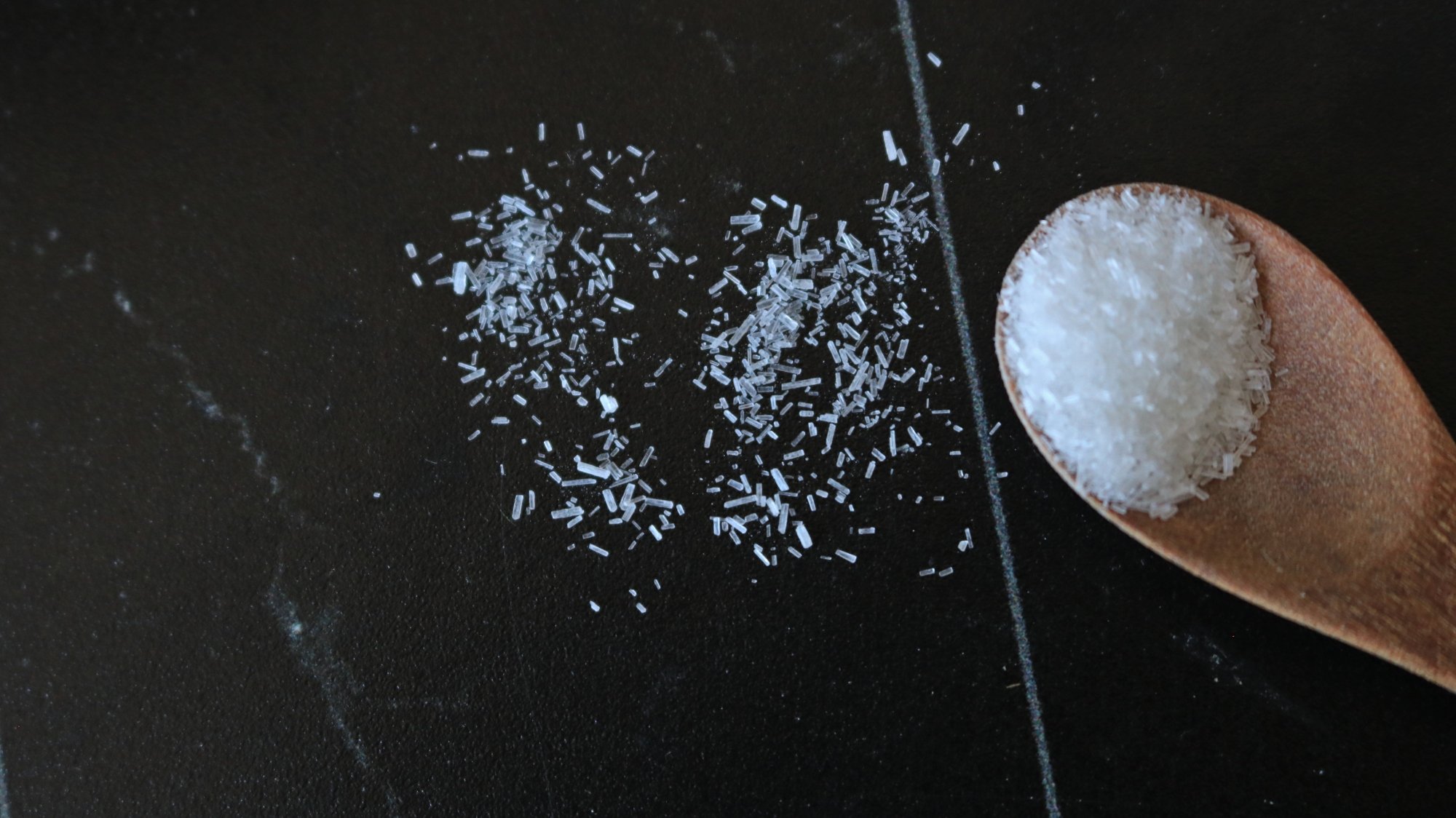
Monosodium glutamate is a teeny, clear, crystalline substance. It looks a lot like salt at first glance, but when you look closely you’ll see that the granules are longer and more regular in shape. It dissolves quickly so it doesn’t have a texture when you eat it. 

A close-up shot of MSG crystals on a black surface.

Credit: Allie Chanthorn Reinmann

We identify the flavor of MSG as umami, or savory. It’s one of the five elemental flavors we can detect: umami, salt, sweet, sour, and bitter. Like sweet or salty, or any building block, it’s not exactly like anything else. Umami is a word we can use to describe other things, though, and that can help you identify when you taste it. 

I often can taste umami in deeply savory foods—dishes with mushrooms, meats, olives, aged cheeses or yeast extracts. When you eat pizza, especially pepperoni pizza, umami is there. Umami adds complexity of flavor, almost like a bass line beneath the music of the entire dish. If you take a bite of risotto and you can feel your mouth water, MSG is actually what is making that happen. When you eat MSG, the glutamate receptors in your taste buds (yep, your body was made to detect glutamates) fire up and actually trigger salivation.

Use MSG in your cooking and baking

I want all of my cooking to make people salivate and take another bite. Since MSG doesn’t taste like anything, it can go in sweet and savory dishes without throwing off the flavor profile. Adding a pinch here or there is going to give your casserole, spaghetti sauce, chocolate cake, or blondies recipe an irresistible je ne sais quoi. I highly recommend adding MSG to brownies—here’s my recipe for dark chocolate soy sauce brownies, but you can use boxed mix and just stir in a quarter-teaspoon of MSG to get the same effect without using soy sauce.

The same goes for savory dishes. I like to stir a pinch into soups and stews toward the end, taste, and take it from there. Basically, you use MSG as you would any seasoning in your cupboard—add, taste, adjust. Even though sodium is part of the MSG equation, it’s not exactly salty, so you will likely use it in conjunction with a pinch of regular cooking salt.

If I’m making homemade stocks or broths, I’ll add about a quarter-teaspoon of MSG per four cups of liquid before I add salt simply because I might not need as much as I think. Taste the food if you can, and then add salt to taste. As I mentioned earlier, sometimes we add more salt when what we’re actually looking for is more umami. Using a smidge of MSG can actually help you reduce your salt intake. As Beth mentions in her article linked above, “sodium only makes up 12% of the weight of MSG (as opposed to 40% of table salt).”

Get an MSG cellar

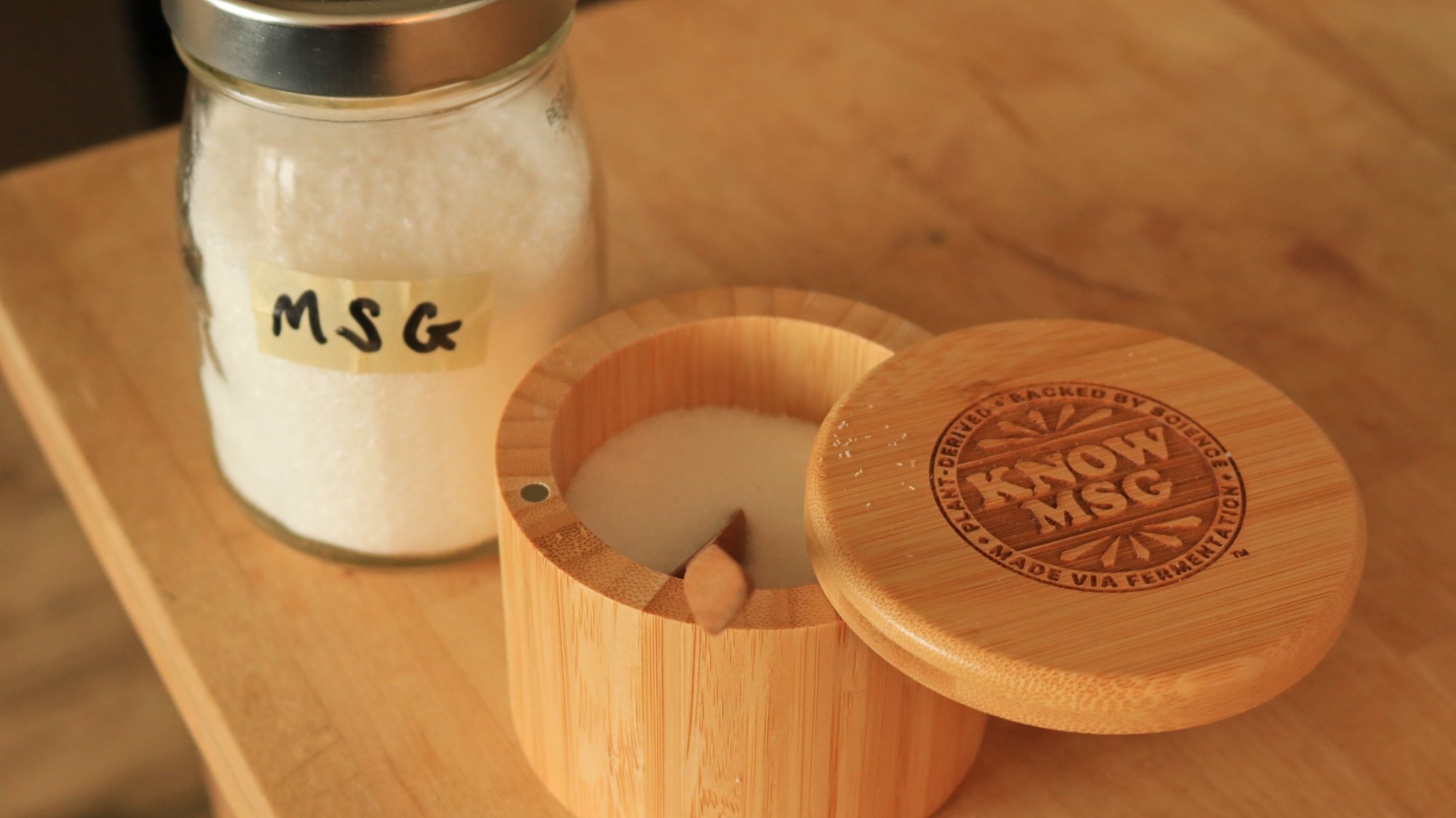
MSG in a bamboo keeper next to a jar of MSG.

Credit: Allie Chanthorn Reinmann

One of the best gifts I’ve ever gotten was my MSG cellar. But you don’t need one made especially for MSG—you can use any salt cellar. You can also buy these cute panda Ajinomoto MSG shakers instead of a cellar to easily sprinkle it onto your food just like you would salt or pepper. 

In the store, MSG might be packaged in medium-sized clear bags, or small seasoning bottles. Check the seasoning aisle of your grocery store. In the Uzbek market near me they carry clear bags of Ajinomoto and I decant it at home into my MSG cellar and smaller back-up jars for easier storage. In my Shoprite, I’ll find MSG in seasoning shakers like these from Ac’cent and Spice Supreme. A little goes a long way, so a shaker this size can last you eight months or longer. 

Here are some things I’ll always season with MSG:

All my egg dishes. MSG brings out the best in your breakfast. All it takes is a pinch per two eggs. Add it to your scrambles, omelettes, quiches, and casseroles. 

Soups and broths. MSG brings complexity, a more “round” flavor, to broths. It’s subtle, but once you have a broth with MSG it’s impossible to go without. A quarter-teaspoon per quart of broth will add a richness that pairs well with every soup, from sweet, earthy borscht to savory beef stew. 

Fresh sliced tomatoes. Enjoy the best tomato sandwich or BLT of your life. There is no better way to quickly improve crappy tomatoes than to add a mixture of MSG, salt, and sugar. And even if they’re not crappy, I still add it—sans sugar. 

Burgers and meatballs. Any mixed ground meat situation is better with MSG. Beef and veal meatballs, pork dumplings, turkey burgers—especially turkey burgers—will have a richer, more meaty flavor from a dose of MSG (about a half-teaspoon per pound of meat). This is actually a prime example of when more salt just wasn’t giving me the flavor I wanted. MSG and less salt fixed my burgers and meatballs. 

Salad dressings. Whether you’ve been looking for a way to avoid those anchovies in your homemade caesar, or your Dijon dressing needs a softened edge, MSG is a great way to improve your whole salad.

Gravies and sauces. MSG brings a welcome depth of flavor to tomato sauces, meatiness to brown gravies, and while the French might never admit this, all of the mother sauces are better with MSG.   

Roasted vegetables. Part of the reason that roasted veggies are so good is because the flavors are concentrated and the natural sugars caramelize. Adding MSG will elevate them to a whole new level of flavor. Simply sprinkle it in when you toss them with oil and salt before roasting. If you’re new to roasting, here’s the easy way to do it.

Intel’s 18A Node Just Hit An Exciting Early Milestone In Arizona Fab

Intel’s 18A Node Just Hit An Exciting Early Milestone In Arizona Fab
Intel has achieved a significant early milestone in its Arizona semiconductor fabrication plant, with the first wafers successfully processed on its advanced 18A process node. This achievement, announced at the same time as its March 13th conference, signals positive momentum for the company’s manufacturing roadmap.

The news first surfaced

Harvard Says Tuition Will Be Free For Families Making $200K or Less

Harvard University on Monday announced that tuition will be free for students from families with annual incomes of $200,000 or less starting in the 2025-26 academic year. From a report: “Putting Harvard within financial reach for more individuals widens the array of backgrounds, experiences, and perspectives that all of our students encounter, fostering their intellectual and personal growth,” Harvard University President Alan M. Garber said in a statement. “By bringing people of outstanding promise together to learn with and from one another, we truly realize the tremendous potential of the University.”

The new plan will enable about 86% of U.S. families to qualify for Harvard financial aid and expand the Ivy League college’s commitment to providing all undergrads the resources they need to enroll and graduate, according to Garber.


Read more of this story at Slashdot.

This month’s Windows updates are removing the Copilot app (accidentally)

Microsoft’s Windows updates over the last couple years have mostly been focused on adding generative AI features to the operating system, including multiple versions of the Copilot assistant. Copilot has made it into Windows 11 (and even, to a more limited extent, the aging Windows 10) as a native app, and then a wrapper around a web app, and soon as a native app again.

But this month’s Windows updates are actually removing the Copilot app from some Windows 11 PCs and unpinning it from the taskbar, according to this Microsoft support document. This bug obviously won’t affect systems where Copilot had already been uninstalled, but it has already led to confusion among some Windows users.

Microsoft says it is “working on a resolution to address the issue” but that users who want to get Copilot back can reinstall the app from the Microsoft Store and repin it to the taskbar, the same process you use to install Copilot on PCs where it has been removed.

Read full article

Comments

Microsoft’s latest Windows update accidentally uninstalled Copilot

If you woke up to a Windows PC suddenly without Microsoft’s Copilot app installed, you didn’t dream the last few years of AI hype, Microsoft just made a mistake. The latest monthly Windows 11 update that rolled out on March 11 “unintentionally uninstalled and unpinned” the AI assistant, according to a Microsoft support article spotted by The Verge.

Microsoft is aware that Copilot’s gone missing and is “working on a resolution to address this issue.” For now, if you want Copilot back, you can redownload its app from the Microsoft Store and manually pin it to your taskbar. Just like any new feature, since Copilot was added to Windows in 2023, there’s been people interested in removing it. If you weren’t satisfied with unpinning the AI from your taskbar, you previously had to do a bit of work to actually remove it. Microsoft’s update saves you some time — at least until it’s fixed.

Whether people like it or not, proving Copilot is useful in a variety of settings is still a priority for Microsoft. In March, the company shared its plans for a “Copilot for Gaming” that will live inside the Xbox app and help players with games. Microsoft has also started to offer some of its premium AI features, like the Copilot’s Voice mode, for free. Based on The Verge’s reporting, Microsoft is planning to announce even more new Copilot features at an event celebrating the company’s 50th anniversary in April.

This article originally appeared on Engadget at https://www.engadget.com/computing/microsofts-latest-windows-update-accidentally-uninstalled-copilot-174850009.html?src=rss

UK online safety law Musk hates kicks in today, and so far, Trump can’t stop it

Enforcement of a first-of-its-kind United Kingdom law that Elon Musk wants Donald Trump to gut kicked in today, with potentially huge penalties possibly imminent for any Big Tech companies deemed non-compliant.

UK’s Online Safety Act (OSA) forces tech companies to detect and remove dangerous online content, threatening fines of up to 10 percent of global turnover. In extreme cases, widely used platforms like Musk’s X could be shut down or executives even jailed if UK online safety regulator Ofcom determines there has been a particularly egregious violation.

Critics call it a censorship bill, listing over 130 “priority” offenses across 17 categories detailing what content platforms must remove. The list includes illegal content connected to terrorism, child sexual exploitation, human trafficking, illegal drugs, animal welfare, and other crimes. But it also broadly restricts content in legally gray areas, like posts considered “extreme pornography,” harassment, or controlling behavior.

Read full article

Comments

The Blink Mini 2 Is at Its Lowest Price Right Now

We may earn a commission from links on this page. Deal pricing and availability subject to change after time of publication.

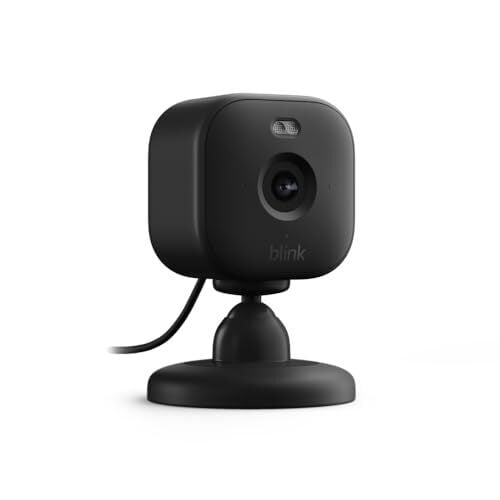
The Blink Mini 2 is currently $19.99 (down from $39.99)—the lowest price it’s ever hit, according to price tracking tools.

It’s a compact, no-fuss security camera with a wide 143-degree field of view, an improved sensor for better low-light performance, and a built-in LED spotlight for color night vision (the night vision works in color with the spotlight on and black and white otherwise). Unlike the original Mini, this one can detect people, pets, and packages—but only if you’re willing to pay for a Blink subscription ($3/month for one camera, $10 for unlimited). Without it, you still get live views, motion detection, and local storage with the Sync Module 2 ($49.99, sold separately), which lets you record footage on an SD card (supported up to 256GB) instead of paying for cloud storage. The camera works with Alexa and supports IFTTT for smart home integrations, but there’s no Google Assistant or Apple HomeKit support.

The Mini 2 is IP65-rated, according to this PCMag review, but if you’re thinking about using the Mini 2 outdoors, you’ll need the $9.99 Blink Weather Resistant Power Adapter to make it outdoor-ready—because the default power cable isn’t water-resistant. That extra cost is worth considering, especially if you’re comparing it to alternatives like the TP-Link Tapo C120, which is currently $24.99 (down from $39.99) and fully weatherproof out of the box. The Tapo C120 also captures 2K video instead of 1080p and includes free AI-powered alerts without a subscription. If sharper footage and free smart detection are must-haves, that extra $5 might be the better buy.

That said, the Blink Mini 2 still holds its own if you’re already in the Blink ecosystem or just want an affordable indoor camera with Alexa compatibility. Through the Blink Home Monitor app, you can fine-tune motion settings, control the spotlight, and adjust privacy features.

Alphabet Spins Off Laser-Based Internet Project Taara From ‘Moonshot’ Unit

Alphabet is spinning out Taara, a laser-based internet company from its X “moonshot” incubator, securing backing from Series X Capital while retaining a minority stake.

Taara’s technology transmits data at 20 gigabits per second over 20km by firing pencil-width light beams between traffic light-sized terminals, extending traditional fiber-optic networks with minimal construction costs.

Based in Sunnyvale, California, the company operates in 12 countries, including India and parts of Africa, where it created a 5km laser link over the Congo River between Brazzaville and Kinshasa. The two-dozen-strong team partners with telecommunications firms like Bharti Airtel and T-Mobile to extend core fiber-optic networks to remote locations or dense urban areas.

Taara originated from Project Loon, which was shut down in 2021 after facing regulatory challenges. The company is developing silicon photonic chips to replace mirrors and lenses in its terminals and potentially enable multiple connections from a single transmitter.


Read more of this story at Slashdot.

The Blink Mini 2 security camera has dropped to only $20

You can save on some of our top picks for the best security cameras as part of a sale on Blink gear. For instance, the Blink Mini 2 is available for $20, which is half off the list price. It matches a record low.

A two-pack of the Blink Mini 2 is down to $38 as well. That’s not quite a record low, but you’ll still save $22 due to the 46 percent percent discount.

We reckon the Blink Mini 2 is the best budget security camera around. You can adjust the webcam-style camera to a variety of angles. It’s weather-resistant, so you can place it outside if you have a special power adapter. The camera picks up decent (but not great) images, particularly those captured in the infrared nighttime view. It also has a built-in LED spotlight.

Since Blink is an Amazon company, of course the Mini 2 ties into the Alexa ecosystem. You’ll just need to have a Blink account before you can actually use it. As you might expect, you’ll be able to view images captured by the Mini 2 via the Alexa app on an Echo Show, Fire Tablet or Fire TV but, curiously, not iOS or Android. To see the captures on your phone or tablet, you’ll instead need to use the Blink app. You’ll get some extra features — such as cloud storage and people and pet detection — if you sign up for the Blink Subscription ($3 per month for one camera, $10 per month for any number).

Elsewhere in the sale, a five-pack of the Blink Outdoor 4 cameras is half off at $200. This is our recommendation for the best security camera for Alexa users. Having five of them should be enough for many folks to keep an eye on everything that’s going on around their property.

Follow @EngadgetDeals on X for the latest tech deals and buying advice.

This article originally appeared on Engadget at https://www.engadget.com/deals/the-blink-mini-2-security-camera-has-dropped-to-only-20-171417083.html?src=rss

Bumble adds ID verification and other safety features

The dating app Bumble is adding a few new safety features, including an ID verification tool. This lets users submit a government-issued ID to the system. Once confirmed, profiles will get a nice and shiny verification badge to let potential connections know everything is on the up and up.

Bumble users can now filter profiles based on who is ID verified. There’s even a request tool to ask a match to complete the process. ID verification is now available in the US, UK, Australia, Canada and several other countries, with more to come in the near future.

The platform has also introduced something called Share Date. This safety feature lets users share details of a date with a trusted contact. The date details include who they’re meeting with, when it starts and where the meeting is set to take place. If plans change, the information can easily be updated via the app. Match has something similar, which is called Date Check-In. Tinder even has its own version of this tool.

There’s a final safety update, as Bumble has updated the Review Before You Send tool. This alerts members when a message may be inappropriate. It started as a pilot program that was rolled out as part of the Compliments feature, but has now been extended to all chats.

An ad.
Bumble

Finally, today’s update brings something called Discover. This is a “personalized experience and a fresh way to find common ground on Bumble.” To that end, it displays the most compatible people based on similar interests and dating intentions. The list is refreshed daily. Bumble says that the Discover page will continue to improve and provide more accurate connections as users update preferred interest badges and complete profiles.

This article originally appeared on Engadget at https://www.engadget.com/apps/bumble-adds-id-verification-and-other-safety-features-170228333.html?src=rss

You Can Now Use ChatGPT As Your Default Android Assistant

The pace of AI development doesn’t seem to be slowing down, and we’re seeing a flurry of updates for the big apps and models every week. One of the most recent of those updates makes it easier to integrate ChatGPT into Android: You can now set it as the default digital assistant on your phone or tablet.

As spotted by Android Authority, you need to have the beta version of ChatGPT for Android installed for this to work at the moment, though the feature will no doubt roll out to everyone in due course. If you’d rather have ChatGPT answering your questions about life, the universe, and everything, this makes it easier to access.

To access the beta for ChatGPT, you need to have ChatGPT for Android installed already. Then, open the Play Store on Android, tap your profile picture (top right), and choose Manage apps and device > Manage. Select ChatGPT to see its full listing page, and you should then see a Join the beta box you can tap Join in.

The usual rules for betas apply: You get access to the newest features first, but you might also see more bugs along the way. After a few minutes, once you’ve been registered as a ChatGPT beta tester, you’ll see an update appear for the app and you can then dive in.

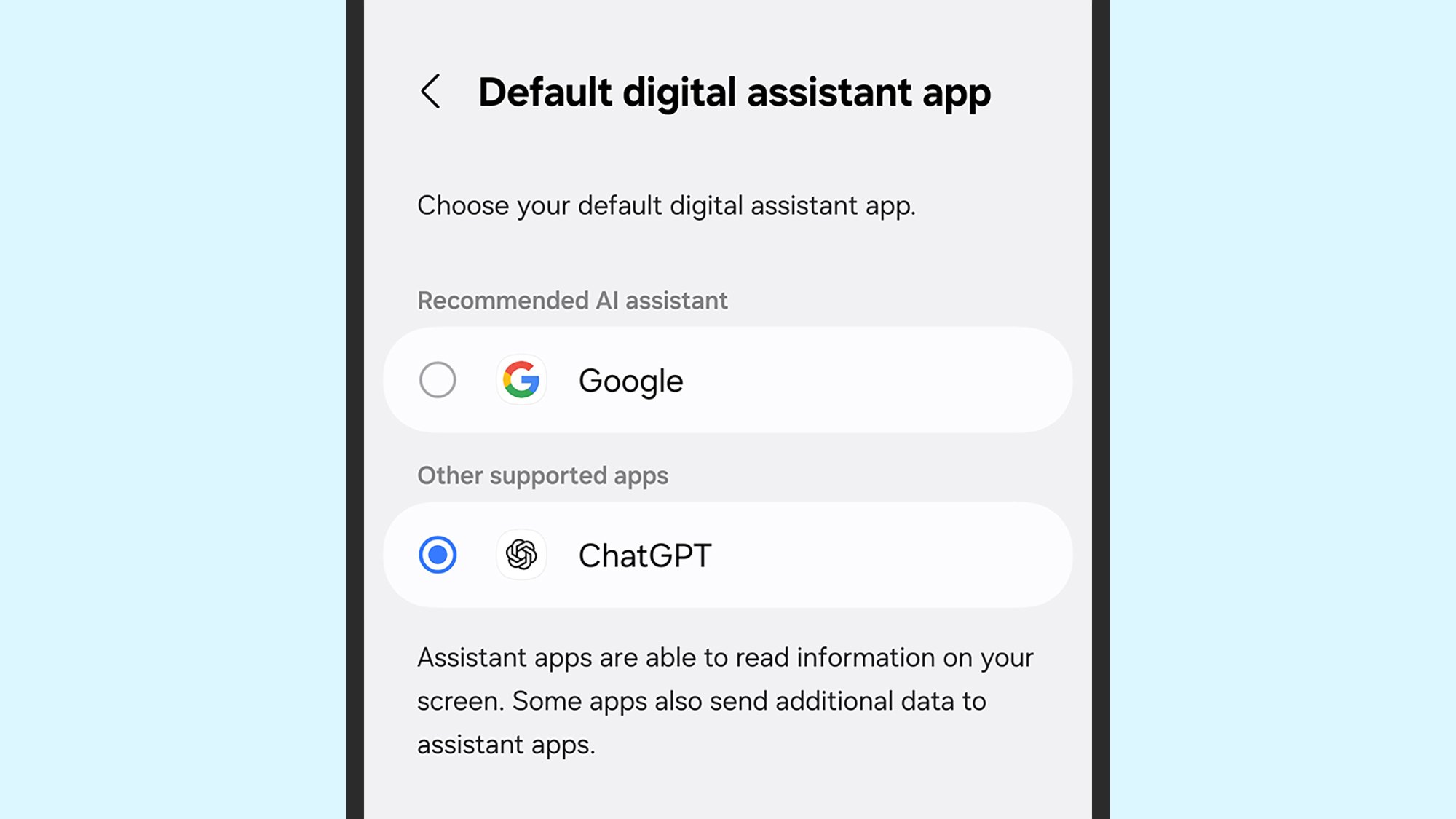
To change the default assistant to ChatGPT or any other app on Android, open Settings and Apps: You can then tap Default apps (on Pixels) or Choose default apps (on Galaxy phones) to find the Digital assistant app option. On the next screen, tap Digital assistant app again to make your choice.

Using ChatGPT as your default assistant

Default assistant setting
Changing the assistant setting on a Galaxy phone.
Credit: Lifehacker

Changing this setting doesn’t give ChatGPT any more capabilities—it just means the AI bot can be launched in the same ways you would normally launch Gemini. That can be with a long press on the power button or a swipe up from the bottom-right corner of the screen, depending on how your device is configured, though there’s no “hey ChatGPT” voice shortcut you can use.

This will work for all ChatGPT users, whether you’ve subscribed to a paid plan or not, though the features and underlying AI models you get once you’ve launched ChatGPT will depend on your subscription level. The bot appears on screen as a floating blue circle and goes into the Gemini Live voice mode that’s now available to everyone, so you can have a two-way spoken conversation with it.

Bear in mind the limitations of ChatGPT as a digital assistant at the moment: It doesn’t have anywhere near the same feature set as Google Gemini when it comes to getting its hooks into Android and your other apps. You can’t use ChatGPT to set timers or add events to your Google Calendar, for example, and you can’t queue up songs in Spotify.

On the other hand, you can have a chat about almost every topic imaginable (watch out for hallucinations), and get information that’s available on the web—such as the latest sports scores or the local weather forecast for your part of the world. You can get ChatGPT to invent text, create images, and everything else the chatbot is capable of.

No doubt more improvements are on the way before OpenAI rolls this option into the stable ChatGPT app. It’s an interesting contrast to the iPhone: It seems unlikely that Apple will ever allow an alternative app to take Siri’s spot as the default assistant, even if you can now access ChatGPT through Siri.

Apple should focus on fixing Siri, not redesigning iOS again

Now that Apple’s recent slew of hardware releases are behind us, we got some news on the software side last week. First, the company publicly announced that it was delaying the smarter, more personal version of Siri that’ll be powered by Apple Intelligence. Then, rumors sprang up again that Apple was giving an extensive visual update to its software platforms, including iOS 19 and macOS 16 which are expected to be revealed at WWDC in June.

The sources for this redesign rumor are solid. Jon Prosser dropped a video on his YouTube channel Front Page Tech back in January where he said that he had seen a redesigned Camera app for the next version of iOS that had a number of interface changes that made it feel more like a visionOS app. His thinking is that Apple wouldn’t redesign a core app like Camera without bringing changes to some of the rest of the OS, as well.

Mark Gurman at Bloomberg followed up on that, reporting that iOS 19, iPadOS 19 and macOS 16 “will fundamentally change the look of the operating systems and make Apple’s various software platforms more consistent.” He also specifically mentioned visionOS, which runs Apple’s wildly expensive ($3,500) Vision Pro headset, as an inspiration for the new design.

This rumor could definitely have legs. Even though visionOS doesn’t feel radically different to Apple’s other software, it does make sense that the company would unify visual themes across all its platforms and devices as it usually does. But at a time when the company is struggling mightily with its Apple Intelligence rollout and delaying a new Siri (which feels to me like the most significant update the company could deliver), slapping a new coat of paint on iOS and macOS feels like a distraction at best and misguided priorities at worst.

The delay to a more intelligent Siri is a major blow to Apple’s AI ambitions. Since it was first introduced at WWDC 2024, it’s been the single thing that might make me upgrade my phone to one that works with Apple Intelligence. The promise is an assistant that has a better understanding of the apps on your phone and can use them more extensively on your behalf; it can do things like automatically adding addresses to a contact card. Another example Apple showed was asking Siri to find an image of your driver’s license, take the ID number on it and put it into a form you’re filling out. It’ll also have more awareness of what’s on your screen and better natural language understanding.

That, of course, is all just a promise right now. Apple commentator John Gruber, who typically takes a fairly positive view of the company, absolutely ripped the company a new one over the Siri delay. He says that at WWDC 2024, he and other members of the press saw controlled demos of Apple Intelligence features, but no proof of a smarter Siri — thus far, all we’ve seen are product videos showing what it could do. In retrospect, Gruber says that a smarter Siri is nothing more than “vaporware.” “They were features Apple said existed, which they claimed would be shipping in the next year, and which they portrayed, to great effect, in the signature ‘Siri, when is my mom’s flight landing?’ segment of the WWDC keynote itself,” he says. “Apple was either unwilling or unable to demonstrate those features in action back in June, even with Apple product marketing reps performing the demos from a prepared script using prepared devices.”

Apple’s presentation of Siri at WWDC 2024 can be seen above.

It’s a bad look for Apple, and was made worse when Bloomberg published a piece showing the turmoil inside the Siri team following the delay announcement. The publication reported that Apple senior director Robby Walker held an all-hands meeting for the Siri team saying the delays have been “ugly and embarrassing,” and that the decision to promote these features to the public before they were ready compounded the issues. To be fair, Apple has shipped a few Siri improvements since the fall (most significantly the addition of ChatGPT), but they’re not things that have radically changed the voice assistant’s most glaring weaknesses.

Additionally, Gurman’s sources claim that we won’t see these features until sometime in 2026 at the earliest, long after iOS 19 would be released. With all that in mind, these redesign rumors feel like a fresh coat of paint to distract people from the structural issues with Apple Intelligence as a whole and the delays on a massively important feature.

The timing also feels strange. While Apple hasn’t embarked on a full-scale redesign of iOS since it released iOS 7 way back in 2013, the company has made small but significant changes and refinements nearly every year since that have added up to software that’s far more customizable and refined than it was more than a decade ago. Since iOS 14 in 2020, Apple added home and lock screen widgets, major customization features for lock screen visuals, and the wild notion of not having all your apps aligned to an inflexible grid. Apple also added the ability to color-tint the icons to match your background image (or just make them any color you want, dark or light). These all add up to an iOS that is a lot more visually customizable than ever before.

Android has had these features for years, so I’m not praising Apple for being some paragon of user freedom. But it’s clear from these changes that Apple is finally interested in giving users more control over how their phones look. With all this as well as many smaller visual tweaks the company has made over the years, it’s fair to say that iOS 18’s design language has evolved far beyond what we saw with iOS 7’s complete and abrupt makeover.

As for macOS, Apple has given it several notable visual updates over the last decade or so. In 2014, OS X Yosemite largely brought over the flatter design from iOS 7 that removed skeuomorphic elements that had littered iOS and the Mac for years. Apple continued to tweak it over the following years before giving it another big visual overhaul in 2020 with macOS Big Sur. That was the first OS that supported Apple’s M-series Macs and as such the company dropped the OS X branding and moved to macOS alongside the new design.

While I was initially skeptical of a major macOS visual refresh, I am a little surprised to remember that it’s been almost five years since Big Sur launched — maybe we’re right on schedule for a visual refresh. And in recent years, Apple has wanted to keep its platforms as aligned as possible, both from a feature perspective as well as how they look. It’s not hard to imagine designers wanting to unify things across platforms again.

Given that the user interface is literally how we interact with all these devices, a design refresh can certainly keep things feeling new, even if the functionality hasn’t changed much. And without a smarter Siri to look forward to at WWDC this year, a fresh coat of paint might be Apple’s best option to make its next software updates feel new. That said, I don’t mean to suggest that the people working on the visual design of Apple’s software platforms could or should abandon their work and rush a better Siri out the door — the skill sets and priorities of those two teams are surely completely different. But at the very least, Apple’s going to have to more forcefully address the elephant in the room that is Siri than it has before it can try selling us on a new design.

This article originally appeared on Engadget at https://www.engadget.com/ai/apple-should-focus-on-fixing-siri-not-redesigning-ios-again-164446205.html?src=rss

European Tech Firms Push EU for ‘Buy European’ Tech Mandate

More than 80 signatories representing about 100 European tech organizations have urged EU leaders to take “radical action” to reduce reliance on foreign digital infrastructure, according to a letter sent to European Commission President Ursula von der Leyen.

The coalition, including Airbus, Proton, and OVHCloud, warns Europe “will lose out on digital innovation” and become almost completely dependent on non-European technologies “in less than three years at current rates.”

The group calls for public procurement requirements mandating European-made tech solutions, development of common standards, and creation of a “Sovereign Infrastructure Fund” for capital-intensive areas like chips and quantum computing. “Our reliance on non-European technologies will become almost complete in less than three years at current rates,” the letter states, citing concerns over U.S. technological dominance following recent comments from Vice President JD Vance criticizing European regulations.


Read more of this story at Slashdot.