We may earn a commission from links on this page.
I’ve used a lot of fitness wearables, but none have been a constant presence in my life for as long as the Oura ring. I woke up to my first night of collected data on November 3, 2020, and I’ve worn an Oura ring nearly every night since. Here’s what I’ve learned from over 1,500 days worth of data, including my thoughts on the hardware, the app, and on whether it’s all been worth it.
How the generations compare
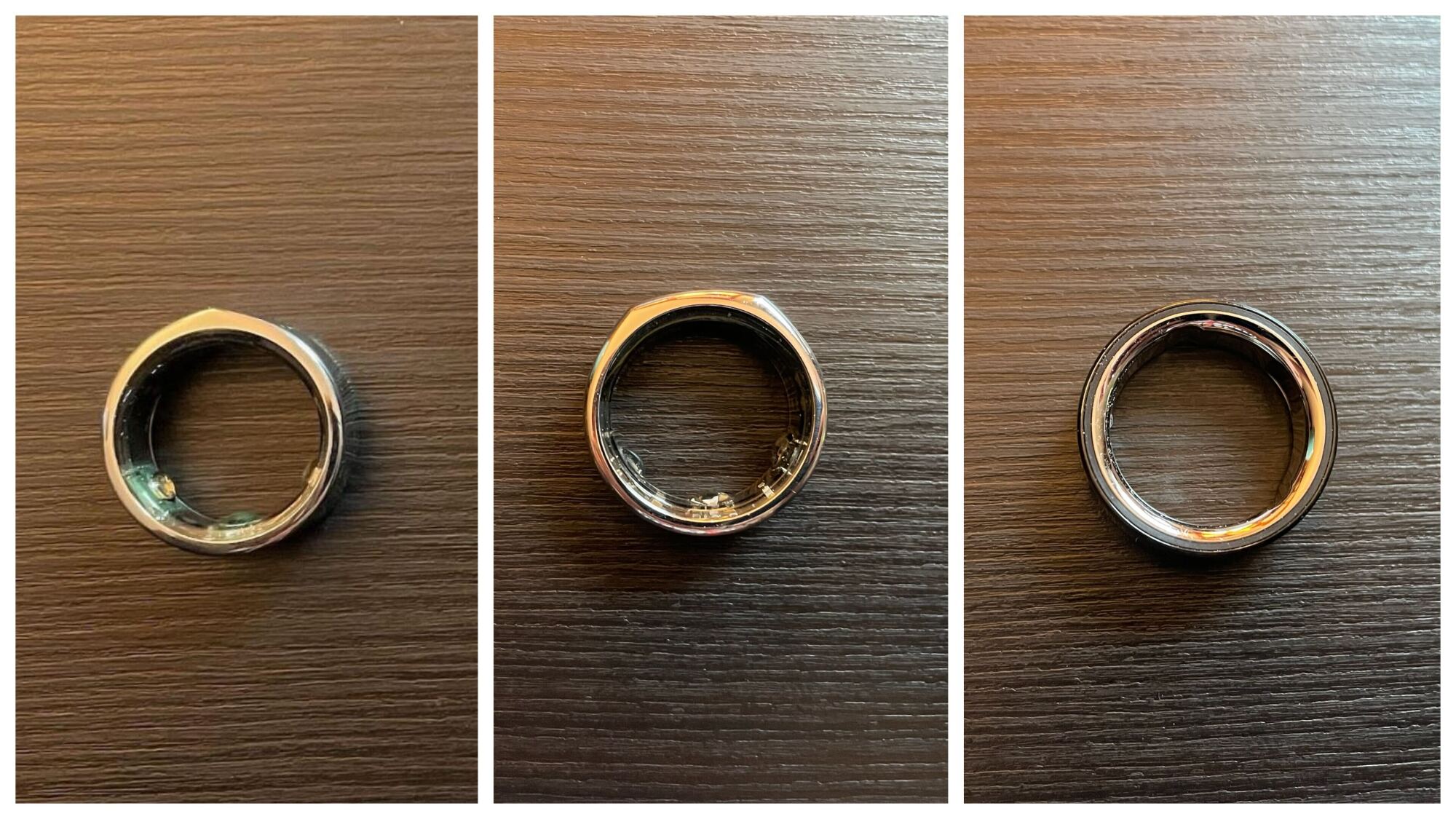
Oura is now on its fourth generation of rings, and I’ve used generations 2, 3, and 4. Here’s my retrospective of each, including what was new with each generation, and when and why I upgraded (or didn’t).
Generations 2, 3, and 4
Credit: Beth Skwarecki
Gen 2
My first Oura ring, in late 2020, was a review unit from the company that I returned after I wrote about it. It was a second generation (“gen 2”) ring whose exact color, shape, and size I don’t recall. Shortly after sending it back, I decided I’d like to buy one of my own, so I ended up getting a silver Balance in size 7, to wear on my ring finger.
The gen 2 had all the important features already: It could record my HRV and resting heart rate, make a pretty good guess at when I was awake or asleep, and make a not-so-great guess at when I was in each stage of sleep. It was widely recognized as the best wearable at sleep tracking, although that still comes with caveats—as we’ll see.
The ring also recorded my respiratory rate and the way my skin temperature fluctuated from night to night. Its ability to detect changes in temperature was being touted as a possible early detection mechanism for COVID. That didn’t pan out for me either, as we’ll see below, but it was a highly touted feature at the time.
Gen 3
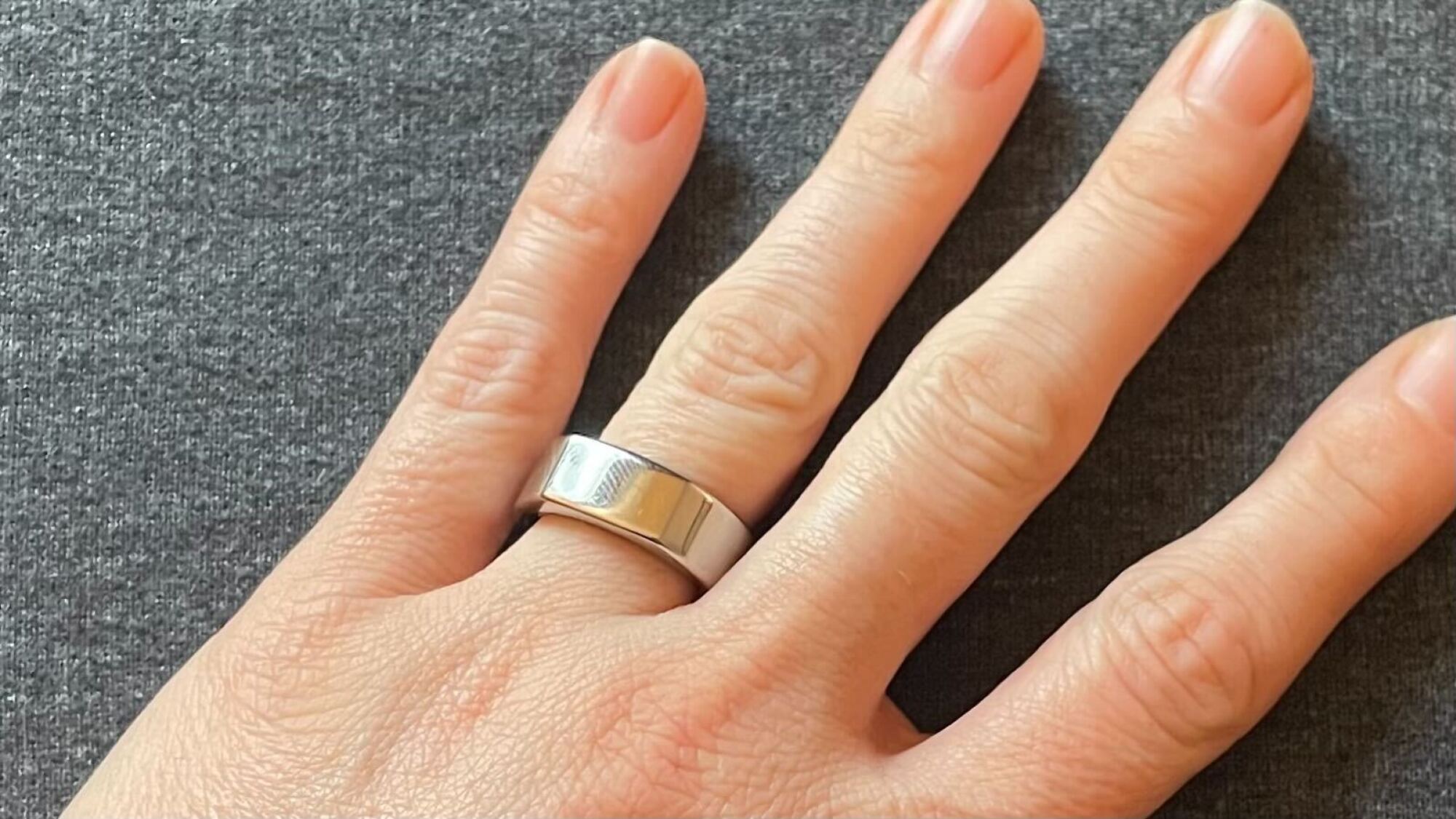
My third generation Oura ring—a silver Heritage.
Credit: Beth Skwarecki
When Oura came out with the gen 3, I reviewed that, too, and the company recommended wearing it on my index finger if possible. So I wore a gen 3 silver Heritage on my index finger and hated using that finger for the ring. I guess I’m in the habit of absentmindedly rubbing my nose with the side of my index finger, because anytime my nose was itchy, I’d reach up without thinking and gouge myself with the ring. When I was done with that review, I gladly switched back to my old gen 2 ring on my ring finger.
But then one day, my beloved gen 2 ring died during the night, when I could have sworn I had just charged it. The same thing happened again a night or two later. I realized the battery must be dying, and with luck I was just inside the two-year warranty period. I’ll say more about battery longevity below, but two years appears to be a typical lifespan—and the warranty no longer covers you that long. But at the time, I got a free replacement, and it was a gen 3 (same size and color, but Heritage shape, since they no longer offered the Balance) and they threw in a lifetime subscription.
New with the gen 3 ring was the subscription model: $5.99/month to be able to view your data from the ring. (Without the subscription, you get sleep and readiness “scores,” which are useless without the underlying data, in my opinion.) Owners of gen 2 rings didn’t have to start paying a subscription fee if they kept using their old ring, and there was a lifetime subscription promotion for anyone who upgraded to the gen 3 around that time.
The gen 3 ring had the same fit and interior shape as the gen 2, but it now had green lights that glowed at night, which I found annoying when putting my kids to bed. It was during the gen 3 era that workout heart rate became available. I never found it very useful, although I was impressed that it auto-detected when I went for a walk or a run. It also interpreted brushing my kid’s hair as “dancing.” Good guess, I suppose!
Two years later, in 2024, the battery died again. (A lifespan of two years seems to be sadly common.) This time my ring was out of warranty, since Oura had switched to only offering a one-year warranty. But the gen 4 had just launched, and presumably the company was trying to get rid of their gen 3 stock. They sent me an exact duplicate of the dead one, and that’s the ring I’m still wearing today.
Gen 4
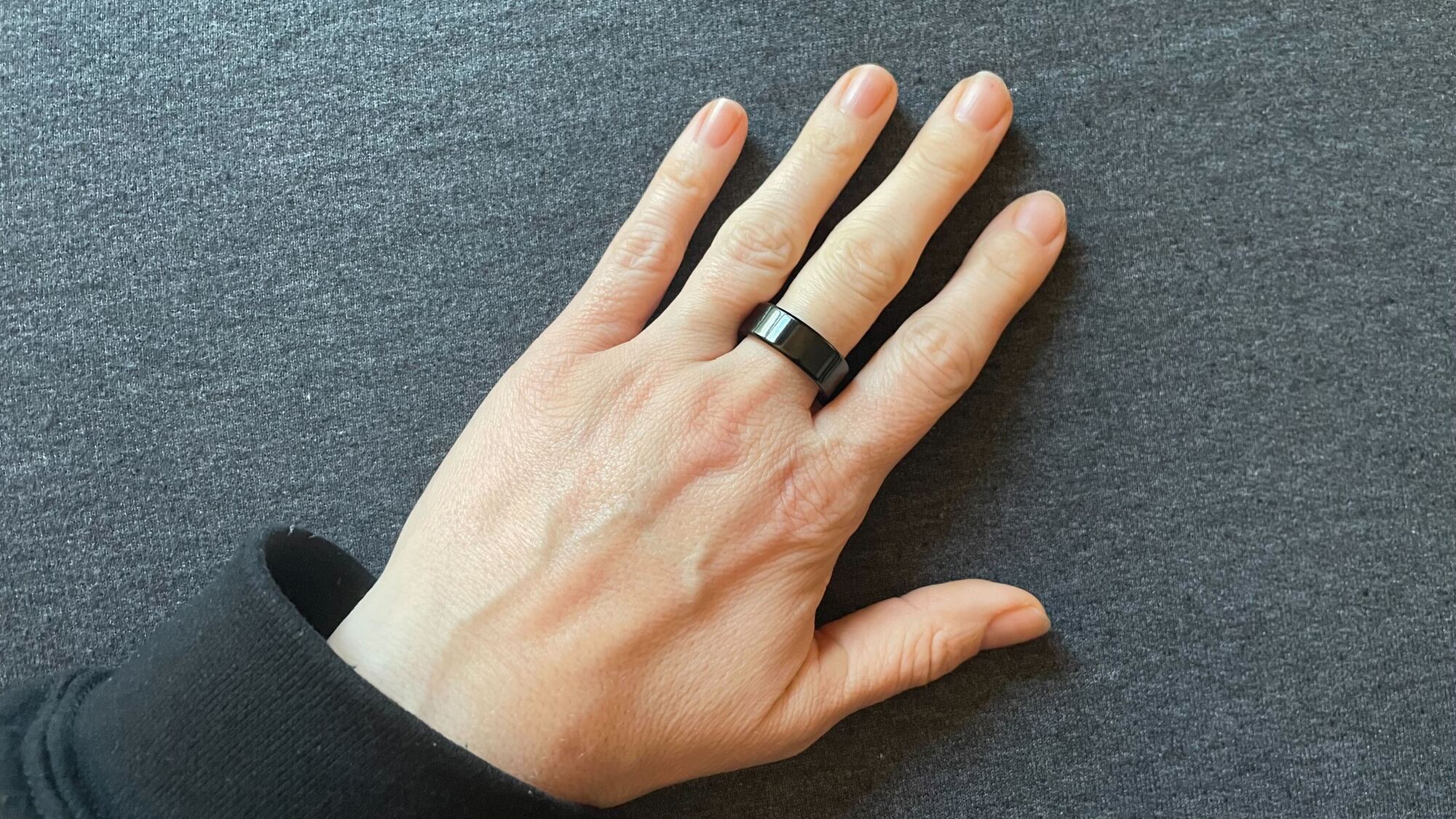
The fourth generation Oura ring that I just reviewed.
Credit: Beth Skwarecki
I did eventually get my hands on a gen 4 Oura ring to review (round shape, black, size 8 for my middle finger). I wrote a comparison of the gen 3 and gen 4 rings, and a review of the gen 4. The gen 4 is nice. But when I was done reviewing it, I happily went back to the gen 3. The essential features are all the same, and I preferred the way the gen 3 fit.
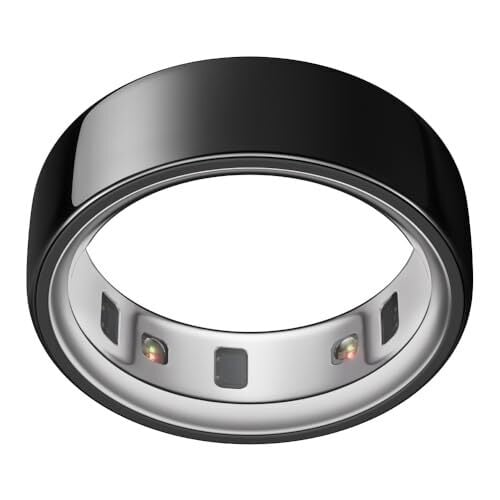
With the gen 4, the ring lost its sensor bumps, making it smoother on the interior but also changing the sizing. The gen 4 comes in a wider range of sizes, and its accuracy at picking up heart rate is improved. The app was also redesigned around this time, the better to manage all the different features it’s acquired over the years—stress scores, resilience, chronotype, and cardiovascular age have all needed to squeeze in, and the main screen now has a timeline of your day that includes exercise sessions and more.
So if you’re keeping count, I’ve worn six different individual Oura rings, from three different generations (2, 3, and 4), in three different shapes. If we’re counting only rings that I’ve owned for personal use, that would be one gen 2 and two identical gen 3 units, the first two dead from battery issues and the third a new-ish unit that is doing well so far.
My favorite generation
Technologically, the gen 4 ring is the best of the generations, but sentimentally, the gen 2 is the one I miss the most. I liked its single-pointed shape, the better to fidget with and get it oriented correctly on my finger. And I loved that the LEDs were infrared rather than visible light. There was no green glow under the ring at night. If they brought back a version of the Oura without the green glow, I’d snap it up in a heartbeat.
The features Oura has added over the last four years have been nice-to-haves, but not game changers. I don’t really care about activity tracking; the ring doesn’t do it well, so I either don’t track my workouts or I track them with another device like a Garmin.
The everyday experience
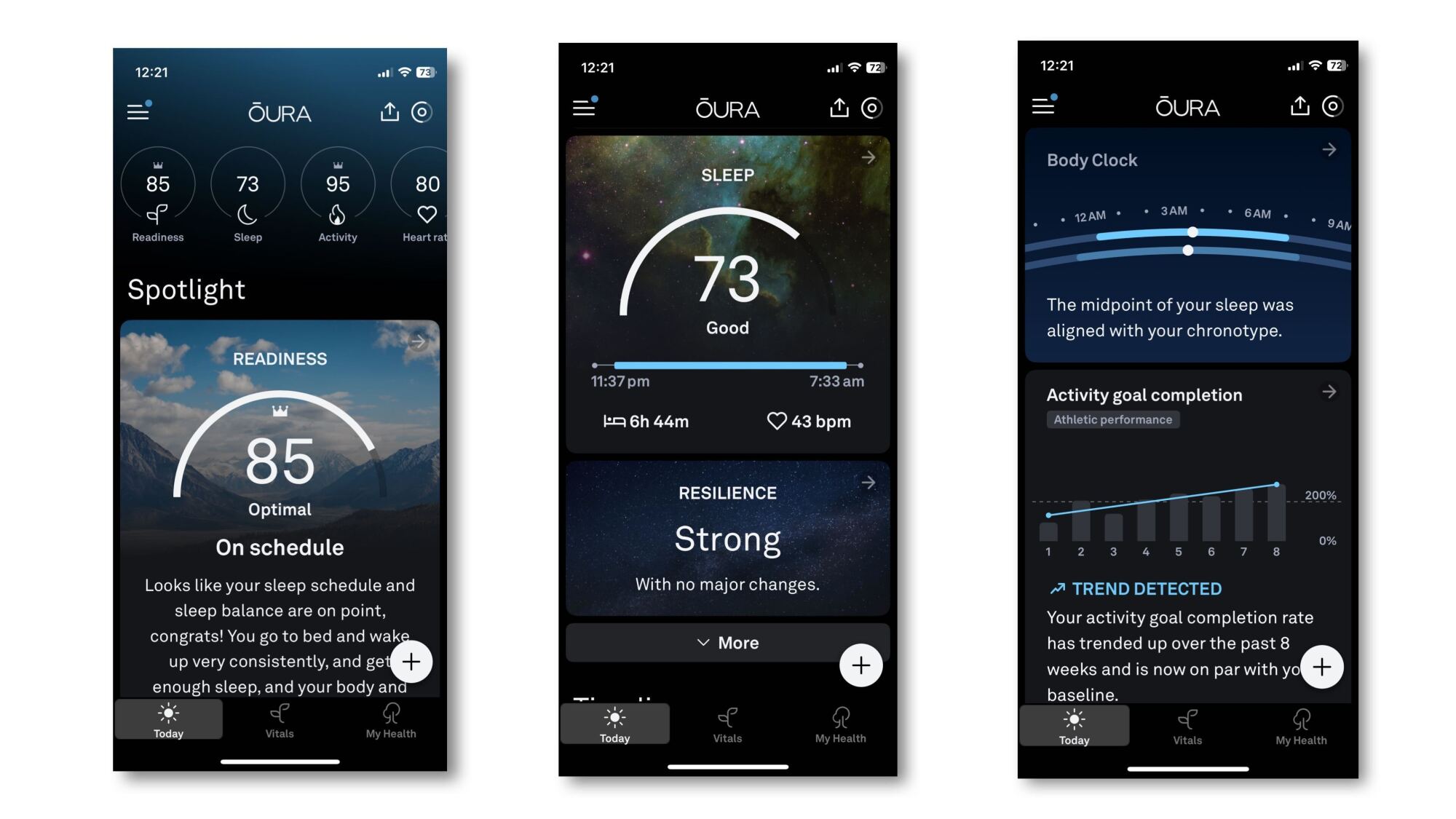
The top of the Today screen, and what you see as you scroll down.
Credit: Beth Skwarecki
It takes a few weeks for any wearable to learn your usual numbers, the Oura ring included. This is important to remember because the numbers reported by the ring make the most sense when compared to your own baseline, not to what is a “good” score for others. This is especially true for heart rate variability (HRV), which is one of the more important numbers the ring collects. An HRV of, say, 52 might be high for one person, signaling that they’re well recovered, and unusually low for another, signaling that they may be sick, overworked, or stressed.
Knowing that, people sometimes ask on forums whether it’s OK to start wearing their ring during a stressful time or on vacation. Having been at this four years, I say: Start wearing it whenever. Two months from now, the exact metrics you had on your vacation will be history. Heck, you might enjoy looking back at them for comparison’s sake. But your baseline is built over time and changes with time. It’s not something the ring imprints on like a duckling.
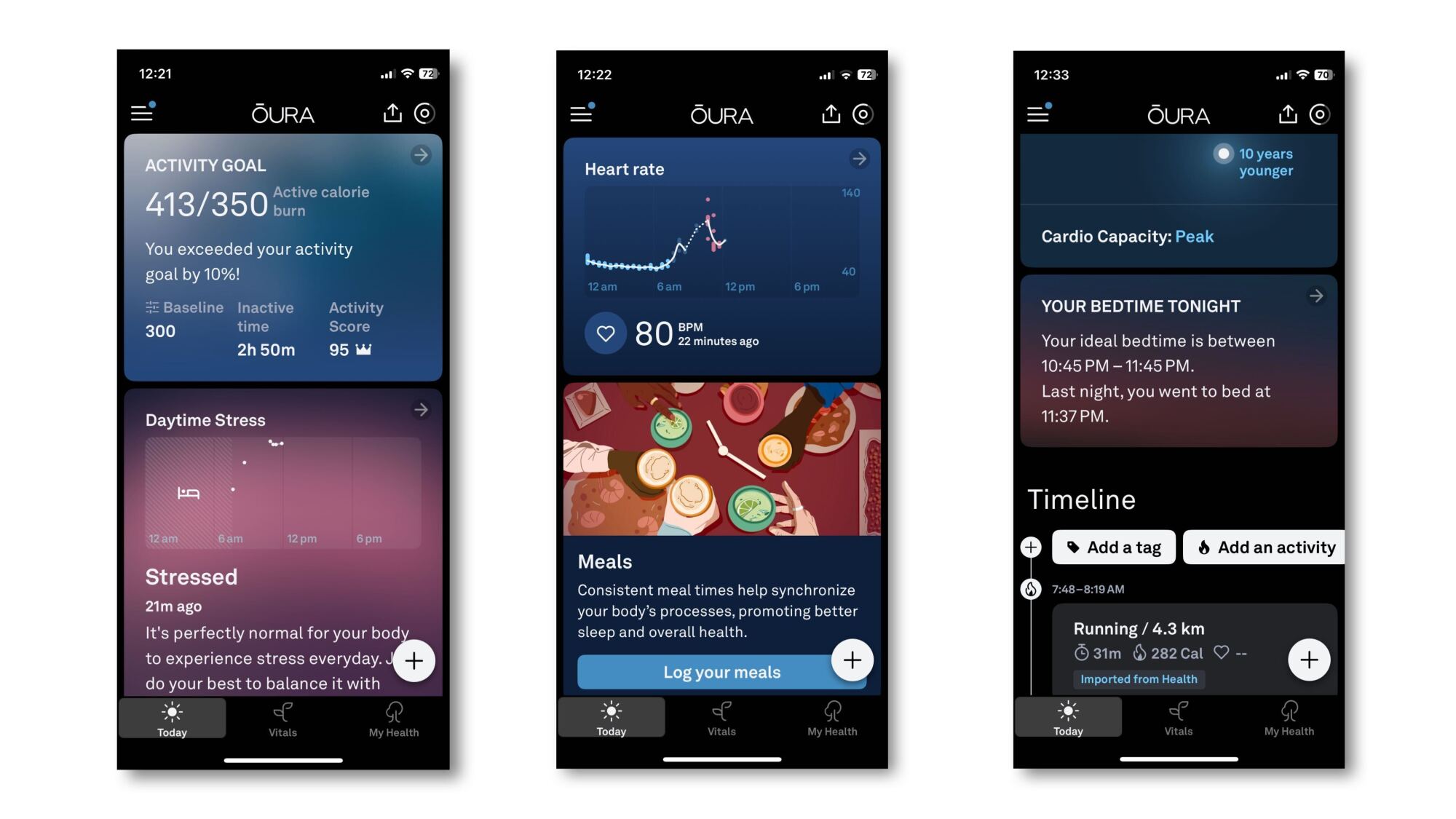
Continuing to scroll down the Today screen.
Credit: Beth Skwarecki
These are screenshots of what my Oura app shows me right now, and if you have a ring you’ve been wearing for at least a few weeks, you’ll see something similar. All of the screenshots you’ve seen so far are from the “today” tab, your home screen when you open the app. Most of them are summaries, and you can see more detailed data if you tap them, or if you go into other areas of the app. The scores at the top of the screen—readiness, sleep, and so on—each lead to one of these more detailed views.
As I’ve written before, I find that “recovery” scores are too imperfect to be useful. Oura tries to be smart by bumping the score up or down based on a variety of things it measures. But these don’t always match up well to reality. For example, when the sleep algorithm was reading my REM stages poorly (more about that below), it would always ding me for my supposedly bad sleep. And it would sometimes reduce my readiness score if I went for a long walk on a rest day, even though I know from experience those long walks help me more than they hurt.
Instead, I look at the raw numbers for my resting heart rate and my HRV. If I’m well rested, and I’m recovering well from the stresses of training and life, my HRV will be high and my RHR will be low. It’s normal for those numbers to get worse over the course of a week as I train and build up some fatigue, and then I see them get better once I’ve had an easier day or two. Watching that rhythm is what helps me to know if I’m recovering well, or if my stress—from training or otherwise—is steering me toward burnout.
While RHR and HRV generally track the same trends (high HRV and low RHR are “good”) I find they react a little differently. My RHR shoots up anytime my body is going through something stressful. That could be a heavy lifting session (my RHR often shoots up after a competition), but could also be drinking alcohol or even just staying up late. If I have a fever or a migraine, my RHR will skyrocket. Meanwhile, HRV can also dip in response to those things, but a high RHR doesn’t always come with a low HRV. It seems like RHR tells me more about how hard something is hitting me, and HRV is how well my body is dealing with it. To be clear, that’s not a scientist’s understanding of the subject, just my own conclusions about my body from looking at this data over the years.
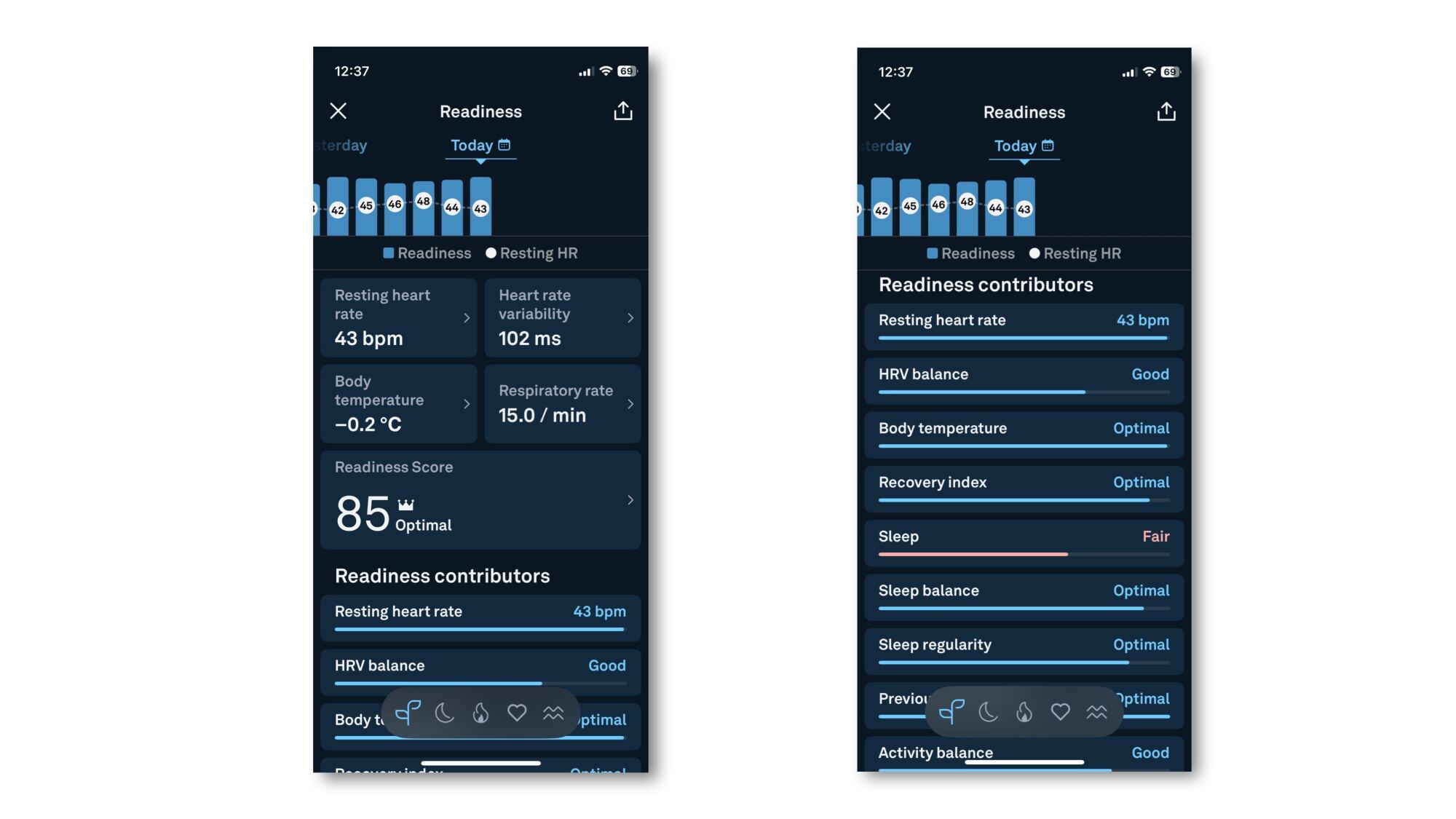
The readiness screen, and (right) what you see when you scroll down.
Credit: Beth Skwarecki
Because I pay more attention to the raw numbers over the scores or little motivational messages, my favorite screen is the one I get when I tap on my Readiness number. Here’s an example. Notice that my Readiness scores (the blue bars in the graph at the top) have been pretty similar each day this past week. But I can tell that my resting heart rate rose over the latter half of last week, was especially high (for me) on Friday, and has only just come back down to a low number after resting a bit on the weekend. Last week was a hard training week, and this week I’m tapering again for a competition, so I’m hoping to see heart rates in the low 40’s and HRV numbers 95+ as my training ramps down this week.
Also, yes, a resting heart rate in the 40’s is pretty low. Partly that’s just how I’m built (I’ve always had a low resting heart rate and a high max). Partly it’s fitness—my RHR lowers slightly when I’m doing more exercise. And partly it’s just that Oura records lower resting heart rates than other devices. When I compared the Oura ring’s numbers with those of four other wearables, Oura always gave the lowest RHRs. When it records a 43, Fitbit might record a 50. Again: compare your Oura ring’s numbers to each other, not to other people or even other devices.
Sleep staging has not been useful (and was often wrong)
For as long as I’ve been writing about wearables, I’ve been telling you—as sleep experts have been telling me—that you shouldn’t trust an app when it tells you how much light or deep sleep you got, or how much REM. Wearables tend to be reasonably good at telling how long you slept, but they’re not great at telling you when you’re in one stage versus another, nor do their measures of sleep “quality” mean anything that we can match up to a scientific meaning.
My four years’ worth of data bear this out in two important ways. The most important is simply that data on sleep quality (the “sleep score,” in Oura’s case) just duplicates information you could get by looking at total sleep time.
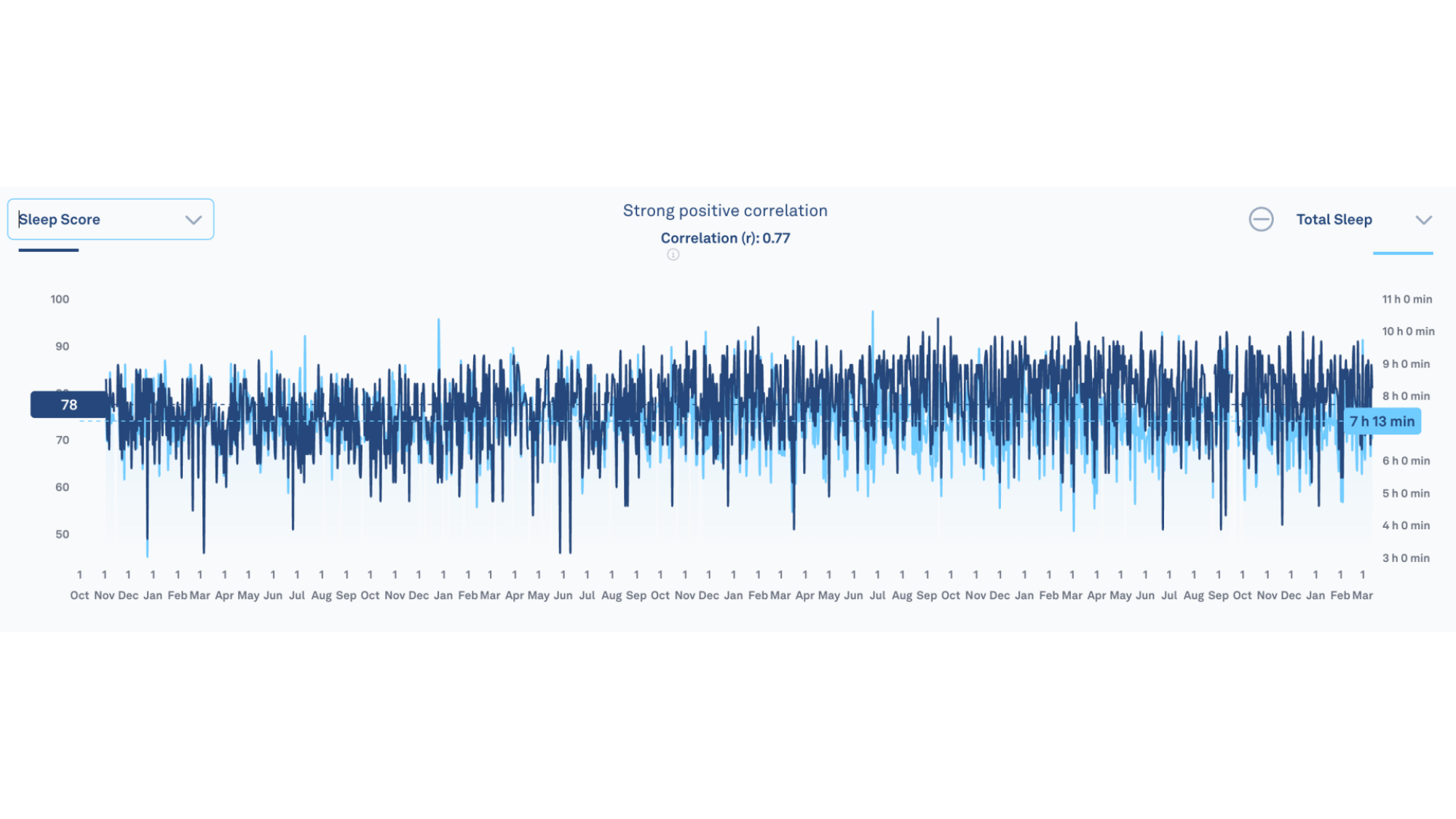
Oura has a web-based data viewer with a tool that will show the correlation between any two variables you care to compare. When comparing my sleep score with my total sleep time, surprise! There is a “strong” positive correlation, with a coefficient of 0.77. The more sleep I got, the higher my sleep score. You don’t need a ring or watch to tell you how long you slept; the old fashioned way, keeping a sleep diary, would do the same thing for the cost of a notebook and pen.
Dark blue is my sleep score; light blue is amount of sleep.
Credit: Beth Skwarecki
When it comes to sleep stages, I have an even more dramatic way of showing the pitfalls of trusting an algorithm.
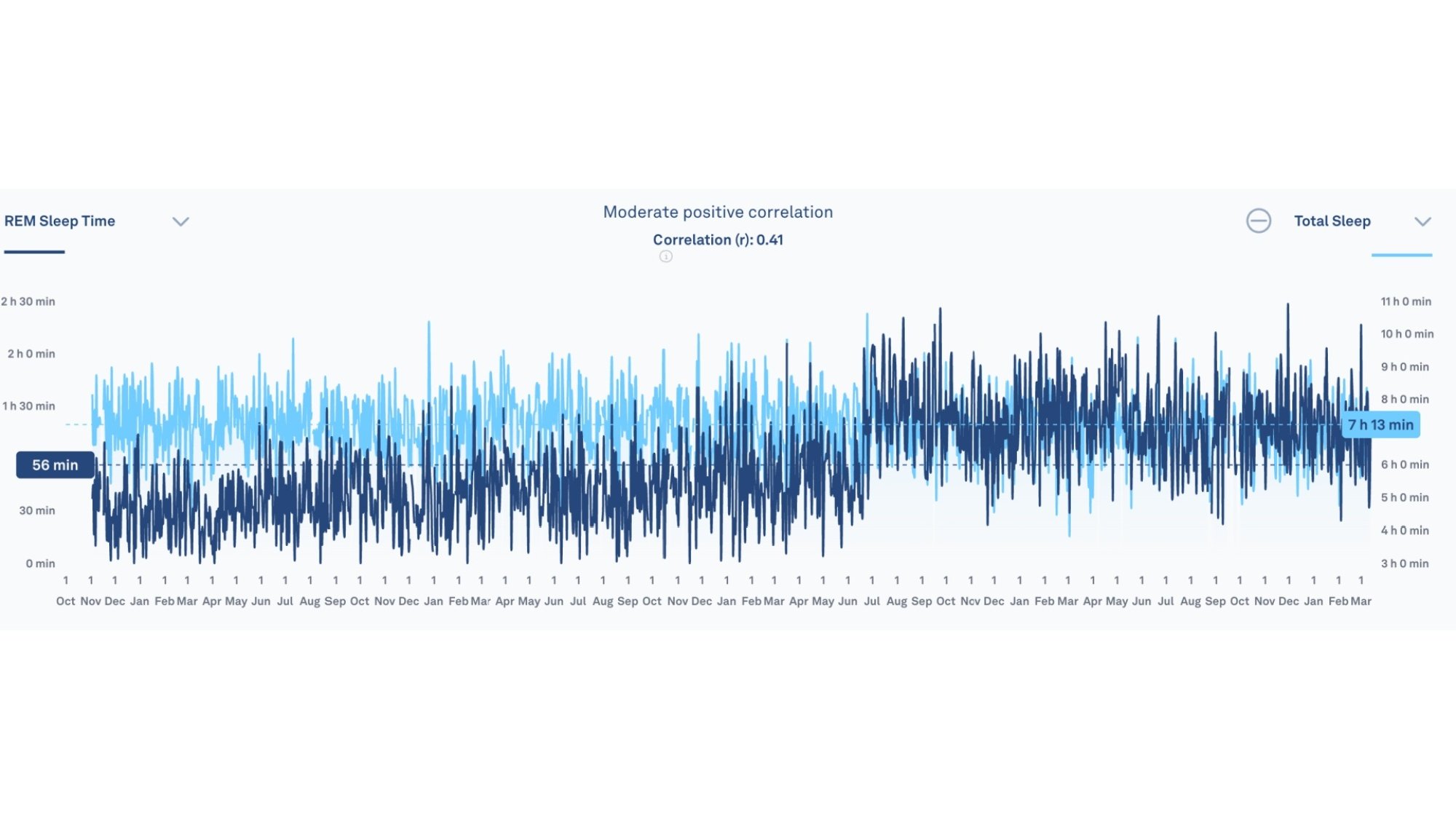
I was always skeptical of the way Oura claimed to divide up my sleep into stages. For the first few years, it always reported an implausibly low amount of REM sleep, sometimes just a few minutes when you’d expect to see well over an hour. I mentioned this when I interviewed a sleep scientist, and she confirmed that the numbers I was seeing in my app were highly unlikely to be correct. Oura rolled out a new sleep staging algorithm in the summer of 2023, which they said should improve sleep stage accuracy. See if you can spot on this graph the day the algorithm changed:
Light blue is total sleep; dark blue is REM sleep.
Credit: Beth Skwarecki
Suddenly, I was getting much more realistic estimates of REM sleep (although I’ve never gotten a sleep study in a lab, so I can’t confirm whether they’re correct.)
We can even see where the “new” REM sleep came from. Not from awake time, or from light sleep, which were both reported in similar amounts before and after the change. No, the algorithm seems to have taken some of what it previously considered deep sleep, and recategorized it (maybe correctly) as REM sleep. The deep sleep graph looks like the opposite of the one above. I felt validated in my complaints that it must not be picking up my REM sleep properly. I also gained a lesson in just how much we are at the whims of the algorithm.
It never predicted when I got sick
I don’t think anybody who buys an Oura ring now is looking for an early detection system for when they get sick, but this was a major talking point for the company (and among users) for a little while. In 2020 the company worked with UCSF on the TemPredict study to see if the ring could let healthcare workers know when to test for COVID. Forums that discussed the Oura ring would occasionally feature posts from people who were able to see signs of poor recovery in the app before they realized they were sick.
But my own experience didn’t bear that out. When I had been wearing the ring about a month, I got sick. It was probably a regular cold or flu, but my COVID test came back inconclusive(?!?) so I never did find out for sure. Whatever the illness, my Oura did not realize I was feeling anything less than stellar until three days after I started feeling feverish, tired, and icky.
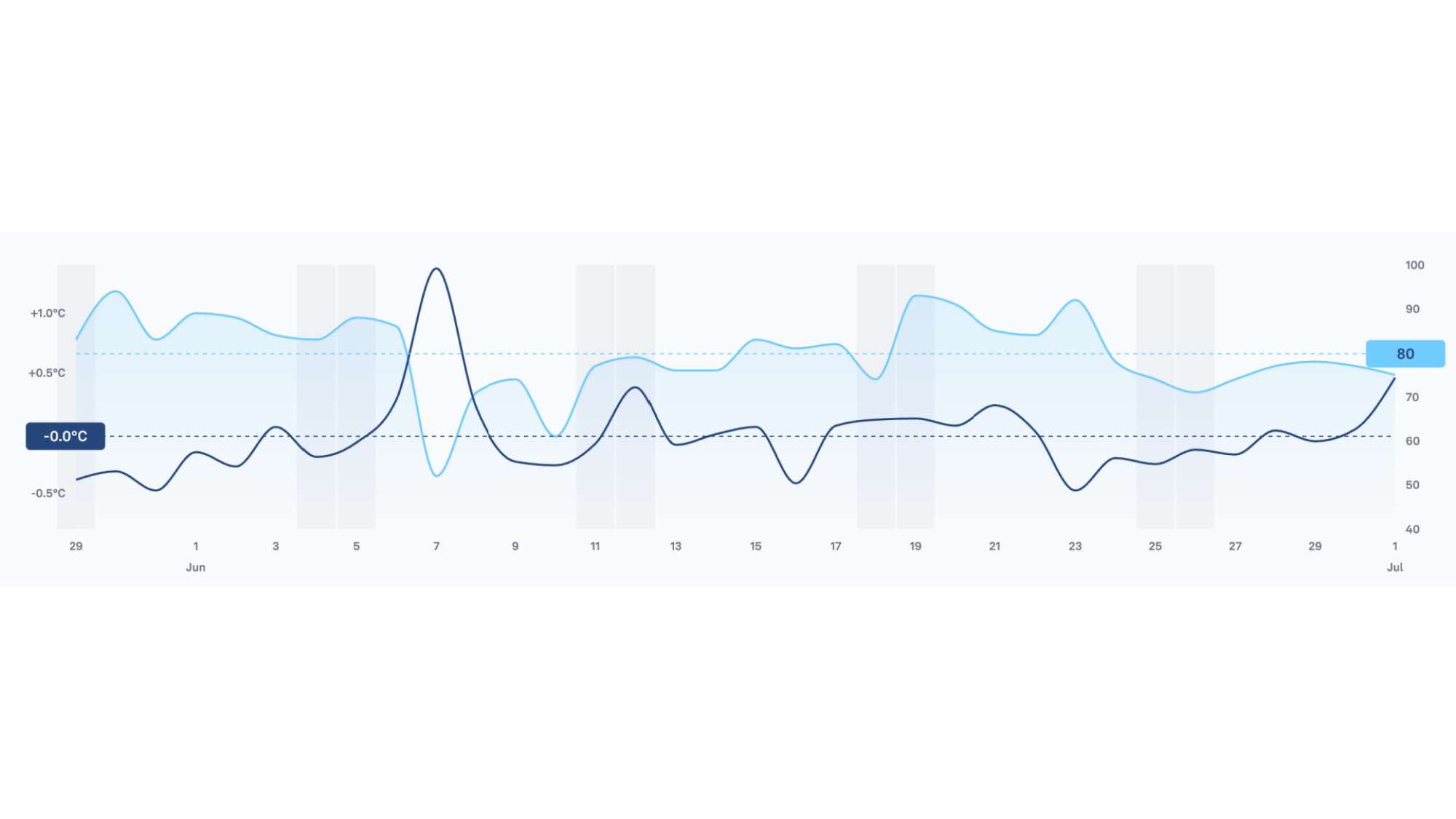
I got COVID for sure in June of 2022, and it’s interesting to take a look at my Oura ring data from the week I tested positive. I recall symptoms starting on that Thursday or Friday, June 2 or 3. It was on Sunday, June 5, that I felt awful enough that it occurred to me to take a COVID test, which was positive. You can see on this graph that my nighttime temperature peaked on June 7, two days after I tested positive. My readiness scores were all great—above 80—until that day. Every other metric I can think to check was normal as well, including my HRV, average resting heart rate, lowest resting heart rate, and respiratory rate.
Dark blue is temperature, light blue is readiness score (out of 100).
Credit: Beth Skwarecki
Since then, I’ve only had minor colds and sniffles. While I’ve never had Oura drop any hints before I got sick, I have found it validating to see my RHR rise and readiness drop when I’m kinda-sorta feeling under the weather. That tells me that there really is something going on, even if it doesn’t rise to the level of a full-blown fever or coughing fit. But, again, I don’t get that validation until after I’ve started feeling crappy.
Just me? I looked up the results of the TemPredict study. The researchers said they were able to use an algorithm to tell who was sick, and that the day the algorithm recognized the illness was on or before symptom onset in 65% of cases, and on or before a positive COVID test in 80% of cases.
That is, to be honest, not all that useful! The idea was to predict illness before those dates, so “on or before” is lumping in the cases where it could act as an early warning system with cases where a person already knew they were sick. And, clearly, the algorithm missed a lot of people.
Oura gave these results a positive spin. The headline finding was that when the algorithm worked, it predicted illness 2.75 days before a positive test. But symptom onset was 1.98 days before a positive test, so even the algorithm’s prediction—which was not revealed to users in the app, only examined by scientists—would give you less than a day’s notice before you started feeling sick.
Oura called these results “preliminary” at the time, but the team has not published anything else on illness detection since then, at least not that I can find.
But Oura did eventually launch Symptom Radar, a feature that rolled out to Oura users in December of 2024. I haven’t gotten sick since then, so I can’t comment on whether the algorithm would be able to notice anything I didn’t. Bottom line: I feel confident in saying the promise of illness prediction has fallen flat. If it works for a few people, and if they enjoy getting a day’s notice before they start feeling sick, cool. But that’s not exactly helpful in any practical sense.
Durability
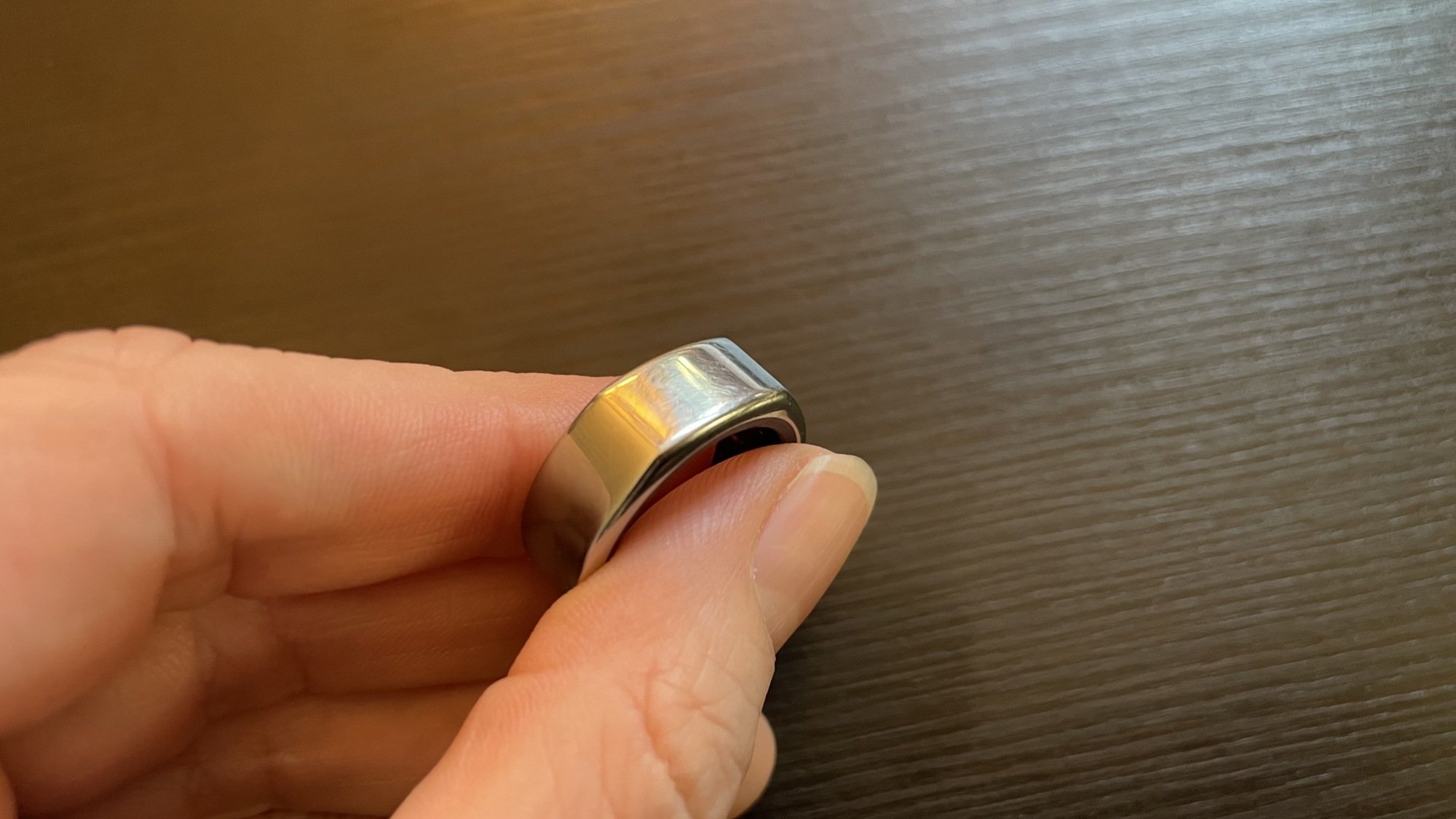
The top of the gen 3 ring that I wore for two years.
Credit: Beth Skwarecki
When you buy a $300+ piece of jewelry, you expect it to last. Oura owners (and prospective owners) are always asking on forums how easily the ring scratches, so here’s a photo. This is the gen 3 ring that I wore for two full years. You’d have to look closely at the top surface to see the little scuffs and scratches, but there are a few. The bottom surface, where the ring would contact things I’m holding, is more scratched up for sure. This doesn’t bother me, since I see the Oura ring as more of a tool than a pristine fashion piece. Others may feel differently.
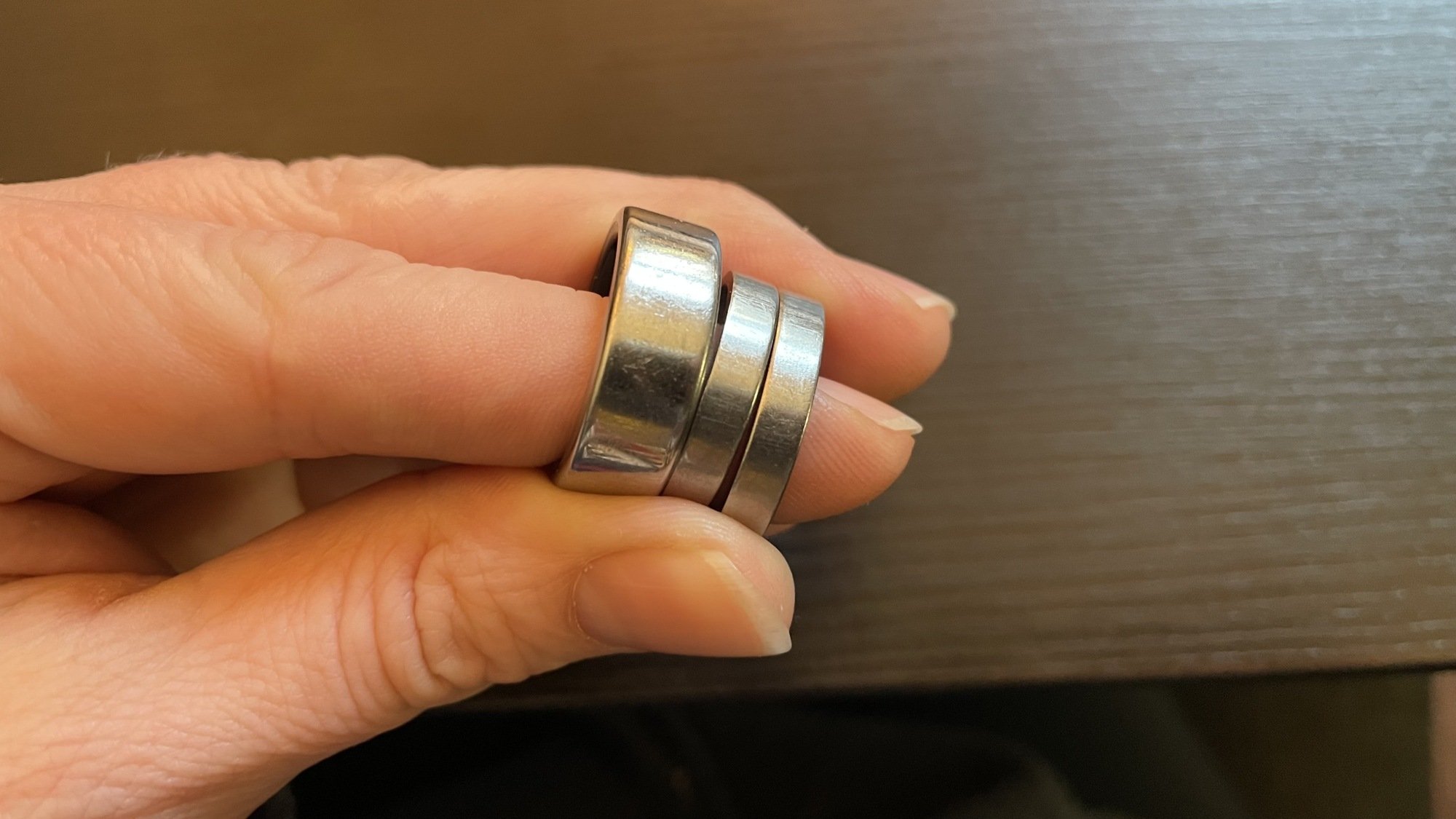
Oura rings have a titanium exterior, and interestingly I have a comparison for that—my wedding and engagement rings are also titanium. All three get plenty of daily wear. My wedding ring’s scratches are subtle; the Oura ring’s are much more obvious by comparison.
Left: the bottom of the gen 2 Oura ring that I wore for two years. Right: the bottom of my wedding and engagement rings, also made of titanium, which I’ve been wearing for nearly 20 years.
Credit: Beth Skwarecki
Battery longevity
My biggest disappointment over the years has been the battery longevity. Not the battery life—the ring goes most of a week between charges without any problem. But I’m talking about how much use you get out of the ring before it stops holding a charge.
My gen 2 ring came with a two-year warranty, and I recall seeing a Reddit post reminding people to check their battery health before the warranty was up, since some users had found that their battery died right around the two-year mark. I forgot all about that, and then it happened to me. Fortunately, I was just barely inside of the warranty period, and got my replacement. Two years later, the same thing happened again, although Oura had wised up and stopped offering a two-year warranty. The warranty is now one year and doesn’t cover battery issues, at least in the U.S. (A two-year warranty is required by law in the EU.)
I lucked out again with my second replacement, since the gen 4 had just launched. I recall being given the choice of a $50 discount on a new gen 4, or a totally free gen 3. I went for the gen 3, but didn’t have an option to ask for a different shape or color. They just shipped me a duplicate of my old ring, in a baggie (no charger).
I can’t complain about getting three rings for the price of one. That said, should I really need three rings in four years? There are plenty of five-year-old Apple Watches and Garmin watches out there that cost around $400 originally. You would expect a $300+ Oura ring to last longer than two years. But check the subreddits and forums, and ask any long-time Oura ring user you know. Two years is pretty typical for the gen 2 and gen 3 rings. (It’s too early for a verdict on the gen 4.)
If you’re the kind of person to upgrade as soon as a new model is out, this may not matter too much—Oura has been releasing new rings on roughly a two-year cycle. But you should know that you’re not buying something that will last for years and years. I saw someone on a forum who was thinking about getting an Oura ring as his actual wedding ring. Not a good option if you’re going to be sentimentally attached to that specific, physical ring.
The Oura is the lowest-maintenance wearable I’ve met
Why have I worn this ring nearly every night for the last four-plus years? Because it’s so dang easy. I don’t need to start or stop anything on the ring itself or on an app. I don’t need to wear it for workouts. It doesn’t take up valuable wrist real estate, so even when I’m wearing a Whoop, Fitbit, Apple Watch, and Garmin watch at the same time and griping about it as I strap them all on for bedtime, it doesn’t bother me at all to have the Oura ring on, too.
Even during times I was paying more attention to other wearables, I kept the Oura ring on. Once a week or so, it might pop up a notification on my phone asking me to charge it before I go to bed. And as long as I open the app once or twice a week to be sure it’s syncing, I know my data is stored safely in a place I can look at it later.
Charging is low-maintenance, too. I keep the Oura ring’s charger on my nightstand. I’ll charge my ring when I head to the gym, and even if I forget to put it back on right away, I’ll see it on the nightstand when I’m getting into bed. The only thing I find inconvenient about charging is the lack of a secure charging case or even a cheap spare nightstand charger I could bring with me when I travel. That said, the ring holds enough charge that I can get through a weekend trip without charging, as long as the battery was full when I left.
My Oura ring data didn’t reveal any deep secrets about recovery
In terms of the big-picture payoff of wearing the ring, I first need to say what it didn’t give me. My original interest in sleep and recovery tracking (with the Oura or otherwise) was to see if there was a way to predict my performance in the gym. Cardio exercise is reasonably easy to get a handle on, but weightlifting is different.
I compete in Olympic-style weightlifting (the sport of the snatch and the clean and jerk). The weights are heavy, but the lifts also require precise technique and coordination. Some days you can snatch 60 kilos, some days you’re lucky to make 53. My coach patiently explained, on many occasions, that if I’m in the middle of a tough training block, fatigue would be masking some of my ability. This pops up in unexpected ways—if I just had a great performance on Saturday, maybe hitting a new PR (personal record), I might struggle on Monday because I’m having a “PR hangover.” Coaches and lifters have known this for decades, if not centuries. But it’s still hard to predict exactly when you’ll feel uncoordinated versus when you’ll perform well.
I hoped that metrics like heart rate variability and resting heart rate would give me a window into what was happening under the hood. But it didn’t quite work out that way. While generally I would have better days when my HRV was high and my RHR was low, that wasn’t something I could rely on.
There were plenty of times I had a great day in the gym or on the competition platform, despite mediocre recovery metrics. And the reverse happened, too. Ultimately, you don’t know how you’ll actually perform in the gym until you actually get there and do some lifts—performance can only be judged after the fact. I said from the start that I would never trust a device more than I’d trust my own body, and I’m glad I kept that promise. If I had skipped or rescheduled workouts based on my “readiness” or other metrics, I would have missed out on good training.
Recovery metrics are a good reality check on the big picture of training and life
So if the metrics from the Oura app didn’t reveal any deep secrets or make me change my training, why do I still keep an eye on them, four years on? Because they give me subtle hints about what’s going on in my body, and bring the big picture of my training and life stresses into focus.
I have a sense of what HRV and RHR numbers I see when I’m well-recovered and training is going well. I even know how much my resting heart rate tends to drop when I’m in the habit of doing a lot of cardio training (only about 3-4 beats, but that’s enough to be noticeable).
I know what it looks like when my training stress has increased but I’m dealing with it well: a slightly elevated RHR, but HRV is still usually pretty high. I know what it looks like when I’m stressed and burned out: high RHR, low HRV. I know that if I’m managing my fatigue pretty well throughout the week, I’ll see the numbers reset on the weekend as my rest days or easy days allow my body to catch up. And I’ve come to know these numbers through comparing them to how I feel—not by trusting a score or a graph or an explanation in the app. You have to take ownership of your new self-knowledge, and learn, not just listen.
Would I have gotten just as good an understanding of my body and my training without the ring? Probably, but I’d expect a lot more mental ups and downs. I have a tendency to go too hard and not realize how much I’m pushing myself, and then to beat myself up when things aren’t going according to plan. The data I get from my ring helps to give me a reality check on what my body is going through, whether it’s an under-the-radar cold or a tough training block that compounds with other stress I’m getting from life. I guess the ring has taught me a little bit of self-compassion. That’s helped me immeasurably, even though it’s not the lesson I was expecting to learn from tracking all this data.