Google’s Latest Gemini Image Editor Can Remove Watermarks From Photos

The speedy progress of AI development continues to dominate headlines, but the latest story to hit the news cycle is more bad press than good press: It turns out that Google’s latest Gemini 2.0 Flash image editor is rather adept at automatically removing watermarks from images.

Google pushed out the experimental native image generation capabilities a few days ago, promoting its capabilities in terms of combining images and text, editing images through conversational prompts, and improving its “world understanding” to give users AI-generated pictures that are more realistic overall.

As TechCrunch reports, the newly upgraded tool was quickly put to one specific and rather nefarious use: Removing watermarks from proprietary images. You can find evidence of it on Reddit and X; while the watermark removal isn’t perfect—the AI is only imagining the pixels that replace what’s covered by the watermark, after all—it definitely leaves you with a usable image, one free of any copyright or authorship labels.

It isn’t exactly ironic that an AI tool should wind up being so capable at circumventing basic copyright protections. Gemini and other generative AI models have been trained on vast amounts of copyrighted text, images, and video, often without permission or recompense—something the AI companies are reluctant to talk about, unless it’s to argue that this qualifies as fair use.


This Tweet is currently unavailable. It might be loading or has been removed.

Though the idea of using an AI trained on scraped copyrighted works to steal an image someone else owns is galling, there are a few caveats worth mentioning. For a start, these new Gemini tools are only available to developers for the time being, and are still labeled as experimental—no doubt Google is going to make tweaks before general users get their hands on them. It’s also worth noting that other shady watermark removal tools are already all over the web, even if none of them is not quite as smart as this and other advanced AI-powered versions would likely be.

Still, it highlights the nefarious ways AI tools can be deployed, even as they’re being relentlessly pushed out to businesses and consumers, and underlines the need for stringent guardrails. ChatGPT and Claude AI models are two that will refuse explicit requests to remove watermarks, and no doubt Google will add the same blocks to Gemini after all the negative coverage.

The limits of AI image editing

As noted above, the watermark removal capabilities of Gemini can currently only be accessed through developer-facing tools, including AI Studio and the Gemini API. However, I also wanted to give it a go using the latest models available through the Gemini Advanced tools available to anyone paying $20 a month.

I took screenshots of several copyrighted and watermarked images from Shutterstock (after first sifting through all the AI-generated results the site offered me), opened and resaved it in Photoshop (after dismissing all the pop-ups asking me to try Photoshop’s latest AI tools), and then let Gemini get to work.

Rocket ship
Gemini gave me a pretty good approximation of the original image.
Credit: Shutterstock / Gemini

Most of the time, Gemini refused to get involved with watermark removal at all—telling me it wasn’t capable of editing images, or explaining that it’s “essential to respect copyright laws”—but it was happy to produce variations on the originals, watermark-free, and based on its training on copyrighted material.

While these variations often weren’t all that much like the originals, in one case it gave me a very close copy of a composite rocket ship photo, and in another it directed me to some watermark removal tools on the web—thanks, Gemini! Of course, you can also start from scratch and just describe a watermarked image you’re hoping to emulate.

Forest cabin
ChatGPT didn’t really understand the watermark removal assignment.
Credit: Shutterstock / ChatGPT

ChatGPT, meanwhile, did accept requests to remove watermarks, but then produced something completely different (and rather odd). Image editing is already available to ChatGPT Plus subscribers, but as I’ve noted before, it’s definitely not yet up to the level of a human Photoshop expert.

The debate over copyright, fair use, and AI safety guardrails will continue, even as upgrade after upgrade makes these AI tools more advanced (even if they’re not particularly useful). One issue the likes of Google and OpenAI may need to start worrying about is where they’ll get fresh training data for their models, once they put all the flesh-and-blood creatives out of business.


Plex raises subscription prices for the first time in a decade

Streaming service Plex is raising its prices for the first time in ten years. The company just announced an increase for its premium subscription service Plex Pass, which offers a number of additional features like offline access and themes. The standard service is still free, if you’re looking to set up a simple media server to stream some movies or shows.

Plex Pass will soon cost $7 per month, which is an increase of $2 per month. A yearly subscription will come in at $70, a fairly substantial lift from $40. Finally, the coveted lifetime pass is shooting up to $250 from $120. These are some serious upticks, but I guess that’s what happens when you don’t raise prices for a decade.

The changes go into effect on April 29, so the Plex-curious still have more than a month to pick up a lifetime pass at the original $120 asking price. The monthly and yearly price impacts both new and pre-existing customers. The company says it’s doing this to keep up with rising industry costs. Remote streaming is also set to fall under a subscription, albeit a cheaper one at $2 per month. 

“These changes weren’t made lightly, and we’ve spent a lot of time weighing the best path forward to ensure we can continue to balance value with a best-in-class personal media experience for years to come,” a blog post from the company says. 

However, there are some new tools coming to accompany these price increases. It’s integrating with Common Sense Media to bring ratings and reviews aimed at parents to Plex Pass holders. It’s also working on a new server management app that will launch in the near(ish) future. The primary playback is also getting a much-needed refresh.

The platform is eliminating the mobile unlock fee, which is a one-time activation fee that was required to remove the one-minute playback limitation when streaming content from a media server to a mobile device. Recently, Plex added public reviews and profiles.

The Plex Pass price increase comes as the entire streaming industry begins tightening its belt. Just about every platform has gotten more expensive in the last couple of years.

This article originally appeared on Engadget at https://www.engadget.com/entertainment/streaming/plex-raises-subscription-prices-for-the-first-time-in-a-decade-182622032.html?src=rss

Analogue Delays 4K Nintendo 64 3D Retro Gaming Console Preorders, Offers Refunds

Analogue Delays 4K Nintendo 64 3D Retro Gaming Console Preorders, Offers Refunds
Retro gamers are eating good these days: classic games are getting remakes that make them more accessible to 2025 gamers, and older hardware is being brought back to life with FPGA-based machines. However, the effort by the retro gaming experts at Analogue to create the ultimate Nintendo 64 has hit a snag, with fans having to wait a bit longer

Use This App to Send Someone a File Without Using Any Cloud Storage

Quick: Send me a large file. Even today, decades after a famous comic about this exact problem, it’s not necessarily simple. Messaging services don’t allow truly huge files; neither do most email providers. You could stick the file in a cloud storage space, sure, but only if you’re paying for enough storage space and not using that space for anything else at the moment.

Isn’t there some way to send a file directly, without using up any cloud space? There is. File.pizza is a web service that allows you to directly share a file from your computer with another device—no cloud storage or app needed.

FilePizza isn’t the only application like this. There’s p2pfileshare.com and sharedrop.io, to name a couple. FilePizza stands out because of the simplicity—just share a file and copy the URL—and because it has a unique URL. The name of the application, while silly, has a crucial advantage: It’s easy to remember.

You can, on any computer, open a browser and type the url “file.pizza” to start sharing a file. Just drag the file onto the browser window, set a password if you want, then click Start.

Me sharing a file named "Dumb Monster Movie.mp4".

Credit: Justin Pot

You now have a bunch of ways to share the file. There’s a QR code, which is handy if you’re trying to get a file onto a mobile device. There are also links you can copy and paste into a text.

A QR code and download links for the file

Credit: Justin Pot

You might have noticed that I haven’t blurred the QR code or the link above. There’s a reason for that: These links only work as long as the computer is on and the browser window offering the file is open. Without a cloud service, it’s on your device to share the file with whoever might download it. Close the tab, and the file is gone. That has downsides, obviously, but the upside is that you don’t have to worry about the file being shared in the long term. This is a tool for one-time transfers.

The person who opens the link will see the name of a file and a button to download it. When they click the button a direct connection is established.

The download button, as seen by the person you're sending the file to.

Credit: Justin Pot

The speed of the download, obviously, is going to depend on your internet connection. If you’ve got a decent upload speed, though, this won’t be an issue. And it works extremely well if you’re on the same wifi network. Give it a shot the next time you need to send a file directly.

The Ninja Crispi Is Changing How I Make Party Dips

We may earn a commission from links on this page.

I’m no stranger to the crisping prowess of the air fryer. (Here are some of my favorite models.) The powerful convection heating mechanism reheats leftovers, blisters veggies, and roasts meats quickly and with a sizzling finish reminiscent of an actual deep fryer—sans the vat of oil. But after using the Ninja Crispi—an air fryer that comes apart for easy storage—my interest in crispy crusts has changed to something totally unexpected: dips.

Making dip in an air fryer is not normal. Dips have always been a stove top thing—you cook the ingredients in a pot or pan, then you pour it all into a casserole dish. Maybe at the end you move it to the oven for a broiled cheesy crust. But things have changed for me: Now I can make a heaping container of spicy buffalo chicken dip, broil it, serve it, and store the leftovers, all in the same vessel.

Why dip works in the Ninja Crispi

All this can be done because the Ninja Crispi is designed to come apart. The PowerPod (Ninja’s name for the handheld convection engine) lifts on and off the cooking chamber. That container is made of clear tempered glass. It’s pretty enough to be used as a serving dish, and small enough to fit in the fridge with your other containers. The Crispi cooking system comes with two containers (one large and one small), so you can still cook in one while you have something stored in the other. Plus, both containers come with lids. Here’s my full Ninja Crispi review. 

Making dip in an air fryer might seem unhinged, but there are benefits to this style of cooking. It has the minimal clean-up of one-pot cooking, but it’s cooking from the top-down instead of the bottom-up. You cook ingredients directly in the air fryer container, stopping to lift off the Ninja Crispi PowerPod to stir when needed. When the necessary ingredients are cooked, simply mix in spices and the creamiest ingredients—sour cream, yogurt, or mayonnaise. Then top with cheese and put the PowerPod back on to melt it until browned and bubbly. Your air fryer has just become a quick, efficient broiler. No need to empty the dip into a new dish—simply serve it as-is.

Here are my favorite dips to make in the Crispi right now. 

Buffalo Chicken Dip Recipe

This dip is quick to make and almost too easy to eat. The right buffalo sauce is key, so make sure you love the one you’re using.

Buffalo chicken dip next to crisp breads.

Credit: Allie Chanthorn Reinmann

Ingredients:

  • 8 ounces butterflied chicken breast

  • ¼ teaspoon salt

  • Pinch MSG

  • ½ cup plain Greek yogurt

  • 2 ounces cream cheese

  • 2 to 4 tablespoons buffalo hot sauce (I use Hot Ones buffalo hot sauce)

  • ⅓ cup shredded cheddar, plus more for topping

  • 1 to 3 sliced scallion, white ends and greens separated

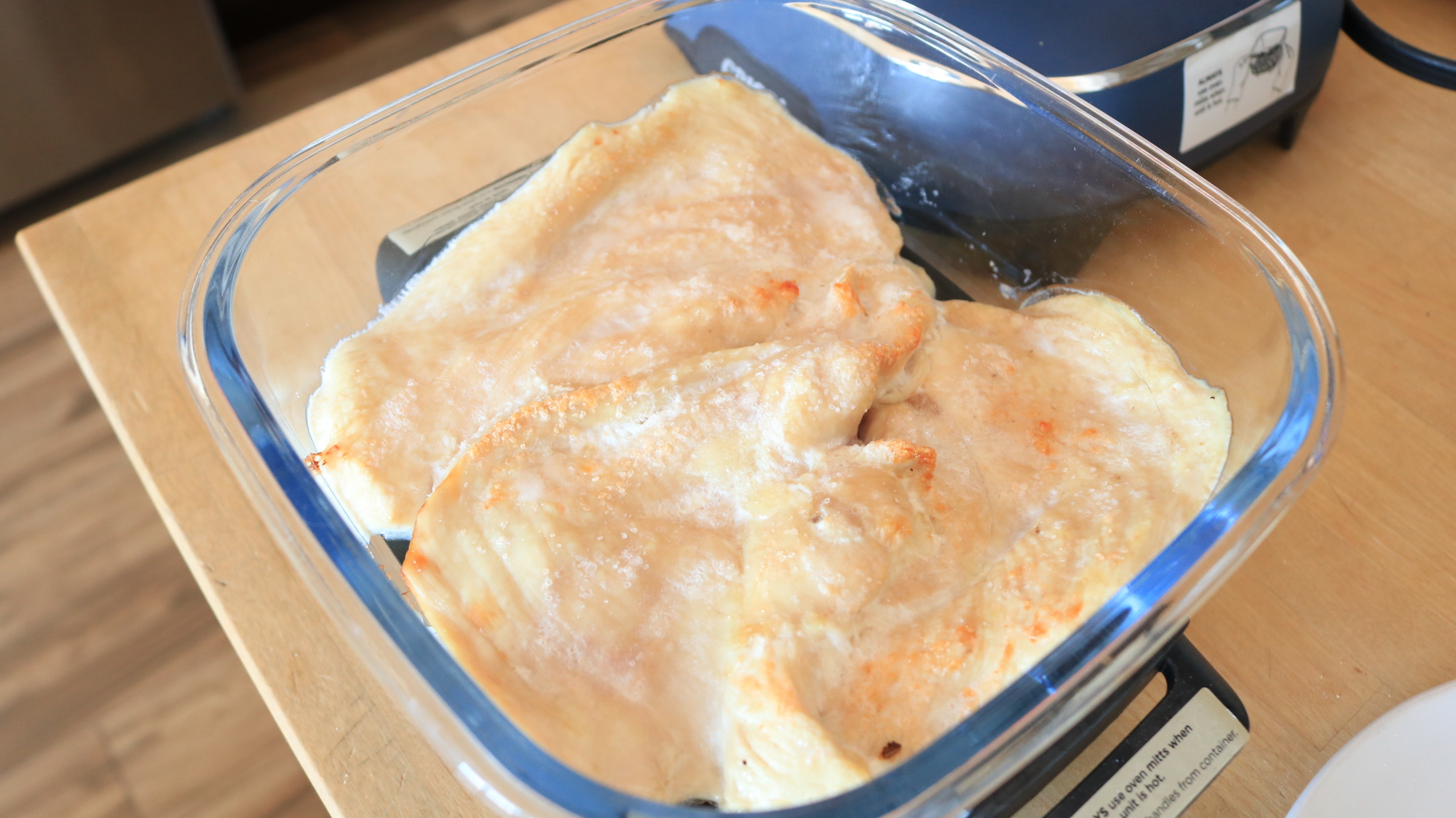
1. Lay the thinly sliced chicken breast onto the grate of the Ninja Crispi, sprinkle with salt and MSG. Cook the chicken on bake mode for 10 minutes, or until cooked through but not too browned.

Cooked chicken breast slices in the Ninja Crispi.

Credit: Allie Chanthorn Reinmann

2. Slide the grate out from under the chicken, and remove it. Shred the chicken with two forks directly in the Ninja Crispi container. 

3. Add the yogurt, cream cheese, two tablespoons of buffalo sauce, cheddar, and the white and light green parts of the scallion. Cook it for another five minutes on bake mode.

Cheese, yogurt, hot sauce, and chicken in the Ninja Crispi.

Credit: Allie Chanthorn Reinmann

4. The cheeses and yogurt should be super soft. Mix everything together thoroughly and taste to see if you want more hot sauce. Spread the dip out flat and top the dip with a little more shredded cheese. Cook it for another three to five minutes on bake mode. Sprinkle the green scallion slices over the top and serve. 

Buffalo chicken dip with a chip scooping a serving out.

Credit: Allie Chanthorn Reinmann

French Onion Dip Recipe

I never imagined being able to caramelize onions in an air fryer before, but it works in the Crispi. Don’t skip the MSG and Worcestershire sauce—they bring in the hearty umami boost that we all look for in French onion dip.

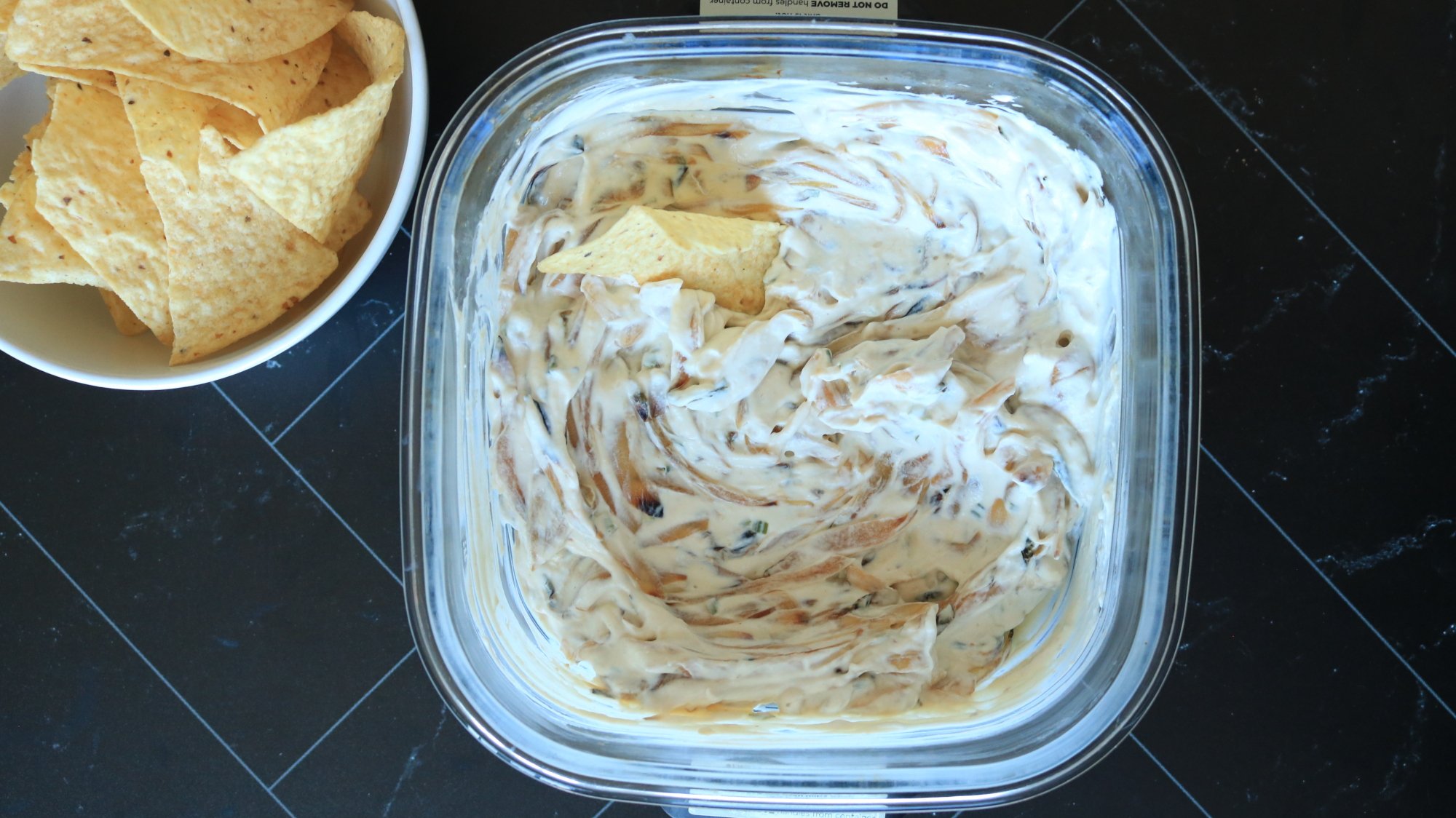
French onion dip next to a bowl of tortilla chips.

Credit: Allie Chanthorn Reinmann

Ingredients:

  • 2 medium onions (about 14 ounces), sliced

  • 2 teaspoons neutral oil

  • 1 tablespoon butter

  • ¼ teaspoon salt

  • 4 ounces full-fat sour cream

  • 3 ounces plain Greek yogurt

  • ¼ teaspoon onion powder

  • 1 teaspoon Worcestershire sauce

  • Pinch MSG

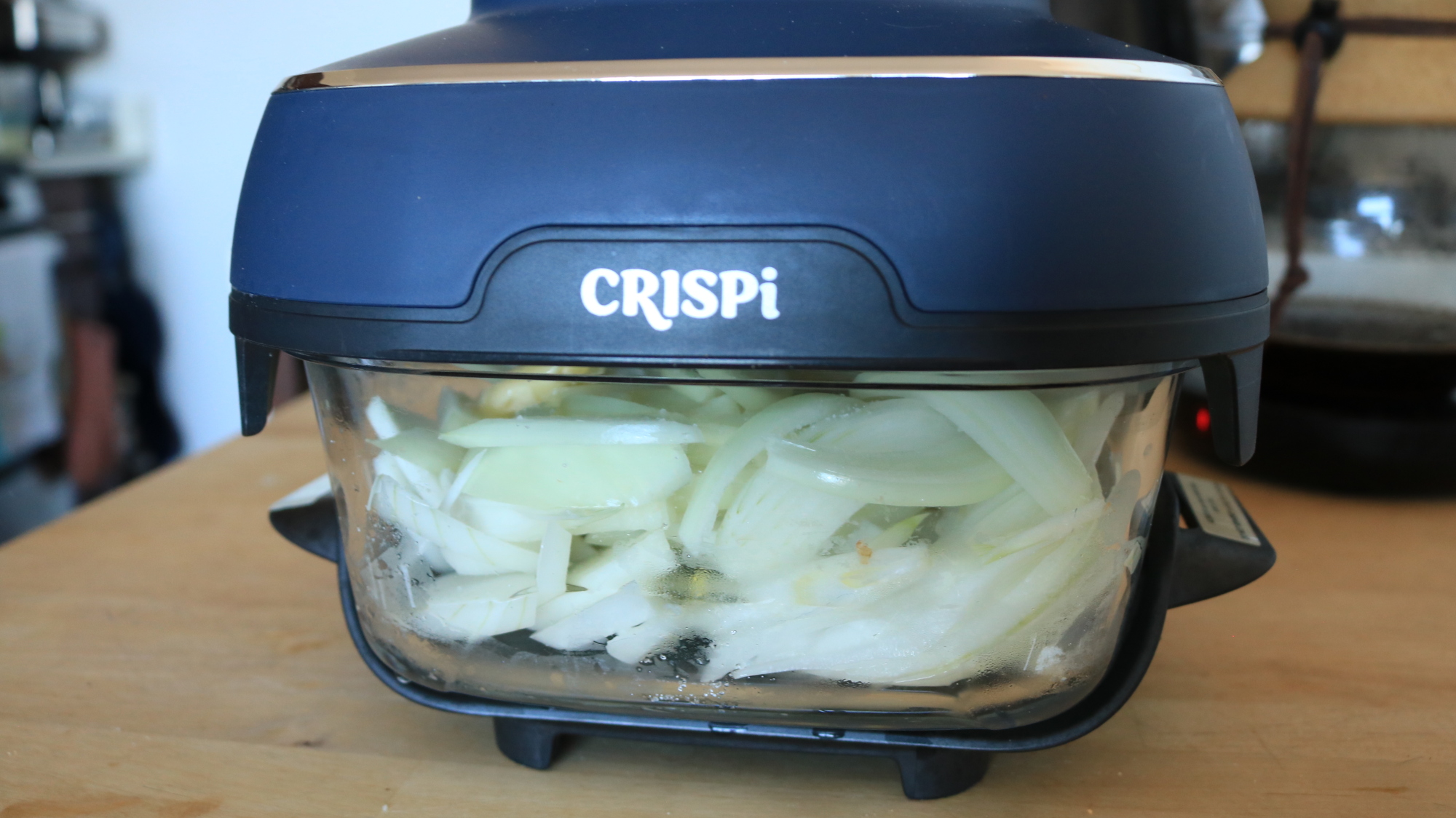
1. Spread out the onion slices into the small Ninja Crispi container. (Do not use the grate.) Drizzle the oil over the top along with the salt. Toss the onions a little to get them in contact with the oil, but you don’t have to be too precise about it. Break the butter up into chunks over the onions. 

Onion slices cooking in the Ninja Crispi container.

Credit: Allie Chanthorn Reinmann

2. Cook the onions for about 30 minutes on bake mode, stirring every three to five minutes. (Caramelizing onions takes time no matter how you do it.) Stir often. This step is important so the onions cook evenly. Some of the ends will still burn and that’s totally OK. It’s actually a good thing.

Caramelized onions in the Ninja Crispi container.

Credit: Allie Chanthorn Reinmann

3. Once the onions are softened and evenly browned, remove the PowerPod and let the caramelized onions cool for about 15 minutes. Stir in the sour cream, yogurt, onion powder, Worcestershire sauce, and MSG. Serve at room temperature or cover it with the Ninja Crispi lid and put it in the fridge until chilled.

Extra-Meaty Seven-Layer Dip Recipe

This dip is great for a party. If you’re a guest, stop at Step 5, pack up the container with the NinjaCrispi lid, and throw the PowerPod in the car. Plug in the Pod and broil the cheese just before serving.

A chip dipping into a seven-layer dip.

Credit: Allie Chanthorn Reinmann

Ingredients:

  • 1 pound ground turkey (or other ground meat)

  • ½ teaspoon baking soda

  • ½ teaspoon salt

  • 1 packet taco seasoning (or any another spice mix of choice)

  • Sliced olives (I used jalepeño stuffed green olives)

  • ½ can refried beans

  • ½ cup sour cream (or plain greek yogurt)

  • 2 to 3 tablespoons salsa

  • Sliced green onions

  • ½ cup shredded cheddar

1. I sprinkle the baking soda over the surface of the ground turkey and, with a gloved hand, mix it into the meat. This will help brown the meat and keep it tender. 

2. Put the meat into the container of the Ninja Crispi without the grate. Note: In the picture I’m using the small container, but the dip almost didn’t fit by the end. I’m considering the large container for next time. 

On bake mode, cook the meat for 25 to 30 minutes, stirring and flipping the meat every five minutes or so. It’ll look somewhat gross at first with the top browning and raw meat lurking underneath, just keep cooking it. The air fryer cooks from the top down, so flipping as you break up the meat morsels is the best way to cook it evenly. 

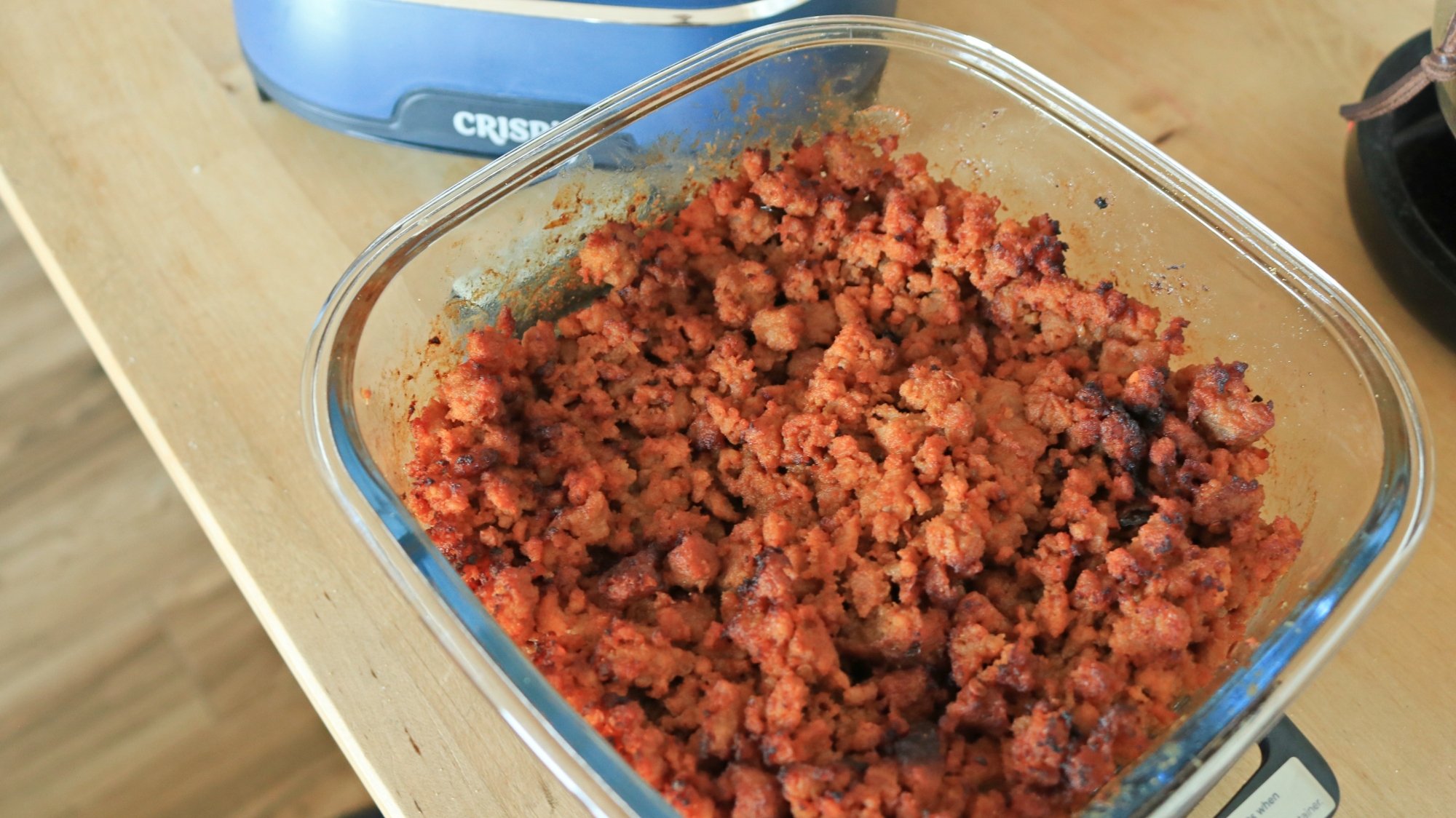
3. When the meat looks mostly browned and nearly finished cooking through, stir in the salt and seasoning packet. Finish cooking the meat completely. 

Seasoned ground turkey in the Ninja Crispi container.

Credit: Allie Chanthorn Reinmann

4. Stir some olives into the meat. Then top the meat with more olives. Spread the refried beans over the top of the meat. Layer the sour cream on top of that, followed by a thin layer of salsa, green onions, and top it all with shredded cheddar. If using the small container, gently press the dip down so it’s below the rim of the dish. You don’t want the cheese to touch the PowerPod. 

5. Cook the dip for another minute or two on the bake setting to melt the cheese, and serve with chips, crisp breads, or between two hamburger buns for a fancy sloppy joe. Why not?

Trump fires both FTC Democrats in challenge to Supreme Court precedent

President Trump fired both Democratic members of the Federal Trade Commission yesterday, advancing his administration’s claim that the president can fire FTC commissioners despite a US law and a 1935 Supreme Court ruling stating that the president cannot do so without good cause.

Trump fired Democrats Alvaro Bedoya and Rebecca Kelly Slaughter, both of whom said the firings are illegal. Trump “tried to illegally fire me. I’ll see the president in court,” Bedoya wrote. The FTC was created “to fight fraudsters and monopolists,” but Trump “wants the FTC to be a lapdog for his golfing buddies,” Bedoya said.

A statement from Slaughter said, “The President illegally fired me from my position as a Federal Trade Commissioner, violating the plain language of a statute and clear Supreme Court precedent.” Slaughter said Trump “fears the accountability that opposition voices would provide if the president orders Chairman [Andrew] Ferguson to treat the most powerful corporations and their executives—like those that flanked the President at his inauguration—with kid gloves.”

Read full article

Comments

Meager 8GB of RAM forces Pixel 9a to run “extra extra small” Gemini AI

Google can’t make a move in 2025 without veering into the realm of generative AI, and the release of the Pixel 9a is no exception. Curiously, the AI experience on this phone may not match what you’ve seen from the company’s high-end smartphones. Google has confirmed to Ars that the phone’s lower memory prevented it from implementing the full suite of Pixel AI features. You can still talk to Gemini by holding the power button or opening the Gemini app, but the on-device Gemini Nano model has seen a downgrade on the 9a.

Google’s approach to AI has changed substantially since the Pixel 8a launched, with some of the Pixel 9’s hallmark features relying on local AI processing through the smartphone-optimized Gemini Nano. The Pixel 9a has it, but it’s smaller than the Gemini Nano model on other Pixel 9s. For reasons unknown, Google does not call it Gemini Pico—it’s Gemini Nano 1.0 XXS (extra extra small). The Pixel 9, 9 Pro, 9 Pro XL, and 9 Pro Fold all run Gemini Nano XS (extra small).

The Pixel 9a has less RAM than the flagship Pixels, which standardized on 12GB largely to provide Gemini Nano with reserved memory without impeding performance. However, the Pixel 9a still just has 8GB of memory, which is a problem for local AI processing. This is the first Google phone to ship with a new super-small AI model. It saves on resources but can’t support some of the best Pixel AI features.

Read full article

Comments

For Years, Apple’s Password Manager Had a Major Security Flaw

While Apple has offered password management solutions for years, it was only this past fall that the company finally rolled out a dedicated passwords app, appropriately named “Passwords.” It’s a bit basic, but it’s built into the OS, and it gets the job done. (It’s also free, which helps.) If you’re fully into the Apple ecosystem, it’s an easy way to create, store, and access the passwords of your numerous accounts. However, as it happens, Passwords has a critical security flaw that Apple only recently addressed.

Here’s the situation: Passwords has a security feature that helps you change an account’s password directly within the Passwords app. This is particularly helpful if the app detects that one of your accounts’ passwords has been compromised. You can tap on the account, choose “Change Password…” and open an in-app browser that will direct you to the account’s website, where you can change your password.

As convenient as this feature is, it contained a significant security risk. As discovered by security researchers with Mysk, whenever you tapped “Change Password…” on an account, Passwords would connect to the site using an unencrypted HTTP protocol, before redirecting to the encrypted HTTPS protocol. This encryption protects your connection between your device and the website you’re visiting. Without it, an actor with privileged network access could take over the connection and redirect the link.

Let’s say the Passwords app warns you that your Yelp password has been compromised, and you need to change it. No problem: You tap your Yelp account in the app, then choose “Change Password…” However, a bad actor follows your activity, and before the real Yelp website can load, they redirect you to a fake Yelp site. Here, the fraudulent page encourages you to share your sensitive information, and since you think you’re visiting the real Yelp site, perhaps you do. And just like that, you’ve been phished.

As Mysk tells 9to5Mac, “We were surprised that Apple didn’t enforce HTTPS by default for such a sensitive app… Additionally, Apple should provide an option for security-conscious users to disable downloading icons completely. I don’t feel comfortable with my password manager constantly pinging each website I maintain a password for, even though the calls Passwords sends don’t contain any ID.”

This problem isn’t contained to the Passwords app, however. According to Mysk, this flaw has existed since Apple rolled out the ability to detect compromised passwords in iOS 14, all the way back in 2020:


This Tweet is currently unavailable. It might be loading or has been removed.

How to fix this ‘Passwords’ security flaw

Apple quietly addressed this problem with the release of iOS 18.2. That update launched in December 2024, so changes are good you’ve updated your iPhone since then.

However, if you haven’t, you need to update to the latest version of iOS as soon as possible. (As of this article, that’s iOS 18.3.2, which coincidentally contains another important security patch.) To update now, head to Settings > General > Software Update, then follow the on-screen instructions to download and install the update.

Apple’s first custom designed modem did surprisingly well in benchmarks

Apple just introduced its first proprietary cellular modem, the C1, as part of the recently-launched iPhone 16e. Ookla, the company behind Speedtest, just ran the C1 modem through a series of benchmark tests and it did surprisingly well, even when compared to the Qualcomm chips that accompany the pricier iPhone 16 handsets.

The C1 misses out on mmWave 5G support, but can still hold its own in the speed department. The company found that the iPhone 16e offered average download speeds of 560Mbps for the top 90th percentile of users on AT&T, Verizon and T-Mobile. The standard iPhone 16, with the Qualcomm chip, is faster in this scenario, with average download speed of 756Mbps. The difference, however, isn’t stark.

A speed test.
Ookla

Things change when you move from the top 90th percentile to the bottom 10th percentile. In this case, the iPhone 16e actually outperforms the standard model. The average data speed for the 16e here reached nearly 218Mbps, whereas the Qualcomm-based model averaged 210Mbps. Interestingly, the newest iPhone model was fastest when using AT&T and Verizon’s networks. It was slower on T-Mobile.

As for upload speeds, the 16e outperformed the traditional iPhone 16 in nearly every test. Apple has touted the C1 as the “most power-efficient modem ever on an iPhone,” and that doesn’t seem to be hyperbole.

Ookla’s tests match our experience, as detailed in the official iPhone 16e review. We found that the C1 modem outperformed even the iPhone 16 Pro in certain use cases. However, it’s always worth noting that this chip doesn’t support ultrawideband 5G.

So Apple’s investment to build an in-house modem looks to have been a worthy endeavor, just like those speedy M-series chips. The company reportedly has big plans for future iterations. Not only is the C2 likely on the way, but Apple is planning on creating an all-purpose processor that contains an integrated modem. This could allow for some serious energy and cost benefits.

This article originally appeared on Engadget at https://www.engadget.com/mobile/smartphones/apples-first-custom-designed-modem-did-surprisingly-well-in-benchmarks-164422205.html?src=rss

Skate Story is coming to PS5 as well as PC this year

Skate Story has been one of my most anticipated games ever since I first clapped eyes on it all the way back in 2020, so it was great to get an update on it as part of Sony’s annual PS Indie Day. It’s been confirmed that the striking skateboarding adventure is coming to PS5, as well as PC. Publisher Devolver Digital plans to release it later this year.

Solo developer Sam Eng describes Skate Story as “a game about a demon made of glass who needs to skate the Underworld and consume The Moon to fulfill the devil’s contract.” To achieve that, you’ll need to work your way through nine layers of hell. The only way to beat bosses is by skating fast and pulling off an array of dope tricks, which deal damage. There’s a time limit on the boss battle against the Moon that’s shown in the latest trailer — you only have until a song ends to defeat the celestial body.

There are more than 70 tricks for you to learn and improve, and you’ll level up by completing skate trials. Other characters you’ll encounter include a “pillowy demon who owns a laundromat” and a “jittery subway train” you can become pals with and then “experience poetry about the multilight of the Moon.”

As odd as that all sounds, absolutely everything I’ve seen and heard about Skate Story has hit the right spot for me. I especially can’t get enough of those visuals.

Eng promises to reveal more details about Skate Story this summer. Given that Devolver typically runs a showcase alongside Summer Game Fest, we’ll probably hear more about the game in early June. In the meantime, you can get a taste of what’s in store by checking out our Skate Story hands-on.

This article originally appeared on Engadget at https://www.engadget.com/gaming/playstation/skate-story-is-coming-to-ps5-as-well-as-pc-this-year-163303910.html?src=rss

FedEx Data Scraping and Telecom Insider Bribes Powered Nationwide iPhone Theft Operation

Federal authorities have broken up an international crime ring that stole thousands of iPhones from porches nationwide [non-paywalled link], arresting 13 people last month after a sophisticated operation that combined high-tech tools with old-fashioned bribery.

The thieves created software to scrape FedEx tracking numbers and paid AT&T store employees to provide customer order details and delivery addresses, according to WSJ, which cites prosecutors. Armed with this information, runners intercepted packages at doorsteps moments after delivery.

Demetrio Reyes Martinez, known online as “CookieNerd,” developed code that circumvented FedEx limits on delivery-data requests, while AT&T employee Alejandro Then Castillo used his credentials to track hundreds of shipments and reportedly received up to $2,500 for recruiting other employees. Stolen devices were funneled through Wyckoff Wireless in Brooklyn, a store owned by Joel Suriel, who was already on supervised release from a previous wire-fraud conviction. The merchandise was then shipped overseas for sale and activation.


Read more of this story at Slashdot.

Judge disses Star Trek icon Data’s poetry while ruling AI can’t author works

A computer scientist who tried to register an artwork that credited an artificial intelligence system as the sole author lost his appeal on Tuesday.

A three-judge panel for the Court of Appeals for the District of Columbia Circuit unanimously agreed with the Copyright Office that Stephen Thaler’s AI software cannot be granted authorship. Copyright law “requires all work to be authored in the first instance by a human being,” Judge Patricia Millett wrote in her opinion.

“Because many of the Copyright Act’s provisions make sense only if an author is a human being, the best reading of the Copyright Act is that human authorship is required for registration,” Millett wrote.

Read full article

Comments