Boeing will build the US Air Force’s next air superiority fighter

Today, it emerged that Boeing has won its bid to supply the United States Air Force with its next jet fighter. As with the last fighter aircraft design procurement in recent times, the Department of Defense was faced with a choice between awarding Boeing or Lockheed the contract for the Next Generation Air Dominance program, which will replace the Lockheed F-22 Raptor sometime in the 2030s.

Very little is known about the NGAD, which the Air Force actually refers to as a “family of systems,” as its goal of owning the skies requires more than just a fancy airplane. The program has been underway for a decade, and a prototype designed by the Air Force first flew in 2020, breaking records in the process (although what records and by how much was not disclosed).

Last summer, the Pentagon paused the program as it reevaluated whether the NGAD would still meet its needs and whether it could afford to pay for the plane, as well as a new bomber, a new early warning aircraft, a new trainer, and a new ICBM, all at the same time. But in late December, it concluded that, yes, a crewed replacement for the F-22 was in the national interest.

Read full article

Comments

CEO of AI ad-tech firm pledging “world free of fraud” sentenced for fraud

In May 2024, the website of ad-tech firm Kubient touted that the company was “a perfect blend” of ad veterans and developers, “committed to solving the growing problem of fraud” in digital ads. Like many corporate sites, it also linked old blog posts from its home page, including a May 2022 post on “How to create a world free of fraud: Kubient’s secret sauce.”

These days, Kubient’s website cannot be reached, the team is no more, and CEO Paul Roberts is due to serve one year and one day in prison, having pled guilty Thursday to creating his own small world of fraud. Roberts, according to federal prosecutors, schemed to create $1.3 million in fraudulent revenue statements to bolster Kubient’s initial public offering (IPO) and significantly oversold “KAI,” Kubient’s artificial intelligence tool.

The core of the case is an I-pay-you, you-pay-me gambit that Roberts initiated with an unnamed “Company-1,” according to prosecutors. Kubient and this firm would each bill the other for nearly identical amounts, with Kubient purportedly deploying KAI to find instances of ad fraud in the other company’s ad spend.

Read full article

Comments

Microsoft Tells Windows 10 Users To Buy New PCs

Microsoft has begun urging Windows 10 users to upgrade their systems ahead of the October 14, 2025 support deadline, but with a solution many find impractical: just buy a new computer. According to StatCounter data, 58.7% of Windows users remain on Windows 10 despite the impending end of security updates and technical assistance.

In emails to Windows 10 users, Microsoft’s primary recommendation is to trade in old devices for newer Windows 11-compatible hardware, rather than focusing on alternative solutions.


Read more of this story at Slashdot.

Google says its European ‘experiment’ shows news is worthless to its ad business

In November, Google said it would conduct a “test” in eight European countries that would omit results from EU-based news publishers for a small percentage of users. The results are in, and the survey says the news has no meaningful monetary value for the company. But the “public experiment” was hardly done for scientific curiosity. European copyright law says the company must pay publishers for using snippets from articles, and Google will likely use the data to try to kneecap news outlets’ negotiating leverage.

“During our negotiations to comply with the European Copyright Directive (EUCD), we’ve seen a number of inaccurate reports that vastly overestimate the value of news content to Google,” the company bluntly wrote in its blog post explaining the experiment’s results. “The results have now come in: European news content in Search has no measurable impact on ad revenue for Google.”

Google Economics Director Paul Liu said that when the company removed news content from one percent of users in Belgium, Croatia, Denmark, Greece, Italy, the Netherlands, Poland and Spain, it saw no change in ad revenue and only a 0.8 percent drop in usage. (It initially included France, but a court warned the company that it would break a previous agreement and face fines, so it backed out.) Liu concludes that “any lost usage was from queries that generated minimal or no revenue.”

Interior view of a Google campus in Madrid.
Interior of Google’s Madrid campus
Google

TechCrunch notes that Google is walking a fine line here. It’s already faced antitrust fines in France over news content, and Germany is ratcheting up pressure on the company’s news licensing tactics. Neither country was ultimately included in the “experiment.”

The company has a long history of using the potential withdrawal of visibility as a negotiating stick in similar situations (with success in some cases), including tests in Canada, California and Australia. In the latter case, Aussie grit prevailed: After Google threatened to remove its entire search engine from the country, then-Prime Minister Scott Morrison said, “Let me be clear. Australia makes our rules for things you can do in Australia.” The bill was passed and enacted, and Google struck deals with Australian media companies to license content. And yes, Google search is still available Down Under.

This article originally appeared on Engadget at https://www.engadget.com/big-tech/google-says-its-european-experiment-shows-news-is-worthless-to-its-ad-business-161103352.html?src=rss

How to Take Photos on iOS Without All the Post-Processing Junk

Your iPhone’s camera is smart—perhaps too smart. It’s smart enough to relight your selfies and remove distracting background objects from your photos. It’s the kind of reality-altering power that normally requires an Infinity Stone. It can also make it much harder to get photos that are accurate representations of the real world. Fortunately, there are alternatives.

It’s worth noting that it’s difficult to get absolutely zero processing on any smartphone camera. There’s always some amount of interpretation of raw data in order to display it. What we want to minimize here is how much your phone makes decisions about the “right” way your photos should look—decisions like how saturated colors should be, what parts of the image should be in or out of focus, and how your subject should be lit. Sometimes it’s better to let your phone make these decisions for you, but if you want more control, these are the options that are best for you.

Get more flexibility with Apple ProRAW

Normally, when you take a photo, your phone compresses the image to save space and tosses data that’s not necessary to display it. But that data can be useful if you want to do your own photo editing. That’s where Apple ProRAW comes in. This format (which takes up more storage space) saves almost all of the data from your camera’s sensor when the photo was taken.

This lets you adjust things like exposure, contrast, saturation, white balance, and other basic aspects of an image. There’s still some unavoidable image processing done to these photos, but ProRAW gives you a lot more flexibility to make changes than you normally would have.

To enable ProRAW images, tap the RAW button while you’re using your camera to use it for the current session. If you’d rather permanently switch your default settings, go to Settings > Camera > Preserve Settings and enable ProRAW & Resolution control. With this enabled, the camera will be in ProRAW mode unless you specifically disable it each time.

Use ZeroCam, the anti-AI camera app

ZeroCam makes the pitch that less is more, especially when it comes to camera features. In fact it only has one: a shutter button. There’s no post-processing, no filters or effects, and the only optional toggle is which of your phone’s lenses to use. It literally can’t be easier—for better or worse.

In my experience, images taken with ZeroCam in low-light settings had noticeably more noise, which is to be expected without a lot of post-processing. However, photos that were properly lit looked a bit more natural than with the stock camera app.

The main downside to the ZeroCam app is the cost: A subscription will run you $2/month, or $13 if you pay for a year up front. You can get a free three-day trial (for the monthly plan, bumped up to a week if you opt for the annual plan), at which point you’ll probably know for sure whether it’s worth the expense to you.

Use Halide for more control over AI-free photos

Unlike ZeroCam, Halide Mark II provides extensive manual controls over your camera. You can precisely adjust focus, ISO, shutter speed, and white balance before capturing the image. Some of these controls are available in the default camera app, but Halide adds other useful tools like focus peaking and live histograms.

Halide also has a dedicated Process Zero mode, which touts zero post-processing AI. This is as close as you can get to photos that are straight from the sensor with only the minimum processing required to create a viewable image. 

Like ZeroCam, this app isn’t free, although you can get a seven-day free trial to see if it serves your needs. After that, monthly subscriptions start at $10, or you can get a year for $20. If you know for certain you love the app and will be using it for a long time, a lifetime license will set you back $60.

Try the Blackmagic Camera app for filterless video

Blackmagic makes the free video editing suite Davinci Resolve, as well as a line of cinema cameras that tie deeply into the software. More recently, the company has released an app for the iPhone that leverages its expertise for the camera you always have with you. The Blackmagic Camera app is primarily focused on video, but you can use it to grab stills from your clips as well.

If you only want still photos, one of the other options on this list is probably better for you, but this app is perfect for videographers. It offers pro-level camera controls like ISO, shutter speed, and white balance, as well as features like an RGB histogram to see which parts of your image are clipping, and image stabilization to reduce the camera shake from holding it in your hand.

Bugatti’s Stunning New Supercar Is An 1800 HP Hybrid Beast With 8-Pipe Exhaust

Bugatti's Stunning New Supercar Is An 1800 HP Hybrid Beast With 8-Pipe Exhaust
As if Bugatti’s Tourbillon isn’t bonkers enough as it is with its V16 plug-in hybrid powerplant, or that the motor makes nearly 1,800 horses and tops out at 276 miles per hour, or that it costs more than $4 million dollars (assuming you can still order one of the 250 planned for production). The Rimac-owned automaker just announced the car’s

Yahoo Sells TechCrunch

Yahoo on Friday said it has struck a deal to sell TechCrunch, the 20-year-old tech journalism site, to Regent, a media investment firm. Axios: Yahoo’s business centers mostly on aggregation. Journalism isn’t its core focus. Regent is trying to pull together a portfolio of tech news sites and is eager to invest in news. Earlier this week, it acquired Foundry, which houses a slew of online tech publications, such as PCWorld, Macworld and TechAdvisor.

In a statement, Regent said it is “thrilled to expand its reach as it provides breaking technology news, opinions, and analysis on tech companies worldwide to our audience.” Financial deal terms were not disclosed. The deal will not require regulatory review, which is normally needed for deals valued at roughly more than $100 million.


Read more of this story at Slashdot.

All the Ways Chickpea Liquid Can Replace Eggs in Dessert Recipes

While I’ve known about the aquafaba (chickpea brining liquid) hack for a while, I’ve always thought of it more for folks with food allergies. Why would I, a happy egg eater, ever need to use it to replace eggs? Well, here we are. Egg prices don’t seem to be coming down anytime soon, and if you’re as reliant on the ovum as I am, you may be looking for ways to cut costs. While I’ll still be splurging on the real thing for perfect, jar-scrambled eggs, I’ll be using aquafaba for these other egg-related recipes.

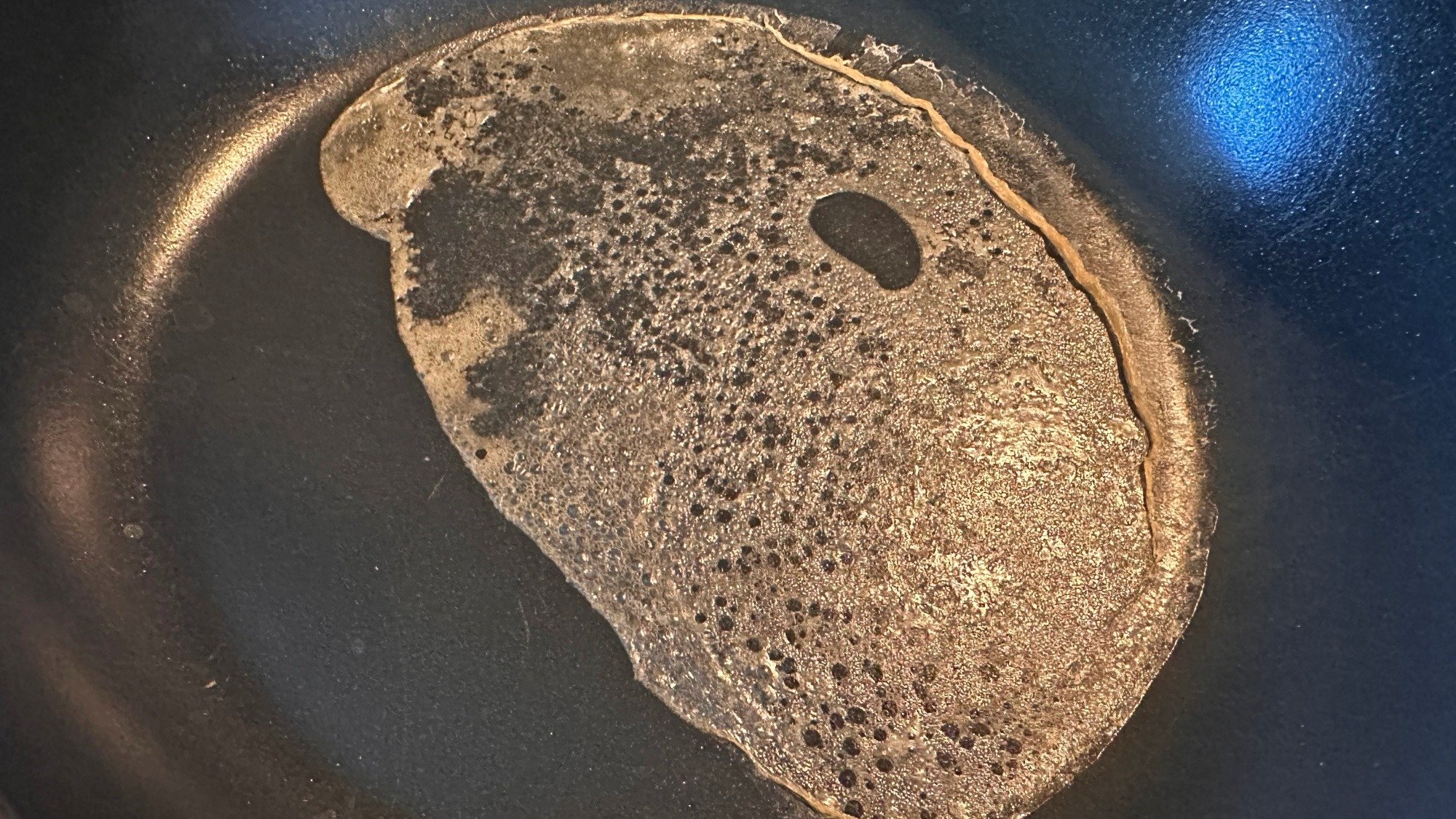
Chickpea liquid gets its magical binding properties from the starches that leach out of the bean and into the brine. When cooked, the water evaporates and you’re left with the starches, salt, and traces of other ingredients bound together in a sticky sort of web. I boiled some straight-up chickpea liquid in a pan to see.

A thin sheet of liquid in a pan.
When the water evaporates, chickpea liquid leaves behind a net of starches and other ingredients.
Credit: Allie Chanthorn Reinmann

Is it an egg? Decidedly not. While a thin sheet of cooked, slightly browned starch doesn’t look so impressive, it actually shows us what this simple liquid is capable of. Do note, however, that salt varies considerably in cans of chickpea liquid. When using it in baking, taste the aquafaba, and if it’s very salty, reduce the salt in the recipe by a quarter-teaspoon per two “eggs” in the recipe.

Use aquafaba in batters

Binding is a big part of why eggs go in cookie dough and cake batters, and luckily aquafaba can function in this way. What aquafaba doesn’t do naturally that eggs do, is puff. Even if you don’t whip an egg, it has some body to it after it cooks. Chickpea liquid doesn’t naturally have the same consistency, but this challenge is not impossible to overcome. Aquafaba whips up pretty easily and manages to hold that aeration. (More on that in a moment)

For batters where you don’t need to see much puff in your baked goods, like brownies, you can pour aquafaba straight into the batter. For one whole large egg, use three tablespoons of aquafaba. For one egg white, use two tablespoons of aquafaba. 

For batters and doughs where you’d like to see a little lift, whip the amount of aquafaba you’re using in a small bowl. Just whip it until its soft and foamy; stiff peaks aren’t necessary for this use. Then mix it into the dough as usual during the egg step. This bit of aeration will give your cookies a mounded shape and the average cake batter a smidge of lift. While it might be an annoying extra five to 10 minutes of your time, it’s worth it. 

Chocolate chip cookies on a tray.

Credit: Allie Chanthorn Reinmann

Use aquafaba for meringue

Typical meringue consists of only two major ingredients: egg whites and sugar. And frankly, it’s only meringue because the egg whites do all the heavy lifting. And yet, aquafaba can make it happen. Again, I’ve never been heavily reliant on this bean syrup, but it’s never let me down when I whip it up. 

Egg or otherwise, no meringue lasts very long unless you stabilize it in some manner. Always whip aquafaba with a small amount of cream of tartar to give you more time to work with the whipped meringue. For every cup of aquafaba, use a half-teaspoon of cream of tartar to help stabilize the structure. Whip the two together until the mixture becomes foamy on top, about three to five minutes, then add the sugar and whip it until the mixture has stiff peaks. Use this meringue to make meringue cookies, pavlovas, or fold it into other batters for maximum lift.

Use aquafaba for egg wash

Egg wash is one of the most understated baking techniques. Adding an egg wash can help seal together pies and pastries so they don’t explode, and it can add color and shine to the exterior of breads and countless other treats. While sour cream makes a good exterior egg wash, it doesn’t do much for binding. Aquafaba is here to help though. Simply brush the liquid onto the pastry or bread how you would normally do with eggs and get on with the recipe. You won’t taste any off flavors, but you might get a tickle of salt. 

This Anker 5K magnetic power bank is only $20 in the Amazon Spring Sale

The Anker 321 MagGo power bank has been discounted to $20 as part of the Amazon Spring Sale. This is a record low price and represents a discount of 23 percent. A whole bunch of colorways are on sale here, including white, black, pink, green and purple.

Anker products are all over our list of the best power banks and portable chargers, so this device is in good company. The 321 MagGo is, as the name suggests, a magnetic power bank that snaps onto the back of smartphones. It works with cases, so long as the case is magnetic. Inside, there’s a 5,000mAh battery that provides up to 19 hours of additional use for modern iPhones.

It’s equipped with heat sensors that continuously monitor temperatures to avoid accidental damage and it can juice up a phone while it’s being charged itself. This power bank is also on the smaller side, so it easily fits into pockets, bags and purses.

The only downside is that this is only for Prime members. The same goes for the Anker MagGo 3-in-1 charging station, which has been discounted to $88 from $110. However, the Anker Nano 3-in-1 portable charger is on sale for everyone. This non-magnetic charger includes a large 10,000mAh battery and is currently $35.

This article originally appeared on Engadget at https://www.engadget.com/deals/this-anker-5k-magnetic-power-bank-is-only-20-in-the-amazon-spring-sale-152009004.html?src=rss

This Big Screen Samsung OLED TV For Under $1,000 Is Nearly 50% Off

This Big Screen Samsung OLED TV For Under $1,000 Is Nearly 50% Off
Remember when buying an OLED TV came with the kind of sticker shock that would have you contemplating a second mortgage? Thankfully, OLED displays are far more affordable these days. They’re still generally pricier than traditional LCD or even mini LED TVs, but we’ve reached a point where you score a big screen OLED for under a grand if you

Google Sues Scammers Over Fake Maps Listings

Google has filed a lawsuit against alleged scammers who created and sold fake business profiles on Google Maps, the company said. The legal action follows an investigation that uncovered and eliminated more than 10,000 illegitimate listings.

The investigation began after a Texas business reported an unlicensed locksmith impersonating them on the platform. Google discovered the scams primarily targeted “duress verticals” — services needed in urgent situations like locksmiths and towing companies. “Once we’re alerted to the actual fraud, we take extreme efforts to identify similar fraudulent listings,” said Halimah DeLaine Prado, Google’s general counsel.

The scammers used tactics including bait-and-switch schemes and intercepting calls to legitimate businesses through “lead generation services.” They also sold fraudulent positive reviews to suppress negative feedback.


Read more of this story at Slashdot.

Gmail Is Now Using AI to Sort ‘More Relevant’ Results, But You Can Turn It Off

You might not think about it, but you’re probably pretty used to how Gmail’s search function works. You type in your query, wait a moment, then scroll through the results, looking for the email in question. These results are always in chronological order, with the most recent results appearing at the top. After years of searching this way, you’re likely subconsciously expecting this order, scrolling backwards in time to find the result you have in mind.

I imagine it’s going to be a bit confusing the next time you search for something in Gmail, and the results are not sorted by recency. That’s because Google is changing the way it returns Gmail results for users: Google announced in a blog post Thursday that the company is rolling out a new AI-powered search feature for Gmail on both mobile and the web. (It’s 2025: Of course the new feature is powered by AI.) The idea is to use artificial intelligence to return more relevant search results, rather than show results in chronological order.

The AI still takes recency into account when returning results, but also considers emails you’ve clicked most, as well as contacts with whom you are in frequent communication. In theory, the changes should be helpful: In an ideal world, the email you wanted to see would show up right at the top of the list with every search, so the closer Gmail can get to finding specific emails you want, the better.

Of course, with every new change comes friction. There’s a muscle memory to search: You’re used to seeing your emails arrive chronologically, so it might be a bit off-putting to skip over one result only to find a more recent one appear after it. There’s also the “AI” of it all: Will artificial intelligence aid in our search for relevant emails, or will it hallucinate, and turn this into another AI Overviews fiasco?

Gmail’s new AI search could actually be useful

While I’m a generative-AI skeptic, I have to be honest: This change might actually be helpful. In particular, I found the new search experience worked well with queries for messages that were definitely not recent. When searching for “graduation,” for example, sorting by “Most recent” delivered a series of results from the past few days, and seeing as my latest graduation was many years ago, these were pretty useless. In fact, I had to scroll through a ridiculous number of newsletters and promotions before I even saw any personal emails—whether they were relevant to my search or not.

On the flip side, switching to the new “Most relevant” showed me mostly personal emails. Perhaps they weren’t always about graduations, and instead included results containing variations on the word “graduation” (“graduated,” “graduating,” etc.) but aside from the odd promoted message or two, virtual all of the immediate returns were direct messages from friends and family.

The same was true with a search for “reservation.” The traditional sorting method returned a bunch of nonsense from hotel rewards accounts, cooking blogs, restaurant newsletters, even a number of Samsung emails. (Apparently I can reserve a $100 credit to get up to $1,100 in total savings when pre-ordering a Bespoke AI product. No thanks.)

While it’s a relief that I didn’t miss out on that Samsung offer, the new AI-powered search returned personal results that actually made sense from my query: The top result was a recent dinner reservation made through Google, appropriately, while subsequent results included flight reservations and other restaurant bookings. Even the first hotel result to pop up was for a previous stay I had, not a newsletter.

How to disable Gmail’s new AI search

That’s not to say this is going to be for everyone. If you have a specific email you’re looking for—especially if it came in recently—I could see the old ways of doing things working better for you here.

Luckily, Google didn’t take away the ability to search by recency—it just made the new search the default, which I can only imagine is going to cause some confusion.

It’s an easy change to miss, but once you know what to look for, you’ll be set. The next time you search on Gmail, take a look just above the top search result, towards the left. You’ll see “Most relevant” with a little drop down arrow next to it. Tap this menu, then, on the new “Sort by” pop-up, choose “Most recent.”

Huawei’s $1K Pura X Flip Phone With HarmonyOS And DeepSeek AI Is Here To Challenge Android

Huawei's $1K Pura X Flip Phone With HarmonyOS And DeepSeek AI Is Here To Challenge Android
Huawei just launched a new smartphone that combines a foldable and flippable into one. The Huawei Pura X may look like a normal flip phone when it’s closed, but instead of opening upwards, it unfolds like a book, basically turning itself into a mini tablet. Not quite iPad Mini territory in terms of display size, but it’s the best of both worlds

We probably inherited our joints from… a fish

What do we have in common with fish, besides being vertebrates? The types of joints we (and most vertebrates) share most likely originated from the same common ancestor. But it’s not a feature that we share with all vertebrates.

Humans, other land vertebrates, and jawed fish have synovial joints. The lubricated cavity within these joints makes them more mobile and stable because it allows for bones or cartilage to slide against each other without friction, which facilitates movement.

The origin of these joints was uncertain. Now, biologist Neelima Sharma of the University of Chicago and her colleagues have taken a look at which fish form this type of joint. Synovial joints are known to be present in jawed but not jawless fish. This left the question of whether they are just a feature of bony skeletons in general or if they are also found in fish with cartilaginous skeletons, such as sharks and skates (there are no land animals with cartilaginous skeletons).

Read full article

Comments