Lego Black Friday deals: Early sales include up to 40 percent off Star Wars and Disney sets

Lego sets are probably at the top of your kid’s wish list, and maybe they’re at the top of your personal list, too. With so many to choose from, you’ll be able to find one that makes a great gift for anyone who you know loves these little building bricks. Black Friday Lego deals are what to look for this time of year, because you can typically save at least 20 percent on a good number of sets. Yes, that often includes the most popular ones from the Star Wars, Super Mario, Harry Potter and other collections. In general, we always recommend using a price tracker when determining if a Lego deal is in fact a good one. Below, we’ve collected the best Lego Black Friday deals we could find right now.

You’ll find Lego deals across the board this holiday season at retailers like Amazon and Walmart, but don’t overlook Lego’s own site. If you join the free Lego Insiders program, you’ll build up points with each purchase that you can redeem in the future, get special discounts and sometimes get exclusive gifts when you buy.

While not a deal, arguably the hottest Lego for Black Friday will be the brand new Star Trek USS Enterprise set, which was announced recently. It has a whopping 3,600 pieces and will be a must-have for any Star Trek fans. The set will be available starting November 28 for $400.

Best Lego Black Friday deals

LEGO Star Wars Advent Calendar 2025 75418 for $27 (40 percent off)

LEGO Disney Frozen Advent Calendar 2025 43273 for $31 (32 percent off)

Lego Harry Potter Advent Calendar 2025 76456 for $39 (13 percent off)

LEGO Star Wars Brick-Built Star Wars Logo 75407 for $48 (20 percent off)

LEGO Star Wars Grogu with Hover Pram Building Toy Set 75403 for $65 (36 percent off)

LEGO Star Wars Millennium Falcon A New Hope 25th Anniversary Collectable Model 75375 for $68 (20 percent off)

LEGO Star Wars R2-D2 Building Toy Set 75379 for $80 (20 percent off)

LEGO Harry Potter Hogwarts Castle and Grounds 76419 for $136 (20 percent off)

LEGO Creator 3 in 1 Magical Unicorn Toy 31140 for $7 (32 percent off)

LEGO City Donut Truck Toy 60452 for $16 (20 percent off)

LEGO Speed Champions 2 Fast 2 Furious Nissan Skyline GT-R (R34) Race Car 76917 for $18 (28 percent off)

LEGO Botanicals Happy Plants Building Toys 10349 for $20 (13 percent off)

LEGO Botanicals Mini Orchid Building Set 10343 for $24 (20 percent off)

LEGO Ideas Tuxedo Cat 21349 for $80 (20 percent off)

LEGO Art Hokusai The Great Wave Framed Japanese Wall Art Building Set 31208 for $85 (15 percent off)

This article originally appeared on Engadget at https://www.engadget.com/deals/lego-black-friday-deals-early-sales-include-up-to-40-percent-off-star-wars-and-disney-sets-155007870.html?src=rss

Intel’s Rewrite Of Linux MM CID Code Showing Some Nice Gains For AMD

Posted last month were new Linux kernel scheduler-related patches rewriting the MM CID management code. The main takeaway for end-users from this set of 19 Linux kernel patches from an Intel engineer was seeing 14~18% improvement in a PostgreSQL database benchmark but that more benchmarks were needed. Curiosity got the best of me and I recently tested these patches on an AMD EPYC server to seeing some very enticing results for this in-development code.

Ford says “no exact date” to restart F-150 Lightning production

When Ford electrified its best-selling pickup truck, it pulled out the stops. The F-150 Lightning may look virtually identical to other versions of the pickup, but it’s smoother, faster, and obviously far, far more efficient than the ones that run on gas, diesel, or hybrid power. But the future of the country’s best-selling electric truck may be in doubt.

That’s according to a report in The Wall Street Journal, which claims that Ford’s management is “in active discussions about scrapping” the Lightning. Production had already been suspended a few weeks ago as a result of an aluminum shortage following a destructive fire at a supplier’s factory in New York, which Ford estimates may result in as much as $2 billion of losses to the company.

While Ford told Ars it doesn’t comment on speculation on its future product plans, the automaker said that “F-150 Lightning is the best-selling electric pickup truck in the US—despite new competition from CyberTruck, Chevy, GMC, Hummer and Rivian—and delivered record sales in Q3.”

Read full article

Comments

Polymarket Volume Inflated by ‘Artificial’ Activity, Study Finds

An anonymous reader shares a report: The volume of activity on Polymarket, one of the most popular prediction markets, has been significantly inflated by so-called wash trading in which users rapidly buy and sell the same contracts, according to a new study by Columbia University researchers. The “artificial trading,” as the authors call it, varied over time but accounted for an average of 25% of all buying and selling on Polymarket over the past three years, the researchers concluded.

The paper, which has not undergone peer review, was posted Thursday on the open-access research platform SSRN. The authors do not suggest that Polymarket itself was responsible for the wash trading, but they point to elements of the exchange’s crypto-based structure that make it possible.


Read more of this story at Slashdot.

D7VK Aims To Deliver Direct3D 7 Atop Vulkan

DXVK that is an important piece of Steam Play (Proton) for the Direct3D API implemented over the Vulkan API began as D9VK. Over time DXVK expanded then to supporting Direct3D 9 / 10 / 11 and even D3D8 too. Meanwhile VKD3D-Proton delivers Direct3D 12 atop Vulkan. Now there is a fork of the DXVK project working to bring Direct3D 7 support atop Vulkan…

10,000 generations of hominins used the same stone tools to weather a changing world

At a site in Kenya, archaeologists recently unearthed layer upon layer of stone stools from deposits that span 300,000 years, and include a period of intense environmental upheaval. The oldest tools at the site date back to 2.75 million years ago. According to a recent study, the finds suggest that for hundreds of millennia, ancient hominins relied on the same stone tool technology as an anchor while the world changed around them.

Photo of 3 chunks of stone with flakes chipped off to make sharp edges
Oldowan choppers dated to 1.7 million years ago, from Melka Kunture, Ethiopia.
Credit:
By Didier Descouens – Own work, CC BY-SA 4.0, https://commons.wikimedia.org/w/index.php?curid=11291046

“An extraordinary story of cultural continuity”

George Washington University archaeologist David Braun and his colleagues recently unearthed stone tools from a 2.75 million-year-old layer of Kenyan sediment at a site called Nomorotukunan. They’re classic examples of a type of tools archaeologists call Oldowan: the earliest types of sharp-edged stone tools made by hominins. The tools unearthed at Nomorotukunan are some of the oldest Olduwan tools ever found; only three other Oldowan sites in Africa date back any farther than 2.6 million years ago.

These hand-sized chunks of river rock, with flakes chipped off one or two sides to make sharp edges, were cutting-edge technology (not sorry) from 2.9 million years ago until about 1.7 million years ago. In technical terms, that’s what’s called a long flipping time, enough to span several hominin species and more than one genus. The last hominins to use Oldowan tools looked very different, and probably lived and behaved very differently, from the first; over this huge span of time, the stone tool technology itself changed less than the beings using it.

Read full article

Comments

How to Stop Bluetooth Speakers From Disconnecting Your AirPods

There are times when I feel like my AirPods are pure magic. It’s always impressive how they automatically shift from my Mac to my iPhone when I get a call, or how I don’t need to reconnect them to my iPad when I want to start watching a show. But when it comes to automatically swapping my audio over to Bluetooth speakers, they can get pretty jarring.

Often, speakers and audio outputs will take over audio from my AirPods when I’m wearing them. This happens every time I get in my car while wearing a single AirPod, usually while listening to music or podcasts (I would not recommend driving while using both AirPods). As soon as I turn on my car, bam, the media starts blaring through my car speakers, whether I want it to or not. Until recently, there was no remedy for this (other than manually pausing and then resuming playback from the AirPods themselves).

It seems like I wasn’t the only person annoyed be this, though. In iOS 26, Apple has introduced a dedicated setting that stops speakers from taking over your audio when you’re wearing your AirPods, or any other wireless headsets.

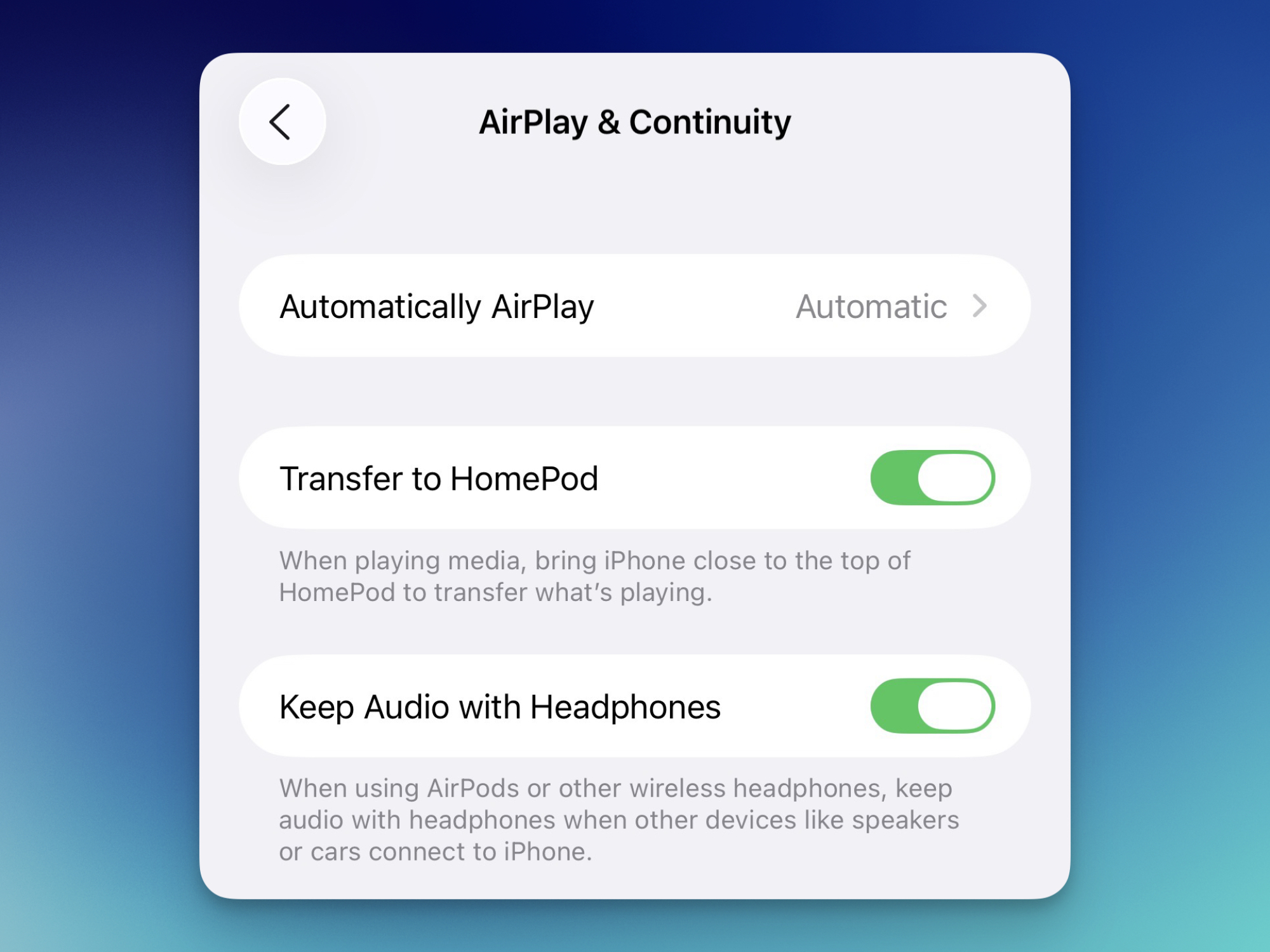
Here’s how to try it. On your iPhone running iOS 26 and above, go to Settings > General > AirPlay & Continuity and then enable the new “Keep Audio with Headphones” setting.

Enabling Keep Audio with Headphones feature in iOS 26.

Credit: Khamosh Pathak

Don’t worry. This doesn’t mean that you can’t use your car speakers or other audio outputs. Your device will still connect to your car speakers when they’re available, and you can switch to them manually using the Control Center.

As for the rest of your car, in iOS 26, Apple is also starting to play nice with AirPods and CarPlay, adding official support for AirPods in CarPlay systems. So, if you’re accessing content through CayPlay, you can continue using your AirPods to listen to music, or answer calls.

The best part? This won’t take away your AirPods’ auto-switching feature, as that’s powered by Handoff. If you want your AirPods to never automatically switch between any device, you can disable the Handoff feature from the AirPlay & Continuity menu.

Will The Switch 2 See A Price Hike? Nintendo President Offers A Clue

Will The Switch 2 See A Price Hike? Nintendo President Offers A Clue
During a question and answer session to discuss Nintendo’s latest earnings report, company president Shuntaro Furukawa was asked how rising component costs are affecting profits on the Switch 2, and what will happen once Nintendo depletes its current inventory. In other words, can we expect a price hike, as we’ve seen from Sony with the PlayStation,

Mark Zuckerberg’s illegal school drove his neighbors crazy

The Crescent Park neighborhood of Palo Alto, California, has some of the best real estate in the country, with a charming hodgepodge of homes ranging in style from Tudor revival to modern farmhouse and contemporary Mediterranean. It also has a gigantic compound that is home to Mark Zuckerberg, his wife Priscilla Chan, and their daughters Maxima, August, and Aurelia. Their land has expanded to include 11 previously separate properties, five of which are connected by at least one property line.

The Zuckerberg compound’s expansion first became a concern for Crescent Park neighbors as early as 2016, due to fears that his purchases were driving up the market. Then, about five years later, neighbors noticed that a school appeared to be operating out of the Zuckerberg compound. This would be illegal under the area’s residential zoning code without a permit. They began a crusade to shut it down that did not end until summer 2025.

WIRED obtained 1,665 pages of documents about the neighborhood dispute—including 311 records, legal filings, construction plans, and emails—through a public record request filed to the Palo Alto Department of Planning and Development Services. (Mentions of “Zuckerberg” or “the Zuckerbergs” appear to have been redacted. However, neighbors and separate public records confirm that the property in question belongs to the family. The names of the neighbors who were in touch with the city were also redacted.)

Read full article

Comments

Did NVIDIA Cancel Its GeForce RTX 50 Super Refresh? Not So Fast

Did NVIDIA Cancel Its GeForce RTX 50 Super Refresh? Not So Fast
A fresh rumor surrounding NVIDIA’s upcoming (or perhaps, no longer upcoming) GeForce RTX 50 Super series refresh is circulating like wildfire this morning. According to the latest unofficial chatter, NVIDIA has outright pulled the plug on its Super refresh for Blackwell due to a “crazy shortage” of memory products, including 3GB GDDR7 chips.

The

Blizzard confirms it’s adding a virtual currency for World of Warcraft

Ahead of its 21st anniversary, World of Warcraft is dealing with some controversy around its latest update. Developer Blizzard has confirmed that WoW is introducing a new “Hearthsteel” housing-related virtual currency with its upcoming Midnight expansion, and users are worried that it could become a microtransaction trap on a game that already costs $15 a month to play. 

In its post, Blizzard said the aim of the new currency is to allow players to purchase “multiple items at once” while offering “financial protections” for the parties involved. “You may want a full set of chairs to place around a dining table, multiple place settings for your invited guest [or]… many candles,” the company wrote. “Using an in-game currency can help make the process of obtaining many of these types of inexpensive items more efficient.”

Blizzard clarified that players will be able to buy Hearthsteel with their Battle.net balance and in-game gold via WoW tokens. It will also keep the catalog of Hearthsteel items small relative to what you can earn through gameplay. “Housing items tied to core fantasies of a player’s race or class, or that already exist in Azeroth, won’t be sold in the shop,” the blog post states. “Thematically important decor that players know and love will also not appear in the shop.”

The Hearthsteel currency was first uncovered by dataminers, and now that Blizzard has confirmed it, players are concerned. “It’s not even about the currency,” said one WoW Reddit user. “It’s about a large, dedicated portion of the player base crying out for years that we don’t want the game to head this direction and here it is.”

It’s hard to look at the new currency and not think of Microsoft’s recent edict to its Xbox division. Last month, the software giant reportedly implemented an “across-the-board goal” of 30 percent profit margins for its gaming division, which it internally called “accountability margins.” That’s a huge amount above Xbox’s own average in the last six years of between 10 and 20 percent.

This article originally appeared on Engadget at https://www.engadget.com/gaming/blizzard-confirms-its-adding-a-virtual-currency-for-world-of-warcraft-133007304.html?src=rss

Texas AG Ken Paxton sues Roblox over alleged child safety lapses

Texas Attorney General Ken Paxton has filed a lawsuit against Roblox, accusing it of ignoring state and federal safety laws. In his announcement on X, Paxton said the children have been “repeatedly exposed to sexually explicit content, exploitation and grooming” on the online game platform, because it chose to prioritize “pixel pedophiles and corporate profit” over the safety of children. “Thank you,” Schlep posted in the comments of his announcement. Schlep was a popular Roblox user who was known for staging sting operations à la To Catch a Predator on the platform, which had led to multiple arrests. He was controversially banned from Roblox in August, because he violated the company’s new rule that prohibits “vigilante behavior.”

“We share Attorney General Paxton’s commitment to keeping kids and teens safe online,” the company said in a statement. “We are disappointed that, rather than working collaboratively with Roblox on this industry-wide challenge and seeking real solutions, the AG has chosen to file a lawsuit based on misrepresentations and sensationalized claims.”

BREAKING: I’m suing Roblox for putting pixel pedophiles and profits over the safety of Texas children.

We cannot allow platforms like Roblox to continue operating as digital playgrounds for predators where the well-being of our kids is sacrificed on the altar of corporate greed. pic.twitter.com/Jj2kHEJM75

— Attorney General Ken Paxton (@KenPaxtonTX) November 6, 2025

Roblox has implemented several measures meant to protect children over the past few years. It blocked any user under 13 from being able to play, search or discover any unrated experiences on the platform, and it restricted DMs for that segment of users, as well. It also added an age estimation feature that requires a video selfie for a user to be able to prove that they’re 13 or older. The company intends to roll it out to everyone by the end of this year.

Texas isn’t the only state suing Roblox and accusing it of failing to protect children from predators, though: Kentucky and Louisiana had previously filed their own lawsuits against the company. Louisiana argued that the platform contains user-created experiences with troubling themes, such as “Escape to Epstein Island” and “Diddy Party,” despite the majority of its users being under 16. It also pointed out that it was possible to initiate voice chats within Roblox’s experiences, even between users who weren’t friends, until November 2024. In one instance, a man who was arrested for possession of child sexual abuse materials was discovered to have used voice altering software to pretend to be a young girl in order to exploit children on the platform.

“Roblox must do more to protect kids from sick and twisted freaks hiding behind a screen,” Paxton wrote. “Any corporation that enables child abuse will face the full and unrelenting force of the law.” To note, the Texas AG also previously sued TikTok, alleging that it has insufficient parental controls, as well as Meta and Character.AI for potentially misusing data collected from underage users.

This article originally appeared on Engadget at https://www.engadget.com/texas-ag-ken-paxton-sues-roblox-over-alleged-child-safety-lapses-131500288.html?src=rss

Anker Laptop Power Bank review: All my favorite battery features together at last

Over the past couple years, I’ve tested around 60 different power banks for Engadget. In that time, battery manufacturers have given their products features with varying degrees of usefulness, ranging from smart (straps and built-in cables) to handy (displays and wireless charging pads) to really not necessary (Bluetooth connectivity, specialized recharging bases).

Anker’s Laptop Power Bank (25K, 165W) manages to combine all the cleverest new features into one sleek-looking charging brick — and it costs less than some other banks in its class. There’s a built-in display that not only lets you know how much charge the bank has left, it also tells you how many watts are flowing through each port to your devices. Pressing the button on the side cycles through the battery’s current temperature and the overall health of the bank, including how many charge cycles it’s gone through. All of those bits of info should help prolong and gauge the bank’s longevity.

Big capacity in a tidy package

The 25,000 mAh capacity puts it well within the TSA’s 100Wh capacity limit and I have taken this battery on two flights in my carry-on with no issue. The capacity is enough to fill my tester smartphones (an iPhone 15 and a Galaxy S23 Ultra) around four times each. Separately, it pushed my aging 16-inch MacBook Pro from 10 percent to 78 percent. That translates to around nine additional hours of use for my typical workload (Wi-Fi, VPN, too many Chrome tabs and other basic productivity apps).

My only gripe with the design is that the very shiny screen has become slightly dull with use. It doesn’t look bad, just not as mint-fresh as when it was unboxed. That’s to be expected, and I’ll take the luxe finish over some ruggedized enclosure any day.

the Anker Laptop Power Bank 25K 165W sits on a table as it charges an iphone and an ereader
Two built-in cables and a big capacity let you charge two devices at once.
Amy Skorheim for Engadget

Sure, forget your cables at home

Possibly the power bank’s most useful features are the two built-in USB-C cables, and one even loops around to create a handy carry strap. It feels robust and well-anchored enough that I don’t fear lugging it around like that. The other cable retracts into the unit and extends up to two feet when needed. The end stays neatly tucked into a well in the body and stays magnetically in place. The cords not only look tidy, their inclusion means you’ll never find yourself in the ironic position of having a dead device and a full battery pack, but no way to connect the two.

Both cables serve in-out functions so you can easily plug them into any USB-C power adapter for a refill. There are also two additional USB (one Type-A and one Type-C) ports, so if you’ve got a specialized cable, such as Lightning, smartwatch or microUSB connector, you’ll be able to charge those devices too.

Admirable speeds

The 165-watt rating, as with any power bank, doesn’t mean you’ll get that power out of a single port. The rating is a combined, almost theoretical total, achieved with all four ports engaged. The three USB-C outlets are rated at a max of 100W, but to get to that speed, you’ll need a device capable of taking it — my biggest energy hog is my laptop and it maxed out at around 90 watts using the power bank. But for all but the most extreme cases, that’s plenty fast.

My tester iPhone 15 went from near-dead to 70 percent refilled in around 40 minutes. The Galaxy S23 Ultra powered up from five to 100 percent in under an hour, and my 16-inch MacBook got a 68 percent refill in just over 50 minutes. That’s not the fastest performance I’ve tested, but it’s better than most other banks and plenty quick enough to get you back in action in a decent amount of time.

Anker Laptop Power Bank 25K 165W on a table outside in the sun
Amy Skorheim for Engadget

Wrap-up

It’s gratifying when, after years of testing one type of product, you get one that is, more or less, an ideal example of the category. This is the battery I grab when I’m heading to get some work done at the coffee shop. I’ve taken it with me on road trips and on flights, and it hasn’t let me down once. The fact that you don’t need to remember to grab a cable takes away an extra bit of stress, and the accurate display means you know just about how much more you can squeeze out of the bank’s rather sizable depths.

This article originally appeared on Engadget at https://www.engadget.com/computing/accessories/anker-laptop-power-bank-review-all-my-favorite-battery-features-together-at-last-130036854.html?src=rss

US Congressional Budget Office Hit By Suspected Foreign Cyberattack

An anonymous reader quotes a report from BleepingComputer: The U.S. Congressional Budget Office (CBO) confirms it suffered a cybersecurity incident after a suspected foreign hacker breached its network, potentially exposing sensitive data. In a statement shared with BleepingComputer, CBO spokesperson Caitlin Emma confirmed the “security incident” and said the agency acted quickly to contain it. “The Congressional Budget Office has identified the security incident, has taken immediate action to contain it, and has implemented additional monitoring and new security controls to further protect the agency’s systems going forward,” Emma told BleepingComputer.

“The incident is being investigated and work for the Congress continues. Like other government agencies and private sector entities, CBO occasionally faces threats to its network and continually monitors to address those threats.” The Washington Post first reported the breach, stating that officials discovered the hack in recent days and are now concerned that emails and exchanges between congressional offices and the CBO’s analysts may have been exposed. While officials have reported told lawmakers they believe the intrusion was detected early, some congressional office have allegedly halted emails with the CBO out of security concerns.


Read more of this story at Slashdot.

Use the ‘5S’ Technique to Create a More Productive Workspace

We may earn a commission from links on this page.

Studies have shown that a decluttered workspace can decrease stress and increase focus—and that stress at work can actually result in more clutter. It’s important to clean up your environment so the place you work is comfortable, calm, and sanitary. If you want to get more done, you need to be working in a tidy, welcoming space. Borrow the 5S method to get it done most efficiently. 

What is the 5S method of workspace cleaning?

The 5S method, like Kanban and Kaizen, comes from Japan, where organizational processes developed in factories and were so useful that their use expanded well beyond Toyota and other manufacturers. The method refers to the five s-words it relies on: seiri, seiton, seisō, seiketsu, and shitsuke, but if you don’t speak Japanese, don’t worry. They’ve been translated into five s-words in English, too:

  • Sort

  • Set in order

  • Shine

  • Standardize

  • Sustain

Occasionally, there’s a sixth “s,” safety, and that makes sense when you consider the uses of the system within factory settings, but it’s not quite as relevant if you’re putting in your time in a cubicle. The technique has a variety of applications outside of factories and is especially useful in healthcare settings, construction sites, and classrooms. For you, however, it may just be all about your desk, and that’s fine. The 5S system is adaptable. 

How to make 5S work for you

The five pillars of the technique provide a framework for organizing and cleaning in a way that minimizes waste and increases productivity. Instead of thinking of the five steps in order as a one-and-done operation, consider them a cycle you’re always repeating. When you’re done with the fifth (or, in some cases, sixth) one, you go back to the first. You should start with sorting for the most part, but at any given time, you can employ one of them and start moving through the cycle. Here’s what to do: 

  1. Sort: Get rid of anything that isn’t necessary in the workspace. If it’s not needed for what you’re doing, put it away. Utilize drawers, storage bins, or under-desk organizers to keep the things that you don’t immediately need out of your sight. When possible, keep the storage bins opaque so you aren’t distracted by the contents. I prefer simple, easy-to-install organizers, like this clip-on drawer system that hides unwanted items under your desk. All you need is something that will obscure what you’re not using when you’re not using it. The sorting period is also when you should clear out clutter anything you don’t use regularly. (If this is unfamiliar territory for you or you just need some ideas, I compiled my 17 favorite decluttering methods here.)

  2. Shine: With the space tidied up and freed of anything unnecessary, it’s time to clean. This can be as easy as running a disinfectant wipe over your surfaces or brushing crumbs into the trash, but cleaning for sanitary reasons is different from decluttering, so don’t skip it. Check out this list of gadgets to clean your desk thoroughly—but make sure you have space in those storage bins for them.

  3. Set in order: Now, look back at the storage bins. During the sorting period, you can just throw everything that isn’t necessary into those, but when you’re setting in order, you need to make them more efficient. Designate bins for different categories, like office supplies, reference materials, specific job tools, etc. Make sure the things you need most often are in a convenient location, like the under-desk drawer, and things you need less often are still available but more removed. It helps to use labels here for maximum efficiency. 

  4. Standardize: This step is a little different from the first three, which are all about organizing and cleaning. Standardizing is about creating a protocol to keep everything organized and clean, plus integrating it into your actual workflow. You already started when you began labeling storage containers, but now it’s time to get serious about implementing these changes consistently, and making the most of what you did in the first three steps. The easiest way to do this is building time into your schedule for regular 5S maintenance and desk cleaning. It should be part of your regular to-do list. For instance, if you’re using the 1-3-5 method of to-do list creation, 5S maintenance can be one of your five smaller tasks for the day. Make sure to carve out time for it at least once a week, ideally by putting time on your calendar when you’re timeboxing. When going through the 5S cycle going forward, you can always make changes to your standardization if you’re not cleaning enough, if things are piling up, or if your technique is otherwise not working, so don’t just skip the fourth step on your next time through. 

  5. Sustain: This step is all about keeping with it. Commit to following the standardization protocol you set in the fourth step and working through all of the s-words regularly and in order. The more you do it, the more of a habit it will become and the more efficient your workspace will be.

Again, sometimes this framework is expanded to include the sixth “s,” safety. A clean, organized environment isn’t just efficient and good for your focus; it’s safer, too. When you’re working through the five steps above, look for anything that could be a hazard, like tangled cords under your desk, items stacked too haphazardly on your shelves, or liquids too close to your electronics.

Keep in mind that when sorting, your goals are not only to make more space available to work, but to decrease distracting items and reduce the amount of time you spend looking for what you need when you need it. When you shine, you want to reduce waste and keep the area safe, but also keep it pleasant to work in, which is an important element of productivity. Setting in order is all about making your work easier by making things available to you when you need them and finding them where you expect them to be, which wastes less time. Standardizing and sustaining will help you make sure the procedure is followed and is working for you, so eventually, you’ll even spend less time thinking about all of this stuff, and more time focusing on your work.

Notable Zwift Events for the Weekend of November 8-9

Signup numbers are looking strong this weekend, so we picked some of the most popular rides and crazier events (6-hour group rides or banded PRL Full events, anyone?) See our five favorites below!

�DBR x Canyon x Cykelnerven Ultra Charity Ride

✅ Good Cause  ✅ Endurance Challenge  ✅ Popular

Are you ready for a mega endurance challenge? This event is 6 hours long and open-paced. DBR organized it on Watopia’s Flat Route Reverse (10.2km, 61m) so you’ll always have riders nearby and can even take a break if needed.

This is a charity ride, held to support Cykelnerve, raising awareness and funds for a world free of multiple sclerosis.
Every donation helps in the fight against multiple sclerosis.


Donate here >

Saturday, November 8 @ 8am UTC/3am ET/12am PT
Sign up at zwift.com/events/view/5183398

�VirtuSlo 4Endurance League 2025

✅ Popular  ✅ Stage Race  ✅ Mass Start

VirtuSlo’s popular 4Endurance League starts this weekend with a 49km, 502m race on France’s Gentil 8. With over 200 riders signed up when we put this post together, this is the most popular ride on our list!

The 4Endurance League is a 6-race series held over a 6-week period. This is race 1. You can find out about the other races and more league info in the event description.

Sunday, November 9 in two different timeslots
Sign up at zwift.com/events/tag/virtuslo

� Bikealicious Rubberband Joy Ride on PRL Full

✅ Banded  ✅ Beginner-Friendly  ✅ Endurance Challenge

Always a popular ride, this week’s Rubberband Joy Ride is a special one, since it’s on Zwift’s longest route: London’s PRL Full (173.5km, 2625m)!

The Bikealicious crew is always friendly, and this is a “keep together” ride, so as long as you keep pedaling you’ll stay with the group. It’s a good chance to grab this route badge if you haven’t done so yet, which comes with a whopping 3460 XP!

Saturday, November 8 @ 7am UTC/2am ET/Friday 11pm PT
Sign up at zwift.com/events/view/5180926

� RiZZRL Veterans / Remembrance Day: Salute to Soldiers

✅ Unique Event  ✅ Newish Route

The RiZZRL races are always epic showdowns, and this week race organizer Ben has fired up a Veterans/Remembrance Day Salute event on Watopia’s Southern Coast Cruise (26.3km, 147m).

Riders are grouped by Racing Score, but these are mass start events.

Sunday, November 9 in three different timeslots
Sign up at zwift.com/events/tag/rizzrl

�Rocacorba Triple Dash

A group of cyclists race through a brightly lit, futuristic city at night with neon signs. The logo and text “The Warrior Games” appear on the left side of the image.

✅ Popular Race  ✅ “Ladies Only” Option ✅ Unique Event

The Rocacorba Triple Dash combines three mini races into one fierce competition. There are two timeslots: 15:30 UTC/10:30 EST/7:30 PST for women’s only races, and 17:30 UTC/12:30 EST/9:30 PST for mixed. And there are prizes!

Learn all about this race >

Saturday, November 8 in two different timeslots
Sign up at zwift.com/events/tag/rocacorbatripledash

How We Make Our Picks

We choose each weekend’s Notable Events based on a variety of factors including:

  • Is the event unique/innovative in some way?
  • Are celebrities (pro riders, etc) attending/leading?
  • Are signup counts already high, meaning the event is extra-popular?
  • Does the ride include desirable unlocks or prizes?
  • Does the event appeal to ladies on Zwift? (We like to support this under-represented group!)
  • Is it for a good cause?
  • Is it just plain crazy (extra long races, world record attempts, etc)?
  • Is it a long-running, popular weekly event with a dedicated leader who deserves a shout out?

In the end, we want to call attention to events that are extra-special and therefore extra-appealing to Zwifters. If you think your event qualifies, comment below with a link/details and we may just include it in an upcoming post!