The Apple Watch Series 10 With Cellular + GPS Is Now $200 Off

We may earn a commission from links on this page. Deal pricing and availability subject to change after time of publication.

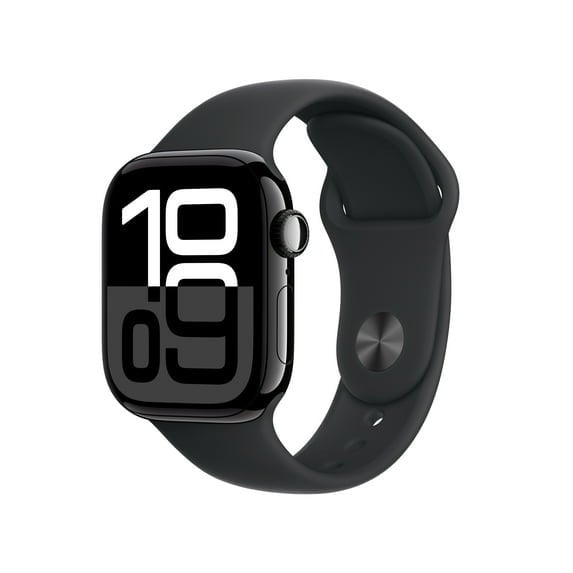
Each year, Apple releases new models of the Apple Watch, but the updates aren’t always that significant—meaning it might make more sense to choose an older one and save on the purchase price. That’s certainly a good option right now, because you can get last year’s Apple Watch Series 10 with GPS + Cellular for $299, $200 off the original price, at Walmart (in four colors!).

The Series 10 has a larger AMOLED display (30% larger, to be precise) and a thinner case than its predecessor, the Series 9. It also features a more powerful chip, improving performance and helping future-proof the device. According to this PCMag review, where it landed an Editors’ Choice Award, its standout features include the Depth app, which measures underwater depth (it’s waterproof up to 50 meters), and a water-temperature sensor, making it great for swimmers and divers. Along with other key health and sleep stats from the Series 9, it also monitors breathing disturbances for people with sleep apnea.

According to PCMag, it exceeds the official battery life estimate of 18 hours and can last more than 36 hours in real-world tests with heavy use, which is close to the battery life on the 11. It’s also fast-charging, reaching around 80% in just 30 minutes. This model comes with both GPS and Cellular, meaning you don’t need to tether it to your iPhone to take full advantage of its features. Design-wise, it has a minimalist look and a durable aluminum and titanium case. 

If you’re in the iOS ecosystem and seeking a smartwatch that blends style, readability, and an ergonomic case with advanced health and fitness stats and monitoring, the Apple Watch Series 10 with GPS + Cellular is a feature-packed steal at $299.

Our Best Editor-Vetted Tech Deals Right Now


Amazon Fire TV Stick 4K Plus


—
$24.99

(List Price $49.99)


Amazon Fire HD 10 (2023)


—
$69.99

(List Price $139.99)


Sony WH-1000XM5


—
$328.00

(List Price $399.99)


Fitbit Versa 4 Fitness Smartwatch (Black)


—
$119.95

(List Price $199.95)

Deals are selected by our commerce team

From 1976 To Today, Dhrystone Benchmarks Reveal How Far CPUs Have Come

From 1976 To Today, Dhrystone Benchmarks Reveal How Far CPUs Have Come
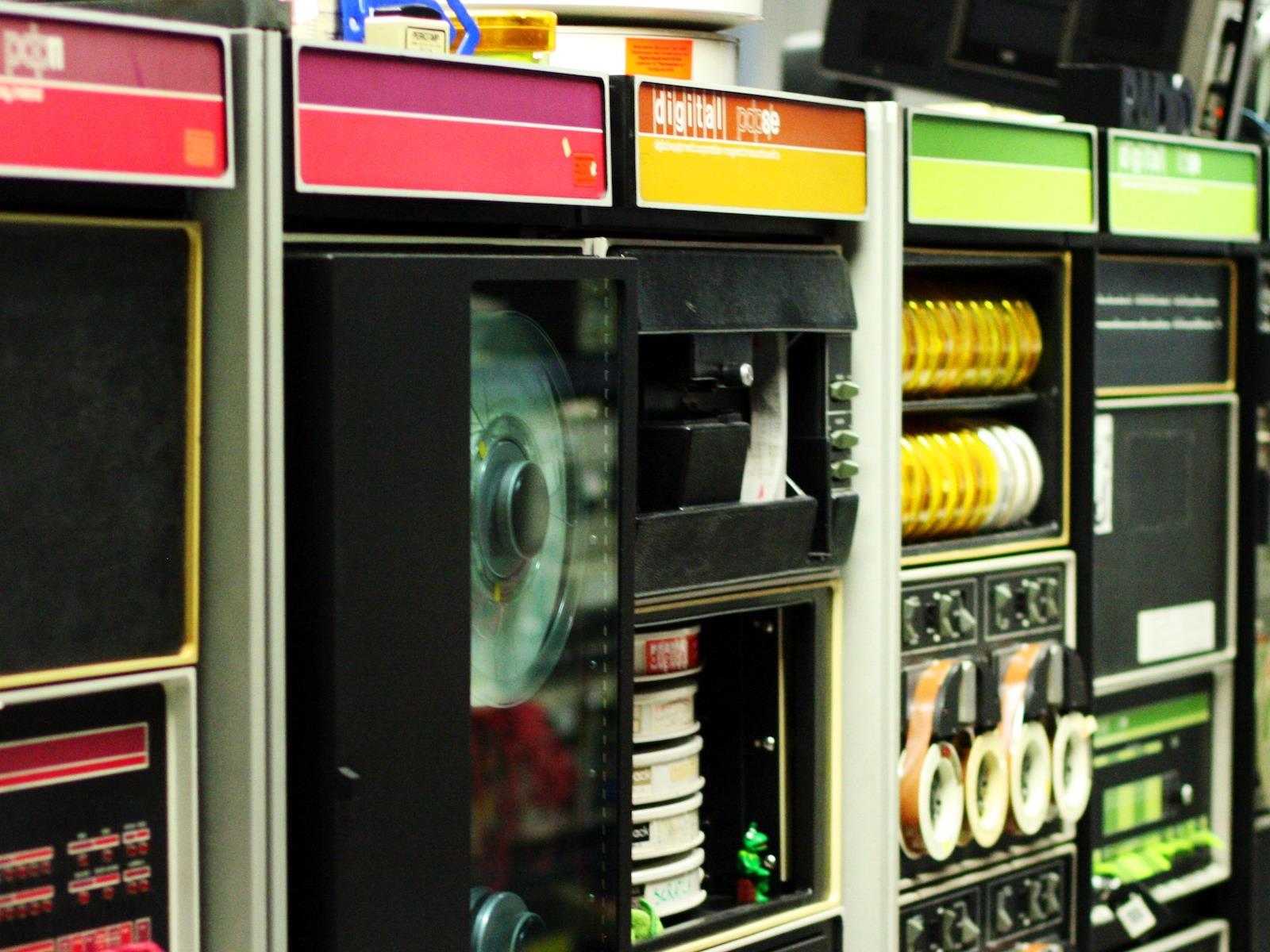
Possibly the most absurd truth of modern computing is that, as far as the technology has evolved, we’re fundamentally still doing the exact same thing we were doing decades ago: twiddling bits. The question, of course, has always been how fast we can twiddle those bits, and how many we can do at once. Because it’s still the same work, though,

Snap is bringing back 2D Bitmoji for Snapchat+ subscribers

Snap is offering Snapchat+ subscribers the chance to have 2D Bitmoji avatars once again. In the coming days, they’ll be able to activate a setting called Comic Bitmoji. Snap said this will revive “the charm of classic avatars, while keeping all the benefits of today’s 3D infrastructure.” If you turn on Comic Bitmoji, all Bitmoji avatars that you see in Snapchat will be rendered in 2D. You’ll also be able to send stickers to your friends in that style.

Snap switched from 2D to 3D avatars back in 2023. The company said the move allowed it to offer a larger array of customizations, including more body types, hairstyles and makeup looks.

However, many users yearned for a return to a 2D look. Nearly 100,000 of them signed a Change.org petition demanding the return of 2D Bitmoji, and Snap said it listened. CEO Evan Spiegel signed the petition too.

Snap says Comic Bitmoji effectively applies a filter to the 3D avatars. To make the animations and expressions work properly in the 2D format, the team had to make adjustments to proportions, shading and outlines, according to Fast Company. Snap said that more than 320 million people use Bitmoji every day, so getting the 2D renders right was important.

It’s a little disappointing that Snap is locking the the Comic Bitmoji setting behind a paywall. However, it seems like just the kind of feature that might prompt more users to sign up for a Snapchat+ subscription.

This article originally appeared on Engadget at https://www.engadget.com/apps/snap-is-bringing-back-2d-bitmoji-for-snapchat-subscribers-202257144.html?src=rss

World’s First Green Fuel Levy To Add Almost $32 To Air Fares

Air passengers departing Singapore will pay a green fuel levy of as much as S$41.60 ($31.95) from next year as the city-state locks in a key step in its effort to cut the aviation industry’s emissions. From a report: Travelers flying in economy and premium economy, as well as those on short-haul routes, will be charged far less. Those customers will pay an additional S$1 for trips to Southeast Asia, and S$10.40 for flights to the Americas, the Civil Aviation Authority of Singapore said Monday. Business and first class travelers will pay four times more, it said. […] The funds collected from passengers will go to the centralized purchase of sustainable aviation fuel — typically made from waste oils or agricultural feedstock — as Singapore looks to achieve a SAF adoption rate of 3% to 5% by 2030.


Read more of this story at Slashdot.

That Lost iPhone Alert Is a Phishing Scam

If your iPhone has been lost or stolen, you’d probably be relieved to get it back, even if it is has been weeks or months since you’ve replaced your device. Having your old phone in hand may provide some peace of mind that your data is secure, and if nothing else, you can sell or trade it in or repurpose it for another use.

Unfortunately, you’re pretty unlikely to see your missing iPhone again, but bad actors are hoping you hold out enough hope to fall for a phishing scam promising that your device has been found.

How the lost iPhone scam works

According to a warning from the Swiss National Cyber Security Center, some iPhone owners whose devices were lost or stolen are receiving SMS or iMessage notifications—purportedly from Apple—claiming that their phones have been located. The text messages include specific and accurate details about the missing iPhones, including the model, color, and storage capacity, and direct recipients to click a link to view the device’s location. The message is signed by the “FindMy Support Team.”

Of course, like all phishing schemes, the link is fake. It directs you to a spoofed Apple Find My page with an Apple ID sign-in designed to steal your credentials, which scammers can use to take over your account.

The goal of this scam is to disable Apple’s built-in security feature tying your iPhone to your Apple ID, which prevents malicious actors from erasing and reselling the device. How scammers manage to find your phone number to text you is unclear, though in some cases they may get it from the lock screen message you can enable when you switch your device to Lost Mode. This may be a good reason to put alternative contact information, such as a dedicated email address, in your custom message.

Avoid falling for lost the iPhone scam

If you do receive a message with a link to locate your lost iPhone, ignore it. Apple does not contact users via text or email with updates about found devices. (Of course, if you’ve enabled Lost Mode and someone reaches out claiming they have your device, proceed with caution.) Never click on links in unsolicited communication, as these are common vectors for phishing.

Of course, you should mark your device as lost in Find My to suspend alerts and notifications that appear on your lock screen as well as payment card access. You should also consider preemptively enabling Apple’s Stolen Device Protection, an anti-theft feature that helps prevent thieves from breaking into your iPhone. If your device does go missing, don’t remove it from your Apple account, as doing so disables some security protections.

EasyEffects 8.0 Released In Porting From GTK4 To Qt / QML / Kirigami

EasyEffects is the open-source application formerly known as PulseEffects that transitioned to using native PipeWire filters for providing simple audio effects on the Linux desktop. EasyEffects makes it easy to apply different audio effects like bass enhancer, compressor, pitch shift, reverberation, and many more. With this week’s release of EasyEffects 8.0, the user interface has been rewritten in Qt / QML / Kirigami rather than GTK4…

Alarming runC Flaws Enable Hackers To Exploit Docker Containers For Root Access

Alarming runC Flaws Enable Hackers To Exploit Docker Containers For Root Access
Security researchers have found several alarming security flaws in tooling used by containerization tool Docker that allows attackers to attack the host machine. The flaws specifically relate to runC, which Docker describes as the “infrastructure plumbing” that makes it such a useful tool for developers.

RunC is a universal container runtime

Renders show off Samsung’s upcoming Galaxy S26+

It looks like Samsung is sticking with its Plus line of Galaxy phones, according to a report by Android Headlines. This comes after rumors swirled that the company would be dropping the Plus line in favor of the slim Edge handset. This report indicates that not only is Samsung keeping the Plus, but it’s ditching the well-reviewed Edge entirely.

A leaker has given us a peek at the forthcoming S26+ and it looks similar to the company’s other modern smartphones. The camera island has been tweaked a bit. The leak shows a small, raised camera island, which is different from the design of the S25+.

Exclusive: Samsung Galaxy S26 Plus Official CAD Renders & Rumorshttps://t.co/gkh378hnYW #GalaxyS26Plus #Samsung #Android

— Androidheadline (@Androidheadline) November 10, 2025

Also, the leaked images seem to suggest that the S26+ won’t have the full-width camera that was rumored to be coming with the S26 Edge. That phone is now reportedly cancelled, so we don’t know when we’ll get that camera.

The publication suggests that the S26+ will be 7.35mm thick, which is in line with the S25+. It also seems to be decidedly chunkier than the S25 Edge, so this is likely not a covert rebrand. The Verge has suggested that the company is also ditching the long-rumored S26 Pro. In other words, we’ll likely be getting a standard S26, the S26+ and the S26 Ultra next year. That’s the same naming convention as this year.

We won’t have too long to wait for actual details from Samsung. The company typically reveals new Galaxy phones sometime in January. It’s been reported that Samsung is dropping the Edge due to poor sales. However, Dutch fansite Galaxy Club has reported that the company is still developing a slim handset for release sometime in the coming years.

This article originally appeared on Engadget at https://www.engadget.com/mobile/smartphones/renders-show-off-samsungs-upcoming-galaxy-s26-194014359.html?src=rss

Apple Delays Release of Next iPhone Air Amid Weak Sales

An anonymous reader shares a report: Apple is delaying the release of next year’s version of the iPhone Air, its thinnest smartphone, after the first model sold below expectations, according to three people involved in the project.

Although the length of the delay remains uncertain, the product won’t be released in fall 2026 as previously planned, they said. Apple has already sharply scaled back production of the first version, according to multiple people with direct knowledge of the matter.


Read more of this story at Slashdot.

Use this hack to get one year of Peacock for $49 before Black Friday

Walmart is offering its Walmart+ subscription at half off for new sign-ups, and it includes a choice of either Peacock Premium or Paramount+ Essential. The deal for new subscribers is just $49 for the first year, marked down from $98.

The real value is in selecting Peacock Premium, which would normally run you $110 per year on its own. With the current discount on a Walmart+ subscription you are essentially getting half off on your streaming subscription for that year.

Just about every major streaming service has raised its prices in the last year, including HBO Max, Disney+, Netflix, Apple TV and YouTube TV, so saving some money on one of them just might be worth the effort. Cord cutting is not nearly as affordable as it used to be, so finding a deal like this is pretty helpful.

Walmart+ itself offers myriad additional benefits like early access to Black Friday deals, free shipping on orders over $35, discounts on gas, free online veterinary care and more. Earlier this year, Walmart+ subscribers got first dibs on the Nintendo Switch 2 at the retailer. You can also use that free shipping to take advantage of Walmart’s drone delivery program in a handful of select cities.

This article originally appeared on Engadget at https://www.engadget.com/deals/use-this-hack-to-get-one-year-of-peacock-for-49-before-black-friday-192739041.html?src=rss

9,549 Riders In 216 Divisions: Looking at ZRL Race 1 Stats

The first race of round 2 of the Zwift Racing League happened on Tuesday, November 4th on the largely flat course of Greatest London Flat.

This round saw 9.5k racers compete across 216 separate divisions from every corner of the globe – in and of itself a massive coordination effort.  Big thanks to the WTRL team for pulling this off season after season.

Given that this was a TTT where the times can be compared across zones, and now that all the results are in, I thought it would be worth taking a step back and looking at the ZRL landscape as a whole. Where are the teams concentrated? Which zones are more competitive? Who are the best of the best?

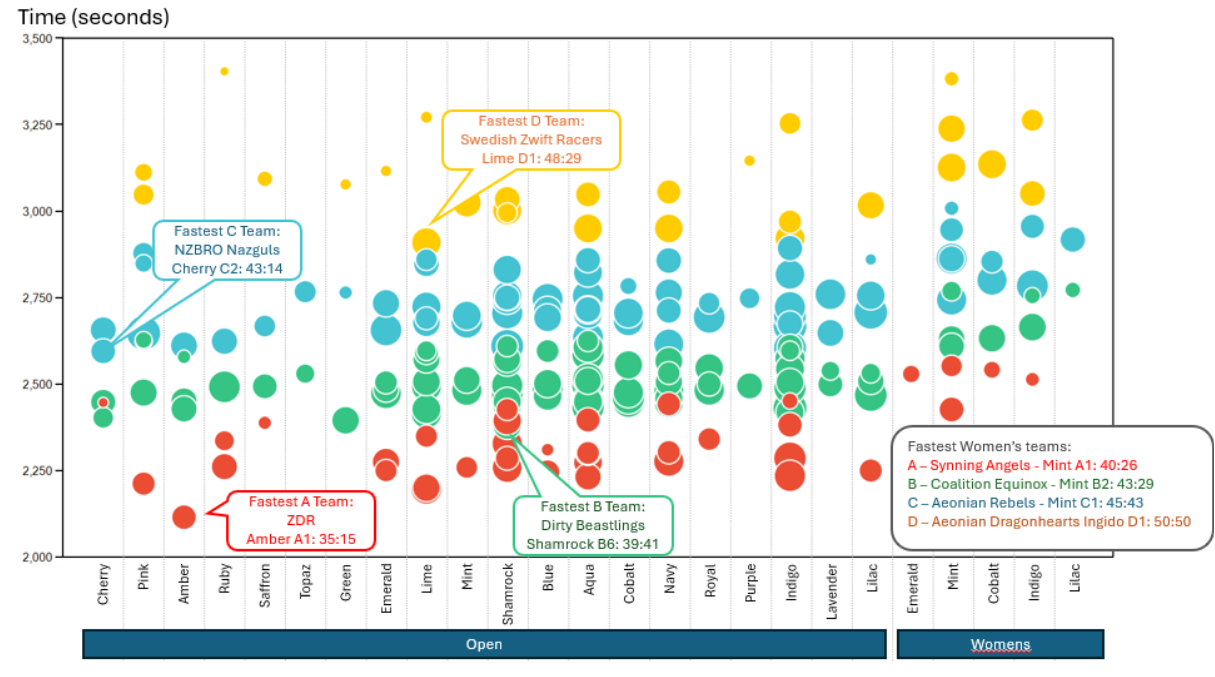
To answer this, I looked at the top team finishing time in each division across all 88 ZRL round 2 events that occurred last Tuesday.  In the chart below, each bubble represents a division, plotted by the time of the fastest team in that division (lower on the chart is faster), with the size of the bubble corresponding to the total number of riders competing in that division:

Source: ZwiftPower, time based on 4th rider to finish event

Interestingly:

  • Clearly some zones are significantly more populated than others, with the Shamrock Open B Regular category having 6 distinct divisions while other zones have just a single division
  • While the overall riders are relatively concentrated in the Shamrock through Indigo zones, the fastest open times largely came from less-populated zones
  • This was not the case for the women’s field, where the Mint zone is both the most populated and also fielded the fastest times
  • There should be some re-shuffling of teams within divisions, with 3 out of the 8 fastest times coming from a team outside of division 1 in their zone. (Editor’s note: WTRL did some reshuffling after the race.)

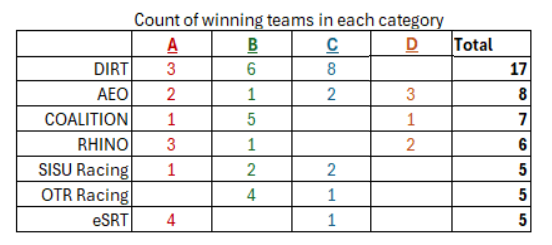
The last topic to look at was teams that performed particularly well across zones and categories.  While the underlying data is approximate at best, there are clearly a few organizations fielding top teams across multiple zones and categories:

Source: Team of the 4th-place rider in each event as defined by their ZwiftPower profile

  • DIRT continues to be by far the largest racing organization within Zwift, though the actual teams are organized by the many sub-teams within DIRT
  • Aeonian Racing Team appears to have fielded an impressive number of winning teams in the women’s leagues
  • Followed by some of the more popular event organizers on Zwift fielding 5 or more winning ZRL teams (Coalition, Rhino, SISU, OTR, and eSRT)

Overall, ZRL continues to be an impressive collection of racing teams coming together season after season, round after round.  I would highly encourage anyone who has not given it a try to give it a go (many teams are always recruiting and quite welcoming).

For the ~10,000 of you racing this round all around the world, best of luck out there!

Questions or Comments?

Share below!

The Best Ways to ‘Track’ Your Runs Without a Fitness Watch or App

We may earn a commission from links on this page.

When you’re new or returning to running, the last thing you need is one more barrier. Shoes, appropriate clothes, sweat-resistant sunscreen: These things are hard to do without. But those running watches that it seems like everyone else is using? You don’t need one, and certainly not on your first day. You don’t even need to run with your phone. 

It’s off how “fitness” has become almost synonymous with tracking fitness. How many steps are you taking? How many calories are you burning? How many minutes per mile was your pace when you went jogging this morning? What was your heart rate? Each of these numbers can be worth tracking…sometimes, in some contexts. Heart rate training, for example, has its uses.

But you don’t need to know any of this. You can just go for a run, and the results are recorded in the very fibers of your muscles. Your heart and lungs know how hard they worked, and they are in the process of adapting so that they’ll be able to serve you better next time. This process does not require you, at any point, to look at numbers on a screen. So do you need a Garmin, a Fitbit, an Apple Watch, or any of their kin? Absolutely not.

What a running watch provides, and how to do without

I may seem like a hypocrite going for runs with three watches on (look, these reviews and comparisons don’t write themselves), but in the past I’ve gone years at a time without regularly wearing a device. Most of the time, I don’t feel like strength workouts need any kind of wrist-based tracking at all. And there have been times I actually took a watch off to go for a run—see the photo up top where I have a watch-shaped indent on my wrist. Not every workouts needs to be tracked.

When I do a watch-less run, I have a vague idea of time and mileage, but no precise numbers. My brain is empty of thoughts except for “don’t go too fast” and “turn around when I get to the main road.” Now I’ll discuss the data I’m not getting from a running watch when I do that, and how to go without it. 

Distance

The watch tells you: how far you’ve gone. Want to run 3 miles? Turn around when your watch says 1.5. You can also add up your miles at the end of the week. 

How to do without: Measure a route beforehand. This doesn’t need to be precise. You can use Google Maps (right-click and select “measure distance,” or just plan a walking route through the normal interface). For a nicer interface, use an app like Footpath. The free version lets you measure routes but not save them; honestly, creating a route and then taking a screenshot is good enough for our purposes here. If you’re going to pay for an app with route planning, you might as well get Strava—but more on that later.

You can plan the route before you go, and then when you’ve finished the route, you know you’ve done your mileage. It can be handy to have a few routes on hand for common distances you like to run. There’s a 5-mile loop at my local park, for example, and I know exactly where to jog in my neighborhood if I want a 2-miler.

Tracking mileage over the course of the week is even easier. To keep track of distance from day to day, you can keep a note in your phone, or add it to your training journal. Want more analytics without having to download an app? Our resident marathoner Meredith Dietz has a spreadsheet you can download.

Time

The watch tells you: how long you’ve been running. 

How to do without: In the olden days, you’d use a regular (non-smart) watch to track time, or even just look at the clock before you leave home and then again when you come back. Where a watch-user knows that their run was 32 minutes and five seconds, you are free from worrying about such minutia and can be happy to know that you were running for about half an hour.

You can also use a stopwatch on your phone to track the time, if you really want to know. You can also just estimate from your mileage: That three-mile route will take about 30 minutes if you run at a 10:00 pace.

Pace

The watch tells you: how many minutes it’s taken you to run each mile; also, what pace you are going right now. 

How to do without: Go by feel. If you’re a beginner, the exact pace doesn’t matter; do easy runs at a speed that feels easy. Do faster intervals at a pace that feels challenging but doesn’t leave you gassed. The exact numbers aren’t important.

If you’re an experienced runner, use that experience! How do you feel when you’re running 10-minute miles? 8-minute miles? Run at an effort level that feels right for the programmed run, and every now and then you can run a race or time yourself on a track to recalibrate. For track intervals, use that old-fashioned stopwatch I mentioned above. That’s the traditional way, anyhow.

Heart rate

The watch tells you: your current heart rate, and maybe the “zone” you’re in. 

How to do without: Honestly, if you’re a beginner, don’t use heart rate at all. Heart rate can be a useful number once you have a pretty good handle on what your personal heart rate is at different effort levels. But the way most watches and apps calculate heart rate is with an error-prone formula that often sets the zones too high or too low. 

As a beginner, the only thing that really matters is that you do your easy runs at an easy pace, not a gut-busting breakneck speed that ends up being unsustainable. So, go with perceived effort here too. Do you feel like you could keep this up almost forever? Like you could talk on the phone with only a little bit of heavy breathing? That’s the famous “zone 2.”  See, you didn’t need a heart rate monitor after all.

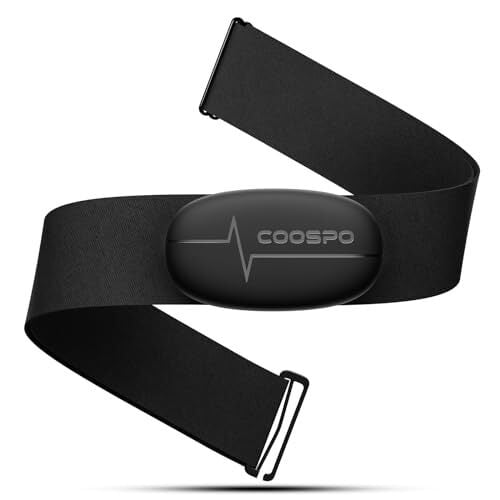
If you’re an experienced runner, you probably get more use out of pace data than heart rate data, anyway—but you can always use a chest strap connected to your phone if you’d like the numbers.

COOSPO Heart Rate Monitor Chest Strap H6M, Bluetooth ANT+ Heart Rate Monitor Chest Sensor with 400H Battery, HRM Works with Strava/Wahoo Fitness/Polar Beat/Peloton/Zwift/DDP Yoga App

COOSPO Heart Rate Monitor Chest Strap H6M, Bluetooth ANT+ Heart Rate Monitor Chest Sensor with 400H Battery, HRM Works with Strava/Wahoo Fitness/Polar Beat/Peloton/Zwift/DDP Yoga App

COOSPO Heart Rate Monitor Chest Strap H6M, Bluetooth ANT+ Heart Rate Monitor Chest Sensor with 400H Battery, HRM Works with Strava/Wahoo Fitness/Polar Beat/Peloton/Zwift/DDP Yoga App

Coaching, sometimes

Not all watches have this feature, and even among people who have running watches, not everyone uses the coaching. But yes, some watches and some apps provide a running plan, telling you how many miles, at what pace, to run each day. They may also give you guided runs, with a coach in your ear telling you when to speed up and slow down. 

Without a watch, you’re on your own for this stuff. But you can also find a plan online that’s not tied to any particular app. Hal Higdon says I’m running 3 miles on Tuesday? Well then, I’ll go out on Tuesday and run (roughly, approximately) 3 miles. 

How I’ve trained without a running watch

Putting all of this together, here’s what it looked like for me last year, a time that was largely watch-free as I returned to running after taking time off. First, I started my running habit by getting consistent with my morning walk (30 minutes, so about 1.5 miles.) Over the course of a week, I started adding some bits of running to my walk, slowing down when I got winded or uncontrollably itchy, and after about two weeks, I was running pretty much the whole 1.5 miles in relative comfort. The following week, I started adding a little mileage—doing 2 miles most morning instead of 1.5.

This worked beautifully as a gentle re-introduction to running, and honestly? I don’t think I would have done it this way if I were wearing a watch. It would have been demoralizing to see that my “running” pace was so much slower than what I was used to seeing when I was in better shape. But once I was in the habit, it was easy to add mileage. 

After that introductory period, I collected a few neighborhood routes into a mental library. I’d put on my sun visor and headphones when I went out with the kids to wait for the bus, and as soon as they left I’d turn and head off on one of my 3-mile (usually) routes. 

I kept track of my mileage in a notebook. Three miles, five times a week, is 15 miles. If I missed a morning or if I wanted to add more time on my feet, I’d add another run in the evening or on a weekend day, usually heading to a nearby park where I knew the mileage of my favorite trails and roads. If I wanted to try a new route, I’d sometimes pick an album that is about as long as I’d like my run to be (many are around 45 minutes, which is perfect) and take note of which song occurs at the halfway point. When I hear that song, I turn around. That’s a 45-minute run in the books—in the ballpark of four miles or so.

Can I use my phone instead of a running watch?

You sure can! If you’re looking at that list above and thinking “aww, I wish I had that data,” wish no more! There are tons of running apps that can track distance, duration, and pace in real time, even speaking up through your headphones to let you know your split times each mile. 

Pros of phone based running apps 

  • No need to buy special equipment like a watch.

  • Numbers are available anytime you want to pull your phone out and look at them.

  • You’re probably bringing your phone anyway to listen to music.

  • You’ll get a map of your run after the fact (thanks to your phone’s GPS).

  • The app will keep track of your mileage over time.

Cons of phone based running apps

  • You may not want to see all those numbers, especially if the thought of logging a “bad” average pace makes you rush warmups or skip walking breaks.

  • GPS tracking on phones is not always as accurate as the tracking on watches (but this depends on your phone).

  • GPS tracking tends to run a phone’s battery down faster than if you weren’t using the GPS.

  • No heart-rate tracking, if that’s a thing you want (unless you use a chest strap and pair it to your phone with Bluetooth).

I enjoy the guidance I get from running apps if I’m doing a specific workout—like one I tried recently that involved segments of 0.6, 0.5, and 0.35 miles. No way was I going to track that manually, but the pleasant voice in my ear told me exactly when to start and stop each interval, and cued me to speed up or slow down if I was getting off pace.

If you do decide to get a running watch later on, they’ll have the same features as the phone apps, but with better battery life and an easier way to view the numbers. 

What are the best running apps to use if you don’t have a phone? 

The classic is Strava. In fact, if the community aspect of a running app or watch is what’s most important to you, you’ll definitely want to get on Strava. People who log their runs on a Garmin or another device will often upload to Strava so they can have everything in one place. But you can also “record” a run from the Strava app directly, no extra device needed. Just beware that the social features can end up revealing your location, so dip into the privacy settings to make sure you aren’t sharing more than you intend. 

If you have an iPhone, the best simple running app (thanks to an update earlier this year) is the built-in Fitness app. This used to only manage data from the Apple Watch, but has since turned into a nice standalone fitness app.

Other popular running apps include MapMyRun, Runkeeper, Adidas Running (formerly Runtastic), and Nike Run Club. There are also some general fitness apps that can track running data, like Polar Beat and Intervals Pro.

How do you track mileage when running without a watch? 

Measure or estimate the length of each run, ideally by measuring on a tool like Google Maps or Footpath. (In the olden days, we would sometimes drive a route and use the odometer.) 

Add up your mileage over time by keeping notes on a calendar (paper or digital), a notebook (paper or digital), or any other way you’d keep track of a running tally. 

How do you pace yourself when running without a watch? 

By paying attention to your body. For an easy or “zone 2” pace, you’ll want to feel like you’re breathing easy and like you can keep going forever. Faster paces might feel harder, but they’ll still be sustainable enough that you can make it the entire distance you intend, without collapsing into a heap by the end. You’ll learn over time what each appropriate pace feels like. 

On guided runs, offered by many running apps, the coach or narrator will help you figure out the right effort level. They might ask you to aim for a 5 on a scale of 1 to 10, or they might describe in words how your body should feel when you’re at a given pace.

Do I need a watch to run a marathon? 

You don’t make it to the start line of a marathon without having a decent amount of running experience under your belt. And these days, when you’ve been running regularly for the amount of time it takes to build a base and then train for a marathon…you’ll probably have already given in to the temptation to buy a running watch. 

But it’s not necessary in any way. You can do your training by mapping out routes ahead of time, gauging your pace based on how you feel, and writing down your weekly mileage in a notebook. This is how almost everybody trained until running watches became more accessible about 10 or 15 years ago. The race organizers are keeping track of your time (there’s a chip in your bib, usually), and they’ll post mile markers along the course so you know where you are. 

On race day, you probably won’t want to use your running app; it drains battery, and you’ll be out there a long time. Instead, you can pace yourself by wearing a basic stopwatch and comparing your time at each mile marker with pre-calculated split times. Sound complicated? It’s not—just grab one of these temporary tattoos that has them all calculated for you. 

What is the best running watch for beginners?

Once you’ve gotten the hang of running, you may eventually decide it’s time to shop for a watch. Fortunately, we have a guide to the best watches for runners here, and I even have a shortlist of the best running watches under $250. Currently the Coros Pace 4 looks like the best of the bunch to me, while my colleague Meredith enjoys her Garmin Forerunner 165.

How HR Took Over the World

Human-resources departments in American companies employed 1.3 million professionals in 2024, a 64% increase over ten years. Overall employment grew 14% in the same period. Professional-services and technology firms saw the number of HR workers double since 2014. Similar patterns have emerged in Australia, Britain and Germany.

Chief human-resources officers also gained ground financially. Their total compensation, which stood at 40% of the average director’s salary in 1992, reached 70% by 2022, according to a Stanford University study. Mary Barra, who runs General Motors, previously held the carmaker’s top HR position.

The expansion has followed several workplace disruptions, including the Me Too movement, the pandemic’s shift to remote work, and the rise of diversity initiatives, Economist reports. Companies also faced more state regulations on employee relations and a jump in workplace complaints. The average number of discrimination or harassment allegations rose from six per 1000 employees in 2021 to 15 last year.


Read more of this story at Slashdot.

Apple TV execs dismiss introducing an ad tier, buying Warner Bros. Discovery

The heads of Apple TV have “no plans” to bring ads to the streaming service, balking, at least for now, at a strategy that has driven success for Apple’s streaming rivals.

In its November 2025 issue, British movie magazine Screen International asked Eddy Cue, SVP of Apple Services, if there are plans to launch an ad-based subscription tier for Apple TV. Cue responded:

Nothing at this time. … I don’t want to say no forever, but there are no plans. If we can stay aggressive with our pricing, it’s better for consumers not to get interrupted with ads.

The comments follow reports over the years suggesting that Apple has been seeking knowledge on how to build a streaming ads business. Most recently, The Telegraph reported that Apple TV executives met with the United Kingdom’s ratings body, Barb, to discuss what tracking ads on Apple TV would look like. In 2023, Apple hired advertising exec Lauren Fry as head of video and Apple News ad sales.

Read full article

Comments

Why I Use ‘Albums’ Instead of the Official Apple Music Mac App

Apple Music’s selection is exceptional, but I’ve never enjoyed using its Mac app much. It’s slow, buggy, and lacks the razor sharp focus on albums that I sometimes desire.

On my iPhone, I often turn to the excellent Albums app to scratch that itch, which is why I’m excited to say that the same app has recently arrived on the Mac as well. I’m always looking for excuses to avoid opening the Music app on the Mac, and Albums has arrived at exactly the right time for me to make the switch. While I do enjoy listening to individual songs or playlists, I am going through an albums phase right now. For this, the Albums app is perfect. Its sole focus is on playing whole albums from your Apple Music library, rather than mixing and matching songs for you. It goes without saying that this app requires an active Apple Music subscription, but I far prefer it to the official Music app.

Play whole albums from Apple Music

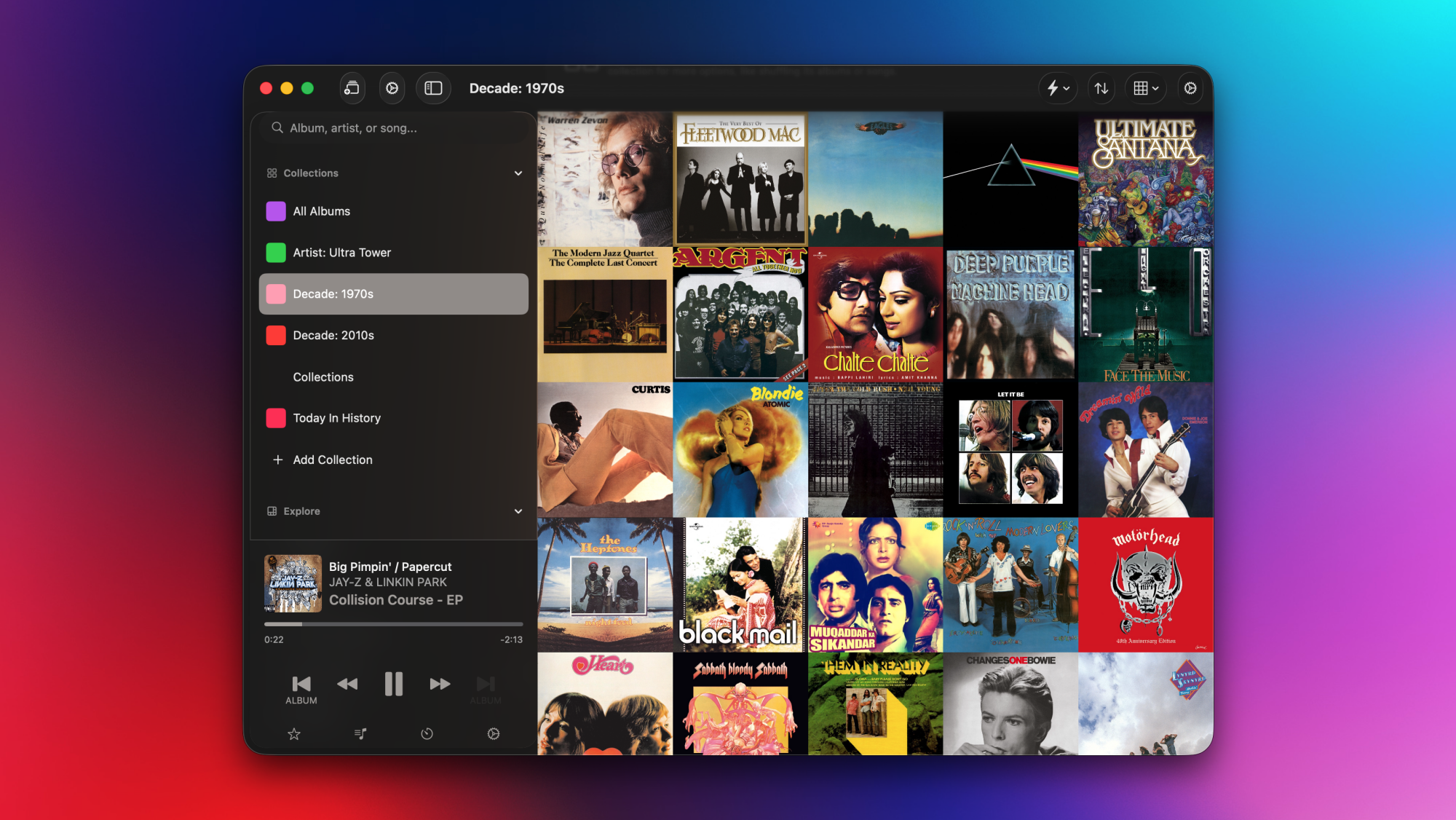
A cover art grid in Albums for Mac.

Credit: Pranay Parab

Albums is available as a free download from the Mac App Store, but it does have a premium tier that unlocks some of its best features. On the free tier, you can search for and listen to albums. When you open the app, it shows a randomized grid containing all the albums in your Apple Music library. You can click any album to start playing it, and you can also queue other albums to play after the current one ends.

Albums Premium is available either as a subscription ($2/month or $19/year) or a one-time purchase ($90). If you join the premium tier, you get access to a whole bunch of power user features, such as listening stats, a release feed that tracks upcoming albums from artists in your library, and an “Insights” section for you to find curated lists of music albums you’ve listened to before. You only need to subscribe or purchase the app on one device to unlock it on your iPhone, iPad, and Mac.

Stats and insights in Albums for Mac

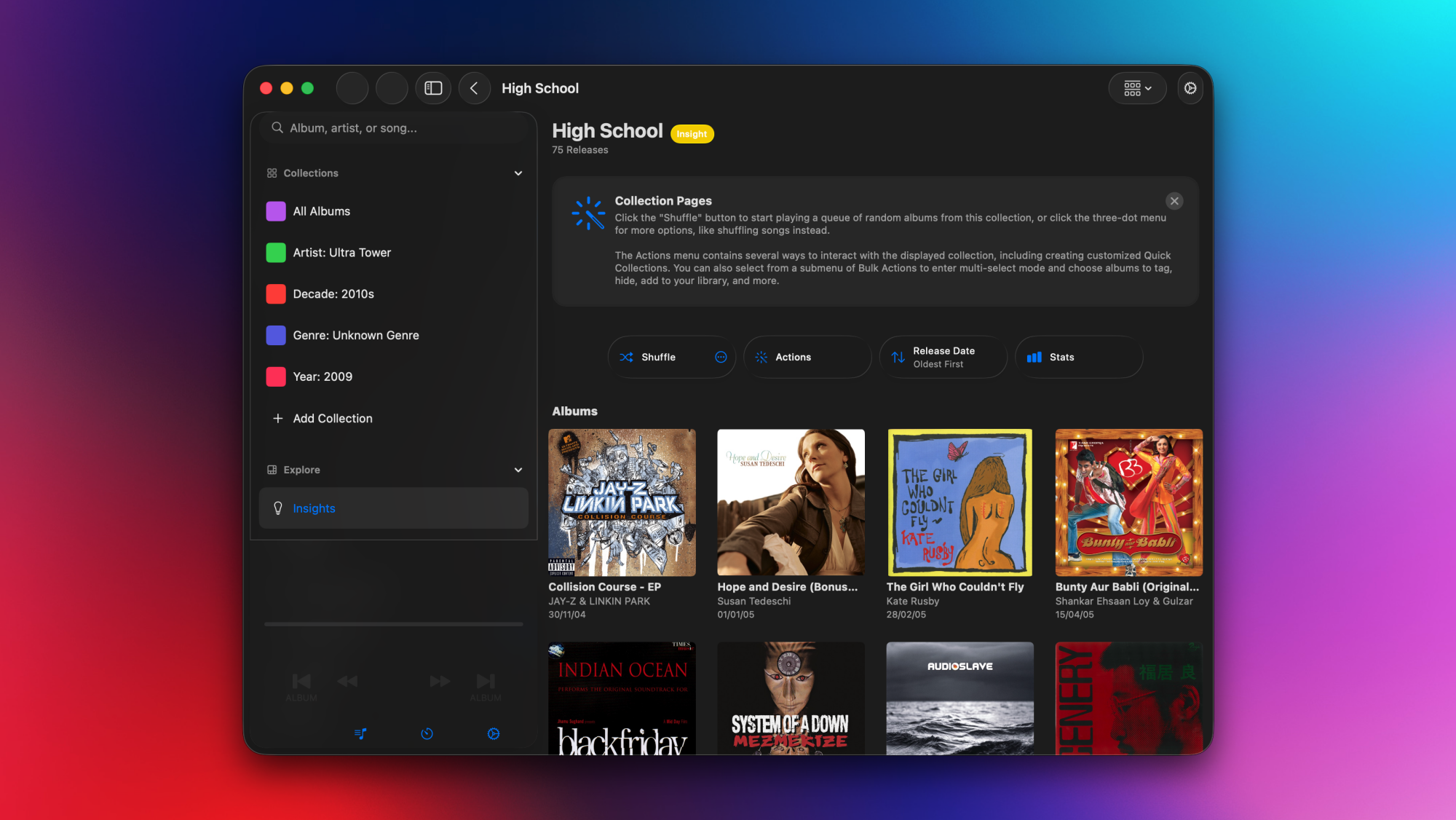
Albums for Mac, with the Insights tab open.

Credit: Pranay Parab

The Albums app’s Insights section is a fascinating way to discover music. It gives you the choice to enter your date of birth and generates a full list of collections based on that. Some examples of these collections include “High School,” “Late Teens/Early 20s,” “My 30s,” and so on. If you open any of these collections, it shows you albums (from your Apple Music library) that were released during that stage of your life, which is a great way to take a walk down memory lane.

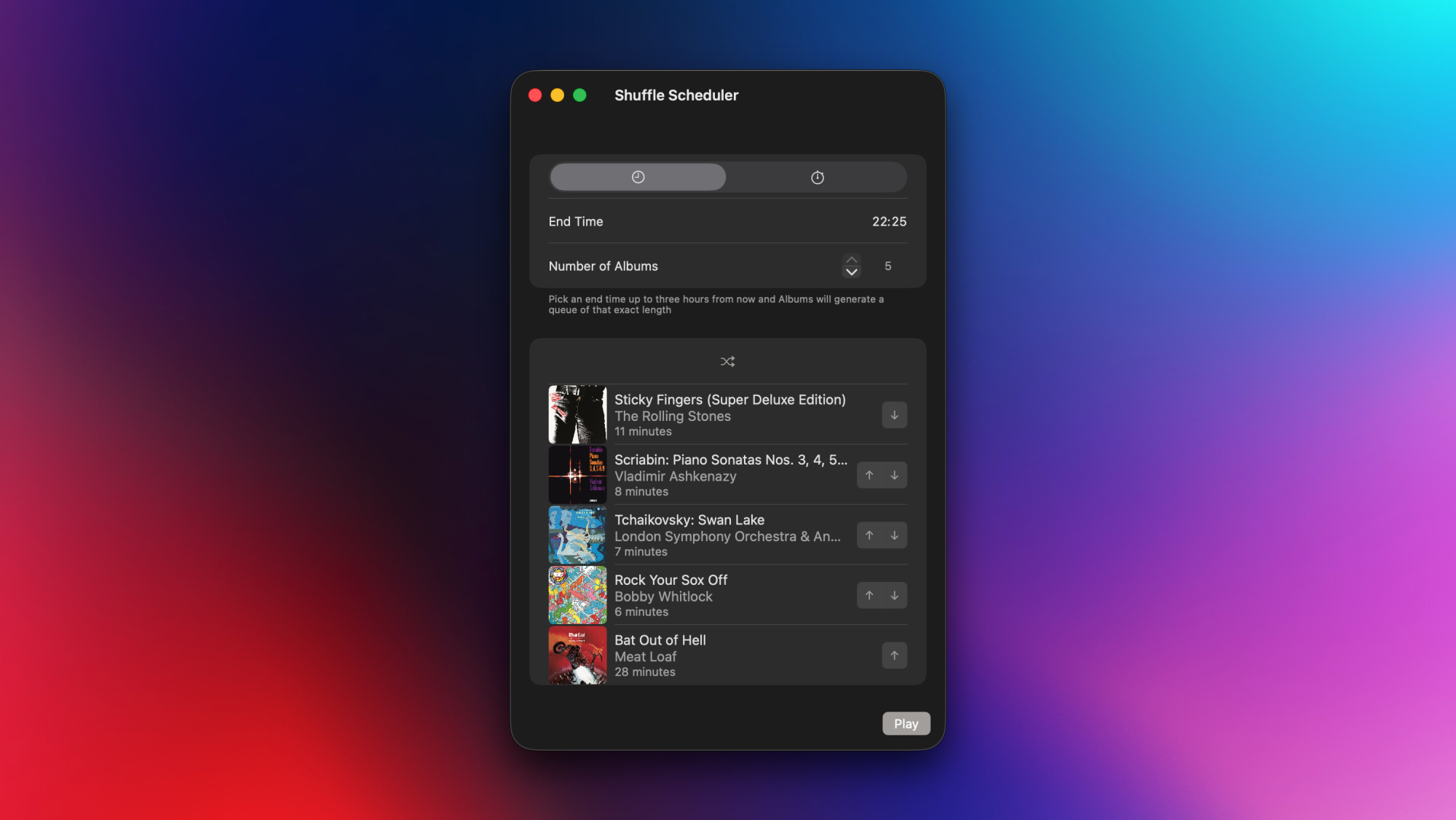
Most collections in the Insights section don’t require your personal information, though. Albums will also look at your Apple Music data, and create useful collections such as “Only Listened Once,” “Never Played,” etc. I also like the “Today In History” section here, which highlights albums released on the day you’re listening on, but in previous years. Once you open a collection, you can either choose an album you want to play, or use the shuffle option to automatically queue other albums after the current one finishes playing. This is also a nice way to stick to the app’s core principle of focusing on whole albums, while still including a “shuffle” feature. 

The Albums Premium tier also lets you create custom collections. You can create a collection of albums by a specific artist, music from a particular decade, or even albums of a particular runtime. For instance, if you’re only in the mood for short albums, you can use the app’s collection filters to group all albums under 15 minutes long. This is how I learned that the longest album in my Apple Music library is a 666-minute epic (Beethoven: Piano Sonatas, by Daniel Barenboim). I might actually play that start-to-finish when I start writing an epic fantasy novel.

Power user features in Albums

A power user feature (shuffle scheduler) in Albums for Mac.

Credit: Pranay Parab

If you’re looking for different ways to discover and play albums, this app does a great job. It’s also perfect for people who love customizing a UI. You can edit the sidebar to reorder various sections, add collections, or even opt for a minimalist look by picking just one element for each section in the sidebar. Albums also supports bulk actions that let you quickly add notes to a bunch of albums or add a set of albums to a new collection. And there are useful sorting options that let you order albums based on release date, title, time spent listening to them, etc. 

In fact, some of you may complain that Albums has too many customization options, since they can make the UI a bit confusing. For instance, I noticed three different gear icon buttons on the same screen in the app. One of them opens app settings, the second is for collection settings, and the third one is for now playing settings. Power users may enjoy this degree of customizability, but it can also be overwhelming for someone who’s just looking for the right button to change their collection’s sort order. I also spotted a minor UI bug that displays search results on top of sidebar elements, which makes both hard to read.

Still, other than these minor complaints, Albums is a great app that brings some much-needed improvements to Apple Music. It is much faster than Apple Music’s own Mac UI, loads songs flawlessly, and does its one job of curating all your albums very well. On the surface, Albums may look like a one-trick pony, but the moment you start exploring it, you’ll realize that it has a lot of amazing features for you to enjoy.

The developer is clearly is an album enthusiast, and it’s nice to see such care still being put into listening to music in the order the artists intended.

Africa Finally Has Its Own Drug-Regulation Agency

After more than a decade of planning, the launch of the African Medicines Agency (AMA) is being celebrated in Mombasa, Kenya, this week at the Seventh Biennial Scientific Conference on Medical Products Regulation in Africa. From a report: The agency’s establishment marks a pivotal moment in Africa’s public health, at a time when the need for biomedical research conducted in Africa, focused on African health problems, has never been greater. Africa holds higher levels of human genetic diversity than anywhere else on Earth, but this diversity has not been adequately studied. And many globally approved treatments and vaccines for diseases such as HIV/AIDS, malaria and tuberculosis are less effective, and can even be harmful in some people of African ancestry.

This year, cuts of billions of US dollars in international funding for biomedical research and health services in Africa have left millions of people without access to life-saving treatments or, in the case of researchers and health-care workers, unemployed. This demonstrates the immense vulnerability that comes with relying on funding from external donors.

What’s more, Africa’s phenomenal population growth and pace of urbanization is bringing fresh challenges — as well as opportunities — around health and disease. In Africa’s cities today, the inhabitants of increasingly affluent neighbourhoods are demanding high-quality medicines and health care. But in low-income areas, high population density, inadequate housing and poor sanitation are facilitating the spread of respiratory and diarrhoeal infections. And everywhere, inadequate diets, air pollution, smoking and physical inactivity are driving increased rates of cardiovascular disease, diabetes and cancer. By 2100, Africa is expected to host 13 of the world’s 20 largest cities, and such inequalities are likely to worsen.


Read more of this story at Slashdot.

New project brings strong Linux compatibility to more classic Windows games

For years now, Valve has been slowly improving the capabilities of the Proton compatibility layer that lets thousands of Windows games work seamlessly on the Linux-based SteamOS. But Valve’s Windows-to-Linux compatibility layer generally only extends back to games written for Direct3D 8, the proprietary Windows graphics API Microsoft released in late 2000.

Now, a new open source project is seeking to extend Linux interoperability further back into PC gaming history. The d7vk project describes itself as “a Vulkan-based translation layer for Direct3D 7 [D3D7], which allows running 3D applications on Linux using Wine.”

More options are always welcome

The new project isn’t the first attempt to get Direct3D 7 games running on Linux. Wine‘s own built-in WineD3D compatibility layer has supported D3D7 in some form or another for at least two decades now. But the new d7vk project instead branches off the existing dxvk compatibility layer, which is already used by Valve’s Proton for SteamOS and which reportedly offers better performance than WineD3D on many games.

Read full article

Comments

Northern lights could be visible in 15 states this week

US residents across 15 states could be in for a show tonight and throughout the week. Incoming coronal mass ejections may spark geomagnetic storms that blaze up the northern lights for all to see, according to a report by the National Oceanic and Atmospheric Administration (NOAA).

Forecasters anticipate geomagnetic activity and aurora displays from November 10 until November 12 in states such as New York, Minnesota, Iowa and Alaska, among others. This is due to a trio of coronal mass ejections that began on November 7.

This week's view.
NOAA

As previously stated, the latest NOAA aurora forecast map notes that 15 US states are fully or partially above the view line. This isn’t an exact science, as it’s entirely possible that those living below the view line could get a glimpse of something in the night sky. Auroras are fickle, so it’s also possible that the lightshow will be understated. A number of conditions have to align for the perfect display.

If you’re planning on heading out tonight for a look, here are some tips. Make sure to find a north-facing vantage point with a clear view of the horizon. You want to be as far from light pollution as possible, so head away from large cities. Use a mobile phone to scan the skies as the camera is actually better at picking up faint lights before being visible to the naked eye. This can help pinpoint where to focus attention.

The last truly powerful and widespread aurora event in the US took place last year. That geomagnetic storm was one of the strongest in the past two decades. It’s unlikely this week’s activity will be quite as striking.

This article originally appeared on Engadget at https://www.engadget.com/science/space/northern-lights-could-be-visible-in-15-states-this-week-180056871.html?src=rss