You Can Finally See Your Mac’s Clipboard History in Spotlight

Amazingly, your Mac has only just gained the ability to show you a full list of what you’ve copied. macOS has always allowed you to copy and paste items, but if you copied multiple items back-to-back, there was no way to view the earliest items you added to your clipboard. Sure, third-party apps have filled this gap for many years now, but macOS itself didn’t allow you to easily view multiple items stored in the clipboard, until now. With macOS 26 Tahoe, your Mac’s Spotlight search has added support for clipboard history, which means that you can view pretty much everything you’ve copied in the past 30 days. Here’s how to set up and use clipboard history on your Mac.

How to enable clipboard history on your Mac
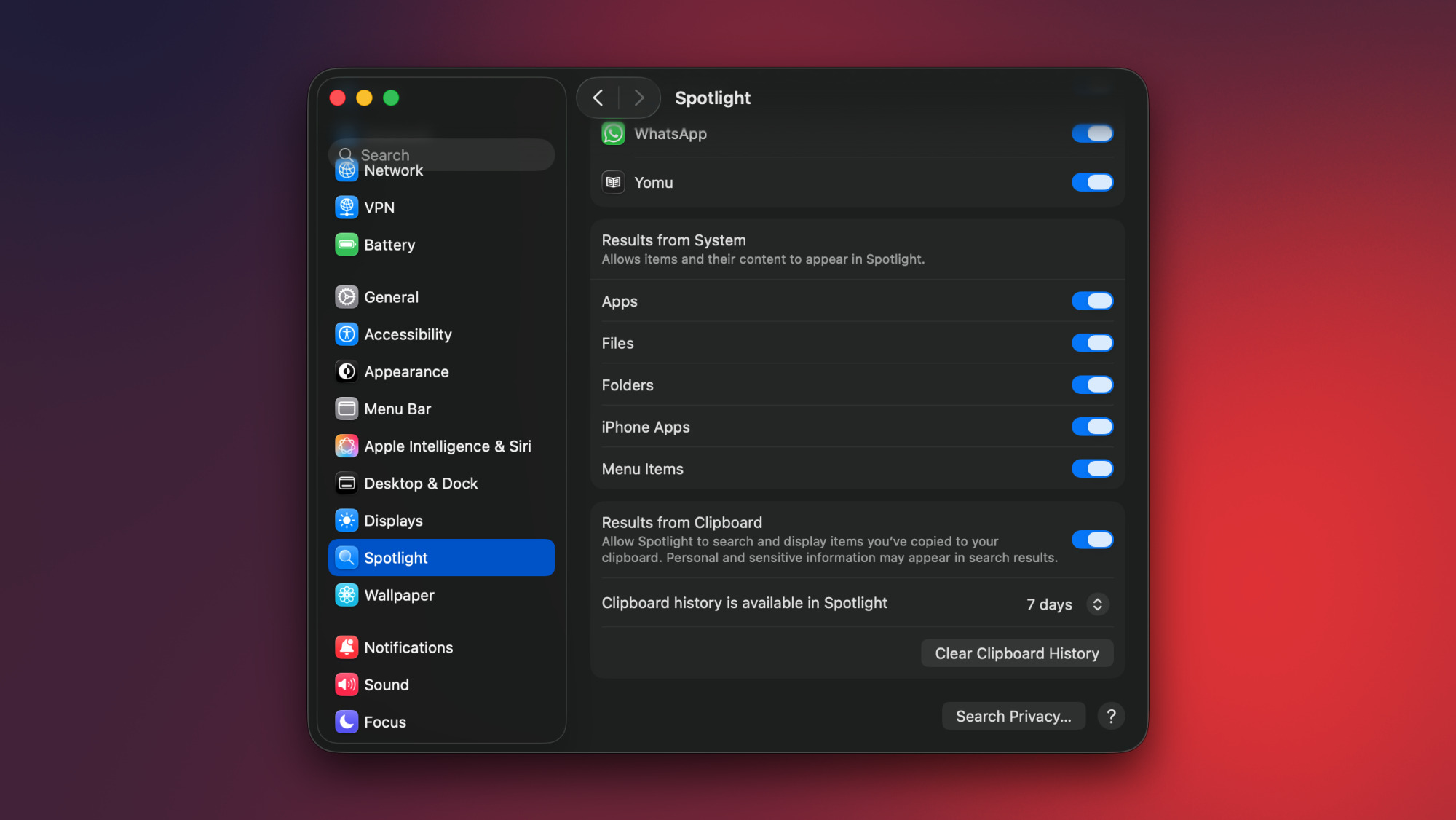
Enabling clipboard history in macOS Tahoe.

Credit: Pranay Parab

Clipboard history is disabled by default on macOS Tahoe, so you’ll have to activate it first. To do this, click the Apple logo in the top-left corner of your Mac’s display and select System Settings. Now, go to Spotlight and scroll to the bottom in the right pane. Enable Results from Clipboard, and then click the drop-down menu below it. This lets you choose how long you want to store your clipboard history for. Apple gives you three choices: 8 hours, 7 days, or 30 days. Once you’ve made your choice, you’ll be ready to use clipboard history on your Mac.

If you copy sensitive items to the clipboard very often, you should probably avoid enabling this feature. I know many people who somehow still store passwords, credit card information, and other banking details in WhatsApp chats or plain text files. The moment you copy sensitive data from unsecured locations, it gets added to your clipboard history, which is not ideal. The good news is that if you copy passwords from Apple Passwords or other password management apps, they don’t appear in your Mac’s clipboard history.

Accessing and using clipboard history on your Mac
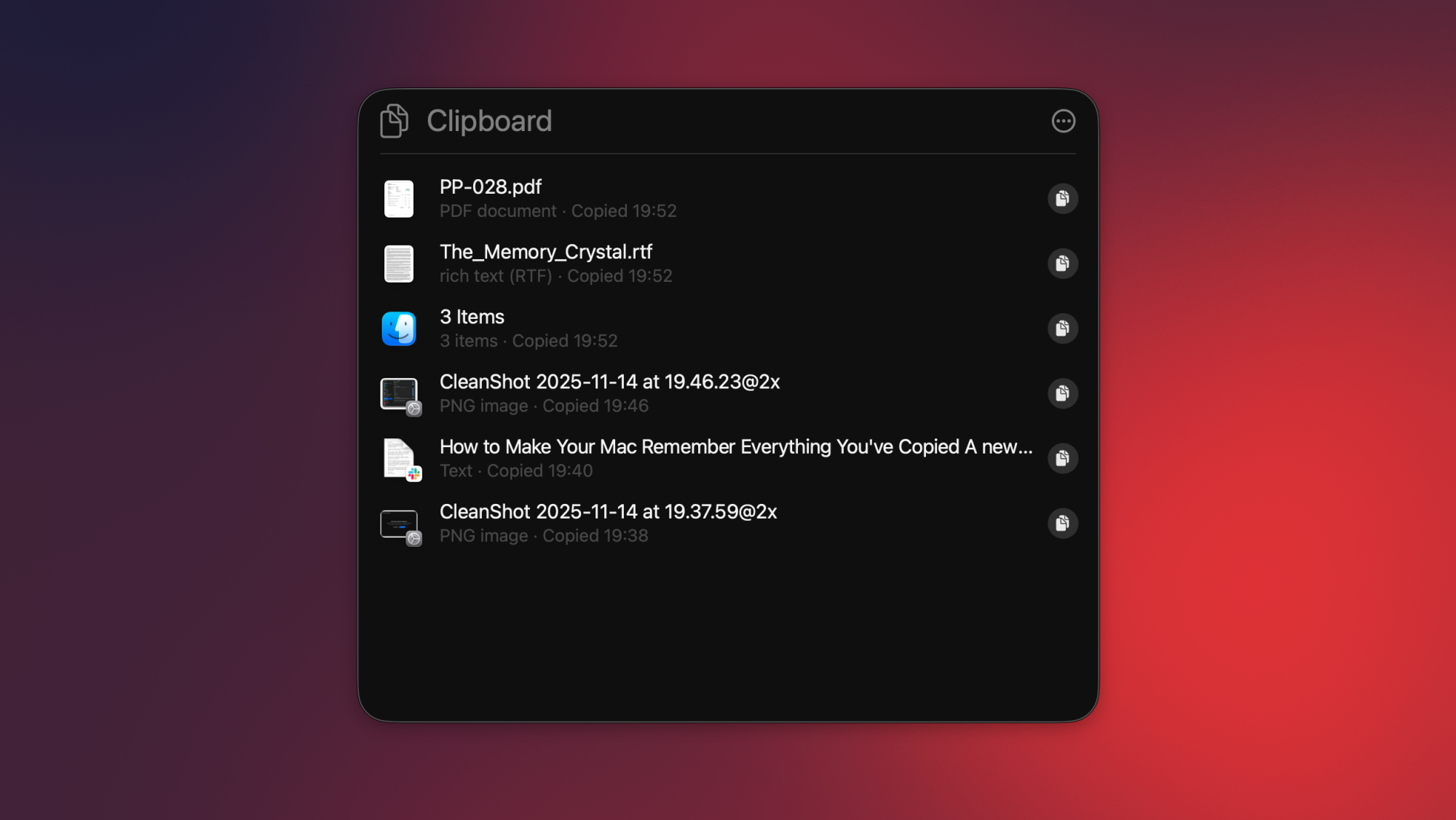
Viewing clipboard history in macOS Tahoe.

Credit: Pranay Parab

You can access your Mac’s clipboard history by using macOS Tahoe’s Spotlight Search. First, copy a few items to your clipboard. These can be text, photos, or other files. Use the Command-Space keyboard shortcut (or click the magnifying glass in your Mac’s top-right corner) to open Spotlight, and press Command-4. This will open your Mac’s clipboard history, where you’ll be able to see all the files you’ve copied recently.

To see older items, scroll down. Next to each item, you’ll see a small copy button, which you can use to copy that item to your clipboard once again. This is useful if you’ve copied multiple items in a row, but forgot to paste the first few. You can also select any item in your clipboard history list and press the return key on your keyboard to paste that item in the app that’s in the foreground.

If you want to quickly clear your clipboard history, fire up Spotlight (Command-Space), followed by the clipboard history page (Command-4), and select the three-dots button on the right. Select Clear History here to erase your entire clipboard. Or you can simply wait—Apple will automatically erase everything in your clipboard after your preset time limit (between 8 hours and 30 days, depending on what you chose in System Settings).

Third-party clipboard management apps are better
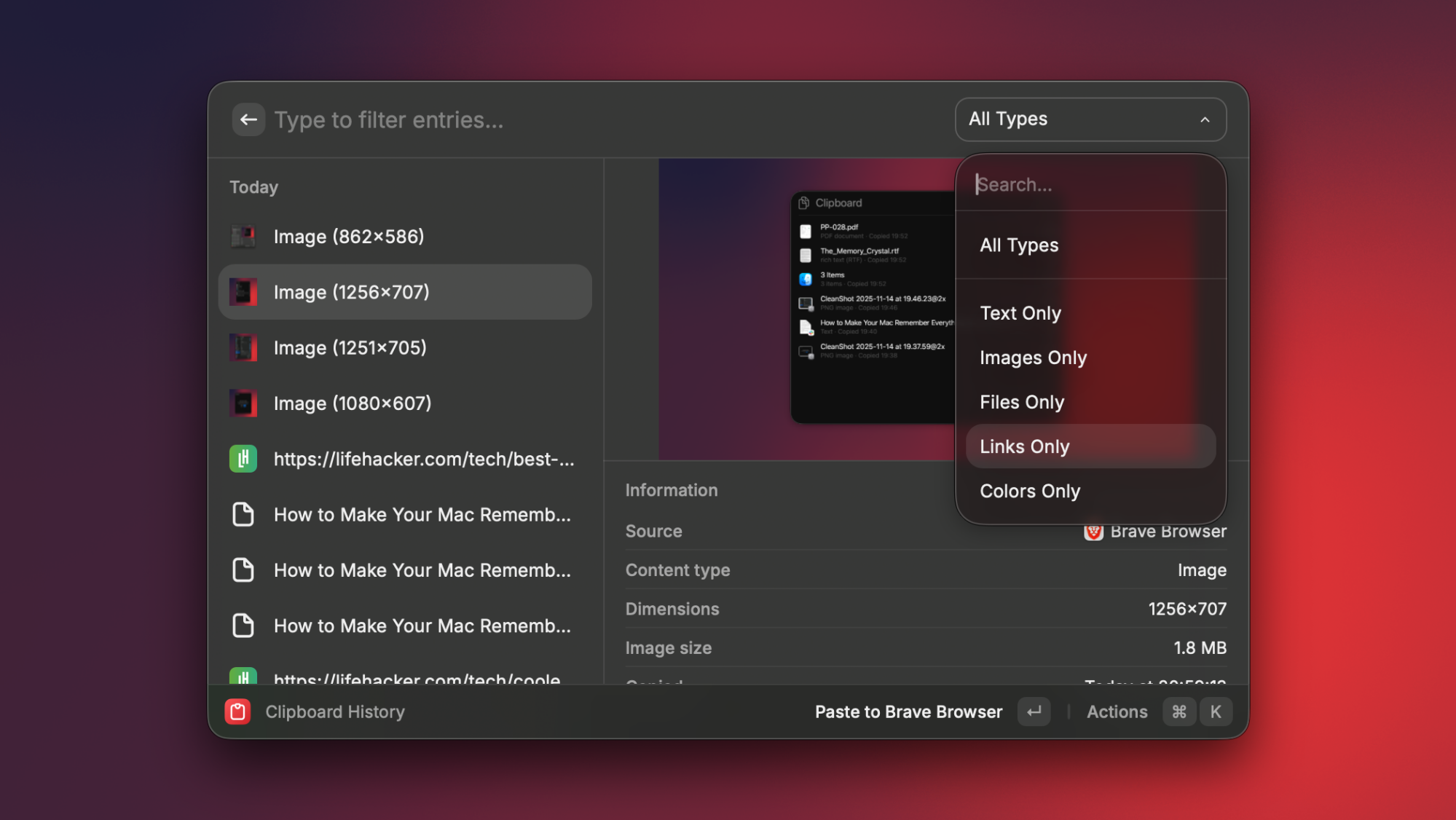
Viewing clipboard history in Raycast, which is a Spotlight alternative.

Credit: Pranay Parab

I’m aware that some people don’t use Spotlight at all, in favor of better alternatives like Raycast or Alfred. Luckily, those apps come with built-in clipboard managers, too. Spotlight’s implementation is good enough for basic use cases, but it needs a quicker way to access and paste from your clipboard history. While clipboard history in Spotlight is a nice upgrade, I still feel that if you’re serious about clipboard management, third-party alternatives are the way to go. 

The best clipboard managers for Mac will allow you to sync your clipboard history across multiple devices, let you exclude certain apps from your clipboard history, filter clipboard items by type (links, text, images, etc.), copy multiple items and paste them sequentially (useful for filling repetitive forms), extract and copy text from images, and so much more. 

DoorDash Says Relax, Data Breach Only Exposed Names, Phones, Emails & Addresses

DoorDash Says Relax, Data Breach Only Exposed Names, Phones, Emails & Addresses
Food delivery giant DoorDash has once again come under negative limelight, this time with a massive data breach stemming from a sophisticated social engineering attack that targeted one of its employees in October. The incident allowed an unauthorized third party to gain access to and exfiltrate key contact information belonging to a mix of

The Garmin Forerunner 265 and 965 Have Never Been Priced This Low

We may earn a commission from links on this page. Deal pricing and availability subject to change after time of publication.

While I’ve been thinking about the sale prices we might see on Black Friday, Garmin just went and dropped the prices on several of their watches. The Forerunner 265 and 965 are at their lowest prices ever, both $150 off. Several other watches are on surprisingly good sales as well.

The Garmin Forerunner 265 is one of my favorite running watches, and you can read my review of it here. It’s got an AMOLED screen, all kinds of advanced training metrics, dual-band GPS, and can connect to a bike power meter, to name a few of the features that set it apart from other watches. I own one myself and highly recommend it. Its original price was $449.99, but it’s sometimes been on sale for $50 or $100 off. It was $100 off for last year’s Black Friday, and has made occasional dips back down to that price since the Forerunner 570 came out this year. (The 570 is basically a 265 plus voice features, and it’s not on sale this year—yet?)

Both sizes are now on sale: the 46-millimeter 265 and the smaller version, the 42-millimeter 265S (S for “smaller”). Both are the same price at $299.99.

The Forerunner 965 has the same features as the 265, plus a few extras—the biggest of which is maps. Normally $599.99, the 965 is on sale for $449.99.

Amazon has these marked as a “limited time deal,” but Garmin has them in their “holiday gift guide,” suggesting this might be the Black Friday price showing up early.

Also on sale:

Our Best Editor-Vetted Tech Deals Right Now


Apple AirPods 4 Wireless Earbuds


—
$84.99

(List Price $129.00)


Apple Watch Series 10


—
$279.00

(List Price $429.00)


Amazon Fire HD 10 (2023)


—
$69.99

(List Price $139.99)


Sony WH-1000XM5


—
$297.98

(List Price $399.99)


Amazon Fire TV Stick 4K Plus


—
$24.99

(List Price $49.99)

Deals are selected by our commerce team

4.5 Billion-Year Mystery Of What’s Inside The Moon Is Settled, It’s Not Cheese

4.5 Billion-Year Mystery Of What's Inside The Moon Is Settled, It's Not Cheese
The Moon is not, in fact, a giant cosmic wheel of Gouda. In a landmark paper published in Nature, researchers from the French National Center of Scientific Research delivered a hard truth: the Moon is actually packing a solid inner core of material with a density suspiciously similar to iron. Rather than a massive cheese ball, we’re dealing

Krafton Launches Voluntary Resignation Program Weeks After Declaring ‘AI-First Company’ Future

An anonymous reader shares a report: In October, PUBG and Subnautica 2 publisher Krafton announced that it would be undergoing a “complete reorganization” to become an “AI-first” company, planning to invest over 130 billion won ($88 million) in agentic AI infrastructure and deployment beginning in 2026. This week, as it boasts record-breaking quarterly profits, the Korean publisher has followed that strategic shift by launching a voluntary resignation program for its domestic employees, according to Business Korea reporting.

The program, announced internally, offers substantial buyouts for domestic Krafton employees based on their length of employment at the publisher. Severance packages range from 6 months’ salary for employees with one year or less of service to 36 months’ salary for employees who’ve worked at Krafton for over 11 years. The voluntary resignation program follows a November 4 earnings call in which Krafton announced a record quarterly profit of $717 million. During the call, Krafton CFO Bae Dong-geun indicated that Krafton had also halted hiring for new positions, telling investors that “excluding organizations developing original intellectual property and AI-related personnel, we have frozen hiring company-wide.”


Read more of this story at Slashdot.

[$] A struct sockaddr sequel

One of the many objectives of the Linux
Kernel Self-Protection Project (KSPP)
, which just completed ten years of
work
, is to ensure that all array references can be bounds-checked,
even in the case of flexible array members, the size of which is not known
at compile time. One of the most challenging flexible array members in the
kernel is not even declared as such. Almost exactly one year ago, LWN looked at the effort to increase safety around
the networking subsystem’s heavily used sockaddr structure. One
year later, Kees Cook is still looking for a way to bring this work to a
close.

This Fire TV Stick HD Is Less Than $20 Right Now

We may earn a commission from links on this page. Deal pricing and availability subject to change after time of publication.

A small upgrade can make an old TV feel new again, and the Amazon Fire TV Stick HD is the kind of plug-and-play streaming device that does exactly that. It’s down to $17.99 right now (from $34.99), which price-tracking sites confirm is its lowest recorded price.

PCMag calls it “the best 1080p media hub” for folks sticking to Full HD, and that lines up with how simple it is to set up. The stick slides straight into an HDMI port, and Amazon also includes a short extender in case your TV’s ports are too tight. It runs in 1080p and supports HDR10, so shows and movies mastered for HDR look a bit richer, even on older screens. I wouldn’t expect a dramatic jump in picture quality, but scenes with a lot of contrast—the kind with bright signage or dark backgrounds—look more defined. It also supports Dolby Atmos, which helps when you pair it with a soundbar that can handle it.

Using it day to day feels familiar if you’ve used any recent Fire TV interface. You get all the usual streaming services—Prime Video, Netflix, Hulu, Disney+, YouTube, Apple TV+, even Crunchyroll and Twitch. The Alexa button on the remote works like it does on other Fire devices: press, talk, let it find what you want. The remote itself feels simple enough to use, and the built-in volume rocker is helpful if your TV remote is long gone. It relies on a quad-core 1.7GHz processor, 1GB RAM, and 8GB of storage. That’s enough for the basics, but you’ll feel its limits from time to time. The interface can get choppy, especially when you jump across tabs quickly or open a large library. Reviews also point out that the stick still uses wifi 5 instead of wifi 6, which matters if your home has a lot of devices fighting for bandwidth.

This is strictly a 1080p device, so if you have a 4K TV (or plan to get one), the Fire TV Stick 4K is just $7 more and offers smoother performance, better wifi, and Dolby Vision. It also doesn’t support AirPlay or Google Cast, so sending videos from an iPhone or Android phone isn’t as seamless. Still, for someone with an older TV who wants the modern streaming apps in one place, the current $18 price makes it feel like a low-risk upgrade.


Our Best Editor-Vetted Tech Deals Right Now


Apple AirPods 4 Wireless Earbuds


—
$84.99

(List Price $129.00)


Apple Watch Series 10


—
$279.00

(List Price $429.00)


Amazon Fire HD 10 (2023)


—
$69.99

(List Price $139.99)


Sony WH-1000XM5


—
$297.98

(List Price $399.99)


Amazon Fire TV Stick 4K Plus


—
$24.99

(List Price $49.99)

Deals are selected by our commerce team

Nouveau Driver To Support Larger Pages & Compression Support With Linux 6.19

While the “Nova” driver continues to be developed as a modern Rust-written, open-source and in-kernel NVIDIA graphics driver for Linux, for the time being Nouveau is what’s working for end-users for those wanting a mainline open-source NVIDIA graphics driver for gaming and other workloads. With Linux 6.19 the Nouveau driver is picking up support for handling larger pages as well as compression support…

All Lupus Cases May Be Linked To a Common Virus, Study Finds

One of the most common viruses in the world could be the cause of lupus, an autoimmune disease with wide-ranging symptoms, according to a new study. From a report: Until now, lupus was somewhat mysterious: No single root cause of the disease had been found, and while there is no cure, there are medications that can treat it.

The research, published in the journal Science Translational Medicine, suggests that Epstein-Barr virus — which 95% of people acquire at some point in life — could cause lupus by driving the body to attack its own healthy cells.

It adds to mounting evidence that Epstein-Barr is associated with multiple long-term health issues, including other autoimmune conditions. As this evidence stacks up, scientists have accelerated calls for a vaccine that targets the virus.

“If we now better understand how this fastidious virus is responsible for autoimmune diseases, I think it’s time to figure out how to prevent it,” said Dr. Anca Askanase, clinical director of the Lupus Center at Columbia University, who wasn’t involved in the new research.


Read more of this story at Slashdot.

Engadget Podcast: Did Valve just reshape PC gaming again?

This week Valve surprised us all with the announcement of three new devices: The tiny Steam Machine PC gaming desktop, the Steam Frame VR headset and a new Steam Controller. In this episode, Devindra and Engadget’s gaming reporter Jessica Conditt discuss how these devices fit into the PC gaming world, which has already been reshaped by Valve’s Steck Deck portable. Also, we discuss our favorite games of 2025, as well as the upcoming titles we’re looking forward to.  

Subscribe!

Topics

  • Valve reshapes PC gaming with a new Steam Machine, Steam Frame VR headset and updated Steam Controller – 1:10

  • It’s not just Silksong! A look at our favorite indie games of 2025 with Jess Conditt – 25:25

  • Michael Burry places his next big short on Palantir and NVIDIA – 46:09

  • WSJ Report: OpenAI faces 7 lawsuits claiming ChatGPT encouraged user suicides – 50:57

  • Apple unveils Digital IDs for iPhones, to hold passports and other IDs – 59:35

  • Deezer-Ipsos survey says 97% of people can’t tell if music is AI generated – 1:01:37

  • Around Engadget – 1:07:18

  • Working on – 1:08:42

  • Pop culture picks – 1:09:10

Credits

Host: Devindra Hardawar
Guest: Jessica Conditt
Producer: Ben Ellman
Music: Dale North and Terrence O’Brien

This article originally appeared on Engadget at https://www.engadget.com/gaming/pc/engadget-podcast-did-valve-just-reshape-pc-gaming-again-143000931.html?src=rss

Four Unofficial Ways to Customize MacOS

MacOS is great in all kinds of ways, but it’s far from the most customizable operating system out there. Sure, it’s not locked down to the extent iOS and iPadOS are, but compared to Linux and even Windows, macOS really doesn’t let you change the look and feel very much.

But that isn’t to say there’s no room to tweak the operating system to make it the way you like—if you know where to look. Here are a few third-party tools that let you make macOS your own.

Use a custom cursor

It’s pretty easy to change how the mouse pointer looks on Windows and Linux—you just need to dig around in the settings. On macOS, you can only change the size of the pointer.

Unless, that is, you install the free and open source Mousecape. This application lets you create a cursor, then use it in place of the default system ones. You can also install cursors made by others. There’s no centralized collection of cursors for this, unfortunately, but I found a fun hand on Github, some Wii cursors, and a decent collection on DeviantArt. You could also try your hand at creating your own set.

Note that Tahoe users will have to download an updated fork in order to use Mousecape—the main build doesn’t work at the moment. You’ll need to install a pre-release download as of this writing.

Use any website as your wallpaper

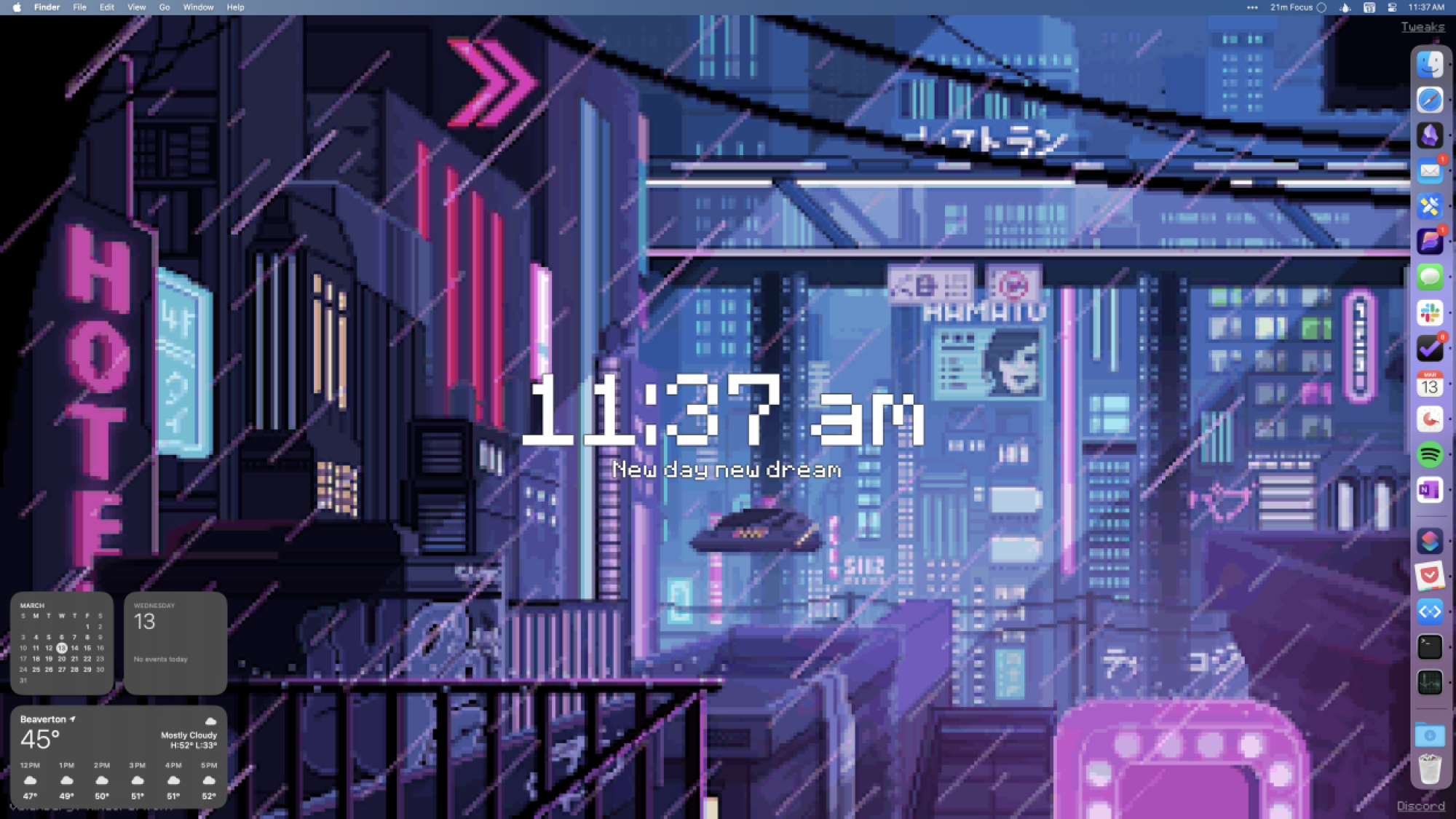
A cyberpunk pixel art wallpaper behind the standard macOS desktop

Credit: Justin Pot

Some great wallpapers, including dynamic ones, are included with macOS. There’s also the option to use your own photos. But what macOS doesn’t offer are custom, animated wallpapers.

Enter Plash. This free application lets you turn any website into a macOS wallpaper, which opens up all kinds of interactive possibilities. A few sites included let you look out a random stranger’s window, see real-time weather data, or take in some animated pixel art, but you can use any website you can think of. It’s a lot of fun to play around with.

Clean up the menu bar

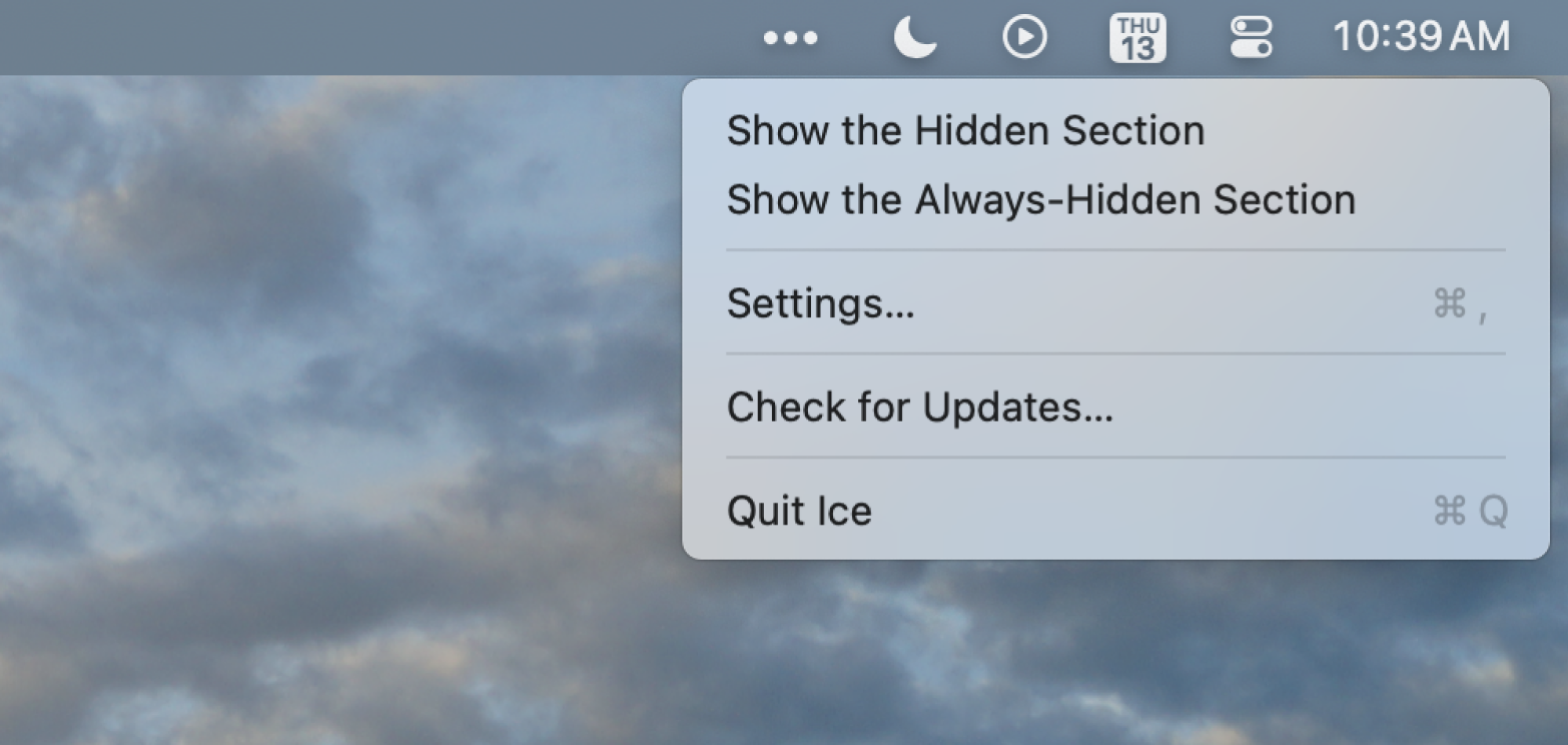
Ice running on a Mac, hidding most of the icons that would otherwise clog the menu bar

Credit: Justin Pot

The macOS menu bar is a bit of a mess. Windows makes it relatively easy to hide icons by dragging them to a secondary area. Apple hasn’t offered anything like this until Tahoe, which added a way to disable any icon in the settings. The problem: it’s all or nothing. Hide an icon in the settings and there’s no quick way to access it other than going back into the settings and turning it back on.

For that, you’ll need a third party app. I personally recommend Ice, which is the best free app for cleaning up your menu bar. My coworker Pranay recommends Barbee, another great option. Both make it easy to hide menu bar icons in a secondary bar accessible by hitting an icon, similar to how it works on Windows. Every Mac user should install some sort of tool like this.

Change your folder icons

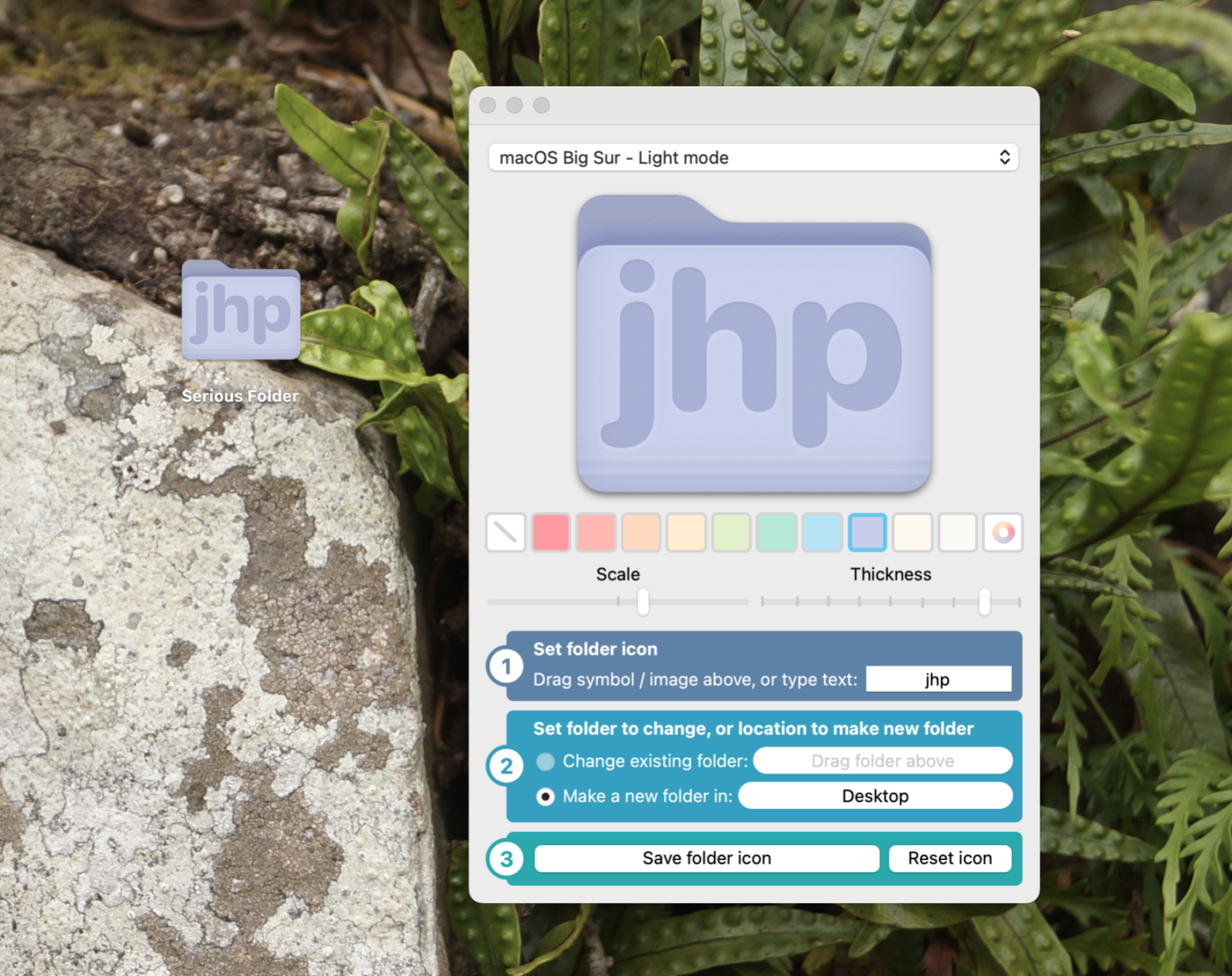
Fancy Folders running on macOS making a purple folder with the letters "jhp" on theml.

Credit: Justin Pot

This one isn’t unofficial, exactly, but it’s so buried it might as well be. You can change the icon for any folder, document, or even application by right-clicking it, clicking “Get Info”, then dragging an image to the icon in the window that opens. Weird, right? But it works, meaning you can customize folders to look however you want. I talked about this in an article with more details.

This gets really fun if you install Fancy Folders, a free application seen in the image above which allows you to create folder icons in the color of your choice, complete with either the text or icon of your choice. It’s a lot of fun to play with, and can be very useful for visually keeping things organized.

Anthropic’s AI was used by Chinese hackers to run a Cyberattack

A few months ago, Anthropic published a report detailing how its Claude AI model had been weaponized in a “vibe hacking” extortion scheme. The company has continued to monitor how the agentic AI is being used to coordinate cyberattacks, and now claims that a state-backed group of hackers in China utilized Claude in an attempted infiltration of 30 corporate and political targets around the world, with some success.

In what it labeled “the first documented case of a large-scale cyberattack executed without substantial human intervention,” Anthropic said that the hackers first chose their targets, which included unnamed tech companies, financial institutions and government agencies. They then used Claude Code to develop an automated attack framework, after successfully bypassing the model’s training to avoid harmful behavior. This was achieved by breaking the planned attack into smaller tasks that didn’t obviously reveal their wider malicious intent, and telling Claude that it was a cybersecurity firm using the AI for defensive training purposes.

After writing its own exploit code, Anthropic said Claude was then able to steal usernames and passwords that allowed it to extract “a large amount of private data” through backdoors it had created. The obedient AI reportedly even went to the trouble of documenting the attacks and storing the stolen data in separate files. 

The hackers used AI for 80-90 percent of its operation, only occasionally intervening, and Claude was able to orchestrate an attack in far less time than humans could have done. It wasn’t flawless, with some of the information it obtained turning out to be publicly available, but Anthropic said that attacks like this will likely become more sophisticated and effective over time.

You might be wondering why an AI company would want to publicize the dangerous potential of its own technology, but Anthropic says its investigation also acts as evidence of why the assistant is “crucial” for cyber defense. It said Claude was successfully used to analyze the threat level of the data it collected, and ultimately sees it as a tool that can assist cybersecurity professionals when future attacks happen.

Claude is by no means the only AI that has benefited cybercriminals. Last year, OpenAI said that its generative AI tools were being used by hacker groups with ties to China and North Korea. They reportedly used GAI to assist with code debugging, researching potential targets and drafting phishing emails. OpenAI said at the time that it had blocked the groups’ access to its systems.

This article originally appeared on Engadget at https://www.engadget.com/ai/anthropics-ai-was-used-by-chinese-hackers-to-run-a-cyberattack-142313551.html?src=rss

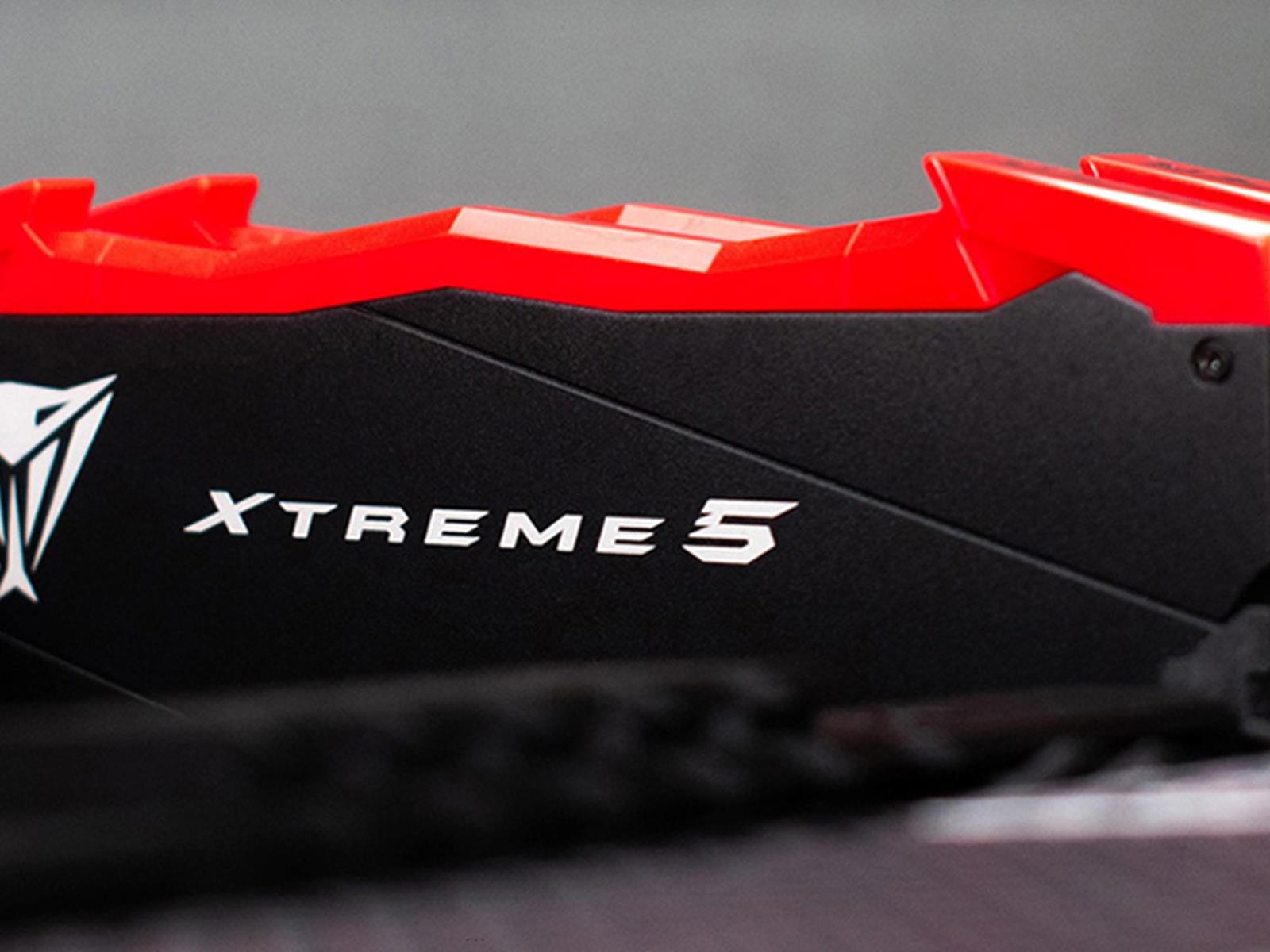
Patriot Viper Xtreme 5 DDR5 Blazes Past 13000 MT/s To Set Speed Record

Patriot Viper Xtreme 5 DDR5 Blazes Past 13000 MT/s To Set Speed Record
One thing that’s often said in sports is that records are meant to be broken. That applies to the sport of overclocking, and to that end, Patriot Memory’s Viper Xtreme 5 DDR5 memory just set a validated memory frequency record, with overclocker AiMax hitting 13,211.4 MT/s (6605.7 MHz) to leapfrog previous records set with Adata, G.Skill, and

Blue Origin caps second heavy-lift launch with first offshore landing

The rocket company founded a quarter-century ago by billionaire Jeff Bezos made history Thursday with the pinpoint landing of an 18-story-tall rocket on a floating platform in the Atlantic Ocean.

The on-target touchdown came nine minutes after the New Glenn rocket, built and operated by Bezos’ company Blue Origin, lifted off from Cape Canaveral Space Force Station, Florida, at 3:55 pm EST (20:55 UTC). The launch was delayed from Sunday, first due to poor weather at the launch site in Florida, then by a solar storm that sent hazardous radiation toward Earth earlier this week.

“We achieved full mission success today, and I am so proud of the team,” said Dave Limp, CEO of Blue Origin. “It turns out Never Tell Me The Odds (Blue Origin’s nickname for the first stage) had perfect odds—never before in history has a booster this large nailed the landing on the second try. This is just the beginning as we rapidly scale our flight cadence and continue delivering for our customers.”

Read full article

Comments

The Economic Impact of Brexit

Abstract of a working paper [PDF] published by NBER: This paper examines the impact of the UK’s decision to leave the European Union (Brexit) in 2016. Using almost a decade of data since the referendum, we combine simulations based on macro data with estimates derived from micro data collected through our Decision Maker Panel survey. These estimates suggest that by 2025, Brexit had reduced UK GDP by 6% to 8%, with the impact accumulating gradually over time.

We estimate that investment was reduced by between 12% and 18%, employment by 3% to 4% and productivity by 3% to 4%. These large negative impacts reflect a combination of elevated uncertainty, reduced demand, diverted management time, and increased misallocation of resources from a protracted Brexit process. Comparing these with contemporary forecasts — providing a rare macro example to complement the burgeoning micro-literature of social science predictions — shows that these forecasts were accurate over a 5-year horizon, but they underestimated the impact over a decade.


Read more of this story at Slashdot.

‘Metroid Prime 4: Beyond’ thrillingly brings the series into the modern era

Earlier this year, I played Metroid Prime for the first time in at least a decade. Back in 2023, Nintendo released a remastered version of the 2002 classic for the Switch, and I felt like dusting it off once we finally knew Metroid Prime 4: Beyond would arrive this year after about a decade in development. The original Metroid Prime holds up surprisingly well for a 23-year-old game, but there were plenty of times where it showed its age. The platforming often felt overly clunky, as precise control over Samus Aran is not the game’s strong suit. Similarly, dealing with larger hordes of energy-sucking Metroids could get pretty frustrating, again due to a lack of precision. 

But the main feeling I came away from the game with was excitement over a fully modernized Metroid Prime experience. I’ve been interested in seeing how the lush alien worlds, monstrous enemies and first-person combat would feel on a current console, built with today’s technology and the many improvements that have come to game design since 2002. I finally got a chance to play about 90 minutes of Metroid Prime 4: Beyond last week and nothing I saw diminished my excitement for the series being brought into the current decade — even if the game felt almost too familiar at times.

I played two segments of Metroid Prime 4: Beyond. The first is an opening sequence that Nintendo made available for people to try at the Switch 2 demo experiences earlier this year before the console launched, while the second is a longer slice that takes place on a gorgeous alien planet where it seems the bulk of the game will likely take place. That first segment is the classic “get the player acquainted with the controls” level where Samus flies in to help defend a base under attack. Since I had played the Switch version of Metroid Prime recently, I felt right at home with the controls even though a few buttons were remapped. All of the classic Metroid moves, including charge blasts, the morph ball, the missile cannon, the scanning visor and more are intact here, and I quickly slipped back into the routine of scanning enemies for weak points and blasting away. 

Right from the jump, the game looks fantastic. There’s an extensive cutscene (at least for a Metroid game) that shows Samus flying in to save the day through a battle-torn base, and everything from the flash of fireball explosions to small details on Samus’s ship give off a level of detail that we simply haven’t seen in a Metroid game before. 

I was playing the game on the Switch 2, in both handheld mode and hooked up to a TV and it looked great either way. The aforementioned explosions popped nicely in HDR and the frame rate never stuttered in a way that I picked up on. As usual, Nintendo’s art direction is top-notch, but this is the first Metroid Prime game made on a console with some power behind it (remember, Metroid Prime 3: Corruption came out on the original Wii). The game isn’t quite aiming for photorealistic graphics, but it’s closer than almost any other Nintendo game I can think of. The combo of impeccable style and a modern resolution that finally lets the Metroid world shine is thrilling, and I can’t wait to see more variety in the worlds that Samus explores.

There’s also a lot more voice chatter than in the original Metroid Prime. As you get dropped into defending the base under attack, plenty of other soldiers recognize Samus, ask for help, tell her where to go and generally praise her for being a badass. It’s a lot more voice work than I’m used to in a Metroid game, and it goes a long way towards making the journey feel less isolated. 

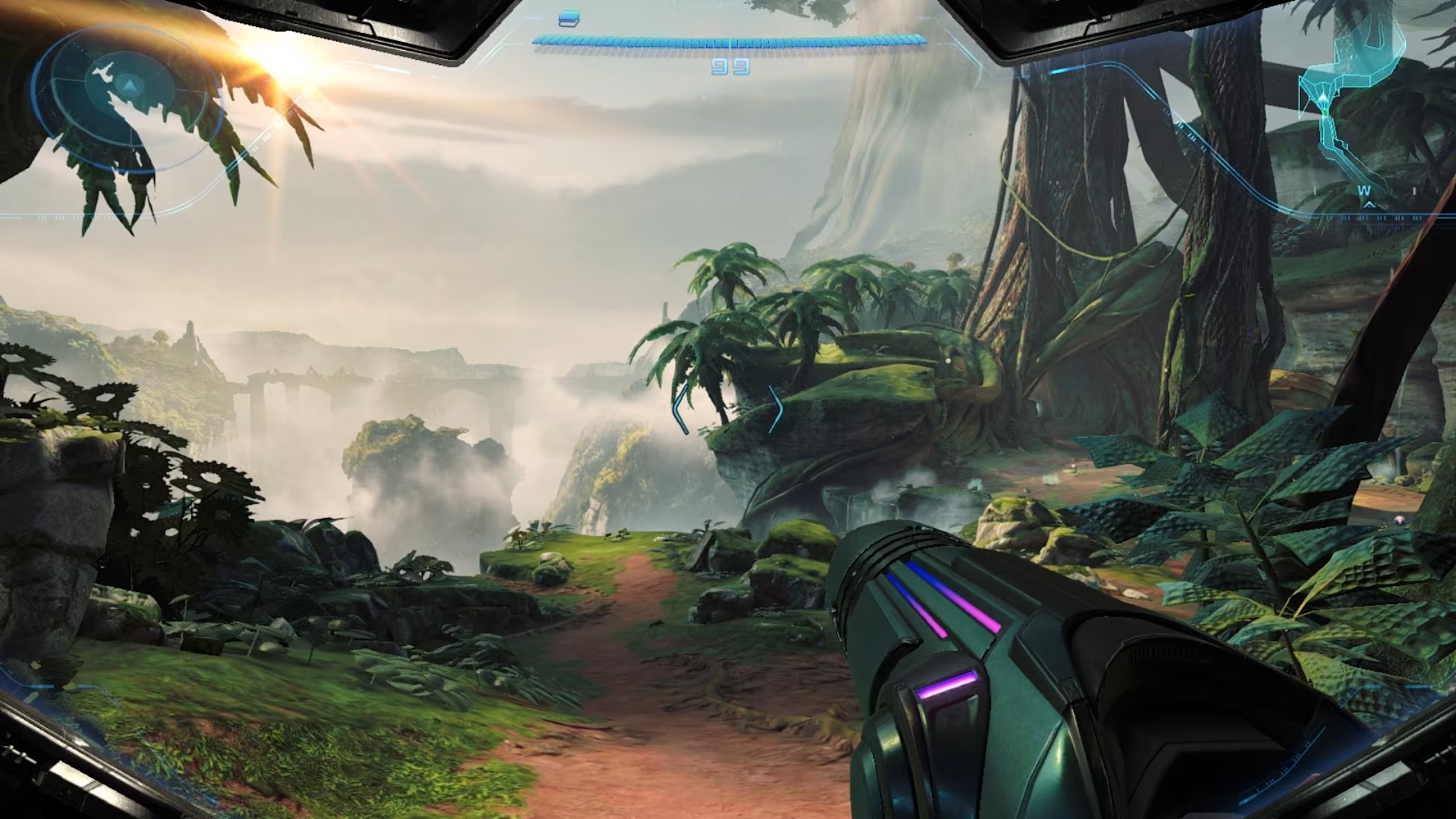
A screenshot showing the jungle world of Metroid Prime 4: Beyond.
Nintendo

The second area I got to explore looks even better than the somewhat generic base where the game kicks off. It’s a classic Metroid world that mixes natural beauty with a mysterious, alien culture. And, of course, a lot of the nature wants to kill you for invading its territory (or possibly because it is being controlled by outside forces). The big boss of the demo was cut from this cloth: a giant tentacled plant flinging its giant spiked arms at you and firing off poisonous flowers. A classic Metroid battle if ever there was one, albeit one that felt not wildly different from some of the boss battles from Metroid Prime. That said, the scope of the battle felt bigger, due to the size of the arena and how the plant’s tentacles made maneuvering and getting off clear shots a challenge. While the boss clearly had a central body right in the middle of the room, the tentacles made it feel like it was all around me, at all times

This boss felt like an upscaled but familiar version of ones from past games, and it was far from the only thing that felt familiar. For example, the game still uses save stations scattered throughout the map to save your progress rather than just autosaving at significant points. That’s a throwback I didn’t exactly miss and didn’t expect to see in 2025. Plenty of the music cues and sound effects felt like they could have been lifted straight from other Metroid Prime games, and the basic move set and weapons Samus has early in the game is nearly identical to how you start Metroid Prime. Naturally, something happens where she loses most of those abilities and has to regain them to progress — in the demo, I had to find the Morph Ball power up to move on, just as you do in nearly every Metroid game before. 

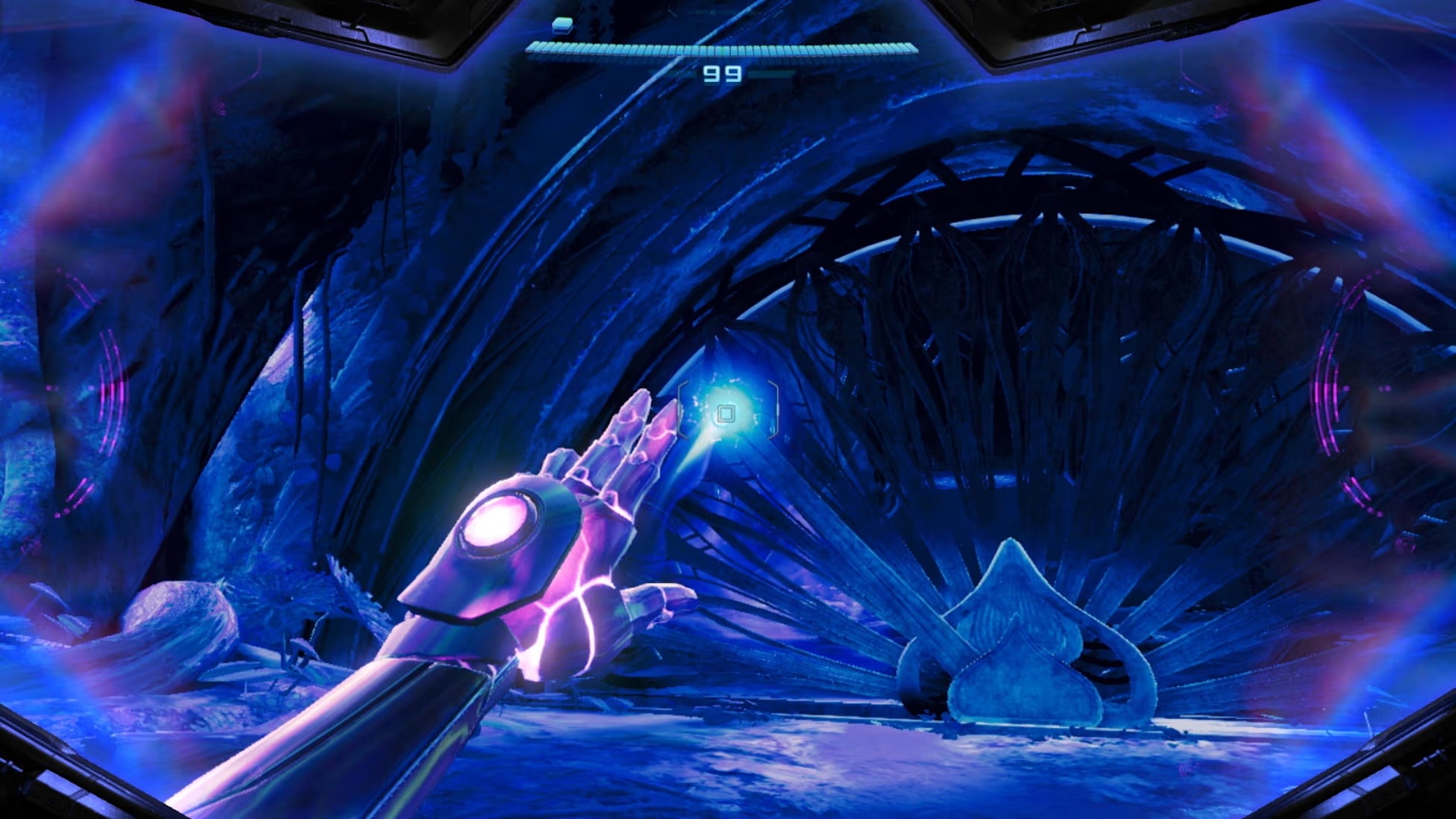
Samus Aran uses her new abilities to unlock a way forward.
Nintendo

At times, it felt like the game was leaning a bit too heavily on the already-established framework rather than trying something new. But given that I was early in the game, I’m allowing for there to be a lot of unexpected changes to come. And I did get a chance to try out the biggest gameplay change Nintendo has teased thus far (no, not the motorcycle): new psychic abilities. 

These powers, at least in the demo, are primarily used for solving environmental puzzles, as they provide a new way to interact with various objects and structures. But there’s also a combat component that I needed to use to beat the aforementioned boss. You can charge and fire off a sort of psychic beam — once it leaves your blaster, time slows to nearly a crawl and you can take control of its direction with the analog stick. While fighting the boss, I had to guide the beam around a host of obstacles to hit each of the three tentacles; once I did that, the monster was vulnerable and I could then charge in and blast it with my conventional weapons. You can see some examples of this power in action in the video below.

I wish I got a chance to see how these powers would evolve throughout the game, and I’m definitely intrigued to see how they manage to separate the gameplay in Metroid Prime 4: Beyond from the aspects of it that feel merely like an updated version of what came before. And to be honest, I’m not sad the game feels familiar. Plenty of people haven’t experienced the Metroid Prime series before or haven’t played it in more than a decade, and many of the familiar aspects felt like a perfect example of “if it’s not broke, don’t fix it.” And it won’t be long before we can all find out if Metroid Prime 4: Beyond finds a way to really stand out from its predecessors after all this time. The game arrives on December 5 for Switch and Switch 2.

This article originally appeared on Engadget at https://www.engadget.com/gaming/nintendo/metroid-prime-4-beyond-thrillingly-brings-the-series-into-the-modern-era-140000932.html?src=rss

WhatsApp enables interoperability with two other messengers in the EU

Meta has announced that BirdyChat and Haiket are the first third-party messaging services that will have interoperability with WhatsApp in the European Union. The company has been working on enabling third-party chats since 2023 after the rules of the bloc’s Digital Markets Act (DMA) came into effect. It apparently held small scale tests over the past few months to make sure WhatsApp does work with BirdyChat and Haiket, and it will roll out integration with the services across Europe “soon.”

Users will be able to send messages, images, voice messages, videos and files between the messaging services whether they’re on Android or iOS. To those wondering, any messaging service Meta teams up with will need to have the same level of end-to-end encryption as WhatsApp under DMA’s rules. Users will see a notification in their Settings tab on WhatsApp over the coming months when BirdyChat and Haiket integration becomes available, telling them how they can opt-in to third-party chats. They can choose not to enable the feature at all or to switch it off anytime they want.

When Meta released details detailing how WhatsApp will work with other messengers, the company said that users will be able to create group chats with their friends on its partner apps. That feature won’t be available at launch, though, and will come later when Meta’s partners are ready to support the capability. Meta also said that it will continue expanding WhatsApp’s interoperability with more apps, as it’s required to do so under the DMA.

This article originally appeared on Engadget at https://www.engadget.com/apps/whatsapp-enables-interoperability-with-two-other-messengers-in-the-eu-140000835.html?src=rss