Meta has won the antitrust case that could have forced it to spin off Instagram and WhatsApp

Meta has successfully avoided what was once the biggest existential threats to its company. A federal judge has sided with the social media company in a landmark antitrust case, ruling on Tuesday that the Federal Trade Commission (FTC) had not proven that Meta is a monopoly.

The FTC filed antitrust charges against Meta, then known as Facebook, in 2020 during President Donald Trump’s first term. The government had argued that by acquiring its one-time rivals, Instagram and WhatsApp, the company had hurt US consumers by stifling competition in the social media industry. Meta had argued that those services were only able to grow to the 1 billion-user apps because of its investment and had cited the rise of TikTok as proof that it continues to face strong competition.

On Tuesday, US District judge James Boasberg ruled in favor of Meta. “Whether or not Meta enjoyed monopoly power in the past, though, the agency must show that it continues to hold such power now,” he wrote. “The Court’s verdict today determines that the FTC has not done so.”

Developing…

This article originally appeared on Engadget at https://www.engadget.com/social-media/meta-has-won-the-antitrust-case-that-could-have-forced-it-to-spin-off-instagram-and-whatsapp-184320742.html?src=rss

The Analogue 3D is the modern N64 fans have been waiting for

If you’ve ever tried to hook an old Nintendo 64 up to a modern HDTV, you know the results can be less than ideal. Assuming your original hardware still works and your flatscreen even has the requisite R/F and/or composite inputs to allow for the connection, the N64’s output will probably look like a blurry mess on a flatscreen that wasn’t designed with those old video signals as a priority.

The Analogue 3D solves this very specific problem very well, with a powerful FPGA core that accurately replicates a Nintendo 64 and well-made display filters that do a good job of approximating that cathode-ray tube glow you remember from decades ago. But the lack of easy expandability limits the appeal of this $250 device to all but the most die-hard fans of original N64 hardware.

A beauty to behold

As a piece of physical design, the Analogue 3D is a work of art. The gentle curves of its sleek black shell evoke the original N64 design without copying it, coming in at a slightly smaller footprint and height. Plus, there’s no ugly power brick.

Read full article

Comments

Bonkers Bitcoin heist: 5-star hotels, cash-filled envelopes, vanishing funds

As Kent Halliburton stood in a bathroom at the Rosewood Hotel in central Amsterdam, thousands of miles from home, running his fingers through an envelope filled with 10,000 euros in crisp banknotes, he started to wonder what he had gotten himself into.

Halliburton is the cofounder and CEO of Sazmining, a company that operates bitcoin mining hardware on behalf of clients—a model known as “mining-as-a-service.” Halliburton is based in Peru, but Sazmining runs mining hardware out of third-party data centers across Norway, Paraguay, Ethiopia, and the United States.

As Halliburton tells it, he had flown to Amsterdam the previous day, August 5, to meet Even and Maxim, two representatives of a wealthy Monaco-based family. The family office had offered to purchase hundreds of bitcoin mining rigs from Sazmining—around $4 million worth—which the company would install at a facility currently under construction in Ethiopia. Before finalizing the deal, the family office had asked to meet Halliburton in person.

Read full article

Comments

Google Issues Emergency Patch For Billions Of Chrome Users To Fix Actively Exploited 0-Day

Google Issues Emergency Patch For Billions Of Chrome Users To Fix Actively Exploited 0-Day
It has been a busy year for the Chrome development team, as they’ve had to contend with several zero-day security flaws. This latest set of vulnerabilities is of particular concern because Google has evidence of one of them being actively exploited by threat actors. Thankfully, a fix is beginning to roll out to users.

The first vulnerability,

Federal Judge Rules Meta’s Instagram and WhatsApp Purchases Did Not Stifle Competition

A federal judge ruled Tuesday that Meta did not illegally stifle competition when it acquired Instagram and WhatsApp. The decision marks Big Tech’s first major victory against antitrust enforcement that began during President Donald Trump’s first term. The U.S. Federal Trade Commission had sought to force Meta to sell or restructure the platforms to restore competition among social media networks. Meta argued it faced competitive pressure from TikTok, YouTube, and Apple’s messaging app.


Read more of this story at Slashdot.

Google CEO Warns Of AI Market Bubble Echoing Dot Com Era Concerns

Google CEO Warns Of AI Market Bubble Echoing Dot Com Era Concerns
In an interview with BBC News, Alphabet and Google CEO Sundar Pichai stated that while AI has experienced “extraordinary” growth, there is “irrationality” in that growth, and that “no company is going to be immune” should it prove to be a bubble soon to burst. In face of an industry bullishly championing AI solutions and rounding up astronomical

Why I Own a Mini Chainsaw (and Maybe You Should Too)

We may earn a commission from links on this page.

No sooner do you dive into the DIY home repair and maintenance rabbit hole (a hole lined with all the money you’ll save!) than you start to collect tools. Some of them will be single-use items that you’ll store in your garage or toolshed for decades like a museum exhibit. But sometimes even these tools can surprise you by being way more useful than you might initially imagine.

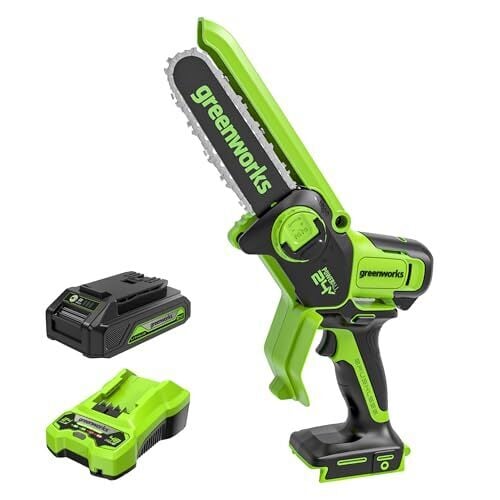
For me, the mini chainsaw was one of those tools. This one, specifically (I considered others, but I really wanted a one-handed, cordless option because I live in a small, urban house, not a sprawling farm that runs on firewood and steam). I bought it specifically for landscaping/pruning chores, but it’s quickly proven to be one of the most useful little tools I own—so useful, in fact, that I think every DIYer should have one. Here are just a few ways I put it to good use.

Pruning

The initial use-case for the mini-chainsaw was for pruning back invasive branches and vines from my neighbor’s yard, which is almost sentient in its determination to colonize my property. I love my neighbors, and it’s not a point of conflict, but if I don’t stay on top of that situation, my whole house will be enveloped by a creeping vine that’s been colonizing their yrad so long it’s almost structural, and I’d never see the sun again due to the encroaching branches of their backyard trees. The mini chainsaw is perfect for this work. It slices right through the (surprisingly thick and robust) vines, as well as the tree branches. As it’s a one-handed tool, I can safely wield it from a ladder without risking my fingers (or more critical body parts).

Cutting through more than just branches

If you think you only use chainsaws on lumber—cutting firewood, or clearing fallen trees—you’re wrong. What’s great about a chainsaw in general is that it slices through dense, thick material like that with ease. I’ve used mine to cut through stuff like PVC when doing minor plumbing work around the house, and it worked a charm.

It’s also great for quick cuts on wood. While I wouldn’t use a chainsaw in place of a circular saw or table saw for precision cuts, it’s been a real time-saver to just trim a bit here and there, especially after I’ve secured a 2×4 in place with screws only to realize I miscalculated the initial cut by a quarter inch. The mini chainsaw just lops off the excess without drama.

Some folks online claim they’ve used mini chainsaws to make quick cuts in drywall, but I’m not sure I’m going to try that. I’m sure it works, but it sure seems like unnecessary overkill.

Demo work

Every DIY project starts with demo and removal, and a mini chainsaw has become an essential tool. For example, when I re-did a deck recently, I had to pull up and haul off all the old planks and structure. The mini chainsaw made it easy to cut everything down to a more manageable size so I wasn’t navigating 10-foot boards through the house. It was a fast, easy way to reduce a lot of cumbersome junk and prevent a bit of the inevitable damage I caused (to my back as well as my house).

Having fun while DIYing

This isn’t really a use-case, but it’s worth mentioning all the same: mini chainsaws are fun to use. The ability to just press a button and slice away anything that’s irritating you is well worth the price all by itself. (If you’re like me, the opportunity to make your own chainsaw noises while you use it is just an added, unnecessary bonus.)

The best Black Friday deals under $50 are already live: Anker chargers, Apple AirTags, Blink cameras, Legos and more

You don’t have to spend a ton to get your hands on quality tech, thanks to Black Friday. We’re already seeing lots of tech deals — many for under $50 and some hitting the best prices we’ve seen all year. Many of the discounts apply to accessories — the chargers, hubs, cables and drives that play supporting roles for smartphones and laptops — but plenty of other small electronics are on sale, too. We rounded up smart speakers, portable speakers, streaming devices, smart plugs and Bluetooth trackers that are seeing notable discounts. It’s all things Engadget recommends in our guides and elsewhere — and we linked to our coverage so you can read up before you buy. Here are the best Black Friday tech deals we could find.

Best Black Friday deals under $25

Audible, 3 months and a $20 credit for $3 ($42 off) at Amazon: As it does each Black Friday (and at a few points besides), Amazon is offering a near-free intro deal for its audiobook subscription. The plan auto-renews at a dollar per month for three months, then defaults to the standard $15 monthly. So set a reminder to cancel before then if you don’t want to pay full-price.

Philips Fabric Shaver for $13 ($7 off) at Amazon: Did you know you needed a fabric shaver? You need a fabric shaver. Our editor grabbed this one (at full price) and loves it. It keeps blankets, sweaters and joggers pill free and looking fresh. For just $13.

Glocusent Tri-head Clip On Book Light for $16 ($10 off) at Glocusent: My family vies for this handy device each night. It’s ideal for reading a book in bed with a light that lets you adjust the warmth, angle and spread of the beam. It’s also great for shining some light on a desk as you can use its clip like a stand.

LEGO Botanicals Happy Plants for $18 ($5 off) at Amazon: Here’s an ideal Secret Santa gift — everyone loves Legos and these cheery little guys will keep your giftee company at their desk or on their windowsill, and are the lowest-maintenance plants around. Also at Target and Walmart.

Apple AirTag Bluetooth tracker for $18 ($11 off) at Amazon: An updated version of Apple’s little finding discs is almost certainly on the horizon. For now, an AirTag is our pick for the best Bluetooth tracker for iPhone users. It’s a little quieter than third party tags like Chipolo, but when it comes to trackers, this is what most people think of.

Amazon Fire TV Stick HD for $18 ($17 off) at Amazon: If you just want the Amazon Fire TV experience for the fewest dollars possible, here you go. The HD stick is the best budget option in our opinion and could be all you need if your TV doesn’t support 4K content anyway.

Blink Mini 2 indoor security camera for $18 ($22 off) at Amazon: Do you wonder what the dog and cat do when you’re gone? (The answer is sleep.) An indoor camera lets you keep an eye on your home while you’re gone or just in the other room. We named the Blink Mini 2 the best budget pick in our guide to security cameras for 2025. The tiny squares are easy to set up, work well (and only) with Alexa and deliver suitable (but not ultra high quality) images.

Kasa Outdoor Smart Plug (dual socket) for $20 ($7 off) at Amazon: Tired of turning off our outdoor holiday lights manually each night? Get one of these and schedule the controls. Or better yet let Alexa, Siri or the Google Assistant turn them off with just a command. This is the one we recommend in our guide to smart plugs — and the one that faithfully controlled my Halloween lights last month. It’s gone as low as $17 in the past.

Samsung SmartTags 2 Bluetooth tracker for $20 ($10 off) at Amazon: If you’ve got a Samsung phone, the brand’s own trackers will serve you well. They’re one of the best-looking fobs we tested. It hooks up with Samsung’s own finding network, which is surprisingly robust, and was able to locate lost stuff nearly as quickly as AirTags in our tests.

Kasa Smart Plug Matter Compatible KP125M (2-pack) for $24 ($11 off) at Amazon: If you want to control your lamps, humidifiers and other simple appliances just by talking to your home assistant of choice, a smart plug will let you do so. We deemed this the top pick for a Matter-enabled plug in our smart plug guide. Set-up is seamless and it supports Siri, Alexa, the Google Assistant and more.

LEGO Creator 3-in-1 Retro Telephone for kids for $24 ($6 off) at Amazon: One of our top picks for the best tech toys for kids is on sale for Black Friday. This cute as a button retro telephone is rated for kids eight and older and is a three-in-one set that can be rebuilt into three different configurations: A rotary phone, cordless phone and an early-days cell phone/flip phone combo.

Chipolo Pop Bluetooth tracker for $25 ($4 off) at Amazon: Quit losing your keys (or jacket or backpack) by attaching this colorful tracker to it. The Pop is our overall favorite in Engadget’s guide to Bluetooth trackers as it’s loud, feature-rich and taps into Apple’s Find My or Google’s Find Hub networks. Also available directly from Chipolo.

Amazon Fire TV Stick 4K Plus for $25 ($25 off) at Amazon: We don’t know why Amazon needs so many streaming sticks in its lineup, but here we are. The 4K Plus is very similar to the 4K Max except it has a little less storage at 8GB and no Wi-Fi 6E (just Wi-Fi 6). You also don’t get the Ambient experience that turns your TV into art. If you can swing the extra bucks, go for the Max, but if those features don’t matter to you, this saves you $10 right now.

Best Black Friday deals under $50

Meross WiFi Dual Smart Plug (2-pack) for $26 ($7 off) at Amazon: The difference between this one and others is the dual outlet — a surprising rarity among smart plugs. Meross’s dual plug works with home systems from Apple, Amazon, Google and Samsung and lets you control each of the two outlets independently. 

Anker Soundcore 2 Portable Bluetooth Speaker for $30 ($15 off with Prime) at Amazon: Share your good taste in music with Anker’s portable sound box. It’s Bluetooth connected, goes for 24 hours on a charge and can handle a dunk in water with no ill effects to its 12 watts of sound. Soundcore makes a few of the picks on our list of the best speakers — this is a more affordable model. 

Zagg Glass Elite Screen Protector for iPhone 17 for $35 ($5 off) at Amazon: You’re thinking of saying yes to the new iPhone 17. You probably won’t be disappointed. Just make sure you protect it. We like Zagg’s shields and said so in our guide to iPhone accessories. Also available at Best Buy.

Amazon Fire TV Stick 4K Max for $35 ($25 off) at Amazon: We recently wondered why Amazon needs so many streaming devices (Google just has one and it’s our favorite). But in the battle among the Fire TV streamers, we think this one is the best. It can display 4K resolution and Dolby Video, supports the more future-proof Wi-Fi 6E, has more memory than the other sticks and lets you use the Ambient Experience that displays art on your screen when you’re not watching The Expanse.

UGreen Uno Nexode Charger Block (65W, 3-Port) for $35 ($15 off with Primea) at Amazon: There are other ways to charge your devices, but few are this cute. That’s why we named it one of the best stocking stuffers you can buy. You get three ports in its head and outlet prongs hidden in its removable magnetic feet. Its 65 watts are enough to charge multiple devices at once. Also available directly from UGreen and at Walmart.

UGreen Revodok Pro 109 USB C Hub for $36 ($55 off) at Amazon: I tested a bunch of USB-C hubs and deemed this one the best. Plug in the generously long cable into your tablet or laptop and you’ll be able to read memory cards, use USB-A peripherals, connect a 4K monitor via HDMI and use Ethernet. The lowest price we tracked on this guy yet is $30.

Baseus Picogo magnetic portable charger with stand (5K mAh, Qi2 15W) for $37 ($13 off) at Amazon: This little guy gave a solid 43 percent bump to our tester iPhone 15 in 42 minutes, ultimately charging it to 91 percent. It earned a mention in our guide to MagSafe batteries thanks to those speeds, its compact size and the handy (and sturdy) little stand on the back. 

Kasa Smart Plug Mini EP25 (4-pack) for $37 ($13 off) at Amazon: In my house, we call these “the good plugs.” The connection is fast and fuss-free and it’ll work with Alexa, Siri, OK Google and via the Kasa app — so if you’re a smart home mad scientist with multiple home assistants you can ask one to turn on the lamp and another helper to turn it off. This is the best smart plug we tested. The four-pack went as low as $30 is the lowest price we’ve tracked. Also at B&H Photo.

JBL Go 4 Waterproof Bluetooth Speaker for $40 ($10 off) at Amazon: Our guide to the best Bluetooth speakers ranks the Go 4 as one of the winners. It’s super compact at less than half a pound — so don’t expect top-end sound — but it outputs good volume for its size and even has a handy carry loop. Also available directly from JBL and at Walmart.

Govee Smart LED Light Bars for $40 ($10 off) at Amazon: Another of our stocking stuffer picks are these smart LED light bars from Govee. They can stand up or lie flat so they can go just about anywhere and are infinitely adjustable via the app. You can even set them to light up in sync with your music. Alexa and the Google Assistant will let you control them with just your voice (and a smart speaker).

Leebein Electric Spin Scrubber for $40 ($20 off with Prime) at Amazon: Shower scrubbing is no one’s favorite activity (I’m assuming here, but I’m pretty sure I’m right). This makes the job so very much easier. Discovered by our editor who abhors the task, the Leebein runs on a USB-C rechargeable battery and has swappable brushes. The course brush combined with the higher speed is no match for any shower scum.

Anker Nano Charger Block (70W, 3-port) for $40 ($10 off) at Amazon: This specific model isn’t in our guides, but we’ve seen other Anker Nano chargers prove themselves, so we’re comfortable recommending it. This one has two USB-C ports for fast charging devices, plus a Type-A outlet for devices that need it.

Blink Outdoor 4 XR for $42 ($78 off) at Amazon: Here’s the extended range model of the Blink Outdoor cameras that we named among the best. That means you can stick it farther from your house and still see the goings on your property. Like most security cameras, you’ll get more out of it with a subscription (smart motion detections, cloud storage, and longer live views).

Ugreen Nexode Pro GaN slim wall charger (65W 3-port) for $45 ($11 off with Prime) at Amazon: In the battle for fast charger supremacy, UGreen’s flatish block got a nod for being pretty good at its job. It has three USB outputs, including one Type-A for your more retro electronics and can pump out up to 65W for phones and tablets, or even laptops if needed. Just note the flat-but-wide design could block other outlets. Also available directly from UGreen and at Best Buy.

Sharge AeroMag Magsafe Power Bank (Qi2 15W, 5K mAh) for $50 ($20 off) at Amazon: To recharge a dying iPhone (12 and later) in the most unobtrusive way possible, go for a MagSafe power bank. It’s not as fast as a wired connection, but super convenient. After testing Sharge’s AeroMag, it earned a runner-up spot in our guide.

Ultimate Ears Miniroll Waterproof Bluetooth Speaker for $50 ($30 off) at Amazon: Ultimate Ears makes some of our favorite Bluetooth speakers. This is the smallest of the UE portable speakers and fits in the palm of your hand or clips to your handlebars (with its hookable strap) and goes for 12 hours on a charge and supports a 40 meter Bluetooth range.

Ring Battery Doorbell for $50 ($50 off) at Amazon: We haven’t officially tested doorbell cameras just yet (it’s on the list). But Ring is one of the best-known and most popular brands you can buy. This one runs on batteries so you don’t have to mess with doorbell wires and it supports two-way talk, live view and smart alerts. Just note that many features are tied to a Ring subscription ($5 to $20 per month).

Ring Outdoor Cam (Stick Up Cam) for $50 ($50 off) at Amazon: This weather-resistant outdoor cam has a removable and rechargeable battery that can go for a few months on a charge. We didn’t test this exact model for our security cam guide, but other Ring cameras worked well for us. Here you get live views, color night vision, two-way talk and motion alerts. Just note that it only works with Alexa and some features require a subscription.

Anker Prime GaN Charger (100W, 3-port) for $50 ($20 off) at Anker: Here’s a variant of the top pick for travel in our fast charger guide. This higher-wattage Prime charger can charge three devices at once (two via USB-C and one via Type A). Plus the prongs fold down. Perfect for keeping everything topped off on the road. Note that the discount comes courtesy an auto-applied code.

This article originally appeared on Engadget at https://www.engadget.com/deals/the-best-black-friday-deals-under-50-are-already-live-anker-chargers-apple-airtags-blink-cameras-legos-and-more-173833576.html?src=rss


Microsoft and NVIDIA will invest up to $15 billion in Anthropic

Fresh off a reorganized deal with OpenAI, Microsoft is diversifying its AI investments. The company says it will invest up to $10 billion in Anthropic. Meanwhile, NVIDIA has pledged up to $5 billion in the Claude maker. The three-way partnership, which includes various other commitments, could be seen as further evidence that an AI bubble is about to burst.

As part of the deal, Anthropic has committed to buy $30 billion of Microsoft Azure cloud computing capacity. Anthropic says it will also contract additional capacity, up to one gigawatt. In addition, Microsoft Foundry customers will gain access to several Claud models. These include Sonnet 4.5, Opus 4.1 and Haiku 4.5.

Meanwhile, NVIDIA and Anthropic will work together to improve Anthropic’s AI models for NVIDIA hardware. The pair will also optimize future NVIDIA architectures for Anthropic’s needs.

All of this is against the backdrop of Microsoft’s recently renewed partnership with OpenAI, which loosens their exclusivity. It didn’t take long to see the apparent fruit of that. Early this month, the ChatGPT maker signed a $38 billion cloud contract with Amazon. And last week, Anthropic said it will use AWS AI chips after Amazon invested an additional $4 billion in the Claude maker.

The two Spider-Men meme: two versions of the web-slinger, pointing at each other.
Marvel.com

Dizzy yet? To borrow imagery from the “two Spider-Men” meme, the AI world increasingly looks like a big circle of web-slingers, all pointing at each other. Only in this case, each index finger is flinging billions of dollars to help prop up the other Spider-Men. (Pay no mind to the AI layoffs.) It’s too early to say how this all plays out, but the circular nature here makes it easier to understand why some believe we’re looking at a bubble. NVIDIA’s earnings tomorrow could tell us more.

This article originally appeared on Engadget at https://www.engadget.com/ai/microsoft-and-nvidia-will-invest-up-to-15-billion-in-anthropic-173432863.html?src=rss

The Meta Quest 3S VR Headset Just Dropped To Its Lowest Price Ever On Amazon

We may earn a commission from links on this page. Deal pricing and availability subject to change after time of publication.

With the holiday season just around the corner, deals on VR headsets are selling fast. The Meta Quest 3 continues to remain the gold standard in this arena. Right now, the more affordable but equally popular Meta Quest 3S (128GB with a Gorilla Tag bundle) is $249.99 (originally $299.99) on Amazon, marking a 17% discount and its lowest price ever, according to price-tracking tools.  

PCMag gave this headset an Editor’s Choice Award and dubbed it the “Best Affordable VR Headset”; this detailed review praises its fast processor, color-pass-through camera, and versatility across many games and apps. The Meta Quest 3 can work standalone or tethered to a PC. 

It has a 1,832-by-1,920 per-eye resolution, which is slightly grainier than the pricier Quest 3 but still crisp, and supports up to 120Hz refresh rate. The processor is on par with the Quest 3, but this sale model only has 128GB of storage, compared to the Quest 3’s 512 GB. While the battery is smaller, it’s longer-lasting (2.5 hours vs. 2.2 hours) due to the lower-resolution display. 

The headset features intuitive Meta Quest Touch Controllers identical to the Quest 3’s, but they must be in view of the headset to track accurately. The Meta Quest Library has a huge selection of experiences; that said, it’s better for gaming and gamified education, art, and exercise apps than for a serious work tool. 

While the graphics aren’t as sharp as the Quest 3 and have a narrower field of view, it offers an equally compelling VR experience for a lower price tag ($250 less), making the Meta Quest 3S a fantastic budget VR headset. 

Our Best Editor-Vetted Tech Deals Right Now


Apple AirPods 4 Wireless Earbuds


—
$117.00

(List Price $129.00)


Amazon Fire HD 10 (2023)


—
$69.99

(List Price $139.99)


Sony WH-1000XM5


—
$248.00

(List Price $399.99)


Amazon Fire TV Stick 4K Plus


—
$24.99

(List Price $49.99)

Deals are selected by our commerce team

Fund Managers Warn AI Investment Boom Has Gone Too Far

A majority of global fund managers think companies are overinvesting, as market anxiety grows about the sustainability of the AI spending boom. From a report: A net 20 per cent of fund managers surveyed this month by Bank of America said companies were spending too much on their investments — the first time this has been a majority view in data running back to 2005. “This jump is driven by concerns over the magnitude and financing of the AI capex boom,” said BofA analysts.

The surge in investment to develop AI infrastructure has been a dominant theme in the record rally in US tech stocks this year — with chipmaker Nvidia becoming the world’s first $5tn company last month — but growing concerns about the sustainability of this spending has caused a pullback on Wall Street in recent weeks.


Read more of this story at Slashdot.

Snapchat’s new ‘Topic Chats’ feature makes it easier to comment publicly on things you’re interested in

Snapchat has introduced a new feature called “Topic Chats,” which allows users of the social network to participate in public conversations about popular trends. By its own admission, Snapchat has previously focused on private conversations, but says the growth of its TikTok-like Spotlight feature made it clear that people want to comment publicly about topics they’re interested in.

Topic Chats, which are coming to Canada, New Zealand and the US first, will appear in different areas of the Snapchat app in the shape of a big yellow button that says “Join the Chat.” Tap it and you’ll join that conversation, where you can also browse related Spotlight videos. The company used F1 and the reality show Below Deck as examples of topics that could feature. 

Snapchat will show you when your friends are in a particular chat, and any that you join will then appear at the top of your personalized Topic Chat page. Snap says it will moderate the new platform to ensure it remains safe, and told TechCrunch that it will use LLMs, among other measures, to ensure that topics being engaged with are of an appropriate nature. All profiles will remain private unless you’re already friends, which Snap says will prevent unwanted friend requests or direct messages.

Topic Chats are set to go live in the coming weeks, and will appear in Chat shortcuts and the Stories page, as well as when searching or viewing Spotlight videos.

This article originally appeared on Engadget at https://www.engadget.com/social-media/snapchats-new-topic-chats-feature-makes-it-easier-to-comment-publicly-on-things-youre-interested-in-171111409.html?src=rss

We Now Know What Caused the Cloudflare Outage Tuesday Morning

Tuesday morning was a stark reminder of how fragile the global internet really is. Websites from X to ChatGPT went offline as Cloudflare, the company they rely on for web infrastructure services, experienced a massive outage. A huge number of sites and services across the world contract Cloudflare for cybersecurity protections, as well as to route traffic through servers local to each user, all in the name of performance and reliability. Ironic, of course, given today’s events.

When the public experiences such a massive internet outage, speculation runs awry. What caused this? Was it a simple bug on Cloudflare’s part, or something malicious? Are bad actors attacking Cloudflare, and the sites that rely on it? But, as it turns out, the reason appears to be closer to the former than the latter.

Cloudflare’s outage was a glitch

In a statement to Mashable, Cloudflare confirmed that the company had identified the cause of the issue, and had rolled out a fix to patch it. In addition, Cloudflare is adamant there is no reason to believe a cyberattack caused this outage. This is the full statement:

“Many of Cloudflare’s services experienced a significant outage today beginning around 11:20 UTC. It was fully resolved at 14:30 UTC. The root cause of the outage was a configuration file that is automatically generated to manage threat traffic. The file grew beyond an expected size of entries and triggered a crash in the software system that handles traffic for a number of Cloudflare’s services.

To be clear, there is no evidence that this was the result of an attack or caused by malicious activity. We expect that some Cloudflare services will be briefly degraded as traffic naturally spikes post incident but we expect all services to return to normal in the next few hours. A detailed explanation will be posted soon on blog.cloudflare.com. Given the importance of Cloudflare’s services, any outage is unacceptable. We apologize to our customers and the Internet in general for letting you down today. We will learn from today’s incident and improve.”

It seems the reason for the outage was a preventative measure meant to block a potential cyberattack. While that goal is obviously important, it shows how complex these systems really are: One glitch with one cybersecurity protocol spun out of control, and took down the network en masse.

Seven Easy Ways You Can Edit PDFs Directly From Your Mac

The best PDF editor on your Mac is the app your Mac ships with. I’m talking about Preview, an app whose name hides its versatility. It can do a lot more than just opening different types of files. For PDFs, it’s as good as most free PDF editors.

Enable dark mode for easier reading

Using dark mode in PDFs in macOS Tahoe's Preview app.

Credit: Pranay Parab

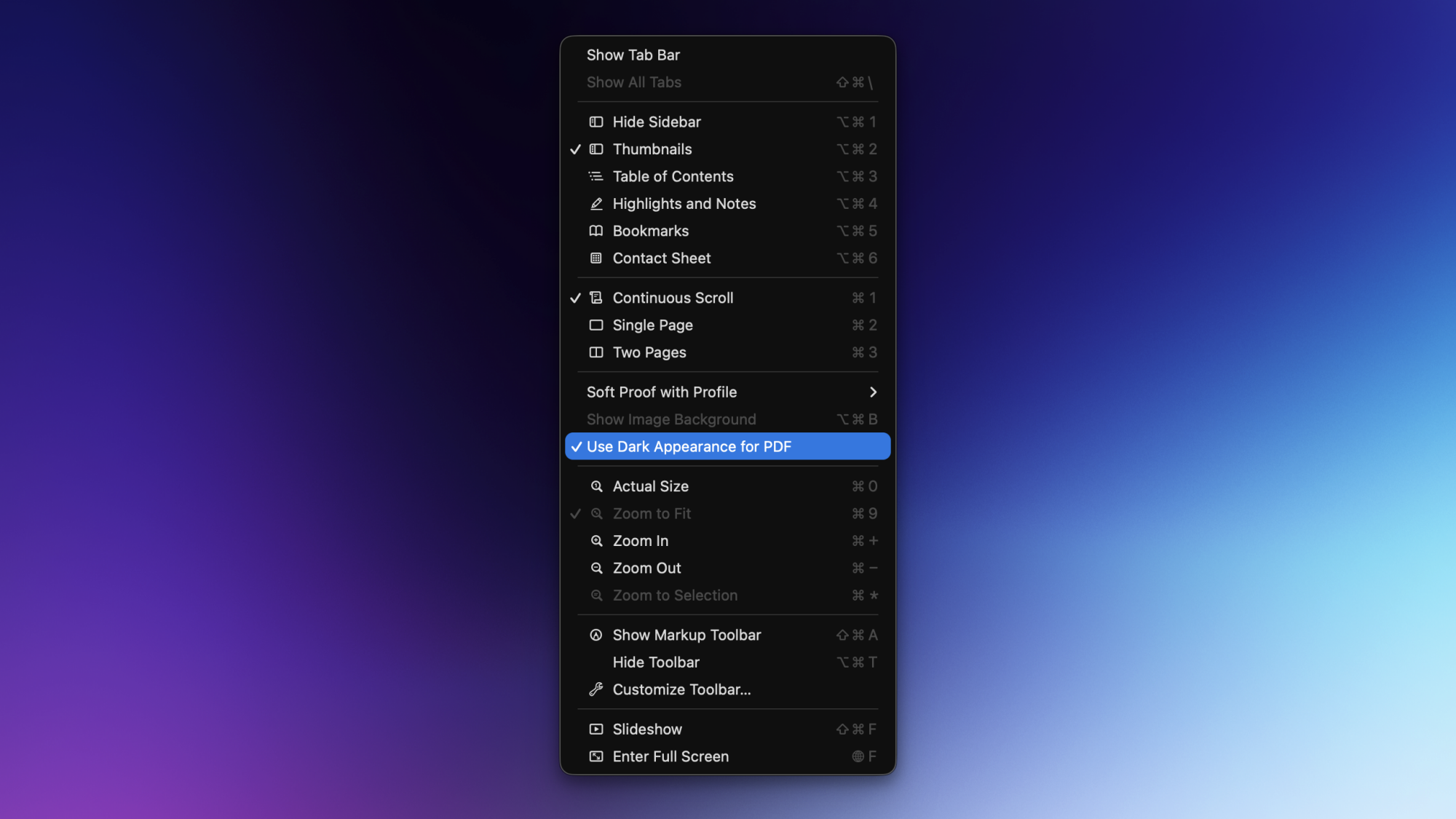
I suffer from migraines and to keep the headaches at bay, I use dark mode wherever I can. In macOS 26 Tahoe, Preview now allows you to enable dark mode for any PDF file, which means that I no longer need to deal with bright white backgrounds when I have to go through any PDF document.

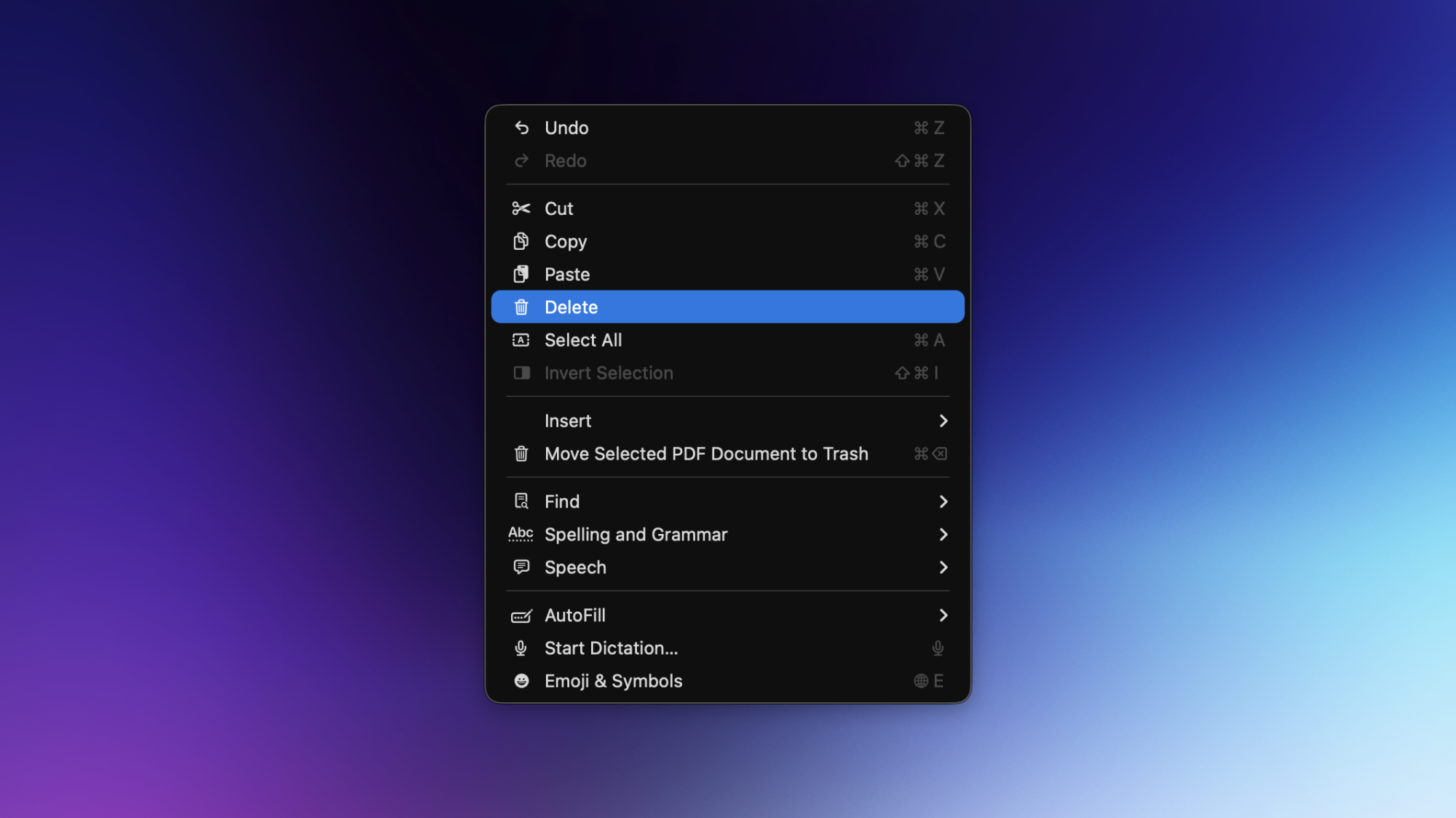
To use this feature, open a PDF file in Preview on your Mac. Now click the View button in the menu bar up top, and select Use Dark Appearance for PDF.

Insert pages in a PDF file

Inserting a new page in a PDF in Preview.

Credit: Pranay Parab

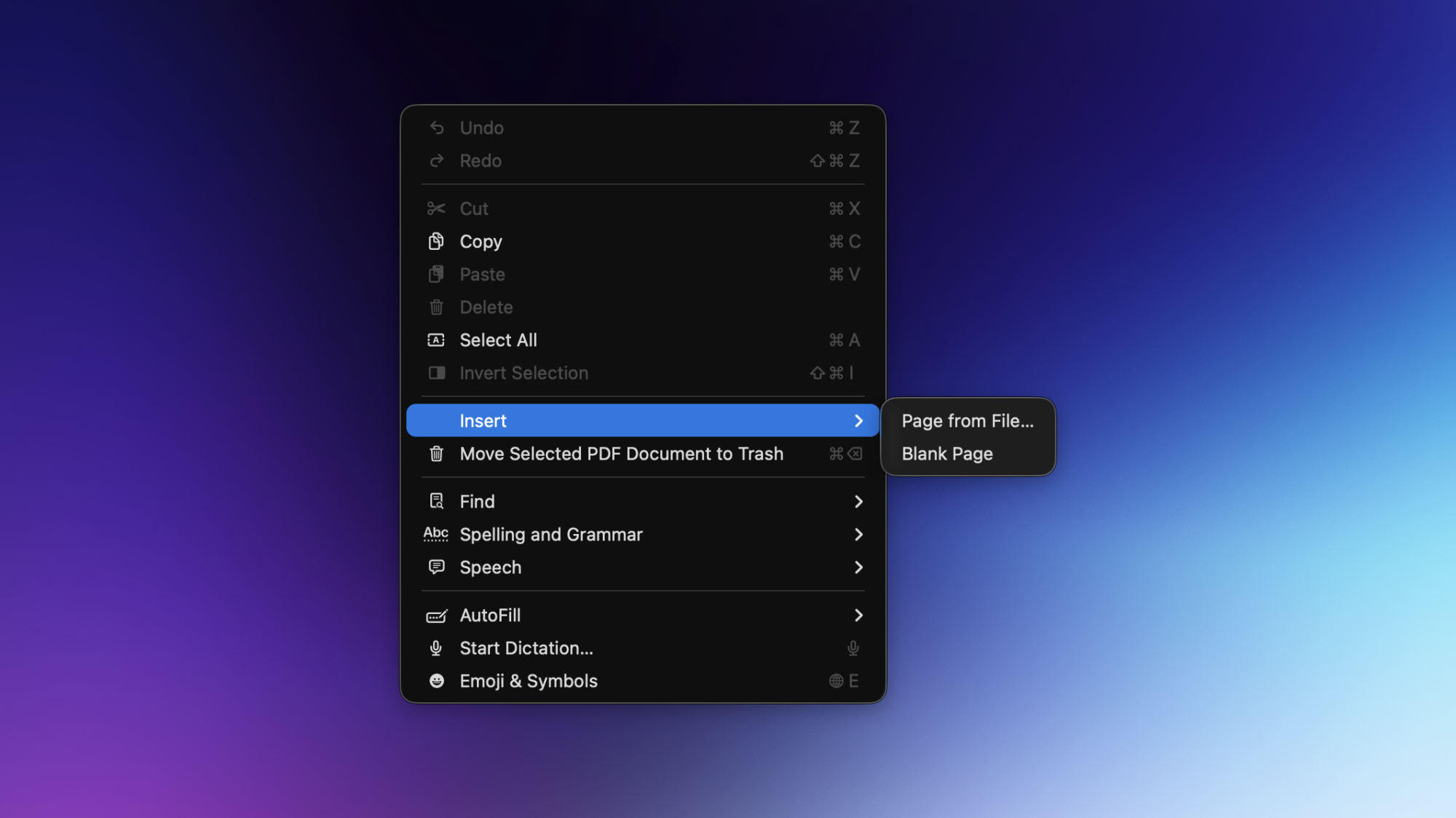
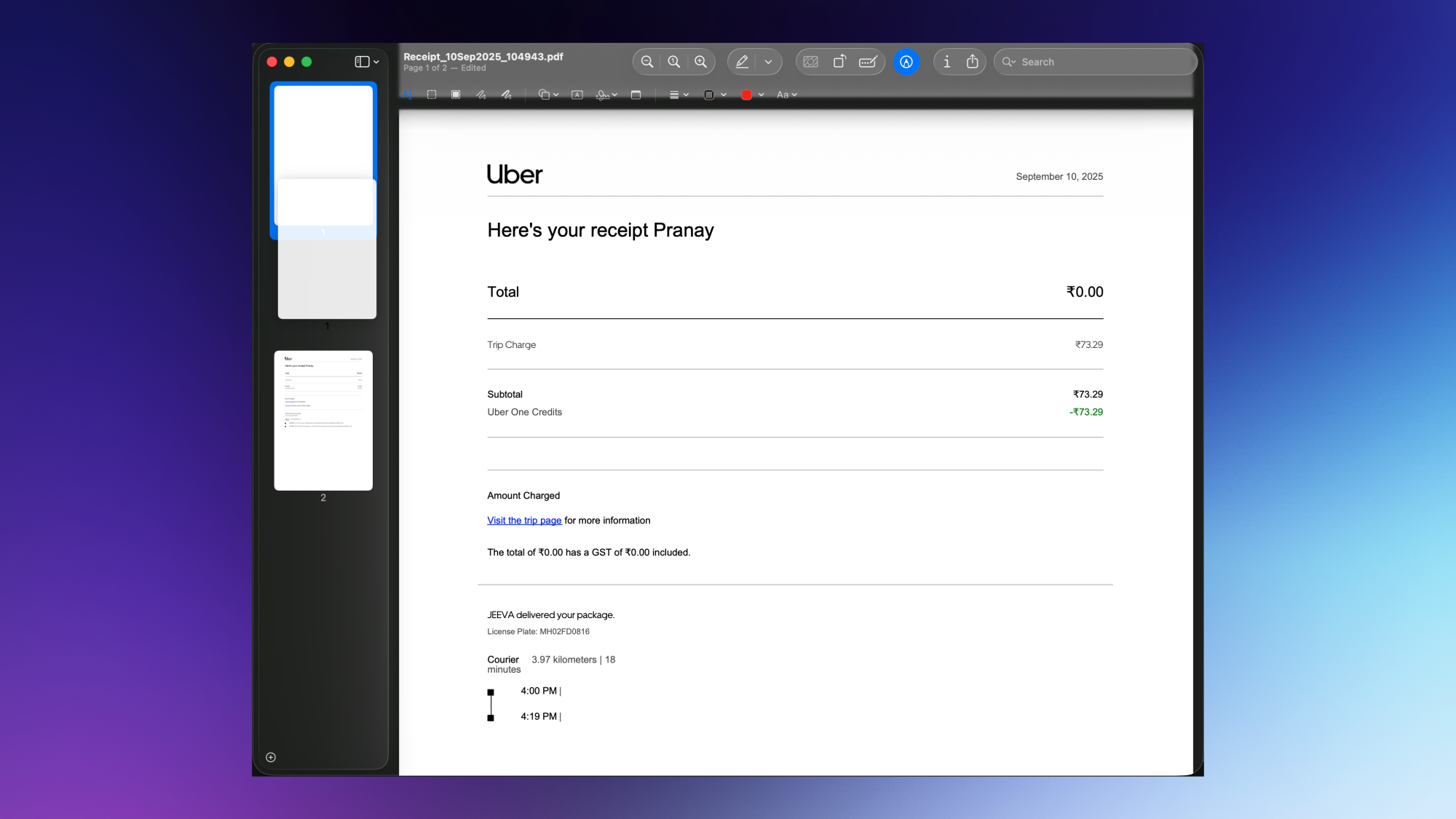
Preview lets you easily add pages to a PDF file. You can either add a blank page or insert a page from a different file. To use this feature, open a PDF file in Preview, and go to Edit > Insert. You can either choose Blank Page or Page from File….

The option to insert a blank page in the PDF is self-explanatory. If you want to insert a page from a different file, there are different ways to do so. The option in the Edit menu will directly insert the whole PDF or image file you select into your PDF. This is fine when you’re selecting a single-page PDF that needs to go into a bigger file, but it’s not ideal if you want to add just one page from a 50-page document. If you’re trying to do this, add pages by opening two PDF files side-by-side in Preview, and dragging pages from the first to the second PDF file. 

If the sidebar is hidden in Preview, go to View > Thumbnails. You can now drag the thumbnail from one sidebar to another with ease.

Reorder pages in a PDF 

Reordering pages in a PDF file in Preview.

Credit: Pranay Parab

If you want to change the order of pages in a PDF file in Preview, just drag and rearrange the thumbnails in the sidebar. It’s quite smooth and intuitive, and you’ll be able to get the job done pretty quickly.

Delete pages from a PDF file 

Deleting pages from a PDF file in Preview.

Credit: Pranay Parab

Preview has a page deletion feature built in, too. Once again, just open a PDF file in Preview, select any page in the sidebar, and press the Delete button to remove the page from your PDF document. This option is also available under Edit > Delete.

Annotate, edit, and redact text in a PDF file

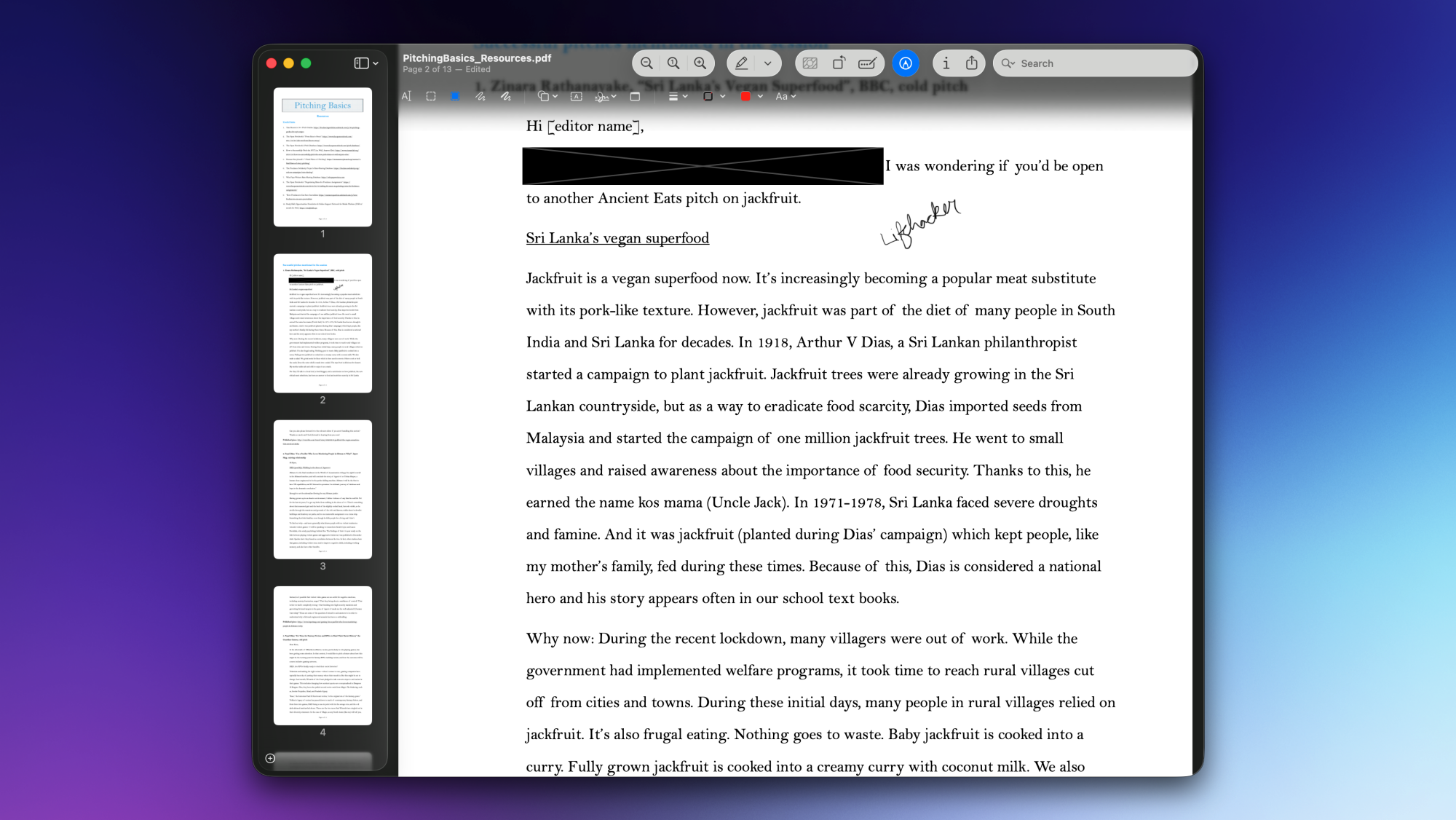
Redacting text from a PDF file in Preview.

Credit: Pranay Parab

You can use basic markup tools to add, select, edit, and redact text in Preview. These tools, along with the options to annotate and sign PDFs, are all available under the Markup Toolbar in Preview for Mac. To access these tools, open any PDF in Preview, and click the pencil icon in the toolbar. Alternatively, you can go to View > Show Markup Toolbar. These tools are more than sufficient for quick edits to PDF documents.

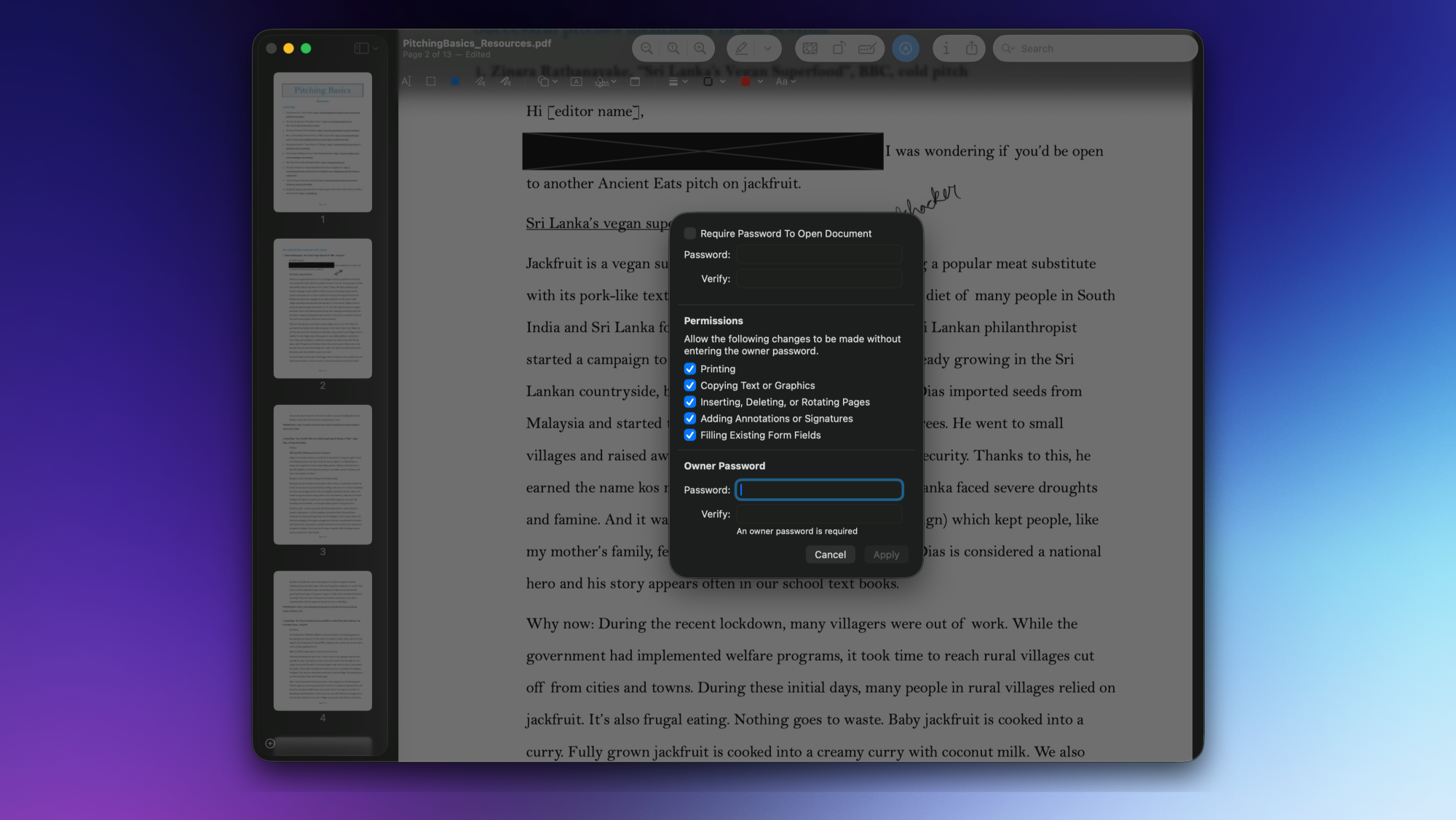
Add a PDF password

Adding a password to a PDF file in Preview.

Credit: Pranay Parab

You can use Preview to add a password to a PDF file, or to remove passwords from a file. To add a password to the PDF file you’re viewing in Preview, go to File > Edit Permissions, and check the box labelled Require Password to Open Document. Once you’ve added and confirmed the password, you’ll also have to add an owner password to the document. The owner password lets you restrict others from making changes to the PDF file, printing it, etc. Ideally, it should be different from the password used to open the PDF file. With both passwords added, click Apply to confirm the changes.

Rotate pages in a PDF

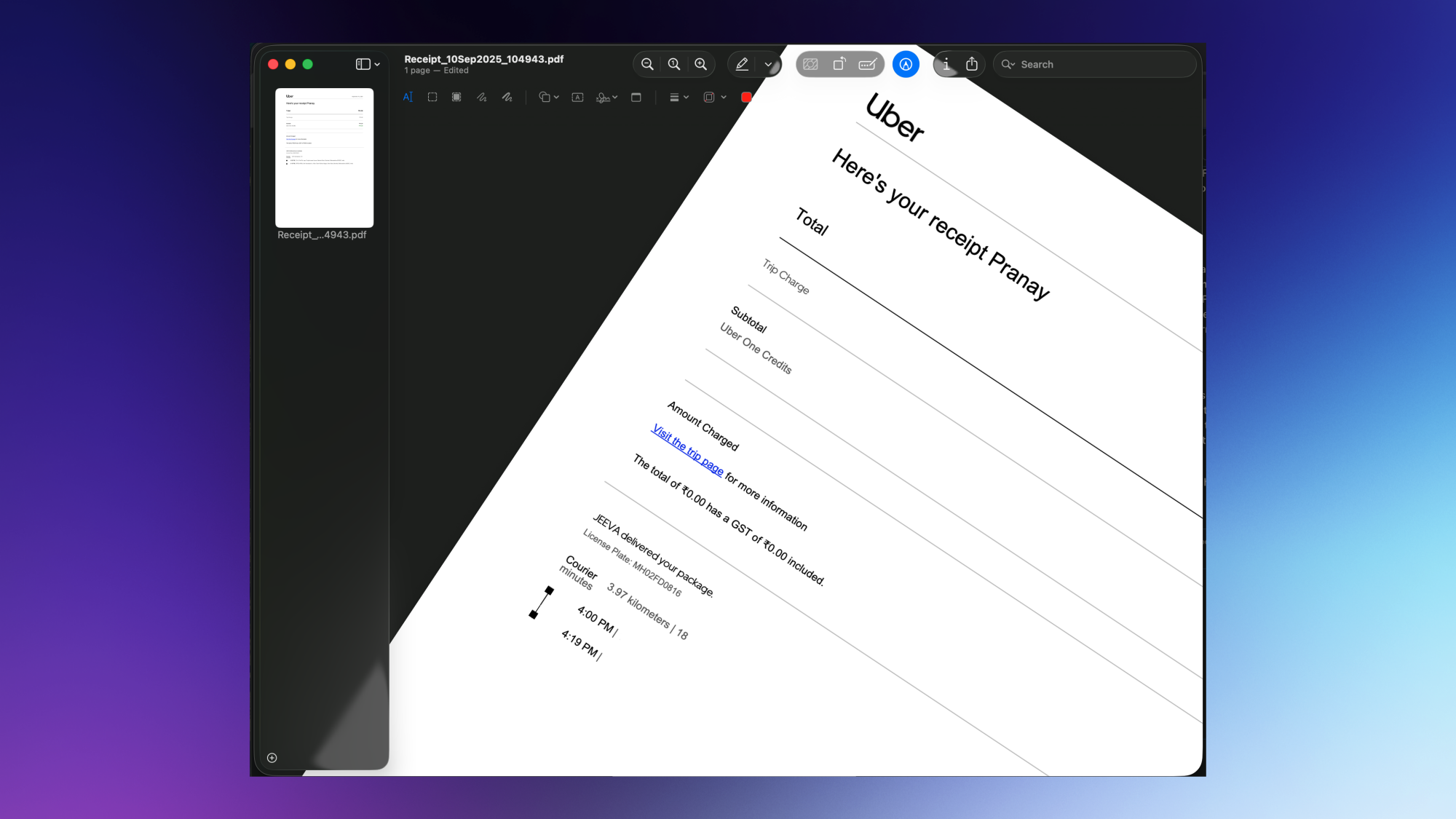
Rotating pages in a PDF file in Preview.

Credit: Pranay Parab

Sometimes, PDF files arrive with an unusable orientation—e.g., portrait pages scanned in landscape mode. In such cases, you can use Preview to rotate the pages of a PDF. Just go to the page you want to rotate and press Command-L to rotate it left or Command-R to rotate right. Fun fact: You can also do the same thing using your trackpad. Use two fingers to mimic a rotating motion and you’ll see that the page of the PDF file rotates to the left or the right.

These options are also available under the Tools menu. Over there, you’ll also find options to flip a page horizontally or vertically, as well as a feature that removes the background from a PDF page.

Google Launches Gemini 3, Its ‘Most Intelligent’ AI Model Yet

Google released Gemini 3 on Tuesday, launching its latest AI model with a breakthrough score of 1501 Elo on the LMArena Leaderboard alongside state-of-the-art performance across multiple benchmarks including 91.9% on GPQA Diamond for PhD-level reasoning and 37.5% on Humanity’s Last Exam without tool usage. The model is available starting today in the Gemini app, AI Mode in Search for Google AI Pro, Google AI Studio, Vertex AI and the newly launched Google Antigravity agentic development platform. Third-party platforms including Cursor, GitHub, JetBrains, Manus, and Replit are also gaining access.

Separately, Google said AI Overviews now have 2 billion users every month. Gemini app has topped 650 million users per month.


Read more of this story at Slashdot.

Google CEO: If an AI bubble pops, no one is getting out clean

On Tuesday, Alphabet CEO Sundar Pichai warned of “irrationality” in the AI market, telling the BBC in an interview, “I think no company is going to be immune, including us.” His comments arrive as scrutiny over the state of the AI market has reached new heights, with Alphabet shares doubling in value over seven months to reach a $3.5 trillion market capitalization.

Speaking exclusively to the BBC at Google’s California headquarters, Pichai acknowledged that while AI investment growth is at an “extraordinary moment,” the industry can “overshoot” in investment cycles, as we’re seeing now. He drew comparisons to the late 1990s Internet boom, which saw early Internet company valuations surge before collapsing in 2000, leading to bankruptcies and job losses.

“We can look back at the Internet right now. There was clearly a lot of excess investment, but none of us would question whether the Internet was profound,” Pichai said. “I expect AI to be the same. So I think it’s both rational and there are elements of irrationality through a moment like this.”

Read full article

Comments

Zwift Update Version 1.102 (155319) Released

Zwift version 1.102 begins its phased rollout today. For most Zwifters, this is a minor update that includes a new NYC route, a wheelset fix, and various bugfixes. But some Zwifters will begin seeing Personalized Recommendations as Zwift begins testing this new feature. Read on for details!

New Big Apple Route(s)

On the heels of the recent New York map expansion, today Zwift releases yet another new route: Times Square Circuit. This route includes an achievement badge for both riders and runners.

Shimano DURA-ACE C36 Fix

Zwift’s release notes include this line: “Updated the performance of the Dura-Ace C36 wheels to better match real-world performance.”

In version 1.101, Zwift removed the Shimano DURA-ACE C40 wheels from the Drop Shop, replacing them with the newer and (supposedly) lighter C36 wheels. There was just one problem: the game showed the new C36 wheels as rated 1 star for weight, meaning they were quite heavy!

Today’s release fixes this problem, and the wheels now show a 4-star weight rating. Watch for a post later today detailing their performance, which looks very strong considering they are unlocked at level 6 and cost only 150,000 Drops. These may just be the climbing/all-around wheels beginners are looking for…

New Level Up Celebrations

A new on-screen celebration happens whenever a Zwifter levels up. You’ll even see it when those around you reach a new level!

To learn more about levels in Zwift, read All About Zwift XP, Levels, and Unlocks for Cyclists >

Apple M5 & A19 Visual Upgrades

Users of the newest Apple devices rejoice: today’s update includes two items that may pertain to you!

  • macOS: The Ultra graphics profile is now enabled for devices with Apple M5 chips.
  • iOS: Improved visual quality for devices with Apple A19 and M5 chips.

Apple’s M5 chip powers the new 14-inch MacBook Pro, iPad Pro, and Apple Vision Pro. The A19 chip powers the iPhone 17.

Personalized Recommendations

Zwift promised this feature would begin launching in November, and they stuck to the plan. Today’s update includes Personalized Recommendations, but the feature is only being enabled for a select cohort of Zwifters because Zwift wants to gather feedback and fine-tune the recommendation engine before releasing it to a larger audience.

Due to this limited rollout, Zwift didn’t include Personalized Recommendations in the release notes.

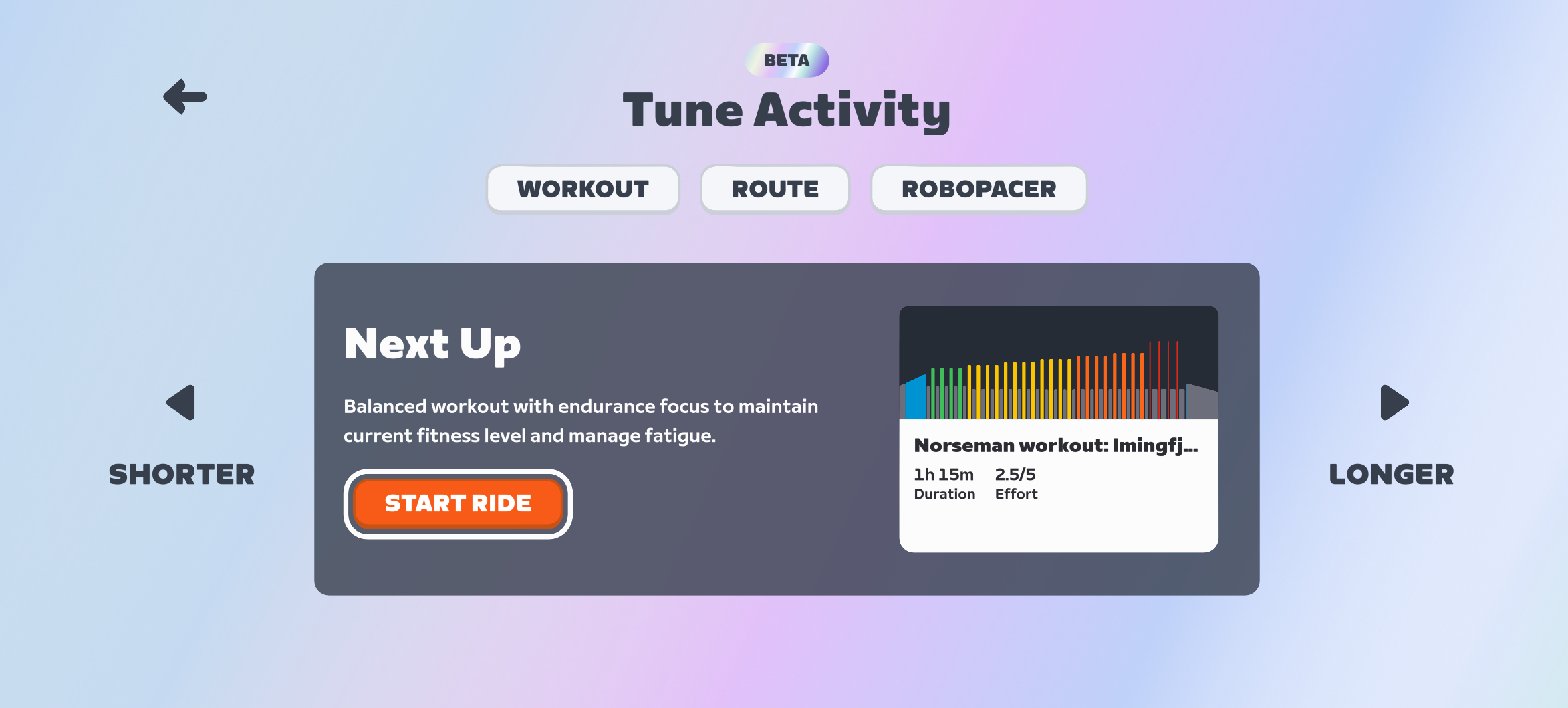
How does it all work? The Personalized Recommendations engine looks at your Zwift activities as well as any outdoor rides if you’ve connected your Garmin, Wahoo, or Karoo account. It then recommends a session for the day based on your habits, fitness, and freshness. These recommendations can be made shorter or longer, and you can choose between a workout, a route, and a RoboPacer. (Zwift tells me event recommendations will come in time.)

While the backend engine is, I’m sure, quite complex, the front-end interface is simple and easy to use. SEe for yourself:

Watch this space for more details as this feature begins rolling out!

More Release Notes

Zwift provided notes on additional tweaks and bug fixes in this update:

  • Fixed an issue that could potentially show an incorrect starting location for activities published to Strava.
  • Fixed an issue that could potentially calculate incorrect Stress Points (SP) when sitting idle in Zwift during an activity.
  • Fixed an issue that could cause heart rate monitors to get stuck in a Connecting state when paired via Kickr Bridge.
  • Fixed an issue that could potentially cause fitness devices connected via Wi-Fi to disconnect immediately after selection.
  • Zwift Unlocked Tour: Fixed an issue that could cause the route lead-in distance to not count toward the total distance metric shown in the HUD.
  • Zwift Unlocked Tour: Fixed an issue that could cause the remaining distance shown below the mini-map to not match the event route distance.
  • Various visual improvements throughout New York.
  • macOS: Fixed an issue that could cause fullscreen mode to not take effect.
  • Android: Improved fitness device connection reliability for devices with Unisoc Bluetooth chipsets (e.g. Samsung Tab A8, Lenovo M10).
  • General stability improvements.

Discuss this update in Zwift’s forum >

Questions or Comments?

If you spotted any other changes or bugs in the update, please comment below!

The AI-powered Perfecta from Seergrills is now shipping after its CES 2024 debut

When a brand new company debuts its first product at CES, it can take a while before the device makes it to market. In fact, sometimes those products don’t make it at all. That’s not the case with Seergrills though, as the company has started shipping its AI-powered Perfecta grills to early adopters after introducing the machine at CES 2024.

The Perfecta relies on AI-powered cooking tech that helps you create “chef-quality results” in a fraction of the time as traditional grilling. It’s powered by a quad-core processor and an arsenal of sensors which allow it to detect food thickness, temperature and doneness. All you have to do is select the food and desired sear and doneness levels via the built-in touchscreen or the Seergrills app.

The Perfecta utilizes a vertical cooking system where food is held by so-called VertiGrates. Dual infrared burners move closer to foods as needed during the cooking process and can achieve a maximum temperature of 1,652 degrees Fahrenheit — hot enough to cook a steak in 90 seconds. Seergrills says the Perfecta can hit those temps in under two minutes, drastically reducing preheating times. This setup also means that there’s no flipping required. The company says the configuration will consistently provide the perfect sear, doneness and moisture retention. Over time, the Perfecta learns from your culinary exploits, refining various cooking profiles to become more precise with each grilling session.

The Perfecta has a vertical cooking configuration with infrared burners that move automatically during use.
Seergrills

And it’s not just a grill either. The Perfecta has oven, pizza and rotisserie modes — if you splurge for the requisite accessories — and a manual mode (called Human Mode) for AI-free operation. What’s more, you can build and save your own cooking profiles for future use.

Despite the oven look, the Perfecta is very much an outdoor grill. It runs on 120-volt electricity and propane gas in order to power the electronics and those high-heat burners. The grill is built with aerospace-grade aluminum, marine-grade stainless steel and both ceramic and tempered glass. The cooking grates are made of naturally non-stick stainless steel and internal components also use stainless steel for easy cleaning. Lastly, the drip tray and grease management system are dishwasher safe.

If you were waiting until the company starting shipping units before committing to one, you’re going to have to wait even longer. Seergrills is now taking orders for its fifth wave of shipments, but those aren’t scheduled to go out until May 2026. You’re also going to pay a lot more for it. Back in 2024, the price tag on the Perfecta was set at $3,500, but now that has gone up to $5,999.

This article originally appeared on Engadget at https://www.engadget.com/home/kitchen-tech/the-ai-powered-perfecta-from-seergrills-is-now-shipping-after-its-ces-2024-debut-163000474.html?src=rss