Turn Your To-do List Into Data to Maximize Your Productivity

You know it’s important to prioritize your to-do list, and may have tried various methods to do so, from the Eisenhower Matrix (to determine how timely and urgent each task is), to the Pareto principle (to decide how to allocate your time to maximize your results). The problem is that determining what’s actually a priority can be an abstract problem. Some people work best when dealing with cold, hard numbers—and there’s a way to take a more quantitative approach to prioritizing your to-dos. 

Why prioritize your to-do list?

The Pareto principle, mentioned above, suggests that 80% of your results will come from 20% of your work, so you have to be picky about what you focus on. Plus, there’s only so much you can do in a day, so the best to-do list for you may be a narrow one—say, with room for one major activity, three medium-sized ones, and five little ones (known as a 1-3-5 list). If you try to do too much, your productivity can take a hit. (That’s Illich’s Law, baby.)

To avoid doing too much or working on the wrong things, you need a strategy, and to form a strategy, you need to do some planning. The Eisenhower matrix can be useful as you figure out which tasks have looming deadlines, but it’s a subjective tool. Assigning numbers to your tasks can make it all feel more data-driven. 

How to turn your to-do list into data

I encountered this tip in a blog post from consultant and strategist Daniel Coulton Shaw, who breaks down how to number your tasks so they align with the Pareto principle.

First, write down everything you need to get done in the foreseeable future, as you would in the early stages of making a 1-3-5 list. Next, assign each task two numbers, both of which will be between 1 and 10. The first number is for the effort required, and the second is for the project’s impact.

For example, answering all your emails may get a 3 for effort, but could yield results in the 7 territory. Finishing a report on a meeting could be a 6 in effort, but a 2 in results. Picking up meds at the pharmacy could be a 2 in effort, or a 7, depending how hard it is to get there, but a 4 in results, or even a 10, depending on how important the prescription is.

This part is subjective too, to a degree, but even thinking about your tasks in terms of “effort” and “results” will help you grasp their seriousness—and we’re not done yet. Next, divide each task’s “results” number by its “effort” number. So, if answering emails is a 7 on the results scale and a 3 in effort, you’re looking at a 2.33 overall score. Once all your tasks have been assigned a score, you can rank them in ascending order and aim to tackle them in that order, unless something extra timely comes along. By doing this, you’ll knock out the tasks that are important but low effort—which should be that 20% of work that comprises 80% of your results. 

What to keep in mind

Something that is a 6 in effort and 2 in results might not make it high up on your list, but could become more urgent as time goes on. Don’t forget to think about timeliness when you’re plotting. If you have a test in four weeks, obviously the effort and results are going to be high and you’re going to want to study, but give yourself the wiggle room of remembering you do have a whole month, so other less pressing tasks might need to come first. Cleaning your room might be high effort and low results when it’s just a little disorganized, but letting it go for too long will make it more effort and force it to yield more results, which will waste time when you should be doing other things no the list. So, yes, the data is important, but there are other human elements you should take into account.

Finally, don’t forget breaks. When you see everything in such a structured, urgent-looking way, it might cause you to jump right in in a flurry. That’s great and will help you better align with the Yerkes-Dodson law, which dictates you need a bit of stress to be most productive, but it can lead to burnout. Write breaks down on that initial list and assign them a high value in terms of results—because taking breaks will yield results. Failing to do so can set you back, rendering the whole exercise useless.

The 10 most dangerous junctions for cyclists in London revealed

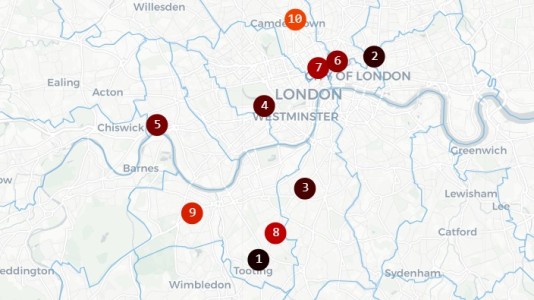
London Cycling Campaign has highlighted 10 junctions in London that it says have, over the past five years, seen the most accidents and fatalities to cyclists and pedestrians.

According to its analysis, the most dangerous junction for cycling is the Upper Tooting Road cluster in Wandsworth, which has been top of the list for the last three years. 

It highlights three ratruns that cross the road: Ansell Road, Lessingham Avenue and Derinton Road, as accident blackspots where, on average over the last five years, two cyclists a year have been seriously injured and four slightly injured.

LCC’s analysis shows that two other high-risk junctions are on the same CS7 Cycle SuperHighway corridor: Clapham High Street and Gauden Road, and Balham High Road and Ramsden Road.

The second most dangerous junction, according to the LCC, is between Great Eastern Street and Curtain Road in Hackney. 

LCC highlights vehicle ratruns that cross cycleways as contributors to accidents at blackspots. London Cycle Campaign

It also highlights the junction on Cycleway C9 between King Street and Weltje Road in Hammersmith, which it says is used by motorists as a ratrun between the A4 and King Street, and that crosses the cycleway. It says Hammersmith & Fulham council has failed to take action, despite a number of serious collisions.

Looking at the data overall, LCC says its analysis highlights two factors that underlie accident blackspots: poor-quality junction design along designated cycle routes and the absence of adjacent low-traffic neighbourhoods, which would deter cross-traffic.

Limited mitigation

LCC’s interactive map highlights cycle and pedestrian accident blackspots across Greater London. London Cycle Campaign

LCC has also followed up what action, if any, has been taken to mitigate the risks at the dangerous junctions it has identified. In most cases, it states, little has been done to prevent a future serious collision or fatality, including on the Upper Tooting Road, which we highlighted as one of seven London cycling accident blackspots as long ago as 2016.

LCC’s analysis underlies its interactive dangerous junctions map on its site, which it has just updated with the latest 2024 data from emergency services. The map clusters junctions close to each other, and also weights collisions by severity and how recently they occurred. 

In contrast to London, Paris has done far more to make central areas such as the upmarket Rue de Rivoli cyclist-friendly. London Cycle Campaign

LCC asserts that Transport for London, which recently reported nine cyclist fatalities on London roads in the previous year, has avoided or delayed changes to accident hotspots, claiming that it has aimed to balance collision reduction with its impact on bus journey times. 

It suggests more rigorous separation of buses from private motor vehicles, giving them priority and reducing capacity for private vehicles, would be a greater contributor to reduced bus journey times, though.

Alongside its analysis, LCC has launched a new email campaign, directed at the Mayor for London, to highlight its campaign for faster action to reduce risks at known dangerous junctions. You can read more and email the Mayor from its Dangerous Junctions page.

Spotify’s SongDNA feature will show you which songs are sampled on a track

Spotify has unveiled an upcoming interactive feature called SongDNA designed to show you the samples, collaborators and covers included in a given track, the company announced. As part of that update, Spotify also revealed that it has acquired WhoSampled, the company behind the SongDNA technology.

“Through our recent discussions with Spotify, it became clear that we share a strong belief in the power of musical context — and a vision for helping listeners go deeper into the songs they love,” the WhoSampled team wrote in a blog post. 

Terms of the deal weren’t disclosed, but Spotify is acquiring both the WhoSampled team and its database. WhoSampled’s standalone platform and brand will continue to operate following the deal with improvements like faster moderation times, the elimination of display ads and free downloads and subscriptions for its mobile apps.

Spotify Premium users will see the SongDNA feature in the “Now Playing” view. It’s described as a way to see connections between songs, “showing collaborators, samples and covers all in one place,” Spotify wrote. 

In the song Kiss me More (feat. SZA), for example, SongDNA shows Carter Lang and two other composers, along with Doja Cat and SZA as the main artists. It reveals that a sample is used from Olivia Newton-John’s Physical and that Kiss me More has been covered multiple times, most prominently in a Japanese version by the artist Rainych.   

Spotify is also working on a feature called “About the song,” showing swipeable cards in the “Now Playing” view. Those will reveal information like the inspiration for a song, how the music was created and the cultural impact — all with links to the sources.

London-based WhoSampled tracks over 1.2 million songs and 622,000 samples in its database, along with covers, remixes and artists. Its mobile app offers a Shazam-style music recognition service that can tell you the song you’re listening to and any samples it might contain. The two companies have partnered previously on a deal that allows WhoSampled users to access their Spotify playlists and tracks.

This article originally appeared on Engadget at https://www.engadget.com/entertainment/streaming/spotifys-songdna-feature-will-show-you-which-songs-are-sampled-on-a-track-130050490.html?src=rss

“NYC Showdown” ZRacing Series Details, November 24-30

Next week, Zwift is mixing up their typical monthly ZRacing model by holding a week-long series of races on fresh New York routes. Each race is scheduled for just 2-3 days, but everything else is what we know and love about ZRacing… fast, hard races, with an overall time-based GC competition for the three races.

Read on for details, or sign up at zwift.com/events/tag/nycshowdown.

The Week’s Routes

Here are the routes we’ll be racing for the week:

  • Stage 1 (Nov 24-25): Times Square Circuit
    • Laps: 6
    • PowerUps: Draft / Aero
    • Distance: 21.24km / 13.20mi
    • Elevation: 120m / 394′
  • Stage 2 (Nov 26-27): Prospect Park Loop
    • Laps: 4
    • PowerUps: Draft / Aero
    • Distance: 21.91km / 13.61mi
    • Elevation: 187m / 614′
  • Stage 2 (Nov 28-30): Stay Puft Pursuit
    • Laps: 1
    • PowerUps: 31.6km / 19.6mi
    • Distance: 416m / 1365′
    • Elevation: Feather / Aero

Sign up at zwift.com/events/tag/nycshowdown

GC Leaderboards

Zwift’s web-based leaderboards are used for tracking the GC competition for the ZRacing series. No ZwiftPower registration or use is necessary.

Access the leaderboards for this week at zwift.com/racing/leagues/nycshowdown2025 >

Your GC ranking is based on your best finishing time for each stage, and you can race each stage more than once to try for a better time.

Category Options

Zwift schedules three different flavors of ZRacing events in order to encourage “Fairer, more competitive racing for everyone.” They each use different racing score ranges for categorization and are titled Advanced, Range 1, and Range 2.

Extras

Get the Badge

Each month’s ZRacing series has a unique achievement badge, which you can unlock by finishing every stage for the month. There are no makeup events, so if you miss a stage, you miss out on the badge and competing in the GC.

One and Done

Zwift has planned these events to deliver a solid 1-hour workout, so each race should only take around 1 hour to complete, including your warmup and cooldown.

Questions or Comments?

Post below! 

White House Prepares Executive Order To Block State AI Laws

An anonymous reader quotes a report from Politico: The White House is preparing to issue an executive order as soon as Friday that tells the Department of Justice and other federal agencies to prevent states from regulating artificial intelligence, according to four people familiar with the matter and a leaked draft of the order obtained by POLITICO. The draft document, confirmed as authentic by three people familiar with the matter, would create an “AI Litigation Task Force” at the DOJ whose “sole responsibility” would be to challenge state AI laws.

Government lawyers would be directed to challenge state laws on the grounds that they unconstitutionally regulate interstate commerce, are preempted by existing federal regulations or otherwise at the attorney general’s discretion. The task force would consult with administration officials, including the special adviser for AI and crypto — a role currently occupied by tech investor David Sacks.

The executive order, in the draft obtained by POLITICO, would also empower Commerce Secretary Howard Lutnick to publish a review of “onerous” state AI laws within 90 days and restrict federal broadband funds to states whose AI laws are found to be objectionable. It would direct the Federal Trade Commission to investigate whether state AI laws that “require alterations to the truthful outputs of AI models” are blocked by the FTC Act. And it would order the Federal Communications Commission to begin work on a reporting and disclosure standard for AI models that would preempt conflicting state laws.


Read more of this story at Slashdot.

Prioritize Your To-Do List By Imagining Rocks in a Jar

Sometimes, it’s not the tasks on your to-do list that overwhelm you, but simply the act of sorting them out and figuring out where to start. Before you can prioritize your responsibilities and setting out a schedule for getting everything done (using strategies like “eating the frog” or creating a 1-3-5 to-do list), you have to identify what those big tasks are and what capacity you have to take them on. If you are the type of person that finds it helpful to visualize these things, let me introduce you to a pair of strategies that both involve imagining tasks as rocks: The “pickle jar theory” and the “big rocks theory.”

What is the pickle jar theory?

The pickle jar theory is an excellent mental exercise for anyone who thinks or processes things visually. It was conceptualized by Jeremy Wright in 2002, based on the idea that a pickle jar holds a finite amount of content. So, too, does your day. There is only so much you can do in a day, as there is only so much you can stuff into a pickle jar. 

When thinking of your day as a pickle jar, imagine it full of three things: Rocks, pebbles, and sand. These represent your daily responsibilities, but as you can see, they’re different sizes. You can fit more of the smaller stuff, like sand and pebbles, than you can rocks, but rocks can still take up half the jar. 

How does the pickle jar theory work?

To use this kind of thinking, you need to categorize your day’s tasks. Start by writing them all down, then prioritizing them using the Eisenhower Matrix, which is useful for figuring out which tasks are urgent and important, urgent and not important, not urgent but important, and not urgent and not important. (Even better: This too is a visual system. You design a matrix and plot your tasks along the graph.)

Then, assign each task to a rock, pebble, or sand, like this: 

  • Rocks are the big tasks that are important, necessary to get on right away, and/or will take up a major chunk of time. Studying for a test, finalizing a major project at work, or cleaning the house can be rock-sized tasks, for instance. 

  • Pebbles are the things that are important to do, but not immediately necessary or massively time-consuming. You can fit quite a few of them in the jar, depending on how many rocks you have in there. 

  • Sand represents the small things that you need to do to keep your day moving along or just want to do. It enters the jar last and fills up the gaps between the bigger items. Sand can be anything from answering emails, going to meetings, calling your mom, or relaxing. These aren’t necessarily urgent or time-consuming, but they’re still important to your work or mental wellbeing. 

Visualize yourself putting one to three rocks in the jar, three to five pebbles, and as much sand as can fit. Understanding that not every single thing you need to do can always fit in there, you can make decisions about which rocks, pebbles, and sand pieces to hold over for the next day’s jar. 

This works because it gives you a tangible example of your own capacity, but also reminds you that even when your day is full of “rocks” and “pebbles,” you still have room for “sand.” Don’t forget to let some of the sand be enjoyable, because breaks are integral to productivity. Don’t over-stuff your jar with rocks and pebbles to the point that you have no room for sand at all, and don’t forget that other people have their own jars that might not be as full. Consider delegating some “pebble” tasks to a teammate, whether it’s a coworker or your spouse, or eliminating the unnecessary tasks altogether. On your Eisenhower Matrix, these will be the ones that are neither urgent nor important.

Finally, you can make a so-called “to-don’t” list if you’re having a hard time figuring out what not to put in the jar. These can be lists of things you can just ignore, or lists of things to delegate or delay; regardless, knowing what isn’t crucial before you start planning will help you fit in what is.

What is the big rocks theory?

There is a simplified version of the idea above that can work for you, too, if you don’t want to categorize your tasks into rocks, pebbles, and sand, but want something a little more streamlined.

You might be familiar with the concept of “big rocks” if you’ve read Stephen Covey’s popular book, The Seven Habits of Highly Effective People. Essentially, as with the pickle-jar mindset, you should think of your time, energy, and resources like a big container and the things you need to do as rocks or gravel. You can’t fit very many big rocks in there, but you can fit a few and still have room for the smaller tasks. The big ones take away from the space—your resources and time—so you have to be intentional about how many you really try to fit in.

Visualizing is important, but you still have to use that to make a plan and get things done. First, write down everything you need to do on one page, whether in a digital word processor or a physical notebook. Then, consider how much time, energy, and other resources each thing will take and mark it as either a rock or gravel. Unlike other task prioritization methods, like the Eisenhower matrix mentioned above, this can be pretty loose. Just put down your best guess about how much each task will drain you. (When you’re short on time, opt for this big rocks approach over the pickle jar approach because of its relative simplicity.)

Once you have everything designated as a rock or gravel, schedule the rocks first. Here’s where you can use time boxing to clearly carve out dedicated time for each thing you have to do. Keep in mind that if you schedule and work on gravel activities—emails, phone calls, doing the dishes, whatever—without taking on the big rocks first, you’ll never get around to the big rocks; the smaller tasks are usually pretty endless, so you need to prioritize the big ones. Go back to your visualization: If you put all the gravel into your vessel before the big rocks, you’d fill it up and leave no room, but if you put in the big rocks first, then add the gravel, the gravel will fall between the rocks and settle in where it can.

Identifying the resource-heavy, demanding tasks and prioritizing those ahead of the more menial stuff will allow you to actually make time to tackle it so you can fit the rest in where you can. But be a little judicious with that scheduling: Don’t load a full day of big rocks into your schedule. You’ll burn yourself out. Instead, choose only one or two per day, then allocate the rest of your time to those maintenance tasks.

As you get better at incorporating this method into your workflow, you won’t really need to think about rocks and jars anymore (unless you want to). You can shift over to a method like a 1-3-5 list, which calls for the pre-planning and completion of one big task, three medium-sized ones, and five little ones each day. Just keep in mind that medium tasks can become big tasks if put off for too long, and that you might need to turn preparation work for larger tasks into one of your smaller tasks.

Apple Black Friday deals include the iPad A16 for a record-low price

The iPad A16 is now on sale for $280 for Black Friday, giving you a chance to pick up Apple’s newest entry-level tablet at a discount. It’s the most affordable iPad in the current lineup, offering quick performance, strong battery life and all the essentials for everyday use. The discount applies to the silver and blue colorways.

Apple’s latest 11-inch iPad uses the A16 chip, the same processor found in the iPhone 15, delivering fast and reliable performance for most tasks. Whether you’re watching videos, editing documents or using creative apps, it feels responsive and capable. The A16 chip also helps future-proof the device, ensuring it stays compatible with new iPadOS updates for years.

The tablet’s 11-inch Liquid Retina display (2360 x 1640) offers sharp detail and vivid color at up to 500 nits of brightness. While it doesn’t have the ultra-bright XDR panel of the iPad Pro, it’s more than crisp enough for streaming or sketching with the Apple Pencil. The design follows Apple’s familiar flat-edge style, with slim bezels and an aluminum build that keeps it light and durable.

The iPad includes a 12MP rear camera and a 12MP front-facing Center Stage camera, which automatically adjusts to keep you in frame during video calls. The front camera is positioned along the longer landscape edge, which gives a more natural angle for calls or recordings. You also get Wi-Fi 6, Bluetooth 5.3, USB-C for charging and data transfer, plus Touch ID built into the top button. Battery life runs up to 10 hours on Wi-Fi, which is consistent with Apple’s other models.

Accessory support covers the Apple Pencil (USB-C) and the first-generation Apple Pencil with the USB-C adapter, along with the Magic Keyboard Folio. It doesn’t work with the Apple Pencil Pro, but for casual drawing, note-taking or quick document markup, these accessories add plenty of flexibility.

The A16 iPad sits at the entry point of Apple’s lineup, but it shares a lot of what makes its pricier siblings appealing. You get a polished display, dependable performance and the familiarity of iPadOS without the premium cost. It’s an ideal choice for students, casual users or anyone who wants a reliable tablet for daily use.

If you’re still deciding which model fits you best, check out our guide to the best iPads to compare the A16 against the Air and Pro models. At $280, this iPad deal offers excellent value for Apple’s newest entry-level tablet.

This article originally appeared on Engadget at https://www.engadget.com/deals/apple-black-friday-deals-include-the-ipad-a16-for-a-record-low-price-125224323.html?src=rss

Apple’s AirPods Pro 3 drop to $220 for Black Friday

The AirPods Pro 3 are now on sale for $220, marking the biggest discount since launch. That’s a solid price for Apple’s newest earbuds, which bring improved sound, longer battery life and upgraded noise cancellation in a familiar, comfortable design. Previously, the lowest we saw Apple’s AirPods Pro 3 go down to was $239. This is a deal worth considering, as we can’t guarantee they’ll be discounted further anytime soon.

Apple didn’t reinvent its flagship earbuds with the AirPods Pro 3, but it made smart refinements that elevate nearly every part of the listening experience. We praised these earbuds in our AirPods Pro 3 review for delivering noticeably richer audio and more effective active noise cancellation while keeping the same pocketable form factor that made earlier models so popular.

The standout upgrade here is Apple’s Live Translation feature, which was an unexpected but welcome surprise, announced at the iPhone 17 event. Leveraging Apple’s H2 chip, the AirPods Pro 3 combines Voice Isolation, ANC and beamforming mics to kick Live Translation into action. Siri’s translation filters seamlessly through the earbuds, but if environmental noise gets too intrusive, you can view a real-time transcription in the iOS Translate app, which is a useful feature for international travel and business calls.

Battery life has improved, too. You get up to eight hours on a single charge with ANC on, and the case adds another 24 hours of playback. The MagSafe charging case, with its new U2 chip, now supports an increased distance for Precision Find My, so it’s easier to locate if misplaced.

Since we’re talking about earbuds, audio quality plays a key role in deciding whether to purchase the AirPods Pro 3 or upgrade from a previous model. Although improvements have been made to sound quality through new drivers and transducers, Apple’s decision to increase air flow inside the earbuds has been the most noticeable update. You can expect the AirPods Pro 3 to deliver deeper bass, crisper highs, and an expanded soundstage that makes everything from podcasts to orchestral tracks feel more dynamic.

There’s not much to fault here beyond the familiar Apple premium price, but that’s why this AirPods Pro 3 deal is such good news. The AirPods Pro 3 remain the best wireless earbuds for iPhone users who want seamless connectivity, top-tier ANC and reliable comfort. If you can grab them for $220, it’s one of the best holiday audio deals you’ll find.

This article originally appeared on Engadget at https://www.engadget.com/deals/apples-airpods-pro-3-drop-to-220-for-black-friday-124617237.html?src=rss

Get up to 23 percent off Sonos speakers for Black Friday

Black Friday is as good a time as any to upgrade your home audio setup. You can get the Sonos Era 300, the company’s only standalone speaker with spatial audio, for $379. That’s $100 off what Engadget’s Nathan Ingraham called “a great speaker, whether or not it is playing songs in Dolby Atmos.”

That Dolby reference points to the Era 300’s core novelty. It produces spatial audio without requiring additional speakers. (You can use Apple Music or Amazon Music to stream compatible tracks.) Expect those Dolby Atmos tracks to sound better with newer music than older songs remixed for Dolby’s tech.

Even if you don’t bother with its spatial tricks, the Era 300 is a terrific-sounding speaker. It delivers rich, detailed and balanced audio that can hang with just about anything else Sonos offers.

The speaker supports voice control via Alexa or Sonos Voice Control. It also offers Trueplay tuning, which listens to how your room shapes the sound and adjusts accordingly. In this model, you don’t need to use your phone: Its built-in mics scan your room for you. That’s especially handy for Android users, since phone-based Trueplay (from other models) is iOS-only.

If the Era 300 is a bit out of your budget, Sonos has loads of other products on sale for Black Friday. You can get the smaller — but still mighty — Era 100 for $169 (23 percent off). The portable Move 2 is down to $399 (20 percent off). Even the company’s headphones, Sonos Ace, are on sale for $279 (30 percent off).

Sonos home theater products are discounted, too. You can get the Arc Ultra soundbar for $879 (20 percent off), or the Sub 4 subwoofer for $719 (also 20 percent off). Or, if you’re in the market for both and have the budget, save even more on a bundle: Get the Arc Ultra and Sub 4 for $1,499 (25 percent off).

This article originally appeared on Engadget at https://www.engadget.com/deals/get-up-to-23-percent-off-sonos-speakers-for-black-friday-120048591.html?src=rss

In 1982, a physics joke gone wrong sparked the invention of the emoticon

On September 19, 1982, Carnegie Mellon University computer science research assistant professor Scott Fahlman posted a message to the university’s bulletin board software that would later come to shape how people communicate online. His proposal: use 🙂 and 🙁 as markers to distinguish jokes from serious comments. While Fahlman describes himself as “the inventor…or at least one of the inventors” of what would later be called the smiley face emoticon, the full story reveals something more interesting than a lone genius moment.

The whole episode started three days earlier when computer scientist Neil Swartz posed a physics problem to colleagues on Carnegie Mellon’s “bboard,” which was an early online message board. The discussion thread had been exploring what happens to objects in a free-falling elevator, and Swartz presented a specific scenario involving a lit candle and a drop of mercury.

That evening, computer scientist Howard Gayle responded with a facetious message titled “WARNING!” He claimed that an elevator had been “contaminated with mercury” and suffered “some slight fire damage” due to a physics experiment. Despite clarifying posts noting the warning was a joke, some people took it seriously.

Read full article

Comments

Get $50 off the Xreal One Pro smart glasses for Black Friday

Some Xreal smart glasses have been discounted as part of a Black Friday promotion. This includes the recently-released Xreal One Pro glasses. The smart specs are down to $600, which is $50 off. The sale applies to both sizes.

These glasses are the real deal. We praised them in our official review, saying they offer similar functionality to the Apple Vision Pro, but at a much friendlier price point. Wearing these glasses allows access to a massive 222-inch virtual display that can be used for just about anything. The glasses connect to laptops, gaming consoles and smartphones, among other gadgets.

The 1080p Micro-OLED screens are surprisingly bright and sharp, which makes this device great for both work and consuming content. The frames even darken to give the illusion of wearing sunglasses.

The glasses are light and comfortable, especially when compared to the Vision Pro. However, the comfort does come at a price. These oversized glasses are not as immersive as Apple’s product, because they don’t completely block out light and cover the entire face. They offer a 57-degree field of view. This is squarely an augmented reality product and not a virtual reality product.

The company has also discounted its Xreal One AR glasses to $400, which is a discount of around $100. These offer smaller virtual screens than the Pro, with a 50-degree field of view.

This article originally appeared on Engadget at https://www.engadget.com/deals/get-50-off-the-xreal-one-pro-smart-glasses-for-black-friday-113032108.html?src=rss

Black Friday Kindle deals include the Colorsoft for a new record low price

Amazon is hosting a Black Friday sale that covers many of its ereaders. This includes the Kindle Colorsoft, which has been discounted to $170. This thing usually costs $250, so this is one heck of a deal and a record low price. 

The model came out earlier this year and we gave it a glowing review, calling it “the missing link in Amazon’s ereader lineup.” It’s the first Kindle ereader in color, which makes this thing one of the best ways to read comic books and graphic novels. The pinch-to-zoom feature lets you get closer to details, to make each panel really pop.

This is also a high-end ereader, color or not. We found the load times to be exceptionally fast and the same goes for turning pages. There’s an auto-adjusting front light, which comes in handy. There are also no lock screen ads by default and a single charge lasts eight full weeks of regular use.

The major downside here is the price. It’s tough to truly recommend any ereader at $250, or the original launch price of $280. It’s a lot easier to recommend at $170.

Amazon is also selling similar products at a discount, some of which made our list of the best ereaders. The base Kindle is down to $80, which is another record low. The Paperwhite is on sale for $125, yet another record low price.

This article originally appeared on Engadget at https://www.engadget.com/deals/black-friday-kindle-deals-include-the-colorsoft-for-a-new-record-low-price-110037178.html?src=rss

Firefox 145: A Major Release with 32-Bit Linux Support Dropped

bMozilla has rolled out Firefox 145, a significant update that brings a range of usability, security and privacy enhancements, while marking a clear turning point by discontinuing official support for 32-bit Linux systems. For users on older hardware or legacy distros, this change means it’s time to consider moving to a 64-bit environment or opting for a supported version. Here’s a detailed look at what’s new, what’s changed, and what you need to know.

The Roku Streaming Stick Plus drops to only $20 for Black Friday

For anyone looking to get a great deal on a streaming device, Roku’s Black Friday deals are here. The Roku Streaming Stick Plus, which just happens to be one of our favorite streaming devices, is 50 percent off, on sale for just $20. The regular Streaming Stick and Streaming Stick 4K are also on sale for 47 percent and 50 percent off, coming in at $16 and $25 respectively.

Roku makes some of the best streaming devices you can get, and any of the ones on sale would be great picks to upgrade an old TV you already have. The Streaming Stick Plus is our favorite of the bunch since it supports 4K HDR content and gives you access to a bunch of free content thanks to Roku’s streaming OS. We also appreciate its accurate universal search and the fact that it draws power from your TV, so it doesn’t need to be plugged into a wall outlet to get power.

The standard Streaming Stick is a good alternative to Amazon’s most basic Fire TV Stick, and if you already prefer Roku’s streaming OS, it’s arguably the better choice. The Streaming Stick 4K adds Dolby Vision into the mix, if that’s a must-have for you. Also, if you’re looking for a more powerful set-top streaming box, the Roku Ultra is 30 percent off, marked down to $70 from $100.

This article originally appeared on Engadget at https://www.engadget.com/deals/the-roku-streaming-stick-plus-drops-to-only-20-for-black-friday-103023110.html?src=rss

This is the Shark robot vacuum to get for Black Friday

Our pick for the best robot vacuum (or at least one of its many variants) is on sale. Amazon’s Black Friday deals include the Shark AI Ultra robot vacuum. This model has a list price of $599, but you can snag one for $250. That’s 58 percent off — and a record low.

One of this model’s standout features is its bagless design. Like many robovacs, it has an auto-empty station. But here, you can remove part of the base, dump its contents in the garbage, and lock it back in place. The base holds up to 60 days of dirt and debris, and you’ll never need to order bag refills.

The Shark AI Ultra has strong suction and decent obstacle avoidance (via LiDAR). The robovac cleans in a matrix grid. It auto-maps your home and supports Google Assistant and Alexa for voice control.

The vacuum has a runtime of about 120 minutes. (If it needs to stop and charge, it will auto-resume afterward.) Also note that this is a vacuum-only model: no mopping here.

This article originally appeared on Engadget at https://www.engadget.com/deals/this-is-the-shark-robot-vacuum-to-get-for-black-friday-100013969.html?src=rss

Proctorio Settles Curious Lawsuit With Librarian Who Shared Public YouTube Videos

Canadian librarian Ian Linkletter has ended a five-year legal battle with ed-tech firm Proctorio after being sued for sharing public YouTube help videos that exposed how the company’s remote-proctoring AI works. Ars Technica reports: … Together, the videos, the help center screenshot, and another screenshot showing course material describing how Proctorio works were enough for Proctorio to take Linkletter to court. The ed tech company promptly filed a lawsuit and obtained a temporary injunction by spuriously claiming that Linkletter shared private YouTube videos containing confidential information. Because the YouTube videos — which were public but “unlisted” when Linkletter shared them — had been removed, Linkletter did not have to delete the seven tweets that initially caught Proctorio’s attention, but the injunction required that he remove two tweets, including the screenshots.

In the five years since, the legal fight dragged on, with no end in sight until last week, as Canadian courts tangled with copyright allegations that tested a recently passed law intended to shield Canadian rights to free expression, the Protection of Public Participation Act. To fund his defense, Linkletter said in a blog announcing the settlement that he invested his life savings “ten times over.” Additionally, about 900 GoFundMe supporters and thousands of members of the Association of Administrative and Professional Staff at UBC contributed tens of thousands more. For the last year of the battle, a law firm, Norton Rose Fulbright, agreed to represent him on a pro bono basis, which Linkletter said âoewas a huge relief to me, as it meant I could defend myself all the way if Proctorio chose to proceed with the litigation.”

The terms of the settlement remain confidential, but both Linkletter and Proctorio confirmed that no money was exchanged. For Proctorio, the settlement made permanent the injunction that restricted Linkletter from posting the company’s help center or instructional materials. But it doesn’t stop Linkletter from remaining the company’s biggest critic, as “there are no other restrictions on my freedom of expression,” Linkletter’s blog noted. “I’ve won my life back!” Linkletter wrote, while reassuring his supporters that he’s “fine” with how things ended. “It doesn’t take much imagination to understand why Proctorio is a nightmare for students,” Linkletter wrote. “I can say everything that matters about Proctorio using public information.”


Read more of this story at Slashdot.

The Amazon Smart Plug drops to only $13 for Black Friday

The Amazon Smart Plug is on sale for just $13 as part of a Black Friday promotion. This is a discount of $12 and represents a record low price. If you’ve been waiting to stock up on some smart plugs, now might be the time.

To that end, this product made our list of the best smart plugs. It’s the perfect accessory for those who rely on Alexa to control aspects of the smart home. These plugs are really easy to set up via the Alexa app. You don’t have to pop in a Wi-Fi password or anything. It’s basically plug-and-play.

Once connected, you’ll be able to use any device with Alexa to control whatever it’s plugged into. For instance, you can group multiple plugs together as lights and then just say “Alexa, turn all the lights off” and it’ll do just that. They are compatible with just about any household device with a physical on/off switch, including lamps and coffee makers.

While these are the perfect smart plugs for Alexa households, they are only for Alexa households. The plugs don’t integrate with any other digital assistant. They are still the best choice for those tied into the ecosystem.

This article originally appeared on Engadget at https://www.engadget.com/deals/the-amazon-smart-plug-drops-to-only-13-for-black-friday-093033211.html?src=rss

Factor Bikes leaves Israel–Premier Tech following season of protests 

Factor Bikes has terminated its contract with Israel–Premier Tech and Scott Bikes is stepping in to provide the troubled team with bikes, reports suggest.

Scott has reportedly arrived at the team’s service course in Girona, although it’s unclear whether the bike brand will be a lead sponsor, according to Daniel Benson’s Cycling Substack. 

The departure of Factor Bikes follows Premier Tech revealing it would leave the team earlier this month. Premier Tech announced this week that it will sponsor St Michel – Preference Home – Auber93 for the next two seasons.

Israel–Premier Tech is currently undergoing a rebrand, after Factor Bikes and Premier Tech said they would only stay on as sponsors if the team ended its affiliation with Israel.

But it now appears Factor Bikes is joining Premier Tech in leaving the team despite its rebranding. 

This follows a season marred by protests against the team’s participation in races in light of Israel’s war on Gaza. Protestors at Vuelta a Espana labelled the team’s participation as “sportswashing”. 

The timing is also notable for Scott Bikes, after Q36.5 Pro Cycling announced a partnership with Pinarello, which will now provide Tom Pidcock with bikes for riding on and off the road. This left Scott Bikes without a team in the WorldTour. 

Factor Bikes and Scott Bikes are yet to comment.