NASA Captures Stunning High-Res Images Of Comet 3I/Atlas Zipping Past Mars

NASA Captures Stunning High-Res Images Of Comet 3I/Atlas Zipping Past Mars
Continuing our coverage of is-it-an-alien-spacecraft Comet 3I/ATLAS, an armada of space missions (including Hubble, JWST, plus assets orbiting and roving on Mars) have captured the comet’s fleeting flyby of Mars before it disappears forever. And no, it’s not extraterrestrial: the icy wanderer was likely ejected from its home star’s orbit millions

Verizon confirms plans to lay off 13,000 employees

Verizon is set to lay off more than 13,000 employees and every part of the company will be going through some changes, CEO Dan Schulman has confirmed. The company is reducing its headcount and cutting back on outsourcing and other external labor expenses in service of “building a stronger Verizon,” Schulman wrote in a memo to staff. The company will also convert 179 retail stores that it owns into franchised outlets and it will close one store.

In September, Verizon said it had around 100,000 full-time employees, so the layoffs constitute about 13 percent of the workforce. Over the previous three years, Verizon had cut about 20,000 jobs. Meanwhile, a $20 billion takeover of telecoms company Frontier Communications is set to close early next year.

It was reported last week that Verizon was set to cull around 15,000 jobs as part of a cost-cutting drive in the face of sterner competition and a drop in postpaid wireless customers. Schulman — a former PayPal CEO who took on his current job in October — indicated during an earnings call last month that the company would “take bold and fiscally responsible action to redefine Verizon’s trajectory at this critical inflection point for our company. These will not be incremental changes.”

In Thursday’s memo, Schulman framed the downsizing as an attempt to create a leaner, more customer-focused operation. “As a customer-first culture, we have to align our teams and resources to create new value for customers and build a faster, stronger and more proactive Verizon,” Schulman wrote. “To do that, we must simplify our operations to address the complexity and friction that slow us down and frustrate our customers.”

Verizon says it has set up a $20 million reskilling and career transition fund to support the workers it’s turfing out. “This fund will focus on skill development, digital training and job placement to help our people take their next steps,” Schulman claimed. “Verizon is the first company to set up a fund to specifically focus on the opportunities and necessary skill sets as we enter the age of AI.”

This article originally appeared on Engadget at https://www.engadget.com/big-tech/verizon-confirms-plans-to-lay-off-13000-employees-144608021.html?src=rss

GeForce RTX 5070 Ti Deal Sees Biggest Black Friday Discount Yet

GeForce RTX 5070 Ti Deal Sees Biggest Black Friday Discount Yet
For a while there (and still, in some cases), finding a modern generation graphics card at MSRP is considered deal. Forget that noise, though, because over the last couple of months, we’ve seen GPU pricing finally stabilize to the point where popular models can be had for less than MSRP. And so it goes with the GeForce RTX 5070 Ti, and this

Microsoft Exec Asks: Why Aren’t More People Impressed With AI?

An anonymous reader shares a report: A Microsoft executive is questioning why more people aren’t impressed with AI, a week after the company touted the evolution of Windows into an “agentic OS,” which immediately triggered backlash.

“Jeez there so many cynics! It cracks me up when I hear people call AI underwhelming,” tweeted Mustafa Suleyman, the CEO for Microsoft’s AI group. Suleyman added that he grew up playing the old-school 2D Snake game on a Nokia phone. “The fact that people are unimpressed that we can have a fluent conversation with a super smart AI that can generate any image/video is mindblowing to me,” he wrote.


Read more of this story at Slashdot.

The Bose SoundLink Plus Is Already at Its Lowest Price Before Black Friday

We may earn a commission from links on this page. Deal pricing and availability subject to change after time of publication.

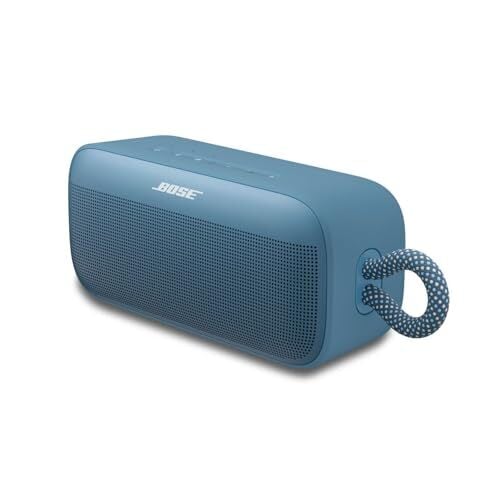
A price drop always stands out more when the product in question already has a reputation for delivering above its size, and that’s the case with the Bose SoundLink Plus. It hasn’t been on the market for long, but it’s already earned strong reviews—CNET even labeled it “the Goldilocks of Bose Bluetooth speakers.” And right now, ahead of Black Friday, it’s down to $199 from $269, which price trackers show is the lowest it’s ever been.

Bose positions it right in the middle of the SoundLink lineup, and you feel that balance in how it’s built. It’s compact enough to clip onto a backpack using its built-in nylon strap, tough enough to handle getting knocked around, and sealed against dust and full water submersion with an IP67 rating. Battery life can last up to 20 hours, depending on the volume, which is sufficient for full-day outings. However, the roughly five-hour recharge time means it’s better to charge it overnight than rely on a quick boost. On the connectivity side, there’s Bluetooth 5.4 with AAC and AptX Adaptive support, as well as the ability to keep two devices paired for smoother switching. What you don’t get is a microphone, aux port, or any voice assistant support, which might matter if you prefer wired options or use speakers for calls.

The sound profile of this Bluetooth speaker leans into mid- and high-bass, which gives electronic and pop tracks a lively pulse without turning everything muddy. It doesn’t reach into true low-bass territory, so anyone who wants thumping sub-bass may not get it here, but the punch it does deliver feels clean for its size. Vocals sit a little behind the beat in denser tracks because the mid-range pulls back slightly, though you can adjust this with the app’s EQ tools. It’s also worth knowing that the speaker plays everything in mono, so you lose the space and width you’d hear in a stereo mix, but its directivity is good—you don’t have to stand directly in front of it to hear things clearly. That said, at higher volumes, there’s some compression, which is common in speakers this size.


Our Best Editor-Vetted Early Black Friday Deals Right Now


Amazon Fire HD 10 (2023)


—
$69.99

(List Price $139.99)


Sony WH-1000XM5


—
$248.00

(List Price $399.99)


Amazon Fire TV Stick 4K Plus


—
$24.99

(List Price $49.99)

Deals are selected by our commerce team

Who is OpenAI’s Auditor?

OpenAI won’t say who audits its books. The company, which projects to hit an ARR of $20 billion this year and is valued at $500 billion, has committed to spending about $1.4 trillion on data centers over the next decade. It accounts for roughly two-thirds of unfulfilled contracts at Oracle and two-fifths at CoreWeave. Microsoft alone holds around $375 billion in unfulfilled contracts with OpenAI.

Reuters reported the company may target a $1 trillion valuation for a potential IPO in coming years. Most companies at this scale use one of the Big Four accounting firms: Deloitte, EY, KPMG or PwC. OpenAI declined to comment to Financial Times. A person close to the organization told the publication the company has “an industry standard audit with one of the Big Four firms.” The company’s latest Form 990 filing lists Fontanello, Duffield, & Otake — a small San Francisco accountancy firm — as the paid preparer. The form does say an independent accountant audited the statements.

Michael Burry, last night: “Can anyone name [OpenAI’s] auditor?”


Read more of this story at Slashdot.

These Smart Glasses Project a Private 200-inch Display, and They’re $50 Off Ahead of Black Friday

We may earn a commission from links on this page. Deal pricing and availability subject to change after time of publication.

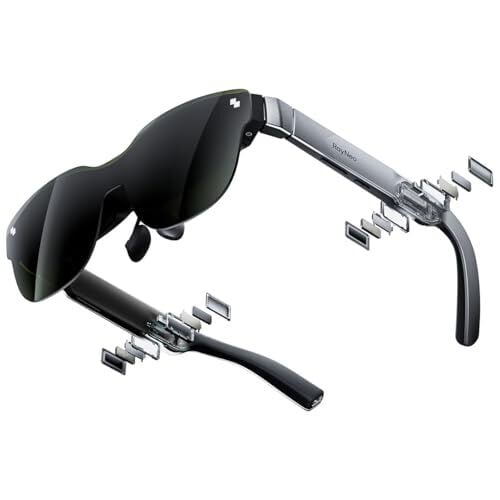
I’ve reviewed a ton of high-tech smart glasses for Lifehacker, and this early Black Friday deal on the RayNeo Air 3s Pro display glasses is excellent. They are on sale for $249 on Amazon (originally $299) until Dec. 1.

If you’re not familiar, these smart glasses basically put a high-definition display in your pocket, projecting the equivalent of a 201-inch TV in front of your face—so if someone on your list is tech-inclined and you want to blast ’em with a pure “whoa” present, here you go. They’ll even fit in a stocking.

There are other glasses that do the same thing, but the Ray Neo Air 3 Pro hit a nice sweet spot between inexpensive and good quality. Check out my review if you want to read about these glasses in more depth, but the bottom line is: if you want to make every flight you’ll ever take better or stream videos and games in private, these glasses will do the trick.

Our Best Editor-Vetted Early Black Friday Deals Right Now


Amazon Fire HD 10 (2023)


—
$69.99

(List Price $139.99)


Sony WH-1000XM5


—
$248.00

(List Price $399.99)


Amazon Fire TV Stick 4K Plus


—
$24.99

(List Price $49.99)

Deals are selected by our commerce team

Webb telescope images an aging binary star system in the center of a four-layered cosmic dust shell

NASA’s James Webb Space Telescope has shown us images of space we’d never see otherwise, and one of the latest wonders it has captured is of an unusual star system in our galaxy with what the agency describes as “four serpentine spirals of dust.” Previous observations of the Apep system, named after the Egyptian god of chaos and located around 8,000 light-years away from Eath, showed only one shell. But as you can see in the mid-infrared image captured by Webb above, it actually has four shells, with the most outer one at the very edges of the image. These shells are made out of dense carbon dust emitted by the system’s two Wolf-Rayet stars over the last 700 years.

Wolf-Rayets are massive stars nearing the end of their lives. They’re very rare, and scientists believe there are only a thousand in our galaxy. Apep happens to have two of them. Yinuo Han from Caltech and Ryan White from the Macquarie University in Sydney, Australia have recently published their own papers about the system. They combined measurements from Webb’s observations with years of data from the European Southern Observatory’s Very Large Telescope (VLT) in Chile to determine that the two stars “swing by one another” once very 190 years. The stars then pass close to each other for 25 years, causing their strong stellar winds to collide and cast out huge amounts of carbon-rich dust within that timeframe.

Thanks to the Webb telescope’s observations, they were also able to confirm the presence of a third star in the system that’s gravitationally bound to the two Wolf-Rayets. The third star is a massive supergiant 40 to 50 times bigger than our sun, and it carved a cavity, which looks like a funnel, into the shells. You can see the cavity in the shells in the video below.

Apep’s Wolf-Rayet stars used to be bigger than the supergiant, but they’ve since shed most of their masses and are now only 10 to 20 times the mass of our sun. In time, the two stars will explode into a supernova and possibly turn into a black hole.

This article originally appeared on Engadget at https://www.engadget.com/science/space/webb-telescope-images-an-aging-binary-star-system-in-the-center-of-a-four-layered-cosmic-dust-shell-140000485.html?src=rss

Windows 11 Update Hurts Games But NVIDIA’s GeForce Hotfix Driver Is The Cure

Windows 11 Update Hurts Games But NVIDIA's GeForce Hotfix Driver Is The Cure
NVIDIA is pushing out an out-of-band GPU driver update to resolve an issue introduced with Microsoft’s October 2025 update for Windows 11 (KB5066835). According to NVIDIA, the Windows 11 update can hamper performance in some unspecified games, even though it’s not listed by Microsoft as one of the known issues. Despite Microsoft being silent

Attack, defend, pursue—the Space Force’s new naming scheme foretells new era

A little more than a century ago, the US Army Air Service came up with a scheme for naming the military’s multiplying fleet of airplanes.

The 1924 aircraft designation code produced memorable names like the B-17, A-26, B-29, and P-51—B for bomber, A for attack, and P for pursuit—during World War II. The military later changed the prefix for pursuit aircraft to F for fighter, leading to recognizable modern names like the F-15 and F-16.

Now, the newest branch of the military is carving its own path with a new document outlining how the Space Force, which can trace its lineage back to the Army Air Service, will name and designate its “weapon systems” on the ground and in orbit. Ars obtained a copy of the document, first written in 2023 and amended in 2024.

Read full article

Comments

Turn Your To-do List Into Data to Maximize Your Productivity

You know it’s important to prioritize your to-do list, and may have tried various methods to do so, from the Eisenhower Matrix (to determine how timely and urgent each task is), to the Pareto principle (to decide how to allocate your time to maximize your results). The problem is that determining what’s actually a priority can be an abstract problem. Some people work best when dealing with cold, hard numbers—and there’s a way to take a more quantitative approach to prioritizing your to-dos. 

Why prioritize your to-do list?

The Pareto principle, mentioned above, suggests that 80% of your results will come from 20% of your work, so you have to be picky about what you focus on. Plus, there’s only so much you can do in a day, so the best to-do list for you may be a narrow one—say, with room for one major activity, three medium-sized ones, and five little ones (known as a 1-3-5 list). If you try to do too much, your productivity can take a hit. (That’s Illich’s Law, baby.)

To avoid doing too much or working on the wrong things, you need a strategy, and to form a strategy, you need to do some planning. The Eisenhower matrix can be useful as you figure out which tasks have looming deadlines, but it’s a subjective tool. Assigning numbers to your tasks can make it all feel more data-driven. 

How to turn your to-do list into data

I encountered this tip in a blog post from consultant and strategist Daniel Coulton Shaw, who breaks down how to number your tasks so they align with the Pareto principle.

First, write down everything you need to get done in the foreseeable future, as you would in the early stages of making a 1-3-5 list. Next, assign each task two numbers, both of which will be between 1 and 10. The first number is for the effort required, and the second is for the project’s impact.

For example, answering all your emails may get a 3 for effort, but could yield results in the 7 territory. Finishing a report on a meeting could be a 6 in effort, but a 2 in results. Picking up meds at the pharmacy could be a 2 in effort, or a 7, depending how hard it is to get there, but a 4 in results, or even a 10, depending on how important the prescription is.

This part is subjective too, to a degree, but even thinking about your tasks in terms of “effort” and “results” will help you grasp their seriousness—and we’re not done yet. Next, divide each task’s “results” number by its “effort” number. So, if answering emails is a 7 on the results scale and a 3 in effort, you’re looking at a 2.33 overall score. Once all your tasks have been assigned a score, you can rank them in ascending order and aim to tackle them in that order, unless something extra timely comes along. By doing this, you’ll knock out the tasks that are important but low effort—which should be that 20% of work that comprises 80% of your results. 

What to keep in mind

Something that is a 6 in effort and 2 in results might not make it high up on your list, but could become more urgent as time goes on. Don’t forget to think about timeliness when you’re plotting. If you have a test in four weeks, obviously the effort and results are going to be high and you’re going to want to study, but give yourself the wiggle room of remembering you do have a whole month, so other less pressing tasks might need to come first. Cleaning your room might be high effort and low results when it’s just a little disorganized, but letting it go for too long will make it more effort and force it to yield more results, which will waste time when you should be doing other things no the list. So, yes, the data is important, but there are other human elements you should take into account.

Finally, don’t forget breaks. When you see everything in such a structured, urgent-looking way, it might cause you to jump right in in a flurry. That’s great and will help you better align with the Yerkes-Dodson law, which dictates you need a bit of stress to be most productive, but it can lead to burnout. Write breaks down on that initial list and assign them a high value in terms of results—because taking breaks will yield results. Failing to do so can set you back, rendering the whole exercise useless.

The 10 most dangerous junctions for cyclists in London revealed

London Cycling Campaign has highlighted 10 junctions in London that it says have, over the past five years, seen the most accidents and fatalities to cyclists and pedestrians.

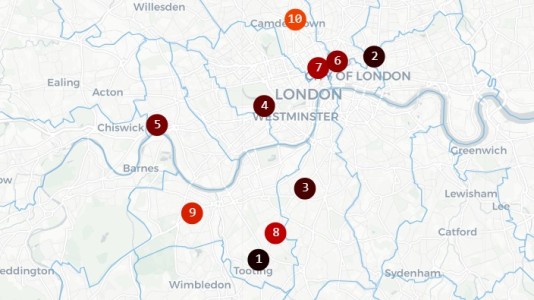
According to its analysis, the most dangerous junction for cycling is the Upper Tooting Road cluster in Wandsworth, which has been top of the list for the last three years. 

It highlights three ratruns that cross the road: Ansell Road, Lessingham Avenue and Derinton Road, as accident blackspots where, on average over the last five years, two cyclists a year have been seriously injured and four slightly injured.

LCC’s analysis shows that two other high-risk junctions are on the same CS7 Cycle SuperHighway corridor: Clapham High Street and Gauden Road, and Balham High Road and Ramsden Road.

The second most dangerous junction, according to the LCC, is between Great Eastern Street and Curtain Road in Hackney. 

LCC highlights vehicle ratruns that cross cycleways as contributors to accidents at blackspots. London Cycle Campaign

It also highlights the junction on Cycleway C9 between King Street and Weltje Road in Hammersmith, which it says is used by motorists as a ratrun between the A4 and King Street, and that crosses the cycleway. It says Hammersmith & Fulham council has failed to take action, despite a number of serious collisions.

Looking at the data overall, LCC says its analysis highlights two factors that underlie accident blackspots: poor-quality junction design along designated cycle routes and the absence of adjacent low-traffic neighbourhoods, which would deter cross-traffic.

Limited mitigation

LCC’s interactive map highlights cycle and pedestrian accident blackspots across Greater London. London Cycle Campaign

LCC has also followed up what action, if any, has been taken to mitigate the risks at the dangerous junctions it has identified. In most cases, it states, little has been done to prevent a future serious collision or fatality, including on the Upper Tooting Road, which we highlighted as one of seven London cycling accident blackspots as long ago as 2016.

LCC’s analysis underlies its interactive dangerous junctions map on its site, which it has just updated with the latest 2024 data from emergency services. The map clusters junctions close to each other, and also weights collisions by severity and how recently they occurred. 

In contrast to London, Paris has done far more to make central areas such as the upmarket Rue de Rivoli cyclist-friendly. London Cycle Campaign

LCC asserts that Transport for London, which recently reported nine cyclist fatalities on London roads in the previous year, has avoided or delayed changes to accident hotspots, claiming that it has aimed to balance collision reduction with its impact on bus journey times. 

It suggests more rigorous separation of buses from private motor vehicles, giving them priority and reducing capacity for private vehicles, would be a greater contributor to reduced bus journey times, though.

Alongside its analysis, LCC has launched a new email campaign, directed at the Mayor for London, to highlight its campaign for faster action to reduce risks at known dangerous junctions. You can read more and email the Mayor from its Dangerous Junctions page.

Spotify’s SongDNA feature will show you which songs are sampled on a track

Spotify has unveiled an upcoming interactive feature called SongDNA designed to show you the samples, collaborators and covers included in a given track, the company announced. As part of that update, Spotify also revealed that it has acquired WhoSampled, the company behind the SongDNA technology.

“Through our recent discussions with Spotify, it became clear that we share a strong belief in the power of musical context — and a vision for helping listeners go deeper into the songs they love,” the WhoSampled team wrote in a blog post. 

Terms of the deal weren’t disclosed, but Spotify is acquiring both the WhoSampled team and its database. WhoSampled’s standalone platform and brand will continue to operate following the deal with improvements like faster moderation times, the elimination of display ads and free downloads and subscriptions for its mobile apps.

Spotify Premium users will see the SongDNA feature in the “Now Playing” view. It’s described as a way to see connections between songs, “showing collaborators, samples and covers all in one place,” Spotify wrote. 

In the song Kiss me More (feat. SZA), for example, SongDNA shows Carter Lang and two other composers, along with Doja Cat and SZA as the main artists. It reveals that a sample is used from Olivia Newton-John’s Physical and that Kiss me More has been covered multiple times, most prominently in a Japanese version by the artist Rainych.   

Spotify is also working on a feature called “About the song,” showing swipeable cards in the “Now Playing” view. Those will reveal information like the inspiration for a song, how the music was created and the cultural impact — all with links to the sources.

London-based WhoSampled tracks over 1.2 million songs and 622,000 samples in its database, along with covers, remixes and artists. Its mobile app offers a Shazam-style music recognition service that can tell you the song you’re listening to and any samples it might contain. The two companies have partnered previously on a deal that allows WhoSampled users to access their Spotify playlists and tracks.

This article originally appeared on Engadget at https://www.engadget.com/entertainment/streaming/spotifys-songdna-feature-will-show-you-which-songs-are-sampled-on-a-track-130050490.html?src=rss

“NYC Showdown” ZRacing Series Details, November 24-30

Next week, Zwift is mixing up their typical monthly ZRacing model by holding a week-long series of races on fresh New York routes. Each race is scheduled for just 2-3 days, but everything else is what we know and love about ZRacing… fast, hard races, with an overall time-based GC competition for the three races.

Read on for details, or sign up at zwift.com/events/tag/nycshowdown.

The Week’s Routes

Here are the routes we’ll be racing for the week:

  • Stage 1 (Nov 24-25): Times Square Circuit
    • Laps: 6
    • PowerUps: Draft / Aero
    • Distance: 21.24km / 13.20mi
    • Elevation: 120m / 394′
  • Stage 2 (Nov 26-27): Prospect Park Loop
    • Laps: 4
    • PowerUps: Draft / Aero
    • Distance: 21.91km / 13.61mi
    • Elevation: 187m / 614′
  • Stage 2 (Nov 28-30): Stay Puft Pursuit
    • Laps: 1
    • PowerUps: 31.6km / 19.6mi
    • Distance: 416m / 1365′
    • Elevation: Feather / Aero

Sign up at zwift.com/events/tag/nycshowdown

GC Leaderboards

Zwift’s web-based leaderboards are used for tracking the GC competition for the ZRacing series. No ZwiftPower registration or use is necessary.

Access the leaderboards for this week at zwift.com/racing/leagues/nycshowdown2025 >

Your GC ranking is based on your best finishing time for each stage, and you can race each stage more than once to try for a better time.

Category Options

Zwift schedules three different flavors of ZRacing events in order to encourage “Fairer, more competitive racing for everyone.” They each use different racing score ranges for categorization and are titled Advanced, Range 1, and Range 2.

Extras

Get the Badge

Each month’s ZRacing series has a unique achievement badge, which you can unlock by finishing every stage for the month. There are no makeup events, so if you miss a stage, you miss out on the badge and competing in the GC.

One and Done

Zwift has planned these events to deliver a solid 1-hour workout, so each race should only take around 1 hour to complete, including your warmup and cooldown.

Questions or Comments?

Post below! 

White House Prepares Executive Order To Block State AI Laws

An anonymous reader quotes a report from Politico: The White House is preparing to issue an executive order as soon as Friday that tells the Department of Justice and other federal agencies to prevent states from regulating artificial intelligence, according to four people familiar with the matter and a leaked draft of the order obtained by POLITICO. The draft document, confirmed as authentic by three people familiar with the matter, would create an “AI Litigation Task Force” at the DOJ whose “sole responsibility” would be to challenge state AI laws.

Government lawyers would be directed to challenge state laws on the grounds that they unconstitutionally regulate interstate commerce, are preempted by existing federal regulations or otherwise at the attorney general’s discretion. The task force would consult with administration officials, including the special adviser for AI and crypto — a role currently occupied by tech investor David Sacks.

The executive order, in the draft obtained by POLITICO, would also empower Commerce Secretary Howard Lutnick to publish a review of “onerous” state AI laws within 90 days and restrict federal broadband funds to states whose AI laws are found to be objectionable. It would direct the Federal Trade Commission to investigate whether state AI laws that “require alterations to the truthful outputs of AI models” are blocked by the FTC Act. And it would order the Federal Communications Commission to begin work on a reporting and disclosure standard for AI models that would preempt conflicting state laws.


Read more of this story at Slashdot.

Prioritize Your To-Do List By Imagining Rocks in a Jar

Sometimes, it’s not the tasks on your to-do list that overwhelm you, but simply the act of sorting them out and figuring out where to start. Before you can prioritize your responsibilities and setting out a schedule for getting everything done (using strategies like “eating the frog” or creating a 1-3-5 to-do list), you have to identify what those big tasks are and what capacity you have to take them on. If you are the type of person that finds it helpful to visualize these things, let me introduce you to a pair of strategies that both involve imagining tasks as rocks: The “pickle jar theory” and the “big rocks theory.”

What is the pickle jar theory?

The pickle jar theory is an excellent mental exercise for anyone who thinks or processes things visually. It was conceptualized by Jeremy Wright in 2002, based on the idea that a pickle jar holds a finite amount of content. So, too, does your day. There is only so much you can do in a day, as there is only so much you can stuff into a pickle jar. 

When thinking of your day as a pickle jar, imagine it full of three things: Rocks, pebbles, and sand. These represent your daily responsibilities, but as you can see, they’re different sizes. You can fit more of the smaller stuff, like sand and pebbles, than you can rocks, but rocks can still take up half the jar. 

How does the pickle jar theory work?

To use this kind of thinking, you need to categorize your day’s tasks. Start by writing them all down, then prioritizing them using the Eisenhower Matrix, which is useful for figuring out which tasks are urgent and important, urgent and not important, not urgent but important, and not urgent and not important. (Even better: This too is a visual system. You design a matrix and plot your tasks along the graph.)

Then, assign each task to a rock, pebble, or sand, like this: 

  • Rocks are the big tasks that are important, necessary to get on right away, and/or will take up a major chunk of time. Studying for a test, finalizing a major project at work, or cleaning the house can be rock-sized tasks, for instance. 

  • Pebbles are the things that are important to do, but not immediately necessary or massively time-consuming. You can fit quite a few of them in the jar, depending on how many rocks you have in there. 

  • Sand represents the small things that you need to do to keep your day moving along or just want to do. It enters the jar last and fills up the gaps between the bigger items. Sand can be anything from answering emails, going to meetings, calling your mom, or relaxing. These aren’t necessarily urgent or time-consuming, but they’re still important to your work or mental wellbeing. 

Visualize yourself putting one to three rocks in the jar, three to five pebbles, and as much sand as can fit. Understanding that not every single thing you need to do can always fit in there, you can make decisions about which rocks, pebbles, and sand pieces to hold over for the next day’s jar. 

This works because it gives you a tangible example of your own capacity, but also reminds you that even when your day is full of “rocks” and “pebbles,” you still have room for “sand.” Don’t forget to let some of the sand be enjoyable, because breaks are integral to productivity. Don’t over-stuff your jar with rocks and pebbles to the point that you have no room for sand at all, and don’t forget that other people have their own jars that might not be as full. Consider delegating some “pebble” tasks to a teammate, whether it’s a coworker or your spouse, or eliminating the unnecessary tasks altogether. On your Eisenhower Matrix, these will be the ones that are neither urgent nor important.

Finally, you can make a so-called “to-don’t” list if you’re having a hard time figuring out what not to put in the jar. These can be lists of things you can just ignore, or lists of things to delegate or delay; regardless, knowing what isn’t crucial before you start planning will help you fit in what is.

What is the big rocks theory?

There is a simplified version of the idea above that can work for you, too, if you don’t want to categorize your tasks into rocks, pebbles, and sand, but want something a little more streamlined.

You might be familiar with the concept of “big rocks” if you’ve read Stephen Covey’s popular book, The Seven Habits of Highly Effective People. Essentially, as with the pickle-jar mindset, you should think of your time, energy, and resources like a big container and the things you need to do as rocks or gravel. You can’t fit very many big rocks in there, but you can fit a few and still have room for the smaller tasks. The big ones take away from the space—your resources and time—so you have to be intentional about how many you really try to fit in.

Visualizing is important, but you still have to use that to make a plan and get things done. First, write down everything you need to do on one page, whether in a digital word processor or a physical notebook. Then, consider how much time, energy, and other resources each thing will take and mark it as either a rock or gravel. Unlike other task prioritization methods, like the Eisenhower matrix mentioned above, this can be pretty loose. Just put down your best guess about how much each task will drain you. (When you’re short on time, opt for this big rocks approach over the pickle jar approach because of its relative simplicity.)

Once you have everything designated as a rock or gravel, schedule the rocks first. Here’s where you can use time boxing to clearly carve out dedicated time for each thing you have to do. Keep in mind that if you schedule and work on gravel activities—emails, phone calls, doing the dishes, whatever—without taking on the big rocks first, you’ll never get around to the big rocks; the smaller tasks are usually pretty endless, so you need to prioritize the big ones. Go back to your visualization: If you put all the gravel into your vessel before the big rocks, you’d fill it up and leave no room, but if you put in the big rocks first, then add the gravel, the gravel will fall between the rocks and settle in where it can.

Identifying the resource-heavy, demanding tasks and prioritizing those ahead of the more menial stuff will allow you to actually make time to tackle it so you can fit the rest in where you can. But be a little judicious with that scheduling: Don’t load a full day of big rocks into your schedule. You’ll burn yourself out. Instead, choose only one or two per day, then allocate the rest of your time to those maintenance tasks.

As you get better at incorporating this method into your workflow, you won’t really need to think about rocks and jars anymore (unless you want to). You can shift over to a method like a 1-3-5 list, which calls for the pre-planning and completion of one big task, three medium-sized ones, and five little ones each day. Just keep in mind that medium tasks can become big tasks if put off for too long, and that you might need to turn preparation work for larger tasks into one of your smaller tasks.


Apple Black Friday deals include the iPad A16 for a record-low price

The iPad A16 is now on sale for $280 for Black Friday, giving you a chance to pick up Apple’s newest entry-level tablet at a discount. It’s the most affordable iPad in the current lineup, offering quick performance, strong battery life and all the essentials for everyday use. The discount applies to the silver and blue colorways.

Apple’s latest 11-inch iPad uses the A16 chip, the same processor found in the iPhone 15, delivering fast and reliable performance for most tasks. Whether you’re watching videos, editing documents or using creative apps, it feels responsive and capable. The A16 chip also helps future-proof the device, ensuring it stays compatible with new iPadOS updates for years.

The tablet’s 11-inch Liquid Retina display (2360 x 1640) offers sharp detail and vivid color at up to 500 nits of brightness. While it doesn’t have the ultra-bright XDR panel of the iPad Pro, it’s more than crisp enough for streaming or sketching with the Apple Pencil. The design follows Apple’s familiar flat-edge style, with slim bezels and an aluminum build that keeps it light and durable.

The iPad includes a 12MP rear camera and a 12MP front-facing Center Stage camera, which automatically adjusts to keep you in frame during video calls. The front camera is positioned along the longer landscape edge, which gives a more natural angle for calls or recordings. You also get Wi-Fi 6, Bluetooth 5.3, USB-C for charging and data transfer, plus Touch ID built into the top button. Battery life runs up to 10 hours on Wi-Fi, which is consistent with Apple’s other models.

Accessory support covers the Apple Pencil (USB-C) and the first-generation Apple Pencil with the USB-C adapter, along with the Magic Keyboard Folio. It doesn’t work with the Apple Pencil Pro, but for casual drawing, note-taking or quick document markup, these accessories add plenty of flexibility.

The A16 iPad sits at the entry point of Apple’s lineup, but it shares a lot of what makes its pricier siblings appealing. You get a polished display, dependable performance and the familiarity of iPadOS without the premium cost. It’s an ideal choice for students, casual users or anyone who wants a reliable tablet for daily use.

If you’re still deciding which model fits you best, check out our guide to the best iPads to compare the A16 against the Air and Pro models. At $280, this iPad deal offers excellent value for Apple’s newest entry-level tablet.

This article originally appeared on Engadget at https://www.engadget.com/deals/apple-black-friday-deals-include-the-ipad-a16-for-a-record-low-price-125224323.html?src=rss