Israel–Premier Tech has rebranded as NSN Cycling Team and will race under a Swiss licence with a base in Spain, it was revealed today.
The international sports and entertainment company NSN (Never Say Never) and Stoneweg, a global investment platform based in Geneva, Switzerland, have “entered into a joint venture” to take over the WorldTour and Development team structure ahead of the 2026 season.
The change in sponsorship follows protests at races against the participation of Israel–Premier Tech in light of Israel’s war on Gaza. These protests came to a head at the Vuelta a España where several stages were cut short and demonstrators labelled the team’s participation as “sportswashing”.
Former Israel–Premier Tech riders Alessandro de Marchi and Jakob Fuglsang also expressed relief over no longer riding for the team, while Derek Gee terminated his contract following “serious concerns related to racing for the team” and a “personal-belief standpoint”.
As a result of the mounting pressure on Israel–Premier Tech, both Premier Tech and Factor Bikes said they would withdraw their support for the team if it did not change its name or drop its affiliation with Israel.
Although Israel–Premier Tech said it would change its name, Premier Tech still dropped its sponsorship of the team in early November.
The Canadian company said at the time: “Although we took notice of the team’s decision to change its name for the 2026 season, the core reason for Premier Tech to sponsor the team has been overshadowed to a point where it has become untenable for us to continue as a sponsor.”
It is now rumoured that Factor Bikes has left the team, with Scott Bikes allegedly stepping in.
The team closed its website and social media accounts last weekend ahead of its relaunch on Thursday evening.
“We are proud to welcome NSN and Stoneweg to the team and announce our new name and identity: NSN Cycling Team,” said NSN Cycling Team general manager Kjell Carlström.
“This is an incredibly exciting new chapter for the team, and we can’t wait to make our debut as NSN Cycling Team.”
The team will return to the WorldTour level for the 2026 season with the name NSN Cycling, while its Continental-level development squad will be called NSN Development Team.
Two years ago, Ooni brought the pizza party indoors with the Volt 12. With that device, the company entered new territory and proved that its brand of outdoor cooking could be transformed for use in home kitchens. That model wasn’t without its flaws though, including its bulky stature and high price. Still, it impressed me enough to earn a spot on our best pizza ovens list.
With the Volt 2 ($699), Ooni completely overhauled its concept of what an electric indoor pizza oven could be. That starts with a more polished design that’s slightly smaller than the first generation. The company also reconfigured the controls, creating a button-based system that’s easier to understand and centers on newly developed Pizza Intelligence technology. Given Ooni’s track record for consistency and performance, it shouldn’t be any surprise that the Volt 2 is another hit for the pizza oven maker.
Design updates
As part of Ooni’s redesign for the Volt 2, the exterior looks completely different, right down to the updated controls and large digital display. This new model has a more refined, more modern aesthetic — one that will certainly fit in amongst today’s small kitchen appliances. The overall design is softer and rounder where the first version was angular and blocky. Plus, Ooni opted for a white version in addition to its standard gray, giving you the ability to choose the one that fits in your kitchen best. There’s also a new orange-ish light that shines down onto the counter, or whatever surface you have the Volt 2 on, which serves as an indicator that the oven is preheating.
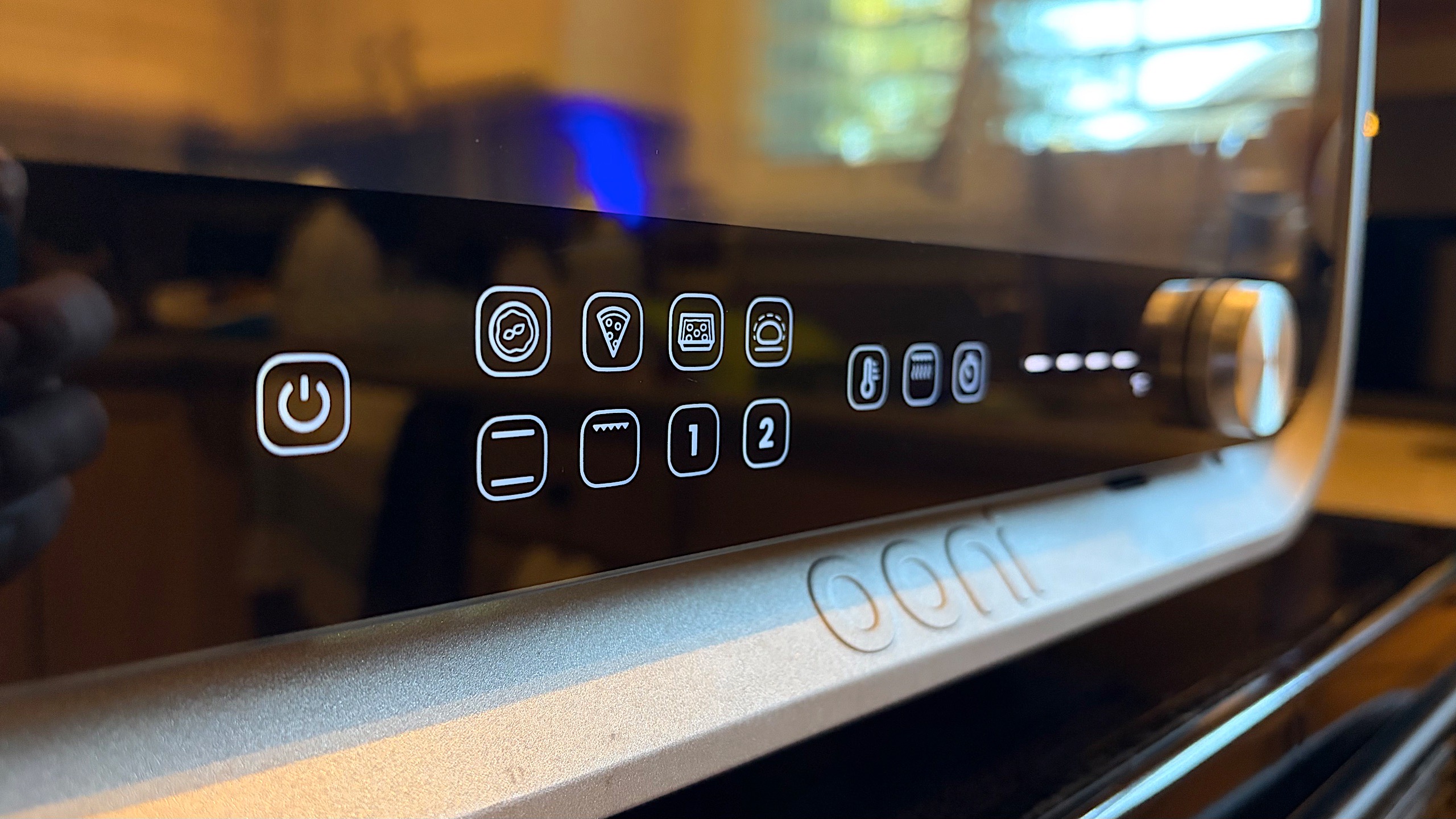
Up front, a collection of buttons have replaced the three control knobs and tiny dials from the Volt 12. There’s one for each of Ooni’s new Pizza Intelligence-powered presets and there are additional options for dough proofing, oven and broil/grill modes. The last two buttons in the main cluster on the left side are for saving custom presets. Closer to the center, there are three buttons for temperature control, crisping intensity and the timer. To set any of those, you’ll use the larger silver knob all the way to the right. This knob also doubles as the boost activation when you need extra power from the top heating element.
Ooni also installed a new digital display on the front, giving you temperature and timer updates at a glance. This is a huge improvement over the dials on the Volt 12, which couldn’t be read from a distance. With the large numbers on the Volt 2, I can just walk to the door of the kitchen and peek in if I want an update on the preheating process.
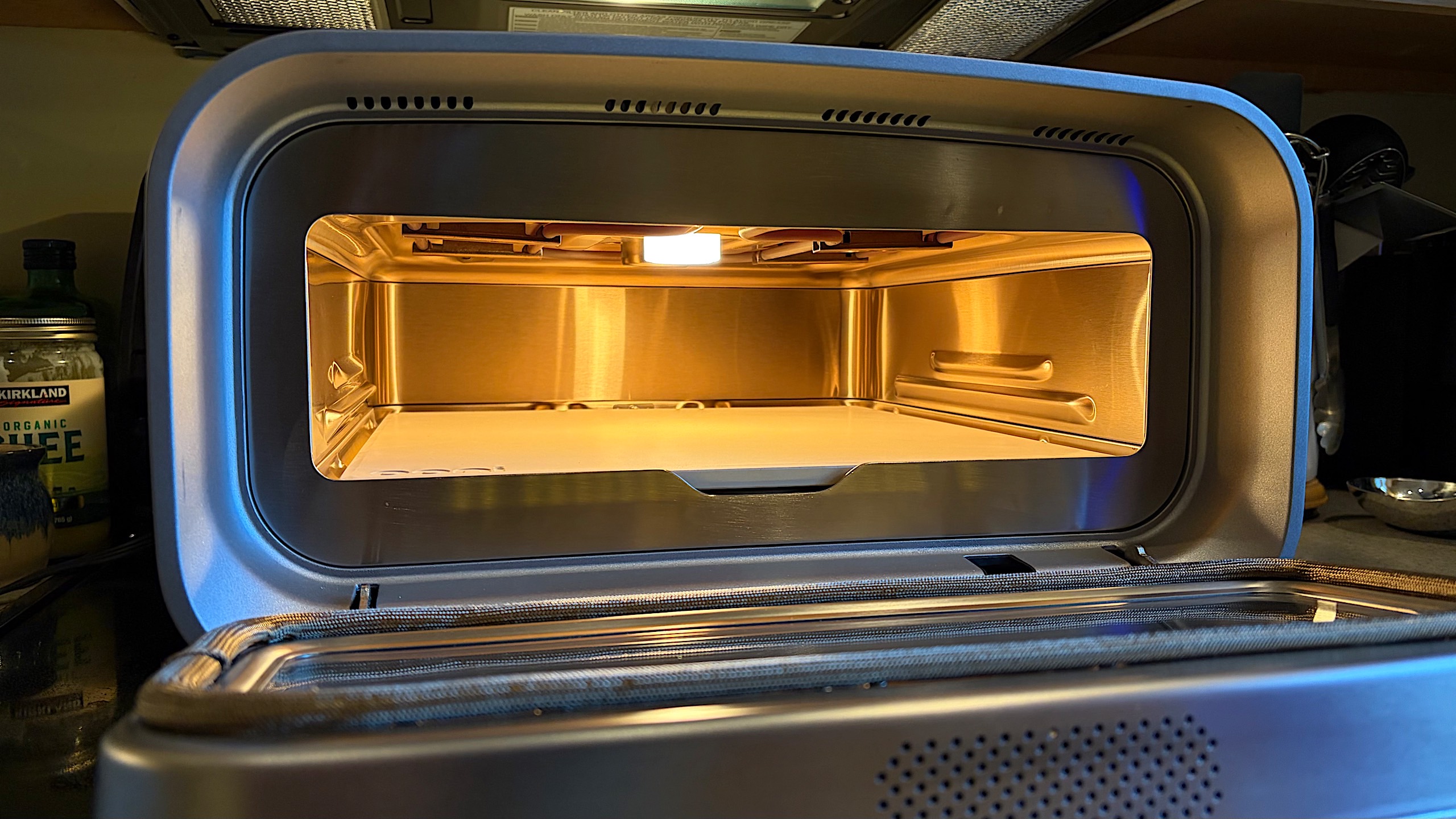
There are other refinements, like the larger viewing window on the front door, but a major one is the size reduction for the Volt 2. Don’t get me wrong, this is still a large device; it’s about the size of a low-profile microwave. It’s also still quite heavy at nearly 39 pounds. But Ooni did manage to shave a few inches here and there, and when combined with the rounder design cues, this makes the Volt 2 seem like it isn’t as massive or imposing as the Volt 12.
New features
The Volt 2’s preset and mode buttons.
Billy Steele for Engadget
Nearly all of the Volt 2’s new features center around what Ooni calls Pizza Intelligence. The technology is an adaptive control system for the oven that uses unique heating elements and internal sensors. The setup can adjust the oven’s temperature in real time “for speed, accuracy and baking consistency,” according to the company. This technology serves as the basis for those style-based presets I already mentioned.
More specifically, the Volt 2’s presets include Neapolitan, Thin & Crispy and Pan Pizza that enable you to start cooking without much thought to time and temperature. All of these can be adjusted as each one has a temperature range for further fine tuning. Each one also has its unique crisping intensity and cook temperature, both of which can also be tweaked as needed.
After using all of the presets during testing, I like that Ooni made its second pizza oven easier to use for beginners. Even though I have some at-home pizza making experience (thanks COVID-19), it was nice to not worry about time and temperature in my research and planning. For more advanced users, the ability to use the presets as a starting point and tweak the parameters ensures that the Volt 2 remains a staple in the kitchen for a long time. Plus, the two slots for completely custom presets means Ooni experts will have space to save their refined, personalized configurations.
Making pizza with the Volt 2
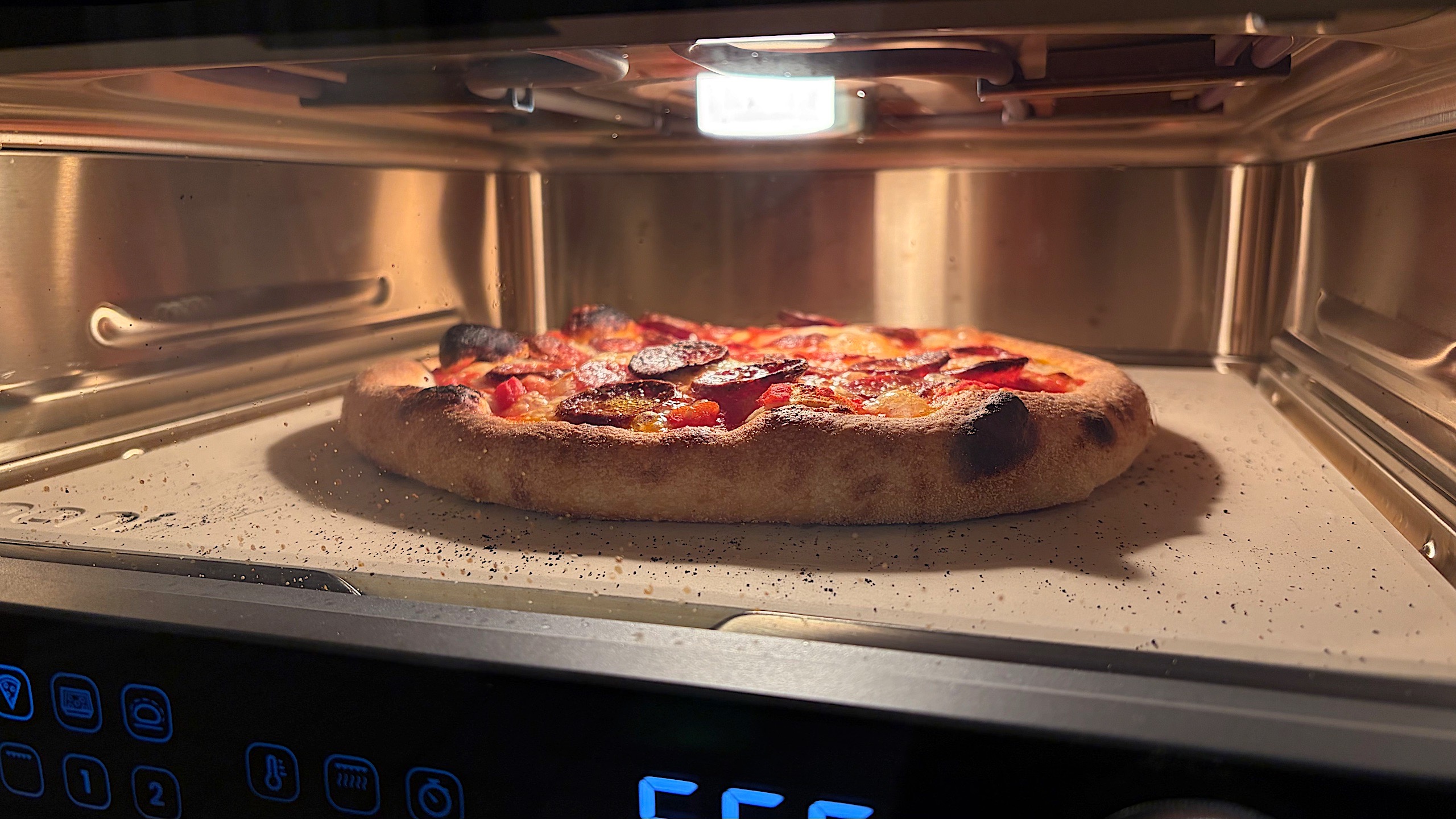
New York-style dough is baking with the Thin & Crispy preset on the Volt 2.
Billy Steele for Engadget
You’re probably wondering how good the pizza is out of this thing, right? After all, the design prowess, features and specs mean nothing if the end result is terrible. That’s not the case here, nor has it been on any Ooni oven I’ve tested. I particularly enjoy baking pizzas with the Volt 2 (and the Volt 12 before) because I can do so in the comfort of my own kitchen. Everything I might need in a pinch is close by and there’s no open flame to maintain or monitor for safety.
First, let’s discuss preheating. Ooni says the Volt 2 can be ready to cook pizza in 12 minutes, and I suppose that’s true if you’re doing a lower-temperature bake. In my tests, the oven took exactly 25 minutes to get to its 850-degree Fahrenheit maximum (ideal for Neapolitan pies) and just over 18 minutes to hit 660 degrees. That latter figure is the target temperature of the Thin & Crispy preset, which was my favorite of the three Pizza Intelligence options. Both of these save time over using your home oven since a lot of recipes tell you to preheat that appliance for an hour.
A major consideration with the Volt 2 is pizza size. The oven’s baking stone can accommodate 12-inch pizzas, which means family pizza night will entail everyone making their own or baking multiple pies at the very least. For my family, I made four during my Neapolitan test, stretching and topping each new pizza after the previous one finished baking. After removing a pizza, the stone temperature drops, but the Volt 2’s Boost feature uses a 45-second burst to help it recover. I found that by the time I carefully stretched and topped the dough, the oven was ready for the next pizza.
Neapolitan-style pizza baked with the Volt 2 preset has ample leoparding.
Billy Steele for Engadget
Across Neapolitan, Thin & Crispy and Pan Pizza modes, the Volt 2 produced truly stellar results for each style. I’ll note that I used dough recipes for each style from The Ooni Pizza Project by Scott Deley. I’ve found that his guidance leads to amazing pizzas, even if you’re planning to just use your home oven. Using the Volt 2, Neapolitan pies had ample leoparding and cooked quickly in the high heat. Thinner, New York-style pizza was indeed crispy on the bottom and perfectly browned on top while still having a pleasant chewiness. And my Detroit-style pan tests were crispy on the edges and pillowy soft inside.
There are two important things to note about using the Volt 2. First, the exterior gets hot, especially at 800 degrees and above. For that reason, you’ll want to avoid sitting anything on top of the oven while you’re using it (or very close to it, really). You’ll also need to allow ample time for the outside to cool before storing the Volt 2. The oven runs its own shutdown cycle, but the exterior may still be too warm to put away when that’s complete.
Second, despite a steam and smoke filter, the Volt 2 still expels steam out of the back. I combated this by putting the oven on my flat-top stove under the exhaust fan, but you’ll need to plan accordingly if you don’t want that wafting around your kitchen. I could see this being a problem for small living spaces like apartments.
The competition
If you’re looking for Volt alternatives, there are two main competitors. The long-standing incumbent is Breville’s Pizzaiolo. It too offers easy-to-use presets and features in addition to a degree of manual operation. My main issue with it was the price, which was initially $1,000 but is now $800. That reduced price is still $100 more than the Volt 2. I also had trouble with the confined round baking area and how difficult the oven is to clean since debris could fall down around the bottom heating element.
There’s also the Current Model P. This one wins the price war at under $500 and it too has presets and a max temperature of 850 degrees. Current’s app has a Pizza Build Calculator that assists with time, temperature and ingredients. I haven’t tested this one yet, but it’s on my list for the near future.
Wrap-up
The Volt 2 has a square baking area that can fit 12-inch pizzas.
Billy Steele for Engadget
There’s no sophomore slump here. The Volt 2 is a big upgrade over the original Volt — that much is undeniable. It’s easier to use for all skill levels thanks to its clearer controls and large display. Presets work well, but they can also serve as a starting point for further recipe refinement for experienced users. And the pizza — my goodness, the pizza is consistently restaurant quality (or better) across a range of styles. Combine that performance with a better looking design, slightly smaller footprint and lower starting price and you’ve got a compelling case for a standalone indoor pizza oven.
This article originally appeared on Engadget at https://www.engadget.com/home/kitchen-tech/ooni-volt-2-review-a-strong-case-for-an-indoor-pizza-oven-193000311.html?src=rss
A Centers for Disease Control and Prevention webpage that previously made the case that vaccines don’t cause autism now says they might. WSJ: The contents of the webpage came up during Health Secretary Robert F. Kennedy Jr. Senate confirmation process. Sen. Bill Cassidy (R., La.) in February said Kennedy had assured him that, if he was confirmed, the CDC would “not remove statements on their website pointing out that vaccines do not cause autism.”
The revised webpage says: “The claim ‘vaccines do not cause autism’ is not an evidence-based claim because studies have not ruled out the possibility that infant vaccines cause autism. Studies supporting a link have been ignored by health authorities.” The new text posted Wednesday also notes that the Department of Health and Human Services has launched “a comprehensive assessment” to probe the causes of autism.
After its most recent successful New Glenn mission, Blue Origin is announcing propulsion upgrades to its star rocket, and plans for a larger “super-heavy class rocket” that puts the company in even closer competition with SpaceX.
Blue Origin says New Glenn will get higher-performing engines at both stages, with the total thrust of the booster engines increasing from 3.9 million lbf to 4.5 million lbf. The total thrust of the upper stage of the rocket, meanwhile, is going from 320,000 lbf to 400,000 lbf. Paired with a new reusable fairing (the cover that goes over the payload of New Glenn) and an “updated lower-cost tank design,” Blue Origin claims that the upgraded rocket will benefit customers heading to “low-Earth orbit, the Moon and beyond.”
The company also has another rocket on the roadmap, New Glenn 9×4, the bigger sibling of the current New Glenn 7×2. Named for the number of engines it has at each stage (nine on the booster stage, four on the upper stage), New Glenn 9×4 can carry “over 70 metric tons to low-Earth orbit, over 14 metric tons direct to geosynchronous orbit and over 20 metric tons to trans-lunar injection,” Blue Origin says. Per an image shared by Blue Origin CEO Dave Limp on X, the rocket is also bigger than the Saturn V rocket that ferried humans to the Moon during NASA’s Apollo 11 mission.
That catapults Blue Origin into the same size range as SpaceX’s Starship, which successfully deployed its payload for the first time in August, and is now facing retirement as SpaceX develops its next-generation model.
Both Blue Origin and SpaceX are competing to work with NASA on future Moon missions. If Blue Origin’s lunar hunger wasn’t clear from the prominent framing of the Moon in its New Glenn press images, the company reportedly plans to land its unmanned lunar lander on the Moon in 2026.
This article originally appeared on Engadget at https://www.engadget.com/science/space/blue-origin-announces-new-glenn-rocket-upgrades-fit-for-a-trip-to-the-moon-192500333.html?src=rss
Wireshark, the world’s most popular network protocol analyzer, has been updated today to version 4.6.1, a minor point release to the latest and greatest Wireshark 4.6 series, addressing various bugs and updating protocol support.
Co-op horror game Reanimal will be released on February 13, 2026. If you simply can’t wait until Valentine’s Day to have an eerie experience with a fellow horror-loving person, you can check out a demo that dropped today. The announcement was part of the Xbox Partner Preview showcase, but you can also try the demo on PC and PlayStation 5.
We got a first glimpse at the next creepy creation from Tarsier Games, which made the first two installments of the Little Nightmares games, last year during Gamescom Opening Night. With Reanimal, players will need to work together to navigate dangerous terrain and escape a very unpleasant-looking island. This team has a great sense for how to create dread from the clever use of scale and proportion, as the two tiny children try to survive whatever spooky situation they’ve been pushed into.
This article originally appeared on Engadget at https://www.engadget.com/gaming/reanimal-will-arrive-just-in-time-for-a-spooky-valentines-day-191523944.html?src=rss
We may earn a commission from links on this page. Deal pricing and availability subject to change after time of publication.
Black Friday sales officially start Friday, November 28, and run through Cyber Monday, December 1, and Lifehacker is sharing the best sales based on product reviews, comparisons, and price-tracking tools before it’s over.
Follow our live blog to stay up-to-date on the best sales we find.
Browse our editors’ picks for a curated list of our favorite sales on laptops, fitness tech, appliances, and more.
Sales are accurate at the time of publication, but prices and inventory are always subject to change.
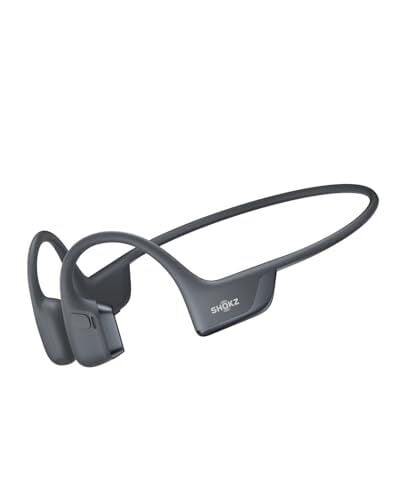
Thanksgiving is a week away, but Black Friday sales are already here. This year, Amazon’s Black Friday deal event is taking place from Nov. 20-28, and Lifehacker will be here with all the best deals throughout the mega-sale. Right now, one of them is on my absolute favorite headphones for running—the Shokz OpenRun Pro 2. They’re currently $124.95, a 31% discount off their list price of $179.95.
If you’re unfamiliar with the world of bone conduction headphones (BCH), let me try to convert you. I love noise-cancelling tech when I’m in the gym, sure. But when I’m exercising outside, I’m grateful for BCH technology to keep my ears open to traffic, other runners, and reckless cyclists—all without sacrificing audio quality. As my colleague Daniel Oropeza reviews in-depth here, the Shokz OpenRun Pro 2 are the best set of BCHs that either of us have ever tried.
With these Shokz, I’ve experienced little to no ear fatigue, even during 20+ mile runs. I’ve worn these headphones for over a year now, through humid summer runs and unexpected downpours, and they’re holding up great. Most important for me, their battery life holds up, lasting even my longest training runs. Even if I forget to charge the night before a run, a quick five-minute charge gives me around 1.5 hours of listening time. Shokz is a go-to brand for a reason, and this 31% discount could be the nudge you need to snag the OpenRun Pro 2 headphones for yourself.
If you’re still shopping around, I recommend checking out guides like our live blog, where we use price trackers to make sure you’re really getting the best deals this Black Friday. And if you have an Amazon Prime membership, make the most of it.
Our Best Editor-Vetted Early Black Friday Deals Right Now
Black Friday and Cyber Monday are coming up soon, but deals are already trickling out across marketplaces across the Internet. If you’re shopping for home goods or home improvement items (like I always am), this is the time to load up on tools, organizers, appliances, and more, all for cheaper than you’ll pay during other times of the year.
Check this live blog often to see the best sales on home products that we’re finding in the lead-up to Black Friday and Cyber Monday.
Black Friday and Cyber Monday are fast approaching, but many deals are actually already here. I’m always hunting for deals on at-home fitness products, but whether you need some dumbbells, more serious equipment, or anything else to boost your health and wellness journey, this is the moment to save.
Check this live blog often to see the best fitness sales we’re finding in the lead-up to Black Friday and Cyber Monday.
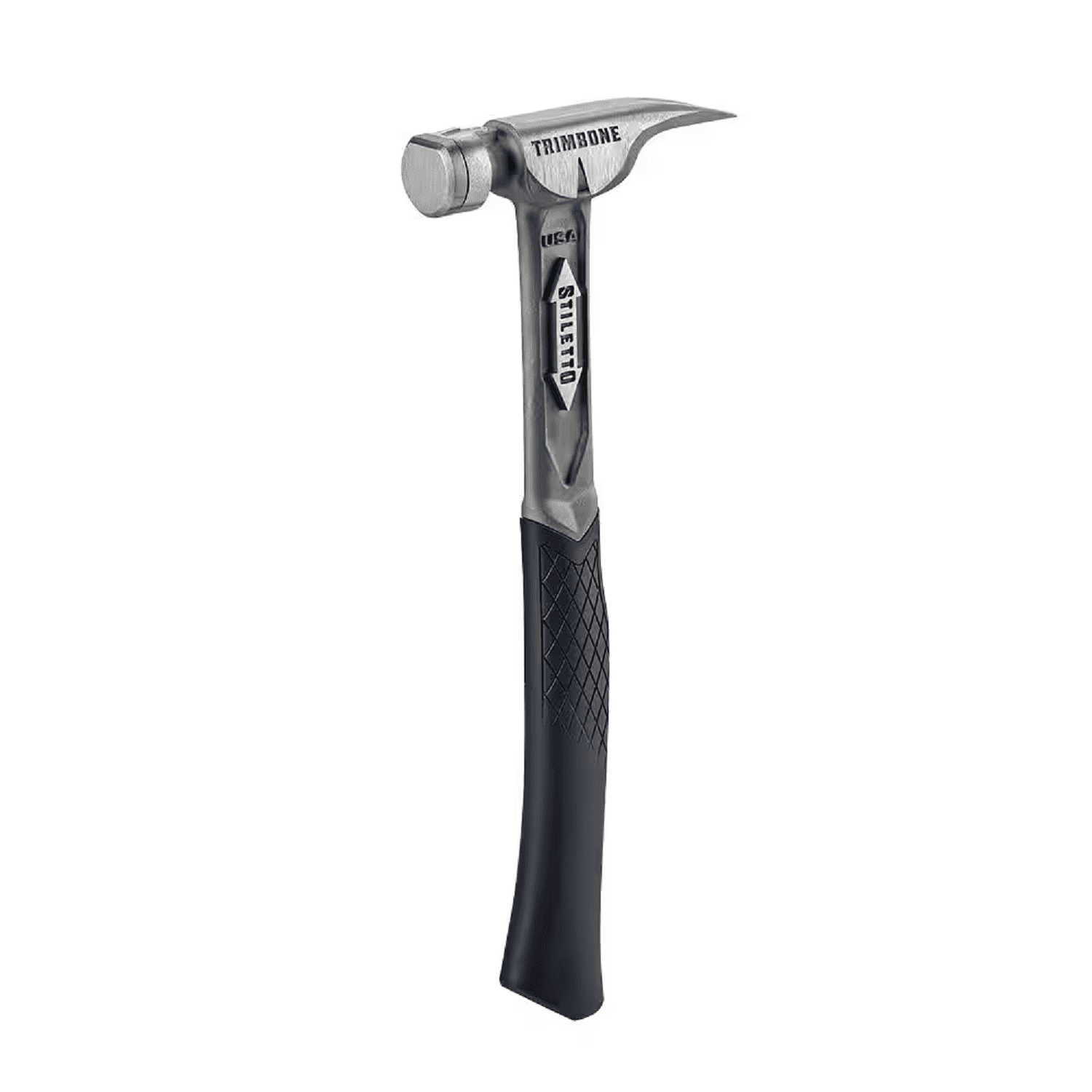
If you’re like most people, you bought a standard claw hammer once long ago and never thought much about its weight or design. I was like that for a long time, too, but I noticed that every time I worked on a project involving lots of hammering, my arm would get fatigued quickly, and the last half of the work would be a misery. I recently fell down a bit of a rabbit hole regarding hammers—the different weights and types-and decided it was time to splurge a bit and buy a titanium hammer (specifically, this one). It was one of the best purchases I’ve made recently.
Titanium vs. steel hammer
Most hammers are made from steel, with either a fiberglass or wood handle. They get the job done—steel is an excellent material for a hammer, and it will last a long time. I still have an old steel hammer handed down from my father; it has a nail bent over the head at the top to hold it in place, but it still works. And steel hammers are pretty cheap—this 16 ounce model from Estwing is just $25 as I write this. You can’t beat that price for a tool that will probably last decades.
The problem with cheap steel hammers is the strain they put your body through. If you use your hammer once a year, you’ll never notice. But when I started doing work around the house on a regular basis, I began to feel it: My arm would get tired, and my elbow and shoulder would ache a little after a few hours. Steel doesn’t absorb the impact of each strike very well, and transmits it to your arm. You can minimize that impact a little with anti-vibration wraps or grips, but it’s never going to go away completely.
Fed up with suffering through every project, I did some research and splurged on a titanium TiBone 10-Oz. Trimbone hammer—and it’s worked out amazingly well. The TiBone is just 10 ounces, but because it’s titanium, it has the same striking force—the force it delivers to the nail—as a much heavier steel model. In other words, whatever weight hammer you’re used to swinging, you can go much lighter with a titanium hammer. That’s less weight to swing, and less strain on your arm.
The Trimbone has a few other features I like—you can swap out the face and grip easily, so it will last longer and is more flexible for different jobs, it has a side nail-puller and a magnetic nail starter, and the grip is comfortable. But it’s mainly the lighter weight without sacrificing performance that I (and my shoulder) like. It’s specifically a framing hammer, but I find it’s terrific as a general-purpose hammer for most jobs.
The big downside is cost. It’s currently $370.49, which is, you may notice, almost 15 times more expensive than the perfectly good steel hammer I referenced above. You might be able to find it cheaper somewhere with a little effort, but it will still be an order of magnitude more expensive. For me, it was worth the cost—I haven’t needed to take a bunch of ibuprofen after working all day since I bought it. If you’re also struggling with arm fatigue with your current hammer, it might be time to consider the upgrade.
Google just unveiled its Nano Banana Pro image generation platform, which is also going by the name Gemini 3 Pro Image. The company promises this is an improvement over previous versions of the software in nearly every way. Google says it will “turn your visions into studio-quality designs with unprecedented control, flawless text rendering and enhanced world knowledge.”
The text rendering portion seems to have gotten a big upgrade here, as Nano Banana Pro can create context-rich infographics and diagrams. The software can render legible text on top of a pre-existing image, making it a good option for generating posters and stuff like that. Google says that this feature is available in multiple languages.
Google
Google also says it can blend multiple elements into a single composition, with the ability to use up to 14 images at once. There are plenty of new editing controls. Users can select and edit any part of a created image. This can be used to adjust camera angles, change focus, adjust the color grade and even swap out the lighting from day to night.
Images created with Nano Banana Pro will have C2PA metadata embedded. This should, in time, make it easier to spot generative AI or deepfakes out there in the world. We’ll have to see how that plays out. TikTok recently announced it would be using this metadata to better label AI-generated content, of which it currently does a very bad job at.
Nano Banana Pro is actually free to use. Free users are limited to a daily quota of images, with the number expanding for Google AI, Plus, Pro and Ultra subscribers. Just open up the Gemini app and create an image, but be sure to use the “Thinking” model. It’s also available in Search and NotebookLM for some subscribers. This is all part of the recently-launched Gemini 3 model.
This article originally appeared on Engadget at https://www.engadget.com/ai/googles-nano-banana-pro-image-generator-leverages-gemini-3-for-improved-visuals-and-text-rendering-185505073.html?src=rss
Microsoft’s push to transform Windows into an “agentic OS” that allows AI agents to control PCs is drawing user backlash similar to the Windows 8 controversy, as the company marks the operating system’s 40th anniversary this week, writes Tom Warren, a reporter at The Verge who has been covering Microsoft for nearly two decades. Windows chief Pavan Davuluri announced the agentic OS plans in a post on X last week and faced immediate criticism in hundreds of replies before they were locked days later.
“It’s evolving into a product that’s driving people to Mac and Linux,” one person wrote, while another asked for a return to Windows 7’s “clean UI, clean icon, a unified control panel, no bloat apps, no ads, just a pure performant OS.” Davuluri later responded to software engineer Gergely Orosz, saying “we care deeply about developers” and acknowledging Microsoft has “work to do on the experience, both on the everyday usability, from inconsistent dialogs to power user experiences.”
Microsoft CEO Satya Nadella told the Dwarkesh Podcast that the company’s business “which today is an end user tools business, will become, essentially an infrastructure business in support of agents doing work.” The Recall feature already spooked users when it was initially turned on by default before Microsoft reworked it to be opt-in. Navjot Virk, corporate vice president of Windows experiences, told The Verge that “every user can use [AI agents] when they’re ready. It’s their choice, they decide.”
President Trump is considering an executive order that would require the federal government to file lawsuits against states with AI laws, and prevent states with AI laws from obtaining broadband funding.
The draft order, “Eliminating State Law Obstruction of National AI Policy,” would order the attorney general to “establish an AI Litigation Task Force whose sole responsibility shall be to challenge State AI laws, including on grounds that such laws unconstitutionally regulate interstate commerce, are preempted by existing Federal regulations, or are otherwise unlawful in the Attorney General’s judgment.”
The draft order says the Trump administration “will act to ensure that there is a minimally burdensome national standard—not 50 discordant State ones.” It specifically names laws enacted by California and Colorado and directs the Secretary of Commerce to evaluate whether other laws should be challenged.
Perplexity is continuing the rollout of its AI browser to more users. Comet is now available to download for Android mobile devices from the Google Play Store. Comet initially debuted this summer only to Perplexity’s high-rolling subscribers on the $200-a-month Pro plan, but it expanded access to all users last month. It’s free on Android as it now is on other platforms, and has many of the same features as the desktop version. The mobile option has access to Perplexity’s AI assistant, and it can summarize searches or be interacted with by voice.
Perplexity has been forthright about its goals of launching a browser as a way to collect customer data so it can more effectively target ads, and it’s not the only artificial intelligence company or tech company trying to integrate AI into the browsing experience. These efforts have already drawn complaints from Amazon, particularly around AI in shopping, but they could yield big paydays for scammers.
This article originally appeared on Engadget at https://www.engadget.com/ai/perplexitys-comet-ai-browser-is-now-on-android-184500885.html?src=rss
We may earn a commission from links on this page. Deal pricing and availability subject to change after time of publication.
Black Friday sales officially start Friday, November 28, and run through Cyber Monday, December 1, and Lifehacker is sharing the best sales based on product reviews, comparisons, and price-tracking tools before it’s over.
Follow our live blog to stay up-to-date on the best sales we find.
Browse our editors’ picks for a curated list of our favorite sales on laptops, fitness tech, appliances, and more.
Sales are accurate at the time of publication, but prices and inventory are always subject to change.
I’m a big fan of Aura’s digital picture frames. They look great, and it make it easy to casually see all of the pictures that might otherwise get lost in your Photos app. Ahead of Black Friday, some stores are selling Aura frames at a pretty steep discount. That includes Amazon, which has the Aura Carver Mat frame for 22% off. That means you can buy it right now for $139, down from $179.
There are a couple things that I really like about Aura’s frames in particular. First is the ease of use: You can add your photos to the frame via Aura’s app, which is convenient for adding new pictures as you take them. In my house, we usually add new photos after parties, weekends away with friends, or long trips. It’s nice to walk into the kitchen and see the pictures you just took, alongside your usual favorites. If you’ve gifted the frame to someone else, the app lets you add pictures to their frame from afar.
The Aura frame also just looks nice. You won’t be tricked into thinking this is a real picture frame, mind you. However, it doesn’t just look like a mini computer screen on your desk. It looks and feels classy, and the image quality is excellent. I also appreciate how the backlight compensates for the lighting in your room: When the sun’s bright, your frame gets brighter. As the sun sets, your frame dims as well. And when all the lights are out in your room, the frame automatically turns off.
My favorite feature, however, is the small touchpad at the top of the frame. This is an easy feature to miss: If you run your finger along the top edge, you can swipe back and forth between photos. It’s great if you want to see another photo that Aura recently swapped out, or you want to skip one you don’t feel like looking at right now. Plus, it’s tucked away, so the frame doesn’t clutter itself up with buttons. Speaking of which, the touchpad doubles as a button if you long-press it. You’ll be able to choose whether to exclude a photo from the current collection, or to turn off the frame entirely.
While I personally love my Carver Mat Aura frame, Amazon has early Black Friday deals on a host of different Aura models, if you’re looking for something different.
Our Best Editor-Vetted Early Black Friday Deals Right Now
Poncle has been pretty darn busy lately. Along with greenlighting a licensed Warhammer take on Vampire Survivors, bringing a VR version of the original game to the world and working on crossover expansions, the studio is making a brand-new game. Vampire Crawlers is a Vampire Survivors spinoff. Rather than running around the map to collect gems to level up and unlock or upgrade auto-firing weapons, Vampire Crawlers has a different format. It’s a dungeon-crawling roguelike deckbuilder.
It’s set in the same world as Vampire Survivors and each of the playable characters is in the original game. You’ll put together decks of attacks and other abilities to help you on your journeys through dungeons. There’s a card customization feature too.
Development of Vampire Crawlers started soon after Vampire Survivors hit early access and blew up in 2021. Poncle founder and CEO Luca Galante told Xbox Wirethat this is hopefully the first in a series of spinoffs in which “the idea is to take some of the core pillars behind the development of VS and to apply them to existing genres.” Galante hinted that a Vampire Survivors sequel is in the works too.
Vampire Crawlers is expected to arrive in 2026. It’ll be available on Steam, Xbox Series X/S, PlayStation 5, Nintendo Switch, Android and iOS. The game will debut on Game Pass Ultimate and PC Game Pass.
This article originally appeared on Engadget at https://www.engadget.com/gaming/xbox/a-vampire-survivors-roguelike-deckbuilder-spinoff-is-coming-in-2026-183841289.html?src=rss
Remember way back in 2024, when Qualcomm said most x86 Windows games would run smoothly on its Arm chipsets? Well, those promises were, shall we say, a bit premature. But with this week’s launch of the Snapdragon Control Panel (along with other updates), the company says things are finally looking up for Snapdragon X Elite laptop owners.
Alongside the launch of faster new chips, Qualcomm has made some quality-of-life improvements on the software end. Chief among them is this week’s arrival of the Snapdragon Control Panel: the company’s answer to NVIDIA and AMD’s GPU tools. Like those apps, the Snapdragon software includes familiar features like automatic game detection, per-game settings and Adreno GPU driver updates. On that note, Qualcomm says its drivers have squashed bugs and boosted performance for over 100 games since last year.
Qualcomm
The crucial x86 emulation layer has also gotten some love. Microsoft’s Prism Emulator now supports Advanced Vector Extensions (AVX) x86 emulation on Qualcomm chips. Meanwhile, the more advanced AVX2 will be supported out of the box on upcoming Snapdragon X2 Elite laptops. (Expect to hear more about those at CES.) Current Snapdragon X Series devices will receive the update “in the coming weeks.”
One Windows gaming obstacle Qualcomm acknowledged last year was kernel-level anti-cheat tech. At the time, multiplayer games that relied on it simply wouldn’t work on its devices. But as part of its gaming announcements this week, Qualcomm highlighted Fortnite‘s availability. That’s thanks to Epic Online Services Anti-Cheat support. Qualcomm says it’s also “working with” leading anti-cheat providers to add wider multiplayer support. That includes anti-cheat tech from Tencent, Roblox and more.
This article originally appeared on Engadget at https://www.engadget.com/gaming/pc/qualcomm-promises-better-gaming-performance-with-latest-windows-on-snapdragon-update-183529616.html?src=rss
The Trump administration has drafted an executive order that would effectively block states from enacting their own AI regulations. According to a draft document obtained by Politico, the effort would entail a multifaceted approach including an “AI Litigation Task Force” run by the DOJ.
This indicates the president has not wavered in his desire to eschew federalism in favor of a more centralized power structure around artificial intelligence. This past summer, the administration released its AI Action Plan, which, among other things, recommends that the “Federal government should not allow AI-related Federal funding to be directed toward states with burdensome AI regulations.”
While it also adds that the government should “not interfere with states’ rights to pass prudent laws that are not unduly restrictive to innovation,” this runs counter to some actions coming from the White House. Senator Ted Cruz, at the behest of the president, tried to add a 10-year moratorium on states’ AI regulation to the President’s One Big Beautiful Bill Act passed this summer. This amendment was ultimately voted down by the Senate 99-1.
The issue is heating up again as the president took to Truth Social to say that “overregulation by the States” would undermine the US economy and lead to “Woke AI.” Congresswoman Marjorie Taylor Greene posted on X that no such moratorium should be put in place, and said states rights and federalism must be preserved.
Politico reports that the administration is likely to try and insert a regulation moratorium again in the year-end annual defense bill. The administration seems convinced that a patchwork of varying regulations around the country would prove too onerous in the race for global AI dominance, and seeks to use every lever of federal power to prevent one.
This article originally appeared on Engadget at https://www.engadget.com/ai/trump-administration-may-use-federal-agencies-to-fight-state-level-ai-regulation-182514317.html?src=rss