Garmin’s ‘Year in Review’ Is Perplexing, Like the Rest of Its Subscription Service

We may earn a commission from links on this page.

Garmin has released an end-of-year summary of users’ stats, Spotify Wrapped-style. But it’s only available to people who pay for Garmin Connect+, the new paid subscription that Garmin has offered since March of this year. I’ll show you what’s inside the Year in Review, and give you my thoughts on how the subscription service has weathered its first almost-year. Spoiler: The more things Garmin adds, the less they seem to know what they’re doing.

What’s in the Year in Review? 

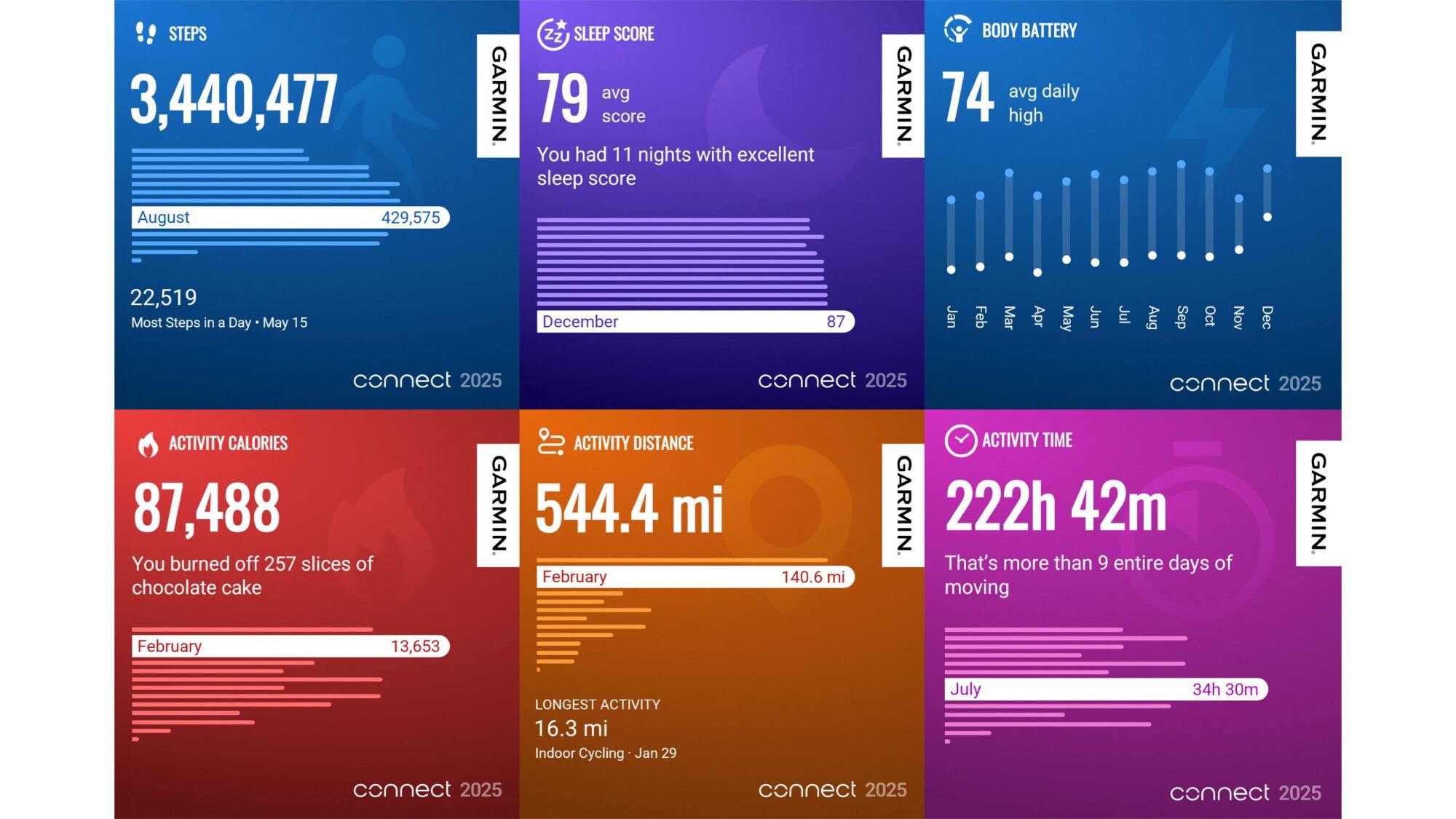
6 screenshots of Garmin Year in Review cards

Credit: Beth Skwarecki/Garmin

Garmin’s Year in Review feature shows you a bunch of cute visuals of your activity throughout the year. For each metric, there is usually a summary or a total, followed by a graph showing that metric for each calendar month (January through December) with the “best” month for that metric highlighted. Sometimes a particular workout was called out for that metric, such as your longest run. The metrics included:

  • Total steps

  • Sleep score average

  • Body Battery average daily high

  • Number of activities, and your most common types

  • Total activity time

  • Total activity distance

  • Total activity ascent

  • Total activity calories (put in terms of “slices of chocolate cake” for some reason)

  • Badges earned

  • Personal records earned

There are shareable cards for each, so it’s certainly fulfilling the function of a yearly recap, but it’s a bit boring to page through. I’m not sure why I’m supposed to care about my average Body Battery, and it’s not exactly a revelation that I did more gym workouts than bike rides. Perhaps this will get more polished in future years.

Your Year in Review says more about Garmin than about you

More companies than ever are offering an annual summary this year, and it seems like each of them is having a little identity crisis. Is the summary meant to provide free marketing when you share the screenshots with your friends? Engage you more deeply with the algorithm, to encourage you to consume more content? Or is it just a reward for being a loyal customer? 

Garmin, by making theirs a premium feature, doesn’t seem to be prioritizing any of the above. I see two things going on here: They’re competing with Strava, and grappling with what it means to exist as a hardware company in a subscription-based world. 

The Strava part is easiest to understand. Strava offers a premium subscription, and the main draw is that it comes with mapping tools and training analytics. People may gripe about having to pay to see their spot on a leaderboard or build a running route, but this model fundamentally works because people like and want those features. Strava’s “Year in Sport” is a premium feature as well, but people don’t subscribe just to get Year in Sport. It’s a little perk, not the whole point. 

Comparing Garmin’s recap to Strava’s, Strava’s feels more cohesive. There are fewer cards in the carousel, and they’re more relevant to things I care about. I get my activities and distance in the same card, find out how long I’ve kept my weekly streak (over a year!), see the days I was active, get reminded of one highlight run (definitely a memorable one), see my PRs for all the major distances, and get a shout-out on the one QOM and couple of Local Legend titles I earned. It’s easier for Strava to do this well because their platform is tailored to people with specific goals: to run or bike more and faster. Garmin tries harder to be everything to everybody. 

And then there’s the question of what Garmin is doing here. It’s always been a hardware company, starting out with GPS devices (back when “GPS device” was a standalone product category) and eventually becoming a maker of sports watches as well as gadgets like bike computers and boat navigation systems. The company seems to be having trouble finding its place in today’s subscription-based world. I appreciate that it isn’t removing features from existing products, but that makes me wonder what the point of Connect+ is supposed to be.

Garmin’s Connect+ subscription doesn’t seem to be the paywall people are afraid of (or the cash cow Garmin is probably hoping for)

Garmin has always been a hardware company at heart, but that model has been harder and harder to fit with the modern wearables market. Now that we all have smartphones, many of the features we expect from a Garmin watch are really features of a phone app. So to keep selling watches in different pricing tiers, Garmin ties specific features to the hardware you’ve bought. You’ll only get a “training status” in the app if you’ve paired a training status-capable watch, for example. (The Forerunner 265 counts, but not the 165.)

I have to imagine Garmin execs wish they could start over, make just a few physical devices, and sell software features as subscription tiers. Everything in 2025 seems to be sold on a subscription basis or with some features paywalled behind a premium tier. So of course Garmin tried to move into that space.

Garmin has long sold subscriptions for some devices, but those were always specific things like satellite messaging or high-definition marine charts, where the purpose and the cost made sense. Garmin Connect+, which launched this year, is basically a subscription for software features of the phone app, not a device. 

That’s good for Garmin users—no actual features of the watches get paywalled this way. Whatever features your Forerunner 265 had when you bought it, you get to keep those. New watches don’t seem to be missing any features (yet)—if anything, new releases like the Forerunner 570 and the Venu 4 seem to be adding features to justify their higher prices. 

But that leaves the Connect+ subscription without anything vital to offer. I’ve gone through and listed all the features you get, and I think the only one that’s really worthwhile is mirroring data to your phone, which both Apple and Coros will give you for free. The rest are all “huh?” features, like unlocking special badges or gaining access to an AI feature that is surely the least useful of all fitness apps’ AI features (and that’s really saying something). 

Garmin seems to be hoping that people will upgrade to the subscription because of its cool amazing attractive features, while carefully avoiding putting anything useful or essential in the subscription. That doesn’t seem to be a tightrope they can actually walk, unless they come up with new app features that don’t fit into their hardware models, but are actually useful and interesting. Features worth paying for are expensive to build, which explains why Garmin Trails is a dud so far—it’s just an empty shell of a service that users are supposed to fill with data, eventually, I guess. 

Year in Review must have been easy to build, but it doesn’t give us anything worth paying for. Garmin has been advertising the Year in Review to non-subscribers, suggesting that we pay for a subscription to access it. I just don’t think it’s working, Garmin.

Pebble is making a weird little smart ring for recording thoughts

Pebble just announced the Index 01, a smart ring for recording thoughts. It’s a little ring with a built-in microphone and that’s about it. The Index 01 is almost anti-tech in its simplicity. There’s no needless AI component shoehorned in, aside from speech-to-text. It’s a ring with a microphone that you whisper ideas into and I want one.

Here’s how it works. You get an idea while walking down the street, so you quietly whisper it into the ring. The ring sends the idea to a notes app or saves it for later review. Pebble founder Eric Migicovsky calls this an “external memory” for the brain, but I call it a nice way to avoid having to dig the phone out of a pocket or bag just to utter something like “pizza, but for cats.”

The ring doesn’t record unless a button is pushed, so it won’t be listening in on private conversations, and it doesn’t require a paid subscription of any kind. It’s on the smaller side, about the size of a wedding band, and is water-resistant.

The battery also lasts for “years” and never needs to be charged. The ring is designed to be worn at all times, so users develop the muscle memory of holding down the little button when they have something to share. See what I mean? I want one, and I’ve quite literally never worn a ring in my life.

A ring.
Pebble

Migicovsky says this is an open source product and that Pebble is “leaving the side door open for folks to customize.” He envisions people will integrate AI voice agents and that the ring will eventually work with stuff like ChatGPT, Beeper, Google and other services.

The Pebble Index 01 works with iPhone and Android and is available for preorder right now. It costs $75 during this preorder period, but the price jacks up to $99 when shipments start going out in March.

This is just the latest product by Migicovsky and Pebble. The company unveiled the Core 2 Duo and the Core Time 2 smartwatches earlier this year.

This article originally appeared on Engadget at https://www.engadget.com/wearables/pebble-is-making-a-weird-little-smart-ring-for-recording-thoughts-161723645.html?src=rss

The Rarest of All Diseases Are Becoming Treatable

In February, a six-month-old baby named KJ Muldoon became the first person ever to receive a CRISPR gene-editing treatment customized specifically for his unique genetic mutation, a milestone that researchers say marks a turning point in how medicine might approach the thousands of rare diseases that collectively affect 30 million Americans. Muldoon was born with a type of urea-cycle disorder that gives patients roughly a 50% chance of surviving infancy and typically requires a liver transplant; he is now a healthy 1-year-old who recently took his first steps.

The treatment’s significance extends beyond one child. Scientists at UC Berkeley’s Innovative Genomics Institute and the Children’s Hospital of Philadelphia are now planning clinical trials that would use Muldoon’s therapy as a template, tweaking the molecular “address” in the CRISPR system to target different mutations in other children with urea-cycle disorders. Last month, FDA officials Marty Makary and Vinay Prasad announced a new drug pathway designed to accelerate approvals for such personalized treatments — a framework inspired in large part by Muldoon’s case. Current gene-editing delivery mechanisms limit treatments to disorders in the blood and liver. Many families will still go without bespoke therapies.


Read more of this story at Slashdot.

Brazil weakens Amazon protections days after COP30

Despite claims of environmental leadership and promises to preserve the Amazon rainforest ahead of COP30, Brazil is stripping away protections for the region’s vital ecosystems faster than workers dismantled the tents that housed the recent global climate summit in Belém.

On Nov. 27, less than a week after COP30 ended, a powerful political bloc in Brazil’s National Congress, representing agribusiness, and development interests, weakened safeguards for the Amazon’s rivers, forests, and Indigenous communities.

The rollback centered on provisions in an environmental licensing bill passed by the government a few months before COP30. The law began to take shape well before, during the Jair Bolsonaro presidency from 2019 to 2023. It reflected the deregulatory agenda of the rural caucus, the Frente Parlamentar da Agropecuária, which wielded significant power during his term and remains influential today.

Read full article

Comments

Pompeii construction site confirms recipe for Roman concrete

Back in 2023, we reported on MIT scientists’ conclusion that the ancient Romans employed “hot mixing” with quicklime, among other strategies, to make their famous concrete, giving the material self-healing functionality. The only snag was that this didn’t match the recipe as described in historical texts. Now the same team is back with a fresh analysis of samples collected from a recently discovered site that confirms the Romans did indeed use hot mixing, according to a new paper published in the journal Nature Communications.

As we’ve reported previously, like today’s Portland cement (a basic ingredient of modern concrete), ancient Roman concrete was basically a mix of a semi-liquid mortar and aggregate. Portland cement is typically made by heating limestone and clay (as well as sandstone, ash, chalk, and iron) in a kiln. The resulting clinker is then ground into a fine powder with just a touch of added gypsum to achieve a smooth, flat surface. But the aggregate used to make Roman concrete was made up of fist-sized pieces of stone or bricks.

In his treatise De architectura (circa 30 CE), the Roman architect and engineer Vitruvius wrote about how to build concrete walls for funerary structures that could endure for a long time without falling into ruin. He recommended the walls be at least two feet thick, made of either “squared red stone or of brick or lava laid in courses.” The brick or volcanic rock aggregate should be bound with mortar composed of hydrated lime and porous fragments of glass and crystals from volcanic eruptions (known as volcanic tephra).

Read full article

Comments

In a major new report, scientists build rationale for sending astronauts to Mars

Sending astronauts to the red planet will be a decades-long activity and cost many billions of dollars. So why should NASA undertake such a bold mission?

A new report published Tuesday, titled “A Science Strategy for the Human Exploration of Mars,” represents the answer from leading scientists and engineers in the United States: finding whether life exists, or once did, beyond Earth.

“We’re searching for life on Mars,” said Dava Newman, a professor in the Department of Aeronautics and Astronautics at Massachusetts Institute of Technology and co-chair of the committee that wrote the report, in an interview with Ars. “The answer to the question ‘are we alone‘ is always going to be ‘maybe,’ unless it becomes yes.”

Read full article

Comments

Why Your TV Will Probably Never Be Better Than It Is Now

We may earn a commission from links on this page.

We’ve reached the end of television. Since the invention of the technology in the 1920s, TV screens have gradually grown larger, pictures clearer, and sets cheaper, until now: For all intents and purposes, we’re at the end of the road. This “nothing special” 65-inch Samsung unit, is, for most people, as good as a TV ever needs to be. It displays an image more highly detailed than most viewers can perceive from a couch-length viewing distance, its screen is as big as the average American living room can handle, and it costs less than $500. For 100 years, manufacturers and consumers have been chasing screen size and image clarity, so what happens now that the dog has caught the mail truck, and just about everyone has a TV that’s essentially perfect?

A brief history of big-screen TVs

Television has come a long way. If we traveled back in time to 1986 with the equivalent of $500 to buy a TV, we would only be able to afford the cheapest set from that year’s Sears catalog. For $159.99, the same relative cost as a 65-inch Samsung today, you could snag a set featuring a 13-inch, 4:3 screen with an equivalent resolution of around 480i. (CRT televisions don’t have pixels, but their screens displayed roughly 330–480 lines of usable detail depending on the signal.) By comparison, the Samsung has a 65-inch, 16:9 screen with a 3840×2160 resolution.

Those CRTs originally displayed images by firing electrons at a phosphorescent screen inside a vacuum-sealed glass tube. The cathode ray tube (hence CRT) had to be deep enough for the electron beams to accelerate, with glass thick enough safely contain them. The result: heavy, deep, fragile machines that couldn’t practically support screens much larger than 40 inches without being prohibitively expensive and heavy. The 1981 Sony KV-3000R, a 30-inch model that cost $10,000 ($36,500 in today’s money) and weighed over 500 pounds, was at the top of the big CRT consumer market. It was technically possible to go bigger—Trinitron created a 45-inch CRT in 1989 that sold in Japan for $40,000—but these were not the kind of screens you’d find in anyone’s living room.

The projection TVs that followed were able to achieve their unheard-of screen sizes by using internal projectors and mirrors to project the cathode ray image onto a translucent screen, but this came with significant drawbacks. The sets were massive and could weigh up to 500 pounds, and the projected image was blurrier and dimmer than a typical CRT’s already “standard definition” image. Viewing angles were limited—you basically had to sit directly in front of it to see anything clearly—and projector bulbs had a limited lifespan and were expensive to replace.

The limitations and cost of rear projection TVs didn’t dissuade people from adopting the technology, especially as they came down in price. By the 1990s, improvements in rear-projection optics, CRT projectors, and production efficiency made big-screen, rear projection TVs into a status symbol, resulting in 50-, 60-, and even 70-inch behemoths appearing in suburban living rooms. They were still heavy, fuzzy, and crazy expensive—a 61-inch Magnavox rear-projection television cost $2,999.99 in 1993—but everything changed in the late 90s with the release of the first plasma TVs.

The flat screen revolution

Plasma and LCD TVs weren’t just better ways of displaying images, but worked on entirely differently principles altogether. In a plasma TV, each pixel is a tiny gas-filled cell that emits ultraviolet light when charged with electricity, which then excites phosphors on the display to create visible colors that resolve into an episode of Friends. LCD TVs use liquid crystals to control the passage of light sourced from a backlight behind. Each pixel contains a liquid crystal layer that can twist or block light, allowing precise control over color and brightness and thus a much more detailed look at Rachel’s hair. Both technologies supported far brighter and more defined images than rear projection TVs all without weighing 400 pounds, making big screen, high-definition displays obtainable for average consumers.

Both LCD and plasma TVs had advantages and drawbacks—plasmas had faster response times (how quickly a pixel can adjust) and darker blacks than LCDs, but LCD TVs lasted longer (around 50,000 hours vs 30,000 hours), used less power, work better in brighter rooms, and weren’t as prone to “burn in” as older plasma and CRT monitors. Ultimately, LCD won out, and plasma TVs became a thing of the past by 2014.

In 2004, Sony introduced the first LED TVs. Where older LCD TVs use cold cathode fluorescent lamps for back lighting, LEDs use light-emitting diodes as backlighting. They’re much more energy efficient and produce a brighter image, more accurate colors, and greater contrast than either LCD or Plasma displays. LED and other technical improvements also solved problems like narrow viewing angles, motion blur, and uneven backlighting that plagued earlier generations of flat screens.

Flat panel displays were expensive at first, but prices fell rapidly. A 42-inch plasma cost around $20,000 in 1997, but cost less than $1,000 a decade later. As prices fell, resolution rose, from 720p (1,280 pixels wide by 720 pixels tall) to 1080p (1,920 pixels wide by 1,080 pixels long) to 4K (3,840 pixels wide by 2,160 pixels long), making it feasible for anyone to mount a giant TV on their living room wall and enjoy a level of realism and image quality previously only available in movie theaters. 

Fine tuning your television: All about backlighting

As screen size and resolution improved, so too did the qualitative aspects of TV images—contrast, color accuracy, and brightness. Older LCD TVs use fluorescent lamps to shine light through liquid crystals, but the crystals can’t block all of the light, so no pixel is ever truly black. That’s why you can tell whether an older LCD TV is on, even if there is no picture. LED displays are built with local dimming—backlights that can light up or dim zones of the screen as needed. The result is less light leaking through the pixels, and thus darker blacks. Mini-LED displays have many more backlighting “zones,” sometimes thousands, further refining the darkness. QLED displays slide a film of “quantum dots” between the LED lights and the LCD front that dilate to improve color saturation and brightness.

Organic light-emitting diode TVs (OLED) take it even further. Many OLED televisions don’t have a backlight at all. Instead, each pixel in the display contains an organic material that lights up individually when electricity is applied. So when a pixel is black, it’s off, which means it’s totally black. OLED televisions aren’t perfect—they tend to be less bright than LED or mini-LED displays—and the emerging technology of microLED TVs promises to solve that problem, but current six-figure price tags make them prohibitively expensive.

We may have achieved peak television

The difference between a color image and a black-and-white one were immediately obvious when the first color TVs hit the market in the 1950s, as was the difference between high-definition and standard definition in late 1990s, but the distinction between an OLED and a QLED display are fine enough to be almost indistinguishable to the average consumer. I’m sure some people are passionately devoted to OLED over mini-LED, or feel you haven’t really experienced Breaking Bad if you haven’t seen it on a $100,000 microLED TV, but for the rest of us, midrange TVs are so close to “as good as they can possibly be” that granular technological improvements are meaningless.

Now, no technology is perfect for everyone. CRT TVs, for instance, are better than the best LED TVs for old school gaming, and a 4K TV might not be detailed enough for some technical uses, but if you’re just talking about the needs and desires of standard, living-room-dwelling watchers, current TV technology is all but perfect. Here are some reasons why:

The limits of vision

A standard 65-inch 4K television delivers a resolution of 3,840 x 2,160 pixels, a density high enough to create an image that is pixel-invisible to a typical viewer sitting at reasonable distance from a television. You can buy an 8K TV (7,680 pixels wide by 4,320 pixels tall), but those extra pixels won’t make the picture look clearer or more highly defined in a practical way; they’ll only add more detail than you can physically see from your couch. For reasonable viewing, even 4K screens are overkill.

Then, there’s the question of size. TVs always could get bigger, but there’s a point where it doesn’t add value to the experience of watching. The Society of Motion Picture and Television Engineers has determined that the best screen viewing experience for most people is achieved when sitting at a distance where your display screen is taking up 30 degrees of your vision. That’s about 8.5 feet away for a 65-inch TV, more than adequate for most living rooms, and even if it isn’t, commercially available televisions go up to 115-inches, which is big enough for all but a cathedral-sized rec room.

The limits of light, color, and comfort

Contrast, the difference in brightness between the darkest blacks and the brightest whites that a screen can display, helps determine how vivid and detailed an image looks. OLED TVs don’t have contrast ratios, because the contrast is infinite. Each pixel in an OLED TV is its own light source, so when a pixel is told to be black, it is literally off, and it doesn’t get blacker than that. In terms of color, modern OLED TVs can reproduce 98 to 100% of the colors used in movies and TV shows, so what you see on screen is all the color there is in source material. While other display types don’t have OLED’s infinite contrast ratio, they get pretty close: Some mini-LED TVs have a contrast ratio as high as 10,000,000:1.

TVs are also brighter than ever. Displays designed for use outside are bright enough to be watchable in full sunlight, and their peak HDR brightness of 1,400 or so nits is far brighter than then the 250 nits of typical screen viewed indoors, which is already more than bright enough to be comfortable for your living room.

The limits of content

As far as what we watch on TV, if you define perfect TV as “the ability to watch anything I want, whenever I want,” we’re practically there. Viewers used to have a scarcity problem; you’d watch whatever happened to be on one of three channels and you’d like it. Now, our problem now is abundance. We’re overwhelmed with content to watch—there are millions of instantly available things to stream on your TV, from shows to movies to YouTube videos. While programming spread over thousands of channels and across dozens of pay and free streaming services is messy, almost every film or TV show ever produced is available somewhere, although it might take a little work (and monthly subscription fees) to find it.

What’s next for TV? 

Consumer demand for bigger-screened televisions with higher quality displays has essentially driven the industry for the last 80 years, so what happens now that the race is almost over and we can all watch whatever we want on an all but-perfect TV?  A marketing person might answer that TV makers will create reasons for people to want new TVs by expanding what TV actually is. You can see this happening with things Samsung’s The Wall or Sony’s Crystal LED—systems that let you cover an entire wall with seamless TV panels (if you have a spare $100,000 sitting around).

But do people really want a TV wall enough to buy one, assuming they become more affordable? Some people would, sure, but a wall screen wouldn’t really make sitting on the couch watching TV better for most of us. A more down-to-earth potential future for TVs is represented by Samsung’s Frame, a “a lifestyle TV” designed to turn your screen into a gallery of digital art when you’re not watching Netflix. It’s cool, but if it doesn’t improve the experience of watching Pluribus, I’m not rushing out to replace my TV.  

When “big TV” tries to create a desire for TVs that do something other than just work like TVs, the results haven’t always worked. Back 2010, perhaps sensing the need for a “gotta have it” feature, the industry rolled out the first 3D TVs. Despite years of hyping the technology as the next big thing, consumers didn’t bite, and by 2017, 3D TV was a dead technology. It was cool, but not cool enough to justify buying a new TV when people just wanted to watch Game of Thrones. Another example: the “screenless screen” represented by AR/VR devices like the Apple VisionPro or Meta Quest 3. It’s too early to say for sure, but these much-hyped devices seem to be meeting with lukewarm consumer response as well. 

The one way your TV isn’t perfect

Don’t get too smug about your perfect TV, though, as it’s probably going to break soon. The profitability of the TV industry requires a lot of people buy new TVs every few years, so your 65-inch Samsung isn’t designed to last as long as the clunky CRTs of yore. Older sets were fairly simple machines that could last for decades (if Elvis didn’t shoot them), but modern flat-panels are packed with LEDs that dim and LCDs that flicker out. Maybe more importantly, almost all new TVs are smart TVs, which introduces new ways of adding obsolescence—manufacturers could stop updating your TV’s operating system and streaming services could drop support too. Even if the display still works, you might find navigating your TV to be such a slow, cumbersome, and useless experience that you’ll go out and pick up a new one, far earlier than you otherwise would.

There’s also the matter of privacy: These TVs are constantly watching what we do, and collect our data when connected to the internet. It’s part of why TVs don’t cost as much up front: You are subsidizing the price with your data. Disconnecting these TVs from the internet helps, but many streaming devices aren’t much better, so you need to choose wisely. Choosing the right one, however, can expand the life of an old, otherwise functioning TV—until the hardware gives out, of course.

The TVs we have today are brilliant, cheap, and enormous, but they’re also designed for a world where replacing your screen every five-seven years is normal, even if a “better” set doesn’t necessarily exist. 

PC Shipments Poised For One Last Holiday Blitz Before It All Hits The Fan

PC Shipments Poised For One Last Holiday Blitz Before It All Hits The Fan
By now you’ve likely heard the gloom and doom scenario facing the PC market, and if you’re looking for some much-needed holiday cheer to lift your spirits, there are indications that we’ll see a strong finish to the year in terms of PC shipments. Despite consecutive quarters of decline, the PC market is expected to have grown when looking

Astronomers Capture Close-Up Images Of Exploding Stars In Stunning Detail

Astronomers Capture Close-Up Images Of Exploding Stars In Stunning Detail
Astrophysicists have achieved an eye-opening leap in understanding stellar death, capturing unprecedented, detailed images of two exploding stars that demonstrate these blasts are far more complicated than previously assumed.

These new observations, published in Nature Astronomy last week, utilized a technique called interferometry at California’s

Asked why we need Golden Dome, the man in charge points to a Hollywood film

Near the end of the film A House of Dynamite, a fictional American president portrayed by Idris Elba sums up the theory of nuclear deterrence.

“Just being ready is the point, right?” Elba says. “It keeps people in check. Keeps the world straight. If they see how prepared we are, no one starts a nuclear war.”

There’s a lot that goes wrong in the film, namely the collapse of deterrence itself. For more than 60 years, the US military has used its vast arsenal of nuclear weapons, constantly deployed on Navy submarines, at Air Force bomber bases, and in Minuteman missile fields, as a way of saying don’t mess with us. In the event of a first strike against the United States, an adversary would be assured of an overwhelming nuclear response, giving rise to the concept of Mutual Assured Destruction.

Read full article

Comments

The AI boom could soon send GPU prices soaring, so now’s a good time to buy one

When someone asks me for gadget buying advice, I normally tell them to stick with their current device. In 2025, most new tech products aren’t a worthwhile upgrade over even something that was released a few years ago — and with the price of everything going up, that new iPhone can wait. But things aren’t normal right now. 

On December 3, The Wall Street Journal reported memory manufacturer Micron would wind down Crucial, its consumer business, to focus on components for the AI industry. The PC I’m writing this article on has an SSD and RAM from Crucial. Overnight, Micron decided to end a business it spent decades building, and from a certain perspective, I guess it makes sense. In recent months, OpenAI has signed more than $1.4 trillion worth of infrastructure deals, creating unprecedented demand for server-grade solid-state storage and RAM. 

To meet the moment, manufacturers have been allocating more of their production capacity and wafers to high-margin commercial customers. For consumers, the result has been skyrocketing RAM prices, with some DDR5 kits now costing as much as two or three times as much as they did a couple of months ago. Recent analysis from TrendForce shows the price of some consumer-grade SSDs increased between 20 and 60 percent in November for the same reason. Then there’s LPDDR5X memory, which is used in both smartphones and NVIDIA’s Grace Blackwell and Vera Rubin platforms. In 2026, it’s expected to increase in price as well. The demand for AI infrastructure is such that all consumer electronics may cost more in the coming months.

Price Changes Coming December 7th 2025, Due To Market Conditions �‼️ pic.twitter.com/et0HADhc08

— CyberPowerPC (@CYBERPOWERPC) November 25, 2025

That gets me to the purpose of this article. If you’ve been thinking about upgrading to a new graphics card, I would recommend you buy one sooner rather than later. The AI boom came for RAM first, and there are already signs it will come for GPU pricing next. A recent report suggests AMD is considering raising the MSRP of its 8GB models by $20 and 16GB models by $40 due to the price of GDDR6 memory. NVIDIA, meanwhile, is rumored to have recently told its board partners it would no longer supply them with VRAM for their cards.     

Neither NVIDIA nor AMD responded to comment requests from Engadget requesting they share how they plan to work with their board partners to ensure GPU prices remain stable. NVIDIA also did not comment on reports the company will stop providing VRAM to its board partners. 

Separate from the memory shortage, neither NVIDIA nor AMD are expected to release new GPUs soon. According to recent rumors, the earliest a Super refresh of the Blackwell line could arrive is sometime in the middle of 2026 — not at CES in January as the 40-series Super cards did in 2024. The memory crunch could complicate things there too, since the company has typically relied on more and faster VRAM to offer better performance on its Super cards. With 50-series Super GPUs, it might not be the case that NVIDIA announces them at the same MSRP as their non-Super predecessors, which was the case with the 40-series. 

As for AMD, the company debuted its RDNA 4 cards at the start of the year. We know it’s already working on RDNA 5, and if a recent chat with Sony’s Mark Cerny is any indication, the new architecture will be a major step change for AMD. However, right now rumors indicate the earliest RDNA 5 could arrive is sometime in 2027.

In other words, with nothing new on the horizon and pricing of existing stock likely to increase, there might be only a short window where you can get a new GPU at a reasonable price. It’s impossible to predict the future, but if you’re in need of an upgrade and have the means to purchase, there might not be a better opportunity before the end of 2026.  

Recommendations

The recommendations in Engadget’s recent GPU guide are still as relevant today as they were a few months ago. Once again, the best advice I can give is to buy a card with at least 12GB of VRAM, and preferably 16GB if your budget allows for it. Unless you mostly plan to play older games on a 1080p monitor, it’s not worth considering a model with 8GB of VRAM — it won’t last you long enough to warrant the purchase price. 

Our recommendations are grouped from most affordable to most expensive. Where possible, I’ve tried to find options from both Newegg and Amazon. You won’t find any high-end picks like the RTX 5080 since if you can afford that card, this guide isn’t for you.  

Intel Arc B580

Intel's Arc B580 is a great budget option, as long as you can put up with some driver issues.
Intel’s Arc B580 is a great budget option, as long as you can put up with some driver issues.
Devindra Hardawar for Engadget

For those on a tight budget, I would start and end my search with the Intel Arc B580. Newegg has models from ASRock and Onix at or under the card’s $250 MSRP. I can’t speak to the quality of ONIX cards, but ASRock is well-regarded. Over on Amazon, you can find the B580 for $300. With Intel cards you sometimes need to put up with odd driver issues, but as far as budget options go, the B580 offers value that’s hard to beat. The one thing about budget cards like the B580 is they’re likely to face the most pricing pressure from the memory crunch due to the smaller margins manufacturers are making on them.   

NVIDIA RTX 5060 Ti 16GB

If you decide to go with the RTX 5060 Ti, be sure to buy the 16GB model.
Devindra Hardawar for Engadget

If you have more than $250 to spend on a GPU, the RTX 5060 Ti is the GPU to buy. Avoid the 8GB model and go straight for the 16GB variant. NVIDIA announced the 5060 Ti at an MSRP of $429, and luckily as of the writing of this article, you can still find one close to that price.

Newegg, for instance, is selling the MSI Ventus Black Plus version of the card for $440. Amazon has the silver colorway of that same GPU listed for $460 currently. The retailer also has models from Gigabyte and Zotac in and around that same price. 

If I had to pick between the 5060 Ti and 5070, which NVIDIA only offers with 12GB of VRAM, I would pick the former. The 5060 Ti is a safer bet, and offers nearly as much performance, particularly in games that include ray tracing as an option.    

AMD Radeon RX 9070 and RX 9070 XT  

If you're a fan of Team Red, the Radeon RX 9070 and 9070 XT are among the best cards of this generation.
If you’re a fan of Team Red, the Radeon RX 9070 and 9070 XT are among the best cards of this generation.
Devindra Hardawar for Engadget

For a mid-range option, the Radeon RX 9070 and 9070 XT offer excellent value. Of the two cards, the 9070 is the better purchase for most people due to its less demanding power requirements, but if you got a PSU that can handle the 9070 XT, go for it. 

Right now, Newegg has a few 9070 models from ASRock and Sapphire just under the card’s $549 MSRP. My friend recently bought the Sapphire card linked above, and has had nothing but good things to say about it. You’ll pay more going through Amazon, but the company has a couple of options around $600 from XFX and Gigabyte. 

When it comes to the 9070 XT, Newegg has an ASRock model priced right at the card’s $599 MSRP. Many of the other options from Sapphire and XFX are unfortunately priced between $650 and $700. The same is true on Amazon, where the cheapest model I could find was $630.   

NVIDIA RTX 5070 Ti

If you have more money to spend, the RTX 5070 Ti is a performance beast.
Devindra Hardawar for Engadget

For our final recommendation, consider the RTX 5070 Ti. It’s a great option if you want to play games at 4K for less than what the 5080 and 5090 cost. Newegg has MSI and Zotac models on sale for $750, the card’s recommended price. There are also a handful of other options from ASUS and Gigabyte that are just over $800. Amazon, meanwhile, is selling one Gigabyte variant for $749. 

This article originally appeared on Engadget at https://www.engadget.com/gaming/pc/the-ai-boom-could-soon-send-gpu-prices-soaring-so-nows-a-good-time-to-buy-one-153000063.html?src=rss

Apple’s New iPhone Update Will Make Sure You’ll Never Miss a Reminder Again

Apple’s various apps and utilities are finally starting to talk to each other, and it’s great news for iPhone users. Last year, Apple added the ability to sync Reminders with Calendar, which added time-based reminders directly into your Calendar view—a feature I now regularly use. Now, with iOS 26.2, Apple is finally integrating Reminders with the Alarms app; you’ll be able to set an accompanying alarm for any reminder.

If, like me, you tend to be forgetful—if you need a reminder for your reminder—this will be a handy feature. The alarm will sound, taking up your entire screen until you dismiss it. And yes, you can snooze it.

How to add an alarm to any reminder on your iPhone

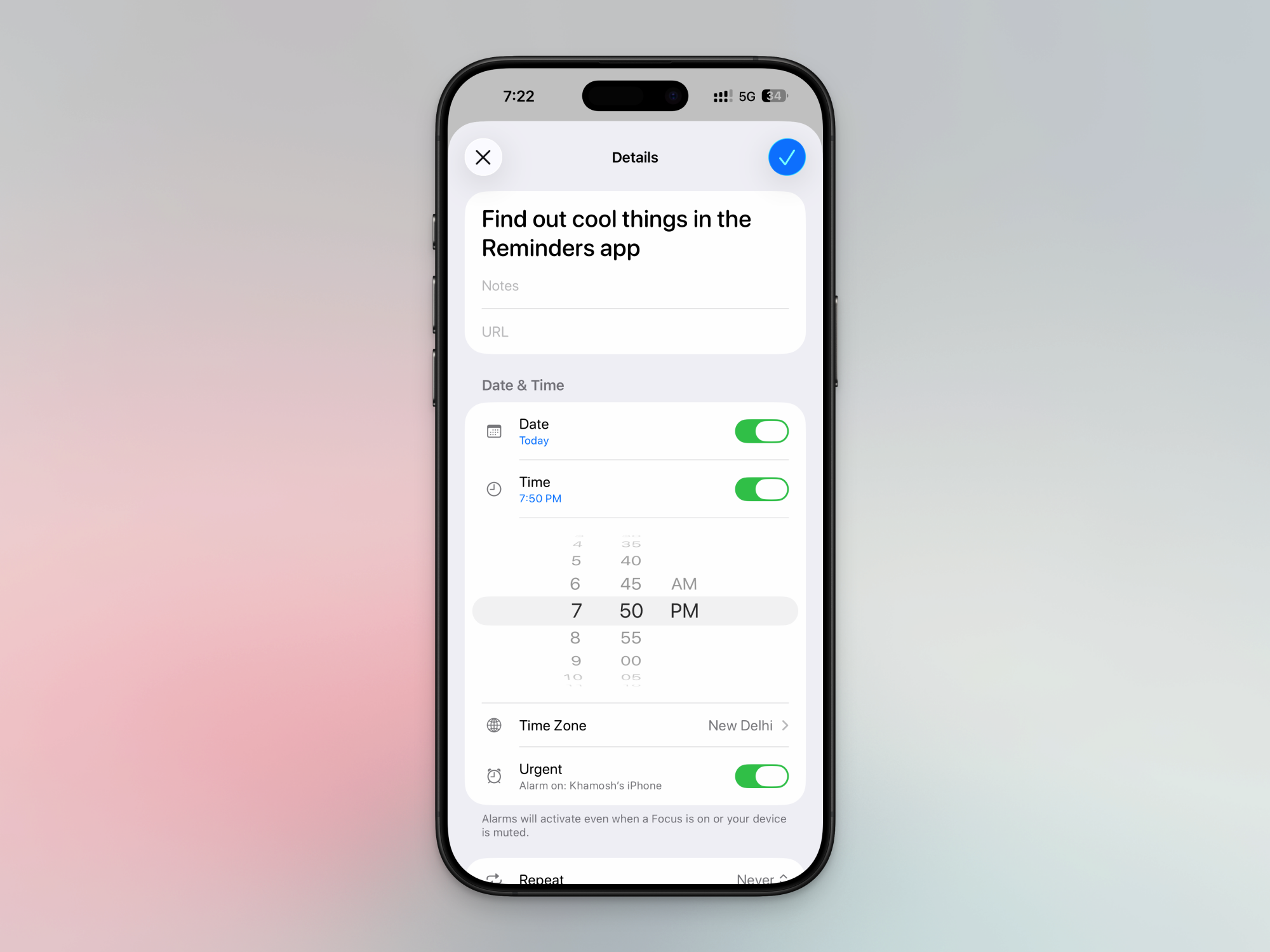
To get started, open the Reminder app, navigate to a task list, and either create a new reminder, or edit it. When you’re adding a date and time, you’ll see a new Urgent toggle. When you enable the Urgent mode, it will turn on an alarm that will go off when the reminder is due. The alarm will trigger even when your iPhone is in silent mode or in a Do Not Disturb Focus mode, so be careful when setting it up.

Urgent setting in Reminders app for alarm.

Credit: Khamosh Pathak

When you enable this for the first time, you’ll get a connection request for integrating Reminders with Alarms. Here, tap Allow. If you don’t see this popup, or if you’ve dismissed it before, go to Settings > Apps > Reminders, and in the “Allow Reminders to Access” section, enable the Alarms toggle.

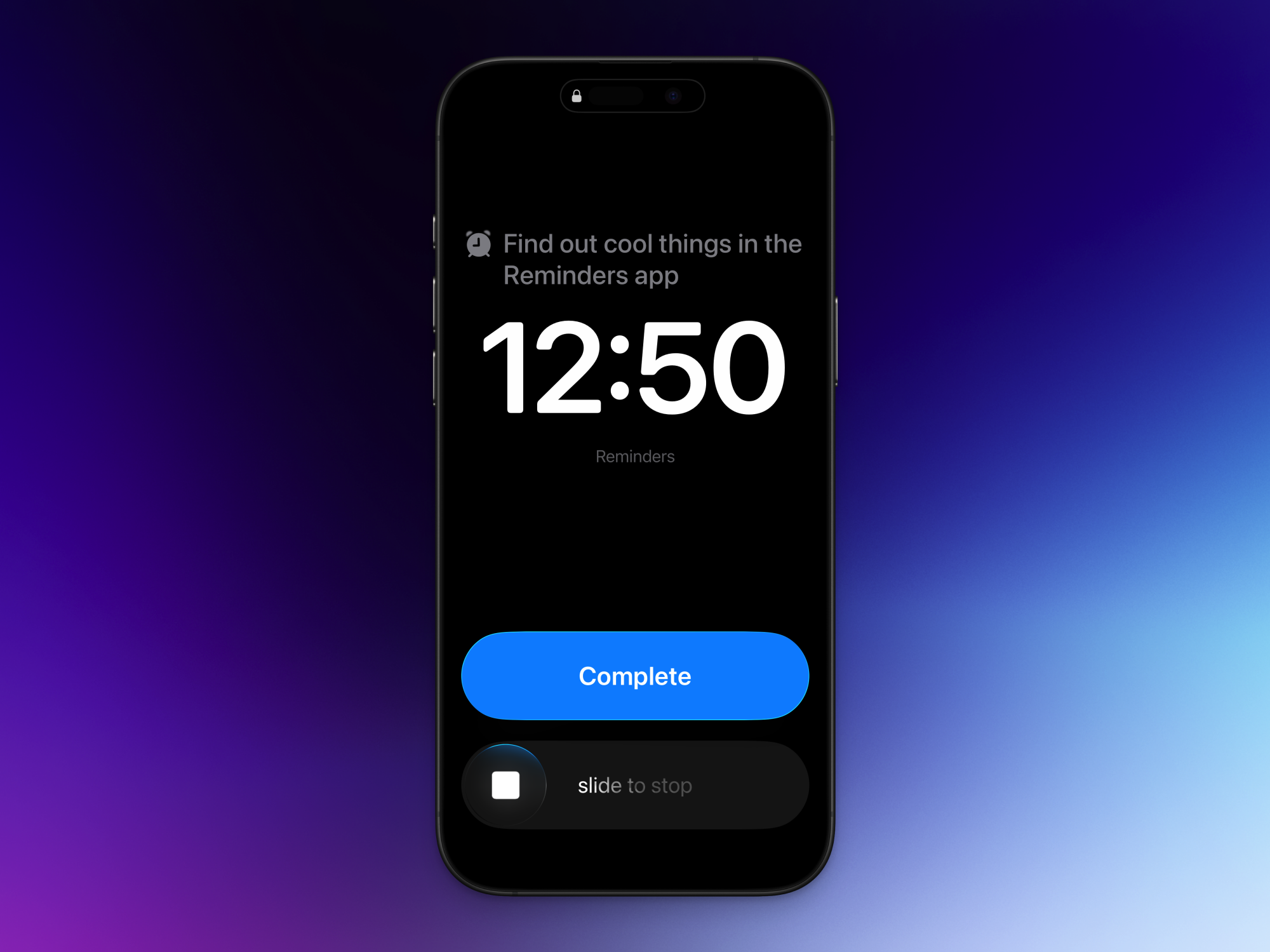
When the reminder is due, you’ll see a full-screen reminder interface, with the reminder up top, and an option to slide to stop (using Apple’s new sliding interface for dismissing alarms, which you can disable if you want). You’ll also see a big blue Snooze button. This will snooze the reminder for nine minutes.

Whether you hit the Snooze button or you use the slider to stop the alarm, Apple will add the Reminder to the top of the notifications list, as a Live Activity. You’ll see the reminder, with the snooze duration (if enabled), and the task. To actually complete the task, you’ll have to check it off from the Live Activity or the Reminders app.

Complete button in Reminders alarm.

Credit: Khamosh Pathak

Unlike in the new alarm feature, there’s no way to edit the Snooze duration for reminders, or to disable the slider. If you don’t like the Snooze feature or the two-tap approach to completing reminders, you can switch it out for a Complete button instead. Go to Settings > Apps > Reminders and in the “Urgent Reminders” section, enable the Complete from Alarm feature. Now, when the alarm goes off, you’ll see two buttons instead: Slide to Stop and Complete. When you tap Complete, the alarm will disappear, and the task will be marked as Complete.

‘Colleges Oversold Education. Now They Must Sell Connection’

A tenured USC professor is arguing that universities need to fundamentally rethink their value proposition as AI rapidly closes the gap on human instruction and a loneliness epidemic grips the generation most likely to be sitting in their lecture halls. Eric Anicich, an associate professor at USC’s Marshall School of Business, wrote in the Los Angeles Times that nearly three-quarters of 16- to 24-year-olds now report feeling lonely, young adults spend 70% less time with friends in person compared to two decades ago, and a growing majority of Gen Z college graduates say their degree was a “waste of money.”

Anicich points to a recent Harvard study finding that students using an AI tutor learned more than twice as much as those in traditional active-learning classes, and did so in less time. The implication is stark: if instruction becomes abundant and cheap, colleges must sell what remains scarce — genuine human community. He notes that his doctoral training included zero coursework on teaching, a norm he says persists across academia. His proposal: fund student life as seriously as research labs, hire professional “experience designers,” and treat rituals and collaborative projects as core curriculum rather than amenities.


Read more of this story at Slashdot.

[$] Bazzite: a gem for Linux gamers

One of the things that has historically stood between Linux and the
fabled “year of the Linux desktop” is its lack of support for video
games. Many users who would have happily abandoned Windows have,
reluctantly, stayed for the video games or had to deal with dual
booting. In the past few years, though, Linux support for
games—including those that only have Windows versions—has
improved dramatically, if one is willing to put the pieces
together. Bazzite, an image-based
Fedora derivative, is a project that aims to let users play games and
use the Linux desktop with almost no assembly required.

Our favorite Anker MagSafe power bank is 34 percent off right now

Holiday travel is almost upon us and, while it likely won’t be something out of a Richard Curtis film, there are ways to make it easier. You can raid our list of best travel gifts for 2025 and pick up our favorite MagSafe power bank: Anker’s MagGo 10,000mAh Power Bank.

Even better, the Anker MagGo power bank is currently on sale for $60, down from $90. This 34 percent discount brings the power bank to only $5 more than its all-time low price. We’re big fans of Anker’s MagGo power bank — one of the first and best Qi2-certified products available. You can get about 1.7 iPhone 15 charges out of it and bring your phone from five percent to 60 percent in a little more than 45 minutes. Plus, the stand makes it easy to keep using your phone while it charges. 

Two of our other picks for best MagSafe power bank are also on sale — and down to record-low prices. The Baseus Picogo 25W Power Bank is 24 percent off and down to $53 from $70. Meanwhile, the Ugreen MagFlow 10,000mAh 25W Power Bank has dropped to $60 from $90 — a 33 percent discount. 

Follow @EngadgetDeals on X for the latest tech deals and buying advice.

This article originally appeared on Engadget at https://www.engadget.com/deals/our-favorite-anker-magsafe-power-bank-is-34-percent-off-right-now-151039224.html?src=rss

Rare Pokémon Cards Worth $100K Stolen In Brazen Heist Caught On Camera

Rare Pokémon Cards Worth $100K Stolen In Brazen Heist Caught On Camera
A brazen and high-speed robbery hit a collectible store in Southern California, whereby a trio of masked thieves made off with over $100,000 worth of rare Pokémon trading cards and sports memorabilia in a heist that lasted just three minutes.

The target was LA Sports Cards in Burbank, which was raided by a band of synchronized card bandits.

Pebble maker announces Index 01, a smart-ish ring for under $100

Nearly a decade after Pebble’s nascent smartwatch empire crumbled, the brand is staging a comeback with new wearables. The Pebble Core Duo 2 and Core Time 2 are a natural evolution of the company’s low-power smartwatch designs, but its next wearable is something different. The Index 01 is a ring, but you probably shouldn’t call it a smart ring. The Index does just one thing—capture voice notes—but the firm says it does that one thing extremely well.

Most of today’s smart rings offer users the ability to track health stats, along with various minor smartphone integrations. With all the sensors and data collection, these devices can cost as much as a smartwatch and require frequent charging. The Index 01 doesn’t do any of that. It contains a Bluetooth radio, a microphone, a hearing aid battery, and a physical button. You press the button, record your note, and that’s it. The company says the Index 01 will run for years on a charge and will cost just $75 during the preorder period. After that, it will go up to $99.

Core Devices, the new home of Pebble, says the Index is designed to be worn on your index finger (get it?), where you can easily mash the device’s button with your thumb. Unlike recording notes with a phone or smartwatch, you don’t need both hands to create voice notes with the Index.

Read full article

Comments

Spotify finally brings music videos to the US

Spotify is finally letting the United States join its music video party. Music Videos have started rolling out in beta today to Premium users across the US and Canada, offering not only official artist videos but also new formats like live performances and covers.

Music Videos first arrived last year in 11 countries, but the United States wasn’t one of them. The reason for that was simple — Spotify simply didn’t have the rights. However, last month the streaming service struck a deal with the National Music Publishers’ Association (NMPA) that included new provisions for video content, paving the way for the new feature. 

Here’s how to access Music Videos. If you’re a Premium subscriber in one of Spotify’s beta markets, you can simply open a track (on TV, desktop, IOS and Android devices) and tap “Switch to video.” The music video will then start playing where the song left off. To return to background listening, hit “Switch to audio.” You can get a full-screen experience by turning your device to landscape mode. 

When the service first launched, it was limited to “thousands” of music videos, but Spotify promised that the list would expand rapidly. In discussing the benefits to artists, the company said early this year that “users who discover a song and then watch the music video on Spotify are 34 percent more likely to stream the song again the following week.” In a job listing spotted by The Verge, Spotify said it planned to build a “best-in-class video experience to rival the biggest players, like YouTube or TikTok.” 

This article originally appeared on Engadget at https://www.engadget.com/entertainment/music/spotify-finally-brings-music-videos-to-the-us-150037974.html?src=rss