NotebookLM Has a New Feature for Visual Learners

Another day, another update to Google’s NotebookLM, the versatile AI tool that functions like a personal assistant focused only on you and your needs. The latest update is for visual learners: You can turn your source materials into helpful infographics that give you a clear picture—literally—of what the PDFs, websites, videos, or other materials you’re studying or organizing are about.

How to use the new NotebookLM infographics feature

To use the new feature, open any of your NotebookLM Notebooks (the name given to folders full of specific materials you’ve uploaded) and navigate to the panel on the right side. It’s the same panel where you find the other offerings like the video creator and flashcard maker.

As with those tools, you just tap the associated button to generate the corresponding product, making sure the sources from your left panel that you want to include are all checked off. I tried it out this morning, first using the NotebookLM account associated with my personal Chrome profile and what I’m studying in my private life, then using the one I have set up for work, which has a tester notebook full of materials about how to study for the SAT. (I am strict about using different Chrome profiles for various parts of my life and am now up to seven.)

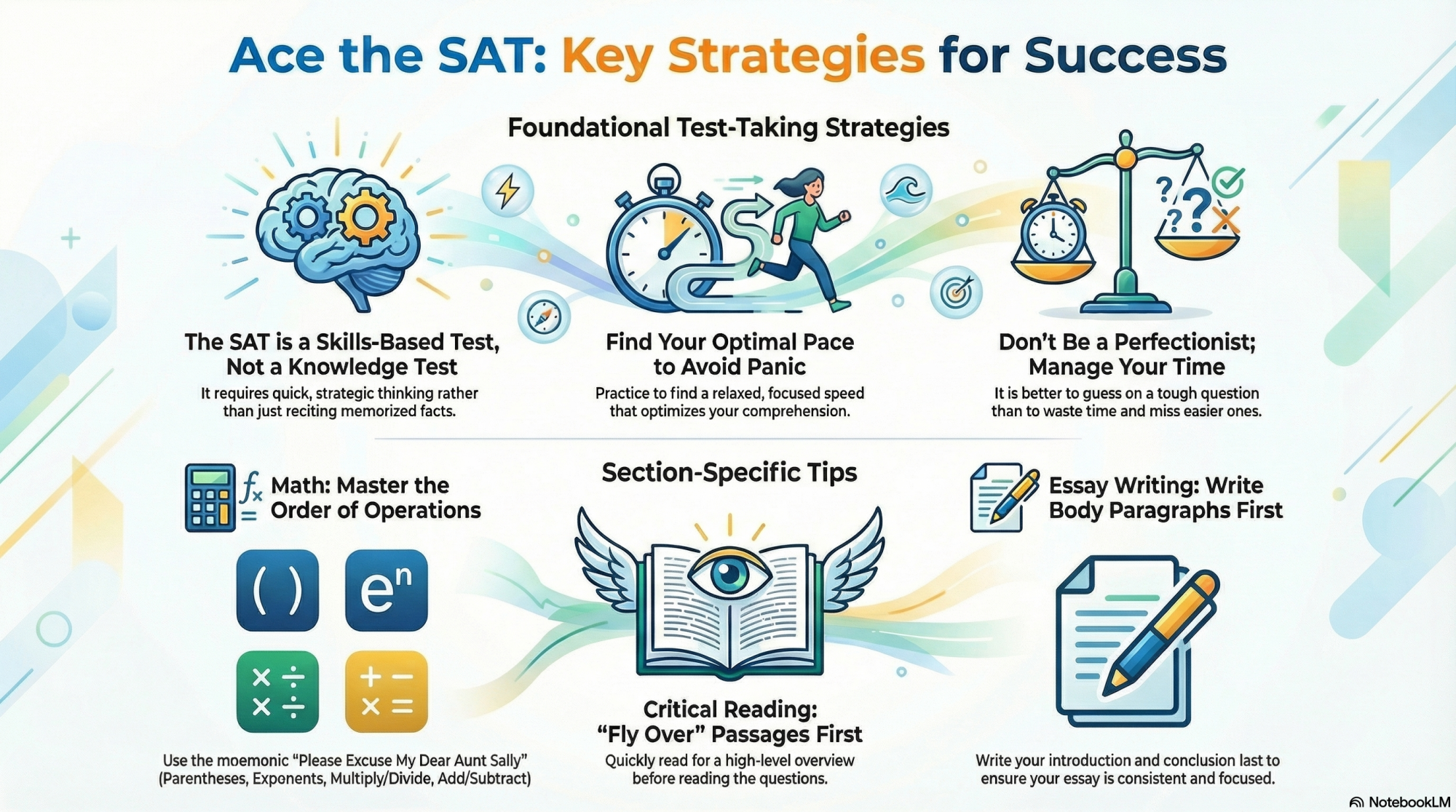
In my personal account, the button was labeled BETA—and it acted like it. After two failed attempts, NotebookLM could not produce an infographic based on my materials. In my work account, though, the beta label was missing and it performed the function just fine, spitting this out:

NotebookLM infographic

Credit: Google

This is rolling out in full functionality to accounts at different times, obviously, but I was glad to see one of mine had easy access because I thought the infographic was solid.

Who the infographics feature is helpful for

I don’t consider myself a visual learner and primarily use NotebookLM to refine ideas or generate educational audio clips I can listen to while I clean the house, so I wasn’t expecting to like this. I don’t like the mind map creator within NotebookLM at all, for instance; flowcharts just aren’t how I learn best, and that’s fine.

But the infographic was concise, engaging, and just detailed enough to keep me interested and looking at it. It’s unlikely I’ll use this to study or refine my work often, but I can absolutely see how it would be useful to someone who learns more visually, especially if all the lines and boxes of a mind map can get too convoluted to be useful.

Scheduler Woes: Bisecting Early Performance Regressions Found In Linux 6.19

Yesterday I noted some early performance regressions I’ve found on the Linux 6.19 kernel compared to Linux 6.18 LTS stable. Those initial benchmarks were on an AMD EPYC server. Since then I’ve seen many of the same workloads regressing similarly on an AMD Ryzen Threadripper workstation between Linux 6.18 and Linux 6.19 Git. Given the significant impact and AMD Threadripper processors always helping out to speed-up Linux kernel build times to make for a quicker and more manageable kernel bisecting experience, here is a look at some of the results for the Linux 6.19 performance regressions.

Security Experts Issue Urgent Warning To Block All AI Browsers ASAP

Security Experts Issue Urgent Warning To Block All AI Browsers ASAP
If you have used any of the AI browsers available today, you would likely have been impressed with their ability to automate tasks and act as an intelligent assistant. While these browsers continue to gain popularity, Gartner, a leading global research company, has warned that they pose security risks and advised companies to block them.

One

The Inevitable Shape of Cheap Online Retail

Pinduoduo in China, Shopee in Southeast Asia, and Meesho in India operate in markets that could hardly be more different — an upper-middle-income industrial state, a stitched-together archipelago of under-banked economies, and a country where three-quarters of retail is unorganized and e-commerce penetration sits at about 7% — yet all three have landed on the same business model.

These platforms run asset-light marketplaces specializing in cheap goods and slow delivery, monetizing through logistics mark-ups, advertising, and installment credit rather than retail margins. Temu and Shein are further variations now expanding in the U.S. and Europe.

The economics are thin for all. Pinduoduo’s EBITDA margins on GMV (gross merchandise value) sit in a 0-4% band; Meesho’s group-wide EBITDA hovers around break-even. Neither charges commissions on most sales; both earn through logistics mark-ups and advertising. Sponsored listings account for 1-3% of GMV at Indian marketplaces and 4-5% at Alibaba and Pinduoduo.

Credit is the more consequential side business. In India, cash on delivery functions as unofficial credit. Meesho CEO Vidit Aatrey said the customers prefer CoD for its “built-in delay,” which effectively makes it “a five-day loan.” Geography, income, and regulation were supposed to produce different answers. They produced one: a 3% endgame where e-commerce clips a few points of GMV and relies on attention and credit for profits.


Read more of this story at Slashdot.

10 Hacks Every Homeowner Should Know

We may earn a commission from links on this page.

When you buy a house, you buy a long list of projects that stretch into the distant future. Planning your time and budget for everything that will need to be done can be a challenge, but it’s worth it for the comfort, security, and financial cushion that home ownership offers. That doesn’t mean it can’t get a little stressful from time to time, though, which is why we could all use a few small tricks that can make a big difference as a homeowner. Here are 10 essential hacks that every homeowner should know.

Enlarge rooms with paint

One of the most common reasons for a home-buyer’s remorse is size. It can be difficult to gauge how you’ll use a space until you’re actually in it, and our lives don’t always go according to plan. As a result, it’s not uncommon for folks to feel like their house seems a bit too small for their liking.

Adding onto a house is expensive—a much more budget-friendly approach is to use visual tricks to make your house feel larger. Paint is a powerful tool for this. By leveraging color theory, you can make a room feel larger by using lighter colors on the walls and glossy white on the ceiling, and using a single color on all the walls to erase the edges that define the space, thus making it appear larger. If you don’t have a handy fortune to throw at a major home renovation, a low-cost paint project can give you the feeling of a larger room, at least.

No-dig fences

If you’ve ever been house-hunting, you’re familiar with one surprising fact: A lot of houses, especially new builds, don’t have fencing. You walk into the backyard and it’s just an open field, with invisible property lines somewhere in the near distance.

Fencing can be expensive if you hire someone to install it, with a price tag potentially in the thousands of dollars. Installing a fence on your own, DIY-style, is labor-intensive, especially if your yard is rocky. If all you need is a perimeter fence, however, a no-dig fence like this one is an easy solution that will mark off your property and pen in small pets without the effort or expense of a traditional fence project.

Dowel pin screw hole repair

Whether your house is new, lightly used, or historical in nature, eventually you’re going to deal with loose screws, especially in your door and cabinet hinges. Hinges carry so much weight and get so much use, the screws inevitably work themselves loose. You can fix this a few times just by tightening everything up again, but over time, this pattern will result in stripped screw holes and permanently sagging doors. At that point, you can either try to reposition the hinge so you can bite into fresh wood, or replace the door frame or cabinets at great expense.

That is, unless you know the dowel hack. All you need are some wooden dowel pins and some wood glue. Fill the stripped screw hole with glue, insert a dowel, trim as needed, and let the glue set. Then you can drill a fresh hole, and your screws will bite like new again, all for less than $10.

Rain-X on shower doors

One of the mysteries of the universe is the fact that bathrooms in general aren’t self-cleaning. How can a space doused with soap and water on a regular basis be so filthy?

One reason is the mineral content of your water, and the tendency for soap to transmogrify into soap scum. These two elements combine to turn glass shower doors into opaque, cloudy barriers that never look clean. Cleaning those hard water and scum stains off the glass requires a lot of elbow grease, and it’s the sort of chore we put off for months (or longer) simply because of the effort involved.

The trick is, once you do clean those glass doors, you should spray them with Rain-X. This is a product made for car windshields, but it will work a charm in your bathroom, too. It’s a water repellent, so your shower water will bead up on the glass, making it super easy to squeegee it off before it can evaporate and leave behind all those mineral deposits and soap residue. Using it on a regular basis when you clean your shower will keep those glass doors clear and free of build-up.

Deodorize with vodka

Vodka doesn’t have much of a taste, it has almost no odor, and it’s typically about 40% alcohol. All this means that vodka—even the cheap stuff—is actually a very good disinfectant and deodorizer. Many theater companies and theme parks use a mixture of vodka and water to spray down costumes between performances when there’s no time to send them out for cleaning. The alcohol kills off germs and odor-creating bacteria, and once it dries, there’s no smell or residue.

You can use this in your house, too. If your bedding, shoes, or towels have gotten a bit musty, a good spray with a 50/50 mix of vodka and water will deodorize and sanitize them effectively. You can add a drop of an essential oil too, if you want a light scent left behind.

Paint your roof

People typically don’t think about the roof of their house until it leaks—which is a mistake, because roofs are expensive to fix, even more expensive to replace, and a failing roof can allow water damage to destroy other parts of your home.

Becoming a roofing expert isn’t in the cards for most of us, but one thing any homeowner can do (usually as a DIY project) is coat the roof. Specialty coatings for flat roofs and shingles protect your roof from sun damage, fill in microscopic cracks before they can develop into leaks, and can extend the life of your roof by years, saving you a lot of money over time.

Run appliances at night

The modern house is an energy-sucking monster. We run lights, heat and cooling systems, televisions, computers, washers, dryers—the list is almost endless. And all of these devices and appliances require electricity, which, as you may have noticed, is expensive stuff.

If you can commit to running a lot of appliances at night, you can generally save money, however. That’s because electricity rates have “peak” and “off-peak” hours, so running your washing machine at night instead of the afternoon can cost a lot less. Some utility companies offer formal Time of Use plans, where you are charged a higher rate during peak hours, but a much lower rate during off-peak hours. If you can be disciplined about your power use, you can save a lot of money this way.

Get a ladder Levler

Doing DIY work around the house can be dangerous, and ladders are often involved. People often don’t know the proper way to position and secure a ladder, try to carry stuff while climbing, or forget that gravity is a thing and try to reach stuff they really shouldn’t while standing twelve feet in the air on an improperly balanced ladder. And then there’s the fun experience of having tools and fasteners in your pockets while you’re clinging to a ladder for dear life.

That can all be solved with this gizmo: The Ladder Levler. This gadget makes it safer to use your ladder on uneven surfaces (like stairs or sloped yards), and it’s also a storage bin that clips right onto your ladder, leaving your hands free to, you know, hold on like your life depends on it.

Leak detectors

Water will destroy your house if you’re not careful. Roof, pipe, and appliance leaks can persist for a long time before they become apparent, and every day a leak remains active means potential mold, dry rot, and structural damage to your home. And if you’re not home when a pipe or water heater bursts, sending gallons of water to gleefully rampage throughout your home, the cost of cleanup and repair can be astronomical.

That’s why leak detectors and alarms are an essential hack. Having these seeded throughout the house means you’ll never be caught by surprise—the moment moisture is detected, the alarms will sound, and you can deal with the problem before it ruins everything. You can get detectors that will ing you on your phone or other devices so you’ll be warned even if you’re not home, and you can often pair them with automatic shutoff valves on your water supply, stopping the flow of water the instant it becomes a threat to your home.

Thorny home security

Keeping your house secure usually involves technology like alarm systems and doorbell cameras, often backed up by a security service that can contact the police on your behalf. That’s always a sound idea, but it can be expensive and occasionally intrusive (especially if you find yourself having to reset systems and call off false alarms regularly).

But there’s also a passive way to enhance your home’s security: landscaping. A few thorny bushes near windows and thoughtful management of tree branches and ground covers can go a long way toward making your home less likely to be robbed. While this isn’t a set-it-and-forget-it kind of security plan, you’re going to have to manage some amount of landscaping anyway, so why not make choices in your outdoor spaces that actually make your home more secure while you’re at it.

Nearly one-third of teens use AI chatbots daily

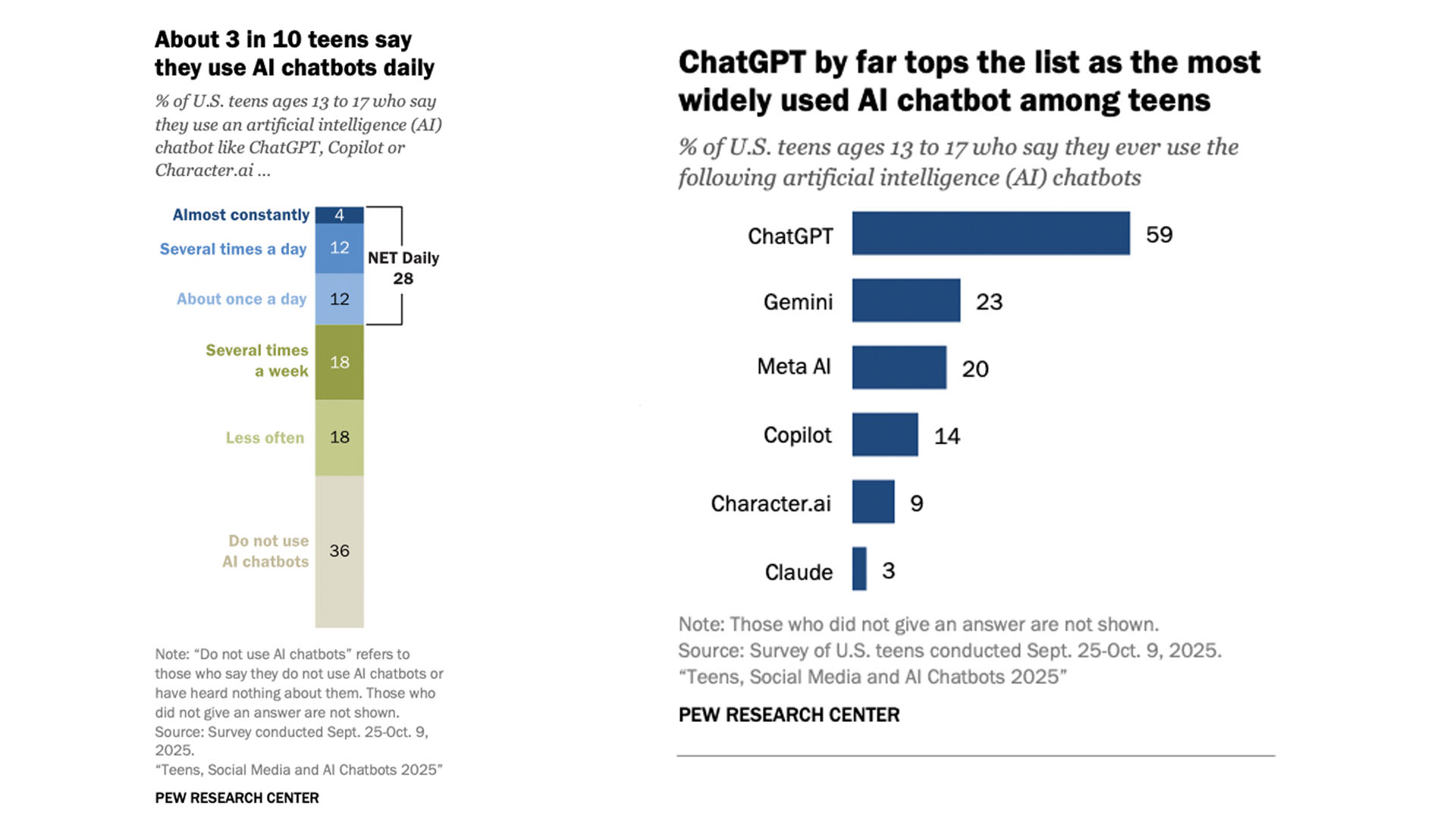
AI chatbots haven’t come close to replacing teens’ social media habits, but they are playing a significant role in their online habits. Nearly one-third of US teens report using AI chatbots daily or more, according to a new report from Pew Research. 

The report is the first from Pew to specifically examine how often teens are using AI overall, and was published alongside its latest research on teens’ social media use. It’s based on an online survey of 1,458 US teens who were polled between September 25 to October 9, 2025. According to Pew, the survey was “weighted to be representative of U.S. teens ages 13 to 17 who live with their parents by age, gender, race and ethnicity, household income, and other categories.”

According to Pew, 48 percent of teens use AI chatbots “several times a week” or more often, with 12 percent reporting their use at “several times a day” and 4 percent saying they use the tools “almost constantly.” That’s far fewer than the 21 percent of teens who report almost constant use of TikTok and the 17 percent who say the same about YouTube. But those numbers are still significant considering how much newer these services are compared with mainstream social media apps. 

The report also offers some insight into which AI companies’ chatbots are most used among teens. OpenAI’s ChatGPT came out ahead by far, with 59 percent of teens saying they had used the service, followed by Google’s Gemini at 23 percent and Meta AI at 20 percent. Just 14 percent of teens said they had ever used Microsoft Copilot, and 9 percent and 3 percent reported using Character AI and Anthropic’s Claude, respectively.

The survey is Pew's first to study Ai chatbot use among teens broadly.
The survey is Pew’s first to study Ai chatbot use among teens broadly.
Pew Research

Pew’s research comes as there’s been growing scrutiny over AI companies’ handling of younger users. Both OpenAI and Character AI are currently facing wrongful deaths lawsuits from the parents of teens who died by suicide. In both cases, the parents allege that their child’s interactions with a chatbot played a role in their death. (Character AI briefly banned teens from its service before introducing a more limited format for younger users.) Other companies, including Alphabet and Meta, are being probed by the FTC over their safety policies for younger users.

Interestingly, the report also indicates there has been little change in US teens’ social media use.  Pew, which has regularly polled teens about how they use social media, notes that teens’ daily use of these platforms “remains relatively stable” compared with recent years. YouTube is still the most widely-used platform, reaching 92 percent of teens, followed by TikTok at 69 percent, Instagram at 63 percent and Snapchat at 55 percent. Of the major apps the report surveyed, WhatsApp is the only service to see significant change in recent years, with 24 percent of teens now reporting they use the messaging app, compared with 17 percent in 2022.

This article originally appeared on Engadget at https://www.engadget.com/ai/nearly-one-third-of-teens-use-ai-chatbots-daily-200000888.html?src=rss

The Webb telescope spots a supernova from 13 billion years ago

The James Webb Space Telescope and other international observatories have spotted a 13-billion-year-old supernova. On Tuesday, the European Space Agency (ESA) announced the sighting of a gamma-ray burst from a star that exploded when the Universe was only 730 million years old. The Webb telescope even detected the supernova’s host galaxy.

Before this observation, the oldest recorded supernova was from when the Universe was 1.8 billion years old. That’s a difference of more than a billion years.

You can see the gamma-ray burst in the image below. It’s the tiny red smudge at the center of the zoomed-in box on the right.

Webb image shows hundreds of galaxies of all shapes and sizes against the black background of space. Toward the center-left is a large white spiral galaxy that is almost face-on. To the right of this is a large box, which zooms in on an area at top right. Within the box is a faint red dot at the center, with the label GRB 250314A.
The tiny red splotch in the center of the crop box is the oldest thing you’ve seen.
NASA, ESA, CSA, STScI, A. Levan (IMAPP)

“This observation also demonstrates that we can use Webb to find individual stars when the Universe was only 5 percent of its current age,” co-author Andrew Levan wrote in the ESA’s press release. “There are only a handful of gamma-ray bursts in the last 50 years that have been detected in the first billion years of the Universe. This particular event is very rare and very exciting.”

Researchers learned that the 13-billion-year-old explosion shared many traits with modern, nearby supernovae. While that may not sound shocking, scientists expected a more profound difference. That’s because early stars likely had fewer heavy elements, were more massive and didn’t live as long. “We went in with open minds,” co-author Nial Tanvir said. “And lo and behold, Webb showed that this supernova looks exactly like modern supernovae.”

Detection was an international relay race. First, NASA’s Neil Gehrels Swift Observatory noted the X-ray source’s location. (That helped Webb to make subsequent observations that determined its distance). Then, the Nordic Optical Telescope on the Canary Islands in Spain made observations indicating that the gamma ray might be very distant. Hours later, the European Southern Observatory’s Very Large Telescope in Chile estimated its age: 730 million years after the Big Bang. All of this happened in under 17 hours, according to the ESA.

The team behind the observation has been approved to spend more time with Webb studying gamma-ray bursts from the early Universe — and the galaxies behind them. “That glow will help Webb see more and give us a ‘fingerprint’ of the galaxy,” Levan predicted.

This article originally appeared on Engadget at https://www.engadget.com/science/space/the-webb-telescope-spots-a-supernova-from-13-billion-years-ago-194327489.html?src=rss

Samsung Wallet to gain support for digital Porsche keys

Owners of the Porsche Macan and upcoming Porsche Cayenne Electric will be able to unlock and start their cars with their Galaxy phones, Samsung has announced. The cars, alongside other Porsche models, are gaining support for Samsung Wallet’s Digital Key feature, which lets users wirelessly control their car over a secure UWB or NFC connection.

Digital Key support will be available in Europe in December, before rolling out globally, “aligned with the launch timeline of Porsche vehicles,” Samsung says. Samsung Wallet is available on Samsung devices as old as the Galaxy S20, Note 20, Galaxy Z Fold 2 and Galaxy Flip 5G, and is included on the majority of the company’s new phones. Like similar features on Google’s Pixels and Apple’s iPhones, Digital Key allows Porsche owners with a supported Galaxy phone to unlock, lock and start their car directly from their phone. If your phone is ever taken, you can also remotely lock or delete a Digital Key to keep your car safe.

Samsung added Digital Key support to select Volvo and Polestar EVs in February 2025. The feature first became available in 2021, and is one of several ways the phone maker imagines people will use Samsung Wallet. Beyond digital car keys, the app can also store credit and debit cards and be used to transfer money with a tap.

This article originally appeared on Engadget at https://www.engadget.com/mobile/smartphones/samsung-wallet-to-gain-support-for-digital-porsche-keys-193000085.html?src=rss

12 Shows Like ‘Percy Jackson and the Olympians’ You Should Watch Next

We may earn a commission from links on this page.

Though the film series petered out after only a couple of movies, Rick Riordan’s middle-grade Camp Half-Blood have been revived as a mega-popular Disney+ streaming series. The breathing room offered by a series format seems to have been the key to unlocking their potential as an adaptation, allowing for a more fully realized exploration of this atypical (at least on our side of Mount Olympus) coming-of-age story.

In its first season, the show found a good balance between fantasy action and teen drama while also having a ton of fun poking at the conventions of ancient myth. Season two is just out, and more is on the way, but it’s likely to be a bit of a wait. In the meantime, here are 12 more shows that offer a similar mix of coming-of-age angst, action, and myths and legends.


Once Upon a Time (2011 – 2018)

Doing for fairy tales what Percy Jackson does for Greek mythology, this long-running prime time drama stars Jennifer Morrison as Emma Swan, a struggling bail bond agent who travels to the Maine town of Storybrooke (subtle!) to reconnect with the son who she gave up for adoption. In the process, she discovers that she’s the daughter of Snow White and Prince Charming, given up to protect her from the machinations of Regina (Lana Parrilla), the evil queen who is also responsible for the curse that dropped an endless number of fairy tale characters into this small town to live dreary normal lives without any memories of their past adventures (at least at first). Stream Once Upon a Time on Disney+ and Hulu.


His Dark Materials (2019 – 2022)

The tone is very different, but there are thematic and plot similarities aplenty in this appropriately dark fantasy, adapted from the beloved YA series by Philip Pullman and set in an alternate world in which human souls exist outside the body in the form of animal companions called daemons. Lyra Belacqua (Dafne Keen) is an orphaned girl living at Jordan College, Oxford who finds herself involved in a murder plot that brings her into the orbit of the powerful Magisterium, the world’s overarching and oppressive religious authority—caught between her mother (Ruth Wilson), a powerful figure in the Magisterium, and her extremist heretic father (James McAvoy). From her steampunk-ish world, Lyra and her daemon Pan travel across a multiverse that includes our very own Earth. Stream His Dark Materials on HBO Max.


Fate: The Winx Saga (2021 – 2022)

An update to the Winx Club Nickelodeon animated series from back in the day, this show follows five fairies attending a prestigious boarding school for magical types. Not entirely unlike Percy Jackson, our lead fire fairy Bloom soon discovers that her parentage is more alien (literally) than she’d ever known. After a slow start, the show builds into an impressive coming-of-age story, and a rare fantasy series genuinely geared to its teenage target audience. It was cancelled after two seasons, but if you find yourself hooked, a series of graphic novels continues the story. Stream Fate: The Winx Saga on Netflix.


Blood of Zeus (2020 – 2025)

If “unacknowledged love children of gods” is your thing, well, Greek mythology has you covered. Set in an ancient Greek of myth, this adult-oriented animated series introduces Heron, an original character who nevertheless fits firmly in the tradition; here, he’s a young miner, illegitimate and thus scorned by his fellow villagers. When demons attack, Heron discovers he’s the secret son of Zeus, and that he’ll need to help lead humanity defeat flesh-eating creatures born from the blood of fallen titans. Intimately plotted and with an increasingly epic scope, the show blends Greek myth with anime style to tell an addictive original story. Stream Blood of Zeus on Netflix.


Moving (2023 – )

The South Korean import became Disney/Hulu’s most-watched K-drama, and did solid business globally (even if the English-language title doesn’t suggest major thrills). As the series opens, we meet Kim Bong-seok (Lee Jung-ha), literally weighted down by his mom (as in: she gives him weights to fill his pockets) as he’s heading off to school; we soon learn that it’s because he can’t quite control his ability to fly, and is prone to floating off unexpectedly. Athlete Jang Hui-soo (Go Youn-jung) heals instantly from injuries, while class president Lee Gang-hoon (Kim Do-hoon) is fast and incredibly strong. As it turns out, all of these kids’ parents were bred and trained as part of a black ops program from which they’ve escaped, passing along their abilities to their kids—who have to stifle their powers, lest they draw the attention of spies hunting them down. Stream Moving on Disney+ and Hulu.


Chilling Adventures of Sabrina (2018 – 2020)

No Greek mythology here (well, we do get a gorgon or two), but Sabrina is also the story of a young woman coming to terms with her destiny at a special school for people with unique powers while having (dark) adventures. Rather than the daughter of a god, Sabrina is a literal child of Lucifer. Sabrina Spellman (Kiernan Shipka) is an old-school witch in a household that’s not at all unlike the Addams family: two witchy aunts (played by Miranda Otto and Lucy Davis) alongside her warlock cousin (Chance Perdomo) and her loyal familiar, Salem the cat, all of them living their witchy lives just out of view of the local normies. At the outset, Sabrina’s forced to choose between signing her name in Satan’s book and becoming a full-fledged witch, or staying in high school with her human friends. Instead, she refuses to choose. Cannibalism, human sacrifice, and blood rituals result, as Sabrina is called upon to save her family, and the world, from dark forces. Stream Chilling Adventures of Sabrina on Netflix.


The Owl House (2020 – 2023)

In this animated series, teenager Luz Noceda (Sarah-Nicole Robles) finds herself trapped in the Demon Realm and there befriends a nonconformist witch Eda Clawthorne (Wendie Malick), who undertakes to teach the non-magical Luz everything she can about magic. Luz is determined to become a full-fledged witch despite her complete lack of prior experience, which is entirely refreshing given the volume of narratives about kids who just kinda discover that they’re super-powered nepo babies. Busting open the doors for LGBTQ+ representation on the Disney Channel, this show is chock full of queer characters, and it remained both creatively offbeat and adorable throughout its now completed run. Stream The Own House on Disney+.


Legacies (2018 – 2022)

A (sorta) standalone spin-off from the rather extensive Vampire Diaries universe, Legacies follows Hope Mikaelson (Danielle Rose Russell), an orphan descended from bloodlines that include vampires, witches, and werewolves—meaning the Salvatore School for the Young and Gifted suits her perfectly. Supernatural beings of all sorts attend, and it serves as a secret haven and training ground for those with powers. It’s a place where they can learn to control and/or conceal their abilities—sort of a cross between Wednesday‘s Nevermore Academy and Camp Half-Blood. The drama is a little more YA to Percy‘s middle-grade, and naturally, teen angst and romance abound. Stream Legacies on Netflix.


Spellbound (2023 – 2024)

Fifteen-year-old American Cece Parker Jones travels to Paris to join the prestigious dance school, only to discover that she’s an actual witch from a family with a history of magic. She struggles to balance dance, magic, and her desire to be a normal teenager while dealing with the Mystics, natural enemies to Cece’s type of witch. It’s a solidly entertaining blend of teen drama, magical duels, and uniquely, ballet. (it’s a standalone successor to the time travel-focused Find Me in Paris, which is also on Hulu). Stream Spellbound on Hulu.


American Born Chinese (2023)

Based on the seminal, semi-autobiographical 2006 graphic novel from Gene Luen Yang, this adaptation introduces Jin Wang (Ben Wang), a nerdy and rather ordinary son of Taiwanese immigrants. He befriends confident, generally loud and proud exchange student Wei-Chen (Jimmy Liu), who’s embarrassing and inspiring in equal measure. It’s soon revealed that Wei-Chen is no ordinary kid, but rather the son of legendary Chinese figure the Monkey King, and he’s on Earth looking for the ordinary teenager he believes can help him stop an uprising against Heaven. Ke Huy Quan co-stars as the former child star of a deeply stereotypical ’80s sitcom, and Michelle Yeoh appears as goddess of compassion Guanyin. It’s disappointing that this only lasted one season, but it tells a fairly complete story nonetheless. Stream American Born Chinese on Disney+.


Lockwood & Co. (2023)

In an alternate modern Britain, ghosts are an everyday sight, which is not to say they aren’t a nuisance—their touch is deadly. Technological progress has largely ground to a halt, while ghost-hunting agencies are common and, since adults lose the ability to sense ghosts directly, kids and teens are the ones on the front lines. Ruby Stokes (Bridgerton) plays Lucy Carlyle, an extremely sensitive listener who was cast aside when she was unfairly blamed for several deaths at her first job. With nowhere else to go, she joins up with the shady, unregulated Lockwood & Co., a two-orphan operation working outside the law. It’s a solidly spooky teen drama with a fair bit of action and a beating heart, in and among all of the dead people. Stream Lockwood & Co. on Netflix.


Troy: Fall of a City (2018)

This one’s definitely not for the young ones, but if you’re a grown-up-type person looking for a bit more on Greek mythology, you could do worse than this BBC take on The Iliad (and other Trojan War narratives). Adapting events in and around Homer’s work, we begin with the judgment of Paris (Louis Hunter), who’s asked by Hera, Athena, and Aphrodite to award an apple to the one he favors most; the goddesses here appear as human-esque characters, marking a change from older takes that saw giants watching from Olympus, and more recent adaptations that do away with gods altogether. We then meet Helen (Bella Dayne), a Spartan citizen in a loveless marriage, before following the action to Troy. The show has a lush, bronze-age aesthetic and displays an impressive fidelity to its varied source material. Stream Troy: Fall of a City on Prime Video and Netflix.

How Pokemon Cards Became a Stock Market For Millennials

The Pokemon Trading Card Game has quietly transformed into something its creators never intended: a speculative asset class dominated by adults hunting for profit while children struggle to find a single pack on store shelves. The resale market has climbed so high that the latest set, Phantasmal Flames, had a rare Charizard illustration valued at more than $800 before anyone had even pulled one from a pack — a pack that retails for about $5.3.

Ben Thyer, owner of BathTCG in Bath, has watched his shop become a flashpoint. His staff have received threats from customers, and he’s heard reports of attacks and robberies at other stores. He stopped selling whole boxes of booster packs and now limits individual pack purchases. On Amazon, customers can only enter raffles for the chance to buy cards at all.The Pokemon Company printed 10.2 billion cards in the year ending March 2025 and still cannot meet demand. The company shared a seven-month-old statement saying it is printing “at maximum capacity.” Thyer sees signs of a correction — prices on singles and sealed products are falling — but expects renewed frenzy around Pokemon’s 30th anniversary in early 2026.


Read more of this story at Slashdot.

PlayStation’s 2025 Wrap-Up is here, so you can see how many hours you’ve sunk into Death Stranding 2

Sony’s 2025 PlayStation Wrap-Up is now available. The recap, which is similar to those from music streaming services, sums up gaming habits from throughout the year. It shows players how many hours they used their PS4 or PS5, what games they played the most, preferred genres, trophy counts and more.

These digital cards are shareable on social media, which is kind of the whole point. Nothing says “bragging rights” more than offering definitive proof of how long you spent on a couch grinding in Clair Obscur: Expedition 33 or wandering the wasteland in Death Stranding 2.

An example.
Sony

This year, the recap provides insight into how much players interacted with accessories like the PlayStation Portal and PS VR2. It also details the “most used DualSense wireless controller design.”

The 2025 Wrap-Up will be available until January 8. Once completed, players also get a “unique glass-themed avatar.” It’s only available for adults.

My PlayStation wrap up 2025 pic.twitter.com/9Em96T4Xce

— priceless (@Real__Priceless) December 9, 2025

The PlayStation Wrap-Up has been around since 2017, though it ran into some issues with accessibility in 2024. Spotify introduced the basic idea with Wrapped back in 2015. Since then, the concept of a shareable year-end streaming list has spread like a virus. Just about everyone does it now, from Apple Music to Nintendo and even YouTube. We love to reflect on things we recently experienced, don’t we folks?

This article originally appeared on Engadget at https://www.engadget.com/gaming/playstation/playstations-2025-wrap-up-is-here-so-you-can-see-how-many-hours-youve-sunk-into-death-stranding-2-191508693.html?src=rss

Top 5 Zwift Videos: Best Trainers, FTP Increases, and Using Zwift

As more riders start the trainer season, many may be looking to upgrade or purchase their first setup. In this week’s top video, hear from one experienced Zwifter as he shares the top trainers for Zwift.

We’ve also included videos on fitness gains, Zwift use cases, the fastest bikes on Zwift, and the Wahoo KICKR CORE 2 (extensive review).

The Best Trainers for Zwift in 2025: From Budget to High End

Tariq from Smart Bike Trainers provides a comprehensive overview of the top trainers for Zwift, covering everything from the best budget trainer to the best high-end smart bike.

How I Increased My FTP by 25% in Just 8 Months

Who doesn’t want a hefty FTP increase? Adam from Road to A shares how he increased his FTP by 25% in the last 8 months of training.

What We Actually Do On Zwift

GCN presenters Conor, Alex, Ollie, Si, and Dan share how they use Zwift to supplement their training during the long winter months.

Fastest Zwift Bikes in 2026, Including New Level 5 Upgrade Bike!

With bike upgrades recently changing how Zwifters choose their bikes on Zwift, Cranks and Sprints shares an updated list of the fastest bikes on Zwift.

Wahoo KICKR CORE 2 In-Depth Review // The Best Budget Bike Trainer?

Desfit shares an in-depth review of the Wahoo KICKR CORE 2 after riding over 2000 kilometres on the trainer. Does it continue to perform as expected?

Got a Great Zwift Video?

Share the link below and we may feature it in an upcoming post!

Supreme Court appears likely to approve Trump’s firing of FTC Democrat

The Supreme Court’s conservative justices appear ready to overturn a 90-year-old precedent that said the president cannot fire a Federal Trade Commission member without cause. A ruling for Trump would give him more power over the FTC and potentially other independent agencies such as the Federal Communications Commission.

Former FTC Commissioner Rebecca Kelly Slaughter, a Democrat, sued Trump after he fired both Democrats from the commission in March. Slaughter’s case rests largely on the 1935 ruling in Humphrey’s Executor v. United States, in which the Supreme Court unanimously held that the president can only remove FTC commissioners for inefficiency, neglect of duty, or malfeasance in office.

Chief Justice John Roberts said during yesterday’s oral arguments that Humphrey’s Executor is a “dried husk” despite being the “primary authority” that Slaughter’s legal team is relying on. Roberts said the court’s 2020 ruling in Seila Law made it “pretty clear… that Humphrey’s Executor is just a dried husk of whatever people used to think it was because, in the opinion itself, it described the powers of the agency it was talking about, and they’re vanishingly insignificant, have nothing to do with what the FTC looks like today.”

Read full article

Comments

10 Hacks Every iPhone User Should Know

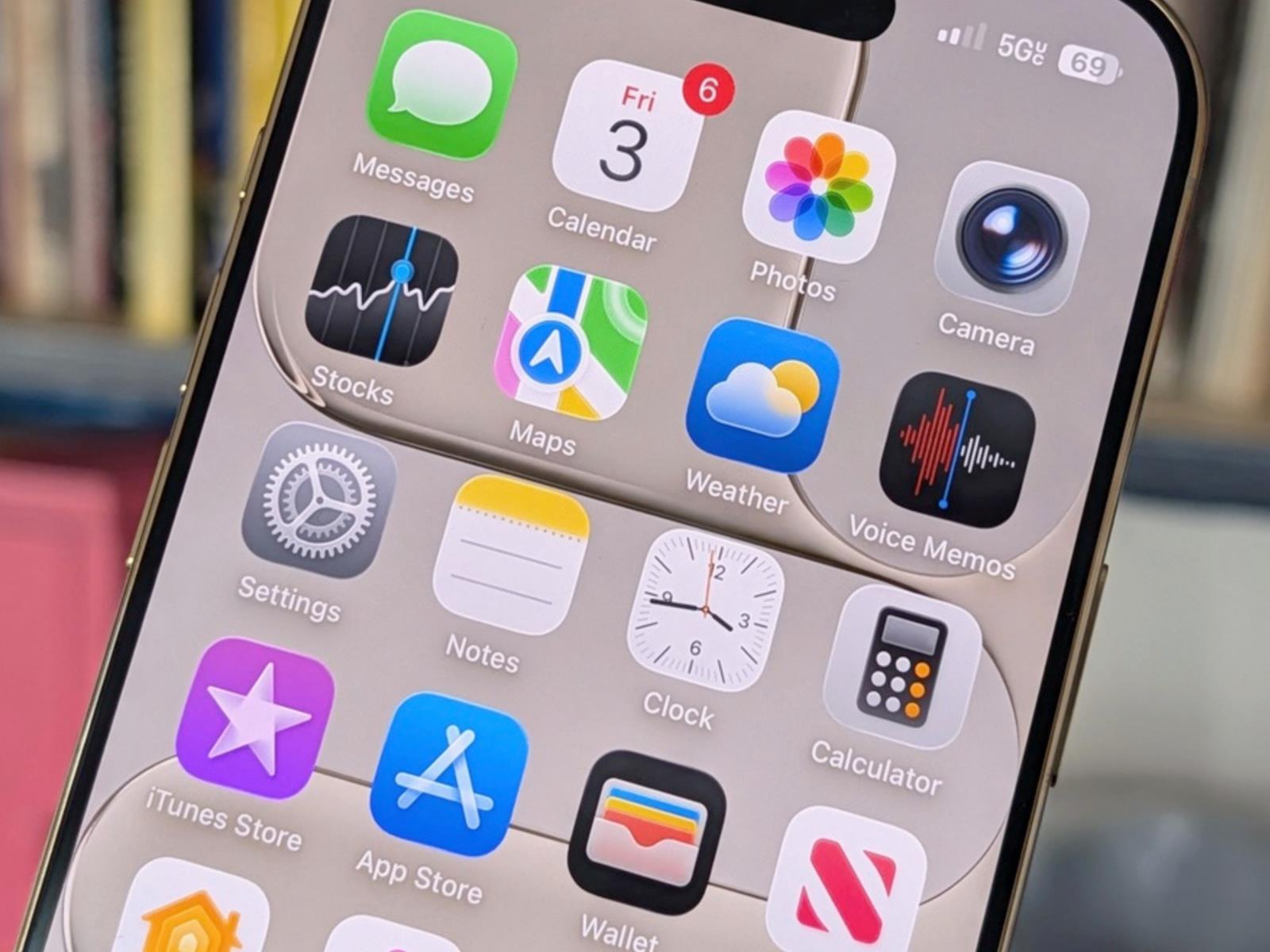
I’m routinely surprised by just how much technology Apple has managed to pack into the iPhone that I can carry in the palm of my hand. What’s even more surprising is that underneath the layers, there’s even more than what meets the eye. There’s a better, faster way to use the keyboard, there’s a faster way to select unread emails to archive, there are better ways to browse the web than just the usual Safari experience, and you can get way better photos out of the iPhone Pro cameras than what the stock Camera app shows you.

The iPhone has become such a default product in all our lives that we just take it for granted. Yes, it’s a great way to stay in touch with friends and coworkers, to capture moments, and to doomscroll the night away. But spend some more time, and there’s a whole new iPhone experience just waiting for you that will truly transform how your iPhone looks and works.

Automate the small, redundant tasks

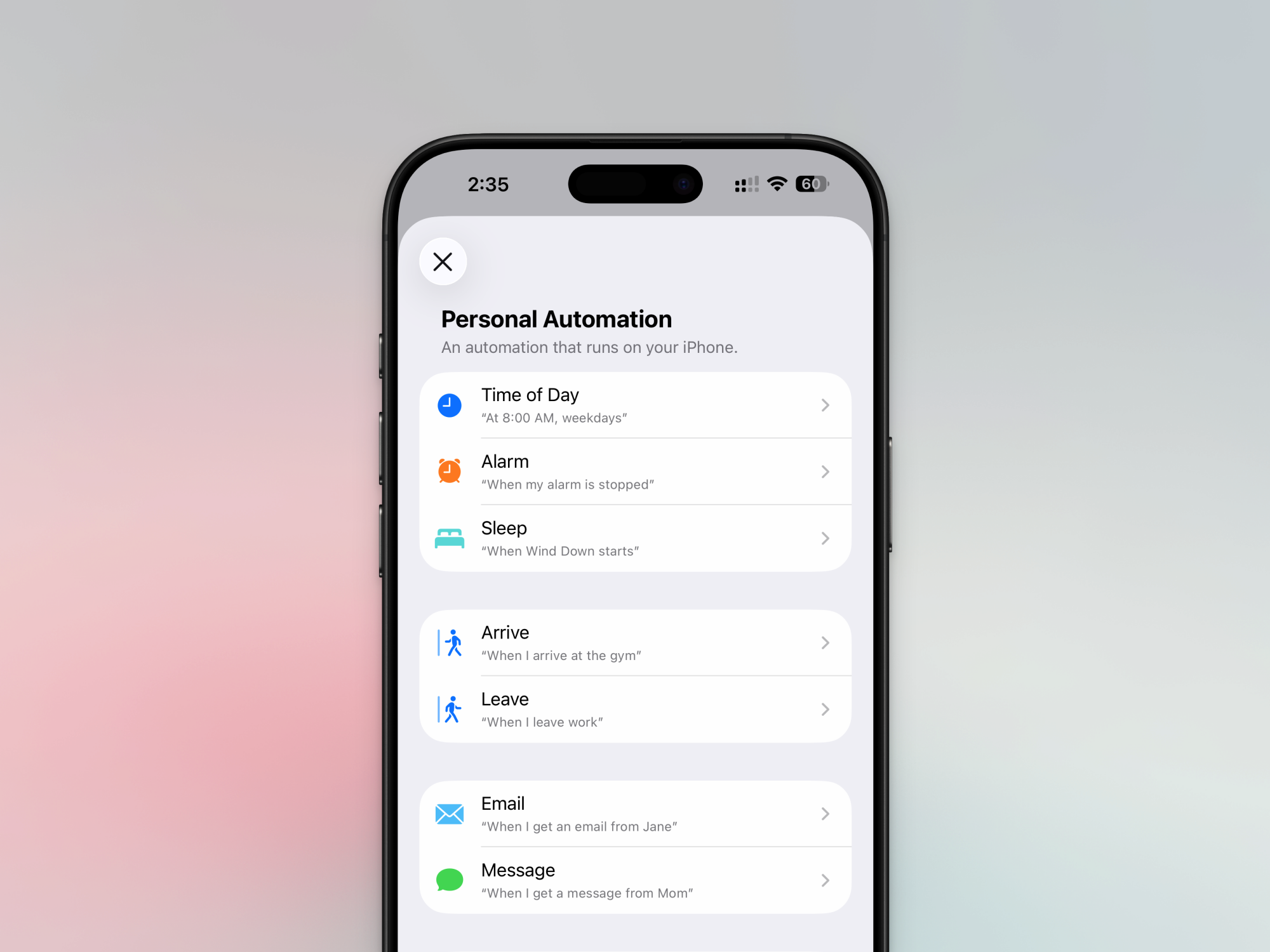
iPhone Personal Automations

Credit: Khamosh Pathak

Apple installs the Shortcuts app on every device and even offers pre-built shortcut automations that you can install from the Gallery. But the fun starts when you explore the very active Shortcuts community online and start to integrate Automations into the mix.

Apple’s Shortcuts app lets you create automations that automatically follow pre-defined steps. They can be used to resize images, compress files, convert data, and even control aspects of your smartphone. For example, you can create an automation that automatically enables a VPN when you step out of your home, or sends a message to your partner when you leave work. Looking to get started? We have a list of seven automations that I feel every iPhone user should install.

Add custom widgets to your Home Screen

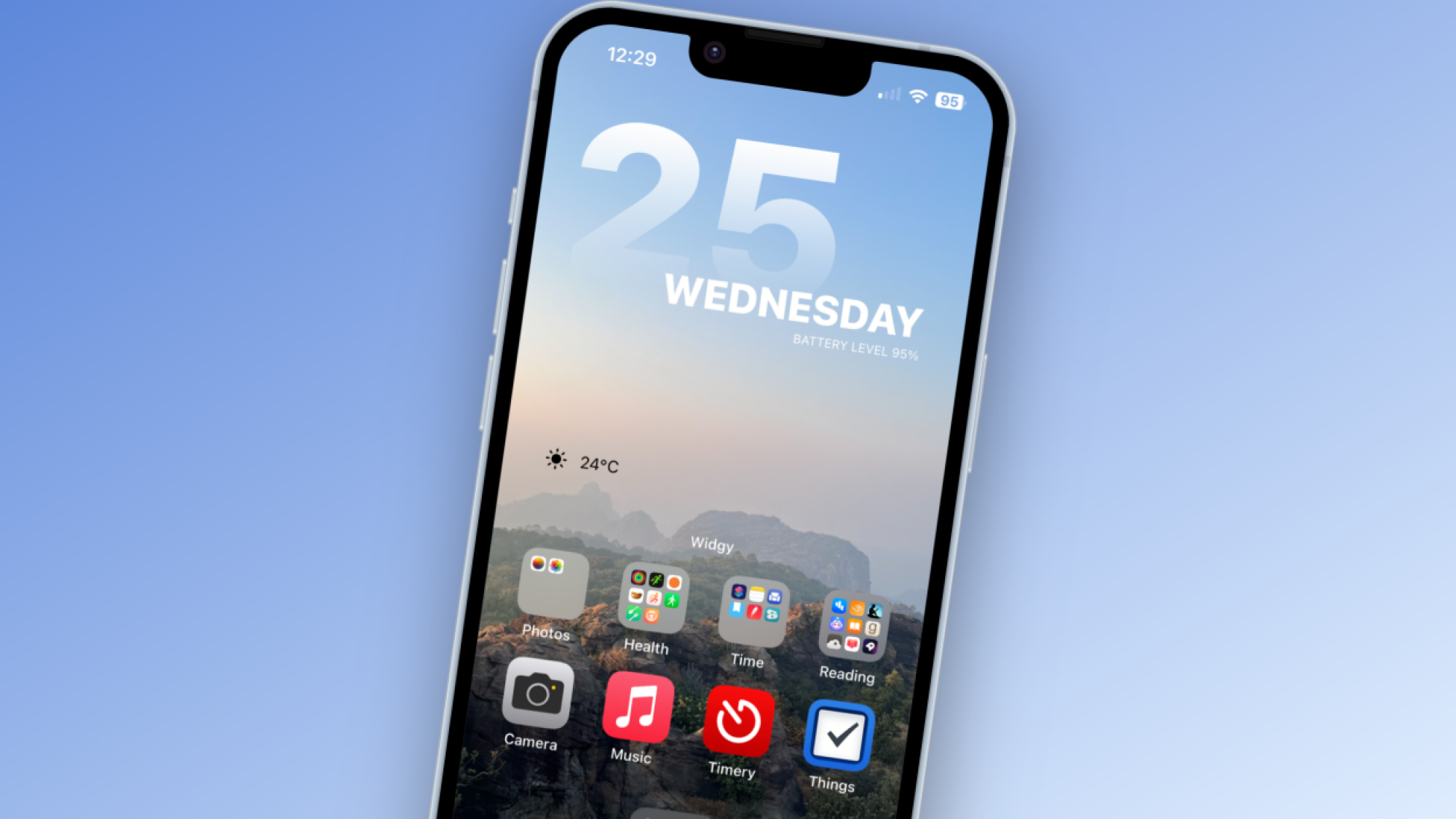
Widgy widget stup on iPhone

Credit: Khamosh Pathak

I’m a huge fan of custom widgets. Whenever someone picks up my iPhone, the response is usually something like, “Your iPhone doesn’t look like a regular iPhone.” That’s down to custom widgets that show the time, day, my appointments, the weather, my tasks, and more. The world of custom iPhone widgets is huge, and if you just want to dip your toes in, I would suggest you start with the Widgetsmith app, which lets you customize multiple widgets with the same theme and fonts. All together, it looks really aesthetically pleasing. When you’re ready, you can dive in with the Widgy app, where you can import and customize thousands of interactive widgets.

Access features quickly using the hidden Back Tap gesture

iPhone Back Tap Gestures

Credit: Khamosh Pathak

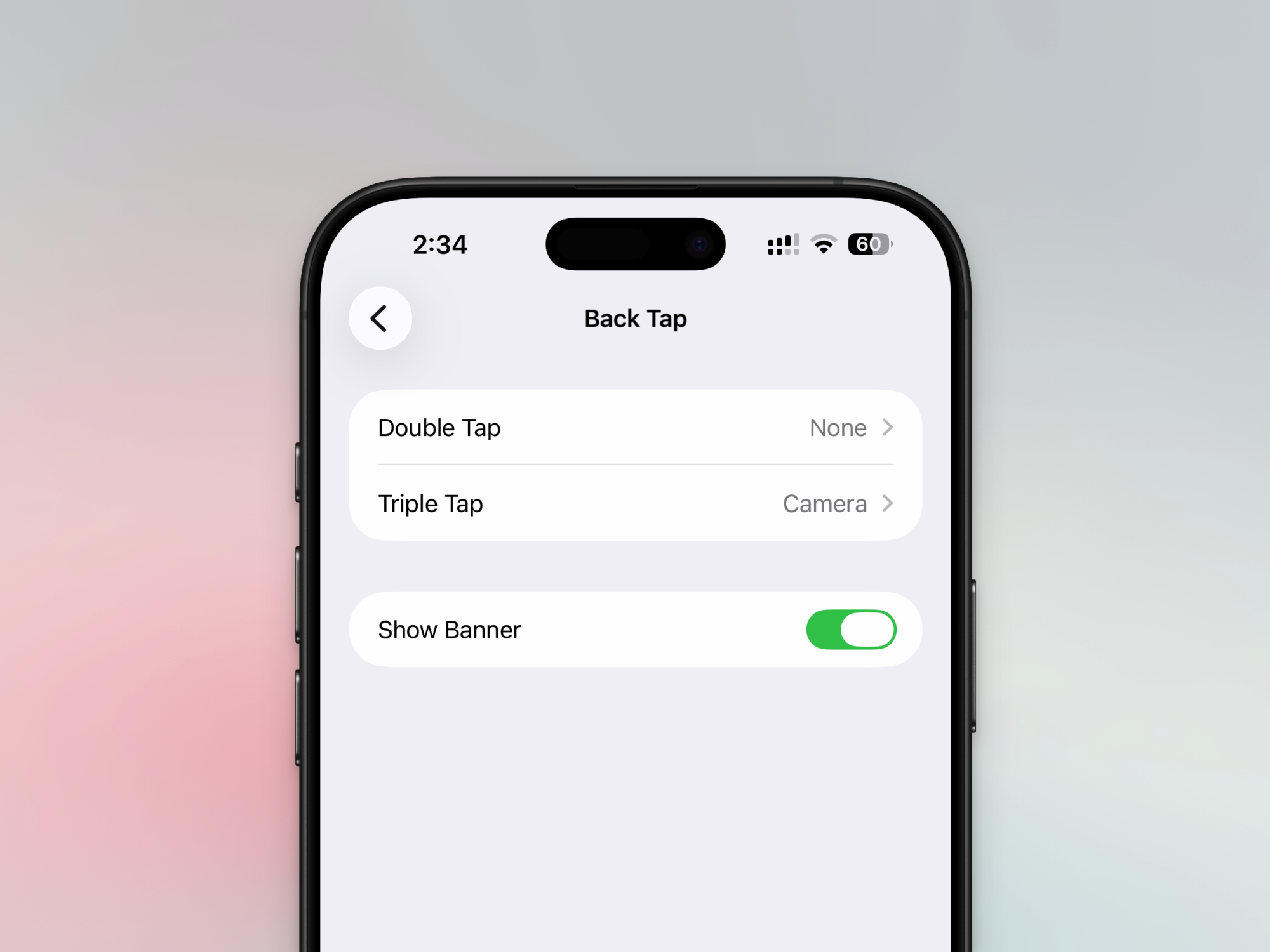
The iPhone has a hidden button, and it’s on the back of your iPhone. It’s an accessibility feature that you can access via Settings > Accessibility > Touch > Back Tap. You can then assign any app, shortcut, or action to either the Double Tap or Triple Tap gesture. It’s a great way to trigger Shortcuts automations, or to simply bring up the selfie camera. I personally find that the double-tap gesture has a tendency to misfire sometimes, and the triple-tap gesture is a lot more reliable.

Enhance Safari using extensions

iPhone Safari Extensions

Credit: Khamosh Pathak

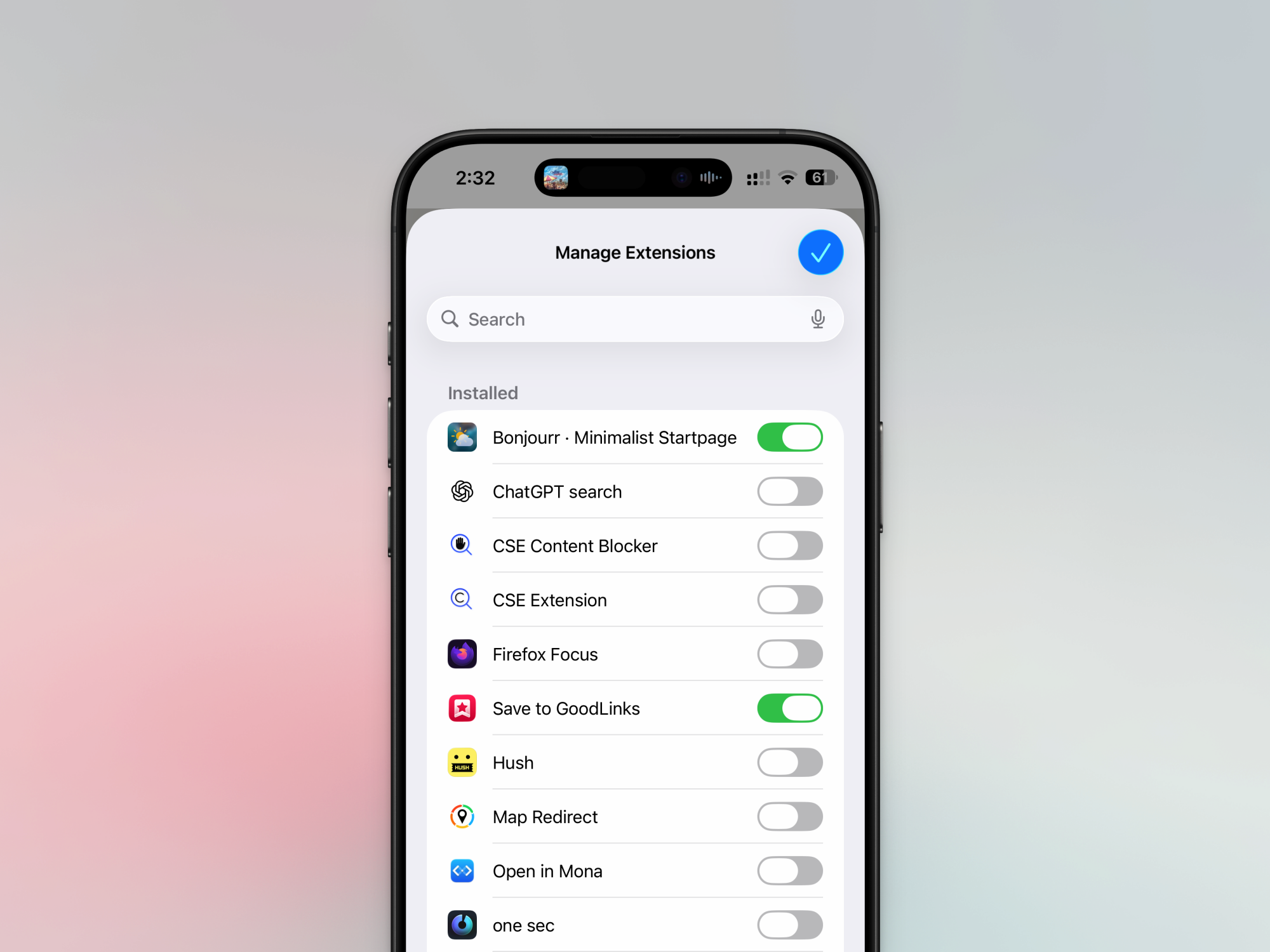
If you don’t use Safari extensions, you’re sleeping on unrealized potential. Just like on the Mac, the Safari browser on the iPhone also supports extensions. And you can use extensions to do some really cool things, like blocking all ads and trackers (of course), but also to force every website to be in dark mode, all the time. You’ll also find extensions to improve the Reddit browsing experience and to take complete control of all the elements on the websites you use frequently.

Upgrade to a third-party browser

Vivaldi browser on iPhone

Credit: Khamosh Pathak

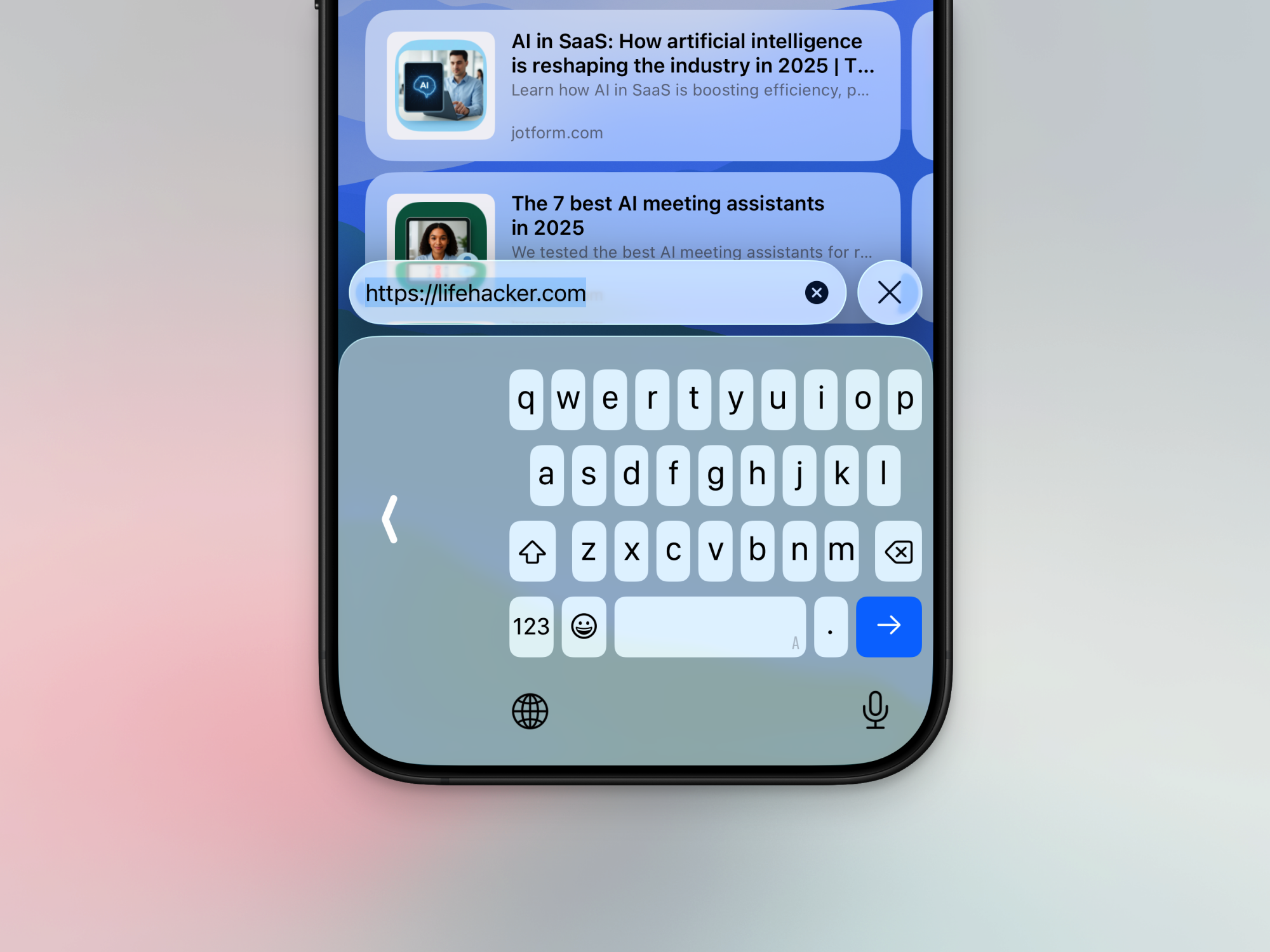
Using a third-party browser, like Vivaldi, is a very power-user move. All third-party browsers on iOS are technically variations of Safari, as Apple forces developers to build their browsers on Safari’s WebKit platform. However, these third-party browsers can include unique features that Safari doesn’t. Vivaldi, for example, offers desktop-class tab browsing, including tab groups and pinned tabs. Then there’s Orion, which can run desktop-class extensions from Firefox and Chrome Web Store on your iPhone (something that Safari can’t do). And if you don’t like Safari’s new interface, try out Quiche, which is a completely customizable browser.

Master your Focuses

iPhone Focus Mode

Credit: Khamosh Pathak

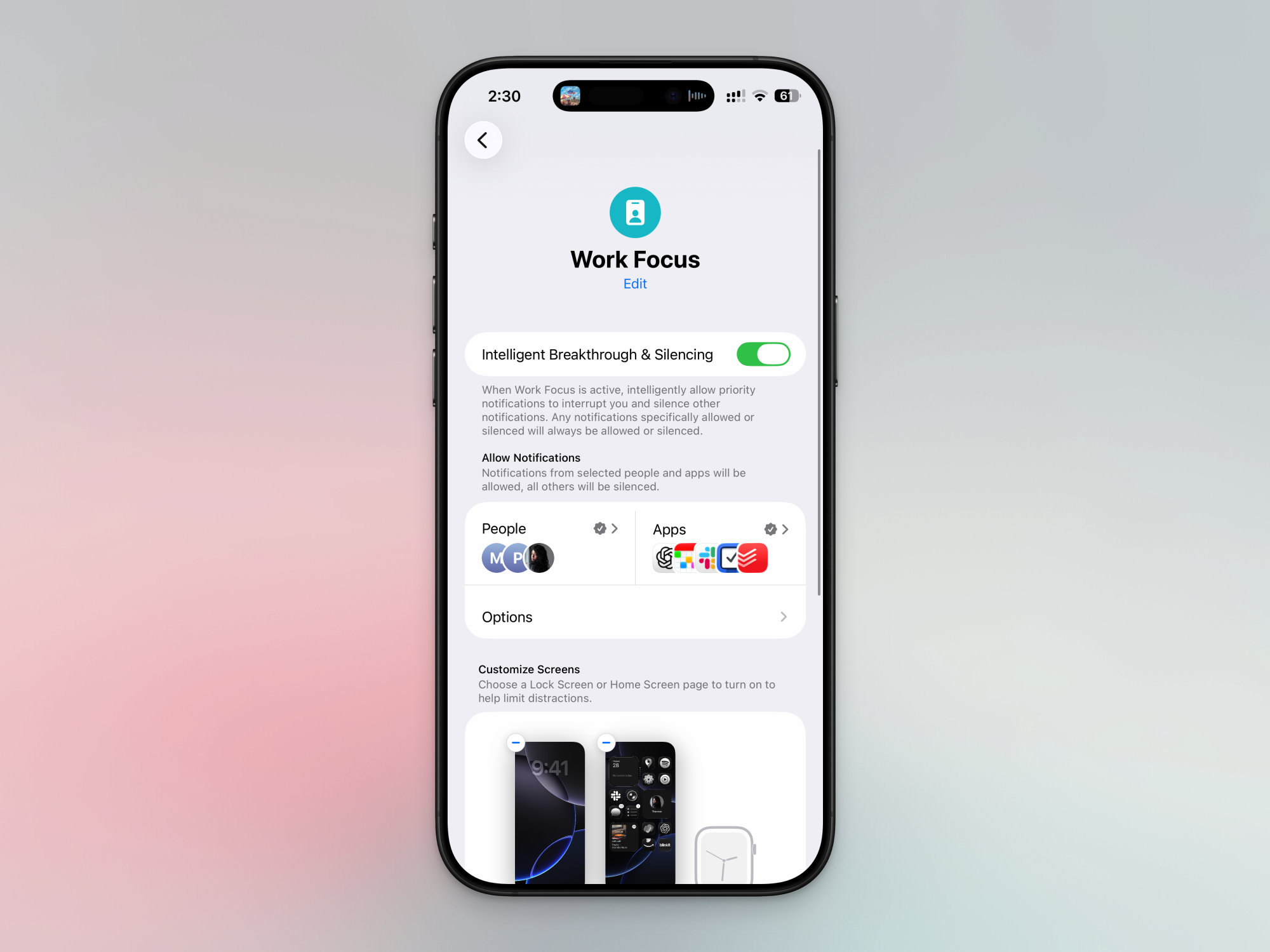
Focuses have the potential to transform how your iPhone looks and works, based on your location, time, day, or the task at hand. It’s time to go beyond Do Not Disturb and embrace everything that Apple’s Focuses can do.

It would be a good idea for you to set up Focuses for Work, Personal Time, and Sleep. In each Focus, you can decide which apps can send notifications, and which friends or family members can contact you. You can even choose which home screens to show in particular Focus, choosing to hide widgets and apps depending on the Focus (no work stuff at all in Personal Time Focus, for example). Focus also integrates with Shortcuts and Automations, so you can trigger a Focus when you start a video call on your Mac or reach a particular location (like your workplace). Go to Settings > Focus to get started.

Use the hidden swipe gestures everywhere

You’ll be familiar with all the usual iPhone gestures, like swiping up from the Home bar, or tapping the top edge of the iPhone to instantly scroll to the top. But the iPhone has a lot more hidden gestures that can really speed things up. If you see a long list, try to swipe down with two fingers to instantly start selecting items. This works really well in Mail, Phone, and other Apple apps, but is also supported by third-party apps. Next, in iOS 26, Apple added back gesture support that’s arguably better than Android. You can swipe in from anywhere on the left edge to quickly go back.

You can also cut, copy, and paste with a three-finger gesture. To copy something, pinch it with three fingers. To cut, do it twice. To paste something, do a three-finger spread gesture (opposite of the pinch).

Get faster with the iPhone keyboard

iPhone Keyboard Tricks

Credit: Khamosh Pathak

The iPhone keyboard is more than what meets the eye. It has a built-in Slide to Type feature where you can glide your finger over the keys to type words. It works really well, especially when using the phone one-handed. There’s a virtual trackpad built in, too. Just tap and hold the Space bar and move your finger to move the cursor around.

If you find your keyboard too large to type on, you can also enable the one-handed keyboard from the Keyboard Settings button (tap and hold the Globe icon). From here, you can go to Keyboard Settings to enable a multi-lingual keyboard and to try out Text Replacement, where you can create shortcuts for expanding your frequently used text snippets. For example, you can type “adrs” to expand to your full home address.

Scan documents without a third-party app

Scan Documents Files App

Credit: Khamosh Pathak

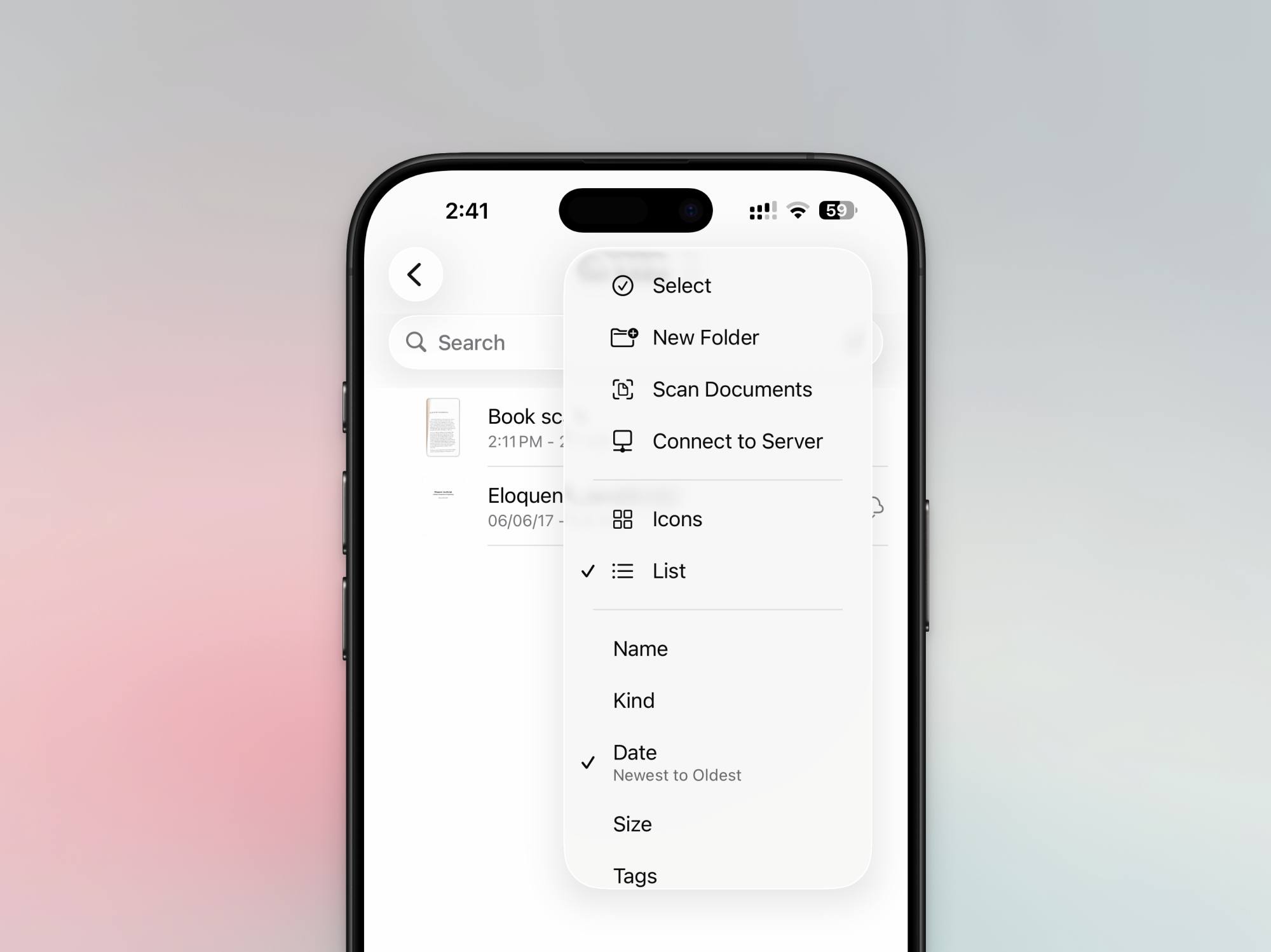
You might not know this, but there’s a really neat document scanner built into the Notes app and the Files app. I prefer to use the Files app for this because I get to save a PDF directly in the folder that I want. Open the Files app, go to any folder, tap the three-dotted Menu icon, and choose the Scan Documents feature. There’s an Auto Shutter feature that’s enabled by default that will automatically scan each new page you put in front of your camera (if you find this annoying, you can disable it as well). Scan as many pages as you want, and tap the Done button. Then, give the document a name. And it’s now stored as a PDF in the folder. You can now send it to where it needs to go, or back it up using iCloud Drive.

Upgrade your photos and videos on iPhone Pro

Blackmagic Camera

Credit: Blackmagic

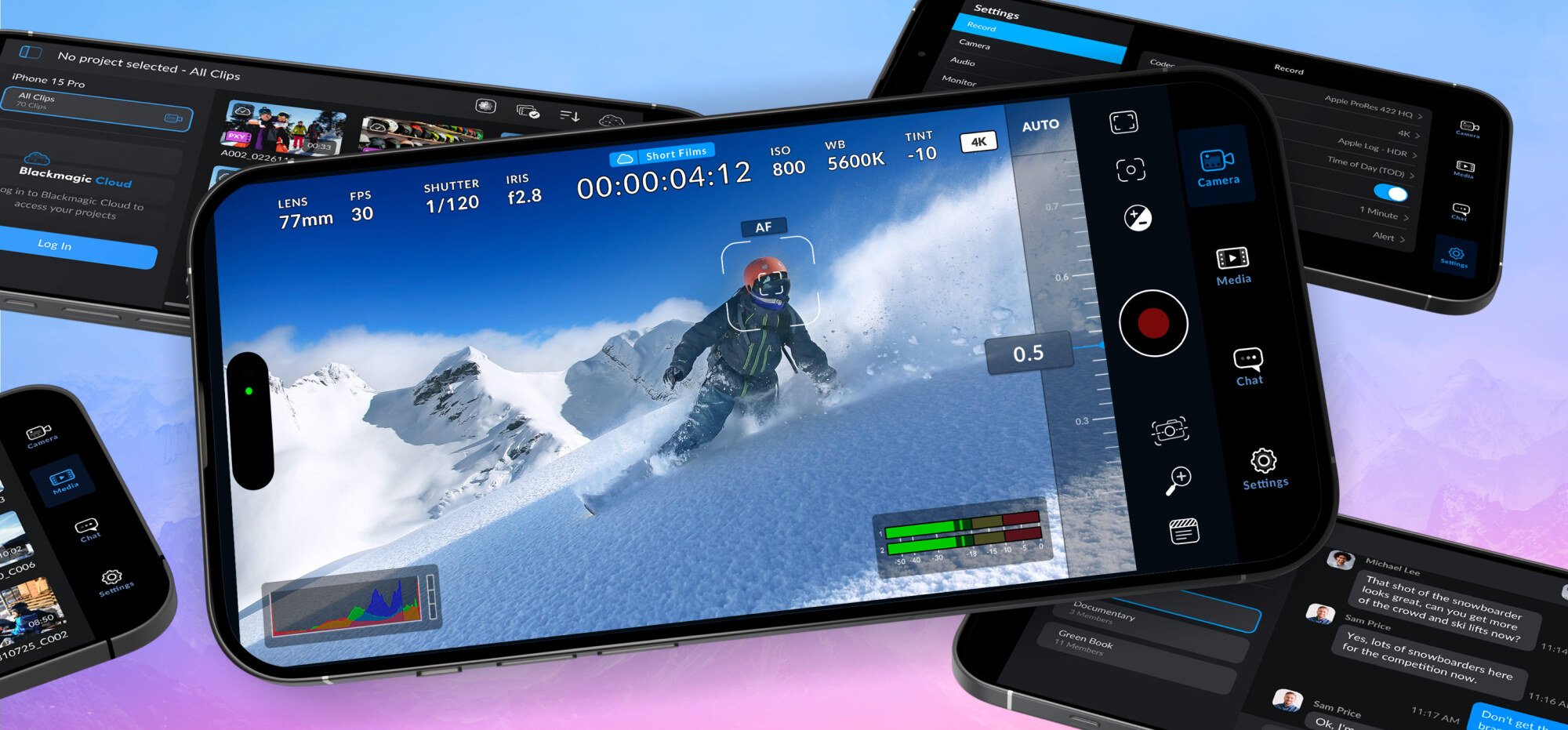
The cameras on the iPhone Pro are truly stellar. But the Camera app is not. The default Camera app does too much computational photography for my taste, and has trouble focusing on elements exactly when I need to capture something small. Plus, the Pro cameras can shoot in Log in ProRes, and to fully take control of the visuals from your iPhone, you’ll need to step out of the Camera app.

For shooting video in the best light, Blackmagic is a great choice. Here, you get full manual control over both photos and videos, with film-grade presets (including the ability to create your own custom ones).

If that feels a bit too Pro, try using a third-party app to capture much better photos. My colleague Pranay has highlighted a couple of great options, with Halide Mark II topping the list (I agree, as well). Halide gives you a lot more control over the look of your photos. There’s also a Process Zero feature that removes all of Apple’s computational processes from the photos.

Intel Panther Lake Gaming Handheld Spotted Boosting Past 35W

Intel Panther Lake Gaming Handheld Spotted Boosting Past 35W
If you read that headline and thought, ‘Oh yeah, so what?’ then you’re probably not too familiar with gaming handhelds. These devices have cooling apparatus of impressive efficiency given the extremely limited space they have to work in, but the laws of physics have this annoying way of being extremely immutable. That is to say that very few

Microsoft To Invest $17.5 Billion in India

Microsoft announced on Tuesday its largest-ever investment in Asia — $17.5 billion over four years starting in 2026 — to expand cloud and AI infrastructure across India, fund skilling programs, and support ongoing operations in the country. The commitment adds to a $3 billion investment the company announced in January 2025 that is on track to be spent by the end of 2026. A new hyperscale cloud region in Hyderabad is set to go live in mid-2026 and will be Microsoft’s largest in India, comprising three availability zones.

The company also plans to integrate AI into two government employment platforms — e-Shram and the National Career Service — that serve more than 310 million informal workers. Microsoft is doubling its India skilling target to 20 million people by 2030; since January, it has already trained 5.6 million.


Read more of this story at Slashdot.

NASA astronauts will have their own droid when they go back to the Moon

B-9 had Will Robinson. Twiki had Buck Rogers. And, of course, C-3PO and R2-D2 had Luke Skywalker. Now, in a scenario straight out of science fiction, MAPP will have whoever NASA names to the crew of the second Artemis mission to land on the moon.

The space agency has selected Lunar Outpost’s Mobile Autonomous Prospecting Platform, or MAPP, to become the first robotic rover to operate on the moon alongside astronauts. Although its tasks will be far simpler than those of the robots seen on TV and in the movies, the autonomous four-wheeled MAPP will help scientists learn more about the crew’s surroundings. Science instruments on the rover will characterize the surface plasma and behavior of the dust in the lunar environment.

“The Apollo era taught us that the further humanity is from Earth, the more dependent we are on science to protect and sustain human life on other planets,” said Nicky Fox, NASA’s associate administrator for science, in a statement. “By deploying these… science instruments on the lunar surface, our proving ground, NASA is leading the world in the creation of humanity’s interplanetary survival guide to ensure the health and safety of our spacecraft and human explorers as we begin our epic journey back to the Moon.”

Read full article

Comments

Canonical To Distribute AMD ROCm Libraries With Ubuntu 26.04 LTS

AMD previously talked of simplifying the in-box Linux support for ROCm during the second half of 2025. So far we haven’t seen any groundbreaking changes from that initiative besides AMD working on various package archives/repositories to make it easier to install the latest ROCm on different Linux distributions. But today a big announcement is now public that Canonical with next year’s Ubuntu 26.04 LTS release will provide official ROCm packages along with other libraries…