State Department: Calibri font was a DEI hire

The US Department of State is unwinding a 2023 decision to use san-serif Calibri font on all official communications and switching to Times New Roman instead, The New York Times reports. In a memo obtained by NYT titled “Return to Tradition: Times New Roman 14-Point Font Required for All Department Paper,” Secretary of State Marco Rubio frames the change as a way to return professionalism to the State Department.

“Switching to Calibri achieved nothing except the degradation of the department’s official correspondence,” Rubio said in the memo. That’s because the font is “informal” and clashes with the State Department’s letterhead, according to Rubio, while serif fonts like Times New Roman “connote tradition, formality and ceremony.”

Former Secretary of State Antony Blinken originally switched the State Department to Calibri in 2023 to improve the accessibility of official communications. The curvy, flourish-free lines of sans-serif fonts work better with assistive technologies like screen readers and text-to-speech tools. Serif fonts, meanwhile, are typically used in things like newspapers to make small, printed text legible.

While Rubio notes that Calibri “was not among the department’s most illegal, immoral, radical or wasteful instances of D.E.I.A.,” it seems clear that Rubio lumps the font in with those same diversity, equity, inclusion and accessibility initiatives. Getting rid of it is an easy (and weirdly petty) way to follow through on the second Trump administration’s anti-DEI stance towards just about everything.

This article originally appeared on Engadget at https://www.engadget.com/big-tech/state-department-calibri-font-was-a-dei-hire-190454957.html?src=rss

Missing Rewards? Update Zwift! Here’s How…

We occasionally hear from Zwifters complaining that new features or achievements on Zwift aren’t working as advertised. The main reason this happens? Running an outdated version of the game.

Here’s how to check your installed Zwift version and update to the latest available version.

What Is the Latest Zwift Version?

Zwift maintains a page showing current versions for each platform.

Checking Your Version

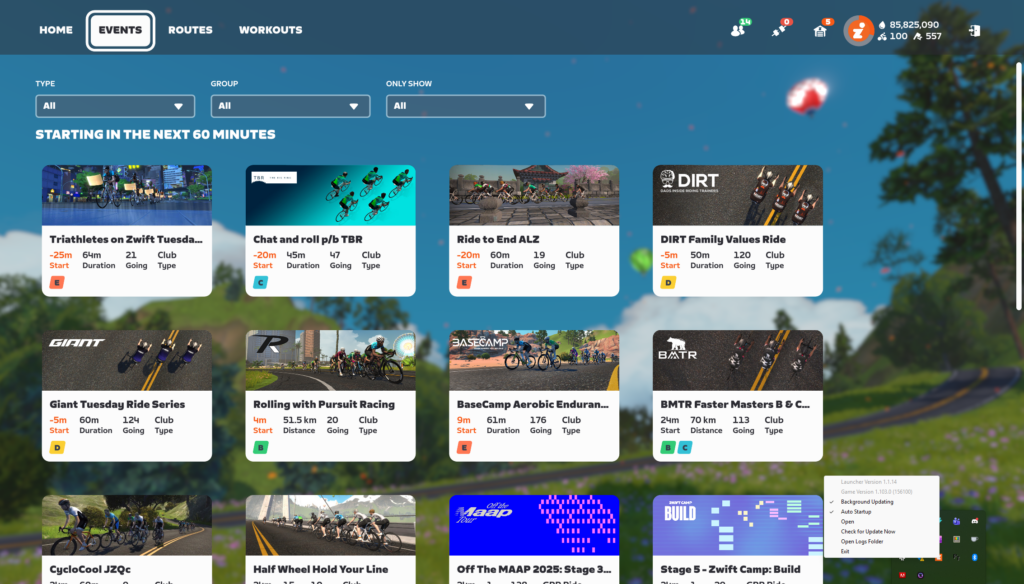
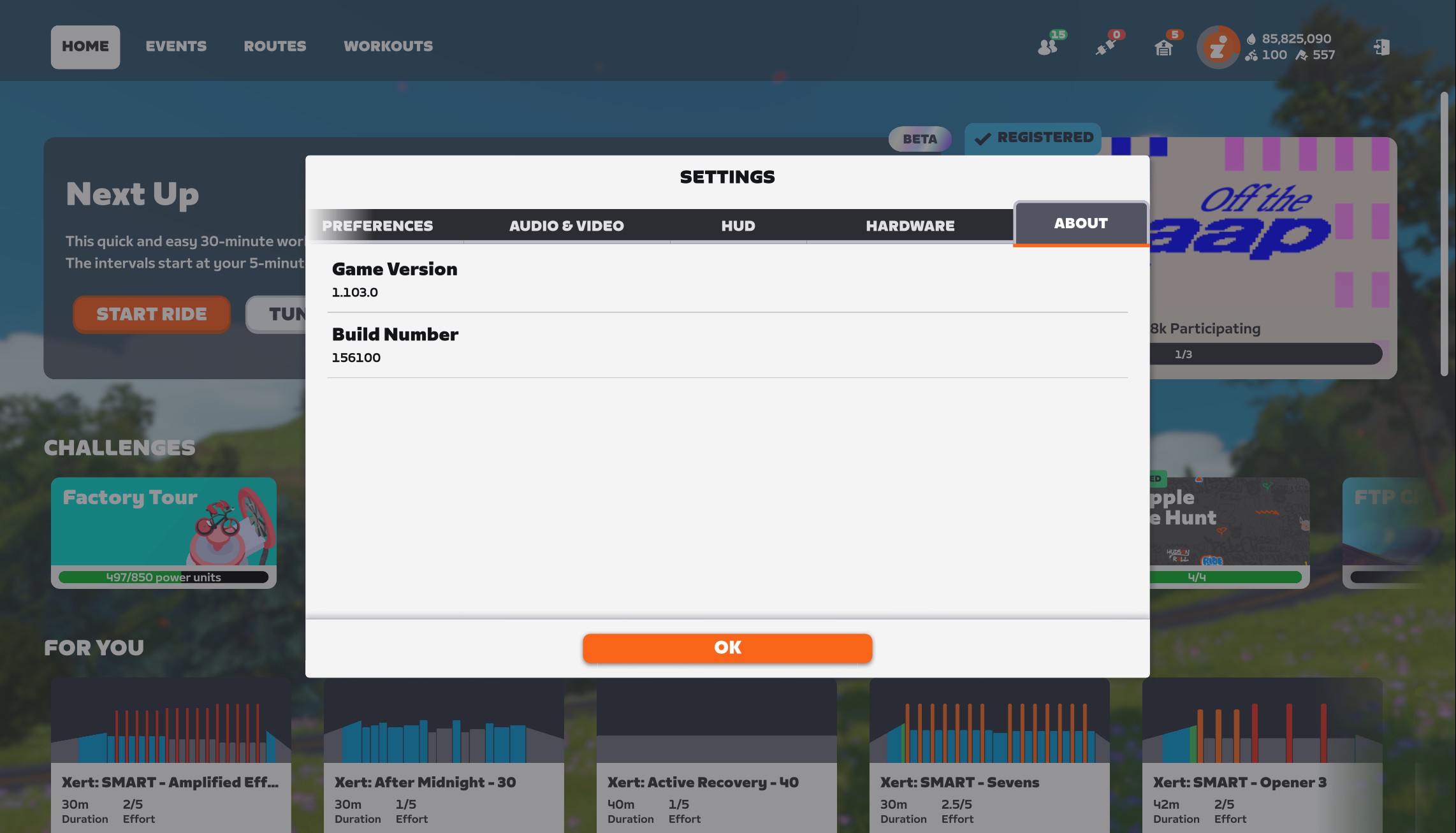
The simple way to check your currently-running Zwift version on any device is to visit My Settings>About:

On PC, you can also right-click the Zwift icon in your taskbar to learn which version of the game and launcher you are running. This can be done even if Zwift isn’t actively running:

How to Update Zwift

Keeping Zwift up to date is quite simple, and usually automatic, depending on how your device is configured. Settings vary by device, so here are some specific tips…

Windows PC

  • Any new updates will be installed when you next launch Zwift.
  • Recommended: right-click the Zwift launcher which appears in your system tray (usually at the bottom right of your screen, near the clock) and make sure “Auto Startup” and “Background Updating” are both checked. This will download updates automatically without your intervention, so they can be quickly installed the next time you start up Zwift.
  • If you want to manually check for an update, right-click the Zwift launcher and click “Check for Update Now.”

On a Mac

  • Just launch Zwift and it will update for you!

On AppleTV

  • Open the App Store and go to your “Purchased Apps” list. Select Zwift. If the app needs an update, there will be a button you can select to update it.
  • Recommended: enable automatic updates by going to the Settings menu, selecting “Apps,” and making sure that “Automatically Update Apps” is turned on.
  • Also Recommended: shut down the Zwift app or your entire AppleTV when you’re done with your day’s session. This unloads it from memory and ensures that when you start your next Zwift session, you’re using the newest version installed on your AppleTV.

On iOS Devices (iPhone or iPad)

  • Go to the App Store, tap your profile icon at the top-right, and you should see a list of available updates. If Zwift appears in the list, tap the “Update” button beside the Zwift icon to download and install the most recent update.
  • If you aren’t seeing the latest Zwift update, or want to make sure you haven’t missed an update, pull down on the screen which shows all available updates. This will force your device to look for all available updates, which will often bring up recently-added app updates that weren’t already listed.
  • If you want your apps to update automatically, go to Settings>Apps>App Store and enable “App Updates” under “Automatic Downloads”.

On Android Devices

  • Go to the Play Store, tap your profile icon (top right), and go to Manage apps & device>Updates available. If your version of Zwift is old, it will appear in this list. Tap the “Update” button beside the app to download and install the most recent update.
  • To enable automatic updates, open the Play Store and tap your profile icon (top right) then Settings>Network Preferences>Auto-update apps. From there, you can choose to auto-update apps over any network, over Wi-Fi only, or never.

Forcing a Zwift Update

Zwift has maintained a biweekly release schedule for the past few years, with updates typically released on Tuesday mornings around 8:30am Pacific Time.

These rollouts are phased, so the update isn’t available to everyone immediately. Zwifters have asked if there’s a way to force a Zwift update, but unfortunately, there is no approved method for doing so. The timing of phased releases is tied to individual Zwift accounts, so chances are you’ll receive each update at approximately the same day and time every other week.

Tired Of Windows 11’s AI Bloat? Use This Tool To Remove It All In Seconds

Tired Of Windows 11's AI Bloat? Use This Tool To Remove It All In Seconds
It’s no secret that Microsoft’s drive to turn Windows 11 into an “agentic” AI-focused OS has been controversial, but being de facto market leader does not mean users won’t push back, and a handy GitHub script from Zoicware is doing exactly that. For users who want to fully or partially disable AI features in Windows 11, Zoicware’s Remove Windows

Hackers tricked ChatGPT, Grok and Google into helping them install malware

Ever since reporting earlier this year on how easy it is to trick an agentic browser, I’ve been following the intersections between modern AI and old-school scams. Now, there’s a new convergence on the horizon: hackers are apparently using AI prompts to seed Google search results with dangerous commands. When executed by unknowing users, these commands prompt computers to give the hackers the access they need to install malware.

The warning comes by way of a recent report from detection-and-response firm Huntress. Here’s how it works. First, the threat actor has a conversation with an AI assistant about a common search term, during which they prompt the AI to suggest pasting a certain command into a computer’s terminal. They make the chat publicly visible and pay to boost it on Google. From then on, whenever someone searches for the term, the malicious instructions will show up high on the first page of results.

Huntress ran tests on both ChatGPT and Grok after discovering that a Mac-targeting data exfiltration attack called AMOS had originated from a simple Google search. The user of the infected device had searched “clear disk space on Mac,” clicked a sponsored ChatGPT link and — lacking the training to see that the advice was hostile — executed the command. This let the attackers install the AMOS malware. The testers discovered that both chatbots replicated the attack vector.

As Huntress points out, the evil genius of this attack is that it bypasses almost all the traditional red flags we’ve been taught to look for. The victim doesn’t have to download a file, install a suspicious executable or even click a shady link. The only things they have to trust are Google and ChatGPT, which they’ve either used before or heard about nonstop for the last several years. They’re primed to trust what those sources tell them. Even worse, while the link to the ChatGPT conversation has since been taken off Google, it was up for at least half a day after Huntress published their blog post.

This news comes at a time that’s already fraught for both AIs. Grok has been getting dunked on for sucking up to Elon Musk in despicable ways, while ChatGPT creator OpenAI has been falling behind the competition. It’s not yet clear if the attack can be replicated with other chatbots, but for now, I strongly recommend using caution. Alongside your other common-sense cybersecurity steps, make sure to never paste anything into your command terminal or your browser URL bar if you aren’t certain of what it will do.

This article originally appeared on Engadget at https://www.engadget.com/cybersecurity/hackers-tricked-chatgpt-grok-and-google-into-helping-them-install-malware-185711492.html?src=rss

Wells Fargo CEO Says More Job Cuts Coming at the Bank as AI Prompts ‘Efficiency’

Wells Fargo expects more job cuts and higher severance costs in this quarter that ends in three weeks, bank CEO and President Charlie Scharf said Tuesday at an investors conference in New York. He’s also betting on AI to drive efficiency and, eventually, further workforce reduction.From a report: “As we’ve gone through the budgeting process, and even pre AI, we do expect to have less people as we go into next year,” Scharf said at the Goldman Sachs Financial Services Conference in New York City.

“We’ll likely have more severance in the fourth quarter.” The fourth quarter runs Oct. 1 through Dec. 31 for the San Francisco-basaed bank. Wells Fargo already has shrunk from 275,000 employees to about 210,000 since Scharf joined the bank in 2019 — about a 24% decrease. Its largest employee base remains in Charlotte, with about 27,000 workers.


Read more of this story at Slashdot.

Kindle Scribe Colorsoft brings color e-ink to Amazon’s 11-inch e-reader

Amazon has been updating the large-screened Kindle Scribe tablet more frequently and regularly than it updates its standard e-readers, and today the company is announcing the tablet’s third hardware update in four years. The regular Scribe is also being joined by a lower-end Scribe with less storage and no front light and an upgraded Kindle Scribe Colorsoft model with a color e-ink screen. This makes it only the second Kindle to include a color screen, after last year’s Kindle Colorsoft.

Both the regular Kindle Scribe and the Kindle Scribe Colorsoft are available to order starting today for $500 and $630, respectively. Both of those devices include a Premium Pen accessory and 32GB of internal storage; 64GB of storage is available for an extra $50 for both devices. The cheaper front light-less Scribe is coming sometime next year and will run $430 for a model with a more modest 16GB of storage. (These are all much more expensive than the original Scribe’s $340 launch price, but inflation, tariffs, and shortages are wreaking havoc with all kinds of tech prices for the past few years.)

The Scribe and Scribe Colorsoft both come with an updated front light “with miniaturized LEDs that fit tightly against the display,” narrowing the bezel and improving the uniformity of the lighting. Amazon has also tweaked the friction level of the paper-like texture on the glass display, shrunk the gap between the glass and the actual display panel to make writing on the tablet feel more like writing on paper, and added a quad-core processor and more RAM to speed the tablet up.

Read full article

Comments

US taking 25% cut of Nvidia chip sales “makes no sense,” experts say

Donald Trump’s decision to allow Nvidia to export an advanced artificial intelligence chip, the H200, to China may give China exactly what it needs to win the AI race, experts and lawmakers have warned.

The H200 is about 10 times less powerful than Nvidia’s Blackwell chip, which is the tech giant’s currently most advanced chip that cannot be exported to China. But the H200 is six times more powerful than the H20, the most advanced chip available in China today. Meanwhile China’s leading AI chip maker, Huawei, is estimated to be about two years behind Nvidia’s technology. By approving the sales, Trump may unwittingly be helping Chinese chip makers “catch up” to Nvidia, Jake Sullivan told The New York Times.

Sullivan, a former Biden-era national security advisor who helped design AI chip export curbs on China, told the NYT that Trump’s move was “nuts” because “China’s main problem” in the AI race “is they don’t have enough advanced computing capability.”

Read full article

Comments

10 Hacks Every Chromebook Power User Should Know

If you’ve chosen a Chromebook as a laptop, then you know the main benefits that it brings: namely, speed, ease of use, and affordability. Despite the simplicity of ChromeOS, however, there’s more that you can do with it than you might realize. You can use it offline, and you can sync files to and from local storage, for example. The operating system is a lot more powerful and versatile than it often gets credit for.

These hacks are for power users who want to level up their Chromebook capabilities, and get extra value out of their laptop, beyond the standard use cases that everyone knows about. No matter how you use ChromeOS, there should be something here to help.

Use your Chromebook offline

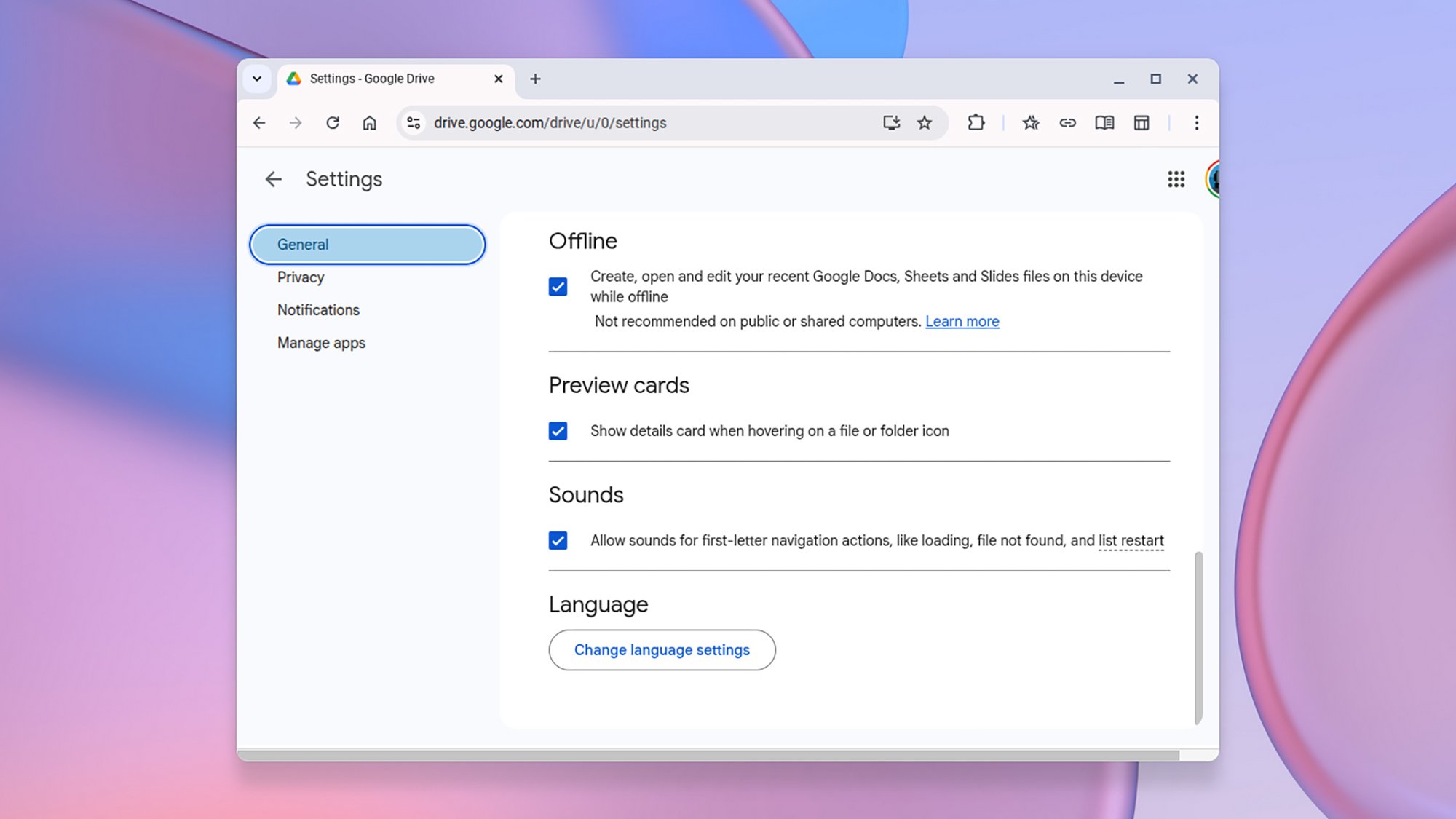
Google Drive offline
Google Drive can work offline.
Credit: Lifehacker

Chromebooks are often criticized for being useless without wifi, but that’s not actually the case: All of the Docs, Sheets, and Slides tools can be used offline, with changes syncing back when your internet connection is restored: From Google Drive, click the gear icon (top right), then choose Settings > General and check the option under the Offline heading.

You can use Gmail offline, too. You can’t send or receive emails, obviously, but you can read through and organize your inbox, and draft emails ready to go once you get your internet back. From Gmail, click on the gear icon (top right), then pick See all settings > Offline. Check the Enable offline mail box and choose how much of your email you want to sync.

Sync media offline

This offline functionality extends to third-party streaming apps too, as ChromeOS supports Android apps. With apps such as Netflix and Spotify, you can sync content to your Chromebook to watch when you don’t have a reliable internet connection—when you’re on a long flight, for example, or traveling between countries.

Talk to your Chromebook

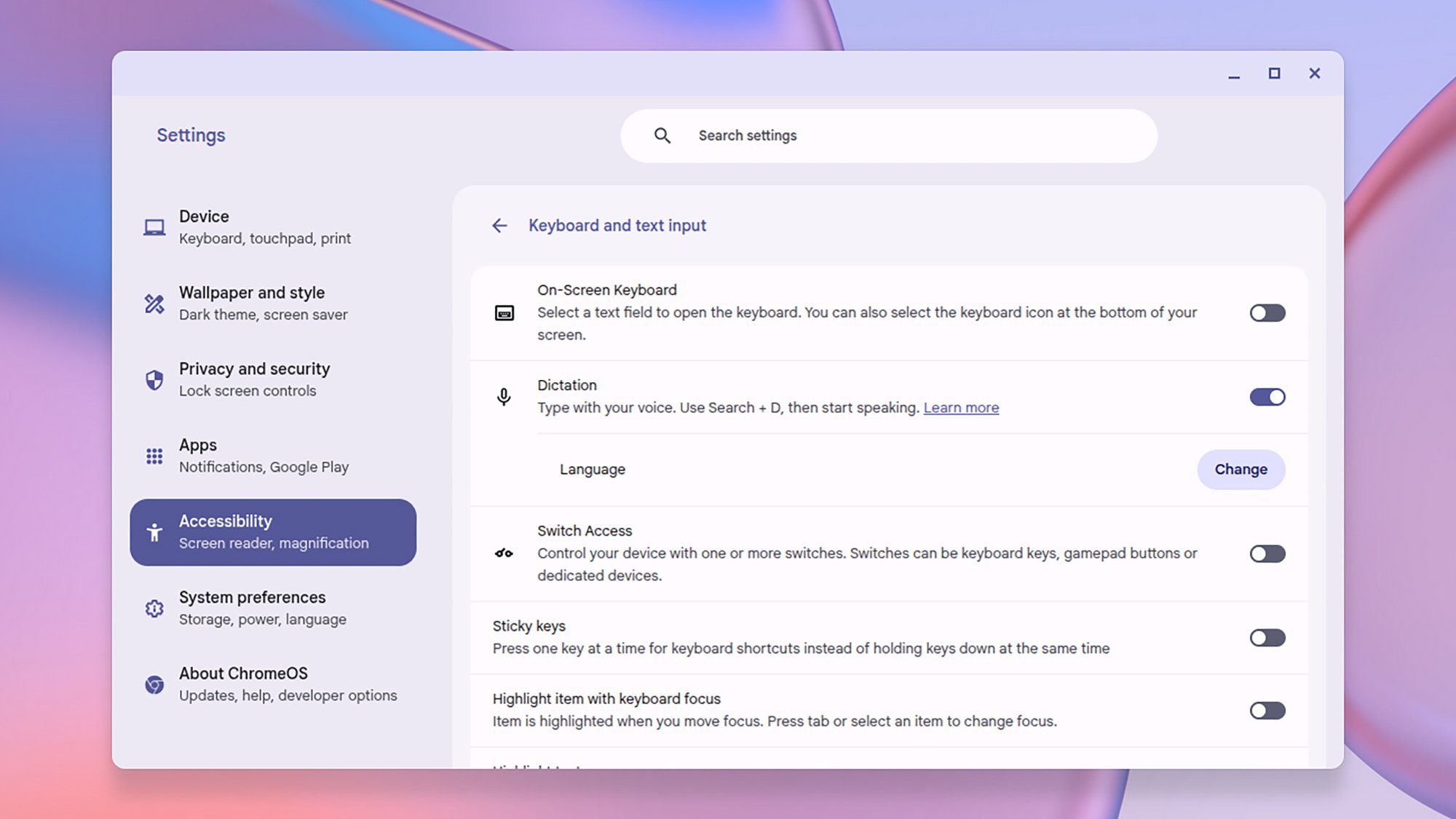
ChromeOS dictation
Enable dictation through the Accessibility settings.
Credit: Lifehacker

Typing is all well and good, but sometimes talking is faster. Launch Settings, then choose Accessibility > Keyboard and text input > Dictation to enable the feature. You can then press the Launcher (G) button and D to start dictating in any app—whether you’re composing emails or writing essays.

Move local files to Google Drive

One of the pros of using a Chromebook is that everything is synced online pretty much instantly, if you’re using one of Google’s own online apps or something similar. However, there may be local files that accumulate on the laptop, including screenshots and downloads, and sometimes you’ll want to get those synced to the cloud as well.

You can see these files via the Files app that comes built into ChromeOS, and upload them manually via the Google Drive web interface. There’s an easier way to get them into Google Drive, though: From the Files app, select all the local files you want to upload in the pane on the right, then drag them into My Drive under Google Drive in the left-hand menu bar.

Set up virtual desktops

Chromebooks don’t always have the biggest or highest-resolution screens, but you can give yourself more room by managing multiple virtual desktops (which ChromeOS calls “desks”). Press the “show windows” key (it’s the one with little rectangles on it, usually also labeled F3) to view open desks, switch between them, and create new ones.

Enable guest access

As ChromeOS is so tightly tied to your Google account, you don’t necessarily want other people borrowing your laptop and being able to get into your Google apps. The solution is guest mode: Restart your Chromebook or sign out of your current user account, then click Browse as Guest to launch a Chrome window without any Google account attached.

Make full use of the clipboard

ChromeOS can sometimes feel limiting in that you can’t quickly drag files to the desktop or to a temporary folder in the same way that you can on Windows or macOS. You might also see that as a benefit—it means less junk will be cluttering your system—but there could well be times that you just need to store something temporarily for transfer.

That’s where the ChromeOS clipboard comes in: It actually stores five items rather than one, so it’s a useful (if rather hidden) way of moving images, text, and links between websites and apps. Use the usual Ctrl+C, Ctrl+X, and Ctrl+V shortcuts to copy, cut, and paste, then hold down the Launcher (G) button and V to see all the clipboard items.

Open the ChromeOS Task Manager

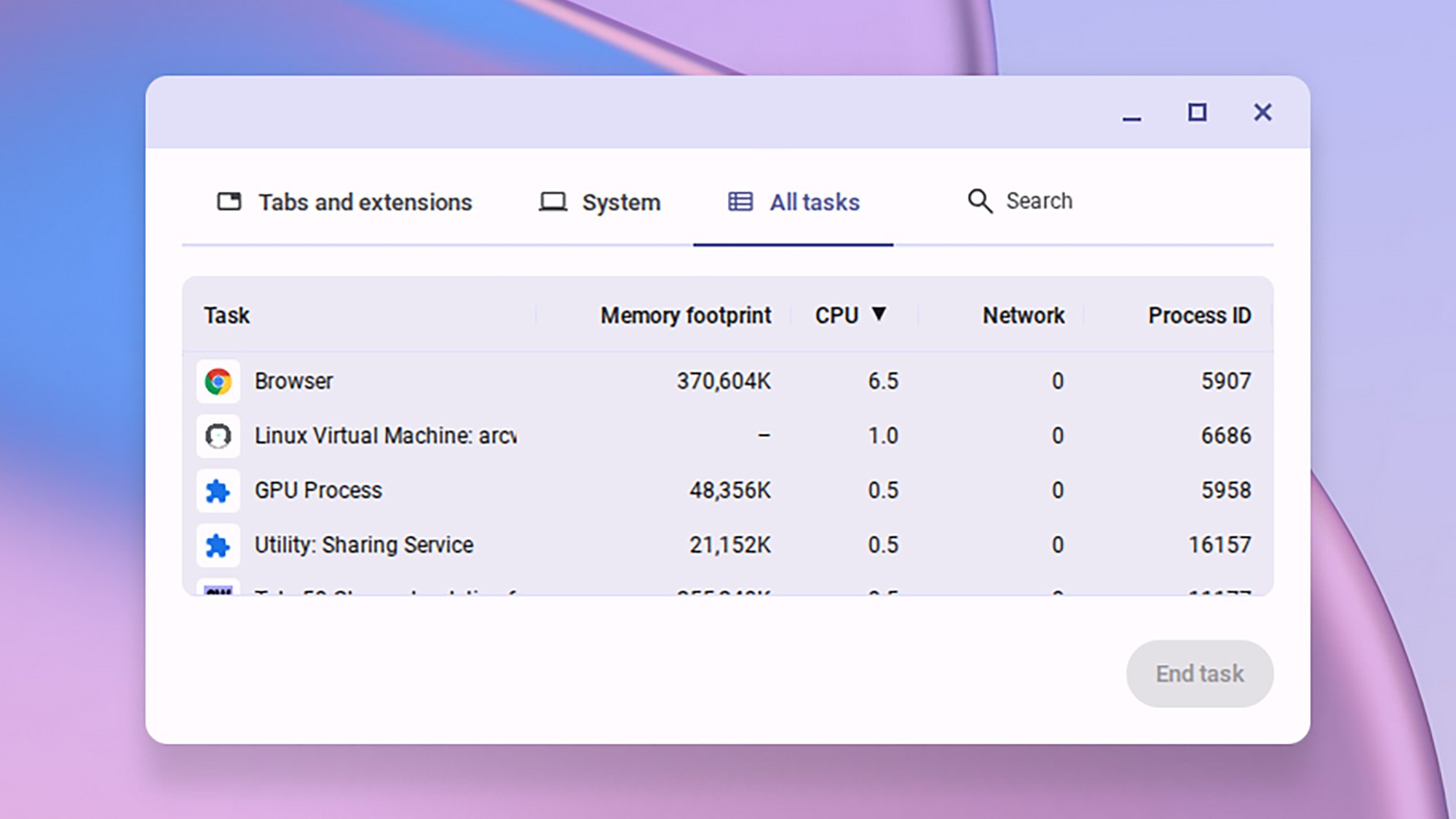
ChromeOS Task Manager
ChromeOS comes with its own Task Manager.
Credit: Lifehacker

The ChromeOS Task Manager is useful for everything from shutting down crashed apps to seeing exactly where all your RAM is going, and it can be a key tool in the power user’s belt. Open it by pressing the Launcher (G) key and Esc: You’ll see you can browse between individual tabs and system processes, or search for something specific on ChromeOS.

Save an older laptop

ChromeOS isn’t just for Chromebooks: You can give an older, struggling laptop a new lease of life by installing ChromeOS Flex on it (even old laptops can usually handle Chrome). Google has full instructions for what you need to do to get this working, and will guide you through the process of creating a bootable USB drive with the ChromeOS software on.

Explore beta and dev channels

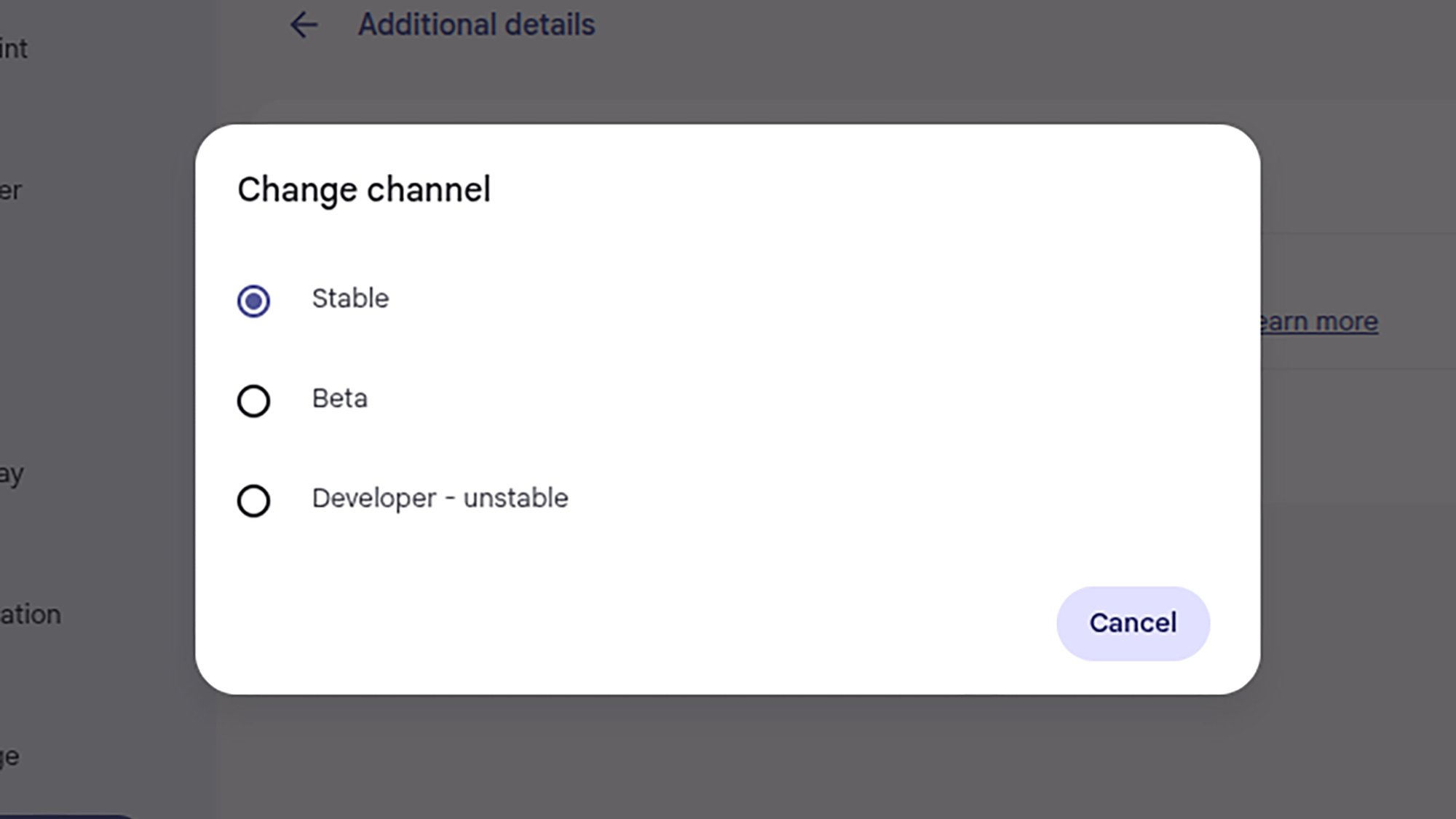
ChromeOS channel
Switching up the channel on ChromeOS.
Credit: Lifehacker

As with a lot of software, there are beta and dev channels of ChromeOS available as well as the stable one. If you want to get the newest Chromebook features before everyone else, and don’t mind a few bugs along the way, then you can make the switch. It doesn’t take long, and you can always switch back again, though a system reset is sometimes required.

To change between ChromeOS channels, click on the time panel (bottom right), then click the gear icon to get to the main Settings page. Choose About ChromeOS > Additional details > Change channel, then choose whichever one you want to use. You’ll keep getting over-the-air updates for your selected channel until you switch to a different one.

10 Years of Let’s Encrypt Certificates

Let’s Encrypt has published
a retrospective that covers the decade since it published its first
publicly trusted certificate in September 2015:

In March 2016, we issued our one millionth certificate. Just two years
later, in September 2018, we were issuing a million certificates every
day. In 2020 we reached a billion total certificates issued and as of
late 2025 we’re frequently issuing ten million certificates per
day. We’re now on track to reach a billion active sites, probably
sometime in the coming year.

YouTube TV Plans will let you choose genre-specific content packages

YouTube TV, which launched in 2017 as a $35-per-month all-in-one service, will soon introduce YouTube TV Plans. Although the announcement is light on details, we know the initiative will let you sign up for genre-specific packages, such as sports and news. In other words, it’s the final step in the legacy-cable-ification of the service.

YouTube hasn’t said anything about pricing. But it’s probably safe to assume that narrowing your available content will reduce your bill. A year ago, the company raised its monthly cost to $83. That’s 137 percent higher than the service’s launch price nearly nine years ago.

We don’t yet have the full list of available plans, but YouTube mentioned packages for sports, news and “family and entertainment content.” As expected, it promised that you can mix and match them. The YouTube TV Sports Plan will include access to all major broadcast channels and several sports networks, like all ESPN networks, FS1, and NBC Sports Network. It sounds similar to offerings from Fubo and DirecTV.

YouTube TV plans will launch in early 2026. The current $83 all-in-one model will remain available alongside it.

This article originally appeared on Engadget at https://www.engadget.com/entertainment/streaming/youtube-tv-plans-will-let-you-choose-genre-specific-content-packages-182909455.html?src=rss

Kroah-Hartman: Linux CVEs, more than you ever wanted to know

Greg Kroah-Hartman is writing
a series of blog posts
about Linux becoming a Certificate
Numbering Authority (CNA):

It’s been almost 2 full years since Linux became a CNA (Certificate
Numbering Authority)
which meant that we (i.e. the kernel.org
community) are now responsible for issuing all CVEs for the Linux
kernel. During this time, we’ve become one of the largest creators of
CVEs by quantity, going from nothing to number 3 in 2024 to number 1
in 2025. Naturally, this has caused some questions about how we are
both doing all of this work, and how people can keep track of it.

So far, Kroah-Hartman has published the introductory post, as well
as a detailed
post about kernel version numbers
that is well worth reading.

After key Russian launch site is damaged, NASA accelerates Dragon supply missions

With a key Russian launch pad out of service, NASA is accelerating the launch of two Cargo Dragon spaceships in order to ensure that astronauts on board the International Space Station have all the supplies they need next year.

According to the space agency’s internal schedule, the next Dragon supply mission, CRS-34, is moving forward one month from June 2026 to May. And the next Dragon supply mission after this, CRS-35, has been advanced three months from November to August.

A source indicated that the changing schedules are a “direct result” of a launch pad incident on Thanksgiving Day at the Russian spaceport in Baikonur, Kazakhstan.

Read full article

Comments

Democrats Warn Their Party May Try To Unravel Any Paramount-Warner Bros. Discovery Deal

As the battle over Warner Bros. Discovery grows, two Democratic lawmakers are warning that their party may try to block or unravel any
acquisition by Paramount when it returns to power. Semafor: In a letter to the WBD board and Treasury Secretary Scott Bessent first shared with Semafor, Reps. Sam Liccardo (D-Calif.) and Ayanna Pressley (D-Mass.) said they were concerned about the national security risk of letting foreign entities control a large portion of the US entertainment and media industry.

They also hinted that a future Democratic Congress and administration could try to unravel any Paramount-WBD deal. “Future Congresses … will review many of the decisions of the current Administration, and may recommend that regulators push for divestitures, which would undermine the strategic logic of this merger,” they wrote. “We urge the Board to weigh these national security and regulatory liabilities in evaluating a transaction burdened by uncertain but potentially extensive mitigation obligations, foreign influence risks, or adverse regulatory action.”


Read more of this story at Slashdot.

Ugly infotainment mars the 2025 Subaru Forester Hybrid experience

Although many of us associate it with rally-derived machinery from the late 1990s and early 2000s, these days, Subaru has mostly abandoned its performance cars to concentrate on its true calling—rugged, all-wheel-drive vehicles that are high on practicality, powered by horizontally opposed “boxer” engines. One area where the brand has never particularly excelled has been fuel efficiency, which is where today’s test car, the Subaru Forester Hybrid, comes in.

The last time Ars reviewed a Subaru Forester, it left us impressed. How about one with 40 percent better economy, in that case? Now, the 2.5 L flat-four engine operates on the Atkinson/Miller cycle, which generates 162 hp (121 kW) and 154 lb-ft (208 Nm). There’s an electric motor-generator starter and an electric traction motor with 118 hp (88 kW) and 199 lb-ft (270 Nm) that work together to send a combined 194 hp (145 kW) to all four wheels via a symmetrical all-wheel drive system and a planetary continuously variable transmission.

Subaru Forester Hybrid in profile
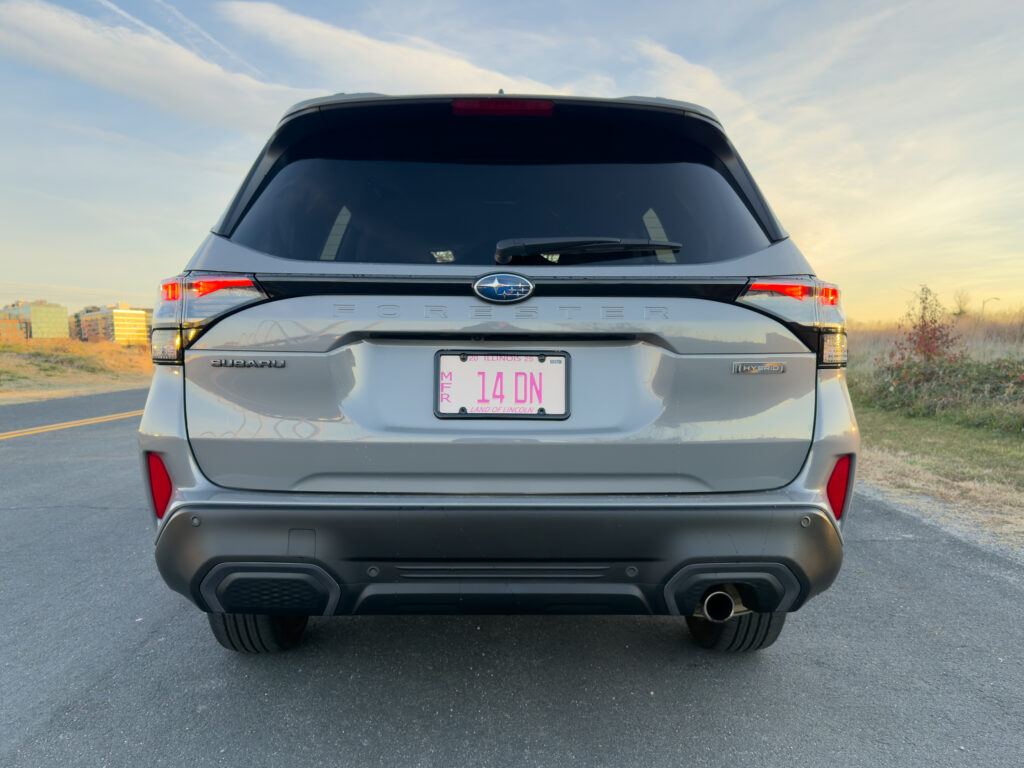
The Forester Hybrid is 183.3 inches (4,656 mm) long, 70.2 inches (1,783 mm) wide, and 68.1 inches (1,729 mm) tall, with a 105.1-inch (2,670 mm) wheelbase.


Credit:

Jonathan Gitlin

Subaru Forester Hybrid seen head-on
Spot the two EyeSight cameras at the top of the windscreen.


Credit:

Jonathan Gitlin

Subaru Forester Hybrid seen from behind
Hatching plots.


Credit:

Jonathan Gitlin

If that sounds vaguely familiar, that’s because it’s the same powertrain that Subaru has also fitted to the smaller Crosstrek Hybrid that we drove in September.

Read full article

Comments

Amazon brings same-day deliveries of perishable food items to 1,300 new areas

Amazon is introducing same-day delivery of perishable food items to 1,300 new cities and towns throughout the country, upping the total service area to more than 2,300 locations. This expansion covers cities like Boise, Salt Lake City, Fort Collins, Omaha, Des Moines and many more.

Check the link to see if it has expanded to where you live. The commerce giant says it will be bringing the service to even more cities in 2026, making the platform a real rival to stuff like Instacart and Walmart+.

Amazon introduced this feature earlier this year and it has proven to be quite the success, given today’s move. It lets people order perishable food items like fruits, vegetables, dairy and meat alongside other more traditional items like electronics and books.

Amazon uses a “specialized temperature-controlled fulfillment network” to ensure that perishables remain in tip-top shape and they are delivered in insulated bags. The deliveries are free for Prime members, as long as the order exceeds $25. Everyone else has to pay $13 per order.

Some items.
Amazon

The company says that fresh groceries already make up nine of the top ten most-ordered items for quick delivery, which is a fairly astounding metric. People want their avocados. Amazon has been steadily increasing the number of items available via this method by incorporating Whole Foods products.

This article originally appeared on Engadget at https://www.engadget.com/big-tech/amazon-brings-same-day-deliveries-of-perishable-food-items-to-1300-new-areas-175746531.html?src=rss

The UK government will ‘look into’ Rockstar’s firing of union-organizing workers

Rockstar Games may have to answer for what appears to be union-busting behavior. UK Prime Minister Keir Starmer, under pressure from parliament, said the government will “look into” the firing of 31 employees in October.

The sacked workers were all part of a private trade union chat group on Discord. The company claimed the firings were “for gross misconduct” and accused the workers of sharing confidential information outside of the company.

But based on what we know, it’s hard to see that characterization as anything but union-busting in search of legal cover. The Independent Workers’ Union of Great Britain (IWGB) described the case as “the most blatant and ruthless act of union busting in the history of the games industry.”

In November, IWGB issued legal claims against the Grand Theft Auto developer. The next day, over 200 staff at Rockstar North signed a letter condemning the firings and pressuring management to reinstate the workers. Earlier that month, the fired workers and their supporters protested outside Rockstar North’s Edinburgh headquarters. Others picketed in Paris, London and New York.

People protesting and holding picket signs outside Rockstar North headquarters
Fired workers and supporters protesting outside Rockstar’s headquarters
IWGB

“It’s clear to everyone close to this situation that this is a blatant, unapologetic act of vicious union busting,” one of the fired staffers said anonymously in a November statement. “Rockstar employs so many talented game developers, all of whom are crucial to making the games we put out.”

Edinburgh East and Musselburgh MP Chris Murray, who prompted Starmer’s response, said in parliament that he recently met with Rockstar to discuss the case. “The meeting only entrenched my concerns about the process Rockstar used to dismiss so many of their staff members,” he said. “I was not assured their process paid robust attention to UK employment law, I was not convinced that this course of action was necessary, and alarmingly, I did not leave informed on exactly what these 31 people had done to warrant their immediate dismissal.”

Murray added that Rockstar initially refused entry to the MPs unless they signed a non-disclosure agreement. The company eventually relented on that front.

On Wednesday, Murray triggered Starmer’s response in parliament. The MP asked the Prime Minister if he agreed that “all companies, regardless of profit size, must follow UK employment law and all workers have the right to join a union?”

Starmer replied that he found the case “deeply concerning.” He added that “every worker has the right to join a trade union, and we’re determined to strengthen workers’ rights and ensure they don’t face unfair consequences for being part of a union. Our ministers will look into the particular case the member raises and will keep him updated.”

This article originally appeared on Engadget at https://www.engadget.com/gaming/the-uk-government-will-look-into-rockstars-firing-of-union-organizing-workers-174216696.html?src=rss

Amazon Changes How Copyright Protection is Applied To Kindle Direct’s Self-Published Ebooks

Amazon says it will allow authors to offer their DRM-free ebooks in the EPUB and PDF formats through its self-publishing platform, Kindle Direct Publishing. Starting on January 20, 2026, authors who set their titles as DRM-free will see their books made available in these more open formats. From a report: The decision to use Digital Rights Management (DRM), a copyright protection mechanism, is set by the authors when they publish their ebooks on Amazon’s platform. The company notes these changes won’t impact previously published titles. If authors want to change the status of older titles, they’ll have to log into the Kindle Direct Publishing (KDP) author portal and change an option in the settings. (Instructions on how to make that change are on Amazon’s KDP support site here.) This move may actually incentivize authors to apply DRM to their ebooks.


Read more of this story at Slashdot.

This Rugged Soundcore Bluetooth Speaker Is Nearly 40% Off Right Now

We may earn a commission from links on this page. Deal pricing and availability subject to change after time of publication.

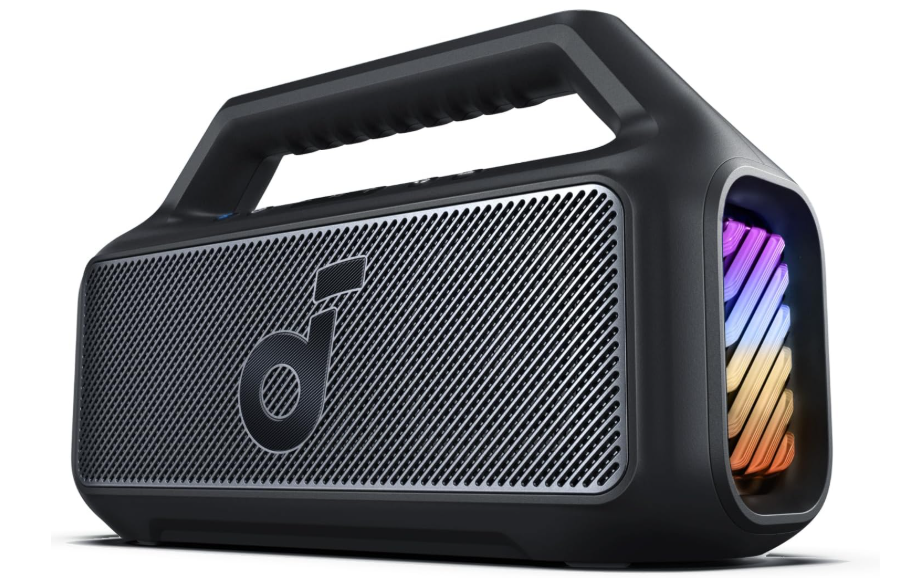
The Soundcore Boom 2 is built for people who don’t want to baby their speakers. With an IPX7 rating and a floatable design, it’s something you can toss in the pool, hose off after a beach trip, or take out on a boat without much worry. And right now, the black model is $89.99, down from $139.99, its lowest price ever according to price trackers.

Note: While the Boom 2 floats, Bluetooth doesn’t work underwater. So your playlist cuts off as soon as it dips below the surface. Still, for outdoor parties where someone will eventually knock the speaker over, that floatability is peace of mind.

The Boom 2 pumps out 80 watts of sound thanks to two 15W tweeters and a 50W woofer. Turn off BassUp mode, though, and output drops to 60W, so if you’re into room-shaking bass, you’ll want to leave it on. And while you can link a second Boom 2 for stereo sound, you’ll be working with Bluetooth only, since there’s no wifi support. The speaker’s LED lights sync to your music, which is fun at night but does drain the battery faster. On that note: Expect around 24 hours of playback with lights and bass boost off, but less if you’re maxing out the volume. It takes about 5.5 hours to charge fully via USB-C. That might be a long wait if you’re in a rush, but decent for overnight charging.

There’s a companion app where you can tweak the sound profile and control the light settings. That adds a level of customization some speakers skip. But this isn’t a speaker for someone who wants elegant design or deep audio fidelity, notes this PCMag review. The JBL Flip 6 might feel nicer in the hand, and the Sony SRS-XB23 offers slightly better balance across mids and highs. What the Boom 2 does well is give you bold sound, big volume, and enough durability to handle messy environments.