‘GhostPairing’ Attacks Are Taking Over WhatsApp Accounts

If you use WhatsApp, you may be targeted by scammers looking to take over your account by pairing their browser to your number. This scheme, dubbed GhostPairing by researchers, uses WhatsApp’s device linking process to allow fraudsters to access all of your messages, impersonate you in chats, and perpetuate the scam to your contacts. Here’s how threat actors are hijacking WhatsApp accounts—and how to defend yours.

GhostPairing manipulates WhatsApp device linking

WhatsApp allows users to link their desktop or browser to their account without needing to enter login credentials in one of two ways: scanning a QR code and approving the session or confirming a numeric pairing code in the mobile app. While the GhostPairing scam could theoretically manipulate users in either approach, researchers found that the latter is much more common.

The fraud begins with a short message sent from a contact with a link that purportedly goes to a Facebook photo or some type of Facebook content. If you click through, you’ll be directed to a spoofed Facebook login page to enter your phone number—a familiar confirmation flow for Meta platforms. The next screen will likely show a numeric code with instructions to enter said code into WhatsApp to confirm the login (again, this may feel like a familiar two-step verification). If you’re not paying attention, you may not realize that this didn’t do anything on your end but instead registered the attacker’s browser as a linked device to your account.

The danger in this scam is that everything will seem normal on your device and in your account, as attackers haven’t hijacked your credentials to lock you out. However, they can do anything and everything in WhatsApp that you can, such as reading chats, receiving messages, viewing and downloading media, collecting information from your contacts, and forwarding the same phishing link. As they learn more about you and the people you know, they can potentially use that for ongoing scams.

How to protect your WhatsApp account

As always, be wary of links received via messaging platforms, even if they seem harmless or you think you know and can trust the sender. Threat actors frequently use social media and direct messaging to spread phishing lures. If you do click a link in WhatsApp (or any other communication), read all prompts carefully before providing or verifying any information to identify scams.

To protect your WhatsApp account specifically, you can set up two-step verification, which will also prevent attackers from adding or changing a connected email address. Go to Settings > Account > Two-step verification > Turn on or Set up PIN and add an email address when prompted. You can also check to see if there are any suspicious devices paired with your account under Settings > Linked devices and remove any you don’t recognize or regularly use.

Finally, if you have been targeted by this scam, let your WhatsApp contacts know, as threat actors may spread the malicious link by making it look like it came from you.

VC Sees AI-generated Video Gutting the Creator Economy

AI-generated video tools like OpenAI’s Sora will make individual content creators “far, far, far less valuable” as social media platforms shift toward algorithmically generated content tailored to each viewer, according to Michael Mignano, a partner at venture capital firm Lightspeed and who cofounded the podcasting platform Anchor before Spotify acquired it.

Speaking on a podcast, Mignano described a future where content is generated instantaneously and artificially to suit the viewer. The TikTok algorithm is powerful, he said, but it still requires human beings to make content — and there’s a cost to that. AI could drive those costs down significantly. Mignano called this shift the “death of the creator” in a post, acknowledging it was “devastating” but arguing it marked a “whole new chapter for the internet.”

In an email to Business Insider, Mignano wrote that quality will win out. “Platforms will no longer reward humans posting the same old, tried and true formats and memes,” he wrote. “True uniqueness of image, likeness, and creativity will be the only viable path for human-created content.”


Read more of this story at Slashdot.

Co-founder of CD Projekt Michał Kiciński has acquired GOG, the company’s game storefront

Michał Kiciński, co-founder of CD Projekt, has acquired total ownership of the DRM-free video game storefront GOG. The digital video game platform was started by CD Projekt in 2008 with a stated mission to preserve “Good Old Games” (hence the GOG acronym). CD Projekt is known for its game studio CD Projekt Red, the developers The Witcher series and Cyberpunk 2077.

GOG said Kiciński bought 100 percent of its shares for PLN 90.7 million ($25 million). The acquisition was fully financed through committed funding secured at the sale’s closing and did not involve the sale of any of Kiciński’s CD Projekt shares.

The storefront will continue to operate independently under its new owner, sticking with its DRM-free philosophy and ongoing work to keep classic titles playable on modern PCs. After the sale, CD Projekt and GOG signed a distribution agreement that will see CD Projekt Red games continue to be listed on GOG.

While the press release for the sale did not list a reason, a report posted Monday under the Regulatory Announcements section of the CD Projekt website states “the sale of shares in GOG is consistent with the CD PROJEKT Group growth strategy, which assumes focusing on the core business of the Company, i.e., developing and publishing video games and related projects based on the owned and new franchises.” The report also describes a “competitive sale process,” implying that Kiciński may not have been the only bidder.

While it seems Kiciński will have a hands-on role in GOG after its acquisition, his current involvement at CD Projekt is less clear. He remains a significant shareholder but is not listed on the company’s Management board or its Supervisory board.

This article originally appeared on Engadget at https://www.engadget.com/gaming/pc/co-founder-of-cd-projekt-micha%C5%82-kicinski-has-acquired-gog-the-companys-game-storefront-174853415.html?src=rss

You Might Soon Be Able to Change Your Gmail Address

One of the most annoying restrictions in Gmail is that, once you’ve picked an email address, you’re stuck with it. There are exceptions for third-party addresses, like work emails tied to a company’s domain, but for the typical @gmail.com account, no dice. Personally, I’ve had a number of loyalty programs and store accounts tied to an embarrassingly edgy email from high school for decades now, but finally, it seems like I’ll be able to change it.

A recently updated Google support page says the company is now “gradually rolling out” the ability to change your Gmail address, with some limitations. Oddly, the page is only available in Hindi for the moment, so I’ve reached out to Google for clarification about where and when the feature will be available and will update when I hear back. Still, the support page does say (through a machine translation) that the feature’s coming “to all users,” which implies it’ll see a global release at some point.

For good measure, I checked if I could change any of my personal gmail addresses, but no luck. But once the feature rolls out to you, here’s how you’ll be able to do it.

  1. On a computer or mobile device, navigate to myaccount.google.com/google-account-email.

  2. At the top of the page, click or tap “Personal Information.” On mobile, this may show up as “Personal Info.”

  3. Click or Tap on “Google Account Email.”

  4. From there, click or tap on “Change Your Google Account Email Address” and enter your updated email address.

Note that these instructions were filtered through a machine translation, so exact wording may differ depending on region. I’ll update with official English instructions when available, but the process does seem simple enough.

There are a couple of wrinkles, however. The big one is that emails sent to your old address will still be sent to your new one, and that your old email may still show up instead of your new one in some cases, like on Calendar events created before you changed your address. That’s because your former name will be listed as an alias for the account, rather than deleted. That could be a pain if you’re trying to leave old contacts behind, but it’ll also ensure important contacts don’t get lost in the shuffle, and it’ll keep anyone else from registering a new account with that email address. You’ll also still be able to use your old gmail address to sign into any accounts associated with it, and regardless of which name you sign in with, you’ll still have access to all of your messages, photos, and other files.

You can also revert to your old address at any time, but as for changing it to a new address, you can only do it once a year, and only three times total. So no changing it to a wacky new address every Halloween and then back to normal come November.

Still, it should be a major quality-of-life upgrade, and should help Google’s email service better catch up to more permissive email providers like Proton. No more sounding like an edgelord every time I talk to the checkout clerk at Sephora.

‘Why Academics Should Do More Consulting’

A group of researchers is calling on universities to treat consulting work as a strategic priority, arguing that bureaucratic obstacles and inconsistent policies have left a massive revenue stream largely untapped even as higher education institutions face mounting financial pressures. (Consulting work refers to academics offering their advice and expertise to outside organizations — industry, government, civil society — for a fee. It’s one of the most direct and scalable ways academics can shape the world beyond campus, and the projects are typically shorter in duration and easier to set up than alternatives like spin-out companies.)

Writing in Nature, the authors found that fewer than 10% of academic staff at nine UK universities engaged in consulting work, and the number of academic consulting contracts across the country fell 38% over the past decade — from around 99,000 in 2014-15 to fewer than 62,000 in 2023-24.

Academic consulting in the UK is currently worth roughly $675-810 million annually, a figure that represents just 0.6% of the country’s $124 billion management consulting market. The authors examined policies at 30 universities and surveyed 76 fellows from a UK Research and Innovation programme. Two-thirds of the surveyed institutions had publicly available consulting policies, and two outright prohibit private consulting. Permitted consulting time ranged from unlimited to 30 days or fewer per year, institutional charges varied from 10-40% of fees, and contract approval timelines stretched from 24 hours to several months.

Private consultancy firms are moving into this space, capturing opportunities that universities neglect. Small-scale projects under $6,750 are commonly sidelined by university contract offices because they represent too small an income for strained institutional resources. The authors propose standardized policies across institutions, shared consulting income with departments, and faster approval processes — reforms similar to those already implemented for university spin-out companies.


Read more of this story at Slashdot.

Samsung’s Galaxy S28 Could Ditch Snapdragon And Go All-In With Exynos

Samsung's Galaxy S28 Could Ditch Snapdragon And Go All-In With Exynos
For multiple generations, Samsung has used a mix of Qualcomm Snapdragon and its own Exynos SoCs in its Galaxy devices, depending on the region or price/performance target, but rumors are swirling that suggest Samsung plans to shift completely to in-house silicon by 2028.

Samsung keeps adding in-house silicon blocks. Makes it even harder

This Soundcore Saltwater-Resistant Speaker Is $50 Off Right Now

We may earn a commission from links on this page. Deal pricing and availability subject to change after time of publication.

Most outdoor speakers claim they can handle water. The Soundcore Boom 3i goes further: it’s fully waterproof and dustproof with an IP68 rating, but it also resists saltwater, which is still rare at this size and price. That matters if your weekends involve beaches, boats, or the ocean rather than a backyard patio. Also, it floats, and more importantly, it does so facing upward, which keeps the drivers out of the water and the sound clear. That one detail makes a real difference when waves or movement would normally flip a speaker onto its side. The Boom 3i usually sells for $129.99, but it’s currently down to $79.99, its lowest price so far, according to price trackers.

It weighs a little over three pounds and comes with a shoulder strap, so carrying it to a beach or campsite doesn’t feel like a chore. And pushing up to 50 watts, the Boom 3i is loud enough to cover a small gathering of about eight people without sounding strained.

The sound quality is solid but not dramatic. You get punchy mid-bass and a warm tone, but very little deep bass, which is expected from a compact, front-facing speaker. There’s a BassUp button on top if you want more low-end emphasis, and the Soundcore app includes a nine-band equalizer for finer tuning. Battery life sits around 15 to 16 hours at moderate volume, and you can keep listening while charging over USB-C.

The Boom 3i’s interesting extras include a Buzz Clean mode, which plays a low-frequency tone to shake sand and grit out of the speaker after a beach day. It works surprisingly well, though you may still need to rinse or shake it afterward. Plus, there’s an emergency alarm and voice amplifier built in, which could be useful for kayaking or group outings, even if they’re not things you’ll use often. On the downside, the speaker reportedly down-mixes stereo audio to mono unless you pair it with a second unit, and the app doesn’t show an exact battery percentage.

All said, this isn’t the speaker for indoor listening or detailed sound. It’s for water-heavy trips where durability matters more than finesse. At this price, it’s a strong option for that specific use case.


Ayaneo Pocket Vert Retro Gaming Handheld Gets A Great Pre-Launch Discount

Ayaneo Pocket Vert Retro Gaming Handheld Gets A Great Pre-Launch Discount
Ayaneo Pocket Vert is here, and if you hop on the bandwagon soon enough, you can get it for as low as $269 USD for the 8GB RAM + 128GB storage configuration, or $349 for the top-end 12GB RAM + 256GB storage config (or $369 if you want it in red). The vertical retro handheld market has been heating up in the past few years, but the Pocket Vert

Top NVIDIA GeForce GPU Deals To Snag Before Prices Potentially Rise

Top NVIDIA GeForce GPU Deals To Snag Before Prices Potentially Rise
Word on the web is that graphics card pricing is about to go up as add-in board (AIB) partners for both AMD and NVIDIA look to pass along the cost of rising DRAM prices. If the reports are true, we’ll start to see higher-priced GPUs next month for AMD and February for NVIDIA, followed by more price increases as 2026 stretches its legs. That’s

China drafts world’s strictest rules to end AI-encouraged suicide, violence

China drafted landmark rules to stop AI chatbots from emotionally manipulating users, including what could become the strictest policy worldwide intended to prevent AI-supported suicides, self-harm, and violence.

China’s Cyberspace Administration proposed the rules on Saturday. If finalized, they would apply to any AI products or services publicly available in China that use text, images, audio, video, or “other means” to simulate engaging human conversation. Winston Ma, adjunct professor at NYU School of Law, told CNBC that the “planned rules would mark the world’s first attempt to regulate AI with human or anthropomorphic characteristics” at a time when companion bot usage is rising globally.

Growing awareness of problems

In 2025, researchers flagged major harms of AI companions, including promotion of self-harm, violence, and terrorism. Beyond that, chatbots shared harmful misinformation, made unwanted sexual advances, encouraged substance abuse, and verbally abused users. Some psychiatrists are increasingly ready to link psychosis to chatbot use, the Wall Street Journal reported this weekend, while the most popular chatbot in the world, ChatGPT, has triggered lawsuits over outputs linked to child suicide and murder-suicide.

Read full article

Comments

I Tested Three macOS Finder Alternatives, and This Is the Best One

You can customize more on your Mac than you might have realized, and that extends to the file management software you use to browse around your system. Take, for example, Finder: There are a good number of alternatives around that bring with them extra features and different layouts.

I’ve been testing out three of the most well-known and highly rated alternatives to Finder to see what I might be missing. Each one has its own appeal, but the third in the list here is so good that I might switch to it permanently for all my file and folder needs on macOS.

Commander One

Commander One

Credit: Lifehacker

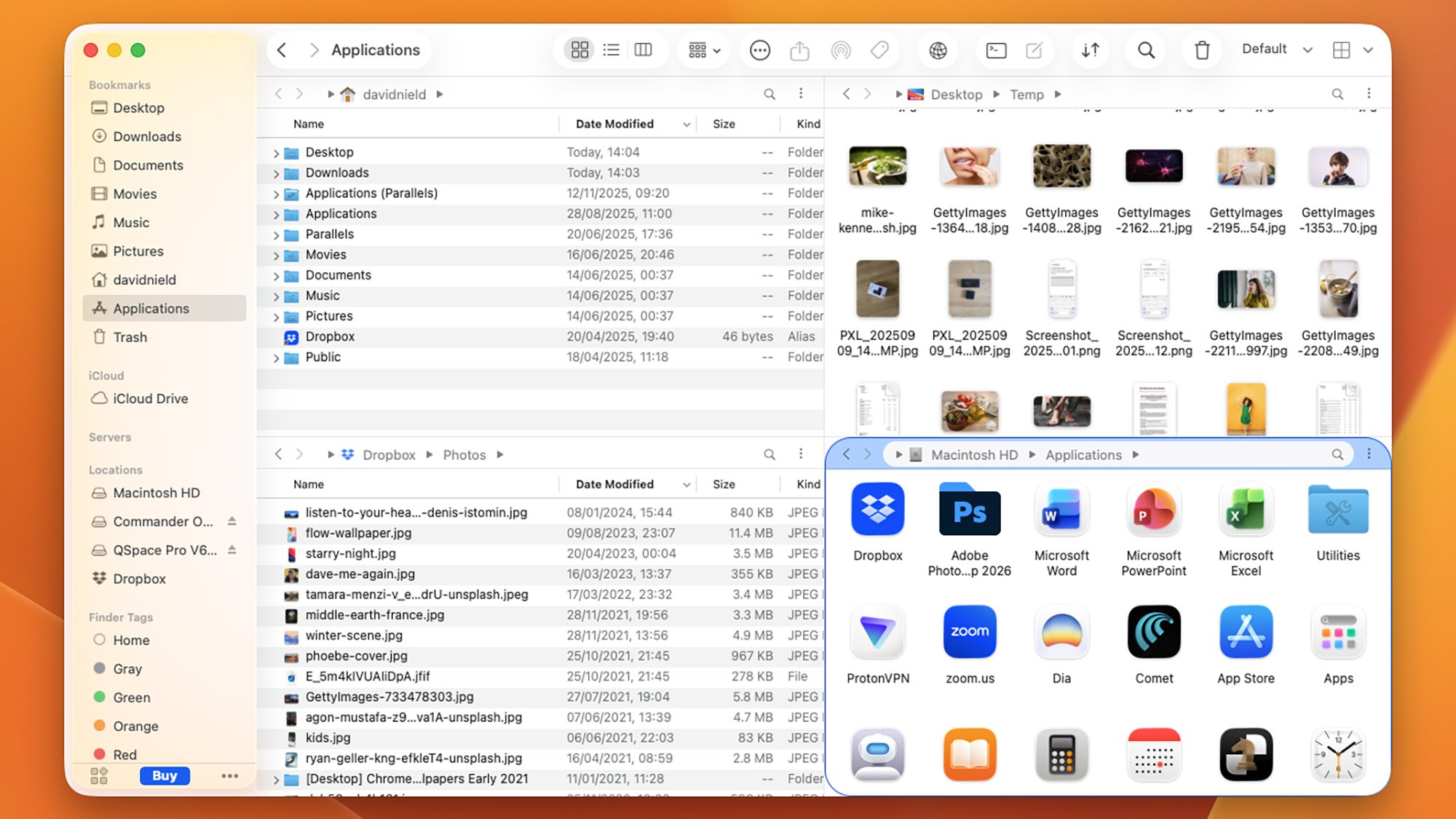
As soon as you load up Commander One, you’ll notice it has a busier interface than Finder, which may or may not suit you, depending on your attitude toward minimalism. Its layout is based around a dual-pane interface, and you can customize it in a variety of ways—even down to the fonts and colors used, if you want something bespoke.

The software starts to show its potential when you move from just looking at your files and folders to actually doing something with them. You’re able to rename files when copying and moving them; you get a dedicated file operations queue; and you can run complex searches through your system using regular expressions, too.

I like the quick toggle switches for seeing hidden files and for previewing files without any additional apps, and connecting up to network locations and cloud storage is straightforward. There’s even an integrated Terminal for you to make use of. It’s handy having shortcut keys on show in the interface as well, and you can customize these as needed if you don’t like the defaults.

There’s certainly a lot going on, and while the interface takes a little bit of getting used to, that’s to be expected—and it doesn’t take long to learn what’s what. The Pro version of the software comes with extra features, including layout themes, and integrations for FTP, Google Drive, and Dropbox: That’s yours for a one-off fee of $29.99.

QSpace Pro

QSpace Pro

Credit: Lifehacker

QSpace Pro is the best Finder alternative I tested in terms of the interface customizations you get access to: You can tailor to a fine level of detail, though the default look isn’t all that different from Finder. You can have up to four different system locations on view at once, with the panels arranged in a variety of different ways, and jumping between these layouts is easily done.

After a short while using QSpace Pro I definitely felt I was better able to get around my Mac more efficiently, and when you’ve got a lot to do on your system, that really helps. Copying, moving, searching, deleting, tagging, and previewing is all intuitively and simply done, and you can easily hide parts of the interface if you know you won’t need them.

The wealth of settings available in QSpace Pro is a testament to how much you can do with this: Keyboard shortcuts, the context menu, new file creation, batch operations, folder syncing, iCloud links, and app launching can all be customized, and those are just some of the options available. It’s like Finder, but with a lot more going on.

QSpace Pro isn’t free, however: Its features cost a one-off fee of $27.99 via the Mac App Store (or $29.99 via a direct download), though at the time of writing, those prices are down to $12.99 and $13.99, respectively. If you go through the QSpace Pro website, you can test the software out for 30 days for free before buying.

Path Finder

Path Finder

Credit: Lifehacker

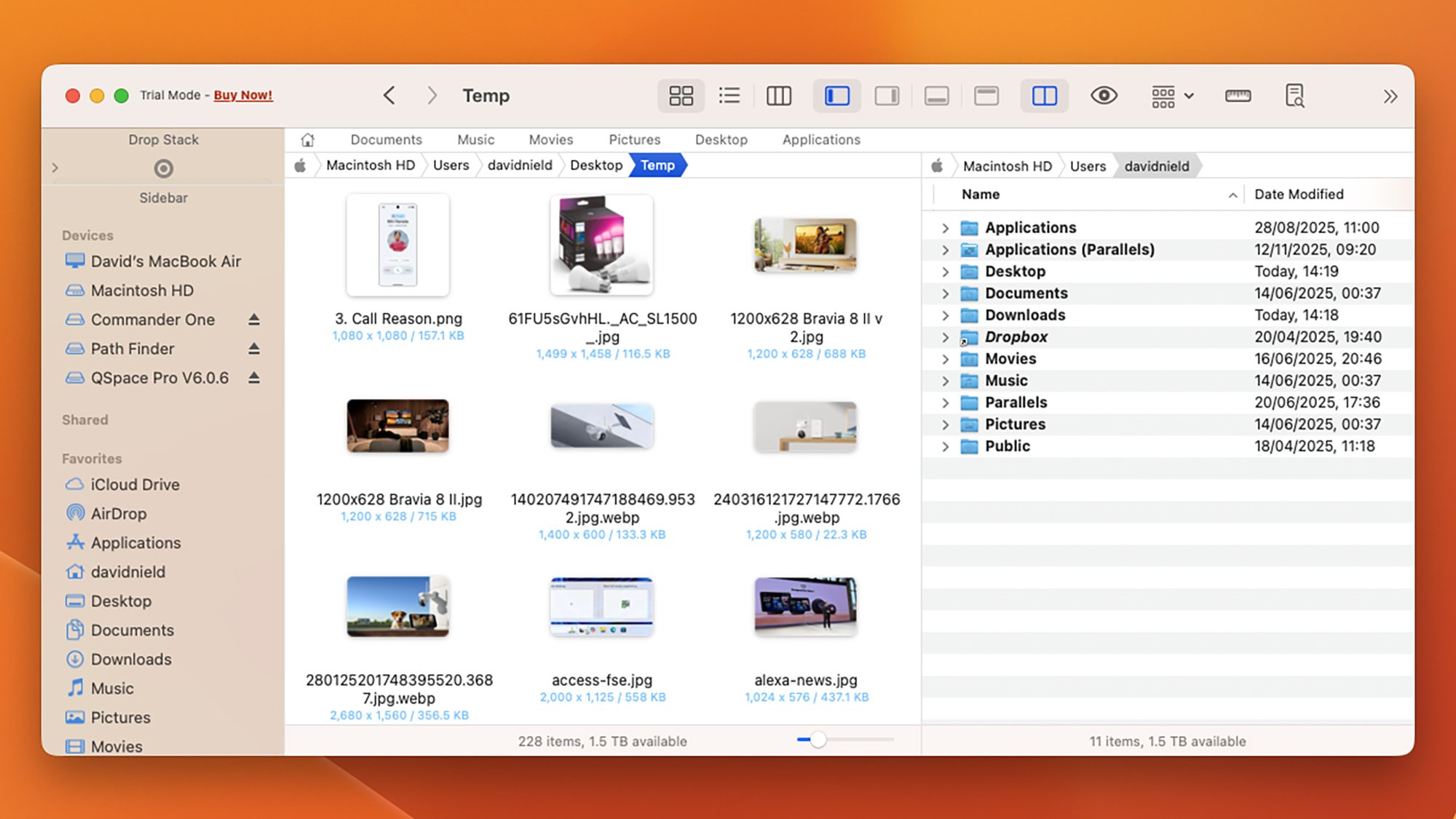
Path Finder is one of the Finder alternatives that’s been around the longest, and I think it’s the one I’m actually going to switch to permanently. It’s absolutely packed with features and options to play around with, and if you spend a little time getting it set up the way you want it, it should seriously speed up all your file operations.

There are a choice of different layouts to pick from, including a dual-pane layout that makes moving and copying more straightforward, and I very much appreciate the “stacking” approach that lets you pile up several files and folders in a temporary holding pane first, before you do anything with them.

Batch file operations are supported, as are synced folders, so you can merge and compare two folders on your system as required. There’s also extensive use of bookmarks and tab presets, so that you can quickly jump to the places on your Mac system that you need to visit the most—something that isn’t always simple to do in Finder.

The visual representations of how much space files and folders are taking up on disk is very handy, and so is the Dropbox integration (with Dropbox being my go-to cloud storage option). Admittedly it’s not the most visually appealing of the software packages listed here, but that’s not necessarily the most important thing in a file manager, and it adds all the features I didn’t know I’d been missing from Finder.

Path Finder is $29.99 for the year, but there’s a 30-day trial available.

NASA’s SPHEREx Completes First All-Sky Infrared Map Of Entire Universe And It’s Stunning

NASA's SPHEREx Completes First All-Sky Infrared Map Of Entire Universe And It's Stunning
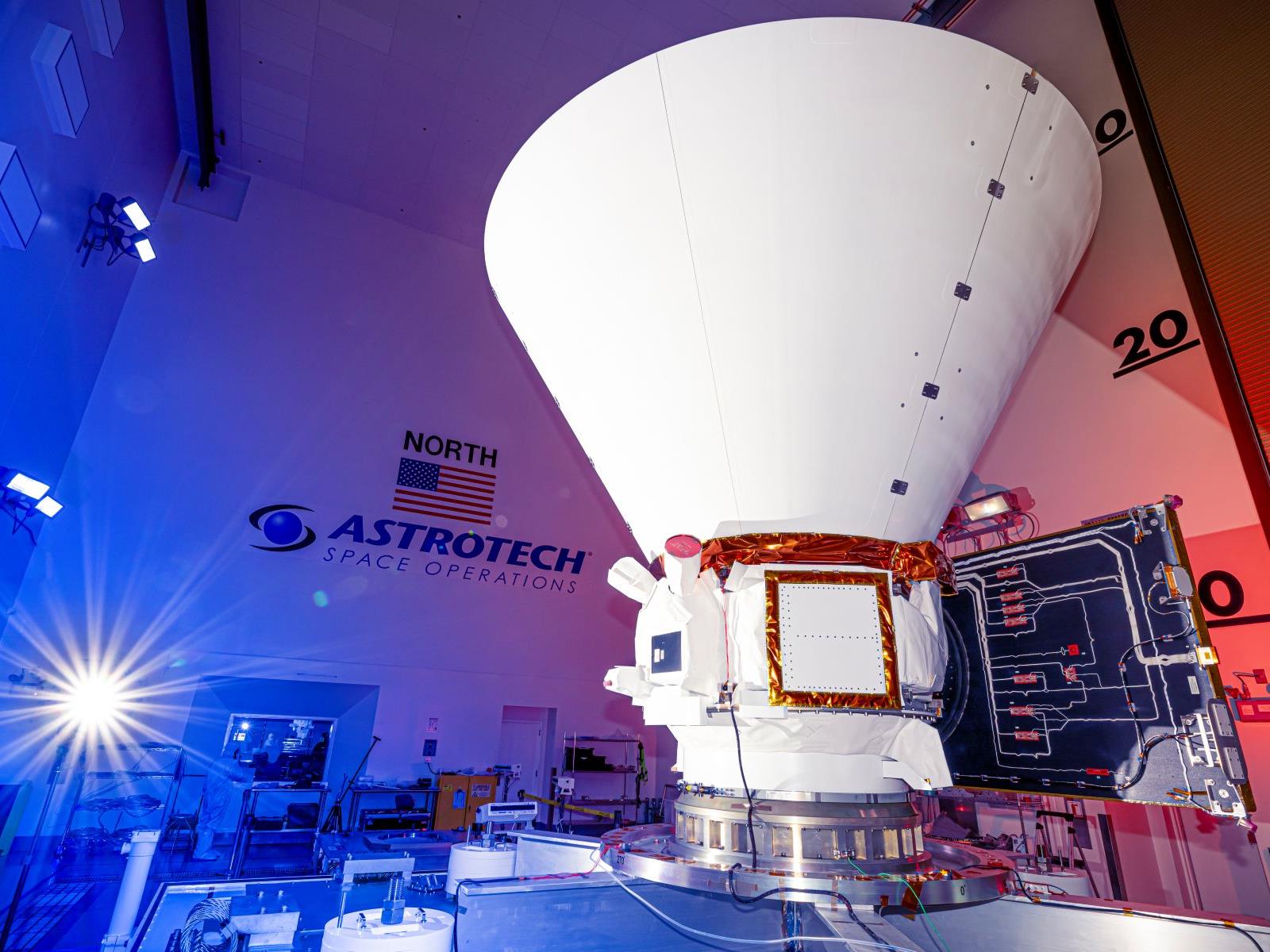
Less than a year into its mission, NASA’s SPHEREx has already completed its first full survey of the sky, producing a near-infrared map that captures the entire cosmos in a staggering 102 colors. Words can’t really convey the true splendor of the achievement, though, so have a look for yourself at the panoramic video NASA released.

Unlike

Graham: [KDE] Highlights from 2025

Nate Graham looks
back at how 2025 went
for the KDE project.

Today Plasma is the default desktop environment in a bunch of the
hottest new gaming-focused distros, including Bazzite, CachyOS,
Garuda, Nobara, and of course SteamOS on Valve’s gaming
devices. Fedora’s Plasma edition was also promoted to co-equal
status with the GNOME edition, and Asahi Linux — the single
practical option for Linux on newer Macs — only supports KDE
Plasma. Parrot Linux recently switched to Plasma by default,
too. And Plasma remains the default on old standbys like
EndeavourOS, Manjaro, NixOS, OpenMandriva, Slackware and TuxedoOS —
which ships on all devices sold by Tuxedo Computers!

Think Your Gaming Monitor Is Fast? This One Hits A Blistering 1080Hz

Think Your Gaming Monitor Is Fast? This One Hits A Blistering 1080Hz
Old school PC geeks may remember a time when AMD and Intel were in a race to 1GHz and beyond, back before multiple cores, hybrid designs, and mountains of stacked cache took center stage. Those days may be gone forever, but now we have monitor makers trying to one-up each other with increasingly fast speeds, and HKC is touting a gaming monitor

Samsung’s New Wireless Speakers Blend Immersive Audio And Home Design At CES

Samsung’s New Wireless Speakers Blend Immersive Audio And Home Design At CES
Hold on a second, Samsung designers were allowed to actually design something? Ahead of the upcoming CES 2026, the South Korean company has unveiled not just a soundbar, but some very fresh-looking Wi-Fi speakers that combine artistic design and high-fidelity performance (on paper anyway).

Music Studio 7

Undoubtedly the eye-catcher during

A quirky guide to myths and lore based in actual science

Earthquakes, volcanic eruption, eclipses, meteor showers, and many other natural phenomena have always been part of life on Earth. In ancient cultures that predated science, such events were often memorialized in myths and legends. There is a growing body of research that strives to connect those ancient stories with the real natural events that inspired them. Folklorist and historian Adrienne Mayor has put together a fascinating short compendium of such insights with Mythopedia: A Brief Compendium of Natural History Lore, from dry quicksand and rains of frogs to burning lakes, paleoburrows, and Scandinavian “endless winters.”

Mayor’s work has long straddled multiple disciplines, but one of her specialities is best described as geomythology, a term coined in 1968 by Indiana University geologist Dorothy Vitaliano, who was interested in classical legends about Atlantis and other civilizations that were lost due to natural disasters. Her interest resulted in Vitaliano’s 1973 book Legends of the Earth: Their Geologic Origins.

Mayor herself became interested in the field when she came across Greek and Roman descriptions of fossils, and that interest expanded over the years to incorporate other examples of “folk science” in cultures around the world. Her books include The Poison King: The Life and Legend of Mithradates, Rome’s Deadliest Enemy (2009), as well as Greek Fire, Poison Arrows, & the Scorpion Bombs (2022), exploring the origins of biological and chemical warfare. Her 2018 book, Gods and Robots: Myths, Machines, and Ancient Dreams of Technology, explored ancient myths and folklore about creating automation, artificial life, and AI, connecting them to the robots and other ingenious mechanical devices actually designed and built during that era.

Read full article

Comments

This Dashcam Is My Tech ‘Upgrade of the Year’

We may earn a commission from links on this page.

To be alive in 2025 is to assume you are being recorded at all times. There are cameras just about everywhere we go these days: Security cameras, video doorbells, and smartphones are frequently recording, and so ubiquitous that I tend to figure that if I go out in public, I’m being watched.

But when you’re driving, it can be a different story. Sure, there are cameras on the road—either street cameras or cameras built directly into modern cars—but there are plenty of moments behind the wheel where nothing you do is recorded. You could view this as a nice reprieve from the surveillance of modern life, but it also means that if you get into an accident, it could quickly turn into a “he said, she said” incident. Someone could reverse directly into your car, but because there were no cameras around to document the accident, your insurance company could throw their hands in the air and make you both pay for something that wasn’t your fault.

I’ve never been in that situation, but I was tired of worrying about it. My car is on the older side, and doesn’t come with any of the modern safety features newer cars now include—including cameras. Where something like a Tesla records everything in and around the car, my vehicle records nothing. If someone accidentally hit my car, or worse, intentionally tried to scam me, I could be out of luck, and without clear evidence I wasn’t at fault.

You won’t regret buying a dashcam, even if you never use it

After following one too many threads online sharing such horror stories, I decided it was time to get myself a dashcam.But before I could, I was gifted one last Christmas—a Redtiger 4K dashcam. It was easy enough to set up, though even after a full year of use, I’m not taking full advantage of it yet: The main unit attaches to my front windshield, with a cable that plugs into the cigarette lighter port, but this particular model also comes with a rear camera that requires a little extra maneuvering to install. I’ve been a bit lazy on that front, but I should get cracking, since it would be helpful to have a camera protecting the back of my car, too.

I almost wish I had some harrowing tale to tell that shows off how the dashcam saved me during the past year, or even a story about capturing some wild driving habits from my fellow drivers. But, spoiler alert: I haven’t actually had to put it to use, as I’ve fortunately not been in an accident, or even experienced an interesting close call. But the peace of mind that comes with knowing that if an otherwise ambiguous fender bender has been refreshing. It’s nice to know when I’m driving on a particularly busy road that I have a little extra protection should someone jump their lane or decide to text and drive.

There are so many different dashcam models, so I won’t try to make the case that mine specifically is the one that everyone should buy. But there are a few things I like about it: First, the main unit records in 4K, which means your videos will be clear enough to use in the event you need to prove yourself innocent. While 4K takes up more recording space than 1080p, this model is designed to record over itself when it fills up. Since you probably don’t need all your driving footage, you don’t really need to worry about running out of space, and can grab the file when something actually happens. There are other features that I don’t use, like wifi connectivity as well as a smart app, but I prefer to just grab the footage off the included SD card—at least, I would if I ever needed it.

3 New Year’s Resolutions for Your Dog

Deal pricing and availability subject to change after time of publication.

New Year’s resolutions are all about improving ourselves, right? The same goes for your best buddy—your dog. 

While your dog can’t physically tell you what they need to feel their best, there are simple things you can do to help set them up for success. Right now, you can save 50% off your first box of human-grade The Farmer’s Dog pet food, so that’s a great start. Check out these pup-centric resolutions and help keep their tail wagging into 2026—and for years to come. 

Make the switch to fresh dog food

Say goodbye to kibble this year by getting a subscription to The Farmer’s Dog. A new study from the company shows that fresh food can support healthier aging in dogs—and who doesn’t want more good years with their pup? 

The Farmer’s Dog makes fresh dog food that’s formulated by on-staff board-certified veterinary nutritionists. Each batch is made from gently cooked meats and vegetables, has no added fillers or preservatives, and is quickly frozen to lock in nutrients. It’s then shipped to your door while it’s still fresh. 

Sign up and The Farmer’s Dog will create a personalized plan with portions that meet your pup’s unique nutritional and caloric needs. Considering nearly 60% of dogs are overweight, these portions can support a healthy lifestyle. 

Brush your dog’s teeth 

Over 80% of dogs will get some form of dental disease in their lifetime. To tackle that stinky dog breath and protect their chompers, you’ll need a toothbrush designed for dogs and doggie toothpaste that has your vet’s approval. (Never use human toothpaste on your pup, as it can be toxic for dogs.) Start by putting doggie toothpaste on your finger and letting your pup lick it off to get them used to having your finger in their mouth. Eventually, replace your finger with the toothbrush.

Teach your dog some new tricks

While daily walks with your dog are key for physical fitness (for both you and your pup), training your dog is a fantastic way to provide them with intellectual stimulation. Teach your dog to sit or some ‘Gram-worthy tricks like playing Bach on the piano, as long as you give them positive affirmation, your pet will feel like the good dog they are. 

When you’re making resolutions this year, don’t forget about your pup. Subscribe to The Farmer’s Dog today and save 50% off your first box of human-grade pet food—and keep the wag-worthy vibes going all year.