Yes, a federal judge blocked an attempt by Texas at an app store age-verification law.
But this year Silicon Valley giants including Google and Apple “are expected to fight hard against similar legislation,” reports Politico, “because of the vast legal liability it imposes on app stores and developers.”
In Texas, Utah and Louisiana, parent advocates have linked up with conservative “pro-family” groups to pass laws forcing mobile app stores to verify user ages and require parental sign-off. If those rules hold up in court, companies like Google and Apple, which run the two largest app stores, would face massive legal liability… California has taken a different approach, passing its own age-verification law last year that puts liability on device manufacturers instead of app stores. That model has been better received by the tech lobby, and is now competing with the app-based approach in states like Ohio. In Washington D.C., a GOP-led bill modeled off of Texas’ law is wending its way through Capitol Hill. And more states are expected to join the fray, including Michigan and South Carolina.
Joel Thayer, president of the conservative Digital Progress Institute and a key architect of the Texas law, said states are only accelerating their push. He explicitly linked the age-verification debate to AI, arguing it’s “terrifying” to think companies could build new AI products by scraping data from children’s apps. Thayer also pointed to the Trump administration’s recent executive order aimed at curbing state regulation of AI, saying it has galvanized lawmakers. “We’re gonna see more states pushing this stuff,” Thayer said. “What really put fuel in the fire is the AI moratorium for states. I think states have been reinvigorated to fight back on this.”
He told Politico that the issue will likely be decided by America’s Supreme Court, which in June upheld Texas legislation requiring age verification for online content. Thayer said states need a ruling from America’s highest court to “triangulate exactly what the eff is going on with the First Amendment in the tech world.
“They’re going to have to resolve the question at some point.”
The first alpha release of Mageia 10 is now available for this Linux distribution who’s lineage traces back to Mandriva and before that the legendary Mandrake Linux…
Back in 2024, NASA announced that the Artemis 2 mission was going to be pushed back to April 2026. Now, the agency says it could launch as early as February, with the first flight opportunity being on February 6. NASA is currently making the final preparations for the mission and will soon roll out the Space Launch System (SLS) rocket and the Orion spacecraft to their launch pad at the Kennedy Space Center in Florida. The spacecraft system’s four-mile journey from the assembly building to Launch Pad 39B will take up to 12 hours. NASA is targeting a date no earlier than January 17, with the exact day depending on the weather and on the possible need for additional time to address technical issues.
Artemis 2 is the first crewed mission to the moon since the Apollo program’s final flight in 1972. The 10-day mission will have four astronauts on board who’ll be testing if Orion’s critical life support systems can sustain human passengers on future longer duration missions. They will first orbit the Earth twice before making their way 4,700 miles beyond the far side of the moon. If the SLS and Orion system is rolled out as planned, NASA intends to conduct a wet dress rehearsal at the end of January. The agency will load cryogenic propellants into the rocket and will do a full launch countdown during the rehearsal to prepare for the real event.
This article originally appeared on Engadget at https://www.engadget.com/science/space/nasa-makes-final-preparations-for-its-first-crewed-moon-mission-in-over-50-years-150000825.html?src=rss
For those loading Linux on the ASUS ROG Xbox Ally X gaming handheld, there is currently audio quality issues, including gaps/dropouts in audio playback. A workaround is in the process of making its way to the Linux kernel until a proper solution can be sorted out…
The Free Software Foundation’s president Ian Kelling is also their senior systems administrator. This week he shared an example of how “the work we put in to making sure a program is free for us also makes it free for the rest of the world.”
During the COVID-19 pandemic, like everyone everywhere, the FSF increased its videoconferencing use, especially videoconferencing software that works in web browsers. We have experience hosting several different programs to accomplish this, and BigBlueButton was an important one for us for a while. It is a videoconferencing service which describes itself as a virtual classroom because of its many features designed for educational environments, such as a shared whiteboard… In BigBlueButton 2.2, the program used a freely licensed version of MongoDB, but it unintentionally picked up MongoDB’s 2018 nonfree license change in versions 2.3 and 2.4. At the FSF, we noticed this [after a four-hour review] and raised the alarm with the BigBlueButton team in late 2020.
In many cases of a developer changing to a nonfree license, free forks have won out, but in this case no one judged it worth the effort to maintain a fork of the final free MongoDB version. This was a very unfortunate case for existing users of MongoDB, including the FSF, who were then faced with a challenge of maintaining their freedom by either running old and unmaintained software or switching over to a different free program. Luckily, the free software world is not especially lacking in high quality database software, and there is also a wide array of free videoconferencing software. At the FSF, we decided to spend some effort to make sure MongoDB would no longer make BigBlueButton nonfree, to help other users of MongoDB and BigBlueButton. We think BigBlueButton is really useful for free software in schools, where it is incredibly important to have free software.
On the tech team, especially when it comes to software running in a web browser, we are used to making modifications to better suit our needs. In the end, we didn’t find a perfect solution, but we did find FerretDB to be a promising MongoDB alternative and assisted the developers of FerretDB to see what would be required for it to work in BigBlueButton. The BigBlueButton developers decided that some architectural level changes for their 3.0 release would be the path for them to remove MongoDB. As of BigBlueButton 3.0, released in 2025, BigBlueButton is back to being entirely free software…!
As you can see, in the world of free software, trust can be tricky, and this is part of why organizations like the FSF are so important.
Kelling notes he’s part of a tech team of just two people reponsible for “63 different services, platforms, and websites for the FSF staff, the GNU Project, other community projects, and the wider free software community…”
Chances are that you’re here because you’ve heard a virtual private network (VPN) can change your virtual location, and want to know what that means. If you know already, head over to my best VPN list to learn which services I recommend for changing your location. But if you’re clueless, read on.
Whenever any device connects to the internet — whether it’s a laptop, a phone or a smart Lego brick — it’s assigned a unique IP address that other devices can use to identify it. Think of the name you give the barista at a coffee shop, except instead of a hot beverage, you’re being served websites and digital audio and video.
That’s the upside. The downside is that a device’s IP address can be used to find its location in the real world. That means service providers can show you local weather reports — as well as targeted local ads. More ominously, however, it means service providers can restrict what you see online based on where you are physically. That impacts everything from the fun (what Netflix has available to stream) to the serious (what information gets censored on the government’s behalf).
A VPN gets around that downside by running all your online activity through a middleman server before sending it to its destination. Instead of your real IP address, everyone sees the address of the VPN server, along with its geolocation. That means you can subvert any local restrictions getting in your way: You’re actually in Houston, but so far as the website you’re viewing is concerned, you seem to be coming from Amsterdam. Here’s how to do it.
How to change your virtual location with a VPN
With so many excellent commercial VPNs on the market, changing your virtual location is a lot easier than it sounds. You don’t need to be a hacker — just find a good VPN app and connect to a server in your desired location. On almost any VPN, this is a simple matter of opening the app or desktop client and choosing the server location from a list.
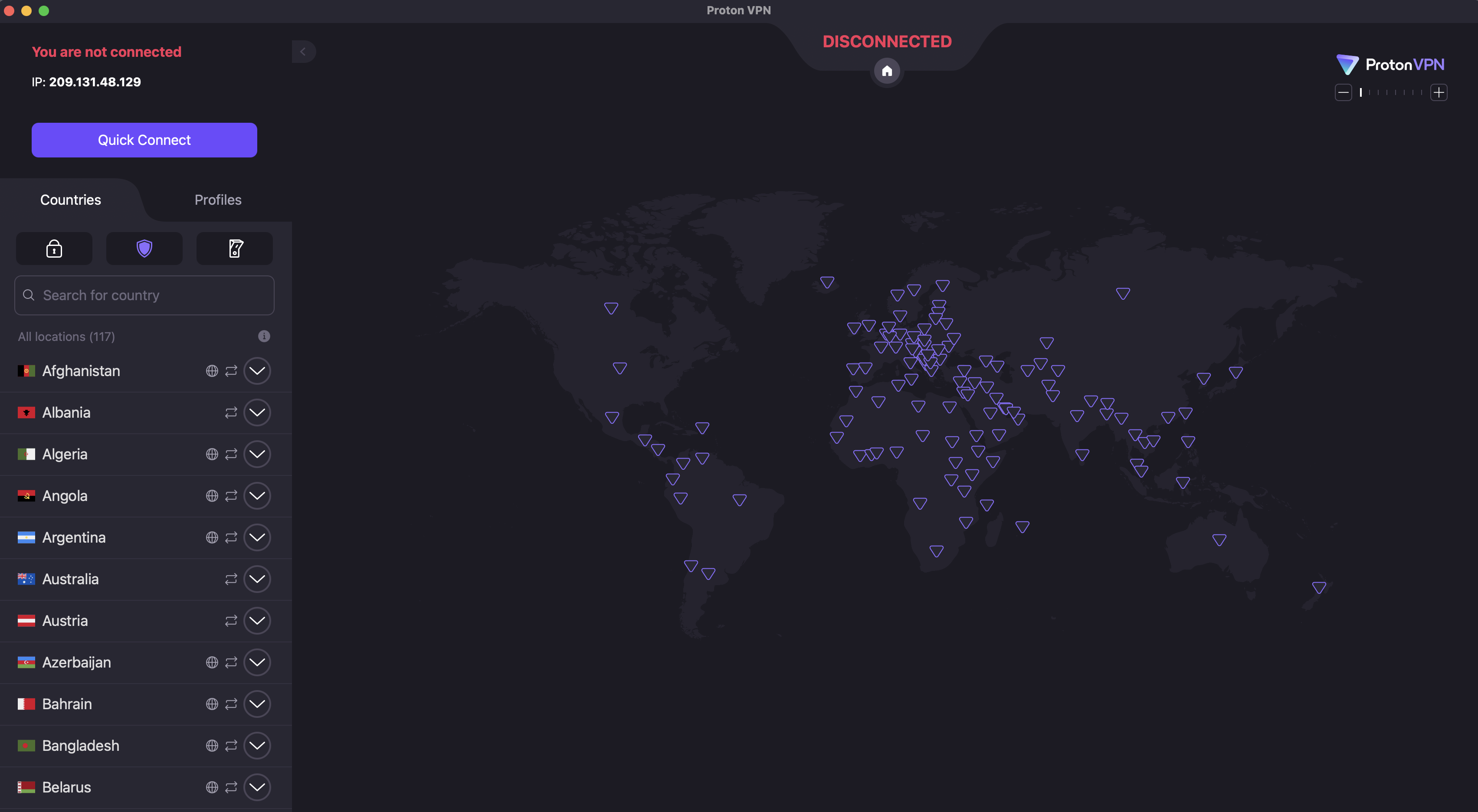
On Proton VPN, for example, you can switch locations by clicking the name of any country in the list on the left.
Sam Chapman for Engadget
However, as with any technology, there are some potential pitfalls. For reference, I’ve laid out the steps below for both desktop and mobile devices.
How to change location on Windows or Mac
Use these steps to change the virtual location of any desktop or laptop device running macOS or Windows. There may be slight variations, but in general, this process works for any top VPN.
Select a VPN provider. You can rely on Engadget’s best VPN list or, if you’re unable to pay for a new subscription right now, our list of the best free VPNs. My personal choice is Proton VPN, but there are other good options. Look for a service with fast speeds, modern encryption and a long, non-controversial record in the industry.
Create an account with the VPN and save your username and password. Unless it’s a forever-free service, this is when you’ll be asked to pay for a subscription. If you’re sure about your provider, you can save a lot by going with a long-term deal. See our list of the best VPN deals for ideas.
Download the VPN app. It’s best to go through the VPN’s website, even if you’re on Mac — in rare cases, the App Store versions can be outdated or short on features. Look for a download center on the site, and make sure you enter it while logged in.
Install the VPN app. Most VPNs have an installation flow built in, so all you have to do is follow the steps. If the VPN asks you to change your settings or grant it permissions, do it; this installs the tools it needs to do its job.
Open the VPN app and find your way around the user interface. At a minimum, make sure you know how to connect, disconnect and open the location selection menu.
Connect to a server in the location where you want your internet connection to appear to originate. If you’re trying to get around local restrictions, you can just pick any nearby country without that censorship — for example, if you’re in China, then Japan, South Korea or Singapore will work. If you’re after content from a specific country, choose a server in that country.
Get online through a browser or connected app as you normally would. To make sure your location has actually changed, use a site like WhatIsMyIPAddress to check where you’re coming from.
When you want to use your real location again, disconnect from the VPN or choose a server in the county you’re in.
It’s not necessary, but I also recommend activating your VPN’s kill switch if there is one. VPN servers aren’t perfect, and they do drop connections from time to time. If this happens, an active kill switch also cuts off your internet connection so your real location isn’t visible for a millisecond.
How to change location on iPhone or Android
The process for using a VPN to change your virtual location on mobile is pretty similar to how it’s done on desktop. Again, while individual installation flows have their own quirks, the following steps are broadly applicable to any iOS or Android VPN.
Pick a VPN provider you like. The best VPNs also tend to be the best for mobile, including Proton VPN, ExpressVPN and Surfshark. On mobile, you can use app store reviews and comments to research. Make sure you’re getting the real version of your chosen VPN and not a similarly named one trying to piggyback.
Download the VPN from the Apple App Store or Google Play Store. At this point, if you haven’t paid yet, you may be able to take advantage of a free trial by opening the app and proceeding through the setup flow. This is a good time to test if the VPN is changing your location in ways that can’t be seen through.
Follow the VPN’s instructions to create an account, including paying for a subscription if necessary.
Take some time to learn to use the VPN app. Mobile interfaces have to pack more features into a smaller space, usually relying on tabs. Try and find the tabs for picking server locations and toggling VPN settings.
Connect to a server in your desired location. Make sure the VPN is actually active before you proceed (most of them make it pretty clear, but it’s still easy to forget).
Get online through a browser or another internet-capable app.
When you’re finished, disconnect from the VPN to return to using your real location.
One more note: on both mobile and desktop, I recommend using either a paid VPN or a free VPN supported by a paid subscription. Entirely free VPNs come with risks, and some popular apps secretly share problematic connections.
Why change your virtual location?
Changing your virtual location isn’t hard, but it’s still an extra step between you and the internet. However, the benefits of location masking far outweigh the small amount of extra work. Hiding your IP address — and your location along with it — is one of the most impactful steps you can take to stay safe online.
Concealing your IP address has massive benefits on its own, even if you use one close to your real location (which gets you shorter loading times). Lots of web services track you without your consent, frequently for advertising purposes. Some of this is done through third-party cookies, but a lot of it starts with building profiles about your IP address.
Illicit actors can also take advantage of your IP address and its geolocation. A hacker can track you down to within your ZIP code — though an IP address can’t pinpoint your location to the square foot, it makes it much easier to narrow down where you live. Even with just your IP address, hackers can launch DDoS attacks against you, use the IP to make fake social media accounts in your name or even call in SWAT teams to your location.
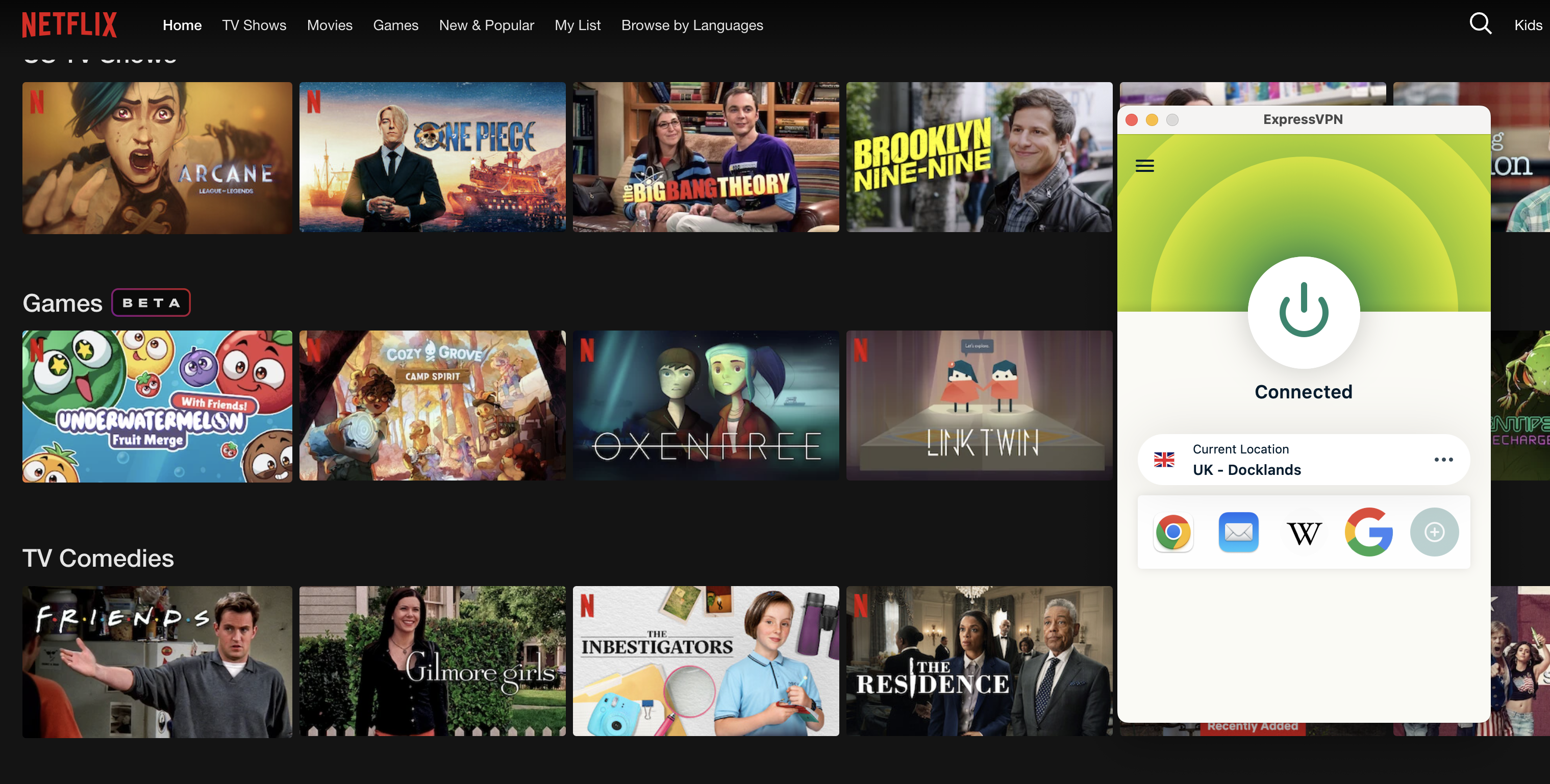
By changing my location to the UK using ExpressVPN, I can see shows on Netflix that aren’t listed in the US.
Sam Chapman for Engadget
Although masking your virtual location can be vital to staying safe online, there are other practical and even fun reasons to do it. For one thing, when traveling abroad, you might want to use a site only available in your home country. Simply connect to a server located near home and you can use your bank account and local streaming libraries as normal.
If you’re home, there are lots of benefits to being virtually in another region. You can see a foreign country’s streaming libraries and shop for deals that may only be available in its currency. You can also get around any nationwide online censorship and potentially download banned apps. Just be sure to be aware of your local laws to know if doing so is merely frowned upon, or if it’s truly against the law.
Can a VPN change your GPS location?
There’s one more critical point to remember when changing location with a VPN. The VPN server only changes your IP address and the physical location associated with it. It does not change the GPS location your device might be broadcasting.
GPS data can leak out in a few ways. Tablets and phones have location services turned on by default, and as anyone who’s heard a true crime podcast knows, they can also give away your location by contacting cell towers. Web browsers often have similar features. Websites can also use HTML5 geolocation to access your GPS — provided you give permission, but that’s easy to do without thinking.
Some VPNs, including Surfshark and Windscribe, do have features designed to fool GPS, but they’re not standard. When you’re changing your location with a VPN, make sure to turn off location services and avoid granting any permissions that might reveal where you really are. You can also run a separate GPS spoofing app alongside your VPN.
How to troubleshoot a VPN that’s not changing your location
If you’ve found that browsers are still seeing your old IP address while you have a VPN active, or that websites show you the same content when you’re supposed to be virtually abroad, there’s a chance your VPN isn’t actually changing your location. To test if your real position is leaking, start by checking your IP address (with a search engine or WhatIsMyIPAddress). If it matches your home location, something has gone wrong.
Note that it’s not necessarily a problem if it doesn’t match your home location or the stated location of your VPN server. VPNs use virtual server locations to reach a lot of locations where brick-and-mortar servers aren’t practical — Windscribe, for example, does not have a physical data center in Antarctica.
If you find that your VPN is leaking your real IP address, try these troubleshooting steps in order. I’ve arranged them roughly from least to most time-intensive.
Disconnect from your VPN and reconnect to the same location. This should hook you up with a different server in that same place. Test your IP again — there’s a good chance the problem was isolated to the first server you tried.
Try a new location (skip this step if you need a server in a particular country).
Try a different VPN protocol. If you’re using WireGuard, switch to OpenVPN or IKEv2.
Make sure location services are turned off.
Clear your browser cache and cookies to get rid of any saved information.
Test for DNS leaks. Your VPN might accidentally be sending your IP address to a public server to resolve DNS requests. IPleak.org is a good tool for catching this.
Try a different VPN. Use a free service like Proton or Windscribe and test for leaks. If the problem reoccurs, it might be coming from inside your network.
Contact the helpdesk for your original VPN and inform them about the problem. Get screenshots of the VPN connected to the leaky location next to IP address data confirming the leak.
I’ve already mentioned several VPNs that do a good job of changing your location, but in case you’re here for product advice, here are all my recommendations in one place. My favorite VPN is Proton VPN, which is so far the only service to receive full marks on my location-change test. I used 15 of its servers in five different countries to access Netflix. Each time, I saw the destination country’s full content library like I was really there.
Surfshark is a close runner-up in this category. It passed 14 out of 15 tests, only slipping up once in Japan — and a quick disconnect and reconnect was enough to fix that. I got equally great results from ExpressVPN, only having to retry one server in the UK. NordVPN performed perfectly in every location except Nigeria, and that still didn’t leak my real IP address. The problem only seemed to exist on Netflix.
This article originally appeared on Engadget at https://www.engadget.com/cybersecurity/vpn/how-to-change-location-with-a-vpn-140000339.html?src=rss
We saw some exciting tech at CES this week, including new monitors leveraging NVIDIA’s G-SYNC Pulsar technology. Now it’s a waiting game to see when they’ll actually be available to purchase. In the meantime, there are great deals to be had on the current crop of OLED panels, including a fantastic discount on an curvy Alienware mode.
Alienware
An anonymous reader quotes a report from CBC.ca: A company largely owned by the French and U.K. governments is pitching Canada on a roughly $250-million plan to provide the military with secure satellite broadband coverage in the Arctic, CBC News has learned. Eutelsat, a rival to tech billionaire Elon Musk’s Starlink, already provides some services to the Canadian military, but wants to deepen the partnership as Canada looks to diversify defence contracts away from suppliers in the United States.
A proposal for Canada’s Department of National Defence to join a French Ministry of Defence initiative involving Eutelsat was apparently raised by French President Emmanuel Macron with Prime Minister Mark Carney on the sidelines of last year’s G7 summit in Alberta. The prime minister’s first question, according to Eutelsat and French defence officials, was how the proposal would affect the Telesat Corporation, a former Canadian Crown corporation that was privatized in the 1990s.
Telesat is in the process of developing its Lightspeed system, a Low Earth Orbit (LEO) constellation of satellites for high-speed broadband. And in mid-December, the Liberal government announced it had established a strategic partnership with Telesat and MDA Space to develop the Canadian Armed Forces’ military satellite communications (MILSATCOM) capabilities. A Eutelsat official said the company already has its own satellite network in place and running, along with Canadian partners, and has been providing support to the Canadian military deployed in Latvia. “What we can provide for Canada is what we call a sovereign capacity capability where Canada would actually own all of our capacity in the Far North or wherever they require it,” said David van Dyke, the general manager for Canada at Eutelsat.
“We also give them the ability to not be under the control of a singular individual who could decide to disconnect the service for political or other reasons.”
Has it been half a century already? Believe it or not, Apple is turning 50 years old this year, and to celebrate the occasion, auction house RR Auction is hosting a huge 50th anniversary Apple sale with a whole bunch of desirable collectibles, some of which are expected to fetch half a million dollars or more. One of them is an ultra-rare
Alice Ryhl of Google has been working on an improvement to the Linux kernel code for inlining C helpers into Rust when making use of a Link-Time Optimized (LTO) kernel build. At least some of the patches are queued up for merging in the upcoming Linux 6.20~7.0 cycle for helping those enabling the Rust kernel support and also making use of the LLVM/Clang compiler’s LTO capabilities for greater performance…
As age-verification laws continue to dismantle the adult industry—and determine the future of free speech on the internet—a Utah lawmaker proposed a bill this week that would enforce a tax on porn sites that operate within the state.
Introduced by state senator Calvin Musselman, a Republican, the bill would impose a 7 percent tax on total receipts “from sales, distributions, memberships, subscriptions, performances, and content amounting to material harmful to minors that is produced, sold, filmed, generated, or otherwise based” in Utah. If passed, the bill would go into effect in May and would also require adult sites to pay a $500 annual fee to the State Tax Commission. Per the legislation, the money made from the tax will be used by Utah’s Department of Health and Human Services to provide more mental health support for teens.
Musselman did not respond to a request for comment.
The ollama 0.14-rc2 release is available today and it introduces new functionality with ollama run –experimental for in this experimental mode to run an agent loop so that LLMs can use tools like bash and web searching on your system. It’s opt-in for letting ollama/LLMs make use of bash on your local system and there are at least some safeguards in place…
With new volunteers stepping up for This Week in Plasma, there is a new issue out this week to highlight more development activities going into the upcoming KDE Plasma 6.6 desktop release…
The current incarnation of ZLUDA continues moving along for running unmodified CUDA apps on non-NVIDIA GPUs. Released on Friday was ZLUDA 6-preview.48 with now boasting CUDA 13.1 compatibility…
Scientists are putting Einstein’s claim that the speed of light is constant to the test. While researchers found no evidence that light’s speed changes with energy, this null result dramatically tightens the constraints on quantum-gravity theories that predict even the tiniest violations. ScienceDaily reports: Special relativity rests on the principle that the laws of physics remain the same for all observers, regardless of how they are moving relative to one another. This idea is known as Lorentz invariance. Over time, Lorentz invariance became a foundational assumption in modern physics, especially within quantum theory. […] One prediction shared by several Lorentz-invariance-violating quantum gravity models is that the speed of light may depend slightly on a photon’s energy. Any such effect would have to be tiny to match existing experimental limits. However, it could become detectable at the highest photon energies, specifically in very-high-energy gamma rays.
A research team led by former UAB student Merce Guerrero and current IEEC PhD student at the UAB Anna Campoy-Ordaz set out to test this idea using astrophysical observations. The team also included Robertus Potting from the University of Algarve and Markus Gaug, a lecturer in the Department of Physics at the UAB who is also affiliated with the IEEC. Their approach relies on the vast distances light travels across the universe. If photons of different energies are emitted at the same time from a distant source, even minuscule differences in their speeds could build up into measurable delays by the time they reach Earth.
Using a new statistical technique, the researchers combined existing measurements of very-high-energy gamma rays to examine several Lorentz-invariance-violating parameters favored by theorists within the Standard Model Extension (SME). The goal was ambitious. They hoped to find evidence that Einstein’s assumptions might break down under extreme conditions. Once again, Einstein’s predictions held firm. The study did not detect any violation of Lorentz invariance. Even so, the results are significant. The new analysis improves previous limits by an order of magnitude, sharply narrowing where new physics could be hiding.
Meta has signed long-term nuclear power deals totaling more than 6 gigawatts to fuel its data centers: “one from a startup, one from a smaller energy company, and one from a larger company that already operates several nuclear reactors in the U.S,” reports TechCrunch. From the report: Oklo and TerraPower, two companies developing small modular reactors (SMR), each signed agreements with Meta to build multiple reactors, while Vistra is selling capacity from its existing power plants. […] The deals are the result of a request for proposals that Meta issued in December 2024, in which Meta sought partners that could add between 1 to 4 gigawatts of generating capacity by the early 2030s. Much of the new power will flow through the PJM interconnection, a grid which covers 13 Mid-Atlantic and Midwestern states and has become saturated with data centers.
The 20-year agreement with Vistra will have the most immediate impact on Meta’s energy needs. The tech company will buy a total of 2.1 gigawatts from two existing nuclear power plants, Perry and Davis-Besse in Ohio. As part of the deal, Vistra will also add capacity to those power plants and to its Beaver Valley power plant in Pennsylvania. Together, the upgrades will generate an additional 433 MW and are scheduled to come online in the early 2030s.
Meta is also buying 1.2 gigawatts from young provider Oklo. Under its deal with Meta, Oklo is hoping to start supplying power to the grid as early as 2030. The SMR company went public via SPAC in 2023, and while Oklo has landed a large deal with data center operator Switch, it has struggled to get its reactor design approved by the Nuclear Regulatory Commission. If Oklo can deliver on its timeline, the new reactors would be built in Pike County, Ohio. The startup’s Aurora Powerhouse reactors each produce 75 megawatts of electricity, and it will need to build more than a dozen to fulfill Meta’s order. TerraPower is a startup co-founded by Bill Gates, and it is aiming to start sending electricity to Meta as early as 2032.