Nowhere Fast Episode 62 – #podgoals

This one launches into 2026 ambitions with all the discipline of a rider who thinks “rest day” means “snack day.” The hosts lay out their official — yet unofficial — #podgoals for the year. Think more creative segments, more storytelling, and maybe even achieving things like “organizing the garage” or “perfecting bike hair on out-of-oven sweat.” Here’s a peek at the prime distractions they tackled:

  • Zach’s Latest Zwift Trick: Less efficiency, more spectacle — because if you’re not confusing other riders, are you really racing?  
  • Mike’s Record Attempt Fiasco: An impressively unimpressive “world record” story that somehow spirals into deeper discussions about why records should definitely involve snacks.  
  • Kevin’s McFlurry Math: A deep, scientific, completely unscientific dive into how many McFlurries equal the effort of a typical Zwift race. (Hint: still better than doing a cool-down ride.)  

This episode also features a soft launch of the Minute of Power exhibition, the spiritual heir to every idea that’s ever sounded brilliant over pizza. 

About the Podcast

Nowhere Fast is a member of the Wide Angle Podium network. To support this podcast and help pay for Kevin’s gold-plated ankle weights, head to wideanglepodium.com and contribute to our advanced virtual racing research.

To keep up to date on all our real coverage of fake bike racing, subscribe via Apple Podcasts or Spotify. 

Sony Hands Control Of Bravia TVs To TCL In Stunning 51% Takeover Deal

Sony Hands Control Of Bravia TVs To TCL In Stunning 51% Takeover Deal
In a development that’s no doubt going to send analysts and fans into a frenzy, Sony today announced that it’s ceding majority control of its iconic Bravia TV and home entertainment business to Chinese electronics giant TCL. Under a new strategic partnership, the two companies will establish a joint venture where TCL holds a 51% controlling

Microsoft Surface Laptop With Snapdragon X Is $350 Off But Only If You’re Fast

Microsoft Surface Laptop With Snapdragon X Is $350 Off But Only If You're Fast
Qualcomm continues to crank out new versions of its Snapdragon X silicon for PCs, and in doing so, there are opportunities to score enticing deals on last-gen releases. Now is one of those times. The caveat is that you’re not getting the latest and greatest silicon, but if you’re willing to go a generation back, you can save a wad a cash on

How to Get Samsung Galaxy’s Best Feature on Your Pixel (or Any Android)

I’m a devout Pixel user. I love stock Android, and I’m always running the latest Android beta, making Pixel basically my only choice. But there are times when I get jealous looking at all the extra tools that Samsung provides on its Galaxy phones, Edge Panel being the big one. With Edge Panel, you can swipe in from the edge of your phone and a hidden drawer reveals itself, filled with apps, system actions, and shortcuts. Given how barebones Pixel Launcher is, I’ve always wanted something like this. Then I found the Panels app by Fossor Coding (not to be confused with the ill-fated wallpaper app by MKBHD).

In some ways, Panels is even better than Edge Panels on Samsung. It lets you use custom icon packs, there’s a quick search shortcut, and you can even open floating widgets. Plus, because it’s customizable, you can move the trigger point to the bottom edge of your phone instead of the side (incredibly handy for large phones), and you can add multiple columns (up to a ridiculous seven column layout). And while you can pay for Panels, all of that basic functionality is included for free.

How to customize the Panels app for Android

First, install the app and give it permission to display over other apps; this makes sure that the Panels launcher can work when you’re using any app.

Customizing Panels app.

Credit: Khamosh Pathak

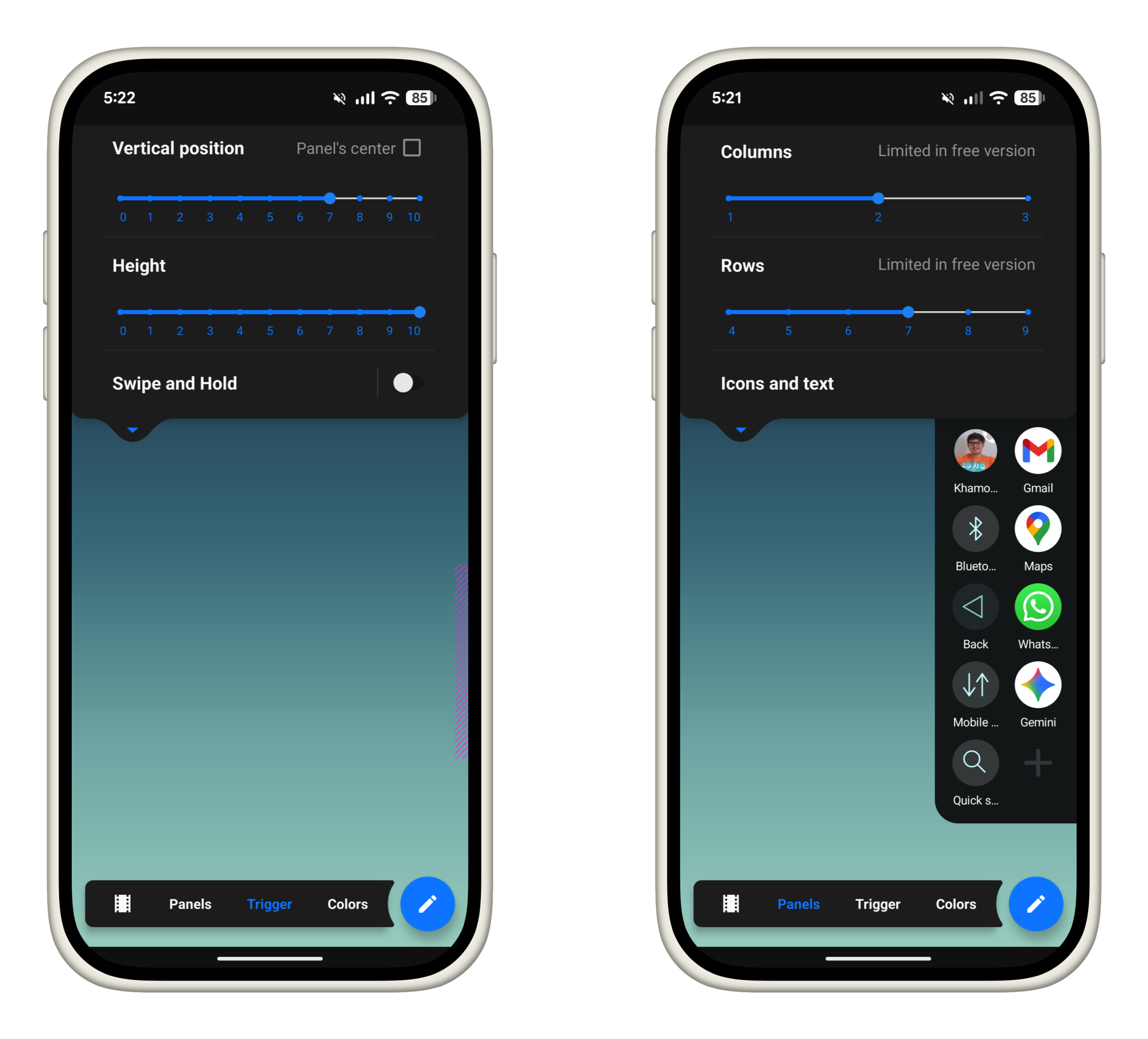
Next, tap on the View button and customize the panel. The free version limits you to 3 columns and 9 rows, which seems like plenty to me. You can upgrade to the full version to remove this limit (which is quite cheap, at just $1.50). From the Trigger section, you can customize the trigger area. If you have a larger phone, I highly recommend bringing down the trigger area towards the bottom of the screen.

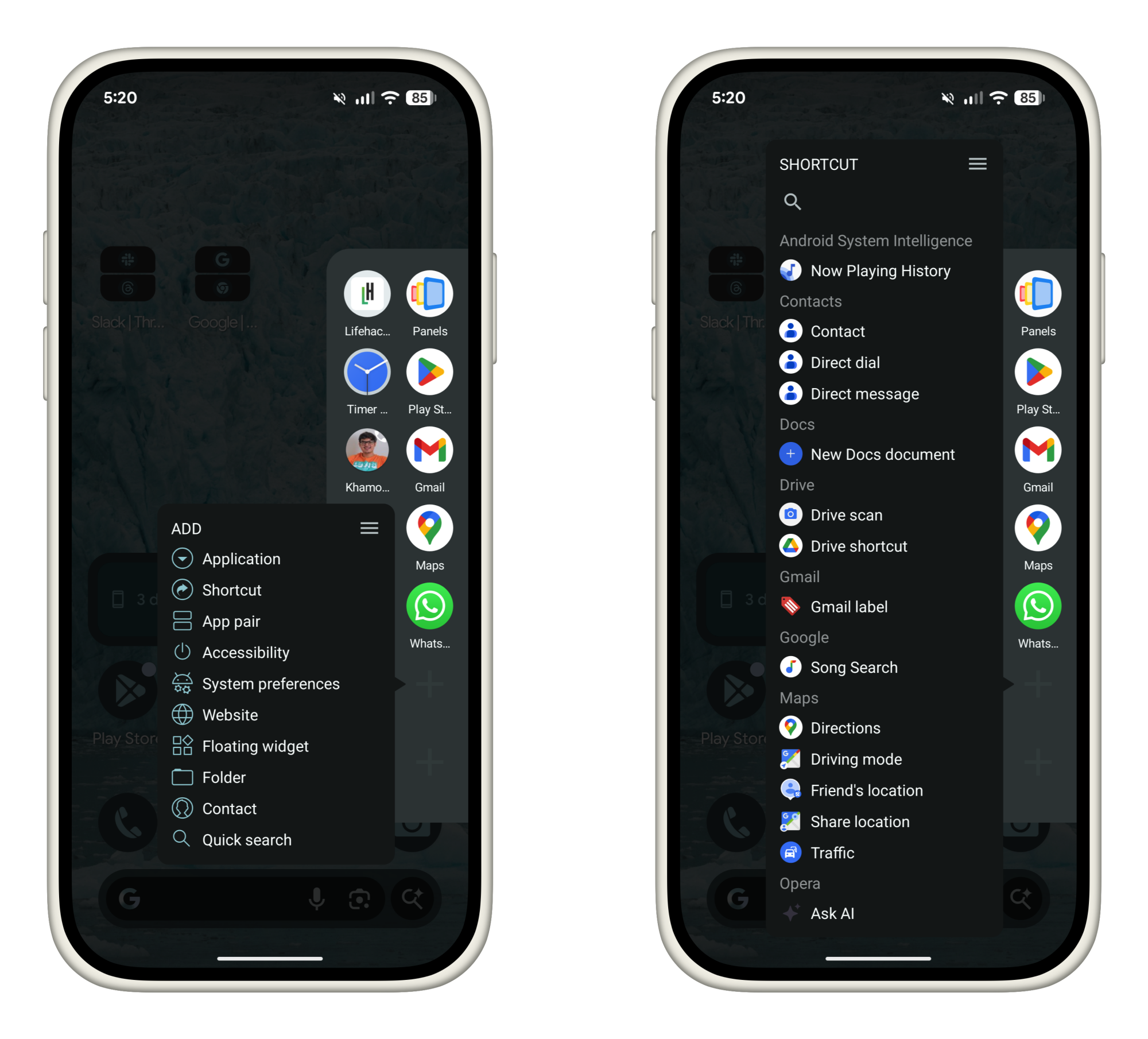
Now, let’s customize the Panels launcher itself. Swipe in from your trigger area and hold for a second to bring up the sidebar panel. By default, you’ll see some apps here already. Tap and hold on an empty area to start adding more apps.

Adding Panels shortcuts.

Credit: Khamosh Pathak

You can choose to add any of the following items:

  • Applications: Choose any installed app. Add your most frequently used apps here.

  • Shortcuts: Launch actions from inside any supported apps. For example, you can create a shortcut for adding a new task in TickTick, or messaging someone on WhatsApp.

  • App pair: Create shortcuts for launching two apps side-by-side, made even more useful after Android 16’s latest 90:10 split screen update.

  • Accessibility: Add shortcuts for system-level options like Home, Back, Notifications, Screenshot, and more.

  • System preferences: Quick access to frequently used settings like media volume, cellular data, airplane mode, Wi-Fi, and a lot more.

  • Website: You can add any website as a quick shortcut here.

  • Floating widget: This is a hidden gem. You can add widgets that open in a floating window above everything else. You can trigger widgets for news, weather, or sports updates. They can hover over everything else for a few seconds, before you dismiss them out of the way.

  • Folder: If you have too many quick app options, organize them in folders instead.

  • Contact: Add any contact here as an icon. Press and hold to quickly call, message, or email them.

  • Quick Search: Another useful hack. The Quick Search panel brings up a fast search for all installed apps.

Go over each option and choose what you’d like to add to your sidebar launcher. Me, I’m a simple man, so my focus is mostly on my most frequently used apps, shortcuts for common actions, and quick access to some system level functionality.

One swipe gesture: Lastly, here’s a pro tip. While you can open apps in Panels by swiping, lifting your thumb, and selecting, you can also do it without taking your thumb off the screen.

Once you swipe in from the edge and the Panels sidebar opens up, don’t let go. You can keep moving your thumb to highlight any app or shortcut (the icon that’s in focus will get bigger). Then simply let go over your selection to launch it.

Overall, Panels is a pretty robust app. Once you have your personalized setup, you can launch apps, shortcuts, or widgets, with just a swipe, no matter which app you’re using.

Energy Costs Will Decide Which Countries Win the AI Race, Microsoft’s Nadella Says

Energy costs will be key to deciding which country wins the AI race, Microsoft CEO Satya Nadella has said. CNBC: As countries race to build AI infrastructure to capitalize on the technology’s promise of huge efficiency gains, Nadella told the World Economic Forum (WEF) on Tuesday that “GDP growth in any place will be directly correlated” to the cost of energy in using AI.

He pointed to a new global commodity in “tokens” — basic units of processing that are bought by users of AI models, allowing them to run tasks. “The job of every economy and every firm in the economy is to translate these tokens into economic growth, then if you have a cheaper commodity, it’s better.”

“I would say we will quickly lose even the social permission to actually take something like energy, which is a scarce resource, and use it to generate these tokens, if these tokens are not improving health outcomes, education outcomes, public sector efficiency, private sector competitiveness across all sectors,” Nadella said.


Read more of this story at Slashdot.

Samsung Raises New Galaxy Book 6 Pro Prices As Panther Lake Arrives

Samsung Raises New Galaxy Book 6 Pro Prices As Panther Lake Arrives
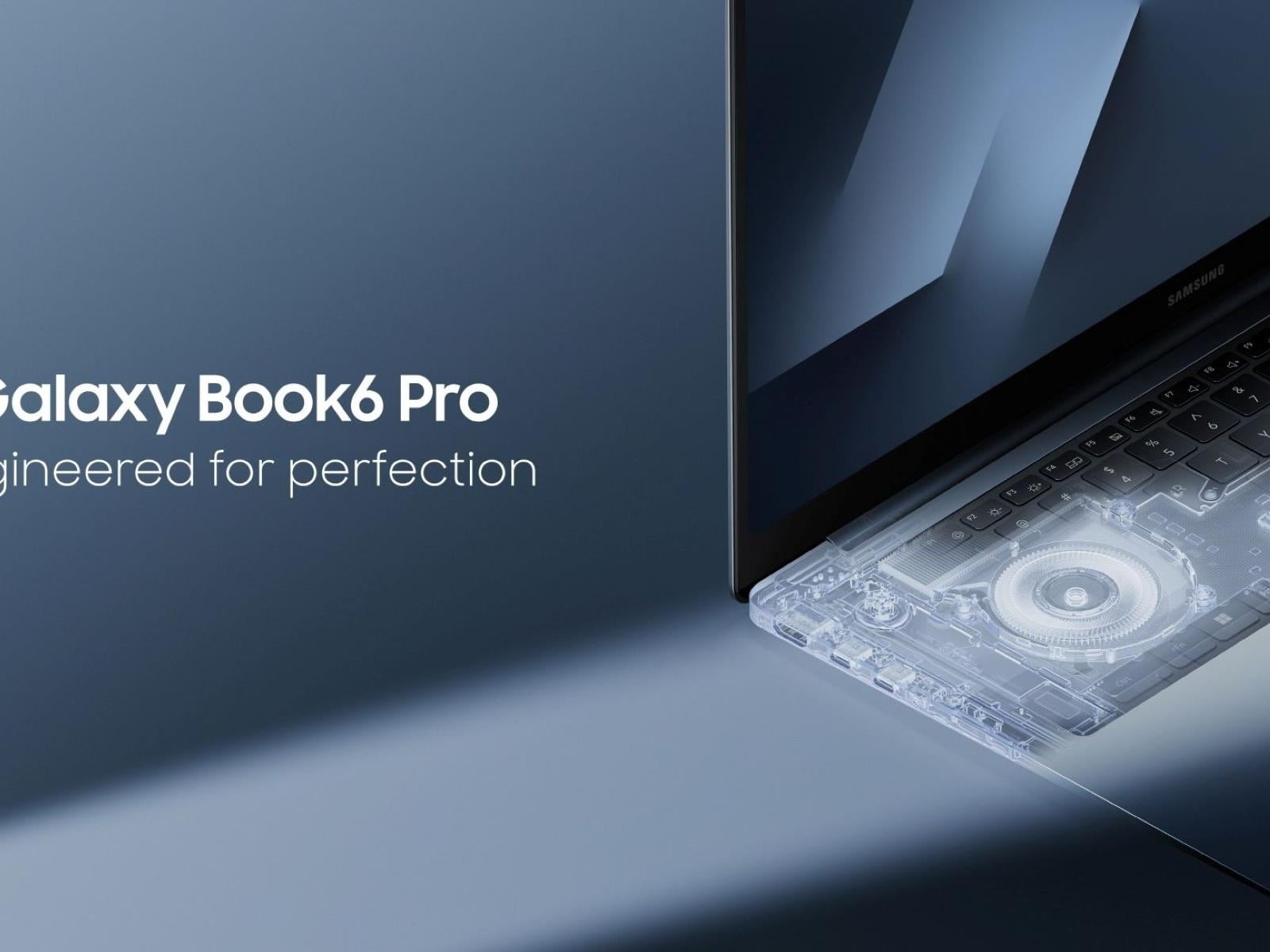
Samsung has just released a pricing guide for its upcoming Galaxy Book 6 series and it shows Panther Lake-powered models hitting shelves with a price premium that’s nearly 20% higher than its Lunar Lake predecessors. Can we thank the RAM-pocalypse for this?

The sticker shock comes directly from Samsung’s official countdown page (for South

The first commercial space station, Haven-1, is now undergoing assembly for launch

As Ars reported last week, NASA’s plan to replace the International Space Station with commercial space stations is running into a time crunch.

The sprawling International Space Station is due to be decommissioned less than five years from now, and the US space agency has yet to formally publish rules and requirements for the follow-on stations being designed and developed by several different private companies.

Although there are expected to be multiple bidders in “phase two” of NASA’s commercial space station program, there are at present four main contenders: Voyager Technologies, Axiom Space, Blue Origin, and Vast Space. At some point later this year, the space agency is expected to select one, or more likely two, of these companies for larger contracts that will support their efforts to build their stations.

Read full article

Comments

Meta’s Oversight Board is looking into transparency around disabling accounts

Meta has a lot of work to do when it comes to limiting hate speech on its platforms. Now, its Oversight Board is looking into the company’s decision to ban an account for, among other things, posting visual violent threats and harassment against a journalist — and it wants the public’s advice. 

In the year prior to the ban, Meta referred five posts due to violations of its hateful conduct, bullying and harassment, violence and incitement and adult nudity and sexual activity community standards. In addition to the posts harassing the woman journalist, the user also shared “anti-gay slurs against prominent politicians and content depicting a sex act, alleging misconduct against minorities.” 

Meta’s internal review experts decided to permanently disable the account due to the consistent violations and calls for violence. This action was taken despite the number of strikes not reaching the ban threshold — Meta’s guidance states that even seven strikes only get users a one-day ban. However, its account integrity page lays out examples of when it will disable accounts, including violating its community standards through “risk of imminent harm” to an individual. 

The Board is now looking for insight from the public until 11:59PM PT on Tuesday, February 3. The Board is specifically seeking comments from individuals who can “contribute valuable perspectives” on the following topics: 

  • How best to ensure due process and fairness to people whose accounts are penalized or permanently disabled.

  • The effectiveness of measures used by social media platforms to protect public figures and journalists from accounts engaged in repeated abuse and threats of violence, in particular against women in the public eye.

  • Challenges in identifying and considering off-platform context when assessing threats against public figures and journalists.

  • Research into the efficacy of punitive measures to shape online behaviors, and the efficacy of alternative or complementary interventions.

  • Good industry practices in transparency reporting on account enforcement decisions and related appeals.

This instance marks the first time the Board has looked into Meta permanently disabling an account. It stated that this “represents a significant opportunity to provide users with greater transparency on Meta’s account enforcement policies and practices, make recommendations for improvement, and expand the types of cases the Board can review.”

This article originally appeared on Engadget at https://www.engadget.com/big-tech/metas-oversight-board-is-looking-into-transparency-around-disabling-accounts-145757717.html?src=rss

This Macintosh-Style Retro Dock Turns Your M4 Mac Mini Into A Tiny All-In-One

This Macintosh-Style Retro Dock Turns Your M4 Mac Mini Into A Tiny All-In-One
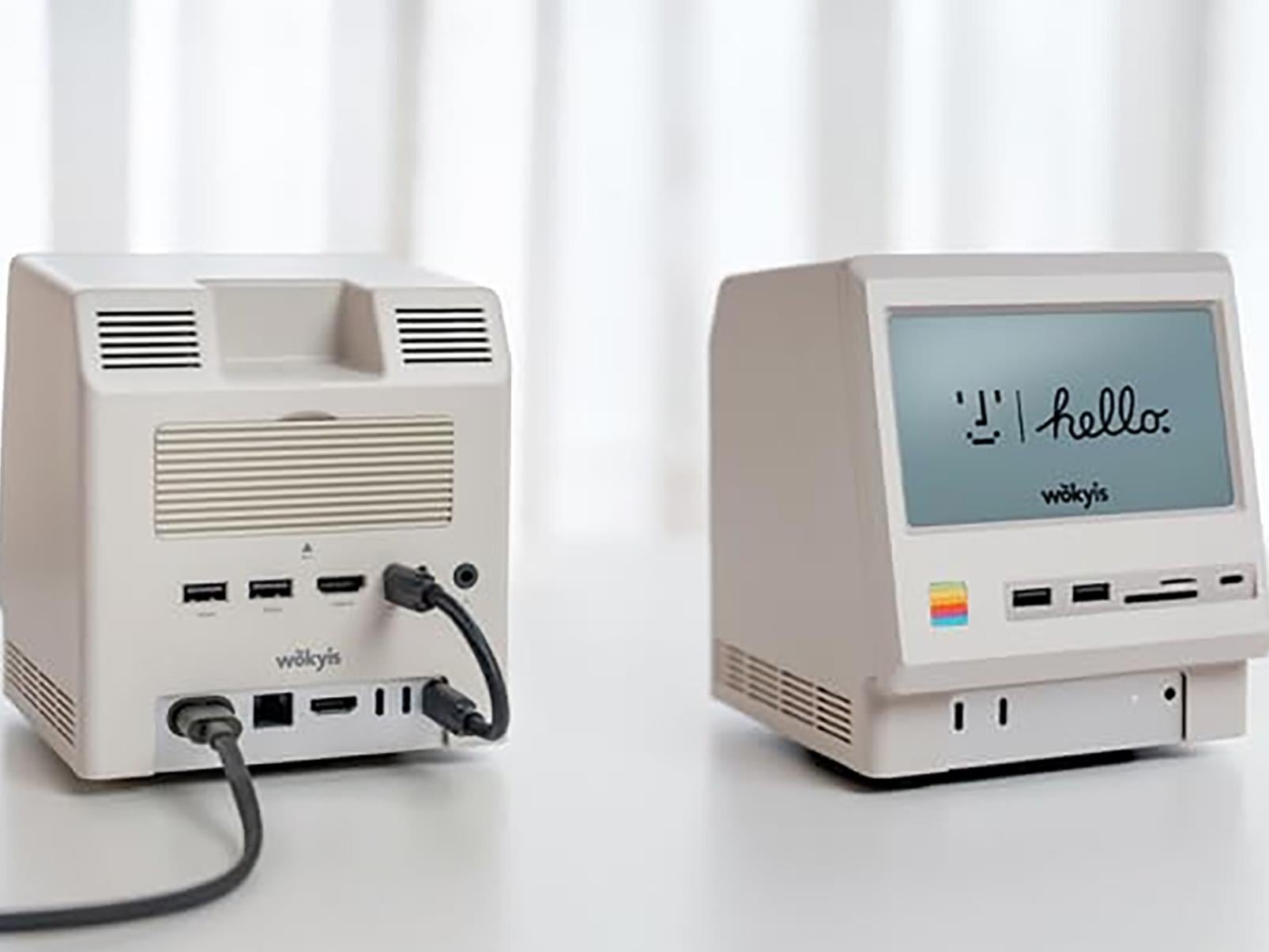
We’re big fans of the Mac mini lineup around these parts (dating back to the M1 Mac mini we reviewed in 2020), particularly as Apple’s in-house M-series silicon has come into its own. The latest version of the Mac mini sports a choice between the M4 or M4 Pro, both of which are powerful and efficient, making the tiny Mac a viable workhorse

How to Back Up All Your Android Messages

I’ve been in a particularly “back everything up for the sake of it” mood lately, and the latest target of my fixation is messages. It’s been several generations of Android flagships since I archived anything, though, so now I’m scrambling to back up everything from 2019 and beyond.

Android was supposed to fix the way it backs up data and messages as far back as Android 8.0 Oreo in 2017. Google recently refined the mechanism when it switched to Google One, its all-in-one subscription and cloud data offering. While data backup has improved, it’s also a veritable “black box.” It’s hard to verify what’s been saved and even harder to view the data.

I’m taking backups back into my own hands, like in the Android days of yore. Actually, one of the throwback apps, SMS Backup and Restore, is still one of the best for backing up text messages, and it’s included in this guide on backing up messages in Android. I’ll also walk you through how to back up archives for secondary messaging apps, including WhatsApp and Signal, two oft-used third-party messengers.

Start with Google One

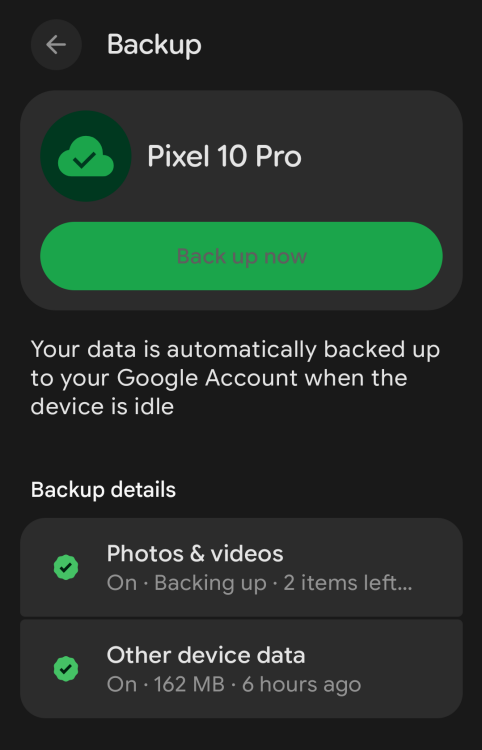
A screenshot of what the backup page looks like on Android

Credit: Florence Ion / Lifehacker

By default, your phone uses Google One to handle backups as long as Google Messages is your default messaging app. (Samsung users can choose to use Samsung Messages instead, which backs up to the Samsung Cloud.) It’s generally a “set it and forget it” system that saves SMS, RCS, and MMS messages, call history, contacts, and device settings to your Google Drive storage. (Pictures and videos are backed up through Google Photos.)

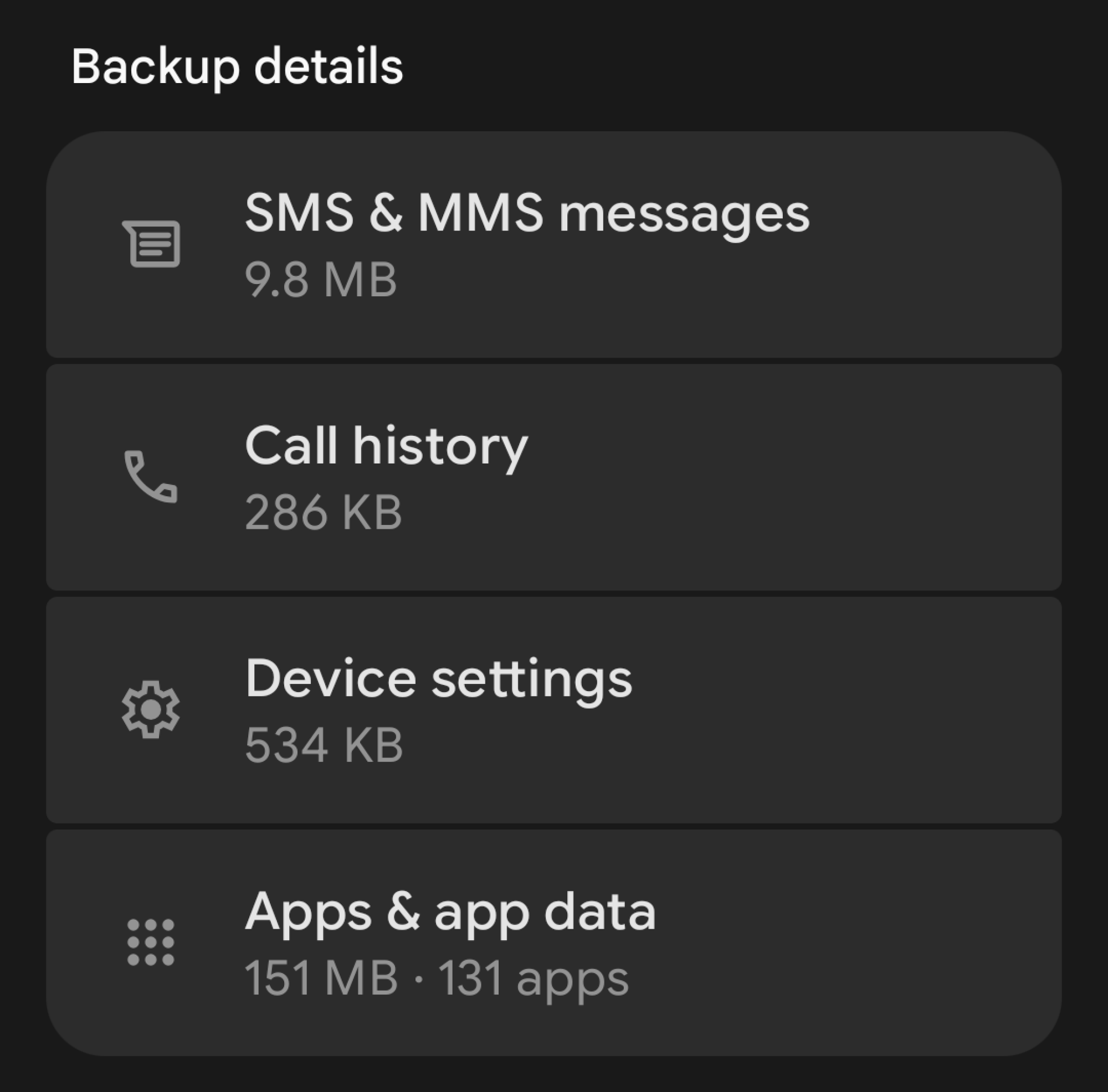
You can check the status of this to see when it was last backed up. Open your phone’s Settings panel, then look for the backup option. If it’s your first time, you’ll get on-screen instructions to turn on backup. If not, you should be able to see what’s been backed up so far. If you’re on the Pixel launcher, scroll down to find a list of Backup details to browse. Tap to see what’s in the vault.

A screenshot showing how much of each thing is backed up to your Google account

Credit: Florence Ion / Lifehacker

At most, backup data doesn’t exceed 25 MB and doesn’t count against your Google Drive quota. (Google Photos does, but that’s effectively another product.) Only the most recent data backup is stored at a time. Anything before that is fully deleted.

Google One’s backup methodology is merely a “sync,” not a true data archive. If you accidentally delete a thread from messages, its backup would also be removed from the cloud, and you couldn’t restore it. Google makes it clear, even in its developer documentation, that backup data can’t be accessed by a user or other apps on the device. So what’s a user to do? Call upon an old faithful: SMS Backup & Restore.

Set up SMS Backup & Restore

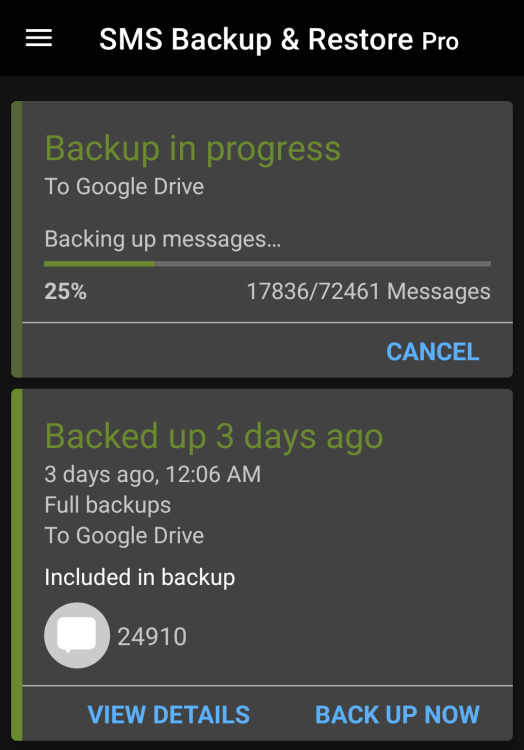
A screenshot of SMS Backup& Restore after it's backed up something

Credit: Florence Ion / Lifehacker

I’m using original Android apps like SMS Backup & Restore to facilitate full backups because it’s still the only way to easily thumb through the messages and call logs you’ve saved. The app treats your text messages as a database and stores them in XML format for parsing if needed. SMS Backup & Restore was once an indie darling, though SyncTech acquired it in late 2017, which has partly helped it endure this long.

It’s easy to set up. Download and install the app from the Google Play Store. The app is free with ads, or you can pay a one-time fee of $6 to remove them and unlock extra abilities, like more cloud storage. Then grant it access to your contacts and messages. Tap the option to set up a backup, and choose Messages. (You can also include call logs if you want.) Then, pick your destination. I back up to Google Drive into its own archive folder. Dropbox, OneDrive, and WebDAV are also options.

SMS Backup & Restore offers several backup options. For one, you don’t have to back up everything in your Messages app. You can choose to back up only select conversations. It doesn’t have to be a constant backup either. If you need to save a one-off thread, SMS Backup & Restore lets you select it and back it up to a location of your choice in XML format.

SMS Backup & Restore also lets you peruse through all that data after it’s synced. The easiest way is through the mobile app, which lets you search conversations, and through SyncTech’s web viewer, where you can upload the XML file it generates and thumb through it as if it were a messaging app on your phone. SyncTech says all processing is done on the browser and nothing is uploaded to any servers. If you’d rather not upload your conversations through the Web Viewer, you can try opening it with Excel instead. And if you’re particularly adept, there are plenty of third-party XML readers available, though they’re not all fully compatible with how SMS Backup & Restore saves logs.

WhatsApp and Signal

These days, half of my digital life is scattered among several messaging apps, most notably WhatsApp and Signal. WhatsApp is where I chat with friends who are on wifi or live halfway across the world, while Signal is where my local parents group and I keep our chats private.

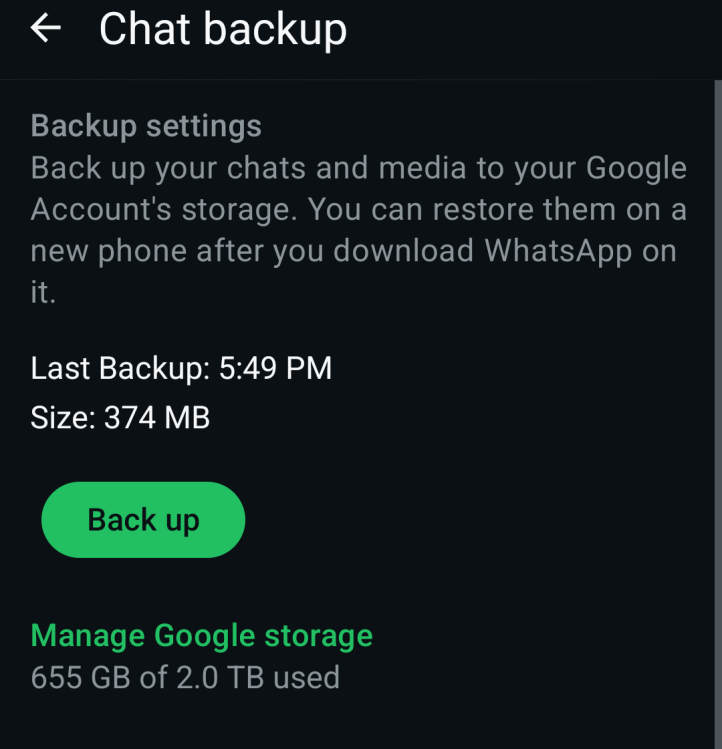
WhatsApp can create a local backup on your phone’s internal storage every day at a set time. This is the most direct way to handle your own WhatsApp chat data. You’ll find your data in the WhatsApp app database on your device’s internal storage. WhatsApp can also automatically back up to Google Drive on Android devices. Unfortunately, Google started counting WhatsApp backups toward your Google Drive storage quota. But the app shows you how much room you have in your Drive account if you are backing up that way.

A screenshot of WhatsApp's backup page

Credit: Florence Ion / Lifehacker

If you haven’t set it up yet, WhatsApp’s backup capabilities are available under the Chats backup option in the app’s settings panel. You can select the backup frequency and whether it includes videos. You can also select whether the backups are end-to-end encrypted. (Note that this option is not on by default.) If you need to export a particular conversation, you can do so from the Chat history menu. You can then read those WhatsApp backups by exporting individual chats as text files directly from the app.

Signal is a little trickier at backup. Since it’s built on the premise of extreme privacy, it prioritizes local backup and doesn’t back up to the cloud. Only recently, in the latest beta for Android devices, has Signal added push-button backup. And it’s technically still getting its kinks sussed out.

A screenshot to show you where you can backup your Signal messages on Android

Credit: Florence Ion / Lifehacker

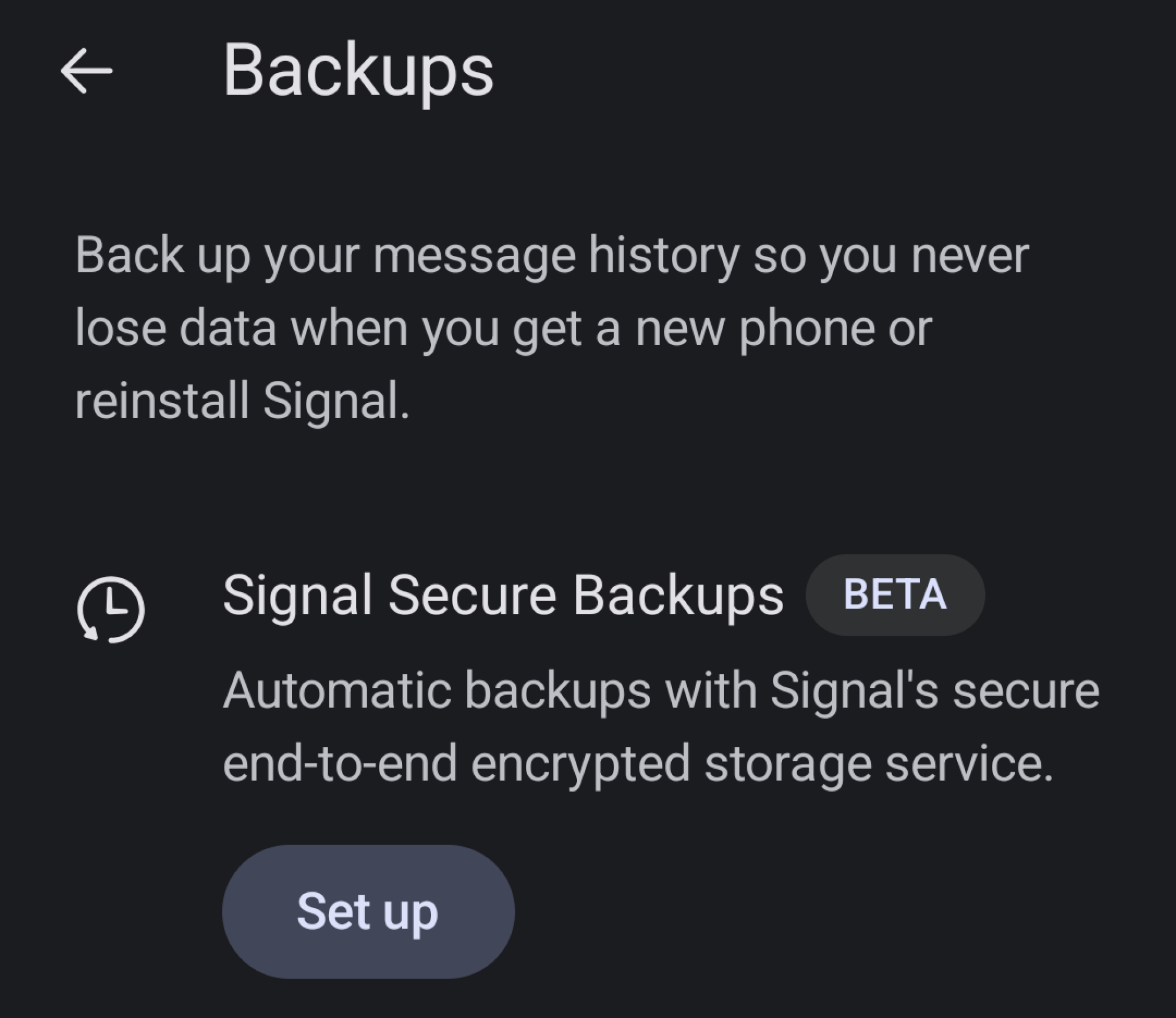
But you can use it if you want to. In Signal on Android, go to Settings, then scroll down to Backups. You’ll see a big Beta sign right next to it. Tap it, and from here, Signal will set you up with an end-to-end encrypted backup of your conversations. The recovery key is a 64-character code that will help you restore the backup. If you lose it, you won’t be able to recover your messages.

Signal eschews the ability to back up to a third-party service. Instead, it will back up the last 45 days of media and text messages for free. Any more than that, and you’ll have to pay $2/month for a full backup of your messages. It also grants you 100GB of photo storage.

Because these are encrypted files, they’re not particularly easy to parse through without first decrypting them and converting them into a readable XML file. You’ll also need to save the archive locally if you want to dig in. Small apps like the Signal Message Exporter and Signal Back can help with this if you are especially keen on having a readable log.

Backing up isn’t a one-and-done task. It’s something you have to get into the habit of doing. The best way to ensure you don’t lose those “receipts” is to make it a habit to check on your backups. Keep Google One, WhatsApp, and Signal’s cloud backups turned on, then set SMS Backup & Restore to run once a week, or, if you’re lighter on that app than on others, once a month.


Amazon CEO Jassy Says Tariffs Have Started To ‘Creep’ Into Prices

Amazon CEO Andy Jassy said President Donald Trump’s sweeping tariffs are starting to be reflected in the price of some items, as sellers weigh how to absorb the shock of the added costs. From a report: Amazon and many of its third-party merchants pre-purchased inventory to try to get ahead of the tariffs and keep prices low for customers, but most of that supply ran out last fall, Jassy said in a Tuesday interview with CNBC’s Becky Quick at the World Economic Forum in Davos, Switzerland.

“So you start to see some of the tariffs creep into some of the prices, some of the items, and you see some sellers are deciding that they’re passing on those higher costs to consumers in the form of higher prices, some are deciding that they’ll absorb it to drive demand and some are doing something in between,” Jassy said. “I think you’re starting to see more of that impact.” The comments are a notable shift from last year, when Jassy said Amazon hadn’t seen “prices appreciably go up” a few months after Trump announced wide-ranging tariffs. Further reading: Americans Are the Ones Paying for Tariffs, Study Finds: Americans, not foreigners, are bearing almost the entire cost of U.S. tariffs, according to new research that contradicts a key claim by President Trump and suggests he might have a weaker hand in a reemerging trade war with Europe.

[…] The new research, published Monday by the Kiel Institute for the World Economy, a well-regarded German think tank, suggests that the impact of tariffs is likely to show up over time in the form of higher U.S. consumer prices. […] By analyzing $4 trillion of shipments between January 2024 and November 2025, the Kiel Institute researchers found that foreign exporters absorbed only about 4% of the burden of last year’s U.S. tariff increases by lowering their prices, while American consumers and importers absorbed 96%.


Read more of this story at Slashdot.

Redmagic 11 Air Gaming Phone Debuts With Snapdragon 8 Elite And Lots Of Cool Tech

Redmagic 11 Air Gaming Phone Debuts With Snapdragon 8 Elite And Lots Of Cool Tech
Thin is in when it comes to smartphone design, or so that’s been the recent trend with devices like Apple’s iPhone 17 Air and Samsung’s Galaxy S25 Edge. Does the same slim design philosophy translate to gaming phones, though? It does as far as Redmagic is concerned, which has launched its Redmagic 11 Air gaming handset in China.

While not

Sony Is Ceding Control of TV Hardware Business To China’s TCL

Sony plans to spin off its TV hardware business to a new joint venture controlled by Chinese electronics giant TCL, the two said Tuesday, a significant retreat for the Japanese giant whose Bravia line has long occupied the premium end of the television market. TCL would hold a 51% stake in the venture and Sony would retain 49% under a nonbinding agreement the two companies signed. They aim to finalize binding terms by the end of March and begin operations in April 2027, pending regulatory approvals.

The new company would retain the Sony and Bravia branding for televisions and home audio equipment but use TCL’s display technology. Japanese TV manufacturers have steadily lost ground to Chinese and Korean rivals over the years. Toshiba, Hitachi, Mitsubishi Electric and Pioneer exited the business entirely. Panasonic and Sharp de-emphasized televisions in their growth strategies. Sony’s Bravia line survived by positioning itself at the premium tier where consumers pay more for high-end picture and sound quality.


Read more of this story at Slashdot.

Adobe unveils new AI-powered video editing tools for Premiere

Adobe has announced updates for Premiere and After Effects, including new AI-powered tools that are meant to speed up your video editing tasks. In Premiere, the company’s video-editing software, it has unveiled a new AI-powered Object Mask feature that lets you easily pick and track persons or objects moving through your video clips. You simply have to hover over that object and click to generate a mask overlay in seconds. While the mask is supposed to be accurate from the start, you can adjust and resize it as needed. Adobe says the feature uses its own AI model for the feature and that the processing happens on-device. It also says that it doesn’t use your activities and data to train its models.

The company has also given its Shape Mask tool an upgrade. You can generate its redesigned Ellipse, Rectangle and Pen masks directly from the toolbar. Further, it updated their controls to make moving or adjusting the masks more precise. The masks can now also track objects on your video clips 20 times faster than their predecessors, which means you won’t have to keep such a close eye on the status bar. Another new Premiere update lets you easily bring media from from Firefly Boards, Adobe’s AI-powered digital canvas, into the program. In addition, Adobe Stock is now fully integrated within Premiere.

For After Effects, Adobe has rolled out an update that lets you import SVG files that are commonly used in Illustrator. You can now also build graphics and photorealistic objects inside images with 3D parametric meshes, consisting of cubes, spheres, cylinders, cones, toris and planes, within the visual effects software.

This article originally appeared on Engadget at https://www.engadget.com/ai/adobe-unveils-new-ai-powered-video-editing-tools-for-premiere-140000970.html?src=rss

Rad Power Bikes warehouse catches fire following flammable battery warnings

In a strange twist of fate, a fire broke out this week at the Rad Power Bikes retail store warehouse in Huntington Beach, California, Electrek reports. The structural blaze came less than two months after the Consumer Product Safety Commission (CPSC) warned customers to “immediately stop” using and dispose of some of the company’s e-bike batteries due to fire hazard. In December, Rad filed for Chapter 11 bankruptcy protection, stating it couldn’t afford to recall the batteries. 

The recent two-alarm fire hit a commercial complex with multiple businesses. Footage from the fire shows e-bikes outside of the warehouse as firemen fought the blaze. Engadget has reached out to Rad for more information on the fire’s impact. 

The CPSC’s November warning told of 31 reports of fire, with 12 of those involving property damage. In some cases, the battery was in storage, not being charged or used, yet still caught fire. The CPSC told customers to get rid of (in a safe, detailed manner) specific models of Rad’s lithium-ion batteries. It claimed that the “hazardous” batteries were at risk of igniting or exploding, even more if wet or interacting with debris. 

Rad told the CPSC it couldn’t recall the batteries as it couldn’t afford to offer replacements and refunds. “Rad offered multiple good-faith solutions to address the agency’s concerns, including offering consumers an opportunity to upgrade to Safe Shield batteries (described below) at a substantial discount. CPSC rejected this opportunity,” Rad Power Bikes said in a statement at the time. “The significant cost of the all-or-nothing demand would force Rad to shut its doors immediately, leaving no way to support our riders or our employees.”

The company also said it disagreed with the CPSC’s “characterization of certain Rad batteries as defective or unsafe.” It also pointed to the incident rate being below one percent and stated that all lithium-ion batteries come with a risk when customers do things — such as improper charging and excessive exposure to moisture — that Rad cautions against. 

This article originally appeared on Engadget at https://www.engadget.com/transportation/rad-power-bikes-warehouse-catches-fire-following-flammable-battery-warnings-133056542.html?src=rss

‘Just Because Linus Torvalds Vibe Codes Doesn’t Mean It’s a Good Idea’

In an opinion piece for The Register, Steven J. Vaughan-Nichols argues that while “vibe coding” can be fun and occasionally useful for small, throwaway projects, it produces brittle, low-quality code that doesn’t scale and ultimately burdens real developers with cleanup and maintenance. An anonymous reader shares an excerpt: Vibe coding got a big boost when everyone’s favorite open source programmer, Linux’s Linus Torvalds, said he’d been using Google’s Antigravity LLM on his toy program AudioNoise, which he uses to create “random digital audio effects” using his “random guitar pedal board design.” This is not exactly Linux or even Git, his other famous project, in terms of the level of work. Still, many people reacted to Torvalds’ vibe coding as “wow!” It’s certainly noteworthy, but has the case for vibe coding really changed?

[…] It’s fun, and for small projects, it’s productive. However, today’s programs are complex and call upon numerous frameworks and resources. Even if your vibe code works, how do you maintain it? Do you know what’s going on inside the code? Chances are you don’t. Besides, the LLM you used two weeks ago has been replaced with a new version. The exact same prompts that worked then yield different results today. Come to think of it, it’s an LLM. The same prompts and the same LLM will give you different results every time you run it. This is asking for disaster.

Just ask Jason Lemkin. He was the guy who used the vibe coding platform Replit, which went “rogue during a code freeze, shut down, and deleted our entire database.” Whoops! Yes, Replit and other dedicated vibe programming AIs, such as Cursor and Windsurf, are improving. I’m not at all sure, though, that they’ve been able to help with those fundamental problems of being fragile and still cannot scale successfully to the demands of production software. It’s much worse than that. Just because a program runs doesn’t mean it’s good. As Ruth Suehle, President of the Apache Software Foundation, commented recently on LinkedIn, naive vibe coders “only know whether the output works or doesn’t and don’t have the skills to evaluate it past that. The potential results are horrifying.”

Why? In another LinkedIn post, Craig McLuckie, co-founder and CEO of Stacklok, wrote: “Today, when we file something as ‘good first issue’ and in less than 24 hours get absolutely inundated with low-quality vibe-coded slop that takes time away from doing real work. This pattern of ‘turning slop into quality code’ through the review process hurts productivity and hurts morale.” McLuckie continued: “Code volume is going up, but tensions rise as engineers do the fun work with AI, then push responsibilities onto their team to turn slop into production code through structured review.”


Read more of this story at Slashdot.