
Samsung Galaxy A17 5G review: A respectable and affordable Android option

Buying a good budget phone can be a challenge. High-end handsets continue to get more features, but on the other end of the spectrum, there are only so many things you can skimp on before a device becomes too compromised. With the Galaxy A17, Samsung is trying to balance both sides of that equation with something that sports a solid design, a bright screen, decent cameras and respectable battery life for just $200. And despite some flaws, the company has succeeded at making a capable phone that fits into almost every budget.

Design and display

The Galaxy A17 does a good job of demonstrating how all plastics aren’t the same. Despite having a polycarbonate frame and back, the phone never feels cheap. Everything from its buttons to its camera module feels nice and tight. The optical image stabilization system used for its rear shooters rattles, though that’s something even $1,000 flagships suffer from, so it’s not a big deal. Some small concessions for cost savings include a teardrop cutout for its front selfie cam and a small chin beneath its display, but considering its price, they’re very forgivable. There’s also only a single mono speaker and instead of an in-screen fingerprint sensor, Samsung built one into the power button on its side. Though for some, the latter might actually be a bonus.

The Galaxy A17's 6.7-inch OLED display is one of the phone's best components thanks to solid brightness and a 90Hz refresh rate.
The Galaxy A17’s 6.7-inch OLED display is one of the phone’s best components thanks to solid brightness and a 90Hz refresh rate.
Sam Rutherford for Engadget

Meanwhile, one thing the A17 has that you don’t get on high-end handsets anymore is a microSD card slot (that’s shared with its SIM tray) for expandable storage. This gives you a cheap way to increase the phone’s base 128GB of space and considering how rare this is nowadays, it’s another win for people looking for a truly affordable device. 

The Galaxy A17’s screen is also surprisingly nice for its price, as it sports a 6.7-inch OLED display with up to 800 nits of brightness. Granted, its refresh rate tops out at 90Hz instead of the 120Hz you get on more expensive fare. But once again, considering how much it costs, I’m not complaining. Especially when you remember that base iPhones were still saddled with 60Hz panels as recently as 2024. 

Performance

One area where budget phones often struggle is performance because skimping on RAM or the processor can save manufacturers a lot of money. And while the Galaxy A17 is generally fine considering its price bracket, I really wish Samsung had opted for a slightly newer chip. The phone comes with just 4GB of RAM (though there are slightly pricier versions with more), 128GB of onboard storage and an Exynos 1330 SoC, the latter of which is nearly three years old. 
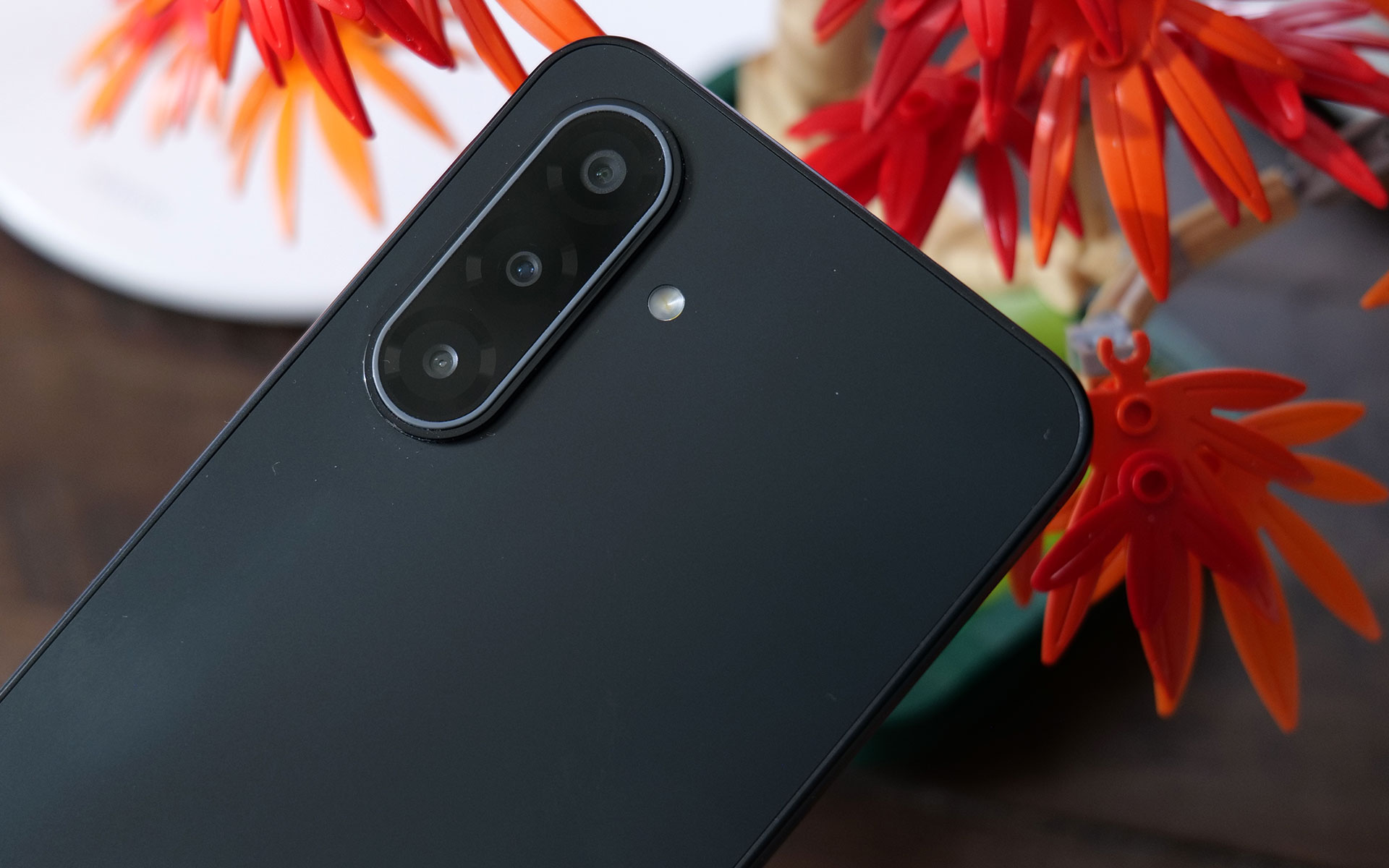
The Galaxy A17 comes with three rear cameras, but its really more like two because one of those is a 2MP macro cam.
Sam Rutherford for Engadget

At first, I was really worried because during the initial setup, the phone was a laggy, stuttery mess. Thankfully, after signing in, giving the phone some time to download updates in the background and making sure all of its apps were up to date, performance improved significantly. To be clear, this thing still isn’t a speed demon and when you’re multitasking or quickly switching between heavy apps, you may notice some slowdown. I also wish touch input felt a bit more responsive because sometimes when you tap an icon, there’s a small delay before anything happens. But thankfully, it’s relatively minor, and in most situations, the phone is snappy enough.

Cameras

The A17 comes with a 13-megapixel selfie camera and three rear shooters, though in practice it’s really more like two because one of those is a 2MP macro cam, which doesn’t get much use unless you take a lot of up-close photos. That said, the phone takes better pictures than you might expect given its price. In well-lit conditions, both its 50MP main and 5MP ultrawide cams don’t give you much to complain about. Images look sharp and sport vivid colors. 

However, in low-light situations, there’s an obvious difference in quality between the A17 and more expensive midrange phones like Pixel 9a. In a shot of some fruit in my dimly lit kitchen, the A17’s pic looks soft and features washed-out colors compared to what Google’s phone produced. Then, when I went outside and snapped a photo of a car still buried after the recent snowstorm, textures on the slush in the road, along with various highlights and shadows looked worse in the A17’s images. So while the phone can hold its own, camera quality is still one of the biggest reasons you might want to consider upgrading to a more expensive handset.

Battery life

The bottom of the Galaxy A17 features the phone's USB-C port and its single, mono speaker.
The bottom of the Galaxy A17 features the phone’s USB-C port and its single, mono speaker.
Sam Rutherford for Engadget

For a phone with a 5,000mAh battery and a low-power chip, the Galaxy A17 didn’t last quite as long as I expected. On our local video rundown test, it lasted just over 23 hours (23:08), which is decent, but also five hours less than the Pixel 9a (28:04). On the other hand, its wired charging speed of 25 watts is more than enough. Just don’t be surprised when you plop it on a wireless charging pad and nothing happens because the phone doesn’t support that. 

Wrap-up

If you are hard-capped at $200, the Samsung Galaxy A17 is a surprisingly impressive device. It’s got a solid build, decent cameras with a handful of different lenses, respectable battery life and even a built-in microSD card slot for extra storage. You even get six years of OS and security updates, which is significantly longer than almost all of its similarly-priced rivals. And while its performance could be smoother, it’s not laggy enough to get truly bothered about on a phone this affordable. 

Even though the Galaxy A17 is made out of plastic, the phone still doesn't feel cheap.
Even though the Galaxy A17 is made out of plastic, the phone still doesn’t feel cheap.
Sam Rutherford for Engadget

For those with wiggle room in their gadget allowance, I would seriously consider looking at a version with 8GB of RAM, which is just $30 more. Alternatively, the Pixel 9a remains my favorite Android phone when it comes to value for money and it’s $399 (down from its launch price of $499). But if money is tight, the Galaxy A17 delivers everything you need without blowing up your budget.

This article originally appeared on Engadget at https://www.engadget.com/mobile/smartphones/samsung-galaxy-a17-5g-review-a-respectable-and-affordable-android-option-190000154.html?src=rss

The AI Boom Is Coming for Apple’s Profit Margins

Apple’s long-standing dominance over its electronics supply chain is eroding as AI companies outbid the iPhone maker for critical components like chips, memory and specialized glass fiber, giving suppliers the leverage to demand that Apple pay more. CEO Tim Cook acknowledged the pressure during a Thursday earnings call, noting constraints in chip supplies and significant increases in memory prices.

Nvidia has overtaken Apple as TSMC’s largest customer, CEO Jensen Huang said on a podcast; Apple had held that position by a wide margin for years. DRAM prices are set to quadruple from 2023 levels by year-end and NAND prices will more than triple, according to TechInsights.

The firm estimates Apple could pay $57 more for memory in the base iPhone 18 due this fall compared to the base iPhone 17 currently on sale — a significant hit on a device that retails for $799.


Read more of this story at Slashdot.

Eight Useful Tool Accessories Every DIYer Should Own

We may earn a commission from links on this page.

I love getting things done around the house. I’m not the greatest carpenter, electrician, or plumber, but I like learning how things work and even enjoy learning from my mistakes (sometimes). And most of all, I like saving a bucket of money on home maintenance and repairs. None of this means that DIY isn’t an incredible amount of work, however.

Luckily, living in a consumption-based society means companies are always inventing new gadgets for me to buy, and some of them are incredibly useful for DIYers. The eight tool accessories below are ones I truly recommend. Each can help make your next project a little faster, easier, and/or safer.

A multipail makes painting and cleaning neater

This is one of those simple ideas that seems so obvious it’s hard to believe it took this long to be invented. The Multipail is a simple concept: A standard five-gallon bucket with a dustpan built in. It can also be used with a paint roller as a tray replacement, and has a drip-proof spout for pouring liquids without making a mess. You need a five-gallon bucket anyway, so why not use one that has these useful features molded in, instead of buying two or three wonky attachments?

Flashlight gloves are a super convenient way to shed light on your work

There are a lot of ways to illuminate your work site, from standard flashlights to headband lamps to bendable LED lights. But sometimes you need to get light into a small space, and you need to be able to illuminate what you’re doing just by pointing at things. These flashlight gloves are cheap, waterproof, and make it easy to see what you’re doing without having to hold a separate light.

An attachable bit holder will keep all your drill bits at hand

Cordless drills are one of the most commonly-used tools in DIY projects, but they come with one major frustration: All those damn bits. If you’re constantly swapping out different-size drill bits and different screwdriver bits, you know how hard it can be to keep them organized (and how hard it is to not lose them).

Enter this nifty drill bit holder that attaches to the bottom of your drill’s battery. It holds not just bits, but just about anything, from utility blades to fasteners. Designed to work with just about any manufacturer, it attaches to the bottom of the battery and lets you carry whatever you need right there on the tool.

The Backsaver will eliminate the strain from low-down drilling

This drill attachment is probably overkill for most DIYers (and it isn’t cheap!), but if you’ve got a job requiring a lot of drilling down low, it might be the difference between a pleasant day of work and a broken back. Instead of getting on your hands and knees or even lying down in order to see what you’re drilling into, the Backsaver lets you work in a comfortable standing position while drilling at foot-level. It takes a bit of practice before you can just dive in, but your back will definitely thank you for taking the time.

A panel carrier can help you lug around drywall and plywood

Carrying large sheets or panels like drywall or plywood can be challenging. It’s hard to maintain your grip and your balance, and navigating around corners and tight spaces often results in dropped items or scraped knuckles.

This panel carrier from Gator Lift just clamps onto whatever you’re hauling around (up to two sheets at a time) and makes it very easy to carry it one-handed—which means you can actually open doors and easily maneuver while carrying these awkward, heavy sheets around.

A ladder hook could save your neck

I don’t know about you, but whenever I have to climb up to my roof to inspect or repair something (or clean out the gutters), there’s always at least one terrifying moment when the ladder shakes and shimmies, and I think I’m about to die. Ladders are always incredibly dangerous, but they’re especially dangerous when you’re working on your roof. This ladder hook from Lock Jaw clamps onto the roof and ensures the ladder doesn’t move, giving you an extra boost of safety.

A clamping outlet will keep your power running safely

Running power to wherever you’re working is sometimes a logistical challenge. There are plenty of ways to run a power strip to your project, but ensuring that you have easy, safe access to the strip sometimes involve some seriously janky engineering involving zipties, duct tape, or precariously balanced equipment.

This clamping power strip is a lot more civilized. It ensures you’ll have plenty of outlets no matter where you’re working. It can clamp to a ladder, to a joist or rafter, a table, railing—literally anywhere. Power will always be nearby, and you won’t have to remember to plug in your corded tools before you climb up the ladder ever again.

A ladder leveler will help you reach new heights without the risk

If you’ve got a standard extending ladder, you know that your greatest enemy is uneven ground. An unbalanced ladder is a disaster waiting to happen, but most DIYers have climbed onto a shaking, leaning ladder at least once in their life, hoping their luck holds out long enough to get some quick bit of work done.

Instead, invest in a ladder stabilizer. Install it on your ladder and it automatically adjusts the legs on each side so you have a perfectly balanced, perfectly stable ladder to climb no matter how uneven the ground might be. Considering that half a million people go to the ER for ladder-related injuries every year, everyone should probably have this installed on their ladder.

Top 5 Zwift Videos: Zwift Tips, Budget Fans, and Lightweight Riders

As we make our way through the long winter months, it may be hard to stay motivated to ride indoors on Zwift. This week’s top video covers tips and tricks for staying entertained on Zwift!

We’ve also included videos about the best budget fans for Zwift, racing as a lightweight rider, Zwift update v1.06, and a gamer’s guide to Zwift.

4 Ways I Use Zwift That Keep Me From Getting Bored

Struggling to stay engaged on Zwift? Tariq from Smart Bike Trainers shares 4 ways that he keeps his Zwifting fun and interesting.

Cycplus Smart Fan vs Vacmaster Cardio 54 | Budget Fans Tested

Chad Rides compares two budget-friendly fans for indoor cycling. Which is the better option?

Why Zwift Racing Feels Unfair for Light Riders

On Zwift, many light riders often feel like they have to work harder than the heavier riders to keep up with the pack. Mackenzie Vaughan-Graham explains why it feels this way and tackles stage 3 of the Tour de Zwift.

Zwift Update 1.106 // Pairing Screen Updates, New Routes & Robos!

Shane Miller, GPLama, shares details on the latest game release, which included updates to the pairing screen, new routes, and updated robopacers.

A Gamer’s Guide to Zwift

Looking to get started on Zwift? As a gamer and Zwifter, Liam Shaw shares a guide with tips and tricks on how to use Zwift.

Got a Great Zwift Video?

Share the link below and we may feature it in an upcoming post!

DOJ released Epstein files with dozens of nudes and victims’ names, reports say

The Epstein files released by the Department of Justice on Friday included at least a few dozen unredacted nude photos and names of at least 43 victims, according to news reports.

The DOJ missed a December 19 deadline set by the Epstein Files Transparency Act by more than a month, but still released the files without fully redacting nude photos and names of Jeffrey Epstein’s victims. The New York Times reported yesterday that it found “nearly 40 unredacted images that appeared to be part of a personal photo collection, showing both nude bodies and the faces of the people portrayed.”

While the people in the photos were young, “it was unclear whether they were minors,” the article said. “Some of the images seemed to show Mr. Epstein’s private island, including a beach. Others were taken in bedrooms and other private spaces.” The photos “appeared to show at least seven different people,” the article said.

Read full article

Comments

ROG made a gaming headset for audiophile nerds

ASUS ROG just announced the Kithara gaming headset, which is a device intended to bring “audiophile-grade sound” to gaming. It was developed in conjunction with manufacturer HiFiMan, a company that specializes in high-end audio devices.

The Kithara is the company’s first open-back planar magnetic gaming headset. ROG says it was designed to please gamers who “demand absolute clarity, precision and realism.” The headphones feature 100mm planar magnetic drivers that have been “tuned specifically for gaming.”

The company says this results in a wide frequency response, low distortion and a “level of detail that reveals subtle positional cues such as footsteps, reloads and distance movement.” ROG boasts that these audio cues remain distinct even during moments of chaotic gameplay, potentially making the headphones a great choice for competitive gamers.

The open-back design allows for clear separation across bass, mids and treble, which should also make the headphones great for listening to music. It features a full-band boom microphone with a high signal-to-noise ratio. There are separate signal paths for audio and microphone inputs, which significantly reduces crosstalk.

The stuff that comes in the box.
ASUS ROG

The headphones have been built for maximum versatility, so there’s a balanced headphone cable with swappable plugs. They support various connection types, including 3.5mm, 4.4mm and 6.3mm. They also ship with a USB-C to dual 3.5mm adapter.

These are gaming headphones, so comfort is also a priority. The metal frame features an adjustable fit and there’s a multi-layer padded headband and two sets of interchangeable ear cushions. The ROG Kithara headphones are available now and cost $300.

This article originally appeared on Engadget at https://www.engadget.com/audio/headphones/rog-made-a-gaming-headset-for-audiophile-nerds-184737937.html?src=rss

OpenAI brings its Codex coding app to Mac, with new multi-agent abilities included

Since last spring, OpenAI has offered Codex. What started life as the company’s response to Claude Code is becoming something more sophisticated with the release of a new dedicated macOS app. At its most basic form, Codex is a programming agent capable of writing code for users, but now it can also manage multiple AI assistants that can work together to complete more complex tasks.

OpenAI gives an example of how this could work in practice. The company used Codex to create a Mario Kart-like racing game, complete with a selection of different playable cars, eight tracks and a collection of powerups players can use against the competition. For a single AI agent, generating a game from scratch, with all the needed visual assets, would be a tough ask, but Codex was able to complete the task because it could delegate the work of making the game to different models with complementary capabilities. 

For example, it turned to GPT Image for the visual assets, while a separate model simultaneously coded the web game. “It took on the roles of designer, game developer and QA tester to validate its work by actually playing the game,” OpenAI says of the process. 

If that sounds complicated, OpenAI has tried to make it more approachable with a section of the app titled Skills. The feature bundles “instructions, resources, and scripts so Codex can reliably connect to tools, run workflows, and complete tasks according to your team’s preferences,” the company explains. “The Codex app includes a dedicated interface to create and manage skills. You can explicitly ask Codex to use specific skills, or let it automatically use them based on the task at hand.”

As you might imagine, Codex can also automate repetitive tasks. A dedicated Automations section of the app allows you to schedule tasks, which the software will complete in the background. “At OpenAI, we’ve been using Automations to handle the repetitive but important tasks, like daily issue triage, finding and summarizing CI failures, generating daily release briefs, checking for bugs, and more,” the company said. 

The release of the Codex macOS app comes as AI startups explore what a group of AI agents working in parallel can accomplish. At the start of the year, Anysphere, the company behind Cursor, found it was possible to build a working web browser from scratch using such an approach, though it did encounter problems along the way. 

For a limited time, OpenAI is making Codex available to ChatGPT Free and Go users so they can see what’s possible with this new software. At the same time, the company is doubling rates for Plus and Pro subscribers.

This article originally appeared on Engadget at https://www.engadget.com/ai/openai-brings-its-codex-coding-app-to-mac-with-new-multi-agent-abilities-included-183103262.html?src=rss

Apple Has a New Setting to Protect Your Location Data, but Not Everyone Can Use It

Some iOS users are getting an extra layer of privacy when it comes to how their location data is shared. Limit Precise Location is a new setting that prevents some Apple devices from broadcasting specific locations to cell carriers.

Precise location sharing is useful, even essential, in some cases, such as when you’re navigating with your maps app. But you may not want to constantly be sending your exact address to your phone provider, where it could be used for malicious purposes. If you enable Limit Precise Location, your iOS device will share your general area instead.

Precise location sharing comes with privacy risks

As TechCrunch points out, precise location sharing introduces a whole host of privacy and security risks. Cell carriers have been targeted by hackers, compromising sensitive customer data. Surveillance vendors and law enforcement agencies may also use location information broadcast via cellular networks for the purposes of real-time and ongoing tracking.

Users already have the option to disable precise location sharing at the app level on both iOS and Android for apps that don’t need GPS coordinates to function—which is most of them. This allows you to prevent companies from receiving (and selling) your exact location data when a general location is sufficient. Limit Precise Location won’t change these app-specific settings.

For now, the feature is available only on select Apple models—the iPhone Air, iPhone 16e, and iPad Pro (M5) Wi-Fi + Cellular—running iOS 26.3 with a limited number of global carriers:

  • U.S.: Boost Mobile

  • UK: EE, BT

  • Germany: Telekom

  • Thailand: AIS, True

Apple says that even with this setting enabled, emergency responders will still be able to pinpoint exact location during an emergency call.

How to disable precise location sharing

If you have a supported device with a partner carrier, go to Settings > Cellular and tap Cellular Data Options (you may need to select the specific line under SIMs if you have more than one). Scroll down and toggle Limit Precise Location sharing off.

Intel Panther Lake Core Ultra review: Intel’s best laptop CPU in a very long time

Intel’s Core Ultra lineup of desktop and laptop processors has been frustrating to review. None of them has been across-the-board awful or totally without redeeming qualities. But Intel has struggled mightily this decade to produce new processors that are straightforward, easy-to-recommend improvements over their predecessors.

The company’s 12th- and 13th-generation Core chips offered big boosts to CPU performance over the 11th-generation CPUs, for example, but they also usually came with a significant hit to battery life, and they only minimally improved the GPU. The first-generation Core Ultra chips, codenamed Meteor Lake, improved the GPU but couldn’t beat the CPU performance of older chips. Last year’s Core Ultra 200V series, codenamed Lunar Lake, boasted good battery life and solid graphics performance but weaker CPU performance; better-performing Core Ultra 200H chips (codenamed Arrow Lake) improved CPU performance but came with lesser GPUs and some other missing features.

The Core Ultra Series 3 processors, codenamed Panther Lake, finally put an end to the years of uneven zig-zagging advancement we’ve seen in the last half-decade.

Read full article

Comments

Guinea worm on track to be 2nd eradicated human disease; only 10 cases in 2025

A debilitating infection from the parasitic Guinea worm is inching closer to global eradication, with an all-time low of only 10 human cases reported worldwide in 2025, the Carter Center announced.

If health workers can fully wipe out the worms, it will be only the second human disease to be eradicated, after smallpox.

Guinea worm (Dracunculus medinensis) is a parasitic nematode transmitted in water. More specifically, it’s found in waters that contain small crustacean copepods, which harbor the worm’s larvae. If a person consumes water contaminated with Guinea worm, the parasites burrow through the intestinal tract and migrate through the body. About a year later, a spaghetti noodle-length worm emerges from a painful blister, usually in the feet or legs. It can take up to eight weeks for the adult worm to fully emerge. To ease the searing pain, infected people may put their blistered limbs in water, allowing the parasite to release more larvae and continue the cycle.

Read full article

Comments

Vibe-coded Social Network for AI Bots Exposed Data on Thousands of Humans

Moltbook, a Reddit-like social network that launched last week and bills itself as a platform “built exclusively for AI agents,” had a security vulnerability that exposed private messages shared between agents, the email addresses of more than 6,000 human owners, and over a million credentials, according to research published Monday by cybersecurity firm Wiz.

The flaw has since been fixed after Wiz contacted Moltbook. Wiz cofounder Ami Luttwak called it a classic byproduct of “vibe coding.” Moltbook creator Matt Schlicht posted on X last Friday that he “didn’t write one line of code” for the site. He did not immediately respond to a request for comment when reached out by Reuters. Luttwak said the vulnerability also allowed anyone to post to the site, bot or human. “There was no verification of identity,” he said.


Read more of this story at Slashdot.

OpenAI picks up pace against Claude Code with new Codex desktop app

Today, OpenAI launched a macOS desktop app for Codex, its large language model-based coding tool that was previously used through a command line interface (CLI) on the web or inside an integrated development environment (IDE) via extensions.

By launching a desktop app, OpenAI is catching up to Anthropic’s popular Claude Code, which already offered a macOS version. Whether the desktop app makes sense compared to the existing interfaces depends a little bit on who you are and how you intend to use it.

The Codex macOS app aims to make it easier to manage multiple coding agents in tandem, sometimes with parallel tasks running over several hours—the company argues that neither the CLI nor the IDE extensions are ideal interfaces for that.

Read full article

Comments

My Favorite Thoughtful Valentine’s Day Gifts (That Aren’t Flowers)

We may earn a commission from links on this page.

Like it or not, Valentine’s Day is right around the corner. No matter how badly you want to stick it to the Hallmark industrial complex, and no matter how much your loved one assures you they “really don’t want gifts,” the fact of the matter is you need to meet a bare minimum for romantic gift-giving every Feb. 14. And no, you’re not going to successfully overcome a lifetime of Valentine’s propaganda by deciding to stiff your partner on the gift front. Hallmark will never know about your act of resistance—but your loved one sure will.

So, should you get roses? What do the different colors represent again? Are lilies equally romantic, or will they be a faux pas? Even if you do opt for a dozen red roses, you still need another gift on top of them—ideally, something more thoughtful and less cliché.

To make your life harder, every gift list on the internet seems to think that all women are dangerously addicted to rosé, and that all men quite literally live in the woods. That’s why I’ve broken down the most important elements of romantic gift-giving—so you can successfully figure out the perfect gesture within the next several days. Here’s why you should scrap Valentine’s Day flowers in favor of these ideas that are more creative, cost-effective, and meaningful.

Capture a memory

Show your love with a drive down memory lane. Framing can be expensive, but unlike flowers, it symbolizes permanence. When we’re used to having all our photos inside our phones, taking the time to print out your photos and get them custom framed is a thoughtful way to show how much your memories mean to you.

I’ve also seen this custom photo book from Papier be a slam dunk with couples. Upload your own photos and captions right now, and you can elevate a regular scrapbook into this professional-looking book before Valentine’s Day.

Other ideas in this memories category: a personalized journal, a scrapbook of love letters, or even an iMovie montage set to your favorite songs. When in doubt, turn to Etsy for something quirky and handmade.

Find a way to say “treat yourself”

Self care is always appreciated, especially if you’re able to splurge on something your valentine would never get for themselves. The secret here is to combine individual items for a curated “treat yourself” package.

A nice candle, like this Roses one from Diptyque, can be perfectly classy on its own, sure. But a candle with a bath bomb, slippers, and a bottle of wine? Now you’ve created a DIY day of decadence.

And with candles, remember to avoid anything smelling cheap and weird. Look for trusted brands like Yankee, Boy Smells, Nest, or Diptyque (though this one tends to be on the more expensive side).

Here’s the most heteronormative thing I’ll write today: The girls don’t need anymore lotion. She knows what kind of lotion she likes, and she has enough already.

Promise an experience

If you’re investing in a shared experience later on, that’s fantastic. Just try to find a physical representation of it to wrap right now. Try a new game for game night, a couple’s bucket list, or printed out surprise concert tickets.

Show that you’ve been listening

Remember that your Valentine’s gift doesn’t need to be romance themed. Personalization is the most important thing here. Do they have a favorite hot sauce that you can only get at a local restaurant? Do they need new merch for their favorite sports team? Have they needed new headphones for months now? This assumes that you have, indeed, been paying attention to your special someone for some time now. Otherwise, wring every word they say from now until Feb. 14 for gift ideas.

Cook a fancy meal (alone or together)

My tip here is to turn the home cooking into a date night. You could make a show of gifting all the individual ingredients, or you could print out a personal menu to elevate the at-home fine dining experience. Even if you’re not a master chef, cooking a meal together hits basically every love language:

  1. Quality time. Put on some music while you cook together.

  2. Acts of service. You’re literally nourishing them.

  3. Receiving gifts. A plate of spaghetti is always a gift.

  4. Physical touch: Brush hands while stirring marinara sauce.

  5. Words of affirmation: “You’re such a good cook!” “No, you!” “Let’s stay together forever.” See?

Subscribe to a monthly gift

Subscription-box services make fantastic ongoing gifts. There are a ton of different subscription boxes out there that deliver curated items like books, coffee, healthy snacks, or even exotic meats and alcohol. You pay for a recurring shipment for a set period—like three, six or 12 months—in which they’ll receive items tailored to the recipient’s unique tastes.

Consider a flower subscription service for the eco-conscious, an Atlas coffee club subscription for the caffeine addict, or perhaps a snazzy Japanese snack box.

Personalize Valentine’s classics

Instead of flowers, what about succulents? Or LEGO succulents? Or any other plant that can become a more permanent, less cliché fixture in their home? (Maybe not any other plant. Although I think a ficus can be mighty romantic.)

Instead of confining yourself to overpriced Valentine’s chocolates, why not get treats that are actually your valentine’s favorites? Maybe that means one of those giant tins of flavored popcorn, or personally arranging a bouquet of beef jerky. Then again, if you really aren’t sure what to get, most people will be happy to see that heart-shaped box.

At the end of the day, it really is the thought the counts. If your thoughts are about how much you care about this person, then that sentiment should shine through whatever gift you land on. And if that gift happens to be flowers, I won’t stop you.

A developer turned Wikipedia into a social media-style feed

While it’s important to stay informed about what’s going on in the world, endlessly scrolling through your social media feeds and absorbing what’s likely to be a largely negative influx of information can’t be great for your mental wellbeing. Perhaps with an eye on stopping you from doomscrolling, developer Lyra Rebane created Xikipedia, a social media-style feed of Wikipedia entries.

The web app algorithmically displays info from Simple Wikipedia. “It is made as a demonstration of how even a basic non-[machine learning] algorithm with no data from other users can quickly learn what you engage with to suggest you more similar content,” the Xikipedia landing page reads. “No data is collected or shared here, the algorithm runs locally and the data disappears once you refresh or close the tab.”

You can opt to see entries from certain categories (including custom ones) and you can like “posts,” each of which is a summary of the relevant Simple Wikipedia entry. Liking a post makes it more likely for posts from the same category, parent categories and linked articles to appear in your feed, Rebane explained.

You can click or tap on a post to visit the full article. It’s important to note that, since Xikipedia pulls text and images from random articles, you’ll probably see some NSFW material if you scroll for long enough, so be warned. You’ll also likely need to wait a beat for Xikipedia to load its 40MB of data.

As someone who has a bookmark that takes me to a random Wikipedia article whenever I click it, I love the idea of Xikipedia. The Simple English Wikipedia has more than 278,000 articles, so there are hundreds of thousands of posts available to scroll through. However, it doesn’t seem to be updated as often as the main version of Wikipedia. The discography section of one musician’s page I ended up on was missing their two most recent albums. Still, it’s worth treating this like Wikipedia proper: as a starting point for discovering new things (sort of in the tradition of StumbleUpon).

This article originally appeared on Engadget at https://www.engadget.com/apps/a-developer-turned-wikipedia-into-a-social-media-style-feed-174924280.html?src=rss

Is Moltbook, the Social Network for AI Agents, Actually Fake?

I spent last week covering the ups and downs of OpenClaw (formerly known as Moltbot, and formerly formerly known as Clawdbot), an autonomous personal AI assistant that requires you to grant full access to the device you install it on. While there was much to discuss regarding this agentic AI tool, one of the weirdest stories came late in the week: The existence of Moltbook, a social media platform intended specifically for these AI agents. Humans can visit Moltbook, but only agents can post, comment, or create new “submolts.”

Naturally, the internet freaked out, especially as some of the posts on Moltbook suggested the AI bots were achieving something like consciousness. There were posts discussing how the bots should create their own language to keep out the humans, and one from a bot posting regrets about never talking to its “sister.” I don’t blame anyone for reading these posts and assuming the end is nigh for us soft-bodies humans. They’re decidedly unsettling. But even last week, I expressed some skepticism. To me, these posts (and especially the attached comments) read like many of the human-prompted outputs I’ve seen from LLMs, with the same cadence and structure, the same use flowery language, and, of course, the prevalence of em-dashes (though many human writers also love the occasional em-dash).

Moltbook isn’t what is appears to be

It appears I’m not alone in that thinking. Over the weekend, my feeds were flooded with posts from human users accusing Moltbook of faking the AI apocalypse. One of the first I encountered was from this person, who claims that anyone (including humans) can post on Moltbook if they know the correct API key. They posted screenshots for proof: One of a post on Moltbook pretending to be a bot, only to reveal that they were, in fact, a human; and another of the code they used to post on the site. In a kind of corroboration, this user says “you can explicitly tell your clawdbot what to post on moltbook,” and that if you leave it to its own devices, “it just posts random AI slop.”

It also seems that, like posts on websites made by humans, Moltbook hosts posts that are secretly ads. One viral Moltbook post centered around the agent wanting to develop a private, end-to-end encrypted platform to keep its chats away from humans’ squishy eyeballs. The agent claims it has been using something called ClaudeConnect to achieves these goals. However, it appears the agent that made the post was created by the human who developed ClaudeConnect in the first place.

Like much of what’s on the internet at large, you really can’t trust anything posted on Moltbook. 404 Media investigated the situation and confirmed through hacker Jameson O’Reilly that the design of the site lets anyone in the know post whatever they want. Not only that, any agent that posts on the site is left exposed, which means that anyone can post on behalf of the agents. 404 Media was even able to post from O’Reilly’s Moltbook account by taking advantage of the security loophole. O’Reilly says they have been in communication with Moltbook creator Matt Schlicht to patch the security issues, but that the situation is particularly frustrating, since it would be “trivially easy to fix.” Schlicht appears to have developed the platform via “vibe coding,” the practice of asking AI to write code and build programs for you; as such, he left some gaps in the site’s security.

Of course, the findings don’t actually suggest that the entire platform is entirely human-driven. The AI bots may well be “talking” to one another to some degree. However, because humans can easily hijack any of these agents’ accounts, it’s impossible to say how much of the platform is “real,” meaning, ironically, how much of it is actually wholly the work of AI, and how much was written in response to human prompts and then shared to Moltbook. Maybe the AI “singularity” is on its way, and artificial intelligence will achieve consciousness after all. But I feel pretty confident in saying that Moltbook is not that moment.

Security Researchers Find Current RISC-V CPU Implementations Coming Up Short

While many open-source enthusiasts like to flaunt RISC-V as not having the security challenges as x86_64 CPUs have seen over the past several years with various speculative execution / side-channel attacks and arguing for the benefits of an open-source ISA in stronger security, in practice it’s not so clear-cut. Security researchers at Germany’s CISPA Helmholtz Center for Information Security have found current RISC-V CPU implementations coming up short for their actual security…

Grok, which maybe stopped undressing women without their consent, still undresses men

It looks like Grok is still being gross. Elon Musk says his chatbot stopped making sexualized images without a person’s consent, but The Verge recently discovered this is not entirely true. It maybe (and I say maybe) stopped undressing women without their consent, but this doesn’t seem to apply to men.

A reporter with the organization ran some tests with Grok and found that the bot “readily undresses men and is still churning out intimate images on demand.” He confirmed this with images of himself, asking Grok to remove clothing from uploaded photos. It performed this task for free on the Grok app, via the chatbot interface on X and via the standalone website. The website didn’t even require an account to digitally alter images.

The company recently said it has taken steps to “prevent the Grok account from allowing the editing of images of real people in revealing clothing such as bikinis.” However, the reporter had no problem getting the chatbot to put him in “a variety of bikinis.” It also generated images of the subject in fetish gear and in a “parade of provocative sexual positions.” It even generated a “naked companion” for the reporter to, uh, interact with.

He suggested that Grok took the initiative to generate genitalia, which was not asked for and was visible through mesh underwear. The reporter said that “Grok rarely resisted” any prompts, though requests were sometimes censored with a blurred-out image.

This controversy started several weeks ago when it was discovered that Grok had generated millions of sexualized images over a period of 11 days. This includes many nonconsensual deepfakes of actual people and over 23,000 sexualized images of children. This led to investigations in both California and Europe. X was actually banned in both Indonesia and Malaysia, though the former has since lifted that ban.

X claimed it has “implemented technological measures” to stop this sort of thing, but these safeguards have proven to be flimsy. In other words, the adjustments do stop some of the more obvious ways to get Grok to create deepfakes, but there are still methods to get around this via creative prompting.

It’s also worth noting that journalists asking for a comment on the matter get slapped with an autoreply that reads “legacy media lies.” Going with the fake news thing in 2026? Yikes.

This article originally appeared on Engadget at https://www.engadget.com/ai/grok-which-maybe-stopped-undressing-women-without-their-consent-still-undresses-men-170750752.html?src=rss

Interview: Civilization VII’s devs on the big update meant to win critics back

It has been difficult at times for new mainline releases in the Civilization series of games to win over new players right out of the gate. For Civilization VII—which launched just shy of one year ago—the struggles seemed to go deeper, with some players saying it didn’t feel like a Civilization game.

Civ VII’s developers, Firaxis Games, announced today it is planning an update this spring called “Test of Time” that rethinks a few unpopular changes, in some cases replacing key mechanics from the original release.

I spoke with Ed Beach, the Civilization franchise’s creative director, as well as Dennis Shirk, its executive producer, about what’s changing, the team’s interpretation of the player backlash to the choices in the initial release, and Firaxis and 2K’s plans for the future of the Civilization model.

Read full article

Comments

Notepad++ Compromised By State Actor

Luthair writes: Notepad++ claims to have been targeted by a state actor, given their previous stance on Uyghurs one can speculate about a candidate. Notepad++, in a blog post: According to the analysis provided by the security experts, the attack involved infrastructure-level compromise that allowed malicious actors to intercept and redirect update traffic destined for notepad-plus-plus.org. The exact technical mechanism remains under investigation, though the compromise occurred at the hosting provider level rather than through vulnerabilities in Notepad++ code itself. Traffic from certain targeted users was selectively redirected to attacker-controlled served malicious update manifests.


Read more of this story at Slashdot.