These Switch 2 ‘Joy-Cons’ Turn Your Handheld Into a Portable GameCube

We may earn a commission from links on this page.

For me, third-party “Joy-Cons” were an absolute necessity for comfortable portable play on the original Switch. But because the Switch 2 upgraded its Joy-Cons to a more complicated magnetic connection, we haven’t seen many third-party options come out for it yet. It hasn’t been as much of an issue for me as on the original Switch, since I do think the Joy-Con 2 are more comfortable than the original Joy-Cons. But they’re still not ideal, especially when compared to other portable gaming options like the Steam Deck.

That’s why controller company Abxylute’s recent announcement is so interesting to me. The company announced on Tuesday that it will soon launch Kickstarters for two different portable controller options for the Nintendo Switch 2, both of which use a novel solution. Instead of sliding onto the console’s sides like the Joy-Cons, these are instead shells you slide the console itself into. Just plug your console into the USB-C dock at the bottom of the shell, and you’ll get a wired connection to the controller halves that sit on either side of the shell, while still being able to use the system’s built-in screen. These Joy-Con 2 alternatives offer gamer a bit more grip, and, as a bonus, one of them also essentially turns your Switch 2 into a portable GameCube.
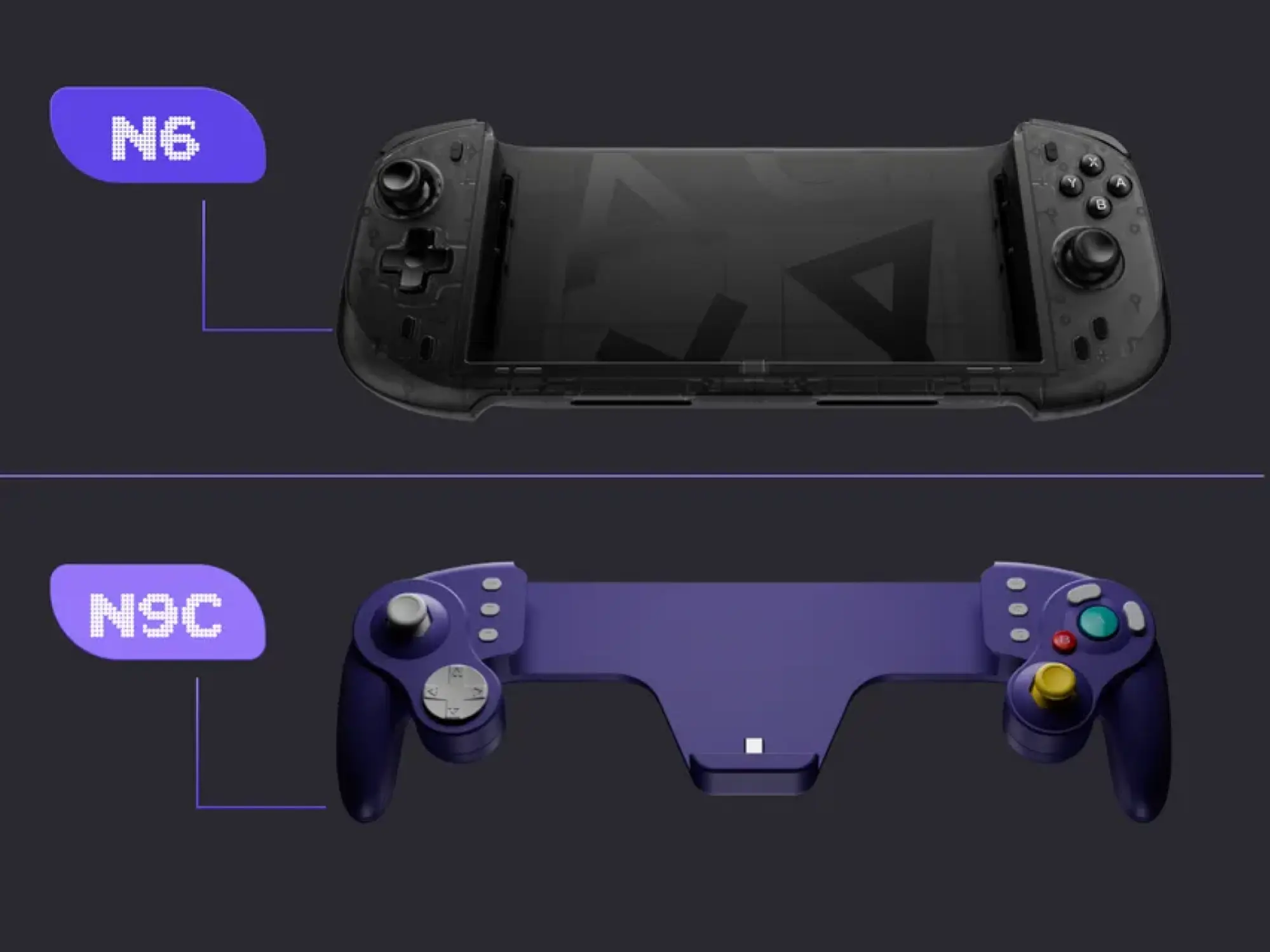
Abxylute N6 (above) and Abxylute N9C (below)

Credit: Abxylute

Part of the fun of third-party Joy-Cons for the original Switch is that they took advantage of the console’s modularity to offer wacky form factors. Take the NYXI Wizard, for example. This controller looked like a classic Nintendo GameCube WaveBird controller out of the box, but you could also take both halves of the controller off a central connector piece and slap them onto the sides of the original Switch for authentic portable Smash Bros. or Super Mario Sunshine gameplay. I missed seeing this kind of innovation on the Switch 2, especially since that system now offers even more GameCube games via Switch Online. Thankfully, though, Abxylute is picking up the slack.

While its N6 portable controller is more traditional, its N9C is for retro gamers. It looks more like an original GameCube controller than a WaveBird, but it has the same familiar stick and button layout, and even has the right colors. There are modern niceties here, like home buttons and a more fully-featured D-Pad and right stick than on an actual GameCube controller. But this is shaping up to be the best way to play GameCube games on the Switch 2 on the go. The N6, meanwhile, has all the same features, but in a more common, Xbox 360 style layout, similar to the CRKD Nitro Deck 2.

There are also some power user features in the fine print, like drift-proof sticks (capacitive on the N9C and Hall effect on the N6), a gyroscope, optional macro buttons, and on the N9C, clicky micro-switch buttons. You could use either controller for any type of game, if you’d like. But it’s really the GameCube form factor that’s convincing me here. Yes, this design will likely be more comfortable than the Joy-Con 2, but it’s also more fun.
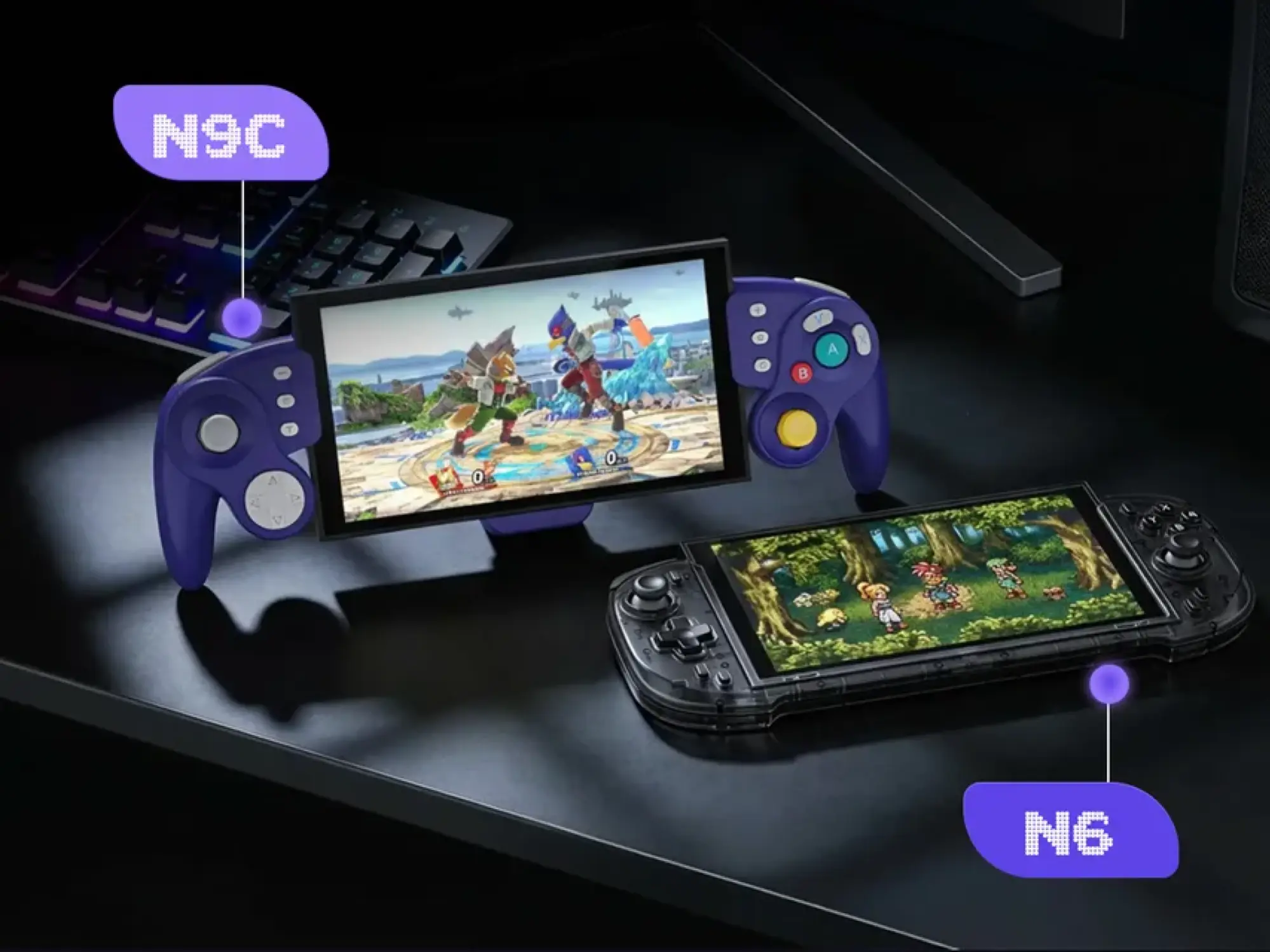
Abxylute N9C (left) and Abxylute N6 (right)

Credit: Abxylute

Unfortunately, because the Kickstarter campaigns for these have yet to launch, we don’t yet know what they’ll cost. Competitors like the Nitro Deck 2 cost $99, though, so you can probably expect to pay around that much. Abxylute’s HandheldDIY J6 for the original Switch also costs $95 (when not on sale), which is another good barometer.

That’s on the pricey end: My favorite third-party Joy-Cons for the original Switch only cost $50. But for the extra features here, plus the pricing on the competition, it’s probably a cost I’d be willing to eat—especially because alternatives are still rare. The only third-party Switch 2 Joy-Cons you can buy right now that offer the same magnetic plug-and-play as the official ones are the NYXI Hyperion 3, and they have yet to be released and cost $126.99 (and they’ll jump to $170 once early bird deals end). Abxylute’s new reveals may not have that same satisfying snap-on tech, but they’re feature-rich, and should still be a good upgrade over the official Joy-Con 2.
Apple AirTag (2026) review: Simply better

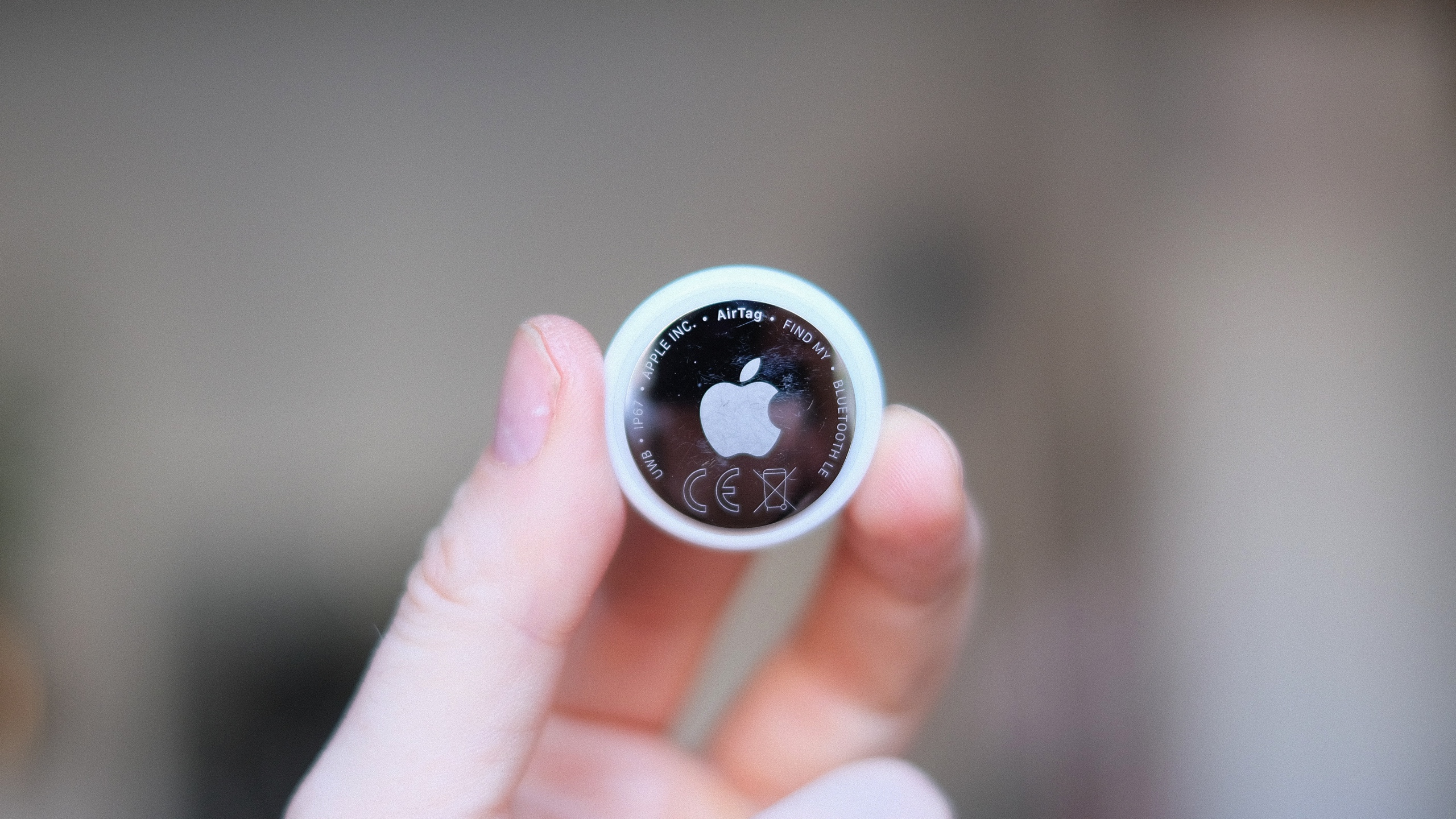
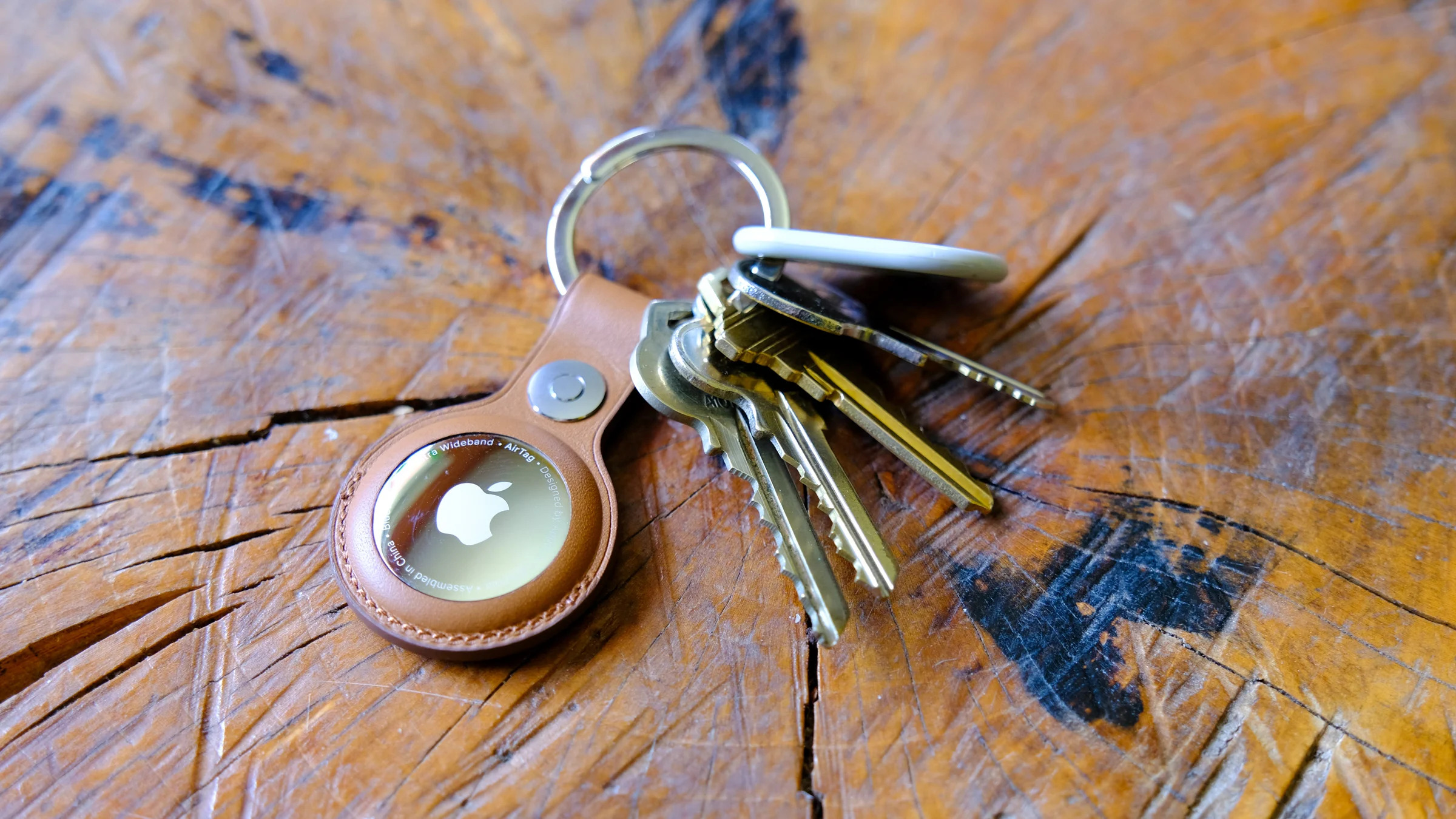
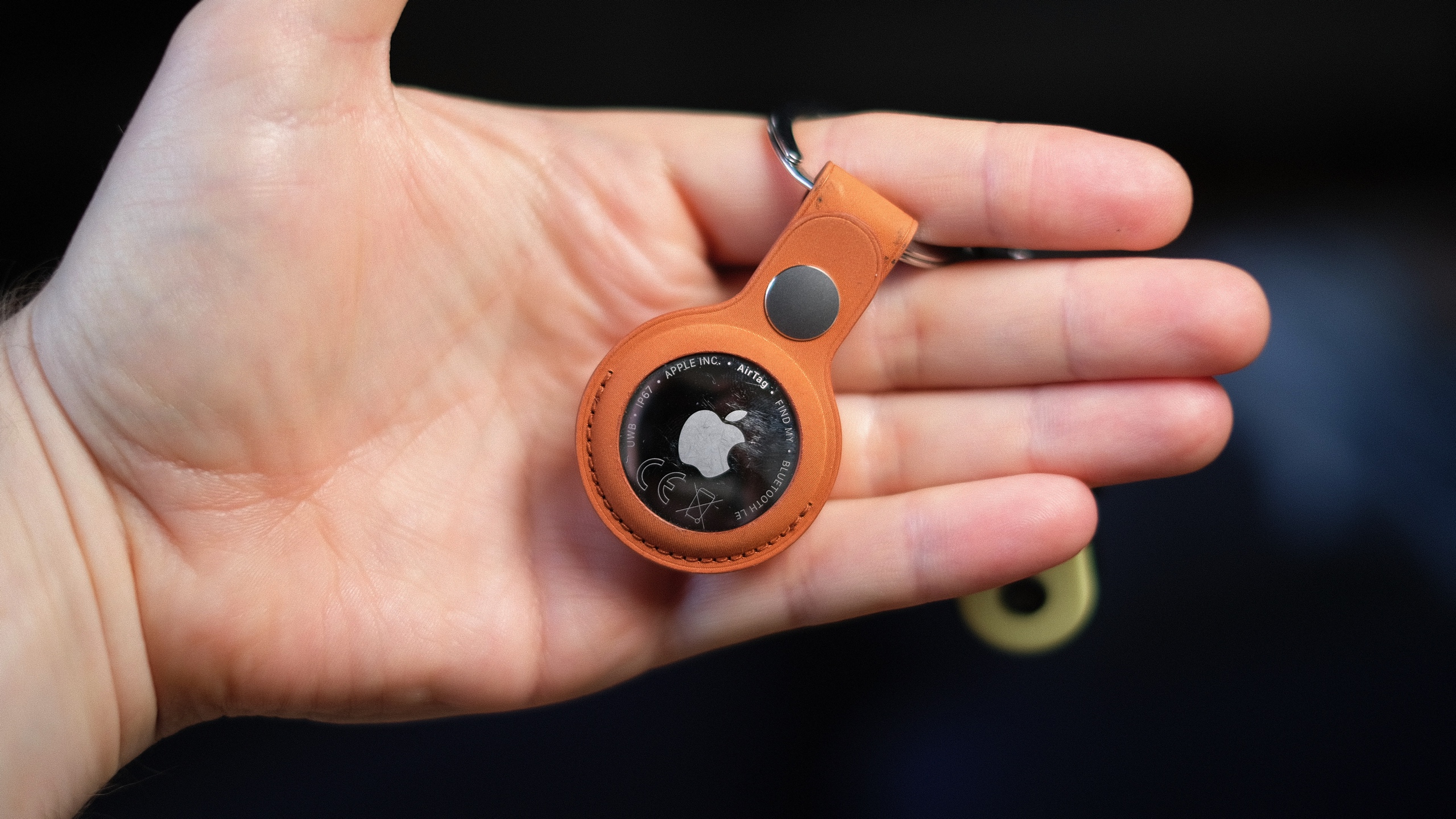
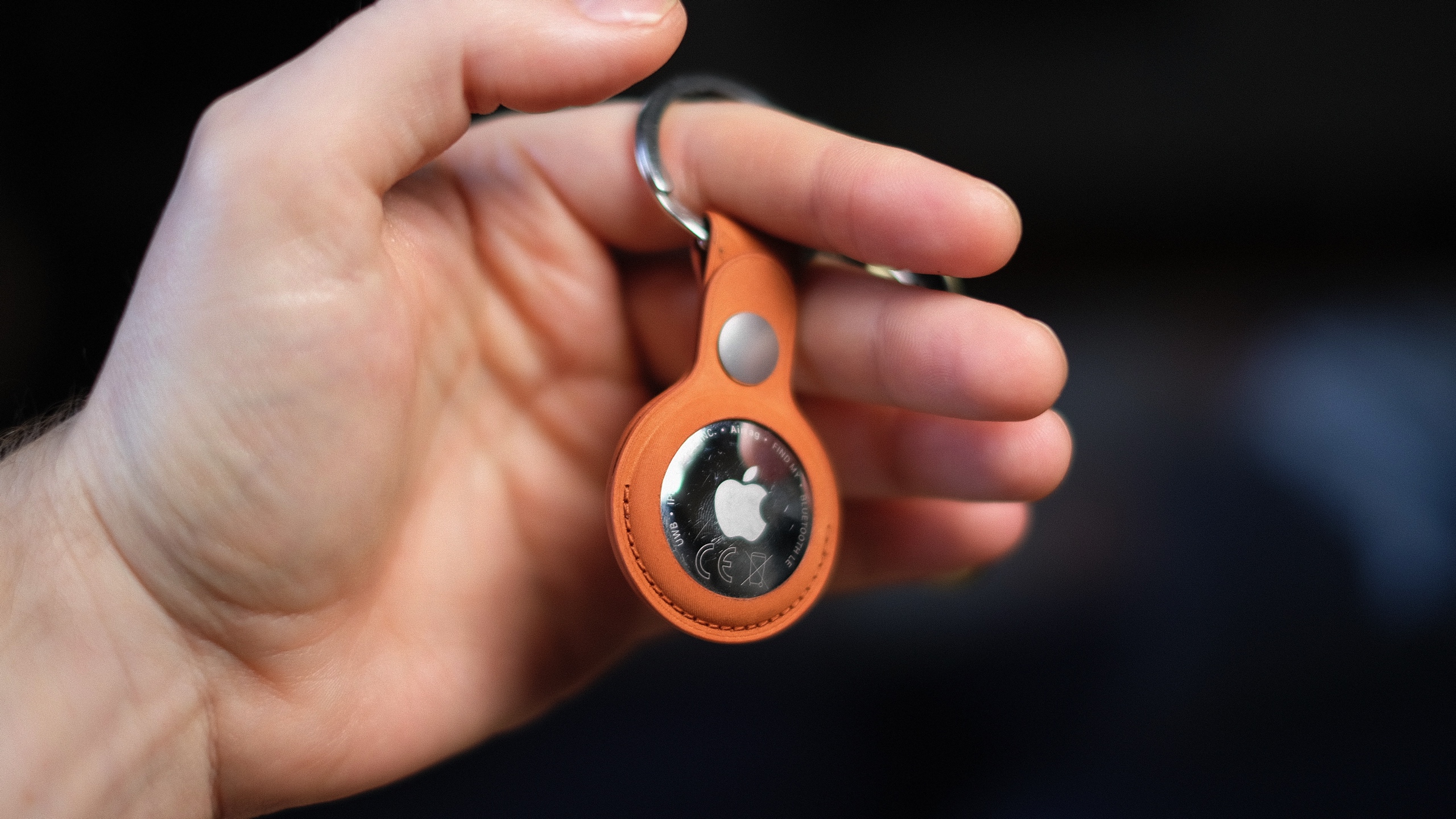
It’s hard to tell the difference between Apple’s second-generation AirTag and the almost-five-year-old original just by looking at them. In fact, the only way to tell is the many scratches on my old tracker, picked up from all those years attached to my keyring, living in my pocket. 

While the price is still $29, Apple’s latest tracker packs some core upgrades. The new AirTag has a second-generation ultra-wideband (UWB) chip that extends its Precise Finding range up to 50 percent, though it requires an iPhone 15 or newer to do so. It’s also apparently 50 percent louder and has a new, higher-pitched chime. Still no keyring hole, though.

The new AirTag looks… the same. It’s arguably the most understated hardware design Apple has ever made, with no buttons or ports, just a company logo on one side. It’s made from a combination of a stainless steel plate and a (now 85-percent recycled) plastic enclosure. It’s like a thick coin, a little bigger than a quarter, and slips into any small pocket or wallet. The battery can be replaced by rotating the backing off, but it’s still solid enough that I never felt there was a risk of coming off accidentally. 

Apple’s accessories to attach the AirTag to your keys are still more expensive than the tracker itself. However, compared to when the original tracker launched, there’s now a rich collection of third-party options from the likes of Mophie, Belkin and more, many of which are more reasonably priced at around $15. A $35 keyring for a $29 tracker is a very tough sell, Apple.

Apple's new AirTag promises increased range and a louder ring chime.
Apple’s new AirTag promises increased range and a louder ring chime.
Mat Smith for Engadget

Setting up a new AirTag is just as effortless as its predecessor. Pull out the plastic tag, connecting the battery, and a notification will pop up on your nearby iPhone. You can then name it, assign it to an item and it’ll join your list of findable Apple hardware. 

I’ve been testing the range of the new AirTag, and if anything, the 50 percent increase in Precision Finding range is a conservative estimate. Naturally, tracking can be affected by building structure, walls, a lack of nearby Find My network devices and other interference, but the next-generation AirTag’s “getting closer” screen consistently appeared on my phone when I was around 80 feet away. The older tracker, however, needed me to be around 30-40 feet away to do the same. The benefit of Precision Finding was limited on the debut AirTag, because its range was so tiny — especially in busy environments. The hardware upgrades now make it truly useful. The new AirTag is also faster to connect and more responsive to my movements and sudden turns, thanks, I expect, to the new ultra-wideband chip. 

You can now also use newer Apple Watches (Series 9, Ultra 2 and up) with precision location detection. After updating her Apple Watch Series 11 to the latest software, my colleague Cherlynn Low reported that locating the new AirTag was pretty much the same as on an iPhone. She did find it slightly counterintuitive to have to first add the Find My shortcut to the Control Center on the watch instead of going to the Find My Items app to do so, but ultimately, once she did that, it mirrored the existing setup for Precision Finding on iPhones. 

Apple's new AirTag promises increased range and a louder ring chime.
Apple’s new AirTag promises increased range and a louder ring chime.
Mat Smith for Engadget

Apple also redesigned the AirTag’s speaker assembly, which it says makes sounds 50 percent louder. Possibly the most effective audio upgrade is a higher-pitched chime that’s easier to hear over ambient noise and in busy public spaces. I could hear it ringing out from the other side of my gym’s locker room, while inside a locker, over music playing in the background. My old AirTag was inaudible until I was a few feet away from my locker. I always thought the sound on the original AirTag was a little too low-key for something you were urgently trying to find. (I’d love to be able to customize the chime, though.)

It’s the Find My network that makes the AirTag shine. Apple’s massive footprint of over a billion devices, from iPhones to Macs, continues to offer a tracking range and finer precision than GPS and Bluetooth alone. If anything, this network is even more built out since the launch of the first Apple tracker.

Since we tested the first AirTag, Apple has added multiple new features, usually through iOS updates, that expanded the utility and versatility of its trackers. In iOS 17, you could share an AirTag through Family Sharing. In iOS 18.2, Share Item Location allowed you to share your tracking information with third parties (such as airlines or train companies), improving the chances of finding the AirTag. 

There have also been subsequent safety upgrades, including expanding unknown tracker alerts to Android devices without needing to install an app. Apple also reduced the time an AirTag takes to emit a sound when separated from its owner, shifting the interval to a random range between 8 and 24 hours. At launch, this was a three-day span.

Wrap-up

Apple's second-gen AirTag.
Apple’s second-gen AirTag is still $29.
Mat Smith for Engadget

Do you need the new AirTag? While improved in every way, it’s pretty much the same device. However, the AirTag’s simplicity and ease of use are second to none when it comes to Bluetooth trackers. If you already own a single AirTag for your keys or wallet, upgrading to the second-gen iteration and repurposing the old one to track, say, your luggage, makes a lot of sense. You get the more precise location tracking and sensing for your smaller item, while you can reduce your bag anxiety if your suitcase doesn’t make it to your destination.

There’s no doubt the second-gen AirTags are improved, and thankfully, upgrading to the new capabilities doesn’t come at too steep a cost.

This article originally appeared on Engadget at https://www.engadget.com/computing/accessories/apple-airtag-2026-review-143000427.html?src=rss

Nintendo’s first Direct showcase of 2026 is scheduled for February 5

Nintendo has lined up its first showcase of the year. The next Nintendo Direct is taking place on February 5 at 9AM ET, the company has announced. It will run for around 30 minutes.

As previous reports suggested, it will focus on third-party titles from partners instead of first-party games from Nintendo itself. So if you were hoping for new Mario or Zelda announcements, that may not happen during this event. Still, you can expect to hear about new games that are coming to Switch and Switch 2. You can tune into the Direct via the YouTube video embedded above.

FromSoftware’s The Duskbloods, a Nintendo Switch 2 exclusive, is slated to arrive this year, so we may get another look at that (or the Switch 2 version of Elden Ring, for that matter). Meanwhile, Resident Evil Requiem will hit the console later this month, so it wouldn’t be surprising to see Capcom making an appearance during this Direct.

This article originally appeared on Engadget at https://www.engadget.com/gaming/nintendo/nintendos-first-direct-showcase-of-2026-is-scheduled-for-february-5-141931154.html?src=rss

Why Google’s Android for PC Launch May Be Messy and Controversial

Google’s much-anticipated plan to merge Android and ChromeOS into a single operating system called Aluminium is shaping up to be a drawn-out, complicated transition that could leave existing Chromebook users behind, according to previously unreported court documents in the Google search antitrust case.

The new OS won’t be compatible with all existing Chromebook hardware, and Google will be forced to maintain ChromeOS through at least 2033 to honor its 10-year support commitment to current users — meaning two parallel operating systems running for years.

The timeline itself is messier than Google has let on publicly, the filings suggest. Sameer Samat, Google’s head of Android, called the merger “something we’re super excited about for next year” last September, but court filings describe the “fastest path” to market as offering Aluminium to “commercial trusted testers” in late 2026 before a full release in 2028.

Enterprise and education customers — the segments where Chromebooks currently dominate — are slated for 2028 as well. Columbia computer science professor Jason Nieh, who interviewed Google engineers as a witness in the case, testified that Aluminium requires a heavier software stack and more powerful hardware to run.


Read more of this story at Slashdot.

This Feature Lets You Autofill Your Credit Card on Any Site or App on iPhone

A useful feature baked into iOS 26 is the ability to autofill credit cards stored in Apple Wallet across apps and browsers. If you don’t use a password manager (which you absolutely should), AutoFill via Apple Wallet saves you the trouble of having to manually enter your credit card information every time you want to make a purchase on your phone. Even if you have a password manager, though, not all plans allow payment card storage and autofilling, and the feature can be clunky on those that do.

As 9to5Mac points out, AutoFill for credit cards was already available in Safari and is now supported systemwide, managed through Apple Wallet.

How to set up and use AutoFill in Apple Wallet

First, you’ll need to add your payment cards to Apple Wallet’s autofill list (which is separate from your general wallet). Tap the three dots in the upper-right corner and select AutoFill. Tap Add Card to input card details manually or use the camera scan feature. The security code is optional, meaning you can add and store it in Apple Wallet AutoFill or enter it for each transaction.

To autofill saved credit cards, simply tap any form field to bring up the Paste/AutoFill option. Select AutoFill > Credit Card, authenticate with Face ID or Touch ID, and tap the card you want to enter. You’ll have to repeat the process for each field, as Apple Wallet won’t autofill the whole form at once.

AMD CEO Reveals Next-Gen Xbox And Valve Steam Machine Launch Details

AMD CEO Reveals Next-Gen Xbox And Valve Steam Machine Launch Details
The PC memory market is in shambles thanks to unprecedented demand for chips in the AI sector, and so it was fair to wonder if this would impact the launch timing of Valve’s upcoming Steam Machine, due out this year, or next-generation game consoles from Microsoft and Sony. The answer for at least two of the three upcoming systems is a flat

Adobe Actually Won’t Discontinue Animate

Adobe is no longer planning to discontinue Adobe Animate on March 1st. From a report: In an FAQ, the company now says that Animate will now be in maintenance mode and that it has “no plans toâdiscontinue or remove access” to the app.

Animate will still receive “ongoing security and bug fixes” and will still be available for “both new and existing users,” but it won’t get new features. Many creators expressed frustration after Adobe’s original discontinuation announcement from earlier this week, and the application is still used by creators like David Firth, the person behind the animated web series Salad Fingers. Now, Adobe says that “We are committed to ensuring Animate usersâalways have access to their content regardless of the state of development of the application.”


Read more of this story at Slashdot.

Zwift Racing League Week 6 Guide: London Loop (A/B Points Race)

The sixth and final race of Zwift Racing League 2025/26 Round 3 happens Tuesday, February 10, and we’re in London for a scratch race.

If you’re on an A or B team, you’ll be racing two laps of the classic London Loop, and this guide is for you. C and D teams will be on Greatest London Loop (click here for that race guide).

There’s much to discuss, including crucial course segments, powerup usage, bike decisions, and strategic options. Let’s go!

Looking at the Route

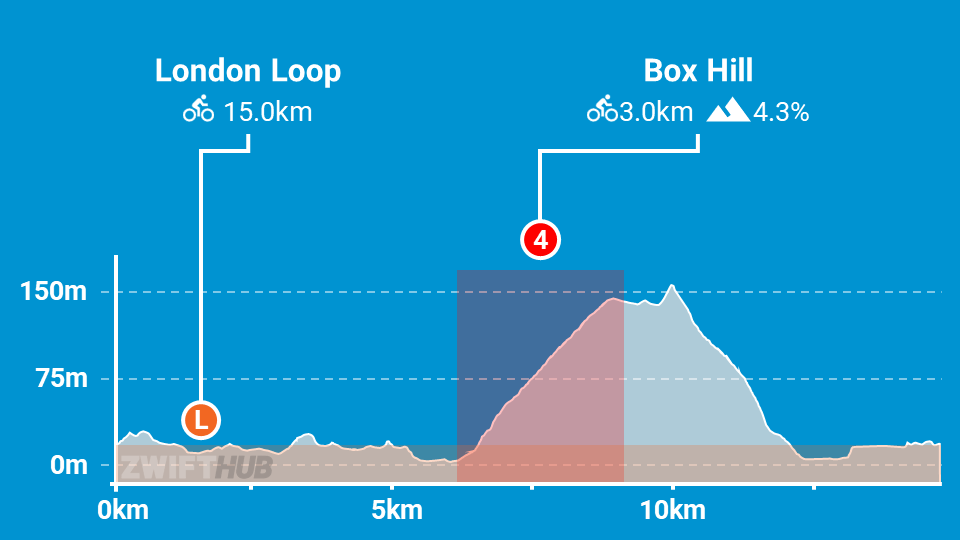
The London Loop is 14.9km long with 231m of elevation gained per lap. A and B teams will be racing two laps of the course for a total of 30.4km and 466m of elevation. Here’s the lap profile:

Clearly, there’s one big feature on this route: Box Hill! This is where the big selections will happen each lap.

Official stats for the leaderboard segment indicate it’s 3km long, with an average gradient of 4%, but that doesn’t tell the whole story, since the leaderboard segment doesn’t line up perfectly with the start and finish of the climb.

Box Hill is a fairly steady 2.7km grade, but the final 300-400 meters of the segment are flat or even slightly downhill, throwing off the stats. The steepest part of the climb, where the pack quickly stretches and elastic snaps, is on the early long stretch before the left hairpin. This section averages 7-8%, and most of the climbing apart from that is around 5%.

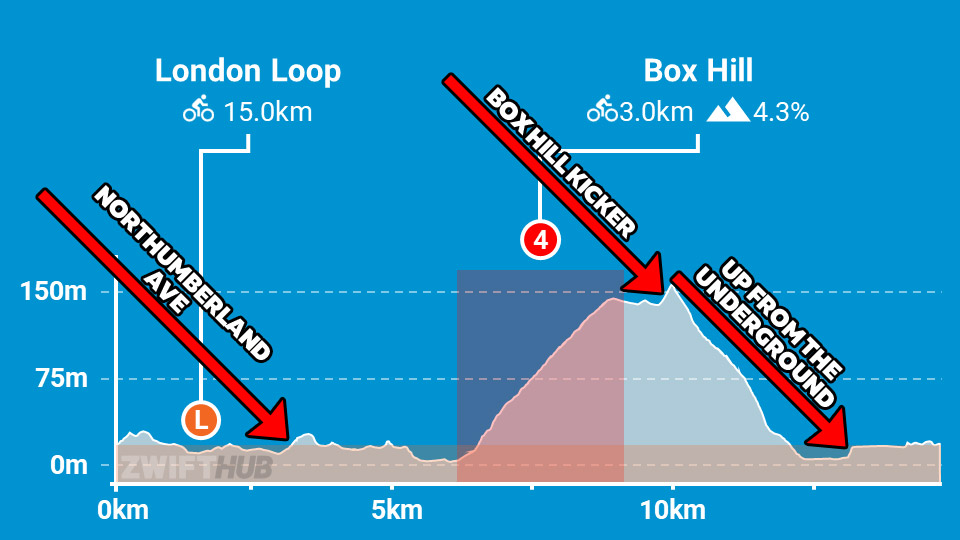
There are three kickers on the circuit that deserve a mention as well:

The first, Northumberland Avenue, comes early on as you turn right from the Thames and head up to Trafalgar Square. This is the first climb more than a few seconds long on the route, so expect the effort level to lift for ~30 seconds, even though big attacks probably won’t come in earnest.

The Box Hill Kicker comes just a few hundred meters after you ride through the Box Hill KOM banner. This one is short, but steep, and everyone’s legs are a big knackered. Pro tip: hit it hard and push across the top, and you can often close big gaps to riders ahead.

After the long descent (expect everyone to take a big rest here), you’ll enter the Underground tunnel and soon enough hit the plywood-covered ramp back into the London sunshine. At 14%, this is the steepest climb of your race. But it’s short! You’ll want to enter it fast, and keep your power high up and over the top.

From the top of the Underground ramp, you’ve got 1.6km to the finish line. Things often get cagey as riders cross Tower Bridge, and the final meters are slightly downhill and fast. It will take just the right mix of timing and strong legs to cross the line victorious. Good luck!

Read more about the London Loop route >

Powerups

Specific powerups will be given at each arch: the feather at the lap banner, and the anvil at the Box Hill KOM banner. That means you’ll get two of each.

Lightweight (feather): reduces your weight by 10% for 30 seconds.
Use on climbs, when weight matters the most. This is best saved for Box Hill, particularly on the lower slope where the pace will be high and the gradient is steepest.

Anvil: makes you heavier for up to 15 seconds, so you can descend faster. It won’t hurt you, as it only adds weight when the road is at a -1.5% decline or greater.
Use this when descending the backside of Box Hill to make it even easier to sit in.

Bike Recommendations

This race’s big Box Hill climb definitely makes me steer away from pure aero setups and look at climbing bikes and all-arounders instead. Because while a more aero setup has a pure time advantage on laps of the full course, that time advantage evaporates if you get dropped on Box Hill!

My recommendation, then, is to use the new ENVE SES 4.5 PRO or DT Swiss ARC 1100 DICUT 65 wheels paired with one of these bikes:

Of course, your frame’s upgrade status should impact your decision. A fully upgraded Aethos will outclimb the other four frames, but that’s not the case when comparing un-upgraded versions.

Related: All About Zwift’s New “Bike Upgrades” Functionality >

See Speed Tests: Tron Bike vs Top Performers for more nerd-level detail on frame and wheel performance.

More Route Recons

Lots of recon events are scheduled on upcoming ZRL routes, led by various teams. See upcoming ZRL recons for this race at zwift.com/events/tag/zrlrecon.

Additionally, riders in the Zwift community do a great job every week creating recon videos that preview the courses and offer tips to help you perform your best on the day. Here are the recons I’ve found (comment if you find another!)

John Rice

J Dirom

Strategic Options

I predict riders will fall into three groups:

  • Climbers: Lighter riders who can sustain high W/kg will surf wheels on the flats, then light it up on Box Hill. Your goal: drop puncheurs/sprinters who have the pure watts to beat you in a pack finish.
  • Puncheurs: If your VO2 power lets you compete on Box Hill-length climbs, but you’ve also got some pure sprint watts, you are in the sweet spot to win this race. Pure climbers may try to rip your legs off on the KOMs, but if you can survive, you can roll them in the end.
  • Everyone Else: If you’re a pure sprinter, or simply a rider with lower fitness than most in the category, you’re going to struggle in this race, particularly up Box Hill. Your best bet is to pace yourself well on Box Hill, ride smart to bridge up to riders ahead, and simply finish as high in the list as possible. Remember: every point counts!

Your Thoughts

Any insights or further thoughts on this race? Share below!

Zwift Racing League Week 6 Guide: Greatest London Loop (C/D Points Race)

The sixth and final race of Zwift Racing League 2025/26 Round 3 happens Tuesday, February 10, and we’re in London for a scratch race.

If you’re on a C or D team, you’ll be racing one lap of Greatest London Loop, and this guide is for you. A and B teams will be on two laps of London Loop (click here for that race guide).

There’s much to discuss, including crucial course segments, powerup usage, bike decisions, and strategic options. Let’s go!

Looking at the Route

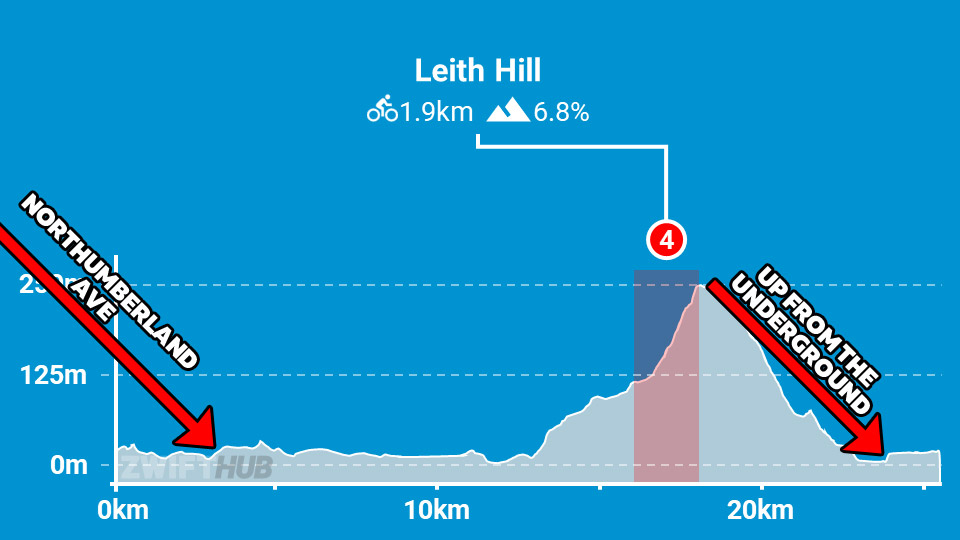
The Greatest London Loop is 26.2km long with 360m of elevation gain. Here’s the course profile:

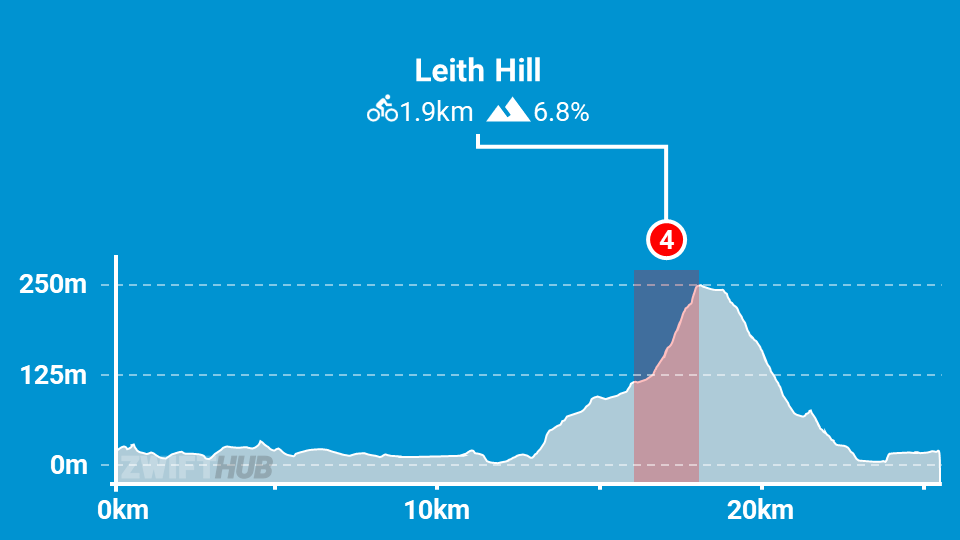
Clearly, there’s one big feature on this route: Leith Hill! This is where the big selection will happen. Don’t be fooled by the KOM leaderboard segment highlighted above, since it’s just a portion of what you’ll be climbing, and this is a scratch race, not a points race.

The actual climb is 6km long, with 252m of elevation gain, and the final 2km is the steepest part. Click to see the Veloviewer profile below in 2D to get a really good picture of how this climb lays out:

Here’s the Strava segment for the full Leith Hill climb, so you can analyze it further. It’s a long climb – the longest we’ll race in this round. Plan on 16 minutes minimum, but probably closer to 20 minutes for many C/D riders. It roughly breaks into four sections:

  • First 1km: Quite flat and early, so I wouldn’t expect any big moves.
  • 1-1.5km: Steep bit starts off the climbing in earnest. The pack will stretch here.
  • 1.5-4.5km: Flatter, longer middle section. Sit in the wheels and draft here if you want to conserve energy for the final big kick.
  • 4.5-6km: The pièce de résistance, averaging 8.3%. This is where the leading selection of riders will be finalized!

There are two small kickers on the circuit that deserve a mention as well. They may look small on the profile since they’re dwarfed by Leith Hill, but trust me – you’ll notice them in the race:

The first, Northumberland Avenue, comes early on as you turn right from the Thames and head up to Trafalgar Square. This is the first climb more than a few seconds long on the route, so expect the effort level to lift significantly for ~30 seconds, even though riders will be saving their big attack for Leith Hill up the road.

After the long descent from the top of Leith Hill (expect everyone to take a big rest here), you’ll enter the Underground tunnel and quickly hit the plywood-covered ramp back into the London sunshine. At 14%, this is the steepest climb of your race. But it’s short! You’ll want to enter it fast and keep your power high up and over the top.

From the top of the Underground ramp, you’ve got 1.6km to the finish line. Things often get cagey as riders cross Tower Bridge, and the final meters are slightly downhill and fast. It will take just the right mix of timing and strong legs to cross the line victorious. Good luck!

Read more about the Greatest London Loop route >

Powerups

Specific powerups will be given at each arch: the feather at the lap banner, and the anvil at the Leith Hill KOM banner.

Lightweight (feather): reduces your weight by 10% for 30 seconds.
Use on climbs, when weight matters the most. This is best saved for Leith Hill, particularly on the final section where the gradient is steepest and legs are burning.

Anvil: makes you heavier for up to 15 seconds, so you can descend faster. It won’t hurt you, as it only adds weight when the road is at a -1.5% decline or greater.
Use this when descending the backside of Leith Hill to make it even easier to sit in.

Bike Recommendations

This race’s decisive and long climb definitely makes me steer away from pure aero setups and look at climbing bikes and all-arounders instead. While a more aero setup has a pure time advantage on laps of the full course, that time advantage evaporates if you get dropped on Leith Hill!

My recommendation, then, is to use the new ENVE SES 4.5 PRO or DT Swiss ARC 1100 DICUT 65 wheels paired with one of these bikes:

Of course, your frame’s upgrade status should impact your decision. A fully upgraded Aethos will outclimb the other four frames, but that’s not the case when comparing un-upgraded versions.

Related: All About Zwift’s New “Bike Upgrades” Functionality >

See Speed Tests: Tron Bike vs Top Performers for more nerd-level detail on frame and wheel performance.

More Route Recons

Lots of recon events are scheduled on upcoming ZRL routes, led by various teams. See upcoming ZRL recons for this race at zwift.com/events/tag/zrlrecon.

Additionally, riders in the Zwift community do a great job every week creating recon videos that preview the courses and offer tips to help you perform your best on the day. Here are the recons I’ve found (comment if you find another!)

John Rice

J Dirom

Strategic Options

I predict riders will fall into three groups:

  • Climbers: Lighter riders who can sustain high W/kg will surf wheels on the flats, then light it up on Leith Hill. Your goal: drop puncheurs/sprinters who have the pure watts to beat you in a pack finish.
  • Puncheurs: You will struggle on Leith Hill thanks to the climb’s length, but if you can hold on, you’ll stand a good chance of finishing well. For you, surviving Leith Hill may require a combination of riding smart and praying the climbers don’t push the pace too high.
  • Everyone Else: If you’re a pure sprinter, or simply a rider with lower fitness than most in the category, you’re going to struggle in this race, particularly up Leith Hill. Your best bet is to pace yourself well on Leith Hill, ride smart to bridge up to riders ahead on flats and descents, and simply finish as high in the list as possible. Remember: every point counts!

Your Thoughts

Any insights or further thoughts on this race? Share below!

Silicon Survival: Why AMD is Soaring, Intel is Stumbling, and NVIDIA is Living in a Different Dimension

AMD released their financial report this week and they blew the doors off with a surprise bump from China (though they would have still surprised even without that bump). However, the Q4 2025 earnings calls for AMD and Intel felt like reports from two different centuries. AMD, led by Dr. Lisa Su, reported record revenue of $10.27 billion for the quarter, driven by a massive 39% year-over-year surge in data center revenue. Their MI300 and the newer Instinct MI325X accelerators aren’t just “alternatives” to NVIDIA anymore; they are becoming staples for hyperscalers who are tired of being beholden to a single supplier.

Conversely, Intel’s Q4 2025 was a exercise in “managed disappointment.” Revenue slid to $13.7 billion, down 4% year-over-year, and the company posted a net loss of nearly $600 million. While Intel’s Data Center and AI (DCAI) group saw a modest 9% bump, the company is bleeding cash to fund its foundry ambitions. The departure of Pat Gelsinger earlier in 2025 and the subsequent focus under Lip-Bu Tan has stabilized the ship, but Intel is currently a company undergoing open-heart surgery while trying to run a marathon.

The Elephant in the Room: NVIDIA’s 2026 Dominance

Comparing AMD and Intel to NVIDIA at this point feels less like a market analysis and more like comparing local weather patterns to a supernova. NVIDIA’s Q4 2026 results (ending January 2026 and reporting on February 25th, 2026) are expected to hit a jaw-dropping $65 billion for the single quarter. To put that in perspective, NVIDIA is now generating more revenue in three months than Intel earns in an entire year.

The driver here is the Blackwell architecture and the rapid ramp-up of Vera Rubin systems. While AMD is fighting for a 10-15% slice of the AI accelerator pie, NVIDIA has effectively become the “OS” of the AI world through CUDA. They aren’t just selling chips; they are selling entire AI factories.

The Trade War Wildcard and Geopolitical Turmoil

As we move into 2026, the “Silicon Shield” is under pressure. The recent executive orders imposing 25% tariffs on advanced chips (like NVIDIA’s H200 and AMD’s MI325X) have sent shockwaves through the supply chain.

  • AMD is nimble, but heavily reliant on TSMC. Any escalation in the Taiwan Strait or further trade restrictions on China (which still accounts for a significant portion of their “embedded” and “gaming” revenue) could cap their upside. It is interesting to note that even without the surprise revenue and profit gain from China sales, AMD would have still beat the street with this revenue report. 
  • Intel, ironically, might be the best positioned for “National Security” play. With their 18A process node finally reaching high-volume manufacturing in Arizona, they are the only player that can offer a “Made in America” cutting-edge silicon solution. If the trade war turns into a full-scale blockade of Asian-made chips, Intel becomes the only game in town.
  • NVIDIA has the most to lose in raw dollars but the most “moat” to protect them. They’ve already started paying “volition” fees to the U.S. government (AMD is negotiating with the US Government for the same fees) to keep shipping to China, essentially treating tariffs as a cost of doing business.

Projecting the 2026 Competitive Landscape

Looking forward, I expect AMD to continue eating Intel’s lunch in the server CPU space. Their EPYC processors are simply more efficient, and with Intel’s 18A yields still hovering in the 55-65% range, AMD has at least another year of clear runway.

Intel’s survival depends entirely on external customers like Microsoft and Amazon actually using their foundry. If Intel can get their yields above 70% by mid-2026, they might actually survive as a split company—Fab and Fabless. If not, we might be looking at the eventual breakup of the greatest silicon icon in American history.

NVIDIA will continue to grow, but the “Law of Large Numbers” will eventually catch up. You cannot grow at 60% YoY forever when you are already a $4 trillion company. The risk for NVIDIA isn’t competition from AMD; it’s the risk that the AI ROI (Return on Investment) doesn’t materialize for their customers fast enough to justify the next $100 billion in GPU orders and companies like Microsoft have complained they can’t deploy the part (Blackwell) because it is too power intensive. 

Wrapping Up

The semiconductor market in 2026 is no longer about who has the fastest clock speed; it’s about who has the most resilient supply chain and the best AI software stack. AMD is the execution king, Intel is the geopolitical phoenix (trying to rise from the ashes), and NVIDIA is the sun around which everything else orbits.

The coming year will be defined by how these giants navigate the “Trump Tariffs” and whether the AI revolution stays in the data center or successfully migrates to the “AI PC” and robotics—areas where Intel and AMD still have a fighting chance to reclaim ground.

So yeah, I vibe-coded a log colorizer—and I feel good about it

I can’t code.

I know, I know—these days, that sounds like an excuse. Anyone can code, right?! Grab some tutorials, maybe an O’Reilly book, download an example project, and jump in. It’s just a matter of learning how to break your project into small steps that you can make the computer do, then memorizing a bit of syntax. Nothing about that is hard!

Perhaps you can sense my sarcasm (and sympathize with my lack of time to learn one more technical skill).

Read full article

Comments

How to set up an AirTag

Apple’s AirTag makes it easy to keep tabs on everyday items like keys, bags and luggage using the Find My network. Setup is quick, requires no tools and takes just a minute or two as long as you have a compatible iPhone or iPad. Once paired, your AirTag quietly works in the background to help you locate misplaced belongings. This guide walks through how to set up an AirTag, how to name it so you can easily identify what it’s attached to and what to do if setup doesn’t go as planned.

What you need before setting up an AirTag

Before you begin, make sure you have the following:

  • An iPhone or iPad signed in to your Apple Account

  • Bluetooth enabled on that device

  • Location Services enabled

  • iOS or iPadOS 14.5 or later (AirTag 2nd generation requires iOS or iPadOS 26.2.1 or later)

  • A stable Wi-Fi or cellular connection

You’ll also want to ensure iCloud Keychain is enabled and that your Apple Account setup is fully completed in Settings.

How to set up an AirTag using your iPhone or iPad

The easiest way to set up an AirTag is directly through the on-screen setup prompt.

  1. Remove the plastic tab from your AirTag to activate the battery.

  2. Hold the AirTag near your unlocked iPhone or iPad.

  3. When the setup animation appears, tap Connect.

  4. Choose a category for your AirTag, such as Keys, Backpack or Luggage. If you select Custom Name, you can type your own label and choose an emoji.

  5. Tap Continue to link the AirTag to your Apple Account.

  6. Tap Done to finish setup.

Once completed, the AirTag will appear under the Items tab in the Find My app. If you’re setting up multiple AirTags, make sure only one is near your device at a time. If more than one is detected, a notification will appear saying “More than one AirTag detected”. If this happens, move the others farther away and try again.

How to add an AirTag using the Find My app

If the setup animation doesn’t appear automatically, you can add an AirTag manually through Find My.

  1. Open the Find My app on your iPhone or iPad.

  2. Tap the Items tab.

  3. Tap the Add button.

  4. Select Add AirTag or Other Item (if you’re adding a compatible FindMy Network accessory).

  5. Follow the on-screen instructions to complete setup.

You can add up to 32 items in Find My, including AirTags, shared items and compatible accessories. If you’ve reached the limit, you’ll need to remove an item before adding a new one.

What to do if your AirTag won’t connect

If setup fails or the pairing animation disappears, try the following steps:

  1. Lock your iPhone or iPad, unlock it again and wait about 15 seconds for the animation to reappear.

  2. Make sure Bluetooth and Location Services are turned on in Settings.

  3. Check that Find My has permission to use Precise Location.

  4. Ensure you’re signed in to your Apple Account and iCloud Keychain is enabled.

  5. Verify your device is running the latest version of iOS or iPadOS (iOS or iPadOS 26.2.1 or later).

If the AirTag still won’t connect, the battery may need replacing. AirTags use a standard CR2032 coin cell battery, and swapping it only takes a minute. If issues persist after replacing the battery, you may need to reset the AirTag and try setup again.

How to name and label your AirTag

Naming your AirTag makes it much easier to identify when you’re tracking multiple items. During setup, Apple offers preset labels like Keys or Backpack, but you can customize these at any time.

To rename an AirTag after setup:

  1. Open the Find My app.

  2. Tap Items and select your AirTag.

  3. Tap Add Name or Rename Item.

  4. Choose a preset label or select Custom Name.

  5. Optionally add an emoji for quick visual identification.

Clear labels are especially helpful if you use AirTags for travel, work gear or shared household items.

Apple AirTag
Apple AirTag
Engadget

Attaching your AirTag to everyday items

AirTags don’t have built-in clips or adhesive, so you’ll usually need an accessory to attach one securely. Depending on how you plan to use it, that could mean a key ring, luggage tag, wallet insert or bike mount.

If you’re unsure which style works best, Engadget has rounded up the best Apple AirTag accessories, covering options for keys, bags, wallets and more. Choosing the right accessory helps ensure your AirTag stays attached and works the way you expect.

Wrap-up

After setup, your AirTag will automatically update its location using Apple’s Find My network. You can view its last known location, play a sound to help locate it nearby or use Precision Finding on supported iPhones to guide you directly to it. With just a few minutes of setup and a clear label, an AirTag can become a reliable way to keep track of important belongings, whether you’re at home or on the move.

This article originally appeared on Engadget at https://www.engadget.com/computing/accessories/how-to-set-up-an-airtag-120000789.html?src=rss

AMD Hints the Next-Gen Xbox Console Could Launch Next Year

An anonymous reader shares a report: Speaking during an earnings call on Tuesday, CEO Lisa Su stated that its development of Microsoft’s next-gen Xbox SoC is “progressing well to support a launch in 2027.”

While the comment doesn’t outright confirm the next Xbox will release next year, it indicates that the Microsoft could be ready to launch soon.


Read more of this story at Slashdot.

Campagnolo rules out layoffs after reaching agreement with trade unions

It has been a tricky few months for Campagnolo. Il Gazzentino reported in November that the Italian brand was preparing to cut more than 100 jobs at its Vicenza headquarters, as part of a restructuring plan, after it had incurred losses exceeding €24 million. 

Campagnolo responded quickly, stating the strategy it had presented to trade unions was “a highly structured plan, the result of months of work… with possible positive developments”. However, it acknowledged a reduction in staff was “expected at this stage”. 

But in a statement released yesterday, Campagnolo said it had reached an agreement with “trade unions and social partners” in December that avoids redundancies.

“Seventy-seven percent of employees expressed their support. This agreement led to the signing of a solidarity contract and clearly ruled out any form of layoffs. The process was completed before Christmas, allowing the company to enter the new year with greater stability and a strong sense of responsibility,” Campagnolo said in its statement.

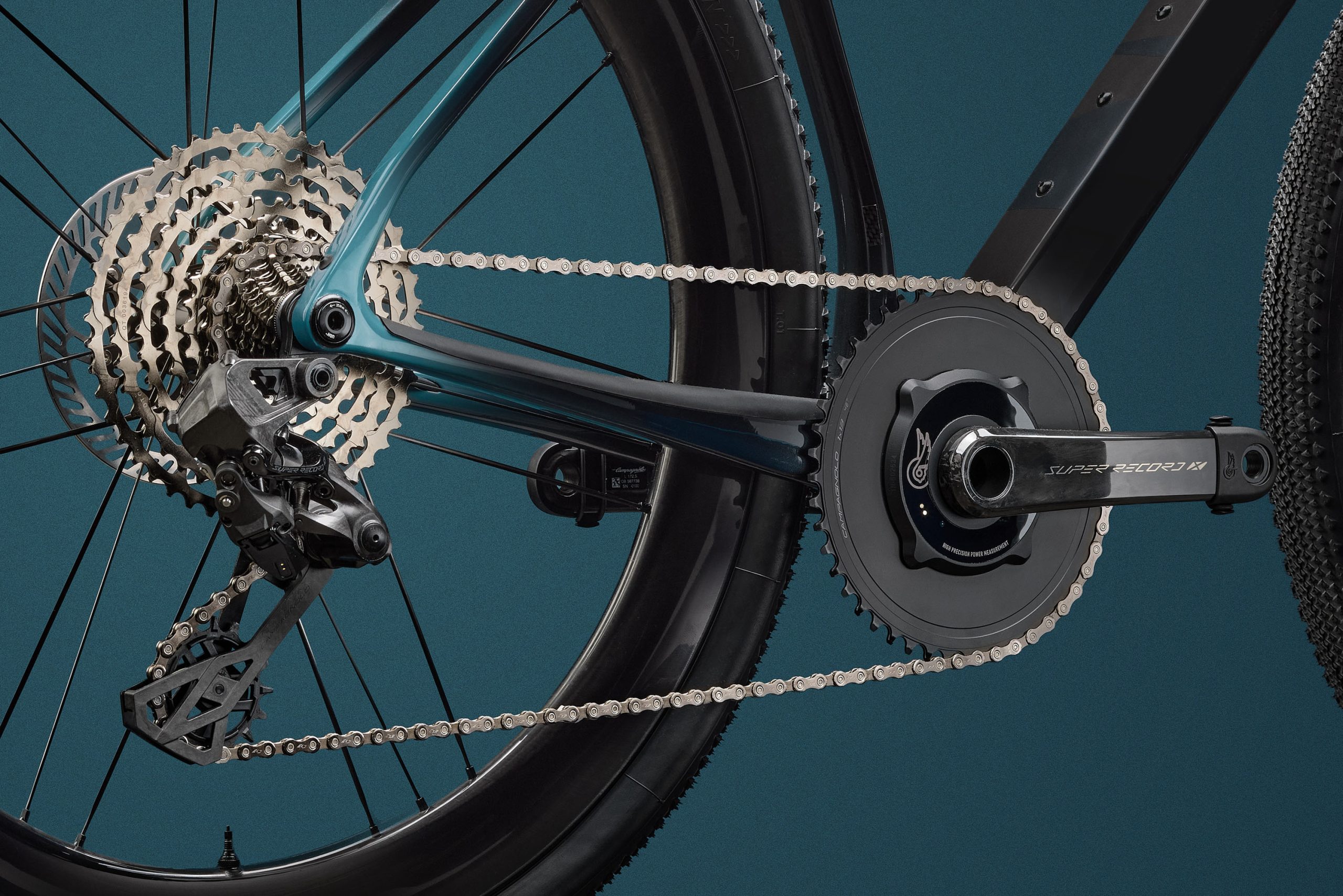
Campagnolo Super Record 13 X gravel groupset
Campagnolo launched Super Record 13 in June last year. Campagnolo

This will be welcome news to FIOM Vicenza, the branch of the Italian Federation of Metalworkers for Vicenza. The trade union said in November that its analysis of Campagnolo’s financial situation was not as disastrous as the company implied and said layoffs could not be the only option.  

But Campagnolo’s statement still addressed the scale of change required. “The company is undergoing a deep internal reorganization that affects both its structure and the way it works. The goal is to simplify, reduce decision-making layers, speed up processes, and give space to the young talents who are already part of the organization. This is not a cosmetic change,” it read.

Campagnolo said these changes are necessary to meet the demands of today’s market. While it didn’t divulge the specific demands, many cycling companies are struggling after a chaotic and challenging five years. 

The Covid cycling boom prompted many companies to over-order, followed by a period of excessive inventory and discounting, issues in the supply chain and subdued economic forecasts – not forgetting geopolitical pressures and US tariffs. 

These conditions led Canyon to lay off 320 staff in Koblenz and Amsterdam last month, following redundancies last year in the USA. There were also layoffs at Trek in January due to similar pressures, according to Escape Collective.

But, despite a tricky market, Campagnolo said it is seeing “encouraging” signals. “The new 13-speed platform is delivering very positive results, both in terms of sales and customer satisfaction. The market has recognized a real shift in pace: technology, precision, speed, and reliability that make this drivetrain truly unique,” it said. 

BikeRadar’s Warren Rossiter argued that Campagnolo’s woes are partly its own making, because of how the company positioned itself as a ‘high-end brand’, neglecting the lower end of the market. 

Campagnolo’s statement from yesterday suggests this is an issue of which the luxury brand is aware – and one it intends to address. 

It says the technology developed through its 13-speed Campagnolo Record groupset, launched in June 2025, will be introduced at lower price points. 

“This is a key step in strengthening Campagnolo’s presence in the market and in bringing our products back onto the bikes of the world’s leading manufacturers,” Campagnolo said, adding that “Many other important developments will be unveiled over the course of the year.”

“We continue to build the future of cycling with genuine passion, respect for our history, and a clear focus on what lies ahead. Not only for business, but for love of this sport,” Campagnolo’s statement concluded.