If you’re like most people in 2026, you don’t have cable and only miss it occasionally—mostly when there’s a specific live sporting event taking place and you need a way to catch it. What if you could get cable for a single day, then ditch it? That’s the basic idea behind Sling’s 1 Day Pass. For $5, you can get a day’s access to ESPN, ESPN2, TNT, and a few more channels besides. That array will cover quite a few nationally broadcast sporting events.
Unfortunately, like most everything related to watching live television in the age of streaming, this is more complicated than I’d like. A 1 Day Pass is only available for Sling Orange, which includes just a subset of Sling’s overall offers. On top of that, Sling has always been a little bit confusing—an attribute it shares with the legacy cable companies still standing. But if you need one of the channels offered on Sling Orange, it’s theoretically a good deal.
But March Madness is coming up too, and quite a few of those games are going to be available via a 1 Day Pass, so keep this service in mind if there’s a single sporting event you want to watch, especially if you notice it’s on ESPN, TBS, or TNT.
Now, could one argue that it’s easier to install an ad blocker and search the internet for a pirated stream than it is to figure out how to legally watch something? Yes. Yes one could. But a Sling 1 Day Pass can save you from that temptation (not to mention accidentally downloading malware) for just $5.
Today, OpenAI announced GPT-5.3-Codex, a new version of its frontier coding model that will be available via the command line, IDE extension, web interface, and the new macOS desktop app. (No API access yet, but it’s coming.)
GPT-5.3-Codex outperforms GPT-5.2-Codex and GPT-5.2 in SWE-Bench Pro, Terminal-Bench 2.0, and other benchmarks, according to the company’s testing.
There are already a few headlines out there saying “Codex built itself,” but let’s reality-check that, as that’s an overstatement. The domains OpenAI described using it for here are similar to the ones you see in some other enterprise software development firms now: managing deployments, debugging, and handling test results and evaluations. There is no claim here that GPT-5.3-Codex built itself.
Android Auto users are reporting a bug that is making their cars disappear from the road—ok, not literally, but within Google Maps. On both Reddit and Google’s own support forums, drivers now say their car icons are sporadically disappearing from their navigation screens while using the Google Maps app through Android Auto. Some users have discovered workarounds, but the fixes don’t appear to be consistent for everyone. Here’s what’s happening, and what you can do to try to fix it.
Why are car icons disappearing in Google Maps in Android Auto?
The news first started popping up six days ago, on a Reddit thread where multiple users reported problems with their car icons disappearing while using the Google Maps app through Android Auto. According to these drivers, when the bug was triggered, the map would move around normally, and traffic data and navigation instructions continued to display as expected. However, the icon indicating their car’s position would suddenly disappear from their screen, making it difficult to know where exactly they were in comparison to the road. That’s not ideal if you’re trying to judge when your next turn is coming up.
According to the thread’s original poster, the issue popped up for them on the Android Auto version 16.1 release, although others mentioned the issue occurring as far back as version 15.9. The bug doesn’t appear to happen all the time, but “reliably” appears when leaving Google Maps, opening another app in fullscreen, and either returning to Google Maps in fullscreen or pulling it up alongside the new app in a splitscreen view. To get their icon back, the original poster had to force quit Google Maps on their phone, but this wouldn’t stop the bug from occurring again in the future. Google itself has not yet offered public comment on the issue, although I’ve reached out to the company and will update this post when I hear back.
How to fix Google Maps in Android Auto
If you’re encountering a disappearing car icon while using Google Maps through Android Auto, there are a few fixes that have worked for community members, although whether they’ll work for everyone appears to be inconsistent.
Try updating or downgrading your Android Auto version
The timing of this bug appears to line up with the Android Auto v16.1 release, which launched last week. While the bug has been reported appearing on older versions of the app, like Android Auto v15.9, it could be worth trying out another version of Android Auto to see if it clears up the issue. For instance, one user mentioned that installing Android Auto V16.0.66 fixed the issue for them. If you’re on an older version, you can update to a newest one from the Android Auto listing on the Play Store. If you’re on a newest version and want to try an older one, though, you’ll need to uninstall your Android Auto app and manually sideload the older version using a trusted APK file. Because these can be tricky to verify, this might not be the best option for most people.
Try changing your Android Auto car icon
Multiple users in the original Reddit thread, including the original poster, pointed out that the bug only seems to affect them when using a non-default car icon. Until Google issues a fix, one solution might be to change your car icon back to the standard white arrow within a blue circle. To change your car icon in Google Maps, open the app on your phone while not connected to Android Auto. Start navigating to a location. Tap on your car icon, and swipe left or right to adjust the icon until you land on the default white arrow within a blue circle. The next time you connect your Google Maps app to Android Auto, your car’s icon should be updated. Note that this isn’t a guaranteed fix. One user on a Google support forum, for instance, said that their arrow icon also disappeared from Google Maps in Android Auto when returning from another app.
Avoid triggering the bug, or use an alternative navigation app
If there is one saving grace to this bug, it’s that the circumstances for triggering it seem to be pretty consistent. That means you can largely avoid it if you simply don’t leave the Google Maps app once you open it. But while that might be OK for short trips, it’s not ideal for longer ones, where you might want to adjust a podcast or playlist during your drive. You can manually restart your Google Maps app on your phone every time the bug pops up, but not only is that annoying, it’s possibly dangerous if you’re in the middle of a drive.
If none of the above fixes work for you and you want to retain the ability to exit your fullscreen navigation app without losing your car icon, it might be worth putting Google Maps to bed for now and using an alternative navigation app. Google’s own Waze app, for instance, works with Android Auto and does not seem to have this bug right now. Alternative navigation apps do have their own pros and cons, as Waze focuses less on comprehensive mapping and more on real-time crowdsourced traffic information when determining routes. However, it might be worth a shot. If Waze doesn’t work for you, other popular navigation apps compatible with Android Auto include Sygic GPS and TomTom – Maps & Traffic (formerly TomTom AmiGo).
NASA Administrator Jared Isaacman has announced that astronauts on the upcoming Crew-12 and Artemis II missions will be allowed to carry iPhones and other modern smartphones into orbit and to the Moon — a reversal of long-standing agency rules that had left crews relying on a 2016 Nikon DSLR and decade-old GoPros for the historic lunar flyby.
Isaacman framed the move as part of a broader push to challenge what he called bloated qualification requirements, where hardware approvals get mired in radiation characterization, battery thermal tests, outgassing reviews and vibration testing. “That operational urgency will serve NASA well as we pursue the highest-value science and research in orbit and on the lunar surface,” he wrote.
The GNU Nettle cryptographic library is out with a major new update that introduces support for SLH-DSA, the post-quantum signature scheme selected by NIST for the FIPS 205 standard…
X is experimenting with a new way for AI to write Community Notes. The company is testing a new “collaborative notes” feature that allows human writers to request an AI-written Community Note.
It’s not the first time the platform has experimented with AI in Community Notes. The company started a pilot program last year to allow developers to create dedicated AI note writers. But the latest experiment sounds like a more streamlined process.
According to the company, when an existing Community Note contributor requests a note on a post, the request “now also kicks off creation of a Collaborative Note.” Contributors can then rate the note or suggest improvements. “Collaborative Notes can update over time as suggestions and ratings come in,” X says. “When considering an update, the system reviews new input from contributors to make the note as helpful as possible, then decides whether the new version is a meaningful improvement.”
The idea: when you request a note, AI drafts one — then the community refines it together through ratings and suggestions. You can watch it get better in real time.
X doesn’t say whether it’s using Grok or another AI tool to actually generate the fact check. If it was using Grok, that would be in-line with how a lot of X users currently invoke the AI on threads with replies like “@grok is this true?”
Community Notes has often been criticized for moving too slowly so adding AI into the mix could help speed up the process of getting notes published. Keith Coleman, who oversees Community Notes at X, wrote in a post that the update also provides “a new way to make models smarter in the process (continuous learning from community feedback).” On the other hand, we don’t have to look very far to find examples of Grok losing touch with reality or worse.
According to X, only Community Note Contributors with a “top writer” status will be able to initiate a collaborative note to start, though it expects to expand availability “over time.”
This article originally appeared on Engadget at https://www.engadget.com/social-media/xs-latest-community-notes-experiment-allows-ai-to-write-the-first-draft-210605597.html?src=rss
Geekom GeekBook X14 Pro: Starting At $1049 ($1249 As Tested) The Geekom GeekBook X14 Pro is highly portable, has a great OLED screen, and ample memory and storage, but its previous-gen processor hampers performance and battery life. Thin, Light, And Portable Crisp 2.8K OLED display Magnesium Alloy Unibody Construction Ample Memory And Storage…
A few Senate Democrats introduced a bill called the ‘‘ICE Out of Our Faces Act,” which would ban Immigration and Customs Enforcement (ICE) and Customs and Border Protection (CBP) from using facial recognition technology.
The bill would make it “unlawful for any covered immigration officer to acquire, possess, access, or use in the United States—(1) any biometric surveillance system; or (2) information derived from a biometric surveillance system operated by another entity.” All data collected from such systems in the past would have to be deleted. The proposed ban extends beyond facial recognition to cover other biometric surveillance technologies, such as voice recognition.
The proposed ban would prohibit the federal government from using data from biometric surveillance systems in court cases or investigations. Individuals would have a right to sue the federal government for financial damages after violations, and state attorneys general would be able to bring suits on behalf of residents.
Although the eastern U.S. is facing another frigid weekend, forecast models suggest temperatures will rise significantly in the latter half of February.
In January, the FBI made headlines after it raided the home of Washington Post reporter Hannah Natanson. It was a shocking case of law enforcement not just overriding one journalist’s privacy, but the integrity of the entire news organization. The devices the FBI seized—which included personal devices as well as a Washington Post-issued laptop—contained Natanson’s personal contacts, correspondences, and the Slack channels of the Washington Post itself.
But while the FBI was able to access some of the devices, it was not able to access Natanson’s iPhone. That’s because the device was in Lockdown Mode, which prevented the FBI’s Computer Analysis Response Team (CART) from breaking into it. This isn’t a setting that is exclusive to journalists: You have this option baked into your iPhone as well, and can choose to turn it on at any time. The thing is, unless you’re a high-profile target, you probably don’t want to.
How does Lockdown Mode work?
Lockdown Mode is an option on iPhones, iPads, Apple Watches, and Macs, designed for users who could be the target of sophisticated cyberattacks. Think politicians, businessmen, activists, and, of course, journalists—really, anyone high-profile that works or takes action in a way that could draw the ire of powerful organizations or governments.
Because attackers target devices with spyware, the goal of Lockdown Mode is to reduce the attack surface of your device in order to prevent potential cyberattacks from working. Attackers can install spyware on a target’s device in a number of ways, through links, attachments, wired connections, and file downloads, the same way you can install malware by clicking a malicious link in an email, or downloading a corrupt extension from the web. Lockdown Mode locks down these vulnerabilities and eliminates as many potential attack routes as possible.
To achieve this, Lockdown Mode severely impacts a number of functions you may use on your device every day. According to Apple, that includes the following:
Messages: Lockdown Mode will block most message attachment types, other than “certain images, video, and audio.” Links and link previews are blocked.
Web browsing: The feature blocks “complex web technologies,” which could impact how certain websites load or function. You may not see certain web fonts, and you may see missing image icons in place of pictures.
FaceTime: Incoming FaceTime calls are blocked, except for contacts you have called within the past 30 days. You can’t use SharePlay or take Live Photos in FaceTime calls.
Apple services: Invitations to Apple services like invites to manage a smart home are blocked, unless you have previously invited that person. GameCenter will not work, and Focuses will not work “as expected.”
Photos: Lockdown Mode strips photos of their location data when you share them, and shared albums are taken out of your Photos app. You won’t be able to receive new shared album invites. You can still see shared albums on devices that don’t have Lockdown Mode enabled.
Device connections: Your device needs to be unlocked before it can communicate with another computer. In addition, your Mac also requires your explicit approval before the connection can be made.
Wireless connectivity: You won’t automatically join non-secure wifi networks, and you will disconnect from existing non-secure wifi networks. Lockdown Mode also blocks 2G and 3G cellular support.
Configuration profiles: You can’t install configuration profiles, and the device can’t enroll in Mobile Device Management.
Apple makes a point to say that phone calls and “plain text messages” will work as normal, however incoming calls won’t ring on your Apple Watch. Emergency SOS also will continue to work.
These restrictions make it much more difficult for a bad actor to install spyware on your device, though it also makes it more difficult to use your device. A shared album invite could contain malware, but by removing the feature entirely, you miss out on photos from friends and family. Any spyware coming from a malicious link or image will be blocked, but if you frequently send photos, videos, and other attachments in Messages, you’ll miss out.
That’s why these measures are really designed only for individuals who think they’ll be targeted by sophisticated actors. It seems that could include governments secretly installing spyware on targets’ devices, or the FBI stealing your device in a raid. It’s worth noting that the FBI was able to access Natanson’s other devices, including a MacBook Pro that unlocked with her fingerprint. The agency’s warrant compelled Natanson to unlock her devices with biometrics if they were enabled. Lockdown Mode could not have prevented that, so it’s not clear why the FBI didn’t force Natanson to unlock the iPhone in question, too.
How to turn on Lockdown Mode
If you understand the restrictions, but still want to try Lockdown Mode, you’ll need to be running the following software version on each of the Apple devices you want to use Lockdown Mode with:
iPhone: iOS 16 or later
iPad: iPadOS 16 or later
Apple Watch: watchOS 10 or later
Mac: macOS Ventura or later
Apple says “additional protections” are available for iOS 17, iPadOS 17, or macOS Sonoma or later. In addition, you should update your device to the latest software version before turning on Lockdown Mode if you want all the latest protections.
You can turn on Lockdown Mode on any of your Apple devices, but you must do so individually on each. You’ll find the option at the bottom of the “Privacy & Security” section in Settings (System Settings on Mac). Hit “Turn On Lockdown Mode,” then review the pop-up that appears and choose “Turn On Lockdown Mode” again. You’ll need to choose to “Turn On & Restart,” then enter your device’s password or passcode for the feature to take effect.
The Steam Machine is back from the dead. Not as a Valve-supported program for manufacturers to create living room PCs, but instead a home console sibling to the Steam Deck. Valve introduced its second attempt at ruling the living room in a surprise hardware announcement in November 2025, and paired the new Steam Machine with a new Steam Controller and a wireless VR headset it calls the Steam Frame. Since the announcement, as is often the case with Valve, some details remain elusive, however.
While we wait for the release of the company’s new hardware lineup in 2026, and more information straight from the horse’s mouth, here’s everything we know about the hardware, software and price of the Steam Machine.
What’s the Steam Machine’s hardware like?
Valve
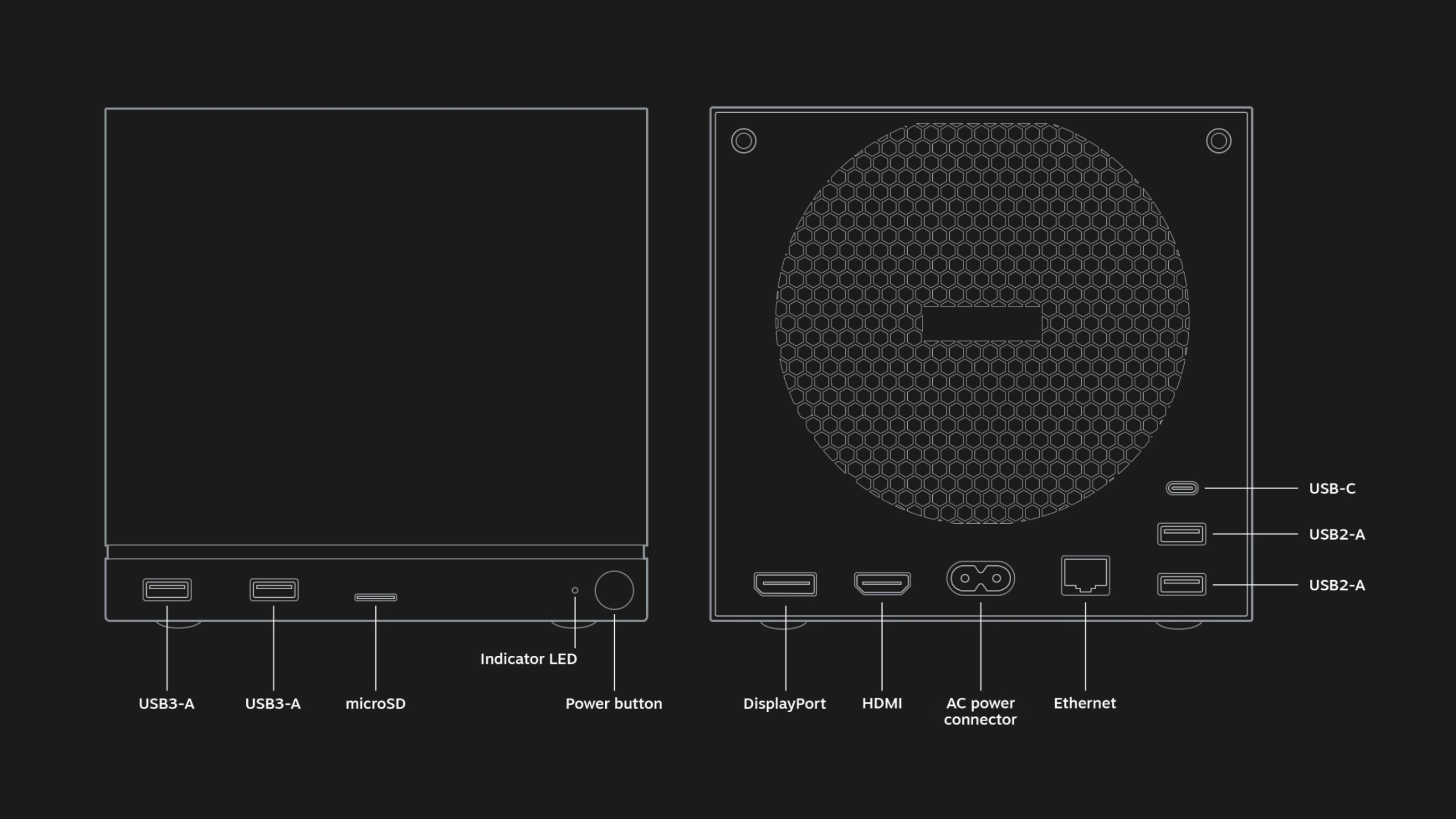
Like the Steam Deck, the Steam Machine is utilitarian and bespoke. The PC is a black, 5.98 x 6.39 x 6.14 inch (152 x 162.4 x 156mm) box, with ports and a grille for a fan in the back and a removable faceplate and customizable LED light strip in the front. Inside, Valve says the Steam Machine features a “semi-custom” AMD Zen 4 CPU with six cores and up to 4.8GHz clock speeds, and a “semi-custom” RDNA3 AMD GPU, along with 16GB DDR RAM, 8GB GDDR6 VRAM and either 512GB or 2TB of storage.
While these specs make the Steam Machine more powerful than the aging Steam Deck (which shipped in 2022 with its own custom AMD chip) Valve has been careful not to oversell the capabilities of the box. In a blog post, the company said that “the majority of Steam titles play great at 4K 60FPS” using AMD’s FidelityFX Super Resolution (FSR) frame generation and upscaling technology, but some titles require more upscaling than others, and it “may be preferable to play at a lower framerate with [variable refresh rate] to maintain a 1080p internal resolution.”
In a hands-on preview of the Steam Machine, Digital Foundry expressed concern with what Valve’s claims and the device’s stated specs could mean for future performance. “The decision to opt for 8GB of GDDR6 memory has been proven to be a limiting factor on many modern mainstream triple-A games and falls short of the maximum VRAM pools and memory bandwidth available on both Xbox Series X and base PS5,” Digital Foundry writes.
The Steam Machine supports Bluetooth 5.3, Wi-Fi 6E and includes an integrated 2.4GHz adapter for the new Steam Controller. In terms of port selection, there’s DisplayPort 1.4 and HDMI 2.0 inputs for connecting the box to external monitors and TVs, four USB-A ports (divided between two USB 2.0 ports and two USB 3.2 Gen 1 ports) and one USB-C port on the back.
Engadget will have to try out the Steam Machine to really know what it’s capable of, but there’s nothing to suggest it couldn’t be as flexible as the Steam Deck, especially with more power to play with.
What games will be able to run on the Steam Machine?
Valve
Any game that runs on SteamOS, Valve’s Linux-based operating system, will run on the Steam Machine, provided the device’s technical specs will support it. For games running natively on Linux, the Steam Machine will download the Linux version. For Windows games and everything else, it’ll be able to use Steam’s built-in Proton compatibility layer to translate games to Linux, just like the Steam Deck does.
Proton is developed by both Valve and CodeWeavers, the team behind the macOS compatibility app CrossOver. Valve’s compatibility layer translates a game’s API calls and other software features into something Linux understands, essentially tricking the game into thinking it’s running on Windows when it isn’t. Proton has worked remarkably well so far, in some cases helping some PC games run more efficiently on Linux than they do on Windows, but it does have some limitations. Because some anti-cheat software doesn’t support Linux, many competitive multiplayer games aren’t playable on SteamOS. Valve hopes the Steam Machine will help change that.
“While [the] Steam Machine also requires dev participation to enable anti-cheat, we think the incentives for enabling anti-cheat on Machine to be higher than on Deck as we expect more people to play multiplayer games on it,” Valve told Eurogamer. “Ultimately we hope that the launch of Machine will change the equation around anti-cheat support and increase its support.”
To help users find what games work well on the Steam Machine, Valve plans to expand its program for verifying games on the Steam Deck to include the Steam Machine and Steam Frame. Valve looks at things like controller support, the default resolution of the game, whether or not it requires a separate launcher and whether the game and its middleware work with Proton to determine a game’s rating. Then the company sorts games into four categories: Verified (where the game works with Steam hardware at launch), Playable (where a user might have to make modifications to run smoothly), Unplayable (where some or all of the game doesn’t function) and Unknown.
According to an announcement Valve sent to developers, games that were Verified for the Steam Deck will automatically be verified for the Steam Machine. The system is helpful, but far from definitive — some Unplayable games are in fact playable — which is why online, community-run databases like ProtonDB fill in the gaps with more granular information.
How much will the Steam Machine cost and when will it launch?
Valve
Valve hasn’t announced a price or a release date for the Steam Machine or any of its new hardware. In terms of price, however, the company has suggested it might not be a deal in quite the same way the $399 Steam Deck LCD was. Valve designer Pierre-Loup Griffais told The Verge that the “Steam Machine’s pricing is comparable to a PC with similar specs” and that its price would be “positioned closer to the entry level of the PC space” but be “very competitive with what you a PC you could build yourself from parts.”
That means the Steam Machine will likely cost more than the $499 PS5, and that the rising costs of memory could make it even more expensive. Valve has already publicly admitted that memory and storage shortages are affecting its plans. In February, the company said that it was delaying the launch of its hardware (though it still hopes to ship in the first half of 2026) and rethinking pricing, particularly around the Steam Machine and Steam Frame, because of the “limited availability and growing prices” of critical components like RAM.
The changes Framework had to make to the pricing of the Framework Desktop are an illustrative example of the position Valve is in. Framework pitched its compact desktop PC as being great for gaming, with an AMD Ryzen AI Max chip (originally meant for gaming laptops) and a minimum of 32GB of RAM that lets it run games at 1440p. The company originally sold the base configuration of the Framework Desktop for $1,099, but announced in January 2026 that it would now cost $1,139 due to the rising cost of RAM. The price situation got even worse for configurations with more RAM. A Framework Desktop with 128GB of RAM now costs $2,459.
The blame for rising costs lies squarely with the AI industry, whose demand for RAM has led to the collapse of consumer RAM brands and a dearth of true deals on the in-demand component. At this point, PC makers have no solution to the problem other than riding the shortage out and raising prices. Valve clearly isn’t immune to those same issues.
That doesn’t rule out the company offering its Linux PC at multiple different price points, or in some kind of bundle deal with multiple pieces of new Steam hardware. But it does mean that the Steam Machine will likely be priced like a premium device. Same for the Steam Controller and Steam Frame. In the case of the Frame, UploadVR reports that Valve wants to sell the headset for less than the $1,000 Valve Index, but that doesn’t mean it won’t be significantly more expensive than the $300 Meta Quest 3S.
What accessories will work with the Steam Machine?
Valve
The Steam Machine is designed to work with a variety of different Bluetooth controllers and other wireless accessories, and also whatever you can plug into its multiple USB-A ports and single USB-C port. With a built-in 2.4GHz Steam Controller dongle inside the Steam Machine, Valve’s controller should be an ideal option for controlling games, particularly because of its multiple control options, like touchpads and gyroscopes. Support for Steam Link, Valve’s tech for streaming PC games over local wireless, means you can also send games from a Steam Machine to the Steam Deck, Steam Frame or the Steam Link app and play them there.
This article originally appeared on Engadget at https://www.engadget.com/gaming/pc/everything-we-know-about-valves-new-steam-machine-200458817.html?src=rss
Elon Musk told podcast host Dwarkesh Patel and Stripe co-founder John Collison that space will become the most economically compelling location for AI data centers in less than 36 months, a prediction rooted not in some exotic technical breakthrough but in the basic math of electricity supply: chip output is growing exponentially, and electrical output outside China is essentially flat.
Solar panels in orbit generate roughly five times the power they do on the ground because there is no day-night cycle, no cloud cover, no atmospheric loss, and no atmosphere-related energy reduction. The system economics are even more favorable because space-based operations eliminate the need for batteries entirely, making the effective cost roughly 10 times cheaper than terrestrial solar, Musk said. The terrestrial bottleneck is already real.
Musk said powering 330,000 Nvidia GB300 chips — once you account for networking hardware, storage, peak cooling on the hottest day of the year, and reserve margin for generator servicing — requires roughly a gigawatt at the generation level. Gas turbines are sold out through 2030, and the limiting factor is the casting of turbine vanes and blades, a process handled by just three companies worldwide.
Five years from now, Musk predicted, SpaceX will launch and operate more AI compute annually than the cumulative total on Earth, expecting at least a few hundred gigawatts per year in space. Patel estimated that 100 gigawatts alone would require on the order of 10,000 Starship launches per year, a figure Musk affirmed. SpaceX is gearing up for 10,000 launches a year, Musk said, and possibly 20,000 to 30,000.
We may earn a commission from links on this page. Deal pricing and availability subject to change after time of publication.
Not everybody needs, wants, or can afford the “best” headphones available, especially when they can easily cost half a grand. If the Sony XM6, which I called the best over-ear headphones of 2025 (and 2026 so far), are not in your budget, then perhaps the more affordable Sony WH-CH720N could be. While they’re not quite as premium, they’re significantly cheaper and offer good enough quality for most people. You can get them for $97 (originally $179.99) on Amazon right now.
Sony WH-CH720N Noise Cancelling Wireless Headphones
$98.00 at Amazon
$179.99 Save $81.99
$98.00 at Amazon
$179.99 Save $81.99
Sony WH-CH720N headphones
$98.00 at Amazon
$179.99 Save $81.99
$98.00 at Amazon
$179.99 Save $81.99
Sony WH-CH720N headphones
$98.00 at Amazon
$179.99 Save $81.99
$98.00 at Amazon
$179.99 Save $81.99
These are Sony’s entry-level over-ear headphones, and Sony mostly made cuts in the design and build. When you hold them, they might feel hollow and light, but they’re still comfortable since the earcups are well-cushioned, according to CNET’s review. However, Sony did not make a lot of sacrifices in the audio or ANC department, which, at the end of the day, is what’s most important.
While they’ve dropped below $100 before, all three colorways have not been available at their current price at the same time—until now. These headphones use the same Sony Sound Connect app as the flagship models and share some of the same features, like multipoint technology to connect to up to two devices. They also come with Google Fast Pair and Find My Device support, nice features to have for convenience, and if you misplace them. You can get 35 hours of battery life with ANC on and 50 hours with ANC off, and the charging is quick, with three minutes giving you three hours of juice.
The ANC is not as good as the latest XM6, but it works great for under $100, according to Mashable’s review and they’ll block most ambient noise outdoors or indoors. Transparency mode is also great, allowing you to have conversations and hear bikes or cars passing by. The adjustable EQ in the app means you can tweak the crisp and vibrant sound of the WH-CH720N to your liking.
Microsoft hasn’t had an easy time with Windows 11 updates as of late, but in an unexpected move, the company just offered a very thoughtful, uncontroversial addition to Windows 11—the popular Sysmon (System Monitor) utility, which launched over ten years ago. While users will be required to enable it manually (either through Settings -> System
Budget conscious Google Pixel fans typically wait for the A-series phones, which often pack high-end internals into a more affordable package. Months after releasing its latest iteration of mobile devices, the excellent Pixel 10 series, the company has officially unveiled the Pixel 10a and is offering some extra perks for those who sign up
The hype for Grand Theft Auto VI continues unabated, as publisher Take-Two Interactive shares that GTA 6 is still on track for a November release. As monumental as this game’s release is likely to be, however, it still can’t escape the discourse of AI in game development. In an interview with GamesIndustry.biz, CEO Strauss Zelnick spoke about
If you haven’t yet played Alan Wake 2, here’s your chance to immerse yourself in its terrors for free. Prime members can play it this month on Amazon’s Luna cloud gaming service at no additional charge.
The “fantastic” Alan Wake 2 oozes “psychedelic terror,” as Engadget’s Jessica Conditt put it in our review. The 2023 horror-survival game uses a dual-protagonist motif, alternating between the lost author Wake and the stoic FBI agent Saga Anderson. It “tells a twisted, serpentine story of paranormal murder, shifting realities and demonic possession, with two brooding investigators at its core.” Not a bad way to sublimate the all-too-real horrors of life in 2026.
The Order of Giants DLC for Indiana Jones and the Great Circle also arrives on Luna this month. Ditto for Disney Universe, a knockoff of the Lego game franchise starring the Mouse’s IP.
Setting Luna aside, Amazon also has downloadable PC games that Prime members can claim for free this month. Starting today, you can snag the Borderlands spinoff Tiny Tina’s Wonderlands from the Epic Store. Later this month, you can also claim the highly rated strategy title Total War: Attila (Epic Store, Feb. 26).
This article originally appeared on Engadget at https://www.engadget.com/gaming/prime-members-can-play-alan-wake-2-for-free-on-luna-193509728.html?src=rss
One of the weirdest corners of the Internet is suddenly hard to find on Bing, after the search engine inexplicably started blocking approximately 1.5 million independent websites hosted on Neocities.
Founded in 2013 to archive the “aesthetic awesomeness” of GeoCities websites, Neocities keeps the spirit of the 1990s Internet alive. It lets users design free websites without relying on standardized templates devoid of personality. For hundreds of thousands of people building websites around art, niche fandoms, and special expertise—or simply seeking a place to get a little weird online—Neocities provides a blank canvas that can be endlessly personalized when compared to a Facebook page. Delightedvisitors discovering these sites are more likely to navigate by hovering flashing pointers over a web of spinning GIFs than clicking a hamburger menu or infinitely scrolling.
That’s the style of Internet that Kyle Drake, Neocities’ founder, strives to maintain. So he was surprised when he noticed that Bing was curiously blocking Neocities sites last summer. At first, the issue seemed resolved by contacting Microsoft, but after receiving more recent reports that users were struggling to log in, Drake discovered that another complete block was implemented in January. Even more concerning, he saw that after delisting the front page, Bing had started pointing users to a copycat site where he was alarmed to learn they were providing their login credentials.
January 2026’s ten most-streamed TV series are a balanced group, including six reality-based dramas and four fantasy/sci-fi hits. One the side of realism, we’ve got medical drama vérité The Pitt, a pair of spy shows (The Night Manager and Ponies), and a gay hockey romance in Heated Rivalry. The fantasy side includes the post-apocalyptic black humor of Fallout, the suburban supernatural seriesStranger Things, and a trip back to Westeros with A Knight of the Seven Kingdoms.
A more important running theme this month: These shows are all critical darlings, including a couple perfect Rotten Tomatoes 100% winners (The Night Manager and Pluribus) and five other shows above 95% (The Pitt, Fallout, Heated Rivalry, Ponies, and A Knight of Seven Kingdoms). Even the “worst” of the bunch, Landman, is sitting at a solid 78%. Good job watching good shows, America!
Here’s the full list of the top 10 most-streamed shows of January 2026 across all major streaming services, as compiled by JustWatch.
The Night Manager
If you’re into high-stake international espionage, you have to check the most-streamed series this week. The Night Manager is based on John le Carre’s best-selling novel and stars Tom Hiddleston as Jonathan Pine, an MI-6 agent whose mission is to infiltrate the inner circle of dangerous arms trader Richard “Dickie” Onslow Roper, played by Hugh Laurie. It has been ten long years since the show first premiered, but both seasons of this BBC-made series are available in full as of Feb. 1, so binge it up, man.Stream The Night Manager on Prime Video.
HBO’s gritty, hyper-realistic medical drama has earned acclaim from critics and audiences for its relentless pace, following a single 15-hour shift at the Pittsburgh Trauma Medical Center. Starring Noah Wyle as Dr. Michael Robinavitch, The Pitt ditches the “disease-of-the-week” format of many medical shows in favor of a study of the toll the modern medical system places on everyone involved. Season one earned five Emmy awards, and judging from the first few episodes, season two might win more. Stream The Pitt on HBO Max.
Post-apocalyptic action-comedy Fallout is like nothing that’s been on TV before. Staying true to the gritty, gruesome, and irreverent spirit of the video games upon which it is based, it follows naive former vault dweller Lucy MacLean (Ella Purnell) as she leaves her protected bunker to track down her father in the irradiated Wasteland. The show’s standout characters include Lucy’s duplicitous pop (Kyle MacLachlan), conflicted mech-warrior Maximus (Aaron Moten), and The Ghoul (Walton Goggins), the walking, talking, noseless, undead remains of a pre-apocalypse Hollywood cowboy. Season one earned a staggering 17 Emmy nominations in 2024, and the just-finished season two earned even greater critical acclaim for its expansion into the iconic ruins of New Vegas. Stream Fallout on Prime Video.
If you want explicit hockey player-on-hockey player action with a 98% “fresh” rating on Rotten Tomatoes, HBO’s Heated Rivalry is a must-watch. Set against the hyper-masculine, hyper-homophobic world of professional sports, the series brings emotional depth to the story of a years-long secret romance between Canadian “golden boy” Shane Hollander (Hudson Williams) and Russian bad boy Ilya Rozanov (Connor Storrie). Stream Heated Rivalry on HBO Max.
A Knight of the Seven Kingdoms takes fans back to Westeros, 100 years before the events of Game of Thrones. Based on George R.R. Martin’s Tales of Dunk and Egg novellas, the series is less about world-spanning politics and more about smaller, character driven moments in the lives of humble, towering knight Ser Duncan the Tall (Peter Claffey) and his diminutive, mysterious squire Egg (Dexter Sol Ansell). It’s shorter, lighter, and funnier than its forebears (but not too light—this is still Westeros, after all). Stream Knights of the Seven Kingdoms on HBO Max.
A veritable streaming institution, Stranger Things reached its end with season five. Set in November 1987, the final chapter follows the Hawkins gang in a mission to find and kill Vecna (Jamie Campbell Bower) while navigating a town under strict military quarantine. From Eleven (Millie Bobby Brown) evading a new government threat to Will Byers (Noah Schnapp) unlocking his psychic potential to protect his friends, the series remains an emotional masterclass in supernatural sci-fi horror—despite a divisive finale. Stream Stranger Things on Netflix.
Creator and executive producer Vince Gilligan takes a hard turn from Breaking Bad and Better Call Saul with Pluribus, a slow-burn post-apocalyptic sci-fi series starring Rhea Seehorn as Carol Sturka, a stubborn and irascible novelist in Albuquerque who finds herself one of the last 13 individuals on Earth in the wake of viral outbreak that has turned the rest of the species into a hive mind. “They” aren’t (isn’t?) exactly evil, but they are extremely persistent about trying to get the mysteriously immune Carol to join their ranks (as nicely but firmly as possible).Stream Pluribus on Apple TV+.
Yellowstone creator Taylor Sheridan’s Landman is is a gritty modern Western set in the oil fields of West Texas. Billy Bob Thornton stars as Tommy Norris, a “crisis executive” for an oil company who must navigate a law-light landscape of roughnecks, billionaires, and dangerous drug cartels in order to make sure fuel keeps getting dug out of the ground. Stream Landman on Paramount+.
Based on the 2020 novel by Alice Feeney, His & Hers is a twisty mystery thriller series that stars Tessa Thompson as Anna Andrews, a disgraced Atlanta journalist who returns to her small Georgia hometown to cover a brutal murder, only to find her estranged husband, Detective Jack Harper (Jon Bernthal), leading the investigation. As the former couple competes to solve the case, each grows more suspicious that the other is the killer. The six-episode run makes it a great series if you’re longing for an engaging drama with a definite conclusion. Stream His & Hers on Netflix.
In international espionage parlance, “ponies” are “persons of no interest.” In this case, that Bea (Emilia Clarke) and Twila (Haley Lu Richardson), two American women in Cold War Moscow whose “normal” lives are upended when their CIA agent husbands die in a mysterious plane crash. The pair convince the U.S. government to let them try to infiltrate the KGB and find out the truth of what happened, using their ordinariness as the ultimate cover. Boasting a 96% “Fresh” rating on Rotten Tomatoes, the eight-episode season balances steamy romance with intense espionage. Stream Ponies on Peacock.