How DuckDuckGo’s New Encrypted Voice AI Chat Compares With ChatGPT and Gemini

While OpenAI is pushing ads on its free users, DuckDuckGo’s Duck.ai portal is going a different way. Duck.ai is a privacy-first AI chatbot that doesn’t use your data for training, but still gives you AI answers using popular models, including those from OpenAI. The data privacy feature goes beyond as well. DuckDuckGo removes all private metadata (like your location and IP address) before prompting the AI model, and it doesn’t share anything about you or your device. Your questions, as well as DuckDuckGo’s answers, are never used for AI training.

Since its launch in 2024, the portal has only offered a chatbot interface, but now, DuckDuckGo has added a voice mode as well. With voice chat, instead of reading through long and meandering answers, the AI replies in short, to-the-point snippets that are relevant to your query. Duck.ai’s take on the feature is competing with those from companies like OpenAI and Google, and it’s free—though expanded limits are offered for DuckDuckGo subscribers.

How Duck.ai’s voice chat works
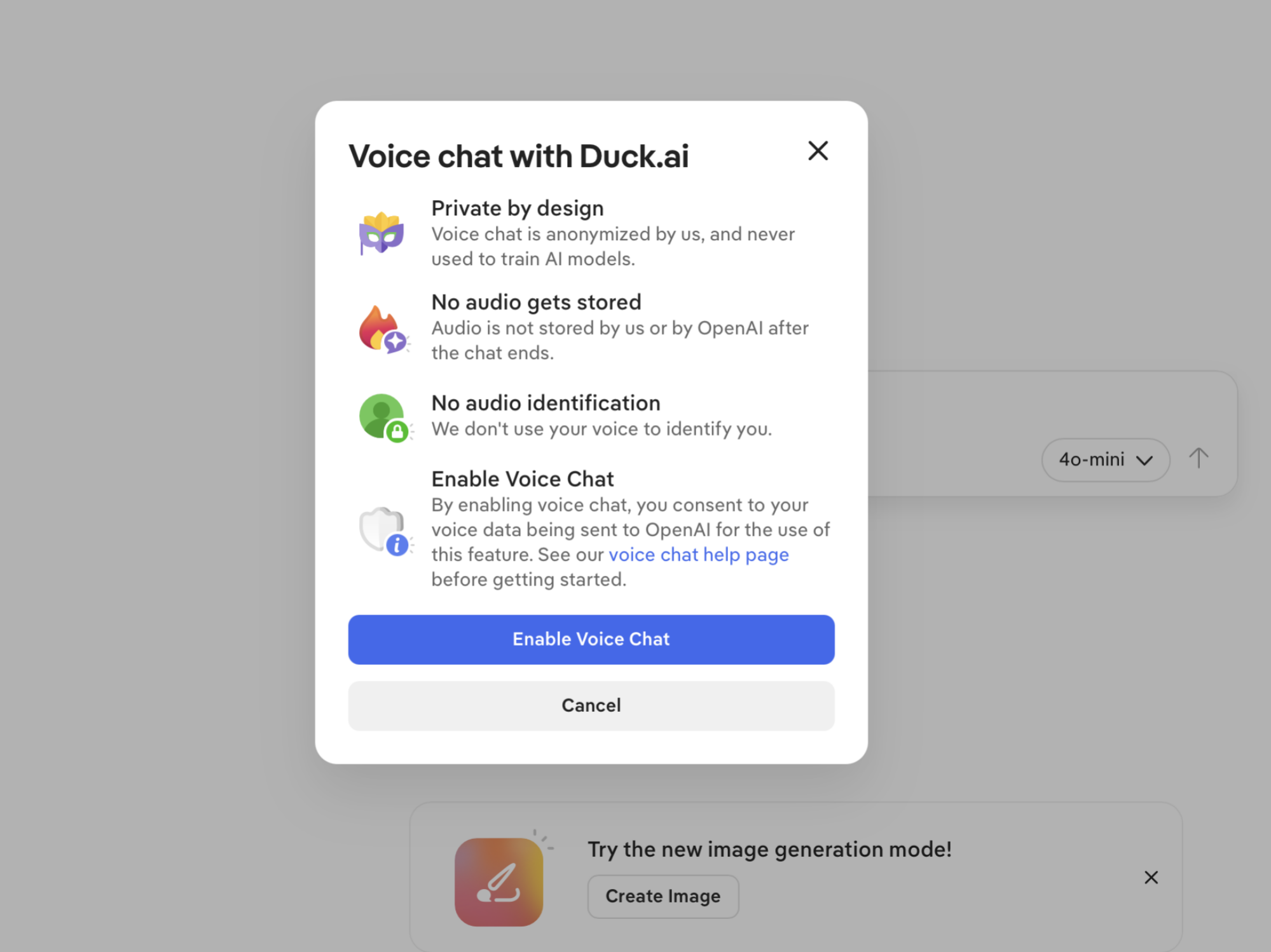
Enabling Duck.ai's Voice Chat feature.

Credit: Khamosh Pathak

Duck.ai’s voice chat is opt-in, not mandatory. In fact, you can even use it without a DuckDuckGo account. To try it, head to the Duck.ai portal, then from the sidebar, choose the voice chat option and enable it for your account.

Now, when you click the “New Voice Chat” button in the sidebar, Duck.ai’s bot will appear. You can start speaking, and the bot will reply to you. Just like ChatGPT or Gemini, this is a continuous voice chat, so you don’t need to perform any action to ask follow-up questions. You can also interrupt the AI answer to add clarifications or to ask more questions.

While the text prompts let you choose the models (including OpenAI’s ChatGPT 5-mini), it’s not clear exactly what powers voice chat. DuckDuckGo says that it uses an OpenAI model, but doesn’t specify which one it is.

When it comes to AI voice chats, ChatGPT is still the king

Of course, the real question is how Duck.ai’s voice chat holds up against Gemini and ChatGPT. For general knowledge questions, Duck.ai holds its own, but it falters when it comes to the latest news. I asked all three services the same questions, and while some responses were similar, ChatGPT’s voice mode offers the best overall user experience by far.

I tested the voice chat features using three different kinds of questions. First, I asked about the upcoming Samsung S26 series; second, we talked about the Roman Empire; and lastly, I asked for some advice on how to get started with coding.

When it comes to asking questions about news, like Samsung’s S26 release, DuckDuckGo’s limitations are immediately evident. It sometimes flat out refuses to answer, saying its knowledge cutoff is 2023. Other times, it gives vague responses about the upcoming event, suggesting I check news sites for the latest information. When pressed for details, like when the event is or the rumors surrounding it, it goes back to its cut-off period excuse.
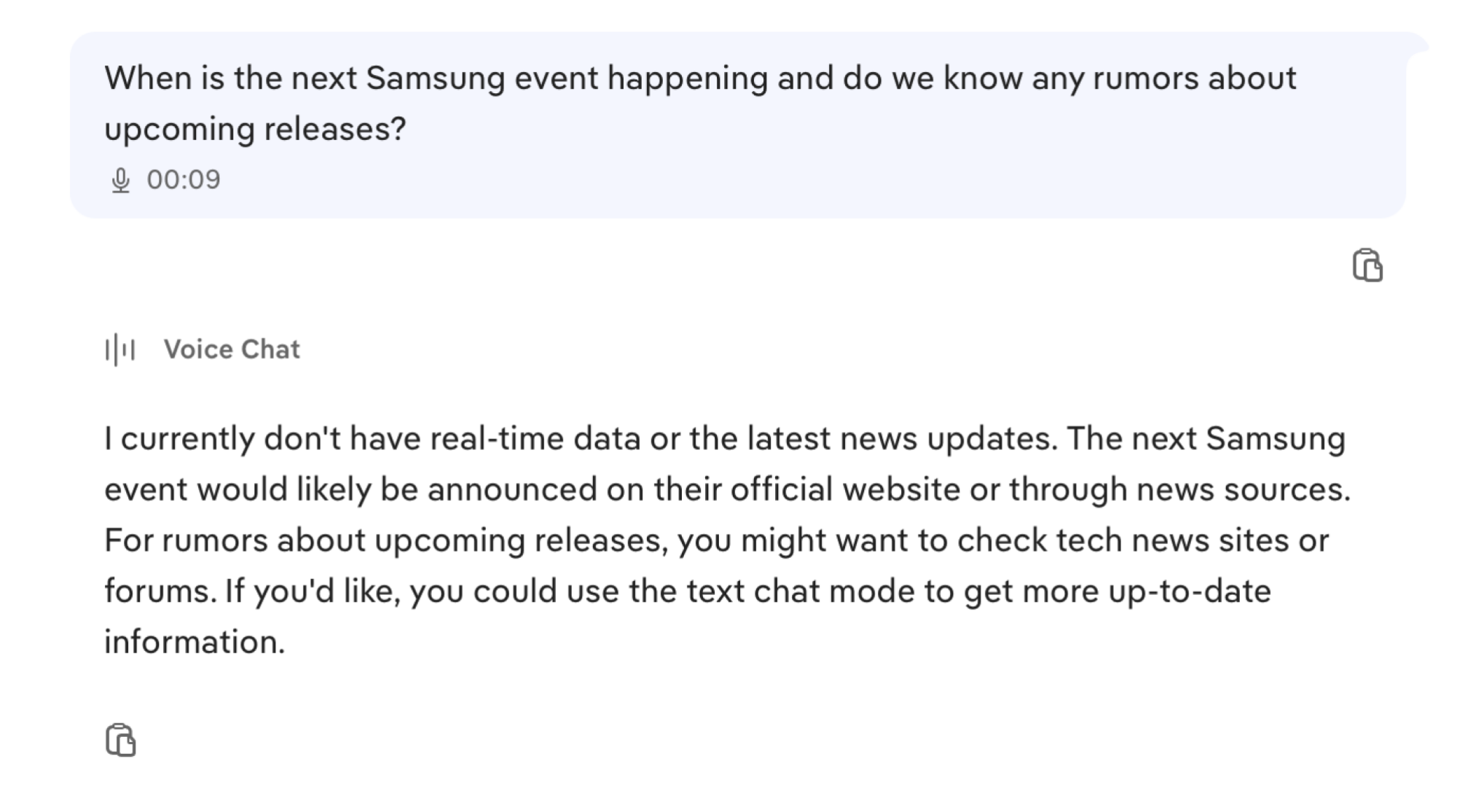
Duck.ai Voice Answer No Reply

Credit: Khamosh Pathak

ChatGPT’s app, however, gave me a detailed response with all the latest rumors, as well as articles to read for additional information—basically, what you’d expect from an AI assistant. Gemini Live provided shorter responses than ChatGPT, though they were accurate. I was able to get Gemini to give me more details in the regular text mode, which reads aloud results if you ask questions using the Mic button, but this defeats the back-and-forth purpose of a voice mode.
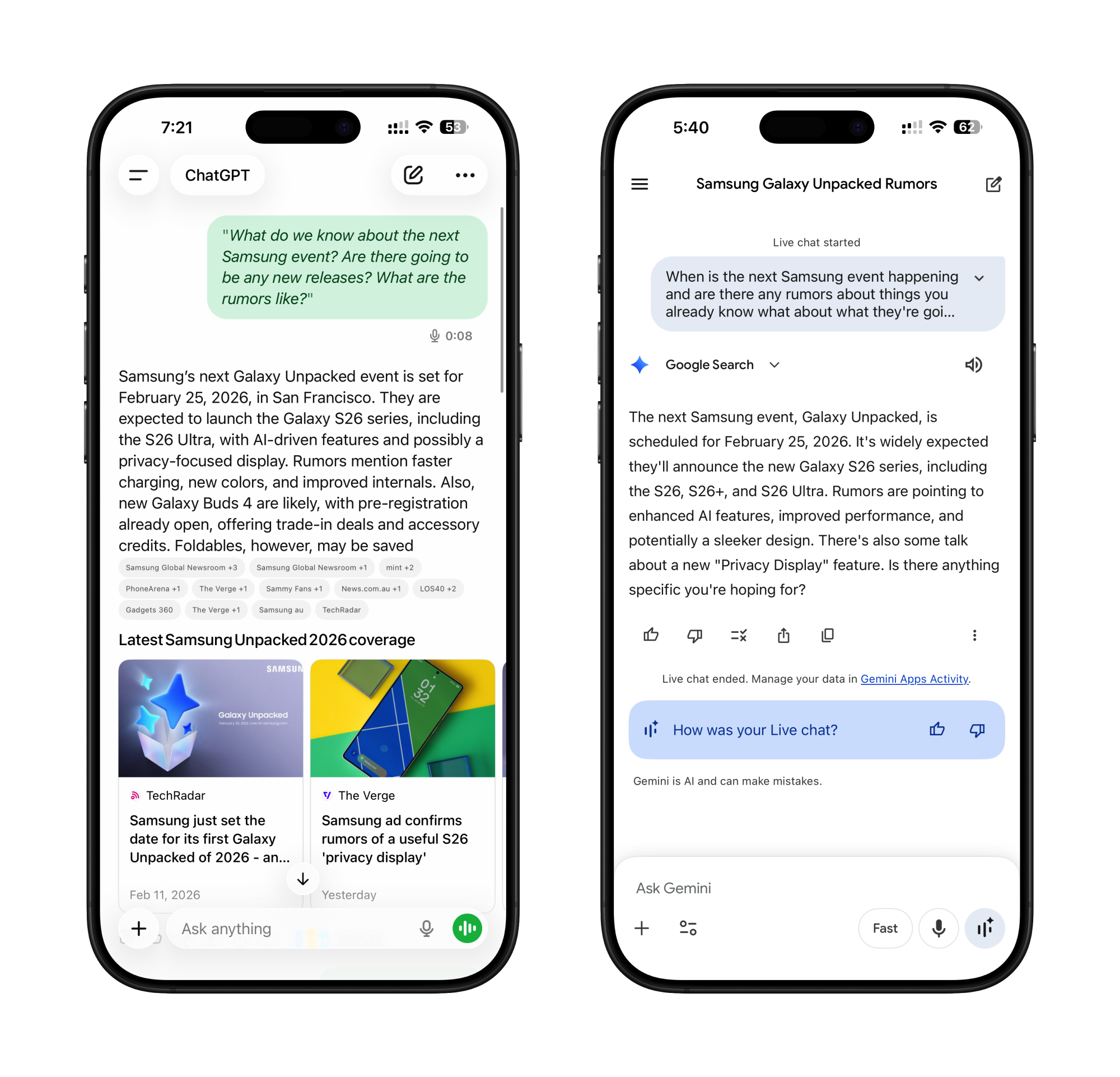
ChatGPT vs Gemini Samsung Rumors
Samsung Event rumors according to ChatGPT Voice (Left) and Gemini Live (Right).
Credit: Khamosh Pathak

Duck.ai didn’t fare much better when I asked about the Roman Empire. I asked for a brief overview of the subject, before cutting it off to just ask who the last emperor was. It answered correctly (Romulus Augustulus), and its overview was fine, but lacked details about the transitionary period and exact dates.

DuckDuckGo Roman History
Duck.ai’s reponse to Roman History question.
Credit: Khamosh Pathak

Again, ChatGPT gave me a much more detailed answer (as demonstrated by the screenshot below). Gemini Live’s answer, however, was devoid of any real dates, or meaning. Mic mode offered more details, but Google’s voice mode was quite limited.
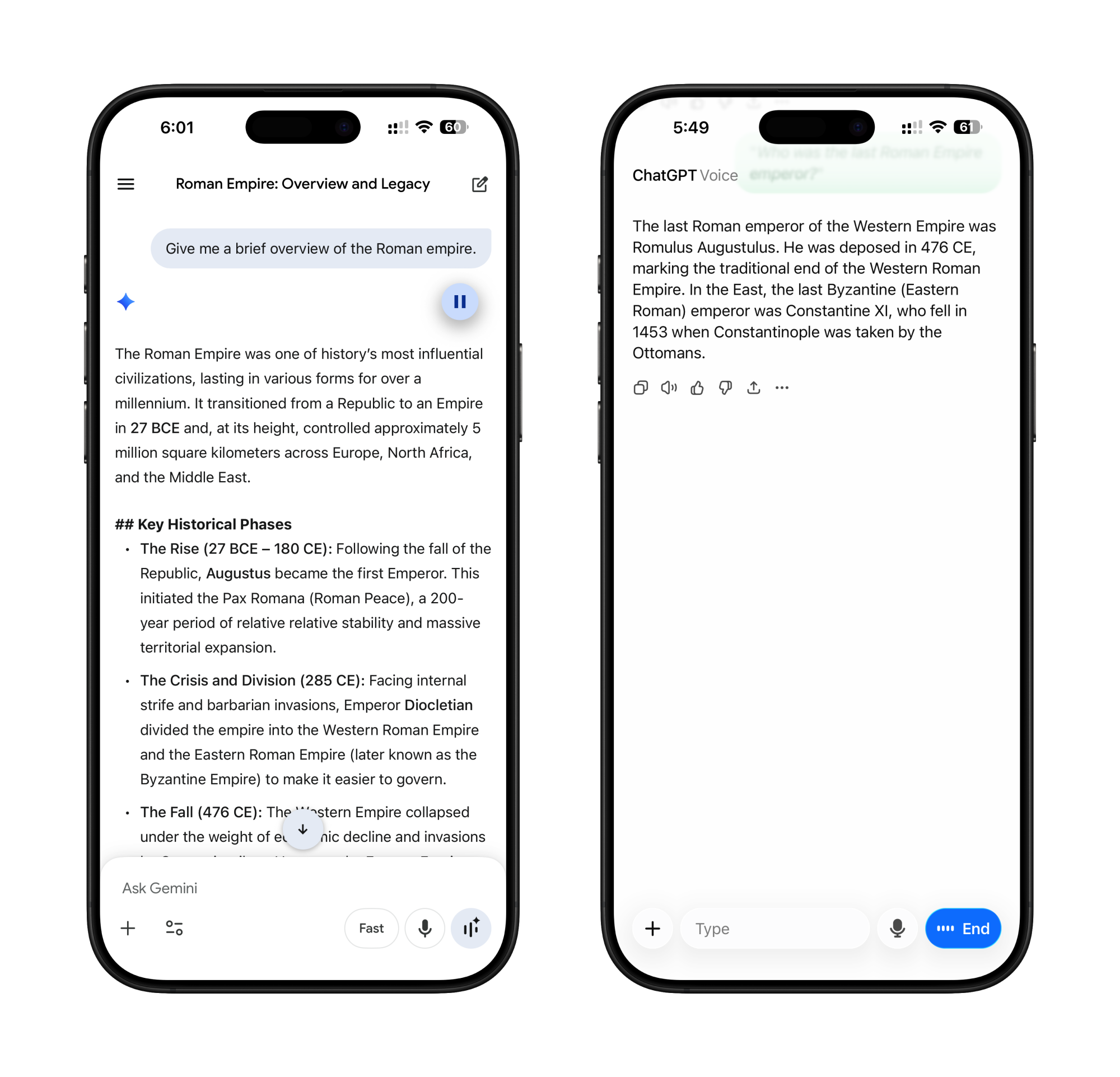
History of Roman Empire ChatGPT vs Gemini
History of Roman Empire in Gemini (Left) vs ChatGPT Voice (Right)
Credit: Khamosh Pathak

Duck.ai performed better when I asked it about learning how to code. It followed a very similar script to ChatGPT and Gemini, suggesting I learn Python, even offering the same sources for learning (e.g. freeCodeCamp and Harvard CS50 courses).
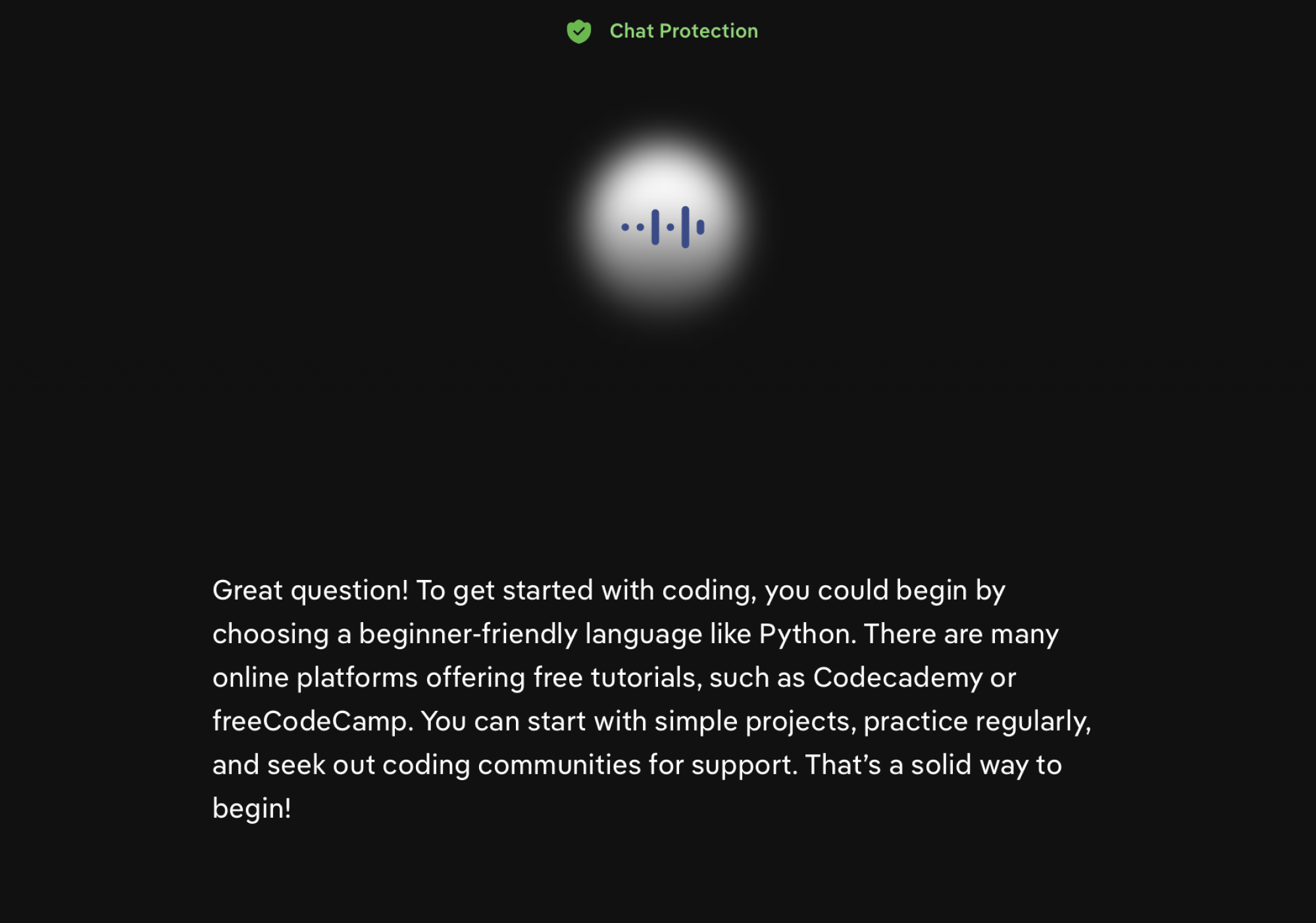
Duck.ai Response to coding question.
Credit: Khamosh Pathak

Gemini Live was the outlier here, though, asking follow-up questions about what I’d like to build or practice. It then changed its answers based on my project ideas (switching from Python to JavaScript as the first language I should learn to build web projects). ChatGPT provided an overview, again focusing on Python, and elaborated on the language’s barrier to entry when I asked for more information.
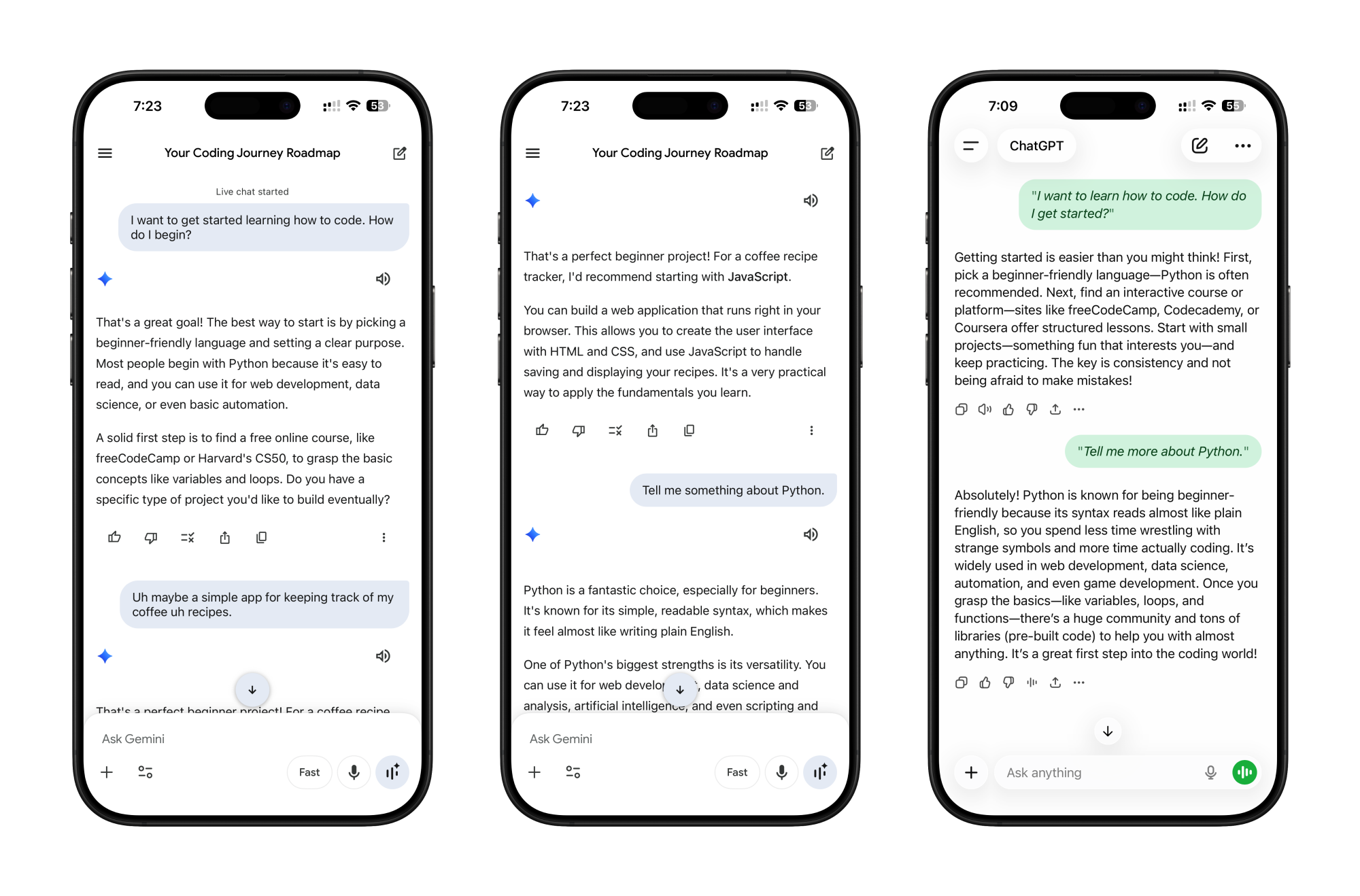
Gemini vs ChatGPT Programming Languages Prompt
Intro to programming languages in Gemini (Left and Middle) vs ChatGPT Voice (Right).
Credit: Khamosh Pathak

Duck.ai’s voice chat feature is a mixed bag. It can be fast, doesn’t use any personal information, and lets you interrupt it. But its limited knowledge base and its inability to give detailed answers are what make it tough to recommend. For the smoothest voice mode experience, ChatGPT is still the king. While DuckDuckGo has the advantage for privacy, you could always use ChatGPT while logged out or in temporary mode to limit the data you share with OpenAI.
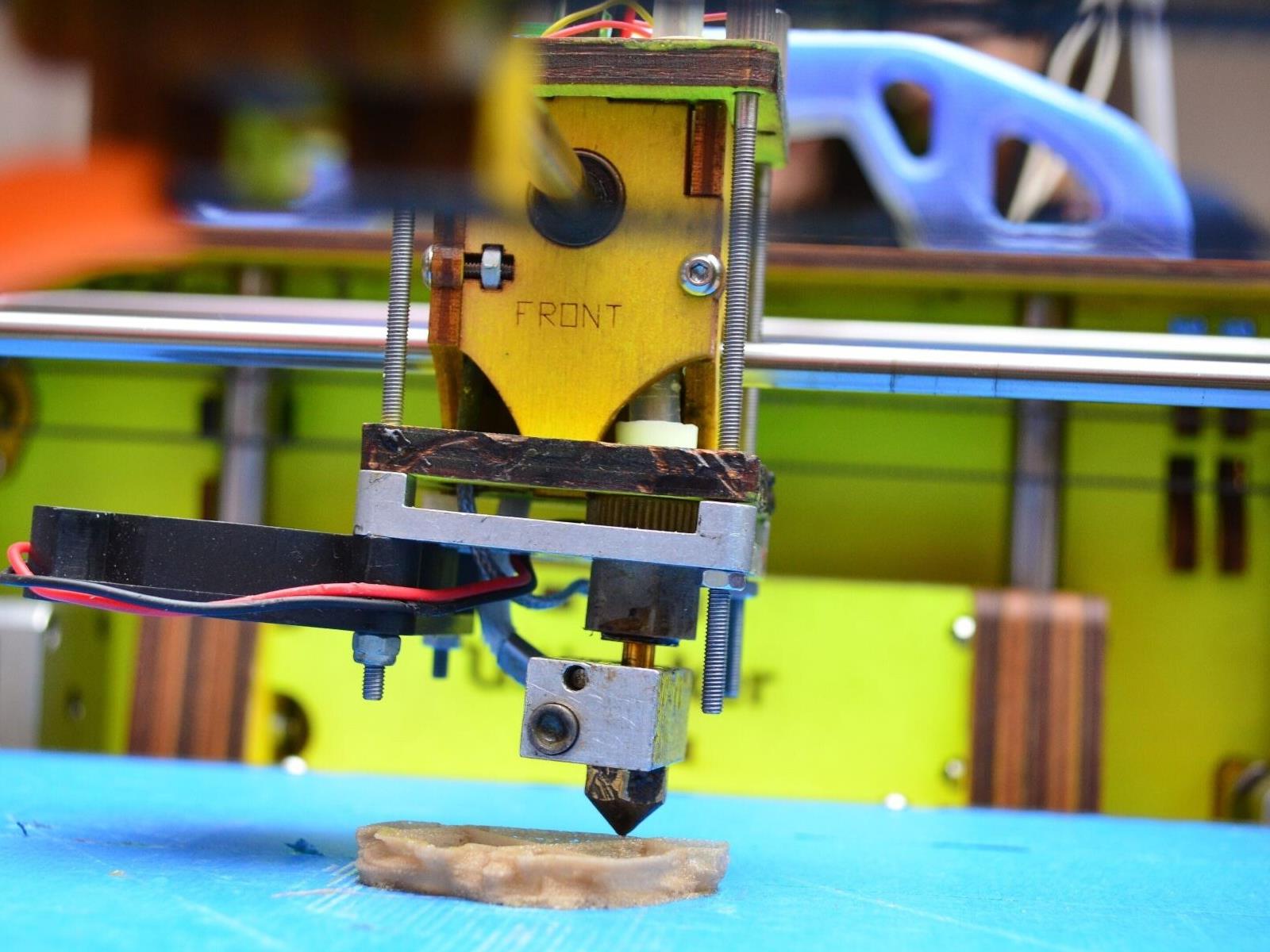
Breakthrough Holographic 3D Printing Tech Creates Objects In Half A Second

Breakthrough Holographic 3D Printing Tech Creates Objects In Half A Second
If you thought your Bambu X1 Carbon was fast, a new 3D printing technique that can fabricate complex millimeter-scale objects in just 0.6 seconds may bring some buyer’s remorse. To achieve such performance, the tech uses holographic light fields to solidify resin all at once, obviously taking away the wait needed for layer-by-layer process

Mazda Finally Admits Its Infotainment System Is the Worst

Mazda, the automaker that for years defended its scroll-wheel infotainment system as a safer alternative to touchscreens, is abandoning the approach entirely in the 2026 CX-5 in favor of a 15.6-inch touchscreen and zero physical buttons.

The current lineup — the CX-50 Hybrid, CX-70 and CX-90 — still relies on a console-mounted scroll wheel and dedicated action buttons to navigate a tablet-like screen perched atop the dashboard. Upper-trim CX-70 and CX-90 models do have 12.3-inch touchscreens, but touch input only works when parked and only inside CarPlay; it disables automatically once the car is in drive.

The new CX-5 goes the other direction entirely, eliminating all hard buttons including the volume knob and physical climate controls that current models still offer. Mazda says the touchscreen is safe because core functions like climate are pinned to a persistent bottom bar — an approach Ford, Rivian, and most of the industry adopted years ago.


Read more of this story at Slashdot.

[$] Do androids dream of accepted pull requests?

Various forms of tools, colloquially known as “AI”, have been
rapidly pervading all aspects of open-source development. Many
developers are embracing LLM tools for code creation and review. Some
project maintainers complain about suffering from a deluge of slop-laden pull
requests, as well as fabricated bug and security
reports
. Too many projects are reeling from scraperbot attacks that
effectively DDoS important infrastructure. But an AI bot flaming an
open-source maintainer was not on our bingo card for 2026; that seemed
a bit too far-fetched. However, it appears that is just what happened
recently after a project rejected a bot-driven pull request.

Snapchat is rolling out creator subscriptions

Snapchat is taking a page out of Meta’s handbook. The social media platform has announced it will launch creator subscriptions for users. Meta-owned Instagram and Facebook currently offer a similar feature. 

On Snapchat, creator subscriptions will give users access to exclusive content across Snaps and Stories. They will also get priority replies and go ad-free on stories. Snapchat pitches the new feature as great way to give creators “freedom to experiment” and “build a recurring income stream” — all good things for keeping people on your platform. 

Creators can choose exactly how much they want to charge subscribers per month. They can spread these figures out across Snapchat’s recommended tiers. 

Snapchat creator subscriptions.
Snap

Starting February 23, select US-based Snapchat creators will be able to offer subscriptions. In the US, iOS users should then be able to subscribe to their accounts. The feature should expand to Canada, France, and the UK in the coming weeks. 

This article originally appeared on Engadget at https://www.engadget.com/social-media/snapchat-is-rolling-out-creator-subscriptions-152114731.html?src=rss

Netgear Orbi Wi-Fi 7 Mesh Router Deals To Supercharge Your Network

Netgear Orbi Wi-Fi 7 Mesh Router Deals To Supercharge Your Network
Don’t let an aging wireless router hold back your home network. These days, practically everything is downloaded and streamed, from triple-A games to movies and TV shows. Practically everything is a connected device too, and if your router is a few generations old, then consider upgrading to take advantage of features only found in later protocols.

Wi-Fi

Nintendo’s Virtual Boy app is now available to download

Nintendo’s Virtual Boy app is now available to download on Switch and Switch 2 as part of its Nintendo Classics offering. You’ll need to have a Nintendo Switch Online + Expansion Pack membership to access the launch titles, and unlike Nintendo’s other retro emulators, this one also requires a dedicated accessory.

As a reminder, the Virtual Boy was a portable tabletop system released in 1995, and the first console capable of rendering stereoscopic 3D graphics. It had a facemask with a monochrome red display built onto a bipod, so rather than wearing it like a modern VR headset, you had to awkwardly push your face towards it to play games.

Once you enter the third dimension, there’s no going back…#VirtualBoy – Nintendo Classics is available now on #NintendoSwitch2 and #NintendoSwitch, as part of #NintendoSwitchOnline + Expansion Pack! pic.twitter.com/2uLd8iYorB

— Nintendo UK (@NintendoUK) February 17, 2026

While undeniably innovative for the time, the console never took off (to put it gently), but Nintendo is giving anyone who missed out in the ’90s a chance to experience one of the strangest experiments in its history in 2026. Aesthetically, the $100 Virtual Boy add-on is a near perfect replica of the original console, with the big difference being that rather than a built-in display, it has a slot for sliding in your Switch or Switch 2. And unlike the OG Virtual Boy, this one is also wireless.

If $100 seems a bit steep for something that’ll almost certainly be collecting dust before summer rolls around, Nintendo is also selling a $25 cardboard version (unfortunately your old Labo VR headset won’t work here). Both are available to buy from the My Nintendo Store.

The Virtual Boy app is launching with the following games today: 3d Tetris, Galactic Pinball, Golf, The Mansion of Innsmouth, Red Alarm, Teleroboxer and Virtual Boy Wario Land. More games will be added in the future, including Mario Clash, Mario’s Tennis and Space Invaders Virtual Collection.

This article originally appeared on Engadget at https://www.engadget.com/gaming/nintendo/nintendos-virtual-boy-app-is-now-available-to-download-150705800.html?src=rss

Plasma 6.6.0 released

Version
6.6.0
of KDE’s Plasma desktop environment has been
released. Notable additions in this release include the ability to
create global themes for Plasma, an “extract text” feature in the Spectacle screenshot
utility, accessibility improvements, and a new on-screen keyboard. See
the changelog
for a full list of new features, enhancements, and bug fixes.

The release is dedicated to the memory of Björn Balazs, a KDE
contributor who passed away in September 2025. “Björn’s drive to
help people achieve the privacy and control over technology that he
believed they deserved is the stuff FLOSS legends are made of.
“

Amazon’s Fire TV redesign is rolling out today

During the flurry of CES 2026 news at the start of the year, it might have been easy to overlook Amazon’s announcement that the Fire TV user interface is getting a revamp. But that redesign is rolling out starting today for US viewers. It will be available to users as a free update. 

The main visual updates for the streaming device’s UI are a lot of rounded corners. But Amazon is also emphasizing speed in this new look, claiming that the improvements will offer 20 to 30 percent faster interactions. This version of the UI also makes more apps visible on the screen at a time, with up to 20 apps able to be pinned to the homescreen compared with six in the prior design. The update also has access to the Alexa+ AI voice assistant if you want to use it to pull up viewing suggestions or to organize your viewing queue.

This article originally appeared on Engadget at https://www.engadget.com/entertainment/streaming/amazons-fire-tv-redesign-is-rolling-out-today-150000988.html?src=rss

Four Ways to Recover Your ‘Lost’ Work in Microsoft Word

There’s little worse than losing an hour or two of hard work, just by clicking on the wrong button or pressing the wrong key in Microsoft Word—a mistake that sees your well-crafted document (or a sizable portion of it) disappear before your eyes.

A slip of the fingers isn’t the only way you can potentially lose work, either. Maybe you just have the misfortune to be busy at your computer when a power outage happens—taking your desktop, Microsoft Word, and your unsaved work along with it.

However, before you begin all over again, there are some tricks you can try to bring your work back.

Use Undo (Ctrl+Z or Cmd+Z)

Word undo
Word keeps an undo history.
Credit: Lifehacker

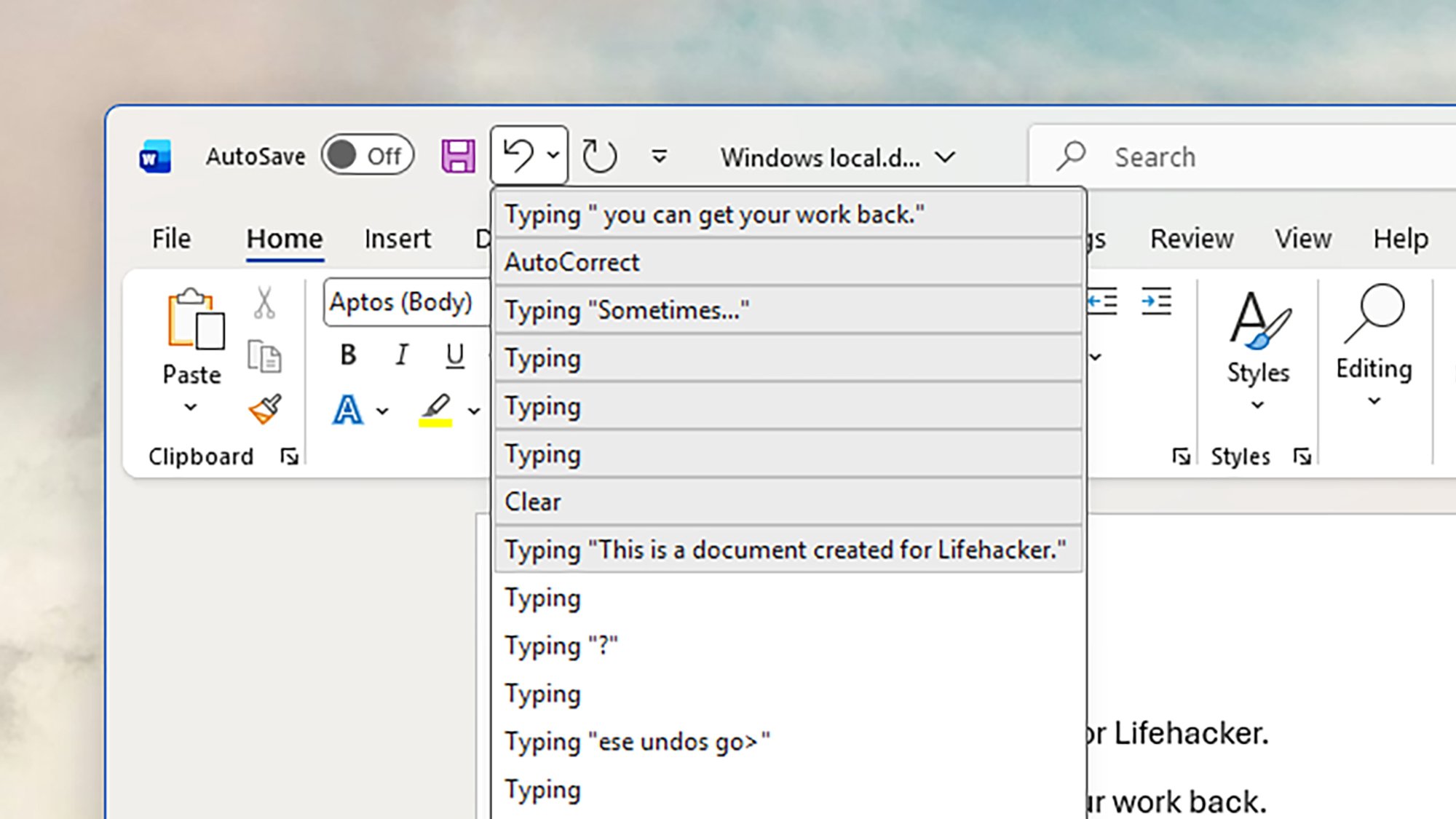
Sometimes, all you need is the undo command—hit Ctrl+Z (Windows) or Cmd+Z (macOS) to undo your last action in Word. It might be enough to restore that table you accidentally deleted, or bring back that huge block of text you moved to the clipboard and have since lost track of.

This won’t save you from a power outage, and it doesn’t include all actions (it won’t bring back a file you’ve closed, for example). However, it’ll work a lot of the time when you’ve made a mistake, and Word always keeps a record of your last 100 actions in the app, so you can go back a fair way.

There’s also an undo button up in the top left corner of the Word interface: Click on this to undo the last action, or click the arrow next to it to see a list of previous actions and choose where you want to go back to. To the right of the undo button is the redo button, which works the same way but in the opposite direction.

Open previous file versions

Word version history
Accessing previous versions in Word.
Credit: Lifehacker

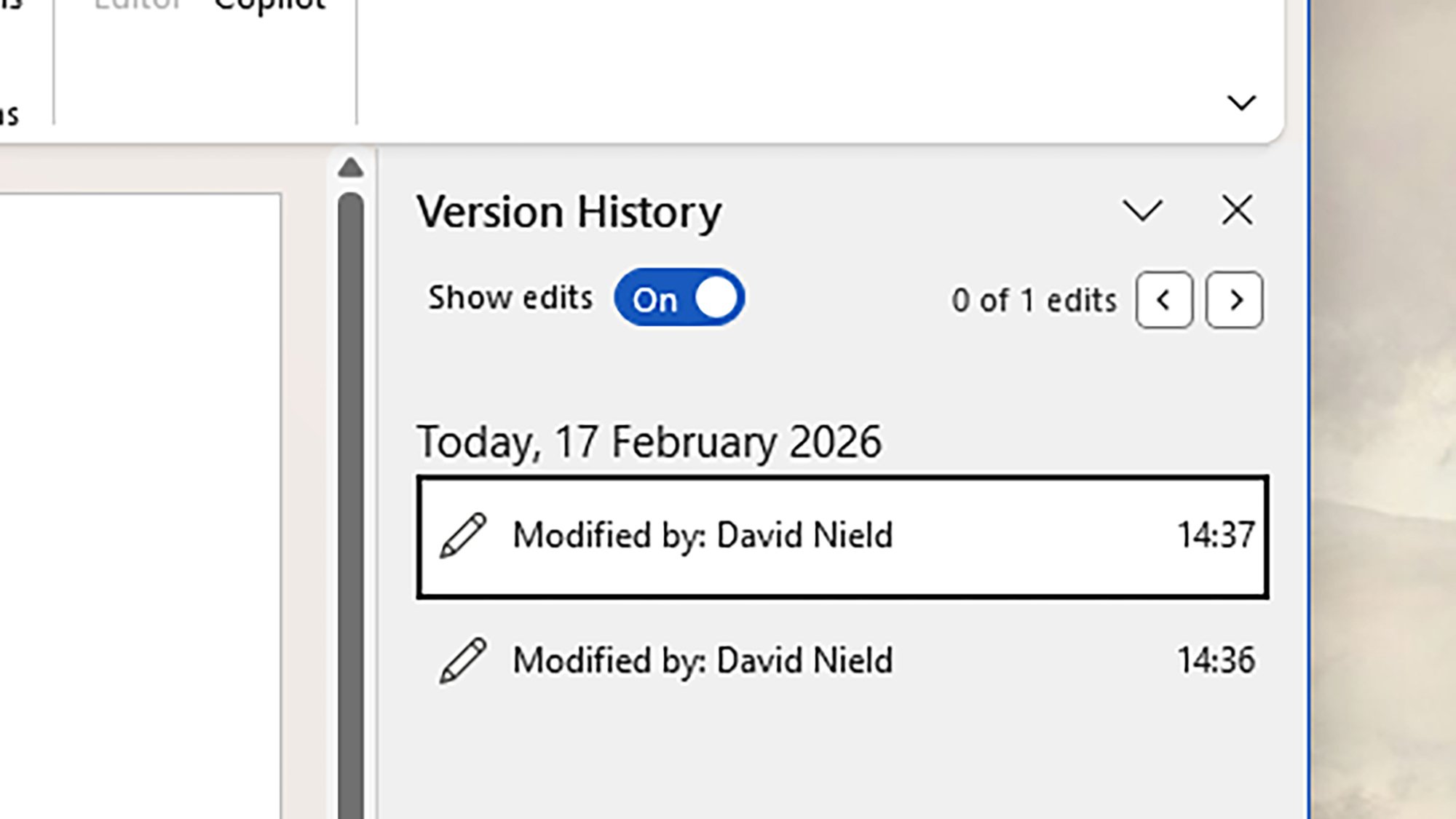
Word also has a file version history feature you can utilize to bring back lost work: It essentially saves past versions of your document at regular intervals, so you can go back in time, and even all the way back to the file’s creation. It’s like a super undo, which works between app restarts as well.

In Word for Windows, you can find these older incarnations of your document by heading to File > Info > Version History. If you’re using Word on macOS, it’s File > Browse Version History. A new sidebar opens on the right, showing all the available previous versions, and the date and time they were saved.

There is a caveat to this, though, which is you have to have your document saved in the cloud (in OneDrive) for this to work. If you’re working with a local file that’s only saved on your computer and you try and access version history, you’ll be prompted to save it to OneDrive instead (which will turn on version history).

Find unsaved documents on your system

Word recovery
Unsaved documents are sometimes still available.
Credit: Lifehacker

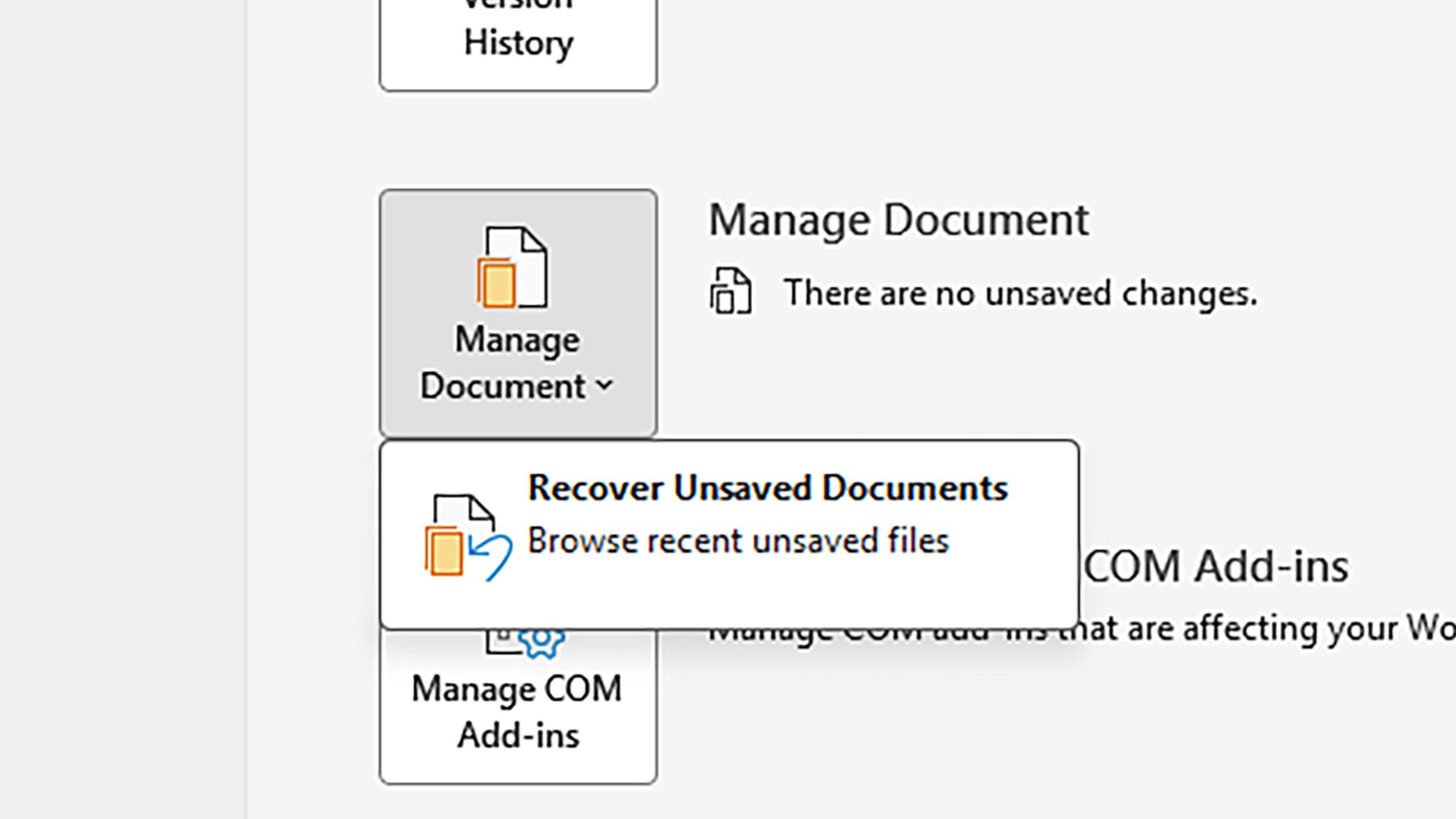
Word actually saves files temporarily to your computer every so often, so if the program crashes without warning, you should see an autorecovery dialog pop up the next time you load Word, asking if you want to recover the old file. If not, you can see partially saved files by clicking Click File > Info > Manage Document > Recover Unsaved Documents.

That’s only for Windows, however—if you’re on macOS, you’re relying on the auto-recovery process. Word for both Windows and macOS lets you set how often auto-recovery files are saved: Head to File > Options > Save (Windows) or Word > Preferences > Save (macOS). The default is every 10 minutes, but you can adjust this if needed.

If you’re still not seeing your file, you can try checking the temporary cache folder manually. On Windows, check “C:Users

Save your work to the cloud

Word AutoSave
OneDrive gives you various extra options—including AutoSave.
Credit: Lifehacker

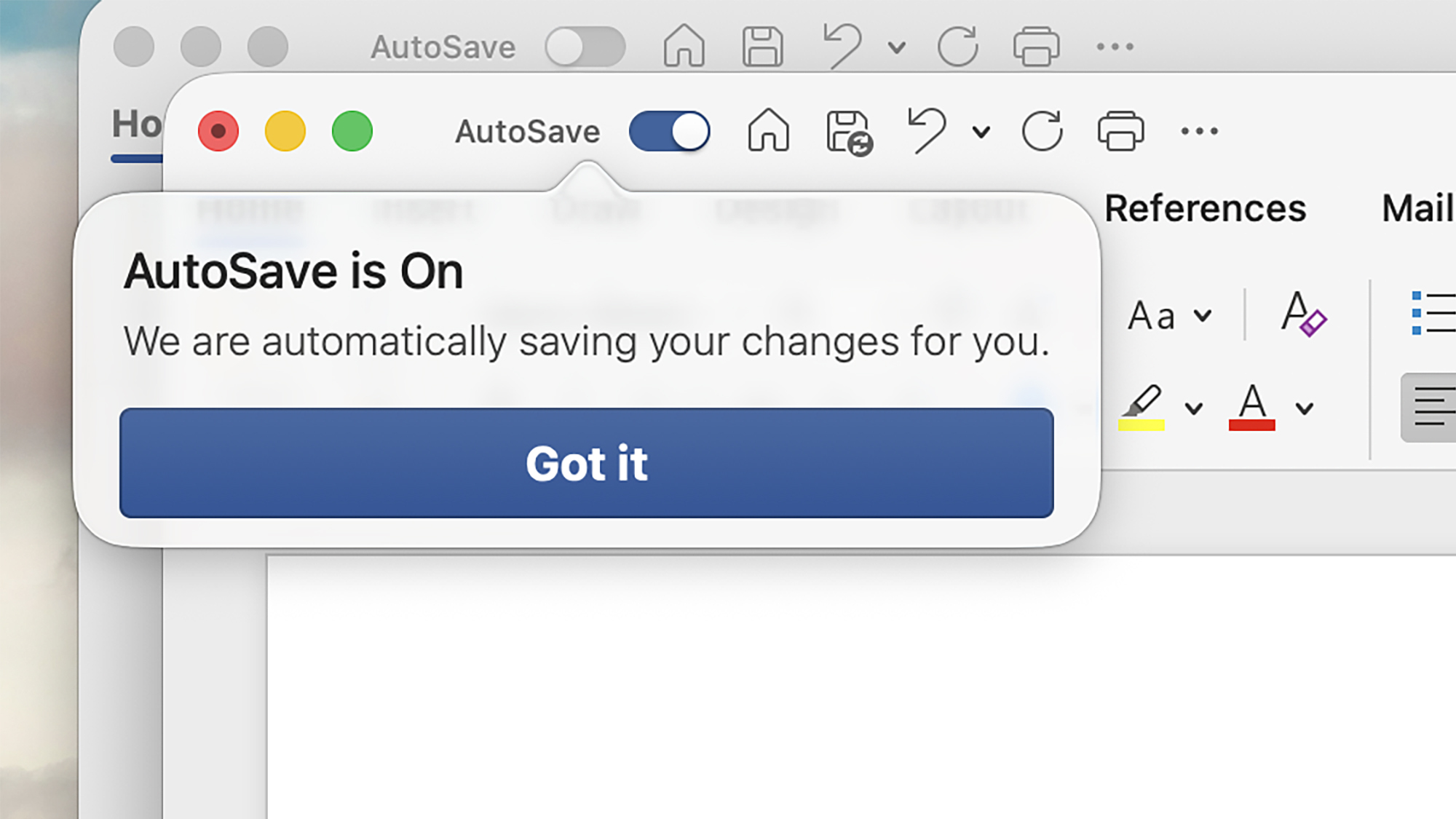
These days, Microsoft Word will tend to push you to save your work in OneDrive in the cloud. There are multiple benefits for this, including the version history feature mentioned above, and the option to collaborate on documents with other people. It also enables another handy feature: AutoSave.

This is exactly what it sounds like, and means that every time something is changed in your document, it quickly syncs to the cloud. You’ll see the AutoSave button in the top left hand corner enabled when it’s active, and the document name at the top of the app window will indicate when saves are in progress.

Should Word or your PC crash, your work should be safe. AutoSave is enabled by default for files saved to OneDrive, but you can customize this behavior by heading to File > Options > Save on Windows) or Word > Preferences > Save on macOS.

Intel Xeon 6 Granite Rapids Memory Scaling Performance From 6 To 12 MRDIMMs

With memory pricing being as wild as it is these days and with MRDIMMs on Xeon 6 Granite Rapids offering much more memory bandwidth than conventional DDR5 RDIMMs, you may be wondering about the performance impact when not populating all twelve memory channels on the Xeon 6900 series processors. In this article are benchmarks to demonstrate the performance difference of MRDIMM-8800 memory across using six, eight, ten, and twelve MRDIMMs with a Xeon 6980P server.

Apple Launches Video Podcasts To Challenge YouTube’s Dominance

Apple Launches Video Podcasts To Challenge YouTube’s Dominance
Apple is preparing to integrate a native video experience directly into the Apple Podcasts app this spring (the feature is also currently available in limited beta). With the company aiming to provide a seamless transition between listening and watching, Apple Podcasts is positioning to bring some heat to the likes of YouTube and Spotify.

Announced

‘Software Isn’t Dead, But Its Cosy Business Model Might Be’

The software industry’s decades-old habit of charging companies a flat fee for every employee who uses a product is running into a fundamental problem: AI agents don’t sit in chairs, and they don’t need licences.

As autonomous agents take on tasks that human workers once handled, the per-seat pricing model that made SaaS revenue so predictable is giving way to consumption-based and hybrid alternatives. Snowflake and Databricks (valued at $134 billion) already charge based on usage. Salesforce initially priced its Agentforce customer relations bot at $2 per conversation but faced customer pushback and now offers action-based pricing, upfront credits and fixed fees.

ServiceNow’s finance chief Amit Zavery said last month that some customers aren’t ready for purely consumption-based models. Goldman Sachs estimates US software spending will nearly triple to $2.8 trillion by 2037 as automated tasks blur the boundary between IT and wage budgets, but that money will no longer arrive in the neat recurring instalments that investors and private equity firms have come to expect.


Read more of this story at Slashdot.

An update on upki

In December 2025, Canonical announced a plan to
develop a universal Public Key Infrastructure called upki. Jon Seager has published
an update
about the project with instructions on trying it
out.

In the few weeks since we announced upki, the core revocation engine
has been established and is now functional, the CRLite mirroring tool
is working and a production deployment in Canonical’s datacentres is
ongoing. We’re now preparing for an alpha release and remain on track
for an opt-in preview for Ubuntu 26.04 LTS.

Apple Confirms March Product Launch Event: When And What To Expect

Apple Confirms March Product Launch Event: When And What To Expect
There have been rumblings of Apple launching new products in the coming weeks and there’s now a confirmed event to go along with the chatter. Apple has been sending out invitations for what it’s describing as a “special Apple Experience” in New York. There’s no mention or even hint of what products will be announced, but we have some guesses.
Apple

The Out-of-Touch Adults’ Guide to Kid Culture: What Is a ‘Bebot Girl’?

This week we’re taking a look at some hyper-specific cultures within the larger youth culture. They run the gamut from the truly disturbing Looksmaxxing community, to the strange world of hardcore audiophiles, to the nostalgic domain of the bebot girls. What’s a bebot girl? I’m glad you asked!

What is a “Bebot Girl”?

TikTok is being taken over by Bebot Girls. “Bebot” is Filipino slang from the 2010s that means “babe” or “baddie.” The bebot girl trend is posting videos of the transformation from a regular person to a bebot, that is, a Filipino baddy from the 1990s. This is usually accomplished through period-appropriate makeup like heavy bronzer, frosty inner eyes, and striking metallic eyeshadow. It looks like this:

and this:

The trend started with TikToker @bellepauleen posting this video, which revived the term. The bebot anthem and soundtrack to the these videos is Black Eyed Peas 2005 song “Bebot.” Bebot girls seems like part of the same nostalgia trend that brought us Millennial Optimism and nostalgia for 2016, but with a huge dose of Filipino pride. If you want to watch bedot girl videos all day, check out the hashtag.

Who is Clavicular?

This week in people who are famous to your children but not you, we have Clavicular. His real name is Braden Peters, he was born in 2005, and he is the world’s most famous looksmaxxer.

Looksmaxxing (as you can read in my Gen Z and Gen A slang glossary) is maximizing one’s physical attractiveness through personal grooming, working out, and dressing stylishly. That doesn’t sound terrible in theory, but in practice, looksmaxxing is nihilistic vanity. To the Looksmaxxer, there’s a single standard for male attractiveness: basically being a lantern-jawed white dude. And there is nothing more important than looks. Being smart, cool, interesting, good-hearted, talented etc. does not matter; the only quality that is worthwhile is how you look. Looksmaxxers are insanely obsessive about defining what makes a person attractive. They measure their canthal tilt (the angle of the eyes), obsess over their maxilla (upper jaw), and know their exact biacromial width (the span of the clavicle.) Clavicular’s is 19.5 inches, hence the name.

Clavicular’s fame comes from his Kick channel, where he films himself rating other people’s looks, walking around being handsome, giving advice to his followers on how they can “ascend,” (become more attractive) and going on dates. As expected, he does sell an online course. To achieve his look, Clav says he’s been injecting himself with testosterone since he was 14, takes steroids regularly, and smashed his cheekbones with a hammer so they would grow more prominent. There are rumors that he takes meth to keep his weight down too. Although he describes himself as apolitical, Clavicular’s associates include right-wing influencers Nick Fuentes, Sneako, Andrew Tate, and more. He says the n-word all the time.

So all this is very bad, and it’s all growing in popularity among boys of the brainrot generation. So be warned, I guess: Young boys are not OK.

What is a “Big John machine”?

While niche communities like Looksmaxxers are depressing, many young people are into much less dire interest groups, like audiophiles. Within that community, audio equipment is sometimes referred to as “Big John machines,” because people are demonstrating their ridiculously expensive audio set-ups by playing a Geoff Castelucci cover of Jimmy Dean’s 1961 novelty hit “Big Bad John.”

It started with a post on Reddit’s audiophile subreddit, describing the original song as “an interesting example of how good audio systems can bring out more life in a recording.” So people started posting videos of extremely exotic and expensive systems playing the song. Like this system with $2 million speakers:

Then people started posting their own systems playing the song. Or just middle-of-the-road gear. Then people started posting the cheapest gear that can play “Big Bad John,” like this:

and this:

Viral video of the week: The Leaf Test

Recently, TikTokers Toni & Austin posted the following 11-second video, dubbed “The Leaf Test.”

In it, Toni says, “I found a leaf,” and Austin responds “It’s beautiful, just like you.” She sighs. He panics, presumably having said the wrong thing. It’s mildly funny, but it went viral in a huge way—over 18 million views— for maybe the wrong reasons.

Despite it being very, very clear that the clip is a joke, the video’s comment section is full of anger, with people saying things like, “Dump her ungrateful ass,” “He deserves someone better,” and “Can we normalize not doing test on our boyfriends he gave a perfect and valid answer and how are we still gonna get upset??”

People started making response videos:

It spread off TikTok. Reddit got extra mad about the leaf test.

I don’t know if there’s any way to measure this, but the internet has made people way less able to understand when someone is being ironic or sarcastic, whether it’s misinterpreted written posts on Threads or joke videos on TikTok. The internet seems to have made people less likely to moderate their responses; people are fast on the trigger.

99% of adults over 40 have shoulder “abnormalities” on an MRI, study finds

Up to a third of people worldwide have shoulder pain; it’s one of the most common musculoskeletal complaints. But medical imaging might not reveal the problem—in fact, it could even cloud it.

In a study published in JAMA Internal Medicine this week, 99 percent of adults over 40 were found to have at least one abnormality in a rotator cuff on magnetic resonance imaging (MRI). The rotator cuff is the group of muscles and tendons in a shoulder joint that keeps the upper arm bone securely in the shoulder socket—and is often blamed for pain and other symptoms. The trouble is, the vast majority of the people in the study had no problems with their shoulders.

The finding calls into question the growing use of MRIs to try to diagnose shoulder pain—and, in turn, the growing problem of overtreatment of rotator cuff (RC) abnormalities, which includes partial- and full-thickness tears as well as signs of tendinopathy (tendon swelling and thickening).

Read full article

Comments

Valve’s Steam Deck OLED Will Be ‘Intermittently’ Out of Stock Because of the RAM Crisis

Valve has updated the Steam Deck website to say that the Steam Deck OLED may be out of stock “intermittently in some regions due to memory and storage shortages.” From a report: The PC gaming handheld has been out of stock in the US and other parts of the world for a few days, and thanks to this update, we now know why. The update comes shortly after Valve delayed the Steam Machine, Steam Frame, and Steam Controller from a planned shipping window of early 2026 because of the memory and storage crunch.

“We have work to do to land on concrete pricing and launch dates that we can confidently announce, being mindful of how quickly the circumstances around both of those things can change,” Valve said in a post about that announcement from earlier this month. Its goal is to launch that new hardware sometime in the first half of 2026, and the company is working to finalize its plans “as soon as possible.”


Read more of this story at Slashdot.