Impressive strides have been happening in efforts to play x86 games on ARM devices, even Windows x86 games on Android mobile platforms—and now, we can confirm that Cyberpunk 2077 is actually playable at 30 FPS and Low settings for owners of Android phones outfitted with Qualcomm’s Snapdragon 8 Elite Gen 5 platform, albeit with FSR in Balanced
Upon its launch, the Nintendo Switch 2 version of The Elder Scrolls V: Skyrim Anniversary Edition received heavy criticism for its 30 FPS cap, input lag, and various graphical glitches. Despite how much more powerful the Nintendo Switch 2 is compared to the platforms available when Skyrim launched, the improvements over the previous-gen Switch
As anyone who’s ever had to schlep their dirty linens to a laundromat knows, having in-house laundry is a godsend. But the convenience of doing laundry whenever you feel like it starts to feel less convenient if you’re lacking in the necessary storage, shelving, or work space. If a total laundry room renovation isn’t in the budget, though, don’t fret: You can upgrade your home’s laundry hub with just a few relatively inexpensive additions. Combined with some fresh paint and some other low-cost improvements, you can have a more beautiful and functional laundry area on a small budget.
Use pedestal storage underneath your washer and dryer
If you’ve got a separate washer and dryer setup in your laundry area, picking up some appliance pedestals with built-in drawers is an easy way to add some useful storage. You’ll need to measure vertically in your laundry space to make sure you’ve got the required height, and you’ll probably need some help moving and lifting the appliances into place. But once that’s done, you’ll not only have a place to store all those unsightly bottles of detergent and other stuff, it will be easier to load and unload your clothes because you won’t have to bend down so far.
Add shelves behind the laundry room door
If your laundry area is its own room with a door, you can maximize your storage space by adding a slim shelving unit behind the door. It will be just deep enough to hold all your laundry materials, cleaning up the area without taking up any valuable floor space.
Install shelves over your washer and dryer
If your laundry area lacks storage, you’ve got a few options. One of the easiest things you can do is to add a countertop over your washer and dryer set. This could be as DIY as cutting a slab of wood or using a leftover remnant from a kitchen remodel, or you could purchase a topper with edge rails like this one. This instantly transforms the top of your appliances into a usable flat surface that won’t let things slide off as soon as you turn your back. If you have more vertical space and need more options, a tiered over-the-appliance shelf system is a great option, giving you multiple shelves plus hanging rods to get everything off the floor and organized.
Even if you only iron your clothes once in a while, having a real ironing board makes a huge difference, and having that ironing board conveniently located near your laundry is ideal. If you have nothing but space, you can just have a board set up, of course, but if you don’t have a ton of space, or you’re just looking to keep the place tidy, you could opt for an over-the-door ironing board or a wall-mounted version like this. The board folds up when not in use, but is always easily accessible.
If you want a fancy version, you could install the Iron-A-Way Ironing Center, which is pricey and probably requires professional installation, as it’s designed to recess into the wall and connect to the home’s power.
Try a portable sink in your laundry room
Having a utility sink in the laundry area is great—it lets you rinse out clothes, clean up detergent spills, and wet-scrub stains right there. If your laundry area isn’t plumbed, you might not relish the idea of hiring a plumber to run water and drain lines for a sink—but you don’t have to. This portable sink can give you that basic functionality without any wiring or plumbing. Just fill it with water, charge it using a USB-C cable, and place it in your laundry area to use whenever you need it.
Install a clothing drying rack
It’s a simple addition, but having a place to hang clothes to dry right there in the laundry area is a great convenience. You can buy a freestanding drying rack, of course, but as an upgrade, consider a wall-mounted option instead. This one from mDesign looks great and folds up when not in use.
Dispensing liquid detergent can get messy, and when you’re in a rush, those measurements can get sloppy, too, leaving you with insufficient detergent for the load or wasting detergent, running up your costs. This rechargeable electronic detergent dispenser fits on top of most plastic detergent bottles and dispenses precise amounts of detergent with the touch of a button. If that’s a bit too fancy for your laundry area, you could pick up a cheap dispenser cup holder like this to make it a little easier and neater to fill your detergent cups.
Add a freestanding island to your laundry room
If you need some folding and storage space in your laundry area but there’s no vertical or wall options, take some inspiration from your kitchen and bring in a freestanding island or laundry cart. This one from Kitsorack is a clothes hamper with a shelf, so you can stuff your dirty clothes in there and have your supplies stored on top, but any mobile cart or island will make your laundry area more usable.
This week, Apple released the first developer betas for iOS 26.4, iPadOS 26.4, macOS 26.4, and its other operating systems. On Tuesday, it followed those up with public beta versions of the same updates.
Usually released around the midpoint between one major iOS release and the next, the *.4 updates to its operating system usually include a significant batch of new features and other refinements, and if the first beta is any indication, this year’s releases uphold that tradition.
A new “Playlist Playground” feature will let Apple Music subscribers generate playlists with text prompts, and native support for video podcasts is coming to the Podcasts app. The Creator Studio version of the Freeform drawing and collaboration app is also available in the 26.4 updates, allowing subscribers to access stock images from Apple’s Content Hub and to insert AI-generated images.
Andrew Yang, the former presidential candidate and longtime Universal Basic Income advocate, published a blog post this week warning that AI is about to displace millions of white-collar workers in the U.S. over the next 12 to 18 months, a wave he has taken to calling “the Fuckening.”
Yang cited a conversation with the CEO of a publicly traded tech company who said the firm is cutting 15% of its workforce now and plans another 20% cut in two years, followed by yet another 20% two years after that. The U.S. currently has about 70 million white-collar workers, and Yang expects that number to fall by 20 to 50% over the next several years.
Underemployment among recent college graduates has already hit 52%, and only 30% of graduating seniors have landed a job in their field. Yang’s proposed remedy remains the same one he ran on in 2020: Universal Basic Income.
After launching Android Quick Share functionality on its flagship Pixel 10 devices earlier this month, Google is now bringing the feature to the Pixel 9 series. Android Quick Share allowsAndroid users to send files to Apple users using AirDrop, which has been a long-running pain point for users with a varied mix of devices among friends, family
Why the delay? Developer Sad Cat Studios notes that the game is “technically finished” but the team needs a few more weeks for polish. The company says it wants the day-one release to be “polished, stable and true to the vision” of the original concept. This is something to be commended, in my opinion, given the sad stateof many game launchesin recent years.
This is just the latest delay for the game. However, previous delays have been for a very good reason. The development team had to relocate from Belarus to Cyprus after Russia invaded Ukraine in 2022.
Replaced is an absolutely gorgeous-looking 2.5D platformer set in a dystopian alternative 1980s America. You play as an AI unwillingly trapped in a human body. There looks to be plenty of cinematic action, with a blurb promising a combination of “precise melee strikes with satisfying ranged attacks.”
The game will be available for Xbox Series X/S, Xbox One and PC via Steam, Epic Games Store, GOG and the Microsoft Store. It’ll also be a day-one Xbox Game Pass release.
This article originally appeared on Engadget at https://www.engadget.com/gaming/cyberpunk-platformer-replaced-has-once-again-been-delayed-190621246.html?src=rss
Archival storage poses lots of challenges. We want media that is extremely dense and stable for centuries or more, and, ideally, doesn’t consume any energy when not being accessed. Lots of ideas have floated around—even DNA has been considered—but one of the simplest is to etch data into glass. Many forms of glass are very physically and chemically stable, and it’s relatively easy to etch things into it.
There’s been a lot of preliminary work demonstrating different aspects of a glass-based storage system. But in Wednesday’s issue of Nature, Microsoft Research announced Project Silica, a working demonstration of a system that can read and write data into small slabs of glass with a density of over a megabyte per cubic millimeter.
Writing on glass
We tend to think of glass as fragile, prone to shattering, and capable of flowing downward over centuries, although the last claim is a myth. Glass is a category of material, and a variety of chemicals can form glasses. With the right starting chemical, it’s possible to make a glass that is, as the researchers put it, “thermally and chemically stable and is resistant to moisture ingress, temperature fluctuations and electromagnetic interference.” While it would still need to be handled in a way to minimize damage, glass provides the sort of stability we’d want for long-term storage.
I like to say, “I was heat training on Zwift before it was cool.” Mostly I like the wordplay, but also, there’s some truth to it: I hadn’t seen or heard of others doing heat training on Zwift when I began doing it in the summer of 2023. It seemed like the perfect training cheat code, though: if heat training delivers on its promise and indoor cycling lets you control your environment, then Zwift could be the place where heat training thrives.
That post was supposed to be part 1 of a series, but that didn’t happen. Instead, I found myself struggling to make sense of the CORE metrics, and when I reached out to CORE for support, I got no reply. So I set the project aside.
Fast-forward to early 2025, and CORE was suddenly very visible in my world: Zwift added CORE metrics to the HUD, and CORE had lots of new staff, a completely revamped app and metrics, and a new version (2) of their sensor. It was time to dive back into the sweat sessions!
The Science
While CORE’s ability to measure your heat training is a relatively new development in the world of cycling, the concept of heat training is not new at all. Cyclists have done it for decades in preparation for hot races, and more recently, riders have embraced heat training to boost overall performance, following the results of various heat-training studies.
If you want to dig into the results of actual studies, here are a few:
What do the studies show? In summary, heat training leads to the following adaptations:
Increased hemoglobin mass
Increased red blood cell volume
Increased VO2max and FTP, in the neighborhood of +3-10%
Earlier onset of sweating and an increased sweat rate
Decreased sodium concentration in your sweat
Notably, these increases are observed in men and women equally, and occur among both elite and amateur athletes. So it’s no surprise that heat training, and specifically heat training with the CORE sensor, has become popular among pro cyclists and triathletes. It offers clear benefits for anyone racing in the heat, but also offers benefits similar to altitude training which lead to performance boosts even in cooler environments. Hence CORE’s mantra: “Train hot, race cool.”
(In fact, various sources have told me that most, if not all, World Tour teams are using CORE for heat training, even though CORE isn’t sponsoring the teams in any way. That should make us sit up and take notice…)
CORE Metrics (Just the Basics)
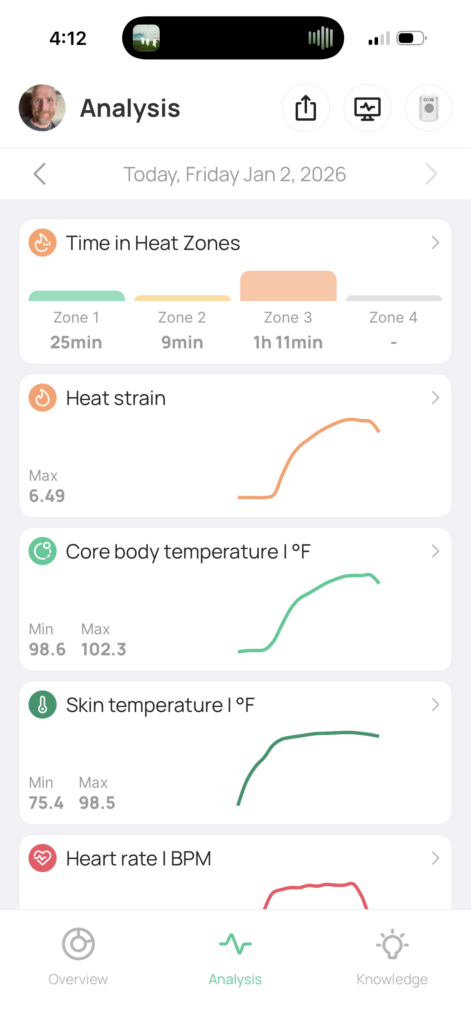
When I first jumped into heat training in 2023, the testing protocol and tracking were complex. Fortunately, CORE revamped their app and metric to simplify things! Here are the key metrics used when heat training with the CORE sensor:
Core Temperature: your internal temperature
Skin Temperature: your “external” temperature, as measured on your skin
Heat Strain Index (HSI): uses your core and skin temperatures to measure how hard your thermoregulatory system is working to cool itself, on a scale of 0-10 (read more)
Heat Zones: these break HSI into 4 zones
Heat Zone 1: HSI of 0.0-0.9
Heat Zone 2: HSI of 1.0-2.9
Heat Zone 3: HSI of 3.0-6.9
Heat Zone 4: HSI of 7+
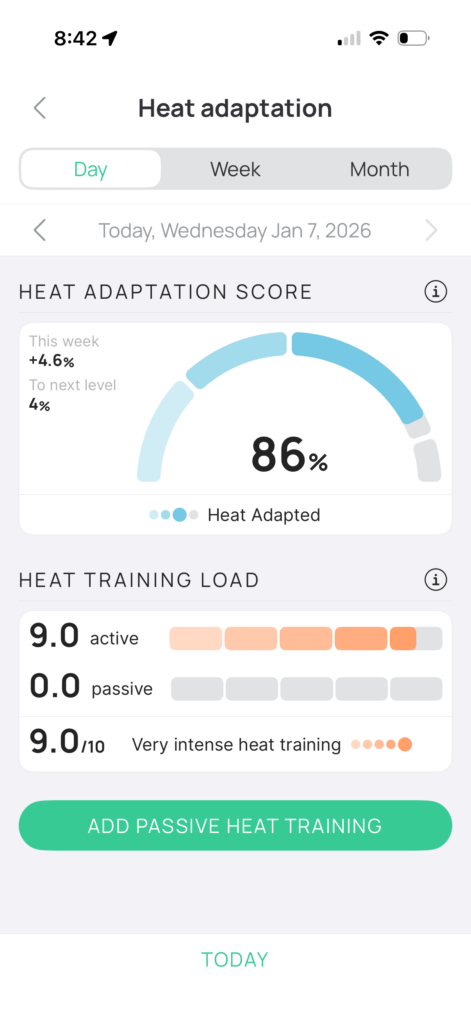
Heat Training Load: ranges from 0-10 and measures how much a particular training session contributes to your heat adaptation (read more)
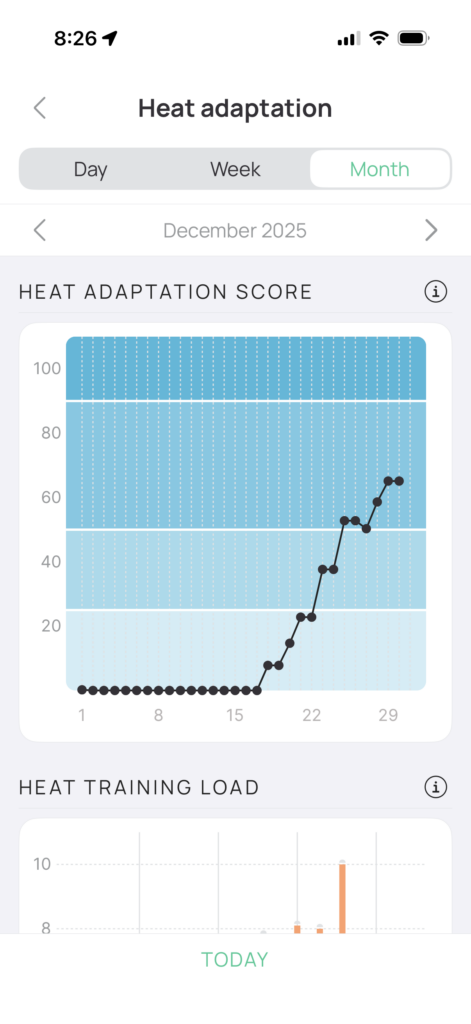
Heat Adaptation Score: tracks your heat adaptation progress to see how much of your potential you’ve reached, on a scale of 0 to 100%
0–24%: Thermal Rookie
25–49%: Heat Accustomed
50–89%: Heat Adapted
90–100%: Heat Champion
Putting all these together, what CORE users typically want to do is get their HSI to increase early in the session, so they are in the higher Heat Zones (zones 3 or 4) where Heat Training Load accumulates more quickly during their session. This results in a higher Heat Training Load for the day, which means their Heat Adaptation Score will increase more quickly.
Zwift Integration: What It Is (and Isn’t)
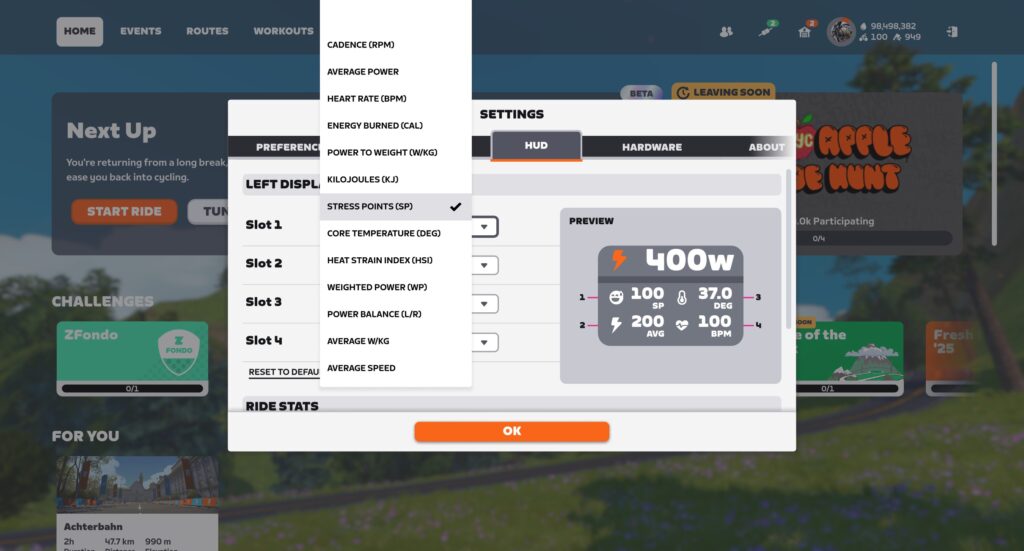
While CORE is now integrated into Zwift, it’s important to define what “integration” really means in this case. Zwift’s CORE integration simply means there are two CORE metrics available to be shown in the HUD (HSI and Core Temperature), and that data is recorded to your FIT file.
To really use CORE to its fullest, though, you’ll want to run the CORE app on your phone, so it can track your Heat Training Load for your session, and track your ongoing Heat Adaptation Score from day to day.
CORE App Basics
As explained above, despite Zwift’s basic integration with CORE, I think it’s safe to say the CORE app is essential for heat training with the CORE sensor.
The CORE app lets you configure your CORE sensor(s), track metrics for your active heat session, and track your overall Heat Adaptation Score. You can tap the Heat Adaptation Score gauge to see a historic view of your data as well:
Current activityHomescreenHistoric view
The CORE sensor has some on-board memory, so it isn’t just live-streaming data to connected apps… it’s actually storing that data. This is handy if you begin a session but forgot to open the CORE app, as it means you won’t lose that data.
The CORE app has come a long way since its early days. Today, coupled with simplified metrics explained above, it provides a clear view of your heat training progress. Still, there are some improvements I’d like to see:
Refresh frequency: the app doesn’t update its data quickly during an active session, and this can be a bit maddening when you’re sweating profusely and wanting to see your progress toward a higher Heat Training Load. I’d love to see the app update all metrics at least every minute, if possible.
Chart quality: the historic charts can’t be tapped to “drill down” into the data, and I’d like to see that feature added.
Trial By Fire
I’ve bounced in and out of heat training several times in the past years, without ever doing it enough to accumulate meaningful adaptation. That changed when I decided to buckle down and do some earnest heat training at the end of 2025.
Over a 3-week period from mid-December 2025 to early January, I completed heat sessions almost daily, working my way from a Heat Adaptation Score of 0 to 96%. And while the sessions were rather sweaty, I began to look forward to the efforts, to the ridiculousness of dripping so much water on the floor, to seeing my Heat Adaptation Score inch closer to 100%.
I learned a lot during those sessions, including:
What to wear to stay as comfortable as possible, while keeping my temperature high so I could accumulate a lot of adaptation.
How much I needed to drink, and what sort of electrolyte mix to use to facilitate replacing what I was losing.
How to arrange towels on the floor and on my bike and within reach, to control sweat while also keeping laundry loads as small as possible.
How to get my Heat Stress Index to increase quickly in a session, so I could get up to those higher Heat Zones and accumulate heat stress faster, resulting in an overall higher Heat Training Load.
The disgusting joy of sitting on the floor in my sweaty clothes after a session, letting my temperature and heart rate slowly drop while accumulating additional heat stress seemingly “for free” (more on this below as well).
I’ll share more about these learnings in part 3 of this series, publishing tomorrow. Until then, here’s a recording of me riding a Tour de Zwift stage as a heat session. Watch as my power drops from the 200W+ to ~100W, while my heart rate actually increases! The human body is an amazing creation…
More Heat Training Resources
If you have questions about heat training, I highly recommend checking out CORE’s support articles, which are impressively detailed and thorough. Visit help.corebodytemp.com.
Up Next
This article began as one post, but it got way too long. So I’m splitting it into two, with the rest of the post publishing tomorrow. The second part covers my personal experience heat training, including lots of tips and tricks I learned along the way.
Performance improvements are also discussed, but (spoiler alert) I didn’t do a good job of tracking those scientifically, so the hard numbers aren’t really there.
Your Thoughts
Have you done any heat training? Have you used the CORE sensor to do so? Share your thoughts, questions, and experiences below!
Long past due for retirement, the Linux 7.0 kernel has removed the obsolete Mwave driver for the 3780i ACP Modem found in some Pentium II era IBM ThinkPads from the 1990s…
Linus Torvalds has told The Register how Linux went from a solo hobby project on a single 386 PC in Helsinki to a genuinely collaborative effort, and the path involved crowdsourced checks, an FTP mirror at MIT, and a licensing decision that opened the floodgates.
Torvalds released the first public snapshot, Linux 0.02, on October 5, 1991, on a Finnish FTP server — about 10,000 lines of code that he had cross-compiled under Minix. He originally wanted to call it “Freax,” but his friend Ari Lemmke, who set up the server, named the directory “Linux” instead. Early contributor Theodore Ts’o set up the first North American mirror on his VAXstation at MIT, since the sole 64 kbps link between Finland and the US made downloads painful. That mirror gave developers on this side of the Atlantic their first practical access to the kernel.
Another early developer, Dirk Hohndel, recalled that Torvalds initially threw away incoming patches and reimplemented them from scratch — a habit he eventually dropped because it did not scale. When Torvalds could not afford to upgrade his underpowered 386, developer H. Peter Anvin collected checks from contributors through his university mailbox and wired the funds to Finland, covering the international banking fees himself. Torvalds got a 486DX/2. In 1992, he moved the kernel to the GPL, and the first full distributions appeared in 1992-1993, turning Linux from a kernel into installable systems.
An anonymous reader writes: Electric buses are proving unreliable this winter for Vermont’s Green Mountain Transit, as it needs to be over 41 degrees for the buses to charge, but due to a battery recall the buses are a fire hazard and can’t be charged in a garage.
Spokesman for energy workers advocacy group Power the Future Larry Behrens told the Center Square: “Taxpayers were sold an $8 million ‘solution’ that can’t operate in cold weather when the home for these buses is in New England.”
“We’re beyond the point where this looks like incompetence and starts to smell like fraud,” Behrens said.
“When government rushes money out the door to satisfy green mandates, basic questions about performance, safety, and value for taxpayers are always pushed aside,” Behrens said. “Americans deserve to know who approved this purchase and why the red flags were ignored.”
General manager at Green Mountain Transit (GMT) Clayton Clark told The Center Square that “the federal government provides public transit agencies with new buses through a competitive grant application process, and success is not a given.”
Nevada is taking action against the rapidly growing Wild West of prediction markets. The state’s gambling regulators and attorney general sued Kalshi on Tuesday. They accuse the company of bypassing Nevada law by operating a sports gambling market without proper licenses. In addition, they say Kalshi provides services to individuals under 21, which violates state law.
The lawsuit follows a federal appeals court’s rejection of Kalshi’s request to prevent the state from pursuing legal action. And it comes a day after the Trump administration claimed that only the federal government has the right to enforce the industry.
Prediction markets, which allow users to bet on events such as sports, political outcomes and wars, have exploded in popularity. Business Insiderreports that Kalshi did 27 times as much business during this year’s Super Bowl as last year’s. Some of that growth has been at the expense of regulated gambling; Nevada’s gambling operations did less business during this year’s game.
“Kalshi has continued to dramatically expand its business, rather than attempting to maintain any kind of status quo,” Nevada regulators wrote in a letter this month.
Kalshi and rival Polymarket insist that their businesses are “event contracts” and should be regulated as financial investments rather than gambling. The Trump administration, rife with conflicts of interest in this area, agrees. The Chair of the Commodity Futures Trading Commission (CFTC) filed an amicus brief on Tuesday, claiming that it alone has the authority to enforce the prediction market.
“The CFTC will no longer sit idly by while overzealous state governments undermine the agency’s exclusive jurisdiction over these markets by seeking to establish statewide prohibitions on these exciting products,” CFTC Chair Michael Selig wrote in a Wall Street Journal op-ed.
Donald Trump Jr. (Photo by Olivier Touron / AFP via Getty Images)
OLIVIER TOURON via Getty Images
Not coincidentally, prediction markets are a growing part of the Trump family business. Donald Trump Jr. is a paid adviser to Kalshi. He’s also an investor in and unpaid adviser to Polymarket. In January, his family’s social media business said it would launch its own prediction market platform.
Prediction markets have the potential to be a hotbed of insider trading. According to blockchain analyst DeFi Oasis, fewer than 0.04 percent of Polymarket accounts have captured over 70 percent of the platform’s total profits, totaling over $3.7 billion.
Last month, The Guardianhighlighted the case of a Polymarket user who bet tens of thousands of dollars on “yes” to the question, “Israel’s military action against Iran by Friday?” Within 24 hours, Israel bombed Iran, leaving hundreds dead. The user made $128,000 on that bet. The Guardian traced the blockchain data to a wallet associated with an X account. Its location on the social platform was set to Beit Ha’shita, a northern Israeli settlement. The user later transferred their bets to two other accounts, apparently to avoid detection. In January, the accounts held 10 live bets on Israeli military strategy.
Another anonymous user made over $400,000 by betting that Nicolás Maduro would be ousted by the end of January. The bets were placed in the hours and days leading up to the US strikes on Venezuela. In another case, eight jointly owned accounts collectively generated over $161,000 by betting on the country’s María Corina Machado Parisca winning the Nobel Peace Prize. The accounts’ handles used names such as “fmaduro,” “madurowilllose,” “striketheboats” and “trumpdeservesit”.
This article originally appeared on Engadget at https://www.engadget.com/big-tech/nevada-sues-kalshi-for-operating-a-sports-gambling-market-without-a-license-175721982.html?src=rss
Everyone loves shiny new products, so what can we expect to see at Apple’s first launch event of 2026? We don’t know anything for certain, but we have plenty of educated guesses that have been sourced from industry reports and speculation from analysts.
Budget-Friendly MacBook
There have been rumors swirling that Apple is preparing to launch a cheaper alternative to the MacBook Air. Bloombergreported on this all the way back in November. Industry rumors indicate that Apple will be stuffing this laptop with an iPhone processor, the A18 Pro, to keep the price down.
Worth pointing out the three colors from the invite are light green, blue and yellow — which just so happen to be the colors Apple has tested the low-cost MacBook with, as I wrote yesterday. Coincidence? We shall see. https://t.co/1FFVkfw9JZpic.twitter.com/ssKDDzdJsw
It’s also been suggested that this laptop will only include 8GB of RAM, which kind of flies against the company’s recent stance to outfit all Macs with at least 16GB of RAM. However, that would certainly help with the cost. You might have heard about a little thing called AI that chomp chomps on all RAM it can find.
TechRadar has reported that this could be Apple’s biggest laptop launch in years, with potential initial shipments hitting 8 million units. The price is likely to be somewhere in the $699 to $799 range, which is pretty nifty. However, I’d still go for an Air at $999. They are absolute workhorses.
MacBook Pro with M5 Pro and Max chips
It’s likely that Apple will release more powerful MacBook Pro models this year and the timing seems to match up. Bloomberg’s Mark Gurman has suggested a March launch and the event is on March 4.
The company has already released a MacBook Pro with an M5 chip, but both the M5 Pro and Max are likely on the horizon. We could be getting new laptops outfitted with these chips in various display sizes.
Devindra Hardawar for Engadget
There have also been reports that both of the higher-end M5 chips are getting a redesign to help improve heat dissipation and reduce defective chip rates. Additionally, the new chiplet design would allow the M5 Pro and Max to raise the total number of CPU and GPU cores. The Max is expected to have more cores than the Pro.
This idea is helped along by the fact that MacBook Pro M4 Max orders are currently delayed. This is typically the case with an outgoing model as stock dries up to make room for new releases. Also, the Pro and Max variants typically get announced in the Fall, so we are due.
New iPads
Rumors have been circulating that we are about to get new iPads, including an update to the base model and the Air. The standard model, which would be the 12th-gen release, is expected to upgrade the A16 chip to an A18. This should also allow for the integration of Apple Intelligence tools, if that’s your bag.
As for specs, Mark Gurman has suggested that it’ll be getting an upgrade to the A19 chip, which is nice. Also, it could be getting MagSafe support. That sounds like an iterative upgrade, but the price is expected to remain steady at $599.
Other Possibilities
The following stuff is less likely, though certainly possible. There have been rumors that Apple is currently preparing a revamped Studio Display and Mac Studio desktop. The reports suggest a release sometime in the first half of the year, and March is right in the middle of that timeframe.
It’s also possible that the company will reveal an upgrade to the MacBook Air with the M5 chip. Reports indicate that this is unlikely to happen during this event, but it is worth noting that the M4 Air came out in March of last year. In other words, it’s a toss up.
The inclusion of Shanghai essentially rules out Siri, as expected, given the delays. https://t.co/mgNLR4qCYy
What’s not a toss up? You shouldn’t expect anything regarding the long-anticipated Siri refresh. This looks to be a hardware event, so any software updates will likely have to wait until WWDC this summer. In any event, Engadget will be on hand to report on all of Apple’s new products.
This article originally appeared on Engadget at https://www.engadget.com/computing/heres-what-to-expect-at-apples-product-launch-event-on-march-4-173612772.html?src=rss
Back in 2022 Intel announced OpenPGL as an open-source library for path guiding to help enhance the quality of path-based renderers. With time Blender began making use of OpenPGL and other industry interest and adoption. Unfortunately, Intel quietly ended work on OpenPGL in 2025 but has now fortunately found a new home…
Microsoft says a Microsoft 365 Copilot bug has been causing the AI assistant to summarize confidential emails since late January, bypassing data loss prevention (DLP) policies that organizations rely on to protect sensitive information. From a report: According to a service alert seen by BleepingComputer, this bug (tracked under CW1226324 and first detected on January 21) affects the Copilot “work tab” chat feature, which incorrectly reads and summarizes emails stored in users’ Sent Items and Drafts folders, including messages that carry confidentiality labels explicitly designed to restrict access by automated tools.
Copilot Chat (short for Microsoft 365 Copilot Chat) is the company’s AI-powered, content-aware chat that lets users interact with AI agents. Microsoft began rolling out Copilot Chat to Word, Excel, PowerPoint, Outlook, and OneNote for paying Microsoft 365 business customers in September 2025.
Windows 11’s latest Release Preview drop, with builds numbered 26100.7918 and 26200.7918, hits with a noticeably different vibe than some of Microsoft’s recent Windows releases. Instead of another dubious Copilot expansion, or an AI-powered reinvention of something that already worked fine, this one leans into practical improvements, system
The Food and Drug Administration has reversed its shocking refusal to consider Moderna’s mRNA flu vaccine for approval.
The refusal was revealed last week in a sharply worded press release from Moderna. Subsequent reporting found that the decision was made by political appointee Vinay Prasad, the Trump administration’s top vaccine regulator, who overruled a team of agency scientists and a top career official in rejecting Moderna’s application.
In an announcement Wednesday morning, Moderna said the FDA has now agreed to review its vaccine after the company held a formal (Type A) meeting with the FDA and proposed a change to the regulatory pathways used in the application.
Linux hardware vendor System76 has begun teasing a redesign of their Thelio chassis that is used by their modern desktops and workstations. Helping distinguish System76 from other Linux desktop/PC vendors has been their custom-engineered, built-in-the-USA enclosures and now they are preparing to launch a next-generation design…