
My Favorite Irish Soda Bread Only Has Four Ingredients

Whenever I have a carb emergency I make one of two things: cookies or quick bread. Lately I’ve been leaning toward the latter—like banana bread, lemon poppy muffins, or biscuits—because they’re less sweet compared to cookies, and I enjoy the ritual smear of salted butter. I’ve been making this Irish soda bread on repeat and I think you’ll like it too.

Quick-bread satisfaction

The quick breads category is pretty wide. They can be sweet and cake-y like banana bread, barely sweet like scones, or savory like cheddar cheese and thyme biscuits. Unlike yeast-raised breads, quick breads are raised with chemical leaveners (baking soda or baking powder), which means they require absolutely none of the long proof times. What’s more, something like Irish soda bread requires very few ingredients. 

The Dutch oven is my vehicle of choice for this lofty, tender Irish soda bread. Similar to baking a sourdough loaf, humidity is your soda bread’s friend. Encasing your soda bread in a small space allows humidity to build up as moisture evaporates from the dough. The moist air keeps the surface of the loaf flexible for longer than if you bake it open on a sheet tray. The extra flexibility means the loaf can rise taller, uninhibited by a hard crust.

How to make Irish soda bread

I slightly modified this simple recipe, which has only four ingredients: flour, salt, baking soda, and buttermilk. It’s very similar to biscuit dough (minus butter or oil). While traditional soda bread is the simplest—no raisins—I choose to toss them in. You can substitute in other mix-ins if the mood strikes you: Try dried cranberries, chopped dried apricots, or chocolate chips. The dough is relatively plain so any flavor profile you choose will work just fine. 

I have two notes before you set out to make your loaf. Most importantly, don’t overwork your dough. You’ve heard it before, but with shaggy doughs like this it’s hard to resist kneading it until smooth. Don’t do it. Leave it a bit shaggy and you’ll have a more tender loaf. 

About preheating your Dutch oven: The conventional oven should be preheated no matter what, but I’ve made this recipe with a cold Dutch oven before. I actually made a whole Irish soda bread YouTube video using a cold pot. It comes out perfectly and well-risen. However, I’ve recently been preheating the Dutch oven as the conventional oven heats up, and the loaf comes out perfectly there too. In the recipe below, I preheat the pot. You can do either—the only difference I detect is a faster bake by 10 minutes if you choose to preheat. 

Any other Irish soda bread questions you have might be answered here. Otherwise, the dough takes mere minutes to put together.

Irish Soda Bread

Ingredients:

  • 12 ounces all-purpose flour

  • ¾ teaspoon salt

  • ¾ teaspoon baking soda

  • 10 ounces buttermilk

  • 2 ounces raisins (optional)

1. Put the Dutch oven inside the oven and preheat to 425°F. Mix the flour, salt, and baking soda together in a large bowl.

2. Pour in the buttermilk all at once and combine the ingredients by pressing and stirring. I use a plastic bowl scraper to do this. 

3. When the dough starts to become clumpy and shaggy, add the raisins (if using) and continue pressing and stirring.

Clumpy dough on a countertop.

Credit: Allie Chanthorn Reinmann

4. When it’s mostly combined but there is still loose flour at the bottom of the bowl, pour the dough out onto an un-floured countertop. Pat and press the dough to pick up the dry bits. Use any sticky areas to target the loose flour. Once you’ve collected most of the loose parts, pat the dough into a (roughly) two-inch thick round. Use a serrated knife to score a half-inch deep plus sign into the dough. Place the loaf on a piece of parchment paper.

Irish soda bread dough in a pot.

Credit: Allie Chanthorn Reinmann

5. Carefully take the Dutch oven out and use the parchment to lift and lower the loaf into the pot. Put the lid back on and return the pot to the oven. Bake for 25 minutes, then remove the lid and bake for another 10 minutes until golden brown. Cool the soda bread on a wire rack before noshing.
Among Us VR is being transformed into a traditional 3D game for PC

Among Us VR has proven itself to be a major hit since first being released back in 2022. Now, developers Innersloth and Schell Games have announced they are rejiggering the virtual reality title for traditional PC players. Among Us 3D is playable without a headset and will be available via Steam in the near future.

This title keeps the core gameplay loop from the original, but shifts to a first-person perspective. It’s basically a new way to keep sabotaging your friends and family. Among Us 3D is for four to ten players and includes native proximity voice chat, with no need for a third-party platform. All of the minigames are returning, though there’s also some new ones coming down the pike. Innersloth is holding off on those details for now.

It features crossplay with Among Us VR, but not with the original game. That’s a bummer, but understandable. There will be, however, an expanded costume selection to offer “an endless number of cosmetic customization combinations.” There’s a new in-game currency called Stardust that will, presumably, be used to purchase some of those outfits.

There’s no release date yet, other than “soon.” However, a demo will be available to US players as part of Steam Next Fest from February 24 to March 3. Preorders for the full game are already live on Steam.

This is just the latest cool thing that developer Innersloth has announced. The company recently revealed a publishing arm called Outersloth. There’s also an Among Us cartoon coming sometime in the near future.

This article originally appeared on Engadget at https://www.engadget.com/gaming/pc/among-us-vr-is-being-transformed-into-a-traditional-3d-game-for-pc-194545497.html?src=rss

Amazon’s Former VP Of Prime Gaming Details Losing War With Steam


Steam currently stands as king of the hill when it comes to PC game distribution, with Valve’s storefront operating as the default choice for almost everyone looking to play games on their computer. Many companies have tried to dethrone Steam, only to fall to the wayside. Ethan Evans, former VP of Prime Gaming at Amazo,n is sharing how the

Small study suggests dark mode doesn’t save much power for very human reasons

If you know how OLED displays work, you know about one of their greatest strengths: Individual pixels can be shut off, offering deeper blacks and power savings. Dark modes, now available on most operating systems, aim to save power by making most backgrounds very dark or black, while also gratifying those who just prefer the look.

But what about on the older but still dominant screen technology, LCDs? The BBC is out with a small, interesting study comparing the light and dark modes of one of its website pages on an older laptop. Faced with a dark mode version, most people turned up the brightness a notable amount, sometimes drawing more power than on light mode.

It’s not a surprise that dark modes don’t do anything to reduce LCD power draw. However, the study—not peer-reviewed but published as part of the International Workshop on Low Carbon Computing—suggests that claims about dark mode’s efficiency may be overstated in real-world scenarios, with non-cutting-edge hardware and humans at the controls.

Read full article

Comments

How to make the most of the iPhone’s Action Button

The Action button is available on nearly every iPhone Apple sells, offering a quick way to access a feature, app or shortcut on your phone, just by pushing a button. It can be a flashlight, activate a smart home routine or let you access any number of custom shortcuts without having to unlock your phone and pick through apps.

Apple added the Action Button on the iPhone 15 Pro as a replacement for the iPhone’s original Ring / Silent switch, and it was an acknowledgement of sorts that lots of people keep their phones on silent anyway. Having a reassignable button was pitched as a “Pro” feature at the time, but much like the Dynamic Island, it came to all of Apple’s other phones in short order, even the entry-level iPhone 16e.

Apple

You can use the Action Button for yourself on an iPhone 15 Pro, iPhone 16, iPhone 16 Plus, iPhone 16 Pro, iPhone 16 Pro Max and iPhone 16e just by pressing or holding down the small button above the volume up and down buttons on the left side of your phone. By default, the Action Button will mute or unmute your text and ringtones. This fills the same role as the old Ring / Silent switch. Heading into the Settings app will let you reassign it to another task and you can silence your phone via the Control Center.

Ian Carlos Campbell for Engadget

Out of the box, Apple lets you assign the Action button to several different controls: Silent Mode (Ring / Silent), Focus (either a specific Focus or a menu that lets you pick each time), Camera (a specific mode like Photo or Video), Flashlight, Voice Memo, Recognize Music, Translate, Magnifier, Controls (a specific control from Control Center like Airplane Mode), Shortcut, Accessibility (toggling a specific accessibility feature) or do nothing at all.

If you wanted to switch from the default, Silent Mode, to the Flashlight, you need to first unlock your phone. Then: 

  1. Open the Settings app. 

  2. Tap on “Action Button.” 

  3. From there, swipe through the different options until you land on Flashlight.  

  4. To test that it worked, try pressing on the Action Button.

You can use this same process to reassign the Action Button to any of the built-in actions Apple provides.

Ian Carlos Campbell for Engadget

If you’d like to get a little more adventurous, you can also have the Action Button open a specific app on your phone. Let’s say, for example, your go-to game on the iPhone is Balatro. You can have the Action Button automatically pull up Balatro whenever you press it.

To set it up, you’ll need your iPhone unlocked.

  1. Open the Settings app.

  2. Tap on “Action Button.”

  3. Swipe through the options until you reach “Shortcut.”

  4. Tap on “Choose a Shortcut…”

  5. Then tap on “Open App…”

  6. Then scroll until you find your chosen app and tap on it.

This process works for any app on your phone, including features of specific apps, like if you wanted to jump directly into ChatGPT’s Voice Mode or a new note in the Notes app.

Ian Carlos Campbell for Engadget

The Shortcut action works for more complicated Apple Shortcuts, too. Technically, any shortcut designed to be triggered by you choosing to activate it (as opposed to a time or location-based shortcut) works. There’s a lot of interesting shortcuts out there, and plenty of custom ones you can make on your own, but to use a simple example, here’s how you’d set the Action Button to start a Pomodoro timer.

  1. Open the Settings app.

  2. Tap on “Action Button.”

  3. Swipe through the options until you get to “Shortcut.”

  4. Tap on “Choose a Shortcut…”

  5. Tap on whatever shortcut you want activate.

  6. Press and hold the Action Button to make sure it works.

In the case of the Pomodoro timer, you’ll be prompted to choose how long you want the timer to last, and then you can tap “Done” to start it.

Between lock screen widgets and app shortcuts, home screen widgets, and the Action Button, there’s now multiple ways to check information inside of an app, adjust a specific setting or use specific functionality from the apps on your iPhone. It’s confusing, but a good rule of thumb is that the Action Button works best for actions that you only need to enable once or binary, on / off features. Plenty of others things work, but at a certain point you’ll want to be spending time in an app instead of futzing with the buttons on your phone.

This article originally appeared on Engadget at https://www.engadget.com/mobile/smartphones/how-to-make-the-most-of-the-iphones-action-button-193038089.html?src=rss

How to Sideload Android Apps (and What to Watch Out For)

Android, unlike some phone operating systems, allows users to install software from outside the default app store (even if you don’t live in Europe). And that’s good, because there’s all kinds of great software that you can’t get on Google Play.

The game Fortnite is a prominent example—that game’s developer, Epic, doesn’t want to pay Google a cut of sales and as such isn’t available on Android’s main app store. Other apps aren’t available because of Google’s interests—for example, there’s an ad-free, privacy respecting YouTube client that you can’t find on Google Play.

If you’ve never installed Android software without using Google Play, however, you might not know where to start. The good news is that sideloading is not hard.

Sideloading comes with security concerns

Before you go too wild, though, know that there are security implications—you should be careful about sideloading Android apps. While it’s not always perfect, Google Play has a system to keep malware out of their app store. Installing apps from outside that ecosystem means that you, yourself, need to do that vetting. Only sideload applications if you trust where they’re coming from. F-Droid, which I’m highlighting in this article, is maintained by a community of open source developers and I’m inclined to trust it. Don’t install APK files unless you’ve done your due diligence and have a good reason to trust the source.

Getting started with sideloading

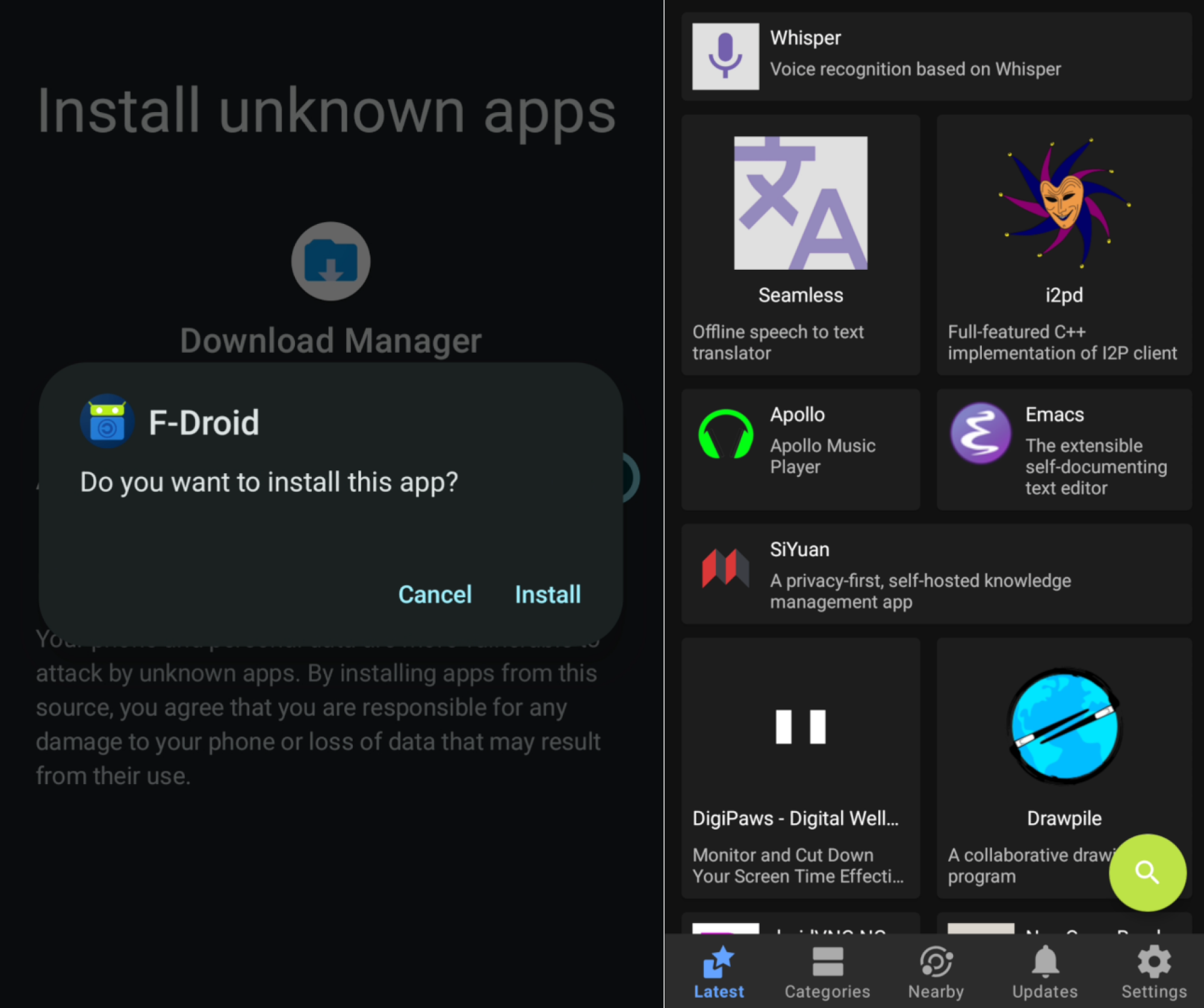
First, you’ll need to download the APK file for the app you want to install. I’m going to use F-Droid, an alternative app store that only carries free and open source applications, to demonstrate how this works. I downloaded the APK file from the website, then I tried to open it. I was told that I was not permitted to install unknown apps from my download manager—in your case the warning may name Chrome, or whatever browser you use. In any case you can tap Settings to adjust the setting to allow installing apps.

Once you’ve enabled the setting, you can now go back to your browser and reopen the file. You will be asked if you want to install the app—tap Install. You’ll see the installer for a few moments, after which the application will be installed.

Two screenshots—one asking if the user wants to install F-Droid and the other showing F-Droid running.

Credit: Justin Pot

Note that you’ll have to repeat these steps for any other sources of software. For example, if you try to install an APK using your phone’s file browser, you’ll need to enable the file browser as a source for software. The same goes for F-Droid and any other alternative app store—you need to give the application permission to install apps.

The exact steps are going to vary depending on your specific model of phone and operating system—that’s the norm for Android. And in some cases your phone might be locked down to prevent such software from being installed—a lot of company-issued phones, for example, are locked down by IT departments. All that aside, though, you should now be able to install APK files. Enjoy the freedom!

Xbox Unveils Muse Generative AI Model With Ninja Gaming Skills


Generative AI seems poised to become an integral part of the game development pipeline, with Microsoft unveiling Muse, a World and Human Action Model (WHAM). It’s the first model of its kind, and comes by way of a collaborative effort between the research team and Xbox Game Studios’ Ninja Theory, which provided gameplay data. The company believes

Jeff Bezos Asks Who Should Be The Next James Bond After Franchise Producers Relinquish Creative Control

It’s been over four years since Daniel Craig’s final appearance as James Bond in No Time to Die and we still don’t know what the franchise’s future holds or who will take the reins next. That could all start changing fast. Amazon now has full creative control over the blockbuster spy series after hashing out a deal…

Read more…

Twitch is Limiting Streamers To 100 hours of Highlights and Uploads

Twitch is planning to cull some of the content archived by streamers to save on storage costs. From a report: On Wednesday the streaming platform announced that it will introduce a 100-hour storage cap for Highlights and Uploads starting April 19th, warning that users will have their content automatically deleted until it falls below the limit.

Twitch says it’s doing this because “Highlights haven’t been very effective in driving discovery or engagement,” and it isn’t worth the cost of storing thousands of hours of such content. Twitch is owned by Amazon, a market-leading cloud storage provider — a detail that hasn’t gone unnoticed by streamers criticizing the decision.

Read more of this story at Slashdot.

Amazon is shutting down its third-party Android app store

The Amazon Appstore will no longer be available on Android as of August 20, 2025. After that date, apps from the digital storefront “are not guaranteed to operate” on Android hardware; however, they can continue to be used on devices like the Fire TV and Fire Tablets. The Coins program, Amazon’s virtual currency for some Appstore app and in-app purchases, will also end on that same date. Coins will no longer be available for purchase beginning today.

The Appstore was Amazon’s effort to get in on the app distribution game for Android. Third-party app stores have been a hot topic for the business world in recent years, with the owners of walled gardens insisting that everything is fair while the companies trying to get a share of the action for themselves insist that it’s not. There have been mixed moves to address the question in the US government, while regions such as the EU have taken more decisive steps to increase competition.

This article originally appeared on Engadget at https://www.engadget.com/big-tech/amazon-is-shutting-down-its-third-party-android-app-store-192047953.html?src=rss

Apple, Lenovo lead losers in laptop repairability analysis

Apple and Lenovo had the lowest laptop repairability scores in an analysis of recently released devices from consumer advocacy group US Public Interest Research Group (PIRG) Education Fund. While Apple’s low marks are partially due the difficulty involved in disassembling MacBooks, Lenovo appears to be withholding information from shoppers deemed critical to right-to-repair legislation and accessibility.

The report, US PIRG’s fourth annual “Failing the Fix” [PDF], calculated repairability scores for PCs and smartphones from popular brands in the US. The report examines “the top 10 most recent devices from each brand that were available for sale directly from manufacturers in January 2025.” If a brand’s website didn’t allow people to sort by newest release, US PIRG picked devices by sorting “by ‘Bestselling’ or something similar,” per the report’s methodology section.

US PIRG’s analysis included finding each device’s French Repairability Index scores on PC makers’ French websites and on third-party retailer sites. US PIRG calculated PC makers’ grades by averaging “the total French score and the isolated disassembly score from each device.” It weighed disassembly scores more heavily because it believes “this better reflects what consumers think a repairability score indicates.” Next, the group subtracted half a point each for membership in TechNet or the Consumer Technology Association (CTA), industry groups that oppose right-to-repair legislation, and added a quarter point “for each piece of Right to Repair legislation supported by the testimony of the manufacturer in the last year.”

Read full article

Comments

Elon Musk recommends that the International Space Station be deorbited ASAP

In a remarkable statement Thursday, SpaceX founder Elon Musk said the International Space Station should be deorbited “as soon as possible.”

This comment from Musk will surely set off a landmine in the global space community, with broad implications. And it appears to be no idle comment from Musk who, at times, indulges in deliberately provocative posts on the social media network X that he owns.

However, that does not seem to be the case here.

Read full article

Comments

You can now sign up to be a contributor to Meta’s Community Notes feature

After announcing its plan to end third-party fact-checking in January 2025, Meta’s crowdsourced replacement is finally starting to take shape. You can now join a waitlist to be a Community Notes contributor on Facebook, Instagram and Threads when the feature rolls out in the coming months.

Contributors are expect to provide context via a note when a post on one of Meta’s platforms “might be inaccurate or confusing,” according to the company’s sign-up page. Community Notes will be able to be added to “most public content across Facebook, Instagram and Threads” and must be 500 characters or fewer. Any note is also subject to Meta’s Community Standards and the judgment of other contributors. Meta expects contributors to rate notes so that the correct context gets displayed under posts.

To sign-up, you need to be based in the US, be over the age of 18, have a Meta account that’s more than six months old and in good standing and have either a verified phone number or two-factor authentication. Meta says contributors will start to be taken off the waitlist once the Community Notes beta launches. The company hasn’t given a hard date for the launch, but does mention that Community Notes will be phased in “over the next few months.”

Meta started testing Community Notes on Threads a little over a month ago. The feature, in name and basic functionality, is inspired by X’s Community Notes, which originally launched in 2022 when the company was still known as Twitter. Community Notes and other crowdsourced pseudo-fact checks have been tested on Google platforms like YouTube and Search as well, and they all have the same general weakness. A crowdsourced answer doesn’t come with the same guarantee of accuracy as one provided by someone whose sole job it is to be an impartial fact-checker. 

This article originally appeared on Engadget at https://www.engadget.com/social-media/you-can-now-sign-up-to-be-a-contributor-to-metas-community-notes-feature-190814234.html?src=rss

My Favorite Amazon Deal of the Day: The Ultimate Ears Megaboom 4

We may earn a commission from links on this page. Deal pricing and availability subject to change after time of publication.

I’ve been a fan of Ultimate Ears (UE) outdoor speakers since I first got the Megaboom 3 back in 2018, and I’m still using it as my personal go-to portable speaker. The Megaboom 4 is its newer version, which came out last year, but it’s already 32% off, bringing its price down to $135.44 (originally $199.99). This is the lowest price it has reached according to price-tracking tools, and it’s cheaper than the Megaboom 3.

UE is well-known in the portable speaker market for making some of the best outdoor speakers. Its Megaboom series is the brand’s flagship speaker, and the fourth reiteration of the speaker was long overdue. The upgrade brings USB-C fast charging, a longer battery life of up to 20 hours, a skip-back media control on its physical buttons, more sub-bass range, and a better sound with more balance.

Because of the way UE designs its speakers, you get 360-degree sound, which is ideal for outdoor use (but it sounds great indoors as well). This speaker, and like many in its lineup, floats on water and has a water- and dust-proof IP67 rating. The companion app lets you fully customize the EQ and connect your speaker to other UE speakers to create a stereo sound. The speaker itself already offers stereo, but since it’s a single speaker, it’ll be hard to notice.

Despite the upgrades, the Megaboom 4 doesn’t get as loud as its predecessor, maxing out around 83 dBs, and the audio quality will sound a bit compressed at those levels, but unless you like to blast your music, this won’t be much of an issue.

If you’re looking for a great portable speaker with modern tech, the Megaboom 4 will not disappoint, especially at this price.