
Stack up to $800 in trade-in credit on the tablet with half off the Book Cover Keyboard Slim or 30% off Samsung Galaxy watches or buds.

Stack up to $800 in trade-in credit on the tablet with half off the Book Cover Keyboard Slim or 30% off Samsung Galaxy watches or buds.

Plus, the Russo brothers want their return to Marvel in Avengers: Doomsday to challenge people.
Panasonic’s mirrorless cameras are best known for their video powers, but with its latest model, the company is finally getting serious about photography as well. The $3,300 full-frame Lumix S1R II is not only the company’s first camera capable of 8K video but can fire off 40 fps bursts of high-resolution (45 megapixel) RAW photos. It also offers a more advanced autofocus system, putting it squarely into the conversation with Sony, Canon and Nikon.
I’ve had a pre-production unit for several days now and so far, I’m impressed. The original S1R was a chunky 2.24 pound monster, but the S1R II is much lighter at 1.75 pounds and considerably smaller in size. That makes it less burdensome than before — though still a bit bigger than the Nikon Z8 and Canon R5 II. It also has one of the fattest grips I’ve ever seen that gave me a firm, secure hold on the camera.
Panasonic made other substantial changes to the body, removing the top display and shifting the mode dial from top left to top right. In the latter’s place a dedicated burst mode dial and photo/video/S&Q switch was introduced, while a new autofocus dial was placed at the back. Handling is now near the top among high-end full-frame cameras in my book, matching or even beating my favorite, the Sony A1 II.
The rear 1.8-million-dot display was also overhauled and not only flips out for content creators but also tilts up and down for photographers — putting it on par with the excellent screen on Sony’s A1 II. The electronic viewfinder has the same 5.76-million-dot resolution and 120Hz refresh rate as before, but now offers a more natural 100 percent magnification.
The S1R II supports both SD UHS II and fast CFexpress Type B cards (rather than XQD as before) with a slot for each, while also allowing SSD recording via the USB-C port like the S5 IIX and GH7. Other inputs include mic, headphone and a full-size HDMI slot, along with a 10Gbps USB-C port. The battery is the same as the one on the GH7 and G9 III but delivers just 350 shots max on a charge, unless you buy the optional DMW-BLK22 battery grip. The S1R II will also offer full-float 32-bit audio recording, but only with the optional DMW-XLR2 audio accessory.
Shooting performance is dramatically better with up to 40 fps (RAW 12-bit) burst speeds with continuous autofocus enabled, compared to a rather pitiful 6 fps on the previous model. It can also hit 10 fps speeds in mechanical mode or 9 fps with 14-bit RAW output. That matches the lower-resolution Canon R1 (though that model does it in 14-bit RAW mode) and is only below Sony’s A9 III that can hit a mind-boggling 120 fps burst speeds in RAW mode.
Panasonic also overhauled the phase-detect autofocus system to add more speed and AI smarts. It can now lock onto a subject’s face and eyes quicker and follow their movements more smoothly, but also detect and automatically switch between humans, animals, cars, motorcycles, bikes, trains and airplanes. From my observations so far, it’s not quite up to the speed and fluidity of Sony and Canon’s latest models, but Panasonic is nearly there.
When it comes to image quality, JPEG photos look natural with realistic colors, though I wasn’t able to open RAW files on this pre-production camera. One big improvement is at high ISOs in low light thanks to the dual ISO sensor that keeps noise under control all the way up to about ISO 12800.
On the video side, the S1R II now supports internal ProRes RAW and 8K video capture, but not both at the same time. ProRes RAW captured to CFexpress or USB-C is limited to 5.8K but uses the full width of the sensor, so it’s a good solution for 4K productions. 8K, meanwhile, can only be captured in 4:2:0 LongGOP MP4 formats at 30 fps (4K tops out at 120 fps in Slow & Quick mode).
That compares to 60 fps max on the Canon EOS R5 II and Nikon Z8, and both of those cameras can do that format in RAW. Sony’s A1 II, by contrast, can also do 8K 30 fps video but doesn’t support RAW recording at all. And of course, the S1R II supports V-Log recording and promises up to 14 stops of dynamic range, slightly less than the S1R. It’ll also allow for external ProRes RAW recording at up to 8K to Atomos recorders via a firmware update coming after the initial launch.
Panasonic’s updated stabilization system promises up to 8 stops of shake reduction, but there are a few significant updates. It reduces edge distortion for video without cropping, though there’s a small amount of vignetting if you do that. As before, it supports e-stabilization at regular and high strengths, and now offers the high-strength mode for anamorphic lenses.
That raises the issue of rolling shutter, since the S1R II doesn’t use a stacked sensor like its main competitors, the Nikon Z8 and Canon R5 II. Distortion is definitely more prominent than on those models, but readout speeds are relatively quick so it’s not offensive except when doing whip pans or filming very fast moving subjects.
At $3,300, the S1R II is priced well below the $4,300 Canon R5 II but nearly on par with the Nikon Z8, which can currently be found at $3,400. It’s set to start shipping at the end of March 2025.
This article originally appeared on Engadget at https://www.engadget.com/cameras/panasonic-takes-on-canon-with-the-full-frame-45-megapixel-s1r-ii-mirrorless-camera-140048286.html?src=rss
A free version of Microsoft Office for Windows might be on its way. Microsoft has been silently testing an ad-supported version of Office reported Beebom. Free versions are currently only available on the web.
The update would allow users to access PowerPoint, Word, Excel and more for free. There appears to be a few conditions for the fee-free option. It appears to include an ever-present banner on the righthand side and 15-second videos that play every few hours. Any documents must also be stored in One Drive rather than in local files.
Each system also comes with limitations. For example, Word wouldn’t have drawing and design tools or dictation. Excel foregoes conditional formatting, recommended charts and more. PowerPoint loses all draw, animation and record tools, among other features.
“Microsoft has been conducting some limited testing,” a representative for the company told PC Mag in an email. “Currently, there are no plans to launch a free, ad-supported version of Microsoft Office desktop apps.”
This article originally appeared on Engadget at https://www.engadget.com/big-tech/microsoft-is-testing-a-free-with-ads-version-of-office-140030345.html?src=rss
“Photoshop” is synonymous with image editing, and for good reason. The app is an industry standard, and has been for over 30 years. But while Photoshop has been available on computers and tablets for some time now, those looking to edit images on their smartphones have had to make due with alternative programs—or simply stick to their other devices instead.
That changes today. As of Tuesday, Feb. 25, Photoshop is officially on iPhone. You can go to the App Store, search “Photoshop,” and see not just the usual alternatives—like Lightroom, Canva, and Facetune—but the real deal, too. Plus, the app itself is free, in addition to a number of “core imaging and design tools.” According to the company, that includes the following, free of charge:
Selections, layers and masks
Tap Select tool
Spot Healing Brush
Adobe Firefly AI features, like Generative Fill and Generative Expand
Integration with Adobe Express, Adobe Fresco, and Adobe Lightroom
Access to “hundreds of thousands” of free Adobe Stock assets
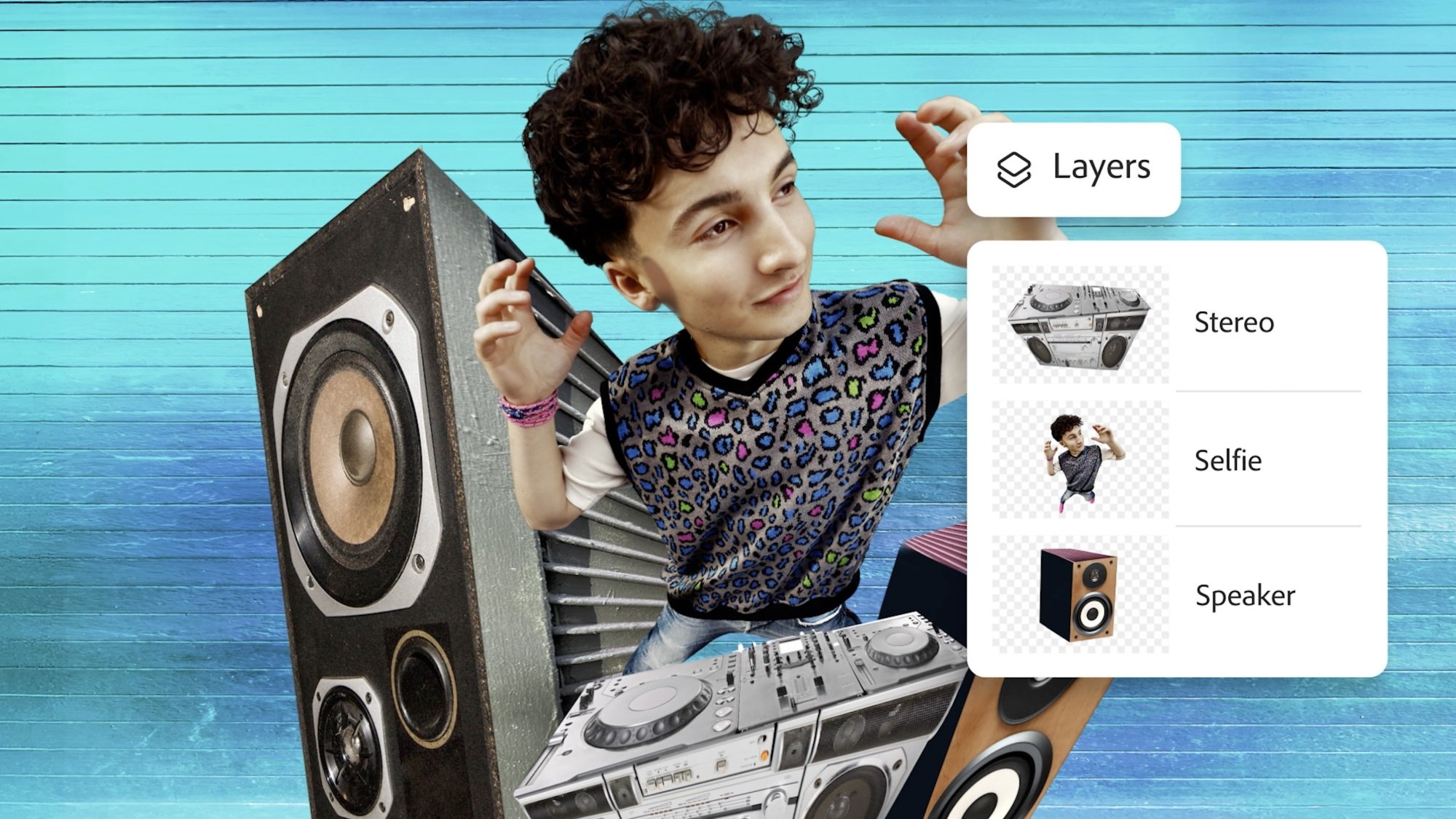
The company showed off a number of edit examples one might use the app for: using a masking tool to copy a subject from one image and paste it to another; using a “quick select brush” to isolate parts of an image from the final product; layering multiple images over one another to create a dramatic but realistic assortment of items around the subject; changing the color of one element of an image, while preserving the rest; and selecting objects to quickly remove them from the scene.
Of course, Adobe is also pushing its AI features, as well—namely, Generative Fill. In one demo, a rep wants to insert an island onto an image of an ocean. They use the lasso tool to highlight where in the image they want that island to be, then use Generative Fill to create a grassy piece of land with AI. In another, Generative Fill is used to remove a background, replacing it with the sky seen in a different part of the image.
Obviously, if you have previous Photoshop experience, you should be quite familiar with the tools and features of this version of the app. However, it may take you a moment to get your bearings: Based on press images and videos, this is definitely a mobile app, meaning its UI looks like many other image editing apps you might have used before. As such, it might take some trial and error before you understand where all of your usual options and features are. But based on what I see, this is the typical Photoshop experience—just distilled into mobile form.
While Photoshop and its “core” features are free to download and use on iPhone, there are more features and perks if you choose to pay. Adobe now has a “Photoshop Mobile and Web plan” for customers who want more on the iOS, iPadOS, and web versions of the app. That includes:
Access to Photoshop on the web
Expanded access to Firefly-powered AI tools, like Generate Similar and Reference Image
Access to over 20,000 fonts (or import your own)
Object Select for precise selections
Magic Wand for targeted adjustments
Remove Tool
Clone Stamp
Content-Aware Fill
Advanced blend modes for styling your image
“Lighten” and “Darken” to lighten or darken different parts of an image
This plan costs $7.99 per month, or $69.99 per year. If you already pay for Photoshop, you now have all of these perks included in your plan.
Adobe has launched a brand new Photoshop app for iPhones, which it’s also releasing for Android later this year. While there’s already a Photoshop Express for mobile, the company says the new app was “designed from the ground up” with more features and has an easy-to-use mobile interface. The app, which is free to download and use, comes with Photoshop’s core imaging and design tools. Users can make selections, layers and masks in the app to combine or blend images. They can also replace parts of an image with the Tap Select tool, remove elements from a photo with the Spot Healing Brush and add new elements by using its generative AI tools, such as Generative Fill and Generative Expand.
Users will have access to free Adobe Stock assets and can link their apps with other Adobe applications, including Express, Lightroom and Fresco. Adobe is, as expected, offering premium upgrades to the app’s capabilities for those willing to pay for the new Photoshop Mobile and Web plan. The $8-a-month service will add features to the app on mobile and iPad and will also include access to Photoshop on the web. Users who already have an existing Photoshop subscription, however, will also be able to enjoy the new Photoshop app’s premium features.
The premium features included with the new plan include the ability to transition editing from Photoshop mobile to the web if a user needs a bigger screen or more precise controls. Users are also getting extra generative AI features, including Adobe Firefly’s Generate Similar, which allows users to create new variations of an existing image. Subscribers will get access to 20,000 fonts, be able to make precise selections of people and objects with the Object Select too, isolate objects with the Magic Wand, erase elements with the Remove Tool, copy and clone certain elements with the Clone Stamp and fill portions of an image with Content-Aware Fill. They will also be able to control an image’s transparency and lighten or darken certain areas of an image. The new app for iPhones is already available from the App Store worldwide.
This article originally appeared on Engadget at https://www.engadget.com/apps/a-new-adobe-photoshop-app-is-coming-to-iphones-140003461.html?src=rss


Read more of this story at Slashdot.


Whether you love Chappell Roan or Doechii (or both!) you’ll agree that these earbuds are where it’s at.
There isn’t an exact science to predicting the Best Picture winner at the Oscars. A Christopher Nolan movie hadn’t won it for the first 24 years of his illustrious career before he snagged the top honors for Oppenheimer. The worst Godfather movie (TheGodfather Part III) got nominated in the same year Spike Lee’s…

Time? Put it on the blockchain.

io9 has your first look at the Pixar-themed release, along with other exclusives coming to WonderCon next month.
Educational tech company Chegg has sued Google in federal court claiming that its “AI Overviews” that appear ahead of search results have hurt its traffic and revenue. In order to be included in Google’s search results, Chegg alleges, it must “supply content that Google republishes without permission in AI-generated answers that unfairly compete for the attention of users on the internet in violation of antitrust laws of the United States.”
Previously, publishers like The New York Times have sued AI companies over copyright infringement, accusing them of training large language models (LLMs) on IP material without permission. However, Chegg is taking another approach, instead accusing Google of abusing its monopoly position to force companies to supply materials for its “AI Overviews” on its search page. Failing to do so, it says, means it could effectively be excluded from Google Search altogether.
Chegg included a screenshot of a Google AI Overview that takes details from Chegg’s website without attribution, though the page in question appears lower down in the search results.
Google told CNBC that it would defend itself against the suit. “Every day, Google sends billions of clicks to sites across the web, and AI Overviews send traffic to a greater diversity of sites,” a spokesperson said.
Google’s use of its monopoly power in this way “amounts to a form of unlawful reciprocal dealing that harms competition in violation of the Sherman Act,” Chegg claimed, while citing a federal judge’s ruling from last year that Google is a monopolist in search. The tech-ed company said that it is particularly affected by these practices because the “breadth, depth, quality and volume of Chegg’s educational content holds enormous value for artificial intelligence applications.”
Chegg is the latest in a long list of companies suing Google over alleged misappropriation of IP content, though as mentioned, using the Sherman Act is a novel approach. As of January 2025, 38 copyright lawsuits related to AI have been filed in the US, according to a site keeping track of the claims — so far with mixed results.
This article originally appeared on Engadget at https://www.engadget.com/ai/educational-tech-company-chegg-sues-google-over-ai-overviews-133017759.html?src=rss
We may earn a commission from links on this page.
Last week during an interview on Air Force One, a reporter asked Donald Trump whether Elon Musk was planning to cut the Pentagon’s budget when he’s finished with the National Park Service and other departments. Trump responded that Musk will instead be looking at Fort Knox.
I’m assuming there was a uncomfortably long pause before the reporter asked why. “To make sure the gold is there,” Trump responded.
Whether the gold is actually at Fort Knox is a question Musk had posed a few days previously in this post on X:
This Tweet is currently unavailable. It might be loading or has been removed.
This has led many to believe that something happened to the gold at Fort Knox. No one knows exactly what happened, but something. Those people are (probably) wrong.
The most likely (and boring) Fort Knox scenario: all 147.3 million ounces of U.S. gold are sitting there, waiting for you to dive in like Scrooge McDuck. All the bars, half of the U.S. total gold reserves, are safe in a heavily guarded, secretive vault on a Kentucky military installation, just as they’ve been since the 1940s. According to Treasury Secretary Scott Bessent, there is an audit of Fort Knox every year and that “all the gold is present and accounted for.”
“The only gold removed has been very small quantities used to test the purity of gold during regularly scheduled audits. Except for these samples, no gold has been transferred to or from the Depository for many years,” confirms the U.S. Mint.
But isn’t that exactly what the U.S. Mint would say? Maybe someone has been stealing all the gold, or the government has been secretly selling the people’s bullion for years! Yeah, probably not.
Musk and Trump are not saying anything new—murmurs of “the gold is not really there” have been common among conspiracy theorists since the 1940s, soon after construction was completed on The United States Bullion Depository and the gold was shipped from the coasts to the heartland to protect it from theoretical invaders.
Here are only some of the conspiracy theories about Fort Knox:
1952: The Daughters of the American Revolution allege that the gold has been stolen from Fort Knox. President Truman invites them to inspect the vault but they decline.
1973: Dr. Peter Beter (his actual name) published The Conspiracy Against the Dollar: The Spirit of the New Imperialism, a book that contends “powerful Americans have secretly permitted $20 billion worth of gold to be removed from Ft. Knox. According to Beter, they took it out through a secret tunnel in the vault.
2009: Online cranks assert that Fort Knox’s gold bars were replaced with tungsten-filled forgeries so the real gold could be sold by the Clinton administration.
2010: Ron Paul questions whether there is gold at Fort Knox.
Unknown: There are aliens there.
These conspiracy theories spring from a weird mix of monetary policy disagreements that date back to the 1800s, hucksters trying to get people to invest in gold schemes, and the questions some people have about anything secret that “the government doesn’t want you to know.” Like everything else, the internet gives people time and space to spread and modernize ideas, but the Trump/Musk quotes are just warmed-over bullshit. And this isn’t even the golden age of Fort Knox conspiracy theories. That was during the 1970s, when fear about our nation’s gold was so pervasive, the Treasury Department had a brief moment of transparency.
It’s not on many people’s shelves in 2025, but Dr. Peter Beter’s (again, really his name) The Conspiracy Against the Dollar was influential enough in the early 1970s that tabloids picked up on his claims, and soon members of Congress were getting calls from constituents, calling for proof that the Fort Knox gold reserves were still there. So in 1974, the Treasure Department sighed and said, “fine,” then invited members of Congress and the press to visit Fort Knox to see for themselves. This was the first time anyone other than treasury employees had been allowed inside the vault since a limited audit was conducted in 1953.
A handful of congresspeople and about 120 members of the media were escorted behind 20-ton steel doors and shown the gold bars. They picked them up. Weighed them. They even got to see the secret tunnel, an escape hatch that ends in the building, a failsafe for anyone accidentally locked in the vault.
The press took pictures and shot film of all of it:
Even the most skeptical congresspeople who toured the vault basically concluded “looks like the gold’s there,” and so, it seems, did most Americans. But for diehard conspiracy theorists (and dummies) no amount of evidence is enough. Some derided the visit as a “show audit” that proved nothing, and others concocted “the bars are filled with tungsten” theories because even if people saw it and took pictures, it’s still not true.
Treasury Secretary Scott Bessent recently has said he would arrange an inspection for any senator who is interested in seeing the vaults. Steven Mnuchin, Trump’s first treasury secretary, had a similar policy. In 2017, Mnuchin, Mitch McConnell, and other officials visited Fort Knox to review the bullion. Their visit included a viewing of the total eclipse as an added bonus. What good timing.
Here’s Mitch McConnell with gold bars. Adorable!

Apparently you can sign your name when you visit Fort Knox, as Mnuchin does here.

The exact purpose of Mnuchin and company’s Fort Knox outing isn’t clear, but I’m sure they were conducting important governmental business, not just sightseeing, and if they had noticed any missing bars, they would have alerted the proper authorities.
While the gold seems to be there, alien bodies are (probably) not stored at Fort Knox, but that doesn’t mean we don’t put weird things down there sometimes.
Back in the 1940s, with World War II ravaging Europe, the U.S. government moved the signed original Constitution of the United States, Declaration of Independence, Articles of Confederation, Lincoln’s Second Inaugural Address, and drafts of Lincoln’s Gettysburg Address into the vault for safe-keeping. The vault was used to store the Crown of St. Stephen, until we sent it back to Hungary in 1978.
Until recently, Fort Knox was home to the U.S.’s strategic reserves of pain-killers: At one time, 68,269 pounds of opium and morphine were stored in the vault—that’s a lot of narcotics! It isn’t stored there any longer, and where it went is not public. Why don’t you look into that, Elon Musk?
Still in the vault are ten 1933 Double Eagle gold coins, a 1974-D aluminum cent, and twelve gold (22-karat) Sacagawea dollar coins that flew on the Space Shuttle Columbia in 1999.
It’s cool that we have a great huge Smaug-sized treasure trove in the U.S., but does it do us any good? The gold bars stored in Fort Knox have been gathering dust since the early 1940s, and we don’t do anything with them and they don’t affect anything tangible. Our money hasn’t been directly tied to gold since the 1930s (or 1970s; it’s complicated) so in a sense it doesn’t matter whether all the bars are filled with tungsten. The piles of gold serve mainly as a symbolic representation of our nation’s wealth and stability—gold is very shiny, after all. Consider this: Fort Knox’s gold is worth $435 billion, total. The U.S. nation debt is $36.22 trillion. So even if we were to sell it all tomorrow, it would be a drop in the bucket. Like the cash hidden under the nation’s blanket, Fort Knox gold is our “if things get really bad, we still have this.” It’s the money in the banana stand. If Elon Musk opens the vault doors and does find nothing there, I hope he’s smart enough to keep it to himself.

Avowed features three starting classes, each focused on specific archetypes that most role-playing fans are certain to recognize. While you can mix and match abilities between these different classes throughout your adventure, picking the one that appeals most to you can have a significant impact on your early hours…
AI has become a pervasive term that is heard with trepidation, excitement, and often a furrowed brow in school staffrooms. For educators, there is pressure to use AI applications for productivity — to save time, to help create lesson plans, to write reports, to answer emails, etc. There is also a lot of interest in using AI tools in the classroom, for example, to personalise or augment teaching and learning. However, without understanding AI technology, neither productivity nor personalisation are likely to be successful as teachers and students alike must be critical consumers of these new ways of working to be able to use them productively.
In both England and globally, there are few new AI-based curricula being introduced and the drive for teachers and students to learn about AI in schools is lagging, with limited initiatives supporting teachers in what to teach and how to teach it. At the Raspberry Pi Foundation and Raspberry Pi Computing Education Research Centre, we decided it was time to investigate this missing link of teaching about AI, and specifically to discover what the teachers who are leading the way in this topic are doing in their classrooms.
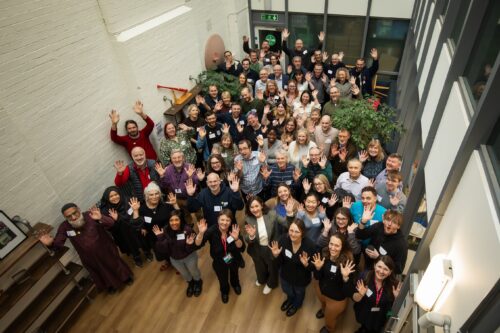
We organised a day-long, face-to-face symposium with educators who have already started to think deeply about teaching about AI, have started to create teaching resources, and are starting to teach about AI in their classrooms. The event was held in Cambridge, England, on 1 February 2025, at the head office of the Raspberry Pi Foundation.
Over 150 educators and researchers applied to take part in the symposium. With only 50 places available, we followed a detailed protocol, whereby those who had the most experience teaching about AI in schools were selected. We also made sure that educators and researchers from different teaching contexts were selected so that there was a good mix of primary to further education phases represented. Educators and researchers from England, Scotland, and the Republic of Ireland were invited and gathered to share about their experiences. One of our main aims was to build a community of early adopters who have started along the road of classroom-based AI curriculum design and delivery.
To inspire the attendees with an international perspective of the topics being discussed, Professor Matti Tedre, a visiting academic from Finland, gave a brief overview of the approach to teaching about AI and resources that his research team have developed. In Finland, there is no compulsory distinct computing topic taught, so AI is taught about in other subjects, such as history. Matti showcased tools and approaches developed from the Generation AI research programme in Finland. You can read about the Finnish research programme and Matti’s two month visit to the Raspberry Pi Computing Education Research Centre in our blog.

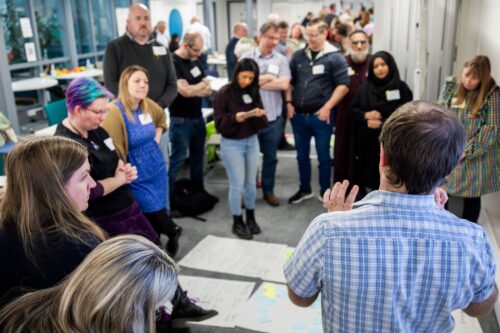
Attendees were asked to talk about, share, and analyse their teaching materials. To model how to analyse resources, Ben Garside from the Raspberry Pi Foundation modelled how to complete the activities using the Experience AI resources as an example. The Experience AI materials have been co-created with Google DeepMind and are a suite of free classroom resources, teacher professional development, and hands-on activities designed to help teachers confidently deliver AI lessons. Aimed at learners aged 11 to 14, the materials are informed by the AI education framework developed at the Raspberry Pi Computing Education Research Centre and are grounded in real-world contexts. We’ve recently released new lessons on AI safety, and we’ve localised the resources for use in many countries including Africa, Asia, Europe, and North America.
In the morning session, Ben exemplified how to talk about and share learning objectives, concepts, and research underpinning materials using the Experience AI resources and in the afternoon he discussed how he had mapped the Experience AI materials to the UNESCO AI competency framework for students.
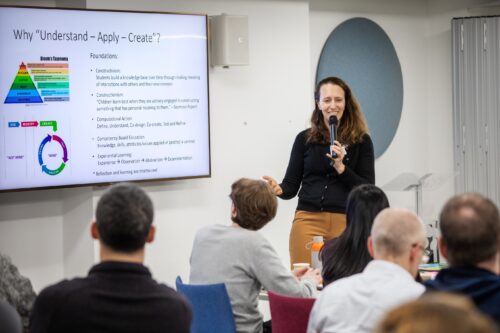
Kelly Shiohira, from UNESCO, kindly attended our session, and gave an invaluable insight into the UNESCO AI competency framework for students. Kelly is one of the framework’s authors and her presentation helped teachers understand how the materials had been developed. The attendees then used the framework to analyse their resources, to identify gaps and to explore what progression might look like in the teaching of AI.
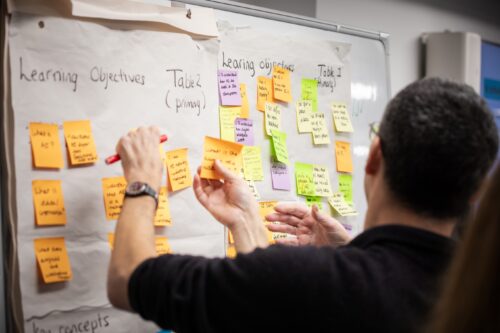
Throughout the day, the teachers worked together to share their experience of teaching about AI. They considered the concepts and learning objectives taught, what progression might look like, what the challenges and opportunities were of teaching about AI, what research informed the resources and what research needs to be done to help improve the teaching and learning of AI.
We are now analysing the vast amount of data that we gathered from the day and we will share this with the symposium participants before we share it with a wider audience. What is clear from our symposium is that teachers have crucial insights into what should be taught to students about AI, and how, and we are greatly looking forward to continuing this journey with them.
As well as the symposium, we are also conducting academic research in this area, you can read more about this in our Annual Report and on our research webpages. We will also be consulting with teachers and AI experts. If you’d like to ensure you are sent links to these blog posts, then sign up to our newsletter. If you’d like to take part in our research and potentially be interviewed about your perspectives on curriculum in AI, then contact us at: rpcerc-enquiries@cst.cam.ac.uk
We also are sharing the research being done by ourselves and other researchers in the field at our research seminars. This year, our seminar series is on teaching about AI and data science in schools. Please do sign up and come along, or watch some of the presentations that have already been delivered by the amazing research teams who are endeavouring to discover what we should be teaching about AI and how in schools
The post Teaching about AI – Teacher symposium appeared first on Raspberry Pi Foundation.
If you’re currently in the market for a music streaming subscription, have we got a deal for you. Pick up six months of Apple Music for just $3. That’s not a typo. This discount brings the price down to, checks math, $0.50 per month. The cost is typically $11 per month, so this sale represents a savings of more than $60. You’ve got a few more days to grab it as well, since the deal runs through February 27.
The usual caveats apply. This is an enticement to bring in new subscribers, so current members are out of luck (myself included.) It’s also not available for those who currently qualify for a three-month free trial of the service. Finally, this deal must be redeemed on an Apple device, and only iPhones running iOS 16 and later, Mac computers running MacOS 13 and later and the Vision Pro headset are applicable here.
Apple Music is a fine little streaming platform. The audio quality is on point, with lossless streaming available at no charge, and the UI is easy-to-navigate. It may not allow exclusive access to Joe Rogan episodes, like Spotify, but that’s because Apple Music seems dedicated to, well, music.
To that end, the app places a heavy emphasis on curation. There are all kinds of playlists that were created by actual humans, and they receive regular updates. Many artist pages include playlists of deep cuts, essential hits and more. Albums are often accompanied by a review or synopsis, which is a nice touch. The app also gives access to several live radio stations that are hosted by actual DJs, and not AI simulacrums.
Apple Music still uses an algorithm for many of its custom playlists unique to each user, but the human touch is still appreciated. The Spotify algorithm for discovering new music is a bit more adventurous, but the Apple algo gets the job done.
On the downside, the service works best on Apple devices. There’s also no free tier, which is something of a bummer. To that end, make sure you cancel before the six months runs out, if it’s not your bag. Otherwise, you’ll start getting charged $11 each month.
Follow @EngadgetDeals on Twitter and subscribe to the Engadget Deals newsletter for the latest tech deals and buying advice.
This article originally appeared on Engadget at https://www.engadget.com/deals/apple-music-deal-get-six-months-of-access-for-only-3-130027527.html?src=rss

This JBL Bar 9.1-Channel Soundbar System just took a $630 price cut during this incredible limited-time Amazon deal.