Amazon’s AI-heavy Alexa+ will be accessible on the web

Amazon just held an event in New York City to reveal the long-awaited revamp of its Alexa chatbot. This refreshed assistant can perform many new tasks, thanks to some AI wizardry, and there are a few different ways for consumers to access the digital companion. There’s voice activation with Echo devices, of course, but the company has also built a dedicated web portal for Alexa+.

This portal will allow Amazon customers to interact with Alexa+ without having to boot up the app or interact with a smart speaker or smart display. This could be handy for making adjustments while at work or for those who feel comfortable drafting lengthy queries with a traditional keyboard. Consumers will also be able to continue using the app, but Amazon promises a redesign in the near future to accommodate the new features offered by Alexa+.

Alexa signage.
Amazon

For the uninitiated, Alexa+ is a juiced up version of the long-standing chatbot. It leverages conversational AI and integration with Amazon services to assist users in a number of new ways. It has contextual awareness, so it can remember earlier parts of a conversation, and can complete relatively complex tasks. The company showed off demos of the assistant finding recipes, booking dinner reservations, searching for the correct part of a movie and a whole lot more.

It looks pretty cool, but it’s also fairly expensive. Alexa+ begins rolling out over the next few weeks to select Echo Show devices and costs $20 per month. However, it’s free for Prime subscribers. Prime currently costs $15 per month in the US. Hopefully that price won’t be rising with the inclusion of Alexa+.

This article originally appeared on Engadget at https://www.engadget.com/home/smart-home/amazons-ai-heavy-alexa-will-be-accessible-on-the-web-164724844.html?src=rss

Everything announced at Amazon’s Alexa+ AI event

Amazon held its first major product event of the year on Wednesday and, as expected, it was largely about Alexa. The company first announced its next-gen, AI-powered voice assistant back in 2023, but technical issues forced Amazon to delay its formal unveiling and rollout. 

An Alexa upgrade means that Amazon has a swathe of new devices ready to support the latest version of the voice assistant. Amazon’s hardware chief, Panos Panay, and his devices and services team were at the event to show off Alexa+.

Here’s a rundown of everything Amazon announced at its first devices event of 2025:

Alexa+ logo shown on a screen behind Panos Panay, who is on stage.
Sam Rutherford for Engadget

After lots (and lots) of boring rambling about generative AI from Amazon CEO Andy Jassy at Wednesday’s event, Panay took the mic to start sharing the actual news. Alexa+ is the name of the company’s upgraded voice assistant. The company will start to roll it out next month, beginning with Echo Show devices. It costs $20 per month, but Prime members get access at no extra cost. Prime currently costs $15 per month, so we have to wonder if a price increase is coming there.

Alexa+ is designed to be more conversational and useful across compatible devices. It can remember your preferences, such as the types of food you like and dislike when asking for a recipe.

Panay claimed that, among other things, smart home management “has transformed with Alexa+.” You can use the voice assistant to, for instance, move music from an Echo device to another speaker or a TV, or jump to a certain scene in a movie that’s on Prime Video. 

Alexa+ can detect your tone and mood. In a live demo, it appeared to try to help Panay remain calm during his presentation. Amazon claims the upgraded voice assistant can answer questions about footage captured with Ring cameras, photos taken with an Echo Show, emails, files such as PDFs, hand-written notes, your calendar, upcoming sports games and much more. Alexa+ can use a service called Suno (which record labels have sued for scraping their music to train its AI modes) to generate custom songs on the fly.

Much like OpenAI has for ChatGPT, Amazon has partnered with a number of news organizations with the aim of answering questions about a variety of topics with current information. Other partners include Uber for ordering rides, OpenTable for booking a restaurant reservation, Spotify, Sonos, Samsung, Xbox, Tidal, Dyson, NASA and “tens of thousands” more. There’s Amazon Fresh integration for grocery ordering, and you can see what’s in your cart on your screen.

Elsewhere, Alexa+ has some features that are apparently kid-friendly. The voice assistant can use genAI to tell kids customized stories based on what they want to hear about. It can also answer questions they have (hopefully without any of those incorrect or false results that delayed Alexa+).

Panay led into the announcement and demos by noting that Alexa, as it stands, can be frustrating to use but generative AI can help to mitigate those annoyances. He added that an AI chatbot wouldn’t be sufficient for Amazon’s vision for Alexa and that people need something easy to use that allows them to “actually take action.” With Alexa+, Panay claimed that the “intimidation factor” of genAI is no more. Sure!

Alexa website
Amazon

There are other ways to access Alexa+ other than on an Echo device. Amazon revealed that you’ll be able to use the upgraded voice assistant via alexa.com, which looks very basic at the time of writing. Seriously, the screenshot above is all that’s on the website, which looks like it was knocked together in five minutes. That’ll surely change soon, as a demo at the event indicated that you’ll be able to type in queries. Amazon is also revamping the Alexa iOS and Android apps to include access to the upgraded assistant.

There was diddly squat on this front. It was widely expected that Amazon would introduce new hardware to go along with Alexa+, such as fresh Echo Buds, Echo speakers, smart displays and so on. 

But nope! The event was all about the upgraded voice assistant which, at least to start with, requires a screen like an Echo Show, smartphone or computer to use. However, the company says Alexa+ will run on nearly every Alexa-compatible device it has released.

This article originally appeared on Engadget at https://www.engadget.com/ai/everything-announced-at-amazons-alexa-ai-event-164613305.html?src=rss

BP Shuns Renewables in Return To Oil and Gas

BP has announced it will cut its renewable energy investments and instead focus on increasing oil and gas production. The energy giant revealed the shift in strategy on Wednesday following pressure from some investors unhappy its profits and share price have been lower than its rivals. From a report: BP said it would increase its investments in oil and gas by about 20% to $10bn a year, while decreasing previously planned funding for renewables by more than $5bn. The move comes as rivals Shell and Norwegian company Equinor have also scaled back plans to invest in green energy and US President Donald Trump’s “drill baby drill” comments have encouraged investment in fossil fuels.

Read more of this story at Slashdot.

[$] Building an open-source battery

FOSDEM 2025 featured the usual talks
about open-source software, but, as always, the conference also offered the
opportunity to discover some more exotic and less software-centric
topics. That’s how I learned about the Flow
Battery Research Collective
(FBRC), which is building what will
eventually become an open-source home battery.
Daniel Fernández Pinto represented the collective at
FOSDEM with his talk “Building
an Open-Source Battery for Stationary Storage
” in the “Energy: Accelerating
the Transition through Open Source
” developer room (devroom).

Instagram Won’t (Usually) Snitch If You Screenshot

Oh, you’re here because you captured the image of someone’s Instagram Story and want to know if they’ll get a notification about the screenshot, à la Snapchat? We’ve all been there, but they’re not going to find out if you took a screenshot of their grid post or story, at least not through a notification. There are a few instances where an Instagram user might be made aware that you’re sharing their content, though, or at least filing it away for later. Here’s everything you need to know about taking screenshots, saving, and sharing in Instagram, so you can lurk in relative peace.

Can you screenshot someone’s Instagram Story or grid post?

If you screenshot someone’s grid or Story post, they do not get a notification. Ditto for screen-recording a video post. For better or worse, I am extremely good at creeping around on the app; I do it all the time. If any of the people whose content I was saving got a notification about it, I’d know by now. And I’d tell you. 

Can you screenshot Instagram direct messages?

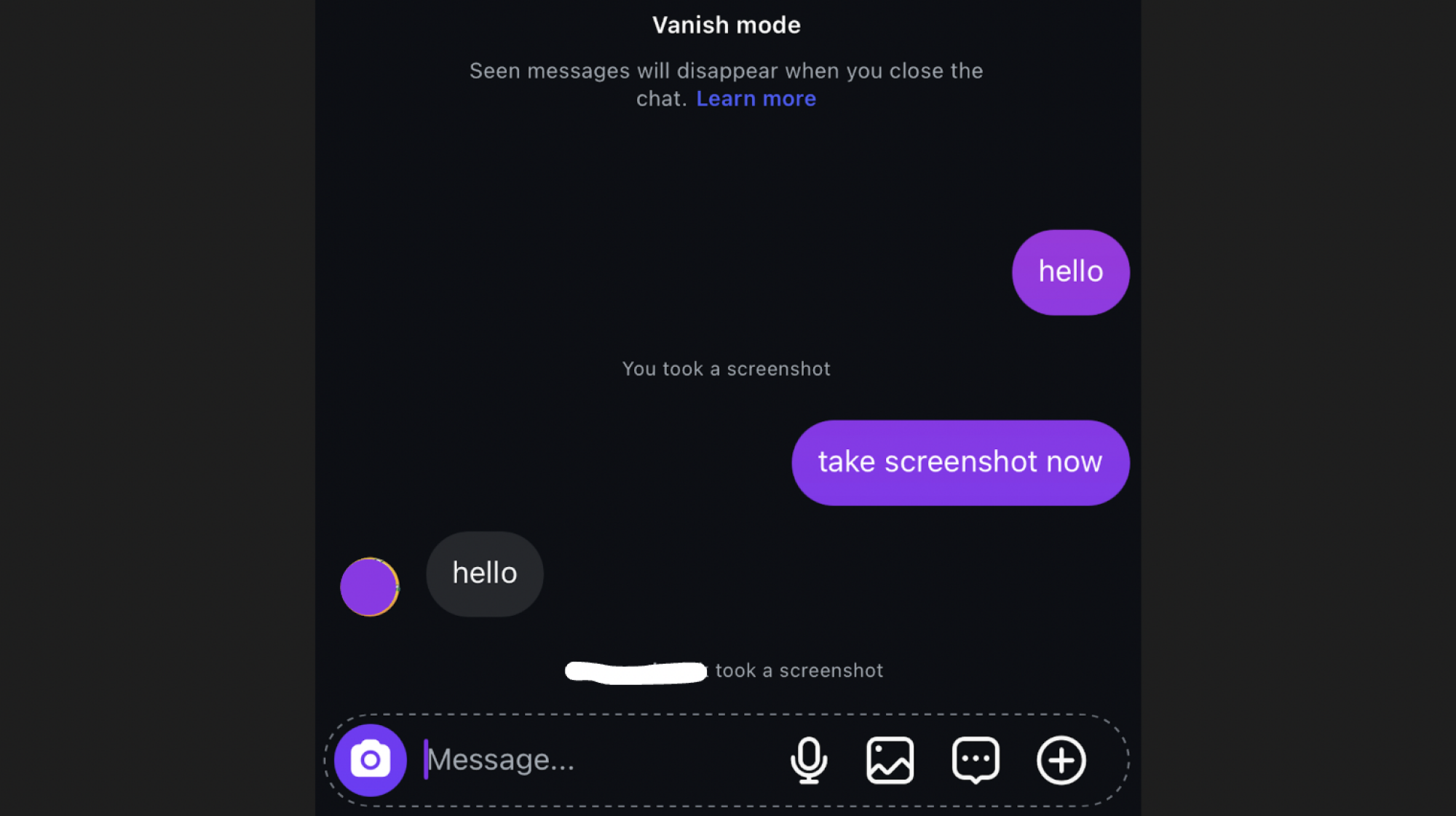
This is where things get dicey. In a standard Instagram direct message, you can screenshot with no problems. If you toggle on vanish mode, however, you lose that ability. This is a new change to vanish mode that appears to have only gone into effect within the past few weeks. I saw a few people posting about it and tested it myself. It’s true: If someone screenshots your chat thread in vanish mode, you get a notification that says, “@theperson took a screenshot.” If you screenshot the thread, you also see the notification that “you took a screenshot.”

It makes sense because vanish mode is supposed to be more private. When you toggle it on (by holding the bottom of your screen and dragging up within the thread), all the messages you send and receive in that chat disappear when you back out of the screen. The other person you’re chatting with is supposed to have a reasonable expectation that their messages won’t stick around for long, so it stands to reason they deserve to know if you took a recording.

This does not apply to messages that are sent in chat threads without vanish mode turned on. It looks like this:

Screenshots in Instagram Vanish mode
The new way Instagram narcs on you.
Credit: @ellefs0n/Instagram

Has Instagram ever alerted users to other screenshots of their content?

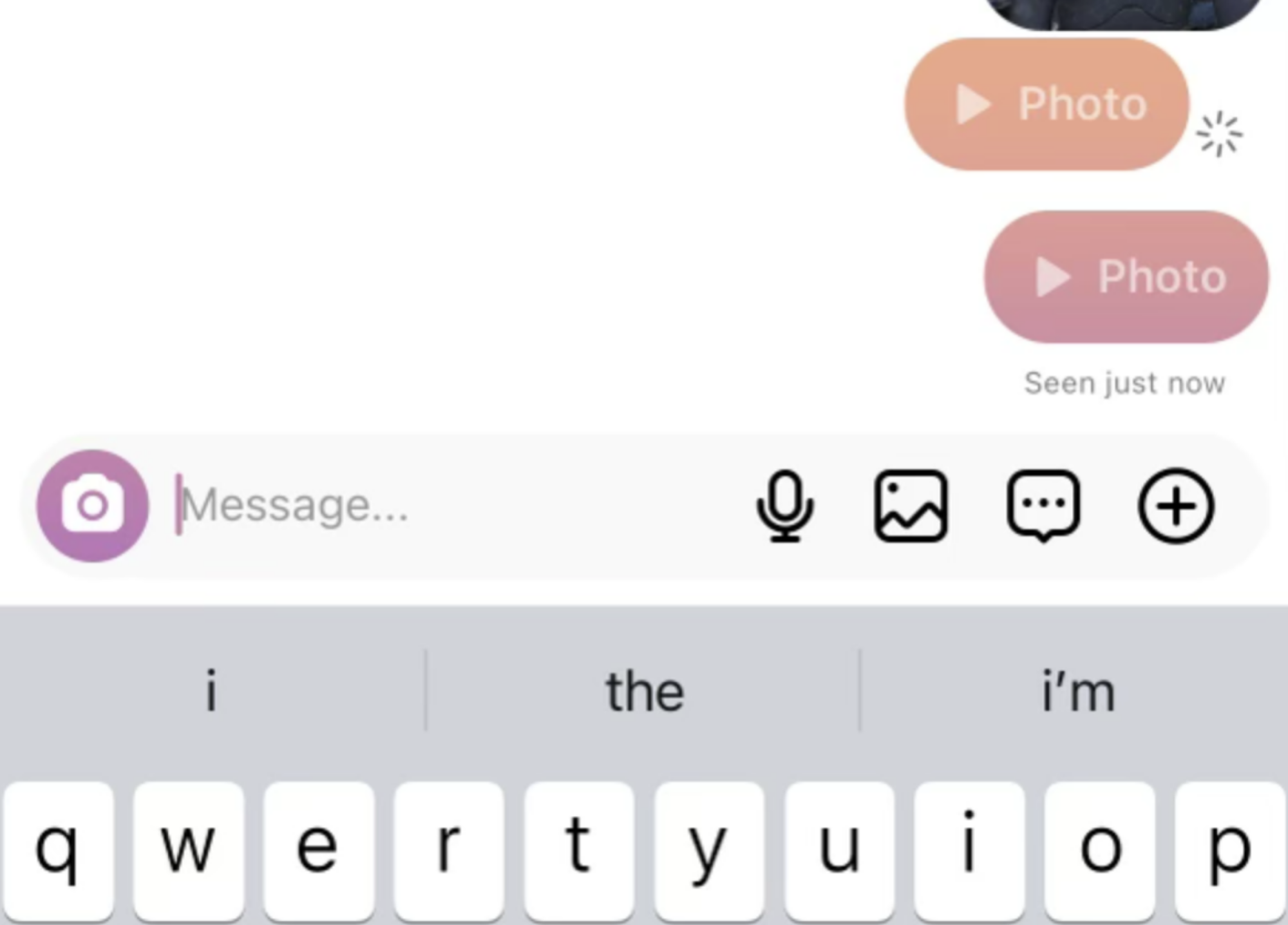
That said, there used to be one other way people could see if you’d taken a screenshot of something on Instagram. It was minor, but that’s what made it insidious: Up until very recently, if someone sent a photo directly to you via Instagram direct messaging, using the in-DM camera feature, and you took a screenshot of it, they would get a notification. It looked like this: 

Screenshots of direct messages in Instagram
The old way Instagram used to narc on you.
Credit: @ellefs0n/Instagram

To demonstrate how that looked, I asked my recipient to screenshot the first picture I sent and to open and view, but not screenshot, the second. The photos were sent in real time, using the camera icon in the bottom left, next to the typing box. As you can see, a little circle icon (it looks like a camera shutter) appeared next to the first one, which meant a screenshot was taken of it. A photo taken with the regular camera and sent from the camera roll did not produce a screenshot notification.

Why am I telling you this? Instagram only recently changed this, but it did so in phases. The last time I checked, three months ago, if you screenshot a photo taken with the in-app camera, there was no longer a notification. Now, Instagram prevents it with a pop-up message that says, “You can’t screenshot or record this. It’s only meant to be replayed once.” If the sender toggles on the “replay” option for the photo taken with the in-app camera and the receiver screenshots that, there is still no notification. That’s a major change from just a year ago, when a notification would pop up, so this is clearly something always in flux. If and when it changes again, I’ll let you know.

Other ways to see if people are sharing your Instagram content

Taking screenshots on Instagram is safe, as we’ve discovered, but there are other ways a person might be able to figure out if you’re disseminating their content or saving it for future review. Technically, you’ll still be anonymous, but it could be traced back to you with a little bad luck.

If you have a business account, not a personal one, you have access to some additional features that can come in handy if you want to know whether people are sharing your content among themselves. Under your grid posts, you’ll see a button that says “View insights.” Tapping this will bring you to a page that shows how many accounts were reached, how many were engaged, how many people tapped through to see your profile, how many were following you already, and all kinds of other interesting data. You’ll also see, right at the top, a string of four numbers: How many accounts liked it, how many comments it got, how many shares it got, and how many saves it got.

Likes, comments, shares, and saves in Instagram analytics

Credit: @ellefs0n/Instagram

The shares and saves are important here. The rightward facing arrow that looks like a paper plane is your shares. The rectangle with a triangular cutout that looks like a bookmark is your saves. If you check this, you can’t see who is sharing or saving it, but you can get a sense of how many opps (or fans!) you have. Above, see that nine people shared my post and six saved it. What were their intentions? These are the questions that keep me up at night, but alas, I may never uncover the culprits.

Bear in mind that if you save or share a post—meaning you send it to someone else via DM, share it to your own Story, or copy the link to send it to someone off-app—if the person has a business profile, they’ll at least know someone did. Depending on the content of the post and how many followers they have, they could narrow it down to you. (To check if someone has a business account, tap their profile. If there’s a descriptor under their name, like Journalist, Blogger, or Public figure, or buttons like “Contact,” they have a business profile.)

If you’re the one worried someone has shared your post with ill intentions, don’t get ahead of yourself. Ask yourself first if you shared your own post to your Story, which would count as a share and increase the number next to that paper plane icon.

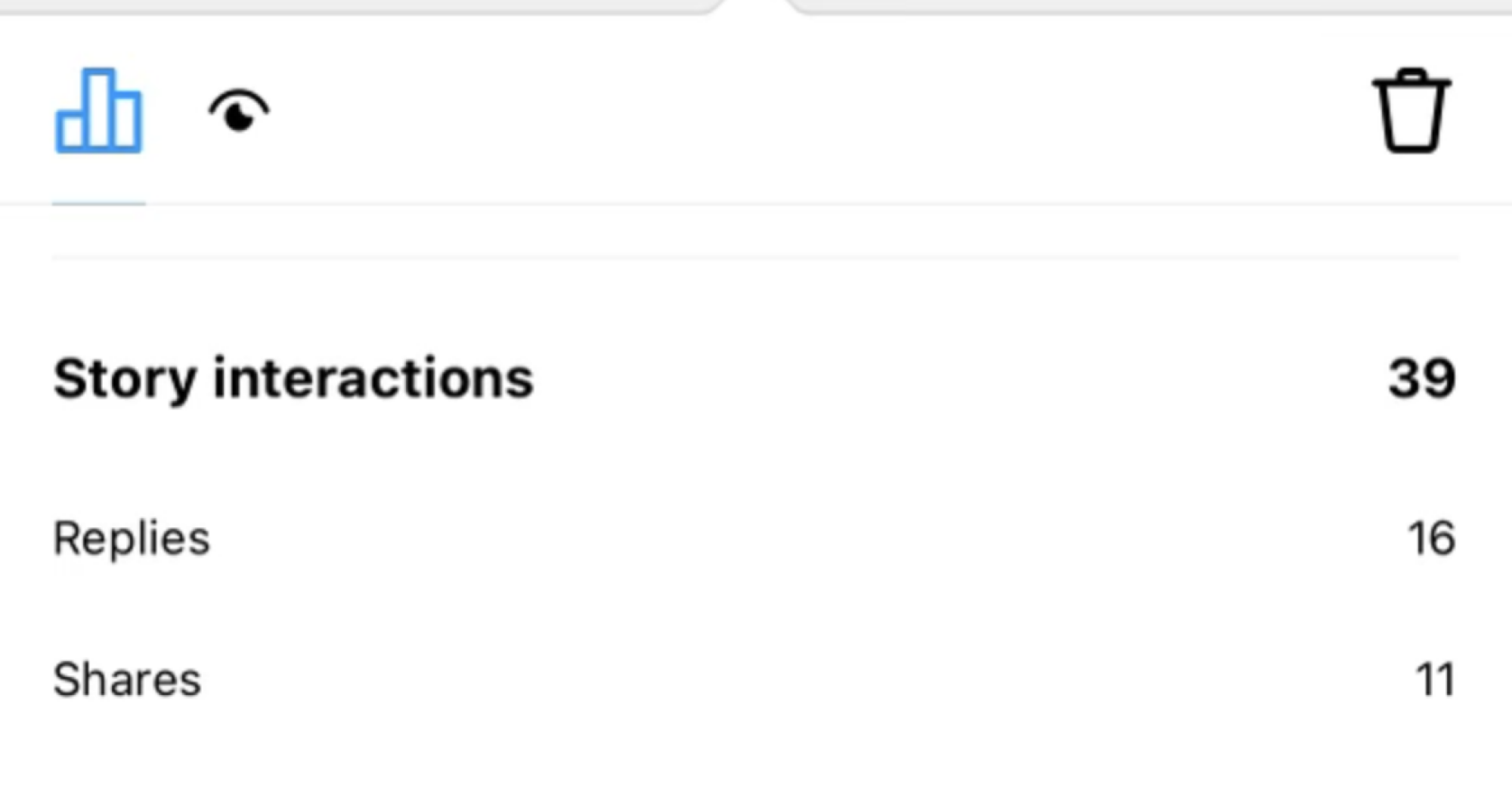
Speaking of Stories, anyone with a business profile can also see the data related to their Story posts, both when the posts are active in the 24 hours after they are shared and in the Story archive. Next to the eye-shaped icon that indicates viewers, there will be an icon with three rectangles that looks like a bar graph. It reveals how many accounts were reached, how many engaged with the post, how many replies it got, etc. It also reveals shares. Below is an example of a time one of my Stories got 11 shares. I was able to figure out who shared it by looking through the views and taking note of the viewers who were not my followers. Sensing nasty intentions, I blocked the original sharer. If you share someone’s Story in-app, the accounts with whom you share it will appear on the story’s viewership list, which could easily implicate you. 

Story shares on Instagram

Credit: @ellefs0n/Instagram

Does any of this matter? No, we should all launch our phones into the nearest trash can Sabrina van der Woodsen-style and go touch grass. But there are ways people can sniff out whether you’re sharing or saving their Instagram posts, even though they won’t get a notification if you screenshot. 

Gentoo now offers qcow2 disk images

The Gentoo Linux project has
announced
the availability of qcow2 images for amd64 (x86_64) and arm64
(aarch64), and plans to “eventually” offer images for the
riscv64 and loongarch64 architectures.

The images, updated weekly, include an EFI boot partition and a fully
functional Gentoo installation; either with no network activated but a
password-less root login on the console (“no root pw”), or with
network activated, all accounts initially locked, but cloud-init
running on boot (“cloud-init”).

QD-OLED Burn-In Testing: One Year Later The Promising Results Are In

QD-OLED Burn-In Testing: One Year Later The Promising Results Are In
Can you imagine splurging on a big and beautiful quantum dot OLED (QD-OLED) monitor, only to turn around and intentionally test its mettle against burn-in over a 12-month period? It’s not something the average consumer should do, and fortunately there’s no need to either, because it’s already been done as part of an ongoing burn-in test.

We

AMD EPYC Turin Power Profile Selection Impact On Performance & Efficiency

Last week I published an article looking at the power efficiency of 5th Gen AMD EPYC “Turin” using the modern AMD P-State driver and the Power Profile options. The AMD P-State driver being used by default now for the EPYC 9005 series processors on Linux 6.12+ and paired with Power Profile option tuning can deliver a nice boost to server energy efficiency with only modest impact to the performance. Today’s article are some complementary numbers I carried out recently on a Supermicro server looking at more of the Power Profile Selection options.

Amazon Revamps Alexa With Generative AI After Year-Long Delay

Amazon has launched a comprehensive AI overhaul of Alexa, representing the voice assistant’s most significant update since its 2014 debut. The new “Alexa Plus” enables multi-turn conversations without repeating wake words, replacing the previous command-response interaction model.

The system now handles complex tasks including booking concert tickets, making restaurant reservations via Yelp integration, and creating smart home routines autonomously. Technical capabilities include image analysis, content-aware movie navigation, and semantic music search that processes vague descriptors rather than exact titles. Originally announced in September 2023 for early 2024 release, the update faced prolonged delays as Amazon engineers struggled with technical challenges.

Internal testing revealed the new AI-powered assistant performed inconsistently against OpenAI’s ChatGPT and suffered from verbose responses. Amazon’s legacy architecture — designed to retrieve predefined answers rather than generate responses dynamically — complicated the transition to generative AI models. The launch represents a critical test for Devices & Services chief Panos Panay, who replaced Dave Limp amid reorganization following layoffs that affected the division.

Read more of this story at Slashdot.

Watch Out for the Latest PayPal Phishing Scam

If you get an email from PayPal, proceed with caution: Scammers are using a legitimate PayPal address to send fraudulent purchase notifications to users in an attempt to gain remote access to your computer by convincing you to download malware.

The phishing emails are being sent from service@paypal.com, which makes them seem real—but as Bleeping Computer reports, scammers have managed to exploit PayPal settings in order to trick recipients.

How to spot the PayPal scam

Users targeted for this scam are receiving emails from PayPal notifying them that they’ve added a new mailing address to their account. According to Bleeping Computer, users who received this message did not actually add new addresses to PayPal, and in some cases, these notices are being sent to email addresses that aren’t even linked to a PayPal account at all.

The phishing email also includes variations of the following message:

“Confirmation: Your shipping address for the MacBook M4 Max 1 TB ($1098.95) has been changed. If you did not authorize this update, please reach out to PayPal at +1-888-668-2508′”

Scammers are hoping users will call the number to reach PayPal support about a suspected fraudulent MacBook purchase. But if you do, you’ll speak with someone who will scare you into believing your account has been hacked and direct you to download and run software to fix it. Instead, though, scams like this intend to take over your system in order to run malware and steal money and/or personal information.

Obviously, a phishing email received from a legitimate PayPal address is worrisome—plus, it can get past security and spam filters. As Bleeping Computer’s reporting found, the scammers are first utilizing the platform’s “gift address” feature (which is just an additional shipping address you can add to your account) and then automatically forwarding the confirmation with the fraudulent message through a mailing list so it looks like it came from PayPal.

How to avoid falling victim to the PayPal scam

One way to identify phishing scams is to check the address that the message is sent from, which may seem legit on the surface but clearly not when you look closer. In this case, that may not help much, but you should always be wary of messages that provoke an emotional response (like fear).

If you get this email, you can ignore and delete it, though you can log into your PayPal account by going directly to the website or app and make sure nothing has been added to your account. Do not click links or call phone numbers listed in suspicious emails—instead, go directly to the website to access your account and locate official customer service channels if needed. Finally, never download anything from a suspicious email to your device.

Two new site features: full-text RSS and automatic dark mode

One of the often-requested LWN site features that has languished the
longest on our to-do list is full-text RSS feeds. We are happy to announce
that, finally, there is a set of such feeds available; the full set can be
seen on our feeds page. This is a
subscriber-only feature, and it works by creating a unique fetch URL for
each user. We will, of course, be counting on our readers to not share
those URLs.

Another feature we have had requests for is to automatically present the
site in dark-mode colors when a reader’s browser has been configured to
prefer it. That feature, too, is now available. In this case, we had to
think about the interaction between automatic selection and the color
customization that the site has long had. The conclusion we reached is
that, if custom colors have been configured for an account, they will win
out over the automatic selection. There is a new preference in the customization area to change this
default if desired.

Both of these features — and the other enhancements we have made recently —
were enabled by the support of LWN’s subscribers. By making it possible to
bring in new staff last year, you created the space to improve the site
experience while keeping up with the writing. We thank all of you for your
support.

Comic Book Writer Says Unfinished Wonder Woman Game Was ‘Gorgeous And Expansive’

The sudden closure of Monolith Productions and the cancelation of its Wonder Woman game has left many scratching their heads. Could it really have been that far off from releasing? Was it really going to cost that much to take it the rest of the way over the finish line? Answers to those questions may come in time,…

Read more…