My Favorite Amazon Deal of the Day: The Samsung Galaxy Tab S9 FE

We may earn a commission from links on this page. Deal pricing and availability subject to change after time of publication.

Samsung has been releasing Fan Edition (FE) smartphones, tablets, and earbuds for those looking for a more budget option compared to their flagship product. The Galaxy Tab S9 tablet has been Samsung’s flagship tablet until the Galaxy Tab S10+ succeeded it last year. But now you can get the more budget-friendly FE version for a record-low price. The Galaxy Tab S9 FE is $297.72 (originally $449.99), a great value considering it comes with a stylus.

The Tab S9 FE is a great budget tablet for anyone looking to get a lot for their money. The best part is that it comes with an S Pen, which by itself retails for $94.99. The Tab S9 FE won’t blow your mind with specs: It’s got a 90Hz refresh rate screen with a 1,440 x 2,304 resolution, it has not an IPS LCD screen instead of AMOLED, and comes with 6GB of RAM and 128GB of storage. But it’s water-resistant with an IP68 rating and includes the Android 13 software; it also includes Samsung DeX, which lets you use your tablet like a laptop (you can get the Dexnor Keyboard Case to attach it to the tablet and pair it with Samsung DeX); and it has the advantage of getting software updates, unlike most tablet competitors. Keep in mind that you can’t connect it to a monitor, however, even with a USB-C video cable.

At the front, you have a 12MP ultrawide camera; in the back, an 8MP. Wifi will be strong with Wi-Fi 6, and the battery life is great, offering you up to 18 hours depending on use (and it’s a USB-C charger). If you’re looking for a reliable tablet that will get software updates for years at a budget price and comes with a stylus, you could do worse than the Galaxy Tab S9 FE.

Who’s Watching What on TV? Who’s To Say?

An anonymous reader shares a report: People now watch so many programs at so many different times in so many different ways — with an antenna, on cable, in an app or from a website, as well as live, recorded or on demand — that it is increasingly challenging for the industry to agree on the best way to measure viewership. In some cases, media executives and advertisers are even uncertain whether a competitor’s show is a hit or something well short of that.

The scramble to sort out a suitable solution began nearly a decade ago, as Netflix rose to prominence. It has only intensified since. “It is more chaotic than it’s ever been,” said George Ivie, the chief executive of the Media Rating Council, a leading industry measurement watchdog. For decades, there was no dispute — Nielsen’s measurement was the only game in town.

But things started to go sideways after the emergence of streaming services like Netflix, Hulu and Amazon Prime Video. Nielsen had no ability — at least at first — to measure how many people clicked play on those apps. The streamers, of course, knew exactly how many people were watching on their own service but they either selectively disclosed some data or did not bother releasing it at all.

Over the past two years, as nearly all the major streaming services have introduced advertising, they have released more data. But the data they release makes apples-to-apples comparisons difficult. Netflix discloses what it calls “hours viewed” and “views” for its shows. Prime Video and Max prefer to describe how many million “viewers” watched a hit of their choosing. The disclosures can be helpful to compare one show with another on the same streaming service. Yet those figures, too, can lead to disagreements.

Read more of this story at Slashdot.

Amazon uses quantum “cat states” with error correction

Following up on Microsoft’s announcement of a qubit based on completely new physics, Amazon is publishing a paper describing a very different take on quantum computing hardware. The system mixes two different types of qubit hardware to improve the stability of the quantum information they hold. The idea is that one type of qubit is resistant to errors, while the second can be used for implementing an error-correction code that catches the problems that do happen.

While there have been more effective demonstrations of error correction in the past, a number of companies are betting that Amazon’s general approach is the best route to getting logical qubits that are capable of complex algorithms. So, in that sense, it’s an important proof of principle.

Herding cats

The basic idea behind Amazon’s approach is to use one type of qubit to hold data and a second to enable error correction. The data qubit is extremely resistant to one type of error, but prone to a second. Those errors are where the second type of qubit comes in; it’s used to run an error-correction code that’s effective at picking up the problems the data qubits are prone to. Combined, the two are hoped to allow error correction to be handled by far fewer hardware qubits.

Read full article

Comments

Four Questions to Ask Yourself When You’re Lifting ‘Heavy’

Lift heavy to build muscle: That’s advice you’ve probably seen in a million places, whether you’re aiming to get stronger, get “toned,” or simply reap the health benefits of putting on a little muscle. But how heavy is “heavy,” and how do you know if your workout qualifies?

There’s no specific number of pounds that will constitute “heavy” for everyone. What’s heavy for a teenage girl picking up a dumbbell for the first time will be a lot less than what’s heavy for a pro strongman. (If you do want to compare your lifts to other people’s, sites like Symmetric Strength can show where you stand—but please consider these comps as just for fun.)

In basic terms, training “heavy” is shorthand for resistance training that is in a low-rep range and gets heavier over time. This is the type of training that delivers the biggest gains in terms of strength and muscle size.

Training heavy is not the only way to build muscle, but it’s an effective one. Here are the questions you should ask yourself when trying to figure out whether you’re training heavy enough.

How many reps are you doing?

Training for strength usually has you doing 1-5 reps in each set. Training for hypertrophy (bigger muscles) is often in the 8-12 range.

The truth is, there isn’t much difference in results between the two methods; getting stronger gives you bigger muscles and getting bigger muscles makes you stronger. I’d say that as long as you’re doing 12 reps or fewer, you’re in an appropriate range to say you are training heavy.

Once you’re doing much more than that—15, 20, 50 reps—you’re training your muscular endurance more than strength. You can build some strength this way, but it’s not what you’re going for when you’re trying to train heavy.

How hard does the set feel?

Let’s say you’re doing squats in sets of eight. That could count as heavy training, but only if you’re loading the squats enough that it’s hard to do all eight of them. For some exercises and some goals, you might be aiming to train “to failure”—literally, going until you can’t do another rep. An example would be if you’re doing eight bicep curls and can’t manage a ninth.

But you can also get close to failure without quite going there. For example, if you’re doing squats, a set of eight might be done at a weight that you could manage for 10 or 11 reps if you really pushed yourself. That still counts as heavy training.

What doesn’t count is if you’re doing eight reps of goblet squats with a light dumbbell because it’s the only dumbbell you have, or because you’re intimidated about going up in weight. Heavy lifting is when you’re doing the appropriate rep range with a weight that is challenging within that range.

Are you increasing the weight over time?

The only way to keep the lift challenging as you get stronger is to keep increasing the weight. This doesn’t mean you need to go heavier every time, but it does mean that you pick up a heavier weight once you’ve gotten a bit stronger.

To use that goblet squat example, maybe squatting with a 20-pound dumbbell was challenging the first time you tried it. But a week or two later, you can probably do the same eight reps with a 25-pound dumbbell. Before long, it may make more sense to do front squats with a barbell, to make it easier to add more weight. OK, now you’re lifting heavy.

But if you kept doing the same sets of eight squats with the same 20-pound dumbbell, you’re not efficiently challenging yourself to build muscle or strength—you’re just doing an exercise that keeps getting easier. That’s still good for you, because it’s still exercise, but it no longer fits the description of lifting heavy.

How long are you resting between sets?

This is where a lot of people go wrong, especially if they’re doing home workouts or are focused on calorie burn. You shouldn’t lift heavy for the calorie burn (or heart rate zones) during the workout; you should lift heavy to build muscle, and save the cardio for another day.

If you’re constantly working to keep your heart rate up, with little to no time to rest between exercises, you aren’t going to be able to train heavy. More likely you’re doing a strength/cardio hybrid such as circuit training. Crossfit “metcon” WODs (workouts of the day) often fall into this category, as do many home workout videos that bill themselves as high-intensity interval training (HIIT). They’re usually not really HIIT, but that’s a rant for another time.

If you aren’t resting, that means you aren’t approaching each set of lifts with fresh, rested muscles. Reducing rest times makes the workouts feel harder, but it also means you’ll be working with less weight. That means these exercises are usually too light fit the definition of working heavy. They might still help you build strength or muscle size, but not nearly as efficiently.

If you take a few minutes’ rest between exercises, then you’re lifting heavy. A typical range would be 2-4 minutes between exercises that work smaller or fewer muscles (like curls or presses) and 3-5 minutes or more between sets of big compound lifts (like squats or deadlifts). With an appropriate rest time, you’ll be able to properly lift heavy.

Wonder Woman Title Scrapped As Warner Bros Closes Multiple Game Studios

Wonder Woman Title Scrapped As Warner Bros Closes Multiple Game Studios
The video game industry continues to face big challenges, with Warner Bros. Games cancelling its planned Wonder Woman game and shuttering several game studios in its portfolio. Despite plenty of popular characters and worlds to draw from, the publisher hasn’t generated the hits it has expected. Its latest big swing, the live multiplayer game Suicide

YouTube Reaches 1 Billion Monthly Podcast Viewers

YouTube has surpassed 1 billion monthly active viewers of podcast content, the video platform announced on Wednesday, cementing its position as the most frequently used podcast service in the United States. The Google-owned platform reported viewers watched over 400 million hours of podcasts monthly on living room devices last year.

Read more of this story at Slashdot.

Alexa Is Getting an AI Upgrade

Are you ready to pay for Amazon Alexa? With the addition of AI to the assistant, Amazon thinks you are.

Announced in a closed-doors meeting with press and business partners today, Amazon’s Alexa+ is bringing AI to the familiar digital assistant, plus a new $20/month price tag. The secret? If you have Prime, you’ll get access to it at no extra charge.

Alexa+ devices

Credit: Amazon

As with standard Alexa, the assistant is built around vocal prompts, but is designed to be more conversational and personalized, and will supposedly be able to act on your behalf and integrate with partner apps including Hulu, Uber, and Xbox.

It also enables new features in Amazon’s own apps, like Prime video or Ring, and should make smart home integration simpler.

Amazon didn’t go over every potential use case at its event, seemingly because there are so many, but a few key ones include:

  • More complex questions: When asking Alexa+ a question, as with other AI, you’ll be able to keep a conversation going without multiple prompts or repeating yourself in each new prompt. For instance, you could tell Alexa that one of your family members is vegetarian, and any recipe suggestions it makes for them for the rest of the conversation will take that into account.

  • Multimodality: Alexa+ is able to use photos as input, or peruse uploaded documents and provide summaries of them.

  • Create new routines by voice: Rather than having to set up new smart home automations through a complicated app, you’ll be able to do them verbally. For example, you could tell Alexa once to remember to turn off the lights when you close the garage door, and it’ll do that from that moment onward.

  • Jump to a specific Prime Video scene: Alexa+ will be able to use details such as scene descriptions or actor names to take you to a specific moment in a specific piece of content within Prime Video. In a press release, Amazon claims that saying something like “what’s that movie where Bradley Cooper sings a duet? Jump to that scene…” will be enough to start it playing.

  • AI-powered Ring: People with Ring subscriptions will be able to ask Alexa+ to summarize saved footage and show you highlights, plus use “Smart Video Search” to find specific moments just by describing them to Alexa, i.e. by saying “When did I last take out the trash bins?”

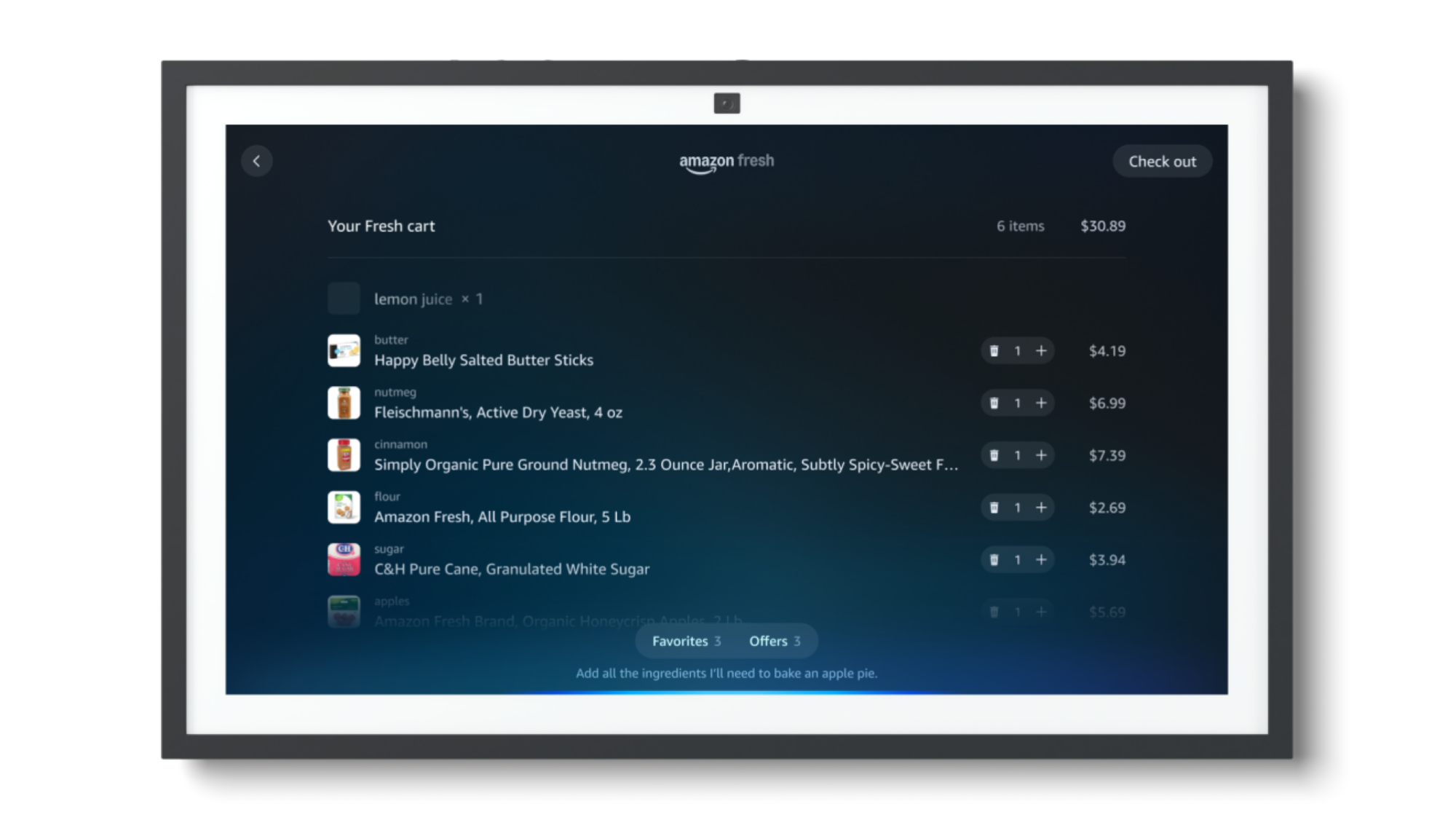
While that’s all set to make Alexa much more powerfuln (assuming it works) it’s also not too different from existing AI solutions. Where Alexa is set to go a step beyond is in taking action, in a way similar to what was promised by the Rabbit R1. Amazon says you could use it to order groceries, find event tickets, set up reservations, or book an Uber, among other things. 

Alexa+ groceries

Credit: Amazon

That’s thanks to those partner integrations mentioned earlier. Supposedly, there are dozens of these partnerships set up and ready to go, including various news outlets like Time or The Washington Post, which should help make the assistant’s answers more accurate. As for actions, while it’s said to be hands-free, it seems like Alexa will ask for confirmation before actually making any final purchases or bookings.

Similarly, Alexa+ is also set to integrate with Amazon Kids+, using AI to converse with kids using facts or interactive games and stories. Amazon promises “extra safety guardrails for younger users,” although details are still light at the moment.

Alexa+ Kids

Credit: Amazon

As is a lot about Alexa+. Amazon is promising transparency and privacy here, accessible via the Alexa Privacy dashboard, and has been surprisingly open about the technology powering Alexa+—it’s a combination of in-house models and Anthropic. But it’ll be a bit before you get to try out the upgraded assistant, with early access set for sometime next month. 

One surprise is that there are no new devices here, with Alexa+ instead being compatible with “almost every” shipped Echo device, although the company says that early access will come first to the Echo Show 8, 10, 15, and 21. Supposedly, the web and a new phone app will also get Alexa+, although it’s unclear when.

Personally, I’ve always been a little skeptical of Alexa and its always-on microphones, and I can’t say Alexa+ is doing anything to move the needle for me. But I also haven’t seen much of it yet. I tend to be a bit more practical-minded when it comes to what I’m willing to use AI for, so we’ll see if Alexa+ can change my mind when I finally get my hands on it—its ability to automatically turn emails into calendar events does seem pretty handy, assuming you’re fine handing that data over to Amazon, and that Amazon makes it easy to do so.

The PS Plus monthly games for March include Dragon Age: The Veilguard

A new month is almost upon us, which means Sony is about to refresh the lineup of games that all PlayStation Plus members can claim and keep in their collection as long as they maintain their subscription. Between March 4 and March 31, you’ll be able to snag Dragon Age: The Veilguard, Sonic Colors: Ultimate and Teenage Mutant Ninja Turtles: The Cowabunga Collection.

Dragon Age: The Veilguard (PS5) is the clear headliner this time around. Fans had to wait a decade between new installments in BioWare’s series, partly because the studio rebooted its work on the latest title several times. Veilguard, an action RPG, is a direct sequel to 2014’s Dragon Age Inquisition. It garnered generally positive reviews and we appreciated the visuals and BioWare’s attention to detail with the game’s characters.

However, Dragon Age: The Veilguard failed to meet BioWare parent EA’s sales expectations. In its first two months, the game brought in 1.5 million players, which is about half of what EA expected in that timeframe. That player count includes those who checked out the game on the EA Play Pro subscription service, so it’s not clear how many copies of the game EA has actually sold so far. That disappointing sales performance is perhaps one reason why Dragon Age: The Veilguard is joining the PS Plus Monthly Games lineup a hair over four months after it was released.

Sonic Colors: Ultimate (PS4) is a remaster of a platformer that was originally released on the Wii back in 2010. As for Teenage Mutant Ninja Turtles: The Cowabunga Collection (PS4 and PS5), that includes 13 classic TMNT games Konami released between 1989 and 1994, such as the all-time great Turtles in Time. The collection has a number of quality of life features, including online and local multiplayer, a rewind option, the ability to save at any point and button remapping. There’s also concept art and “historic TMNT media content.”

Until this trio joins the PS Plus Essential lineup on March 4, you can still snag February’s games. Those are Payday 3, High on Life and Pac-Man World Re-Pac.

This article originally appeared on Engadget at https://www.engadget.com/gaming/playstation/the-ps-plus-monthly-games-for-march-include-dragon-age-the-veilguard-181028013.html?src=rss

US Intelligence Chief Opposes UK Order for Apple Encryption Backdoor

U.S. Director of National Intelligence Tulsi Gabbard has condemned a British order requiring Apple to break its encrypted storage worldwide as an “egregious” violation of American rights that could breach the CLOUD Act facilitating cross-border investigations. In a letter [PDF] to Senator Ron Wyden and Representative Andy Biggs, Gabbard revealed she has directed a legal review of the secret order, which she learned about through media reports.

“This would be a clear and egregious violation of Americans’ privacy and civil liberties, and open up a serious vulnerability for cyber exploitation by adversarial actors,” Gabbard wrote. The UK Home Office, under the Investigatory Powers Act, prohibited Apple from disclosing the order to Congress or U.S. regulators. The directive would have forced Apple to compromise its Advanced Data Protection encryption, enabling officials to access individual data. Apple refused compliance, instead withdrawing the secure storage option from UK customers while maintaining it elsewhere globally. Despite Apple’s pullback, the UK demand for backdoor creation remains. Gabbard pledged to ensure UK actions protect American privacy rights “consistent with the CLOUD Act and other applicable laws.”

Read more of this story at Slashdot.

It’s easier than ever to scrub your personal info from Google Search

As Google’s 2024 antitrust loss proved, the company has worked very, very hard to ensure its search engine is the primary roadmap for the Internet. Google scours the Internet for data about everything—even you. And if you don’t want your personal info to wind up in Google search results, you can use the just-redesigned “Results About You” tool. The tool, which began its rollout in 2022, is easier to use now, and some of the most useful features are now better integrated with search results.

The first step in using Results About You—which has not changed—is a bit alarming when you’ve set out to obscure your personal information. Just head to the new hub for Results About You and enter your personal information. Google probably already knows your phone number, email, and even physical address, but this tells the tool what specific information to pluck out of search results. If that data is out there, Google has it whether or not you remove it from search results.

Before this update, most of the Results About You features were limited to this console, but the most important features are now integrated with the search results. They’re not exactly prominently displayed, though. When scrolling through a Google search (after the AI overview, ads, knowledge graph, and more ads), you can use the three-dot menu next to a result to get data about it. This menu now includes options to remove the result right at the top.

Read full article

Comments

World Record 228 Jump Rope Jumps In 30 Seconds

This is a video of jump roper Cen Xiaolin setting a new world speed record with an astonishing 228 jumps (technically alternate leg skips) in 30 seconds. That’s 7.6 jumps PER SECOND. Cen has been speed jumping for a while, and his record 8 years ago was only 108 jumps, so he’s more than doubled it in that time. How far can he go? My guess is ALL THE WAY. I don’t even know what that means, but I believe in him. Also, it’s safe to say I could never move that fast even if I was on fire, which I often am.

Keep going for the new record, as well as Cen’s previous record from 2016 for reference.

These Home Repairs Aren’t Your Landlord’s Responsibility

We may earn a commission from links on this page.

There are all kinds of laws that govern the rights you have when you’re renting your home, but landlords are also pretty well-protected. You might think that anything that goes on in your apartment is their business (for better or worse), but there are actually quite a few things that simply are not their responsibility. While it’s pretty wild that they technically own your home and can make all kinds of rules about it but don’t actually have to fix certain issues, it’s worth knowing what is and is not their job when it comes to your space.

Outdoor spaces are your responsibility

If you are renting a house or are lucky enough to have scored an apartment with a backyard, be warned: Your lease may stipulate that management of those areas is your responsibility. Read it carefully and ask your landlord if you have any questions, but know that you could be the one who has to clear snow, trim the grass, clean the gutters, remove pests, and more.

Small plumbing issues are also for you to handle

Clogs and other little plumbing issues are rarely your landlord’s responsibility. Unless it’s something really major, you’re probably on your own to get whatever is in that pipe out of it, which you should do because if your issue becomes the building’s issue, you’re likely on the hook for that, too.

I recommend the FlexiSnake Drain Weasel for clogs: It extends 18 inches, has a rotating handle that makes using it easy, and it’s less than $20. Regularly use this to avoid major problems down the line and only call your landlord when something is really, really wrong. For instance, my super stopped by a few months ago to fix my leaky shower—there was a problem with some valve seals that I didn’t cause and couldn’t fix on my own—but my stopped-up sink just a foot away? That’s my problem and mine alone. Speaking of…

Damage you cause is damage you fix

In most cases, if you cause damage, you have to fix it. If your wall develops a hole because of a water leak, that’s the landlord’s responsibility. If it develops a hole because you hung something too heavy, it’s yours.

This can get a little confusing, so this is the category it’s best to discuss with your super regardless. This week, I called mine out of exasperation because I couldn’t get some marks off the higher part of my wall. I assumed they were my fault. Wrong! They were caused by a faulty radiator valve (not my fault) and were actually a sign of a deeper problem inside the wall (also not my fault), which meant the management company did have to dispatch someone to not only tear up my wall, but replace my radiator valve. They did that, but other marks caused by scratches or wall hangings were left untouched; those are my responsibility, since I put them there.

This is not to say you’re on your own completely. Depending on the relationship you have with your super, you can ask to borrow their tools and resources and they might even help you out. It is, after all, in their financial interest to keep it in good condition. I rent a small apartment and certainly don’t have room for things like big tools or ladders, but my super lets me use his when I have to correct something that falls under the umbrella of my responsibility. More often than not, they actually come do it for me, preferring not to let me climb around on a ladder they own. Smart!

Cosmetic repairs are your responsibility

In that same vein, your landlord is likely not legally required to make repairs in your place that are purely cosmetic. If a crack in your bathroom tile is merely unsightly, that’s probably your problem. If a crack in the tub is causing a leak or making it unusable, it’s more likely theirs. What they are legally required to do is keep the building livable, which means you have to be warm and have access to the essentials. That’s it. I know from experience that they have little to no interest in how attractive your unit actually is, as long as it’s not driving the value down or visible from the outside. That said, once again, ask nicely and see if they’re willing to help you out or lend you tools. Just because they aren’t legally required to do something doesn’t always mean they won’t, especially if you can make the case that it will keep the value high.

What to do if you’re unsure

You can assume your landlord doesn’t have to provide you with window screens, air conditioners, lightbulbs, and other things of that nature, but you should always reach out to them if you think there’s a chance. My apartment has a vaulted ceiling, for instance, and like I said, I don’t have a gigantic ladder lying around. My landlord comes in and changes my lightbulb when I need it, which is considerate; I just have to provide the bulb. Read your lease carefully to see what repairs are specifically highlighted as their responsibility and yours and, if you do make requests or ask for clarification, be sure to always do it in writing so you have a record of what is said.

This week, after my wall catastrophe, my building manager gently reminded me that I should always err on the side of asking for help instead of assuming I have to take care of something myself. That’s great advice straight from the horse’s mouth. They might be willing to help you out, but you won’t know unless you ask. Just keep in mind they don’t have to do much beyond fix anything that makes the place unsafe or unlivable.

In addition to reading over your lease, being open with your landlord, and just asking for help on the chance they’ll provide it, familiarize yourself with the renter protections and laws in your specific state. The repairs above are generally accepted as the ones you’re in charge of, but that might not be true where you live. Here is a handy state-by-state list that can help you get started. The more you know about your lease and the laws that apply to your personal situation, the better equipped you are to deal with leaks, holes, and other issues.


This DJI Osmo Action 5 Pro bundle is cheaper than ever

The DJI Osmo Action 5 Pro Adventure Combo bundle is on sale via Amazon for $369. This is 18 percent off and represents a record low price, as the normal cost is $449. The bundle includes the well-regarded Action 5 Pro camera, a trio of rechargeable batteries, a protective frame, a lens cover, an extension rod and more.

We heaped praise on the Osmo Action 5 Pro camera in our official review, calling it “a worthy GoPro rival.” The battery life here is next-level, allowing for over two hours of use when shooting 4K 60p video and four hours when shooting in 1080p. Again, this bundle comes with three batteries, which means twelve full hours of continuous shooting in 1080p. That’s a whole lot of ski jumps or whatever.

There’s also 47GB of internal storage, in addition to a microSD slot. Most action cameras don’t even have internal storage, so this is a much-appreciated upgrade. The Action 5 Pro is lightweight and waterproof down to 66 feet. There’s a waterproof case that extends this limit to 200 feet, but that doesn’t ship with this particular bundle.

As for the actual footage, we found it to be serviceable, but thought the color was slightly oversaturated. The video is also a bit less sharp than what’s produced with rival cameras. Other than these minor nitpicks, however, this is a near-perfect action camera, and those accessories sure sound useful.

The Adventure Combo isn’t the only bundle on sale right now, though it is the best value. The Essential and Standard bundles are also on sale, at $319 and $329 respectively.

Follow @EngadgetDeals on Twitter and subscribe to the Engadget Deals newsletter for the latest tech deals and buying advice.

This article originally appeared on Engadget at https://www.engadget.com/deals/this-dji-osmo-action-5-pro-bundle-is-cheaper-than-ever-175747696.html?src=rss