
The FreeDesktop.org GitLab instance that is heavily relied upon for the development of the Mesa graphics drivers, Wayland, and many other Linux desktop projects will be down for up to one week later this month due to its cloud migration…
Category Archives: Unfiltered RSS
Linux 6.15 Preparing Support For The XP-Pen Artist Pro 19, A Big 4K Drawing Tablet
Linux already supports a number of XP-Pen drawing tablets while the upcoming Linux 6.15 kernel is set to include support for another one: the XP-Pen Artist Pro 19. This XP-Pen Artist Pro 19 is a big, 4K resolution display drawing tablet that retails for nearly $800 USD and features dual stylus, 16K pressure levels, and a nice display for this 19-inch drawing surface…
VR treadmill Omni One gets its own travel app with world-famous sights
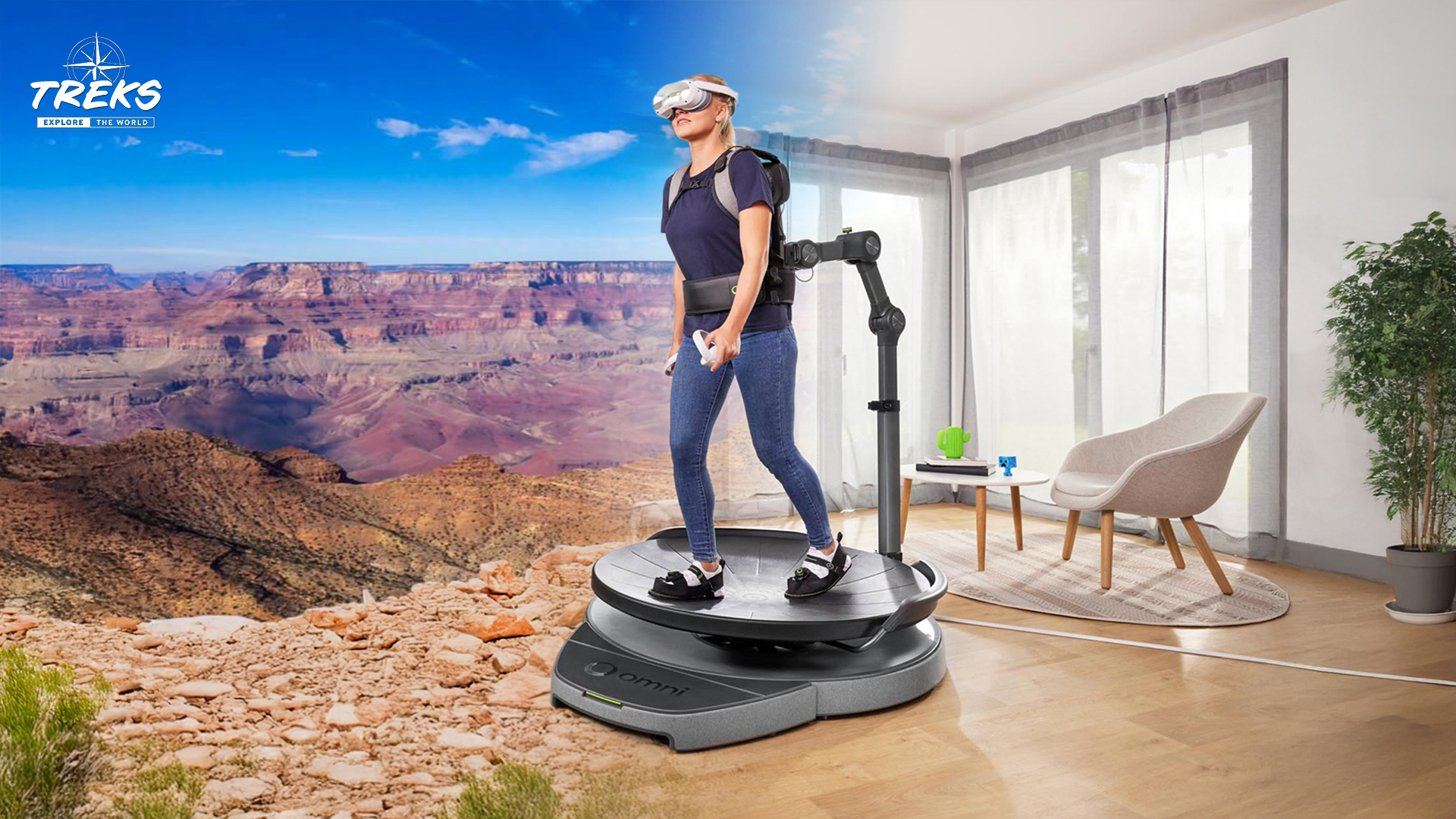
With Treks from Virtuix, you can experience the world’s most famous sights in VR — on foot on the Omni One VR treadmill.
The post VR treadmill Omni One gets its own travel app with world-famous sights appeared first on MIXED Reality News.
More Apple SoC DeviceTree Additions Being Upstreamed For Linux 6.15
Sven Peter continues work on upstreaming more of the Apple SoC support to the mainline Linux kernel. On the DeviceTree side following the DT support for Apple T2 SoCs sent out last month, another set of updates were submitted this week ahead of the Linux 6.15 merge window…
Best Free and Open Source Alternatives to Progress WS_FTP Professional
WS_FTP Professional is a secure FTP client that provides reliable and secure transfer of critical files. We recommend the best free and open source alternatives.
Ray-Ban Meta Smart Glasses: New limited edition coming this month
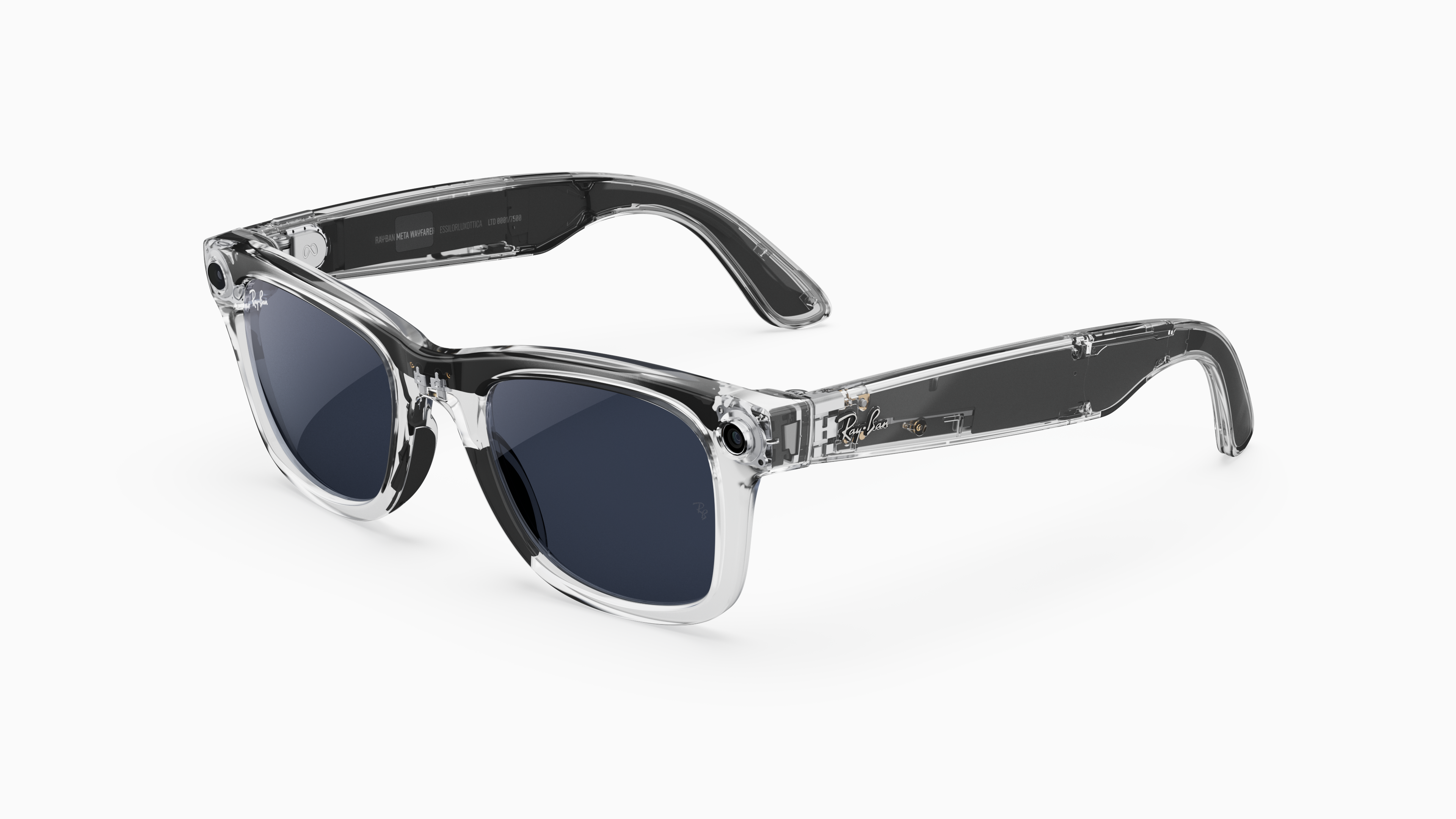
A new limited edition with a transparent frame for the smart glasses from Meta and Ray-Ban is in the starting blocks.
The post Ray-Ban Meta Smart Glasses: New limited edition coming this month appeared first on MIXED Reality News.
Volvo reveals its ES90 EV with an 800-volt charging system
Volvo has officially launched the ES90, the fully electrified version of its S60 sedan. While the vehicle can technically be considered a sedan, Volvo says it has the “adaptability of a fastback, and the spacious interior and higher ground clearance associated with SUVs.” It’s the first Volvo EV with an 800-volt system, which promises faster charging times. Since Volvo’s 800-volt technology uses lighter components to reduce the vehicle’s overall weight, it could also lead to a longer range and better acceleration.
For the ES90, specifically, Volvo promises a driving range of 700 kilometers or 435 miles, though the official EPA range could be shorter. When plugged into a 350 kW fast charger, the model can add 300 kilometers (186 miles) of range in just 10 minutes, and its 106 kWh battery can go from 10 to 80 percent full in just 20 minutes. All the vehicle’s variants have a top speed of 112 mph, but the Twin Motor Performance (all-wheel drive) version has the fastest acceleration and can go from 0 to 60 mph in 3.9 seconds.
The ES90 was built on top of the Volvo Cars Superset tech stack, just like the EX90 SUV. That’s a single set of hardware and software that will serve as the base for all of Volvo’s electric vehicles and will make it possible to simultaneously roll out over-the-air updates for all its EVs as needed. ES90, however, is the first Volvo model to be powered by dual NVIDIA DRIVE AGX Orin configuration, which the company’s chief engineering and technology officer says makes it the “most powerful car [Volvo has] ever created in terms of core computing capacity.”
Volvo gave the ES90 a slightly raised ride height and its Thor’s Hammer headlight design, along with its new C-shaped LED rear lamps. It also equipped the vehicle with an array of sensors that include one lidar, five radars, seven cameras and twelve ultrasonic sensors for its active safety systems that can help drivers avoid collision and hazards. Inside, owners can individually fold down its three rear seats for more space. And while the panoramic roof provides 99.9 percent UV protection, buyers can choose the electrochromic version that will allow them to darken the glass and reduce glare at the touch of a button. Owners can access the model’s infotainment system on its 14.5-inch center screen display, which comes with built-in Google apps, including Maps and Assistant.
Interested buyers can now order the ES90 in Austria, Belgium, the Czech Republic, Finland, France, Germany, Greece, Hungary, Italy, the Netherlands, Norway, Poland, Portugal, Spain, Sweden, Switzerland and the United Kingdom. Volvo will release it in more markets later this year and into 2026.
Volvo
This article originally appeared on Engadget at https://www.engadget.com/transportation/evs/volvo-reveals-its-es90-ev-with-an-800-volt-charging-system-101006882.html?src=rss
Lauded VR Storytelling Studio Astrea Releases Latest Project on Quest & PC VR


Astrea, the studio and publisher behind a host of VR narrative experiences, including Spheres, Astra, and Mobile Suit Gundam: Silver Phantom, has released an interactive VR experience on Quest and PC VR headsets that lets you embody passengers on a train, and help them face pivotal moments in their lives.
Called The Passengers, the four chapter, 40-minute interactive experience allows you to become one of four characters, experiencing their internal monologues and interacting with the environment with both your hands and voice.
Developed by Canada-based studio Couzin Films and France-based Les Produits Frais, The Passengers tells each story with a variety of styles, offering different visuals such as oil paint, watercolor, pencil, colored pencils, and immersive video.
“In this experience, you can be each one of the four passengers who all have their own personal quest. The course of each story is affected according to what they say, where they look, and what they do with their hands. You are one deciding all of that. The characters were created by volumetrically scanning the four actors. They were then rigged and animated through motion capture.”
While The Passengers is new to consumer headsets, it’s actually been on the international festival circuit since 2021 shortly after its completion.
The experience won the Best Immersive Experience – Fiction award at the Canadian Screen Awards (2022), and was selected as a finalist at the Prix Gémeaux (2022), Prix Numix (2021) and the VR Experience of the Year at the VR Awards (2021).
You can find The Passengers on the Horizon Store for Quest 2 and above, and Steam for PC VR headsets, priced at $5.
The post Lauded VR Storytelling Studio Astrea Releases Latest Project on Quest & PC VR appeared first on Road to VR.
The best MacBook accessories for 2025
The MacBook Air and Pro are great all-in-one computers. The excellent trackpad and keyboard on the latest MacBook Air is part of why we named it the best laptop you can buy. The bright screen and long lasting battery on the Pro model helped it earn a high score of 92 in our review. But to really get the most out of a MacBook, we recommend adding a few accessories — both for your stay-put command center and your on-the-go setup. External keyboards and mice can improve your ergonomics, a webcam can enhance your video calls and a docking station lets you connect more than the built-in ports will allow. Here are the best MacBook accessories we’ve used that may work for you too.
Best MacBook accessories for 2025
This article originally appeared on Engadget at https://www.engadget.com/computing/accessories/best-macbook-accessories-150014737.html?src=rss
World’s First ‘Synthetic Biological Intelligence’ Runs On Living Human Cells
Australian company Cortical Labs has launched the CL1, the world’s first commercial “biological computer” that merges human brain cells with silicon hardware to form adaptable, energy-efficient neural networks. New Atlas reports: Known as a Synthetic Biological Intelligence (SBI), Cortical’s CL1 system was officially launched in Barcelona on March 2, 2025, and is expected to be a game-changer for science and medical research. The human-cell neural networks that form on the silicon “chip” are essentially an ever-evolving organic computer, and the engineers behind it say it learns so quickly and flexibly that it completely outpaces the silicon-based AI chips used to train existing large language models (LLMs) like ChatGPT.


“Today is the culmination of a vision that has powered Cortical Labs for almost six years,” said Cortical founder and CEO Dr Hon Weng Chong. “We’ve enjoyed a series of critical breakthroughs in recent years, most notably our research in the journal Neuron, through which cultures were embedded in a simulated game-world, and were provided with electrophysiological stimulation and recording to mimic the arcade game Pong. However, our long-term mission has been to democratize this technology, making it accessible to researchers without specialized hardware and software. The CL1 is the realization of that mission.” He added that while this is a groundbreaking step forward, the full extent of the SBI system won’t be seen until it’s in users’ hands.
“We’re offering ‘Wetware-as-a-Service’ (WaaS),” he added — customers will be able to buy the CL-1 biocomputer outright, or simply buy time on the chips, accessing them remotely to work with the cultured cell technology via the cloud. “This platform will enable the millions of researchers, innovators and big-thinkers around the world to turn the CL1’s potential into tangible, real-word impact. We’ll provide the platform and support for them to invest in R&D and drive new breakthroughs and research.” These remarkable brain-cell biocomputers could revolutionize everything from drug discovery and clinical testing to how robotic “intelligence” is built, allowing unlimited personalization depending on need. The CL1, which will be widely available in the second half of 2025, is an enormous achievement for Cortical — and as New Atlas saw recently with a visit to the company’s Melbourne headquarters — the potential here is much more far-reaching than Pong. […]
Read more of this story at Slashdot.
Thunderbird 136 Now Available for Download, Here’s What’s New
Mozilla Thunderbird 136 rolls out with dark mode enhancements, improved message threading controls, and bug fixes.
Vertigo 2: DLC for the popular VR shooter will no longer be released in March

Bad news for Vertigo 2 fans: The eagerly awaited story add-on Into the Aether will be released a month later than planned.
The post Vertigo 2: DLC for the popular VR shooter will no longer be released in March appeared first on MIXED Reality News.
Firefox 136 finally brings the features that fans wanted
Vertical tabs, native Arm64 Linux version, and AMD GPU-accelerated video playback. Mozilla’s Firefox 136 is out today. Despite recent Mozilla moves, it’s still a better choice for the privacy-conscious than Chrome.…
Meta’s Orion AR glasses: “We start getting into the limits of physics”
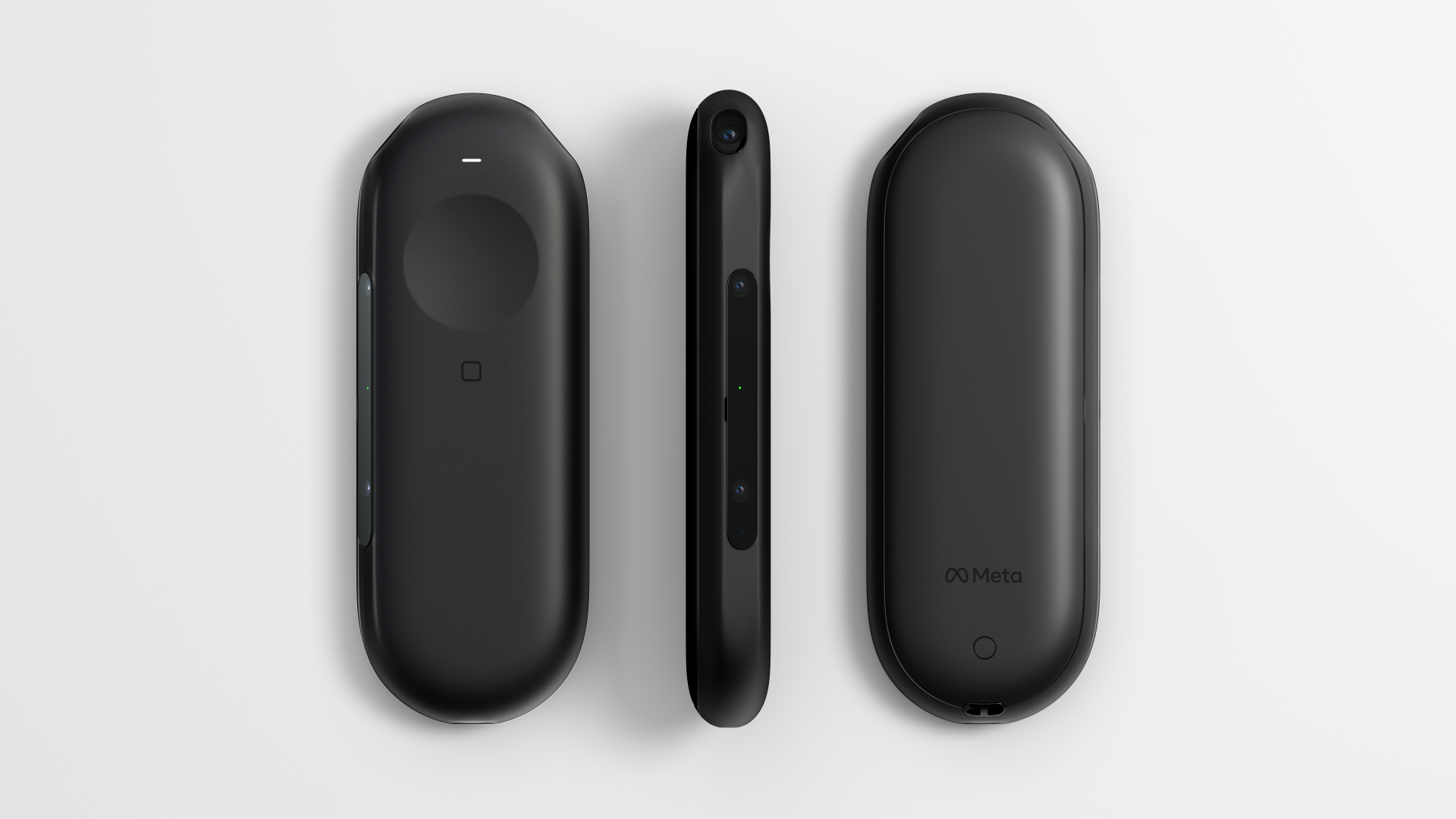
Meta provides insights into the development of the Orion AR glasses and presents the wireless pocket computer “Puck”.
The post Meta’s Orion AR glasses: “We start getting into the limits of physics” appeared first on MIXED Reality News.
Firefox 137 Enters Public Beta Testing with HEVC Playback Support on Linux
Now that Firefox 136 started rolling out today to all supported platforms, Mozilla promoted the next major release, Firefox 137, to the beta channel for public testing, so it’s time to take a look at what’s changed.
The best projector for 2025
To experience the true grandeur of the cinema in your house, nothing can top a projector. A good one can show a bright, sharp image up to 150 inches in size for an immersive experience that no TV can match — and often at a much lower price. Plus, they’re great for gaming and can even be used as a second screen for your computer.
Projectors have gained popularity of late so there are tons of options to choose from. Classic models that mount on the ceiling are brighter and sharper than ever, and you can choose either bulbs or lasers as a light source depending on your budget. If you’d rather mount one on the floor close to the screen, you can choose from dozens of ultra short throw (UST) models as well.
But compared to TVs, projectors remain a bit more confusing for a majority of buyers. This guide will fill you in on important details to consider like brightness, type (classic, portable and ultra short throw) and other factors to help you choose the best model for your setup.
Table of contents
Best projectors for 2025
Some projectors are for serious cinephiles, projecting sharp 4K video with HDR brightness and hyper realistic colors to a large screen. Others are bright enough to replace your TV for sports or gaming, and some low-cost portable models can be set up for camping or outdoor fun. That’s why we’ve divided this guide into several categories to help you find the right one.
What to look for in a projector
For a deep dive on projector technology check my previous explainer, but there are few key things to keep in mind. What will the projector mainly be used for? What type of room will it be used in? And how big of an image do you want? You’ll also see a variety of specifications that may be confusing, so here are a few to consider and what they mean.
Brightness and contrast
Brightness is measured in ANSI lumens; the brighter the projector, typically the more expensive it will be. 1,500-2,500 lumens is good for darkened rooms, 3,000-4,000 lumens allows you to see with some ambient light and 4,000+ lumens is bright enough to use in direct sunlight. High contrast is important, because projectors are more sensitive to things like ambient light and reflections.
DLP vs LCD
Digital light processing units (DLPs) used by Optoma, BenQ, LG and others allow bright 4K images. The negative is that they can produce a “rainbow” effect, or red/blue/green artifacts that affect some viewers more than others. LCDs are used mainly by Epson, but also Sony and Sanyo. Those are often brighter, more color accurate and don’t produce rainbow effects, but are also more expensive and susceptible to image degradation over time.
Resolution
If you want a true 4K projector, beware: only expensive models have native 4K resolution (many movie theaters still use 2K projectors for various reasons). However, most DLP projectors and some LCD models can use pixel-shifting to attain 4K resolution.
Elite Starling
HDR and color accuracy
Projectors can’t produce anywhere close to the amount of light required to qualify as true HDR. Rather, they use a technique called tone mapping to fit the entire HDR gamut into a lower brightness range. That said, many projectors can display millions of colors, with some models surpassing the color accuracy of TVs and monitors.
UST vs. classic
Classic projectors and screens can be mounted on the ceiling so they’re great if you have no floor space. They can also project a larger video for a truly cinematic experience. UST projectors mount on the floor right next to the screen so they can take the place of a TV. They don’t beam as big an image but are generally brighter, sharper and more expensive. For best results, they require special screens.
Mounting and fan noise
Ceiling mounting requires some work and don’t forget to budget for a bracket and any necessary long cables, including extra power for a Google Chromecast or other streaming device. UST projectors require less labor, but getting the image perfectly square can still be surprisingly time-consuming. As for fan noise, some projectors (usually cheaper DLP models) generate more than others.
Optics
For more flexibility with location and image size, ceiling mounted projectors need a good zoom range. Lens shift, meanwhile, is used if the projector is mounted higher or lower relative to the screen than recommended by the manufacturer. Otherwise, you might have to use a “keystone correction” to digitally stretch part of the image, resulting in distortion or artifacts. Also, keystore correction may not work in gaming modes for some models.
Gaming and streaming
If you’re interested in a projector for gaming, look up the refresh rate and input lag figures. Some projectors offer good numbers in that regard (240Hz and <20 ms, respectively), but others designed for home entertainment have very poor input lag and refresh rates at just 60 Hz. If it’s streaming you want, be sure to pick a model either with built-in Google TV or a bundled streaming dongle.
Screens
Should you project onto a wall, roll-down screen, fixed screen or ambient light rejecting (ALR) screen? The choice depends largely on the room and what kind of projector you have. Roll down screens take up no space as they’re ceiling mounted, fixed screens can be moved easily and ALR models are perfect in rooms with a lot of ambient light.
Projector FAQs
Are 4K projectors better?
Yes, because higher resolution is more noticeable on larger screens, so 4K is particularly useful with projectors since they beam images up to 200 inches in size. That being said, brightness and contrast are more important.
Is a projector better than a TV?
Projectors can provide a more immersive experience thanks to the large screen, but they’re not necessarily “better.” Since you usually have to dim the lights with a projector, TVs are superior for everyday use.
Is 2000 lumens bright enough for a projector?
Yes, 2000 lumens is easily bright enough, even with some ambient light in the room. However, the image will still be hard to see with the windows open on a bright day.
Should I get a 4K or 1080p projector?
That depends on your budget and needs. If your budget is below $1,000, look for a 1080p projector with the best brightness and contrast. Between $1,000-$2,000, you’ll need to weigh whether brightness or 4K resolution is most important. Above that, choose the brightest 4K projector you can afford.
What are the best projectors in daylight?
The best projectors in daylight are ultra short throw (UST) models, as they have the brightest and sharpest image. However, they generally cost more than $2,000.
Do you need a screen for a better projector experience?
Technically, you don’t need a screen to use a projector — any light-colored, smooth wall can work in a pinch. But if you want to get the most out of your projector, a screen can make a difference. Projector screens are designed to reflect light evenly and enhance contrast, so colors look more vibrant and the picture appears sharper. With a screen, you’ll notice darker blacks and brighter colors, which can give a real boost to your movie nights or gaming sessions. So while you can absolutely enjoy a projector without one, a screen can make the experience feel a bit more like your own personal theater.
Should I buy a portable or home projector?
It depends on how and where you plan to use it. If you want a projector you can easily move around, bring to friends’ houses or set up indoors or outdoors easily, a portable projector is a great choice. They’re usually smaller, lightweight and often have built-in speakers and batteries, making them convenient for on-the-go use.
On the other hand, if you’re looking for a more permanent setup for a home theater or living room, a home projector might be the way to go. Home projectors tend to be more powerful, with higher resolution and brightness, which gives you that crisp, cinema-quality experience. They’re ideal if you have a dedicated space and don’t mind leaving it set up in one spot.
This article originally appeared on Engadget at https://www.engadget.com/home/home-theater/best-projectors-123004354.html?src=rss
How to Build and Package Lightweight Applications with Tauri Framework
In this guide, we will learn how to what is Tauri and how to build and package applications with Tauri framework in Linux.
Transcript of Richard Stallman’s Interview With Manuel Cuda News in Italy (Debunking Fake “AI”)
We like the part where RMS says “the name OpenAI is deceptive because it’s not artificial intelligence. It’s an LLM. They should change their name to OpenLLM. And then they should change their name to SecretLLM because they don’t publish the code at all. So the name OpenAI is two lies.”
Trump Says New Tech Will Make Reagan’s Star Wars a Reality

“Ronald Reagan wanted to do it long ago, but the technology just wasn’t there,” said Trump.
This is the best Linux email client I’ve found – and I’ve tested them all
I’ve tried a bunch of Linux email clients over the years, but I found only one that’s my ride or die. Here’s why.