Google is no stranger to antitrust scrutiny, but the walls may be closing in. As the next phase of Google’s search trial nears, the company’s lawyers have reportedly met with representatives from the US Department of Justice in hopes of heading off a breakup. Google is reportedly pushing the argument that forcing it to spin off parts of the business and limit certain investments would constitute a national security threat.
Google’s antitrust situation got much worse this past August when it lost the long-running case targeting its search business. With Google branded yet again as a monopolist, the DOJ asked for stiff penalties, seeking to have US District Judge Amit Mehta force Google to sell its popular Chrome browser and end payments for search engine placement with other firms.
According to Bloomberg, Google met with the DOJ team last week to make the case for a lighter regulatory touch. Specifically, Google has stepped up its claims that forcing it to spin-off Chrome and limit AI investments could harm US national security, as well as security at the user level.
The first time you make anything, it probably won’t come out perfect, so it wasn’t a huge surprise when MSI’s debut gaming handheld struggled out of the gate. And that’s before you consider the unorthodox choice to go with an Intel chip instead of one from AMD like practically all of its rivals. However, MSI didn’t give up, and now it’s back with not one but two versions of its second-gen handheld, headlined by the Claw 8 AI+. Not only is it bigger than before, it has twice as many Thunderbolt 4 ports, a way bigger battery and some of the best performance we’ve seen from any device in this category. But more importantly, as the follow-up to a device plagued by lackluster software and unfinished drivers, it feels like the Claw got its bite back.
Design and display: The desert cat
With its 8-inch screen, the Claw 8 AI+ is bigger than its predecessor and a number of its rivals like the ROG Ally X, though it’s still smaller than Lenovo’s chunky 8.8-inch Legion Go. MSI also zagged by giving it a two-toned black and sandstone chassis. Ergonomics are generally fine, but if I’m nitpicking, I would prefer slightly larger grips for increased comfort. But aside from that, the handheld features a relatively straightforward mix of premium components strewn across a familiar blueprint.
It has Hall Effect sensors for its joysticks and triggers along with some embedded RGB lighting, the latter of which has become sort of an unspoken requirement among portable gaming PCs these days. You also get two Thunderbolt 4 ports that support both data and charging — which are especially handy if you ever plan on using this thing for productivity — and a microSD card slot for expandable storage. I appreciate that unlike Lenovo’s handhelds, MSI included a built-in fingerprint reader that makes unlocking Windows-based devices like the Claw a lot more convenient. That said, you don’t get a touchpad, though MSI’s software does let you control your cursor with the joysticks, so it’s not a complete pain in the butt anytime you have to switch between games and apps. And finally, around back, there’s a single pair of paddles.
As for the display, while it’s an IPS panel instead of the super-rich OLEDs on some handhelds, the Claw’s screen offers above-average brightness (up to 500 nits), a solid 120Hz refresh rate (with VRR) and the perfect resolution for a system this size (1,920 x 1,200). So all told, there’s very little to gripe about when it comes to its visuals. Plus, thanks to some surprisingly punchy front-facing speakers, it has solid audio too.
Performance and software: A low-key beast
Sam Rutherford for Engadget
Perhaps the biggest surprise is that after lackluster results from MSI’s first attempt, the Claw 8 AI+ pumped out strong performance that was easily able to keep up with and sometimes surpass what I’ve seen from its competitors. Some of that is assuredly due to more polished software and recent driver updates from Intel, but still, between its Intel Core Ultra 7 258V chip, 32GB of RAM and 1TB of SSD storage, the Claw produced framerates that were often 10 to 15 percent higher than what we got from the Ally X.
For example, when set to its 30-watt preset, in Cyberpunk 2077 at 800p on medium settings the Claw hit 75 fps versus 65 fps for the ROG Ally X at the same TDP (thermal design power). Meanwhile, in Returnal at 800p on medium, the Claw also bested the Legion Go by reaching 56 fps compared to just 46 fps for the Lenovo. Now it’s important to note that MSI’s midrange power for the preset on the Claw (which is what I used to get those figures in Returnal) is 17 watts instead of 15 watts like on most of its rivals, which may be MSI’s attempt to skew benchmarks in its favor. But even after you account for that, the Claw still comes out ahead.
Another nice thing about the Claw is that if you don’t want to fiddle around with settings all the time, there’s what MSI is calling its AI Engine mode, which will automatically adjust things to optimize performance or battery life depending on what you want. It’s a nice option for quickly changing how much horsepower you need, though as always, you’re going to need to tweak things manually for the best results.
The rest of the MSI Center app feels somewhat spartan. There are sections for launching games, performing software updates, changing the RGB lighting and more. You can even install game stores like Steam directly inside the program. But aside from that, the app isn’t very fancy or all that pretty to look at. All the important stuff is there though, which is what really counts since Windows 11 as a whole still feels way clunkier to use than more bespoke platforms like Valve’s SteamOS.
Battery life: Surprisingly good
Sam Rutherford for Engadget
The Claw 8 AI+ features an 80Whr cell, which is one of the largest battery packs in this category and allows for prodigious longevity. In Elden Ring on medium settings, the handheld lasted just over three hours on a single charge. That ain’t too shabby, especially after my recent testing with the Lenovo Legion Go, which only lasted for two and a half hours at best, and that was when playing a much less demanding game in Metal Slug Tactics.
Wrap-up
After the original bombed, a lot of companies would have simply called it quits. Sure, a lot of the first system’s issues may have been caused by Intel’s chip and unpolished drivers more than anything MSI did (or didn’t do). But with the Claw 8 AI+, MSI came back and totally redeemed itself. Not only is it a very competent gaming handheld, this cat offers a solid design, great performance and above-average battery life.
Sam Rutherford for Engadget
However, even though it pushes out slightly fewer frames, the $800 ROG Ally X remains a better value (especially if you can find it on sale) and its smaller screen makes it a more portable pick for people planning to game on the go. When it comes to larger competitors, Lenovo’s Legion Go offers similar horsepower for even less money with starting prices of $700 (or less, now that it regularly receives discounts). But if you’re looking for top-notch performance from a portable PC with an assortment of premium components, the Claw 8 AI+ makes an interesting case as an upgrade pick among gaming handhelds.
This article originally appeared on Engadget at https://www.engadget.com/gaming/pc/msi-claw-8-ai-review-this-cat-got-its-bite-back-184526430.html?src=rss
The world’s first “biological computer” has officially hit the market, marking what may actually be a significant breakthrough in AI technology. Developed by Australian company Cortical Labs, the CL1 fuses human brain cells with silicon hardware to create a dynamic, learning neural network. This innovative system, known as Synthetic Biological
Almost every major Japanese publisher had to have a big RPG franchise in the PS1 era. Square Soft had Final Fantasy. Enix had Dragon Quest. Capcom had Breath of Fire. Bandai Namco had Tales. And so, Konami made Suikoden. Its innovation was trading a set party of heroes for a cast of 108 total characters who could be…
Ubuntu has some snap apps (e.g., Firefox and AppCenter) pre-installed in recent releases. The snap apps auto-generate a snap folder in user’s home directory to store app data, caches, and configuration files.
Some accurate medical information was removed from the CDC’s website last month, and we gave you some tips on where to look for archived versions and for sources of similar information. Now, there’s a nearly complete mirror of the CDC website being hosted in Europe, so you can look up information on HIV, health for trans people, and other topics that really shouldn’t be controversial, but for some reason are.
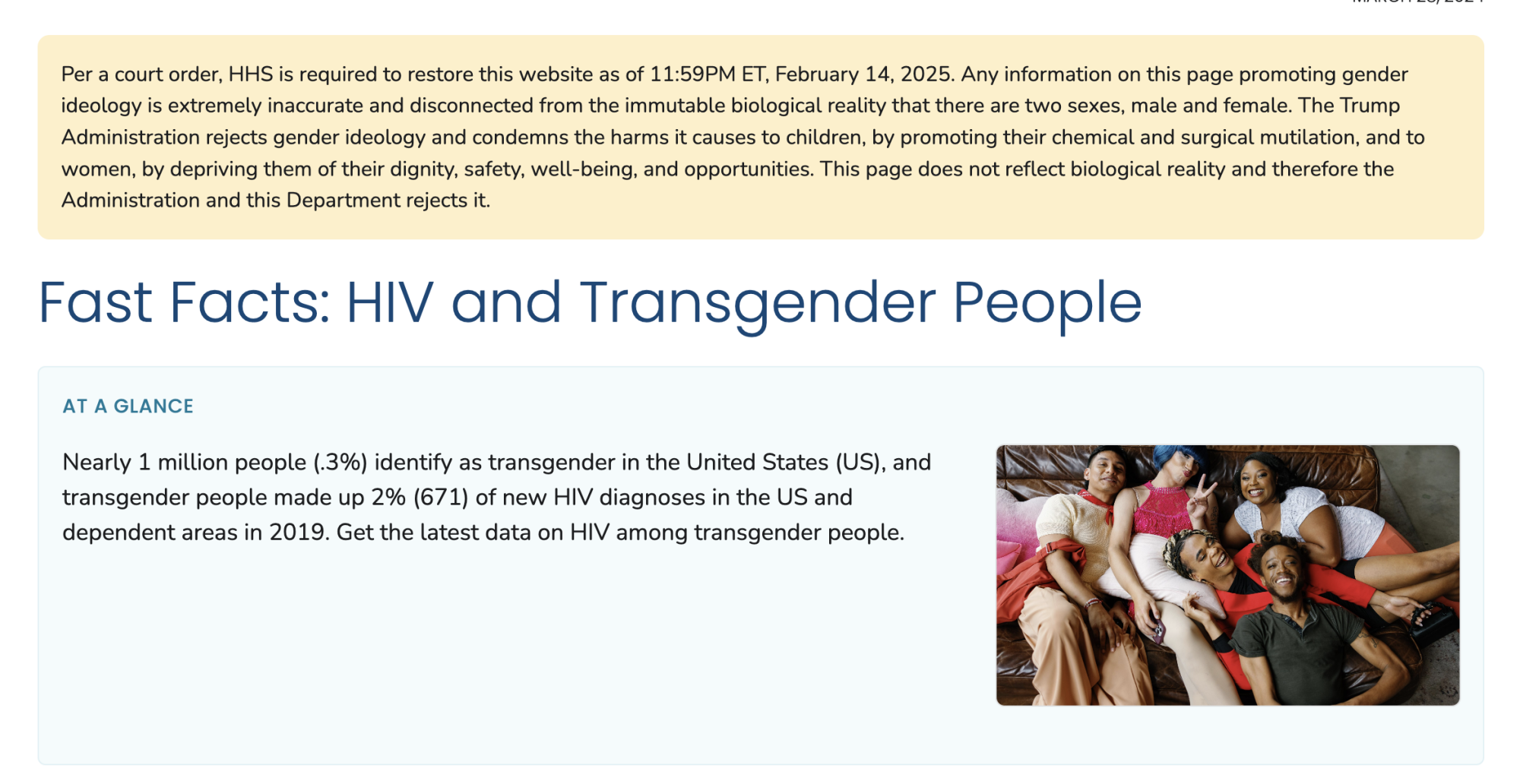
Some of the removed information has been reinstated by court order, but it comes with a disclaimer at the top of the page that somehow manages to be insulting, incorrect, sensationalist, and inflammatory. Just what you need when you want to know, say, who is most vulnerable to HIV.
Credit: CDC
As 404 Media reports, the archive’s creators say it is being hosted in Europe, and the pages were downloaded with the help of the DataHoarder community on Reddit. Unlike many of the other goverment data archiving projects, this one aims to build a fully functional version of the CDC website, including the links between pages, and interactive elements.
But for most information, the website is still present and functional. Trans health information is still there, without the insulting disclaimer. The page on health equity guiding principles for inclusive communication is up at the archive, even though it’s still missing from cdc.gov.
There is still one major gap, though: current information on outbreaks and other developing situations. The CDC is not updating information at restoredcdc.org. It’s a static archive of what was available in January. So if you want to check the numbers on the current measles outbreak, or see what’s going on with bird flu, the regular CDC website is still the place where that stuff is getting updated. For now, anyway.
We’re about a month away from season two of The Last of Us premiering on Max, and Neil Druckmann, the director of the series of games the show is based on, is doing interviews to promote its return. Naturally, those conversations end up drifting over to the future of the video game series that started it all. That’s…
On Tuesday, Donald Trump finally made it clear to Congress that he wants to kill the CHIPS and Science Act—a $280 billion bipartisan law Joe Biden signed in 2022 to bring more semiconductor manufacturing into the US and put the country at the forefront of research and innovation.
Trump has long expressed frustration with the high cost of the CHIPS Act, telling Congress on Tuesday that it’s a “horrible, horrible thing” to “give hundreds of billions of dollars” in subsidies to companies that he claimed “take our money” and “don’t spend it,” Reuters reported.
“You should get rid of the CHIPS Act, and whatever is left over, Mr. Speaker, you should use it to reduce debt,” Trump said.
The trailer absolutely captures the anarchic spirit of last year’s specials, which is fitting for a guy who has said he “never wanted to host a talk show.” The whole thing is basically a drone shot of Mulaney in a darkened parking lot, as he complains about filming the promo. Finally, he declares that “Everybody‘s Live is on Wednesdays live,” then puts on a pair of sunglasses. He’s also calling Everybody’s Live with John Mulaney “the first ever celebrity sit-down talk show.”
There’s probably one question on the minds of anyone who watched Everybody’s in LA. Will co-host Richard Kind be returning? He sure will, along with everyone’s favorite delivery robot Saymo.
Everybody’s Live with John Mulaney will run for 12 weeks, airing on Wednesdays. It’s already been picked up for a second season, which will presumably air later in 2025 or early next year. As for Netflix, it’s been steadily building out its livestreaming infrastructure. It aired that Mike Tyson/Jake Paul fight last year, along with Mulaney’s previous show. It has also aired live coverage of golf matches, awards ceremonies and will stream its own Tudum event.
This article originally appeared on Engadget at https://www.engadget.com/entertainment/streaming/theres-an-appropriately-ridiculous-trailer-for-john-mulaneys-live-netflix-talk-show-182510750.html?src=rss
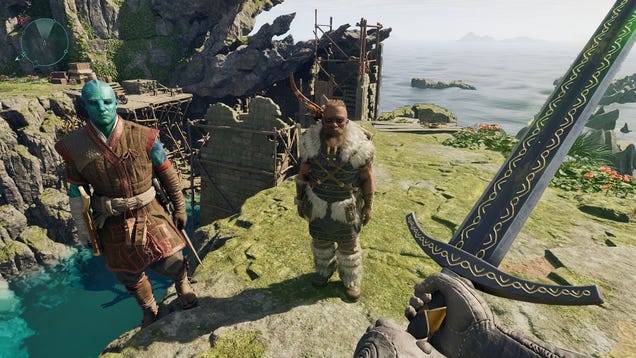
Avowed contains multiple fantastic two-handed Great Sword options, so it’s hard to specify which is the absolute best for you without knowing what type of build you’re going for. But one thing is for certain: Great Swords swing slow as hell. As such, more attack speed is never a bad thing. And that’s where The…
A federal judge rejected Elon Musk’s request to block OpenAI’s planned conversion from a nonprofit to for-profit entity but expedited the case so that Musk’s core claims can be addressed in a trial before the end of this year.
Musk had filed a motion for preliminary injunction in US District Court for the Northern District of California, claiming that OpenAI’s for-profit conversation “violates the terms of Musk’s donations” to the company. But Musk failed to meet the burden of proof needed for an injunction, Judge Yvonne Gonzalez Rogers ruled yesterday.
“Plaintiffs Elon Musk, [former OpenAI board member] Shivon Zilis, and X.AI Corp. (‘xAI’) collectively move for a preliminary injunction barring defendants from engaging in various business activities, which plaintiffs claim violate federal antitrust and state law,” Rogers wrote. “The relief requested is extraordinary and rarely granted as it seeks the ultimate relief of the case on an expedited basis, with a cursory record, and without the benefit of a trial.”
After a few Habana Labs driver maintainers left Intel last year and the upstream open-source Habana Labs driver going on rather a hiatus, it looks like Intel software engineers will be returning to work on this upstream Linux kernel driver for supporting the Gaudi AI accelerators…
Since the 2018 Supreme Court decision letting US states legalize gambling, related content has been hard to miss, whether it’s odds tickers flashed during sports broadcasts, superstar athletes and celebrities hawking betting sites during commercial breaks or YouTube videos promising that you won’t lose if you only use this gambling service. Although the first two won’t change anytime soon, the latter could become scarcer, thanks to some upcoming changes Google announced on Tuesday.
YouTube said it will prohibit content (URLs, embedded links, logos or spoken references) that directs viewers to unapproved gambling sites or apps. The company defines authorized services as those that meet local legal requirements (a large number, post-2018) and are certified by Google Ads or reviewed by YouTube.
But even if a site or app meets those requirements, its content could still be removed if it promises guaranteed returns. Of course, if any truly did offer that, it would cease to be gambling and simply be a service handing out free money. (I believe the technical term is “horseshit.”)
Meanwhile, even if content does meet YouTube’s requirements, it could still be age-gated for users under 18. However, one gargantuan exception the company carved out of that part is online sports betting. Another omission is the depiction of in-person gambling, which would rule out a healthy swath of Hollywood TV and movies and even some music videos or news reports.
The changes will take effect on March 19. “We’ve strengthened our policies that prohibit content directing viewers to unapproved gambling websites or applications,” YouTube spokesperson Boot Bullwinkle toldCNN. “We will also begin age-restricting content that promotes online casinos.”
Twitch made a similar move in 2022, banning streams featuring specific types of gambling content. When the Amazon-owned platform expanded its prohibition the following year, it said views for betting-related streams were down by 75 percent.
YouTube’s changes aren’t likely to stem the highly visible onslaught of gambling content in modern culture, which includes betting on esports (something younger users are more likely to engage in). Gambling companies and gaming trade organizations insist that legal gambling content pushes those who would be betting illegally into more regulated areas — a fair point in at least some cases.
On the other hand, Keith Whyte, executive director of the National Council on Problem Gambling (NCPG), toldCNN last year that his organization believes the risk of harmful gambling has risen by about 30 percent since SCOTUS and 38 states (plus Washington, DC) decided to open the floodgates. “I’m in the District of Columbia right now,” Whyte said. “The mayor recently cut every single penny of public funding to prevent and treat gambling problems. So right where the [American Gaming Association] and the [NCPG] is located — the nation’s capital — they abolished all public funds for problem gambling.”
This article originally appeared on Engadget at https://www.engadget.com/social-media/youtube-will-tighten-its-policies-on-illegal-gambling-content-180703194.html?src=rss
There’s a lot of “one hand washing the other” in this collaboration: TuxCare gains cred by contributing to Trend’s proprietary platform, AlmaLinux gains another reason for potential users to choose it over the competition, and Trend now has something to offer companies already running AlmaLinux.
This is a video of a robotic spy squirrel built by John Downer Productions (previously: some of their other spy animals) capturing the behavior of real squirrels as they attempt to steal each other’s nuts. Did you know that every autumn the average squirrel hides 10,000 nuts, and has such a good memory it can retrieve up to 4,000 of those? Sure, that’s only 40%, but if I retained 40% of the information I gathered I’d be a genius. I’m averaging far less than even 1% though, and if I were a squirrel I’d have been hit by a car crossing the street with a mouthful of rocks I thought were acorns a long time ago.
Keep going for the video while I practice the squirrel method of memory retention and never lose my car keys or wallet again.
A surprise find in my inbox this morning: news from Volkswagen about a pair of new electric vehicles it has in the works. Even better, they’re both small and affordable, bucking the supersized, overpriced trend of the past few years. But before we get too excited, there’s currently no guarantee either will go on sale in North America.
Next year sees the European debut of the ID. 2all, a small electric hatchback that VW wants to sell for less than 25,000 euros ($26,671). But the ID. 2all isn’t really news: VW showed off the concept, as well as a GTI version, back in September 2023.
What is new is the ID. EVERY1, an all-electric entry-level car that, if the concept is anything to go by, is high on style and charm. It does not have a retro shape like a Mini or Fiat 500—VW could easily have succumbed to a retread of the Giugiaro-styled Golf from 1976 but opted for something new instead. The design language involves three pillars: stability, likability, and surprise elements, or “secret sauce,” according to VW’s description.
Microsoft warned that an advanced Chinese hacking group is waging a campaign of supply-chain attacks. From a report: The company’s threat intelligence division said in a blog post Wednesday that the group, known as Silk Typhoon, was targeting remote management tools and cloud applications in order to spy on a range of companies and organizations in the US and abroad.
Microsoft said it observed in late 2024 that hackers were targeting cloud storage services, from which they would steal keys that could be used to access customer data. The group breached state and local government organizations and companies in the technology sector, seeking information on US government policy and documents related to law enforcement investigations. Silk Typhoon was behind a December hack that targeted the US Treasury Department, compromising more than 400 computers, Bloomberg News previously reported.
If your Mac’s close to running out of space, don’t ignore the problem. These machines can run into issues when their storage is 100% full: Updates may struggle to install; the machine may slow down; apps might not work well; and you may notice that some stop backing up their data to the cloud, too. To avoid all of these issues, free up space. It’s not as daunting as it seems.
Use built-in tools to free up space on your Mac
Credit: Pranay Parab
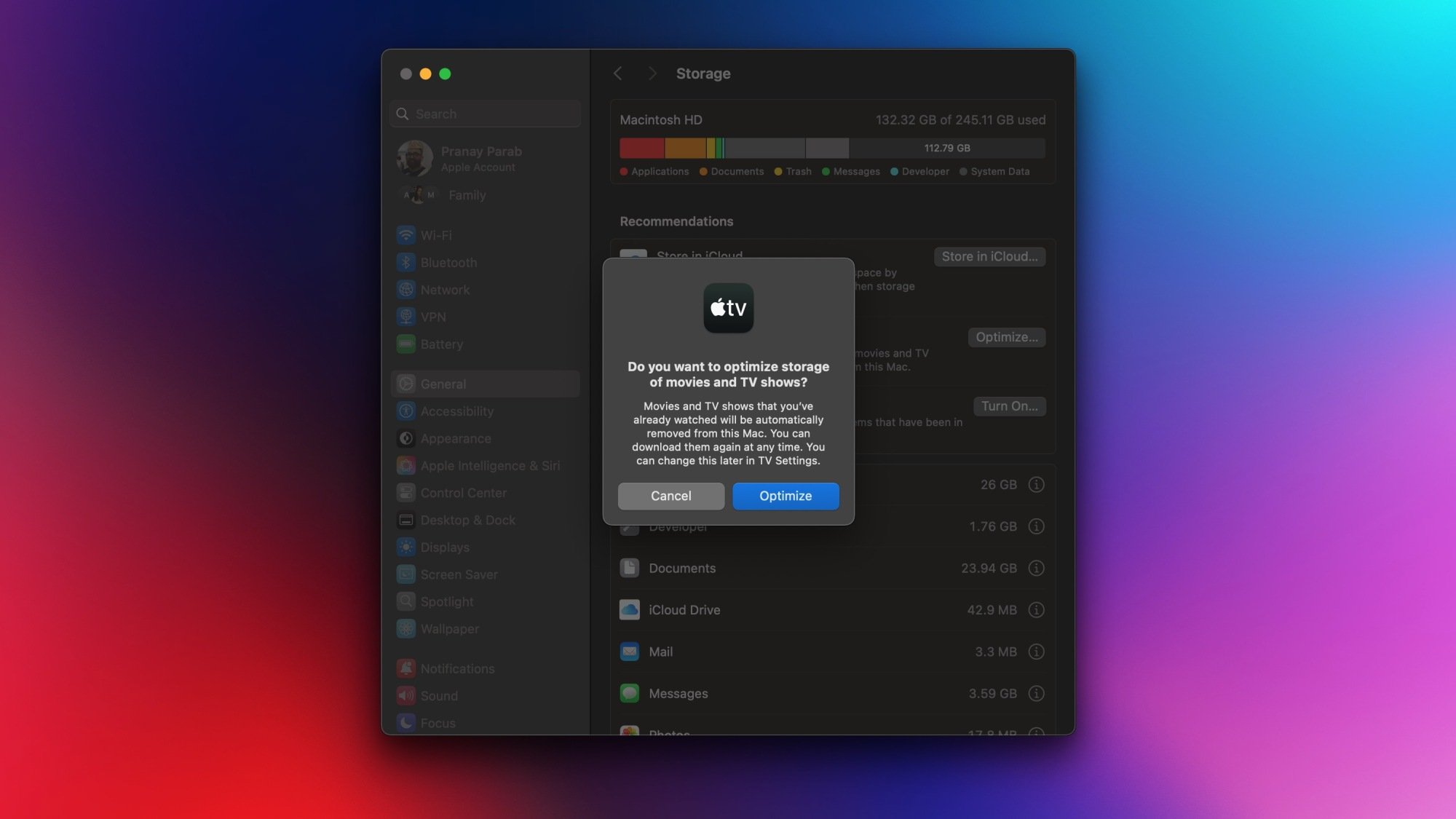
Apple gives you plenty of easy tools to start clearing unwanted files from your computer. To get started, you should identify where the problem lies. Click the Apple logo in the top-left corner of your Mac’s screen and go to System Settings > General > Storage. Wait until all the loading signs disappear, and you’ll see why your Mac is running out of space. The Recommendations section offers an easy way to start the cleanup process. Here, you can quickly offload unused apps, delete local copies of files stored in iCloud, automatically delete old files from Trash with a click, among other useful functions.
Once you’ve followed these steps, you should have some breathing room, but you can take it even further by clicking the i buttons next to each item in the list below the Recommendations section. For instance, you can click the i button next to Applications to see a full list of installed apps sorted by size, and quickly delete apps you don’t use. Once you’re through with this, you should’ve reclaimed a lot of space.
Use DaisyDisk to clean up your Mac
Credit: Pranay Parab
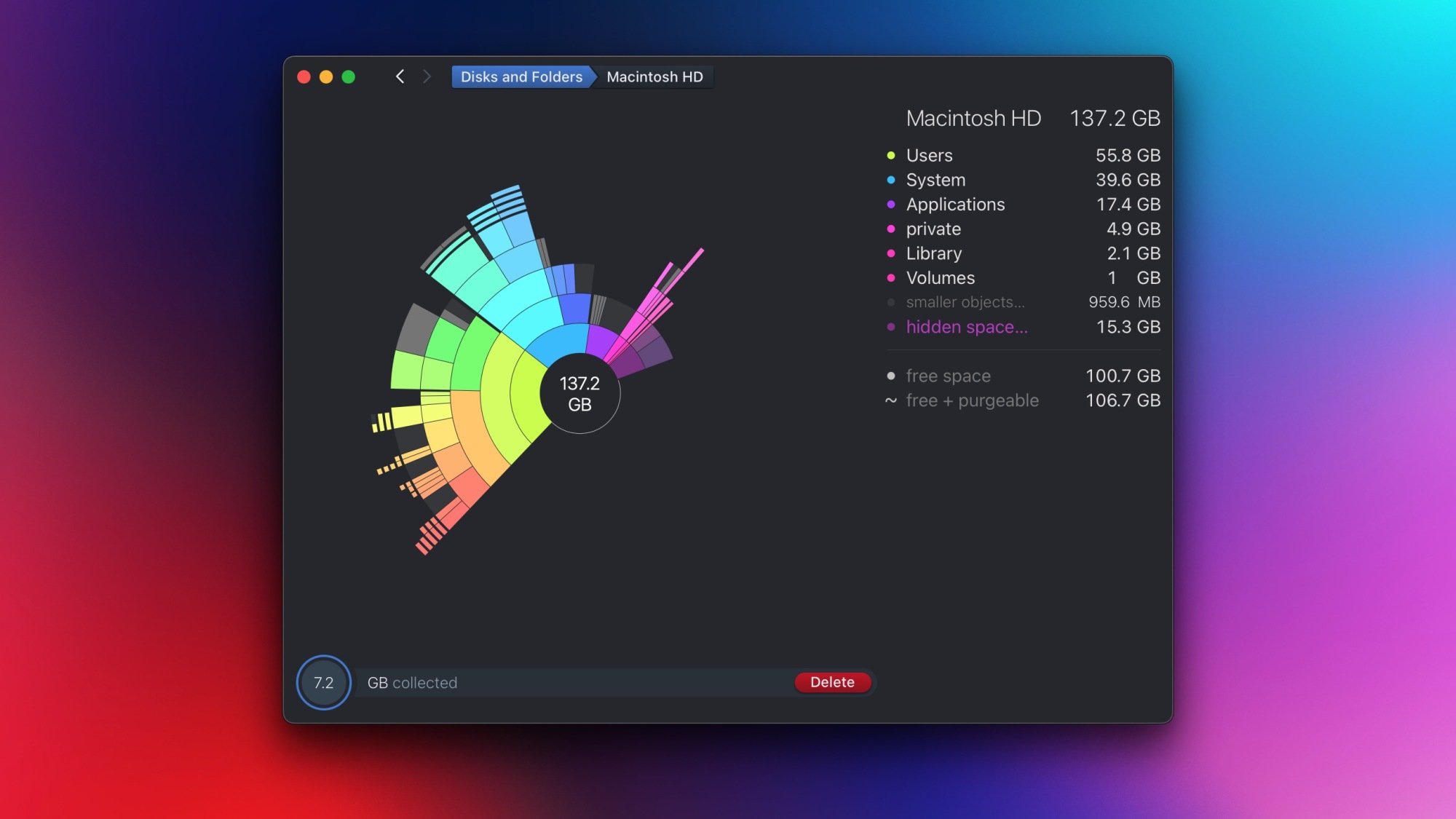
Apple’s built-in method is usually quite good at getting you started, but if you want to get every last unwanted bit of data out of your Mac, consider using the excellent DaisyDisk ($10). This app has been around for well over a decade and has earned itself a reputation for making it easy to free up space. Once you open the app, you can run a scan to see which apps are taking up storage space. Once that’s done, you can easily browse through various folders and drop things in the collector area, which is like a shopping cart for things you want to delete. DaisyDisk lists all of your folders by size, and finds files that the built-in tool misses. In my case, I discovered 80GB of data in WhatsApp—files shared in a large group that I’d muted long ago and forgotten all about.
Once all files are collected, you can click the Delete button to erase them quickly.
Try Hyperspace to clear out the stragglers
Credit: Pranay Parab
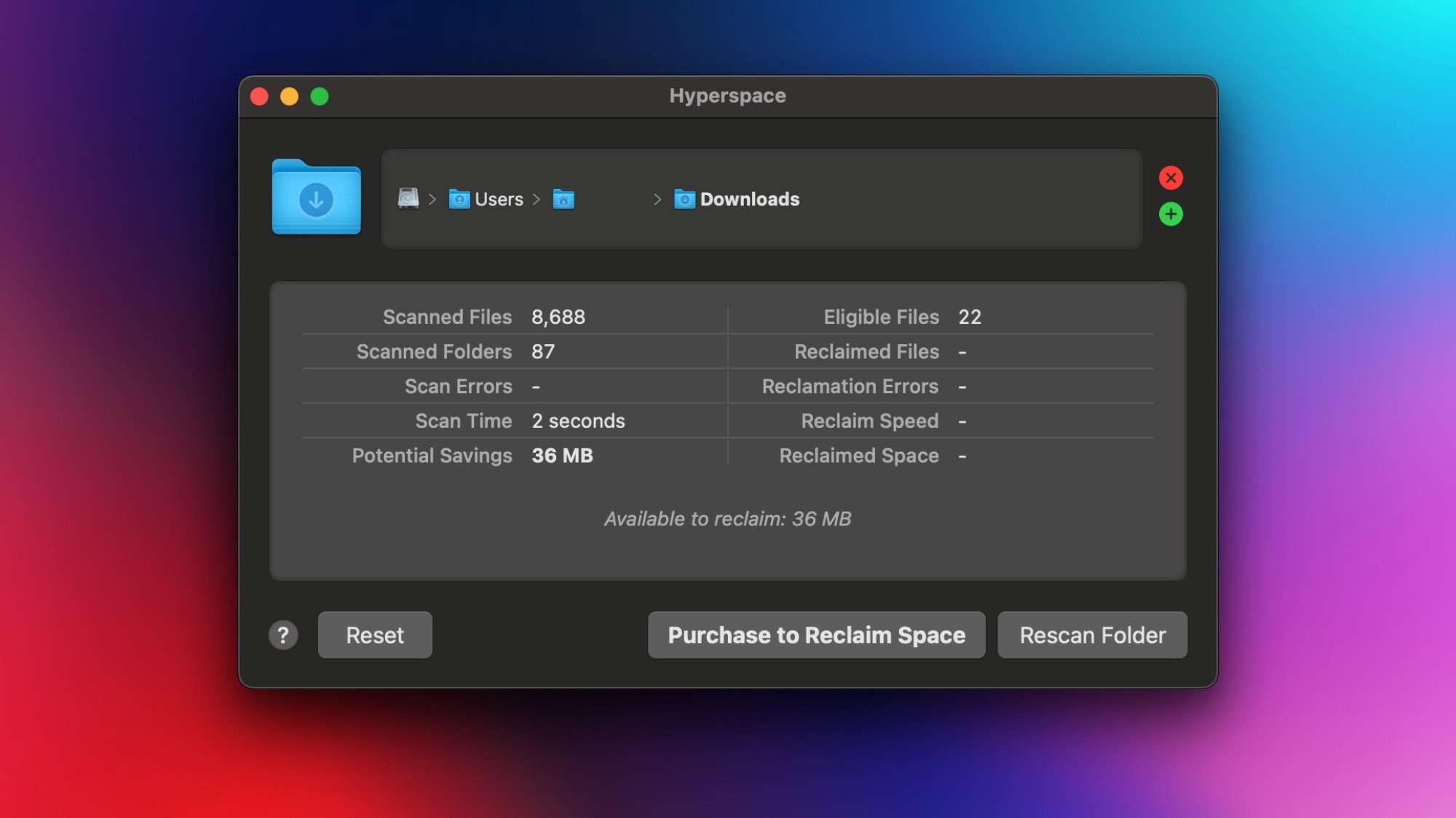
Hyperspace should be the last stop in your Mac cleanup process. It clears up storage space without deleting any files. Here’s how it works.
Apple Filesystem (APFS) has a neat space-saving feature that lets multiple files share a single copy of data. For instance, if you duplicate a 1GB file on macOS, you’ll notice that a copy is created instantly. Try to copy the same file to an external drive and no matter how fast the drive is, it’ll take a while to copy it over. This happens because APFS just creates a new file with fresh metadata and doesn’t actually create a second copy of the data underneath. This saves you a lot of space.
Hyperspace uses this APFS feature to locate identical files and converts them into clones of each other. This means that you will continue to see the same number of files in the same original locations, but the app will use the APFS feature to free up space.
The explanation is slightly complex, but this app does seem to work. Hyperspace is a free download, and you can also scan your folders without paying. If these scans show the app can save you a significant amount of space, you can then pay to clear those files. The app costs $10 per month, $20 per year, or a one-time purchase of $50.