Who gets ownership of useful genetic data?

Cow D lived on a dairy farm in New Zealand. The animal looked like the typical black-and-white cow farmers raise for milk, except for one thing: Researchers had outfitted Cow D with an artificial fistula—a hole offering them a way to reach the microbes inhabiting the animal’s bathtub-size stomach. But it’s what happened next that offers a porthole into the global debate over the use of genetic data.

In the spring of 2009, Samantha Noel, then a doctoral researcher at Massey University in Palmerston North, New Zealand, reached into Cow D’s rumen and plucked out a strain of Lachnospiraceae bacterium, later dubbed ND2006. Another team of geneticists sequenced the microbe’s complete set of genes, or genome, and uploaded the information, which was then shared with GenBank, a public database run by the US National Institutes of Health. If genes are the book of life, then this process was like adding a digital copy to an online library. In policy circles, these lines of code go by another name: digital sequence information, or DSI.

Eventually, a section of the sequence found inside Cow D caught the attention of scientists on the other side of the world. The sequence contained a promising new genetic tool for modifying DNA, a CRISPR. Editas Medicine, a Massachusetts-based company focused on commercializing gene-editing technology for medical applications, used these data to build its platform and now holds the license on a portfolio of patents—all without ever interacting with the cow or its microbes directly. The company subsequently developed an experimental therapy, which involved injecting a modified CRISPR-associated molecule into patients’ eyeballs to treat a common form of inherited blindness. Editas billed the breakthrough as the first such treatment “administered to people anywhere in the world.” The results, published in the New England Journal of Medicine, contain little mention of any sequence data and even less about its origins.

Read full article

Comments

Apple’s M3 MacBook Air is up to $300 off right now

We love a good deal on a great laptop around these parts and that’s exactly the case with Apple’s M3-powered MacBook Air. The 2024 machine is on sale at Amazon with discounts of up to $300. The base model can be yours for $899, which is $200 off and close to a record-low price. This 13-inch variant has 16GB of RAM and 256GB of SSD storage.

You’ll find the steepest discount on an M3 MacBook Air with 24GB of RAM and double the SSD storage at 512GB. That’s $300 off at $1,199.

The M3 MacBook Air is our pick for the best MacBook and our top recommendation for the best laptop overall. (I own one personally and am very happy with it.)

We gave the system a score of 90 in our review, lauding it for fast performance, as well as the sleek and study design (including a great trackpad and keyboard). It looks and sounds great too thanks to the Liquid Retina display and quad-speaker array. What’s more, the M3 MacBook Air supports Apple Intelligence features. Ultimately, the blend of performance and portability is hard to beat.

While this is an attractive deal, there’s one important factor to bear in mind. Apple just this week announced the M4 MacBook Air. We’ve yet to review the latest system, so we can’t say for sure how it stacks up against last year’s model.

But it’s worth considering that an upgraded model is right around the corner before you take the plunge on this deal — especially given that Apple has dropped the starting price of the base M4 Air to $999. That’s $100 less than the current regular price of the M3 and $100 more than you can get the laptop for through this deal.

Follow @EngadgetDeals on Twitter and subscribe to the Engadget Deals newsletter for the latest tech deals and buying advice.

This article originally appeared on Engadget at https://www.engadget.com/deals/apples-m3-macbook-air-is-up-to-300-off-right-now-153346492.html?src=rss

US Congressional Panel Urges Americans To Ditch China-made Routers

A U.S. congressional committee has urged Americans to remove Chinese-made wireless routers from their homes, including those made by TP-Link, calling them a security threat that opened the door for China to hack U.S. critical infrastructure. From a report: The House of Representatives Select Committee on China has pushed the Commerce Department to investigate China’s TP-Link Technology Co, which according to research firm IDC is the top seller of WiFi routers internationally by unit volume. U.S. authorities are considering a ban on the sale of the company’s routers, according to media reports.

Rob Joyce, former director of cybersecurity at the National Security Agency, told Wednesday’s committee hearing that TP-Link devices exposed individuals to cyber intrusion that hackers could use to gain leverage to attack critical infrastructure. “We need to all take action and replace those devices so they don’t become the tools that are used in the attacks on the U.S.,” Joyce said, adding that he understood the Commerce Department was considering a ban.

Read more of this story at Slashdot.

Apple’s Best New Chipset Isn’t the M4 Max

Aside from the launch of the sky blue M4-powered MacBook Air, this week’s flurry of Apple announcements saw the introduction of the most powerful Apple silicon desktop processor yet. Given Apple’s numbering scheme for its own chipsets, you’d think that would be one with an M4 label attached, but it’s actually the M3 Ultra, which will power the newest Mac Studio.

Since Apple started releasing its own chipsets with the M designation, we’ve seen a variety of different labels attached. First came the standard processor, then the Pro, then the Max, and then the Ultra, with performance improving with each iteration. We’re now up to the M4 Max and the M3 Ultra.

When preordering directly from Apple, you can fit the latest Mac Studio with either the M4 Max or the M3 Ultra, but the latter’s superior capabilities are evident in the pricing: The starting price of an M3 Ultra Mac Studio is double that of an M4 Max Mac Studio.

Apple Mac Studio
The M3 Ultra is available in the new Mac Studio.
Credit: Apple

Here’s what’s going on: As with previous generation chipsets with the Ultra moniker, the M3 Ultra is essentially two M3 Max processors fused together and appearing as one, using a technique Apple calls UltraFusion. You’re basically getting twice the performance: This piece of silicon features an incredible 184 billion transistors.

So many cores

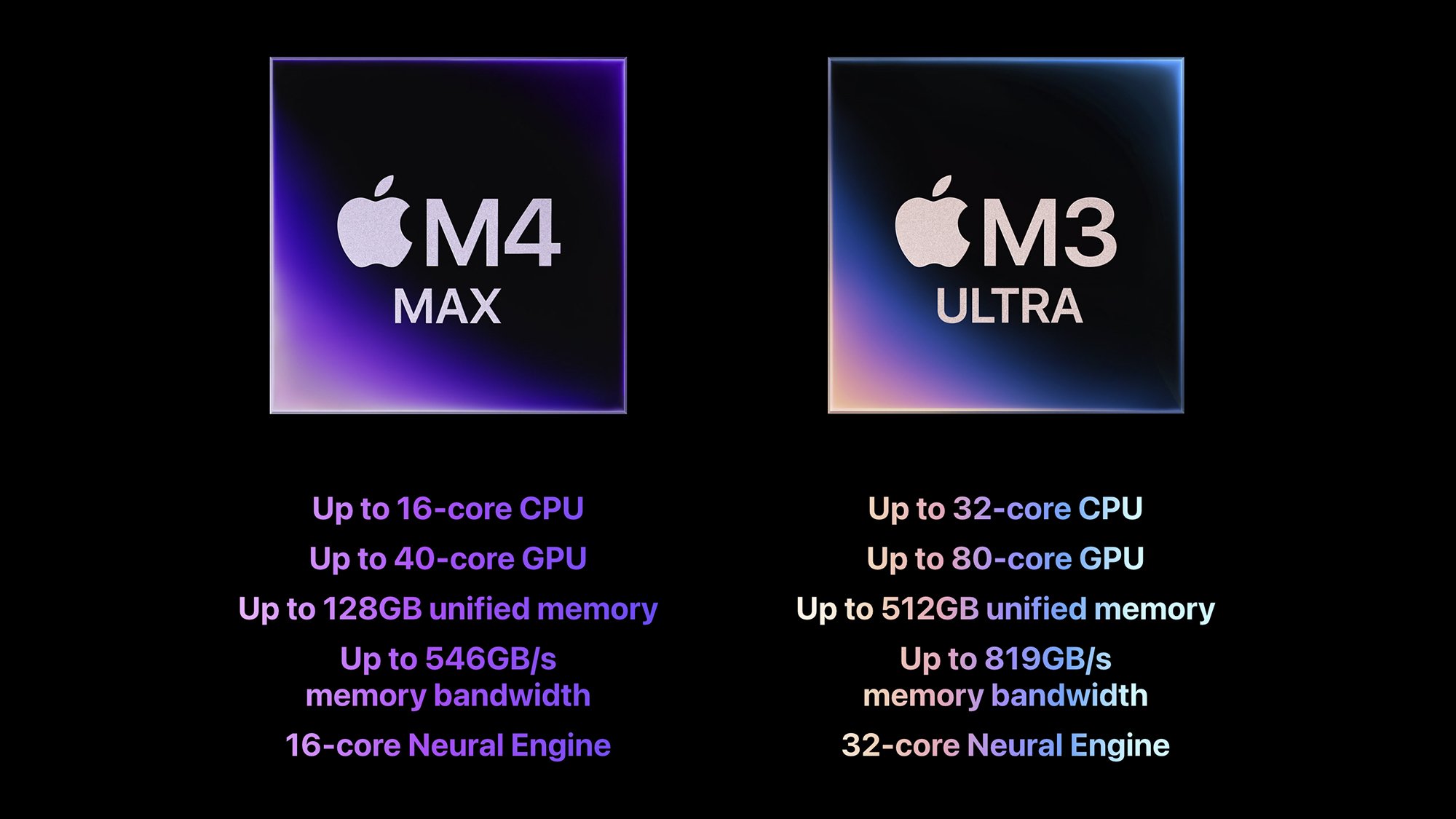
Here are some more stats: The M3 Ultra offers up to 32 CPU cores (compared to 24 on its most comparable predecessor, the M2 Ultra. It sports up to 80 CPU cores (compared to 76 on the M2 Ultra), 32 neural cores (the same as the M2 Ultra), support for up to 512GB of memory (compared to 192GB on the M2 Ultra), and up to 819GB/s of memory bandwidth (compared to 800GB/s). Overall, performance is around 1.5x of the Apple M2 Ultra.

While the M2 Ultra chipset is the direct forebear to the M3 Ultra, if you’re buying a Mac Studio, you’ll be choosing between the M3 Ultra to the M4 Max—the latter being the processor that launched last year with the refreshed MacBook Pros. The M4 Max gives you up to 16 CPU cores, up to 40 GPU cores, 16 neural cores, support for up to 128GB of memory, and up to 546GB/s of memory bandwidth.

One of the benefits of the M3 Ultra supporting so much RAM—more than half a terabyte—is that users can run more powerful AI models locally, on their own machines. A Mac Studio with an M3 Ultra inside should have enough oomph to run something like DeepSeek R1 locally, without having to connect to servers in China.

M4 Max vs M3 Ultra
Apple’s two latest chipsets, compared.
Credit: Apple

The M3 Ultra also comes with a Thunderbolt 5 upgrade, doubling the maximum data transfer rates from Thunderbolt 4, up to 120Gb/s. This means you can even link multiple Mac Studios together (if you’ve got the budget for them), while the display engine on the M3 Ultra is capable of driving more than 160 million pixels—the equivalent of eight Pro Display XDRs.

“M3 Ultra is the pinnacle of our scalable system-on-a-chip architecture, aimed specifically at users who run the most heavily threaded and bandwidth-intensive applications,” says Johny Srouji, a senior vice president of hardware technologies at Apple.

And what of the M4 Ultra? Apple hasn’t said anything about it yet, but intimated to Ars Technica that it might not add an Ultra model this time around. That would make the M4 series the first to go without an Ultra variant, but as these super-powerful, super-expensive chipsets are only of interest to those with the most demanding needs and the deepest pockets, less frequent launches may be the most logical course of action.

NASA is shutting down parts of Voyager 1 and 2 to extend their lifespan

Nearly 50 years after they were first launched, Voyager 1 and 2 are still traveling around interstellar space — though they’ve faced some setbacks over the years. Now, NASA has announced that the twin Voyager spacecraft are losing some of their features in a bid to extend their lifespans in the face of a diminishing power supply. 

On February 25, NASA’s Jet Propulsion Laboratory (JPL) turned off Voyager 1’s cosmic ray subsystem experiment and on March 25, it will shut down Voyager 2’s low-energy charged particle instrument. 

“The Voyagers have been deep space rock stars since launch, and we want to keep it that way as long as possible,” said Suzanne Dodd, Voyager project manager at the JPL. “But electrical power is running low. If we don’t turn off an instrument on each Voyager now, they would probably have only a few more months of power before we would need to declare end of mission.”

Each probe will continue to run three science instruments, but hold another seven instruments which have turned off over time. Just last October, NASA shut down Voyager 2’s plasma science instrument. However, both spacecraft have experienced recent issues. Last June, Voyager 1 finally starting running properly again, following seven months of technical issues, including unreadable data. It had a similar issue two years prior. In 2023, Voyager 2 went dark for two weeks after requiring technical assistance three years earlier. 

NASA still puts a lot of value in the Voyager probes. “Every minute of every day, the Voyagers explore a region where no spacecraft has gone before,” said Linda Spilker, Voyager project scientist at JPL. “That also means every day could be our last. But that day could also bring another interstellar revelation. So, we’re pulling out all the stops, doing what we can to make sure Voyagers 1 and 2 continue their trailblazing for the maximum time possible.” Maybe at least until they hit 50 years in 2027? 

The slightly more cynical take on NASA “pulling out all the stops” to keep them going is that they’d certainly love for the probes to be functional for their 50th anniversary in 2027 — which feels like a tall order despite the agency’s best efforts.

This article originally appeared on Engadget at https://www.engadget.com/science/space/nasa-is-shutting-down-parts-of-voyager-1-and-2-to-extend-their-lifespan-151322570.html?src=rss

A Quarter of Startups in YC’s Current Cohort Have Codebases That Are Almost Entirely AI-Generated

A quarter of startups in Y Combinator’s Winter 2025 batch have 95% of their codebases generated by AI, YC managing partner Jared Friedman said. “Every one of these people is highly technical, completely capable of building their own products from scratch. A year ago, they would have built their product from scratch — but now 95% of it is built by an AI,” Friedman said.

YC CEO Garry Tan warned that AI-generated code may face challenges at scale and developers need classical coding skills to sustain products. He predicted: “This isn’t a fad. This is the dominant way to code.”

Read more of this story at Slashdot.

A Total Lunar Eclipse Is Coming: How To Catch This Spectacular Blood Moon

A Total Lunar Eclipse Is Coming: How To Catch This Spectacular Blood Moon
Next week, Earth will be lined up between the Sun and the Moon, creating a total lunar eclipse. North Americans, at least, haven’t seen such an eclipse, otherwise known as a “blood moon,” in several years—since November 2022—so this is a great opportunity to catch this special event. Unlike a solar eclipse, no special equipment or protective

AMD Radeon RX 9070 XT Launch Day Retail Stock Status Looks Promising

AMD Radeon RX 9070 XT Launch Day Retail Stock Status Looks Promising
Gamers finally have some good news in terms of GPU availability. AMD has launched its Radeon RX 9070 and RX 9070 XT GPUs to retail today. Retailers in both the UK and the US are reporting good inventory levels. In the UK, Overclockers UK confirmed it has around 910 AMD Radeon RX 9000 series GPUs in stock (with a staggered release planned),

This Subscription-Free Indoor Camera Is $27 Right Now

We may earn a commission from links on this page. Deal pricing and availability subject to change after time of publication.

If you need an extra set of eyes at home without spending a lot, the TP-Link Kasa KC410S indoor security camera is currently down to $26.99 from its usual $44.99.

You can swivel the KC410S 360 degrees horizontally and 113 degrees vertically for full-room coverage and motion tracking (though its pan and tilt controls can reportedly feel a bit jerky at times). As for its video quality, it delivers clear 2K footage during the day, with vibrant colors and good detail, but its nighttime performance depends on ambient light—if there isn’t enough, its Starlight sensor struggles, leaving the image dark and washed out. That said, according to this PCMag review, its black-and-white infrared night vision is crisp and well-lit.

The KC410S also has sound and motion alerts, pushing notifications to your phone when it detects movement or a loud noise (intelligently differentiating between people and general motion, so you’re not getting spammed with alerts every time the AC kicks on). However, if you want to store video recordings, you’ll need to buy a microSD card (up to 256GB) or subscribe to Kasa Care. The Plus plan costs $3 per month for a single camera and gives you 30 days of video history, manual clip recording, and activity notifications with screenshots. If you have multiple cameras, the Premium plan, at $10 per month, supports up to 10 cameras and unlocks all features. Inserting a microSD card also lets you keep the camera running 24/7, regardless of motion or sound detection, if you prefer a continuous recording mode,

The Kasa Smart app gives you full control over the camera, letting you view live footage, talk through the built-in mic, adjust motion sensitivity, enable night vision, and set patrol routes, among others. It integrates seamlessly with other TP-Link Kasa smart devices but doesn’t support Apple HomeKit. It does, however, work with Alexa and Google Assistant, so voice commands are still on the table. For a slightly higher price, the eufy Security Indoor Cam E220 ($34.99, down from $54.99) offers another solid indoor security camera with a high-res option.

Apple Analyst Claims Folding iPhone Could Ditch Face ID, Cost $2,500 Or More

Apple Analyst Claims Folding iPhone Could Ditch Face ID, Cost $2,500 Or More
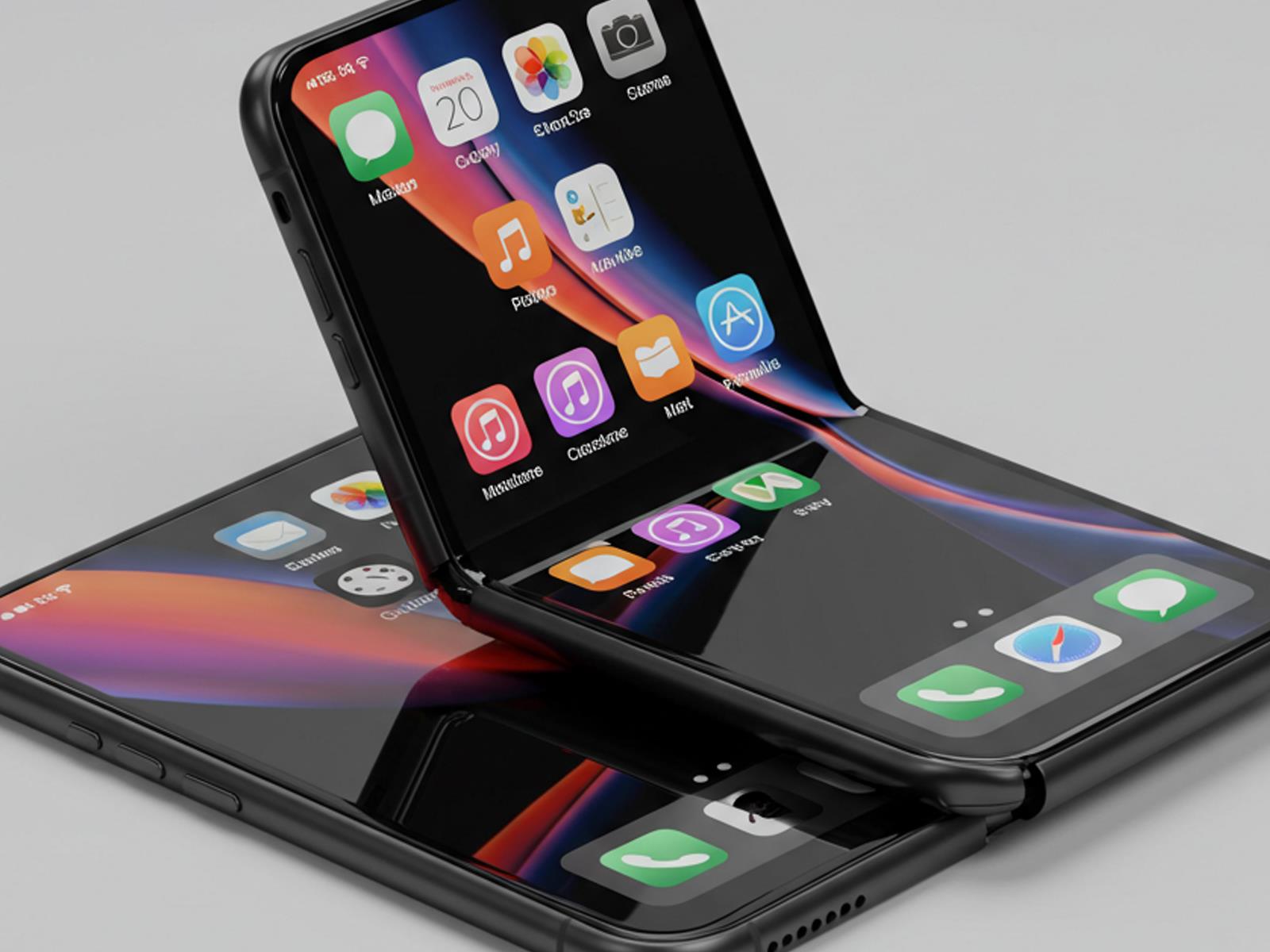
We keep hearing that Apple plans to release an iPhone handset in a folding form factor, but will it really happen and if so, what can we expect? Prominent Apple analyst Ming-Chi Kuo offered some insight on both accounts. According to Kuo, there is a timeline for Apple’s first foldable iPhone, and he also shares some hardware predictions and

Download This Tax Prep Checklist for Stress-Free Filing

Tax season can reduce even the most organized individuals to stressed-out procrastinators. And if you’re anything like me, you’re not exactly the most organized individual in the first place. The complexity of gathering documents, understanding deductions, and meeting deadlines creates anxiety that many of us dread each year. But with a well-designed tax preparation checklist, I’ve been able to turn my taxes into a manageable (maybe even even satisfying?) task well before the April 15 deadline. Here’s how you can, too.

A tax preparation checklist serves as your personalized roadmap through the filing process. Luckily, I’ve create this template to get you started. It includes sections for personal information, income documentation, deductions and credits, a tax preparation timeline, and a final verification check-list. All you need to do is to download it or make a copy in Google Docs for your own use. Here’s how to make the most of this checklist, or build your own from scratch.

Gather personal information

Start with the basics. Your checklist should include spaces to confirm you have:

  • Social Security numbers for yourself, spouse, and dependents

  • Birth dates for all dependents

  • Last year’s tax return (helpful for reference)

  • Bank account and routing numbers for direct deposit

Identify your income sources

List all potential income sources to ensure nothing gets missed:

  • W-2 forms from employers

  • 1099 forms for self-employment, investments, etc.

  • Income records from gig work or side hustles

  • Alimony received

  • Rental property income

  • Social Security benefits

  • Unemployment compensation

Document potential deductions

This section often represents the biggest opportunity for tax savings:

  • Homeownership documents (mortgage interest, property taxes)

  • Educational expenses (tuition, student loan interest)

  • Medical expenses exceeding threshold amounts

  • Charitable donations with receipts

  • Business expenses for self-employed individuals

  • Retirement contributions

  • Childcare expenses

Organize by timeline

Structure your checklist with time-based sections:

  • January: Collect arriving tax documents (W-2s, 1099s).

  • February: Organize receipts and deduction documentation.

  • March: Schedule appointment with tax professional or prepare software.

  • April: Complete final review and file.

Include verification steps

Add verification checkpoints to ensure accuracy:

  • Compare this year’s return to last year’s for consistency.

  • Double-check math and entries.

  • Verify all Social Security numbers.

  • Confirm all required forms are signed.

  • Make copies of everything for your records.

Making the most of your tax prep checklist

While the template provides a comprehensive starting point, your personal tax situation may require additional items. Customize your checklist so that it suits your tax needs. Review last year’s return to identify recurring items specific to your finances.

Digital vs. physical organization

Choose the system that works best for you:

  • Digital: Use a spreadsheet, note-taking app, or dedicated tax software.

  • Physical: Create a folder system with labeled sections for each category.

  • Hybrid: Scan physical documents and organize them in digital folders.

Begin early

The biggest tax preparation mistake is waiting until the last minute. Begin organizing as soon as all your documents first arrive, and you’ll avoid the mid-April stress entirely.

Review and improve annually

After filing, take a few minutes to note what worked well and what didn’t. Add a “Notes for Next Year” section to your checklist to remember adjustments needed for the coming tax season.

The bottom line

A personalized tax preparation checklist transforms tax filing from a dreaded chore into a methodical process. By breaking down the complex task into manageable steps, you’ll not only reduce stress, but potentially identify additional deductions you might otherwise miss.

Again, here’s my downloadable template for you. Feel free to add or remove items based on your financial circumstances and filing requirements. With this system in place, you’ll be able to approach tax season with confidence rather than anxiety.