The best MacBook for 2025: Which Apple laptop should you buy?

At its Worldwide Developers Conference (WWDC) last June, Apple announced updates coming to its various operating systems, most of which focus on its own version of AI, dubbed Apple Intelligence. MacBooks will get macOS 15, aka Sequoia, that will support Image Playground, Apple’s image generation tool, and AI composition features that can rewrite, proofread and summarize text in Mail, Notes, Pages and more. But the AI smarts will only be available to Apple laptops with an M1 chip or newer. So if you have an older model (pre-2020), or want the latest chips to get the most out of macOS 15, you might want a new MacBook. This guide will help you pick which one makes the most sense for you.

After testing every model Apple makes, we think the 13-inch MacBook Air with the M3 chip and 16GB of RAM is the best choice for most people. But there are definitely reasons to consider the cheaper M2 Air and the fully featured Pro laptops. We’ve broken down all the options to help you decide which is the best MacBook for you.

Editor’s note (3/6/25): Apple unveiled the new M4 MacBook Air earlier this week, featuring the new M4 processor, a base 16GB of RAM and a price cut to $999 for the entry-level model. Our current top picks here still stand, but we’ll update this guide once we’ve put the new MacBook Air through its paces. You can currently pre-order the M4 MacBook Air, and it will become widely available on March 12.

Compared to PCs, Apple computers tend to have more streamlined specifications. The company has long been known for this simplicity, and the M-series “system-on-a-chip” condenses things even further. It started with the M1 chip, which has since been retired in all models. The M2 and M3 chips can be found in current-generation MacBooks, but the latest Apple silicon, the M4 chip, is only housed in the new iPad Pro. All M-series chips combine, among other technologies, the CPU, graphics card and unified memory (RAM). Apple’s Neural Engine is included too, which is a specialized group of processor cores that handles machine learning tasks such as image analysis and voice recognition. 

While a unified chip means you have fewer decisions to make when picking a MacBook, there are still a few factors to consider, including specs like the number of CPU cores, amount of RAM, storage capacity, screen size, and, obviously, price. The finish color may be a minor consideration, but it’s worth pointing out that the Pro come in just two colors (Silver or Space Gray) but the Air adds two additional hues (Midnight and Starlight).

Currently the lowest-specced chip in a MacBook is the M2 in the 13-inch MacBook Air. It comes with an 8-core CPU and either an 8- or 10-core GPU. At the other end of the spectrum, the M3 Max chip is built with up to a 16-core CPU and a 40-core GPU. Cores are, in essence, smaller processing units that can handle different tasks simultaneously. Having more of them translates to the computer being able to run multiple programs and applications at once, while also smoothly processing demanding tasks like video editing and high-level gaming. In short, more cores allow for more advanced computing and better performance. But if your processing power needs fall below professional-level gaming and cinematic video and audio editing, getting the highest number of cores is likely overkill — and after all, more cores equals higher cost and more power usage.

Your options for RAM, or in Apple’s terminology, Unified memory, varies depending on the chip you choose. The M2 and M3 chips can be paired with 8, 16 or 24GB of RAM. The M3 Pro chip has 18 or 36GB memory options, while the most powerful M3 Max chip supports 48, 64 or a whopping 128GB of RAM.

You’ve likely heard the analogy comparing memory to the amount of workspace available on a literal desktop surface, whereas storage is the amount of drawers you have to store projects to work on later. The larger the worktop surface, the more projects you can work on at once. The bigger the drawers, the more you can save for later.

More RAM is ideal for people who plan to work in multiple apps at once. And the more demanding each program is, the more RAM will be required. Extra memory can also come in handy if you’re the type who likes to have infinite numbers of tabs open on your browser. If your daily workflow doesn’t involve simultaneously using a vast number of memory-intensive programs, you can save yourself money and buy the RAM configuration that you’re most likely to actually use.

For casual users, 8GB may be enough, however, if you can afford an upgrade to 16GB of RAM, we recommend going doing so, as modern browsers tend to be pretty memory-hungry. Investing in more RAM now will give your new MacBook a longer lifespan of reliable use. It’s also important to keep in mind that, unlike most PCs, the RAM in current-model MacBooks is not user-upgradable, so you’ll want to get what you plan on needing at the outset.

Apple MacBook Pro 14-inch from the rear, showing off the Apple logo.
Photo by Devindra Hardawar/Engadget

Storage options range from 256GB of SSD for the M2 MacBook Air and 8TB of storage for the MacBook Pros with the M3 Max chip. If you want to rotate between a long roster of game titles or keep lots of high-res videos on hand, you’ll want more storage. If you’re mostly working with browser- and cloud-based applications, you can get away with a smaller-capacity configuration. That said, we recommend springing for 512GB of storage or more, if it’s within your budget. You’ll quickly feel the limits of a 256GB machine as it ages since the operating system alone takes up a good portion of that space. Having 1TB will feel even roomier and allow for more data storage over the life of your laptop.

When Apple announced the iPhone 15, the company also announced new iCloud+ storage storage plans, with subscriptions that allow up to 12TB of storage. You could also transfer files to an external storage device. But if you don’t want to pay for a monthly subscription and prefer the convenience of having immediate access to your files, it’s best to get the highest amount of storage space your budget allows for at the outset.

MacBooks come in 13-, 14-, 15- and 16-inch sizes. That might not seem like a huge difference, but, as Engadget’s Nathan Ingraham noted when he reviewed the now-retired 15-inch M2-powered MacBook Air, a larger screen “makes a surprising difference.” That’s especially true if you plan to use your laptop as an all-day productivity machine and won’t be using an external monitor. More space means you can more clearly view side-by-side windows and have a more immersive experience when watching shows or gaming.

But screen size is the main factor influencing weight. The 13-inch MacBook Air M2 weighs 2.7 pounds, whereas the top-end 16-inch MacBook Pro weighs 4.8 pounds. If you plan to travel a lot or swap your work locations regularly, a smaller screen will make life easier in the long run.

All MacBooks feature IPS LCD panels (in-plane switching, liquid crystal display), which Apple markets as Retina displays. The MacBook Air M1 has a Retina display. A Liquid Retina display comes with the M2 MacBook Air and the Liquid Retina XDR display comes with the 14- and 16-inch MacBook Pros. “Liquid” refers to the way the lighted portion of the display “flows” within the contours of the screen, filling the rounded corners and curving around the camera notch. “XDR” is what Apple calls HDR (high dynamic range).

Compared to most other laptops, MacBook displays are notably bright, sharp and lush. But one feature worth pointing out is another Apple marketing term: ProMotion. It’s the company’s term to describe a screen with a higher, 120Hz refresh rate, which results in smoother scrolling and more fluid-looking graphics. Only the 14- and 16-inch MacBook Pros offer ProMotion; the other models max out at 60Hz, which is perfectly fine for everyday browsing and typical workdays. But if you want buttery-smooth motion from your display, you’ll have to shell out more money for an upgrade.

When the MacBook Air M3 came out, Apple dropped the price of the base-model, 13-inch, M2-powered Air with 8GB of RAM and 256GB of storage. With a $999 starting price, it’s now the least expensive new MacBook you can get. Alternatively, you can spend up to $7,199 for the 16-inch MacBook Pro M3 Max with 128GB of RAM and 8TB of storage. Chip type, screen size, memory and storage capacity all influence the final price, which is why guides like this can help you determine just what you need (and what you don’t) so you can get the most cost-effective machine for you.

We recommend the MacBook Air M3 for most people, the MacBook Air M2 for students and those on a budget, and the 14- or 16-inch MacBook Pros for professionals. If you have extra money to spare once you’ve picked your machine, we recommend upgrading to at least 16GB of RAM and 512GB of storage to make your machine as future-proof as possible.

The MacBook Air comes with a standard M3 or M2 chip. MacBook Pro models have the option of more powerful M3 Pro or M3 Max chips. The Pro has a higher resolution screen with a higher peak brightness that supports XDR (extreme dynamic range). The battery life on most Pro models is longer than on the Air models. Pro models also have more ports and more speakers. In short, the MacBook Air is aimed at everyday users looking for good productivity and entertainment capabilities, while Pro models are aimed at professionals who need a high-performance computer.

MacOS is the operating system developed by Apple and used in all of its desktop and laptop computers. It can only be found in hardware made by Apple including MacBooks and iMacs. Microsoft’s Windows operating system can be found in the company’s own Surface laptops as well as computers made by a wide array of manufacturers, like Acer, Asus, Dell and Razer.

This article originally appeared on Engadget at https://www.engadget.com/computing/laptops/best-macbook-140032524.html?src=rss

The Live-Action PowerPuff Girls Trailer WB Doesn’t Want You To See Keeps Disappearing From The Internet

In case you missed it this morning, a trailer for the canceled 2023 live-action CW Powerpuff Girls show was leaked. The internet almost universally deemed it a dumpster fire and started clowning on it, and Warner Bros., which owns the rights to the superhero sisters, has been going to great lengths to scrub it from…

Read more…

Retailers Claim Second Wave Of Radeon RX 9070 Cards Will Have Higher MSRPs

Retailers Claim Second Wave Of Radeon RX 9070 Cards Will Have Higher MSRPs
As we pointed out in our review, one of the key points working in the favor of the Radeon RX 9070 cards is their relatively aggressive pricing strategy against NVIDIA. But what if the cards weren’t actually available at those prices, and instead ran similar pricing to their GeForce competitors? Would you still be eager to buy one?

That

Starlink benefits as Trump admin rewrites rules for $42B grant program

The Trump administration is eliminating a preference for fiber Internet in a $42.45 billion broadband deployment program, a change that is expected to reduce spending on the most advanced wired networks while directing more money to Elon Musk’s Starlink and other non-fiber Internet service providers. One report suggests Starlink could obtain $10 billion to $20 billion under the new rules.

Secretary of Commerce Howard Lutnick criticized the Biden administration’s handling of the Broadband Equity, Access, and Deployment (BEAD) program in a statement yesterday. Lutnick said that “because of the prior Administration’s woke mandates, favoritism towards certain technologies, and burdensome regulations, the program has not connected a single person to the Internet and is in dire need of a readjustment.”

The BEAD program was authorized by Congress in November 2021, and the US was finalizing plans to distribute funding before Trump’s inauguration. The National Telecommunications and Information Administration (NTIA), part of the Commerce Department, developed rules for the program in the Biden era and approved initial funding plans submitted by every state and territory.

Read full article

Comments

Saliva that fights norovirus? Experimental oral vaccine is nothing to spit at.

In an early clinical trial, an experimental norovirus vaccine given as a pill produced defensive responses exactly where it counts—in the saliva of older people most vulnerable to the explosive stomach bug.

The results, published this week in Science Translational Medicine, is another step in the long effort to thwart the gruesome germ, which finds a way to violently hollow out innards wherever people go—from restaurants to natural wonders and even the high seas. It’s a robust, extremely infectious virus that spreads via the nauseating fecal-oral route. Infected people spew billions of virus particles in their vomit and diarrhea, and shedding can last weeks. The particles aren’t easily killed by hand sanitizers and can linger on surfaces for up to two weeks. Exposure to as few as 10 virus particles can spark an infection. According to the Centers for Disease Control and Prevention, norovirus causes an average of between 19 and 21 million cases of acute gastroenteritis in the US every year, leading to 109,000 hospitalizations and 900 deaths. This racks up an economic burden estimated to be $2 billion to $10.6 billion.

Vaccine design

For most, the gut-busting bug is miserable but usually over in a few days. But older people—especially those with underlying medical conditions—are vulnerable to severe outcomes. About 90 percent of people who die from a norovirus infection are people age 65 or older who live in long-term care facilities.

Read full article

Comments

UK Quietly Scrubs Encryption Advice From Government Websites

The U.K. government appears to have quietly scrubbed encryption advice from government web pages, just weeks after demanding backdoor access to encrypted data stored on Apple’s cloud storage service, iCloud. From a report: The change was spotted by security expert Alec Muffett, who wrote in a blog post on Wednesday that the U.K.’s National Cyber Security Centre (NCSC) is no longer recommending that high-risk individuals use encryption to protect their sensitive information.

The NCSC in October published a document titled “Cybersecurity tips for barristers, solicitors & legal professionals,” that advised the use of encryption tools such as Apple’s Advanced Data Protection (ADP). ADP allows users to turn on end-to-end encryption for their iCloud backups, effectively making it impossible for anyone, including Apple and government authorities, to view data stored on iCloud. The URL hosting the NCSC document now redirects to a different page that makes no mention of encryption or ADP. Instead, it recommends that at-risk individuals use Apple’s Lockdown Mode, an “extreme” security tool that restricts access to certain functions and features.

Read more of this story at Slashdot.

The most intriguing tech gadget prototypes demoed this week

Creating new and exciting tech products requires thinking outside of the box. At this week’s Mobile World Congress (MWC) conference in Barcelona, we got a peek at some of the research and development happening in the hopes of forging a functional gadget that people might actually want to buy one day.

While MWC is best known for its smartphone developments, we thought we’d break down the most intriguing, non-phone prototypes brought to the show for you. Since these are just concept devices, it’s possible that you’ll never see any of the following designs in real products. However, every technology described below is being demonstrated via a tangible proof of concept. And the companies involved—Samsung and Lenovo—both have histories of getting prototyped technologies into real gadgets.

Samsung’s briefcase-tablet

How many times must something repeat before it’s considered a trend? We ask because Samsung Display this week demoed the third recent take we’ve seen on integrating computing devices into suitcases.

Read full article

Comments

This TikTok Cleaning Method Might Have Broken My Fan

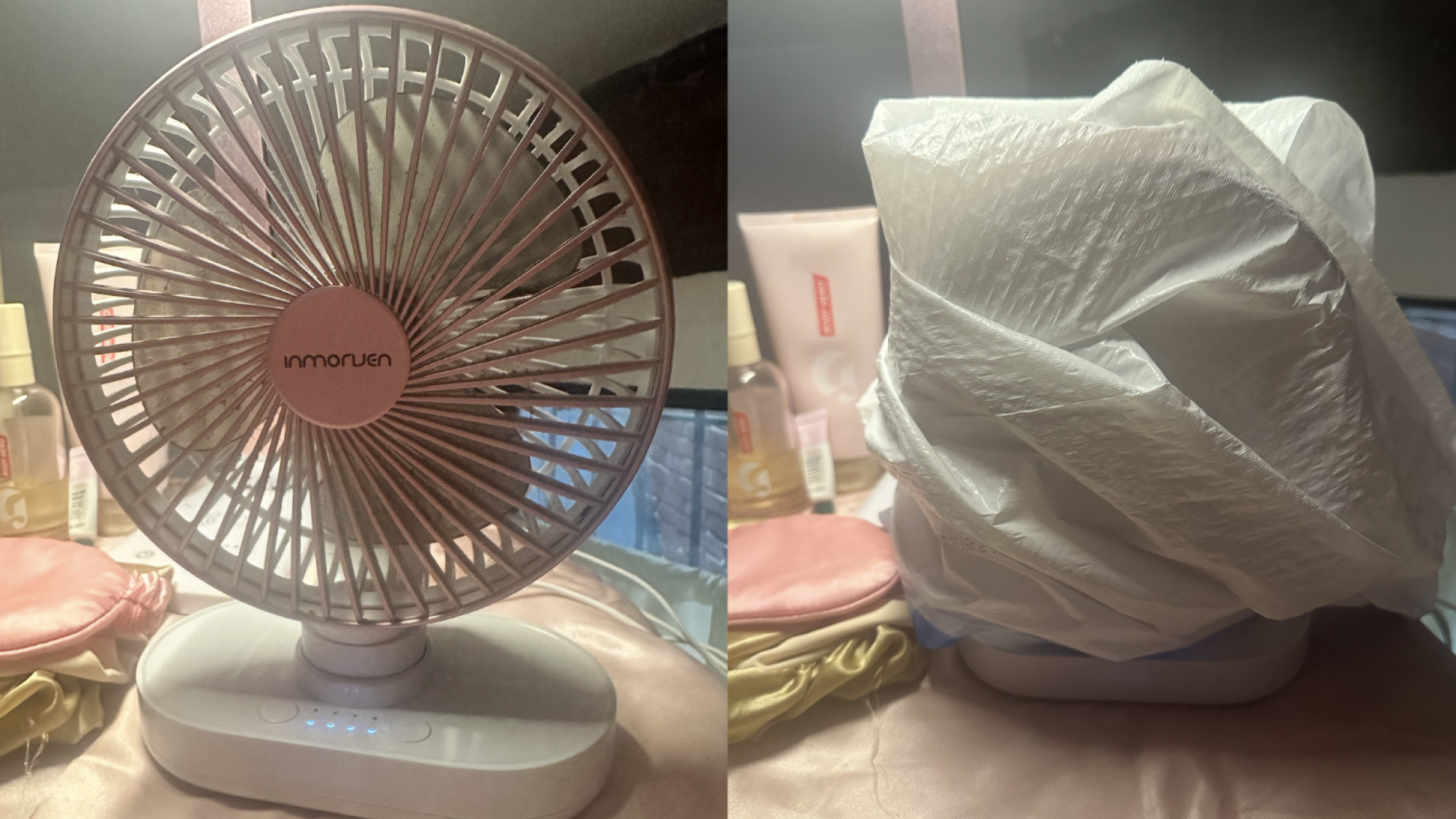
As the spring gets closer and closer, I was excited to see a new trend on TikTok that claims you can easily clean fans—a pretty tedious chore—just by spritzing the machine and covering it with a plastic bag. I tried it out on two different fans today and the results weren’t great. Here’s what happened and what you can (and should) do instead.

My attempt at the TikTok fan-cleaning hack

First of all, here’s how it’s supposed to look and work when you use a cleaning solution and garbage or plastic bag to “clean” your fan:

There are tons of videos like this on TikTok and they all look pretty effective, so I gave it a real try. Different creators recommend different cleaning solutions, like rubbing alcohol or dish soap, but I decided to fill my spray bottle with diluted Fabuloso, the same thing I’d clean the fan with if I were doing it manually.

First, I saturated my tower fan with some heavy-handed spray, then put the bag over it. Nothing happened. No dust or dirt came out into the bag whatsoever. I decided to take this as a personal win, honestly, and chalk it up to my fan simply not being disgusting and dirty enough. The goal here is ostensibly to dampen the dust within the fan to the point that it becomes heavy and dense enough to actually be blown out of the vents. I simply didn’t have enough dirt!

A tower fan under a plastic bag
Useless.
Credit: Lindsey Ellefson

My small table fan, however, definitely did; it was gross to even look at. I sprayed that one down, put the bag over it for a full 10 minutes, and… nothing. All the dirt was still visible when I removed the bag. None—and I mean none—came off. But worse, my fan got too wet and malfunctioned. It wouldn’t turn off. That, I think is the primary problem with this supposed hack: You can’t unplug the device like you normally would when cleaning something with electrical components, since you need it to be able to blow air in order to complete the trick. Unfortunately for me, my fan charges while it’s plugged in, so even unplugging it did nothing. It had to run for an hour with water inside before it regained the ability to be turned off. I unquestionably damaged and/or broke it by doing this.

A small fan under a bag

Credit: Lindsey Ellefson

In short, not only does this hack not clean the fan vents or blades, but it has the potential to damage your fan. I don’t care how many videos you see of people appearing to pull this off successfully. It’s not worth attempting.

How to clean a fan instead

In this case, it’s best to do things the old-school way. Unplug your fan. On larger box fans, you should be able to unscrew and detach the front plate, giving you access to the interior parts while you plop the front plate into soapy water (your tub works great for this). From there, wipe down the blades with soapy water. If you can’t do that or don’t want to, just use a vacuum with a brush attachment to suck dirt and grime out through the vents and slats. Use soapy water to wipe down the exterior, including the cord, but don’t get any moisture near where the cord connects or any of the buttons. They can be wiped with a plain microfiber cloth. Here’s a more comprehensive breakdown.

While I am sad that the nifty trick didn’t work, I’m glad for two reasons: I can dissuade you from trying it, first of all, and my apartment smells great now that two of my fans have dispersed Fabuloso water through the air. It’s the little things.

US Communications Agency To Explore Alternatives To GPS Systems

The FCC says it plans to vote next month to explore alternatives to GPS after national security concerns have been raised about relying on a single system crucial to modern life. From a report: “Continuing to rely so heavily on one system leaves us exposed,” FCC Chair Brendan Carr said. “We need to develop redundant technologies.” There have been reports of a rise in GPS interference around the world, particularly since 2023, known as spoofing raising fears of an increased risk of accidents if planes veer off-course. “Disruptions to GPS have the potential to undermine the nation’s economic and national security. And the risks to our current system are only increasing,” Carr said, noting President Donald Trump and a bipartisan group of lawmakers have called for action for years.

Read more of this story at Slashdot.

1Password offers geo-locating help for bad apps that constantly log you out

1Password has announced a new feature that lets you assign a geolocation to items stored in your vault. At first glance, that might not seem like much: a new little box inside a mobile utility you use on occasion. But allow me to remind you of something many of us cannot get away from: Terrible yet semi-mandatory apps with awful names that sign you out just when you need them.

The Ticketmaster app, for example, will always be signed out right when you’re coming up to the front of the line at the venue and the line suddenly starts moving faster. Or you will remember you have a discount or coupon inside a store or takeout joint’s app, but you will remember this only after every item has been scanned, just as the eyes of those in line behind you start burning holes into your neck. The airline on which you are flying ensures you are not logged in right before you arrive at the airport, so you can spend a little more time at their self-service kiosk, holding your bags so they don’t tip over while you log back in.

Can you get by without using these apps? Technically, yes. But they’re quite handy in a pinch, and 1Password’s newest feature actually does something to make them even more accessible.

Read full article

Comments