I Tried Prime Video’s New AI Dubbing, and I Have Thoughts

We may earn a commission from links on this page.

When you watch a piece of media produced in a language you don’t speak, you have a couple of options. You can, of course, turn on subtitles and follow along by reading. But in some cases, you can switch the audio track to whichever language you speak. This is called the “dub,” and it usually requires voice artists to record the lines in this new language—in a way that matches the original tone of the show or movie.

This requires time and money, something studios aren’t always willing to part with. As such, not everything has a dub. But what if it could?

On Wednesday, Amazon announced “AI-aided dubbing” for Prime Video. On select titles, viewers can choose to play an AI-generated dub of the script in either English or Latin American Spanish. Amazon says there are 12 titles that support this feature at this time, but only named three: El Cid: La Leyenda; Mi Mamá Lora; and Long Lost. The company also says “localization professionals” work with AI to “ensure quality control.” It’s not clear what that means, other than there are humans checking these AI dubs to make sure they aren’t mistranslating or making other mistakes due to hallucinations.

I have Prime Video, so I was interested to check out these dubs for myself to see how Amazon’s AI compared to, you know, human beings. In my search, I couldn’t find Mi Mamá Lora, but I could find the other two titles. In order to use the feature, you need to go into the language selector on the compatible title and choose the “AI beta.” Then, you can experience what I experienced.

El Cid: La Leyenda

There are a few titles on Prime Video going by the name of El Cid, but the only one that supports AI dubbing is this specific option: a 63 minute-long documentary about Rodrigo Díaz de Vivar, otherwise known as El Cid. I wasn’t watching El Cid: La Layenda to learn more about this ruler from medieval Spain—I wanted to hear how well an AI bot would handle the English dubbing of a movie produced in Spanish.

The results are interesting, to say the least. Most of the speaking in the documentary happens via voiceover, which is extremely hit or miss. (“Hit” may be too generous.) When you know the voice is AI-generated, you pick out the bland or odd inflections. It’s classic AI-generated speech: items in a list are spoken in inconsistent tones; some words are slurred or artificially slowed down, as if the bot has had a drink or two. But in all honesty, I was expecting worse. This isn’t like watching a documentary narrated by the TikTok AI voice. It isn’t great (it’s not even good), but it does offer a bit more emotion than I expected.

The issues extend to the AI dubs of the documentary’s interviewees. In many cases, the voice is quite awkward, stilted, and full of the inconsistencies mentioned above. At times, the voice is completely devoid of any emotion, and does sound more like a voiceover tool from years past, rather than the “high quality” AI voices we’ve come to expect.

To Amazon’s credit, it does sound like the AI uses a different voice for each person it is dubbing. That makes it a bit easier to distinguish between the different speakers, and spares you from having to listen to the same mediocre AI voice for the entire movie.

Long Lost

Long Lost is a little more difficult to judge: The movie, originally produced in English, has an AI dub in Spanish. Since I don’t speak Spanish, it’s not as easy to pick out the robotic quirks your ear picks up on when you know the language.

Still, Long Lost offered a different experience than El Cid, since this is a movie: You get to hear how the AI handles dubbing over actors. Like the AI voiceover in the documentary, these AI actors aren’t as bad as I expected. I was anticipating AI voices delivering their lines totally flat, but there is some emotion here at times. No robot is winning an Oscar here, mind you: In fact, the voices can be quite awkward and lacking, reading the script too loudly, abruptly, or plainly. But, for some lines, I’m not sure I would assume these were AI voices if I didn’t already know ahead of time.

Even in more intense scenes, the AI does “try.” When the character screams, the AI raises its voice. It’s far from perfect, but it’s an interesting experiment to see what the AI can do:

In one scene, two characters compete in a game of “Chubby Bunny,” in which each has to continue adding marshmallows to their mouths while still being able to say “chubby bunny.” At times, the AI actually sounds muffled, and while it isn’t “realistic,” it’s a nice touch. (Perhaps this is where the human intervention comes into play.) At other times, however, the AI sounds totally normal, while the actors’ mouths are clearly full of marshmallow.

Another interesting quirk: One of the characters starts speaking in French, so the AI track cuts out and the original audio comes in. It’s jarring, because you can hear the difference immediately—not just the different languages, of course, but the difference in how the movie’s actual audio sounds when compared to the sterile AI output.

I’d like to try this feature again on a movie produced in Spanish with an AI English dub. I imagine it would be easier for me to pick out the issues, and to know whether more (or all) of the voices would sound totally fake.

Is the future of dubbing AI?

Look, there is no way I would genuinely enjoy watching an entire movie or series with an AI dub. Personally, I’m not a huge fan of human-generated dubs, so I have zero interest in one that, at times, sounds like a robot gunning for the EGOT.

But I have to admit, the tech isn’t terrible. At some points, the voices sound realistic enough for me to get the gist, especially when the voiceover would also be monotone and informative—such as during a documentary. And it’s interesting that these AI dubs can incorporate elements from the show or movie, like muffled speech during a game of Chubby Bunny.

I don’t want to see any voice actors put out of work here. They deserve to get paid for their labor and audiences deserve a high-quality dub on the shows and movies they pay to watch. However, I do think AI dubbing could offer a compromise for the times when no dub is on its way at all: If a studio isn’t going to pay for a dub anyway, it would be helpful to have a dub at all—even if it’s on the robotic side. That would certainly help visually impaired viewers, who might not be able to take advantage of subtitles.

Of course, it’s naive to think studios will only use this tech for those specific uses, rather than eliminate an entire human profession to save some cash. To that end, I’d be happy if the whole AI dubbing practice ends here and now: It’s interesting, but it’s not good, so please don’t replace real voice actors.


Measles outbreak hits 208 cases as federal response goes off the rails

The measles outbreak in West Texas and New Mexico has reached 208 cases.

Texas officials reported 198 confirmed cases across nine counties as of Friday, with 23 people requiring hospitalization since the outbreak exploded at the end of January. Most of the cases continue to be in children and teens, with 153 of the 198 cases being between the ages of 0 and 17. Eleven cases have no confirmed age listed. All but five cases are in people who are unvaccinated or have no vaccination record.

Texas officials have so far reported one death in the outbreak in an unvaccinated school-aged child with no underlying health conditions. Media reports have identified the child as being a 6-year-old.

Read full article

Comments

How to watch Games Done Quick’s Frost Fatales speedrunning event from March 9

Games Done Quick’s next weeklong charity speedrunning shindig kicks off this weekend. Frost Fatales, one of GDQ’s two events celebrating women and femmes, runs from March 9 to 16, raising money for the nonprofit National Women’s Law Center.

Frost Fatales is the winter installment of the pair of events organized by GDQ’s Frame Fatales speedrunning community. (Its summer counterpart is Flame Fatales.) Last year’s Frost Fatales raised $155,000 for the same nonprofit, which fights for gender justice in issues central to the lives of women and girls. Since the first Frame Fatales event in 2019, the biannual speedruns have raised over $1 million for charity.

Gameplay screenshot from Cuphead. Boss fight.
Studio MDHR

This year’s festivities dive right into the deep end with a run of the charmingly punishing Cuphead at 1PM ET on Sunday, followed by Super Mario Odyssey a mere hour later. Anyone who can beat Cuphead in that time deserves a Medal of Honor.

Other notable runs from the week include the OG Legend of Zelda on Sunday, the Wii reboot of Punch-Out!! on Monday, a “girl squad” three-way race in Final Fantasy X-2 on Wednesday and a race to defeat Ganon (again) in Breath of the Wild on Saturday. The week wraps up with a one-handed (say what?) speedrun of the indie platforming classic Celeste later that night.

You can check out GDQ’s schedule for the full lineup of games. The weeklong event streams exclusively on the GDQ Twitch channel (also embedded below), starting with that must-see Cuphead run at 1PM ET on Sunday.

This article originally appeared on Engadget at https://www.engadget.com/gaming/how-to-watch-games-done-quicks-frost-fatales-speedrunning-event-from-march-9-220017343.html?src=rss

The First Three Settings to Change on Any Boox E-Ink Tablet

While they will never have the name recognition of the Amazon Kindle, e-ink devices from Chinese tech company Onyx International—sold under the slightly silly “Boox” brand name—are gaining a cult following in the U.S. I’ve reviewed three of its e-readers and digital notebooks over the past year, and I’m a huge fan. And if you’re reading this article, you probably are too (or soon will be).

I love Boox devices not only because they’re well built and full-featured (though if you want more of my thoughts there, check out my assessments of the Boox Palma, Note Max, and Note Air 4C). I also can’t get enough of their customizability. Nothing makes me crazier than trying to do something simple with a device, only to be stymied due to locked down software that doesn’t want to let me. From side-loading books onto a Kindle to doing—well, basically anything unsanctioned on an iPad, big companies seem determined to only let me do with my devices what they want me to do.

Boox devices are different: They run on an open version of Android that lets you do pretty much whatever you want. You can download any app in the Google Play Store, so you aren’t tied to one e-reading platform. If you want to sideload apps, feel free: Plug the device into your laptop and it will mount right to the desktop. If you’re truly ambitious, you can even install your own launcher to completely change things up.

While all this freedom is nice, it also means Boox devices have a bit more of a learning curve than, say, a plug-and-read Kindle. So if you are the new owner of one of these fantastic devices—whether an e-reader or a full-fledged digital notebook—here are five settings you should change right away to get the most out of it.

Set a one-touch refresh

Like any e-ink tablet, Boox devices suffer from occasional “ghosting,” or visible afterimages once you’ve turned a page. While the device will automatically refresh itself after a certain number of taps (touching the screen, basically), I like to set up a one-touch refresh that I can trigger whenever I want to. Depending on your device, there are a few ways to do this: a button or a gesture.

Setting a manual refresh on a Boox device with buttons

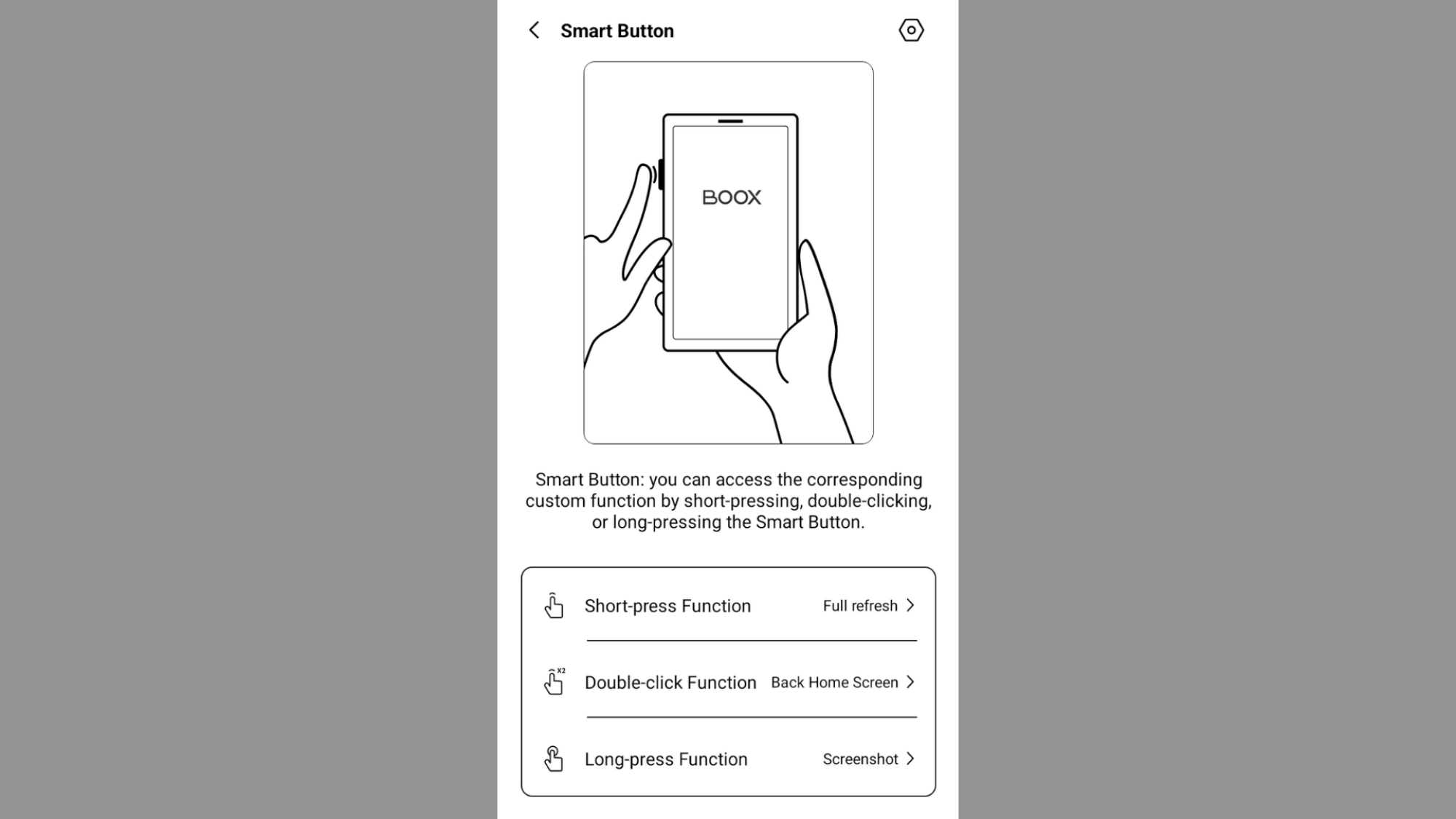
Action button settings on Boox Palma 2

Credit: Screenshot by Joel Cunningham

If you’ve got a Boox Palma or another device with page turn/volume buttons, you can map one of them to a screen refresh. For the Palma, it makes the most sense to use the Smart Button for this—that’s the button on the left hand side of the device, which can do different things based on whether you press it once, twice, or hold it down. On my own device, I’ve mapped a manual refresh to a single Smart Button press, as it’s the thing I find myself doing most often. However, you can also map a refresh to the volume buttons if you like (though I prefer to use those for page turns).

To remap your Smart Button, open the settings app and tap Smart Button. Tap your preferred option (Short-press Function, Double-click Function, or Long-press Function) and select Full-refresh.

Setting a manual refresh with a gesture

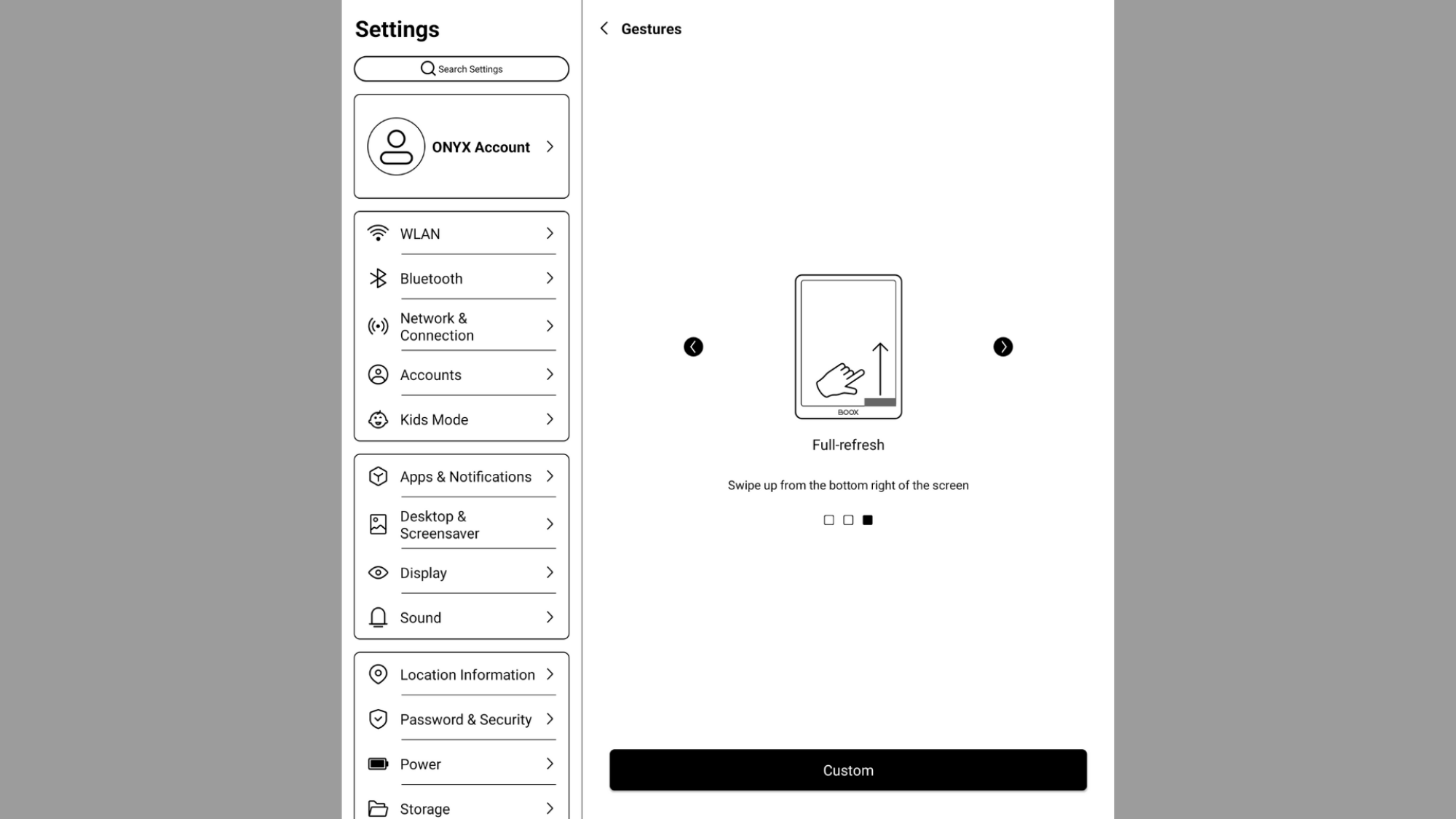
Genture menu on Boox Note Max

Credit: Screenshot by Joel Cunningham

Not all Boox devices have buttons, so if yours doesn’t, you’ll need to map a manual refresh to a gesture. (Though you can also do this on the Palma, if you like.)

To get started, open Settings and scroll down to System Navigation. Under Bottom Navigation, tap More Settings. Choose the area of the screen you’d like to map the refresh to by swiping between the left, center, or right side options. Tap Custom and then choose Full-refresh from your list of options.

Choose your cloud storage option

Boox devices tend to have generous onboard storage, but you’ll get more out of them by linking your preferred cloud storage service on the system level. This will let you move files on and off the device without the need to plug it in to your computer.

To start, open Settings, then Accounts. Tap Move to Cloud Storage in Library, then select your preferred option from the list. You have a bunch of choices, including Dropbox and Google Drive. Tap the one you want, then log in.

Change your lock screen image and screensaver

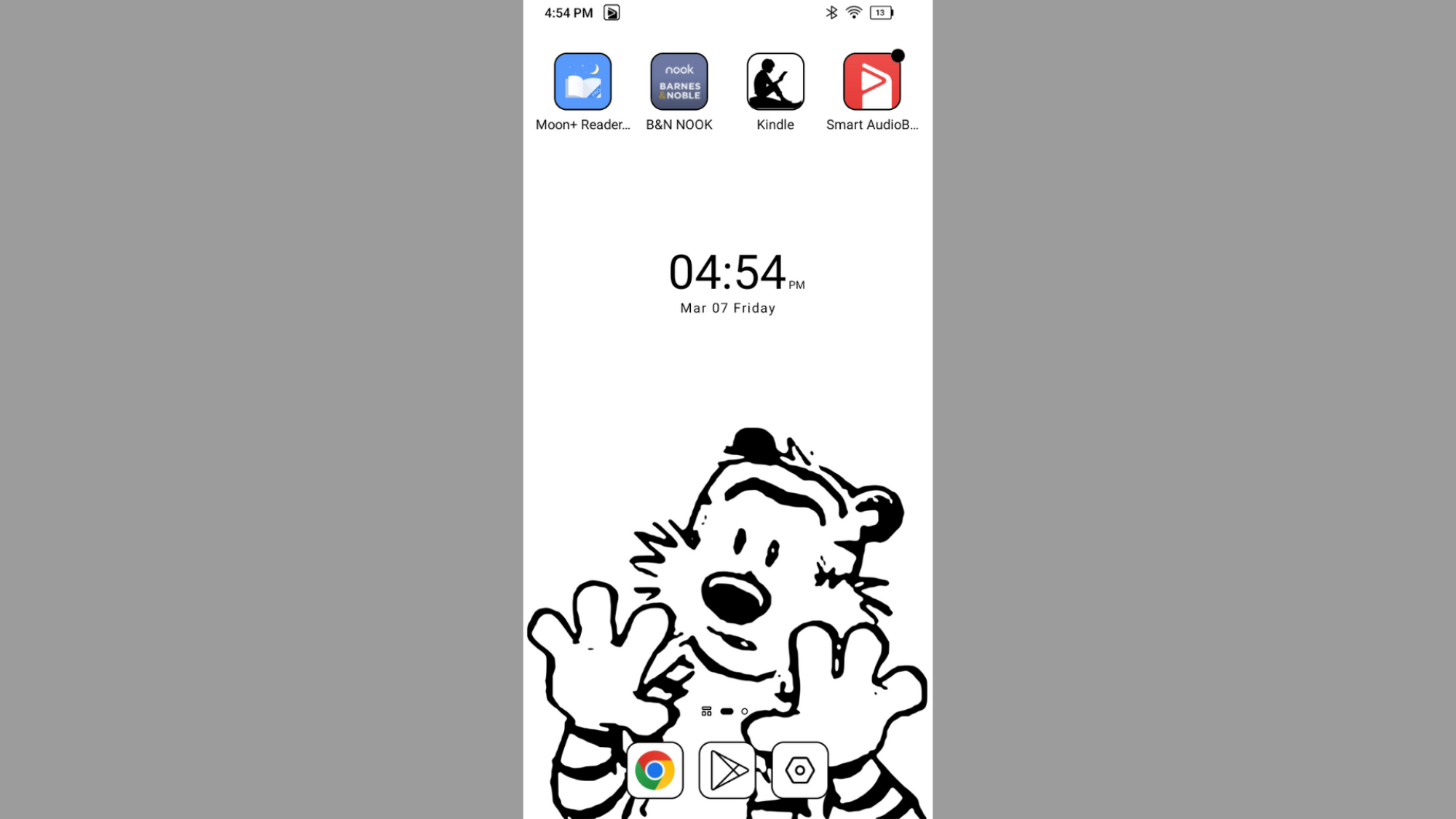
A wallpaper on a Boox Palma featuring a line drawing of Hobbes from Calvin and Hobbes

Credit: Joel Cunningham

Boox devices have some handsome preset lock screen images, but if you want to make the device your own, you can set your own screensaver and wallpaper. This one is pretty straightforward: Choose Desktop & Screensaver in the Settings app—but if you want a custom image, you’ll first have to get it saved to the right spot.

The easiest way to do this is to find an image you like while browsing the internet using your Boox device. Long press on it and choose Download, which will save it to your downloads folder (naturally). Next, open up the Gallery app, tap your Download folder, and then tap the image you want. In the lower right, tap More and then Set as. You can choose to set it as the Screensaver, the Wallpaper, or the Power-Off image.

Alternately, you can plug the device into a computer and manually add the images to your Pictures folder. And here’s another helpful hint: If you want to create your own wallpaper image in Photoshop or Canva, the dimensions are 824×1648 for the Boox Palma. For the Note Max or Note Air 4C, 1404 x 1872 should serve you well.

Feds arrest man for sharing DVD rip of Spider-Man movie with millions online

A 37-year-old Tennessee man was arrested Thursday, accused of stealing Blu-rays and DVDs from a manufacturing and distribution company used by major movie studios and sharing them online before the movies’ scheduled release dates.

According to a US Department of Justice press release, Steven Hale worked at the DVD company and allegedly stole “numerous ‘pre-release’ DVDs and Blu-rays” between February 2021 and March 2022. He then allegedly “ripped” the movies, “bypassing encryption that prevents unauthorized copying” and shared copies widely online. He also supposedly sold the actual stolen discs on e-commerce sites, the DOJ alleged.

Hale has been charged with “two counts of criminal copyright infringement and one count of interstate transportation of stolen goods,” the DOJ said. He faces a maximum sentence of five years for the former, and 10 years for the latter.

Read full article

Comments

Microsoft Sounds Urgent Alarm After Millions Of PCs Get Hit With Malvertising

Microsoft Sounds Urgent Alarm After Millions Of PCs Get Hit With Malvertising
Microsoft has uncovered a large-scale malvertising campaign that has affected over 1 million devices worldwide. In a blog post detailing its findings, Microsoft revealed that threat actors used platforms such as Dropbox, Discord, and Github to broadcast malware. The attacks, which were aimed at stealing sensitive information, were discovered

You can stream the first episode of Pixar’s Win or Lose on YouTube

You can stream the first episode of Win or Lose, Pixar’s first original TV series, for free on YouTube. It follows a co-ed middle school softball team (the Pickles), with each episode focusing on a different character’s perspective — including animated personifications of their insecurities and defense mechanisms.

The first episode hones in on the “coach’s kid,” Laurie, the Pickles’ right fielder. She’s rubbish at softball, thanks in no small part to her insecurities, illustrated as a sentient perspiration blob (the aptly named Sweaty).

If Win or Lose floats your boat, you’ll need to hop over to Disney+ — subscription in tow — to watch the remaining seven episodes (the last two of which premiere on March 12). Should you go that route, you can currently save some money on the ad-supported tier of a Disney+ and Hulu bundle.

Closeup of the character Kai from the Pixar series Win or Lose,
Disney+

Win or Lose stood at the center of a controversy months before its February 19 debut. The show was initially slated to include an openly transgender character, Kai. While the part, played by trans actress Chanel Stewart, is still included in the series, Disney cut several lines of dialog referencing her gender identity.

A pair of overshadowing circumstances compounded the online backlash over the decision: The news came on the heels of Donald Trump’s election victory, and the show has an openly Christian character (Laurie) who prays aloud to “Heavenly Father” before heading to the plate. The combination led many to assume the moves were an appeasement to the president-elect, right as business leaders were routinely seen visiting Mar-a-Lago and currying favor by cutting DEI programs and trans-inclusive features.

However, Disney framed its decision as being about parental freedom regarding LGBTQ+ storylines. “When it comes to animated content for a younger audience, we recognize that many parents would prefer to discuss certain subjects with their children on their own terms and timeline,” a company spokesperson told The Hollywood Reporter in December. An off-record source “close to” the project told the publication that the studio chose to cut the lines several months before, which (if true) would have placed it at a point when political forecasters saw the election’s outcome as either a coin flip or slightly favoring former Vice President Kamala Harris.

Regardless, you can check out the first episode below if it sounds like your cup of tea.

This article originally appeared on Engadget at https://www.engadget.com/entertainment/streaming/you-can-stream-the-first-episode-of-pixars-win-or-lose-on-youtube-211938945.html?src=rss

Everything announced at MWC 2025: Samsung, Nothing, Lenovo, Xiaomi and more tech news

Mobile World Congress is taking place in Barcelona this week, offering manufacturers an opportunity to show off new gear without needing to hold their own splashy event. So far, we’ve learned about some new laptops and phones, as well as upcoming AI updates to Android and an internet connectivity announcement from Meta. There’s also been some interesting ideas in the world of headphones and a whole lot of concepts that might never make it to market, but are fun to look at any way.

Here’s a look at everything announced at Mobile World Congress that caught our eye. We’ll update this story throughout the week.

The new ThinkBook 16p Gen 6 with docked with Lenovo's prototype dual 13-inch display add-on.
Sam Rutherford for Engadget

Among the bigger-name manufacturers, Lenovo has arguably had the busiest MWC so far. The company has revealed a whole bunch of laptops, including upgraded ThinkPads and several intriguing concept models.

The ThinkPad T14s 2-in-1 has a design that’s more aligned with the convertible format of the Yoga lineup than a typical ThinkPad. The 14-inch machine can be equipped with a 400-nit WUXGA touch display. Other ThinkPads are getting spec upgrades, while Lenovo claims the new ThinkPad X13 Gen 6 has “one of the lightest ThinkPad designs ever.” The company has a fresh slate of laptops with generative AI capabilities as well.

Some of Lenovo’s concepts have certainly caught our attention. It’s a bummer that the company doesn’t currently plan to turn the Yoga Solar PC Concept into a commercial device. Thanks to the solar cells on the casing, the laptop can soak up enough energy from the sun in 20 minutes to play an hour of videos. As little as 0.3 watts of light is enough to juice up the battery. While solar-powered laptops aren’t exactly new, the Yoga Solar PC feels polished. Here’s hoping Lenovo does more with the notion in the future.

The Lenovo Yoga Solar PC Concept features built-in photovoltaic cells that can add an hour's worth of video playback after just 20 minutes in the sun.
Sam Rutherford for Engadget

In addition, Lenovo showed off some conceptual display accessories for a ThinkBook laptop. There’s an eight-inch screen that attaches to the side magnetically to help you, for instance, keep up with notifications and widgets. The Magic Bay Dual Display Concept adds a 13.3-inch panel to either side of the main display. There’s also a slim second display that’s designed to sit above your laptop screen and provide quick access to things like the time, weather, notifications, a focus mode timer, an AI assistant and notifications.

A photo showing the 18-inch screen on Lenovo's codename Flip concept in its full glory.
Sam Rutherford for Engadget

On top of all of that, Lenovo offered a look at a new prototype laptop with a flexible display. Building on the tech the company used in the ThinkBook Plus Gen 6 Rollable, the ThinkBook codename Flip AI PC Proof of concept (to give its full name) has a fold-out screen. This allows Lenovo to double the panel’s size from 13 inches to 18.1 inches. The ThinkBook Rollable’s display, on the other hand, can extend to 16.7 inches. Again, Lenovo doesn’t currently plan to release a commercial version of this fold-out laptop, but it’s an interesting idea.

Samsung Galaxy A56 hands-on
Photo by Mat Smith for Engadget.

The main MWC news from Samsung this year is the company’s latest midrange and budget phones. The Galaxy A56 has a larger screen than its predecessor at 6.7 inches, but it’s thinner too at 7.44mm vs. 8.2mm. There’s now a small bump where the volume and power buttons are — a tweak that we feel makes the A56 easier to handle.

Samsung has switched up the camera array in the A56. On the front, there’s a lower-res 12MP lens. On the other side, you’ll find an upgraded 12MP ultrawide, 50MP main sensor and a 5MP macro lens. The A56 has a bunch of AI-powered camera and image editing features, such as enhanced subject detection in portrait mode and an object eraser.

Pre-orders are open in the UK for the Galaxy A56, which costs $499/£499. It will hit the UK on March 19, but folks in the US will have to wait until “later this year” for it.

Samsung also revealed the Galaxy A36 5G and Galaxy A26 5G. Both devices have a 120Hz, 6.7-inch display with brightness of up to 1,200 nits. They also share an IP67 rating and 5,000mAh battery with the A56. 

However, the base models of each only have 6GB of RAM (compared with the A56’s 12GB). In addition, the A36 has the Snapdragon 6 Gen 3 processor instead of the Exynos 1580 that the A56 boasts, while the A26 has a Exynos 1380 chipset.

In addition to properly launching the trio of A-series phones, Samsung also brought a bunch of concept devices to Barcelona, further showing off its flexible display prowess. We’ve seen reporting of these, like Android Police’s coverage of a “Flex Gaming” handheld. That prototype consists of a 7.2-inch OLED screen that bends in half. Flanking the display are what appear to be controllers and holes where they’d fit when the handheld is folded up. Elsewhere on the internet we also saw Samsung showcase a Galaxy Z Flip-esque device that had two hinges that let it fold in on itself from the top and bottom. Allison Johnson at The Verge has nicknamed it “The Claw,” which to our editor Cherlynn Low is just reminiscent of an MSI device.

The Xiaomi 15 Ultra with its optional photography kit.
Sam Rutherford for Engadget

Unfortunately, Xiaomi doesn’t have plans to bring a handset it showed off at MWC to the US. That’s a real pity, because no other companies are selling phones quite like the Xiaomi 15 Ultra in the country these days.

Xiaomi teamed up with Leica to make a smartphone that leans heavily into photography. The camera array includes a 1-inch 50-megapixel Sony main sensor, an f/2.2 50MP ultrawide cam, a 50MP midrange lens with a 70mm focal length and a 200MP periscope array with a 100mm focal length — that equates to a 4.7x optical zoom. Some preset Leica filters help to tie the two brands’ knowhow together.

That’s not all that might be interesting to mobile snappers. Xiaomi’s separate Photography kit includes an add-on camera grip with a physical shutter button, an adjustable dial and dedicated video button. You’ll have the option to attach a standard 67mm filter adapter to a case as well — in other words, some of the equipment you might use on a dedicated camera is compatible with the Ultra 15 as part of this setup.

Moreover, the Ultra 15 has a 6.7-inch AMOLED display with 120Hz refresh rate and up to 3,200 nits of brightness to help you get a good look at your captures. Plus, unlike some other Chinese phones (like Huawei’s), Xiaomi supports Google services in HyperOS 2, which is an Android skin. The Ultra 15 starts at about €1,499 (around $1,572).

Speaking of Android, Google announced two new AI-powered features for the operating system at MWC. The Live Video function, which Google first previewed at I/O 2024, allows you to share what your phone’s camera sees with Gemini so you can ask the chatbot questions about the footage. 

The new screensharing function works in a similar way. You can ask Gemini questions about whatever’s on your phone or tablet’s display. 

If they work as well as advertised, these features could be a boon for accessibility. Google will first offer them to Gemini Advanced subscribers starting later this month. Those with a $20 per month Google One AI Premium membership, which is included with some Verizon plans, have access to Gemini Advanced.

Nothing Phone 3a and 3a Pro hands-on
Image by Mat Smith for Engadget

Samsung wasn’t the only smartphone maker of note to show off two new mid-range devices at MWC. Nothing debuted its Phone 3a Pro and Phone 3a at the event — even though it has yet to unleash the Phone 3.

The 3a Pro has a beefier camera module (quite literally as the device is about 10 grams heavier than the 3a). It contains a 50MP telephoto sensor with a 3x optical zoom; a 50MP primary sensor with f/1.88 lens and dual-pixel phase detection auto-focus (PDAF); and an ultrawide 8MP sensor with a 120-degree field of view. The handset has a telemacro mode too. As for the 3a, that boasts a main 50MP camera with single-pixel PDAF, but the other two sensors are the same as on the 3a Pro.

The cameras are the main difference between the two phones, which both have a 6.77-inch AMOLED LTPS display with a 120Hz refresh rate and up to 1,300 nits of brightness. The phones have a 5,000mAh battery with support for 50W fast charging, and they run on a Snapdragon 7s Gen 3 chipset.

The devices have Nothing’s multipurpose Essential Key, a physical button that can take screenshots and help you record voice notes. The phones also have some generative AI features, such as the ability to transcribe said voice notes and describe what’s in screenshots and photos.

As usual, Nothing is initially offering these devices in the US through a beta program. Phone 3a pre-orders are open now and the $379 handset ships on March 11. That’s the date when pre-orders for the Phone 3a Pro go live. The $459 phone can be in your hands on March 25.

There was more news out of MWC beyond new gear and OS updates. Meta and the Internet Society announced a partnership to bolster affordable internet connectivity around the globe. They’re jointly putting $30 million into the initiative over the next five years.

A major aim of the project is to help build out infrastructure in areas where commercial providers have yet to do so. The Connectivity Co-Funding Initiative will also back training programs, community-centered solutions for underserved areas and locally owned networks. The Internet Society is hoping to find more partners to help with the project. 

Finnish company HMD, which also makes devices under the Nokia brand, brought a bunch of phones to Barcelona this year, but maybe the most interesting thing was some earbuds. The Amped Earbuds are a pair of fairly standard Bluetooth buds, with a twist in the case: It’s got a 1,600mAh battery built in that supports reverse wireless charging. It’s a pretty solid idea — given you’re likely already carrying a phone and some headphones. Perhaps the one issue is that capacity: 1,600mAh is enough to charge a lot of headphones, but it’s dramatically smaller than the battery in your phone. Still, an extra 20 percent of battery life could be an lifesaver.

Update, March 7 2025, 4:05PM ET: This story has been updated twice since publish. Once to include a section on Samsung’s concept folding devices, and once to add a section on HMD’s Amped Earbuds. The introduction of the article was also changed.

This article originally appeared on Engadget at https://www.engadget.com/computing/laptops/everything-announced-at-mwc-2025-samsung-nothing-lenovo-xiaomi-and-more-tech-news-200029465.html?src=rss

The Eight Best Services to Rent, Buy, and Download E-Books

We may earn a commission from links on this page.

While there is something special about a physical book, e-books are a great alternative for reading on the go (and building a library that doesn’t take up any space). If you want to read on your phone, tablet, or e-reader, there are a number of options for finding millions of titles to borrow or buy.

Your e-reader choice doesn’t necessarily limit where you can get e-books, as some of the best e-readers (Kindle and non-Kindle) support a wide range of document formats, which you can convert back and forth using a service like Calibre and Adobe Acrobat, with some limitations. (If you’re in need of an e-reader, we’ve broken down the pros and cons of some of the most popular options on the market, though you can also access content via various apps for your iOS or Android device.)

On the flip side, where you buy e-books may limit where can you read them. For example, Amazon has eliminated the option to download your Kindle e-books to a computer to convert them from the company’s proprietary .AZW3 format. That means you can read content only on your Kindle or through the Kindle mobile or web app.

In addition to compatibility with your reading device, you should also consider factors like book selection and catalog size, whether you want to pay per book or have a subscription, and whether you want to borrow books or own them long-term.

Here are some of the best e-book services to consider.

Kindle Books

While you might be trying to get away from Amazon’s services, especially if you’re not already a Kindle user, Kindle Books is still one of the top e-book shops out there, with more than 6 million titles to choose from.

You can buy individual books a la carte or subscribe to Kindle Unlimited, which allows you to borrow up to 20 eligible e-book or audiobook titles at a time (plus magazine subscriptions) with no due date, for $12 per month after a 30-day trial. Your books and reading progress sync across devices, so you don’t lose your place.

The downside, as outlined above, is that you can only read books on a Kindle device or in the Kindle app, so you won’t be able to transfer content to another e-reader. And while Kindle Unlimited has a huge selection, including popular titles, you may not find everything you want to read is eligible, so you’ll have to purchase some books separately.

OverDrive

OverDrive is the library service that loans titles to anyone with a library card at a participating library system. More than 90% of libraries in North American support OverDrive, and you can check out and read e-books through the Libby app on iOS, Android, and Amazon devices as well as via web. OverDrive is free to use as long as you have a library card, and the Libby app is easy to navigate for browsing, requesting, reading, and returning e-books with features like device syncing and offline access.

However, the selection is dependent on your local library’s catalog, and you may have to wait for popular titles. Plus, like physical books from the library, you have a limited checkout period before your e-book is returned to circulation—and if other users have requested the title, you may not be able to renew it.

If you want to expand your options for library borrowing, you can also use Hoopla, which is similar to OverDrive and allows you to check out e-books to read on your mobile device.

Rakuten Kobo

Kobo is a great alternative to Kindle for both e-readers and e-books. The catalog has more than 5 million titles to choose from, which you can read on any Kobo device or with the Kobo app on iOS, Android, or desktop. You can also download Kobo books in EPUB or PDF format to export to other reading devices, and Kobo integrates with OverDrive/Libby for library borrowing.

Kobo offers a la carte purchases as well as a subscription borrowing service called Kobo Plus, which costs $8 per month for e-books only or $10 a month for both e-books and audiobooks after a 30-day trial. Kobo Plus doesn’t come with access to the full Kobo catalog, though there are 1.5 million e-books and 150,000 audiobooks available to choose from.

Google Play Books

Google has a catalog of more than 4 million books available to buy or rent through Google Play. You can read books on almost any device (except Kindle) using either the Google Play app or by downloading as an EPUB or PDF file and transferring to an e-reader. The Google interface offers helpful recommendations, and the app syncs across devices with the option to read offline. Google doesn’t have its own e-reader, but that makes reading more flexible than content purchased for Kindle.

Bookshop.org

If you want to support your local bookseller with your e-book buys, Bookshop.org is a great alternative to Kindle and Kobo. A portion of all purchases (whether e-book or hard copy) goes to an indie bookstore of your choosing, and you can read e-books through the Bookshop.org app on your iOS or Android device or in a web browser.

The selection from Bookshop.org isn’t as large as some other catalogs, and you’ll pay full price for most titles, as there’s also no subscription option for borrowing. Again, though, you are supporting local businesses with each purchase.

Everand

Everand is the audiobook and e-book arm of Scribd, and a monthly subscription includes access to both content types and a catalog of more than 1.5 million titles. The $12-per-month standard plan unlocks one title per month, or you can pay $17 per month for three unlocks (after a 30-day trial). Both plans include access to community-uploaded documents on Scribd. Everand e-books can be read through the service’s iOS or Android app or on Everand.com.

eBooks.com

eBooks.com is a platform-agnostic shop with more than 2.6 million titles to choose from, making it a good option if you’re not locked into a single device. You can download your books in one of several formats depending on your reading device (note that eBooks.com is not compatible with Kindle except for Kindle Fire). You do have to purchase e-books outright—there’s no subscription option.

Project Gutenberg

If you’re looking for literary classics, Project Gutenberg is one place to find them for free. First launched in 1971, the (now) online library has digitized over 75,000 books in dozens of languages, with a focus on content with expired U.S. copyrights. File formats are compatible with most e-readers and mobile devices, so you can download and transfer books anywhere you want to read them. You won’t find popular titles or current bestsellers here, but it is a great option for books from your English class reading list.

Other e-book services

Of course, there are plenty of other places to get e-books. Those in the Apple ecosystem can purchase individual titles from Apple Books, which you can read on any device with the Apple Books app and share with up to five family members. Barnes & Noble is good choice for Nook users, with more than 4 million titles that can also be accessed in iOS or Android. Or look at platforms that offer discounted or free e-books.

Review: Mickey 17’s dark comedic antics make for a wild cinematic ride

Oscar-winning director Bong Joon-Ho returns to the big screen this weekend with the sci-fi film Mickey 17. If you’re expecting the subtly devastating social commentary of his 2019 drama/horror/thriller-hybrid Parasite, I suspect you’ll be disappointed. Mickey 17 is a very different beast in both aesthetic and tone. When the first trailer dropped, I wrote that the film felt like a darkly comedic version of Duncan Jones’ 2009 film Moon, with a dash of the surreal absurdity of Terry Gilliam’s Brazil (1985) thrown in for good measure. I stand by that assessment, and it proves to be a winning combination.

(Some spoilers below but no major reveals.)

The film is based on the 2022 novel Mickey7 by Edward Ashton. Ashton’s inspiration for the novel was the teletransportation paradox—a thought experiment pondering the philosophy of identity that challenges certain notions of the self and consciousness. It started as a short story about what Ashton called “a crappy immortality” and expanded from there into a full-length novel. (Ashton also penned a sequel, Antimatter Blues, which was published in 2023.)

Read full article

Comments

The Spectacular Synapse Collapse

The spectacular collapse of fintech middleman Synapse has left $200 million in customer money frozen and up to $95 million missing, with no clear answers about where the funds went. After Synapse, a financial technology company connecting other fintechs to banks, filed for bankruptcy in April 2024, customers of apps like Yotta, Juno, and Copper found themselves locked out of their savings.

Founded in 2014 by Sankaet Pathak, Synapse connected consumer-facing fintech platforms with banks holding customer deposits. The disaster unfolded after relationships with regional bank Evolve and unicorn client Mercury deteriorated, triggering a chain reaction through the financial infrastructure. Nearly a year later, Fortune reports that a Department of Justice criminal investigation is underway, while the bankruptcy’s court-appointed trustee called the situation an “awful, awful” mess. The debacle, the outlet writes, exposes the risks lurking beneath popular financial apps operating in a regulatory frontier where customer funds travel across an invisible bridge of intermediaries.

Read more of this story at Slashdot.