Pebble founder Eric Migicovsky has warned that the company’s revived smartwatch line will face significant functionality limitations when paired with iPhones, blaming Apple’s restrictive policies that favor its own Apple Watch. “It’s impossible for a 3rd party smartwatch to send text messages, or perform actions on notifications (like dismissing, muting, replying) and many, many other things,” Migicovsky wrote in a blog post, adding that the situation has “actually gotten worse over the last 8 years.”
A 2024 class action lawsuit cited in the post claims Apple has added further restrictions since iOS 13, including requiring users to display full content previews on their lock screens for notifications to reach third-party watches. Pebble is still developing an iOS app because 40% of potential customers use iPhones, he said. Migicovsky warned that the watch will “always appear to have less developed functionality on iOS than Android” and some features will arrive on Android first.
Enriched Lithium is a critical ingredient in fusion reactors. Making it is a toxic nightmare, but scientists may have found a way to do it without poisoning the world.
POC’s new road and MTB helmets have been ranked as the safest Virginia Tech’s Helmet Lab has ever tested.
The Cytal road helmet and Cularis MTB helmet are rated number one in their respective classes by Virginia Tech.
POC says safety performance and ventilation were its priorities when developing the new helmets.
“We know how to develop highly ventilated, comfortable, aerodynamic and highly protective helmets; with the Cytal and Cularis, we wanted to challenge ourselves to take another step forward,” says POC’s chief product officer, Oscar Huss.
“In particular, we wanted to integrate more of our real-world testing and research knowledge to refine details and enhance helmet performance. And the Cytal and Cularis are a true embodiment of this approach.”
POC Cytal
POC’s Cytal road and gravel helmet in Hydrogen White. Poc Sports
Building on the success of the POC Cytal Carbon, released in the summer of 2024 and worn by EF Pro Cycling, the new Cytal road and gravel helmet is optimised for hot-weather riding.
According to POC, the Cytal uses the Venturi effect to channel air into the helmet and compress it, which improves both the cooling effect and aerodynamics.
The Cytal uses the same design as the Cytal Carbon, although without the carbon fibre used in the wing, the pricing becomes more accessible.
While the existing Cytal Carbon retails at £360 / $400 / €400, the new Cytal is priced at £290 / $330 / €320 / AU$500.
The use of CFD modelling has helped POC optimise airflow through the Cularis helmet. Poc Sports
Alongside Computational Fluid Dynamics (CFD) modelling, the Cytal has also been tested thoroughly in the wind tunnel and in real-world scenarios to inform the development process.
Besides integrating the MIPS Air Node system to limit the impact of rotational forces on the brain, the Cytal’s safety features have also been developed using Finite Element Method (FEM) modelling.
You can choose from nine colourways, including multiple monochrome options alongside ‘deep green’, navy, red and orange.
POC Cularis
The POC Cularis MTB helmet in Hydrogen White.
A new model in POC’s line-up, the Cularis is a trail mountain bike helmet that’s designed to combine optimal safety with maximum ventilation.
POC’s product development team have been working with CFD modelling to make sure the Cularis provides a “super cool” fit.
Most notably, the Cularis ranks #1 out of 264 helmets tested at Virginia Tech since 2011, making it the safest MTB helmet it has ever tested.
The helmet features a ‘breakaway peak’, which is designed to detach in the event of a crash, as well as the MIPS Air Node system, for enhanced protection from angular impacts.
The POC Cularis retails at £200 / $240 / €230 / AU$350, and is available in three sizes and a choice of nine colourways.
If you’ve ever sat in front of your Windows PC wondering exactly what is causing it to run so sluggishly, some clarity may be on the way: Microsoft is testing a new FAQ page in Windows 11 that will analyze your system specs and give you some advice about why you might not be seeing top performance speeds.
The feature is currently hidden away in the preview release of Windows—it’s not even active in the earliest testing version—but developer @phantomofearth.bsky.social has managed to access the relevant screens and find out how they work. The new page will apparently make its home in the System tab of Settings.
As per the screens shared online, an example of a frequently asked question is: “Is my GPU sufficient for high end gaming and video experience? How can having a dedicated GPU enhance my experience and productivity?” The answer then explains that less than 4GB of memory for a GPU can lead to lower performance and visual quality.
New Frequently Asked Questions list in Settings > System > About hidden in builds 26120.3576 and 22635.5090. Has some questions related to the Windows version and device specs. (vivetool /enable /id:55305888)[image or embed]
Then there’s: “How does having 4-8GB of RAM impact my PC’s performance? Can I run modern applications smoothly with this RAM capacity?” The response explains that you’ll be fine editing documents and browsing the web, though tasks such as photo and video editing may be more of a challenge for your system.
These questions and answers will apparently be tailored to each specific system, so you’ll only get information that’s relevant to your own setup. This could potentially be pretty useful when it comes to figuring out what’s slowing down the performance of your computer, or getting advice on which component needs an upgrade.
It’s worth bearing in mind that a huge chunk of Windows users aren’t even going to know what RAM is, let alone how it impacts the performance of their system. For those users, I could see the FAQ section being helpful—certainly more helpful than a dry list of system specs, which is all that’s available right now.
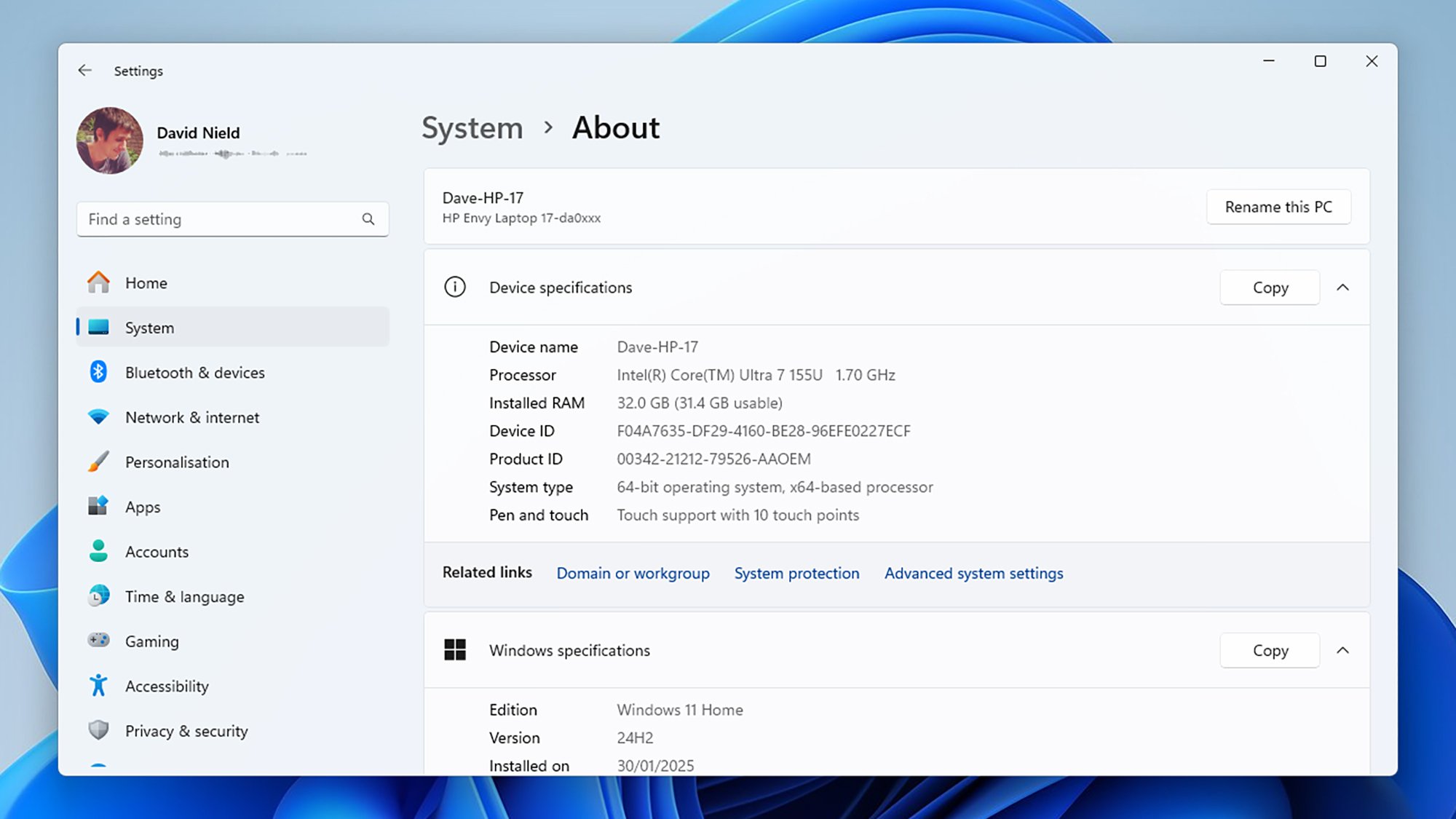
Right now, Windows 11 gives you a basic list of system specs. Credit: Lifehacker
That said, the responses are a little on the generic side (I really hope Microsoft hasn’t given Copilot the job of writing them). Information like “a high-end GPU can provide better graphics, smoother gameplay, and faster processing” isn’t exactly a revelation, and doesn’t really quantify how much improvement a user might see with a graphics card upgrade—so some estimates on potential performance gains would be welcome.
However, the more precise these FAQs get, the greater the risk of inaccuracies: Microsoft wouldn’t want a user to be in the situation of buying an expensive GPU upgrade only to see minimal performance boosts because of a slow CPU, for example. Assessing PC speeds and the contribution of each component is a complicated business, which is probably why these FAQs are rather vague at the moment.
Hopefully, Microsoft can work in some more specifics before this feature actually launches without running the risk of misleading users. Of course, a lot of the details also might change between now and whenever this gets pushed to all Windows users—if indeed it ever does see the light of day. But it’s a potentially useful new addition to the OS that will provide some extra context to your system specs.
Video games and their accompanying hardware have been a big part of mainstream entertainment for decades with billions of gamers worldwide partaking in the pastime. This segment is also not immune to the slings and arrows of fortune, and thus plummeting sales at certain times. To that end, video game hardware spending is down about 11% in
After what felt like an near-endless barrage of leaks and rumors, Google finally lifted the curtain on its Pixel 9a, a midrange Android handset that is poised to battle Apple’s recently launched iPhone 16e. Both are priced similarly, though the Pixel 9a has a $100 price advantage—it starts at $499, versus $599 for Apple’s replacement to the
If you’re looking to boost the Wi-Fi coverage in your home without spending too much, the Amazon Spring Sale has you covered. The TP-Link Deco mesh Wi-Fi system is $120 off as part of the Big Spring Sale. While not a record-low, it’s close to it and a great deal considering how expensive mesh Wi-Fi systems can be.
The Deco XE75 Pro comes with three nodes (or satellites) offering coverage up to 7,200 square feet, which is especially beneficial for large family homes or home office setups. Each node has one 2.5 Gbps and two Gigabit ports which offer a stable and reliable wired connection for devices such as your PC, laptop and game consoles. Thanks to AI-driven mesh technology, your mesh Wi-Fi system uses the same user name and password, meaning you can move from room to room switching nodes in the background and on the fly for an uninterrupted wireless connection.
If you’ve never used a mesh Wi-Fi system (or have limited experience with them), setup is fairly simple using the Deco app. You’ll have access to three wireless network bands as well: 6 GHz (2402 Mbps), 5 GHz (2402 Mbps) and 2.4 GHz (574 Mbps). We ranked the Deco XE75 Pro “best mesh Wi-Fi system for most” in our best mesh Wi-Fi system buying guide because of its excellent performance, comprehensive coverage and user-friendliness. This three-pack gives you everything you need (and arguably more than you need) to enjoy fast and reliable whole-home coverage.
You can set up a separate guest Wi-Fi network, meaning your friends and family can easily join your Wi-Fi without having to grant them access to your devices or data. Although the app could do with a bit of polish in places, it does support voice commands via Alexa, so you can conveniently turn your guest Wi-Fi on or off with voice commands.
TP-Link’s HomeShield is built into the Deco XE75 Pro, which gives you access to a suite of customizable security features. You can set parental controls to block specific websites, strengthen your network security, or program “no internet” bedtimes for your kids. With this deal, you get a lot of bang for your buck, future-proofing your home Wi-Fi at a fraction of the usual cost.
This article originally appeared on Engadget at https://www.engadget.com/deals/get-120-off-our-favorite-mesh-wi-fi-system-with-this-amazon-spring-sale-deal-133030064.html?src=rss
While it’s generally useful to get notifications on your phone, there are times when it’s too much, too fast, such as after you disable Airplane Mode or when your family text thread is blowing up while you’re in the middle of a meeting. On Android, you can turn on silent mode or snooze or disable notifications entirely—or you can rely on the new Notification Cooldown feature, which temporarily lowers the literal and figurative volume on your alerts so you don’t have to manage those modes yourself.
Notification Cooldown manages a deluge of alerts that come in over a short period of time by temporarily lowering your device’s volume and minimizing on-screen pop-ups. The cooldown can last up to two minutes.
Notifications don’t disappear entirely when Notification Cooldown is enabled, so you don’t need to worry about missing important alerts. You can still view them in the notification shade by pulling down from the top of your phone’s screen. Calls, alarms, emergency alerts, and priority conversations will still come through during a cooldown.
Unfortunately, there’s no option to customize Notification Cooldown—such as the alert threshold that triggers it, how long it lasts, and which apps are cooled—other than turning the feature on or off.
How to enable (or disable) Notification Cooldown
To turn Notification Cooldown on or off on your Pixel device, open Settings and go to Notifications > Notification cooldown (under General). Use the toggle next to “Use notification cooldown” to enable or disable the feature. Notification Cooldown may be on by default, so you can opt out if you prefer not to use it.
If you don’t see this option in your phone’s settings, make sure you’ve updated your device to the latest version of Android 15.
The credit-card market has quietly split in two, Atlantic argues in a new story: one offering generous benefits to wealthy Americans, the other offering expensive debt to the poor. Credit-card balances have reached an all-time high of $1.2 trillion, with serious delinquency rates climbing to their highest point since the Great Recession.
“Transactors” pay off balances monthly and earn valuable rewards worth up to $3,000 annually in taxable income equivalent, while “revolvers” carry balances at a brutal 21.5% average APR. The poor subsidize the rich through two mechanisms: swipe fees that drive up retail prices by $1,700 annually for the average family, and late fees and interest charges that finance rewards programs. Interest revenue for credit-card companies has ballooned from $76 billion in 2020 to $170 billion in 2024.
The economy now appears to be slowing down. High-income families are increasingly resembling working-class families in credit data, with three in five households earning over $80,000 annually carrying balances for more than a year. Card companies are now offering fewer cards to subprime borrowers, creating a troubling dilemma – while expensive credit cards are harmful, having no credit access might be worse. Bipartisan legislation now aims to cap interest rates and lower swipe fees.
Discord is officially launching Quest ads on mobile and will start showing users videos in exchange for rewards starting in June 2025. The messaging service has been testing its advertising experience called “Quests” on mobile for a while now after they were officially launched on desktop a year ago. But next month, video Quests will become widely available on its mobile application. Discord frames the experience as as “a way for players to discover games and new content while earning rewards for playing, streaming, or watching videos.”
For advertisers, though, it’s a way to get people to watch their trailers for new games, as well as video announcements for things like DLC drops. Some Quests even ask users to stream games to unlock rewards, potentially gaining advertisers new players for their titles. Discord says companies have used the format for advertising campaigns for some of the most recognizable video game franchises out there, including Diablo, Street Fighter, World of Warcraft and Genshin Impact. Other non-video game companies have also used the format, so you can expect movie trailers and other kinds of video announcements, as well. Max, for instance, made users watch a trailer of Dune: Prophecy before it premiered. Like on desktop, users will get a notification when a Quest is available, and they can choose to accept it to perform the task that it requires.
This article originally appeared on Engadget at https://www.engadget.com/apps/the-discord-app-is-getting-video-ads-in-june-130054000.html?src=rss
I’ve been trying to get back into playing guitar and I’ve noticed one thing: Both the App Store and Google Play are replete with guitar-tuning apps that are full of either upsells or advertisements. Isn’t there any application that helps tune your guitar without bothering you?
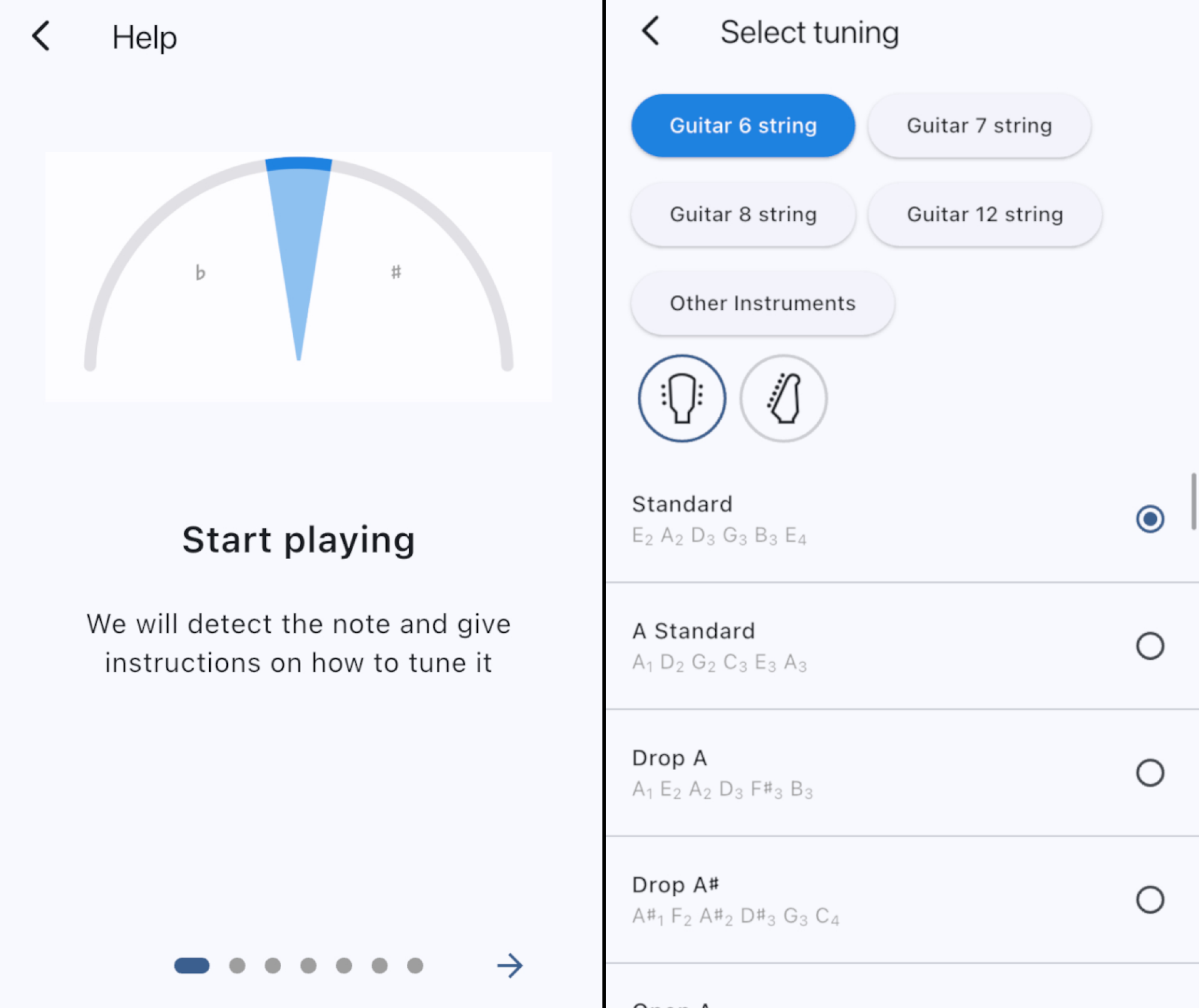
It turns out, there is. LikeTones, a music-education company, offers a guitar tuner for Android and iPhone that’s both free to use and free of ads and upsells. You can open this application, play a string on your guitar, and start tuning. The application automatically detects which string you’re trying to play and tells you whether to tune up or down.
If you’d rather not use this automated tuning, or find that it doesn’t quite work, you can tap a string to tune it specifically. This also plays the note from your phone’s speakers, giving you an idea of how the string should sound.
Because not every guitar is the same, this application offers support for six, seven, eight, and 12 string guitars in the settings. There’s also support for various alternative tunings. You can also configure the reference frequency, if you want—this is useful if you need to tune to a piano or other instrument that isn’t quite standard.
Credit: Justin Pot
It’s a well-thought-out application, and the best I could manage to dig up in my capacity as an amateur guitarist and professional app recommender. It even has a built-in metronome.
There are other solid options out there. Jon’s Tuner for iPhone also works quite well, and is clean, but doesn’t offer the same flexibility in terms of alternative tuning schemes. The Android version of Jon’s Tuner, which I found reference to online, seems to be missing from Google Play. There is a solid Android alternative, though: Tunerly, which is completely open source. This app offers a simple user interface and settings, allowing you to choose specific tuning schemes.
For most people, though, LikeTone Guitar Tuner is currently the best option. It works on both Android and iPhone, it’s clean, it works well, and it stays out of your way. Try it if you’re even a little unhappy with your current guitar tuning application.
Make light work of meal times and enjoy a saving of $30 to boot with this 9-in-1 Cosori TurboBlaze air fryer. It’s currently on sale for $90 in the Amazon Spring Sale, reduced from its usual price of $120. We’ve seen similar price drops for this product in the past, but this is still a great deal that’s well worth a look.
The Cosori TurboBlaze air fryer is one of the top picks in our best air fryers guide. We loved its spacious basket and easy-to-use touchscreen controls, and were impressed with its built-in safety features, like the handy basket-release button. Plus, for anybody who’s stuck for a bit of inspiration in the kitchen, it comes with a Cosori recipe book with more than 100 tasty recipes to try.
The Cosori TurboBlaze air fryer boasts nine preset cooking modes, making it a versatile kitchen companion for air frying, roasting, baking, broiling and more. With a roomy six-quart capacity, there’s ample space to easily feed the whole family or whip up an appetizer for social gatherings. It sports an efficient five-speed fan, has a top temperature of 450 degrees Fahrenheit and can deliver crisp, juicy chicken wings up to 40 percent faster than conventional ovens.
This compact air fryer is ideal for busy families or anyone who values the program-and-go convenience that it provides. It’s small enough to be stowed away when not in use, and thanks to its dishwasher-safe design, clean up is a breeze, too. The non-stick basket is built for daily use, whether you’re batch cooking or whipping up a last-minute meal, making it a reliable go-to option for people with hectic lives.
The Amazon Spring Sale ends on March 31st, so if you don’t want to miss out on this discounted rate, you should grab hold of this deal now while you can.
This article originally appeared on Engadget at https://www.engadget.com/deals/one-of-our-favorite-air-fryers-is-30-off-in-the-amazon-spring-sale-123016888.html?src=rss
We may earn a commission from links on this page. Deal pricing and availability subject to change after time of publication.
Hisense 65U6N, a PCMag Editor’s Choice winner (that also made it into Lifehacker’s “Best 65-inch TVs to Buy in 2025” roundup in the budget category) is currently on sale for $498, down from its regular $734 price tag. This 65-inch 4K QLED TV uses a mini-LED backlight system to deliver solid contrast and color accuracy—something you’d expect from pricier models. It supports Dolby Vision, HDR10, and HLG—meaning whatever you stream will look sharp and vibrant.
That said, it’s a 60Hz panel, so motion won’t be as smooth as on higher-end 120Hz or 144Hz models. Gamers might also want to think twice—while it does support VRR (variable refresh rate), it lacks AMD FreeSync and Nvidia G-Sync, which could be a dealbreaker for serious competitive gaming. But at an input lag of just 3.6 milliseconds, casual gaming is still solid, according to this PCMag review.
Hisense went with Google TV for the software, which is a win if you like a clean interface and easy access to all major streaming apps like Netflix, Disney+, HBO Max, and Apple TV. Plus, hands-free Google Assistant support means you can control your 65U6N and compatible smart home devices just by talking. Apple users will appreciate its AirPlay 2 support, making it easy to stream directly from an iPhone or Mac. Android users, of course, get Google Cast. One notable omission is that this TV only has an ATSC 1.0 tuner, meaning it won’t support over-the-air 4K broadcasts with ATSC 3.0. However, if that’s not a dealbreaker, its smart features still make it a strong pick.
The remote feels surprisingly premium, with a brushed-metallic plastic design and a shiny navigation pad. Dedicated buttons for Netflix, Prime Video, and YouTube make it easy to jump into your favorite apps, and the built-in mic means you don’t have to shout across the room to give voice commands. Connectivity-wise, you get four HDMI ports (one with eARC), two USB ports, an Ethernet port, an optical audio output, and multiple 3.5mm jacks. It also comes with sturdy metal legs for tabletop placement or VESA compatibility if you want to mount it. If you’re after a step up, the Hisense 65U7N ($698, down from $998) offers a brighter display, 144Hz refresh rate, and ATSC 3.0 tuner; but at this price, the 65U6N is hard to beat for everyday streaming and casual gaming.