
Linux kernel 6.14 introduces NT sync primitives for faster gaming, improved Btrfs RAID1 read balancing, GPU memory control, and more.
Category Archives: Unfiltered RSS
14 Things You Absolutely Must Know About Your House
There are about 85 million single-family homes in the United States, which is a lot of houses. If you own one of them, then you already know what you don’t know—from real estate terms to the actual cost of owning the place. Buying and maintaining a house is a life-long learning process.
But no matter how long you’ve owned your home, there are probably aspects of it that you have no clue about. This can be a problem because you’re relying on this structure to protect you and your family from the elements, to be a valuable asset in your financial portfolio, and to be an attractive place you can be proud to show off to friends and family. In order for that to happen, you need to know some fundamental details about your house. If you don’t know these things, find them out ASAP.
Shutoffs
Your house runs on a few basic resources—water, electricity, and possibly natural gas. Unless you’re totally off the grid with solar power and localized supplies like propane tanks, these resources are piped into your home from outside under consistent pressure. If something goes wrong (e.g., a water pipe bursts, or a pilot light goes out and gas leaks) you need to know how to shut things off—which means you need to know the location of the following:
-
The water shutoff: The main valve that controls the flow of water into your house. It will usually be located outside, but if it’s inside (mine is), it’ll be near the perimeter, and possibly in your basement. Know where it is and how to turn it off.
-
Localized valves. Your sinks, outdoor spigots, and toilets will also have shutoff valves. Knowing where your toilet shutoff is located can be a real lifesaver when it starts to overflow.
-
The gas shut off. Similarly, if you have natural gas piped into your home, know where the shutoff valve is. If you ever smell gas and can’t figure out its source, this could literally save your house—and your life.
-
Appliance shutoffs. Your gas-powered appliances like an oven or a dryer will also have specific shutoffs, usually located in the rear where the hookups are. Know how to access them in case you need to turn them off.
-
Electric panel. Know where your home’s electric panel is located, and familiarize yourself with the circuits and the main in case you need to cut the power to an area of the home—or the whole house.
If you smell gas, you should exit your home and call the authorities even if you turn off the main supply. And never touch an electrical panel that’s sparking or smoking.
Circuits
Speaking of your electrical panel, you should know more than just it’s location. Map out which circuits control what in your house by turning them off one by one and checking to see what they’re connected to. Don’t just trust any labeling that’s already in there—these are often not updated properly after renovations and repairs. Having each breaker labeled clearly will save you time and trouble if you need to kill the juice to something that’s malfunctioning.
Location of meters
You should know where your water, gas, and electric meters are—and how to read them. If you still have in-person meter readers from your utility company, it’s helpful to know how to guide them to the meters, and being able to read and interpret them will let you audit your utility bills. Doing this once a year will spot any discrepancies that could indicate a billing error, utility theft, or a slow leak.
An evacuation route
If something terrible were to happen unexpectedly, how would you get out of the house? If the front door was blocked somehow, is there an alternate route out? If you’re trapped on an upper floor, how would you escape? Those kinds of emergencies don’t happen often, thank goodness, but now is the time to plan for them. Think about what you would do in a variety of scenarios, so you have a way out even if the obvious exits are blocked.
Dryer type
If your home had a washer and dryer when you moved in, find out what kind of dryer you have. This might sound obvious, but many people don’t realize that there are gas- and electric-powered dryers. If your gas-powered dryer dies and you order an electric one to replace it, you’ve got a huge headache instead of a solution.
Type of insulation
A good question to ask the builder, previous owners, or home inspector is the type of insulation in the walls and attic space. In older homes that haven’t been significantly renovated, this could be asbestos-based insulation, which isn’t a problem unless you try to remove it. But even if your insulation is more modern, knowing the kind and how long it’s been in there is a good thing. First, it might not be the best insulation in the world, so you might want to upgrade it. And second, insulation doesn’t last forever, so knowing how old it is will be helpful as you plan future maintenance and budgets.
Property lines
You (probably) didn’t just buy a structure, you bought property. That probably includes some outdoor space around your home—your lot. The problem with property lots is that they look very clear and obvious on a map, but aren’t so easy to figure out when you’re literally standing on them. This can lead to incursions from neighbors when their fencing strays onto your property, or assumptions about who owns what or whether your neighbors have an easement or a right of access that includes your property. Finding out your exact property lines is, in other words, a very good idea.
Water quality
Clean, potable water being piped into our homes is an incredible luxury by historical standards—but not all local water supplies are the same. Your local water utility probably has testing results available, but it’s not a bad idea to test your tap water yourself to see what you’re dealing with—and whether you’re comfortable drinking it, or if you need to look into filters.
It’s also useful to find out if you have hard water—water with a high mineral content—as it can be damaging to your appliances and other aspects of your house (and isn’t the best water for showering and cleaning, either). You can soften your hard water pretty effectively—but only if you know about it in the first place.
Lead pipes
If your house was built some time before 1988, it might still have lead water pipes—which means lead might be leeching into your drinking water, potentially making you sick. You should check to see if your pipes are lead, and if you get a positive result, you should contact your local government and water utility to arrange a replacement.
Underneath
Do you know what’s under your house? If you have a full basement, the answer is probably yes. Crawl spaces—especially very shallow ones—can be overlooked, however. They usually contain a lot of vital stuff like water lines, gas lines, and electrical wiring, and can be a source of pest infiltration, air pollution, and bad vibes in general.
It’s not unheard of for homeowners to eliminate crawl space access panels in their homes, or for crawl spaces to simply have no convenient access point—but it’s vital that you be able to access your crawl space for a variety of reasons. You will someday need to access those pipes and wires, after all, and you need to be able to monitor the foundation, humidity levels (and potential mold growth), rodent and pest populations, and potential water issues. When it comes to what’s under your house, ignorance is definitely not bliss.
Sewer or septic
When you flush your toilet or wash your dishes, where does that grey and black water go? The answer will inform your maintenance decisions, as plumbing that hooks into a municipal sewer line needs different maintenance than pipes that lead to a septic tank on your property. If you’re on a sewer line, having it inspected for clogs or infiltrating roots every year can save you a lot of trouble, while septic tanks need to be pumped out regularly, and chemical drain cleaners need to be avoided.
Your filter schedules
A lot of things in your house have filters (including, possibly, the house itself). These filters all need to be replaced periodically, but each appliance or piece of infrastructure will have its own schedule and specific type of filter. Make sure you know what filters you need and how often it’s recommended they be replaced. Just because something appears to be running just fine doesn’t mean the filter doesn’t need replacing.
Materials
Do you know what kind of flooring you’re walking on? What kind of countertop you’re cooking on? Different materials have different maintenance and cleaning needs. Using the wrong cleaning products—like bleach when you’re cleaning natural stone—can do real damage to the materials, and leave you with ruined stuff and a looming renovation bill. It can be challenging for non-experts to tell the difference between stuff like laminate and hardwood flooring, after all, so you can’t just assume you know what you’re dealing with. If at all possible, it’s best to find out exactly what’s there and what the manufacturer recommends in terms of maintenance, cleaning, and repair.
Access
You own the house—all of it. You should be able to access every bit of it. You might not want to go into the crawl space or up onto the roof, but you should be able to get into those places. If there is any place you can’t get to, it might also be a place a contractor can’t get to, which could be disastrous in case of an emergency repair. And you should be able to inspect your house regularly as a proactive practice to anticipate problems before they become emergencies. Taking some time to make sure you at least know how you can access each part of your home is an essential piece of maintenance planning for what’s probably the largest asset you own.
Researcher Alarmingly Tricks DeepSeek And Other AIs Into Building Malware

Modern AI is far from science-fiction AGI, and yet it can still be an incredibly powerful tool. Like any tool, if misused, it can pose a threat to legitimate users, like how we recently covered photographers’ concerns that Google’s Gemini Flash 2.0 could be used to easily remove watermarks from copyrighted photographs. In another example,
‘What CERN Does Next Matters For Science and For International Cooperation’
CERN faces a pivotal decision about its future as the Large Hadron Collider approaches the end of its usefulness by the early 2040s. Management proposes building the Future Circular Collider (FCC), a machine with a 90-kilometer circumference that would smash particles at eight times the energy of the LHC. This hugely consequential plan faces significant challenges. Much of the required technology doesn’t exist yet, including superconducting magnets strong enough to bend high-energy particle beams.
The project also lacks the clear rationale that the LHC had in finding the Higgs boson. The proposal has divided physicists. Critics worry about the decades-long timeline, potential cost overruns, and the risk of sacrificing other valuable CERN activities. Germany, which provides 20% of the lab’s budget, has already indicated it won’t increase contributions. A council-appointed group is now gathering input from the physics community before making recommendations in December.
Nature’s editorial board adds: Unless some nations step up with a major infusion of cash, the FCC faces an uncertain prospect of being funded. But waiting too long could mean that there will be a large gap between the new facility opening and the closure of the LHC, and precious expertise could end up being lost.
Although physicists might disagree on what CERN should do, they nearly unanimously care about the lab’s future. They and their leaders must now make the case for why European taxpayers, who fund most of the lab’s yearly budget should care, too. The stakes are beyond science, and even beyond Europe.


Read more of this story at Slashdot.
How to delete your 23andMe data
23andMe has capped off a challenging few years by filing for Chapter 11 bankruptcy today. Given the uncertainty around the future of the DNA testing company and what will happen to all of the genetic data it has collected, now is a critical time for customers to protect their privacy. California Attorney General Rob Bonta has recommended that past customers of the genetic testing business delete their information as a precautionary measure. Here are the steps to deleting your records with 23andMe.
-
Log into your 23andMe account.
-
Go to the “Settings” tab of your profile.
-
Click View on the section called “23andMe Data.”
-
If you want to retain a copy for your own records, download your data now.
-
Go to the “Delete Data” section
-
Click “Permanently Delete Data.”
-
You will receive an email from 23andMe confirming the action. Click the link in that email to complete the process.
While the majority of an individual’s personal information will be deleted, 23andMe does keep some information for legal compliance. The details are in the company’s privacy policy.
There are a few other privacy-minded actions customers can take. First, anyone who opted to have 23andMe store their saliva and DNA can request that the sample be destroyed. That choice can be made from the Preferences tab of the account settings menu. Second, you can review whether you granted permission for your genetic data and sample to be used in scientific research. The allowance can also be checked, and revoked if you wish, from the account settings page; it’s listed under Research and Product Consents.
This article originally appeared on Engadget at https://www.engadget.com/science/how-to-delete-your-23andme-data-201451382.html?src=rss
107MPH On A Jet-Powered Snow Sled
This is a sitcom-long video from Hacksmith Industries of the crew attempting to set the world record for fasted speed on a snow sled. Not a snowmobile, but a previously unpowered sled trike that’s been modded with two jet engines and manages to hit 107MPH (beating the previous record of 42MPH, although the record for an unpowered downhill sled is a very respectable/incredibly deadly 83MPH). Damn! There’s no doubt in my mind that if roadrunners lived in Canada, Wyle E. Coyote would have been all over ordering one of these from ACME and crashing it into a maple tree.
Google May Have Deleted Your Timeline Data in Maps
Google Maps’ Timeline feature is a great way to look back on your past travels—if you have the data to look back on.
Timeline users over the past couple of weeks have noticed that their data is missing, with no warning or explanation. Redditor srj737 posted on the r/GooglePixel subreddit earlier this month, reporting they lost over a decade of Timeline data, seemingly out of nowhere. Before, they could browse each location they visited with Google Maps over the past ten years; now, they had to start from scratch.
What makes the situation especially confusing is the fact that Google had previously warned users they might lose Timeline data. The company announced late last year that it would be transferring Timeline functionality away from the web, and onto individual mobile devices. If you didn’t move your Timeline data in time, Google warned you could lose it forever.
However, that deadline appears to be June of this year, not March, so it wouldn’t have made much sense for that to be the reason behind this deletion.
Google did accidentally delete the data
Google has since responded to these concerns, however. The company confirmed to The Verge that they had accidentally erased Timeline data for some users:
We briefly experienced a technical issue that caused the deletion of Timeline data for some people. Nearly everyone with encrypted Timeline backups will be able to restore their data; unfortunately those who did not have backups enabled will not be able to recover lost data.
Google appears to be actively reaching out to affected users, so keep an eye out for an email from the company with instructions on retrieving your data—if you can.
Redditor srj737 was able to retrieve their data, once Google acknowledged the situation. They had tried restoring from their backup before to no avail, but following Google’s email, the backup worked. It’s possible Google made some changes on their end to fix the feature in general, which includes both saved data as well as backup restoring, but that can’t be confirmed at this time.
It’s a crummy situation, but it’s a good reminder of the trust we put in tech companies to manage our data. Google is so huge, it makes it seem like anything you share with them will be preserved forever. However, all it takes is a technical issue on the company’s end to lose your data forever. Today, it’s Timeline data; tomorrow, it could be your photos. It’s tricky with dedicated cloud-based features, but whenever you have the option, backing up to a source other than the cloud is the most secure way to preserve your data.
How to recover your lost Timeline data
Unfortunately, the only way to restore this deleted Timeline data is if you had previously made a backup of that data through Google Maps. If so, Google’s instructions say to update to the latest version of Google Maps, open your Timeline, then tap the cloud icon that appears at the top of the screen. From here, you should be able to select a backup to restore your Timeline data from.
If you don’t see a backup option here, it likely means you never made a Timeline backup, and, sadly, your data is lost forever.
How to export your Google Maps Timeline data
If you do still have your Timeline data, or you start building it back up again, and you want to make a more secure backup than relying on Google’s services, you can manually export your data, as shared by Redditor saharaci.
To do so on Pixel, then go to Settings > Location > Location Services > Timeline > Export timeline data. On iPhone, go through the Google Maps app. Tap your profile, head to Your timeline, then tap the three dots in the top right. Here, tap Location & privacy settings, choose Export Timeline data, then pick a destination for your data.
Bcachefs Aims For “Soft Frozen” On-Disk Format With Linux 6.15 Along With New Features
Last month Bcachefs lead developer Kent Overstreet talked of Bcachefs getting to the point of freezing its on-disk format with future on-disk format updates slated to be optional. With today’s Bcachefs pull request for Linux 6.15, it’s now being treated as “soft frozen” and also landing other new features for this copy-on-write file-system. Among the new features is case insensitive file/folder support contributed by Valve…
Wild LED Display Tech Uses Nano-Sized Pixels To Achieve An Incredible 127,000 PPI

Did you read our explainer on display technologies? If so, you’ll already be well aware of the concept of PPI, or “pixels per inch,” which is a more informative measure of “display resolution” than a static value like 1024×768. Typical PC monitors have PPI values in the 90-130 range, while smartphones go as high as 643 pixels per inch. This
Btrfs Adding Fast/Realtime Zstd Compression & Other Performance Optimizations
David Sterba of SUSE sent in all of the Btrfs file-system updates today for the now-open Linux 6.15 kernel merge window. There are some new performance optimizations, new and faster Zstd compression level options, and other changes slated to be included for this CoW file-system in Linux 6.15…
Disney+ adds option to edit ‘Continue Watching’ list
Disney is giving Disney+ subscribers the ability to edit their “Continue Watching” lists, a quality-of-life feature that’s been oddly missing from the streaming service up until now.
Continue Watching collects all of the TV shows, movies and live events you’ve started watching, saving your place so you can pick up right where you left off. If you dip in and out of watching things, it’s very easy for the list to get unwieldy quickly, so being able to edit it is helpful.
You can remove something from Continue Watching in two different ways: directly from the list itself or the Details page of a given show or movie. If you’re on your TV and want to edit your list, you just highlight a movie or show with your remote, press and hold the remote’s button (on the Apple TV remote, for example, its the center button) and then select “Remove” when the menu slides over. From the Details page of the show or movie you want to remove, just highlight and select the “Remove” icon (it’s a minus symbol) to get it out of your list.
The process is similar on the web or in Disney+ mobile app. If you’re watching Disney+ on your phone, you can just tap on the three dots in the corner of a show or movie in Continue Watching and then tap on Remove. On the web, just hover your mouse over anything in Continue Watching and click on the Remove icon in the corner of the movie or show. The only thing you can’t remove from Continue Watching are live events, which will stay until they officially end.
Disney says the ability to edit Continue Watching is available today on the web, iOS devices and Apple TV, and will be coming to the other platforms Disney+ is on in the coming weeks.
This article originally appeared on Engadget at https://www.engadget.com/entertainment/streaming/disney-adds-option-to-edit-continue-watching-list-182856588.html?src=rss
Pentagon Axes HR System After 780% Budget Overrun
The Pentagon has canceled its troubled Defense Civilian Human Resources Management System after years of delays and budget overruns, Defense Secretary Pete Hegseth said. The project, launched in 2018 with a one-year timeline and $36 million budget, ultimately ran eight years and exceeded costs by $280 million, reaching 780% over budget. “We’re not doing that anymore,” Hegseth said in a video announcing the cancellation. Officials have 60 days to develop a new plan to modernize DoD’s civilian HR systems. The cuts are part of a broader $580 million spending reduction that includes $360 million in diversity, climate change and COVID-19 grant programs, plus $30 million in consulting contracts with Gartner and McKinsey.


Read more of this story at Slashdot.
All About the New Cannondale SuperSix EVO LAB71 on Zwift
The recent big Zwift update included the welcome addition of several new bike frames, including two bikes from US-based Cannondale. The fastest of these bikes is the Cannondale SuperSix EVO LAB71, which is a top-spec racing frame ridden by the pros at EF Pro Cycling.

You’ll need to be updated to game version 1.86+ to see the SuperSix EVO LAB71 in Zwift’s Drop Shop. You’ll also need to be at level 40+ with 1,750,000 Drops to buy it. Here’s how it’s described in the Drop Shop:
“The SuperSix EVO LAB71 is the trusted bike of EF Pro Cycling, crafted for cyclists who demand peak performance. This fourth generation of the SuperSix EVO boasts razor-sharp aerodynamics and an ultra-lightweight frame, delivering exceptional performance across all terrains. From steep climbs to powerful sprints, this bike offers unmatched speed and agility. Every detail is engineered for excellence, making the LAB71 SuperSix EVO the ultimate race-ready machine that gives you a competitive edge.”
This is a pro-spec bike that the pros actually ride, which is fun. And reviewers say the IRL bike handles very well while being stiff in the right places and super light. But how does it perform in Zwift?
See our master list of all frames in Zwift >
It’s rated 3 stars for aero, 4 stars for weight, like a handful of other top newish all-arounders. But a 4-star system isn’t the most granular of performance measurements, so we ran this frame through our precise tests to measure performance at nerd-level detail. Let’s dive in!
Note: test results below are from a 75kg, 183cm rider holding 300W steady using Zwift’s stock 32mm Carbon wheelset.
Aero (Flat/Rolling) Performance

The SuperSix EVO LAB71 is very slippery, trimming 61.4s off our baseline Zwift Carbon frame over an hour of flat riding.
That puts it within 1.6 seconds of the game’s fastest frame. And like we said with the S-Works Tarmac SL8, when you consider that our tests have a 1-second margin of error, one could reasonably lump this frame in with the other fastest frames in terms of performance on flat roads.
Climb Performance

The real-life SuperSix EVO LAB71 is known for its light weight as well as aero performance, so we expected it to climb well. We weren’t disappointed.
This bike shaves 52.3 seconds off of our baseline Zwift Carbon’s time on an hourlong climb, which means slots neatly into 3rd place in our rankings, just 3.7 seconds behind the S-Works Tarmac SL8 over an hour of climbing.
Upgrading Your Cannondale SuperSix EVO LAB71
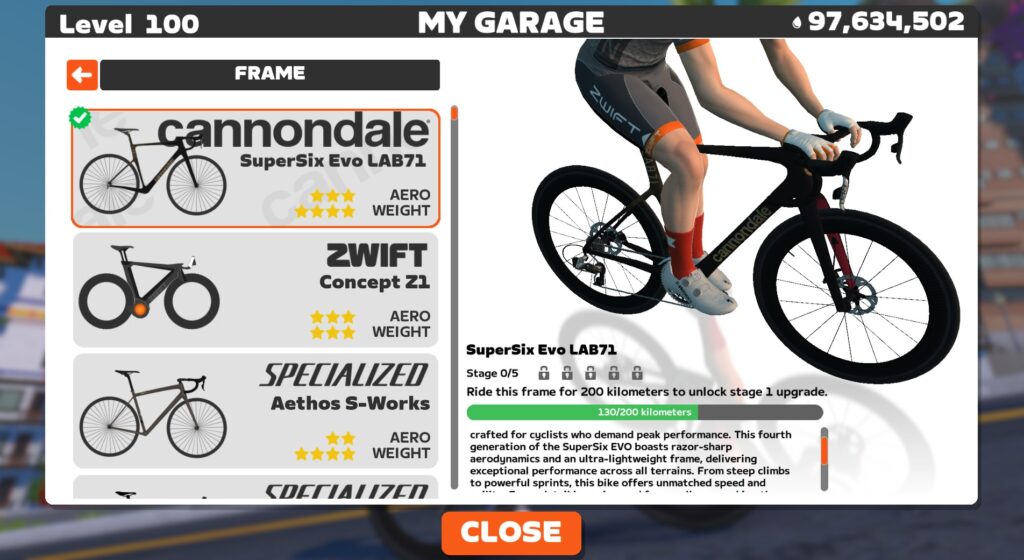
Like all frames in Zwift, the SuperSix EVO LAB71 can be upgraded in five stages. As a high-end race bike, each of the five stages results in a performance improvement. The Cannondale SuperSix EVO LAB71 upgrade stages are as follows:
- Ride 200km, pay 100,000 Drops for an aero upgrade
- Ride 260km, pay 200,000 Drops for a weight reduction
- Ride 320km, pay 350,000 Drops for a drivetrain efficiency improvement
- Ride 380km, pay 500,000 Drops for an aero upgrade
- Ride 440km, pay 750,000 Drops for a weight reduction
You can expect a fully upgraded SuperSix EVO LAB71 to be approximately 28 seconds faster on a flat hour and 36 seconds faster on an hourlong climb vs the “stock” SuperSix EVO LAB71.
Conclusions
While it’s not quite as fast in Zwift as the new S-Works Tarmac SL8, Cannondale’s SuperSix EVO LAB71 is within just a few seconds of this new standard… so close that it’s doubtful riders will notice the difference.
So if you’re a Cannondale fan, or just like the look of this frameset (it is a sweet paintjob, even if there’s no color slider), buy it and race it! Because it’s one fast bike.
Questions or Comments?
Got questions or comments about this frame? Share below…
Important note: this post contains speed test results for Zwift frames or wheels. These results may change over time, and a bike’s performance relative to others may also change. We don’t always revise posts when performance rankings change, but we do keep current, master versions of our speed test results which are always available. See the frame charts, wheel charts, and Tron vs Top Performers for current performance data.
Google Says It Might Have Deleted Your Maps Timeline Data
Google has confirmed that a technical issue has permanently deleted location history data for numerous users of its Maps application, with no recovery possible for most affected customers. The problem emerged after Google transitioned its Timeline feature from cloud to on-device storage in 2024 to enhance privacy protections. Users began reporting missing historical location data on support forums and social media platforms in recent weeks. “This is the result of a technical issue and not user error or an intentional change,” said a Google spokesperson. Only users who manually enabled encrypted cloud backups before the incident can recover their data, according to Google. The company began shifting location storage policies in 2023, initially stopping collection of sensitive location data including visits to abortion clinics and domestic violence shelters.


Read more of this story at Slashdot.
Google Drive is now available on Snapdragon-based Windows PCs
There’s now a native version of Google Drive for Arm-powered PCs, like those featuring last year’s Snapdragon X Elite and X Plus chips. The company announced this feature update in a blog post, saying that the Drive app for Windows is “generally available” for Snapdragon X chipsets. Today’s release follows a beta test going back to last year.
This includes machines by several big brands, with the most notable being the newest Microsoft Surface laptops. The Drive port for Arm-based PCs also allows users to access their accounts through the Windows File Explorer app. This should make it easier to pull files from Drive accounts.
The native app only works on devices running Windows 11 and Microsoft WebView2. Existing beta users will automatically be updated to the full version. It’s rolling out today but could take up to 15 days to hit everyone’s accounts. The new app is available for all Google Workspace customers, Workspace Individual Subscribers and users with personal Google accounts.
This article originally appeared on Engadget at https://www.engadget.com/computing/google-drive-is-now-available-on-snapdragon-based-windows-pcs-173517153.html?src=rss
Should we be concerned about the loss of weather balloons?
Due to staff reductions, retirements, and a federal hiring freeze, the National Weather Service has announced a series of suspensions involving weather balloon launches in recent weeks. The question is, will this significantly degrade forecasts in the United States and around the world?
On February 27, it was announced that balloon launches would be suspended entirely at Kotzebue, Alaska, due to staffing shortages. In early March, Albany, N.Y., and Gray, Maine, announced periodic disruptions in launches. Since March 7, it appears that Gray has not missed any balloon launches through Saturday. Albany, however, has missed 14 of them, all during the morning launch cycle (12z).
The kicker came on Thursday afternoon when it was announced that all balloon launches would be suspended in Omaha, Neb., and Rapid City, S.D., due to staffing shortages. Additionally, the balloon launches in Aberdeen, S.D.; Grand Junction, Colo.; Green Bay, Wis.; Gaylord, Mich.; North Platte, Neb.; and Riverton, Wyo., would be reduced to once a day from twice a day.
Current SEC chair cast only vote against suing Elon Musk, report says
A new report says that when the Securities and Exchange Commission sued Elon Musk less than a week before President Trump’s inauguration, only one member—the current chairman—voted against filing the lawsuit.
The vote behind closed doors was 4–1, with three Democrats and Republican Hester Peirce joining to support the lawsuit over Musk’s late disclosure of a Twitter stock purchase in early 2022, Reuters reported today. The one dissent reportedly came from Republican Mark Uyeda, who was subsequently named acting SEC chairman by Trump.
Uyeda also asked SEC enforcement staff “to declare that a case they wanted to bring against Elon Musk was not motivated by politics, an unusual request that the staffers refused,” Bloomberg reported last month. Reuters said its sources confirmed that “staff refused to sign the pledge, as it is not typical SEC practice.”
Apple Watch Could Get A New Hardware Feature No Other Smartwatch Has

Like just about every technology company, Apple continues to try and incorporate artificial intelligence into as many of its products as it can. However, it hasn’t gone well for the company so far. It has struggled to get Apple Intelligence and Siri up to the level of competing offerings. Things have gone so poorly that the company was recently
How a nephew’s CD burner inspired early Valve to embrace DRM
Back in 2004, the launch of Half-Life 2 would help launch Steam on the path to eventually becoming the de facto digital rights management (DRM) system for the vast majority of PC games. But years before that, with the 1998 launch of the original Half-Life, Valve cofounder and then-CMO Monica Harrington said she was inspired to take DRM more seriously by her nephew’s reaction to the purchase of a new CD-ROM burner.
PC Gamer pulled that interesting tidbit from a talk Harrington gave at last week’s Game Developers Conference. In her remembering, Harrington’s nephew had used funds she had sent for school supplies on a CD replicator, then sent her “a lovely thank you note essentially saying how happy he was to copy and share games with his friends.”
That was the moment Harrington said she realized this new technology was leading to a “generational shift” in both the availability and acceptability of PC game piracy. While game piracy and DRM definitely existed prior to CD burners (anyone else remember the large codewheels that cluttered many early PC game boxes?), Harrington said the new technology—and the blasé attitude her nephew showed toward using it for piracy—could “put our entire business model at risk.”
Mirantis Is Giving Two Kubernetes Projects to CNCF
Less than a week after IBM announced that it was donating three open source AI tools to the Linux Foundation, FOSS Force learns that Kubernetes-focused Mirantis is the process of donating a couple of project to CNCF.
The post Mirantis Is Giving Two Kubernetes Projects to CNCF appeared first on FOSS Force.