iPad (2025) with A16 review: No Apple Intelligence, no problem

When it debuted in 2022, Apple’s 10th-generation iPad sat in something of a no-man’s land, bringing a long-overdue design revamp at an inflated price. A year and a half later, Apple gave the slate a $100 price cut and immediately turned it into a much more enticing value. Now, the company has quietly released a follow-up. Dubbed the iPad (A16), the new tablet is a far less dramatic update, one with welcome performance improvements that otherwise refuses to rock the boat. It even lacks the Apple Intelligence features Apple has endlessly promoted over the past year.

This isn’t necessarily a bad thing. Compared to the iPad Air, iPad Pro and iPad mini, this might be the easiest Apple tablet to grok — it’s the cheapest, it only comes in one size and it’s clearly designed for the core iPad Things. That doesn’t make it a slam dunk, though.

What hasn’t changed

Almost everything about the latest iPad is identical to the previous entry-level iPad from 2022, which brought many of the iPad Air’s features down to a lower price. The design is unchanged, with the same dimensions, weight, bezels, display and aluminum finish as before. Apple now lists the screen as being 11 inches instead of 10.9 inches, but it’s merely rounding up for marketing purposes — the size is no different.

There are still competent 12-megapixel cameras on the front and back, with the selfie cam conveniently located along the device’s long edge for FaceTime calls. The same reliable Touch ID fingerprint sensor is built into the power button in lieu of Face ID. Two speakers, one on either end, sit behind a (misleading) quartet of grilles, while a lone USB-C port continues to max out at basic USB 2.0 transfer speeds. There’s no difference in accessory support either, and the whole thing is available in the same bold colors: blue, pink, yellow or silver.

Battery life, meanwhile, still checks in at around 10 hours per charge, give or take a few depending on how you push it. I got 11 hours and 19 minutes out of the slate after playing a 1080p movie on loop at roughly 70 percent brightness and volume (and with Wi-Fi and Bluetooth disabled). Gaming and media editing will naturally sap it faster.

Most of this is still perfectly fine for a $349 tablet. The last iPad was a light and comfortable slab, with a substantial aluminum finish and flat sides that made it feel modern. This one is no different. And iPadOS is still a level above Android and Windows tablets when it comes to app and game support, long-term updates and features optimized for large displays. But if the 10th-gen iPad was a “tick” update, the iPad (A16) is clearly a “tock.”

That said, there are some important changes, namely a faster chip, more memory and higher storage options, plus a few minor tweaks like Smart HDR 4 processing for photos and support for Bluetooth 5.3 instead of Bluetooth 5.2. It’s a spec bump through and through, with most of those tweaks being for the better, although I do think that some of the things that haven’t been touched could really use an update next time.

A faster chip and more RAM

As the name implies, the latest iPad’s headline upgrade is its A16 chip. This is a slightly weaker version of the A16 Bionic found in 2022’s iPhone 14 Pro and the regular iPhone 15 from 2023. Compared to that SoC, this A16 has five CPU cores instead of six and four GPU cores instead of five.

But in practice, it’s still more than fast enough for the vast majority of things people do with iPads: browsing the web, streaming video, reading ebooks, viewing and editing photos, playing most games and the like. I tested this iPad against my personal 13-inch iPad Air M2 for much of this review, and the two consistently booted up and loaded popular apps at virtually the same speed. The few times the Air M2 was quicker, the difference wasn’t long enough to be significant.

Geekbench 6 results back this up: The iPad (A16) earned a single-core CPU score of 2,582, while the iPad Air M2 was only marginally better at 2,632. This is a roughly 20 percent jump from the 10th-gen iPad, though the most recent iPad Air M3 still measures about 16-18 percent faster. But for media consumption and common work tasks, it won’t feel slow anytime soon.

These performance gains are helped by the 6GB of RAM, which is 2GB more than the last model and twice as much as the 9th-gen iPad from 2021. While this is still 2GB short of the iPad Air and lower-spec iPad Pros, getting more memory for the same price is always a good thing: It lets the tablet hang onto apps and Safari tabs longer before it has to start refreshing things for new tasks. It will only improve the chances of the device holding up four or five years down the road, too.

Where the iPad (A16) lags behind its higher-end siblings is multi-core and graphics performance. In Geekbench 6, the tablet’s multi-core CPU score was about 40 percent below the iPad Air M2 (6,185 vs. 10,006), while its GPU score was about 55 percent worse (19,448 vs. 42,920). Other graphics benchmarks were largely the same: It scored about 60 percent lower than the Air M2 in 3DMark’s Wild Life Extreme test (with an average of 15.2 fps vs. 37.6 fps) and anywhere between 45 to 55 percent worse on GFXBench’s Aztec Ruins benchmark, depending on the resolution. Of course, the difference will be a little greater with the newer iPad Air M3.

This sounds more dramatic on paper than it does in real life. Many everyday iPad workloads won’t tax the chip’s multi-core abilities all that hard, and the scores above are still a good 15 to 30 percent higher than the last entry-level iPad. I could still play Call of Duty Mobile at its highest settings (120 fps mode aside) without any hitches. Diablo Immortal warned that maxing out its settings would put the device under “high” load — with the Air M2, it only goes up to “medium” load — but I still got through the opening areas totally fine. (It does seem to drain the battery a bit faster, though.) You can still edit RAW photos in Lightroom or create music in GarageBand without major frustration.

The iPad (A16) on top of a 13-inch iPad Air.

Still, the Air is better if you ever want to push things further. This is easiest to see in the newest and most taxing iPadOS games. With Infinity Nikki, for instance, playing at ultra or high settings on the new iPad brought a constant bit of choppiness and some slowdowns during more involved animations. It also warmed up the device’s back and drained the battery faster. The game was still totally playable at medium settings, but there’s less need to knock it down on the iPad Air M2, where it looked sharper and ran smoother at high settings. Likewise, the Air will be noticeably quicker to export higher-res videos in apps like Adobe Premiere Rush.

Arguably, the main benefit of the iPad Air’s M-series chip and extra RAM has less to do with today than it does the future. Features like Apple Intelligence and the Stage Manager multitasking mode aren’t available here, nor are some especially demanding games. Those aren’t essential right now — though omitting Stage Manager does make the device more cumbersome to use with an external display — but there’ll always be some risk that the next great iPadOS feature or power-hungry game won’t work (or work as well) with this entry-level model.

More storage — hallelujah

The best improvement with the iPad (A16) is also the simplest: It now starts with 128GB of storage, which is twice as much as the last model. There’s also a new 512GB option for $649. There isn’t much to say about this besides “good.” It’s a common-sense upgrade that makes the tablet a much safer long-term investment than its predecessor, especially when there’s no hope of Apple ever letting us upgrade storage manually.

A fine display, but it’s time to improve

In his iPad Air M3 review, my colleague Nathan Ingraham argued that it’s time for Apple to update the Air’s display with a higher refresh rate or a mini LED panel, as the OLED tech exclusive to the iPad Pros represents a major upgrade on its own. Since the iPad (A16)’s screen is no different than the last one, I want to make a follow-up case for the entry-level model, albeit on a smaller scale.

It’s much easier to see in person than through photos, but if you look at the bottom corner of the display, near the bezel, you can see the air gap between the iPad’s LCD panel and front glass.

Out of context, the IPS display here is still totally adequate. It’s comfortably sized, it’s sharp enough, it’s not a massive smudge magnet and it doesn’t have any serious color accuracy issues. A tablet is nothing if not a big display, and most of the people Apple is targeting with this one will still enjoy watching and reading stuff on it. I can also live with the 60Hz refresh rate — that’s the minimum in 2025, but it’s a harsher limitation on a $599 (or $799) tablet like the iPad Air than a $349 device.

The other restrictions are more annoying. This screen still isn’t laminated, most notably, which means there’s a visible air gap between the LCD panel and the glass above. This helps the screen’s repairability but makes it look cheaper and feel more distant when you interact with the glass. This is particularly discernible with the Apple Pencil: Writing out notes on the iPad Air is both quieter and more natural. Those who’ve never used a higher-end iPad probably won’t care, but once you notice the difference, you can’t unsee it.

The display also lacks an anti-reflective coating, so it’s worse at fending off glare. It’s certainly not unusable outdoors, but you’ll see your reflection much more clearly on the iPad (A16) than you will on the iPad Air M2 in sunlight. You’re much more likely to have to angle its display to make things out. Unlike the iPad Air and iPad Pro, the base iPad isn’t tuned for the wider P3 color space either. While the difference in color reproduction between the iPad Air and iPad (A16) is nowhere near as dramatic as the one between the Air and the iPad Pro, colors on the Air can still look slightly bolder and less washed-out when you put the two side-by-side.

I appreciate that Apple wants to keep its “good, better, best” hierarchy intact, but at this point the iPad Pro’s display is so far ahead of the rest of the lineup that there’s room to even things out. If the next Air can upgrade to 120Hz, as Nathan suggests, then the next entry-level iPad should at least have a laminated display with better glare protection. Those aren’t premium features anymore.

The USB-C Pencil can attach magnetically but lacks wireless charging and pressure sensitivity, so it’s not a great choice for more involved work.

Continued weirdness with accessories

Apple Pencil and Magic Keyboard support is another ongoing pain point. Like its predecessor, the iPad (A16) isn’t compatible with the Pencil Pro (Apple’s best stylus) or the older, second-gen Pencil. That means the only stylus you can buy with pressure sensitivity — a key feature for digital artists that lets you make darker marks by pressing down harder — is the original Pencil, which is nearly a decade old (!), isn’t as comfortable as the newer models and can’t attach to the tablet magnetically. It also requires a USB-C cable and a USB-C to Lightning adapter to charge. All of this is bad.

You can still get the $79 USB-C Pencil, which is nicer to hold and can attach to the iPad’s side magnetically but isn’t pressure-sensitive and still requires a separate cable to pair and charge. Really, though, most people who want an iPad for drawing should start with the iPad Air. I’ve never been a big fan of this iPad’s Magic Keyboard Folio either, as its Surface-style kickstand is hard to keep stable on your lap and it lacks backlit keys. That’s tough given its exorbitantly high price of $249.

Not built for Apple Intelligence, but that’s OK (for now)

As noted above, the iPad (A16) isn’t compatible with Apple Intelligence, which is Apple’s catch-all term for the suite of generative AI features it’s gradually rolled out since late last year. In fact, it’s the only major device Apple has released without the AI tools since they became available.

Right now, though, you won’t miss much without them. Sure, the “Clean Up” feature that lets you scrub unwanted objects from photos is nice. Some of the writing-assistance tools are fine if you’re completely out of gas, and being able to access ChatGPT through Siri is convenient. But just as many of the tricks are either half-cooked or, let’s say, less than essential. A promised Siri revamp has been significantly delayed. If anything, many people will appreciate that their tablet won’t push AI onto them with every update. There’s always a chance Apple Intelligence becomes more useful down the road, and buying the iPad (A16) means locking yourself out of that potential future. But it’s not there yet, and Apple is reportedly well aware of that, so we can’t call it a major omission today.

Wrap-up

The iPad (A16) isn’t a massive leap forward from the last entry-level iPad, and some of its display and accessory quirks are getting long in the tooth. We still recommend stepping up to the iPad Air if you can swing it: It’s faster and more futureproof, with small but meaningful upgrades to the screen, better accessory support and speakers that sound less compressed. It’s also worth the upgrade if you want to use your iPad as a pseudo laptop replacement without spending top dollar. If you see a great deal on refurbished iPad Air M2, that’s a good buy as well.

But for $250 less than the latest Air, the iPad (A16) does well to meet most iPad users where they live. It’s largely well-built and plenty quick for reading, watching and playing things, with solid battery life and an eternally easy-to-use OS. If you’re upgrading from a 9th-gen iPad or older, buying for a kid or just looking for a competent slate you won’t use for hours every day, it should be plenty of tablet for your needs. It’s not the most delightful iPad, but it’s good enough for the masses.

This article originally appeared on Engadget at https://www.engadget.com/mobile/tablets/ipad-2025-with-a16-review-no-apple-intelligence-no-problem-132641539.html?src=rss
‘Severance’ But With ‘The Office’ Characters

It was only a matter of time, and Luís Azevedo of Little White Lies magazine has done it, editing clips from ‘The Office’ to make the characters appear to be severed employees of Dunder Mifflin Paper Company. Would I watch nine seasons of it? Why stop at nine? I’ll watch anything. My favorite are franchises that get run into the ground and just keep going, plowing up mole people for at least three more seasons than they should have run. I’m also no stranger to counting the kernels in popcorn ceilings.

ASRock Investigation Hints At User Error For Burned Ryzen 7 9800X3D

ASRock Investigation Hints At User Error For Burned Ryzen 7 9800X3D
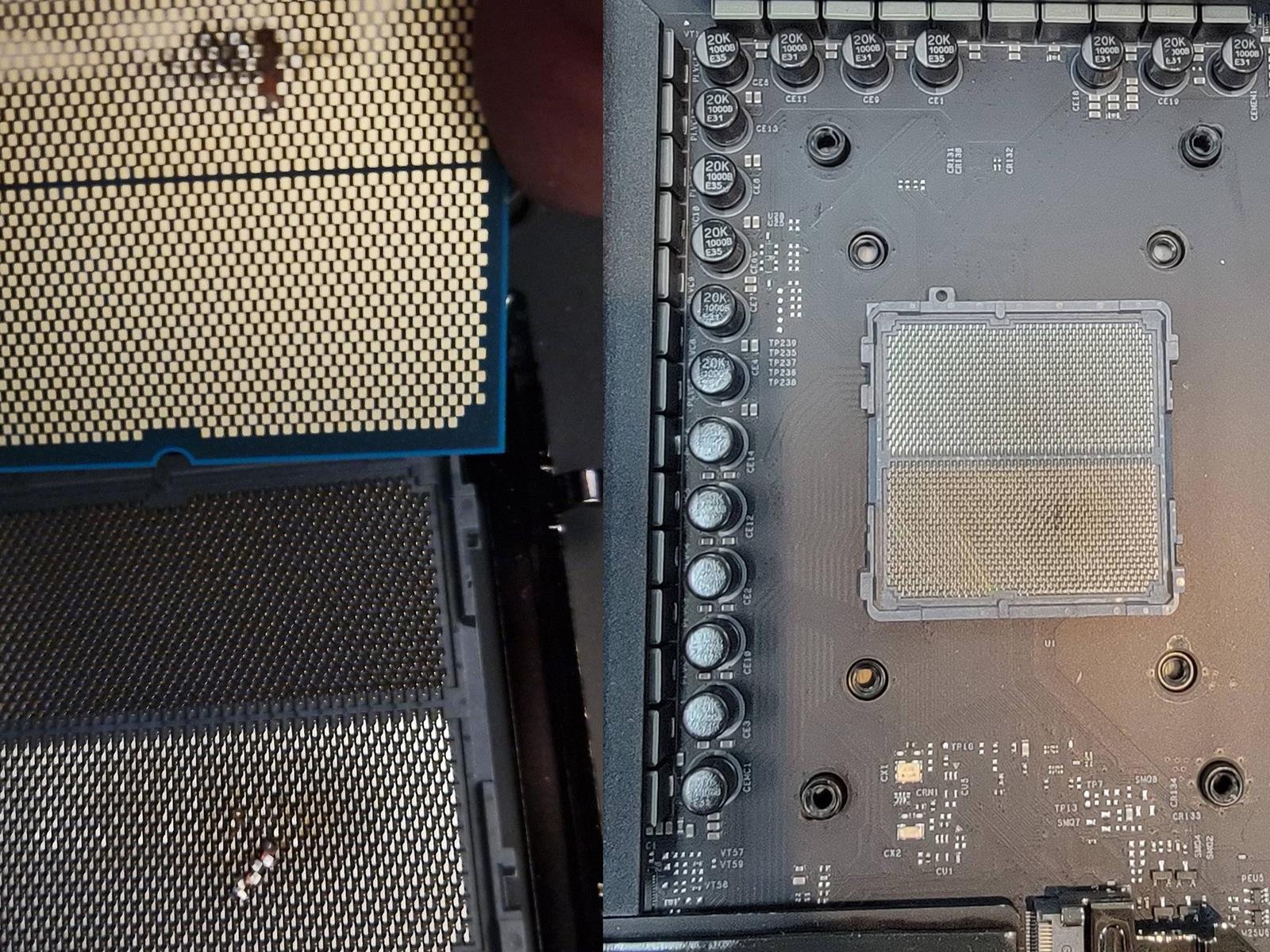
ASRock says it was able to completely restore functionality of a seemingly damaged Phantom Gaming X870E Nova WiFi motherboard (the same model we reviewed in our X870E motherboard mashup) that burned several contact points on a Ryzen 7 9800X3D, simply by removing debris from the AM5 socket area. The insinuation is that user error is ultimately

Block reportedly lays off almost 1,000 employees

Block has laid off 931 workers, which make up around eight percent of its entire staff, according to TechCrunch and The Guardian. The publications have viewed an email, wherein the financial technology company’s co-founder and CEO, Jack Dorsey, has discussed the latest organizational changes. Dorsey said that Block is eliminating roles based on three areas, starting with strategy. The company is letting 391 people go, because it’s reducing “teams that are off strategy.” It’s also parting ways with 460 workers who scored a “below” rating or are trending towards a “below” rating in its internal performance tracking metrics.

Finally, Block is laying off 80 managers, as well as moving 193 to individual contributor roles, to flatten the organization and remove layers of middle management between workers and the high-level bosses they’d now have to report to. In his email, Dorsey denied that the layoffs were made to hit any specific financial target and headcount goal, or because the company was replacing workers with artificial intelligence. He said that it was all about strategy and because flattening its org will allow it to “move faster and with less abstraction.” The CEO admitted, however, that everyone in Block has equity in the company and that the reorganization “will help [it] focus and execute better to do just that.” Block’s stock prices have plummeted by around 30 percent this year. 

Dorsey explained that the company is laying off nearly 1,000 workers all at once instead of over time, because it’s behind in its actions. “We need to move to help us meet and stay ahead of the transformational moment our industry is in,” he wrote. In addition to the layoffs, Block is also closing 748 previously open jobs and is only leaving key leadership and critical roles, along with those that have already progressed to offer stage, open. Block, which owns Square and Cash App, also underwent a reorganization in early 2024. It laid off nearly 1,000 people back then, as well, to make the company leaner and to limit its headcount to around 12,000 workers. As TechCrunch notes, Block had around 11,300 workers around the world by December 2024, which means its headcount is now far below the original goal it set for itself in 2023. 

This article originally appeared on Engadget at https://www.engadget.com/big-tech/block-reportedly-lays-off-almost-1000-employees-130056952.html?src=rss

The Sonos Arc Soundbar Is $250 Off Right Now

We may earn a commission from links on this page. Deal pricing and availability subject to change after time of publication.

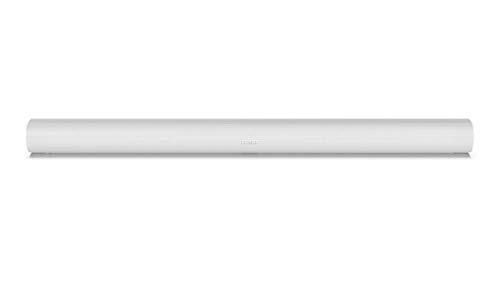
I love soundbars. I’m still traumatized by having to rig speakers all over my living room to get decent audio back in the day—not to mention finding a place for a damn subwoofer—so enjoying high quality audio from an easy-to-set-up, compact soundbar like the Sonos Arc is a great relief. It’s on sale now for Amazon’s Big Spring Sale for $649.00, 28% off the list price.

The Arc is a slick-looking piece of kit—a 45-inch oval cylinder that’s only 4.3 inches wide and 3.5 inches tall and is available in black or white—but more importantly, the Arc’s sound quality is top-notch, whether you’re watching movies or listening to music.

The Sonos Arc is powered by Dolby’s Atmos system that creates a three-dimensional “sound globe” that lets you hear anything from any direction—jets sounds like they’re overhead and whispers sound like they’re right in your ear. There’s even a dialogue enhancer so you don’t miss any lines. As for music, just put on Hawkwind’s “Master of the Universe” and tell me it doesn’t change your life.

Our pals over at PC Mag put a Sonos Arc through its paces and were impressed enough to give it four stars and name it an Editor’s Choice.

Shopping for tech? Lifehacker can help you make the right decision. Browse our tech reviews and head-to-head comparisons for everything from laptops and smartwatches to e-bikes and home gyms. Subscribe to our deals newsletter, Add to Cart, for the best sales sent to your inbox, or browse our best-of lists directly on Amazon, including:

Firm wins Space Force funding to provide an “aircraft carrier” in orbit

In recent years the US military has made much of a concept known as tactically responsive launch. This essentially means that if there is some rapidly developing threat in space—say an adversary takes out a key national defense satellite—the military would like the capability to rapidly fuel a satellite on Earth, mate it to a rocket, and launch it into space.

The US Space Force first demonstrated this tactically responsive capability with a launch on Firefly’s Alpha rocket in 2023. As part of this “Victus Nox” test flight, a satellite was encapsulated into a payload fairing and mated to the rocket and completed all final launch preparations within 27 hours.

But what if there were an even faster way to respond? That’s the vision behind a new, $60 million federal award to a new space company named Gravitics for a concept called an orbital carrier.

Read full article

Comments

Amazon has a new AI-powered tool for shopping

A day without a company announcing some new way AI can supposedly make our lives better is rare. Today it’s Amazon, which has announced a new AI-powered feature called “Interests.” It lets you enter personalized shopping prompts based on your, well, interests and price limits — and it arrives just in time for Amazon’s Spring Sale. 

Interests can handle prompts with everyday language, like “Brewing tools and gadgets for coffee lovers” or “Natural makeup products for summer glow from top brands.” The AI-powered feature will then look through Amazon’s store to see current offerings and send you notifications about any deals, new products or restocks that are relevant to your prompt. Shopping on Amazon can sometimes feel like a never-ending pit of decent enough options, so hopefully this feature provides a more tailored selection. 

Amazon has only released Interests to a small group of customers in the US and only through the app or mobile website. You can check if it’s available to you by looking under the “Me” tab in the Amazon shopping app. Otherwise, Amazon plans to roll out Interests to all of its US users in the coming months. 

This article originally appeared on Engadget at https://www.engadget.com/ai/amazon-has-a-new-ai-powered-tool-for-shopping-125314016.html?src=rss

[$] The state of the page in 2025

The folio transition is one of the most
fundamental kernel changes ever made; it can be thought of as being similar
to replacing the foundation of a building while it remains open for
business. So it is not surprising that, for some years, the annual Linux
Storage, Filesystem, Memory-Management, and BPF Summit has included a
session on the state of this transition. The 2025 Summit was no exception,
with Matthew Wilcox updating the group on what has been accomplished, what
remains to be done, and where some of the significant problems are.

The best language learning apps for 2025

There’s a good chance learning a new language is one of your New Year’s resolutions, unless you’re hoping Google Translate will be enough for your next international adventure. Either way, you’ll need a reliable method to guide you through speaking and understanding the foreign language of your choosing. Fortunately, we’re no longer confined to flashcards and textbooks as you can learn using your phone from the comfort of your couch.

Many of the best language learning apps today offer a multi-tier approach, with AI-powered conversations, extensive vocab libraries and even podcasts you can listen to to help you master your target language. Whether you’re just starting because you’re just trying to understand what Bad Bunny means when he says “un verano en Nueva Yol,” or you want to brush up on your Korean before that planned vacation, there’s a language learning app to suit your needs.

Best language learning apps for 2025

Others language learning apps we tested

Memrise

Memrise has a library of more than 200 languages to learn. From Spanish to isiXhosa, Memrise can teach you all the basics and dive into more regional differences. As a Spanish learner, I could choose to learn from Spain or Mexico and I enjoyed that Memrise didn’t just teach me a more generalized version of the language. While Memrise could be great for polyglots, its hefty $60 monthly fee was too steep and prevented it from gleaning one of our top slots.

Pimsleur

Dr. Pimsleur believed speaking and listening were key to learning a new language. This app allows you to take its audio lessons offline, even going as far as integrating into Apple CarPlay and Android Auto. As a commuter, I appreciated having a lesson or two stored away for my journey to the office. However, I wanted more ways to practice reading and writing. With other apps offering podcasts for listening along and other forms of teaching, Pimsleur didn’t offer enough to make our list.

Rosetta Stone

Gone are the large, yellow disc sets of yesteryear; now Rosetta Stone lives squarely in the digital age with its app. Using the same visual learning tools as the old-school Rosetta Stone, the app shows you pictures and terms to get you to understand what things mean. Users can repeat after voice recordings and match phrases to the images to learn slowly. Rosetta Stone could be great for beginners, but in order to get access to all 25 languages and a lifetime subscription, you’d have to dish out $400. There are cheaper apps on this list that provide comparable experiences.

HelloTalk

Similar to Discord, HelloTalk provides voice and chat rooms to talk to folks from different countries. Its users can learn regional terms and talk about cultural differences. With a paid subscription, you can practice with a tutor or their AI chatbot. If you’re looking to learn a new language outside of your inner circle, HelloTalk can be a great fit. I enjoyed connecting with others on the app, but, as always when meeting strangers online, beware — some users treat it like a dating app. Fortunately, there are apps on this list that offer a similar AI learning approach without that added concern.

How we test language learning apps

As an intermediate Spanish learner, I was looking for an app that best catered to my needs, but I know everyone learns differently. So for each app, I assessed based on several factors. Can beginners use this to gain confidence? Will advanced speakers feel challenged? Are there enough opportunities to test reading and writing skills? How many ways can you learn vocabulary words? For those who want to have more conversations, what opportunities did each app provide to speak in that language? Bonus points if an app helped you learn a bit of the culture surrounding that language.

This article originally appeared on Engadget at https://www.engadget.com/apps/best-language-learning-app-120001600.html?src=rss

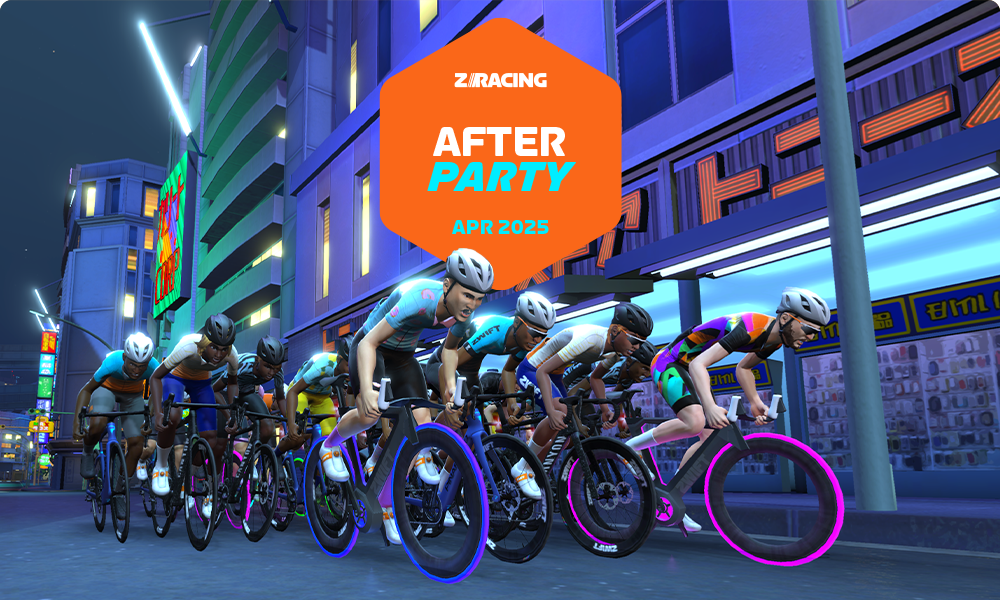
“After Party” ZRacing April Series Details

Zwift’s “ZRacing” is the platform’s most popular ongoing race series, and it continues to evolve as we head into April 2025. Here are the changes Zwift is rolling out this month:

  • Advanced Event Schedule Expansion: advanced races now happen every other hour, to increase availability.
  • Advanced Event Minimum Score Requirement: to avoid riders joining these events in order to tank their scores, Advanced events are now “category enforced” at 650+, meaning you must have a racing score of 650+ to join.
  • Advanced Event HRM Requirement: this isn’t really a new requirement, but lower-category events no longer require a heart rate in order to join. Zwift says requiring HRM “will bring the events into line with the minimum criteria to feature on ZwiftPower and is the first of a number of additional fairness measures we hope to add to Advanced events over the coming year.”
  • Range 2 modification: these events now top out at 725 (up from 700). Zwift says “We hope this will provide racers with scores of 650-725 with a softer ‘Advanced’ transition.”
  • Zwift.com-Based GC Leaderboards: an upgraded version of the Zwift Games leaderboards will be used for tracking the monthly ZRacing GC. More on this below…

For April, the series takes on “after party” routes which feature a climb in the final kilometers. Also, there’s a yet-to-be-revealed new route (on new roads!) for us to race in stage 5, April 28-May 4! Watch this space for more news on this front.

Read on for details about this month’s race routes and more!

April’s Routes

Here are the routes we’ll be racing in April:

See upcoming Range 1 “After Party” events >
See upcoming Range 2 “After Party”
events >
See upcoming Advanced “After Party”
events >
See ALL upcoming “After Party” events >

New GC Leaderboards

Zwift debuted new web-based leaderboards at zwift.com for tracking the Zwift Games 2025 GC, and an upgraded version of those leaderboards will now be put to work for use in the monthly ZRacing series!

Access April’s leaderboard at zwift.com/racing/leagues/zracingapr2025 >

Your GC ranking is based on your best finishing time for each stage, and you can race each stage multiple times if you’d like.

Choose Your Category

Zwift now schedules three different flavors of ZRacing events in order to encourage “Fairer, more competitive racing for everyone.” They each use different racing score ranges for categorization and are titled Advanced, Range 1, and Range 2. Click banners below to see upcoming events for each.

Get the Badge

Each month’s ZRacing series has a unique achievement badge, which you can unlock by finishing every stage for the month. There are no makeup events, so if you miss a stage, you miss out on the badge and competing in the GC.

One and Done

Zwift has planned these events to deliver a solid 1-hour workout, so each race should only take around 1 hour to complete, including your warmup and cooldown.

Questions or Comments?

Post below! 

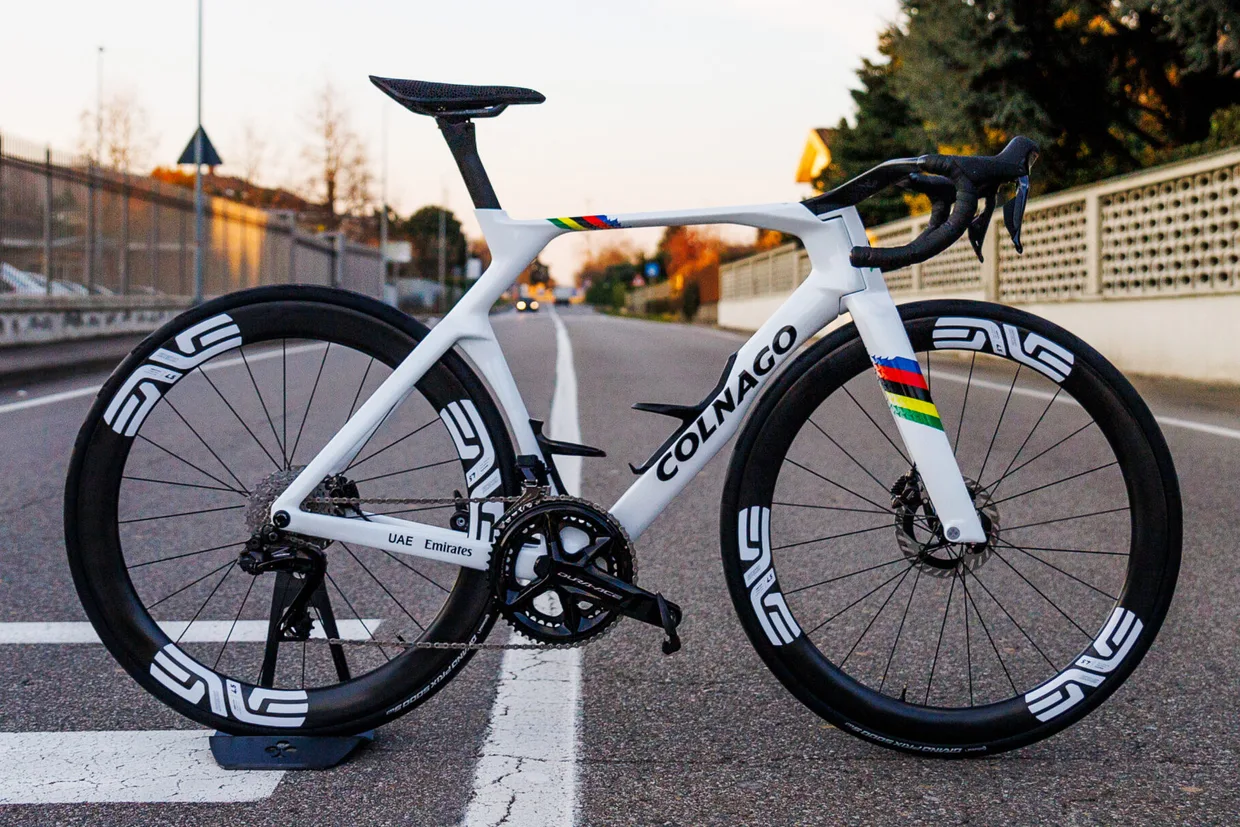
Tadej Pogačar spotted on possible new Colnago V5RS

Men’s road world champion Tadej Pogačar has been spotted on what appears to be a new Colnago V5RS. But while a geometric wrap hides any changes to the frame, one photo can tell us a few crucial details.

Spotted by Lukas Ronald Lukacs on X, the notable aspect of the frame is how similar it seems when compared to the current Colnago V4RS.

During the recent launch of Colnago’s Y1RS aero bike, the V4RS was shown, by Colnago’s own data, to be rather slow.

Colnago Y1RS
There are no jaunty angles to be seen like on the Y1RS. Liam Cahill / Our Media

The Y1RS was claimed to be a whopping 20 watts faster than the V4RS at 50kph and 0º yaw.

As a result of this gulf in aero performance, we would expect a new V5RS to come with claims of significant aero improvements.

However, given the angular camo wrap covering Pogačar’s bike, it’s difficult to tell whether the V5RS takes any frame-design cues from the Y1RS.

There is also a possibility that the UAE Team Emirates riders asked Colnago for similar aero credentials to the V4RS, but at a lighter weight. Outside Magazine reported Pogačar’s Giro d’Italia-winning V4RS, with ENVE 4.5 wheels and Shimano Dura-Ace pedals, weighed 7.4kg.

Given a number of Pogačar’s competitors boast lightweight climbing bikes that get close to the UCI’s 6.8kg minimum weight limit, there could have been a focus on lowering the weight.

The CC.Y1 cockpit requires a very specific head tube design. Liam Cahill / Our Media

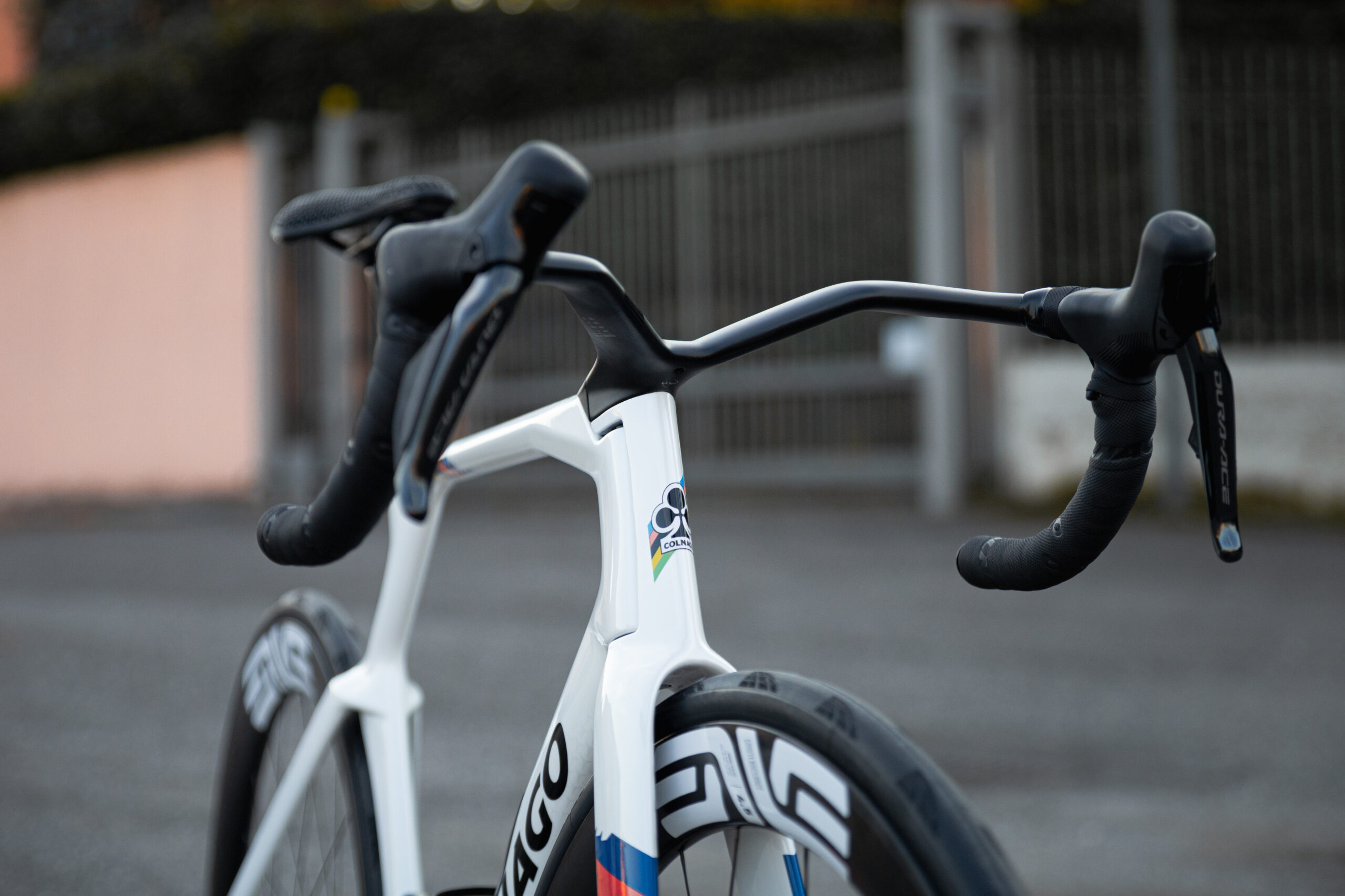
What we can see clearly is the Y1RS’ CC.Y1 cockpit is not being used. Pogačar’s current ENVE one-piece cockpit is visible and, given the design of the head tube, we suspect there’s no new bar design in the works.

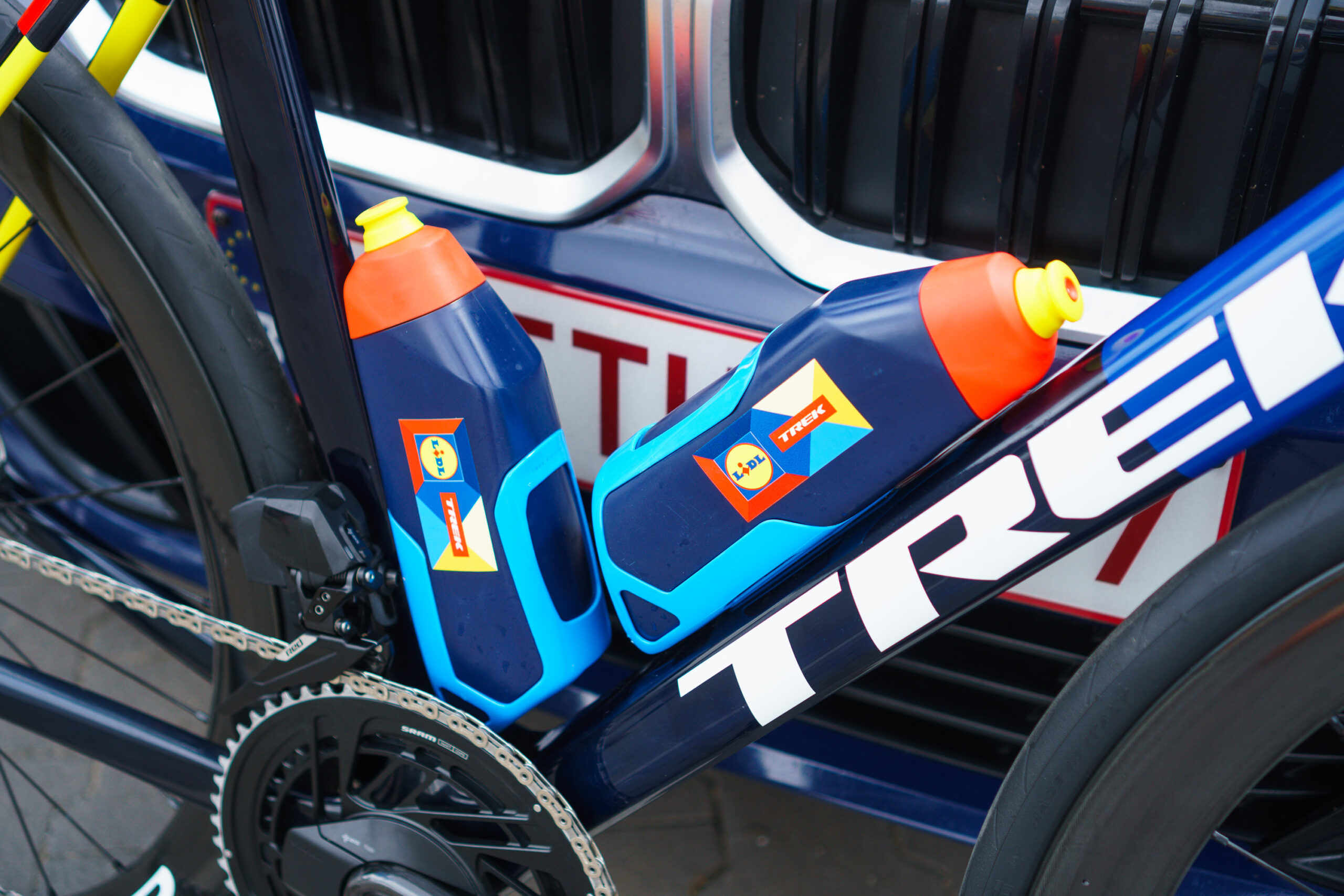
Carlos Verona’s Trek Madone SLR for the 2024 Tour de France. Simon Von Bromley / Our Media

The new bike also appears to be set up with standard bottles and cages. Other brands, such as Trek with its latest Madone, have looked to reduce drag through specially designed water bottles, but Colnago told BikeRadar this idea was rejected by the team during development of the Y1RS.

While we don’t know when we’ll get full details of the new bike, we’ll be keeping a sharp eye out for it being used in the pro peloton in the coming weeks.

EU OS: A Bold Step Toward Digital Sovereignty for Europe

A new initiative, called “EU OS,” has been launched to develop a Linux-based operating system tailored specifically for the public sector organizations of the European Union (EU). This community-driven project aims to address the EU’s unique needs and challenges, focusing on fostering digital sovereignty, reducing dependency on external vendors, and building a secure, self-sufficient digital ecosystem.

This Spotlight Camera Three-Pack Is Half Off During Amazon’s Big Spring Sale

We may earn a commission from links on this page. Deal pricing and availability subject to change after time of publication.

Amazon’s Big Spring Sale is back—and while it’s no Prime Day, it still brings a solid lineup of discounts for anyone looking to snag big-ticket items for less. Running from March 25 through March 31, this seven-day sale is only in its second year but already feels like a decent excuse to shop. You don’t need to be a Prime member to grab deals, though Amazon claims members get “more and better” prices. If you don’t want to commit, the 30-day free trial might be worth it just for the week. Just set a reminder to cancel if you’re not planning on keeping it.

One of the more eye-catching markdowns right now is on the Arlo Pro 5S 2K Spotlight Camera (3-Pack)—it’s down to $217.78 from $449.99, which, according to price-trackers, is the lowest it’s ever been. This three-camera bundle is designed for people who want decent home security without a complicated install. Each camera is completely wire-free and captures 2K resolution video. That means the footage is sharp enough to see license plates or faces from a distance, and you can digitally zoom in without everything turning into a blur. They have built-in spotlights and color night vision, which kicks in when motion is detected, giving you a better view at night.

That said, these cameras don’t come with local storage unless you already own the Arlo Smart Hub ($99, down from $110), which lets you record to a USB drive. If you don’t, you’ll need an Arlo Secure plan—$7.99/month for a single camera or $17.99/month for unlimited ones. That subscription unlocks cloud recording, activity zones, advanced object detection, and smart alerts. You can also step up to a $24.99/month plan that adds 24/7 emergency response. On the plus side, the Pro 5S 2K works with Alexa, Google Assistant, IFTTT, SmartThings (and Apple HomeKit if paired with a hub)—so it’s flexible if you’re already using smart home gear, according to this PCMag review.


Shopping for tech? Lifehacker can help you make the right decision. Browse our tech reviews and head-to-head comparisons for everything from laptops and smartwatches to e-bikes and home gyms. Subscribe to our deals newsletter, Add to Cart, for the best sales sent to your inbox, or browse our best-of lists directly on Amazon, including:

Panaracer’s new gravel tyres come in two vivid colours – and I’m warming to the Cranberry option

Ever thought there weren’t enough colour choices for your bike tyres? Well, Panaracer now has you covered.

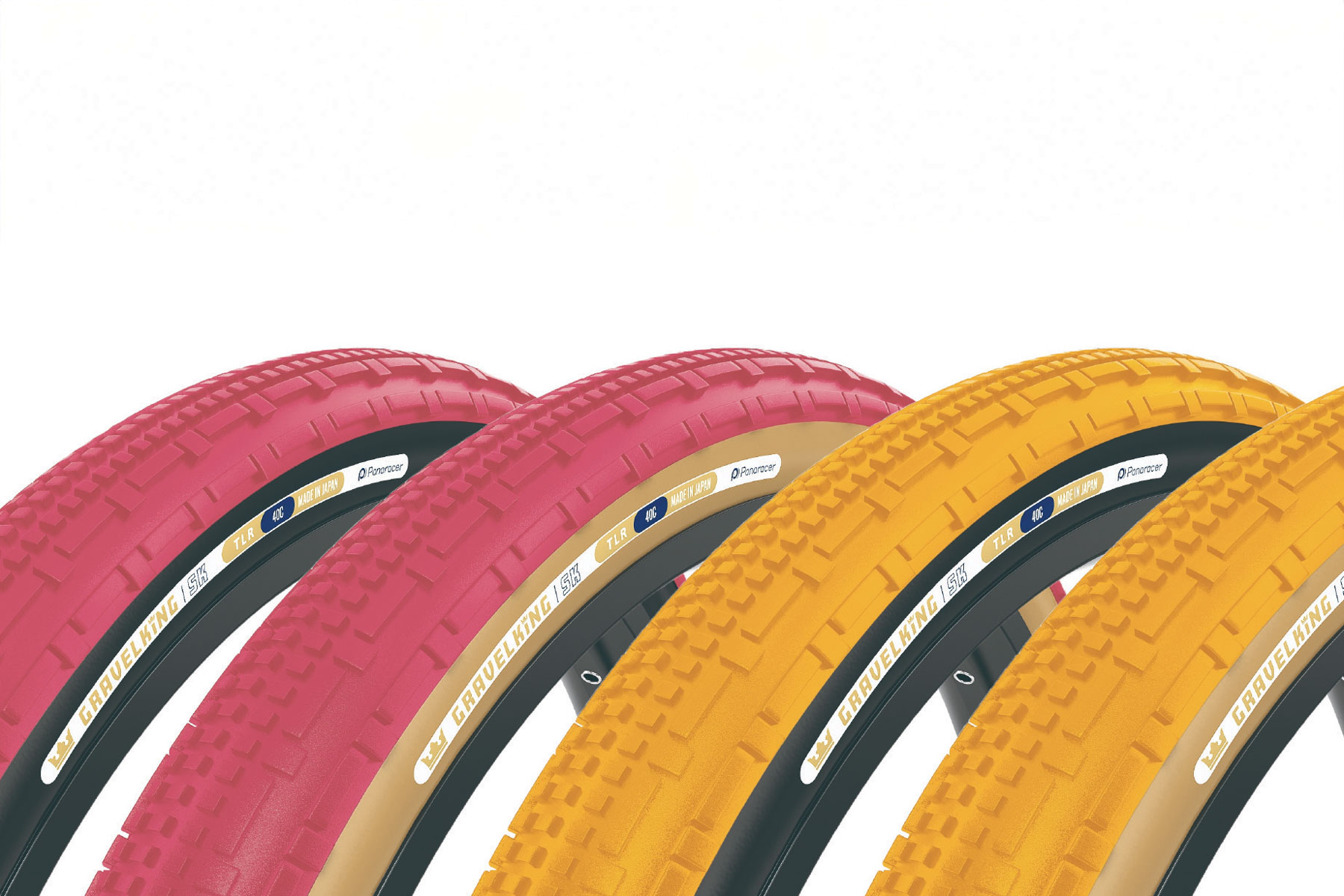
Panaracer has released its Gravel King tyre in two new vivid colours, Honey Butter and Cranberry, with the option of black or brown sidewalls.

I can’t say I’ve ever thought I needed more vividness from my tyre choice, but I’m warming to the Cranberry and tanwall option, which might be a good fit for my Cannondale Topstone.

Why Honey Butter and Cranberry?

Panaracer Gravelking limited editions
The limited-edition Gravel Kings certainly stand out. Panaracer

Panaracer has released a range of brightly coloured gravel tyres in the past, including purple, orange and green options.

The company has provided rationales for its 2025 colours, which reference their food-y roots.

“Honey Butter brings warmth and charm to any ride. Inspired by the golden richness of churned butter with a touch of honey and the soft glow of afternoon light. This creamy hue adds a timeless, refined look that stands out and brings a unique blend of comfort and sophistication,” Panaracer says.

It says the Cranberry option “draws inspiration from the rich, deep hue of freshly picked berries. Evoking a sense of adventure from the vividness of the natural world”.

“Cranberry is perfect for riders who want their bike to stand out on city streets or rugged trails,” Panaracer adds.

Tread options

Panaracer Gravelking limited editions
The limited-edition colours can be had with tan or black sidewalls. Panaracer

The Honey Butter and Cranberry tyres are available in four tread patterns: Gravel King Slick; Gravel King SS; Gravel King SK; and Panaracer’s latest Gravel King X1 tread.

Panaracer says the X1 is the fastest-ever GravelKing tyre and that it’s an homage to the tyre’s 10th anniversary, featuring “cutting-edge technology”.

“This next-generation tyre aims to surpass its predecessors by delivering unparalleled performance, boasting low rolling resistance, puncture resistance, and a supremely smooth riding experience,” Panaracer says.

The tyres will be available in 700x40c or 700x45c and cost £54.99 / $64.99.

KDE Developers Begin Working On A New Login Manager

KDE developer David Edmundson has published a lengthy blog post today outlining the long-standing challenges they have with the SDDM display manager, unimplemented features they want out of a log-in manager, and acknowledging GNOME’s GDM as a “gold standard” for display managers. While not yet an official project, they have begun working on a new KDE Login Manager for improving the situation…

IBM Says Goodbye To Cell Blade Servers With Linux 6.15

The Linux 6.15 kernel is set to remove support for IBM Cell Blade servers for those server platforms from around two decades ago that used the Cell Broadband Engine Architecture processors. IBM Cell Blades at the time powered a few supercomputers but these IBM QS20 / QS21 / QS22 platforms are no longer relevant and the IBM Linux kernel maintainers no longer even have these platforms available/running. With no apparent users remaining, it’s time to say goodbye to the IBM Cell Blades from the mainline kernel…

Google Patches Chrome Sandbox Escape Zero-Day Caught By Kaspersky

wiredmikey shares a report from SecurityWeek: Google late Tuesday rushed out a patch for a sandbox escape vulnerability in its flagship Chrome browser after researchers at Kaspersky caught a professional hacking operation launching drive-by download exploits. The vulnerability, tracked as CVE-2025-2783, was chained with a second exploit for remote code execution in what appears to be a nation-state sponsored cyberespionage campaign [dubbed Operation ForumTroll] targeting organizations in Russia.

Kaspersky said it detected a series of infections triggered by phishing emails in the middle of March and traced the incidents to a zero-day that fired when victims simply clicked on a booby-trapped website from a Chrome browser. The Russian anti-malware vendor said victims merely had to click on a personalized, short-lived link, and their systems were compromised when the malicious website was opened in Chrome. Kaspersky said its exploit detection tools picked up on the zero-day, and after reverse-engineering the code, the team reported the bug to Google and coordinated the fix released on Tuesday.


Read more of this story at Slashdot.