Oracle Customers Confirm Data Stolen In Alleged Cloud Breach Is Valid

An anonymous reader quotes a report from BleepingComputer: Despite Oracle denying a breach of its Oracle Cloud federated SSO login servers and the theft of account data for 6 million people, BleepingComputer has confirmed with multiple companies that associated data samples shared by the threat actor are valid. Last week, a person named ‘rose87168’ claimed to have breached Oracle Cloud servers and began selling the alleged authentication data and encrypted passwords of 6 million users. The threat actor also said that stolen SSO and LDAP passwords could be decrypted using the info in the stolen files and offered to share some of the data with anyone who could help recover them.

The threat actor released multiple text files consisting of a database, LDAP data, and a list of 140,621 domains for companies and government agencies that were allegedly impacted by the breach. It should be noted that some of the company domains look like tests, and there are multiple domains per company. In addition to the data, rose87168 shared an Archive.org URL with BleepingComputer for a text file hosted on the “login.us2.oraclecloud.com” server that contained their email address. This file indicates that the threat actor could create files on Oracle’s server, indicating an actual breach. However, Oracle has denied that it suffered a breach of Oracle Cloud and has refused to respond to any further questions about the incident.

“There has been no breach of Oracle Cloud. The published credentials are not for the Oracle Cloud. No Oracle Cloud customers experienced a breach or lost any data,” the company told BleepingComputer last Friday. This denial, however, contradicts findings from BleepingComputer, which received additional samples of the leaked data from the threat actor and contacted the associated companies. Representatives from these companies, all who agreed to confirm the data under the promise of anonymity, confirmed the authenticity of the information. The companies stated that the associated LDAP display names, email addresses, given names, and other identifying information were all correct and belonged to them. The threat actor also shared emails with BleepingComputer, claiming to be part of an exchange between them and Oracle.


Read more of this story at Slashdot.

Marvel Cosmic Invasion is a ’90s-style beat-’em-up in the mold of Shredder’s Revenge

There’s a lot in the world to be angry about today. So, why not do like we did in the ’90s and channel that aggression into beating the living hell out of bad guys in a delightfully loud and over-the-top arcade game? Marvel Cosmic Invasion takes characters like Spider-Man, Captain America and Wolverine and gives them a beat-’em-up that looks straight out of a grunge-era cabinet.

If this sounds like Teenage Mutant Ninja Turtles: Shredder’s Revenge, that’s no coincidence. Marvel Cosmic Invasion is not only cut from the same cloth; it’s from the same team (developer Tribute Games and publisher Dotemu). The idea is to recreate the look, sound and feel of side-scrolling ’90s button-mashers like X-Men, The Simpsons and the original Teenage Mutant Ninja Turtles with modern touches.

Screenshot from the game Marvel Cosmic Invasion, showing heroes beating up bad guys.
Tribute Games / Dotemu

Like Shredder’s Revenge, it exploits the advantages of modern graphical engines without betraying its muses’ old-school pixel art. Appropriately, the characters’ visual style is inspired by 90s-era Marvel comics.

You’ll choose a team of two superheroes and can tag between them mid-fight. At launch, you can play as Captain America, Wolverine, Spider-Man, Storm, Phyla-Vell, Venom and Nova. The developers are mum about which characters we might see in the future, but it’s hard to imagine Marvel stalwarts like Thor, Iron Man, Black Panther, Hulk and Black Widow not swooping in at some point.

Screenshot from the game Marvel Cosmic Invasion. showing heroes beating up bad guys.
Tribute Games / Dotemu

Its story sounds as extravagant as you’d want from a ’90s-inspired Marvel beat-’em-up. “The immortal Super Villain Annihilus has launched an unprecedented attack across the galaxy, threatening all life as we know it,” the description reads. “Fighters both Earth-born and cosmic must now join forces in a star-spanning adventure against the deadly Annihilation Wave. Brawl through the streets of New York City all the way to the depths of the Negative Zone to foil Annihilus’ vow to spread death across the cosmos.”

You can play with up to four players, local or online. (And it supports crossplay!)

Marvel Cosmic Invasion will be available for PC, Switch, PS5 / PS4 and Xbox. There’s no word yet on pricing or an exact release date, but Dotemu says it will arrive later this year. In the meantime, you can check out the announcement trailer below.

This article originally appeared on Engadget at https://www.engadget.com/gaming/marvel-cosmic-invasion-is-a-90s-style-beat-em-up-in-the-mold-of-shredders-revenge-191110625.html?src=rss

Boston Dynamics Atlas Humanoid Robot Can Run, Cartwheel, Breakdance Now

The robot apocalypse: it can’t come soon enough for some people. And to prove it, here’s a video of Boston Dynamics’ latest iteration of its Atlas humanoid that’s capable of running, crawling, doing cartwheels, and breakdancing. So, if you were wondering if robots were now able to easily circumvent any anti-robot traps you set up around your house, the answer is a definitive yes, and the only foolproof protection is my $39 anti-robot spray. I recommend a can for every room of the house. “This is just bug spray you relabeled.” Huff enough and you’ll be invincible!

Google announces Maps screenshot analysis, AI itineraries to help you plan trips

After a long and gloomy winter, many people are looking forward to some summer travel. Google has some new tools to help you plan, but like most of what Google does now, the new features lean heavily on AI. And unusually, the most interesting of these additions is launching first on iOS.

Google says that lots of people tend to take screenshots when they’re planning a trip. Instead of letting those images become lost in your camera roll, Google will let you feed them into Maps. The new screenshot list feature will let you add those images to Maps, where Gemini will scan them to identify locations.

This feature is opt-in, and the AI doesn’t appear to detect locations with image recognition. Instead, it looks for place names in text, allowing you to review the results before marking them on the map for later perusal.

Read full article

Comments

Nintendo’s digital Switch game sharing plan could be so much simpler

In the final days of our pre-Switch 2 world, Nintendo is trying to rethink how sharing games works. The biggest announcement from the company’s latest Direct was its upcoming Virtual Game Cards feature, a new approach to sharing digital games that improves on the company’s current system, but still carries limitations that keep it from feeling truly modern.

Virtual Game Cards attempt to make digital games as easy to share as physical ones. That starts with the company visually representing games as “cards” and using the language of loading and ejecting them, and extends to how simple they are to share. Two Switch consoles logged into your Nintendo Account can share any digital game just by “ejecting” it from one and “loading” it on another. The only catch is that the consoles need to be connected over local wireless (as in, be physically near each other) when the trade happens, and be able to access the internet to download the game and run it for the first time.

You can similarly share a Virtual Game Card with anyone in the same Nintendo Account family group for two weeks, after which the game automatically returns. In both cases, saves for each game stay on the console where the game was played, making it simple to share the Virtual Game Card again and keep playing.

In comparison to Nintendo’s current system, which requires defining a Switch console as “primary” and able to be used offline and other devices as a “secondary” and needing an internet connection to play shared games, Virtual Game Cards are a meaningful improvement. If you’re a parent trying to share games with your kids or a super-fan with multiple Switches (something Nintendo no doubt wants to encourage), Virtual Game Cards have basically solved the problem — or at least made it much easier to manage and understand. The company isn’t exactly leading the pack here, though.

If I own a game on PlayStation, I can download it on my Playstation 4 and PlayStation 5, and play on either console, without needing to go through the rigamarole of ejecting virtual cards. The same goes for Steam games. Valve even goes further and lets the vast majority of games be shared and played on accounts connected to the same Steam Family, without your computers needing to be near each other when you “hand-off” games.

People are highly sensitive to any kind of DRM. Just ask Xbox, which had big plans to change how loaning games work when the Xbox One was announced, but had to dramatically backtrack after basically everyone complained. 

Nintendo isn’t pulling an Xbox, per se, but it is pitching something adjacent. Virtual Game Cards are inarguably better than how things work now, but they require an internet connection and they still limit how many people can play a game at once. Nintendo came up with a better mental model for sharing games, but not necessarily a better way to do it.

This article originally appeared on Engadget at https://www.engadget.com/gaming/nintendo/nintendos-digital-switch-game-sharing-plan-could-be-so-much-simpler-190353732.html?src=rss

Shadow Labyrinth, the edgy Pac-Man Metroidvania, arrives on July 18

Shadow Labyrinth, an utterly bonkers riff on Pac-Man and sidescrolling Metroidvania games, will hit digital store shelves on July 18. It’ll be available for Nintendo Switch, PC via Steam, PS5 and Xbox Series X/S.

The game casts players as Swordsman No. 8 as he befriends a yellow orb called Puck. For the gaming historians out there, Puck-Man was the original name for Pac-Man. The gameplay involves switching from the classic sword-wielding hero to Puck, with the latter able to crawl on walls and (surprise) gobble up yellow dots. There’s also a third form, a mecha construct called Gaia.

The gameplay looks frenetic and fairly violent, which seems like an odd choice for everyone’s favorite perpetually hungry orb. Bandai Namco is making the game, however, and it made the very first Pac-Man all of those decades ago. I’m going to give them the benefit of the doubt here. In any event, it’s not as if developers haven’t experimented with Pac-Man in the past. The famished fiend has been featured in racing games, platformers, endless runners, puzzlers and more. What’s one more genre to add to the mix?

Shadow Labyrinth will be available in the original version and as a Digital Deluxe edition. That one comes with a digital artbook and the soundtrack.

This article originally appeared on Engadget at https://www.engadget.com/gaming/shadow-labyrinth-the-edgy-pac-man-metroidvania-arrives-on-july-18-185011811.html?src=rss

Android Development Is Going Private As Google Confirms Big Strategy Shift

Android Development Is Going Private As Google Confirms Big Strategy Shift
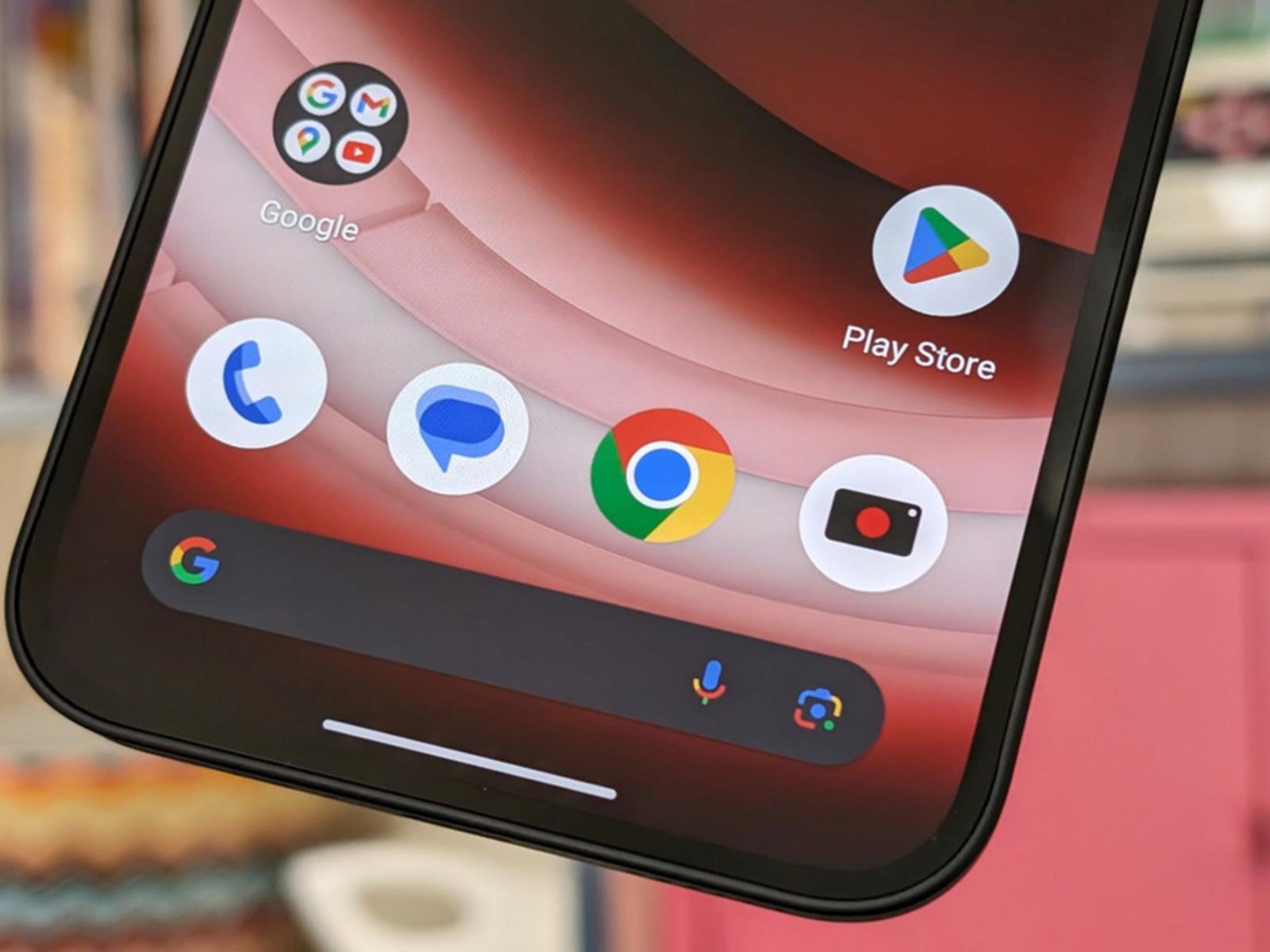
Google is making a big shift in how it manages the Android Open Source Project (AOSP), which it has been maintaining for over a decade, alongside its internal branch. AOSP has allowed for a lot of flexibility with how third parties could make use of the operating system. Moreover, it took in code from outside developers that would eventually

AMD Ryzen 5 9600 Looks Strong Compared To 9600X In Early Benchmarks

AMD Ryzen 5 9600 Looks Strong Compared To 9600X In Early Benchmarks
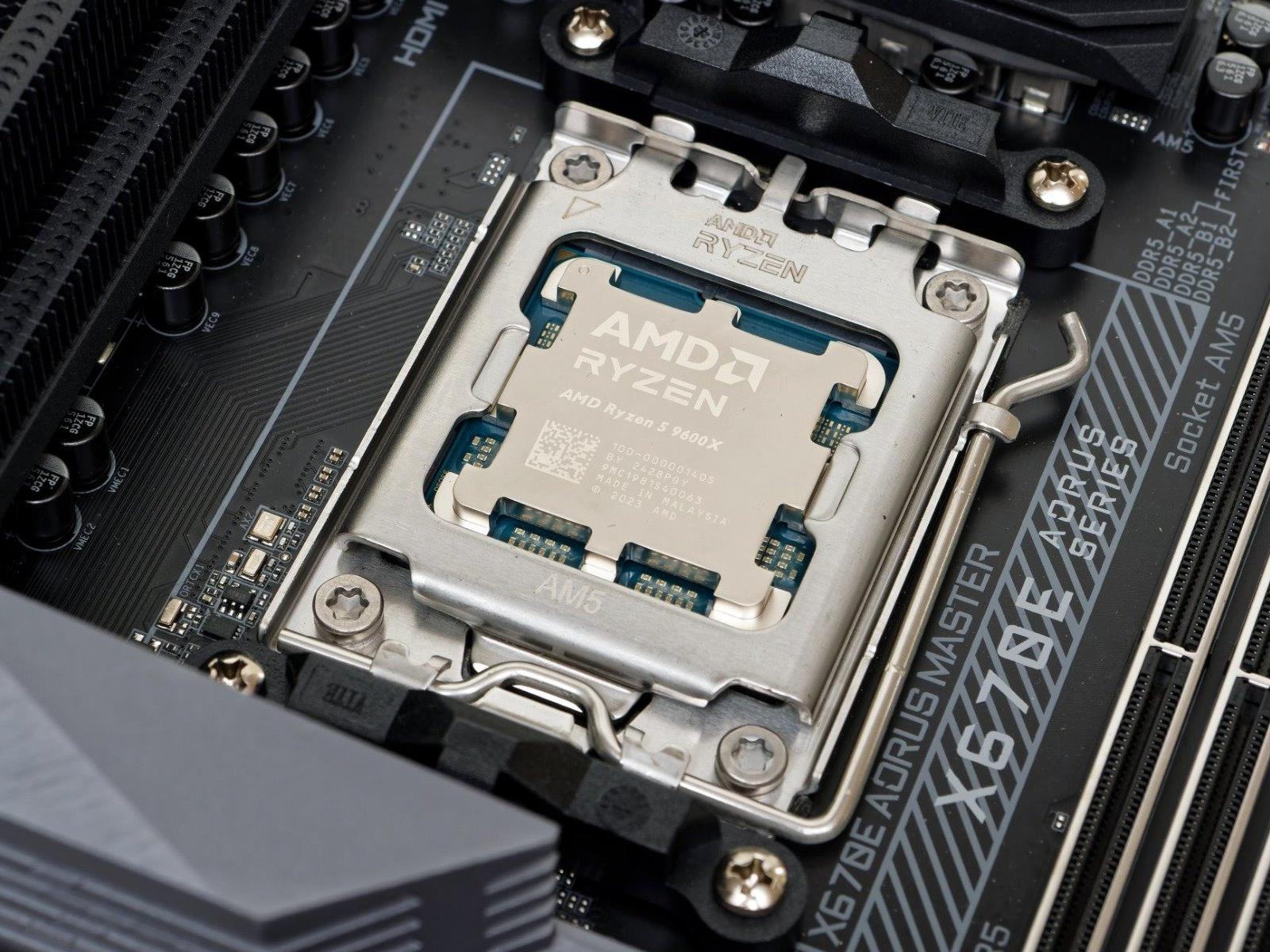
Ever since at least the Ryzen 3000 series, AMD’s release schedule for its Ryzen desktop processors has been to launch the enthusiast-focused “X” processors first, and then release the very-slightly neutered “non-X” versions after. The standard model Ryzen chips usually differ from their “X”-branded brethren only in that they have a lower power

Ubisoft spins out subsidiary with a billion-dollar investment from Tencent

Ubisoft is continuing its efforts to course-correct after several challenging years. Today, the video game company announced that it will launch a subsidiary centered around three of its most familiar franchises: Assassin’s Creed, Far Cry and Tom Clancy’s Rainbow Six. The as-yet-unnamed subsidiary will fold in the teams working on those three series, including Ubisoft studios in Montréal, Quebec, Sherbrooke, Saguenay, Barcelona and Sofia.

This new business will receive an investment of €1.16 billion (roughly $1.25 billion) from its longstanding partner Tencent, granting the conglomerate a minority ownership stake. Following the transaction, Ubisoft will narrow focus to its other franchises, such as The Division and Tom Clancy’s Ghost Recon.

“Today Ubisoft is opening a new chapter in its history,” CEO and Co-Founder Yves Guillemot said. “As we accelerate the company’s transformation, this is a foundational step in changing Ubisoft’s operating model that will enable us to be both agile and ambitious.”

Ubisoft has been cutting costs and jobs over the past several months after several of its new projects flopped. There have been hints for a while that the company’s leaders were interested in either finding a buyer or exploring a joint venture with Tencent to help reverse its fortunes. It’s encouraging that the recent Assassin’s Creed: Shadows has already reached 3 million players, but Ubisoft will probably need a few more wins to fully stabilize.

There is some extra good news in the announcement. The description of the new subsidiary does specify that “it will drive further increases in quality of narrative solo experiences.” So while we can expect to also see multiplayer and free-to-play offerings from the Ubisoft umbrella, they aren’t giving up on single-player games.

This article originally appeared on Engadget at https://www.engadget.com/gaming/ubisoft-spins-out-subsidiary-with-a-billion-dollar-investment-from-tencent-183516992.html?src=rss

Discord is planning an IPO this year, and big changes could be on the horizon

As previously rumored, Discord, a popular communications platform, is working with Goldman Sachs and JP Morgan Chase to plan an IPO as soon as this year, according to a recent report by Bloomberg. The report cites people familiar with the matter and notes that more advisors may come on board as the talks progress.

This isn’t the first we’ve heard about plans for an IPO; an article in The New York Times claimed that Discord had begun exploratory meetings with bankers earlier this month. Even way back in 2022, Discord was exploring the option of a direct listing, but it now seems the company plans to go with a traditional IPO.

Launched in 2015, Discord was initially conceived as an improved way to facilitate communication while playing video games—and gaming-related uses still account for more than 90 percent of its activity. While some previous tools focused mainly on in-game voice chat, Discord supports text, voice, and video, as well as game streaming. It also has robust features for managing communities outside the game and has developer APIs for developing bots, tools, and games that can be used within its channels.

Read full article

Comments

New Windows Scheduled Task Will Launch Office Apps Faster

Microsoft plans to roll out a new Windows scheduled task in May that launches automatically to help Microsoft Office apps load faster. From a report: The company says the “Startup Boost” task will launch in the background on logon, with the roll-out to start in mid-May and worldwide general availability to be reached by late May 2025. On systems where it’s toggled on, users will see new Office Startup Boost and Office Startup Boost Logon tasks in the Windows Task Scheduler, which will ensure that Office apps can preload “performance enhancements.”

“We are introducing a new Startup Boost task from the Microsoft Office installer to optimize performance and load-time of experiences within Office applications,” Microsoft says on the Microsoft 365 message center. “After the system performs the task, the app remains in a paused state until the app launches and the sequence resumes, or the system removes the app from memory to reclaim resources. The system can perform this task for an app after a device reboot and periodically as system conditions allow.”


Read more of this story at Slashdot.

This Is the Air Fryer I Use Every Day, and It’s 40% Off Right Now

We may earn a commission from links on this page. Deal pricing and availability subject to change after time of publication.

A good air fryer doesn’t need to have a ton of bells and whistles. For the most part, the convection heating function is highly effective in both cheap and pricey models. So if you have few demands like I do—just make the food hot and crispy—then you’ll enjoy a reliable basket-style air fryer that consistently churns out crunchy snacks and roasts meats without asking for too much from you. The Instant Vortex is a great pick for that, and it’s on sale right now during Amazon’s Big Spring Sale. 

While I’ve reviewed a few different air fryers (read here for my best overall air fryer suggestion), the Instant Vortex is actually my go-to air fryer for daily use and it’s 40% off right now. This particular model of the Instant Vortex has a 5.75-quart capacity which has allowed me—someone who’s constantly testing out bizarre recipes in the air fryer—to flourish. I’ve made cheesecakes in this air fryer, a number of pies and even blind baked some crusts, not to mention normal dinner stuff, like roasting whole pork tenderloin, and game day snacks like biscuit cheese balls. 

You can (and should) check out my full review of the Instant Vortex here, but what makes this air fryer so versatile is that even with the unit’s overall compact size, you still have plenty of depth to work with in the basket. Not only does this allow for plenty of air flow to help food cook more evenly, but you have the head room to roast and bake taller items too. The control panel is easy to navigate with a twist knob so you can increase and decrease time and temperature, and the Vortex gives you a helpful nudge to flip your food halfway through the cooking time. 

This handy air fryer is also lighter and more compact than the toaster oven variety, which makes it ideal for those in smaller kitchens or situations where you don’t want the air fryer living on the counter top. For $83.99, down from its usual $139.99, you’re looking at a great bargain for an air fryer that won’t let you down, day in and day out. 

The Best Amazon Spring Sale Deals You Can Get Now


Apple AirPods Pro 2 Wireless Earbuds


—
$169.99

(List Price $249.00)


Ecobee Smart Thermostat Enhanced


—
$169.00

(List Price $189.99)


Blink Mini 2 (White, 2-Pack)


—
$37.99

(List Price $69.99)


Sonos Era 100 Wireless Speaker – White


—
$199.00

(List Price $249.00)

Deals are selected by our commerce team

The Samsung Galaxy Watch Ultra Is $253 Off Right Now

We may earn a commission from links on this page. Deal pricing and availability subject to change after time of publication.

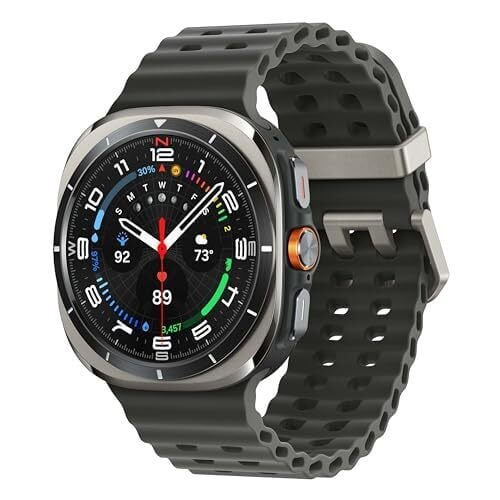
If you need a sturdy watch to meet all your athletic and adventurous needs, good news: You can save big right now on the LTE Samsung Galaxy Watch Ultra. The watch is currently 39% off during Amazon’s Big Spring Sale. Normally priced at $649.99, the current discount brings the smartwatch down to $396.94. This is as low a price as this watch ever gets, according to price-tracking tools.

Samsung announced the Galaxy Watch Ultra last summer, marketing it as competition for the Apple Watch Ultra—with an emphasis on outdoor and exercise features. And as Lifehacker’s deals expert Daniel Oropeza explains, the Galaxy Watch Ultra does in fact excel in those areas above other watches.

The watch is built to weather tough conditions. It’s made out of Grade 4 titanium, and has an IP68 water- and dust-resistant rating. You can also take it up high altitudes (up to 9,000 meters), and it can withstand up to 10ATM of pressure (about 330 feet underwater). There’s also a built-in siren option, which you can set to go off in case of emergencies. And since this watch uses LTE, you don’t rely on wifi or Bluetooth for a satellite signal. And yes, you can take calls on it. Another huge perk: battery power. If you don’t use any power-saving modes, it’ll last 60 hours, but it can go up to 100 hours if you’re conservative.

However, if you’re not looking for a rugged (read: big) smartwatch, then the biggest downside is that the Galaxy Ultra only comes in one size, 47mm. The 1.47-inch Super AMOLED display is brighter than previous Samsung AMOLED smartwatches.


Shopping for tech? Lifehacker can help you make the right decision. Browse our tech reviews and head-to-head comparisons for everything from laptops and smartwatches to e-bikes and home gyms. Subscribe to our deals newsletter, Add to Cart, for the best sales sent to your inbox, or browse our best-of lists directly on Amazon, including:

Mark Zuckerberg decides content from your actual friends is an ‘OG’ Facebook feature

Meta has spent the last few years remaking Facebook’s main feed into a “discovery engine” that primarily serves up recommended content from pages, groups and accounts users don’t already follow. But while the company has said the change is necessary to compete with TikTok, it’s also frustrated Facebook users who miss seeing posts from people they actually know.

Now, Meta is trying to remedy this with a revamped “Friends” section of the app that will only show posts and content related to your Facebook friends. The company says the update is the first of many meant to bring “OG” features back into the 21-year-old social network.

With the update, the “Friends” tab of the Facebook app that used to only be for friend requests will now be home to a feed exclusively made up of content related to your friends. This includes feed and Story posts, as well as Reels, birthdays, friend requests and “people you may know suggestions.”

While Meta is spinning the change as a part of a larger push to make Facebook feel more “social,” it’s not the first time the company has offered dedicated feeds for “friend only” content. In fact, Mark Zuckerberg showed off dedicated “friends” feed in 2022 amid the company’s push to bring more recommendations to users’ “home” feeds. That feed, which surfaces posts from friends in reverse chronological order, is still available, though it’s somewhat buried in the app.

It’s not clear what else Meta has in store for other “OG” Facebook features that could play on nostalgia for the 21-year-old social network. (Facebook’s once infamous “poke” feature already had a brief resurgence last year.) But it’s apparently a priority for Zuckerberg.

“I actually think that there’s this whole opportunity that I think is going to be pretty fun to to go after and build which is just to kind of go one-by-one and build up a a bunch of these things that used to be these joyful experiences that people had as part of Facebook that just kind of don’t exist on the internet today,” Zuckerberg said in a podcast appearance promoting the change.

This article originally appeared on Engadget at https://www.engadget.com/social-media/mark-zuckerberg-decides-content-from-your-actual-friends-is-an-og-facebook-feature-180803853.html?src=rss

Here’s Everything You Get With Garmin’s New Connect+ Subscription

We may earn a commission from links on this page.

Garmin is now offering a $6.99/month subscription called Connect+ that provides “premium features,” including AI, on top of what you already get for free with the Garmin Connect app. So far, nothing is being paywalled, but it feels like the end of an era. Garmin watches were some of the last few wearables where you pay for a device and then all of its features are free to use forever. (The hardware has impressively long lifespans, too.) I signed up for Connect+ to see what’s inside, so let’s take a look. 

Subscription details

The new Connect+ subscription costs $6.99/month or $69.99/year. It only adds features on top of what you already get with the Garmin Connect app; no existing features are being paywalled. 

Garmin did tease that “premium enhancements may be made to existing features,” leading users to speculate that any new features that come down the line may be limited to paid members. Garmin is in the habit of adding new features pretty frequently, and often enables them even on older watches. In the past year alone, we’ve gotten strength coaching, a new type of run coaching, and the ability to detect your lactate threshold heart rate without a chest strap—all things that just appeared on my watch or in my app one day. I wouldn’t expect watch firmware updates to be affected—this is a premium subscription for the phone app—but I have to wonder if there will be fewer of those new app feature rollouts for free users going forward. 

Connect+ is not Garmin’s first subscription offering, by the way. They have long offered a slate of services for various special purposes, including hiking and hunting maps, marine charts, search and rescue insurance, dog tracking, kids’ smartwatch tracking, and more. But this is definitely Garmin’s first foray into a premium subscription for health and fitness features, in the same vein as, say, Fitbit.

Garmin says the Connect+ subscription will come with: 

  • Active Intelligence (an AI analysis of your activities; this requires opt-in)

  • Enhanced LiveTrack (also available with an Outdoor Maps+ subscription), allowing you to text contacts when you start an activity, or set up a public tracking page

  • Live Activity, which lets you follow a workout from your phone and not just your watch

  • A new Performance Dashboard on the web with new charts and comparison features

  • Social features, including double points on badges and the ability to earn badges from anywhere in the world (some badges are only available in certain locations). Immediately upon signing up for Connect+, I noticed a little yellow star on the corner of my profile pic on the app. 

  • Extra training guidance if you’re following a Garmin Coach program

What you get with Live Activity

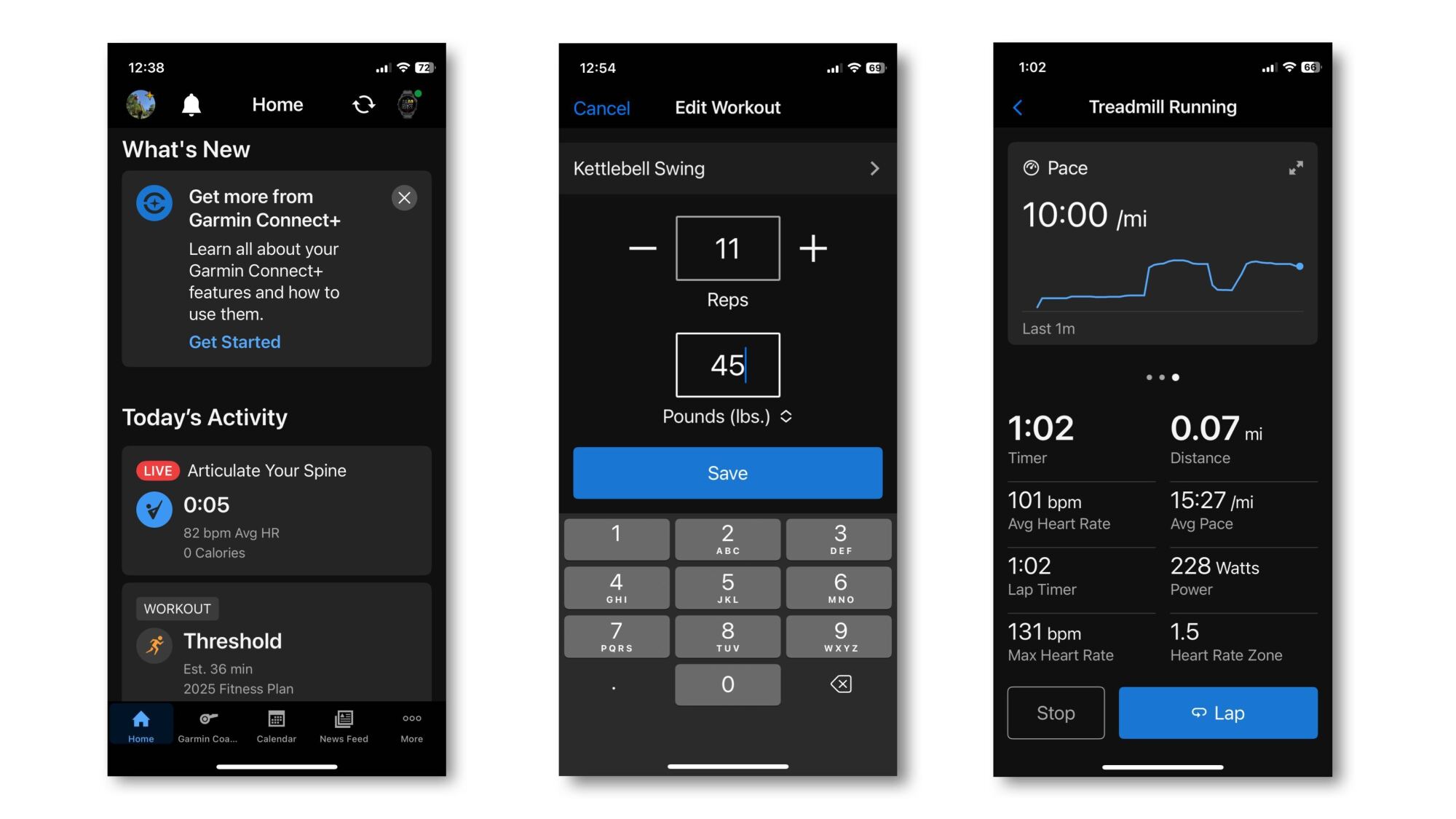
Screenshots of a live activity on the home screen, editing sets and reps, and what you see when you do a treadmill workout.
Credit: Beth Skwarecki

Until now, a workout you do on your Garmin watch stays on your Garmin watch, at least until you finish the activity. At that point, it syncs to your phone, where you can view and edit the details. 

But with Live Activity, you can now use the Garmin Connect app while you’re doing an activity on your watch. That’s especially useful for strength workouts, which previously required you to edit weights and reps through an awkward interface on the watch after each set. 

To test this out, I did a few quick workouts on my Garmin Forerunner 265S. One was a mini workout of kettlebell swings and sit-ups that I created on the app, and sent to the watch. 

I started the workout on my watch. Nothing happened on the phone—I might have expected a notification—but when I opened the Garmin Connect app on my phone, there was a tile on the home screen for a Live Activity. I tapped it, and there was the same workout I was doing on the watch. I could see my heart rate, the time elapsed, and which exercise I was supposed to be doing. 

I didn’t see the promised exercise videos right away, but it turns out you need to swipe left on the heart rate graph. There you can see an exercise video (or a rest timer, if appropriate). Swipe again, and you’ll see your heart rate zone. The bottom half of the screen shows your stats in progress, including your reps, sets, heart rate, and a timer. 

Importantly, if you’ve turned off rep counting or weight editing on your phone (because they’re so annoying in normal use), you’ll want to turn them back on for this. The watch counted my kettlebell swings, and at the end of each set prompted me to edit my reps and weight. This editing screen came up on both the watch and my phone, and of course it was easier to edit that information from the phone. 

With Live Activity, you can do the following from the watch or phone:

  • Pause or unpause the workout

  • Edit reps or weight in a strength workout

  • Advance to the next set (strength), or start a new lap (in activities like running)

  • View stats like your heart rate, time elapsed, reps, pace, and so on

But only the watch can do the following: 

  • Start the workout

  • Finish and save the workout

  • Create custom data screens

Live Activity definitely improves the usability of the watch for strength workouts. I don’t entirely see the point for running workouts, but maybe there’s a use case I haven’t thought of yet.

What’s in the Performance Dashboard

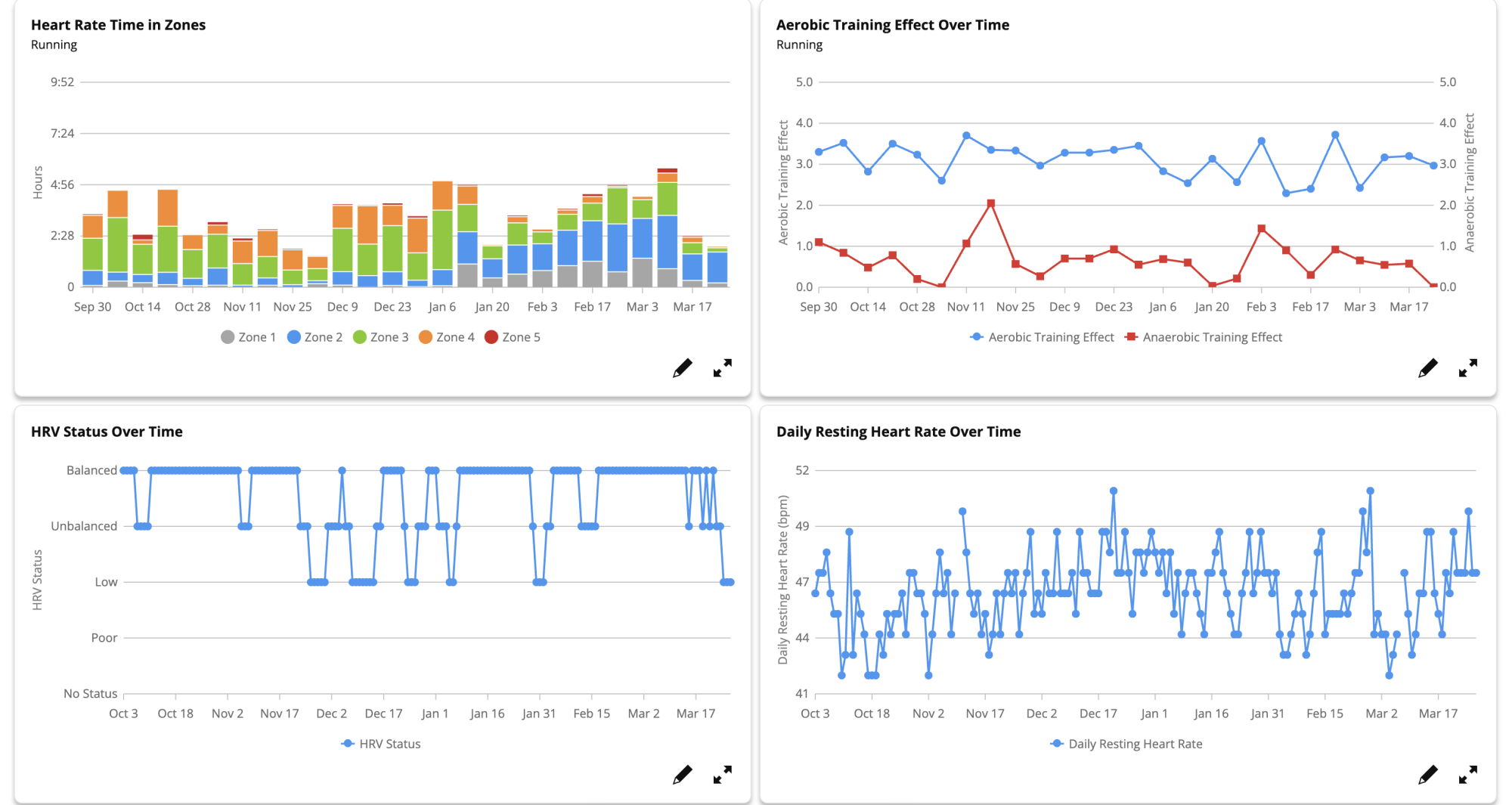
Four charts from the Performance dashboard: HR time in zones, aerobic training effect over time, HRV status over time, daily resting HR over time.
Four of the charts I can view in my Performance Dashboard
Credit: Beth Skwarecki/Garmin

One of Garmin’s better-kept secrets is its web dashboard. You can log in here and view all your activities and data—essentially a web view of everything that’s in the app. 

The Performance Dashboard is a new item in the sidebar of the web dashboard. To set it up: 

  1. Mouse over the black sidebar at the left side of the screen. 

  2. Select Performance Dashboard, which I see as the last blue item, just under Reports.

  3. Click Add dashboard, and choose whether you want a running, cycling, multisport, or custom dashboard. (You can have more than one.) 

Some of the charts on the performance dashboard are also available from the free Reports tool, although Reports will only show you one chart at a time. The Performance Dashboard is definitely a better tool if you’re looking to really nerd out about your data. 

For example, I can get a simple report from the Reports tool that shows my running mileage over the past six months. It gives me a bar chart with one bar per month. The Performance Dashboard, on the other hand, can give me a bar for each week, and I can select a custom timeframe instead of just selecting one of a few options. There are also more options for types of data you can view. Do you know how your watch will ask you at the end of each run how hard it felt? You can now see that on a graph called “perceived effort over time.”

What you get with Active Intelligence

There’s good news here for people who want AI in everything, and for those of us whose reaction is “oh god, not here too” (this meme sums up my personal stance). The AI (“active intelligence”) is the one feature of Connect+ that requires you to opt in, even after you have subscribed to the whole package. 

But I did it, dear readers. I opted in for you, so I could let you know what the AI can actually tell you about your training—and whether it’s any better than Strava’s notoriously clueless AI. 

Unfortunately, there’s not much to say at the moment. My home screen “insight” (which you can turn off, by the way, even with AI enabled) at first just told me to check back later. My recent runs don’t have any AI commentary attached. Garmin says that “As customers use Garmin Connect+ more, the insights will become more tailored to them and their goals.” 

As I was finishing up this article, I noticed that I now have a home screen insight. It tells me that I achieved 255 intensity minutes this week, exceeding my goal of 150. (I guess I set a goal for that at some point? OK.) Then it tells me consistency is good (not wrong) and gives a few sentences of encouragement. 

The AI feature is labeled as a “beta,” with a thumbs up/thumbs down icon that lets me rate the insight I just read. I can say that it’s interesting, not interesting, or “report a concern” if it’s inaccurate, discouraging, or poorly written. (You can also give a custom response.) I’ll keep an eye on these notes and report back as the AI gets to know me better.

Garmin asks your permission to train its AI on your data

To turn on the AI features, you need to click through an agreement where you allow the AI to access your training and health data (so that it can run its analyses). This also allows your data to be used as training data for the AI. 

I asked Garmin if this means that the AI is only trained on people who opt-in. A spokesperson confirmed: “We only train with data from users who have consented.” The existing model was trained on users who previously granted permission for their data to be used for product improvements. Garmin has a brief AI transparency policy here. 

You can revoke permission at any time in your Connect+ settings, which will also turn off your access to AI features. 

Top 5 Zwift Videos: New Pain Caves, First Races, and Outdoors vs Indoors

Thinking of putting together an indoor cycling space? In this week’s top video, watch as one Zwifter converts his packed garage to an impressive Zwift setup.

Also included in this week’s top videos are videos about a Zwifter’s first race, a comparison of indoor and outdoor FTP tests, an overview of the TrainerRoad and Zwift integration, and fitness gains from Zwift racing.

New “Paincave” Setup & Zwift Ride Unboxing

Ryan Condon has finally made the move to upgrade his paincave. Watch as he puts together his new setup in his garage. 

Sprinter Tries His First Zwift Race

Jeff from Norcal Cycling tackles a Zwift race with Dylan, who has never raced on Zwift before. Can Jeff help Dylan win his first Zwift race?

Zwift FTP Test vs Outdoors FTP Test

To accomplish one of his cycling goals, Nathan must increase his FTP to be more competitive in the higher Zwift categories. In this video, Nathan does an FTP test both indoors and outdoors to see how the numbers compare.

TrainerRoad x Zwift: The Ultimate Indoor Training Combo?

J Dirom covers the TrainerRoad and Zwift integration and shares his thoughts on the topic.

I tried Zwift racing for 4 months – this is what happened

After racing consistently for the last four months, Henry shares his takeaways from the experience and the progress that he has made.

Got a Great Zwift Video?

Share the link below and we may feature it in an upcoming post!

Elon Musk and Trump win fight to keep DOGE’s work secret

Elon Musk and the Department of Government Efficiency (DOGE) don’t have to turn over information related to their government cost-cutting operations, at least for now, a federal appeals court ruled yesterday.

A federal judge previously ruled that 14 states suing the federal government can serve written discovery requests on Musk and DOGE. Musk, DOGE, and President Trump turned to the US Court of Appeals for the District of Columbia Circuit in an attempt to block that order.

A three-judge panel at the appeals court granted an emergency motion for a stay in an order issued yesterday, putting the lower-court ruling on hold pending further orders from the appeals court. “Petitioners have satisfied the stringent requirements for a stay,” the panel ruling said. “In particular, petitioners have shown a likelihood of success on their argument that the district court was required to decide their motion to dismiss before allowing discovery.”

Read full article

Comments