Oura’s ‘AI Advisor’ Is Out of Beta Testing, but Is It Worth Using?

We may earn a commission from links on this page.

The Oura Advisor, an AI feature formerly tucked away in Oura’s beta testing program, is now rolling out to all Oura Ring customers. It takes the form of a chatbot that you can start a conversation with at any time from within the Oura app—plus the Advisor promises to “check in” with you daily, weekly, or three times a week, depending on what you request. But do you actually want it to do any of those things?

What does the Oura Advisor do? 
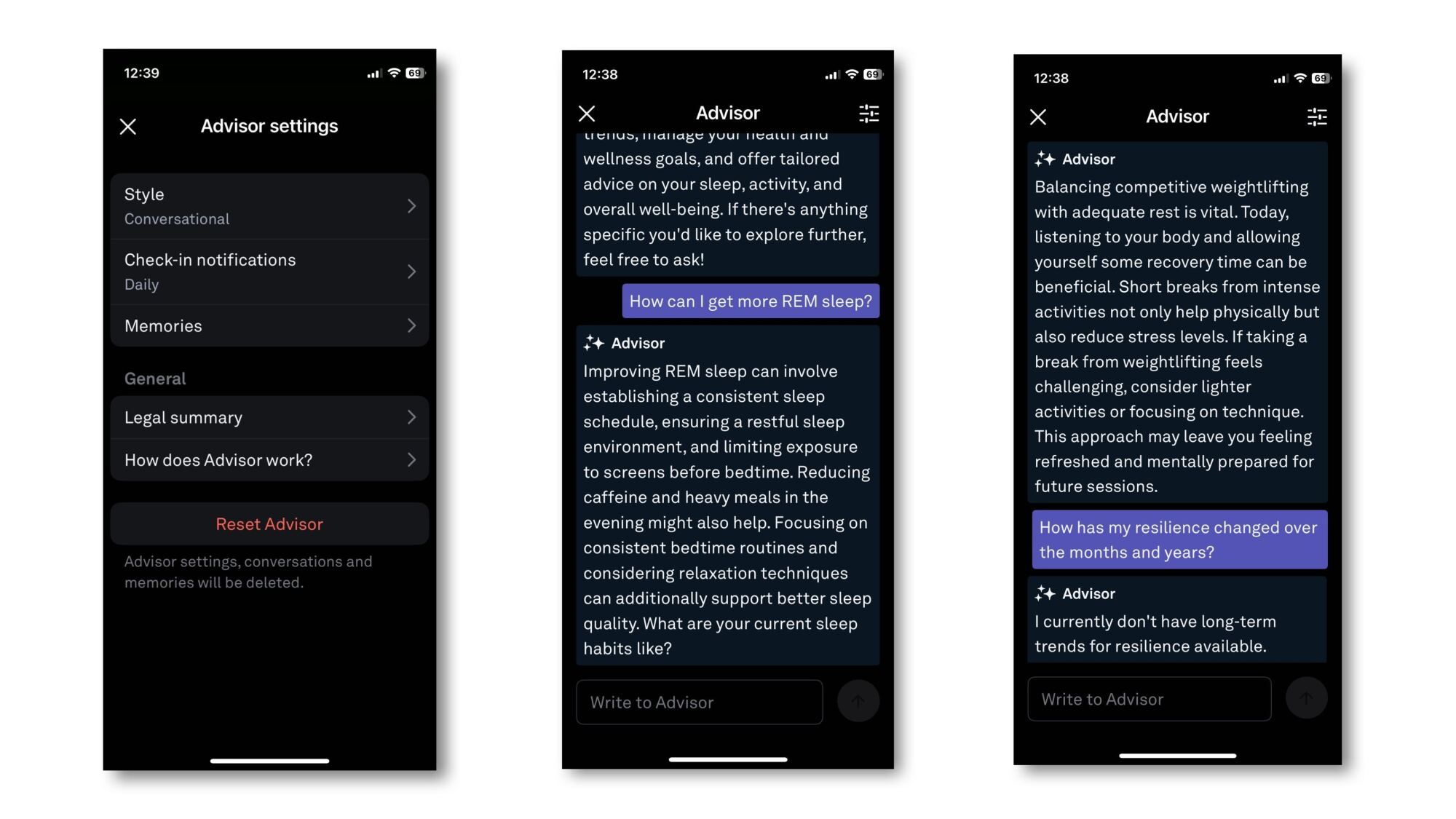
A side by side screenshot of the app features as described below

Credit: Beth Skawrecki

Honestly, this seems to be a pretty standard fitness app AI—meaning that all it really does is restate metrics from the app in a more conversational tone. The Advisor itself told me that it “analyze[s] your Oura data to provide insights and guidance tailored to your health goals.” Its language is in the same style as the little encouraging sentences you get on the Oura home screen, and it tends to repeat the same kinds of advice. 

When you open a chat with the Advisor, it asks what you’d like to talk about. So far I haven’t gotten it to tell me anything that wasn’t already obvious from other screens of the app. When I asked why my resting heart rate has been high lately, it gave a generic list of reasons that a resting heart rate might be high for anyone. When I asked it for an “insight” (since it told me that its job is to provide insights), it told me my cardiovascular age, which is a metric that also appears on my app home screen. 

How to turn on the Oura Advisor

Until recently, you had to opt in to Oura Labs (the beta testing program) to access the Advisor. It’s still rolling out to all users, so if you want to try it in the meantime, you can turn on any Oura Labs features you like by going to the menu in the top left corner, selecting Oura Labs, and choosing what “experiments” you’d like to turn on. (There is currently a meal tracking feature, and a “heart check-in.”)

You do have to use the app in English, although Oura says they’re planning to offer the Advisor in other languages in the future. Once the Advisor is enabled, you can tap the “+” in the bottom right corner (the same place you would add an activity or start a meditation session) and choose Advisor. This opens up the chat, and from this screen you can also adjust the Advisor’s settings. 

How to change settings and delete “memories” on the Oura Advisor

In the chat, you can tap a settings icon in the upper right corner of the screen. The available settings are: 

  • Style: Conversational, conversational, or direct. I can’t tell if the two “conversational” options are different, or if the duplication is an error on Oura’s part. 

  • Check-in notifications: Daily, three times a week, or weekly; you can also set whether your preferred time of day is morning, afternoon, or evening (or any combination)

  • Memories: The Advisor remembers things you’ve told it about yourself. My Memories section has “The user participates in competitive weightlifting,” and “the user has been sick,” both things I told it directly in our conversations. You can delete a memory by tapping the trash can icon next to it.

There is also a button to “reset” the advisor, which means all settings, conversations, and memories will be deleted.

To test what it’s getting from its memories, I asked the advisor if its data suggested I was getting sick. With the “memory” of my illness, it said yes, and suggested I might want to focus on recovery today. After deleting that memory, I asked the same question again. It said that my resting heart rate suggests I’ve been under some stress, and that I might want to focus on recovery today. 

Is the Oura Advisor worthwhile?

So far I haven’t seen the Advisor hallucinate data or say anything inappropriate, but it also hasn’t told me anything I would consider an “insight.” I tried asking it about data that I can’t easily read from the app—like my long term resilience trends—and it said it didn’t have that data available. On the Oura subreddit, most posts about the Advisor seem to be complaints that it isn’t doing anything interesting, but one user said they were able to get the Advisor to talk to them about their meal choices logged with the Meals feature, which is still in beta.

One user said the Advisor helped them to improve their resilience score, but they didn’t provide much information about how it did that, just that they gave the advisor specific information about things like their sleep schedule. Now that the feature has rolled out to more users, perhaps we’ll find out whether more people find it useful.

iOS 18.4 is available now with new emoji, Apple News+ Food and priority notifications

Apple has released iOS 18.4, iPadOS 18.4, macOS 15.4 and visionOS 2.4, bringing a grab bag of new features to the companies devices and expanding Apple Intelligence to new countries and languages.

As previously announced by Apple iOS 18.4, iPadOS 18.4 and macOS 15.4 include a new Apple News+ Food section in the News app that collects recipes and food-oriented articles, including exclusive recipes for Apple News+ subscribers. The updates also introduce new emoji, AI-sorted Priority Notifications in Notification Center, new ways to filter photos in the Photos app and lossless audio on the AirPods Max. That’s on top of a random assortment of other quality-of-life features like:

  • AI-generated summaries of App Store reviews

  • An Ambient Music tool in Control Center

  • The ability to add and control Matter-compatible robot vacuums to the Home app

  • New widgets for the Podcasts app

  • A new “Sketch” style for images in Image Playground

The Writing Tools features in visionOS on the Vision Pro.
Apple

The update to visionOS 2.4 will add Apple Intelligence features like Writing Tools and Image Playground to the Vision Pro for the first time, on top of a streamlined process for sharing your headset with another person, a new Apple Vision Pro app for the iPhone to download apps and experiences to your Vision Pro remotely, and a Spatial Gallery app for the headset itself that features a rotating collection of spatial videos and photos curated by Apple.

After a bit of a delay, Apple says Apple Intelligence will be available in the European Union for the first time on iPhone and iPad. The suite of AI features will now also work in several new languages “including French, German, Italian, Portuguese (Brazil), Spanish, Japanese, Korean, and Chinese (simplified) — as well as localized English for Singapore and India,” Apple says.

This article originally appeared on Engadget at https://www.engadget.com/mobile/smartphones/ios-184-is-available-now-with-new-emoji-apple-news-food-and-priority-notifications-175358845.html?src=rss

France fines Apple €150M for “excessive” pop-ups that let users reject tracking

France’s competition regulator fined Apple €150 million, saying the iPhone maker went overboard in its implementation of pop-up messages that let users consent to or reject tracking that third-party applications use for targeted advertising.

The App Tracking Transparency (ATT) framework used by Apple on iPhones and iPads since 2021 makes the use of third-party applications too complex and hurts small companies that rely on advertising revenue, said a press release today by the Autorité de la concurrence (Competition Authority). The system harms “smaller publishers in particular since, unlike the main vertically integrated platforms, they depend to a large extent on third-party data collection to finance their business,” the agency said.

User consent obtained via the ATA framework “authorizes the application in question to collect user data for targeted advertising purposes,” the agency said. “If consent is given, the application can access the Identifier for Advertisers (‘IDFA’), the identifier by which each device can be tracked through its use of third-party applications and sites.” The French investigation was triggered by a complaint lodged by advertising industry associations.

Read full article

Comments

Microsoft Shutters AI Lab in Shanghai, Signalling a Broader Pullback From China

An anonymous reader shares a report: Microsoft has closed its IoT & AI Insider Lab in Shanghai’s Zhangjiang hi-tech zone, marking the latest sign of the US tech giant’s retreat from China amid rising geopolitical tensions.

The Shanghai lab, meant to help with domestic development of the Internet of Things (IoT) and artificial intelligence (AI) technologies, closed earlier this year, according to people who work in the Zhangjiang AI Island area. Opened in May 2019, Microsoft’s IoT & AI Insider Lab was touted as a flagship collaboration between the global tech giant and Zhangjiang, the innovation hub of Shanghai’s Pudong district, where numerous domestic and international semiconductor and AI companies have set up shop. The lab covered roughly 2,800 square meters (30,000 square feet).


Read more of this story at Slashdot.

There’s a new benchmark in town for measuring performance on Windows 95 PCs

If you’re still using a computer you bought during the Clinton administration, interesting news: Crystal Dew World, developers of apps like CrystalDiskInfo and CrystalDiskMark, have released an update to their CrystalMark Retro benchmark (as spotted by Tom’s Hardware). The most interesting aspect of the update for retro computing enthusiasts is expanded operating system support: the app will now run on Windows 95, Windows 98, and old versions of Windows NT like 3.51 and 4.0. The previous version of the app only went as far back as Windows XP.

The app spits out benchmarking scores for five things: single-core CPU performance, multi-core CPU performance, 2D graphics performance using GDI, 3D graphics performance using OpenGL, and disk speed (broken into four sub-benchmarks for sequential and random read and write performance).

The app will also run on current systems, including 64-bit x86 and Arm-based PCs, and the results database is dominated by those modern systems. But searching by operating system allows you to zero in on those retro results, including nine (as of this writing) for Windows 95, six for Windows 98, and five for Windows NT 3.51.

Read full article

Comments

You Can Get a 1-Year Sam’s Club Membership for $25 Right Now

We may earn a commission from links on this page. Deal pricing and availability subject to change after time of publication.

If you like to buy in bulk or just want one less thing to worry about during weekly errands, this sale might be worth the look: You can get a one-year membership to Sam’s Club for $25 right now on StackSocial. It’s half the usual price, but the catch is that it’s only for new members in the U.S. If you’re eligible, though, the sale opens up access to warehouse prices on groceries, household staples, electronics, furniture, and even tires. It’s not just bulk cereal and 40-roll packs of paper towels anymore—there’s a surprising amount of variety on the shelves. You’ll need to activate your membership within 30 days of buying the code (and definitely before May 28, 2025, or the promo becomes invalid). Also, the code is non-transferable, so make sure you’re signing up for yourself.

Sam’s Club uses a limited-item business model, meaning fewer brands per category but carefully selected products across the board. From what regular members say, the quality holds up well, especially in categories like meat, produce, and household cleaning. The membership also includes perks like discounts on travel, rental cars, concert tickets, and even movie nights—so there’s some value beyond groceries. You can shop in-store at one of their 597 U.S. locations or browse online through mobile and desktop platforms. Just be prepared for the occasional treasure hunt feel—inventory can vary.

That said, this deal includes auto-renewal, which means your card will be charged yearly (currently $50 for Club members, plus taxes) unless you cancel. If you like buying snacks for months in one go, finding discounts on random big-ticket items, or just having one place to cover most of your shopping list, this might be a practical pick. If you’re more of a once-a-week, two-bags-max kind of shopper, it may not be worth the warehouse dive.

The 2025 BMW M5 Touring review: Way more power, way too much weight

When BMW introduced the original M5 to the European motoring public in 1984, the automaker effectively established a new vehicle segment. By combining the practical and understatedly rakish E28 5-Series with the motorsport-derived six-cylinder engine from the M1 supercar, the automaker had created a “do-it-all” performance machine, a vehicle that could serve as a tasteful and luxurious sedan one moment and a charismatic sports car the next.

It’s a concept that has guided the development of not only subsequent generations of the M5 but also all of the other sports sedans that have dared to go toe to toe with it over the past forty years. For decades, it’s been the benchmark by which all big, fast four-doors have been judged, but after spending a week with the all-new $125,275 G99-generation M5 Touring, I can’t help but wonder if that era is coming to a close.

A range of factors have contributed to this seismic shift. While other automakers have been chasing the M5’s ghost around the Nürburgring, BMW has purposely started to reposition its M Division vehicles as the pinnacle representation of the brand rather than the pinnacle representation of BMW performance. It’s a move that has yielded models like the XM, a vehicle that certainly has plenty of firepower under the hood but ultimately prioritizes style over substance.

Read full article

Comments

Warner Bros. has officially sold the Looney Tunes film Coyote vs. Acme

The Looney Tunes film Coyote vs. Acme won’t be rotting away in David Zaslav’s basement for the next 50 years. Warner Bros. Discovery has sold the rights to the movie to Ketchup Entertainment, the same company that just released The Day the Earth Blew Up: A Looney Tunes Movie.

Ketchup ponied up around $50 million for the film and it’ll hit theaters in 2026, according to reporting by Deadline. Warner Bros. funded the creation of the movie but then shelved it for a tax write-off. You know the drill. It’s pretty much the same thing it did with the Batgirl movie and Scoob! Holiday Haunt. Nobody loves scrapping finished projects more than WB.

This one, at least, has a happy ending. Coyote vs. Acme always seemed like a pretty nifty concept. It stars Will Forte and John Cena and follows Wile E. Coyote as he sues notorious manufacturer Acme after he repeatedly fails to catch his arch-nemesis, the roadrunner. Directing duties fell to Dave Green, who made Teenage Mutant Ninja Turtles: Out of the Shadows. It was produced by Chris deFaria and James Gunn, with a screenplay by May December scribe Samy Burch.

This hasn’t stopped Warner Bros. Discovery from feverishly hitting the “delete” key. It just pulled all of the original Looney Tunes shorts from the streaming platform Max. This happened just as The Day the Earth Blew Up: A Looney Tunes Movie was hitting theaters. To be fair, that film didn’t exactly blow up the box office.

This article originally appeared on Engadget at https://www.engadget.com/entertainment/tv-movies/warner-bros-has-officially-sold-the-looney-tunes-film-coyote-vs-acme-170346994.html?src=rss

How to Try Out Windows’ New ‘Blue Screen of Death’

Even if you don’t use a PC, you probably know about the Blue Screen of Death (or BSOD). This iconic error screen has been a core component of Windows since the OS’ first version (though it looked a bit more like something out of The Matrix back then). The BSOD isn’t something you necessarily want to see—especially if you’re Bill Gates showing off a new version of Windows—as it means some factor has crashed your system, and now your PC needs to restart. However, soon enough, when you do see it, you might not actually recognize it.

As it happens, Microsoft is changing the look of the BSOD. The company announced the redesign in a Friday post on the Windows Insider blog. (The Windows Insider program allows software testers to try out new Windows features early before Microsoft launches them to the public.) In addition to a number of other new features and changes testers can try, there’s the new BSOD, which Microsoft says is “more streamlined” and “better aligns with Windows 11 design principles,” while maintaining the same technical information you’d expect from the traditional blue screen.

The thing is, this new Blue Screen of Death isn’t even blue. During testing, it appears green, but the screen will eventually be black when it rolls out to the public. (At least the BSOD acronym still holds up.) Further, the text you’ll see is different. Gone is the emoticon of a frowny-face, which has defined the BSOD look since Windows 8. Now, the screen presents a simple message: “Your device ran into a problem, and needs to restart,” followed by the current progress of the restart represented by a percentage. At the very bottom of the screen, you can see the stop code, as well as what failed.

windows new blue screen of death, appearing in green as it is in testing

Credit: Microsoft

This is far from the first time Microsoft has changed the BSOD for Windows. Martin Nobel has a great timeline of the changes, starting with that very first “Matrix-esque” screen back in Windows 1.0, to the warning Windows users of the 90s and 2000s are likely acutely acquainted with, all the way to the present design scheme kicked off with 2012’s Windows 8. The color, too, has flip-flopped over the years. Microsoft experimented with a black BSOD for Windows NT, Windows 8, Windows 10, and even an earlier version of Windows 11. If you hate change, there’s a chance Microsoft could flip back to blue down the line.

How to try out Windows’ new Blue Screen of Death

I hope you don’t run into a BSOD often. However, if you’d like your next encounter with a system crash to be with the new error screen, you’ll need to enroll your PC in the Windows Insider program. Since the Insider program lets you test out new versions of Windows before the general public, there is a risk for bugs and other issues following the install. Make sure any important data is backed up before enrolling. If you’re OK with those risks, you can follow our guide here to enroll your PC.

This particular change is rolling out to the Canary, Dev, and Beta Channels, not the Release Preview Channel, so you’ll need to enroll in one of these three channels in order to see the new BSOD. If you’re looking to minimize your risk, I’d recommend the Beta channel here. This channel features builds that Microsoft has already tested, which means some of the issues have likely already been discovered and patched. It’s not risk-free, but it offers a better balance than Dev, which throws the newest Windows features your way that haven’t necessarily been tested yet.

Google’s new experimental Gemini 2.5 model rolls out to free users

Google released its latest and greatest Gemini AI model last week, but it was only made available to paying subscribers. Google has moved with uncharacteristic speed to release Gemini 2.5 Pro (Experimental) for free users, too. The next time you check in with Gemini, you can access most of the new AI’s features without a Gemini Advanced subscription.

The Gemini 2.5 branch will eventually replace 2.0, which was only released in late 2024. It supports simulated reasoning, as all Google’s models will in the future. This approach to producing an output can avoid some of the common mistakes that AI models have made in the past. We’ve also been impressed with Gemini 2.5’s vibe, which has landed it at the top of the LMSYS Chatbot arena leaderboard.

Google says Gemini 2.5 Pro (Experimental) is ready and waiting for free users to try on the web. Simply select the model from the drop-down menu and enter your prompt to watch the “thinking” happen. The model will roll out to the mobile app for free users soon.

Read full article

Comments

Spotted: New Shimano Dura-Ace wheels tested by Mathieu van der Poel – with one feature that harks back to the past

Mathieu van der Poel has been spotted testing an unbranded wheelset, which is almost certainly a new set of flagship Shimano Dura-Ace wheels.

The key giveaway that these are new wheels can be seen at the hubs, where the nipples appear to have moved from the rim end to the hub itself. 

This is a design Shimano has used in the past on its road bike wheels, but not on the current Dura-Ace wheelset.

Cropped image showing new Dura-Ace wheels
The nipples appear to thread into the flanges of the hubs. DIRK WAEM/BELGA MAG/AFP via Getty Images

The WH-7700 wheelset, launched in the late 1990s, was the first generation to feature spoke nipples positioned at the hub end, rather than at the rim. 

Shimano first offered wheels with nipples at the hub in the 1990s. Shimano

Claimed to reduce rotational weight and improve aerodynamics, the design was used until at least the 7810-era of Dura-Ace, before being dropped in 2007, with the brand’s then-flagship carbon/alloy hybrid WH-7850 wheelset. 

Though Shimano briefly flirted with internal nipples throughout the R9000-era of Dura-Ace, in the intervening years Shimano has gone back to external nipples.  

Shimano briefly used internal nipples. James Huang / BikeRadar.com

Though a win for serviceability, all else being equal, external nipples are less aerodynamic than internal nipples. 

With the nipples relatively accessible at the hub end, Shimano may believe the new design we’ve spotted offers the advantages of ‘hidden’ nipples without the need to remove the tyre and tape to true the wheel. Though of marginal importance, this design could also offer reduced rotating mass. 

Close-up of new Shimano Dura-Ace wheels
The driveside is radially laced. DIRK WAEM/BELGA MAG/AFP via Getty Images

Elsewhere, the non-driveside spokes are laced radially. They’re laced in a conventional straight-pull 2x layout on the existing wheelset, signalling another change for the new wheels.

It’s harder to glean details on what may have changed on the unbranded rims.

The spacer/nut bed beneath the tubeless valve lockring also looks like it could be moulded as part of the rim, rather than a separate piece. 

At a glance, the rims also appear slightly broader and blunter than the outgoing wheelset – par for the course for a new wheelset in 2025. 

Shimano Dura-Ace wheels
It’s hard to glean any details from the unbranded rims. DIRK WAEM/Belga/AFP via Getty Images

Though solid and dependable, Shimano’s wheels are relatively conservative in design. This has seen Van der Poel turn to unbranded Scope wheels for time trials.

However, given the close relationship between Alpecin–Deceuninck and Shimano, and the overall design of the hubs, we’re confident these are new Dura-Ace wheels. 

Shimano also has a history of teasing new, unbranded wheels. In recent times, the Dutchman used stealthy black rims laced to Dura-Ace hubs to win at the 2024 UCI Gravel World Championships.

Shimano issued its standard response in reply to our request for comment: “Shimano is continually developing new products and evaluates the performance of our products based on valuable rider feedback. 

“We however do not address rumours, speculation, or unverified information about our products, regardless of whether they are currently in development or not.”

‘No Longer Think You Should Learn To Code,’ Says CEO of AI Coding Startup

Learning to code has become sort of become pointless as AI increasingly dominates programming tasks, said Replit founder and chief executive Amjad Masad. “I no longer think you should learn to code,” Masad wrote on X.

The statement comes as major tech executives report significant AI inroads into software development. Google CEO Sundar Pichai recently revealed that 25% of new code at the tech giant is AI-generated, though still reviewed by engineers. Furthermore, Anthropic CEO Dario Amodei predicted AI could generate up to 90% of all code within six months.

Masad called this shift a “bittersweet realization” after spending years popularizing coding through open-source work, Codecademy, and Replit — a platform that now uses AI to help users build apps and websites. Instead of syntax-focused programming skills, Masad recommends learning “how to think, how to break down problems… how to communicate clearly, with humans and with machines.”


Read more of this story at Slashdot.

Europe’s quest to finally land on Mars takes another turn

Oh, ExoMars, what a long, strange trip it has been. Are you ever going to go to space?

The ExoMars mission represents Europe’s third attempt to land successfully on Mars, and at a cost of more than $1.3 billion. there is a lot riding on its success. But success is far from assured for a mission that has been whipsawed by geopolitical tensions, budget cuts, and an ever-changing architecture over the last 20 years.

The latest news, announced Sunday, is that Airbus will design and build the lander that will carry the ExoMars down to the surface of Mars. The mission is scheduled to launch no earlier than 2028 on a US rocket. But there have been so many twists and turns in the ExoMars story that it’s very difficult to know what will ultimately happen.

Read full article

Comments

A LEGO Mario Kart Race Rube Goldberg Machine

Constructed by Joseph of Joseph’s Machines in partnership with LEGO (heck yeah, get that LEGO money!), this is a video of a Rube Goldberg machine featuring a LEGO Mario Kart race. Who wins in the end? We do, because that was delightful. But also Mario, because Mario always wins. Unless you picked him in Versus mode for Mario Kart 64 and I’m Toad, because I’ll pop all your balloons almost as fast as you can say no fair you unplugged my controller.

Watch Out for This Info-Stealing Malware on Windows

If you’re a gamer, beware a new malware that’s pretending to be an ASUS utility. CoffeeLoader impersonates Armoury Crate, which manages ASUS and ROG software and peripherals, and infects your Windows machine with an infostealer that’s nearly impossible to detect.

How CoffeeLoader malware works

According to an analysis by ZScaler, once on your system, the CoffeeLoader malware delivers the Rhadamanthys infostealer, which can extract credentials from applications like web browsers, email clients, crypto wallets, and even the password manager KeePass.

CoffeeLoader then manages to evade most security tools on your device, including antivirus software and malware detectors, making it especially dangerous and difficult to catch. It does this in part by running on the graphics card (GPU), which security tools aren’t as likely to scan, rather than your computer’s CPU.

It also uses techniques like Call Stack Spoofing, which changes its trail of function calls to appear harmless, and Sleep Obfuscation, through which it encrypts and locks itself in your computer’s memory so it’s unreadable to security scanners. CoffeeLoader will also use pathways like Windows Fibers that are less likely to be monitored by security software.

How to protect your machine from CoffeeLoader malware

Malware like CoffeeLoader spreads successfully in part because it often looks like something trustworthy. Hackers may impersonate a brand like ASUS, leading you to believe you’re downloading real software, whether from an ad, an online forum, a fake website found in search results, or a phishing attack via email or messenger app.

To prevent a malware infection, use caution when downloading utilities or any type of software to your machine. Always go directly to the official site—rather than clicking through search results or a forum link—to ensure you’re getting the real thing. You should also follow basic cybersecurity best practices, like avoiding clicking links or opening attachments in messages that could be malicious.

If you believe your device is infected, there are a few steps you can take to remove malware from your machine. Start by disconnecting your PC from the internet and rebooting in safe mode. Search for and delete temporary files (Settings > System > Storage > Local Disk > Temporary files) and check Task Manager for suspicious activity or processes running on your device. In general, you can use a malware scanner to identify and remove infections.

Europe’s first private launch company is learning to embrace failure

The first flight of Isar Aerospace’s Spectrum rocket didn’t last long on Sunday. The booster’s nine engines switched off as the rocket cartwheeled upside-down and fell a short distance from its Arctic launch pad in Norway, punctuating the abbreviated test flight with a spectacular fiery crash into the sea.

If officials at Isar Aerospace were able to pick the outcome of their first test flight, it wouldn’t be this. However, the result has precedent. The first launch of SpaceX’s Falcon 1 rocket in 2006 ended in similar fashion.

“Today, we know twice as much about our launch system as yesterday before launch,” Daniel Metzler, Isar’s co-founder and CEO, wrote on X early Monday. “Can’t beat flight testing. Ploughing through lots of data now.”

Read full article

Comments

Movie studios have been making serious money from AI slop on YouTube

Regular YouTube users have likely noticed an abundance of AI-generated fake movie trailers this past year or so. This annoying AI slop is all over the platform. As it turns out, major movie studios have actually been making money from the videos, according to reporting by Deadline.

The scheme worked sort of like a mob shakedown. Hollywood studios would not enforce copyright on these videos. Instead, they struck a deal with YouTube to ensure they got the ad revenue instead of the people that typed in a couple of prompts and did some light editing. 

One of the most famous of these videos is a bogus trailer for the upcoming Superman reboot. This one actually tricked French national television, leading director James Gunn to post three puking emojis on X. He likely didn’t know that Warner Bros. Discovery was one of the companies racking up cash for these pale imitations.

��� https://t.co/O17n3VuSx0

— James Gunn (@JamesGunn) October 20, 2024

There’s a question here as to why major film studios would allow their brands to be diluted by AI-generated nonsense. After all, these fake trailers exist right next to the actual teasers and it’s been proven that they can confuse people. We don’t have any actual monetary figures, but the videos have racked up billions of views. Maybe that’s enough for short-sighted companies. The actors union SAG-AFTRA has called the whole thing a “race to the bottom.”

In any event, the gravy train has run out of steam. YouTube has turned off ad revenue for these kinds of videos, which was likely done because of Deadline’s reporting. Popular channels that distribute this content, like Screen Culture, have been removed from the partner program. Now nobody will make money from a slightly-off Leonardo DiCaprio making his way through a season of Squid Game.

The channels can appeal YouTube’s decision. The founder of a channel called KH Studio, which has amassed hundreds of millions of views, has said that they never intended to mislead viewers. They just wanted to create “what if” scenarios.

“I’ve been running KH Studio full-time for over three years now, putting everything into it. It’s tough to see it grouped under ‘misleading content’ in the demonetization decision, when my goal has always been to explore creative possibilities – not to misrepresent real releases,” they added.

We contacted Screen Culture for comment and will update this post if we hear back. That channel has over 1.4 million subscribers and has posted a whopping 1,800 videos. If something exists, Screen Culture has likely made a fake trailer for it. For instance, the channel has posted over 20 AI-generated trailers for the upcoming Marvel film Fantastic Four: First Steps.

This article originally appeared on Engadget at https://www.engadget.com/ai/movie-studios-have-been-making-serious-money-from-ai-slop-on-youtube-160434252.html?src=rss