After years of lagging behind rivals when it comes to video capture (and then suddenly buying cinema camera manufacturer RED), Nikon is pushing new boundaries in that area. Its latest salvo is the $1,699 24-megapixel full-frame Z5 II, perhaps the cheapest mirrorless camera so far to support internal RAW video. It also offers improved autofocus with new AI powers, cleaner images and enhanced image stabilization.
The Z5 II is a wholesale remake of the original Z5 and that starts with video. While still limited to 4K 30 fps and cropped 4K 60 fps, it can now capture those formats internally using the company’s 12-bit N-RAW format with N-log, along with 10-bit H.265 and 8-bit H.264. Interestingly, it will record in N-RAW to SDXC UHS-II cards, since the camera lacks high-speed CFexpress slots. That likely means you’ll need to buy very fast (and expensive) cards and that the N-RAW video will be highly compressed. Still, it’s a feature available on no other camera in this price range.
Nikon
Nikon is also promising much-improved autofocus bolstered by a new image-processing engine and tech borrowed from its high-end Z9 and Z8 models. The Z5 II can now lock onto subjects more quickly, particularly human eyes, faces and bodies, and works in lower light down to -10 EV, compared to -3 EV before. Meanwhile, the AI system can detect up to nine subject types ranging from animals (including a Bird Detection mode) to bicycles. When working in Auto-Area AF, these subjects can be detected, focused on, and tracked automatically.
Native ISOs have been boosted to 100-64000 (50-204,800 in expanded modes), up from a maximum 51,200 before. That should improve noise levels across the ISO ranges, the company said. However, resolution is still limited to 24 megapixels.
Nikon
In-body stabilization has been boosted to 7.5 stops with supported lenses, way up from five stops on the Z5. That’s paired with electronic stabilization designed to keep handheld video steady.
The Z5 II’s viewfinder still offers a decent 3.69-million dots of resolution, but brightness has been boosted to 3,000 nits with 13 levels of brightness control. And it now comes with a 1.7-million-dot vari-angle display that’s a big improvement from the previous model’s tilt-only screen. The body now has a deeper grip to improve handling and comes with a one-touch Picture Control button for previewing and switching between color profiles in real time, matching a recent trend started by Fujifilm’s X100 VI.
Other features including dual SD UHS-II card slots, 3.5mm headphone and mic jacks, camera to cloud connectivity via Nikon’s Imaging Cloud and a new weather-proof build “on par with the Z6 III,” according to Nikon.
The Z5 II looks to be an impressive hybrid full-frame camera for the money and rivals Sony and Canon don’t really have anything in the same price range that can match it. However, it also comes at a price $300 higher than the Z5 was at launch. Still, it could tempt filmmakers and others away from similarly priced crop sensor cameras from the likes of Fujifilm and Sony. The Z5 II is now on pre-order for $1,699 (body only) or $1,999 with a 24-50mm f/4-6.3 kit lens.
This article originally appeared on Engadget at https://www.engadget.com/cameras/nikons-z5-ii-is-the-cheapest-full-frame-camera-yet-with-internal-raw-video-113041486.html?src=rss
Robotics and machine learning engineer Naveen Kul developed WattWise, a lightweight open-source CLI tool that monitors power usage via smart plugs and throttles system performance based on electricity pricing and peak hours. Tom’s Hardware reports: The simple program, called WattWise, came about when Naveen built a dual-socket EPYC workstation with plans to add four GPUs. It’s a power-intensive setup, so he wanted a way to monitor its power consumption using a Kasa smart plug. The enthusiast has released the monitoring portion of the project to the public now, but the portion that manages clocks and power will be released later. Unfortunately, the Kasa Smart app and the Home Assistant dashboard was inconvenient and couldn’t do everything he desired. He already had a terminal window running monitoring tools like htop, nvtop, and nload, and decided to take matters into his own hands rather than dealing with yet another app.
Naveen built a terminal-based UI that shows power consumption data through Home Assistant and the TP-Link integration. The app monitors real-time power use, showing wattage and current, as well as providing historical consumption charts. More importantly, it is designed to automatically throttle CPU and GPU performance. Naveen’s power provider uses Time-of-Use (ToU) pricing, so using a lot of power during peak hours can cost significantly more. The workstation can draw as much as 1400 watts at full load, but by reducing the CPU frequency from 3.7 GHz to 1.5 GHz, he’s able to reduce consumption by about 225 watts. (No mention is made of GPU throttling, which could potentially allow for even higher power savings with a quad-GPU setup.)
Results will vary based on the hardware being used, naturally, and servers can pull far more power than a typical desktop — even one designed and used for gaming. WattWise optimizes the system’s clock speed based on the current system load, power consumption as reported by the smart plug, and the time — with the latter factoring in peak pricing. From there, it uses a Proportional-Integral (PI) controller to manage the power and adapts system parameters based on the three variables. A blog post with more information is available here.
NaNoWriMo, the nonprofit behind the annual novel-writing challenge, is shutting down after 20 years but will keep its websites online temporarily so users can retrieve their content. The Guardian reports: A 27-minute YouTube video posted the same day by the organization’s interim executive director Kilby Blades explained that it had to close due to ongoing financial problems, which were compounded by reputational damage. In November 2023, several community members complained to the nonprofit’s board, Blades said. They believed that staff had mishandled accusations made in May 2023 that a NaNoWriMo forum moderator was grooming children on a different website. The moderator was eventually removed, though this was for unrelated code of conduct violations and occurred “many weeks” after the initial complaints. In the wake of this, community members came forward with other complaints related to child safety on the NaNoWriMo sites.
The organization was also widely criticized last year over a statement on the use of artificial intelligence in creative writing. After stating that it did not support or explicitly condemn any approach to writing, including the use of AI, it said that the “categorical condemnation of artificial intelligence has classist and ableist undertones.” It went on to say that “not all writers have the financial ability to hire humans to help at certain phases of their writing,” and that “not all brains have same abilities … There is a wealth of reasons why individuals can’t ‘see’ the issues in their writing without help.” “We hold no belief that people will stop writing 50,000 words in November,” read Monday’s email. “Many alternatives to NaNoWriMo popped up this year, and people did find each other. In so many ways, it’s easier than it was when NaNoWriMo began in 1999 to find your writing tribe online.”
A joint investigation found that at least five popular VPN apps on the App Store and Google Play have ties to Qihoo 360, a Chinese company with military links. Apple has since removed two of the apps but has not confirmed the status of the remaining three, which 9to5Mac notes have “racked up more than a million downloads.” The five apps in question are Turbo VPN, VPN Proxy Master, Thunder VPN, Snap VPN, and Signal Secure VPN (not associated with the Signal messaging app). The Financial Times reports: At least five free virtual private networks (VPNs) available through the US tech groups’ app stores have links to Shanghai-listed Qihoo 360, according to a new report by research group Tech Transparency Project, as well as additional findings by the Financial Times. Qihoo, formally known as 360 Security Technology, was sanctioned by the US in 2020 for alleged Chinese military links. The US Department of Defense later added Qihoo to a list of Chinese military-affiliated companies […] In recent recruitment listings, Guangzhou Lianchuang says its apps operate in more than 220 countries and that it has 10mn daily users. It is currently hiring for a position whose responsibilities include “monitoring and analyzing platform data.” The right candidate will be “well-versed in American culture,” the posting says.
An anonymous reader quotes a report from TechCrunch: Anthropic announced on Wednesday that it’s launching a new Claude for Education tier, an answer to OpenAI’s ChatGPT Edu plan. The new tier is aimed at higher education, and gives students, faculty, and other staff access to Anthropic’s AI chatbot, Claude, with a few additional capabilities. One piece of Claude for Education is “Learning Mode,” a new feature within Claude Projects to help students develop their own critical thinking skills, rather than simply obtain answers to questions. With Learning Mode enabled, Claude will ask questions to test understanding, highlight fundamental principles behind specific problems, and provide potentially useful templates for research papers, outlines, and study guides.
Anthropic says Claude for Education comes with its standard chat interface, as well as “enterprise-grade” security and privacy controls. In a press release shared with TechCrunch ahead of launch, Anthropic said university administrators can use Claude to analyze enrollment trends and automate repetitive email responses to common inquiries. Meanwhile, students can use Claude for Education in their studies, the company suggested, such as working through calculus problems with step-by-step guidance from the AI chatbot. To help universities integrate Claude into their systems, Anthropic says it’s partnering with the company Instructure, which offers the popular education software platform Canvas. The AI startup is also teaming up with Internet2, a nonprofit organization that delivers cloud solutions for colleges.
Anthropic says that it has already struck “full campus agreements” with Northeastern University, the London School of Economics and Political Science, and Champlain College to make Claude for Education available to all students. Northeastern is a design partner — Anthropic says it’s working with the institution’s students, faculty, and staff to build best practices for AI integration, AI-powered education tools, and frameworks. Anthropic hopes to strike more of these contracts, in part through new student ambassador and AI “builder” programs, to capitalize on the growing number of students using AI in their studies.
According to Bloomberg, India is set for a surge in tech startup IPOs valued at around $100 billion by 2027, with major players like Flipkart, PhonePe, and Oyo preparing to go public. From a report: A report from Indian investment bank The Rainmaker Group suggests that the new wave of IPO hopefuls is in a stronger financial position than their predecessors. Many of the startups that were listed during the 2021-2022 boom struggled post-IPO, with fintech firm Paytm losing roughly 63% of its value and beauty retailer Nykaa slipping 4% since going public.
“The financial health of companies set to list in the next two years is significantly better than those that went public earlier,” said Kashyap Chanchani, managing partner at Rainmaker. He noted that two-thirds of the firms eyeing IPOs are already profitable and have improved transparency, making them more attractive to investors.
Last week, Health Secretary and anti-vaccine advocate Robert F. Kennedy Jr. announced the Trump administration would hack off nearly a quarter of employees at the Department of Health and Human Services, which oversees critical agencies including the Food and Drug Administration (FDA), the Centers for Disease Control and Prevention (CDC), the National Institutes of Health (NIH), and the Centers for Medicare and Medicaid Services (CMS).
The downsizing includes pushing out about 10,000 full-time employees through early retirements, deferred resignations, and other efforts. Another 10,000 will be laid off in a brutal restructuring, bringing the total HHS workforce from 82,000 to 62,000.
“This will be a painful period,” Kennedy said in a video announcement last week. Early yesterday morning, the pain began.
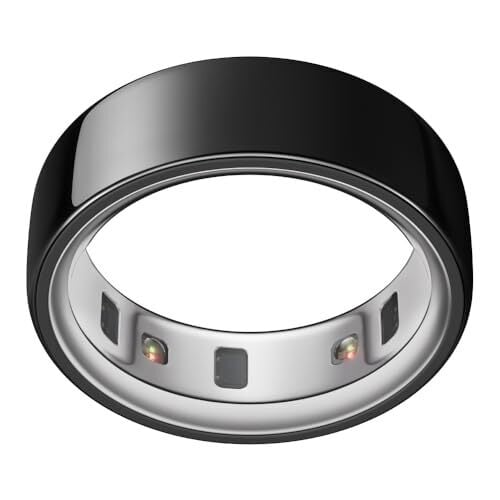
I’ve always preferred to wear my Oura ring on my ring finger. The company says that “for optimal performance and accuracy,” it’s best to wear it on your index finger, but that any finger can work. And if you ask longtime Oura users, you’ll get a variety of opinions. Does it really matter which finger you use? I realized I have the perfect way to test this—I have two gen 3 rings that fit my index and my ring fingers. I wore both for nearly two weeks to compare their readings and answer the question once and for all.
As I explained in my four-year retrospective, I’ve worn quite a few Oura rings over the years. My current unit is a gen 3 ring (the slightly older model) that I wear on my ring finger. I also had a gen 3 that fit my index finger, so I could wear both to bed for a few days and compare their readings.
I actually wore three rings, but left one of them off my results because it turned out to be redundant. This one was a duplicate of the one I had on my ring finger, so I wore it on the other hand’s ring finger. It was a nearly-dead one that I had replaced when its battery wore out. It still had just enough juice to make it through each night’s sleep so long as I charged it the next day. The readings were pretty much the same as my other ring finger, though, so I left this data off my results chart for clarity’s sake.
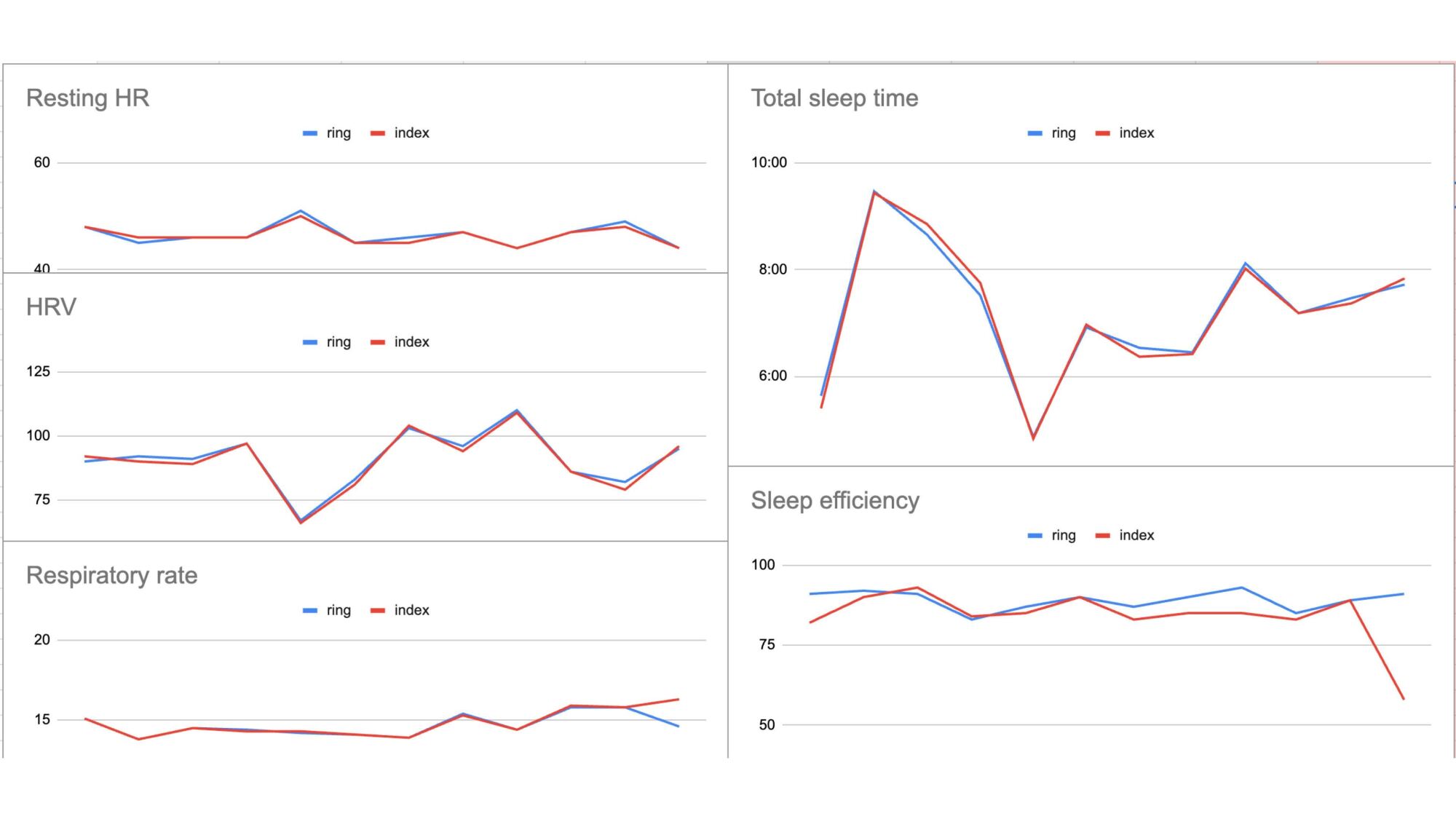
For this experiment, I needed to pair each ring to a different account on a different phone. The things I do for you, dear readers. Since the accounts were all working from different (or nonexistent) baseline data, I avoided any scores that the app calculates based on your personal history. I stuck with readings like resting heart rate, heart rate variability, and sleep time. The one score I kept was sleep efficiency, since that combines multiple measurements from the same night.
My results
Credit: Beth Skwarecki
I’ve always felt like my ring finger readings are as good as my index finger readings, but now I have data to prove it. Look at these charts! The readings are often identical, and always close. There was one day where the two readings differed—it’s the very last day, with different respiratory rates and sleep efficiency. On that day, my second ring-finger ring (data not shown) matched the other ring-finger ring, suggesting that it’s the index finger that was the outlier.
Overall, the different fingers give readings that are much closer to each other than the different devices from this comparison (for that experiment, I wore Oura, Garmin, Whoop, Apple, and Fitbit devices at the same time).
Any of the three placements I used would be perfectly good for daily wear. So why does Oura say your index finger is best? I reached out to the company for more information.
What Oura says
The gen 3 and 4 Oura rings work on any finger, an Oura spokesperson told me by email, so long as the ring fits “tightly and securely” around the base of the finger. So why the preference for the index finger? It turns out that’s the finger where most people have the easiest time getting a good fit.
Specifically: “We suggest avoiding fingers with large knuckles where the base is significantly narrower, which can affect fit and sensor contact. This is why we generally recommend the index finger. If that’s not comfortable or preferred, the middle or ring finger are also good alternatives. All three fingers have larger blood vessels, which help optimize PPG pulse monitoring.” (PPG refers to photoplethysmography, the optical sensor system that picks up your pulse from your finger.)
So if your ring finger has a big bony knuckle, you’ll need a larger size ring to get over the knuckle, and that ring won’t be able to sit snugly against the base of your finger. I have no problem getting a secure fit on my ring finger, but I can see that my thumb has a large enough knuckle it probably wouldn’t work well with the ring.
Another issue with sizing is that the Oura ring doesn’t come in half sizes, so you may not be able to find the perfect size for your preferred finger. That said, the gen 3 rings feel about a half-size smaller than the gen 4 rings at the same numbered size, so playing around with both sizing kits may help you to find the perfect fit if you’re not picky about which version of the ring you end up with.
To mark Microsoft’s 50th anniversary, Bill Gates has released the original Altair BASIC source code he co-wrote with Paul Allen, calling it the “coolest code” he’s ever written and a symbol of the company’s humble beginnings. Thurrott reports: “Before there was Office or Windows 95 or Xbox or AI, there was Altair BASIC,” Bill Gates writes on his Gates Notes website. “In 1975, Paul Allen and I created Microsoft because we believed in our vision of a computer on every desk and in every home. Five decades later, Microsoft continues to innovate new ways to make life easier and work more productive. Making it 50 years is a huge accomplishment, and we couldn’t have done it without incredible leaders like Steve Ballmer and Satya Nadella, along with the many people who have worked at Microsoft over the years.”
Today, Gates says that the 50th anniversary of Microsoft is “bittersweet,” and that it feels like yesterday when he and Allen “hunched over the PDP-10 in Harvard’s computer lab, writing the code that would become the first product of our new company.” That code, he says, remains “the coolest code I’ve ever written to this day … I still get a kick out of seeing it, even all these years later.”
Linux power management and ACPI subsystems maintainer Rafael Wysocki last week sent out the assortment of ACPI/PM material for the new Linux 6.15 kernel cycle. The AMD P-State driver continues to be heavy with its code churn and there have been various other optimizations and code clean-ups. The CPUIdle Menu governor also received some performance tuning worth mentioning…
Although home burglaries are trending downward overall, there are still more than 800,000 break-ins every year. Aside from the potential damage to your property and the loss of your belongings, there also the concern for your family’s safety—no one wants criminals wandering around your house.
The obvious solution is to go with technology—alarm systems and security cameras. While these kinds of systems can definitely help defend against unwanted guests on your property (and give you peace of mind), there’s more you can do to keep your home secure. Your landscaping is a surprisingly key element of your home’s security—or it can be, if you plan it thoughtfully. Here are a few simple ways your home’s exterior design can help defend it against intruders.
Keep your home’s entrances visible
The first thing to consider when it comes to security and landscaping is visibility. A lot of tall, lush plants can give you a feeling of cozy privacy—but it also offers a lot of places for people to conceal themselves. Trimming hedges, shrubs, and other plantings down to about 2 to 3 feet in height will ensure you have a good field of vision around your property, and can help eliminate those hiding spots and make it easier to actually use those security cameras you paid for.
Having a lot of plants around windows and doors can give you a lot of privacy and shade, but it also means someone can get up close to your house to work on your door and window locks without being seen from the street. Your neighbors can’t help you if they can’t see what’s happening. And dense landscaping around your front door means someone can conceal themselves in order to wait for you to come home or open the door.
To make your windows and entryway more secure, keep them clear. If you’re using defensive plants, keep them trimmed low and set them back from windows and doors. You should be able to see the area immediately around your apertures easily from a variety of angles.
You can also increase visibility by avoiding opaque features like walls or fences, and instead going with see-through choices like picket or chain-link fences or lattices.
Choose thorny plants
One way to weaponize your landscaping against trespassers is to place “defensive” plants around access areas like first-floor windows. Thorny, prickly plants placed thickly around these areas create a natural barrier to anyone trying to creep around your house. It might not have the same visceral excitement as releasing a bunch of hounds, but it will definitely make a trespasser think twice as they nurse their wounds.
Some examples of good defensive plants include cacti (including some mild-weather species like Prickly Pear), thorny rose bushes, Whale’s Tongue agave, or spiky plants like Barberry. Whatever climate or design you’re working with, there’s a plant that will make life uncomfortable for anyone trying to get close to your house.
Trim back your trees
If you’ve got trees as part of your landscaping, you should keep them away from your house (about 8 to 20 feet, depending on the size of the tree) for a lot of very good reasons (root issues with your foundation or roof damage, for example). But if your trees are closer than that, or if they’re mature and their branches have crept closer to the house, you should hire an arborist to cut them back. Trim both horizontally (so no one can shimmy their way to a window or to get on your roof) and vertically (so there are no branches lower than seven feet or so off the ground) to prevent someone from climbing up. Untrimmed trees can provide hiding places or act as ladders for thieves and other intruders, so trimming them regularly is a very good idea.
Skip the trellis
You might like the visual of a climbing plant snaking its way up your home’s walls, but if that includes a trellis or lattice you should reconsider. A trellis or lattice attached to an exterior wall (or leaned up against it) is essentially a ladder that someone can use to climb, gaining access to an upper floor window.
Use gravel for ground cover
One way your landscaping can increase your home’s security is by making it more challenging for intruders to sneak around. Rough gravel used as a ground cover around access points like windows will be noisy when walked on, making it a lot more difficult for someone to get close without being noticed. It’s not going to be as effective as an alarm system, of course, but in the dead of night an unusual noise might alert you—or your dog—to the presence of an unwanted guest outside.
Add lighting
One of the more obvious ways your landscaping plan can improve your home’s security is by adding a lot of lighting, especially motion-activated lights. Being able to see your outdoor spaces clearly makes it less likely someone can gain access to your property undetected, and a sudden flood of light will deter trespassers hoping for the cover of darkness. When planning your landscaping, make sure to include robust lighting to make it as safe and secure as possible.
We may earn a commission from links on this page. Deal pricing and availability subject to change after time of publication.
If you’ve never considered the Kindle Kids e-reader because of the label, you’ve been missing out on some sweet perks. The 16 GB Amazon Kindle Paperwhite Kids is $139.99 (originally $179.99), the lowest price it has ever been, according to price-tracking tools. Here’s why this is a great deal for everyone—not just kids.
(16 GB) – larger 7″ glare-free display – Cyber
Amazon Kindle Paperwhite Kids
$139.99 at Amazon
$179.99 Save $40.00
$139.99 at Amazon
$179.99 Save $40.00
(16 GB) – larger 7″ glare-free display – Starfish
Amazon Kindle Paperwhite Kids
$139.99 at Amazon
$179.99 Save $40.00
$139.99 at Amazon
$179.99 Save $40.00
(16 GB) – Larger 7″ glare-free display – Diary of a Wimpy Kid
Amazon Kindle Paperwhite Kids
$144.99 at Amazon
$189.99 Save $45.00
$144.99 at Amazon
$189.99 Save $45.00
The kids’ Kindle version includes a free case (about a $30 value), an ad-free experience ($20 value), six months of Amazon Kindle Kids + subscription ($36 value), and a two-year warranty (as opposed to the one-year warranty on the standard version). All that value for $20 less than the “adult” version is a no-brainer.
The cases for these models are obviously tailored for kids, but it’s hard to argue with free. The Amazon Kindle Kids + subscription will charge you automatically after the first six months, but you can cancel it beforehand. On these Kindle models, the kids’ mode feature is turned on by default. You can easily turn it off in the settings, but this will bring the ads back to the lock screen—the Kindle Kids also has some cool features even adults will appreciate, like the awards feature, as this video explains.
With the six months of Amazon Kindle Kids + subscription, you can get unlimited access to thousands of kids’ books, including all of the Harry Potter series. The Paperwhite Kindle hardware is the same as the adults, including that it’s waterproof, has adjustable warm light, a 12-week battery, and Audible access through Bluetooth. You can read the full review of the 2024 Amazon Kindle Paperwhite Kids from PCMag here. If you still don’t know which Kindle is best for you, check out our complete breakdown.
The European Commission has announced its intention to join the ongoing debate about lawful access to data and end-to-end encryption while unveiling a new internal security strategy aimed to address ongoing threats. From a report: ProtectEU, as the strategy has been named, describes the general areas that the bloc’s executive would like to address in the coming years although as a strategy it does not offer any detailed policy proposals. In what the Commission called “a changed security environment and an evolving geopolitical landscape,” it said Europe needed to “review its approach to internal security.”
Among its aims is establishing Europol as “a truly operational police agency to reinforce support to Member States,” something potentially comparable to the U.S. FBI, with a role “in investigating cross-border, large-scale, and complex cases posing a serious threat to the internal security of the Union.” Alongside the new Europol, the Commission said it would create roadmaps regarding both the “lawful and effective access to data for law enforcement” and on encryption.
In 2002, Microsoft launched Xbox Live with built-in voice chat as one of the main selling points of the then new service. Now, nearly 25 years later, Nintendo is finally giving its fans an easy way to talk to their friends online over a friendly match of Mario Kart World.
Considering some of the solutions Nintendo has offered in the past, GameChat is surprisingly elegant. A tap of the Switch 2‘s new C button, conveniently located below the Home button on the right Joy-Con, brings up a dedicated interface that allows you to quickly start screensharing, mute and unmute your mic and, if you decide to buy the optional Switch 2 Camera, enable video.
What’s more, the Switch 2 has a built-in mic. We’ll need to test the handheld to see how well the microphone performs in a noisy environment; Nintendo touted its noise-reduction features in today’s introduction. But if nothing else, kudos to Nintendo for realizing it couldn’t release a new console in 2025 without voice chat built-in and making that feature standard on all models.
However, if the demo Nintendo showed off today is any indication of the final product, the company has some work to do. Voice chat looks like it works well enough, with users allowed to invite up to 11 other people to join their conversation. That said, screen sharing and video chat look very rough.
When everyone in the video started streaming their gameplay, it looked like the games were running at less than 30 frames per second, making it difficult to see how it would be possible to use the feature to guide a friend through a tricky section, like Nintendo suggested in the demo. Video chat was equally janky, with the footage from the Switch 2 Camera looking like something captured by a webcam from the mid-aughts. Moreover, if you want to see your friend’s screen, there’s an additional tradeoff.
Nintendo showed off three different interface options, with two of them devoting a fair amount of screen space to tiles for your friends. I imagine this won’t be a problem if you’re playing on a TV, but even on the Switch 2’s large 7.9-inch screen, the interface looks like it could get cramped fast.
To Nintendo’s credit, the company has thought a lot about parental controls, with features that allow parents and guardians to decide who their kids can chat with online and if they can join a session with video. But the thing is none of GameChat’s capabilities are new. They’ve existed in apps like Discord for years, which begs the question why some of them look so rough this close to launch.
Nintendo has time between now and June 5 to polish GameChat, but in 2025, making a technically competent chat app shouldn’t be so hard. Of course, I imagine most of the Switch 2’s audience won’t care if some of GameChat’s features are half-baked. For the rest of us, the company plans to offer the feature for free until the end of March 2026. One would hope that’s enough time for the company to catch up on two decades worth of progress in online gaming.
This article originally appeared on Engadget at https://www.engadget.com/gaming/nintendo/gamechat-is-decades-late-and-looks-pretty-janky-202309823.html?src=rss
Sonos has given two of its audio products price cuts. The Era 100 smart speaker and Ray soundbar now retail for $199. The change offers new customers a $50 savings for the Era 100 and $80 on the Ray. Both speakers would frequently show up on sale, but Sonos has confirmed that this is a permanent pricing change for the products.
These items have been available for a few years, so the price drop might signal that a refresh is in store for both. When it debuted in 2023, the Era 100 was an upgrade on the Sonos One, bringing overhauled touch controls and even better audio quality to the same cylindrical form factor. At $200, it’s now selling for what the Sonos One cost, making it a solid choice for a home speaker. The Ray came out in 2022, offering a solid home theater performance without the most high-end audio or accompanying high-end price tag.
This article originally appeared on Engadget at https://www.engadget.com/audio/speakers/sonos-cut-retail-prices-for-its-era-100-speaker-and-ray-soundbar-201049055.html?src=rss
Microsoft is pushing businesses to shift away from perpetual Office licenses to Microsoft 365 subscriptions, citing collaboration limitations and rising IT costs associated with standalone software. “You may have started noticing limitations,” Microsoft says in a post. “Your apps are stuck on your desktop, limiting productivity anytime you’re away from your office. You can’t easily access your files or collaborate when working remotely.”
In its pitch, the Windows-maker says Microsoft 365 includes Office applications as well as security features, AI tools, and cloud storage. The post cites a Microsoft-commissioned Forrester study that claims the subscription model delivers “223% ROI over three years, with a payback period of less than six months” and “over $500,000 in benefits over three years.”
It seems fitting that Nintendo didn’t reveal the Switch 2’s $450 price during its Direct stream this morning — it would have just bummed everyone out. After spending an hour hearing about how the Switch 2 practically fixes almost every problem we had with the original console, and seeing teasers for exciting games like Mario Kart World, why spoil the good vibes with the harsh reality of market economics? Instead, Nintendo revealed the console’s price in the lowliest of media communications: A simple press release.
My first reaction was shock. $450 for a mostly portable console? That’s the same retail price as the PlayStation 5, a system that’s also currently on sale for $400 together with Astro-Bot. Sure, the Switch 2 is vastly superior to the original Switch, but it likely doesn’t have PS5-level hardware. The price jump is also surprising since the original Switch launched at $300 in 2017. Can you imagine we thought the $350 Switch OLED was too high-priced?
Unfortunately, it’s not 2017. NVIDIA now has mid-range GPUs selling for upwards of $600, the cost of almost every product has gone up, and massive companies like Nintendo are bracing for the potential impact of the Trump administration’s long-threatened tariffs.
A $450 Switch 2 is expensive, I’m not denying that. But in the current economic landscape, I would hesitate to call it too expensive.
Nintendo
Consider this: The Switch 2 is just $50 more than the cheapest Steam Deck, a portable PC gaming handheld with significantly slower hardware, a smaller and lower quality (7-inch, 1280 by 800, 60Hz) screen, and a much bulkier frame. The Switch 2, meanwhile, is just as thin as the original model, it has a 7.9-inch 1080p screen that can run up to 120fps with HDR, and it’s powerful enough to play games at up to 4K/60fps while docked. Based on the games we’ve seen so far, the Switch 2 seems surprisingly powerful for its size.
The Switch 2 also improves on its controls with the Joy-Con 2, which now magnetically attach to the consoles, feature larger analog sticks and can also work as mice across a variety of services. You won’t be removing the Steam Deck’s controls without the use of a small saw. And I’ve yet to see a handheld PC maker deliver removable controls that are as comfortable and easy to use as the original Switch (that means you, Lenovo). Nintendo’s original Joy-Con were far from perfect, but they did the job, and I’d wager the company has learned enough to make the Joy-Con 2f even better.
Nintendo
And while you can technically dock other PC gaming handhelds, they won’t see the performance upgrade Nintendo is claiming with the Switch 2. The company says its new console can reach up to 4K/60fps for some titles, thanks to an additional fan in the dock. We don’t know exactly what’s powering the Switch 2 yet, so Nintendo could be drastically overselling its capabilities. But given how seamless docking worked on the first Switch (where it also delivered a bit of a performance upgrade, sans an additional fan), it’s also something I think Nintendo has optimized more than PC companies, who are only just now dipping their toes into portable gaming.
Maybe I’m just trying to justify my own purchases (I just realized I’ll probably need a second Switch 2 for my kid), but I just can’t get too angry about a $450 Switch 2. If we see many more $80 games like Mario Kart World, though, we should absolutely riot in the streets.
This article originally appeared on Engadget at https://www.engadget.com/gaming/nintendo/is-the-450-nintendo-switch-2-too-expensive-195750206.html?src=rss
The Nintendo Switch 2 had its big debut on Wednesday, and the new console looks to be a sizable, if mostly straightforward, upgrade over its mega-popular predecessor. Tucked between the new Donkey Kong and (pricier) Mario Kart games, mouse mode and overhauled party chat features, though, was another significant update: The device supports faster microSD Express cards. This may not be the sexiest feature, but it should bring quicker load times and generally improved storage performance to the upcoming handheld. The company briefly showed new 256GB cards from Samsung and SanDisk during its presentation, complete with Mario logos printed on.
However, the news came with a major caveat: The console is only compatible with microSD Express. The cards most people use today — which are based on the older UHS-I bus interface — will only work for loading videos and screenshots from an original Switch, not playing games, according to Nintendo’s support site. Nintendo says this restriction is necessary to preserve the Switch 2’s performance upgrades, and it’s worth noting that the console itself comes with a much more generous 256GB of space by default. But if you ever need to expand the device’s storage, this change will likely make doing so cost extra, while drastically shrinking the options you have to choose from.
Unlike traditional UHS-I cards, a microSD Express card like the SanDisk model on the right comes with a second row of pins on the back.
Jeff Dunn for Engadget
What are microSD Express cards?
SD Express is a relatively recent but seldom-used standard that lets SD cards take advantage of the NVMe protocol and PCIe interface, which is the underlying tech used by SSDs. A microSD Express card has a second row of “pins” on its back and can utilize a single lane’s worth of PCIe bandwidth. As a result, it can produce dramatically faster read and write speeds than its UHS-I counterparts. Whereas the latter advertise sequential transfer rates up to 104 megabytes per second (MB/s), microSD Express cards have a theoretical maximum of 985 MB/s.
That’s far behind the NVMe SSDs used by the PlayStation 5 and Xbox Series X, but in theory, it makes Express cards faster than some older SATA-based SSDs when it comes to loading game levels, retrieving saves or copying games to the external storage. It’s worth noting that many UHS-I microSD cards can exceed the 104 MB/s limit with proprietary card readers, but they still fall well short of microSD Express levels even with those. The same goes for speedier UHS-II cards, which are mostly used by professional types with select cameras and PCs and max out at 312 MB/s. (There’s also a UHS-III interface, but nobody uses it. Getting all of this?)
Prior to Wednesday, the only reliably available microSD Express card we could find was this model from SanDisk. We recently tested it for our microSD card buying guide, and the upgrade was pretty dramatic. In the synthetic benchmark CrystalDiskMark, the SanDisk card achieved sequential reads up to 899.12 MB/s and sequential writes up to 650.41 MB/s. For comparison, the absolute fastest UHS-I card we’ve tested (Lexar’s Professional Silver Plus) topped out at 209.25 MB/s for reads and 193.93 MB/s for writes — so, three to four times slower.
In one of our “real-world” tests, the SanDisk Express card took an average of 20 seconds to move a 12GB folder containing various file types and subfolders to a PC and 52 seconds to write the folder back to the card. The Lexar card averaged 67 and 76 seconds, respectively. The gulf in random speeds — which measure how quickly a card can read and write small bits of data scattered throughout a device and tend to be particularly important for gaming — was similarly large, and in some benchmarks even greater.
SanDisk’s microSD Express card is one of the (very) few options you can actually buy today.
Jeff Dunn for Engadget
Nintendo has not provided any official transfer speed ratings for the new console just yet, but all of this suggests that the Switch 2’s storage should be much faster than before, even if it’s not on par with the speeds of a PS5 or Xbox Series X. It’s also possible that, like those other consoles, the Switch 2 has hardware dedicated to decompressing files, which could make the real-world improvements over the original Switch’s storage performance even greater. (We’ve reached out to Nintendo and will update this post if we receive any further details.)
The original SD Express standard was released in 2018, but the tech has mostly gone nowhere in the years since. There’s been the SanDisk card noted above, a full-size SD card from ADATA and not much else. Previously, Samsung and Lexar announced microSD Express cards that wound up missing their original release windows — though Samsung’s card may just be the same one unveiled today, and Lexar did release a new “Play Pro” microSD Express card on Wednesday.
Host devices that support the standard, which are required to even see any improved speeds, have been highly uncommon over the same time frame. (If you put a microSD Express card in a device that doesn’t support the underlying tech, such as the original Switch, it’ll be limited to standard UHS-I speeds.) And while compatible card readers can deliver the faster transfer rates on certain PCs, they aren’t cheap, so at that point most people have been better off buying a faster external SSD.
The SD Association pointed us to a LinkedIn page (!) with other compatible devices when reached for comment, but the pickings are still slim, and very few of those support microSD Express cards specifically. The Switch 2 is by far the highest-profile device to embrace the standard, so it could be the thing that finally takes these cards from “cool idea” to “useful niche.”
The Samsung and SanDisk microSD Express cards Nintendo quickly teased during its Switch 2 unveiling on Wednesday.
Nintendo
Questions of price and heat
That said, there are multiple reasons why SD Express has failed to take off before this week, and it remains to be seen whether the Switch 2 will truly fix them. First and foremost is price. We’ve reached out to SanDisk and Samsung for confirmation, but for now we don’t know how much the microSD Express cards that Nintendo has teased will cost. If the couple other Express models available today are any indication, though, they’re likely to be much more expensive than the conventional cards you may have bought for the previous Switch.
SanDisk’s Express card, for instance, costs $45 for a 128GB model and $60 for the 256GB version. The 256GB Lexar Play Pro is $10 cheaper, but its 512GB and 1TB versions cost a whopping $100 and $200, respectively. For reference, Samsung’s Pro Plus — another UHS-I card we recommend in our buying guide — costs $17 for 128GB, $23 for 256GB, $38 for 512GB and $80 for 1TB as of this writing. That’s a huge difference.
What’s more, the Play Pro is the only purchasable microSD Express card we’ve seen thus far that even supports capacities greater than 256GB. Nintendo says the console can support up to 2TB of external storage, but no Express card with that capacity appears to exist yet. The Switch 2 will be one of the first mainstream devices to truly push SD Express in earnest, so we’d expect it’ll drive prices down and increase competition over time. But how quickly, and by how much, remains up in the air.
Nintendo
The other concern relates to thermal management. MicroSD Express cards can pump out significantly faster transfer speeds, but they’re still working with tiny little frames that don’t leave much room to dissipate heat. When we tested SanDisk’s microSD Express model for our guide, we noticed that it slowed down under longer, more sustained loads — not enough to fall behind than UHS-I cards, but still below its peak by a few hundred MB/s.
The SD Express spec does have mechanisms for keeping heat in check, and manufacturers like SanDisk advertise similar protections. Nintendo presumably has come up with ways to further avoid severe throttling with the Switch 2. (We already know that the new dock comes with a cooling fan built in, for instance.) But it’ll be something to keep an eye on once we can move large game files around the device.
In a developer Q&A posted to Nintendo’s website on Wednesday, Switch 2 producer Kouichi Kawamoto notes that the move to microSD Express will help the console’s performance hold up better in the long-term. With the new Mario Kart World, for instance, he says the faster transfer speeds will help make far-off destinations in the game’s open world visible faster. He also notes that Switch 2 games will have larger file sizes, but that he “doubt[s] most people will need a microSD Express card immediately after buying the system” thanks to the Switch 2’s larger built-in capacity.
Hopefully that’s the case. It’d be unfair to call this a PlayStation Vita situation, as that portable console relied solely on proprietary memory cards, and the Switch 2 will support options from several third-party manufacturers. But as it stands now, storage upgrades for the new console look like they’ll be much pricier and more limited to start. And just how much of an advantage the new tech provides is something we won’t know until the console arrives in June.
This article originally appeared on Engadget at https://www.engadget.com/gaming/nintendo/the-nintendo-switch-2-promises-major-storage-upgrades-but-itll-cost-you-193758964.html?src=rss
Nintendo’s Switch 2 presentation gave us pricing for the console ($449 to start) and Nintendo’s product pages have given us pricing information for accessories ($80 for a Pro Controller, $90 for another pair of Joy-Cons, and $110 for a replacement dock, sheesh). But what Nintendo didn’t mention during the presentation was game pricing, either for standalone Switch 2 titles or the Switch 2 Edition upgrades for existing Switch games.
Nintendo announced via its website after the presentation that Mario Kart World, the console’s flagship launch title, will cost $50 when you buy a digital copy as part of a Switch 2 bundle. But the game will cost $80 when you buy it on its own, $30 more than the pack-in version and $20 more than the usual $60 price for first-party Switch games.
Pre-order listings at US retailers that have gone live since this morning also list several $80 games—we’ll use Wal-Mart’s as an example. The upgraded Switch 2 Editions for a trio of Switch games—2024’s Super Mario Party Jamboree, 2023’s The Legend of Zelda: Tears of the Kingdom, and 2022’s Kirby and the Forgotten Land—are all going for $80, the same as Mario Kart World.
On the heels of releasing its most capable AI model yet, Google is making some changes to the Gemini team. A new report from Semafor reveals that longtime Googler Sissie Hsiao will step down from her role leading the Gemini team effective immediately. In her place, Google is appointing Josh Woodward, who currently leads Google Labs.
According to a memo from DeepMind CEO Demis Hassabis, this change is designed to “sharpen our focus on the next evolution of the Gemini app.” This new responsibility won’t take Woodward away from his role at Google Labs—he will remain in charge of that division while leading the Gemini team.
Meanwhile, Hsiao says in a message to employees that she is happy with “Chapter 1” of the Bard story and is optimistic for Woodward’s “Chapter 2.” Hsiao won’t be involved in Google’s AI efforts for now—she’s opted to take some time off before returning to Google in a new role.