Google Wallet adds support for UK passports

Google Wallet has supported copies of US passports since December and now its UK residents’ turn. The company has announced that UK passports will soon be available as digital passes in Google Wallets on Android devices. 

To start, Google is partnering with Rail Delivery Group, which provides Railcards — or discount passes — for a range of travelers. Applying for a Railcard requires identity verification (some of them are also age-based) and individuals should be able to use their digital ID for proof. 

Google also announced further updates and features to its Wallet. More states, including Montana and Arkansas, will soon have the ability to put their government IDs in their Google Wallet, and places like Georgia and Maryland will be able to use their digital IDs at the DMV. While travelers can use US passports stored on Google Wallet at select airports, Google cautions that ID passes for UK passports won’t work at TSA for now. 

The company is also bringing Zero Knowledge Proof (ZKP) technology to Google Wallet. It should also for quick age verification while “ensuring there is no way to link the age back to your identity.” Google might use it with its own products or when verifying a person’s age on partner apps. 

This article originally appeared on Engadget at https://www.engadget.com/mobile/smartphones/google-wallet-adds-support-for-uk-passports-123019945.html?src=rss

X is bringing 4K video uploads to premium subscribers

X (formerly Twitter) has been leaning into video content more and more since Elon Musk took over. The latest shift, announced by X’s engineering account, sees the platform rolling out 4K video uploads to some of its creators. 

The new video resolution should soon be available for all premium subscribers. Currently, they can share videos in 1080p that are a max of 8GB in size and about three hours in length. X has also taken steps such as creating a vertical videos feed a la TikTok and Instagram Reels. 

We’re starting to roll out 4k video uploads for some creators.

Coming soon for all @Premium subscribers!

— Engineering (@XEng) April 29, 2025

If you’re one of the many people done with the platform — and want nothing to do with Musk — then you can delete your X account. We have a step-by-step guide on how to fully deactivate your profile and clear most of your tweets (posts?) from X. 

This article originally appeared on Engadget at https://www.engadget.com/big-tech/x-is-bringing-4k-video-uploads-to-premium-subscribers-120044356.html?src=rss

Firefly Aerospace’s Alpha Rocket Fails, Sends Satellite Falling Into Ocean

Firefly Aerospace’s sixth Alpha rocket launch failed on April 29, 2025, after an upper-stage anomaly prevented a Lockheed Martin satellite demo from reaching orbit. Both the stage and payload fell into the Pacific Ocean near Antarctica. Space.com reports: The two-stage, 96.7-foot-tall (29.6 meters) Alpha lifted off from California’s Vandenberg Space Force Base this morning (April 29), carrying a technology demonstration for aerospace giant Lockheed Martin toward low Earth orbit (LEO). But the payload never got there. Alpha suffered an anomaly shortly after its two stages separated, which led to the loss of the nozzle extension for the upper stage’s single Lightning engine. This significantly reduced the engine’s thrust, dooming the mission, Firefly said in an update several hours after launch.

Today’s mission, which Firefly called “Message in a Booster,” was the first of up to 25 that the company will conduct for Lockheed Martin over the next five years. The flight aimed to send a satellite technology demonstrator to LEO. This demo payload “was specifically built to showcase the company’s pathfinding efforts for its LM 400 mid-sized, multi-mission satellite bus, and to demonstrate the space vehicle’s operational capabilities on orbit for potential customers,” Firefly wrote in a prelaunch mission description. “Initial indications showed Alpha’s upper stage reached 320 km [199 miles] in altitude. However, upon further assessment, the team learned the upper stage did not reach orbital velocity, and the stage and payload have now safely impacted the Pacific Ocean in a cleared zone north of Antarctica,” an update reads.

“Firefly recognizes the hard work that went into payload development and would like to thank our mission partners at Lockheed Martin for their continued support,” it continues. “The team is working closely with our customers and the FAA [Federal Aviation Administration] to conduct an investigation and determine root cause of the anomaly. We will provide more information on our mission page after the investigation is completed.”


Read more of this story at Slashdot.

New Atomic Fountain Clock Joins Elite Group That Keeps the World on Time

NIST: Clocks on Earth are ticking a bit more regularly thanks to NIST-F4, a new atomic clock at the National Institute of Standards and Technology (NIST) campus in Boulder, Colorado. This month, NIST researchers published a journal article establishing NIST-F4 as one of the world’s most accurate timekeepers. NIST has also submitted the clock for acceptance as a primary frequency standard by the International Bureau of Weights and Measures (BIPM), the body that oversees the world’s time.

NIST-F4 measures an unchanging frequency in the heart of cesium atoms, the internationally agreed-upon basis for defining the second since 1967. The clock is based on a “fountain” design that represents the gold standard of accuracy in timekeeping. NIST-F4 ticks at such a steady rate that if it had started running 100 million years ago, when dinosaurs roamed, it would be off by less than a second today.

By joining a small group of similarly elite time pieces run by just 10 countries around the world, NIST-F4 makes the foundation of global time more stable and secure. At the same time, it is helping to steer the clocks NIST uses to keep official U.S. time. Distributed via radio and the internet, official U.S. time is critical for telecommunications and transportation systems, financial trading platforms, data center operations and more.


Read more of this story at Slashdot.

I Started Customizing My Steam Deck Controls, and It Was a Literal Game Changer

Valve’s Steam Deck has quickly become my go-to gaming handheld. I’ve clocked—oh god—500 hours just in Hades II on the Steam Deck. Yet I spent full weeks of my life using this device without diving into its most powerful feature: its customizable controls. Here’s why you should be using them, even if you think you don’t need to.

At first, I avoided customizing my controls because I usually like to play the way the developer intended. That ended when I sprained my left wrist while in the middle of replaying Chrono Trigger. I wanted to keep playing, but I needed to rest my wrist. What could I do?

That’s correct: Obviously, I should remap the in-game controls so I could access almost every function in the game with just one hand, prop up the Steam Deck, and keep playing. Once I’d done that successfully, though, I started experimenting with every game to see what I could do.

Get started by trying out community layouts

Almost every game that’s playable on the Steam Deck has its own controller layout ready to go, but you can always edit it. Simply press the Steam button while playing the game, then scroll to Controller Settings. You’ll see a layout that shows which inputs each of the Steam Deck’s buttons, control sticks, and touchpads are mapped to. At the bottom, you’ll see a button labeled Controller Settings. Click that to start editing.

Your first option is to change your entire layout. If you click “Edit Layout,” you’ll create a copy of the existing layout with your own changes (which you can always reset), but you can also browse community-made layouts to see if someone made something that’s more comfortable for you. If you try a community layout and don’t like it, your original layout will always be available to swap back.

Make games designed for a mouse feel more natural

One of the most slept-on superpowers of the Steam Deck—and what, in my opinion, makes it superior to most Windows-based handhelds—is its dual trackpads. These small squares just under each joystick work similarly to your laptop’s trackpad. They have haptic feedback, and you can even click them. The Steam Deck has a touchscreen for entering text, but for my money, the trackpads are a better analog for mouse input.

For example, Stardew Valley is a game that was initially designed for PC, and while its controller support is stellar, there are still a few menus where it would be handy to have a mouse. The default controller input maps the right trackpad to be seen as a joystick input. However, I swapped mine so that it reads like a mouse instead. This lets me quickly click on menus, or hover over items more easily than I would with controller inputs.

You can change this behavior under the Trackpads section while editing your controller layout. You can pick from a few types of behavior (the nuance between “Joystick” and “As Joystick” can be, uh, confusing) so experiment with what works best for you. You can also add custom inputs for just touching the pad, and for clicking it.

Boost your ergonomics with rear grip buttons

The four back grip buttons (labeled L4, L5, R4, and R5) are quickly becoming my best friends. Depending on your hand size, they might be a little tough to reach, but they’re what let me play Chrono Trigger with just one hand while the other was wrapped in a cold compress. These are so simple to enable, you don’t even need to customize the controller layout.

Each back grip button can be assigned to any existing input, but you can take it further by tweaking their settings. Click the gear icon next to each input and you can set each button to register as a single press, double press, long press, or a range of other options. You can even set one rear button to register as starting to press a key, then a different rear button to register as releasing that key. So, for example, if I want to buy thousands of pieces of wood from Robin’s shop in Stardew Valley, I could start hitting the buy button, then walk away to get a snack while the numbers tick up. (Or I could install a bulk buy with gamepads mod, but still.)

There’s also a robust Turbo mode settings menu, though it’s worth mentioning you should probably be wary of using this in any multiplayer games if you don’t want your account banned. You can set a button to rapidly repeat an input while holding it down, adjust the interval between inputs, or even set it as a toggle.

Create your own input menu overlays

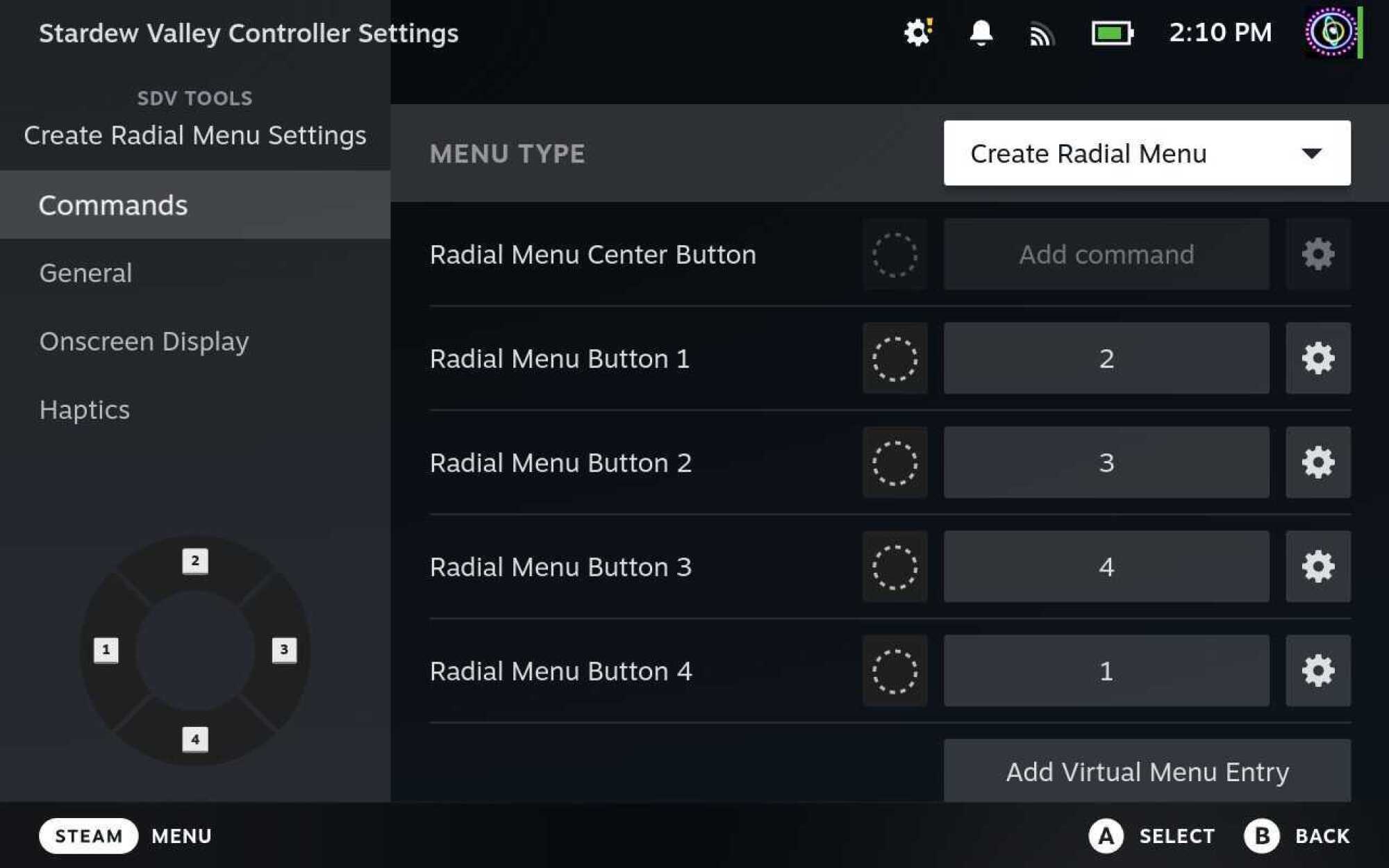
By far, one of the coolest tools on the Steam Deck is the ability to create your own input menus. My favorite is the Radial Menu. This creates an overlay on top of your game that lets you assign different inputs to a wheel for easy access. While editing your layout, go to Trackpads and from the behavior dropdown, choose Create Radial Menu. This will let you generate a radial overlay that appears whenever you touch this touchpad. 

This has been a lifesaver for me in games like Stardew Valley, where cycling through the toolbar is more cumbersome than on a desktop. The default configuration has you press the left and right triggers to move through the toolbar one step at a time. Nah; my custom radial menu lets me jump to the slot I want quickly with a single gesture.

You can create radial menu layouts and apply them to the touchpads, joysticks, or even gyro controls (more on that below). It’s one of the best ways to augment your game inputs, especially for games that aren’t purposely designed with gamepad controls in mind.

A screenshot of the Radial Menu creation interface, shows how the user can add multiple options to the menu, and even an extra input for the center.
The Radial Menu creation interface
Credit: Eric Ravenscraft

Get precision aiming with gyro controls

It gets overlooked a lot, but the Steam Deck has built-in gyro capabilities, and you can turn them on for any game in your library. Sort of. The Steam Deck will try to map gyro movements to inputs the game can comprehend, which usually works pretty well, but might be finicky depending on the game. Expect to do a little experimentation here.

By default, Gyro controls will be off, but you can enable them with a simple toggle in the controller settings. After that, you can activate gyro movement by placing your thumb on the right control stick. The top of this stick is touch sensitive, so you don’t need to move it, just come in contact with it. It also works by touching the right touchpad, but you can change this behavior in the controller settings.

While you’re activating gyro controls, tilting the Steam Deck will send corresponding mouse inputs to your game. In my experience, this worked great in first-person games like Doom Eternal, where you use the right control stick to point your camera. The gyro movements will give you a little extra precision control while tilting your Deck, while your thumb is where it would normally be on the control stick anyway.


The amount of effort that’s already gone into making sure most Steam games play well on the Steam Deck is already pretty incredible. Before it came out, I was skeptical it would work, and I’ve never been more happy to be proven wrong. Between official developer support and community layouts, almost every game I’ve played on the Steam Deck felt like it was made to be there.

But that doesn’t mean the customization has to stop. Even if you’ve never had a problem with any of the controls on your Steam Deck, it’s worth diving into the customization tools to see if you can make your games feel more comfortable for you.

You Can Get a Lifetime License to Microsoft Project 2021 Professional for $20 Right Now

We may earn a commission from links on this page. Deal pricing and availability subject to change after time of publication.

Wrangling tasks, timelines, and teams can get overwhelming fast, especially if you’re bouncing between spreadsheets and browser tabs to keep everything straight. Microsoft Project 2021 Professional is built to make that juggling act easier, and right now, it’s available for just $19.97 on StackSocial. That’s a significant drop from its regular $249.99 price. This deal gives you a lifetime license for one Windows PC, no subscription required. Just keep in mind that it’s a one-use code for new users only, and you’ll need to redeem it within 30 days of purchase.

Microsoft Project is a professional-grade project management tool that doesn’t overcomplicate things. It has features like automated scheduling that adjusts timelines based on task dependencies, built-in templates to get your planning started faster, and tools for tracking time, resources, and budgets in one place. There’s also a what-if scenario builder that can help you course-correct before things go off the rails. And because it syncs with Project Online and Server (though those tools are sold separately), it’s flexible enough to fit into larger enterprise systems too.

That said, it’s Windows-only (no Mac compatibility here), and you’ll need at least 4GB of RAM and a DirectX 10 graphics card to run it smoothly. Installation is straightforward, with the download and license code arriving instantly via email. While this isn’t subscription-based, meaning no recurring fees, you do need to redeem your license within 30 days. It’s also not built for collaborative real-time work like some modern cloud tools, but it’s still a powerful solution for users who prefer full control and local access. If you’ve been meaning to get more organized in your project management, this is a low-cost way to step things up.

This is the cheapest way to buy a Garmin Edge bike computer on Amazon

Bikes may be a big lump-sum investment, but there’s plenty more to spend your hard-earned cash on when it comes to cycling – and a decent GPS cycling computer is one such item. 

Bike computers can help you track your ride and metrics, and act as a sat nav on your handlebar, with many computers offering impressive colour mapping and navigational aids.

However, the advanced tech found in the best bike computers doesn’t come cheap. 

To help you save money, we’ve dug out some of the best deals for market leader Garmin’s most popular cycling computers, available through Amazon Renewed.

Amazon Renewed is the online mega-retailer’s shop for pre-loved electronics across a range of categories, including laptop computers, smartphones, smartwatches and gaming. 

The products are inspected, tested and cleaned, and sold with a 90-day money-back guarantee. That means you can return your item at any time within 90 days of purchase for a replacement or full refund.

According to Amazon, batteries will have a capacity that exceeds 80 per cent of the original battery life, and all products are rated according to their condition: premium/excellent, good or acceptable.

Right, on to the deals. Where possible, we’ve highlighted whether the deal is available in the US, UK or both.

Garmin Edge 830 – save $84.04

Garmin Edge 830
Save on a refurbished Garmin Edge 830. Scott Windsor / Our Media

The Edge 830 may have been superseded by the Edge 840, but it’s still a top-dollar bike computer, with a touchscreen, turn-by-turn navigation, and advanced training features and analysis, such as training load focus, recovery and VO2 max.

Safety features include a bike alarm and tracking, to give peace of mind when you’re out on the road or trail.

Garmin Edge 530 – save $34.50 / £109.43

Garmin-Edge-530-37a6a1d
The Edge 530 is an excellent (and compact) bike computer. Matthew Loveridge / Our Media

Looking for the same performance-tracking capability of the Garmin Edge 830 in a more reasonably priced package? 

The Garmin Edge 530 boasts a 2.6in colour display and many of the same great features as the pricier Edge 830, and offers turn-by-turn navigation.

The major difference is the Garmin Edge 530 is operated by buttons, rather than a touchscreen, but for most riders, this will be a compact, user-friendly and great-value computer.

Garmin Edge 820 – save $89.99

The Garmin Edge 820 is an older model, but that means you can save big. Ben Delaney / Immediate Media

The Garmin Edge 820 is a compact GPS cycling computer with a 2.3in touchscreen display. It’s a slightly older model in the Garmin range, but still offers plenty of performance – and at a good price.

As well as key performance metrics and Strava Live Segments integration, the computer can also provide turn-by-turn navigation.

Expect the full bundle in this package, with a standard and out-front mounts, premium heart rate monitor, and cadence and speed sensors included.

Garmin Edge Explore 2 – save £52.70

Garmin edge explore 2 cycling computer
The Garmin Edge Explore 2 has all of the functionality most riders will need. Warren Rossiter / Our Media

The Edge Explore 2 is one of our favourite bike computers, if you’re looking for a unit that focuses on navigation and mapping, rather than training and performance.

You still get plenty of ride metrics, and you can connect the computer to external sensors such as heart-rate monitors and power meters, to pull in and display that data.

The Edge Explore 2 also has a 3-inch touch display.

Research roundup: Tattooed tardigrades and splash-free urinals

It’s a regrettable reality that there is never time to cover all the interesting scientific stories we come across each month. In the past, we’ve featured year-end roundups of cool science stories we (almost) missed. This year, we’re experimenting with a monthly collection. April’s list includes new research on tattooed tardigrades, the first live image of a colossal baby squid, the digital unfolding of a recently discovered Merlin manuscript, and an ancient Roman gladiator whose skeleton shows signs of being gnawed by a lion.

Gladiator vs lion?

Puncture injuries by large felid scavenging
Puncture injuries by large felid scavenging.
Credit:
Thompson et al., 2025/PLOS One/CC-BY 4.0

Popular depictions of Roman gladiators in combat invariably include battling not just human adversaries but wild animals. We know from surviving texts, imagery, and artifacts that such battles likely took place. But hard physical evidence is much more limited. Archaeologists have now found the first direct osteological evidence: the skeleton of a Roman gladiator who encountered a wild animal in the arena, most likely a lion, based on bite marks evident on the pelvic bone, according to a paper published in the journal PLoS ONE.

The skeleton in question was that of a young man, age 26 to 35, buried between 200–300 CE near what is now York, England, formerly the Roman city of Eboracum. It’s one of several such skeletons, mostly young men whose remains showed signs of trauma—hence the suggestion that it could be a gladiator burial site. “We used a method called structured light scanning [to study the skeleton],” co-author Tim Thompson of Maynooth University told Ars. “It’s a method of creating a 3D model using grids of light. It’s not like X-ray or CT, in that it only records the surface (not internal) features, but since it uses light and not X-rays etc, it is much safer, cheaper, and more portable. We have published a fair bit on this and shown its use in both archaeological and forensic contexts.”

Read full article

Comments

Intel’s New Arc GPU Driver Promises Big Gaming Gains On Lunar Lake Handhelds

Intel's New Arc GPU Driver Promises Big Gaming Gains On Lunar Lake Handhelds
Intel is rolling out an updated GPU driver that it claims will deliver double-digit percentage gains in several games on handheld devices running Core Ultra 200V series processors with built-in Arc 140V and 130V graphics. Otherwise known as Lunar Lake, Intel says gaming handhelds like MSI’s Claw lineup benefit primarily at or under the common

“Makuri May” ZRacing Series Details

Zwift’s “ZRacing” is the platform’s most popular ongoing race series, and for May we’re staying in the Makuri Islands.

Read on for details about this month’s race routes and more!

May’s Routes

Here are the routes we’ll be racing in May:

  • Stage 1 (May 5-11): Bridges and Boardwalks
    • 3 laps (20.5km, 191m)
    • Powerups: Aero, Feather
  • Stage 2 (May 12-18): Turf N Surf
    • 1 lap (24.7km, 198m elevation)
    • Powerups: Feather, Anvil
  • Stage 3 (May 19-25): Castle to Castle
    • 1 lap (23.2km, 141m)
    • Powerups: Draft, Aero
  • Stage 4 (May 26 – June 1): Three Village Loop
    • 2 laps (23.5km, 191m)
    • Powerups: Feather, Draft

See upcoming Range 1 “Makuri May” events >
See upcoming Range 2 “Makuri May” events >
See upcoming Advanced “Makuri May” events >
See ALL upcoming “Makuri May” events >

GC Leaderboards

Zwift debuted new web-based leaderboards at zwift.com for tracking the Zwift Games 2025 GC, and an upgraded version of those leaderboards is now being put to work for use in the monthly ZRacing series!

Access May’s leaderboard at zwift.com/racing/leagues/zracingmay2025 >

Your GC ranking is based on your best finishing time for each stage, and you can race each stage more than once to try for a better time.

Choose Your Category

Zwift schedules three different flavors of ZRacing events in order to encourage “Fairer, more competitive racing for everyone.” They each use different racing score ranges for categorization and are titled Advanced, Range 1, and Range 2. Click banners below to see upcoming events for each:

Get the Badge

Each month’s ZRacing series has a unique achievement badge, which you can unlock by finishing every stage for the month. There are no makeup events, so if you miss a stage, you miss out on the badge and competing in the GC.

One and Done

Zwift has planned these events to deliver a solid 1-hour workout, so each race should only take around 1 hour to complete, including your warmup and cooldown.

Questions or Comments?

Post below! 

The Samsung M8 Is a Smart Monitor and TV in One, and It’s $300 Off Right Now

We may earn a commission from links on this page. Deal pricing and availability subject to change after time of publication.

Some people don’t need to have both a TV and a monitor in their office or bedroom. There might just not be enough space, or money might be a factor. If this sounds like you, consider the beautifully designed Samsung M8, a smart monitor that doubles as a TV and a gaming hub, currently $399.99 (originally $699.99) after a 43% discount.

This 32-inch monitor has a 4K UHD 3840 by 2160p resolution VA display that can withstand brightly lit rooms, thanks to its 400 nits bright display (good for a monitor, but not for a TV). If you’re going to watch media in HDR, it supports HDR10+ and still gets bright, but the contrast won’t be as good as TVs around this price range in bright settings. If you’re watching in a dark room, details will be more noticeable. The monitor comes with a remote, which is what gives it that TV feeling. It makes moving around the built-in Samsung Tizen OS a breeze.

It comes with Alexa built in as well, which adds to the smart monitor aspect. You can control your smart home or get the usual voice assistant features. The removable webcam can easily attach to the back of the monitor; while the resolution is good, the color is subpar. There are built-in speakers, but they’re not the best, and there is no audio-out jack, which limits what speakers you can hook up to it if you want to do that in the future.

Gamers might appreciate the Samsung Gaming Hub on Tizen OS, again, which is easily accessible with the controller. The monitor has a high native contrast ratio, which will make games look good, but there is no motion handling, VRR, or fast refresh rate (only 60Hz). So it’s best for casual gamers but not serious ones.

The M8 smart monitor is best for those looking for a beautiful monitor that doubles as a smart TV that can also accommodate casual gaming.

Sundar Pichai says DOJ demands are a “de facto” spin-off of Google search

The Department of Justice (DOJ) rested its case in Google’s search remedy trial earlier this week, giving Google a chance to push back on the government’s attempt to break up the search giant. Today is arguably Google’s best chance to make the case that it should not be harshly penalized in the ongoing search antitrust case, with CEO Sundar Pichai taking the stand.

Pichai attempted to explain why Google isn’t abusing its market position and why the DOJ’s proposed remedies are too extreme. The issue of Chrome divestment came up, but Google’s team also focused intensely on the potential effects of the DOJ’s data remedies, which could force Google to share its search index and technology with other firms.

A de facto spin-off

Pichai, who chose to stand while giving testimony, took issue with the government’s proposal to force Google to license search technology to other companies. The DOJ claims that Google’s status as a monopolist has resulted in it accumulating a huge volume of user data on search behavior. Plus, its significant technological lead means its index of the web is much more robust than competing services.

Read full article

Comments

Windows RDP lets you log in using revoked passwords. Microsoft is OK with that.

From the department of head scratches comes this counterintuitive news: Microsoft says it has no plans to change a remote login protocol in Windows that allows people to log in to machines using passwords that have been revoked.

Password changes are among the first steps people should take in the event that a password has been leaked or an account has been compromised. People expect that once they’ve taken this step, none of the devices that relied on the password can be accessed.

Not just a bug

The Remote Desktop Protocol—the proprietary mechanism built into Windows for allowing a remote user to log in to and control a machine as if they were directly in front of it—however, will in many cases continue trusting a password even after a user has changed it. Microsoft says the behavior is a design decision to ensure users never get locked out.

Read full article

Comments

Update Your Apple Devices Now to Keep Them Safe From New AirPlay Vulnerability

There’s a new Apple security issue in town, and this time it’s Airborne. Or, well, that’s what the security researchers are calling it. As cybersecurity firm Oligo revealed on Tuesday, a collection of security vulnerabilities are now affecting the AirPlay feature in Apple products, and the AirPlay SDK used in third-party gadgets like TVs, speakers, receivers, and more.

As reported by Wired, the vulnerability lets hackers take over the AirPlay protocol to inject malware into and take control of impacted devices. This is a zero-click attack, so it works even if you don’t click on anything.

AirPlay is a widely supported protocol, and a popular way for Apple devices to share audio and video. Thankfully, Oligo had alerted Apple about this issue, and has spent months in the background fixing the issues.

How Airborne’s hijacking works

The Airborne vulnerability works only on a local network, so the hijacker will have to be in proximity to you and on that same network. This local network can be anywhere, like your home, your workspace, or the Airport wifi network.

If a hacker is on your local network, and if your AirPlay devices are discoverable, they are susceptible to a zero-click attack. Meaning that the hijacker can take control of the device without any action from you. Alternatively, they could direct another type of attack at your device, like a Man-in-the-middle (MITM) attacks or a Denial of service (DoS) attack.

On a Mac, this could allow the hijacker to take control of and run malicious code on your computer.

On a connected device, like a Bluetooth speaker, it could also let the hijacker play anything they want, or turn on the microphone to listen in on conversations. The video below demonstrates the security researchers taking over a Bose speaker.

Time to update all your Apple devices

Apple has patched the Airborne vulnerability on all its latest software. That means it’s time to update your iPhone, iPad, Mac, Apple Watch, and Apple Vision Pro to the latest available software version. You can do so by going to Settings > General > Software Update on your iPhone or iPad, and System Settings > General > Software Update on the Mac.

What to do about third-party devices

While Oligo has worked closely with Apple to fix the vulnerability in its own devices, the issue still remains on devices that support the AirPlay protocol, like your TV or smart speaker, which will still exposed to this issue. These devices, of which there are tens of millions out in the wild, are the real issue, as the security researchers can’t work with every single company to fix the issue.

There’s not a lot you can do about third-party devices, but if you see an update from an AirPlay supported device in your home, make sure to install it.

How to protect yourself from AirPlay hijacking

Disabling AirPlay Recieving on Mac.

Credit: Khamosh Pathak

Yes, you’ve updated your official Apple devices, but depending on your device, that might not be enough, as mentioned above. While you can’t really expect to update the firmware on your speaker, there are a couple of things you can do to lessen the likelihood of an attack.

  1. First, make sure you’re updating all third-party devices that support AirPlay. That means your TV, or your smart audio system.

  2. Next, make sure that AirPlay is disabled when you’re not actively using it. How to do this will differ based on your device, but to do this on a Mac, go to System Settings > AirDrop & Handoff and disable AirPlay Receiver.

  3. Only use trusted devices to stream AirPlay content.

  4. Next, limit AirPlay streaming to only yourself. On a Mac, this is under Settings > General > AirDrop & Handoff. Navigate to this menu, then in the dropdown next to Allow AirPlay For, choose Current User.

  5. Most importantly, avoid playing content through AirPlay when you’re in a public network, or using any unknown network like those at airports, cafes, or hotels.

RFK Jr. rejects cornerstone of health science: Germ theory

With the rise of Robert F. Kennedy Jr., brain worms have gotten a bad rap.

A year ago, the long-time anti-vaccine advocate and current US health secretary famously told The New York Times that a parasitic worm “got into my brain and ate a portion of it and then died.” The startling revelation is now frequently referenced whenever Kennedy says something outlandish, false, or offensive—which is often. For those who have followed his anti-vaccine advocacy, it’s frightfully clear that, worm-infested or not, Kennedy’s brain is marinated in wild conspiracy theories and dangerous misinformation.

While it’s certainly possible that worm remnants could impair brain function, it remains unknown if the worm is to blame for Kennedy’s cognitive oddities. For one thing, he was also diagnosed with mercury poisoning, which can cause brain damage, too. As prominent infectious disease expert Anthony Fauci said last June in a conversation with political analyst David Axelrod: “I don’t know what’s going on in [Kennedy’s] head, but it’s not good.”

Read full article

Comments