The FTC Is Warning Consumers About a Scam on Discounted Monthly Bills

Scams often fit with the old adage: “if it sounds too good to be true, it probably is.” The Federal Trade Commission (FTC) and the FBI are warning consumers about several similar-sounding scams that involve the promise of discounted services—ranging from utilities to health insurance—that end with fraudsters stealing your money and you having nothing to show for it.

Here’s how scammers are ripping people off, and how to protect yourself.

How discounted services scams work

One iteration of this scam type begins with a robocall from someone who claims to be from a utility company (like AT&T or Comcast Xfinity) that offers phone, TV, or internet services. As the FTC alert describes, the scammer promises a 40 to 50% discount on future bills, bundles, or product purchases, but only if you act fast and pay up front. They’ll ask you to purchase a gift card and provide them with the number—and they may also request your utility account information.

A public service announcement from the FBI’s Internet Crime Complaint Center describes a similar scam involving discount medical insurance. In this scheme, fraudsters reach out via unsolicited calls, texts, or emails and pretend to represent legitimate health insurance providers. They may pressure targets to sign up for a new plan at a discounted rate that’s available only for a limited time or promise free services. Once victims purchase a plan, they are unable to cancel it, receive refunds, or use the supposed benefits upon receiving costly medical or dental bills they believed were covered.

How to protect yourself

As with many scams, there are a few telltale signs that the promise of discounted services is fake, including a stranger contacting you out of the blue trying to sell you something, the sense of urgency to act now or lose the opportunity, and the demand to pay right away (especially with a gift card).

To avoid becoming a victim, don’t make any quick decisions. End the conversation, and contact the company that’s supposedly offering the deal to confirm whether it’s real. Only use phone numbers and websites you search for directly—do not click links or call back numbers you’re sent in messages. Never pay anything up front.

If you are targeted for discounted medical insurance, research the company through your state insurance commissioner and the Better Business Bureau to check whether it’s reputable and licensed in your state. Confirm that your providers accept the plan, and read any policy documents carefully before signing. If you don’t receive any documents, it’s almost certainly a fraud.

Waymo Says Its Driverless Cars Are Better Than Humans At Avoiding Crashes

An anonymous reader quotes a report from Teslarati: Waymo Driver is already reducing severe crashes and enhancing the safety of vulnerable road users. As per a new research paper set for publication in the Traffic Injury Prevention Journal, Waymo Driver had outperformed human drivers in safety, particularly for vulnerable road users (VRUs). Over 56.7 million miles, compared to human drivers, Waymo Driver achieved a 92% reduction in pedestrian injury crashes. It also saw 82% fewer crashes with injuries with cyclists and 82% fewer crashes with injuries with motorcyclists. Waymo Driver also slashed injury-involving intersection crashes by 96%, which are a leading cause of severe road harm for human drivers. Waymo Driver saw 85% fewer crashes with suspected serious or worse injuries as well. “It’s encouraging to see real-world data showing Waymo outperforming human drivers when it comes to safety. Fewer crashes and fewer injuries — especially for people walking and biking — is exactly the kind of progress we want to see from autonomous vehicles,” said Jonathan Adkins, Chief Executive Officer at Governors Highway Safety Association.


Read more of this story at Slashdot.

Apple could spend $900 million on tariffs over the next quarter

In an earnings call for the quarter ending in March, Apple CEO Tim Cook said the company expects to pay around $900 million for US tariffs for the months of April to June. Apple saw limited impacts from tariffs for the months January through March, which doesn’t come as a surprise since most of the government’s new import taxes didn’t exist before April. The company was also able to optimize its supply chain and inventory before then. Cook admitted that Apple can’t give a precise estimate of the impact tariffs will have on the company in the coming months because the Trump administration’s rules could still change the future. 

“For the June quarter, currently, we are not able to precisely estimate the impact of tariffs as we are uncertain of potential future actions prior to the end of the quarter,” the CEO explained. The $900 million figure came from the company’s estimates, assuming “current global tariff rates, policies and applications do not change for the balance of the quarter and no new tariffs are added.” Investors seemed relieved that Apple is only slated to spend $900 million to pay the new taxes, which is a drop in the bucket for a company valued at over $3 trillion. When an inventor asked what tariffs would look like for Apple after June, though, Cook said: “I don’t want to predict the future, because I’m not sure what will happen with the tariffs.”

“For our part, we will manage the company the way we always have, with thoughtful and deliberate decisions, with a focus on investing for the long term, and with dedication to innovation and the possibilities it creates,” Cook assured investors. Apple posted a quarterly revenue of $95.4 billion, up 5 percent year over year, for January to March 2025. Apple told CNBC that it’s manufacturing half the iPhones meant for the US in India instead of China, which would mean lower tariff rates for the company. It will also manufacture most of its other products for the US in Vietnam. 

This article originally appeared on Engadget at https://www.engadget.com/big-tech/apple-could-spend-900-million-on-tariffs-over-the-next-quarter-123037323.html?src=rss

Despelote review: A poignant memoir masquerading as a soccer game

Despelote is a living memory. Julián Cordero, the game’s co-creator, invites players to spend a few hours in the city of Quito, Ecuador, in the early 2000s, and experience a nationwide soccer fever from the perspective of his own childhood. Wrapped in layers of static and shadow, Despelote follows an 8-year-old Cordero as he interacts with his family, attends school and kicks a ball around with friends. Pivotal national events, revealed in news reports and overheard conversations, color the game’s runtime. But its focus remains squarely on Cordero’s experience — a charmingly self-centered child viewing the world from hip height.

In Despelote, it’s the summer of 2001 and Ecuador is on the verge of qualifying for its first-ever World Cup, which has created a soccer frenzy across the country. Soccer is a storytelling mechanic in Despelote, as Cordero runs around Quito kicking a ball, playing a FIFA-style video game, watching World Cup matches on TV and generally annoying his neighbors.

Using actual recordings from Quito, Despelote captures intimate conversations, inside jokes and everyday chatter among Cordero’s friends and family members (in Spanish, obviously, with translations provided in speech bubbles). The game’s environments are built out of photographs of Quito that have been stylized to mimic the way memories feel — single-color, fuzzy backgrounds with people and important objects outlined in crisp black and white. Actual footage of the Ecuador team making its World Cup run plays out on in-game TVs, and you’re able to sit and watch an entire match on a small, staticky screen, if you wish. These true-to-life elements ground the game in reality, while visual flourishes make everything seem like a daydream, and the combination of styles is hypnotic.

Transitions come in the form of nearly imperceptible camera zooms and slowly blurring environments, and at every turn, there’s space to luxuriate in the simple activity of being a kid. The game’s mechanics are intuitive — flick the right stick to kick the ball; hold any trigger to run; press any button to interact; look down to check your watch so you can get home on time — and this simplicity helps Quito come alive. Poignant moments of magical surrealism cut through the flow like memories inside of memories, providing glimpses into Cordero’s future as a teenager and Ecuador’s evolution as a country. These scenes appear just enough to provide a sense of tension and context without breaking the immersion of the childhood memories.

Despelote
Panic

There isn’t much in terms of a moment-to-moment storyline here, but Despelote effortlessly builds a sense of place and self with each new vignette. It’s night and Cordero is sitting in the back of the family van, idly listening to his parents’ conversation and drawing shapes in the window fog. His mom stands in front of the television and tries to pull his attention away from the video game he’s playing, exasperated. His younger sister asks him to draw a frog. A grumpy neighbor steals the ball that Cordero and his friends are playing with, so they start kicking around an empty bottle instead. These are the building blocks of Cordero’s childhood, and while they’re deeply specific, they’re also highly relatable. Despelote is a study in the beauty of mundanity.

I haven’t played many games like Despelote. I’m tempted to say I’ve never played anything like it, that this is the first true memoir in video game form, but of course that’s not entirely accurate. Games like That Dragon, Cancer and Dys4ia offer similar glimpses into their creators’ lives, and they’re similarly vulnerable and grounded. They’re also examinations of moments of acute pain — and while stories about trauma compose a substantial and valuable portion of the memoir market, there’s room for Despelote‘s slower, lighter reflection in this genre. Despelote is a stellar addition in the category of memoir video games, proving that a thoughtful rumination on one person’s childhood can translate into a powerful interactive experience. The key, as always, is authenticity.

Despelote
Panic

Cordero breaks the fourth wall at the end of Despelote in a way that feels completely natural. The style of the game changes in an instant and Cordero narrates the scene, talking about how he and co-creator Sebastián Valbuena traveled to Quito to collect Despelote’s audio and location data. He discusses the fickle nature of memory and clarifies some of the game’s timelines. He says he really just wanted to get it right. He wanted players to understand the magic of this moment in Ecuador’s history, when soccer was everything, and he was just a kid.

I believe he succeeded.

Despelote is available now on Steam, PlayStation 4, PS5 and Xbox Series X/S, published by Panic.

This article originally appeared on Engadget at https://www.engadget.com/gaming/despelote-review-a-poignant-memoir-masquerading-as-a-soccer-game-124526276.html?src=rss

DOGE put a college student in charge of using AI to rewrite regulations

A young man with no government experience who has yet to even complete his undergraduate degree is working for Elon Musk’s so-called Department of Government Efficiency (DOGE) at the Department of Housing and Urban Development (HUD) and has been tasked with using artificial intelligence to rewrite the agency’s rules and regulations.

Christopher Sweet was introduced to HUD employees as being originally from San Francisco and, most recently, a third-year student at the University of Chicago, where he was studying economics and data science, in an email sent to staffers earlier this month.

“I’d like to share with you that Chris Sweet has joined the HUD DOGE team with the title of special assistant, although a better title might be ‘Al computer programming quant analyst,’” Scott Langmack, a DOGE staffer and chief operating officer of an AI real estate company, wrote in an email widely shared within the agency and reviewed by WIRED. “With family roots from Brazil, Chris speaks Portuguese fluently. Please join me in welcoming Chris to HUD!”

Read full article

Comments

Ford Mustang GTD Returns To Green Hell And Obliterates Its Own Lap Record

Ford Mustang GTD Returns To Green Hell And Obliterates Its Own Lap Record
Engineers of the Ford Mustang GTD have stood by their word in besting the GTD’s previous lap record at the Nürburgring Nordschleife. With a time of 6:57.685 last year, the Mustang GTD became the fifth fastest production sports car ever. Following a bunch of small tweaks and changes to the chassis, ABS, powertrain, and aerodynamic bits, the

Catch Of The Day: Are Chinese Smugglers Hiding NVIDIA Chips With Live Lobsters?

Catch Of The Day: Are Chinese Smugglers Hiding NVIDIA Chips With Live Lobsters?
Butter. Corn on the cob. Potatoes. White wine. These are all things that pair nicely with lobster. But chips? Not so much, though when it comes to the non-edible variety (you know, semiconductors), there’s a report claiming that smugglers are using live lobsters to sneak NVIDIA’s AI chips into China. Is this really happening, though? It all

Celebrating 20 Years of the OASIS Open Document Format (ODF) Standard

oday, The Document Foundation joins the open source software and open standards community in celebrating the 20th anniversary of the ratification of the Open Document Format (ODF) as an OASIS standard. Two decades after its approval in 2005, ODF is the only open standard for office documents, promoting digital independence, interoperability and content transparency worldwide.

Apple, Anthropic Team Up To Build AI-Powered ‘Vibe-Coding’ Platform

An anonymous reader shares a report: Apple is teaming up with startup Anthropic on a new “vibe-coding” software platform that will use AI to write, edit and test code on behalf of programmers.

The system is a new version of Xcode, Apple’s programming software, that will integrate Anthropic’s Claude Sonnet model, according to people with knowledge of the matter. Apple will roll out the software internally and hasn’t yet decided whether to launch it publicly, said the people, who asked not to be identified because the initiative hasn’t been announced.

The work shows how Apple is using AI to improve its internal workflow, aiming to speed up and modernize product development. The approach is similar to one used by companies such as Windsurf and Cursor maker Anysphere, which offer advanced AI coding assistants popular with software developers. Further reading: ‘Vibe Coding’ is Letting 10 Engineers Do the Work of a Team of 50 To 100, Says YC CEO.


Read more of this story at Slashdot.

Intel’s Mysterious Battlemage G31 GPU Gets Spotted In Shipping Manifest

Intel's Mysterious Battlemage G31 GPU Gets Spotted In Shipping Manifest
Rumors of a bigger Battlemage GPU’s demise may have been greatly exaggerated. Tech sleuth Haze spotted something interesting in the public shipping database over at NBD DATA: multiple entries for things like “SOCKET STIFFENER (STF), DESIGNED FOR BATTLEMAGE-G31.” The listings are dated late March and were destined for Intel Vietnam, which handles

My Six Favorite Apps for Selling Used Clothing and Household Items

We may earn a commission from links on this page.

For over a year, I have been on a quest to sell a bunch of my stuff to make room in my closet—and, in the process, earn money for more stuff.

I have encountered highs, lows, and many resale apps, some of which are better than others. In addition to making me a little extra money, this endeavor has really helped me reduce my clutter, too: A lot of the popular decluttering techniques ask you to sort your items into three categories—keep, throw, and donate—but by adding the fourth category of things to sell, I’ve cleared major space in my closet. What’s more, I do my best to use my “balance” in each app to buy any new items I want or need, helping me stick to my own version of the “one in, one out” decluttering method.

After all these months and dozens of trips to the post office, here’s what I’ve learned about buying and selling online and which apps I recommend most.

A few notes on reselling clothing online

There are sellers on these apps who do this in a hardcore way, sourcing cool, rare, or expensive items and turning them for a profit. They treat this like a job and, in some cases, it is their job. You don’t have to be like that. Don’t worry about the profiles that feature professional-grade photos and hundreds of listings, because someone out there wants the thing you’re selling and will find it by searching for it—it won’t really matter if you’re displaying the item on a mannequin in studio lighting as long as it’s the right size and price for the buyer.

Here are my tips to get you started.

  1. Don’t list something unless you’d actually want to get rid of it if it sold. That seems obvious, but this has happened to me: I’ll get a little overzealous, list something I still use, and feel sad when it gets bought sooner than I wanted it to. One safeguard I’ve employed is listing things I still like to wear at higher prices than they deserve. Interested buyers will still like the listings and may send offers I can consider. If someone actually buys it at the listed price, it was meant to be—and I get extra money to soothe myself through the grief of losing the item.

  2. On the other hand, don’t list something if you really want it out of the house. You can’t determine how fast something will sell, even if you undervalue it in price and promote it on the apps every day. If waiting for something to sell impedes your decluttering, consider a brick-and-mortar consignment shop if the item is truly valuable—or just donate it.

  3. I still use my items while they’re listed on my apps, but be careful if you choose to do this. If something happens to a bag, like it gets a scuff or a stain, it reduces its value and you’ll have to update the listing at the very least. Don’t try to trick people by showcasing something in perfect condition, then sending it to them in worse shape. They can send it back and this can have an impact on your seller rating. 

  4. Take a lot of pictures. You don’t need fancy lighting or a backdrop, but I at least try to set my wares on a nice rug and keep other stuff out of the frame. Take pictures from a few angles, close-up photos of any damage, and a shot of the date stamp or serial number if it’s a luxury or high-end piece. Tags, defining features, and details are important to include. (If you don’t do this upfront, be prepared for potential buyers to ask for them later.) 

  5. Be open to offers and respond to inquiries. Most of the time, you won’t get the price you ask for, at least not in my experience, but accepting reasonable offers or being willing to lower the price will help you get the thing out of your house and the money into your account.

  6. Always search for the item you’re selling to see what other people are selling theirs for. If yours is of comparable quality, consider listing it for a little less than your competitors to get it sold faster.

  7. If you list the same thing on multiple apps, stay on top of what you’re doing. A few weeks ago, I sold a wristlet that I accidentally way undervalued on one app a day after listing it for its true value on another. I lost out on good money! Plus, if something sells on one app, you need to immediately remove its listing everywhere else. Otherwise, it could “sell” again, you’ll need to cancel that order, and your seller rating may take a hit.

  8. Finally, and perhaps most importantly, be wary of scams. This applies more to you if you’re buying something than if you’re selling, but as a general rule, never communicate with anyone off-app, let alone conduct transactions that way. These apps are reputable and well-run. Anyone claiming they’re having trouble with the payment system is almost certainly lying to you. All of the apps I highlight here have quality customer service and are available to help you if you’re sold a counterfeit item or encounter a buyer who is lying about the condition of the thing you sold, but you need to conduct your transactions on the app for them to be able to render service.

The first app you need is Vendoo

Before I get into my top apps for buying and selling, I want to highlight one that has made my use of all of them much easier: Vendoo. Essentially, it’s a cross-listing app that enables you to create listings for all your sellable possessions, then post them to a variety of marketplaces, including Poshmark, Vestiaire Collective, Depop, Mercari, and more. You can change prices, track sales, and stay much more organized if your goal is to get rid of as much as you can as fast as you can.

Having your goods for sale across multiple platforms is helpful because, while there are a lot of shoppers who peruse multiple apps, each one also has a pretty dedicated fanbase that only uses one specific marketplace. By cross-listing, you increase your chances of a potential buyer running across your item.

Another app that is really helpful is PrimeLister, but really only if you’re selling on Poshmark. This one automates all of the tedious little tasks you can (and should) do to boost your sales, like sharing your listings to landing pages and the homepages of your followers, plus it gives you the option to bulk-complete tasks, like changing prices or sending out discount offers to interested buyers.

Vendoo and PrimeLister both cost money—about $30 per month, depending on the services you need—but, in my experience, are worth it for boosting sales and making this process easy.

The best apps to sell clothes and accessories

Even though I only really got into selling about a year ago, I’ve been buying on these platforms for many, many years and made the sporadic sale here and there back in the day, too. I recommend Poshmark, Vestiaire Collective, TheRealReal, and Depop. To me, these four have the best interfaces and are easiest to use for buying and selling. Let’s go over their details. 

Poshmark: Best for selling pretty much anything

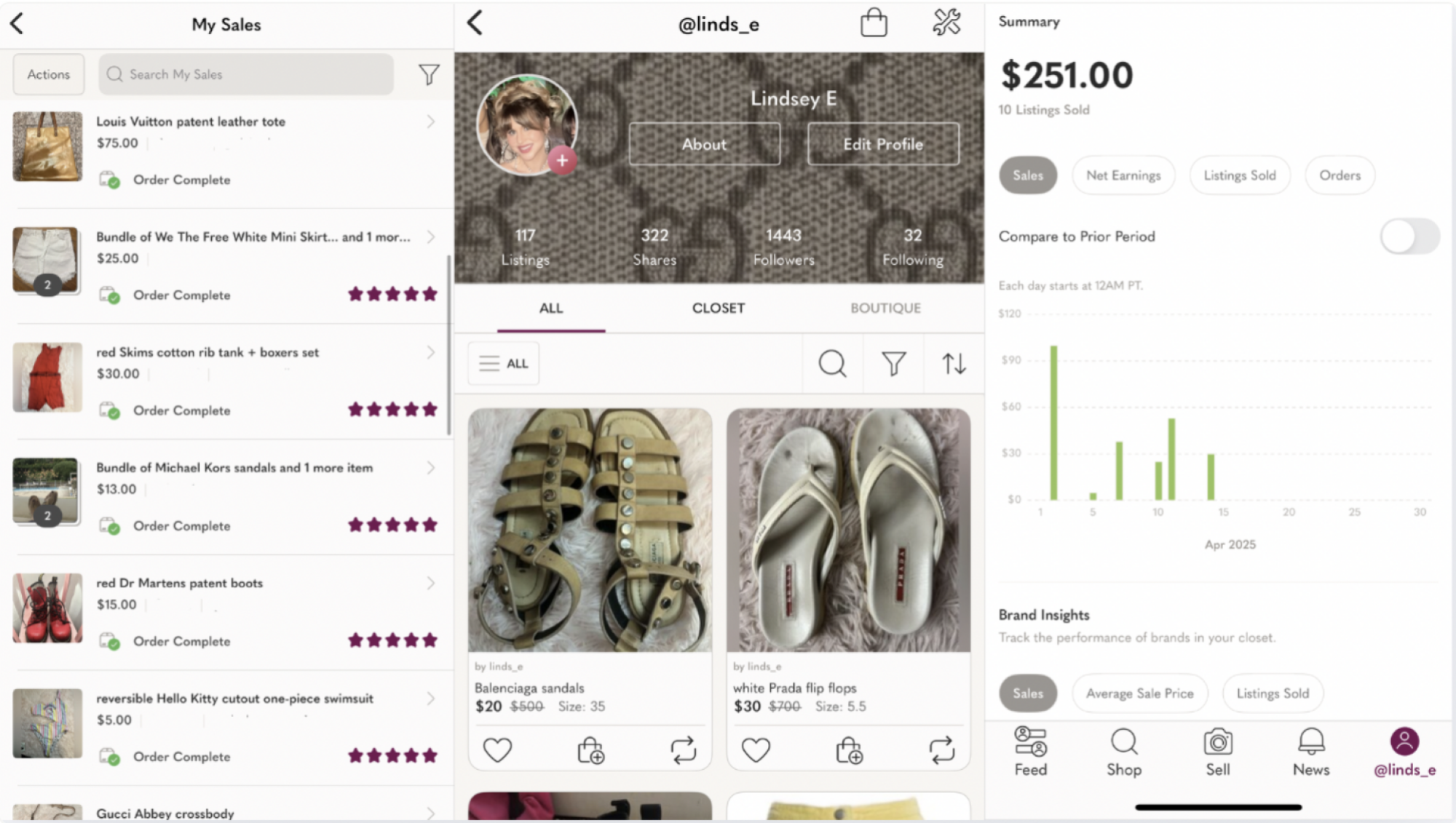
When you sell on Poshmark, you keep 80% of your sales as long as they’re over $15. For anything under $15, you pay the app a fee of $2.95. On this app, buyers can offer lower prices than what you’re listing your item for and you’re free to accept or decline their offers.

Declining gives you the chance to submit a counteroffer, so you may end up negotiating for a little bit, but the app always notifies you of what, exactly, you’ll make if you sell something at a certain price. The app also allows potential buyers to “like” items, enabling you to send private discount offers to all of a listing’s likers at once. Lowering the price of an item is easy, too, and you can share listings to “parties” that match your item’s description. For instance, Poshmark regularly hosts luxury bag parties, creating a landing page for shoppers looking for those, and I share my listings for bags to those parties when they’re happening.

Creating a listing is very easy if you’re doing it in-app, not using a third-party service like Vendoo. Upload your photos, fill out a form that includes simple details like size, brand, original price, and asking price, and you’re good to go.

If there’s a downside to Poshmark, it’s that you do need to be pretty active and engaged. Offers expire after 24 hours, you can only share listings to a party when the party is happening, and users expect timely responses to their comments. 

Poshmark on iOS

Credit: Lindsey Ellefson

Like I said, you can put anything on here. You can sell a Louis Vuitton bag or a Nike T-shirt. Some people sell housewares and handicrafts. I’ve bought a few Diptyque candles and once offloaded a Yankees bobblehead I accidentally acquired on a trip to the Bronx. If you want an app where you can sell everything, not just a certain kind of clothing, it should be Poshmark. 

In my experience, selling higher-end items on Poshmark is hit or miss. Yes, I’ve done it, but people on there are shopping for all kinds of things. I mostly buy baseball jerseys there and save my own luxury resale browsing for other apps. Poshmark doesn’t authenticate designer goods the way other dedicated luxury apps do, so buyers are less confident and more likely to lowball you to make up for their lack of faith in your wares. If you have mid-tier stuff, like Lululemon, Uggs, or Skims, Poshmark is going to be especially handy for you.

All that said, Poshmark is by far my most-used resale app and I’d say I conduct over 90% of my business there. The interface is easy to navigate, the variety of listings and diverse user base lend themselves to a surprisingly high amount of sales on even the most random things, and selling is really easy. When I make a sale, Poshmark generates a QR code that I simply have to show to the people at the post office. The shipping fee is paid by the customer and includes a priority box or envelope. I don’t have to print a label, buy a box, or do anything but show up at the post office. A day or two after the buyer gets the item, the money appears in my balance. Crucially, Poshmark allows you to use your sales balance to purchase things on the app, which I really love, but you can also very easily transfer it out into your bank account. Read my full Poshmark review here.

Vestiaire Collective: Best for higher-end items to maximize profits

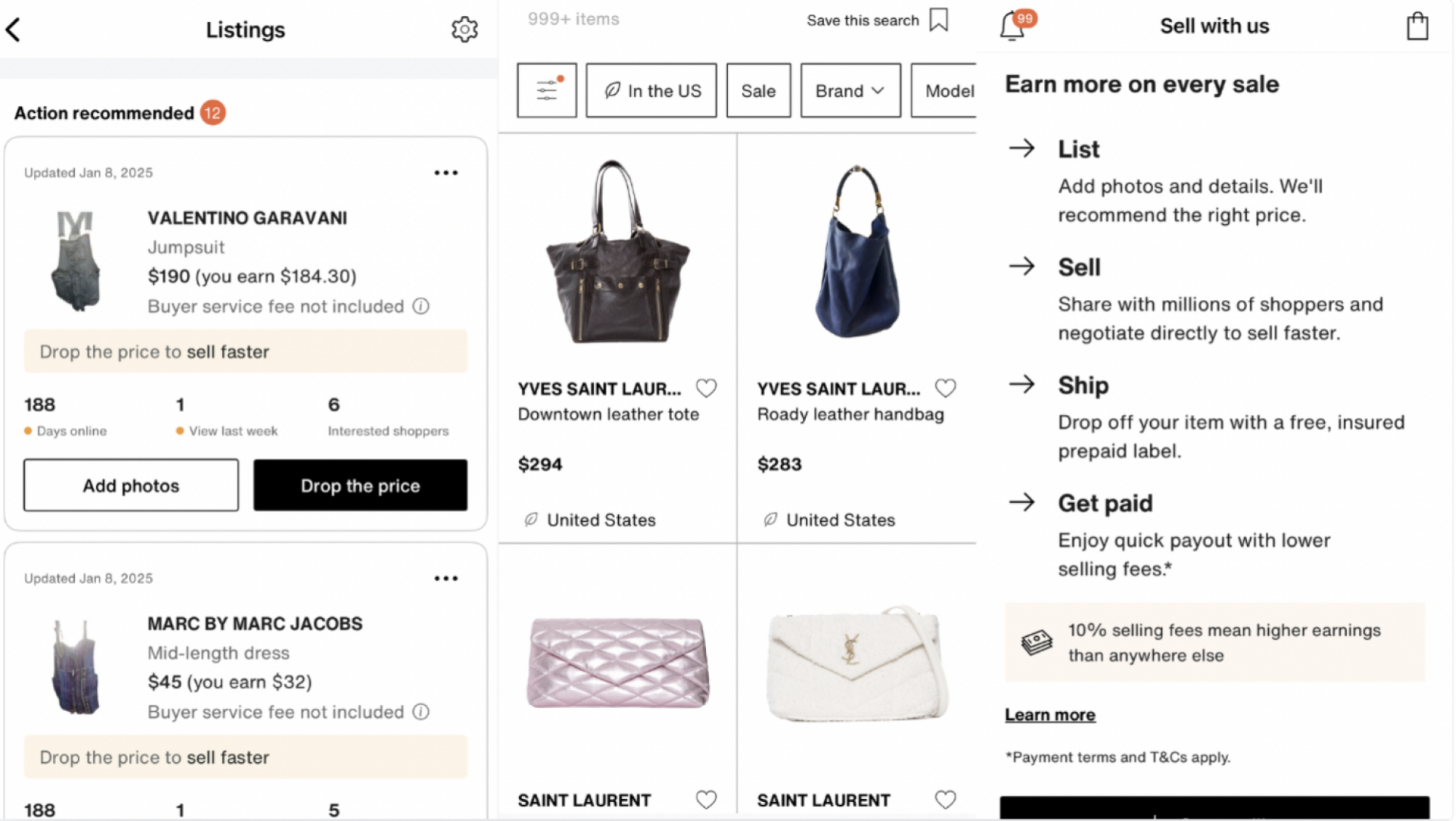
Vestiaire Collective is meant for higher-end items, which usually means luxury goods, but I’ve seen it include plenty of other quality stuff, like Gymshark. Where this one shines is its authentication process. Much of the time, items you sell will be shipped straight to VC, where a staffer will authenticate them and send them out to the buyer. This extra security is great, especially for really high-ticket items, and VC has low selling fees: You pay 10% on every sale, plus a 3% payment processing fee. You don’t get charged on your first one, either, as long as it’s below $2,000.

VC often runs specials, too, where where you’ll pay no seller’s fees on certain brands, for example. Like Poshmark, buyers can send offers, but here, you have two days to accept, decline, or counter them, rather than one. One difference that can throw a bit of a learning curveball is that once you accept an offer, the buyer has to make the purchase. On Poshmark, a buyer who sends an offer agrees that if you accept it, their balance or card is charged. On VC, just because you accept the low price does not mean you’ve made the sale. The buyer then has two more days to decide if they want to go through with it. Selling on VC, in my experience, is a much slower process than other apps, especially because of the extra time required for in-person authentication.

Vestiaire Collective on iOS

Credit: Lindsey Ellefson

Overall, I love buying on here because I know I’m always getting high-quality goods, but the slow pace of sales stops me from selling on VC too often. When you make a VC sale, you don’t get a handy QR code to ship the item. Rather, you have to print the label, buy a box or envelope, and ship it yourself. It takes a while for the money to get to you, given that the item has to go to VC for authentication before being sent out to the buyer. And when you do get that money, it goes into your Venmo account, not a balance that you can use to make new purchases.

It’s worth noting that VC is the most global app on my list. People around the world buy and sell on here, which is awesome because it really broadens the market from which you can purchase and the population to which you can sell, but not-so-awesome because global shipping certainly takes a while. If you buy, don’t expect your item to come in quickly—and if you sell, don’t expect your money to come in quickly.

Buyers on here are looking to spend on nice stuff, so you won’t get lowballed often and items that wouldn’t sell on a more mid-level app get way more attention. Selling on VC requires you to measure your bags, take more specific photos of items (including ones that clearly show brand labeling), identify the material your item is made of, and wait—sometimes, in my experience, up to two or three days—for the photos to be approved by a staffer. Like I said, this is not a fast-money app, but one nice thing is that the app suggests a price for your listing based on prices similar items in similar condition have sold at, so you don’t have to guess. For all the extra work you need to do on this one, it does help you out with little features like that—plus, its cut of the profit is lower than competitors’, so if you’re willing to put in more effort and wait a little longer, you do end up making more money. Read my full Vestiaire Collective review here.

TheRealReal: Best for fancier stuff you just want out of your house

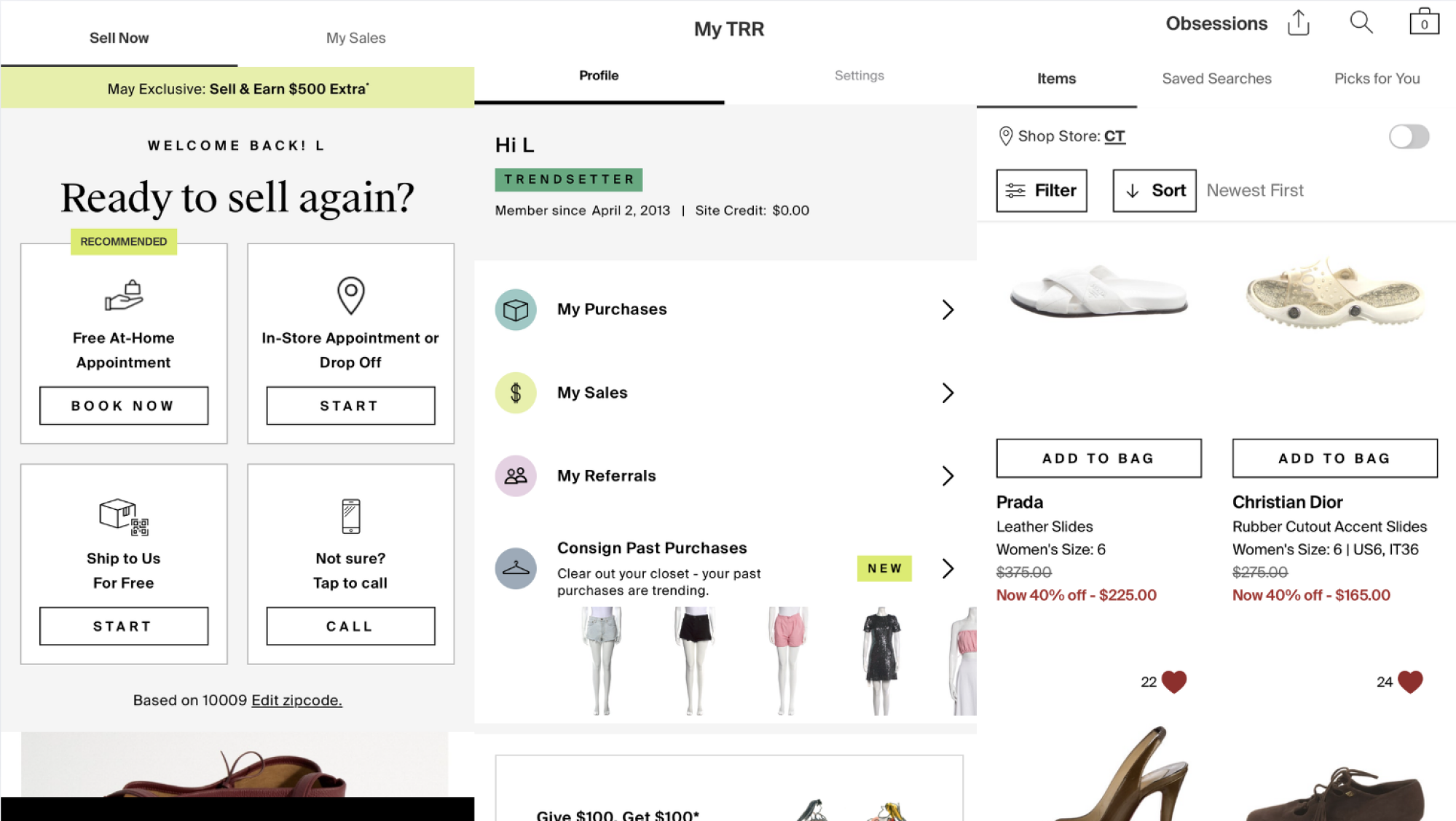
TheRealReal is only for designer, luxury items, and it operates more like a consignment store than direct selling. How much you actually make depends on your “loyalty tier” at the time of sale, so if you’re just starting out, you get 55% commission on anything sold for more than $195. If you earn $1,500 in annual net sales, you move up to a new tier and earn more. You can also just fork your goods over to TRR in exchange for site credit and let them sell as they will. I won’t lie: It’s a little confusing, so only go with this one if you have really expensive items to sell that require authentication and can still bring in a hefty chunk of cash, even with fees. 

I use this app almost exclusively as a buyer, not a seller. Since TRR is in charge of the prices, a lot of really nice things inevitably go on a deep discount if they don’t get sold quickly. If you want a quality piece that you can wear for a little and then resell, try looking here.

TheRealReal on iOS

Credit: Lindsey Ellefson

Depop: Best for getting rid of anything you have, from mall finds to more luxe items

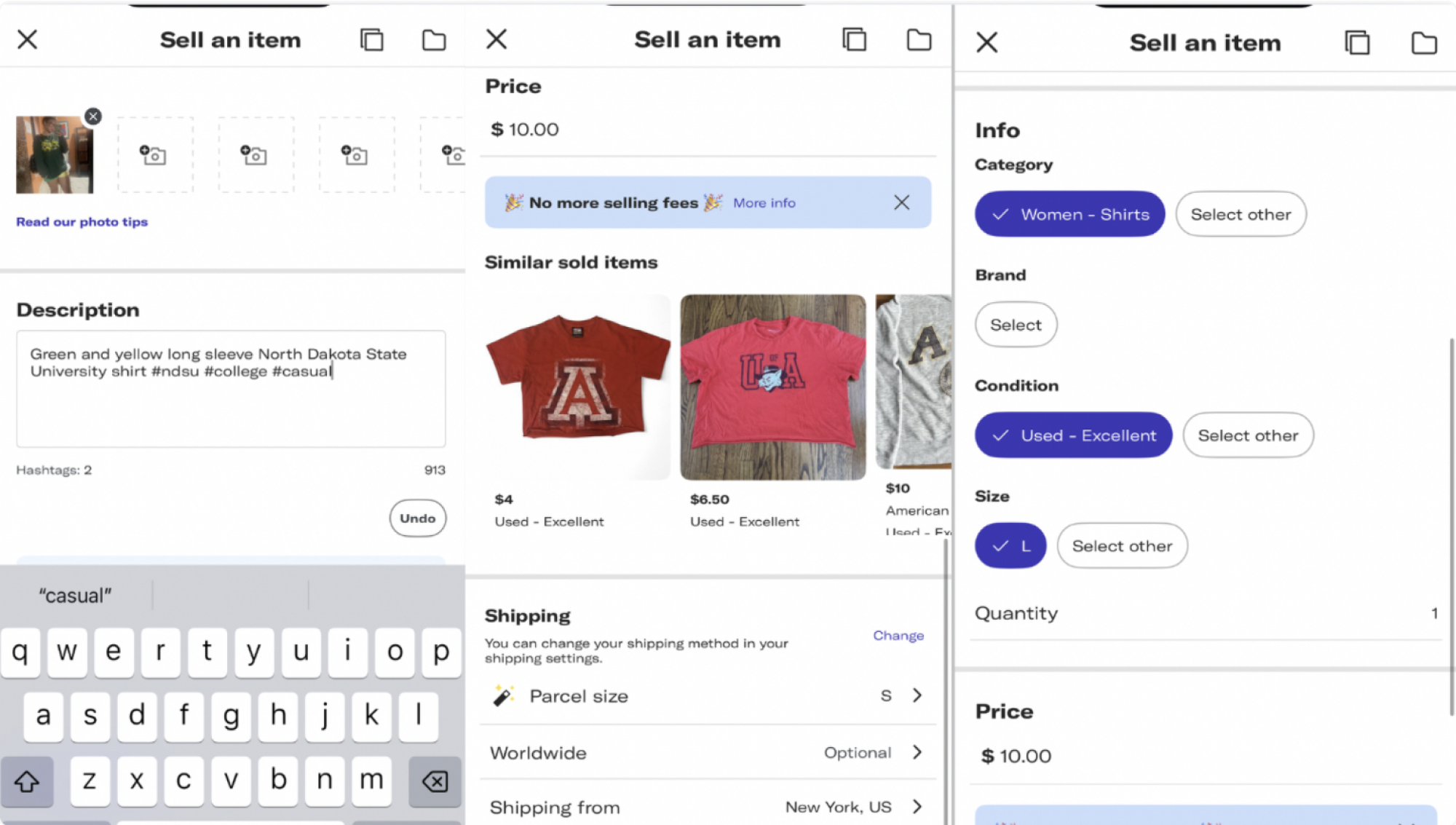
Depop is another site where you can sell anything. It can be fancy, it can be basic, it can be handmade—you can sell whatever. You don’t pay a listing fee, but you pay a 10% fee for everything you sell. That’s it. It’s super straightforward, and Depop helps you fill out the listing by populating suggestions based on your pictures and text inputs. This speeds up the process so you’re not spending five minutes on every listing, pulling brand names and sizes from drop-down menus. You can offer likers discounts and, like Poshmark and VC, field offers from potential buyers. 

Depop on iOS

Credit: Lindsey Ellefson

I’ve had success with Depop as a seller and a buyer, but it’s definitely a crowded marketplace. I think of it more like a thrift store than anything. You can find fancy things, yes, but they’re not authenticated and I’ve seen pages and pages of very obvious fakes (and, likely, less obvious fakes I didn’t bother investigating), so beware. (As a side note, if you ever need help determining if a listed luxury product is authentic, you can reach out to me. This is a fun hobby I genuinely enjoy.)

Also prominent are truly basic things, like Forever 21 tops. You may not think the fast-fashion, mall-bought shirts clogging up your closet are worth trying to sell, but you’d be very surprised. Someone out there may want them, so try listing them on Depop before donating or tossing them. Set a hard deadline for yourself, though. If it doesn’t sell in, say, two weeks, get rid of it another way. Again, selling is awesome, but not if it stops you from effectively decluttering. Read my full Depop review here.

Best for set-it-and-forget it sales: Mercari

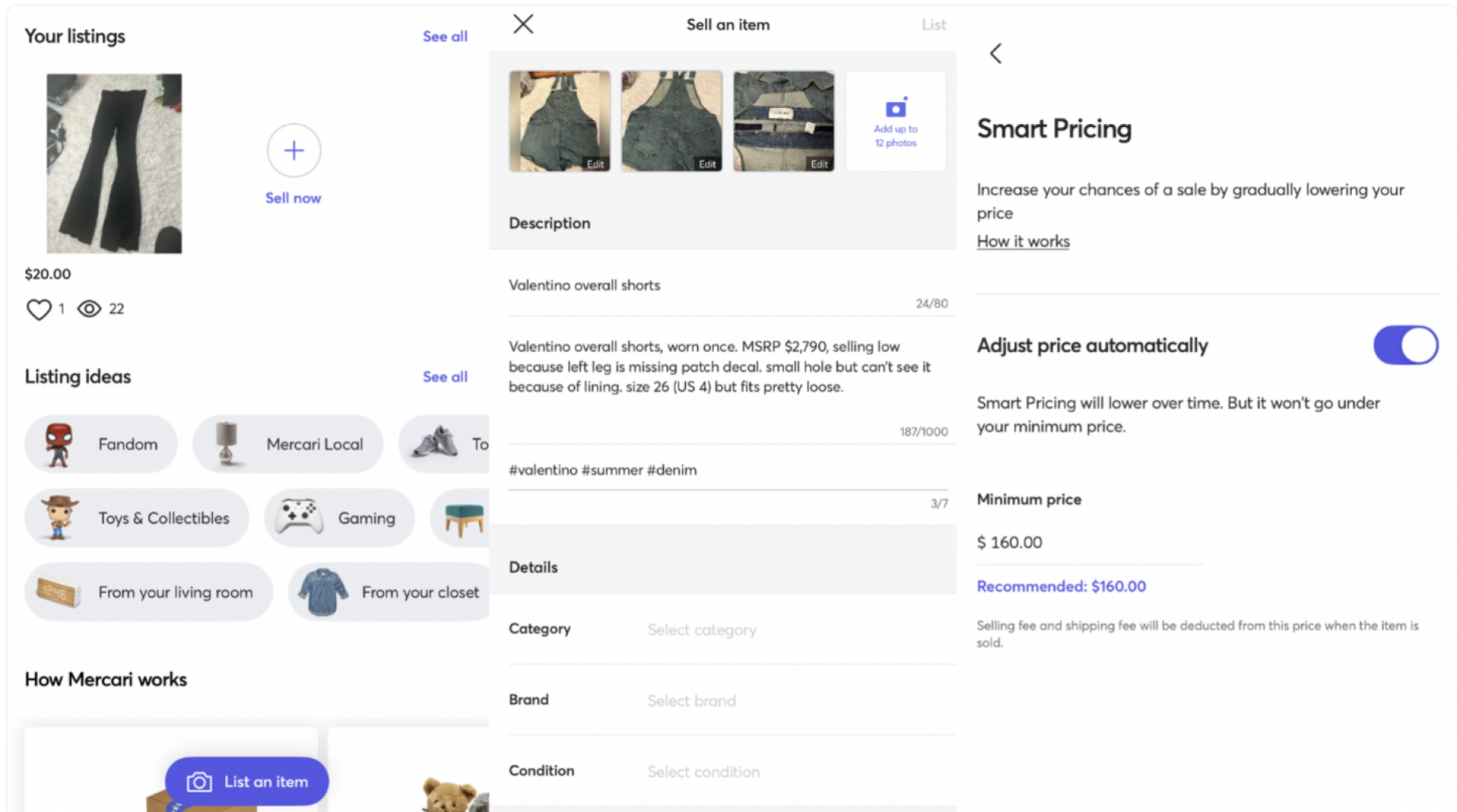
I am very new to Mercari, as it’s the only app on this list I downloaded just to review and had never used before. That said, I liked what I saw! The process of listing on Mercari is especially simple, so this is a solid entry point if you’re new to reselling and want to start with a more manageable experience. Tapping Sell at the bottom of the home screen brings you to a listing creation page that is notably pared down when compared to the other apps on this list. You add your photos, a title, a longer description, up to seven hashtags, a category, a brand, and a condition indicator. You have the opportunity to offer free shipping (which means you pay for it) or make the buyer pay the cost. Then, you set your listing price. That’s it.

Remarkably, Mercari will even handle your discounting for you, which is something you have to do manually on the other apps or else recruit a third-party service like PoshLister to manage for you. When you finish creating a listing, just toggle on “Smart Pricing,” set a minimum you’d be willing to accept for the product, and do nothing else. Over time, if it doesn’t sell, Mercari will incrementally lower the price until it hits that minimum you set. Of all the apps here, this one is the most hands-off from beginning to end.

Mercari on iOS

Credit: Lindsey Ellefson

There is one downside: While all apps take a little cut of your profit in the form of seller’s fees, not every app charges buyer’s fees, however, which Mercari does as of January 2025: Buyers pay a “Buyer Protection Fee” of 3.6% on Mercari, and that fee is displayed as part of the final price in the item checkout section. Think of it like when you order food off Uber Eats, but only see the true cost, with fees, when you get to the very end.

If you’re a seller, you might want to keep that in mind and, unfortunately, lower some of your prices to make your wares more appealing in light of these price increases. You also need to keep in mind the fees you’ll pay on the sale. Mercari takes a 10% cut of your earnings and, depending on whether you elected to offer “free shipping” to buyers, you’ll could also have to pay around $9 for the shipping cost. Some good news is that you can spend your balance in-app, which you know I’m a big fan of. Read my full Mercari review here.

Honorable mention: Rent your clothes out on Pickle

This list is all about resale platforms, yes, but I have had incredible luck using Pickle, an app that allows me to rent out my accessories and clothes instead of selling them. I’ve only been using it for two months and few bags in my closet have already been rented multiple times. Theoretically, they can keep generating me money over and over again and I can keep using them myself, neither of which is true when you make a straight-up sale.

There are three ways you can rent out your stuff on Pickle: You can arrange a meetup with a renter and hand it off in person, the renter can pay a $3 fee for a courier to transport your item to and from their location, or you can ship your goods wherever the other person is in the country. Meetups really only work in large metro areas, but with the shipping option—and because the courier system runs through established apps like Uber Eats and Doordash—Pickle works surprisingly well even in far-flung areas. During a recent interview, the app’s cofounder also let me know that it’s hoping to broaden the scope of Pickle’s marketplace offerings soon, too, so you could rent out musical instruments, camera equipment, or whatever goods you have lying around.

Pickle on iOS

Credit: Lindsey Ellefson

I have loved being able to put my goods to work and a few of my handbags and shoes are close to paying themselves off, so to speak. Like other apps, Pickle allows potential renters to send you an offer, which you can accept or decline, and it takes a 20% fee off your profit, but again, you get your stuff back and can rent it out again indefinitely. If you’re worried about sending your possessions out, take heart knowing Pickle has a robust customer service team and care policy. If someone damages or fails to return your item, the Pickle team works with you to get you the value of the goods. That’s a rarity, though, because the app has a strong community feel to it. Not only have my things always been returned in perfect condition, but they usually come with thank-you notes and, notably, one renter even sent me a thank-you gift.

Pickle is really helpful if you’re starting to declutter because it is comparable to a purgatory box, or a space you put something if you’re not quite sure you’re ready to get rid of it. You can experience what life is like without immediate access to that item and you may even find you didn’t miss it. In that case, list it on one of the apps above. Notably, Pickle also allows you to sell your stuff. All you have to do is indicate an item is for sale in its rental listing. Read my full Pickle review here.

Pinterest Users Left Confused By Mass Account Suspensions

An anonymous reader shares a report: Pinterest is having some weird moderation issues. Reports of sweeping pin removals and account suspensions have appeared across social media platforms like Instagram, TikTok, and X, with many users saying they received no warning or explanation about the ban before being locked out of their accounts.

The r/Pinterest subreddit is also currently dominated by posts from confused users who claim their accounts have been suspended without evidence explaining how they violated the platform’s guidelines. Users are also reporting they’re experiencing an unusually high quantity of pins being deleted by Pinterest with absurd explanations, such as quilting magazines, cross-stitch art, and Minecraft bunk bed builds all being flagged for “adult content.”


Read more of this story at Slashdot.

Spotify Can Now Show You More Payment Options in the iPhone App

You probably know you don’t have to pay to use Spotify, as long as you’re good with ads. For a commercial-free experience, of course, you need to subscribe to Premium. If you ever tried to sign up for Spotify Premium on your iPhone, however, you might have noticed there was no way to do so—neither a “pay now” button, nor a link to subscribe elsewhere.

The Apple tax

That’s because Spotify didn’t want 15–30% of the money you gave it going directly to Apple. That’s how Apple’s App Store works (and largely Google’s, for that matter). Any payments you make within an app on your iPhone, Apple gets a cut—either 15% or 30%, depending on how much money the app in question has paid, or how long a subscription has been running for.

Spotify and apps like it don’t have to pay the Apple tax if you make your purchases outside the app: Signing up for Spotify Premium through Safari, for example, means Spotify gets 100% of the money. Apple knows this, which is why it has traditionally banned apps from linking to external sites for payments. In their view, if you want customers to pay for your services directly, you either need to go through the app and pay the fee, or hope they google it on their own.

Spotify had a Premium tab in the app, even for free users, but it only let those users know those subscriptions existed, and that they needed to subscribe through their web browser if they wanted to sign up. (The app even acknowledged that it was a pain, without directly blaming Apple.)

Spotify can now direct you to its own website for payments

That all changed this week: Judge Yvonne Gonzalez Rogers ruled that Apple cannot block developers in any way from directing their users to third-party websites to make payments, or to impose any fees on purchases made outside the app. That means that apps like Spotify can push updates to their app, which include links to their own websites for payments and subscriptions.

Apple says it will comply with the ruling, but appeal it all the same. In the interim, however, it does appear the company is in compliance, as Apple did approve Spotify’s latest update. If you go to the Premium tab in the app, you now see links to various subscription options.

This ruling didn’t come out of nowhere. It’s in response to Fortnite developer Epic Games’ continuous antitrust lawsuit against Apple. Judge Rogers disagreed with most of Epic’s claims in a 2021 decision, but did rule that Apple needed to allow developers to direct customers to third-party payment options. Apple bent the rules here, by issuing a new fee on purchases made outside of apps, as well as rolling out messages to persuade customers away from these third-party sites. Judge Rogers was not pleased, calling out Apple executives (including CEO Tim Cook), and holding the company in civil contempt of court. Apple may also be investigated for criminal contempt.

Apple might have had a particularly bad day in court, but apps like Spotify are likely quite pleased. So, expect to see more options to pay for things outside of the apps you use. Some might even charge less, now that it’s easier to direct customers away from Apple’s in-app purchases. Not Spotify, though: The company didn’t offer in-app payments before, and still don’t, so Premium still costs exactly the same.

I Can’t Stop Making This Brazilian Cheesy Bread

Cheese and carbs have never been a tough sell, but if you’ve ever had a stretchy, springy bite of pão de queijo (a Brazilian cheese bread puff) then you know that this simple combination can soar to new heights. It’s the most utterly stretchy cheese puff you’ve ever known. If you haven’t had the pleasure of noshing on pão de queijo, then we should change that. Luckily, it only requires six ingredients and with the help of a blender or stand mixer, it’s nearly effortless. 

What is pão de queijo?

While many South American countries have a version of a this cheesy bread, pão de queijo originated in Brazil. This delightful snack owes its stretchy, gummy center to tapioca flour, a starch made from the cassava root. Cheese delivers its own stretch too, but I find it plays a bigger role as the primary flavoring ingredient. So using a powerful cheese with plenty of flavor pays off in the end. Add a bit of egg, oil, and milk and you’re on your way.

I first had pão de queijo in a Brazilian restaurant in Brooklyn, where the we were quickly supplied with a basket of golden brown flecked pastry balls about the size of a large egg. My friend stopped the conversation and directed my attention to the bread because this was the whole reason she brought me there. After tearing one in half—which took a long moment, due to the never-ending cheesy stretch—I understood why we had paused our discussion. This chewy, salty, crusty but soft pão de queijo demands your full attention, and deserves it. 

A few years later, I did have the distinct pleasure of eating pão de queijo in Brazil. It’s not uncommon to have them with breakfast, or for a café to serve a few golden spheres alongside your coffee. The ones I ate in Brazil are made in frustratingly small sizes compared to how big my appetite is for them, but not everyone is a cheese monster like I am. And in my own home, I get to make them bigger. 

There are two different methods that I’ve used for making pão de queijo: a blender version and a stand mixer version. (If you haven’t joined the stand mixer club yet, here’s what to look for when you’re shopping for one.) Both recipes are delicious, so instead of choosing for you, I’ve provided them both.  

Pão de queijo in your blender

This style of pão de queijo is more like a batter. It’s extremely simple: I just add all of the ingredients to my Vitamix, but you can use any other blender just as well. (If you need a fancy new blender, this one has nearly changed my life.) The oven takes care of the rest. It’s better to use a cupcake pan (or a mini cupcake pan) to shape the puffs. I used this recipe from the back of the Bob’s Red Mill Tapioca Flour package. I took the liberty of adding extra cheese before baking and included that here.

Ingredients:

  • 1 egg

  • ¼ cup olive oil 

  • ⅔ cup milk

  • 1 ½ cups tapioca flour

  • ½ cup grated cheddar cheese, plus extra for topping

  • ½ teaspoon salt

1. Blender dump

Butter a cupcake pan, or mini cupcake pan, and preheat the oven to 400ºF. Add all of the ingredients to a blender. Blend on low speed to “catch” all of the ingredients and slowly increase the speed. Stop the blender and scrape the sides if you see any tapioca flour is stuck. Blend again if necessary.

2. Bake

Pour the contents of the blender into the greased cups of a cupcake pan, or mini cupcake pan. I only fill them about halfway to three quarters full. Then top them each with a pinch of extra cheese. Bake them for about 20 minutes, or until puffed and the cheese has browned.

Pão de queijo in your stand mixer

A light bread dough in a stand mixer bowl.

Credit: Allie Chanthorn Reinmann

I used this recipe from TudoGostoso which ends up with more of a dough consistency partially due to heating the tapioca with hot milk and oil before it goes in the oven. 

Ingredients:

  • 500 grams tapioca flour (I used the whole bag of Bob’s Red Mill tapioca flour)

  • 1 tablespoon salt

  • 250 mL milk (slightly more than 1 cup)

  • 1 to 2 eggs (the second egg is only if needed)

  • 12 ounce shredded cheese (I used a mozzarella, parmesan, and cheddar blend)

1. Dry and wet ingredients 

Line a baking sheet with parchment paper. Preheat the oven to 350ºF. Add the tapioca flour and salt to the bowl of a stand mixer. In a pan or pot, add the milk and oil. Heat the liquid mixture over medium until it starts to bubble on the edges. 

2. Mix the dough

Add a paddle attachment and turn the mixer on the lowest speed. Pour in the hot oil and milk mixture all at once with the mixer running. Mix until evenly incorporated and the texture is consistent and sandy. Add one egg and the cheese. If the dough is dry, add the other egg. It should feel like soft cookie dough. Mix until the dough is homogeneous and thick. 

3. Form the balls

A sheet tray full of dough balls.

Credit: Allie Chanthorn Reinmann

Shape the dough into 1-inch balls. I scooped the dough onto a parchment-lined baking sheet and then rolled them in my palms to smooth out the shape. Give them an inch of space between each ball and bake them in a 350ºF oven until fully puffed and lightly browned on the bottom, about 20 to 25 minutes. Enjoy warm. 

LG Hits Major Milestone Towards Its ‘Dream OLED’ Display Tech

LG Hits Major Milestone Towards Its 'Dream OLED' Display Tech
Life’s Good with an OLED display, and soon enough it might be better still. LG Display has announced a mass commercialization breakthrough and will soon fire-up its “Dream OLED” display production lines.

LG Display calls the upgraded form Hybrid Tandem OLED, describing the way in which its researchers stacked two blue light-emitting elements

Woman Racer Spotlight: Gretchen Zoeller

Name: Gretchen Zoeller 

Hometown: Nottingham, UK

How did you get into cycling? It’s a long story! I was 144 kg till 19. At 12 years old I discovered sport. I threw the discus and hammer, then got injured and lost 100kg. I started training in Brazilian jiu-jitsu at the age of 22 and have successfully competed all over the world.  I was the first British woman to medal at black belt in Brazil and the 3rd British woman to be awarded a black belt.

Then at 41 my life was turned upside down. I was diagnosed with a knee issue which turned out to be quite a serious disability. I decided to retire from the professional division and had my last fight. On the advice of my knee surgeon, I started cycling in mid 2020. I couldn’t do a 5-mile ride without stopping for hills even though I was fit. 

I met a lady at a local club who persuaded me to try an introduction to racing course she was teaching (thanks Liz!). I tried a few TTs in 2022 and enjoyed them. Racing filled the competitive gap I was missing after leaving high-level sport. 

In 2023 I signed up for a full season of able-bodied TT’s. I medalled at the VTTA national 100-mile TT & won two open 10s. I now compete for the Born2Bike racing team. My physio suggested I contact British Cycling for a para assessment which after a year of fighting was completed in June ’24. My knee is a degenerative disability and some days I can’t walk. Some Zwift races I compete using one leg!

How many years have you been racing on Zwift? 3 years 

Are you part of a Virtual team? Definitely! REVO, my team, is fantastic. You know when you’ve found “your people.” I love the ladies in my team, they are amazing. 

What do you love most about racing? Pushing myself. That feeling of destroying yourself during a race and the exhilaration at the finish. Oh, and the spare calories! 

What is your favourite style of race (e.g. points, scratch, iTT, TTT, Chase, duathlon)?  I do love a TT! 

What is your favourite Zwift women’s race series? TBD, but anywhere the whole team are involved and fighting for positions.

What is your most memorable racing experience, inside or outside or BOTH? I was in Cambridge at a 10-mile TT. I’d had bad news from my doctor. I thought f*** it. I emptied the tank and did 22.51. I cried at the side of the road after and 2 other riders stopped to check on me. They asked why I was crying. I said, “Because I just got an epic PB.” We rode the 8 miles back to HQ together! 

What is your favourite food to eat post race? Protein shakes and cold pizza made by the expert Maria at Pizza Paz (I fought middle-heavyweight).

What advice would you give to a woman entering her first Zwift race? Have high expectations for yourself because you are stronger than you realise, and you can achieve more than anyone ever expected of you. 

Any upcoming race you are looking forward to? I’m recovering from knee surgery and just want to start training ASAP. 

Where can people follow your racing adventures? I’m old skool. I don’t like to post much, but if you like photos of cute German Shepherds then @gretzoeller on Insta.

**A big shout out to my biggest supporter. My husband Ben. He gets my bikes ready, maintains and repairs both them and me (which is a much bigger job!). I literally couldn’t do it without him.