My Favorite Amazon Deal of the Day: The Beats Studio Pro

We may earn a commission from links on this page. Deal pricing and availability subject to change after time of publication.

Beats headphones are well known for their style and better compatibility with Apple devices. Both of these hold true with their flagship headphones, the Beats Studio Pro, currently $169.95 (originally $349.99), the second-lowest price it has been after a 51% discount, according to price-tracking tools. While it is compatible with Android users, Apple users will get the most out of these premium headphones.

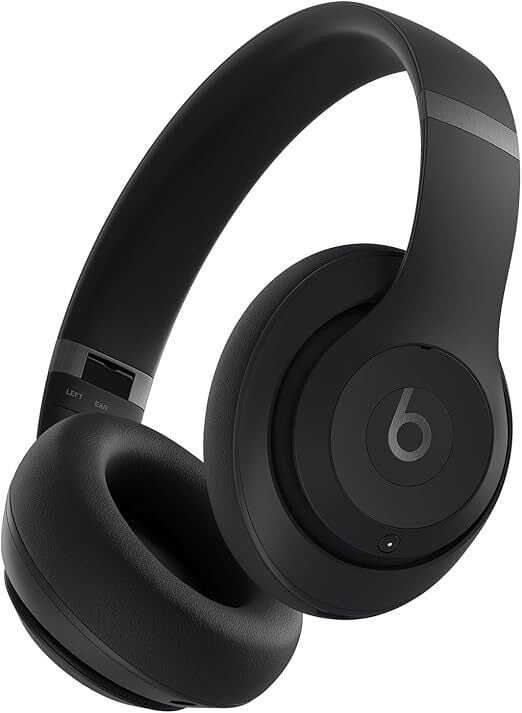
The Beats Studio Pro came out in 2023 with a “good” review from PCMag, praising its sculpted sound (but warning sound-sticklers against it), comfort, premium accessories, and spatial audio with head tracking. They also said you can get much better headphones for less than their $349.99 price (which is very true) that have adjustable EQ and better active noise cancelling (ANC). However, at $169.95, these headphones are a great deal, especially if you’re an Apple user.

These headphones have hands-free Siri access, one-touch pairing on iOS and Android devices (through Google Fast Pair), which gives simultaneous connections with up to two devices, and a transparency mode that lets you hear your surroundings. Apple users will be able to take advantage of the AAC codecs, which work seamlessly with Apple to give much better audio quality, but have limitations with Android devices. You get a quick-access menu to control the ANC and Transparency modes, and you can also use the Find My app if you misplace your headphones.

The biggest miss with the Beats Studio Pro that you would expect any premium headphones to have is an adjustable EQ. However, they have plenty of EQ presets for you to choose from. The ANC is slightly above average, which is good for its current price. You can get about 40 hours of playtime at full charge with ANC and Transparency modes off, and a 10-minute charge gives you about four hours of juice.

A Beats headphone sale includes all-time lows on the Solo 4 and Powerbeats Pro 2

A wide-ranging sale on Beats headphones has brought some of the brand’s products down to record-low prices. Take, for instance, the Beats Solo 4. That model is currently half off at $100 at Amazon. Although we’ve seen those headphones hit this price before, it’s matching an all-time low. The same offer is also available at Walmart, Target and Best Buy.

We gave the Beats Solo 4 a score of 79 in our review just over a year ago. The lack of multipoint connectivity was a disappointment and there’s no automatic pausing when you remove them from your ears. Some folks may find the fit quite tight as well. However, we feel that the Beats Solo 4 offer improved sound quality over previous models, while the 50-plus hours of battery life is very welcome. If you’re looking for a portable set of on-ear headphones, the Solo 4 might be worth considering.

In addition, the Beats Powerbeats Pro 2 are available for a discount, just a few months after they debuted. You can save 50 bucks if you buy a pair of the earbuds now, as they’re down to $200.

The Powerbeats Pro 2 are Apple’s first earbuds that include a heart-rate tracking feature. We gave the fitness-focused model a score of 79 in our review back in February.

The improved design helps make the earbuds more comfortable to wear compared with the previous iteration and we felt that they delivered powerful audio performance on the low end. The Powerbeats Pro 2 also have a lot of the same smarts as AirPods, largely thanks to the inclusion of an H2 chip. That said, the hook design won’t be to everyone’s taste, and we felt the active noise cancellation performance was so-so.

Elsewhere in the sale, there are some solid discounts that aren’t quite all-time lows but still worth checking out. You can snap up a pair of over-ear Beats Studio Pro headphones for $170, down from $350. We gave those a score of 81 in our review. As for the in-ear Beats Studio Buds +, those are $70 off at $100. We think these are the best Beats option for most people, and gave them a score of 84 in our review.

Check out our coverage of the best Apple deals for more discounts, and follow @EngadgetDeals on X for the latest tech deals and buying advice.

This article originally appeared on Engadget at https://www.engadget.com/deals/a-beats-headphone-sale-includes-all-time-lows-on-the-solo-4-and-powerbeats-pro-2-144550967.html?src=rss

Budget Titles Dominate 2025’s Top-Rated Games as AAA Prices Climb To $80

The highest-rated video games of 2025 are all budget-priced titles, with Metacritic top performers Clair Obscur: Expedition 33, Blue Prince, and Split Fiction costing just $50, $30, and $50 respectively. This comes as Microsoft announces certain Xbox titles will now cost $80, following Nintendo’s similar price hike for Mario Kart on Switch 2.

Clair Obscur, developed by a small French studio, sold 1 million copies in its first week. Split Fiction, despite being published by EA, was created by a small Stockholm team and has reached 2 million sales. Blue Prince, a puzzle-roguelike largely created by a single developer in Los Angeles, is showing strong performance on Steam, Bloomberg reports.

All three games share key traits: they use commercially available engines, take creative risks that big-budget projects couldn’t afford, and target specific player demographics rather than trying to appeal broadly. The contrast is striking — Clair Obscur’s developers celebrated reaching 1 million sales while EA declared Dragon Age: The Veilguard a failure with similar numbers, underscoring the economic realities of different development scales.


Read more of this story at Slashdot.

F1 in Miami: Like normal F1, but everyone wears pastels

After a brief reprieve, Formula 1’s teams were back at it this past weekend at the Miami Grand Prix. It was the first of three stops in the US and five in North America as F1 capitalizes on its current wave of popularity here. The sport evidently believes something is going right—it just announced a contract extension that will see the event remain on the calendar for another 16 years.

The Miami race is among the latest of F1’s new breed of Grands Prix. It was originally supposed to be more of a true street circuit like Baku or Singapore or Las Vegas, with a route that crossed over a bridge into South Beach. But the track is laid out around the various parking lots of Miami’s Hard Rock Stadium, like a 21st-century version of the early ’80s Caesars Palace Grands Prix or the now-defunct Sochi race that wound its way around Vladimir Putin’s favorite sea-side theme park.

Ticket prices appear to have come down a little now that the race is in its third year, but the “beach club” and Potemkin marina remain, even if they didn’t look particularly busy on any of the overhead shots. Despite what looked like sparse attendance on Friday and Saturday, we’re told that 275,000 people attended across the weekend.

Read full article

Comments

Samsung Galaxy S26 May Usher In Another Silicon Chip Strategy Change

Samsung Galaxy S26 May Usher In Another Silicon Chip Strategy Change
An insider’s report has found that for 2026, Samsung might bring its Exynos silicon back into its Galaxy S26 flagship phones. This move stems from heavy financial losses incurred from using solely Qualcomm Snapdragon 8 Elite processors for all Galaxy S25 phones sold worldwide. Samsung took an estimated $400 million hit for the Qualcomm chipset

21-Way Intel Core / AMD Ryzen Linux Laptop Comparison On Ubuntu 25.04

As part of fresh re-testing of existing laptops on-hand given the recent release of Ubuntu 25.04 and then also recent Linux reviews of some interesting models like the Framework Laptop 13 with AMD Strix Point and the Lenovo ThinkPad X1 Carbon Gen 13 Aura Edition, I have been running a lot of Linux laptop benchmarks the past few weeks. I ended up taking things a bit further after those reviews and have now extended it to a 21-way laptop comparison of AMD Ryzen and Intel Core SoCs from the past few generations in looking at their performance on Ubuntu 25.04 across more than 200 benchmarks.

Call Of Duty: Black Ops 7 Battle Pass LTM Paywall Rumor Sparks Gamer Outrage

Call Of Duty: Black Ops 7 Battle Pass LTM Paywall Rumor Sparks Gamer Outrage
The growing trend for gaming in 2025 is that everything is getting more expensive, with no exceptions. The popular Call of Duty franchise falls into the ‘no exceptions’ category, as there are some early murmurs claiming that Call of Duty: Black Ops 7 will have some more expensive changes to its Battle Pass system. 

According to user @TheGhostOfHope

This Refurbished Wireless Floodlight Camera Is $115 Right Now

We may earn a commission from links on this page. Deal pricing and availability subject to change after time of publication.

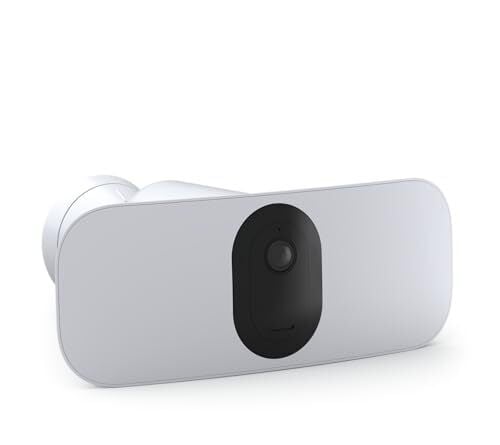
If you’re thinking about upgrading your home security without dealing with tangled wires or tricky installations, this refurbished Arlo Pro 3 Floodlight Camera—currently priced at $114.95 on Amazon with free shipping—might be worth a look. It’s a wire-free setup that mounts easily with just a few screws and connects over 2.4GHz wifi. No electrical know-how required. PCMag gave it an Editor’s Choice award, mostly thanks to its 2K HDR video, wide 160-degree field of view, and a super bright (up to) 3,000-lumen floodlight. You can dim the light if needed (it’s set at a cooler 4,000K color temp), and either turn it on manually through the Arlo Secure app or have it trigger automatically with motion.

What’s nice here is the smart detection system—it doesn’t just ping your phone every time a leaf blows past. Instead, it uses object detection to tell you if it saw a person, animal, or vehicle. It also has a 12x digital zoom with auto tracking, which helps the camera stay locked on moving objects in the frame. The image/video quality holds up well, especially during the day—crisp, colorful, and clear. At night, it still performs nicely with decent clarity up to about 25 feet, but the colors don’t pop as much, especially in low lighting. Just a heads up, though: If you want to store footage in the cloud, you’ll need a subscription to the Arlo Secure plans. Those start at $7.99 per month for a single camera or $17.99 per month for unlimited cameras.

On the smart home side, it plays well with Alexa, Google Assistant, and IFTTT, so it fits right into most setups, according to this PCMag review. As for battery life, the built-in battery lasts a few months between charges, but if that sounds like a hassle, you can pair it with a $59.99 solar panel or plug it in via Arlo’s $49.99 outdoor magnetic cable.

ASUS TUF Gaming T500 PC Goes Hybrid With A Laptop CPU And Desktop RTX GPU

ASUS TUF Gaming T500 PC Goes Hybrid With A Laptop CPU And Desktop RTX GPU
Well, here is something you don’t see every day—ASUS has unveiled a compact gaming PC that mates a mobile Intel Core i7 or Core i5 processor based on Raptor Lake with a full-fledged desktop graphics card based on NVIDIA’s latest-generation Blackwell architecture. In doing so, it’s fair to consider the new ASUS TUF Gaming T500 a hybrid desktop.

To

Building your own Atomic (bootc) Desktop

Bootc and associated tools provide the basis for building a personalised desktop. This article will describe the process to build your own custom installation. Disclaimer Building and using a custom installation is “at your own risk”. Your installation may be harder to find support for when compared with a mainstream solution. Motivation There has been […]

Majority in UK Now ‘Self-Identify’ as Neurodivergent

A majority of Britons may now consider themselves neurodivergent, with conditions such as autism, dyslexia or ADHD, according to a leading psychologist from King’s College London. Professor Francesca Happe, an expert in cognitive neuroscience, said reduced stigma around these conditions has prompted more people to seek medical diagnoses or self-diagnose.

“Once you take autism, ADHD, dyslexia, dyspraxia and all the other ways that you can developmentally be different from the typical, you actually don’t get many typical people left,” Happe told BBC Radio 4.

Autism diagnoses increased 787% between 1998 and 2018 in the UK, with estimated prevalence rising from one in 2,500 children 80 years ago to one in 36 today. Happe, who was appointed CBE in 2021 for her autism research, warned that behaviors previously considered “a bit of eccentricity” are now being labeled with medical terms.


Read more of this story at Slashdot.

On cusp of storm season, NOAA funding cuts put hurricane forecasting at risk

The National Hurricane Center’s forecasts in 2024 were its most accurate on record, from its one-day forecasts, as tropical cyclones neared the coast, to its forecasts five days into the future, when storms were only beginning to come together.

Thanks to federally funded research, forecasts of tropical cyclone tracks today are up to 75 percent more accurate than they were in 1990. A National Hurricane Center forecast three days out today is about as accurate as a one-day forecast in 2002, giving people in the storm’s path more time to prepare and reducing the size of evacuations.

Accuracy will be crucial again in 2025, as meteorologists predict another active Atlantic hurricane season, which runs from June 1 to November 30.

Read full article

Comments

US Bill Aims To Crack Down On Smuggling NVIDIA’s AI Chips To China With Boot Locks

US Bill Aims To Crack Down On Smuggling NVIDIA's AI Chips To China With Boot Locks
Chip smugglers have reportedly found all kinds of creative ways to sneak semiconductors into China, such as hiding them with live lobsters, inside fake baby bumps, and other means designed to evade customs and, more broadly, import and export restrictions. In an effort to crack down on chip smuggling, a U.S. lawmaker is hoping to pass a bill

Windows Has an Emergency Restart Option You Probably Don’t Know About

The old turn-it-off-and-on-again adage has helped successfully troubleshoot computers for years, but there’s more than one way to restart your hardware and software—including a lesser known option on Windows that may well be new to you.

Having spent many years writing about tech, it isn’t often that I come across something I didn’t already know about. So when I stumbled across this old BetaNews article about an emergency restart feature in Windows, I was taken aback.

It showed a screen and a keystroke combination I had genuinely never heard of before. A bit more digging revealed that this has been in Windows for decades, making it even stranger that I’d never come across it.

Official information on this emergency restart in Windows seems to be thin on the ground, or has perhaps been lost to time. Essentially though, it seems to replicate what a long press on your PC’s power button would do: A quick, no-questions-asked reboot of your computer, with the minimum of fuss.

The Windows enthusiasts over on Reddit have spotted this feature before, and there appear to be plenty of people on the boards who hadn’t come across it until their attention was drawn towards it. If you dig into those threads you’ll find some technical information on what exactly is going on behind the scenes, and the different calls that the feature might be making.

It’s worth emphasizing that this is very much a last resort option, as indeed the feature itself will tell you. You’re not going to get a chance to save anything you’re working on, as is the case if you force a reboot by pressing and holding the power button.

How to access the emergency restart option

Emergency restart
Use at your own risk.
Credit: World of OSes

If all is well with your Windows computer, you can of course click the Start menu button on the taskbar, then the power button on the right, and then Restart. But what if your computer has crashed and left you hanging, so you can’t click anything? What if the situation is so bad that the Start menu has mysteriously disappeared?

To get to the emergency restart option, you need to press the familiar Ctrl+Alt+Del keyboard shortcut, known by pretty much everyone who’s ever had to fix a Windows PC at some point. This shortcut is designed to work even if your computer is otherwise unresponsive, and gives you access to options for locking your PC, signing out of your account, and bringing up the Task Manager.

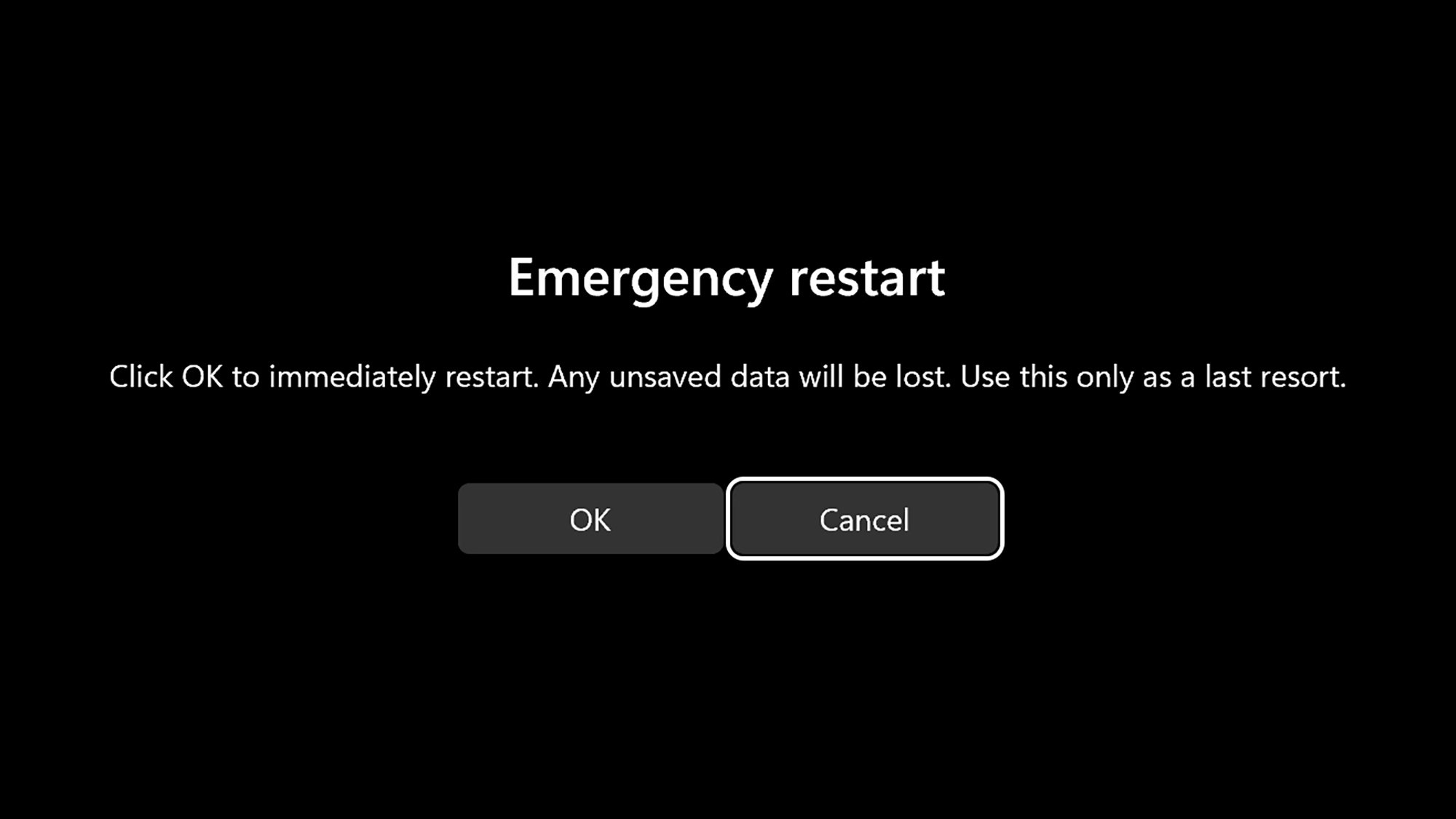
Down in the lower right corner, there’s also a power button: Click this and you get the standard Sleep, Shut down, and Restart options. However, if you hold down Ctrl and then click the power button, that takes you to the emergency restart page, together with the warning about losing any unsaved data. Click OK, and your computer will reboot itself almost instantly.

If you can get to the screen after Ctrl+Alt+Del, then you’ll want to try the normal restart option first—you’ll only need to go down the holding Ctrl route if that doesn’t work. Presumably, that will be because there’s a program or a part of the Windows code that isn’t shutting down properly to clear the way for a restart.

Should you need yet another way of restarting your computer without using the Start menu, you can do it from the command prompt or PowerShell utility, too: Just type “shutdown /r” and hit Enter. There are a host of extra flags you can add to that command if needed, including setting a timer for the restart and forcing applications to close: You can read full instructions here.

Having now familiarized myself with the emergency restart option in Windows, I’m off to find more features that I haven’t come across—even though they’ve been around for years. Any suggestions are most welcome.

Elaine’s Seinfeld Dance Edited Into Other Shows And Movies

This is a compilation of Seinfeld’s Elaine Benes performing her so-bad-it’s-good dance (aka the trippy hitchhiker) in a variety of other shows and movies. The clips were edited by the Bell Brothers, who previously added Home Alone’s Kevin McAllister to other Christmas movies. That dance… I forgot how good it was. I’m going to perform it at my wedding. Well not MY wedding, a friend’s wedding everyone will refer to as mine afterwards because I stole the show at the reception. People probably won’t even be able to remember what color the bride was wearing.

Original clip included after for reference.

PopClip Is Like a Supercharged Right Click for Text on Mac

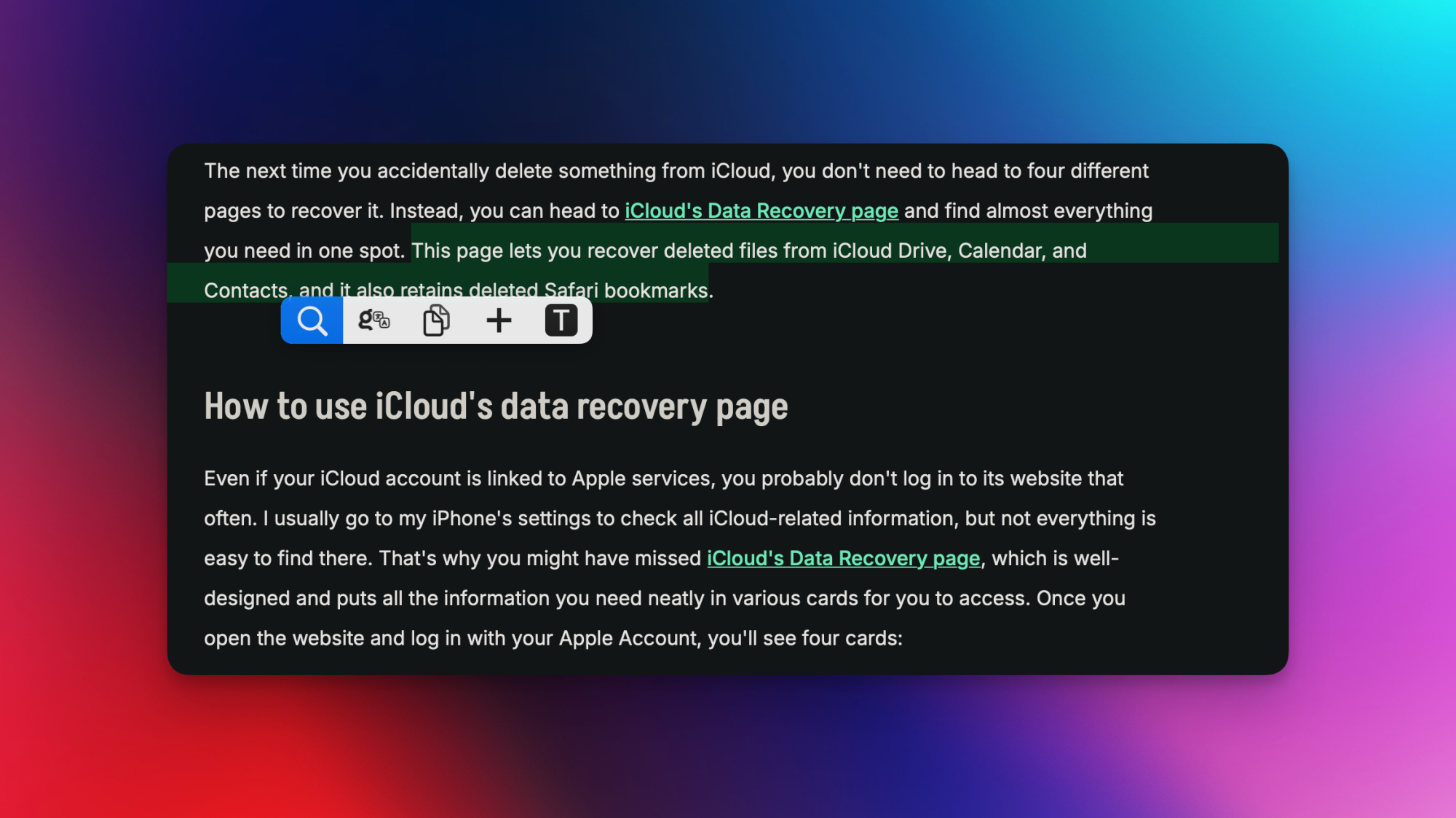
Everyone works with text while on their Macs, and PopClip is a simple and effective way to speed up all your text workflows. On the surface, it’s really simple. The app, also available on mobile, simply adds a small popover menu to your screen every time you select text on your Mac. By default, it gives you access to four commonly used actions: search, cut, copy, and paste. This alone is good enough for most people, but the app can do a lot more.

Mobile is a bit more limited, but on Mac, you can customize the popover menu by adding or removing features, and there’s a big extension directory to make this even better. With some tweaking, you can use it for relatively basic operations such as text transformations, or more advanced ones such as sending text to the translation service of your choice. PopClip’s free trial lets you use text actions 250 times, and once you’ve exhausted those, you can buy the app for $12 or $25. The lower price guarantees two years of updates, after which you can continue using it without new features, but if you pay more, you get access to app updates for as long as PopClip is in active development.

Customizing PopClip

PopClip's settings, showing the Actions tab.

Credit: Pranay Parab

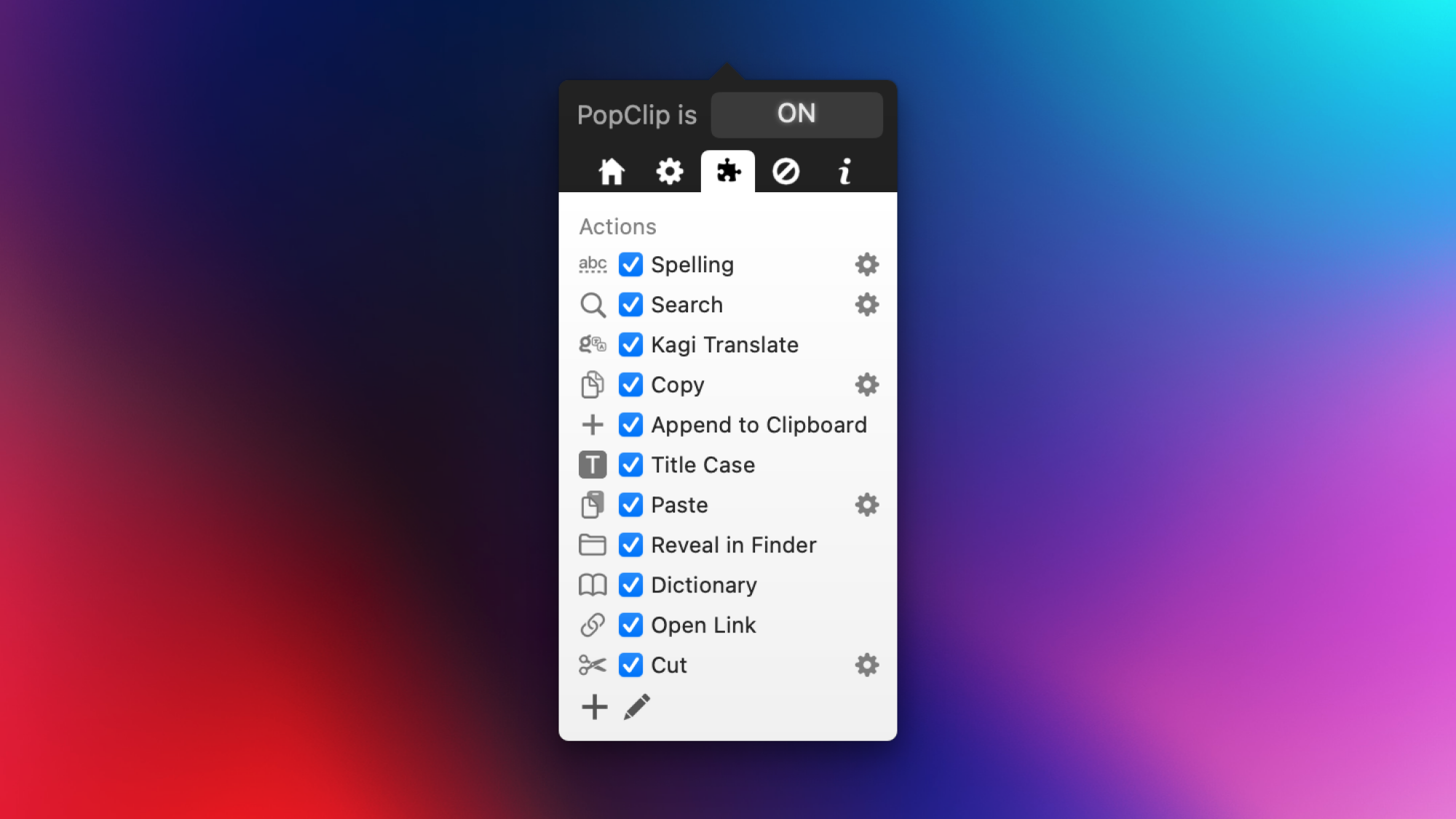
Customizing PopClip is a bit annoying, because the app’s window is quite small and uses tiny font sizes. Click its menu bar icon to get started. The good news is that you won’t have to use the menu bar window much, so I can look past its tiny size and barebones UI. In the app’s window, begin by clicking the home icon, which will allow the app to launch at login. This way, you won’t have to keep activating PopClip every time you restart your Mac.

Next, go to the gear icon tab and change the size and position (above or below the selected text) of the popover menu to suit your needs. A larger size is more intrusive, but it makes it easier to click the buttons in the menu. On the same page, you can record a keyboard shortcut to access PopClip without using the mouse, too. The next tab has a puzzle piece icon, and it lets you configure your actions or add additional actions not included in the default set, like translation or dictionary tools. Uncheck the options you don’t use, and drag the four dots next to each action upwards or downwards to reorder them.

Finally, go to the next tab to customize a list of excluded apps. PopClip’s menus won’t appear when you select text in those apps.

Adding extensions to supercharge the app

A sentence of text selected, with PopClip's popover menu visible.

Credit: Pranay Parab

PopClip’s real magic comes from its extension support. Just go to the extensions directory page, select any extensions you like, download them, and open the downloaded files. This automatically adds those extensions to PopClip. Simply go to back to the puzzle piece icon in the settings to see your new additions. There are plenty of extensions on this page, and it can be hard to stop adding them to the app, because most of them are quite useful. The extensions page even has an RSS feed, and you can add it to the RSS reader of your choice to get informed whenever a new tool shows up. 

It’s hard to make a definitive list of the best PopClip extensions, since that depends on what you want to do with the app. Personally, I like to select text and send it into third-party apps (to quickly create to-dos or calendar entries, translate text, etc.), and there are plenty of great actions for that. I’m also a big fan of the Append to Clipboard action, which lets me copy multiple bits of text and adds it all to the clipboard. This way, I can quickly copy an excerpt and add the article’s URL to the clipboard, then paste them both to a social media post in one go. Without PopClip, that would require pasting twice, plus switching between tabs.

Has Meta Figured Out How to Monetize AI – By Using It For Targeted Advertising?

Yahoo Finance reports that Mark Zuckerberg made bold predictions for investors on Meta’s earnings call this week — about advertisers. “AI has already made us better at targeting and finding the audiences that will be interested in their products than many businesses are themselves,” Zuck said, “and that keeps improving…”

“If we deliver on this vision, then over the coming years, I think that the increased productivity from AI will make advertising a meaningfully larger share of global GDP than it is today…”

If investors are still searching for answers to nagging questions about how massive AI investments will pay off, Zuckerberg provided the clearest reply yet: It will strengthen our core business. In fact, it is our business… On what many believe to be the cusp of an economic downturn, Meta isn’t pitching its AI developments as an add-on to its operations, but as something central to its core proposition of targeted advertising…

“While Meta’s investments in GenAI have spooked certain investors who continue to question the return on these investments, we saw further signs of GenAI monetization in the firm’s ad business,” wrote Morningstar equity analyst Malik Ahmed Khan in a note on Thursday. In a powerful showing, coming after Alphabet’s own impressive results, Meta noted that a new ads recommendation model it’s testing for Reels has already boosted conversion rates by 5%. And nearly one-third of advertisers were using AI creative tools in the past quarter. For Zuckerberg, the enhancements AI offers to finding the right consumers and providing measurable results strengthen the case for boosting capacity and for a revamped model of advertising’s scope.

And with the company set to invest upwards of $70 billion toward its AI opportunity this year, the bet is not all about ads, of course. Zuckerberg outlined four other areas of focus for its AI efforts: business messaging, Meta AI, AI devices, and more engaging experiences. Meta’s efforts can also be viewed as an ambitious play to take on its rivals across tech’s legacy and emerging platforms. As John Blackledge, senior analyst at TD Cowen, said in a note on Thursday, the AI opportunities Zuckerberg outlined are about “ultimately taking on Google search, iPhone and ChatGPT all at once.”
In the pre-AI world, “Businesses used to have to generate their own ad creative and define what audiences they wanted to reach,” Zuckerberg told Meta’s investors this week.
And by Friday’s closing, Meta’s stock had jumped 12.6% over its value Wednesday morning, leading Yahoo Finance to conclude that Wall Street “appears to be buying into” Zuckerberg’s vision.


Read more of this story at Slashdot.