Zwift Update Version 1.90 (146371) Released

Zwift version 1.90 begins its phased rollout today. It includes the much-requested Splits feature, along with some visual tweaks and bug fixes. Read on for details…

New Splits Feature

Zwifters have long requested the ability to trigger laps/splits in game, allowing us to record our own custom interval data while riding in Zwift. Cycling head units have long offered this functionality, so many riders are already familiar with the concept of a “lap button” you can click so the head unit will display data for your current “lap”, including average power, length of time, and speed/distance.

You can trigger a new split in several different ways.

  • Click the “New Split” button in the Action Bar (which is also in the Companion app)
  • Click the on-screen lap button in the Splits HUD (on all platforms except AppleTV)
  • Use the tab key on your keyboard (this will not work in a workout, however, as this is the shortcut for skipping the interval)
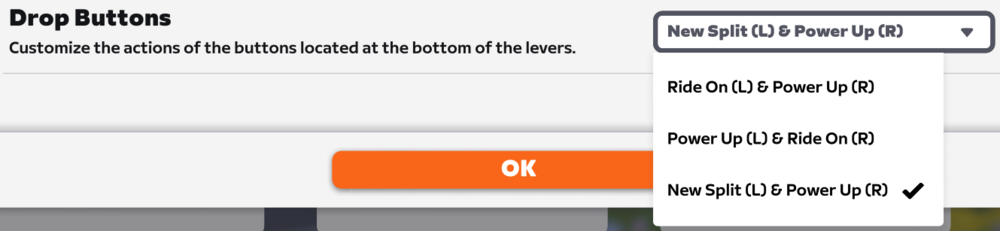
  • If you own the Zwift Ride you can configure the left drop button to trigger a new split:
draft-zg-1-90-release-notes-google-docs (2).png

The new Splits HUD displays the time, distance, and average power of each split. It also shows a color-coded power zone duration bar that functions just like the bar at the top-left below your power number, except it’s only showing power durations for each specific interval.

Once you’ve triggered a split, you’ll have access to another new “Toggle Side Display” button in the Action Bar next to the New Split button. This swaps the side display between the Splits HUD and the Leaderboard.

Splits data is written to your FIT file, so it can be displayed later on in other platforms like Strava, Garmin, Intervals.icu, etc.

Note: structured workouts will trigger a ”lap” for each interval block, as they always have. To view these splits after your workout, press the Toggle Side Display button in the Action Bar.

Here’s a quick video walkthrough of how it works in game:

There are a few minor UI bugs that Zwift still needs to iron out, including the list of splits not scrolling to the top when you click away from that list, and some typesetting being a bit misaligned, especially in non-English languages.

But the functionality is in place and working well, as far as we can see. Let’s do the splits!

Updated Lighting Effects

If you’ve noticed snazzier lighting effects during your recent Zwift sessions, you’re not hallucinating. Here’s a quick video screenshot recorded in Watopia on version 1.90:

Zwift has been experimenting with improved lighting effects lately, and while they haven’t mentioned it in any of the update notes, more and more Zwifters are starting to notice lighting changes. Our guess is that Zwift is rolling out the updated lighting to specific groups of users on certain types of hardware.

More Release Notes

Zwift provided notes on additional tweaks and bug fixes in this update:

  • Improved the appearance of flat routes in the mini-map route profile.
  • Fixed an issue that could cause the mini-map elevation profile to be stuck at the start of some routes.
  • Fixed an issue that caused the Leaderboard visibility setting to behave as if it were set to “Auto” when the “Always” setting was selected.
  • Fixed gaps in the roadway on the Douce France route in France.
  • Fixed an issue that could cause the roadway to flicker in some sections on the R.G.V. route in France.
  • iOS: Stability improvements.

Discuss this update in Zwift’s forum > (link coming soon)

Questions or Comments?

If you spotted any other changes or bugs in the update, please comment below!
Stop what you’re doing and watch this gloriously odd, whisky-fuelled cycling adventure from 1976

Some videos defy genre, logic and liver function. This 1976 gem from the BBC archives follows Big Jim Collie – a Scottish crofter with a taste for solitude and strong drink – as he sets off on his 105th crossing of the Lairig Ghru, one of the highest mountain passes in Britain, aboard his war-era bone-shaker of a bike, the ‘Lairig Flyer’.

This gloriously odd film is part poetic travelogue, part slow-motion solo outdoors pub crawl – it’s utterly fabulous, and worth seven minutes of your day.

Jim lives alone in a tin-roofed bothy in the foothills of the Cairngorms. In the video, he’s heading to Braemar – 60 miles by road, but only 22 if you’re willing to drag you and your bike through some of the wildest terrain in Scotland.

He starts the day with a wee dram, and keeps going with the help of a generous network of whisky caches stashed along the route – not to mention the three pints he guzzles at Mar Lodge.

With rod brakes and a single gear, his bike – bought for six bob off a friend – was a relic even by 1976 standards. Undeterred, Jim explains mechanical issues – punctures, broken pedals, collapsed wheels – are met with the same response: shrug, sip, press on.

How I Turned My E-Reader Into a Distraction-Free Writing Device

We may earn a commission from links on this page.

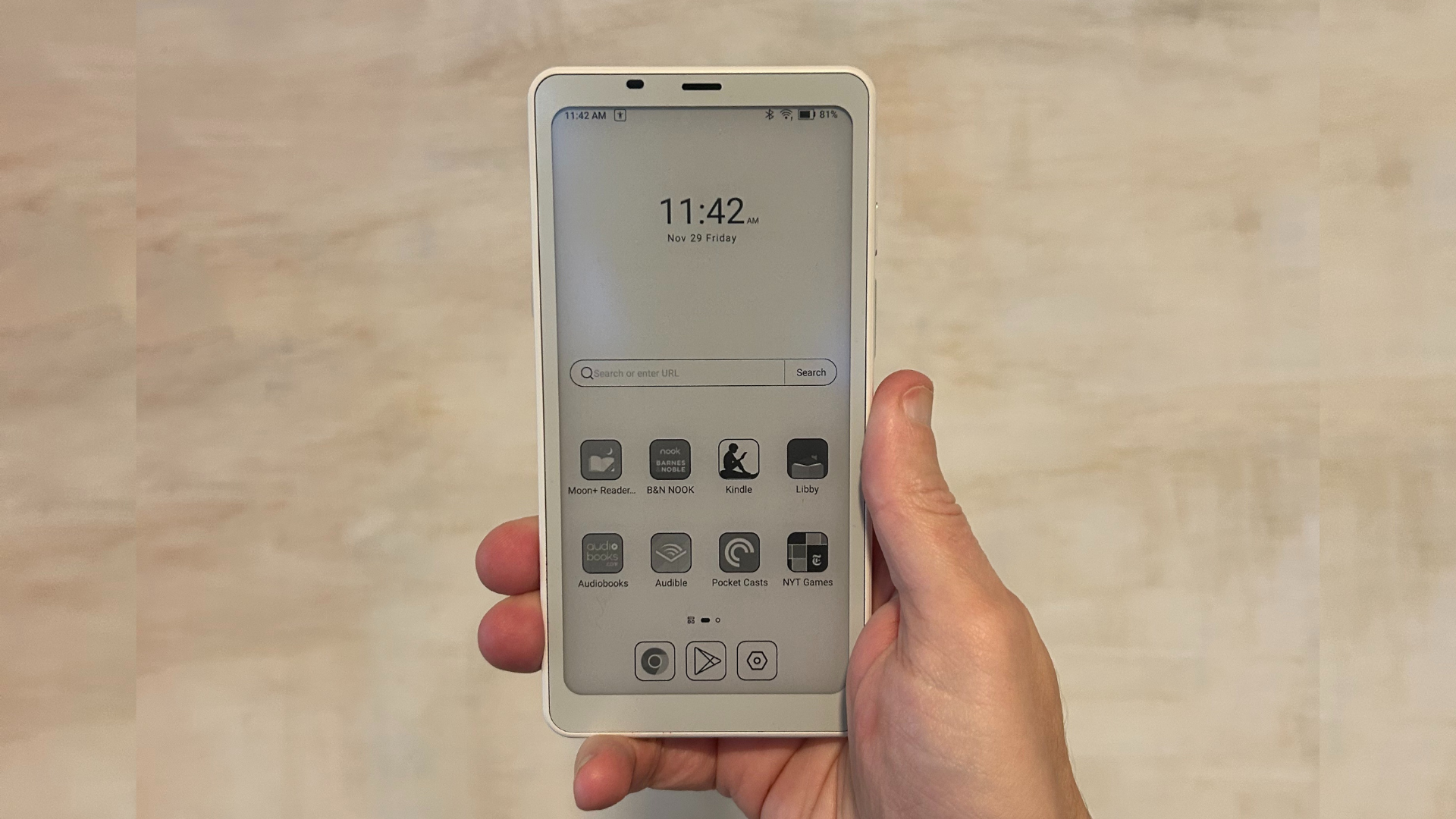
When I first reviewed the Boox Palma e-reader, I called it the ideal solution to your doomscrolling habit—a device as portable and pocketable as a phone, with an adaptable Android operating system that allows you to run any apps you want, but with an e-ink screen that is both easier on the eyes and not nearly as stimulating to stare at as your smartphone’s LED display. Weirdly, by looking like a smartphone but feeling just a little bit worse to use (complimentary), this little device helped me smash my 2025 reading goal in fewer than six months.

But doomscrolling isn’t a mobile-only problem (at least, not for me)—it’s just as easy to get sucked into the latest political outrage when I’m scrolling Bluesky on my laptop via my web browser, never mind that I’m supposed to be writing. So I decided to take a cue from the Boox fans on Reddit and explore transforming my Palma into an on-the-go productivity device: a coffee shop-friendly word processor that wouldn’t leave me pretending to work while I was really scrolling social media or wandering down another Wiki-hole.

To put it to the test, I decided I would write up my findings on the Palma itself—yes, I wrote this entire article on an e-reader.

How to turn your Boox Palma (or other Android e-reader) into a mini-word processor

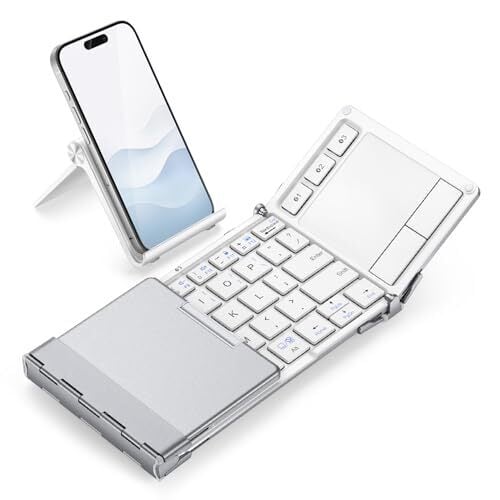
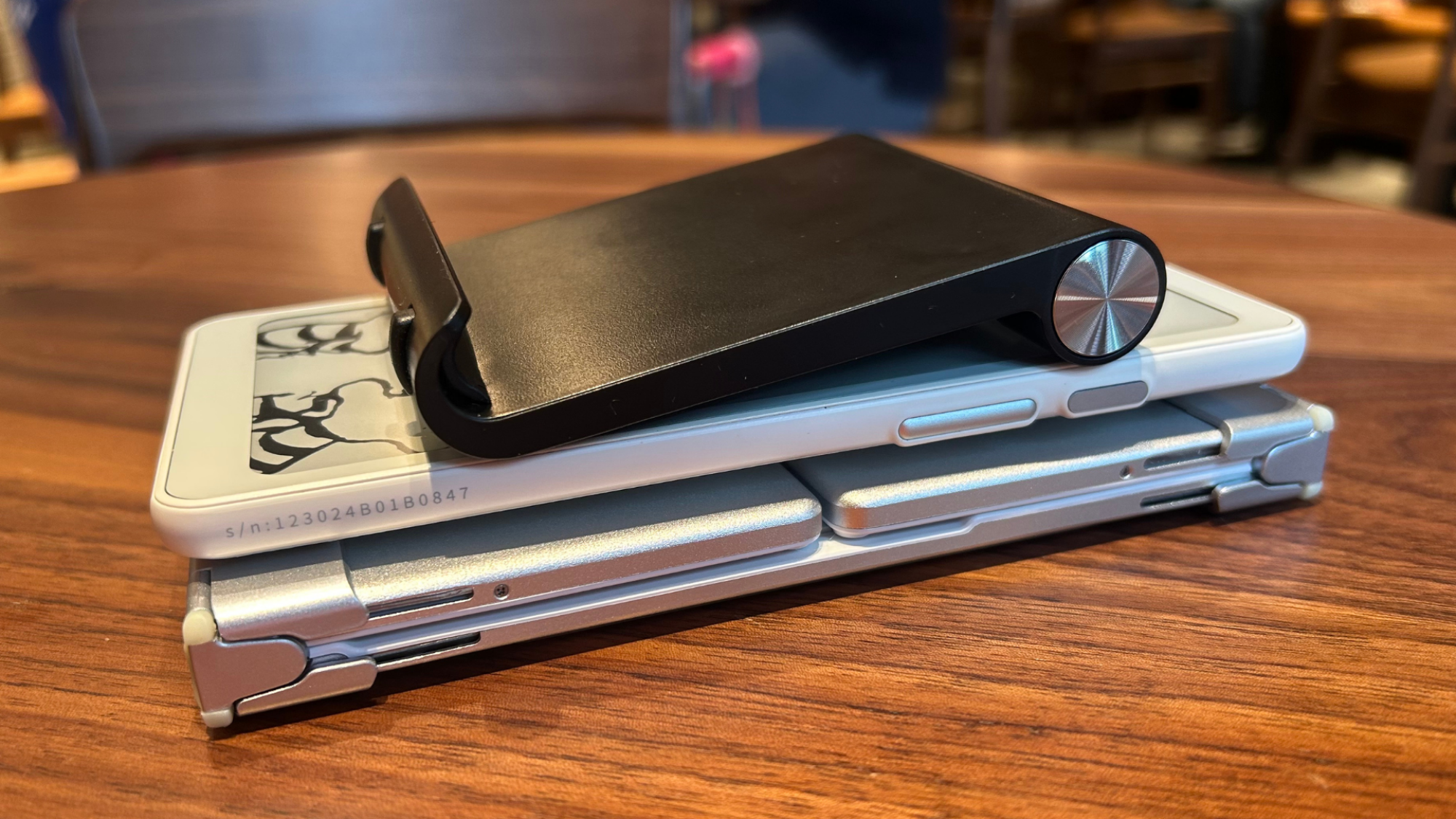
Because the Palma runs on an open version of Android, using it as a replacement for your laptop is as simple as connecting a Bluetooth keyboard. (While the Palma is my favorite e-reader, you can use a similar setup on any open Android e-ink device—not just those from Boox, like the Note Air 4C and Note Max, but also from competitors like Bigme and Hisense.) In the interest of keeping my setup as svelte and portable as possible, I opted for the iClever BK08, a slim foldable that, when stored, is roughly the size and thickness of the Palma itself. It even has a trackpad and comes with a little cloth carrying case that has enough room to fit my favorite little e-reader. (Annoyingly, it does not fit the little foldable stand that comes with the keyboard.)

The Boox Palma, the iClever folding Bluetooth keyboard (folded up) and a small phone stand in a stack showing the similar thicknesses of each

Credit: Joel Cunningham

Getting it set up was simply a matter of enabling Bluetooth on my Palma, putting the keyboard in pairing mode, and opening up Google Docs. (Well, and also spending five minutes looking for the setting to disable the onscreen keyboard when a physical keyboard is attached.)

To do this on the Palma, you’ll need to go into the system-level Settings app, scroll to More Settings, then tap Language and Input. Tap Current and select ONYX Keyboard as your default. Next, connect the keyboard via Bluetooth, open your Google Doc, and tap on the screen to bring up the onscreen keyboard. Tap the settings icon (it looks like a hexagon with a hole in the center) and then Switch Keyboard. Turn the slider next to Show virtual keyboard to off. (These directions will obviously vary if you’re using a different Android-based e-reader, like the Bigme B751C, which I have yet to test out.)

With this accomplished, you’re all set to begin treating your e-reader like a teeny tiny laptop.

What it’s like to write on the Boox Palma

If you’ve ever tried to search for something on your Kindle using the clunky onscreen keyboard, you might be expecting the experience of typing onto an e-ink screen would be a similar exercise in frustration. I had my own doubts, given I wasn’t thrilled with the performance of Boox’s own keyboard dock for the Note Max tablet I tested last year. But the iClever keyboard impressed me–the build quality feels good, it’s small but not unreasonably so for shorter writing sessions, and it even has a small touch-sensitive trackpad that allowed me to click around within Google Docs (though to be honest, just using the touch screen is faster and easier).

Performance-wise, I noticed no significant delay between pressing the keys and the characters appearing on the screen. To be fair, this likely has less to do with the keyboard (which is a sturdy little device, and fun to fold and unfold, but likely any Bluetooth keyboard will perform similarly) and more to do with Boox’s speedy refresh modes, which do their darnedest to make the Palma’s e-ink screen as responsive as the LED on your smartphone. Do they get there? Kinda. Ish. If you put the Palma in “speed” mode, you can watch YouTube on the Palma and almost make out what’s happening onscreen. But typing is way less graphically intense, and as a word processor, this little e-reader is as speedy as you need it to be.

The setup is great for writing without distractions: No intrusive notifications, no new tabs to click away to just for a second. Depending on how you configure your settings, the smaller display can also mean you’ll only see a few lines of text at any given time, which can be a boon if you’re the kind of person who gets caught up in obsessive on-the-fly editing: You’ll be able to quickly get the words out, and leave the revisions for later, when you’re back in front of a “real” computer.

The biggest hiccup I experienced had nothing to do with the keyboard at all. For some reason, the Palma didn’t want to play nice with the free wifi at Starbucks. I could connect to it, but the popup menu where you agree to the terms of use kept crashing before I could enter my email address and click “agree.” One could argue this is a feature and not a bug—you can’t waste time online if you can’t get online—but I also wasn’t able to back up my writing to the cloud without connecting to my iPhone’s hotspot.

The bottom line

As fun and functional as I found this setup, I’m not suggesting you toss out your laptop in favor of an e-reader—full disclosure, I did not edit and insert the images into this review using the Palma, and I didn’t even bother trying to connect it to the Lifehacker CMS. But if you just want to be left alone with a blinking cursor, it’s kind of ideal. I wrote the preceding 1,000 words more or less in one go, without navigating away from Google Docs to check my email or respond to texts or a notification from Instagram, which is, er, not my usual workflow (no one tell my boss; I am very good at staying on task, I swear). 

OnePlus Pad 3 Taps Snapdragon 8 Elite To Challenge iPad And Android Tablets

OnePlus Pad 3 Taps Snapdragon 8 Elite To Challenge iPad And Android Tablets
OnePlus has thrown down the gauntlet, with the company’s Chief Marketing Officer boldly declaring its upcoming OnePlus Pad 3 will be the “best Android tablet of 2025.” This claim is being backed up by some tablet-killing features, such as Snapdragon 8 Elite power and productivity-focused Open Canvas triple-window multitasking and Remote Mac/iOS

France Barred Telegram Founder Pavel Durov From Traveling To US

French authorities have denied Telegram founder Pavel Durov’s request to travel to the U.S. for “negotiations with investment funds.” From a report: The Paris prosecutor’s office told POLITICO that it rendered its decision on May 12 “on the grounds that such a trip abroad did not appear imperative or justified.”

Durov was arrested in August 2024 at a French airport and has been under strict legal control since last September, when he was indicted on six charges related to illicit activity on the messaging app he operates. He is forbidden to leave France without authorization — which he obtained to travel to Dubai from March 15 to April 7, the prosecutor’s office said. Russian-born Durov is a citizen, among other countries, of France and the United Arab Emirates.


Read more of this story at Slashdot.

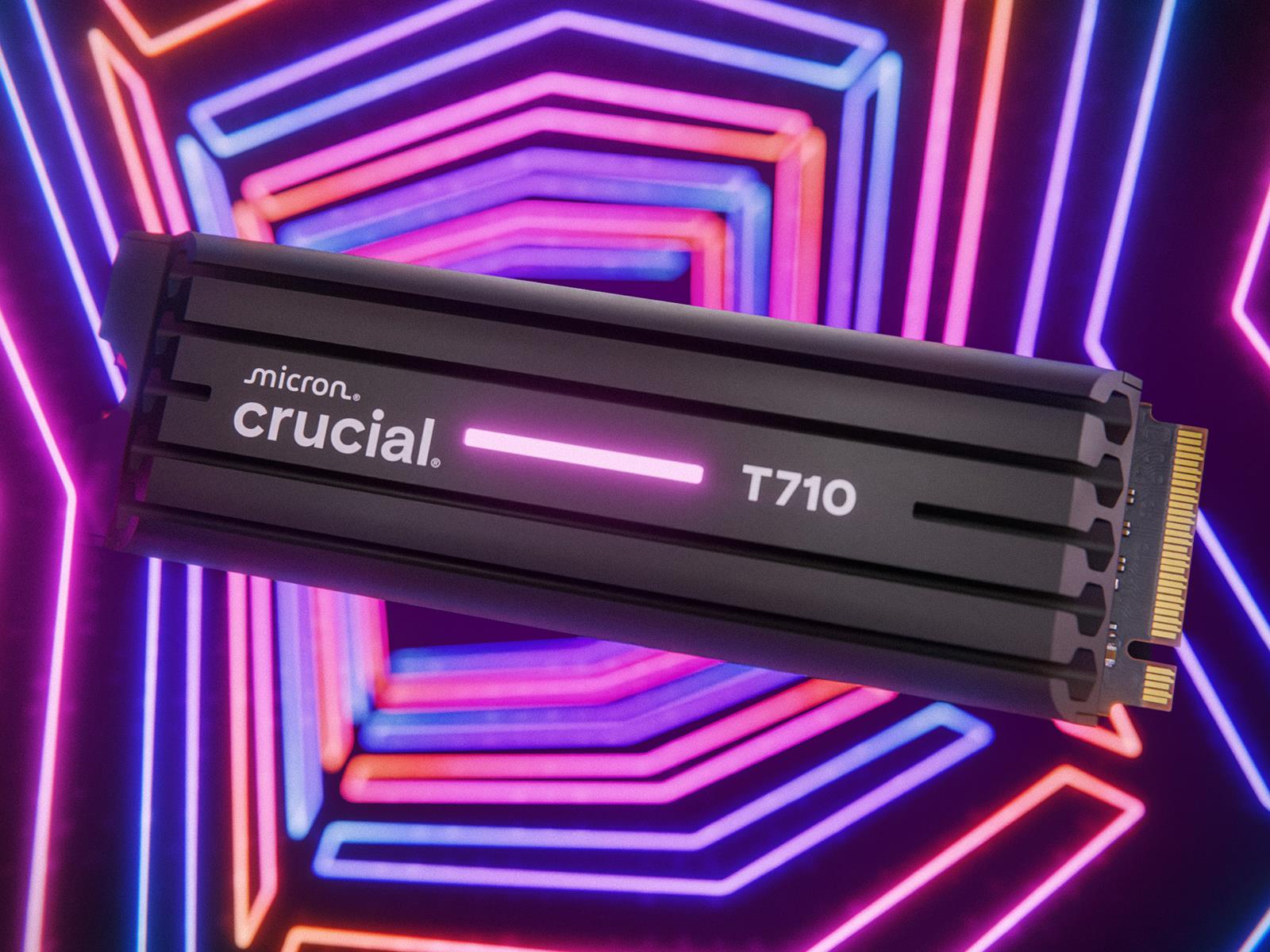
Crucial T710 PCIe 5 SSD Guns For Speed Win, X10 Portable SSD A Capacity King

Crucial T710 PCIe 5 SSD Guns For Speed Win, X10 Portable SSD A Capacity King
There’s been a lot of hardware (and software) announced at this year’s Computex event, not all of which is focused on AI and/or new graphics cards. Case in point, Micron expanded its solid state drive (SSD) storage family with a couple of additions to its Crucial brand, one of which takes aim at top speeds on the desktop (and in laptops),

Phison Debuts E28 SSD Controller With AI-Optimized Performance And Efficiency

Phison Debuts E28 SSD Controller With AI-Optimized Performance And Efficiency
Every hardware and software outfit right now is like, ‘You get AI, you get AI, you get AI…everyone gets AI!’. There are product segments where an AI infusion makes a lot of sense, though, and Phison sees fast solid state drive (SSD) storage as being one of them. As a result, it’s showcasing its AI-infused E28 SSD controller at Computex where

Apple’s WWDC 2025 keynote will be June 9 at 1PM ET

Apple has sent the invites for its in-person WWDC 2025 festivities on Monday, June 9, featuring the keynote session at 1PM ET/10AM PT. Attendees will be able to watch the keynote presentation at the company’s Cupertino campus, as well as meet with developers and participating in special activities. For everyone who hasn’t received an invite to Apple Park, the keynote will stream online. Developers can also participate in the rest of WWDC’s programming online for free.

We’ve already got pretty high hopes for the keynote announcements, with a lot of potential news expected about the upcoming redesign for iOS 19. We’ve heard that the operating system could have features including AI-powered battery management and improved public Wi-Fi sign ins, and our own Nathan Ingraham has penned an impassioned plea for a normal letter “a” in the Notes app. The full WWDC conference runs from June 9-13.

This article originally appeared on Engadget at https://www.engadget.com/big-tech/apples-wwdc-2025-keynote-will-be-june-9-at-1pm-et-150621700.html?src=rss

Why ‘Made in USA’ Tools Aren’t Tariff-Proof (and How to Save Money Anyway)

We may earn a commission from links on this page.

Tariffs on products being imported to the U.S., especially from China, Canada, and Mexico, have been a hotly debated topic in the news, and many people are predicting a hike in prices on things like tools and materials for DIY projects as the tariffs are enacted. There is a lot of conjecture about how to keep your home improvement and DIY projects prices down, with many commentators advising people to simply “buy American”—but that probably won’t work. The economy is increasingly international, with parts of almost everything made in the U.S. being imported from all over the world.

Most tools made in the U.S., even from brands that have a reputation for being American-made, are actually “made in the USA from globally sourced parts,” meaning that at least some of the components of these tools are made elsewhere. A few exceptions to this rule exist, like Estwing hammers and hatchets, and Channellock, which makes a large selection of tools mostly in the U.S. from U.S.-sourced materials and parts. But most tools are affected at some point along the supply chain by tariffs on imported materials and parts.

Because of an overall increase in the cost of manufacturing due to tariffs on things like fuel and electricity, as well as materials and parts, and a decrease in demand for American products abroad, manufacturing in the U.S. has slowed significantly over the last few months. As a result of this lull in activity and the lack of international demand for American goods, prices on tools made in the U.S. aren’t likely to be much cheaper than imported products. Whether companies are battling higher costs, lower demand for their products, or both, their prices won’t be going down as compared to other products as long as their business operates in the global economy. Here’s what you can do if the prices get too high.

Buy used tools

Don’t get me wrong: Estwing still makes my favorite hammer, and Klein still makes my favorite tool bag right here in the U.S., and I would never advise people not to buy these things; ultimately, the reason I like them isn’t because of tariffs but because they’re well-made and they last a long time. But if you want to save money in the economic storm caused by tariffs, consider buying used. Buying good-quality used tools is a better bet than buying low-quality new tools—they will likely last longer. For more information on how to identify quality used tools, read my article on buying tools from estate sales.

Repair broken tools instead of buying new ones

While parts might be more expensive because of tariffs, you can likely still save some money by fixing power tools when they break rather than replacing them. Sharpening saw blades for a table saw can range from $15 to about $50 per blade, which is much cheaper than replacing them, especially for specialty blades. If you have a tool with a power cord that has become worn, you can get a replacement cord for between $10 and $40, depending on the length and gauge. Even if you don’t feel comfortable replacing the cord yourself, the cost of having the repair done is likely still cheaper than buying a new drill press or bench sander.

Join a makerspace

You might be able to find a makerspace locally at a school, community center, or one that’s run as its own business. Depending on the size and scope of the space, membership can cost anywhere from $10/month to $200/month and includes access to on-site tools for a variety of DIY projects. Some of these communal shops also have tools you can check out and take home. While the price of membership for some of these spaces can seem expensive, it’s still likely cheaper than the cost of buying all the tools you would have access to, especially if you consider the cost of maintenance and electricity for some of the larger ones, like table saws.

Rent your tools

While renting smaller power tools like drills and drivers might not be worth it—the minimum rental on those is around $27—larger tools like power washers, floor sanders, and tillers can be rented for between $80 and $90 per day. This is a significant savings on buying a large tool like this, but make sure to check your rental contract to see what’s included. Sometimes you’ll be responsible for providing sanding discs and other needed accessories for the rented tool. Auto repair stores like Autozone also sometimes have tools to loan out for a deposit, as long as you return the tools within the 90-day loan period. If you have a DIY project that only requires the use of a particular tool for a short period of time, this type of rental or loan can result in significant savings.

Where to borrow tools

If you want to avoid tariffs altogether, you can try borrowing tools through a local tool library or neighborhood swap group. This is by far the most tariff-resistant way to get your DIY projects done on a budget—and build community while you work. Tool libraries can often be a resource for more than just tools—they often host classes and repair workshops, too, making them a perfect place to start if you’re a DIY beginner or you just want to make some DIY friends.

Red Hat Enterprise Linux 10 released

Red Hat has announced
the release of Red Hat Enterprise Linux (RHEL) 10. A blog post
accompanying the release provides details on some of the more notable
features, such as encrypted DNS, a developer preview of RHEL 10
for RISC-V,
and image
mode
for RHEL using bootc.

Image mode for RHEL lets you deploy your OS as a bootc image to your
hardware, virtual machine or cloud, and then layer your app on top of
it. That’s a far less complex operation than traditional packaged
deployments, and it gives developers and image maintainers a common
experience and total control over their environment.

RHEL 10 includes the 6.12.0 kernel, GCC 14.2, GNU
Binutils 2.41, GNU C Library (glibc) 2.39, Python 3.12,
Perl 5.40, and more. See the release
notes
for a full list of changes. LWN covered
CentOS Stream 10 in December, which provided an early look
at what would be in the RHEL 10 release.

Chicago Sun-Times prints summer reading list full of fake books

On Sunday, the Chicago Sun-Times published an advertorial summer reading list containing at least 10 fake books attributed to real authors, according to multiple reports on social media. The newspaper’s uncredited “Summer reading list for 2025” supplement recommended titles including “Tidewater Dreams” by Isabel Allende and “The Last Algorithm” by Andy Weir—books that don’t exist and were created out of thin air by an AI system.

The creator of the list, Marco Buscaglia, confirmed to 404 Media that he used AI to generate the content. “I do use AI for background at times but always check out the material first. This time, I did not and I can’t believe I missed it because it’s so obvious. No excuses,” Buscaglia said. “On me 100 percent and I’m completely embarrassed.”

A check by Ars Technica shows that only five of the fifteen recommended books in the list actually exist, with the remainder being fabricated titles falsely attributed to well-known authors. AI assistants such as ChatGPT are well-known for creating plausible-sounding errors known as confabulations, especially when lacking detailed information on a particular topic. The problem affects everything from AI search results to lawyers citing fake cases.

Read full article

Comments

Intel Explores Sale of Networking and Edge Unit

An anonymous reader shares a report: Intel has considered divesting its network and edge businesses as the chipmaker looks to shave off parts of the company its new chief executive does not see as crucial, three sources familiar with the matter said.

Talks about the potential sale of the group, once called NEX in Intel’s financial results, are a part of CEO Lip-Bu Tan’s strategy to focus its tens of thousands of employees on areas in which it has historically thrived: PC and data center chips.


Read more of this story at Slashdot.

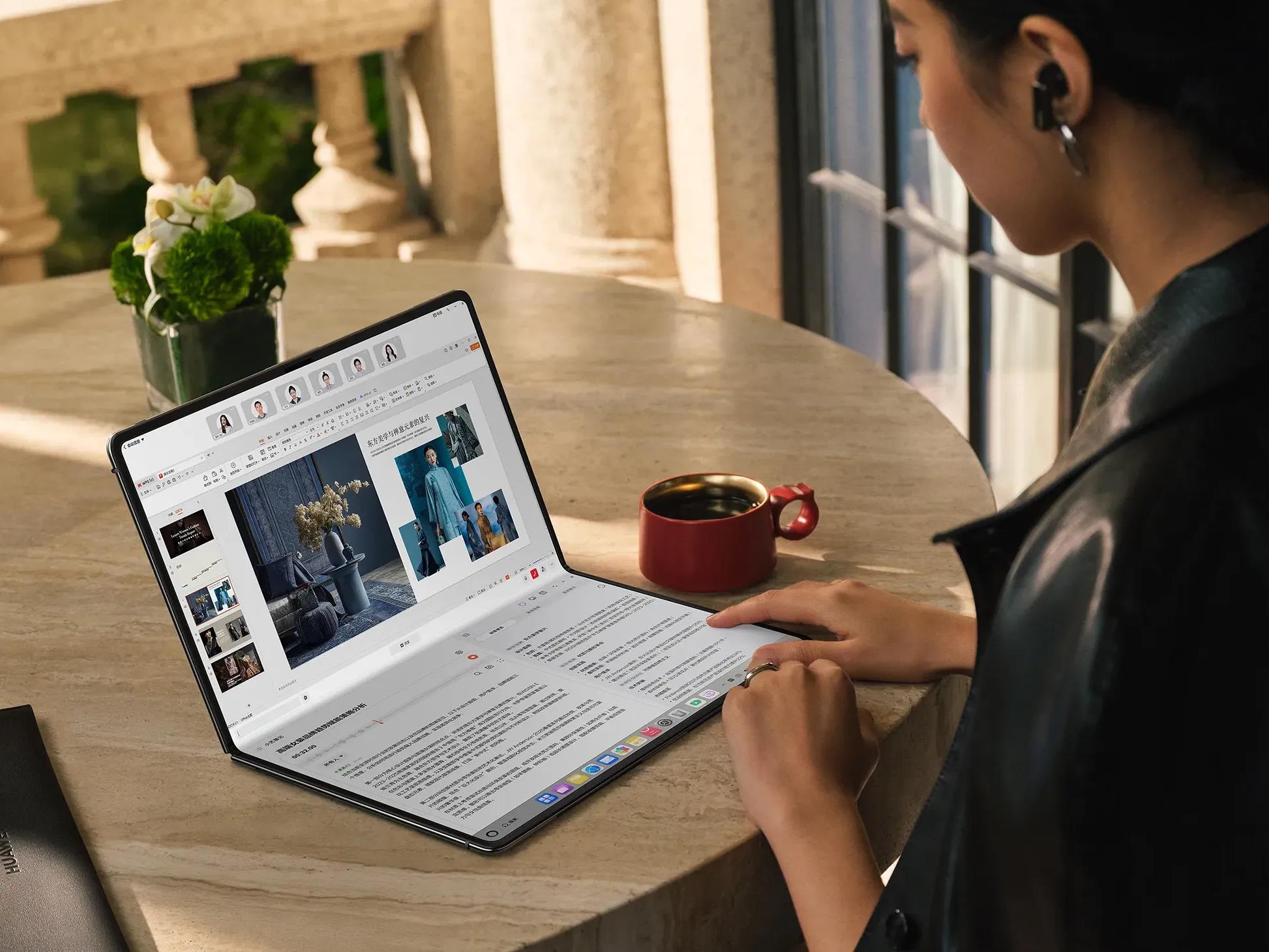
Forget Foldable iPad, Huawei MateBook Fold Is A Slick Folding Laptop That’s All Screen

Forget Foldable iPad, Huawei MateBook Fold Is A Slick Folding Laptop That's All Screen
Just as Samsung and Apple are duking it out with skinny phones, Huawei steps in and says, “Hold my beer” while showing off its new MateBook Fold, a foldable-screen laptop that, when unfolded, is thinner than your average phone. The party trick is an 18-inch foldable display, which makes the device either an all-screen laptop or folding tablet—you

You Can Get This M1 MacBook Air in Gold Finish on Sale for $500 Right Now

We may earn a commission from links on this page. Deal pricing and availability subject to change after time of publication.

If you’ve been waiting for a chance to grab a MacBook without wrecking your budget, this refurbished 2020 M1 Apple MacBook Air deal is worth your time. It’s currently on sale for $499.99 on StackSocial, which is a huge drop from its original $1,499.99 price. Since it’s a Grade “A” refurbished unit, it should arrive looking almost brand new, with little to no visible wear. You’re getting the 13.3-inch model in the Gold finish, with 8GB of RAM and a 256GB SSD—pretty much the combo most people need for everyday work, casual creative projects, and lighter multitasking.

The M1 chip is really what keeps this 2020 model relevant. Even though it’s not the latest, it still handles tasks like browsing, document editing, and basic video or photo editing without breaking a sweat. Its battery life also holds up well, with about 15 to 18 hours on a single charge, depending on your usage. The fanless design means it’s whisper-quiet even when you have a dozen tabs open or you’re running a marathon Zoom call. However, storage might feel a little tight if you’re into heavy media projects or like to hoard large files, and the 8GB RAM could start to show its limits if you run dozens of apps at once.

One thing worth keeping in mind is that the port situation is basic—just two Thunderbolt 3 (USB-C) ports and a headphone jack. You’ll probably need a dongle or hub if you regularly plug in USB-A accessories or an SD card. But in return, you get that lightweight, durable aluminum body, a crisp Retina display, and the Magic Keyboard. If you’re not chasing after the latest M3 or M4 upgrades and just want a solid MacBook for everyday tasks, this refurbished MacBook Air is hard to beat at this price. And for those who care about looks, the Gold finish definitely stands out without being too flashy.

Universal releases one last Jurassic World Rebirth trailer

Scarlett Johansson and Mahershala Ali star in Jurassic World Rebirth.

Jurassic World Rebirth is coming to theaters for the Fourth of July weekend, and Universal Pictures has released one final trailer to whet audience appetites for the film.

As previously reported, this is the fourth installment in the Jurassic World series and seventh film overall in the franchise spawned by 1993’s Jurassic Park. This time around, Scarlett Johansson and Mahershala Ali step into the leading roles since the film is meant to be a fresh start for the franchise—although it does feature a return to the original research facility. Gareth Edwards—who directed 2014’s Godzilla—signed on to direct a script penned by David Koepp, who wrote the scripts for Jurassic Park and The Lost World (1997).

Per the official premise:

Read full article

Comments

Intel Core Ultra 7 265K Plummets To $269 Plus A Killer LG OLED Monitor Deal

Intel Core Ultra 7 265K Plummets To $269 Plus A Killer LG OLED Monitor Deal
In case you missed it, Intel recently announced a surprise round of price cuts to two of its Arrow Lake processors, including the Core Ultra 7 265K and Core Ultra 7 265KF, slashing $100 off the suggested retail price of both chips. That knocked them down to a few bucks below $300, though both are discounted even further on Amazon right now.

Fan Favorite Noctua Teases Its First PSU And Liquid Cooler, Is A GPU Next?

Fan Favorite Noctua Teases Its First PSU And Liquid Cooler, Is A GPU Next?
Noctua has a large fan base of enthusiasts who adore cooling solutions, and they’re about to see even more products from the company. Famous for its high-quality fans and air coolers, it’s now branching out into other component categories to continue its excellence. Noctua has posted a teaser image for Computex 2025, which appears to show

Amazon Music gets AI-powered search results in new beta

Amazon is updating Amazon Music with a a new “AI-powered search experience” that should make it easier to discover music based on the albums and artists you’re already looking for. The company says the new beta feature “includes results for many of your favorite artists today,” which is to say, not everyone, but it’ll continue to expand to include more over time.

A traditional search uses a search term — an artist’s name, a song or an album title — and tries to pull up results that are as close to whatever you entered as possible. You’ll still be able to make those kinds of searches in Amazon Music, but now under a new “Explore” tab in the iOS Amazon Music app, you’ll also be able to see new AI-powered recommendations. These include “curated music collections,” an easy jumping-off-point for creating an AI-generated playlists and more. 

AI-powered search results in Amazon Music.
Amazon

Amazon suggests these results will vary depending on what you search you do. Looking up Bad Bunny’s “Debí Tirar Más Fotos” will show the album, but also “influential artists who influenced his sound” and other musicians he’s collaborated with, the company says. A search for BLACKPINK, meanwhile, would highlight the K-pop group’s early hits before surfacing solo work from members like Lisa or Jennie. It all sounds like a more flexible and expansive version of the X-Ray feature Amazon includes in Prime Video, which provides things like actors’ names, trivia and related movies and TV shows with a button press.

This new search experience was built using Amazon Bedrock, Amazon’s cloud service for hosting AI models. It’s one of several ways the company is trying to incorporate more AI features into its products. Earlier this year, Amazon started rolling out Alexa+, a version of the popular voice assistant rebuilt around generative AI, to select Echo devices.

AI search in Amazon Music is available today on iOS for a select number of Amazon Music Unlimited subscribers in the US. If you’re not included in this beta, you could be included in future tests.

This article originally appeared on Engadget at https://www.engadget.com/apps/amazon-music-gets-ai-powered-search-results-in-new-beta-140055428.html?src=rss

The first Marshall soundbar is the $1,000 Heston 120 with Dolby Atmos

When a company enters a new product category, it might as well swing for the fences. That’s exactly what Marshall is doing with its first soundbar. The Heston 120 is a $1,000 Dolby Atmos and DTS-X living room speaker, equipped with 11 drivers to power that spatial audio. Like the company’s headphones and speakers, there’s plenty of the iconic guitar amplifier aesthetic to go around. 

Inside, two subwoofers, two mid-range units, two tweeters and five full-range drivers produce the Heston 120’s sound. There are also 11 Class D amplifiers (two 50W and nine 30W) inside and the soundbar has a total power output of 150 watts. Bluetooth (5.3) and Wi-Fi are also onboard, which means AirPlay 2, Google Cast, Spotify Connect and Tidal Connect are all available. For wired connectivity, there are two HDMI 2.1 ports (1 eARC) for your TV and other home theater gear, plus an RCA input allows you to hook up a turntable or other audio devices. 

Marshall's Heston 120 soundbar has controls similar to its guitar amps.
Marshall

The Heston 120 takes design cues from Marshall’s line of guitar amps. This has been the case for the company’s headphones, earbuds and speakers, and it will continue with soundbars. To that end, there’s a mix of leather and metal, complete with the trademark gold script logo. There are also tactile controls you typically don’t see on a soundbar, like the gold knobs and preset buttons akin to those that adorn an amplifier. 

This soundbar doesn’t come with a subwoofer, but Marshall says a standalone option is on the way. What’s more, that Heston Sub 200 and a smaller Heston 60 are both due to arrive “at a later date.” Lots of companies are bundling at least a sub with their high-end soundbars, so it’s disappointing that Marshall didn’t do the same. I look forward to getting a review unit to see if the company’s promise of “bass rumbling from below like never before” from the soundbar itself hold true. 

The Heston 120 will be available for purchase from Marshall’s website on June 3.

This article originally appeared on Engadget at https://www.engadget.com/audio/speakers/the-first-marshall-soundbar-is-the-1000-heston-120-with-dolby-atmos-140041873.html?src=rss