Zwift Virtual Shifting Support Announced for All Interactive Direct-Drive Elite Trainers

Today, Elite announced a firmware update unlocking Zwift virtual shifting across their entire range of interactive direct-drive trainers, including older model versions no longer in production. With this update, the list of Elite trainers with virtual shifting support now includes:

Updating Your Firmware

If you own one of the trainers above, you can now upgrade its firmware via Elite’s Upgrado app in order to receive virtual shifting capabilities.

For the Justo 2 and Avanti, which have built-in Wi-Fi, the upgrade will happen automatically.

Virtual Shifter Options (Play/Click/Ride)
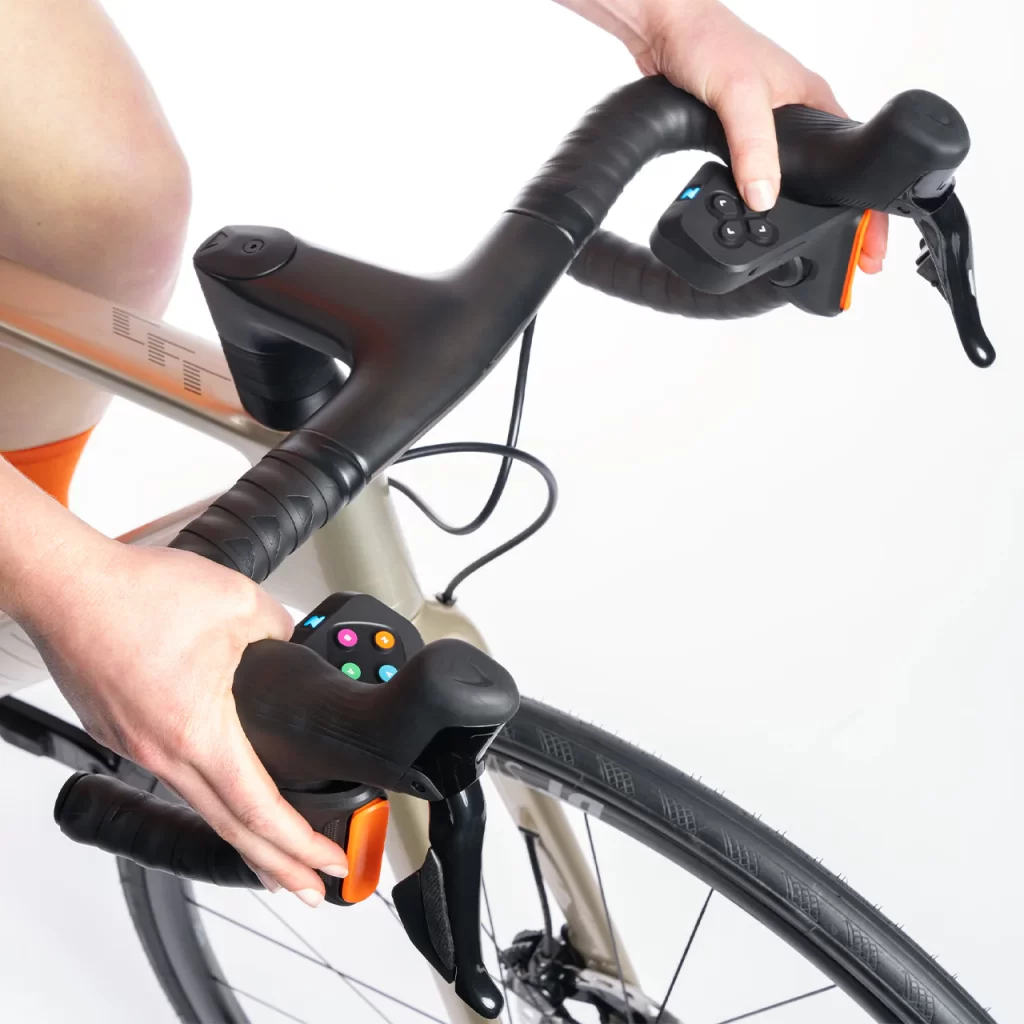
Play controllers
Click controller

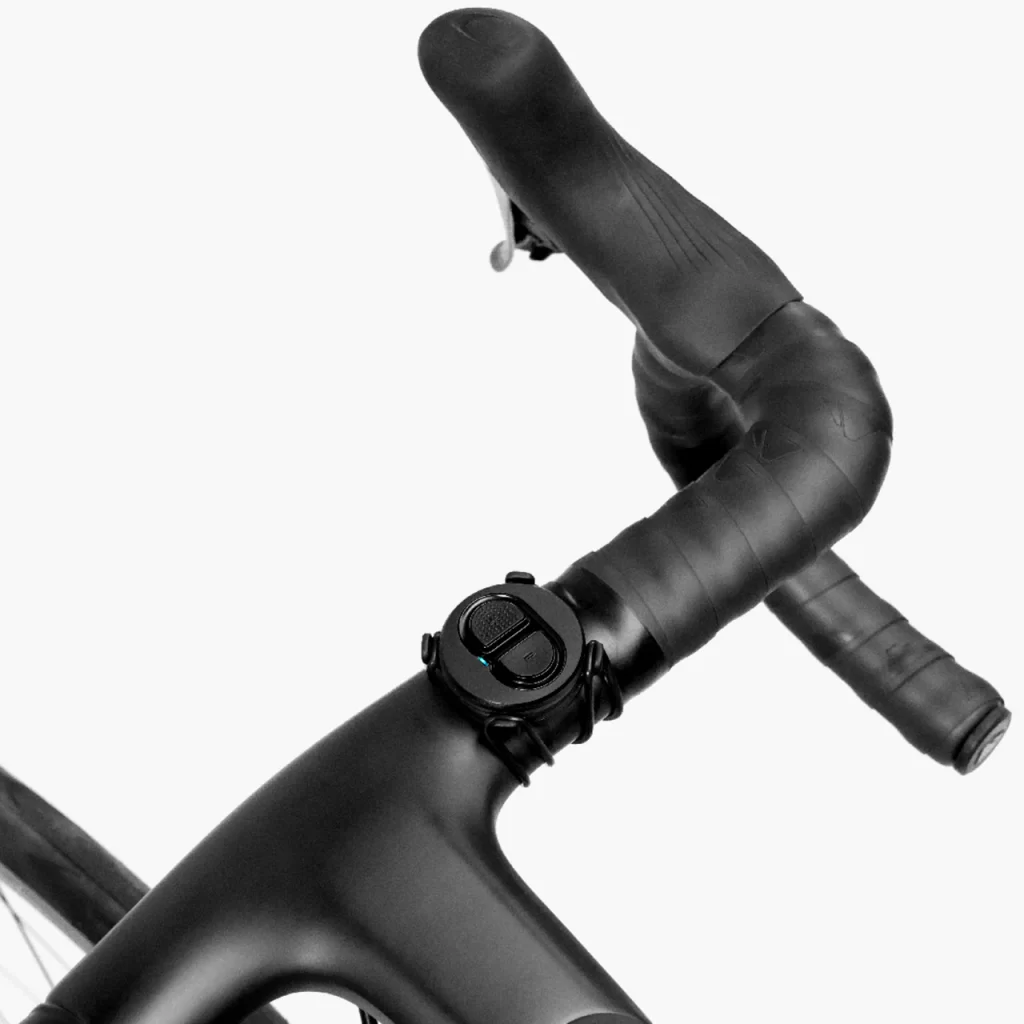
To use Zwift’s virtual shifting, you don’t just need a compatible trainer – you also need shifters! While Zwift (unfortunately) doesn’t sell the simple Click shifter as a standalone item, there are three options currently in stock at the Zwift shop:

RidePlayClick
Virtual Shifting✅✅✅
Steering + Braking✅✅❌
Powerup Trigger✅✅❌
Ride On Bomb button✅✅❌
Game Navigation buttons✅✅❌
Drop bar compatible✅✅✅
Flat bar compatible❌❌✅
TT bar compatible❌❌✅
Sequential Shifting✅✅✅
SRAM-Style Shifting✅✅✅
Shimano-Style Shifting✅❌❌
Cog Included✅❌✅
Power SourceUSB RechargeableUSB RechargeableCoin cell (CR2032)
Battery Life~20 hours~20 hours>100 hours
BLE Connections*121
Price$1300 (frame + trainer) or $800 (frame only)$80US$80US

Elite tells us Zwifters can use code ELITEZCOG2024 for a €20 discount on the Cog & Click Upgrade pack.

To Cog, or Not To Cog?

You don’t need the Zwift Cog installed on your trainer for virtual shifting to work – your current cassette will work just fine. But some riders may prefer to use the Cog so it’s easier to swap between different bikes on the trainer.

Related: All About Zwift Cog: Versions, Installation, and More

A Very Strong Move from Elite

To say this is a big move from Elite would be an understatement. With industry leader Wahoo only supporting virtual shifting on their newest trainers (plus the KICKR Core), and Garmin/Tacx not supporting it at all (yet), Elite’s move to support it on all of their trainers (including versions that are several years old and not even in production anymore) should earn them a lot of goodwill with existing customers.

We all love it when new capabilities are added to existing hardware. And we really don’t like being forced to purchase new hardware to access new capabilities, when it appears as if our current hardware could do the job just fine with a quick firmware update.

I don’t have a legacy Elite trainer in-house on which to test virtual shifting, but if it works as well as it’s been working on the Direto XR, then this is a move that will earn Elite plenty of points with current customers. Bravo!

Questions or Comments?

Have you tried virtual shifting on an Elite trainer? Share your experience below! Share below!

Google Brings AI-Powered Live Translation To Meet

Google is adding AI-powered live translation to Meet, enabling participants to converse in their native languages while the system automatically translates in real time with the speaker’s original vocal characteristics intact. Initially launching with English-Spanish translation this week, the technology processes speech with minimal delay, preserving tone, cadence, and expressions — creating an effect similar to professional dubbing but with the speaker’s own voice, the company announced at its developer conference Tuesday.

In some testings, WSJ found occasional limitations: initial sentences sometimes appear garbled before smoothing out, context-dependent words like “match” might translate imperfectly (rendered as “fight” in Spanish), and the slight delay can create confusing crosstalk with multiple participants. Google plans to extend support to Italian, German, and Portuguese in the coming weeks. The feature is rolling out to Google AI Pro and Ultra subscribers now, with enterprise availability planned later this year. The company says that no meeting data is stored when translation is active, and conversation audio isn’t used to train AI models.


Read more of this story at Slashdot.

Motorola’s New Budget Smartwatch Launches This Week

We may earn a commission from links on this page.

Motorola is set to release its latest wearable, the Moto Watch Fit, on May 22 with a price tag of $199 in the U.S. ($249 in Canada). The new smartwatch, which was initially unveiled alongside updated Razr flip phones last month, will be available through Motorola’s official website at launch, with availability expanding to Amazon and Best Buy in the coming weeks.

What to know about the Moto Watch Fit

Unlike most Android smartwatches on the market, the Moto Watch Fit runs on a proprietary operating system rather than Google’s Wear OS. While this might raise some concerns for potential buyers wary of an untested system, there are a few features that could sway you in its direction.

Design

The Moto Watch Fit features a sleek design with a 1.9-inch OLED display housed in an aluminum frame. In terms of durability, the watch has 5ATM water resistance and IP68 ratings—meaning it should hold up for swimming and other water-based activities. At just 25 grams, the Moto Watch Fit offers a lightweight design that won’t weigh you down during workouts or daily wear. (For comparison, most versions of the Apple Watch Series 10 sit around 30 grams).

Impressive battery life

Where Motorola claims the watch truly stands out is its battery life. It says users can expect up to 16 days of use on a single charge and under normal conditions. However, something like constant GPS usage would naturally drain your battery much faster. However, the company promises a quick 5-minute charge can provides a full day of usage.

The Watch Fit focuses on delivering reliable fitness tracking, making it best for someone prioritizing battery life and comfort over extensive app ecosystems.

Limited smart features

On that note, it looks like the Moto Watch Fit does not support third-party apps and lacks smart assistant functionality. While this may be a dealbreaker users who want the full smartwatch experience, it’s likely these limitations contribute to the device’s extended battery life, not to mention it’s price point—at under $200, it’s one of the more affordable smartwatches. For context, the most popular versions of Galaxy, Google Pixel, or Apple watches will typically cost at least $299.

So, if you’re looking for heart rate monitoring, GPS tracking, and basic smartwatch functions, and you’re tired of power-hungry options on the market that struggle to last even a week between charges, the Moto Watch Fit could be the right fit for you.

MSI Claw A8 Handheld Goes Ryzen For The First Time, Rocks 24GB Of RAM

MSI Claw A8 Handheld Goes Ryzen For The First Time, Rocks 24GB Of RAM
Have you read our review of the MSI Claw 8 AI+? If you haven’t, please do! We were quite fond of the machine and had a lot of nice things to say about it, although one of our complaints was about the aesthetics; the odd beige color that MSI chose for the system’s handgrips gave it a very unusual vibe. Well, MSI’s fixing that with a new version

Google’s new filmmaking tool Flow adds editing tools and some consistency to AI-generated video

At I/O today, Google pitched creators on a new app for “AI filmmaking”: Flow. Combining all of Google’s recent announcements and developments across AI-powered services, including Veo (video), Imagen (images) and Gemini, the company bills Flow as a storytelling aid ‘built with creatives.” If it sounds familiar, this is the advanced version of VideoFX, previously a Google Labs experiment.

It says it’s aimed at helping storytellers to explore ideas and create clips and scenes, almost like storyboards and sketches in motion. Google’s generally impressive Veo 2 model seems to form the core of Flow, able to extend footage and create video that “excel(s) at physics and realism”, although I’m not sure many agree with that..

You can use Gemini’s natural language skills to construct and tweak the video output, and creatives can pull in their own assets or create things with Imagen through simple text input. What’s notable is the ability to integrate your creations and scenes into different clips and scenes with consistency. While the early demo footage we saw was impressive, it still had a not-so-faint AI-slop aroma.

There are further film-making tools, too. Flow will also feature direct control over the movement of your ‘camera’, and even choose camera angles. You can also edit and extend shots, adding different transitions between AI-generated videos. Creating video with Veo is often a piecemeal process, but Flow will have its own asset management system to organize assets and even your prompts. These richer controls and editing abilities could make for more compelling creations in time. Let’s not forget: It’s been less than a year since that very weird Toys R’Us ad.

Google buddied up with several notable filmmakers to attempt to legitimize collaborate on these still-early steps into AI video creation, including Dave Clark, Henry Daubrez and Junie Lau. It says it offered creatives early access to the tools, and folded in their insights and feedback into what is now called Flow.

Flow is now available to AI Pro and AI Ultra subscribers in the US, and will roll out to other countries soon. Pro users will get Flow tools outlined so far and 100 generations each month. With the Ultra sub, you’ll get unlimited generation and early access to Veo 3, with native audio generation.

This article originally appeared on Engadget at https://www.engadget.com/ai/google-filmmaking-tool-flow-ai-generated-video-175212520.html?src=rss

[$] An update on continuous testing of BPF kernel patches

Ihor Solodrai has been working on the BPF subsystem’s continuous-integration
(CI) testing for the last six months. At the 2025 Linux Storage, Filesystem,
Memory-Management, and BPF Summit, he remotely shared
an update on his work, and solicited feedback on how the tests could be further
improved. Much of the work he’s done has been specific to the BPF subsystem, but
some is more generic and could potentially be of use to other subsystems. He
also shared some general lessons learned from working on the BPF CI tests.

Google Chrome previews feature to instantly change compromised passwords

Google Chrome has announced a feature for its built-in password manager that it claims will let users instantly change passwords compromised in data breaches. Google Password Manager already alerts you when your credentials have appeared in a data breach, and partially automates the process of changing your password, but — until now — you still had to go through the steps manually for each of your online accounts.

The Automated Password Change feature, announced at today’s Google I/O keynote presentation, goes a step farther. It will apparently let you generate a new password and substitute it for the old one with a single click, without ever seeing a “Create New Password” page. The feature only works on participating websites. Google is currently in talks with developers to expand the range of sites that will support one-click password changes, with plans for a full rollout later in 2025.

Automated Password Change was discovered as far back as February by eagle-eyed software diggers, but was limited to the early developer-only builds made public as Chrome Canary. At that time, it was located in the “AI Innovations” settings menu, though it’s not yet clear how AI figures in the process.

This feature builds on password health functionality that Google has been steadily incorporating into Chrome since it released the Password Checkup extension in 2019, recognizing that compromised credentials are a common vector for cybercrime. People often reuse the same short, memorable password on multiple websites. If hackers steal a credential database from one weakly defended site and dump it on the dark web, other cybercriminals can try the leaked usernames and passwords on more secure sites — like online banks and cash apps — until one fits.

The best way to prevent this is to use a password manager to generate and save a different strong password for every account you make, even ones you don’t think will handle sensitive information. If you haven’t done this, the second-best prevention is to monitor password data breaches and immediately change any password that gets leaked. If Automated Password Change works as advertised, it’ll make that crisis response a lot more convenient.

This article originally appeared on Engadget at https://www.engadget.com/cybersecurity/google-chrome-previews-feature-to-instantly-change-compromised-passwords-175051933.html?src=rss

AI Mode is now rolling out to everyone in the US

Google has begun rolling out AI Mode to every Search user in the US. The company announced the expansion during its I/O 2025 conference. Google first began previewing AI Mode with testers in its Labs program at the start of March. Since then, it has been gradually rolling out the feature to more people, including in recent weeks regular Search users.

For the uninitiated, AI Mode is a chatbot built directly into Google Search. It lives in a separate tab, and was designed by the company to tackle more complicated queries than people have historically used its search engine to answer. For instance, you can use AI Mode to generate a comparison between different fitness trackers. Before today, the chatbot was powered by Gemini 2.0. Now it’s running a custom version of Gemini 2.5. What’s more, Google plans to bring many of AI Mode’s capabilities to other parts of the Search experience.

Developing…

This article originally appeared on Engadget at https://www.engadget.com/ai/ai-mode-is-now-rolling-out-to-everyone-in-the-us-174917212.html?src=rss

Google is bringing Gemini to Chrome so it can answer questions about your open tabs

Google’s Chrome browser is the latest major product from the company to get its own built-in Gemini features. Today at Google I/O, the company detailed its plans to bring its AI assistant to Chrome.

While Gemini can already distill information from websites, having the assistant baked into Chrome allows it to provide insights and answer questions about your open tabs without ever having to move to a different window or application. Instead, Gemini lives in a new menu at the top of your browser window as well as in the taskbar.

The company envisions its assistant as being able to help out with tasks that may normally require switching between several open tabs or scrolling around to different parts of a web page. For example, Google showed off how Gemini can give advice about potential modifications for dietary restrictions while looking at a recipe blog. Gemini in the browser could also come in handy while shopping as it can answer specific questions about products or even summarize reviews.

To start, Gemini will only be able to answer queries about a single open tab, but the company plans to add multi-tab capabilities in a future update. This would allow the assistant to synthesize info across multiple open tabs and answer even more complex questions. Gemini in Chrome will also have Gemini Live capabilities, for anyone more comfortable conversing with the assistant using their voice. The company also teased a future update that will allow Gemini to actually scroll through web pages on your behalf, like asking it to jump to a specific step in a recipe. (Notably, all this is separate from Google’s other web-browsing AI, Project Mariner, which is still a research prototype.)

Gemini is starting to roll out to Chrome users on Mac and Windows today, beginning with AI Pro and AI Ultra subscribers in the United States. The company hasn’t indicated whether it plans to bring similar features to Chromebooks or Chrome’s mobile app.

This article originally appeared on Engadget at https://www.engadget.com/ai/google-is-bringing-gemini-to-chrome-so-it-can-answer-questions-about-your-open-tabs-174903787.html?src=rss

Google’s AI Mode lets you virtually try clothes on by uploading a single photo

As part of its announcements for I/O 2025 today, Google shared details on some new features that would make shopping in AI Mode more novel. It’s describing the three new tools as being part of its new shopping experience in AI Mode, and they cover the discovery, trying on and checkout parts of the process. These will be available “in the coming months” for online shoppers in the US. 

The first update is when you’re looking for a specific thing to buy. The examples Google shared were searches for travel bags or a rug that matches the other furniture in a room. By combining Gemini’s reasoning capabilities with its shopping graph database of products, Google AI will determine from your query that you’d like lots of pictures to look at and pull up a new image-laden panel. 

It’s somewhat reminiscent of Image search results, except these photos take up the right half or so of the page and are laid out vertically in four columns, according to the screenshots the company shared. Of course, some of the best spots in this grid can be paid for by companies looking for better placement for their products. 

As you continue to refine your search results with Gemini, the “new righthand panel dynamically updates with relevant products and images,” the company said. If you specify that the travel bag you’re looking for should withstand a trip to Oregon, for example, the AI can prioritize weatherproof products and show you those images in this panel. 

The second, and more intriguing part of the shopping updates in AI Mode, is a change coming to the company’s virtual try-on tool. Since its launch in 2023, this feature has gotten more sophisticated, letting you pick specific models that most closely match your body type and then virtually reimagine the outfit you’ve found on them. At Google I/O today, the company shared that it will soon allow users to upload a single picture of themselves and its new image generation model that has been designed for fashion will overlay articles of clothing on your AI-imagined self. 

According to Google, the custom image generation model “understands the human body and nuances of clothing — like how different materials fold, stretch and drape on different bodies.” It added that the software will “preserve these subtleties when applied to poses in your photos.” The company said this is “the first of its kind working at this scale, allowing shoppers to try on billions of items of clothing from our Shopping Graph.” The Try It On with an upload of your photo is rolling out in Search Labs in the US today, and when you’re testing it, you’ll need to look for the “try it on” icon on compatible product listings.

Three screenshots showing the price tracking and buy for me features coming to AI Mode. The left shows a Track Price button at the bottom right of a panel about a travel duffle bag; the middle shows an alert in the Android notifications shade saying
Google

Finally, when you’ve found what you want, you might not want to purchase it immediately. Many of us know the feeling of having online shopping carts packed and ready for the next upcoming sale (Memorial Day in the US is this weekend, by the way). Google’s new “agentic checkout feature” can keep an eye on price drops on your behalf. You’ll soon see a “track price” option on product listings similar to those already available on Google Flights, and after selecting it you’ll be able to set your desired price, size, color and other options. The tracker will alert you when those parameters are met, and if you’re ready to hand over your money, the agentic checkout tool can also simplify that process if you tap “buy for me.”

According to Google, “behind the scenes, we’ll add the item to your cart on the merchant’s site and securely complete the checkout on your behalf with Google Pay.” The agentic checkout feature will be available “in the coming months” for product listings in the US. 

This article originally appeared on Engadget at https://www.engadget.com/ai/googles-ai-mode-lets-you-virtually-try-clothes-on-by-uploading-a-single-photo-174820693.html?src=rss

Google’s Veo 3 AI model can generate videos with sound

As part of this year’s announcements at its I/O developer conference, Google has revealed its latest media generation models. Most notable, perhaps, is the Veo 3, which is the first iteration of the model that can generate videos with sounds. It can, for instance, create a video of birds with an audio of their singing, or a city street with the sounds of traffic in the background. Google says Veo 3 also excels in real-world physics and in lip syncing. At the moment, the model is only available for Gemini Ultra subscribers in the US within the Gemini app and for enterprise users on Vertex AI. It’s also available in Flow, Google’s new AI filmmaking tool. 

Flow brings Veo, Imagen and Gemini together to create cinematic clips and scenes. Users can describe the final output they want in natural language, and Flow will go to work making it for them. The new tool will only be available to Google AI Pro and Ultra subscribers in the US for now, but Google says it will roll out to more countries soon. 

While the company has released a brand new video-generating model, it hasn’t abandoned Veo 2 just yet. Users will be able to give Veo 2 images of people, scenes, styles and objects to use as reference for their desired output in Flow. They’ll have access to camera controls that will allow them to rotate scenes and zoom into specific objects for Flow, as well. Plus, they’ll be able to broaden their frames from portrait to landscape if they want to and add or remove objects from their videos. 

Google has also introduced its latest image-generating model, Imagen 4, at the event. The company said Imagen 4 does fine details like intricate fabrics and animal fur with “remarkable clarity” and excels at generating both photorealistic and abstract images. It’s also significantly better at rendering typography than its predecessors and can create images in various aspect ratios with resolutions of up to 2K. Imagen 4 is now available via the Gemini app, Vertex AI and in Workspace apps, including Docs and Slides. Google said it’s also releasing a version of Imagen 4 that’s 10 times faster than Imagen 3 “soon.” 

Finally, to help people identify AI-generated content, which is becoming more and more difficult these days, Google has launched SynthID Detector. It’s a portal where users can upload a piece of media they think could be AI-generated, and Google will determine if it contains SynthID, its watermarking and identification tool for AI art. Google had open sourced its watermarking tool, but not all image generators use it, so the portal still won’t be able to identify all AI-generated images. 

This article originally appeared on Engadget at https://www.engadget.com/ai/googles-veo-3-ai-model-can-generate-videos-with-sound-174541183.html?src=rss

Google Search Live will let you ask questions about what your camera sees

One of the new AI features that Google has announced for Search at I/O 2025 will let you discuss what it’s seeing through your camera in real time. Google says more than 1.5 billion people use visual search on Google Lens, and it’s now taking the next step in multimodality by bringing Project Astra’s live capabilities into Search. With the new feature called Search Live, you can have a back-and-forth conversation with Search about what’s in front of you. For instance, you can simply point your camera at a difficult math problem and ask it to help you solve it or to explain a concept you’re having difficulty grasping. 

Search will also give you links to more resources you can explore. To be able to access Search Live, you’ll have to tap the Live icon in Google Lens or in AI Mode, which the company has just rolled out in the US after making it available to Labs users earlier this month. AI Mode is a new chatbot Google built directly into Search that can break down your query into subtopics so it can serve you more thorough results with “hyper-relevant content.” The new AI Mode tab will show up in Search and in the Google app in the coming weeks. 

AI Mode will be able to help you analyze and visualize numbers and data, as well, by generating interactive graphics for you. If you want to compare two different sports teams, for instance, Google will be able to generate a graph showing their performance using its own real-time sports information. The company will also be able to create real-time graphs for finance queries. 

Soon, AI Mode will be able to give you personalized responses based on your past activities. If you ask it where you can eat while visiting a specific city, for example, it can name restaurants with outdoor seating if you’ve booked an outdoor table in the past. It can also give you suggestions based on your hotel and flight bookings. In addition, AI Mode will come with a Shopping experience that will let you try on clothes virtually by uploading a photo of yourself. When you’re done, Google’s new checkout feature will be able to buy the clothes you want in your stead from their respective websites with Google Pay. 

This article originally appeared on Engadget at https://www.engadget.com/ai/google-search-live-will-let-you-ask-questions-about-what-your-camera-sees-174532593.html?src=rss

Google introduces the Deep Think reasoning model for Gemini 2.5 Pro and a better 2.5 Flash

Google has started testing a reasoning model called Deep Think for Gemini 2.5 Pro, the company has revealed at its I/O developer conference. According to DeepMind CEO Demis Hassabis, Gemini’s Deep Think uses “the latest cutting-edge research” that gives the model the capability to consider multiple hypotheses before responding to queries. Google says it got an “impressive score” when evaluated using questions from the 2025 United States of America Mathematical Olympiad competition. However, Google wants to take more time to conduct safety evaluations and get further input from safety experts before releasing it widely. That’s why it’s making Deep Think initially available to trusted testers via the Gemini API first in order to get their feedback first. 

The company has also introduced a better Gemini 2.5 Flash model, which is optimized for speed and efficiency. It’s now more efficient than before, uses fewer tokens and has scored higher in benchmarks for reasoning, multimodality, code and long context than its predecessor. It will be generally available in early June. For now, the improved Gemini 2.5 Flash is available as a preview via Google AI Studio for developers, via Vertex AI for enterprise customers and via the Gemini app for other users. 

While most of the efficiency gains covered on the I/O stage were focused on 2.5 Flash, Google did announce that it’s bringing the 2.5 Flash concept of “Thinking Budgets” to its more advanced 2.5 Pro model. This feature will let you balance tokens spent vs. accuracy and speed of output.

Separately, Google is bringing Project Mariner into the Gemini API and Vertex AI, as well. Project Mariner is Google’s Gemini-powered AI agents that can navigate pages on the web browser to complete tasks for users. The company will roll the agents out more broadly this summer so that developers can experiment with them. In addition, the company is releasing new previews for text-to-speech on both 2.5 Pro and 2.5 Flash models via the Gemini API, with support for two voices in 24 languages. 

This article originally appeared on Engadget at https://www.engadget.com/ai/google-introduces-the-deep-think-reasoning-model-for-gemini-25-pro-and-a-better-25-flash-174531020.html?src=rss

Project Astra, Google’s vision for a universal AI assistant, is pulling into focus

Last year at Google I/O, one of the most interesting demos was Project Astra, an early version of a multimodal AI that could recognize your surroundings in real-time and answer questions about them conversationally. While the demo offered a glimpse into Google’s plans for more powerful AI assistants, the company was careful to note that what we saw was a “research preview.”

One year later though, Google is laying out its vision for Project Astra to one day power a version of Gemini that can act as a “universal AI assistant.” And Project Astra has gotten some important upgrades to help the company accomplish this. Google has been working on upgrading Astra’s memory — the version we saw last year could only “remember” for 30 seconds at a time — and added computer control so Astra can now take on more complex tasks.

In its latest video showcasing Astra, Google shows the assistant browsing the web and pulling out specific pieces of information necessary to complete a task (in this example, fixing a mountain bike). Astra is also able to look through past emails to find specific specs of the bike in question and call a local bike shop to inquire about a replacement part.

Eventually, according to DeepMind’s Demis Hassabis, Astra’s advancements will show up in Gemini. “Our ultimate vision is to transform the Gemini app into a universal AI assistant that will perform everyday tasks for us, take care of our mundane admin, surface delightful new recommendations, making us more productive and enriching our lives,” Hassabis writes in a blog post. “This starts with the capabilities we first explored last year in our research prototype Project Astra, such as video understanding, screen sharing and memory.”

Some of that work is already evident in Gemini Live, which recently got some multimodal capabilities of its own. But, as I noted last year, Project Astra gets even more interesting in the context of smart glasses — an idea Google briefly teased in its I/O video last year. That vision appears to be inching closer to reality, with Hassabis noting that Google is working on bringing Project Astra abilities to “new form factors, like glasses.” There’s no clear timeframe on when any of this will be available, but given Google’s updates on Android XR elsewhere at I/O, we know the company has big plans for AI-powered smart glasses later this year.

This article originally appeared on Engadget at https://www.engadget.com/ai/project-astra-googles-vision-for-a-universal-ai-assistant-is-pulling-into-focus-174539875.html?src=rss

Google still doesn’t have much to show for Android XR

When Google unveiled Android XR last year, it seemed like a clear response to Apple’s Vision Pro: It was a plan for a true mixed reality platform that could easily hop between AR, VR and smart glasses like Meta’s Ray-Bans. At Google I/O 2025 today, Google announced the second developer preview for Android XR, and it also showed off a bit more about how it could work in headsets and smart glasses. It’ll likely be a while before we see Android XR devices in action, though, as Google also revealed Samsung’s Project Moohan headset will arrive later this year. Additionally, Xreal is also building Project Aura, a pair of tethered smart glasses powered by the platform.

Basically, there really isn’t much to get excited about just yet. It’s clear that Google is working hard to catch up with both Apple and Meta, which actually have XR products on the shelves already. Given that Google tends to kill its ambitious projects with a swiftness — just take a look at Google Glass, Cardboard and Daydream, which were all early stabs at AR and VR — it’s hard to put much faith in the future of Android XR. Is the availability of much better XR hardware enough to make the platform a success? At this point, it’s just too tough to tell.

For now, though, it looks like Google is aiming to deliver all of the features you’d expect with Android XR. Its second developer preview adds the ability to play 180-degree and 360-degree immersive videos, bring hand-tracking into apps and support dynamic refresh rates (which could seriously help battery life). As expected, Google is also making it easier to integrate its Gemini AI into Android XR apps, something the company promised when it first announced the platform last year.

Android XR
Google

In a series of pre-rendered videos, Google showed off the ideal ways to use Gemini in smart glasses and headsets. If your glasses have a built-in display (something Meta’s Ray-Bans don’t offer yet), you could see a small Google Map to give you directions, message friends while you’re prepping dinner or take a picture while dancing with your partner at sunset (seriously). All I can say is: “Cool demo, bro.” Get back to us when this is all working in headsets and glasses we can actually wear.

This article originally appeared on Engadget at https://www.engadget.com/ar-vr/google-still-doesnt-have-much-to-show-for-android-xr-174529434.html?src=rss

Google’s new text-to-speech can switch languages on the fly

Google is enhancing Gemini’s text-to-speech (TTS). On Tuesday at Google I/O 2025, the company previewed a new TTS feature, built on native audio output, that can “converse in more expressive ways.”

Google’s Tulsee Doshi showed a quick demo of the Gemini 2.5 TTS models onstage in Mountain View. It showed an AI-powered voice that sounds more natural and less robotic, with subtler nuances.

The TTS can converse in over 24 languages, switching between them seamlessly. The demo showed the model beginning in English, shifting to Hindi, and then circling back to English. They all used the same voice, helping create the illusion that it’s the same “person.” The TTS can also switch to a whisper (which sounded a little creepy) on the fly.

The new text-to-speech is available starting today in the Gemini API. Also on Tuesday, the Gemini Live API will have a 2.5 Flash preview of native audio dialog.

This article originally appeared on Engadget at https://www.engadget.com/ai/googles-new-text-to-speech-can-switch-languages-on-the-fly-174528459.html?src=rss

Xreal’s Project Aura is the second official Android XR headset

Late last year Google announced its new extended reality ecosystem, Android XR, designed to go up against Meta Quest and Apple‘s Vision Pro. Along with that it introduced the first device, Samsung’s Project Moohan, a virtual reality-style headset. 

Now as part of Google I/O, Xreal has unveiled Project Aura, the second official Android XR device. Rather than being a full headset, it’s a pair of lightweight see-through “tethered” glasses powered by a Qualcomm Snapdragon processor. It incorporates Google’s Gemini AI and will deliver both optical see-through (OST) and virtual see-through (VST) cinematic experiences, according to Google and Xreal. 

The new XR glasses are a “call to action” for developers, the companies said. They invited that community to “begin envisioning new applications and use cases for this next generation of XR,” adding that developers already building for headsets on the platform will be able to easily bring their apps to Project Aura.

Xreal and Google didn’t release any other details. Previous Xreal headsets like the Air 2 Ultra offer 6DoF (six degree of freedom) tracking so you can physically walk around a virtual space, along with hand tracking for interacting with objects virtually. The fact that the glasses are tethered (despite having their own processor) means you’ll likely need to carry an Android device as well. 

Google’s past dalliances with VR and AR (Cardboard, Daydream and Google Glass) all finished in the Google Graveyard. However, the company recently said that the underlying technology is finally good enough to tap extended reality’s full potential. And while lightweight, see-through augmented reality glasses have never lived up to their potential, Xreal has perhaps made the best progress with models like the One Pro. Google and Xreal are set to reveal more information about Project Aura at Augmented World Expo (AWE) in June 2025. 

This article originally appeared on Engadget at https://www.engadget.com/ar-vr/xreals-project-aura-is-the-second-official-android-xr-headset-174526481.html?src=rss

1.5 billion people see Google’s AI Overviews each month

Google just touted some big numbers regarding its AI Overviews feature during its I/O conference. On the stage, company CEO Sundar Pichai said that the service has 1.5 billion monthly users. That’s around 18 percent of the total human population of planet Earth, give or take.

For the remaining 82 percent of humanity, AI Overviews are those little recaps that appear at the top of Google queries. These primarily appear when the search engine is asked a question, with the company saying they only show up for more complex questions, where the systems recognize that they’re helpful beyond what the rest of the results page offers.

A response about soundproofing.
Google

We asked the company what that 1.5 billion number actually means, being how the recaps spawn automatically. Google responded by saying the number is a measure of people who have seen AI Overviews in their results. It also noted that the overwhelming majority of these users engage with the service in some meaningful way. The company continued by saying that users are interacting with it, which leads them to “search more often.”

Google says that Overviews are driving a 10 percent increase in search engine usage, with regard to the types of queries that show AI-generated results. The biggest markets for this feature are the US and India. Back in October, Google pledged to bring the platform to 100 new countries and hoped to one-day reach one billion users per month. It looks like the company has sailed past that.

The company has also been busy bringing it to even more regions. All told, Overviews is available in more than 200 countries and in 40 languages. It’s even been testing a similar service for YouTube.

An incorrect response.
Engadget

Of course, this is AI. The Overviews feature may be inching toward omnipresence, but that doesn’t mean it’s always correct. The service has been known to make stuff up, get things wrong or just act plain goofy.

This article originally appeared on Engadget at https://www.engadget.com/ai/15-billion-people-see-googles-ai-overviews-each-month-174526822.html?src=rss

Personalized AI-powered Smart Replies are coming to Gmail

Like it or not, Google’s Gemini AI is worming its way into more of your Workspace apps. At I/O 2025, CEO Sundar Pichai announced that its upcoming Gmail app will have a new feature called Personalized Smart Replies. The idea is that with your permission, Gemini can examine your past emails and Google docs, then help you craft responses to personal- or business-oriented emails. 

In an example onstage at I/O, Pichai used the example of a friend taking a road trip through Colorado to Utah, a trip the friend knew Pichai had taken before. Gemini is able to look through all the notes in Drive, looking through email for related reservations and finding an itinerary in Google Docs. It’ll pull all that stuff together and then draft an email that matches the typical tone, style and even words that Pichai commonly uses. 

Google also wants to help you manage your emails better with a new Inbox cleanup feature. “Simply tell Gemini what you want to do (e.g., ‘delete all my unread emails from [a specific company] last year’) and watch as it helps you manage and declutter your inbox with a single click.” Another new feature is integrated fast appointment scheduling, letting you offer times for customers to make bookings directly from Gmail.

All these new features are coming to Google’s Workspace subscribers starting this summer. Though they may prove useful to many users, some have found Google’s addition of recent Gemini features to be intrusive and unwelcome. 

This article originally appeared on Engadget at https://www.engadget.com/apps/personalized-ai-powered-smart-replies-are-coming-to-gmail-172422777.html?src=rss

Zwift Racing League Showdown Announced: Signups Now Open

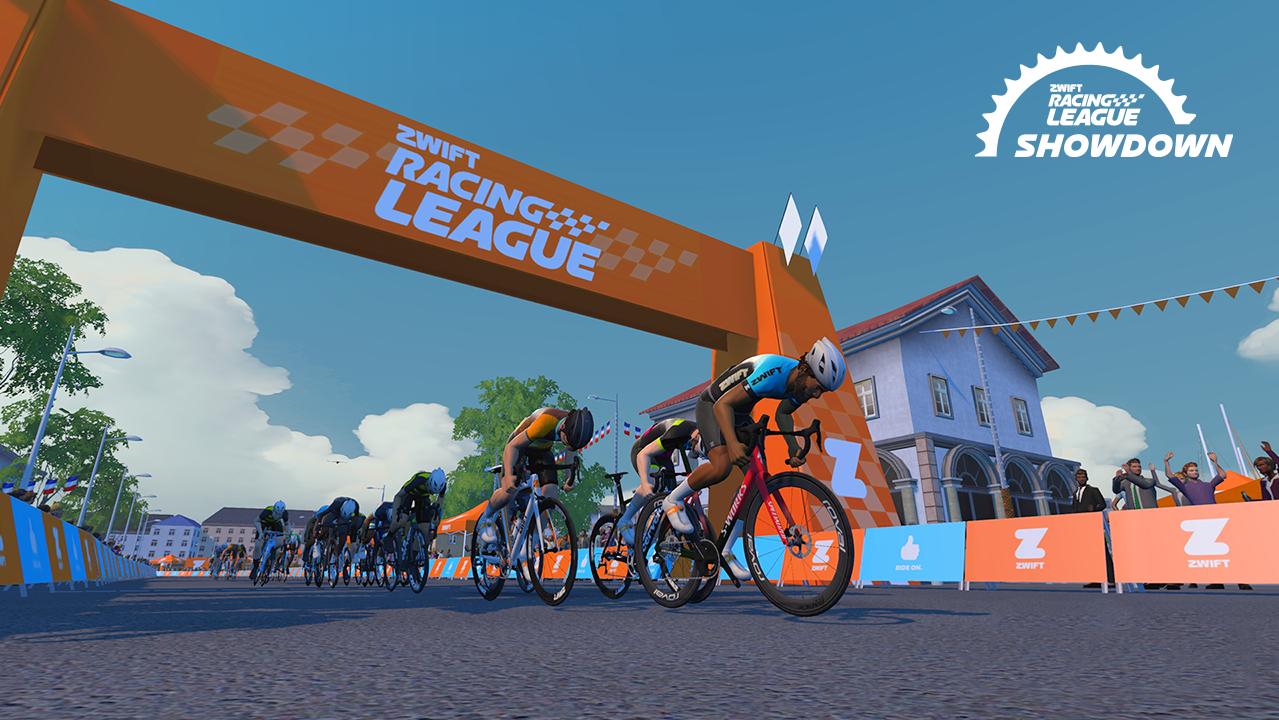
The folks at WTRL have announced the second annual “Zwift Racing League Showdown,” a four-week, multi-format team racing competition. Get all the details below.

A Mini ZRL… with Twists

The ZRL Showdown operates like a trimmed-down Zwift Racing League, with a shorter schedule (4 weeks/races) and smaller teams (max of 10 on your roster, with up to 4 racing each week) racing on Tuesdays.

But there are some twists, including a revised scoring system with more ways to earn points! (Learn more about the new scoring system below.)

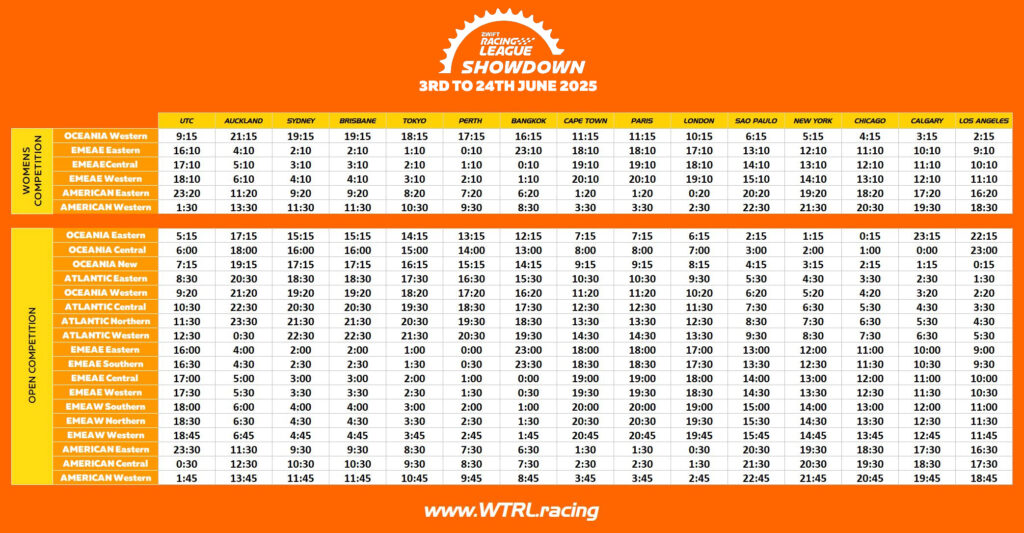
Like the regular-season ZRL, 40+ race times will be available, and your team must race at the same time each week. Both women-only and open races are available.

(The ZRL Summer Showdown is a standalone event, so results in this series will not affect the regular ZRL season.)

New Points System

The ZRL Showdown uses a revised points system that differs from last year’s Showdown and the most recent ZRL season. Here’s a summary of how this ZRL Showdown’s scoring will work (read the details on WTRL’s site):

  • TTT: your team’s time is taken from the 3rd rider across the line (not the 4th rider like ZRL).
  • Individual FAL: first across the line points are given to the first 40 riders (40 points for first place, down to 1 point for 40th place) for each designated FAL segment.
  • Team FAL: top 3 individual FAL scores per team are added together, then teams are ranked by these totals, with the 5 highest-ranked teams earning league points bonuses: 5 points for 1st place down to 1 point for 5th place. (Team FAL does not exist in ZRL.)
  • FTS: fastest through segment points are given to the 5 fastest riders through each designated FTS segment, with participants able to score multiple times if they clock more than 1 of the top 5 times. 1st place gets 10 points, 2nd place 8 points, down to 5th place getting 2 points.
  • FIN: finishing points are awarded based on finishing order and are scaled based on field size. First place receives finish points equal to the number of riders who started the race, 2nd place 1 less, etc.
  • PBP: podium bonus points (which don’t exist in ZRL) are given to 1st, 2nd, and 3rd place riders across the line.
    • Points Races: 5 rider points for 1st place, 3 points for 2nd place, 1 points for 3rd place.
    • Scratch Races: 10 rider points for 1st place, 6 points for 2nd place, 3 points for 3rd place.
  • League Points: once the race ends, the 1st place team earns points equivalent to the total number of teams starting the race. 2nd place earns one less, etc.

Race Schedule

  • June 3: Team Time Trial
  • June 10: Points Race (Hilly)
  • June 17: Scratch Race
  • June 24: Points Race (Flat)

Race Settings

A few notes about how these races are set up:

  • Bike upgrades are disabled/neutralised for ZRL races.
  • Steering and braking are disabled for ZRL races unless racing in a Steering-enabled League.
  • TT bikes offer draft during TTT events but are disabled for Points and Scratch races.
  • Rider flagging is disabled for ZRL races.

Registration + More Info

Registration opened May 15 at WTRL’s website and closes May 30.

Got questions? Visit WTRL’s ZRL Showdown page >