What’s New on Netflix in June 2025

The third and final season of dystopian survival series Squid Game—one of Netflix’s most-watched shows—is coming in June. The South Korean thriller picks up after last season’s cliffhanger, with Gi-hun (Player 456) at the center of the new game. The new season will be available on June 27.

Also on June’s lineup is the return of FUBAR (June 12), the action series starring Arnold Schwarzenegger and Monica Barbaro as a father and daughter who both work for the CIA. Carrie-Anne Moss joins the cast this season as a former East German spy.

On the documentary side, Netflix will stream Titan: The OceanGate Disaster (June 11) following its premiere at the Tribeca Festival just a few days earlier. The feature uses first-hand accounts of former OceanGate employees to create a portrait of CEO Stockton Rush and the history leading up to the submersible’s failure in 2023.

The platform will also drop three new installments of its anthology series Trainwreck, which covers major news events gone wrong. This month’s stories cover the deaths at 2021’s Astroworld music festival (The Astroworld Tragedy, June 10), the rise and fall of former Toronto mayor Rob Ford (Mayor of Mayhem, June 17), and the ill-fated “poop cruise” (Poop Cruise, June 24).

Sports docs this month include Power Moves with Shaquille O’Neal (June 4), a series that follows Shaq in his role as president of Reebok Basketball alongside Allen Iverson, and season two of AMERICA’S SWEETHEARTS: Dallas Cowboys Cheerleaders (June 18).

Netflix comedy specials in June include Justin Willman: Magic Lover (June 17) and Steph Tolev: Filth Queen (June 24).

Here’s everything coming to Netflix in June, and everything that’s leaving.

What’s coming to Netflix in June 2025

Available soon

Available June 1

  • The American

  • Barbarian

  • Bee Movie

  • The Birds

  • The Blues Brothers

  • The Devil’s Own

  • Dune (1984)

  • The Equalizer

  • Family Plot

  • Focus

  • Frenzy

  • The Great Outdoors

  • Hitchcock

  • Hop

  • The Legend of Zorro

  • The Man Who Knew Too Much

  • Neighbors

  • Now You See Me

  • Now You See Me 2

  • The Nutty Professor

  • Pokémon The Series: XY

  • Pokémon The Series: XY: XY: Kalos Quest

  • Pokémon The Series: XY: XYZ

  • Rear Window

  • The Theory of Everything

  • The Town

  • U-571

  • Us

  • Vertigo

Available June 3

Available June 4

Available June 5

Available June 6

Available June 7

  • Boys on the Side

  • Piece by Piece

Available June 9

Available June 10

Available June 11

Available June 12

  • The Fairly OddParents: A New Wish: Season 2

  • FUBAR: Season 2—Netflix Series

  • Plane

Available June 13

Available June 14

  • Grey’s Anatomy: Season 21

Available June 16

  • The Last Witch Hunter

Available June 17

Available June 18

Available June 19

Available June 20

Available June 22

  • The Intern

Available June 24

Available June 25

Available June 27

What’s leaving Netflix in June 2025

Leaving June 1

  • Batman Begins

  • Beginners

  • Burlesque

  • Closer

  • Cult of Chucky

  • Daddy Day Care

  • The Dark Knight

  • The Dark Knight Rises

  • Den of Thieves

  • From Prada to Nada

  • GoodFellas

  • Ma

  • Magic Mike XXL

  • Pride & Prejudice

  • Ted

  • Ted 2

  • Two Weeks Notice

Leaving June 11

  • Gran Turismo: Based on a True Story

  • Trap

Leaving June 14

  • Godzilla x Kong: The New Empire

Leaving June 16

  • The Equalizer: Seasons 1-3

  • Won’t You Be My Neighbor?

Leaving June 17

  • Carol

Leaving June 19

  • Migration

Leaving June 21

  • American Sniper

Leaving June 22

  • Brain on Fire

Leaving June 26

  • Ordinary People

Meta Targets More ‘Underperformers’ in Mid-Year Reviews

An anonymous reader shares a report: Meta is expanding the ranks of its lowest-rated employees in mid-year performance reviews, a move that could lead to more performance-based cuts. Meta is telling managers to put more employees in “Below Expectations”, the lowest performance bucket during this year’s mid-year performance reviews, according to a memo shared on Meta’s internal forum on May 14, which was viewed by Business Insider. For teams of 150 or more, Meta wants managers to put 15-20% of employees in the bottom bucket compared to 12-15% last year.

The expanded range includes employees who have already left the company as part of “non-regrettable attrition”, Meta’s term for staff considered non-critical to operations, including those who resigned or were dismissed for underperformance. The mid-year performance review process is “an opportunity to make exit decisions”, according to the memo. It added that “there will be no company-wide performance terminations, unlike earlier this year,” and leaders are expected to manage the performance of their reports.


Read more of this story at Slashdot.

Screw the Windows Search Bar, and Use Command Palette Instead

Mac users are spoiled when it comes to searching their computers. Macs have Spotlight search built-in, which they can use to open apps, search for files, perform calculations, and search the web. Windows has the Search Bar, but when you compare what they can do, it’s not exactly the same.

Now, though, there’s a new tool called Command Palette, and it’s a keyboard launcher designed specifically for developers and power users alike. It replaces a similar feature called PowerToys Run, and offers way more features, including the ability to run commands, search the web, search for files, and add custom bookmarks and global keyboard shortcuts.

How to install and enable Command Palette

Command Palette is part of PowerToys, which is a suite of powerful apps and utilities created by Microsoft itself. These are open source and are updated much faster than any built-in Windows feature. You can download and install PowerToys from the GitHub page, the Microsoft Store, or using Windows Package Manager.

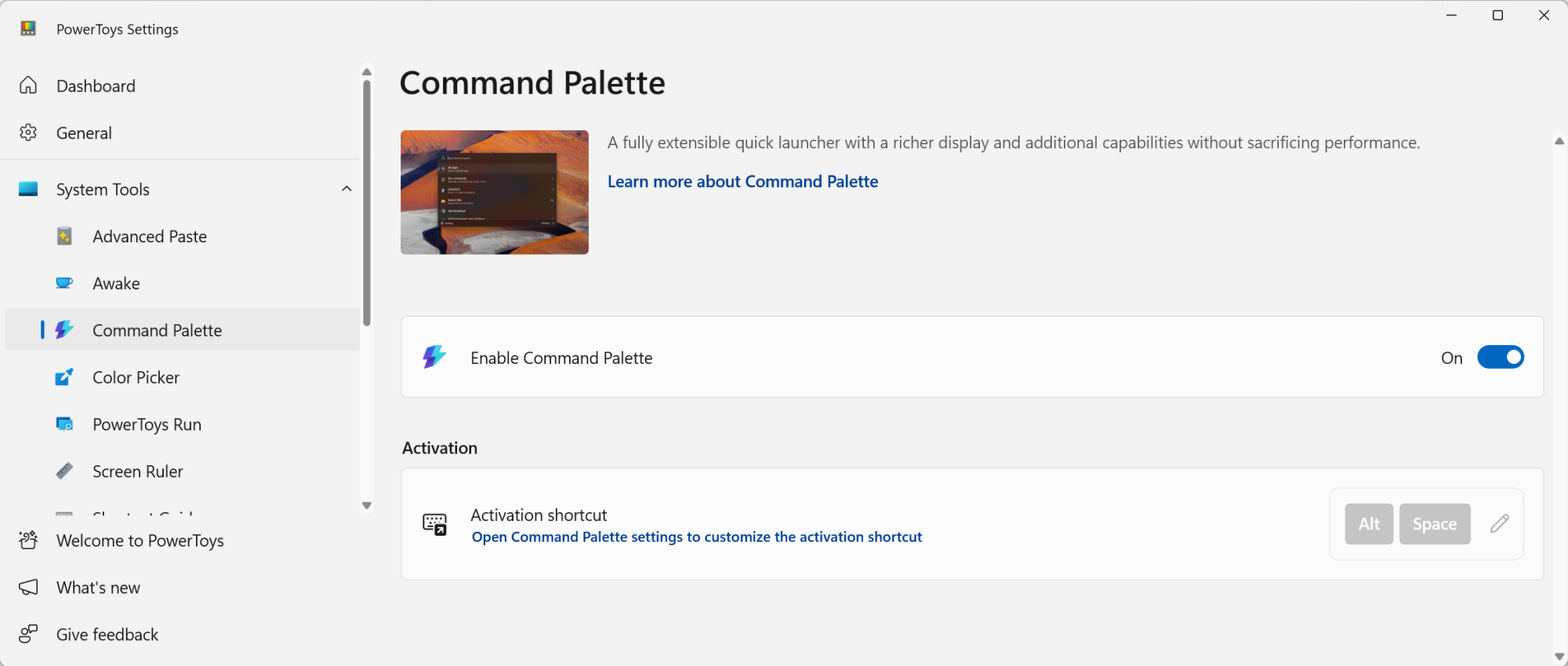
Once PowerToys is installed (or updated to the version 0.9 or higher), open the app and find the Command Palette option from the sidebar. If you don’t see the app window, right-click the PowerToys utility in the Windows taskbar and click Settings.

Enabling Command Palette from PowerToys.

Credit: Khamosh Pathak

From the Command Palette screen, make sure the extension is enabled. Here, you’ll see the default keyboard shortcut for Command Palette, which is Windows + Alt + Space, but you are free to change it to anything you want.

Customizing the Command Palette shortcut and other settings

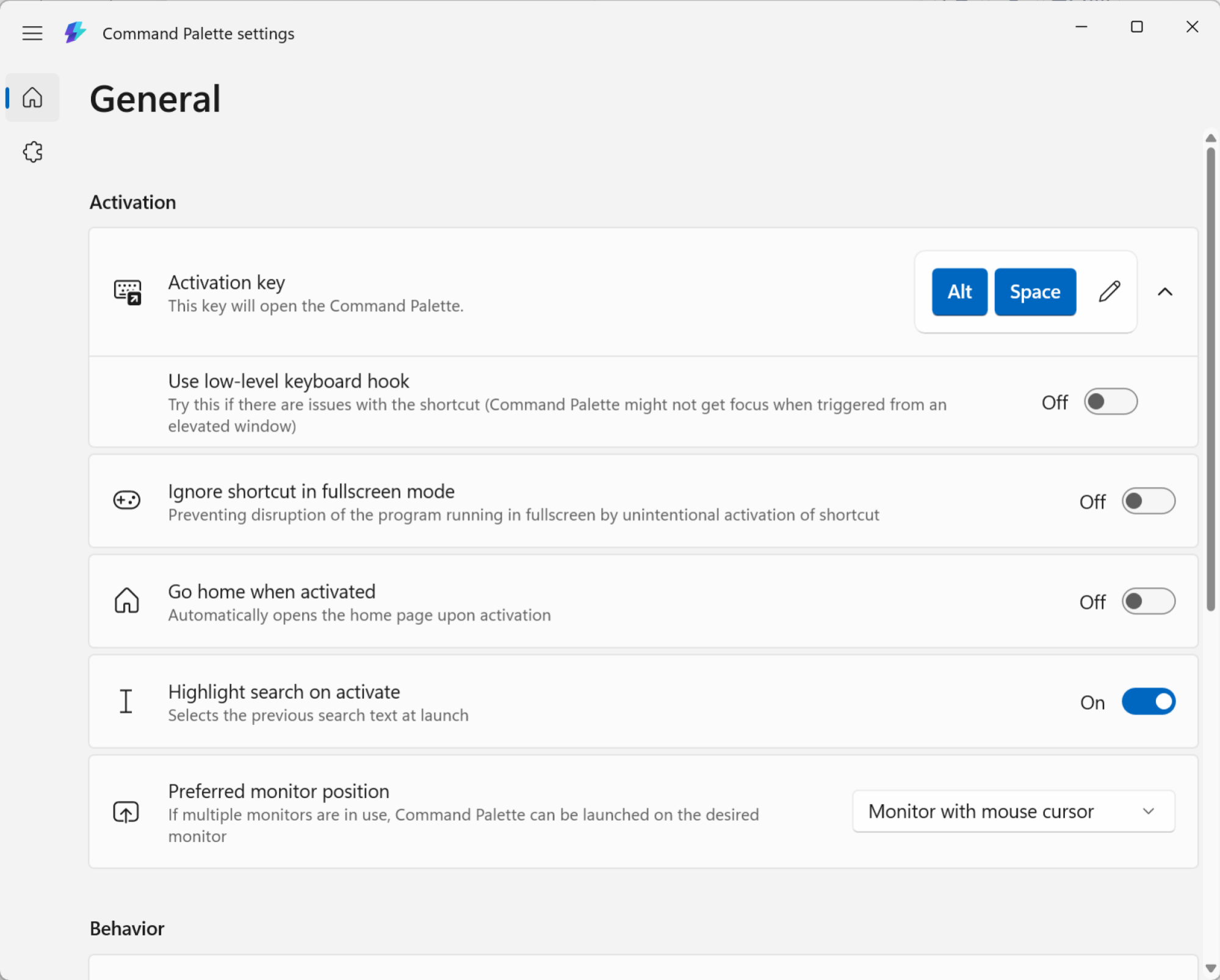
First, open Command Palette using the keyboard shortcut, and then click the Settings button in the bottom-right corner. From here, you can use the Activation key option to remap the keyboard shortcut to something simpler, like Alt + Space.

Command Palette Settings.

Credit: Khamosh Pathak

While you’re here, you can also customize the behavior of Command Palette. The features I find most useful is the ability to use Backspace to go back, but your mileage may vary.

Now, let’s see everything Command Palette can do.

System settings and file search

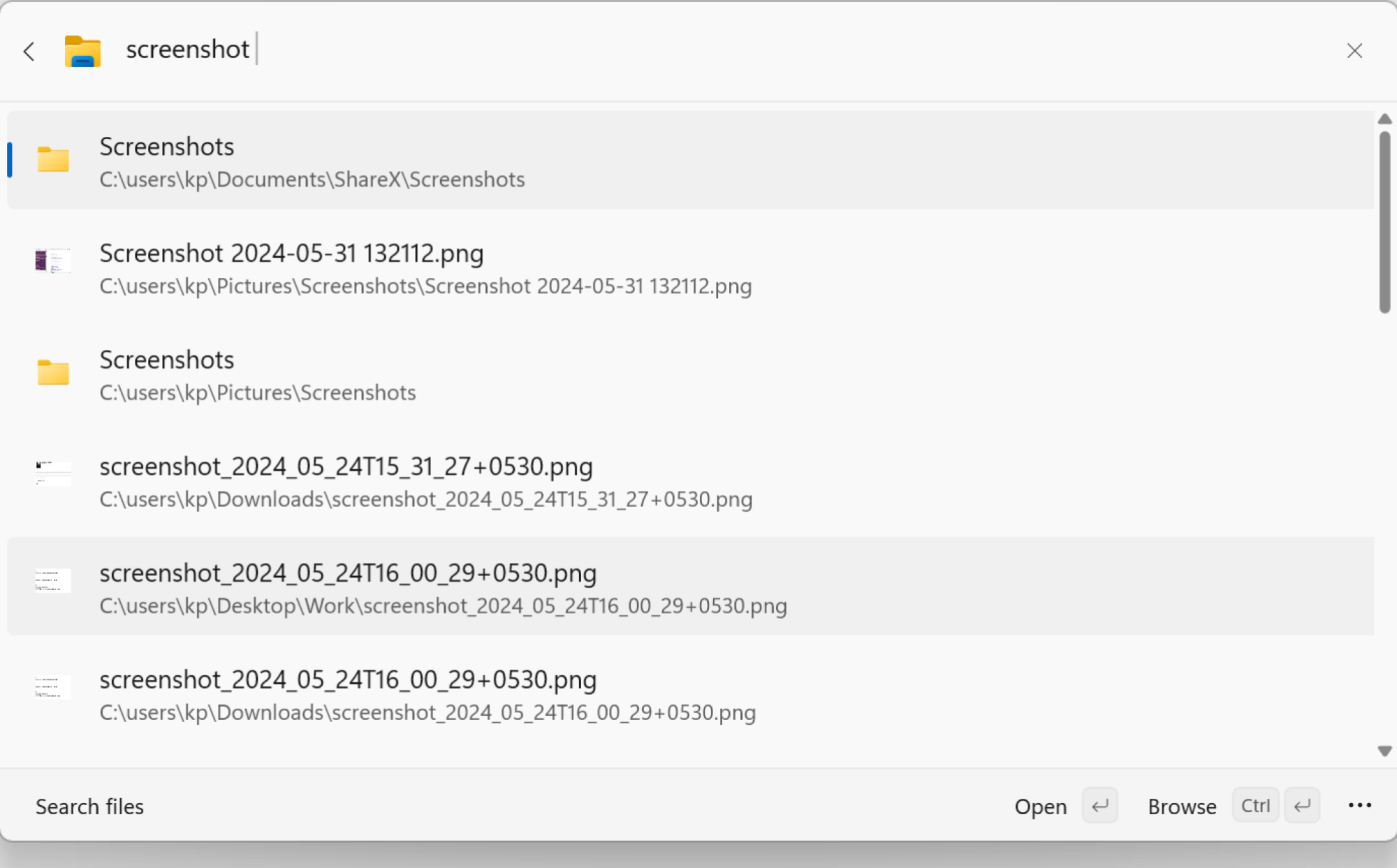
Search for files in Command Palette.

Credit: Khamosh Pathak

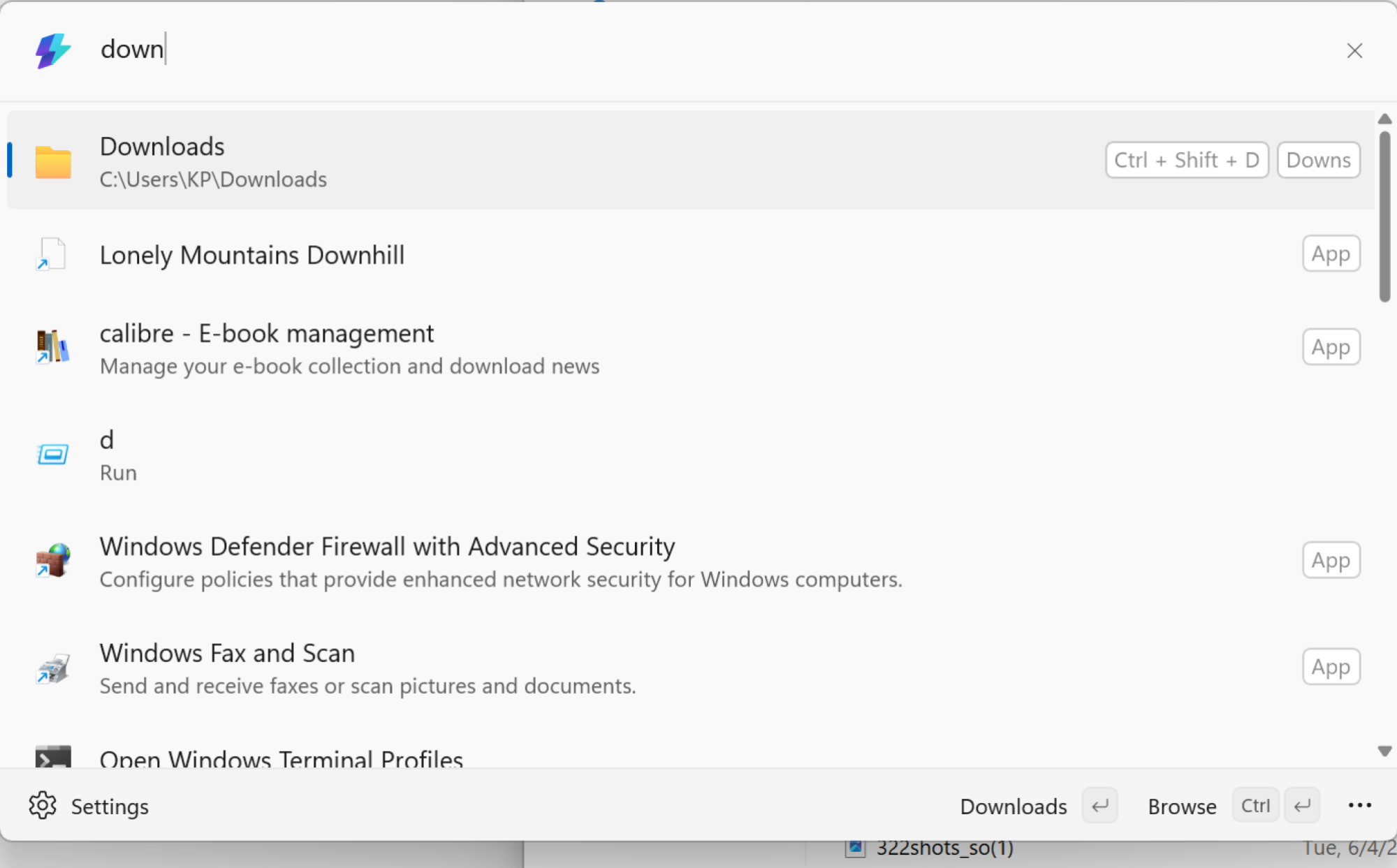
Open the Command Palette and start typing. Everything you’d want from a basic keyboard launcher is here. You can use Command Palette to open apps, and to search for files and folders.

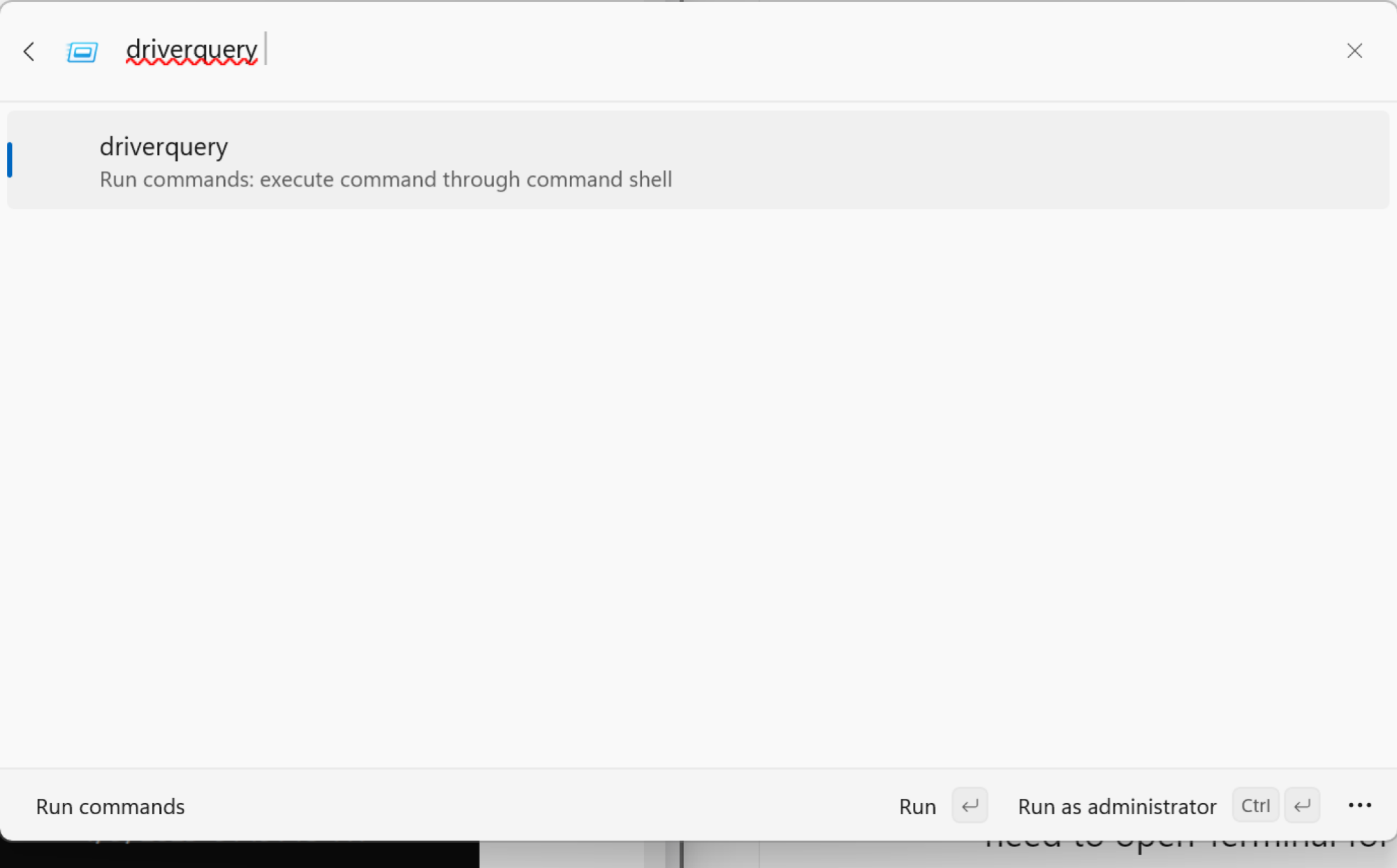
You can start searching for apps directly. But when it comes to files and folders, it’s better to first choose the File search option. Just type “file“, choose the option, and then start searching. Similarly, if you use the “=” key, you’ll enter calculator mode.

Switch between open windows

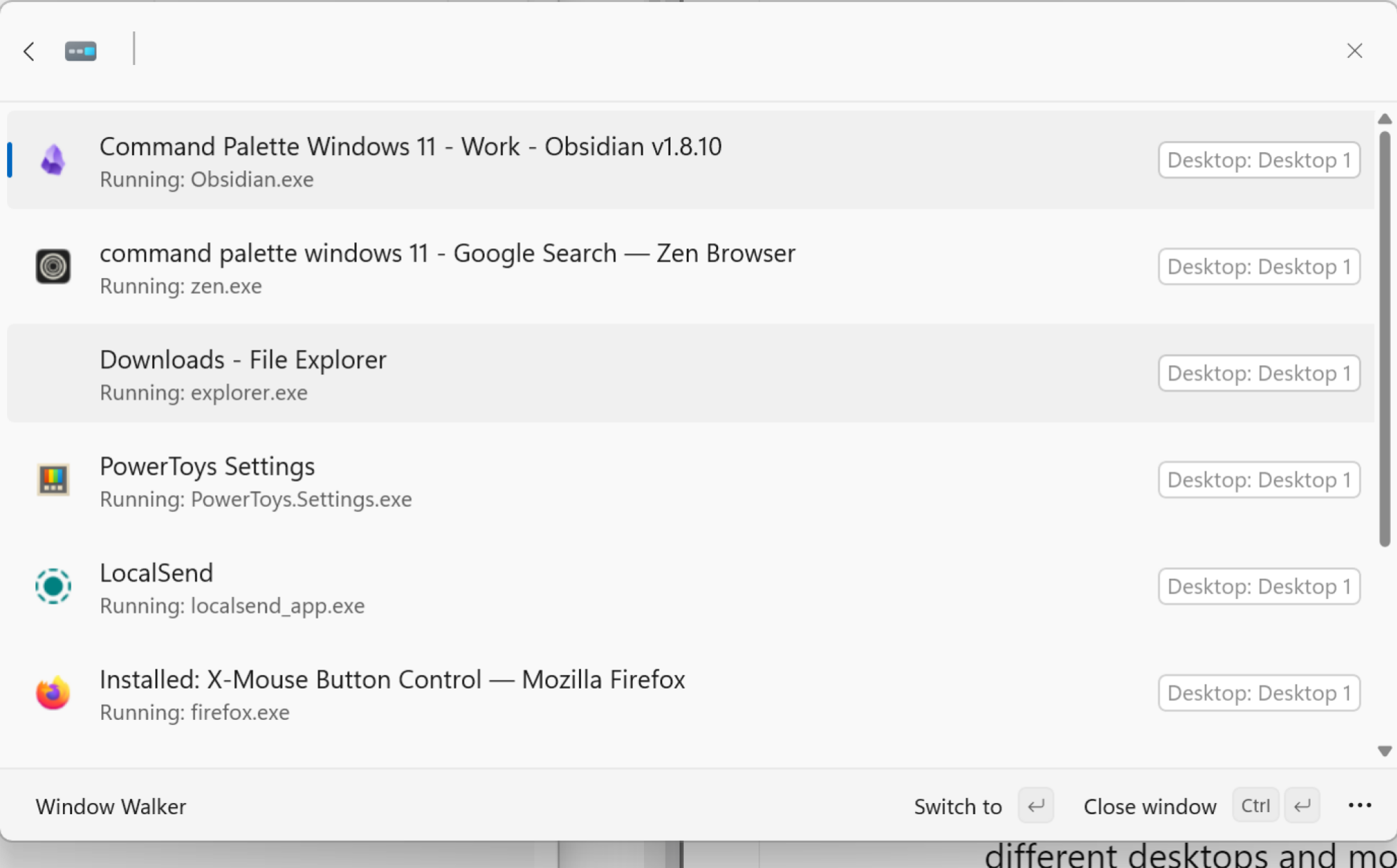
Window switcher in Command Palette

Credit: Khamosh Pathak

Command Palette has a built-in window switcher, and it can show all windows across different desktops and monitors. Open the Command Palette and type the less-than symbol () and you’ll see a list of all open windows and apps. You can scroll or search through this, or you can just enter the name of a specific app or window to highlight it, then press Enter to quickly switch to it.

Use Bookmarks to open any folder or website

Opening Downloads folder using a shortcut and alias.

Credit: Khamosh Pathak

Bookmarks might be the best feature in Command Palette. The file search is definitely useful, but most often, you find yourself opening the same folders and files over and over again throughout the day. For me, it’s the Screenshots folder and the Downloads folder. Now, I can use Command Palette to make these easier to open.

Namely, I can create a bookmark that opens the Downloads folder with just a couple of letters, or using a global keyboard shortcut. This works for any Folder or File path, and even a website URL.

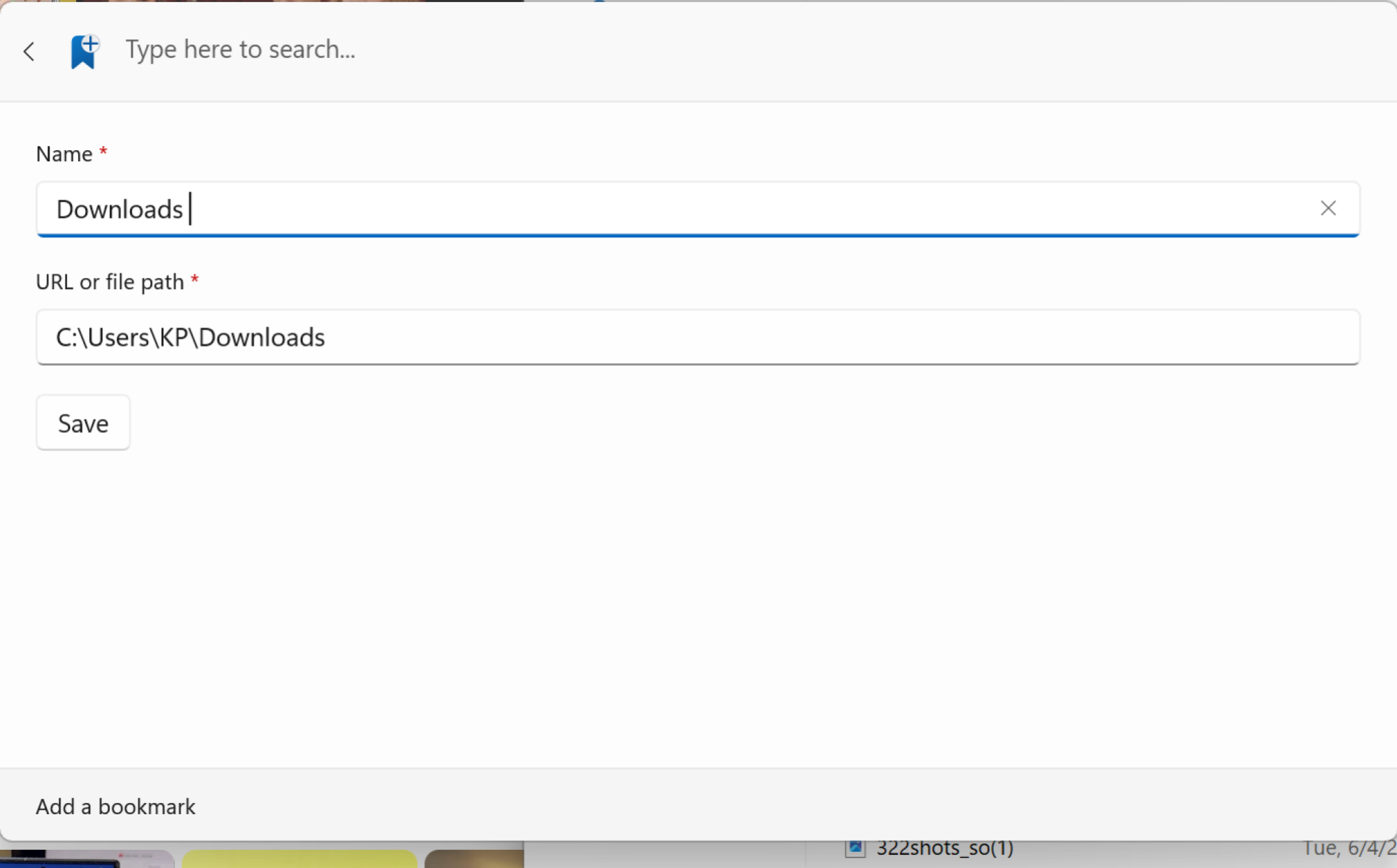
First, navigate to the folder you want to assign a shortcut to, right-click on the folder at the top, and choose Copy Address to copy the file path. In Command Palette, use the Add Bookmark option. Here, paste in the file path and give it a name.

Adding a Bookmark.

Credit: Khamosh Pathak

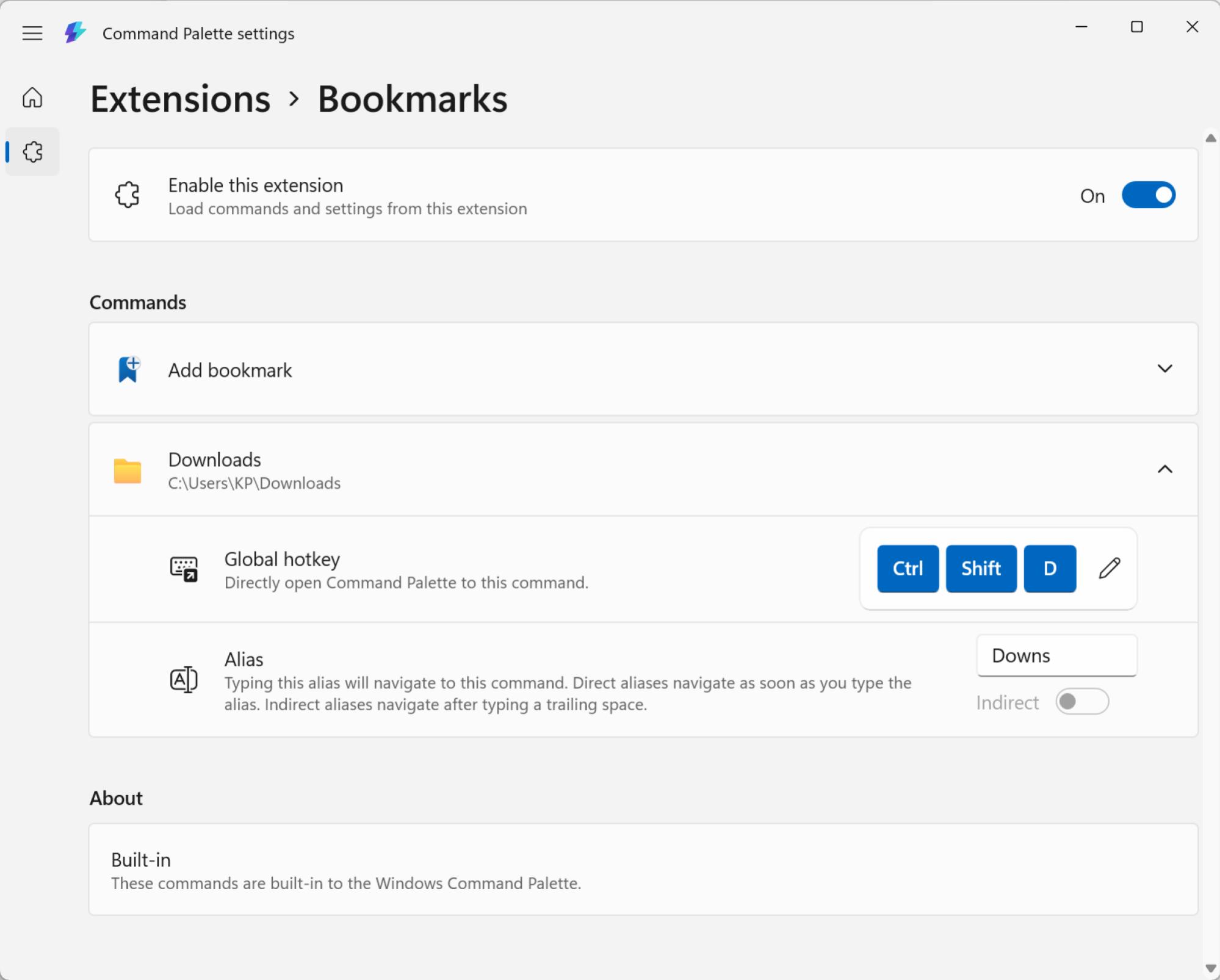
Now, you can give it a unique alias and a global shortcut. Go to Command Palette Settings, and from the sidebar, choose Extensions > Bookmarks. You’ll see your newly created bookmark here.

Settings for Bookmarks.

Credit: Khamosh Pathak

Click on it, and you can now record a unique global hotkey, or give it an alias that makes it faster to find in Command Palette.

Search the web

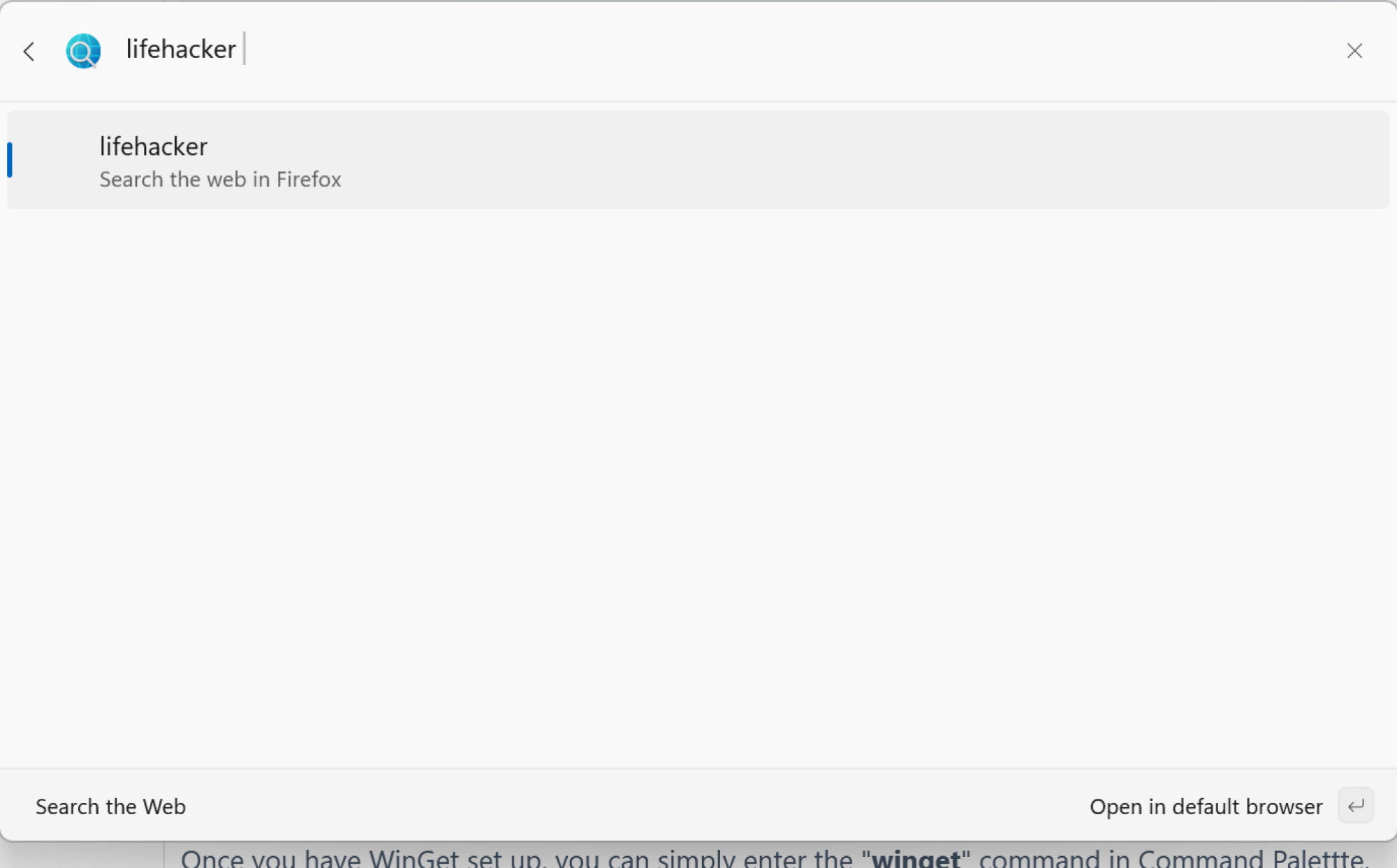
Searching on the web in Command Palette.

Credit: Khamosh Pathak

Command Palette has a quick way to search the web that opens directly in your default browser. Enter “??” and then type out your query. Press Enter, and that’s it.

Run any Terminal command

Running a terminal command in Command Palette.

Credit: Khamosh Pathak

If you use the greater-than sign (>) before you start typing in Command Palette, you’ll enter Terminal mode. From here, you can enter any command, and it will open in the Terminal app, where it will execute the command for you.

Install apps using WinGet

We’ve already talked about WinGet, the hidden package manager inside Windows that lets you install any package or an app using a single command. Well, now you don’t even need to open Terminal for this. Once you have WinGet set up, you can simply enter the “winget” command in Command Palette, followed by the package you want to install. Command Palette will search for and start installing the package for you.

Use extensions to add even more features

Lastly, you can use third-party extensions to add even more functionality to Command Palette. As the feature is new, the collection is quite limited, but here’s hoping that developers add new extensions in the future. To see your extensions, open the Command Palette and search for Extensions. You can find extensions on WinGet, or on the Microsoft Store.

Life After Chromecast: Walmart’s New 4K Google TV Streamer Is Super Affordable

Life After Chromecast: Walmart's New 4K Google TV Streamer Is Super Affordable
In some respects, it’s been a bit of a rough patch for fans of Google’s Chromecast dongle. For one, Google effectively killed the Chromecast in favor of its new Google TV Streamer hardware priced at $99.99 MSRP (slightly cheaper on the street). Then more recently, owners of Google’s second-generation Chromecast as well as Chromecast Audio

Status report on optional Rust in FreeBSD support

Shawn Webb has published a status
report
on work to provide basic support in FreeBSD for userland components
written in Rust.

We introduced a new BSD makefile, located at share/mk/bsd.rust.mk,
that enables building a Rust application during buildworld. As of this
writing, we only support building and installing Rust
applications. Supporting library crates is planned (we would like to
be able to build/install library crates that expose an FFI, like for
C/C++ compatibility). Normal library crates build and install just
fine. Support for cdylib Rust library crates specifically is what’s
missing, but is desired and planned.

We do NOT currently support Rust in the kernel. Kernel support
requires more work that we deemed out-of-scope for this initial
proof-of-concept/work-in-progress patchset. We also do NOT support
building multiple programs in the same BSD Makefile (like with
bsd.progs.mk), though that is also a desired feature.

LWN covered a
discussion about including Rust in the FreeBSD base system in August
2024.

Tamagotchi Paradise looks like the most exciting virtual pet toy in years

You’ve got to hand it to the Tamagotchi team for continuing to find new ways to spin a toy that is now pushing 30 years old. We’ve seen a Tamagotchi with a built-in camera, a Tamagotchi watch with a touchscreen so you can pet your virtual pet and another one with its own Tamaverse. Sometimes these experiments don’t work out as well as we’d like them to — the flat buttons introduced with Tamagotchi Pix were kind of terrible in practice — but they keep the franchise feeling alive. And alive seems like the best way to describe the newest member of the Tamagotchi family. Tamagotchi Paradise looks like it’s absolutely bustling with life.

Bandai first teased the upcoming Tamagotchi Paradise in a comic for Free Comic Book Day at the beginning of May, but it’s now official: we’re getting a Tamagotchi that’s equipped with a zoom dial feature to observe the critters up close (like, even down to the cellular level) and from afar. It’ll bring back gene-mixing, too, meaning you’ll be able to create unique characters through breeding. Tamagotchi Paradise will also be able to physically connect to other devices with a docking port on the top of the egg.

There is a lot of information to unpack in the Tamagotchi Paradise announcement. For one, instead of starting off by hatching a Tamagotchi character from an egg, players will hatch an entire planet in an Egg Bang (get it?) event. You’ll be able to view the planet from space, and zoom in to observe what’s going on down at the surface. Your mission is to “enrich your planet and make its Tamagotchi population flourish.” The device will come in three shell designs — Pink Land, Blue Water and Purple Sky — and whichever shell you have will determine which location you start in. It appears that you’ll be able to unlock all three areas eventually no matter what device you have.

Previews of 9 Tamagotchi Paradise experiences including mini games and the character compendium are pictured in a grid
Bandai

As always, you’ll have to raise Tamagotchi characters from babies to adults and do all the usual caretaking tasks, like feeding them and cleaning up poop. But for once, you’ll be able to put all that poop to good use by turning it into biofuel for space travel. When a Tamagotchi gets sick, you’ll use the dial to “zoom in and treat them at the cellular level.” There are a total of 25 different care menus according to Bandai, including shops and mini-games.

Tamagotchi Paradise introduces a ton of new, more animal-like characters than we’ve been seeing in recent years, and they’re really cute. (Don’t worry, Mametchi, Mimitchi and a few other existing favorites will still be there too). There are also three secret characters that haven’t yet been revealed. 

All the characters in the Land, Water and Sky fields from Tamagotchi Paradise are pictured, plus the silhouettes of three unannounced secret characters
Bandai

It looks like it’s packed with activities, which would be really nice coming off of the Tamagotchi Uni, a device I’ve loved in the two years since it was released but still can’t help but feel like it’s a bit boring compared to others. Tamagotchi Paradise goes back to AAA batteries, which should be good for longevity. And it’ll be cheaper than other recent flagship Tamagotchis, at $45. Pre-orders haven’t opened in the US just yet, but the device will ship on July 12 according to the Japanese Amazon listing. The wait might actually kill me.

Once Tamagotchi Paradise arrives, there will be pop-up Tamagotchi Labs in some as yet unannounced stores where you’ll be able to connect your device to access exclusive items and experiences. Tamagotchi Uni owners will be able to get a taste of all this ahead of the release as well if they buy the Tamagotchi Lab Tamaverse ticket, which comes out on July 3.

This article originally appeared on Engadget at https://www.engadget.com/gaming/tamagotchi-paradise-looks-like-the-most-exciting-virtual-pet-toy-in-years-155010892.html?src=rss

Volvo Puts Gemini In The Passenger Seat As Google Accelerates Android Auto

Volvo Puts Gemini In The Passenger Seat As Google Accelerates Android Auto
Volvo Cars and Google have announced a partnership that seeks to change in-car digital experiences for the better. New Volvo models equipped with Android Auto will soon be the first cars to have Gemini AI. The vision is to have a cabin where drivers can focus on driving while having Gemini perform tasks—such as sending messages, controlling

Strava cracks down on leaderboard cheats by removing millions of activities as part of huge AI-powered app update

Strava has taken aim at leaderboard cheats by removing 4.45 million activities in a bid to “rightfully restore KOMs and QOMs to reflect true performances”.

Announced as part of a raft of app updates, Strava says it has fast-tracked the application of the machine learning model launched in February to “reprocess the top 10 spots on ride and run leaderboards”.

February’s update was designed to protect the integrity of Strava’s leaderboards by identifying unrealistic speeds, GPS errors and “other anomalies that could skew leaderboard results”.

Strava says every activity is now automatically analysed by a machine learning model, which looks at 57 different factors, such as speed and acceleration. 

“Strava is reinforcing its commitment to helping athletes compete fairly and perform at their best,” reads Strava’s latest press release. “The updates allow users to push harder this summer, with the confidence that leaderboards reflect true performances.”

Strava summer 2025 app update
Strava has also announced a raft of other app updates. Strava

Other key app updates include:

  • New AI-powered routes
  • Tappable points of interest
  • Point-to-point routing

Strava says the updated route functionality, which, like leaderboards, is only available to premium subscribers, now utilises AI to “offer smarter, intuitive suggestions by leveraging Strava’s global heatmap, so riders can run, ride or walk like locals wherever they go”. 

The result, according to Strava, is routes that are more flexible and reliable, based on where existing cyclists ride. These can be generated from your current location or a custom starting point.

Strava routes app update
Strava now offers improved AI-powered routes. Strava

Strava has also introduced tappable points of interest, such as cafes, restrooms and viewpoints. Strava says you can tap to discover more information, generate a route there, or suggest a route that includes the point of interest.

Elevation, distance and estimated time of arrival will be present, and the points of interest will be accompanied by photos uploaded by Strava users “within the maps tabs in the Strava mobile app”. 

Strava's new 'points of interest' feature brings it closer to Komoot, which offers user-generated 'highlights' (pictured).
Strava’s new ‘points of interest’ feature brings it closer to Komoot, which offers user-generated ‘highlights’ (pictured). Komoot

This feature, available from June, brings Strava a little closer to Komoot, one of its competitors and rivals for the crown of best cycling app. Komoot enables riders to add photos to user-generated highlights, as well as tips describing the highlight.

Finally, new point-to-point routing will, according to Strava, provide “the most efficient, activity-specific route from A to B”. This, Strava says, is based on a new routes engine, informed by the global heatmap.

“Starting in July, simply drop a pin and go with point-to-point routing on mobile,” Strava says.

This Free Mac App Combines Several AI Transcription Tools

If you’ve ever wished the text-to-speech feature on your Mac worked better, Spokenly might be the solution for you. It’s a free Mac application that lets you use modern AI transcription right on your Mac for free—just trigger the application with a keyboard shortcut, say what you want to type, and watch as it appears on the screen.

Whatever you feel about modern AI, it’s hard to deny that it’s good at turning the spoken word into text. Whether it’s real-time transcription or creating a transcript for a video or audio file, the open source Whisper engine is accurate and fast. Spokenly is a free application that lets you use this technology on your Mac.

Install the application, which is currently free on the Mac App Store, and it will start in your menu bar. Transcribing is simple: Just press and hold the right Command button and you’ll see the pop-up, as shown above. Say what you want to type and let go when you’re done—the text will appear in the currently active text field.

You could honestly just install the application, use it this way, and never think about the settings—it mostly just works. If you want to dig into, though, open the settings by clicking the menu bar icon and clicking General Settings. You can decide whether the application will show up in the menu bar, dock, or both. You can decide which microphone you’d like the application to favor, assuming you use more than one. And you can decide whether transcribed text should be copied to your clipboard by default.

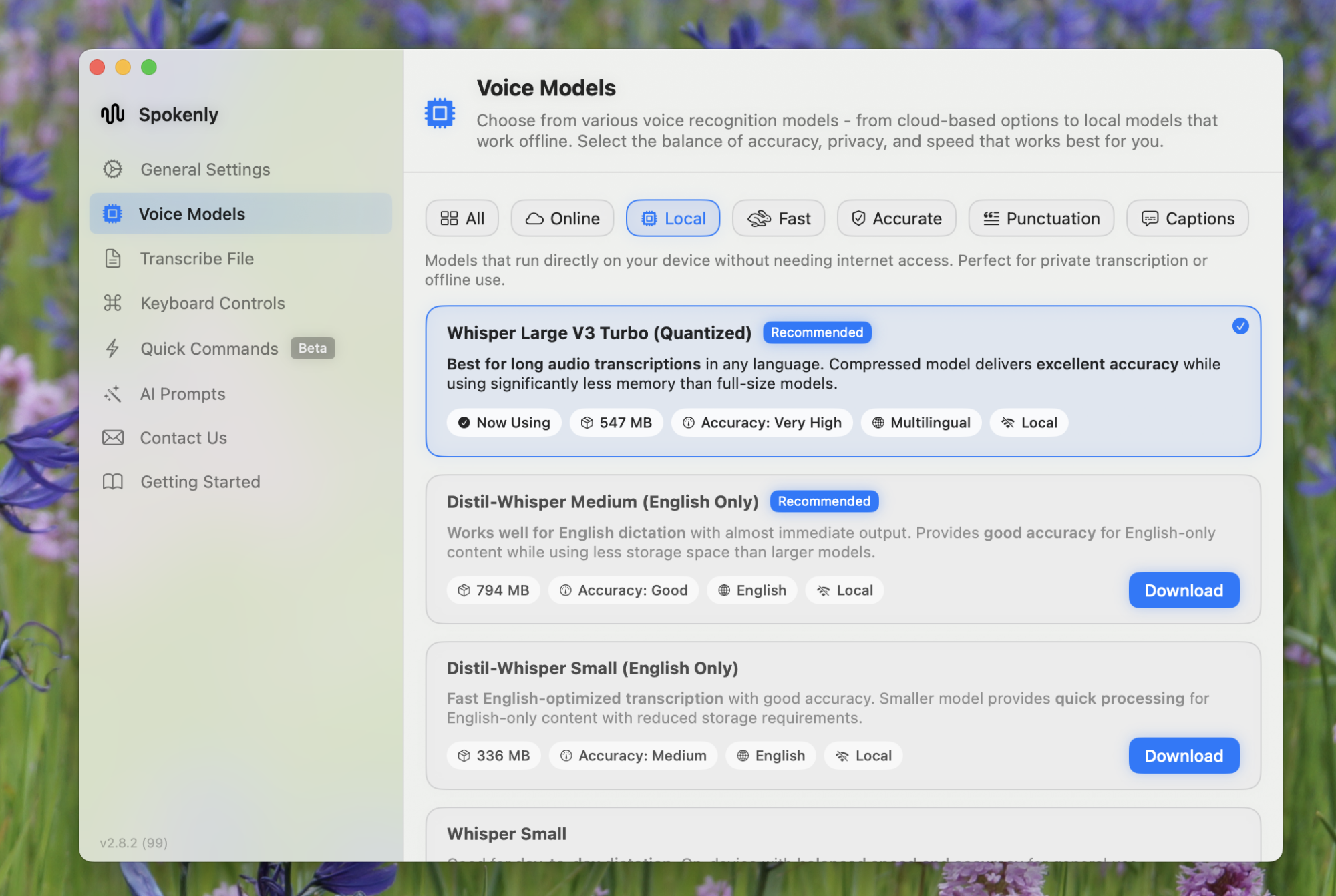
If you like experimenting with AI, though, you should check out the Voice Models tab. From here, you you can choose which AI model you want to use. By default, the application uses an online version of “Whisper Large v3,” which is the only model that supports showing your transcription in the pop-up window as you’re talking. There are other models you can use, though, including GTP-4o via Spokenly.

The settings window offering many different AI models for transcription

Credit: Justin Pot

If you’d rather not use an online service, there’s support for downloading and running various Whisper models locally. You will have to find a balance between hard drive space, performance, and accuracy—I recommend trying out a few models until one works for you. There’s also support for using Deepgram, Fireworks, and OpenAI API keys, assuming you’re already paying for one of those services.

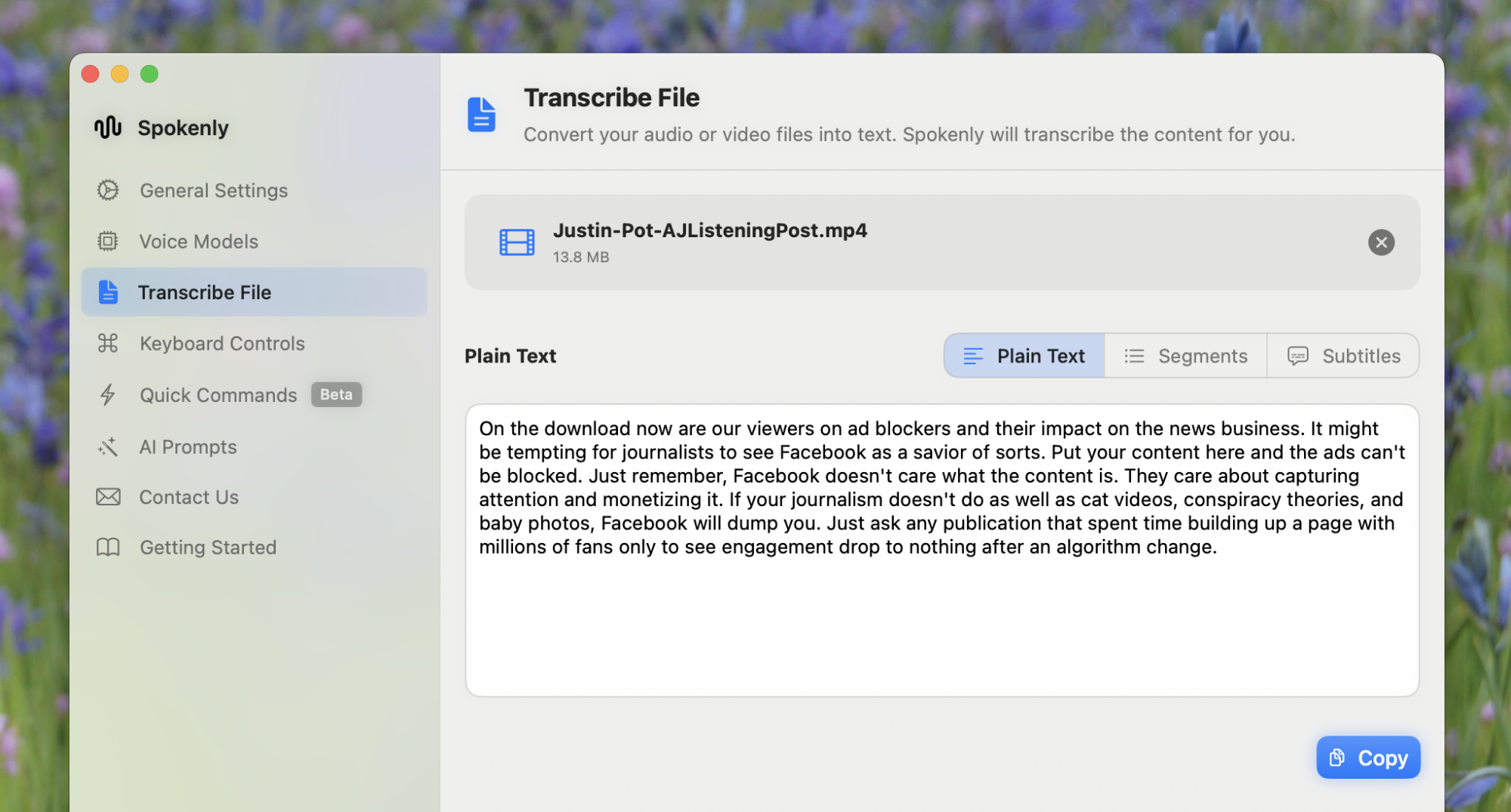
If you don’t know what any of that means, don’t worry: The default model works extremely well. And there’s more to dig into with this application. The Transcribe File tab of the settings window lets you add any video or audio file and get a transcription, with or without timestamps. There’s even support for generating subtitle files for your videos.

The transcription service generating text for an Al Jazeera interview I did years ago and forgot about

Credit: Justin Pot

And there’s a few power-user tools you can set up. The Quick Commands tab lets you choose a few combinations of words that run an action instead of transcribing. Just choose a trigger phrase and what you’d like that phrase to do—open a URL, launch an application, or run one of your Apple Shortcuts. For example, you could set up “Open Lifehacker” as a trigger phrase and our homepage as the URL. Do that and the Lifehacker website will open every time your say the words “Open Lifehacker,” improving your life (one assumes).

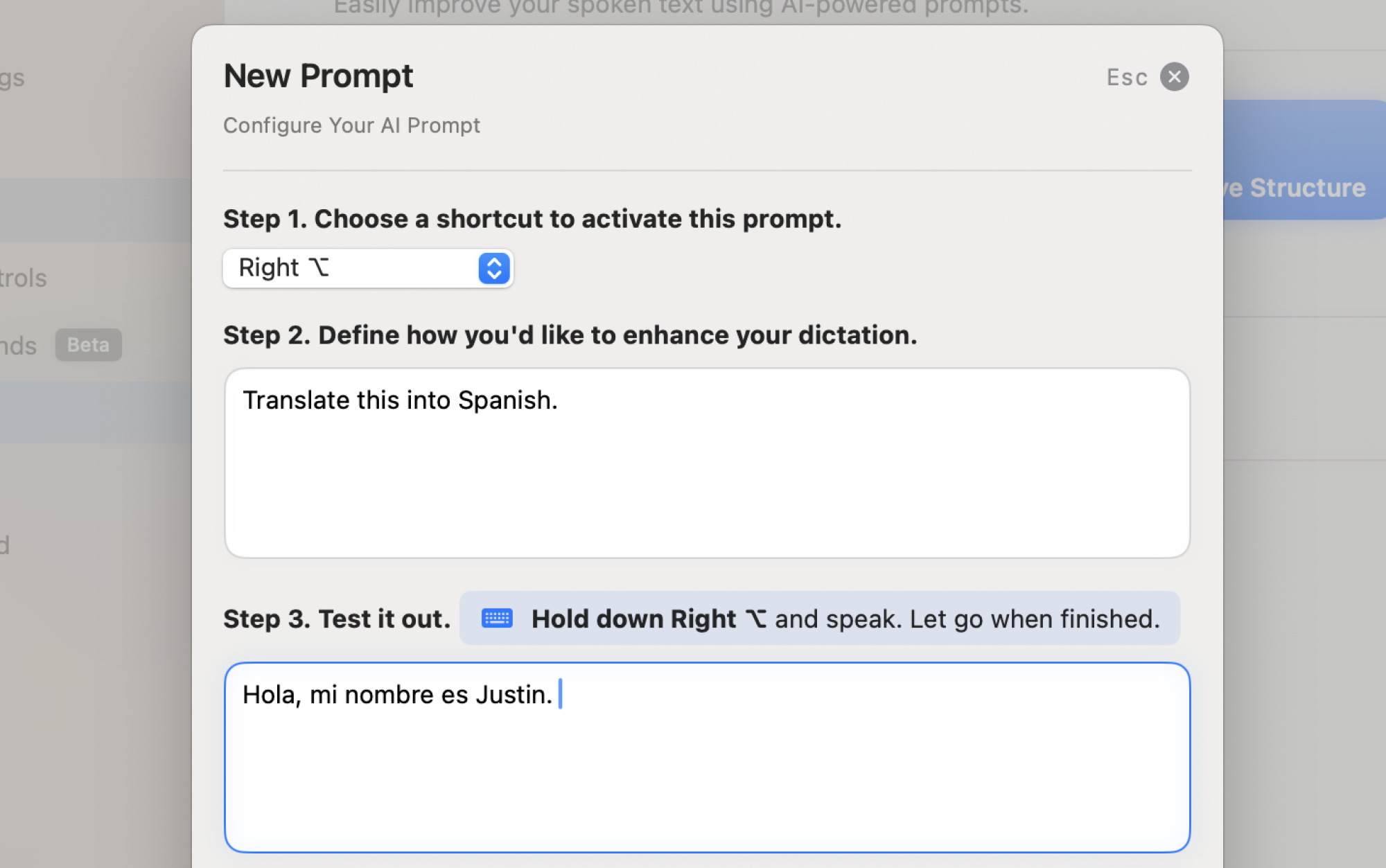
The settings window for the AI Prompt feature. I'm setting up a prompt that will translate English speaking` into Spanish text.

Credit: Justin Pot

Another feature, AI Prompts, allows you to set a prompt that will change your text after dictating it. Just choose a separate keyboard shortcut and type your prompt for the text. For example, you could write a prompt that says “translate this text into Spanish”—you can now use a custom keyboard shortcut to transcribe something before using AI to translate it. Any prompt you can think of will work.

All of these features reward tinkering, which is exactly the kind of application I like. And the application is completely free as of this writing, while offering features that allow you to use it privately. Try it out if you wish you could get more out of transcription software.

Brembo’s new brakes cut particulate emissions by 90 percent

As electric vehicles reduce car exhaust as a source of particulate emissions, people are increasingly focusing on other vehicular sources of pollution that won’t go away with electrification. Tires are one of them, particularly as we grapple with overweight EVs with tire-shredding torque. And brakes are another—even an EV with regenerative braking will occasionally need to use its friction brakes, after all.

Over in Europe, the people responsible for writing regulations have taken this into consideration with the upcoming Euro 7 standard, which sets new limits on 10- and 2.5-micron particulate emissions on all new vehicles—including EVs—starting next year. And to help OEMs achieve that target, Brembo has developed a new brake and pad set called Greentell that it says cuts brake dust emissions by 90 percent, improving durability in the process.

“We started 10 years ago to investigate a different solution. The main topic that we had in mind was to develop a disk that is greener than the current production of cast iron,” said Fabiano Carminati, VP of disc technical development at Brembo.

Read full article

Comments

Robot Solves Rubik’s Cube In 0.103 Seconds, Sets New World Record

This is a video highlighting the Rubik’s Cube solving robot built by Purdue University undergraduates, which just set the world record for fastest Rubik’s Cube solve with a time of 103 milliseconds (0.103 seconds). That’s faster than a blink. The previous record was 305 milliseconds, which the robot can reliably solve under no matter the initial cube state. For reference, the clock for my first Rubik’s Cube solve is still running and well over 22 years now. One of these days though — one of these days I’m going to watch some Youtube tutorials and finally solve that cube. “I thought you have been.” They’re all bad explainers, I really just need to know what solvent to use to remove the stickers.

Google’s Brin: ‘I Made a Lot of Mistakes With Google Glass’

Google co-founder Sergey Brin candidly addressed the failure of Google Glass during an unscheduled appearance at Tuesday’s Google I/O conference, where the company announced a new smart glasses partnership with Warby Parker. “I definitely feel like I made a lot of mistakes with Google Glass, I’ll be honest,” Brin said.

He noted several key issues that doomed the $1,500 device launched in 2013, including a conspicuous front-facing camera that sparked privacy concerns. “Now it looks like normal glasses without that thing in front,” Brin said of the new design. He also blamed the “technology gap” that existed a decade ago and his own inexperience with supply chains that prevented pricing the original Glass competitively.


Read more of this story at Slashdot.

Memorial Day deals include the Apple Watch Series 10 for $100 off

The best smartwatch you can get your hands on right now is the Apple Watch Series 10 (at least if you’re an iPhone user). The wearable is on sale at the minute, making it a more enticing proposition. The Apple Watch Series 10 can be yours for $299. That marks a discount of $100 and is a record-low price.

This price is for a GPS version (meaning it doesn’t support LTE) with the smaller 42mm case. At the time of writing, the $299 price applies to two color variants: a jet black aluminium case with black sport band and a rose gold aluminium case with light blush sport band. Discounts vary on other configurations.

The Apple Watch Series 10 is an iterative upgrade. If you already have a Series 8 or 9, it’s perhaps not worth switching to the latest model. However, if you’re rocking an older Apple Watch or you’re looking to pick up your first one, this is our recommendation. We gave the Apple Watch Series 10 a score of 90 in our review.

The Series 10 is a little thinner and lighter than the previous model, but it has a larger OLED screen, which makes it easier to see what’s on the display. Apple has improved the efficiency of the battery life as well, and it should often last longer on a single charge than the 18 hours for which it’s rated.

The new sleep apnea feature is very welcome, but the blood oxygen feature from older models is not available here (Apple removed that app from certain models in the US due to a patent dispute). In general, though, the Series 10 is a solid step forward for the Apple Watch. The latest model is a terrific fitness tracker that helps you keep an eye on the most important alerts and notifications you receive on your iPhone.

Check out our coverage of the best Apple deals for more discounts, and follow @EngadgetDeals on X for the latest tech deals and buying advice.

This article originally appeared on Engadget at https://www.engadget.com/deals/memorial-day-deals-include-the-apple-watch-series-10-for-100-off-151537320.html?src=rss

May’s Game Pass additions include the brilliant Metaphor: ReFantazio and The Division 2

This is a big month for Xbox Game Pass, as there are some real standout titles hitting the service. Upcoming games include the sublime Metaphor ReFantazio, Tales of Kenzera: Zau and The Division 2, among others.

Let’s get to the games. You likely heard a whole lot about Metaphor ReFantazio last year. The JRPG was a bona-fide phenomenon, and it actually grabbed a nomination for game of the year. It also easily made our list of the best games of 2024. It’s developed by Atlus and the game improves on the formula behind the Persona and Shin Megami Tensei franchises in nearly every way.

The characters are great. The dungeons aren’t procedurally generated. The world feels alive, with quests and objectives in nearly every nook and cranny. The story is perhaps the biggest reason why the game became such a sensation. It’s grounded and feels like it was plucked from today’s news, despite being set in a fantasy-laden kingdom. It’ll be playable on May 29.

Tales of Kenzera: Zau is a Metroidvania platformer that wears its heart on its sleeve. The story is extremely emotional and engaging, particularly for this genre. The graphics are lovely and the gameplay is fluid, with plenty of nifty upgrades as you advance. What’s not to like? The game arrives on May 22.

Tom Clancy’s The Division 2 is something of a hybrid, with plenty of both tactical shooter and RPG mechanics. The game is set in an open world version of Washington DC, which is a pretty cool location. It’s online-only, so there’s a deep emphasis on multiplayer. It can be played solo, but you have to be connected to the game’s servers. It’ll be available on May 27.

Other forthcoming games include Spray Paint Simulator (May 29) and Stalker 2 (May 22.) The deckbuilding roguelike Monster Train 2 is available right now.

This article originally appeared on Engadget at https://www.engadget.com/gaming/mays-game-pass-additions-include-the-brilliant-metaphor-refantazio-and-the-division-2-151424740.html?src=rss

[$] Recent disruptive changes from Setuptools

In late March, version 78.0.1 of Setuptools — an important
Python packaging tool — was released. It was scarcely half an hour before
the first bug
report
came in, and it quickly became clear that the change was far
more disruptive than anticipated. Within only about five hours 78.0.2 was
published to roll back the change
, and multiple discussions were
started about how to limit the damage caused by future breaking
changes. Nevertheless, many users still felt the response was
inadequate. Some previous Setuptools releases have also caused problems on a smaller but still notable scale, and hopefully the developers will be more cautious going forward. But there are also lessons here for the developers of Python package installers, ordinary Python developers and end users, and even Linux distribution maintainers.

AMD Unveils Zen 5 Threadripper CPUs With Up To 96 Cores, Bodacious 480MB Cache

AMD Unveils Zen 5 Threadripper CPUs With Up To 96 Cores, Bodacious 480MB Cache
AMD is making a splash at Computex this week. In addition to formally introducing the Radeon RX 9060 XT, a mainstream GPU that it claims is the “world’s best” GPU for under $350, it’s also rolling out a new round of Ryzen Threadripper processors. And rather than go with a staggered release, AMD lifted the curtain on both high-end desktop (HEDT)

Move Over Meta Ray-Ban, Google Unveils Android XR Glasses With Gemini

Move Over Meta Ray-Ban, Google Unveils Android XR Glasses With Gemini
Google has unveiled a powerful convergence of its ambitious Android XR platform and the ever-growing capabilities of its Gemini AI. This integration was showcased extensively at Google I/O, including a demo of the OS performing livestreams, Google Map-ping, and photo captures using beta Android XR glasses. Google plans to take on Meta AI glasses

New Fizik Vega shoes improve pedalling efficiency thanks to a novel construction technique

We spotted new shoes from Fizik back in February’s UAE tour. Though then it just looked like another lightweight race shoe with a knitted upper.

Now that the details of the new Vega shoe have been released, it’s much more than that.

The Vega’s construction is unlike any previous Fizik shoe in that they’ve embedded the stiff carbon outsole inside of the shoe. Rather than the standard method of bonding a carbon outsole to the upper.

Fizik says that in developing this new construction method, they’ve been able to greatly reduce the stack height at the cleat area, leading to claimed improvements in pedalling efficiency.

fizik vega outsole detail
The carbon outsole is wrapped by the upper, and then a full-length protective layer is fixed to the shoe. Fizik

Natural shape

Fizik claims it also means improved stiffness (though the Vega’s stiffness rating remains 10/10 on Fizik’s scale) and better foot support as the carbon base is ergonomically shaped to your foot. Fizik says they start the new shoe development from the ground up, designing the outsole and footbed as a single unit.

The redesigned contact point has meant a straighter axis of the shoe’s shape and a reduced drop from heel to toe. They claim this new shape gives a more natural feeling when pedalling.

fizik vega sole detail
The internal outsole means a much lower stack height at the cleat. Fizik

The Vegas upper wraps completely around the foot with a carbon plate enclosed within. It’s more of a base to the footbed than a traditional outsole.

The stiff carbon sole being hidden within the shoe and protected by a full polyurethane cover should make the Vega easier to walk in, with a replaceable heel bumper and toe bumper, it should provide lots of protection too.

Multi-material upper

The Vega’s upper uses a blend of materials with a woven fabric called Aeroweave meshed with a thin translucent material, which they say creates a much lighter shoe. At the same time, the upper remains compliant and close-fitting. The inner of the shoe is a foot-wrapping bootie made from a highly perforated Airprene material to add comfort and breathability.

fizik vega heel
The heel cup blends into a lightweight internal bootie. Fizik

The midfoot and heel cup are reinforced with a bonded material that adds stiffness and stability.

The upper has a more generous toe-box than previous Fizik shoes. Just one of the adjustments made with the new last was developed around the integrated outsole.

Adjust to comfort

Adjustments are made using twin BOA Li2 dials. The upper dial uses a short wire anchored to a ribbon. This controls the fit around the instep, the lower dial adjusts the volume around the medial (middle) part of the foot.

Twin Li2 BOAs
The twin Li2 BOAs control the fit of the upper. Fizik

With a claimed weight of 239g, a shoe (size 44) + 20g for the footbeds, the Vega is a lightweight shoe.

The Vega comes in all-white.

The shoes are available in Sizes: 36-48 (37 to 47 also in half sizes) and in all-white, and the white/blue/yellow Fluoro of Team Movistar.

Fizik Vega
The blue/white/fluoro option is my favourite. Fizik

The Vegas are priced at £389.99 / €390.00 / $469.99

Oura’s smart ring gets better at tracking your activities

Oura has rolled out activity updates for Gen3 and Ring 4 users, including a new trend view for active minutes so that they can get a better look at how active they are for the day, the week or even the whole month. They’ll also be able to add their max heart rate to the activity setting, and Oura will adjust heart rate zones accordingly. Oura now allows users to add or edit activities for the past seven days manually, instead of just for that particular day, and it now displays heart rate data from activities imported from partner integrations via Apple HealthKit and Health Connect by Android. Its Automatic Activity Detection feature has also been updated to work all hours to track movements, even for activities between midnight and 4AM. 

In addition to those new features, Oura has upgraded its system to be able to count steps more accurately. The company uses an advanced machine-learning model to determine whether a movement is an actual step, and it says the technology slashes average daily step count error by 61 percent. It has upgraded its Active Calorie burn feature to be more accurate by taking heart rate into account during exercise, as well. Oura can now also use your phone’s GPS data to show your runs and walks in more detail within its app. All these updates are now available on iOS, but the new fitness metrics and new trend view for active minutes won’t be out on Android until June. 

Aside from announcing its upgraded features, Oura has revealed its new partnerships with third-party entities. Users can now link their smart ring with CorePower Yoga so that they can track their yoga activities, Sculpt Society, Technogym and Open, which uses a person’s biometrics to create personalized recovery rituals for them. 

Update, May 21, 2025, 10:50AM ET: This story has been updated to clarify that the updates are available for Gen3 and Ring 4 users with Oura Membership. 

This article originally appeared on Engadget at https://www.engadget.com/wearables/ouras-smart-ring-gets-better-at-tracking-your-activities-130012859.html?src=rss