
Merged for the Linux 6.16 kernel are all of the x86 core enhancements that provide a variety of benefits to Intel as well as AMD processors…
Category Archives: Unfiltered RSS
SISU Scramble Races Begin June 3
The race organizers at SISU have just announced the SISU Scramble – a twice-a-week series where the midweek race (on Tuesdays) is an individual time trial while the Saturday event is a road race.
Every scramble is a difficult or hurried clamber up, over, or around something. With three General Classifications (iTT only, Road Race only, and Overall for those racing all scrambles) there is something for everyone.
Race Schedule
- Scramble 1: Tuesday, 3 June (iTT)
- ZG25 Climb Champs, London
- 1 lap | 4.7km | 156m
- Scramble 2: Saturday, 7 June (Road Race)
- 2018 Worlds Short Lap, Innsbruck
- 1 lap | 23.7km | 495m
- Scramble 3: Tuesday, 10 June (iTT)
- Astoria Line, New York
- 1 lap | 11.6km | 141m
- Scramble 4:Saturday, 14 June (Road Race)
- Triple Loops, London
- 1 lap | 41.0km | 564m
- Scramble 5: Tuesday, 17 June (iTT)
- Coastal Crown Loop, Watopia
- 1 lap | 15.1km | 80m
- Scramble 6: Saturday, 21 June (Road Race)
- Countryside Tour, Makuri Islands
- 2 laps | 31.7km | 370m
- Scramble 7: Tuesday, 24 June (iTT)
- Volcano Circuit, Watopia
- 2 laps | 8.2km | 40m
- Scramble 8: Saturday, 28 June (Road Race)
- Outer Scotland, Scotland
- 2 laps | 22.5km | 209m
Sign up at zwift.com/events/tag/sisu >
More Information
- Open events using Zwift’s Racing Score with separate results for Men and Women.
- Each event is a mass start with all riders visible on the course.
- TT bikes are mandatory for the iTT. Draft will be disabled.
- ZPower and riders without heart rate data will be excluded from the results.
- A rider’s best time will count if they race the same discipline in multiple zones.
- To be included in the GC, riders must have a ZwiftPower profile (learn how to sign up here).
- Team GC is based on each team’s fastest two riders.
- Riders who upgrade during the first seven scrambles will be re-classified to their higher grade.
For more information and results, visit sisu.racing/scramble.
‘AI Role in College Brings Education Closer To a Crisis Point’
Bloomberg’s editorial board warned Tuesday that AI has created an “untenable situation” in higher education where students routinely outsource homework to chatbots while professors struggle to distinguish computer-generated work from human writing. The editorial described a cycle where assignments that once required days of research can now be completed in minutes through AI prompts, leaving students who still do their own work looking inferior to peers who rely on technology.
The board said that professors have begun using AI tools themselves to evaluate student assignments, creating what it called a scenario of “computers grading papers written by computers, students and professors idly observing, and parents paying tens of thousands of dollars a year for the privilege.”
The editorial argued that widespread AI use in coursework undermines the broader educational mission of developing critical thinking skills and character formation, particularly in humanities subjects. Bloomberg’s board recommended that colleges establish clearer policies on acceptable AI use, increase in-class assessments including oral exams, and implement stronger honor codes with defined consequences for violations.


Read more of this story at Slashdot.
Europe tries to force age verification onto Pornhub and other adult sites
European regulators have opened formal proceedings into Pornhub and three other adult platforms for suspected violations of the Digital Services Act (DSA), the European Commission announced yesterday. Pornhub, Stripchat, XNXX, and XVideos are accused of failing to prevent minors from accessing adult content.
“The Commission preliminarily found that the platforms do not comply with putting in place appropriate and proportionate measures to ensure a high level of privacy, safety and security for minors, in particular with age verification tools to safeguard minors from adult content,” the EC said.
The regulatory body said preventing minors from accessing adult content with age verification tools is needed to prevent “negative effects on the rights of the child” and “the mental and physical well-being of users.”
14 Ways to Customize Your Mac’s Dock
The dock, an iconic Mac feature, is used to launch apps, switch between them, and as a hub for displaying key apps and minimized windows while they’re open. By default, the dock has a clean look and features a few apps that your computer thinks you might want to use. However, you can get a lot out of customizing your dock, like removing the icons for default Apple apps you don’t use. You can also change its placement and its look. Here’s what you need to know to do just that, plus a bit extra.
Remove apps you’re not going to use
Credit: Pranay Parab
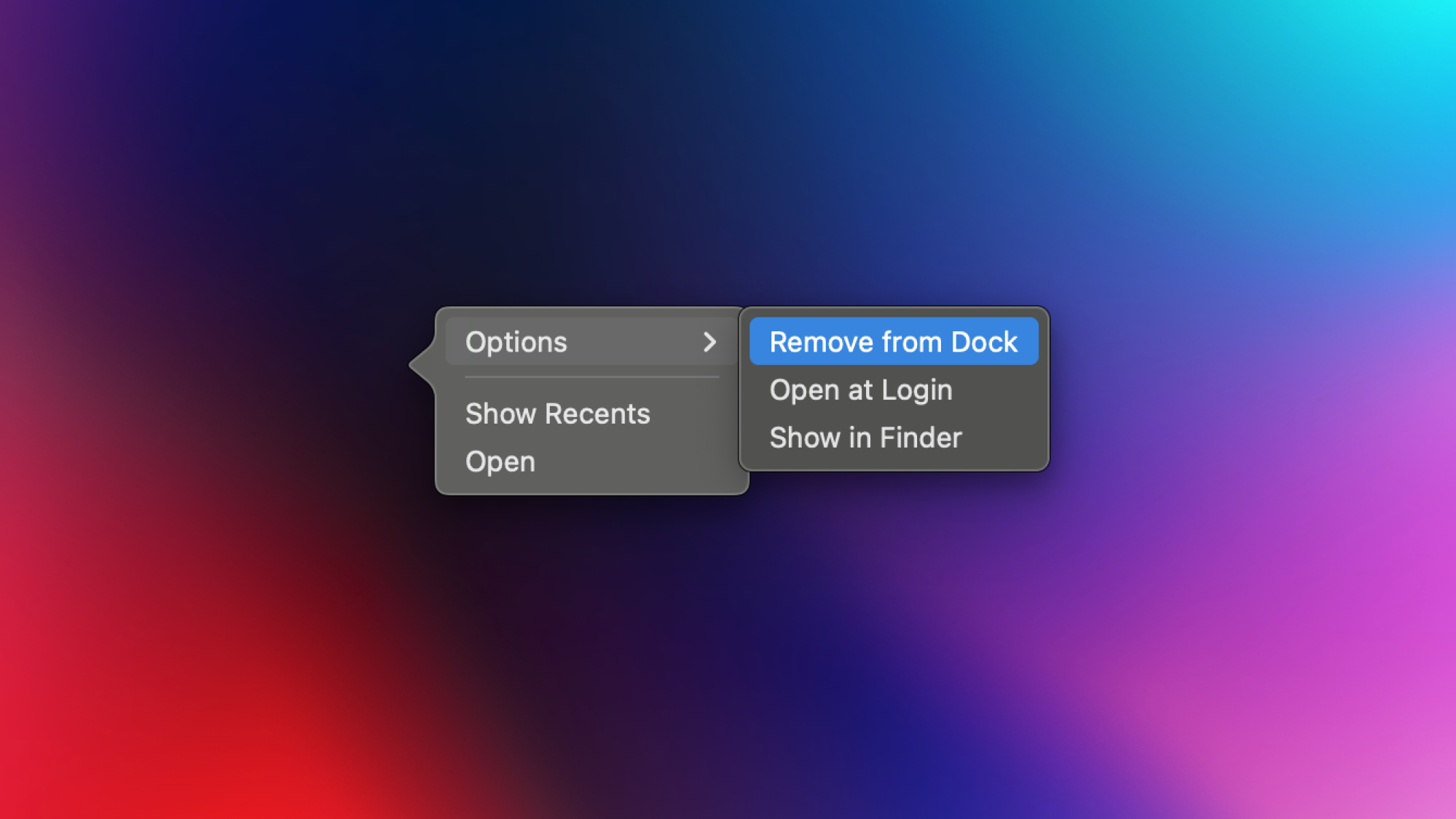
You should start your dock tweaks by removing apps you’re never going to use. To remove an app from your dock, right-click it and select Options > Remove from Dock. You can also ensure apps that are only in the dock temporarily (which appear on the right side of the dock, next to a separator) stay there by right-clicking them and selecting Options > Keep in Dock.
Move apps around to make them easy to access
Your next step should be to reorder your Dock’s apps, which is as simple dragging their icons where you want them. Note, though, that if you accidentally drop an icon outside of the dock, it’ll be removed from your dock and you’ll have to add it again.
Change the size of the dock
You can also adjust your dock’s size. Hover your mouse cursor over any of your dock’s separators (those vertical dividing lines). The cursor will change to an arrow that points up and down. Drag it towards the top of the screen to make the dock larger or drag it downwards to make it smaller.
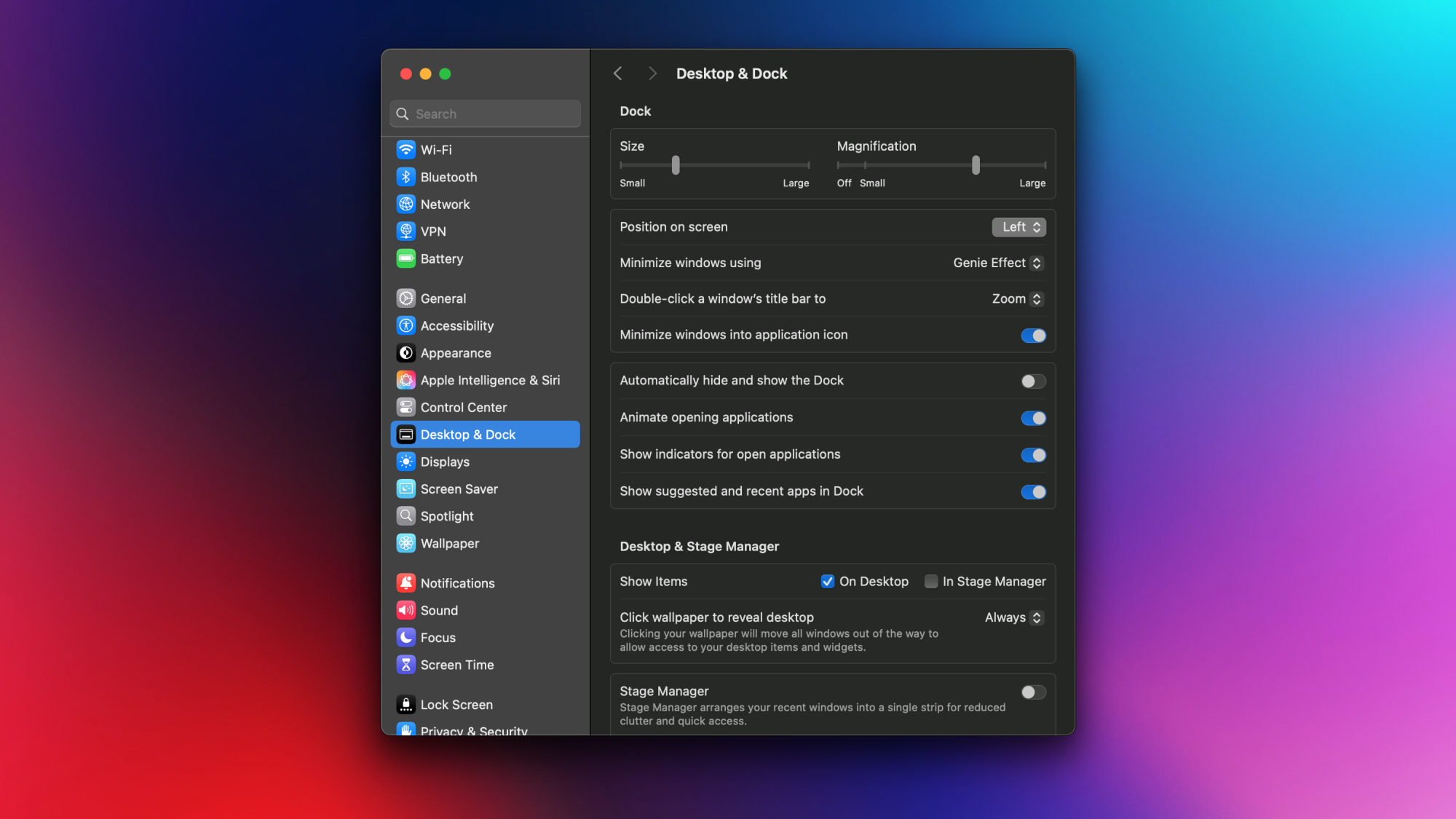
Alternatively, you can adjust the dock’s size by clicking the Apple logo in the top-left corner of your Mac’s screen and going to System Settings > Desktop & Dock and moving the Size slider.
Change the dock’s position
The dock can be moved to either side of your screen, saving you precious real estate. To change this, right-click any vacant area in the dock and select Position on Screen. Pick Left or Right to align your dock vertically to your selected position. Center will place it back in the default spot.
This option is also available in System Settings > Desktop & Dock > Position on screen.
Automatically hide and show the dock
Credit: Pranay Parab
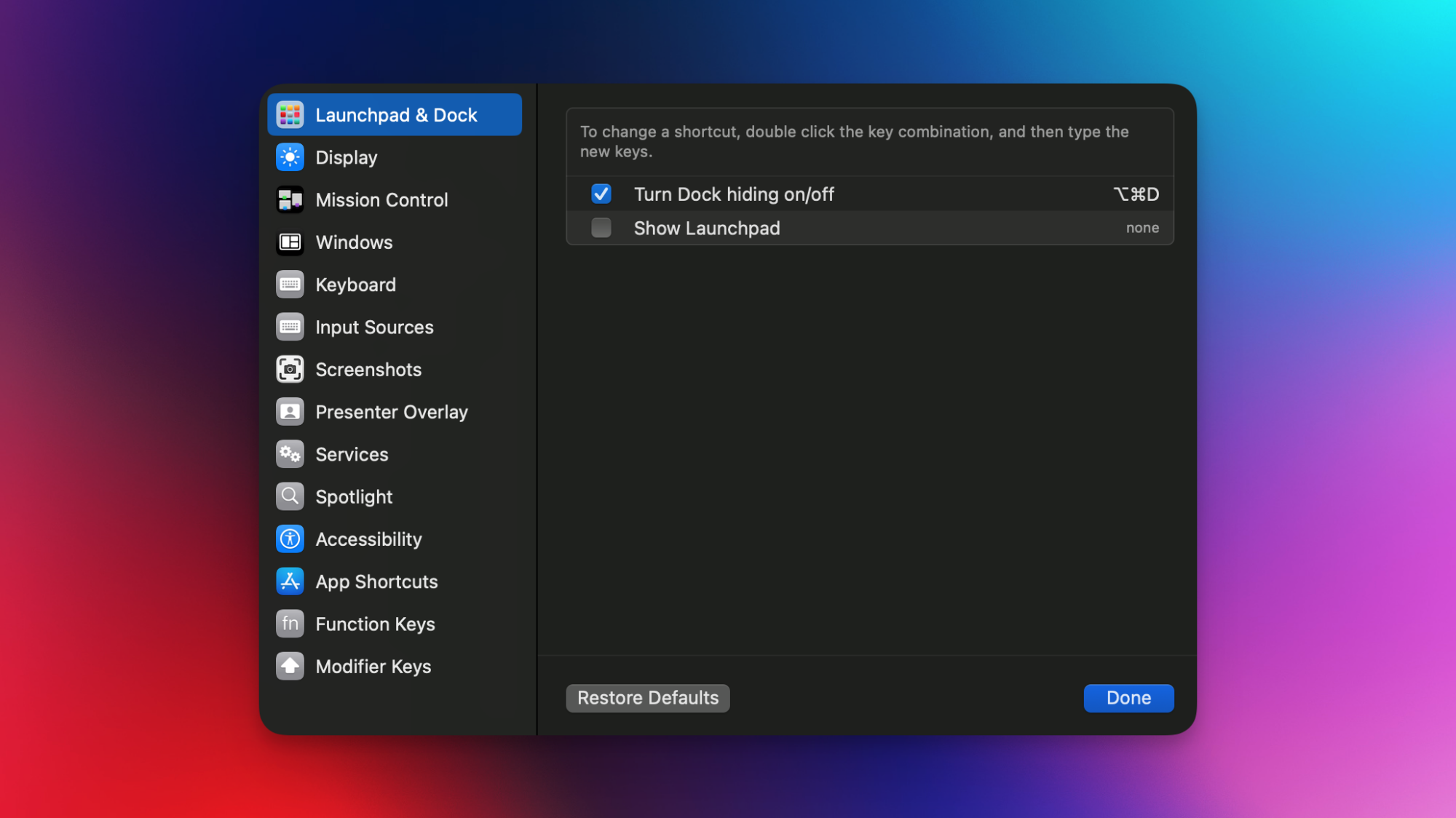
Some of us prefer to have a clean workspace, and if that’s you, you can auto-hide the dock when it’s not in use. It won’t be gone entirely, but it’ll only make itself visible when you move the cursor towards its location. This is also a good feature for those with limited screen space. Enable this feature by going to System Settings > Desktop & Dock > Automatically hide & show the dock. Alternatively, you can use the keyboard shortcut Command-Option-D to toggle this setting on and off.
Remove recently opened apps from the dock
The right side of your dock will show your most recently opened apps. If this annoys you, you can disable the setting by going to System Settings > Desktop & Dock and disabling Show suggested and recent apps in Dock. I prefer this feature on, to help me navigate commonly used apps, but if you’re short on screen space, it could be useful.
Move minimized windows into the app icon
Whenever you minimize apps on your Mac, each window appears as a separate icon on the dock. This can cause the dock to fill up fast, automatically making it smaller. If you’d rather avoid this, macOS allows you to minimize windows directly into the appropriate app icon instead. Just go to System Settings > Desktop & Dock and select Minimize windows into application icon. To access a window that’s been minimized into an app icon, right-click it.
Hide indicators for open apps
Credit: Pranay Parab
If an app is open on your Mac, a small dot will appear near its icon on the dock. You can remove these open app indicators if you’d like. Go to System Settings > Desktop & Dock and disable Show indicators for open applications.
Customize magnification of icons
When you move your cursor near any app icon on your Mac’s dock, it’ll automatically enlarge. You can change the level of this magnification effect, or disable it altogether by going to System Settings > Desktop & Dock.
To enable or disable enlarging icons, use the slider below Magnification. Moving the slider all the way to the left switches off magnification, while moving it elsewhere will adjust magnification size. Fun tip: If you have this feature disabled, you can temporarily activate it on command by holding Shift + Control.
Add folders to the dock
Credit: Pranay Parab
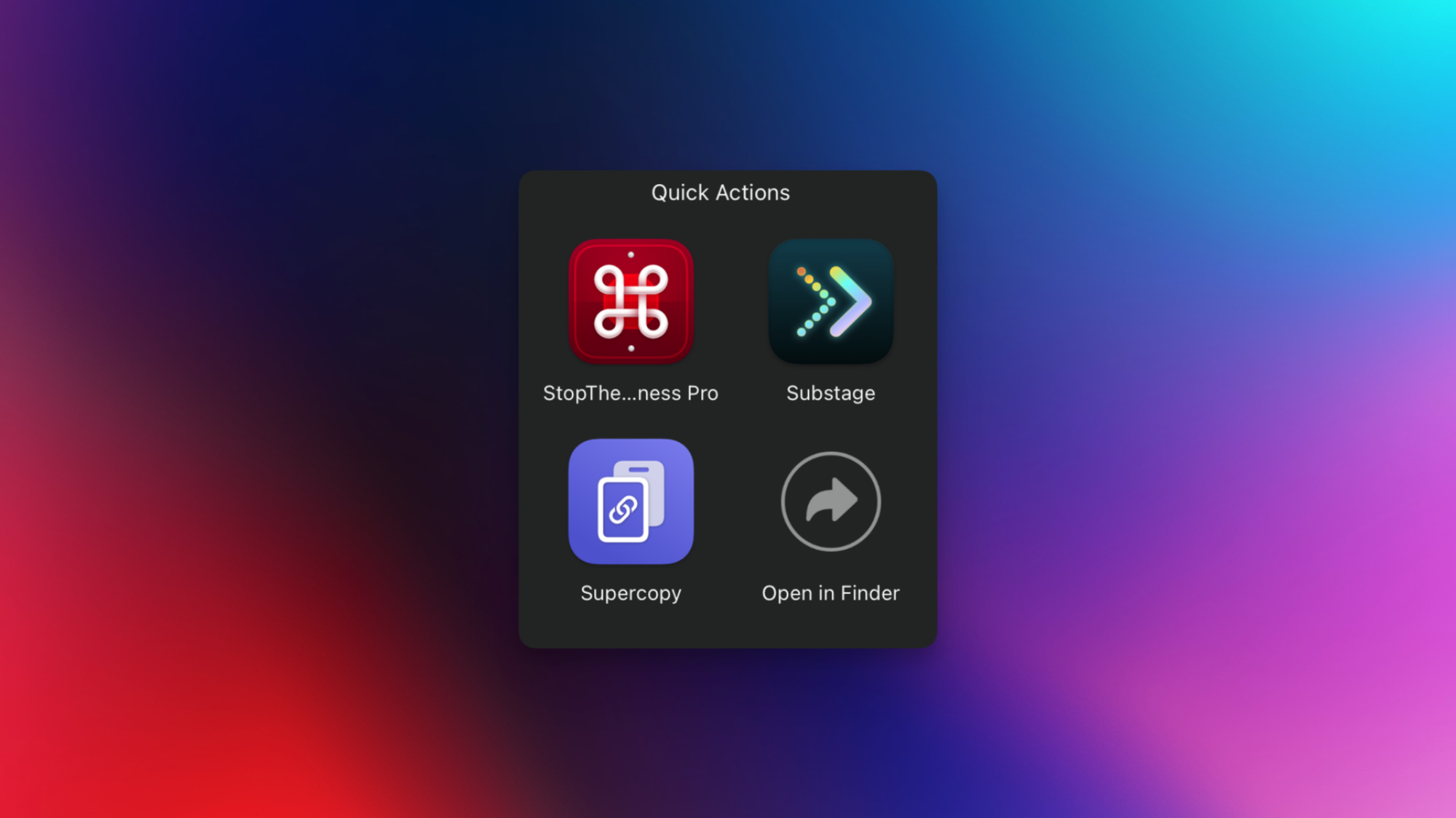
You can add browsable folders to your Mac’s dock, as long as the folder is in the Favorites bar in Finder. Open Finder and locate the folder you want to add and drag it to the Favorites bar in the left pane. Right-click any folder in the Favorites bar and select Add to Dock.
Here’s the fun part: you can use this trick to group a bunch of apps into a single dock icon, which is great when you have a few apps that you want to keep in the dock, but you don’t need them every single day. The trick is to go to the Applications folder in Finder and move the apps to a new folder. Just give the folder a name, move it to the Favorites Bar, and add it to the dock. You’re all set!
Add spacers to the dock
You can go a little beyond the options macOS gives you and add a few spacers, or blank spaces, to your dock to help organize it. You can use these blank spaces for aesthetics or to group similar apps. To do this, you’ll need to use your Mac’s Terminal. Press Command-Space, search for Terminal, and open the app. Then, paste and run the following command to add a full-size spacer in the dock.
defaults write com.apple.dock persistent-apps -array-add '{tile-data={}; tile-type="spacer-tile";}' && killall Dock
If you want a smaller spacer, use this command instead.
defaults write com.apple.dock persistent-apps -array-add '{"tile-type"="small-spacer-tile";}' && killall Dock
For more than one spacer, simply re-run your chosen command. The good news is that this is the only time you’ll need the Terminal. Once you have your spacer, simply drag it around to change its position in the dock, or drop it outside the dock to remove it.
Change app icons to make the dock more visually pleasing
You can also customize the dock by simply changing various app icons. This can make it look more pleasant or help it fit a particular theme. The best way to do this is to open your favorite apps and see if they let you change their app icons. If not, check out my guide on replacing macOS app icons, which highlights both a built-in method and one third-party app that makes it easier to change app icons. For alternative icons, a good resource is macOSicons.com.
Use third-party apps to access hidden dock settings
Credit: Pranay Parab
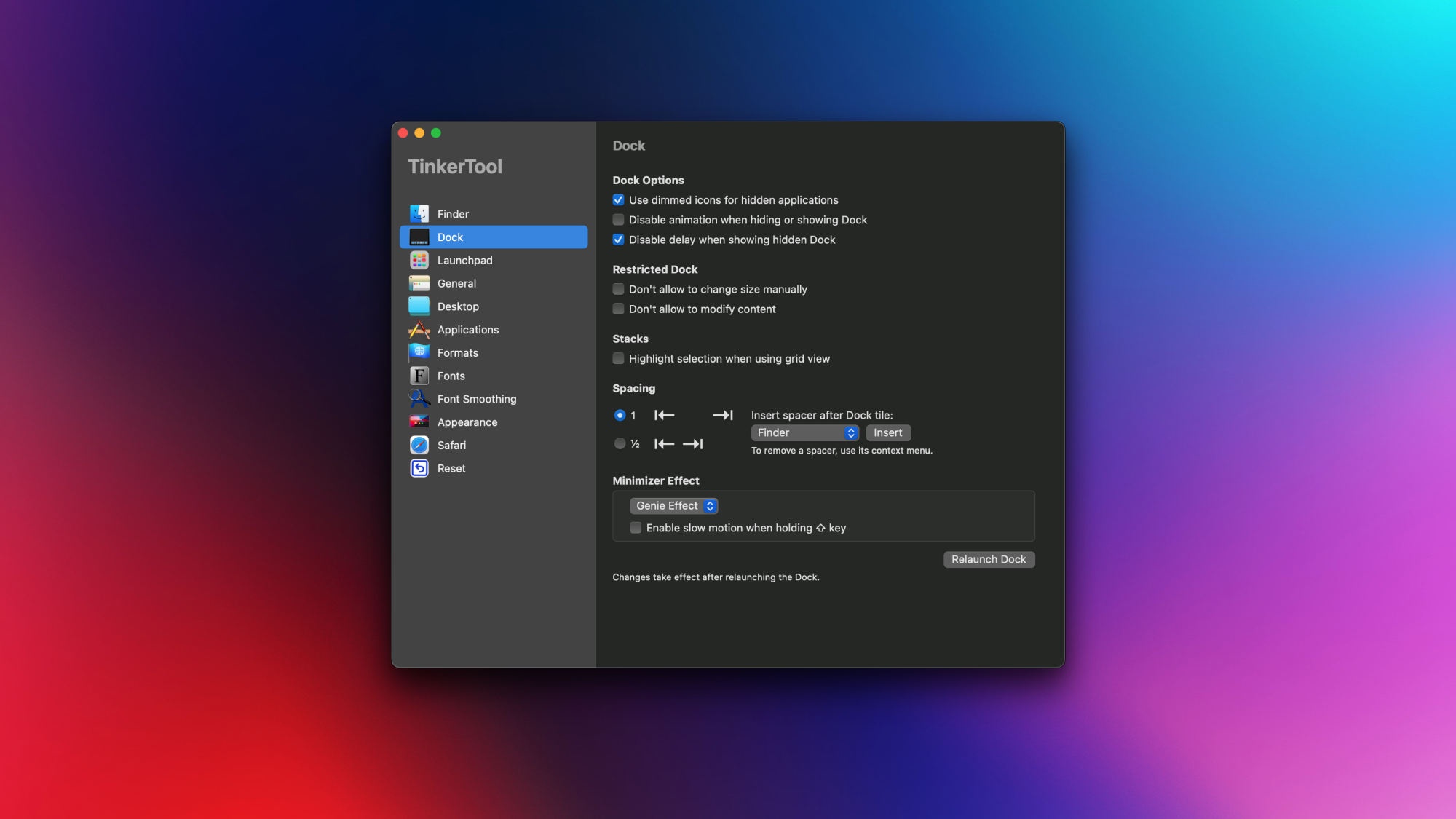
Your Mac doesn’t always make it easy to find everything you can do with it. Sometimes, you need to run a few Terminal commands to access hidden features (such as the spacers I just highlighted), and even then, some features aren’t user-accessible at all. For more control, consider trying Mac apps that unlock these hidden features for you, such as TinkerTool (free) or Supercharge ($11). I’ve written about TinkerTool before, and my colleague Khamosh Pathak has covered Supercharge. Both apps have a few useful options for tweaking your dock, such as the ability to remove the delay before macOS reveals your hidden dock, or dimming the icons of hidden apps.
TinkerTool also makes it easier to add spacers to the dock, and it even allows you to lock the dock, so that the positions of icons and spacers can’t be changed. Supercharge, meanwhile, has a feature that directly opens dock folders in Finder, instead of showing their contents right in the dock.
Use a dedicated dock customization app
If your goal is only to tweak the dock and nothing else, you may be better-served by a dedicated dock customization app. This type of an app will allow you to make cosmetic and functional changes to the dock, but won’t be useful if you want other systemwide tweaks. Two good examples are DockFlow ($5.60) and uBar ($30). DockFlow lets you create presets for your dock. You can think of it like creating various profiles such as work, gaming, education, social media, etc. For each of these presets, you can drop a few apps into them and quickly switch between them as needed. uBar, meanwhile, focuses on making the dock look like the Windows taskbar, which could be useful if you’re moving operating systems.
Massive 47GB Data Breach Exposes Millions Of Passwords For Google, Netflix And More

It might surprise you to learn this, but cybercriminals are usually fairly protective of the data they steal, because things like credentials and login details have value, and can be sold to the right buyer. That’s why it’s so unusual that this latest discovery was apparently found completely unencrypted and visible to the open web; a massive
Android Auto Gets Ready To Rev These Great New Features

Google is announcing a suite of significant Android Auto updates designed to make your time behind the wheel—especially while parked—more engaging, collaborative, and possibly safer. Among the most anticipated additions are an overhaul to the Spotify experience with “Jam” integration, the long-awaited arrival of web browsers and video application
CISA Loses Nearly All Top Officials
Multiple readers shared the following report about the executive departures at CISA: Virtually all of the top officials at the Cybersecurity and Infrastructure Security Agency (CISA) have departed the agency or will do so this month, according to an email obtained by Cybersecurity Dive, further widening a growing void in expertise and leadership at the government’s lead cyber defense force at a time when tensions with foreign adversaries are escalating.
Five of CISA’s six operational divisions and six of its 10 regional offices will have lost top leaders by the end of the month, the agency’s new deputy director, Madhu Gottumukkala, informed employees in an email on Thursday. […] The exits of these leaders could undermine the efficiency and strategic clarity of CISA’s partnerships with critical infrastructure operators, private security firms, foreign allies, state governments and local emergency managers, experts say.


Read more of this story at Slashdot.
RFK Jr. revokes COVID shot recommendations for kids, during pregnancy
Anti-vaccine advocate and health secretary Robert F. Kennedy Jr. has unilaterally revoked federal recommendations for healthy children and pregnant people to get COVID-19 booster shots.
The abrupt change, announced on social media, could make it yet more difficult, if not impossible, for healthy children and pregnant people to have access to the seasonal vaccines, which have proven safe and effective at protecting both of those groups from severe illness.
In a regulatory meeting last week, Centers for Disease Control and Prevention epidemiologist Ruth Link-Gelles presented 2023–2024 data showing that COVID-19 boosters effectively protected children and teens from needing urgent or emergency care due to COVID-19 (slide 36). In children 9 months to 4 years old in that season, the boosters provided 52 percent added effectiveness over background immunity from past vaccination and illness. The boosters were 64 percent effective in kids ages 5 to 17.
AlmaLinux 10.0 Stable Released – Unlike RHEL 10, It Continues Supporting x86-64-v2 CPUs
Building off the recent release of Red Hat Enterprise Linux 10.0, AlmaLinux 10.0 stable is now available as this RHEL-derived popular community Linux OS alternative…
WhatsApp finally launches an official version for iPads
The wait is (finally) over. There’s an official WhatsApp release for Apple iPads. It only took 16 years, as WhatsApp first entered the scene all the way back in 2009. As a matter of fact, the messaging platform predates the iPad itself, which launched in 2010.
The iPad offers much more screen real estate than a smartphone, and Meta seems to have made good use of the extra space. The app takes advantage of the tablet’s multitasking features like Split View and Slide Over, so users can view multiple apps at once. This lets folks, for instance, browse the web as they chat with a friend.
The iPad version of the app also works with Magic Keyboard and Apple Pencil, which should speed up conversations. It allows for video and audio calls with up to 32 people, and integrates with both the front and rear cameras. Just like other versions of WhatsApp, chats sync across devices. WhatsApp for iPad is available right now via the App Store.
One down, one to go. We are still waiting for Meta to make a dedicated Instagram app for iPad tablets. Recent reports indicate that the company is actually working on it, after a long 15 years in which we all have had to use a resized iPhone app and pretend we were enjoying ourselves.
This article originally appeared on Engadget at https://www.engadget.com/apps/whatsapp-finally-launches-an-official-version-for-ipads-165608577.html?src=rss
TCL’s newest TVs will automatically calibrate wireless speakers
Dolby’s automatic speaker calibration tech FlexConnect finally comes to market via TCL’s 2025 QD-Mini LED TVs. The company had originally announced the technology back in 2023, and was set to debut it with TCL’s 2024 TV lineup.
FlexConnect lets users place wireless speakers anywhere in a room without worrying about perfect configuration. The surround sound will then be optimized automatically based on the layout of the room and the position of the speakers.
The first audio device to support this tech will be TCL’s Z100 smart speaker, which is designed to pair with TCL’s FlexConnect-enabled TVs. TCL’s Precise Dimming Series, which includes the QM6K, QM7K and the newly announced QM8K, will all be FlexConnect-compatible.
Users will be able to pair up to four Z100 speakers with their TCL TVs, which will work in concert with the TV’s built-in speakers to deliver intelligently calibrated Dolby Atmos sound. This innovation allows for immersive spatial sound without the need for a perfectly symmetrical speaker setup.
In today’s joint press release, John Couling, Senior VP of Entertainment at Dolby Labs, said “With Dolby Atmos FlexConnect, consumers can unlock even more flexibility and adaptability in how they design their home entertainment systems, while removing the stress of whether their speakers are in the right location to get an incredible Dolby Atmos experience.”
In the same release, TCL said the Z100 speakers are expected this summer. The Z100 and the TCL Precise Dimming Series represent the first FlexConnect products launched in the United States. Along with the QM8K launch, TCL also announced its first model of party speakers, as well as the Q65H, its latest Dolby Atmos soundbar.
This article originally appeared on Engadget at https://www.engadget.com/home/home-theater/tcls-newest-tvs-will-automatically-calibrate-wireless-speakers-163907846.html?src=rss
GLP-1 Drug Use Surges 600% as 2% of Americans Take Weight-Loss Medications
An anonymous reader shares a report: More than 2% of Americans are taking the blockbuster class of GLP-1 drugs for overweight or obesity, up nearly 600% over six years, according to a report from FAIR Health given to Axios first. The data from FAIR Health’s repository of over 51 billion commercial healthcare claim records shows the explosion in use of the drugs specifically for weight loss — roughly half of all users.
In all, roughly 4% of Americans were taking GLP-1 drugs in 2024 for either overweight, obesity or Type 2 diabetes (their original approved use). The data shows Novo Nordisk’s Ozempic is still by far the most commonly taken GLP-1, followed by Eli Lilly’s Mounjaro. The percentage of adults who were prescribed a GLP-1 drug but did not have bariatric surgery increased from 2.5% in 2019 to 11.2% in 2024 while the the percentage of adult patients who had bariatric surgery decreased 41.8%.


Read more of this story at Slashdot.
Falcon 9 sonic booms can feel more like seismic waves
The Vandenberg Space Force Base in Santa Barbara, California, serves military space launch missions as well as launches for NASA and commercial entities like SpaceX. But how do all those launches affect residents living along the Central Coast? People might marvel at the spectacular visual display, but as launch activity at the base has ramped up, so have the noise complaints, particularly about the sonic booms produced by Falcon 9 launches, which can reach as far south as Ventura County. The booms rattle windows, frighten pets, and have raised concerns about threats to the structural integrity of private homes.
There have been rockets launching from Vandenberg for decades, so why are the Falcon 9 launches of such concern? “Because of the Starlink satellites, the orbital mechanics for where they’re trying to place these in orbit is bringing [the trajectories] closer to the coast,” said Brigham Young University’s Kent Gee, who described his research into sonic boom effects on neighboring communities in a press briefing at a meeting of the Acoustical Society of America in New Orleans. And the launches are occurring much more frequently, from two to three launches per year in the 1980s to between five and seven launches each month today. There were 46 Falcon 9 launches out of the Vandenberg base in 2024 alone, per Gee.
Gee joined a project called ECOBOOM (Environmental and Community Observation of Sonic Booms) to study the factors that can impact just how jarring those sonic booms might be, conducted jointly by BYU and California State University, Bakersfield, with cooperation from the Space Force. “Space Force is interested in this because they feel a sense of stewardship,” said Gee. “These rockets from SpaceX and other providers are launched from the base for a variety of missions and they want to understand the effects both on and off base, trying to understand how they can complete the mission while minimizing [negative] impacts.”
These Beats Fit Pro Earbuds Are Half Their Original Price Right Now
We may earn a commission from links on this page. Deal pricing and availability subject to change after time of publication.
There’s no shortage of wireless earbuds out there, but if you’re after strong noise cancellation, bass-heavy sound, full iOS compatibility, and a fit that won’t budge during a workout, you should consider the Beats Fit Pro, and this open-box deal on StackSocial drops the price to $99.99 from the usual $199.99. The sale includes all four color options—white, black, gray, and purple.
The “open box” tag just means they’ve likely been handled but not used, and they’ve been inspected to make sure they’re still in new condition. They’re rated IPX4 for water resistance, so sweat and light rain aren’t a problem, though the case itself isn’t protected and doesn’t support wireless charging. Battery life is around six hours with ANC on and another 18 to 23 hours from the case, depending on how you use them.
Sound-wise, these lean hard into bass, which some folks will love and others might find a bit much. The low end hits especially well at high volumes without distortion, which makes them great for hip-hop, pop or EDM, notes this PCMag review. The downside is that there’s no customizable EQ, so if you’re not into that sculpted sound, you can’t do much about it. The noise cancellation holds up pretty well for things like plane rumbles and low-frequency distractions, but don’t expect total silence in a noisy café (higher-pitched noises still leak through). There’s also a decent Transparency Mode that lets in just enough outside sound for you to cross the street or chat with someone without pulling out an earbud. Android users do get access to most core features through the Beats app, but some perks like automatic switching, hands-free Siri, and Spatial Audio are still iOS-only. Getting all that for half off isn’t a bad deal.
Wayland ext-background-effect-v1 Merged For Background Blur Feature
After being under discussion since January of 2024, the ext-background-effect-v1 staging protocol proposal by KDE developer Xaver Hugl has finally been merged to the Wayland-Protocols repository. This new Wayland protocol is intended for handling effects like background blur on terminals…
Firearms Expert Reacts To Weapons From DOOM Video Game
This is a video of firearms expert and the UK’s Royal Armouries museum curator Jonathan Ferguson (complete with an “I’m Your Huckleberry” t-shirt under his blazer) reacting to and seriously discussing a variety of the outlandish weapons seen in the video game DOOM: The Dark Ages. That look on his face says it all. That’s the look of a man who can’t believe he’s had to crush and pulverize skulls the old fashioned way.
Specialized slashes £1,600 off Turbo Levo 4 entry price with two new alloy options
Specialized has released two aluminium additions to its Turbo Levo 4 electric mountain bike line-up, dropping the entry-level price while still featuring the same 3.1 Motor, battery and geometry as the recently-released carbon Turbo Levo 4.
The new bikes also feature a lower spec level than the carbon counterparts, with the US brand said to be “offering a more attainable option without sacrificing performance”.
The base Levo 4 model uses Marzocchi suspension, while the Levo 4 Comp uses a Fox 38 Rhythm fork and the co-developed Fox Float GENIE rear shock first seen on the Stumpjumper 15.
Prices start at £5,199 for the Turbo Levo 4 Alloy, while the Levo 4 Alloy Comp is priced at £5,999 (international pricing TBA).
For comparison, the carbon-framed bikes start at £6,799 / $7,999 for the Levo 4 Comp.
We were big fans of the S-Works Levo 4 when we tested it, awarding it 4.5 stars, so it’s hard to see this being far off the mark.
The same, but different

The 3.1 Motor, as specced on the carbon Levo 4, is used on the new alloy bike.
While not sharing the same punchiness as the S-Works variant, it’s still competitive compared to the competition.

Alongside the motor, the 840Wh batter is carried over, which Specialized says gives an average of 5.3 hours of ride time when combined with a 280Wh aftermarket Range Extender.
Controlling the system is Specialized’s Mastermind TCU screen. This is embedded into the top tube, and enables you to cycle through modes and see key performance metrics and range estimations.
| | S2 | S3 | S4 | S5 | S6 |
|---|---|---|---|---|---|
| Seat tube angle (degrees) | 77 | 77 | 77 | 77 | 77 |
| Head tube angle (degrees) | 64.5 | 64.5 | 64.5 | 64.5 | 64.5 |
| Chainstay (mm) | 435 | 435 | 435 | 435 | 435 |
| Seat tube (mm) | 390 | 405 | 425 | 445 | 465 |
| Top tube (mm) | 578 | 599 | 627 | 655 | 689 |
| Head tube (mm) | 95 | 103 | 117 | 132 | 149 |
| Fork offset (mm) | 44 | 44 | 44 | 44 | 44 |
| Trail (mm) | 132 | 132 | 132 | 132 | 132 |
| Bottom bracket drop (mm) | 30 | 30 | 30 | 30 | 30 |
| Bottom bracket height (mm) | 350 | 350 | 350 | 350 | 350 |
| Wheelbase (mm) | 1200 | 1223 | 1254 | 1286 | 1323 |
| Standover (mm) | 753 | 754 | 753 | 758 | 761 |
| Stack (mm) | 618 | 626 | 638 | 652 | 667 |
| Reach (mm) | 435 | 455 | 480 | 505 | 535 |
The geometry of the electric mountain bike is also carried over from its carbon siblings. This includes the adjustability seen on the carbon model, which is said to enable riders to fine-tune their geometry for a personalised ride.
The head angle sits at 64.5 degrees as stock, but can be adjusted by 1 degree in either direction using cups in the headset.

You can also run the bike with a 29in rear wheel, or with a 27.5in mullet setup.
The only difference, Specialized says, is the frame material, which instead of using the brand’s Fact carbon fibre, uses its premium M5 Alloy.
Unlike some brands, Specialized has managed to keep its internal frame storage with the Alloy model, with its signature SWAT box featuring on the downtube and able to carry spares such as multi-tools and tubes.
The bikes continues to use a 160mm fork up front, with 150mm of rear travel.

If you’re looking for a similar ride to the carbon-framed bikes, the Levo 4 Alloy Comp uses the same GENIE shock technology.
The GENIE system uses two air springs to create a flatter spring curve, which gives it a more coil-like feel as you move through the stroke.
For the first 70 per cent of the travel, both air chambers are open.
Close in on that last 30 per cent, though, and the GENIE band slides over and closes a port to the outer chamber, reducing the volume dramatically and creating a nice, progressive ramp up right where you need it most.
Specialized Levo 4 Alloy specification and price
Specialized Levo 4 Alloy

- Fork: Marzocchi Bomber Z1, 160mm
- Shock: Marzocchi Bomber Inline
- Motor: Specialized 3.1 Motor
- Drivetrain: SRAM Eagle 70 T-Type
- Brakes: SRAM DB8 Stealth
- Wheels: Roval Traverse DH Alloy
- Price: £5,199
Specialized Levo 4 Alloy Comp
- Fork: Fox 38 Rhythm, 160mm
- Shock: Fox Float Genie Performance Elite
- Motor: Specialized 3.1 Motor
- Drivetrain: SRAM Eagle 90 T-Type
- Brakes: SRAM Maven Bronze
- Wheels: Roval Traverse DH Alloy
- Price: £5,999
Cancer-Fighting Immune Cells Could Soon Be Engineered Inside Our Bodies
Researchers are developing techniques to genetically modify cancer-fighting immune cells directly inside patients rather than in expensive laboratory facilities, potentially making CAR-T therapy accessible to far more people.
Current CAR-T treatments require removing a patient’s T cells, shipping them to specialized facilities for genetic engineering, then returning them weeks later at costs around $500,000 per dose. The new “in vivo” approaches use viral vectors or RNA-loaded nanoparticles to deliver genetic instructions directly to T cells circulating in the bloodstream, which could reduce costs by an order of magnitude. Companies including Capstan Therapeutics, co-founded by Nobel laureates, and AstraZeneca-backed EsoBiotec have launched early human trials. While only about 200 US centers currently offer traditional CAR-T therapy, the approach could make the powerful treatment available on demand like conventional drugs.


Read more of this story at Slashdot.
OnePlus is the latest smartphone maker to go all-in with AI
OnePlus thrives on trends—if other smartphone makers are doing something, you can bet OnePlus is going to have a take. The company recently confirmed it’s ditching the storied alert slider in favor of an Apple-like shortcut button called the Plus Key, and that’s not the only trend it’ll chase with its latest phones. OnePlus has also announced an expanded collection of AI features for translation, photography, screen capture, and more. OnePlus isn’t breaking new ground here, but it is cherry-picking some of the more useful AI features we’ve seen on other phones.
The OnePlus approach covers most of the established AI use cases. There will be AI VoiceScribe, a feature that records and summarizes calls in popular messaging and video chat apps. Similarly, AI Call Assistant will record and summarize phone calls, a bit like Google’s Pixel phones. However, these two features are India-only for now.
Globally, OnePlus users will get AI Translation, which pulls together text, voice, camera, and screen translation into a single AI-powered app. AI Search, meanwhile, allows you to search for content on your phone and in OnePlus system apps in a “conversational” way. That suggests to us it’s basically another chatbot on your phone, like Motorola’s Ask and Search feature, which we didn’t love.