Nintendo is gearing up for the launch of the Switch 2 on June 5, and to ensure you’re ready to go when the console arrives at your door, you’ll need to download the latest update for the newly renamed Nintendo Switch App. The app, which was previously called the Nintendo Switch Online app, had added a number of new features, including a more seamless screenshot interface, GameChat functionality and placeholder icons for game-specific services like Zelda Notes. The latter will become usable on launch day.
Arguably the most useful addition is the revamped screenshots and video upload feature, which allows you to link your phone to your Switch 2 and wirelessly upload in-game media to the app, either manually or automatically. This was already possible on the original Switch (and is hardly a revolutionary feature), but doing so involved some needlessly clunky QR code scanning that didn’t always work. Now, screenshots and gameplay clips should just appear in the app, where you can save them locally. Up to 100 files can be stored in the app for 30 days from the point of upload, and once you hit the limit the oldest files will disappear if not saved.
Another big Switch 2 feature is GameChat, Nintendo’s new multiplayer voice chat functionality. Via the Nintendo Switch App you’ll be able to receive notifications for GameChat invites, friends coming online and friend requests. Your added friends will be displayed on the home screen of the app. Again, no one who’s been playing games on a modern PlayStation or Xbox console for the last decade is going to be blown away by any of this stuff, but it looks like playing online with friends on Switch 2 is going to be mercifully less fiddly than on its predecessor.
The Zelda Notes icon now appears when you open the Nintendo Switch App, but it won’t be functional until June 5. The app, which is only compatible with the Nintendo Switch 2 Editions of The Legend of Zelda: Breath of the Wild and Tears of the Kingdom, effectively functions like a sat nav for tracking down missing Koroks and shrines on your save file. You can also share your Autobuild creations in TotK with friends, edit in-game photos and check play records such as the number of enemies defeated and total game overs.
Nintendo is making small tweaks to some of its other services ahead of the Switch 2’s arrival. Over on Nintendo Switch Online (not to be confused with the mobile app), where you can play a selection of emulated classics from Nintendo’s back catalogue, a new Switch 2-exclusive rewind feature will be added to the N64 library, as well as a new CRT filter option. These features were already available for NES and SNES games on the service, and it’s not entirely clear why original Switch owners won’t benefit from the additional N64 options as well.
This article originally appeared on Engadget at https://www.engadget.com/gaming/nintendo/nintendos-updated-mobile-app-will-make-sharing-switch-2-screenshots-a-lot-easier-143842317.html?src=rss
There may never be an iOS 19 or a macOS 16, according to reporting from Bloomberg’s Mark Gurman. At its Worldwide Developers Conference next month, Apple reportedly plans to shift toward version numbers based on years rather than the current numbering system. This is intended to unify the company’s current maze of version numbers; instead of iOS 19, iPadOS 19, macOS 16, tvOS 19, watchOS 11, and visionOS 3, we’ll get iOS, iPadOS, macOS, tvOS, watchOS, and visionOS 26.
The last time Apple changed its version numbering convention for any of its operating systems was back in 2020, when it shifted from “macOS X” to macOS 11. Note that the numbering will be based not on the year of the software’s release but on the year after; this makes a certain amount of sense since iOS 26 would be Apple’s most-current version of iOS for roughly nine months of 2026 and just three months of 2025.
The update to the version numbering system will be accompanied by what Gurman describes as “fresh user interfaces across the operating systems,” a visual overhaul that will bring Apple’s iPhone, Mac, watch, and TV software more in line with some of the design conventions introduced in Apple’s visionOS software in 2024. Among the changes and additions will be another crack at “Mac-like” multitasking for the iPad.
With Google expected to push out its next major Android update to its own Pixel phones sometime next month, Samsung is catching up: Its top-end phones phones got updates to One UI 7 (based on Android 15) this year, and now the beta version of One UI 8 (based on Android 16) is available if you own a Galaxy S25 phone and live in the U.S., UK, Germany, or South Korea.
While there aren’t any revolutionary new features here—at least, not so far—Samsung is promising “a new era of software intelligence” and “a true multimodal AI agent” (which as far as I can tell, means a few tweaks to the Now Bar and the Now Brief).
Look inside the Members app for the beta invite. Credit: Lifehacker
If you’re in an eligible country and have an eligible device, then you can join the One UI 8 beta now. The usual caveats about beta software apply: Bugs are to be expected, and you shouldn’t run betas on devices that you rely on (you may notice certain apps crash or don’t work properly).
How to join the One UI 8 beta
Open up the Samsung Members app on your phone (you can redownload it if you’ve previously uninstalled the app), and sign in using your Samsung account details. Scroll down the Discover tab, and somewhere on it you should see a Beta Program panel you can tap on.
From there, tap One UI 8 S25 Beta, read through the information provided, and tap Join. After a few moments, you’ll get confirmation that you’re in, and you’ll see a screen where you can Check for software updates. Once the software is ready, you’ll be prompted to reboot your phone to install it.
It takes a few seconds to sign up. Credit: Lifehacker
As yet, Samsung hasn’t said anything yet about which other phones might be able to join the beta, but considering One UI 8 is expected to launch in full around July time—with the Galaxy Z Fold 7 and Galaxy Z Flip 7, most probably—the program might not be extended much further beyond Galaxy S25 handsets.
You can leave the One UI 8 beta at any time by tapping Beta Program > One UI 8 S25 Beta in the Members app, then the three dots (top right), then Leave One UI 8 S25 Beta.
What’s new in One UI 8
There’s official information from Samsung about what’s new in One UI 8, plus features that users have already spotted during testing. Bear in mind that features can come and go during testing, so none of these changes are guaranteed to still be in place once One UI 8 is ready for mass adoption.
There’s a Bluetooth upgrade with Auracast, for sharing audio streams to multiple devices, as well as improved Quick Share capabilities: full screens for sending and receiving files, and QR code transfer support. You can get to Quick Share through a single tap on the button in Quick Settings.
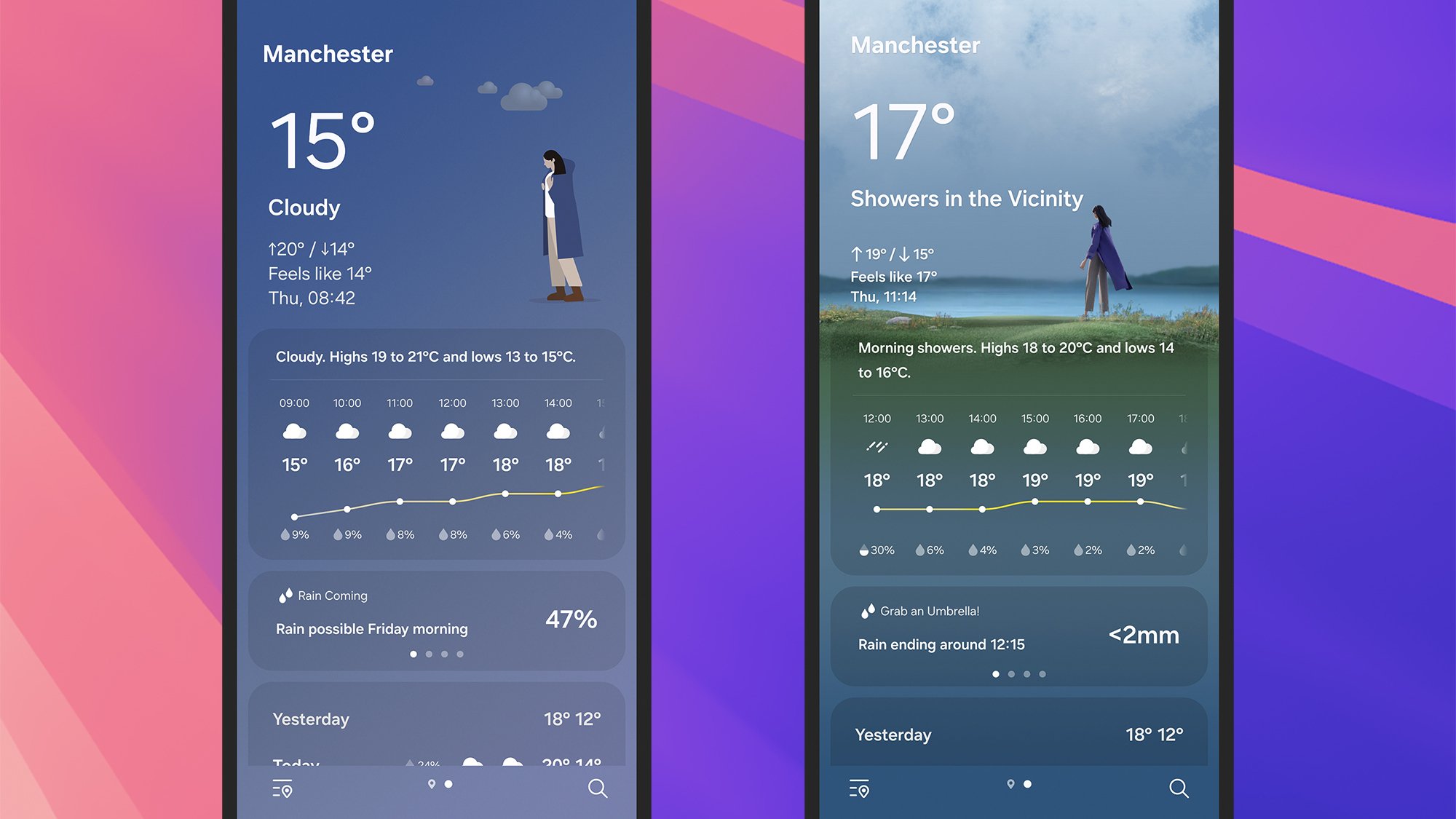
The Weather app in One UI 7 (left) and One UI 8 (right). Credit: Lifehacker
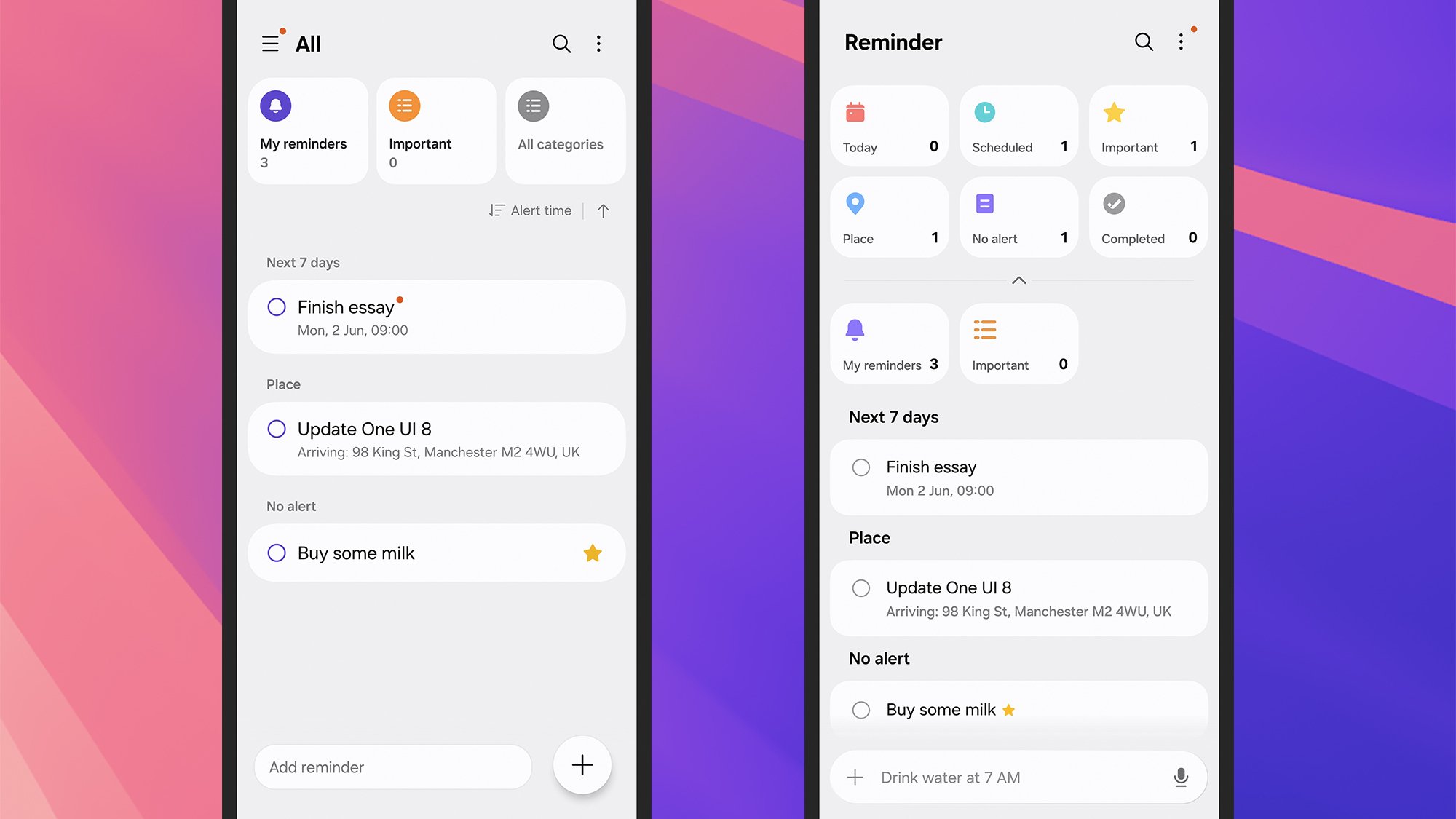
Some apps are getting visual overhauls. They include Weather, which adopts a less cartoony aesthetic with more translucent elements, and Files, which adds a recently edited row and shifts some elements around. Reminders also gets a bit of an overhaul, with the introduction of suggested reminders and more category filters at the top (like Completed and Place).
You’ll notice a revamped menu in the Samsung Internet app too, if you tap on the three horizontal lines in the lower right corner. Shortcuts can be customized and pages can be shared more easily, and—like One UI 8 in general—the overall interface feels a little more modern and fresh.
Samsung says it’s added more resolution options for Samsung DeX, and there are more preset routines to choose from in Modes and Routines on the Settings menu. There are improvements to the Secure Folder as well: Apps can now be moved there and hidden from the app drawer, and the Secure Folder can also be completely hidden.
The Reminders app in One UI 7 (left) and One UI 8 (right). Credit: Lifehacker
Users are spotting all kinds of other changes: Earbud controls on the lock screen, more customization for home screen widgets, extra options for split-screen mode, and a bunch of other minor tweaks. No doubt more of these will emerge as the beta testing continues.
As for Galaxy AI, I can’t see too much that’s changed. It appears that the Now Bar is able to show calls and Do Not Disturb modes now, but that’s about it. It may be there’s more to come here: Hidden code suggests you’ll soon be able to get your Now Brief read out to you, but the feature hasn’t gone live yet.
While we’re still waiting for a true electric minivan to hit the US, VW’s ID.Buzz microbus is close. It’s a unique family hauler that’ll definitely get your neighbors buzzing. No, seriously, during my week of testing I had over a dozen conversations with strangers who were fascinated by the ID.Buzz. One of my neighbors stopped their car dramatically when they saw it, backed up, and just had to give me a thumbs up and praise it as “cool as hell.”
My kids were similarly enamored, they loved its cute design and enormous interior space. In many ways, it’s the family EV I’ve been dreaming of — something that could comfortably seat seven people and carry tons of cargo for road trips. Unfortunately, its high $60,000 starting price and relatively lackluster 234 mile range hold it back from true greatness.
Really, though, those issues were obvious when VW announced its US launch details for the ID.Buzz last year. I was more intrigued to see if it was a complete flop for VW, or if there was something compelling about it despite those flaws. After testing the ID.Buzz for a week, I’ve noticed one surprising thing: It makes everyone smile. It may not look exactly like VW’s classic ’60s microbus, but it elicits a similar amount of joy. And that’s refreshing compared to the response I’ve seen to other large EVs like the Cybertruck (my son calls it the “ugly truck”) and the ridiculous Hummer EV.
Sure, it’s sort of coasting on vibes, but the VW ID.Buzz still has plenty of practical benefits if you don’t mind the high price and charging a bit more often during road trips. And as I’ll explain below, it’ll likely be an enticing option once it hits the used market in a few years.
What is the VW ID.Buzz?
Most cynically, the ID.Buzz is an attempt to milk the brand nostalgia for VW’s hippy-era Type 2 microbus. VW never quite gave up on those vehicles, but its later models dropped the cute rounded aesthetic and looked more like commercial vans. What makes the ID.Buzz truly interesting is that it transforms a beloved classic into a cutting-edge EV, with an enormous infotainment screen and modern features like adaptive cruise control.
It also makes a great first impression, since it doesn’t look like anything else on the road. There’s a rounded front end that evokes the playfulness of the original model, and its two-tone color design (on some trims) simply pops among a sea of boring (and often white) cars in traffic. Sure, VW has done this before, but the Buzz is still a great reminder that EVs don’t have to look like traditional vehicles. There’s no front engine to worry about, just a big battery and electric motors. In the Buzz’s case, you can choose from rear-wheel drive and “4Motion” all-wheel drive dual motors, delivering 282 and 335 horsepower, respectively.
Devindra Hardawar for Engadget
The ID.Buzz offers the seating of a minivan — with room for six to seven people depending on your configuration, and convenient sliding second-row doors — plus the height and storage capacity more akin to cargo vans. With all of its seats up, the Buzz offers an acceptable 18.6 cubic feet of storage, which is enough for a typical grocery run or a stroller and a diaper bag. Fold the third row down, though, and you get a far more useful 75.5 cubic feet of space. You could also remove the second and third row of seats entirely to get a massive 145.5 cubic feet of space.
Funny enough, you could technically fit three people into the Buzz’s third row, but US regulators have taken issue since that row only has two seatbelts. VW has recalled existing vehicles and says it’ll be adding “unpadded trim parts” to reduce the seating area. Yes, it’s the rare recall where you’ll actually lose a bit of functionality in the name of safety. (Nobody is actually forcing Buzz owners to do that, though…)
As for other niceties, the ID.Buzz offers an enormous 12.9-inch infotainment screen (I’ve never seen Apple CarPlay look so big before), a smaller driving information screen behind the steering wheel and an optional heads-up display. There’s also a panoramic sunroof option, which can’t be opened but can be tinted to look opaque on demand. Our review unit didn’t have that sunroof, unfortunately, and the interior certainly felt a bit gloomier because of that. If I were seriously considering the ID.Buzz, I’d argue the sunroof a is requirement. (Admittedly, it could be a problem if you’re trying to get babies and toddlers to sleep, since the interior will never truly get dark. But kids outgrow napping fairly quickly, and it’s easy to find canopies for car seats.)
Devindra Hardawar for Engadget
What’s good about the VW ID.Buzz?
The best thing about the ID.Buzz is the vibe you get while driving it around town. People will stop and stare at it, kids will point at it excitedly and harried parents will approach it like the monolith from 2001. It’s as if VW’s designers took Marie Kondo’s advice to heart: It simply sparks joy. As I dropped off my son at daycare one morning, one of the school’s admins dragged me outside and demanded to see the interior. “I wish I could retire in this thing and travel the country,” she said.
The ID.Buzz is also very capable as an EV. Despite its large size, it’s quick to accelerate and incredibly comfortable on the highway and bumpy roads. Parking was a bit annoying, but the Buzz was also easy to maneuver thanks to the large infotainment screen, which could display both single-camera and 360-degree overhead views at the same time. I had a much easier time backing into spots than I did with much smaller cars.
The Buzz’s large second row could easily fit three carseats side-by-side, assuming you get the models with the middle bench seat. I was able to hook up my son’s carseat and my daughter’s booster chair in a few minutes, without the finger-cramping I usually experience with my Volvo XC90 SUV. (One downside to the second row? You can’t open its windows fully, instead only a smaller section of the windows open up.)
Devindra Hardawar for Engadget
I also instantly appreciated the Buzz’s enormous storage area, as it was able to fit a large pile of charity donations that were sitting in my garage. That included a bike trailer for kids as well as an old high chair. We were able to fully load up the trunk with the third-row seats down, and there was still room in the second row for additional gear. That trip likely would have been possible with my Volvo, but it would have involved cramming in large items more creatively. With the ID.Buzz, I didn’t break a sweat.
Now that I’m several years into being a suburban dad with two kids (sigh), I’ve learned to appreciate the benefits of less flashy and more practical transportation. And there’s no doubt the ID.Buzz is useful. In addition to that donation drop-off, I was also able to comfortably pile my parents into the Buzz along with my kids for a day trip. My dad thought the third row was absolutely huge, and my mom had no trouble sitting in the second row alongside the child and booster seats.
There’s no other EV that’s this flexible. The Rivian R1S is far more expensive, and the Kia EV9 is great but doesn’t offer as much storage. And neither of those cars have minivan-like sliding doors, which are a life-saver in tight parking spots. There’s no true EV minivan in the US at this point, the best you can get is the hybrid Toyota Sienna (which I loved) and the plug-in hybrid Pacifica (which I had to dump because of Chrysler’s terrible build quality).
Devindra Hardawar for Engadget
What’s bad about the VW ID.Buzz?
The hardest pill to swallow with the Buzz is its $60,000 starting price, which can escalate to over $70,000 if you want all the fixins. Basically, it’s a luxury curiosity for those who can afford it, not something that’s easily attainable for everyone. Its price could be excused if the Buzz also offered everything we see in comparable EVs, but its short 234-mile range is just inexcusable when the EV9 can reach 309 miles for around the same price. For such a large vehicle, you’d think VW would be able to stuff in more batteries.
Realistically, the Buzz’s range only becomes a problem during long road trips, where you’ll have to charge more often compared to other EVs. But that can be an annoying process, since you’ll typically have to spend at least half an hour at a charging station to get ready for the next leg of your trip. VW says the Buzz can go from 10 to 80 percent charge on a 200 kW DC fast charger in 30 minutes, but those aren’t available everywhere. One hour of level 2 AC charging got me 12 percent of additional battery life, while level 1 trickle charging at home added 20 percent of juice over 14 hours.
It’s also worth noting that range estimates vary dramatically in cold weather, or if you’re cranking the Buzz’s heat or air conditioning. That’s why it’s always smart to aim for as much range as you can, even if you don’t think you’ll be driving that much.
Volkswagen
Beyond the obvious problems, I also hated the Buzz’s capacitive touch controls, which are spread across its steering wheel buttons, infotainment center and window controls. While there are indentations and a bit of haptic feedback when you hit something, like pumping up the volume or choosing the next music track via the steering wheel, it’s hard to differentiate those controls from nearby capacitive buttons. It’s far too easy to tap the cruise control functions while you’re just trying to change the volume, and vice versa.
Since it’s hard to actually feel where certain buttons are, I found myself looking down to make sure I was hitting the right option, which is something I absolutely hate doing while driving. Similarly, trying to adjust HVAC settings on the bottom portion of the infotainment screen can easily trigger the capacitive buttons below them, which was another reason I had to occasionally take my eyes off the road. Thankfully, VW appears to be focusing on physical buttons for future vehicles, but ID.Buzz owners are still left with a frustrating interface.
The ID.Buzz’s rearview mirror controls… how do they work?
Devindra Hardawar for Engadget
Here are just some of the ways the capacitive buttons infuriated me:
It’s difficult to turn on the cruise control and adjust your speed without looking down.
It’s tough to control the rear windows from the driver’s seat, since it involves hitting a capacitive “Rear” button. There are only two controls for windows, so you have to choose between controlling the front and second-row windows. Even more annoying, the Buzz would sometimes disable the rear window option after a few seconds.
I spent at least 10 minutes trying to figure out how the rear-view mirrors are controlled, and I still have no clue. It’s an inscrutable combination of a joy-stick, turning dial and capacitive controls.
Should you buy the VW ID.Buzz?
At this point, given its price and range, the VW ID.Buzz just doesn’t make sense for most people. If you really want a three-row EV, you’ll likely be better served by the Kia EV9 or the Hyundai Ioniq 9, which offer more range for a similar price. And if you absolutely need something that’s like a minivan, the Toyota Sienna is hard to beat. While it’s not a full EV, its hybrid setup still offers a healthy 36 MPG.
But, I’ve also noticed that used EVs tend to drop in price far quicker than gas cars. You can currently find the Polestar 2, which launched at around $60,000, for $30,000 or less in the used market. While I can’t guarantee the Buzz will drop that far, I wouldn’t be surprised if we see used versions for around $40,000 in a few years. And at that point, it could be a decent purchase even with its relatively low range.
Devindra Hardawar for Engadget
Wrap-up
It’s clear that the ID.Buzz is a big swing for VW, and it’s truly unique since there aren’t any EV minivans outside of China. It’s just a shame that it’s held back by some obvious issues. The ID.Buzz is still undeniably useful though, especially if you don’t plan on taking many road trips, so there’s a chance it’ll become more compelling as its price falls.
This article originally appeared on Engadget at https://www.engadget.com/transportation/evs/volkswagen-idbuzz-review-a-head-turning-ev-microbus-with-unfortunate-flaws-143024824.html?src=rss
One of the many advantages with the newly announced EPYC 4005 series for entry-level servers is support for DDR5-5600 ECC memory compared to the current Xeon 6300 series being limited to DDR5-4800 memory. With the launch-day EPYC 4005 “Grado” benchmarks earlier this month of the AMD EPYC 4585PX and EPYC 4565P I was running with DDR5-5600 ECC memory modules. But for those wondering about the performance when using DDR5-4800 comparable to the Xeon 6300 / Xeon E-2400 series, here are some comparison benchmarks for reference.
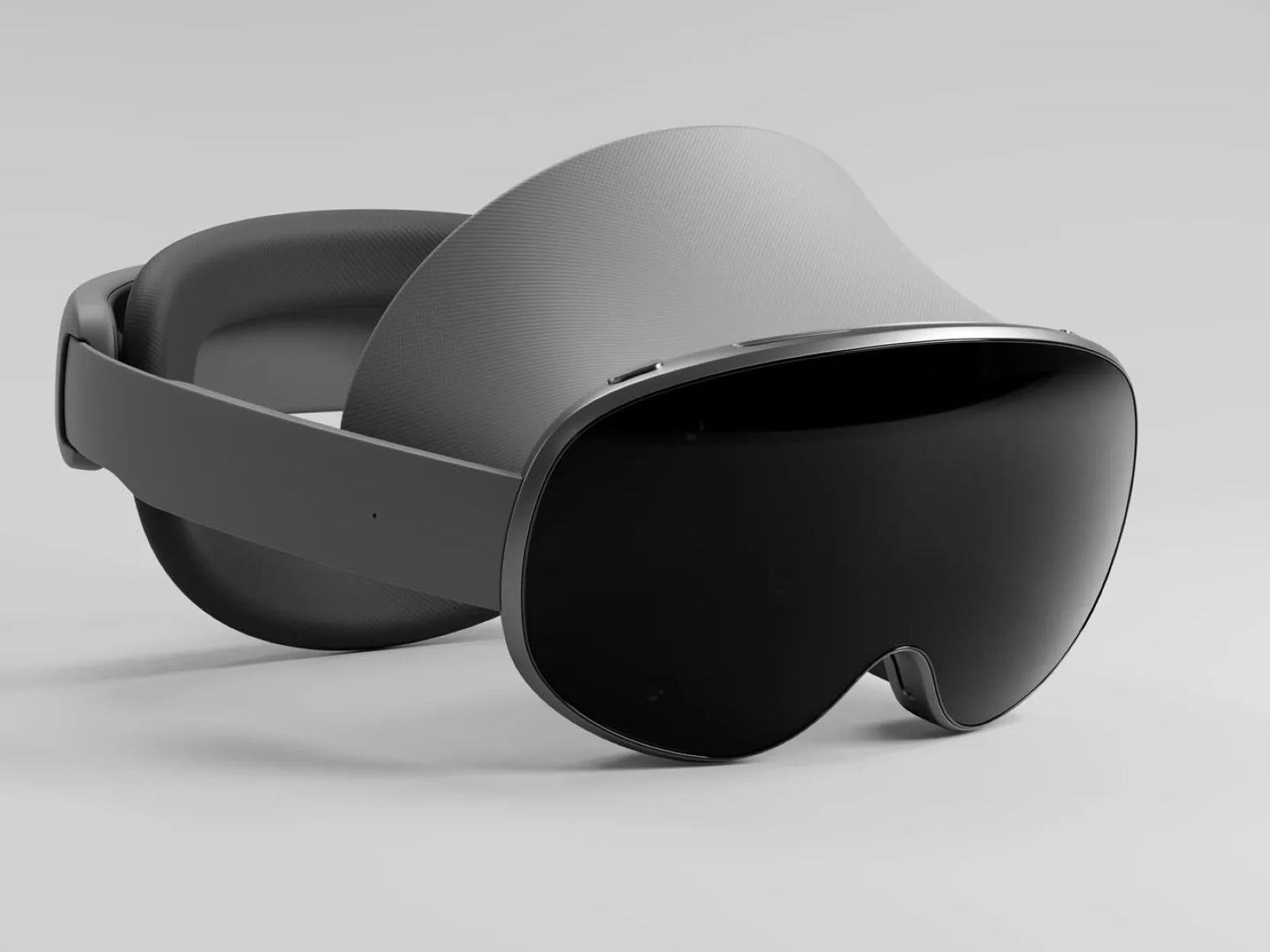
Samsung’s inaugural foray into the extended reality (XR) space is taking clearer shape as details emerge about its “Project Moohan” headset. The device recently made an appearance on Geekbench, revealing key specifications such as a Qualcomm Snapdragon XR2+ Gen 2 processor paired with an Adreno 740 GPU running on top of Android 14. The headset
In speed doggin’ news, all six active Oscar Mayer Wienermobiles raced around the Indianapolis Motor Speedway last weekend as part of the Indy 500 festivities. Is anybody else shocked and outraged there’s more than one Wienermobile? I saw one once IRL but who cares, it’s not even special anymore. This is like finding out Santa Claus is really the Easter Bunny. Each motorized glizzy measures 24-hot dogs tall, 60-hot dogs long, 18 hot dogs wide, and weighs in at 140,500 hot dogs. Of course it doesn’t look like the drivers were really putting the pedal to the metal for fear of crashing their wieners into another’s buns. Me? I’m not afraid of crashing — I came to win and spray myself with chili and cheese in the winner’s circle or die in a fiery mangled wiener trying.
There is a metric ton of uncertainty surrounding U.S. tariffs, and given that this is the case, you would think that PC shipments could take a massive hit as companies attempt to navigate a tumultuous situation (which has seen Nikon hike prices and concerns arise over a potential big increase in iPhone pricing, to give just two examples).
Arizona State University researchers are pushing back [PDF] against the widespread practice of describing AI language models’ intermediate text generation as “reasoning” or “thinking,” arguing this anthropomorphization creates dangerous misconceptions about how these systems actually work. The research team, led by Subbarao Kambhampati, examined recent “reasoning” models like DeepSeek’s R1, which generate lengthy intermediate token sequences before providing final answers to complex problems. Though these models show improved performance and their intermediate outputs often resemble human scratch work, the researchers found little evidence that these tokens represent genuine reasoning processes.
Crucially, the analysis also revealed that models trained on incorrect or semantically meaningless intermediate traces can still maintain or even improve performance compared to those trained on correct reasoning steps. The researchers tested this by training models on deliberately corrupted algorithmic traces and found sustained improvements despite the semantic noise. The paper warns that treating these intermediate outputs as interpretable reasoning traces engenders false confidence in AI capabilities and may mislead both researchers and users about the systems’ actual problem-solving mechanisms.
We may earn a commission from links on this page. Deal pricing and availability subject to change after time of publication.
If you’re someone who spends serious time with your PlayStation 5 and wants a controller that can match that energy, the Sony DualSense Edge Wireless Controller is currently down to $169.99 from $199.99 on Amazon—its lowest price yet, according to price trackers.
That’s still a chunk of change, but it’s the first meaningful discount I’ve seen on what PCMag calls the best premium PlayStation controller in their “Excellent” review. It’s built for players who like to fine-tune their setup, with enough customization options and accessories to justify the cost, at least for the right kind of user. For more options, check out PCMag’s roundup of the best controllers for every platform.
At a glance, the Edge looks like the standard DualSense, just with a sharper black-and-white color scheme. But once you start digging in, the differences add up. There are two back buttons you can swap out with different paddles, adjustable trigger stops, and swappable thumbsticks with different heights. You can save multiple control profiles and toggle between them using the Fn buttons near the analog sticks. The system settings on the PS5 walk you through how to do it—no separate app needed. Plus, it ships with a hard case for safe portability and storage, and includes a USB-C cable with a lock to keep it connected during wired play. And if you run into stick drift down the line, you can swap out the analog modules without replacing the whole thing—new ones cost $19.99 from Sony.
Battery life is the main downside here. You’re looking at five to six hours of wireless play before it needs charging. That won’t be ideal for marathon sessions unless you’re okay playing wired. Also, while it works with PCs, you’ll lose fancy features like haptics and adaptive triggers unless the game specifically supports them. That said, if most of your gaming happens on the PS5 and you want more control over how your controller feels and responds, this is about as feature-rich as it gets—and with this discount, it’s a better time than usual to try it out.
As of this moment, NVIDIA still has not added a GeForce RTX 5050 SKU to either its mobile or desktop GPU lineups. However, multiple leaks and rumors suggest it is only a matter of time, the latest of which comes from a major hardware partner—Acer, which jumped the gun by referencing the GeForce RTX 5050 in mobile form on a few of its gaming
After watching its fixed-lens X100 VI camera do stratospheric sales numbers, Fujifilm decided to build a bigger and badder version that could go up against Leica’s full-frame Q3. The result is the $4,899 GFX100RF, the first-ever 100-megapixel medium format compact camera.
The GFX100RF has some novel features, like a crop dial that lets you choose aspect ratios ranging from vertical 3:4 to a panoramic 65:24. It can digitally zoom via a dedicated toggle and offers all the social media-friendly benefits of the X100 VI, including film simulations. You can even shoot medium-format 4K video.
However, the GFX100RF has some flaws. Where Leica’s Q3 has a fast 28mm f/1.7 lens and optical stabilization, Fujifilm’s 35mm lens (28mm equivalent) here is limited to f4 and lacks any shake reduction, hurting the camera in low light. I’ve used the camera for nearly two weeks now and enjoyed it, but given the high price and quirks, it’s definitely not for everyone.
Design and handling
Though it’s Fujifilm’s smallest medium-format camera, the GFX100RF is still a hefty unit at 735 grams. That’s more than many full-frame mirrorless cameras and around the same weight as the Q3. The control layout is similar to the X100 VI with control dials on the front and back, along with exposure compensation, shutter speed and ISO controls on top.
What’s new is the aspect ratio dial that offers modes for 4:3, 3:2, 16:9, 17:6, 3:4, 1:1, 7:6, 5:4 and 65:24 (the latter pays tribute to Fujifilm’s TX-1 panoramic camera). The GFX100RF also has a toggle up front to select 28mm, 35mm, 50mm and 63mm (full-frame equivalent) zoom levels. Those gradually lose resolution due to cropping, from 100MP at 28mm down to 20MP at 63mm. Bokeh is also reduced as the sensor size shrinks.
The rear 2.1-million-dot, 3.15-inch display only tilts up and down, but that’s fine for the camera’s primary street photo role. Though sharp and detailed, the 5.76-million-dot electronic viewfinder unfortunately lacks the X100 VI’s signature hybrid display that lets you switch between optical and electronic views. However, it does offer three modes to support the aspect ratio dial and make composition easier. One only shows the selected crop, another shows the full scene with a box around the crop and the third displays everything outside the crop at 50 percent opacity.
Fujifilm’s GFX100RF includes an innovative aspect ratio dial at back
Steve Dent for Engadget
Battery life on the GFX100RF is outstanding with up to 820 shots on a charge or about 100 minutes of 4K 30 fps video shooting. For me, that amounted to nearly two days of use, which is better than nearly every other (non-DSLR) camera I’ve tested. The camera also includes dual UHS-II memory card slots plus mic, headphone, microHDMI and USB-C ports. The latter allows not only data transfers and charging, but also SSD video recording.
Performance
The GFX100RF is essentially a GFX100S II squeezed into a compact body, so performance is similar with up to 6 fps burst shooting speeds. However, each RAW file is up to 150MB in size and JPEGs are 70MB, so even at those slower speeds, you can fill your memory cards very quickly. That said, this camera definitely isn’t designed for sports or wildlife, so I didn’t use burst shooting often.
The autofocus is reliable when shooting single photos, but it’s a little laggy for bursts. Using the face and eye detect AI modes helps nail eye focus reliably, but it’s not as fast as Sony and Canon’s systems. It also supports animal, bird and vehicle tracking, which helped me capture sharp photos of ducks floating on the Seine river in Paris.
Steve Dent for Engadget
The GFX100RF has both mechanical and silent electronic shutter modes. Rolling shutter skew is a big issue with this sensor in silent mode with fast moving subjects, though. Luckily, the mechanical shutter eliminates that and is nearly inaudible.
The built-in ND filter can reduce light up to four stops, letting you shoot on sunny days while retaining some bokeh. However, the main problem is when there’s not enough light. The minimum f4 aperture is simply inadequate and the lack of stabilization exacerbates the issue as you risk blurry photos at slow shutter speeds. In dim light you may need to pack a tripod, which isn’t ideal for a compact camera.
Image quality
The aspect ratio and zoom options on the GFX100RF are handy and fun. Some curmudgeons may prefer to shoot full sensor 100MP photos and then just crop later in post production. But the GFX100RF lets you have your cake and eat it, too. You can apply all the crops, zooms and film simulations you want and save them as JPEGs for easy sharing. Then, if you need to go back and change something, you also have the full 100MP RAW image as a backup (though obviously, shooting both will fill your memory card more quickly).
As with the GFX100S II, the GFX100RF is a top performer when it comes to detail and sharpness. Colors are pleasing and RAW files retain high amounts of dynamic range, allowing for easy adjustment in Lightroom. And of course, Fujifilm’s film simulations give you colorful, nostalgic options — like Reala Ace or the dramatic black and white look of Acros — straight out of the camera.
The GFX100RF also delivers beautiful bokeh, with the f4 aperture equivalent to around f3 for a full-frame camera in terms of depth of field (but not light gathering). Like other GFX models, the large sensor produces more dramatic images than full frame for portraits, landscapes or street shots.
Like I mentioned, things fall apart when the light dims, though. With no option below f4 and no stabilization, I relied on high ISOs to boost exposure. The GFX100RF isn’t bad in this area, with controllable noise up to about ISO 8000, but that’s not high enough considering the other factors. For these reasons, the GFX100RF is less versatile than it could be.
Video
Steve Dent for Engadget
The GFX100RF can handle 4K and widescreen DCI 4K at up to 30 fps with fairly high bit rates, as long as you have a fast UHS-II SD card. It can even shoot ProRes with at much higher data speeds, but for those, you’ll need to record directly to an SSD via the USB Type-C port.
Autofocus for video is decent but not incredibly fast, so ideally your subjects don’t move too much. The AI-powered face and eye detection helps nail focus when filming people, but again, can fail if subjects dart around.
Video has a dreamy quality and bokeh that only a large sensor can offer. Like the GFX100S II, the GFX100RF captures video using the full width of the sensor in most modes, albeit with pixel binning that reduces quality. The sharpest video comes with a 1.32x crop, but that reduces the image quality benefits of a large sensor.
Video on the GFX100RF has one thing going for it that the photo side lacks: digital stabilization. This smooths out shakiness for handheld shots, but the excessive rolling shutter limits your ability to move the camera quickly.
Colors are pleasing and easy to adjust, particularly when using Fujifilim’s F-Log or F-Log2 10-bit modes to boost dynamic range. And of course, Reala Ace, Acros and other film simulations are available in video modes to create great looks straight out of the camera.
Wrap-up
Steve Dent for Engadget
Fujifilm’s $4,899 GFX100RF is a powerful camera with incredible image quality that’s hampered by a lack of low-light performance. It’s also a niche and expensive product that, unlike Fujifilm’s popular X100 VI, only appeals to a small group of photographers.
Its primary rival in this space is Leica’s Q3, which has a smaller 60MP full-frame sensor and higher $6,735 price tag. However, the Q3 has a much faster 28mm f/1.7 lens, less rolling shutter, a single SD UHS-II card slot and up to 8K video. It also has the Leica brand cachet, which does mean something to people spending this kind of money.
The GFX100RF is fun to use, though, and introduces several innovations like the aspect ratio dial. Though it may never have a huge market, I think products like this push the industry in new directions and create conversations that draw new people into photography. So even though I’d never buy one, I’m glad the GFX100RF exists for those reasons.
This article originally appeared on Engadget at https://www.engadget.com/cameras/fujifilm-gfx100rf-review-a-powerful-and-fun-camera-thats-far-from-perfect-133034384.html?src=rss
The newest text scam making the rounds is a message that (poorly) impersonates your state DMV with a threat to rescind your license unless you pay outstanding fees. NPR reports that departments of motor vehicles in New York, Florida, and California have alerted residents to the scam, but it has been spotted in other places too (including Utah, where I live).
How the DMV text scam works
This scam purports to be from the DMV or transportation department in your state and warns of unpaid fees for traffic violations or tolls. The message directs recipients to a link to pay these supposed penalties or risk losing their license (or “driving privileges”) or face legal action. It also references a state statute that may actually be legitimate (albeit unrelated to the warning), but that doesn’t mean the text itself is.
The DMV scam currently circulating is similar to the unpaid tolls scam and the unpaid parking fee scam, both of which are examples of smishing, or SMS phishing. This type of attack relies on text messages to try to convince targets to click malicious links and disclose personal or financial information or download malware to their device in the process. Scammers engaging in smishing often attempt to impersonate legitimate institutions, such as banks and government agencies.
According to data from Robokiller, Americans received 19.2 billion spam texts, of which smishing is an example, in April 2025. That’s an average of 63 messages per person.
Text scam red flags to watch for
The DMV scam may seem obvious, but bad actors hope that some recipients will be swayed by an official-looking text that threatens real-life consequences and act without investigating further. That’s why you should be wary of any message, text or otherwise, that demands urgent action or invokes an emotional response.
Once you read more carefully, you’ll notice additional red flags. The sender may be an email address or non-local (even international) phone number— official texts from government agencies typically come from five-digit numbers. The name of the department may be incorrect, such as the Florida State Department of Motor Vehicles (fake) instead of Florida Highway Safety and Motor Vehicles (real). The URL to pay the supposed fine is not an official state website (https://utah[dot]gov-etcwirs[dot]cc, for example), and it may not be clickable, so it skirts your device’s security features. And, of course, there may be minor spelling and grammar errors and odd formatting.
The Trump administration has told US companies that offer software used to design semiconductors to stop selling their services to Chinese groups, in the latest attempt to make it harder for China to develop advanced chips.
Several people familiar with the move said the US Department of Commerce had told so-called electronic design automation groups—which include Cadence, Synopsys, and Siemens EDA—to stop supplying their technology to China.
The Bureau of Industry and Security, the arm of the US commerce department that oversees export controls, issued the directive to the companies via letters, according to the people. It was unclear if every US EDA company had received a letter.
Transport for London has published its annual casualty statistics revealing that nine people were killed while cycling in the capital city last year.
This is higher than the eight people killed while cycling in 2023, but is a third lower than the 2010-2014 baseline.
But TfL also points out that cycling has seen an increase in London from 1.26 million daily cycling journeys in 2025 to 1.33 million in 2024, and says this 5 per cent increase means: “that the risk to people cycling remains the same despite massive growth.”
“TfL remains committed to improving cycle safety and ensuring cycling is sustainable, safe and accessible for all, and has quadrupled the cycle lane network since 2016,” the local government body says.
“To continue to reduce risk and increase the number of people who choose to cycle, TfL and the boroughs will continue to expand the Cycleway network, tackle road danger hotspots, fund cycle training and improve cycle parking.”
A total of 110 people were killed on London’s roads in 2024, with TfL saying it “remains committed to working closely with London’s boroughs, the police and other partners to eliminate death and serious injury from London’s streets by 2041.”
Daily cycling journeys increased by 5 per cent in 2024. Steve Sayers / Our Media
The statistics also reveal that road casualties are at their lowest levels outside the pandemic. The provisional number of people killed or seriously injured on London roads fell from 3,710 in 2023 to 3,696.
There has also been a 12 per cent reduction in serious injuries to children, while pedestrian serious injuries have reduced by 8 per cent.
“Cars continued to be involved in most collisions that killed or seriously injured someone else in 2024. Excess speed remains one of the biggest risks to road users, with around half of the 2024 fatal collisions in London reporting speed as a contributory factor,” TfL says.
TfL recently published new research that showed “the number of people killed and seriously injured on borough roads in London reduced by 34 per cent (from 395 to 260) following the implementation of the 20mph speed limits on borough roads between 1989 and 2013 [2], and the number of children killed reduced by 75 per cent.”
Of all people killed or seriously injured in 2024, 81 per cent (2,988 people) were walking, cycling or motorcycling.
Deputy Mayor for Transport, Seb Dance, said: “These figures show encouraging signs that our efforts to reduce road danger in London are making a difference, but every death or serious injury is one too many and we know there is much more work to do.
“The Mayor and I remain fully committed to his Vision Zero goal of eliminating death and serious injury from London’s roads by 2041. That means continuing to expand our safer speed programme, transforming dangerous junctions and investing in safe, high-quality walking and cycling infrastructure. We will continue working with TfL, boroughs and the police to reduce road danger and build a safer London for all.”
TfL recently confirmed £87m of funding for London’s boroughs to boost investment in safer streets, which it says could deliver 95km of new cycle routes across the city.
27 per cent of Londoners now live within 400m of the city’s cycling network which has quadrupled in size since 2016 to more than 400km in length.
The Steam Deck just got even more useful. NVIDIA’s native GeForce NOW app is now available for the portable console, after being teased back at CES. This allows Steam Deck owners to stream the entire library of over 2,200 games, with up to a 4K resolution at 60FPS.
There are some benefits to using this service even when the game already runs natively on the Steam Deck. The integration provides HDR, DLSS 4 and Reflex on supported titles and the settings can be pushed much higher than usual. This is a streaming platform, so the Steam Deck is more or less just a display for cloud content.
To that end, NVIDIA promises a massive increase in battery life when using GeForce NOW as compared to running a game natively on the console. The company says players could squeeze around 50 percent more use out of the Steam Deck before requiring a charge. This is a big deal, as the Deck is a noted battery hog.
It also allows players to run games that aren’t available on the handheld. GeForce NOW pulls its library from Steam, Epic Games Store, Game Pass for PC, Ubisoft, Blizzard’s Battle.net and other places. NVIDIA says that it can be used to run games like Clair Obscur: Expedition 33, Elder Scrolls IV: Oblivion Remastered, Monster Hunter Wilds and Microsoft Flight Sim 2024 “at max settings without worrying about hardware limits.” That’s an enticing proposition.
The Steam Deck is also easily docked to a TV, offering a way to play the aforementioned titles on the big screen. There’s a free version of GeForce NOW to try it out, but it comes with serious caveats. The queues are generally much longer here than with paid subscriptions and users are limited to play sessions of one hour. The company’s offering a six-month Performance membership right now for $30. This reverts back to $50 once the period expires.
This article originally appeared on Engadget at https://www.engadget.com/gaming/nvidias-native-geforce-now-app-is-now-available-for-steam-deck-130016615.html?src=rss
An anonymous reader quotes a report from TechCrunch: Researchers at SignalFire, a data-driven VC firm that tracks job movements of over 600 million employees and 80 million companies on LinkedIn, believe they may be seeing first signs of AI’s impact on hiring. When analyzing hiring trends, SignalFire noticed that tech companies recruited fewer recent college graduates in 2024 than they did in 2023. Meanwhile, tech companies, especially the top 15 Big Tech businesses, ramped up their hiring of experienced professionals. Specifically, SignalFire found that Big Tech companies reduced the hiring of new graduates by 25% in 2024 compared to 2023. Meanwhile, graduate recruitment at startups decreased by 11% compared to the prior year. Although SignalFire wouldn’t reveal exactly how many fewer grads were hired according to their data, a spokesperson told us it was thousands.
While adoption of new AI tools might not fully explain the dip in recent grad hiring, Asher Bantock, SignalFire’s head of research, says there’s “convincing evidence” that AI is a significant contributing factor. Entry-level jobs are susceptible to automation because they often involve routine, low-risk tasks that generative AI handles well. AI’s new coding, debugging, financial research, and software installation abilities could mean companies need fewer people to do that type of work. AI’s ability to handle certain entry-level tasks means some jobs for new graduates could soon be obsolete. […]
Although AI’s threat to low-skilled jobs is real, tech companies’ need for experienced professionals is still rising. According to SignalFire’s report, Big Tech companies increased hiring by 27% for professionals with two to five years of experience, while startups hired 14% more individuals in that same seniority range. A frustrating paradox emerges for recent graduates: They can’t get hired without experience, but they can’t get experience without being hired. While this dilemma is not new, Heather Doshay, SignalFire’s people and talent partner, says it is considerably exacerbated by AI. Doshay’s advice to new grads: master AI tools. “AI won’t take your job if you’re the one who’s best at using it,” she said.
I do not consider myself a very woo-woo person, someone who’s in touch with their spirituality, or even someone particularly sentimental. The concept of meditating, like so many other things I regard “too mystical,” has never appealed to me, but I’ll tell you what does: Working out, being physically healthy, and staying on top of my goals. That’s why Peloton’s approach to meditation sessions appealed to me more than others have before.
I’m always browsing the Peloton app for new workout options and recently stumbled across the guided meditation classes it offers alongside cycling, walking, yoga, strength training, and more. At first, I didn’t see the appeal. I use the app and its classes to get sweaty, burn calories, and enhance my body’s performance, after all. But as it turns out, these are really cool and can put you in a better mental space, which clears the way for you to do all that other stuff. Since discovering them, I’ve been streaming them quite a bit. Here’s why you should, too.
What are Peloton’s meditation classes all about?
Using Peloton’s app—which is included on the touchscreens of its at-home workout equipment, can be downloaded to your phone, or even streamed on devices like a Roku—you can access a variety of class types. Tap Meditation from the home screen and you’ll be shown hundreds of meditation options that range in length from five minutes to 30. As with any Peloton offering, they’re led by a number of different instructors; if you take enough of them, you’ll find a favorite or two, but what really stands out is that there are different categories available, such as:
sleep
mindfulness
anxiety
focus
recovery
gratitude
happiness
relaxing
Each class is designed for a specific purpose, so you can choose if you want to “flow and let go,” embrace a bright morning, or even take one designed for use on your evening commute. You can filter by class type, which lets you break down the classes by categories like “Daily Meditation,” “Meditation Basics,” “Emotions,” “Theme,” or “Walking Meditation.” There are even some for pre- and post-natal meditation.
You don’t need any special equipment; the instructors usually lead off simply by suggesting how you should position your body. Meditations can be added to class Stacks, which are Peloton’s version of playlists that cycles through pre-selected classes, allowing you to customize your entire workout before it begins. If you have your Apple Watch linked up to your Peloton account (and you should!) the app will track your heart rate and input the meditation into your Apple Health tracker, listing it as “Mind & Body” under your sessions.
Why I like Peloton’s meditations
As I said, I’m not a very spiritual or soulful person, so I appreciate that the meditation classes I’ve taken through the app aren’t overly mushy. Rather, they’re pretty straightforward: The instructors speak clearly and plainly, don’t rely too much on frivolous imagery, and instead, draw your attention to your breathing and body in a way that actually helps you feel more connected to both. For as much energy as I put into working out and strengthening my body, I do struggle with things like the “mind-muscle connection” or just identifying how different parts of my body are feeling, so these sessions, where I’m asked to focus intently on certain areas and connect to how I’m feeling in a given moment, are actually pretty beneficial to my quest to become stronger and healthier overall.
I first tried the Peloton meditations a few weeks ago while waiting for the bus. I was having a very busy day and had had absolutely no time to work out, not even on my Peloton bike, which was adding to my stress while I waited for the bus to pull up and take me to more busy activities. I didn’t want to lose my Peloton streak, so I opened the app to see if there was a quick walking workout I could get in, maybe by strolling to the next-farthest bus stop, and saw the meditations option. I picked a five-minute meditation and listened to it while I stood on the sidewalk—and it did chill me out, help me focus, and reinvigorate me a little, almost the same as a traditional workout would have, but without taking up as much time or making me a sweaty mess. I tried a few others over the next few days and found them really useful, especially during long hours in the car on my Memorial Day road trip or earlier this week and when my team was losing a baseball game and I was not enjoying the experience of watching.
Obviously, these classes are a lot different from Peloton’s usual offerings. I’m not sweating, straining myself, or enhancing my cardiovascular or respiratory function. Instead, I’m strengthening my mind, training myself to focus on my breathing and feelings. Those abilities translate really well to being able to continue my fitness journey as well as just handle whatever is going on in an average day. I think these are especially useful as a pick-me-up, a kickstart for the day, or a post-workout wind-down.
I also appreciate how accessible the classes are. You can toggle on closed captions, for instance, and the audio and video components are high-quality, making the instructors easy to understand. The background music never muffles the instructors’ voices, there is a diverse selection of instructors and class types, and there really does seem to be something for everyone, whether you want to walk and listen or only have five minutes to devote to grounding yourself.