Tire Boy is a wacky open-world adventure game you can tread all over

One of the best things about an indie game showcase is that you’ll see at least one preview that makes you think “huh?” and “lol!” in equal parts. For the Day of the Devs presentation at Summer Games Fest 2025, Tire Boy definitely fits the bill. Mechanics-wise, it’s an open-world action-adventure game, which is pretty standard fare. However, like the name says, you play it all out as a tiny anthropomorphized tire. It looks super goofy, but in a way that might also be super great.

The trio from GameTeam6 who presented the early build of the game explained that they wanted to do some odd things with scale in the world, and that’s definitely been accomplished. Most other characters tower over little Tire Boy, whether they’re a friendly owl, an enemy frog or just a really big heckin bunny. But there’s also some sweetness promised as Tire Boy tries to uncover the secrets of his past and his tire people. It’s the sort of wacky combination that can be a lot of fun in practice. 

The studio has a ways to go before it’s ready to play; they didn’t suggest any time frames for a demo or release window, but Tire Boy can be wishlisted on Steam if you want to keep tabs on this quirky project.

This article originally appeared on Engadget at https://www.engadget.com/gaming/tire-boy-is-a-wacky-open-world-adventure-game-you-can-tread-all-over-000036605.html?src=rss

Pocket Boss turns corporate data manipulation into a puzzle game

There’s a new puzzle game in town, and this one tackles remote work and corporate data manipulation. Pocket Boss is coming to Steam and the developers just dropped a trailer during the Day of the Devs showcase event, which is part of Summer Game Fest.

Pocket Boss casts players as an employee working remotely, trapped by the whims of an ever-demanding boss. The game is primarily set inside of a chat window, though the puzzle element kicks in when the aforementioned job creator demands changes to data in order to maximize profits and erase competitors.

When that happens, the perspective shifts to a minigame. There looks to be plenty of different designs here. One game involves flinging a competitor’s market share off of the screen, while another has players navigate a physical representation of the stock market without crashing. It’s like a corporation-soaked take on the WarioWare franchise.

The game is published by Playables, which is the studio behind the novel-looking Time Flies and the interactive cartoon KIDS. We don’t have a release date for Pocket Boss just yet.

The stock market minigame.
Playables

Of course, this is just one game announced during the beefy Day of the Devs stream, and that’s just one event of many throughout Summer Game Fest. It’s a good time to be someone who likes to read and watch trailers about upcoming video games.

This article originally appeared on Engadget at https://www.engadget.com/gaming/pc/pocket-boss-turns-corporate-data-manipulation-into-a-puzzle-game-000042457.html?src=rss

Linux Foundation Tries To Play Peacemaker In Ongoing WordPress Scuffle

The Register’s Thomas Claburn reports: The Linux Foundation on Friday introduced a new method to distribute WordPress updates and plugins that’s not controlled by any one party, in a bid to “stabilize the WordPress ecosystem” after months of infighting. The FAIR Package Manager project is a response to the legal brawl that erupted last year, pitting WordPress co-creator Matthew Mullenweg, his for-profit hosting firm Automattic, and the WordPress Foundation that he controls, against WP Engine, a rival commercial WordPress hosting firm. […]

The Linux Foundation says the FAIR Package Manager, a mechanism for distributing open-source WordPress plugins, “eliminates reliance on any single source for core updates, plugins, themes, and more, unites a fragmented ecosystem by bringing together plugins from any source, and builds security into the supply chain.” In other words, it can’t be weaponized against the WordPress community because it won’t be controlled by any one entity. “The FAIR Package Manager project paves the way for the stability and growth of open source content management, giving contributors and businesses additional options governed by a neutral community,” said Jim Zemlin, Executive Director of the Linux Foundation, in a canned press statement. “We look forward to the growth in community and contributions this important project attracts.”

The FAIR Package Manager repo explains the software’s purpose more succinctly. The software “is a decentralized alternative to the central WordPress.org plugin and theme ecosystem, designed to return control to WordPress hosts and developers. It operates as a drop-in WordPress plugin, seamlessly replacing existing centralized services with a federated, open-source infrastructure.” In addition to providing some measure of stability, the Linux Foundation sees the FAIR Package Manager as advancing WordPress’ alignment with Europe’s General Data Protection Regulation by reducing automatic browser data transmission and telemetry sent to commercial entities, while also supporting modern security practices and strengthening the open source software supply chain.


Read more of this story at Slashdot.

Rescue African artifacts from colonizers’ museums in the heist game Relooted

Relooted is a heist game about reclaiming African artifacts from the Western countries that stole them, developed by independent South African studio Nyamakop. Relooted is set in a future timeline where Western nations have signed a treaty to return plundered items to their African regions of origin, but things aren’t going to plan. Western leaders are instead hiding the artifacts away in private collections, so it’s up to a ragtag crew based in Johannesburg, South Africa, to strategize and steal them back.

Relooted is broken into missions, and each one includes a briefing about the artifact, an infiltration planning stage, and the heist. Gameplay is a mix of puzzle and action as you case each building, set up your run, and then execute the plan. Once you grab your target artifact, the security alarms go off and you have a limited amount of time to escape, so thorough preparation is key.

In the Day of the Devs reveal video for Relooted, producer Sithe Ncube cites a wild statistic from a pivotal 2018 report on African cultural heritage, saying, “90 percent of sub-Saharan African culture heritage is in the possession of Western collections. That is millions upon millions of deeply important cultural, spiritual and personal artifacts, including human remains, that aren’t in their rightful place.”

The locations in Relooted are fictional, but the 70 artifacts you have to steal back are real, and they’re all currently in Western and private collections, far from their original homes and owners.

Nyamakop is one of the largest independent games studios in sub-Saharan Africa, with about 30 developers working on Relooted right now. Its previous game, the globular platformer Semblance, was the first African-developed IP to ever come to a Nintendo console, hitting the Switch in 2018. In order to get Semblance on the Switch, Nyamakop co-founder Ben Myres had to bootstrap his way around the world, buying one-way tickets and finding new partners on the fly in a daisy chain of game festival appearances. Here’s how Myres explained it to Engadget at E3 2018:

“The entry curve into being an indie game developer in South Africa is like a cliff face. Because you don’t have the contacts, the platform holders like Xbox, Sony. You don’t have reps that live in your country. The press that matter are all here. There isn’t a big enough market locally to sell to, so you have to make works to sell to the West, which means you have to go to Western shows and you have to meet Western press. So basically, if you’re not traveling a ton, you’re not going to be able to make it.”

Nyamakop has grown significantly since 2018, and Relooted is an unabashedly African game built by a majority-POC team, Myres and Ncube said in 2024.

“There is the thing about making games for Africans — we say that a lot,” Ncube told GamesIndustry.biz. “We say that should be a thing, we should make games for Africans because we’re playing games that were made in the West. But will people even play those games, if you make them? And then if you make games targeting people … even if you were to make one that’s really good, there’s no guarantee that you’ll have a lot of people playing it. So I think there’s some level of confusion, I can say, in terms of unexplored aspects of the African games market.”

Relooted is in development for Steam, the Epic Games Store and Xbox Series X/S, and while it doesn’t yet have a firm release date, it’s available to wishlist.

This article originally appeared on Engadget at https://www.engadget.com/gaming/rescue-african-artifacts-from-colonizers-museums-in-the-heist-game-relooted-000035161.html?src=rss

Bask in the grotesque pixel-art beauty of Neverway

Neverway already looks, sounds and feels like it’s going to be something special — in a grim, grotesque and hellishly depressed kind of way. (Side note: That could be a nice tagline, no? It’s grim! It’s grotesque! It’s hellishly depressed! It’s… Neverway! OK, I’ll stop.)

Neverway is a life-sim RPG starring Fiona, a young woman who quits her dead-end job to live on a remote island farm for a while, where she ends up becoming the immortal herald of a dead god. Fiona has to fight through nightmare realms and battle repulsive horrors, while also tending her land and maintaining relationships with townsfolk. She’s able to meet and date more than 10 distinct characters, and forming friendship bonds unlocks combat abilities. The game features farming and fishing mechanics, and there’s also a crafting system for secondary tools like the hookshot, which supplements Fiona’s primary weapon, a sword.

Neverway comes from Coldblood Inc., an independent Vancouver studio founded by Brazilian-Canadian developers Pedro Medeiros and Isadora Sophia. Medeiros is the pixel artist behind Towerfall and Celeste, two stunning indie games, and Sophia is an ex-senior software engineer at Microsoft and the creator of the open-source Murder Engine, which powers Neverway. The game also features music by Disasterpiece, the composer behind Fez and the top-tier horror film It Follows, with sound design by Martin Kvale of NokNok Audio. OuterSloth, the indie game fund established by Among Us creators InnerSloth, is providing financial backing for Neverway, and Coldblood Inc. is self-publishing it.

Though Neverway was officially announced one month ago during the Triple-i Initiative showcase, it still made a splash as part of the Day of the Devs event tied to Summer Game Fest 2025 this week. Neverway is heading to PC at an undetermined future time, and it’s available to wishlist on Steam now.

This article originally appeared on Engadget at https://www.engadget.com/gaming/pc/bask-in-the-grotesque-pixel-art-beauty-of-neverway-000046814.html?src=rss

Please, Watch the Artwork is a puzzle game with eerie paintings and a sad clown

Fusing light psychological horror with the quiet melancholy of American Realist painter Edward Hopper, developer Thomas Waterzooi is following up his puzzle games Please, Touch the Artwork and Please, Touch the Artwork 2 by having you just watch the artwork instead. Please, Watch the Artwork is an upcoming spot-the-difference game featured during Day of the Devs that tasks you with observing a museum of living paintings and tracking down a sad clown that may be harshing the other paintings’ vibe.

In the game, you’ll observe living versions of classic Edward Hopper paintings, like Nighthawks or Automat, and look for inconsistencies, like a character behaving strangely or objects being out of place — what one could describe as sad clown interference. You’ll then click on the offending area and it’ll be repainted, restoring the living painting to its normal gloomy self. 

Please, Watch the Artwork riffs on popular horror titles like I’m On Observation Duty, Five Nights At Freddy’s and dozens of other similar games on Steam that make you look at fake CCTV footage of a garages and office buildings. Waterzooi’s game just takes a slightly classier approach. The combination of classic art and eclectic puzzle mechanics has paid off well in the past, too: Please, Touch the Artwork was nominated for numerous awards, including an Apple Design Award.

Please, Watch the Artwork will be available on iOS and Android for $4.99 and on Steam for macOS, Windows and Linux devices for $7.99. Waterzooi’s Day of the Dev’s presentation didn’t include an exact release date for the game, but he did suggest that it will be out around Halloween.

This article originally appeared on Engadget at https://www.engadget.com/gaming/please-watch-the-artwork-is-a-puzzle-game-with-eerie-paintings-and-a-sad-clown-000022744.html?src=rss

RGG’s Project Century is now called Stranger Than Heaven

Ryu Ga Gotoku Studio first teased “Project Century” in 2024, and at Summer Game Fest it debuted a new trailer revealing the game’s full name: Stranger Than Heaven. The game clearly draws on the bareknuckle brawling of the Yakuza series, but this time is set in the jazzy Japan of 1943.

It’s hard to get a full sense of the story from the trailer alone, but similar to RGG’s previous games, it looks like Stranger Than Heaven will feature an open-world full of enemies to whoop and narrative choices that’ll be as determined by who you punch as who you help. If the player character Mako Taito isn’t a private eye, he does appear to be investigating something.

RGG’s released a Like a Dragon spin-off, Like a Dragon: Pirate Yakuza in Hawaii earlier this year. Before that, it’s last major entry in the melodramatic crime saga was Like a Dragon Infinite Wealth in 2024. Besides the gameplay similarities, it’s not clear if Stranger Than Heaven is set in the same world as RGG’s other open-world action RPGs. At the very least, it does seem incredibly stylish, though.

Stranger Than Heaven is still in-development and doesn’t currently have a release date.

This article originally appeared on Engadget at https://www.engadget.com/gaming/rggs-project-century-is-now-called-stranger-than-heaven-232848763.html?src=rss

Morse Micro and Gateworks Launch Wi-Fi HaLow Solution for Industrial Connectivity

Morse Micro and Gateworks Corporation have partnered to bring Wi-Fi HaLow (IEEE 802.11ah) to industrial environments. In collaboration with Silex Technology, they offer a hardware and software ecosystem for long-range, low-power, and secure wireless networking across manufacturing, energy, and transportation sectors. Wi-Fi HaLow operates in the sub-GHz frequency band, offering a communication range of over […]

Escape Academy 2: Back 2 School is an open-world puzzle game spanning the whole campus

If you’ve ever dreamed of being a student at a school built entirely out of escape rooms and silly puns, Coin Crew has the game just for you. Escape Academy 2: Back 2 School is heading to PC in 2026, and it’s available now to wishlist on Steam. It’s the sequel to Escape Academy, which is one of our absolute favorite puzzle games in recent years, particularly when played as a couch co-op experience.

Escape Academy 2 expands the campus into an open world, allowing players to explore and uncover secrets between classes, ramping up the student role-playing vibe. Coin Crew also drew inspiration from games like Animal Well and The Legend of Zelda series, which incorporate riddles and mysteries into the standard exploration gameplay loop, creating a free-roaming puzzle flow.

The original Escape Academy attracted more than 4 million players, and the sequel appears to be even bigger and radder. There’s no release date for now, but Coin Crew is looking for playtesters through its Discord channel. The Escape Academy series is published by iam8bit, and the sequel was revealed during the Day of the Devs showcase tied to Summer Game Fest 2025.

This article originally appeared on Engadget at https://www.engadget.com/gaming/pc/escape-academy-2-back-2-school-is-an-open-world-puzzle-game-spanning-the-whole-campus-000055295.html?src=rss

Resident Evil Requiem announced at Summer Game Fest 2025

While many of us soldier on with the remakes and VR takes on the Resident Evil story, Capcom is prepping the next chapter of the story: Resident Evil Requiem. The sequel was fully revealed as part of Summer Game Fest Live, kicking off a week(ish) of gaming announcements and release dates.

Intercutting the starting moments of REs of the past, Capcom did a fake-out, teasing that we’d have to wait a little longer to see Resident Evil Requiem — it turns out they only meant a 30-minute wait.

The teaser trailer raised more questions than answers, teasing locations from previous games, like Raccoon City — and its ruined police department. It appears the game will follow Grace Ashcroft, as she tries unveil grim mysteries and, er, gets kidnapped. She’s the daughter of Alyssa Ashcroft — a Resident Evil character that I do not remember at all. 

Capcom confirmed a year ago that veteran director Koshi Nakanishi will lead what is definitely not the ninth chapter of Resident Evil. (If you don’t count Code Veronica, who even are you?) Nakanishi was involved in the development of Resident Evil Revelations and Resident Evil 7: Biohazard, among other Resident Evil titles. 

Resident Evil 9 is set to launch on February 27, 2026, but a demo will be playable in August at Gamescom, so book your tickets for Cologne, Germany.

This article originally appeared on Engadget at https://www.engadget.com/gaming/resident-evil-requiem-announced-at-summer-game-fest-2025-231136129.html?src=rss

What To Expect From Apple’s WWDC

Apple’s Worldwide Developers Conference 25 (WWDC) kicks off next week, June 9th, showcasing the company’s latest software and new technologies. That includes the next version of iOS, which is rumored to have the most significant design overhaul since the introduction of iOS 7. Here’s an overview of what to expect:
Major Software Redesigns
Apple plans to shift its operating system naming to reflect the release year, moving from sequential numbers to year-based identifiers. Consequently, the upcoming releases will be labeled as iOS 26, macOS 26, watchOS 26, etc., streamlining the versioning across platforms.

iOS 26 is anticipated to feature a glossy, glass-like interface inspired by visionOS, incorporating translucent elements and rounded buttons. This design language is expected to extend across iPadOS, macOS, watchOS, and tvOS, promoting a cohesive user experience across devices. Core applications like Phone, Safari, and Camera are slated for significant redesigns, too. For instance, Safari may introduce a translucent, “glassy” address bar, aligning with the new visual aesthetics.

While AI is not expected to be the main focus due to Siri’s current readiness, some AI-related updates are rumored. The Shortcuts app may gain “Apple Intelligence,” enabling users to create shortcuts using natural language. It’s also possible that Gemini will be offered as an option for AI functionalities on the iPhone, similar to ChatGPT.

Other App and Feature Updates
The lock screen might display charging estimates, indicating how long it will take for the phone to fully charge. There’s a rumor about bringing live translation features to AirPods. The Messages app could receive automatic translations and call support; the Music app might introduce full-screen animated lock screen art; and Apple Notes may get markdown support. Users may also only need to log into a captive Wi-Fi portal once, and all their devices will automatically be logged in.

Significant updates are expected for Apple Home. There’s speculation about the potential announcement of a “HomePad” with a screen, Apple’s competitor to devices like the Nest Hub Mini. A new dedicated Apple gaming app is also anticipated to replace Game Center.

If you’re expecting new hardware, don’t hold your breath. The event is expected to focus primarily on software developments. It may even see discontinued support for several older Intel-based Macs in macOS 26, including models like the 2018 MacBook Pro and the 2019 iMac, as Apple continues its transition towards exclusive support for Apple Silicon devices.

Sources:
Apple WWDC 2025 Rumors and Predictions! (Waveform)
WWDC 2025 Overview (MacRumors)
WWDC 2025: What to expect from this year’s conference (TechCrunch)
What to expect from Apple’s Worldwide Developers Conference next week (Ars Technica)
Apple’s WWDC 2025: How to Watch and What to Expect (Wired)


Read more of this story at Slashdot.

Snap & Grab is No Goblin’s campy, photography-based heist game

Photography games can be hyper-realistic simulations of the real thing or a vehicle for ogling cute creatures, but No Goblin’s Snap & Grab is forging a different path by treating photography as a key ingredient in a good heist. The upcoming game as part of the Day of the Devs showcase at Summer Game Fest 2025, ahead of its launch in 2026.

Based on the trailer, Snap & Grab can be broken into two distinct parts. There’s the snapping, where you’ll play as a professional photographer grooving through (high-fashion) high society, taking pictures of things you want to steal. And the grabbing, where you’ll lay out those photos in a workflow of sorts for your team of thieves to follow during a heist. Some of the things you’ll photograph might be obstacles or parts of the environment you can manipulate in your favor and it looks like more than a few could just be cute pictures of dogs.

Like No Goblin’s other games, 100ft Robot Golf and Roundabout, over-the-top, silly theming is the name of the game. In the case of Snap & Grab, that’s a sort of cartoon-y 80’s aesthetic — think Miami Vice by way of Johnny Bravo and you’ll be in the ballpark of the hair and shoulder pads No Goblin is playing with.

Luckily, you won’t have to wait long to see the game for yourself. No Goblin says Snap & Grab is coming to PC, PS5 and Xbox Series X / S in 2026.

This article originally appeared on Engadget at https://www.engadget.com/gaming/snap-grab-is-no-goblins-campy-photography-based-heist-game-000024233.html?src=rss

The dev behind TMNT: Shredder’s Revenge is making a Scott Pilgrim beat-em-up

Tribute Games, the developer behind the fantastic Teenage Mutant Ninja Turtles: Shredder’s Revenge, is back with its take on another comic book IP. Scott Pilgrim EX is a beat-em-up coming to PC and consoles in 2026.

This looks like a real evolution of its work with those pizza-loving turtles. There’s a large map to explore with plenty of secrets, seven playable characters and, most importantly for Pilgrim fans, a brand-new story. Vegans, robots and demons have taken over Toronto! This seems only nominally better than ex-boyfriends.

The developer promises “countless creative combos” and all kinds of quests “across space and time.” The graphics and soundtrack are both absolutely soaked in retro goodness.

If the idea of a sidescrolling Scott Pilgrim beat-em-up seems eerily familiar to you, it’s not the Mandela Effect. Scott Pilgrim vs. the World: The Game was first released all the way back in 2010.

This article originally appeared on Engadget at https://www.engadget.com/gaming/the-dev-behind-tmnt-shredders-revenge-is-making-a-scott-pilgrim-beat-em-up-223721054.html?src=rss

Blighted is a trippy Metroidvania from the team behind Guacamelee!

Drinkbox Studios is back with a new title called Blighted, a 3D Metroidvania that promises to take the concept of generational memory to some bizarre and compelling new places. It will have a solo or co-op story that sees players fighting their way through a world full of monsters and secrets as they attempt to control the blight that corrupts them. And maybe eat some brains. The game was announced during the Summer Game Fest kickoff stream.

The team describes Blighted as a “psychedelic western nightmare,” which is pretty much exactly what I love to see from Drinkbox Studios. This company is probably best known for the excellent 2D platformers Guacamelee! and Guacamelee! 2, but don’t sleep on the surreal dungeon-crawler Severed either. Drinkbox games have a powerful sense of place and clever action mechanics, so I’m very curious to see how they’ll bring those sensibilities into this genre.

This article originally appeared on Engadget at https://www.engadget.com/gaming/blighted-is-a-trippy-metroidvania-from-the-team-behind-guacamelee-000030687.html?src=rss

Top Researchers Leave Intel To Build Startup With ‘The Biggest, Baddest CPU’

An anonymous reader quotes a report from OregonLive: Together, the four founders of Beaverton startup AheadComputing spent nearly a century at Intel. They were among Intel’s top chip architects, working years in advance to develop new generations of microprocessors to power the computers of the future. Now they’re on their own, flying without a net, building a new class of microprocessor on an entirely different architecture from Intel’s. Founded a year ago, AheadComputing is trying to prove there’s a better way to design computer chips.

“AheadComputing is doing the biggest, baddest CPU in the world,” said Debbie Marr, the company’s CEO. […] AheadComputing is betting on an open architecture called RISC-V — RISC stands for “reduced instruction set computer.” The idea is to craft a streamlined microprocessor that works more efficiently by doing fewer things, and doing them better than conventional processors. For AheadComputing’s founders and 80 employees, many of them also Intel alumni, it’s a major break from the kind of work they’ve been doing all their careers. They’ve left a company with more than 100,000 workers to start a business with fewer than 100.

“Every person in this room,” Marr said, looking across a conference table at her colleagues, “we could have stayed at Intel. We could have continued to do very exciting things at Intel.” They decided they had a better chance at leading a revolution in semiconductor technology at a startup than at a big, established company like Intel. And AheadComputing could be at the forefront of renewal in Oregon’s semiconductor ecosystem. “We see this opportunity, this light,” Marr said. “We took our chances.” It’ll be years before AheadComputing’s designs are on the market, but the company “envisions its chips will someday power PCs, laptops and data centers,” reports OregonLive. “Possible clients could include Google, Amazon, Samsung or other large computing companies.”


Read more of this story at Slashdot.

Mina the Hollower, from the makers of Shovel Knight, arrives on Halloween

It’s been a few years since Yacht Club Games, the studio behind Shovel Knight, ran a successful Kickstarter campaign for the first entry in a new franchise, and now we know when that game will drop. The team announced at Summer Game Fest Live that Mina the Hollower will arrive on October 31 on PC. A demo is available on Steam until Steam Next Fest ends on June 13.

Mina the Hollower is a gothic horror-influenced, action-adventure platformer, so the Halloween release date is quite fitting. It’s styled after the look and feel of Game Boy Color games — so much so that the game has no 3D assets and a limited color palette (but Yacht Club did make one concession by opting for a widescreen display ratio). As the inventor and mouse Mina, you’ll have a whip as a weapon and the ability to burrow short distances to cross gaps and have a moment of invincibility.

This article originally appeared on Engadget at https://www.engadget.com/gaming/mina-the-hollower-from-the-makers-of-shovel-knight-arrives-on-halloween-222539705.html?src=rss

Lego Voyagers is a co-op puzzle game from the studio behind Builder’s Journey

Annapurna Interactive showed off a first like at Lego Voyagers at Summer Game Fest Live, the next game from Light Brick Studio, the developers of Lego Builder’s Journey.

Lego Voyagers is co-op puzzle game where you and a friend will play as two Lego studs, traveling through a realistic, brick-based world solving puzzles. The trailer showed off several different locales your studs will journey through, including a Lego speedboat and rocket launch. To make your way through the game’s various challenges, you’ll move and build new structures by picking up bricks with your studs.

The game looks like it builds on the calming vibes of Builder’s Journey, but with a focus on co-op gameplay. Light Brick’s first game worked like a riff on Monument Valley, tasking you with building a path for your bricks through a minimalistic Lego world. Voyagers takes things in a Split Fiction-direction, just with a lot more chill.

Lego Voyagers is “coming soon” to PS5, PS4, Xbox Series X / S, Nintendo Switch and PC. You’ll be able to play with a friend using only one copy of the game thanks to a feature called Friend’s Pass.

This article originally appeared on Engadget at https://www.engadget.com/gaming/lego-voyagers-is-a-co-op-puzzle-game-from-the-studio-behind-builders-journey-222331161.html?src=rss

Out of Words is a cozy stop-motion co-op adventure from Epic Games

A new co-op adventure is coming from Epic Games. Made by WiredFly and Kong Orange, Out of Words will offer a stop-motion-flavored platform adventure that’s a little bit cozy and a little bit fantasy. The controllable humans have had their mouths stolen — that’s why it’s called Out of Words. (It’s a little On The Nose.)

The cute figures and creatures have been crafted by hand, and cutscenes suggest they’ve been stop-motion animated alongside the gaming parts. Alongside the two humans you seemingly control, there’s also a cute flying stingray. According to Epic Games, much of that whimsy originates from the mind of acclaimed poet Morten Søndergaard.

Out of Words
Epic Games

A core navigation dynamic will be the ability to invert gravity, allowing players to run upside-down alongside each other. There are other traversal powers, including monstrous arms that can grab and slingshot players across spaces.

Out of Words launches in 2026, and is coming to the Epic Games Store, PS5 and Xbox Series X and S.

This article originally appeared on Engadget at https://www.engadget.com/gaming/out-of-words-is-a-cozy-stop-motion-co-op-adventure-from-epic-games-220803056.html?src=rss

Killer Inn turns Werewolf into a multiplayer action game

Killer Inn is a little bit murder mystery and a little bit third-person action game, and combined, it looks like a lot of fun. Square Enix and developer Tactic Studios revealed Killer Inn during today’s Summer Game Fest kickoff stream. A beta for the game is coming to Steam soon and it’s available to wishlist now.

Killer Inn is a lot like the movie Clue, or the TV show The Traitors, or the social improv game Werewolf, or the video game Spy Party — it’s all about uncovering players’ true intentions and concealing your own, with a murderous twist. Each round includes 24 players, some of whom are wolves, while the rest are lambs. As a lamb, the players’ goal is sniff out the wolves and survive their attacks, and the wolves are out to blend in with the herd, stealthily killing when they can. Each kill leaves behind a clue for other players to find. The game ends when one team has eliminated all members of the opposing group.

It isn’t pure social strategy — there are various weapons, traps, poisons, bits of armor and masks to use, and a range of characters to choose from. Killer Inn is playable solo or with up to four players.

This article originally appeared on Engadget at https://www.engadget.com/gaming/pc/killer-inn-turns-werewolf-into-a-multiplayer-action-game-220859571.html?src=rss

How to Set Up and Start Using Your New Nintendo Switch 2

So, you’ve braved the pre-order sites, or maybe you’ve just gotten lucky while waiting in line—either way, you’ve got yourself a Nintendo Switch 2. Congratulations! But before you start gaming, there are a few things you’ll need to keep in mind while setting up your console. Nintendo is known for being user friendly, but also a bit particular. Case in point: You can only do a full transfer of your Switch 1 data to your Switch 2 during setup, and if you miss this opportunity, you’ll have to reset your device to try again, or manually copy over your games and save data piece-by-piece later on.

Luckily, I’ve got your back. Read on for a quick guide on how to set up your Nintendo Switch 2, and the three other features you should set up before you start playing.

How to start setting up a Nintendo Switch 2

For the most part, setting up a new Switch 2 out of the box is straightforward, but you’ll still want to pay close attention to each step before moving on, especially when it comes to transferring console data.

First, remove your Switch 2 and your joy-con controllers from their packaging. Then, plug your joy-cons into their respective slots (they’ll attach magnetically, so it’s much simpler than on the first Switch). If you don’t know which joy-con goes where, the one with red highlights goes to the right of the screen, and the one with blue highlights goes to the left.

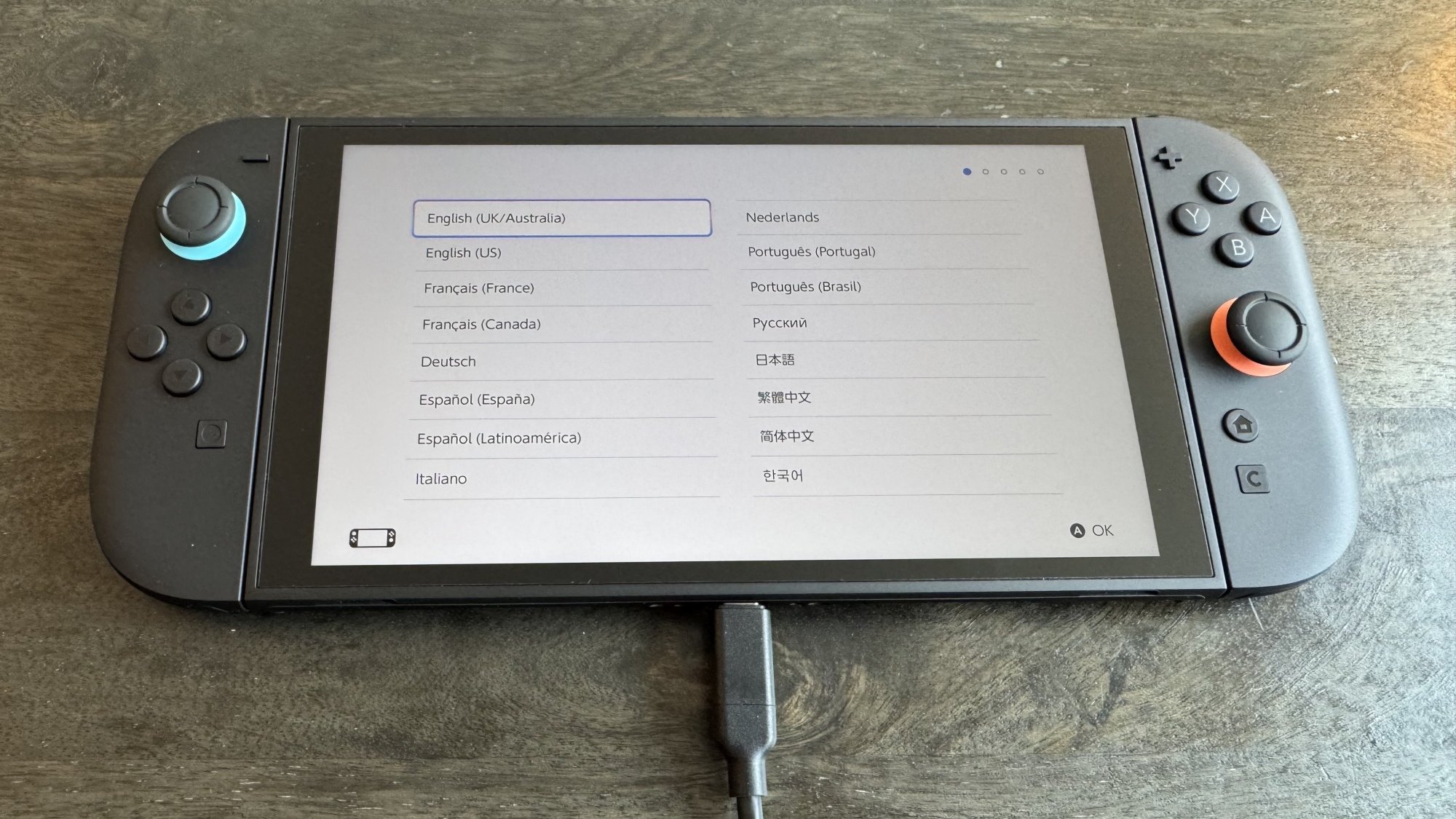
Next, plug your Switch into power using the included charging brick and cable, and power it on. On the screens that follow, select your language and region, then read and accept the end-user license agreement.

Switch 2 language

Credit: Michelle Ehrhardt

You’ll see a screen to connect to the internet and download the console’s day-one system update. This technically isn’t mandatory, and skipping it (with the X button on the right joy-con) will instead take you to time zone settings. However, most features will be locked down, including backward compatibility, until you download it, so I recommend doing it during setup if possible. If you do skip this step, you can access the update later under Settings > System > System Update.

Once you’re connected to the internet and you’ve started downloading the update, you’ll be able to continue setup while it downloads. Now, you’ll pick your time zone and click through a couple of tutorial pages. These will instruct you about portable and TV play, tell you how to use the kickstand and extra USB-C port, and walk you through detaching your joy-con from the console (press in the button on the back of the joy-con, underneath the trigger, and pull). You can also click through an optional tutorial on connecting your Switch 2 to a TV, if you like, after which you’ll get quick guides on using the included joy-con grip accessory and the joy-con wrist straps.

If your console hasn’t finished updating, it’ll finish that now, and then take you to your first big decision: do you want to transfer your Switch 1 data to your Switch 2?

Transferring Switch 1 data to the Switch 2

During Switch 2 setup, Nintendo will allow you to transfer your Switch 1 data to your Switch 2, but there are a few caveats.

You’ll know you’re ready for this once your system update is downloaded and you’re on a screen that says “To Nintendo Switch Console Owners,” above a graphic of someone holding a Switch 1 and Switch 2. 

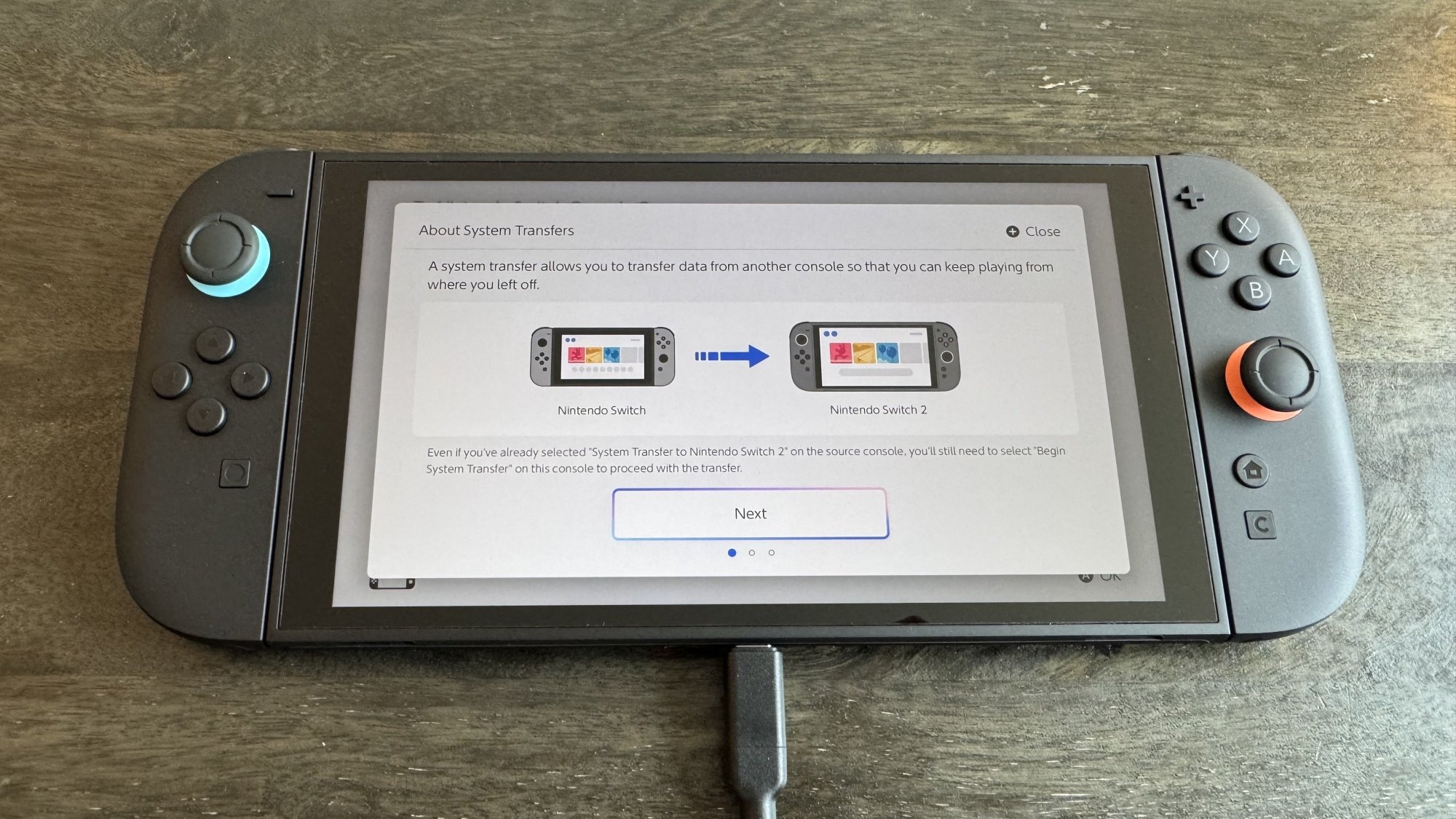
Next to the graphic, you’ll see two buttons: Begin System Transfer, Don’t Transfer Data, plus a third button below that explains the process to you, but leaves out a few key details.

Before you make your decision, the most important thing to remember is this: There are actually two ways to transfer data from the Switch 1 to the Switch 2, and despite what you might have read elsewhere, locally transferring your Switch 1 data to the Switch 2 during setup will not factory reset your original Switch. Unless you’ve taken extra steps beforehand, this is the option Nintendo’s setup process will recommend to you, so most users don’t need to be scared about accidentally erasing their original consoles.

Switch 2 System Transfer

Credit: Michelle Ehrhardt

If you stick with a local transfer, it will simply copy over your data to your Switch 2, so that it exists on both systems. There are a few specific cases where some data will get removed from your original device as it makes its way over to your new one, but for the most part, you’ll be able to keep using your original device as usual after the transfer, and there are ways to get that data back later on (I’ll get into that). Just know that save data for specific games, as well as some free-to-play games, may have been deleted from your Switch 1 and moved over to your Switch 2. Don’t worry— Nintendo will warn you about which software will be affected during the transfer process. Additionally, screenshots and video captures stored on a microSD card attached to the Switch 1 will need to be moved over manually later on.

How to transfer your Switch 1 data locally

With that in mind, if you want to transfer your data locally, which is what most people should do, click the Begin System Transfer button and follow the instructions—this involves signing into your Nintendo account, keeping your original Switch powered on and in close proximity to the Switch 2, and activating the transfer on your original Switch under Settings > System Settings > System Transfer to Nintendo Switch 2.

How to transfer your Switch 1 data using Nintendo’s servers

The confusion about factory resets comes from this data transfer option, which involves using the Nintendo servers. This will factory reset your Switch, and is best if you plan to sell it anyway, or if you expect to be away from your original Switch during Switch 2 setup and don’t mind setting up your original console from scratch when you get back to it. To start this kind of transfer, power on your original Switch, navigate to the System Transfer page mentioned above, then select I don’t have a Nintendo Switch 2 yet. Take note of the Download Deadline for later. Conveniently, that does point to one upside to this method: you can start it before you even have a Switch 2 in hand.

Now, click Next, then Upload Data, then OK, followed by another OK. Click Start Initialization to begin factory resetting your original Switch. 

From here, your original Switch will revert to how it was before you bought it, and you’ll need to move over to your Switch 2, click Begin System Transfer, and sign into your Nintendo account. If the system detects that you have transfer data to download from the cloud, it’ll walk you through the process. Note, however, that if you don’t download your transfer data before the deadline you jotted down earlier, you’ll lose access to it.

If you want to skip the data transfer process…

If you’d rather not transfer your data, that’s also fine, but you won’t have an opportunity to do so later, and will instead need to move games and save data over manually. Click the Don’t Transfer Data button, then Continue to move to the next step.

Adding a user and parental controls

With system transfers out of the way, you’re through the hardest part of setting up your new console. Now, you’ll be prompted to add a user to the system. Here, you can sign in with your Nintendo Account to get access to your Switch Online subscription and your collection of downloadable games, or create a local user profile. After that, you can add more users as you like, or you can save that for later (simply navigate to System Settings > User > Add User).

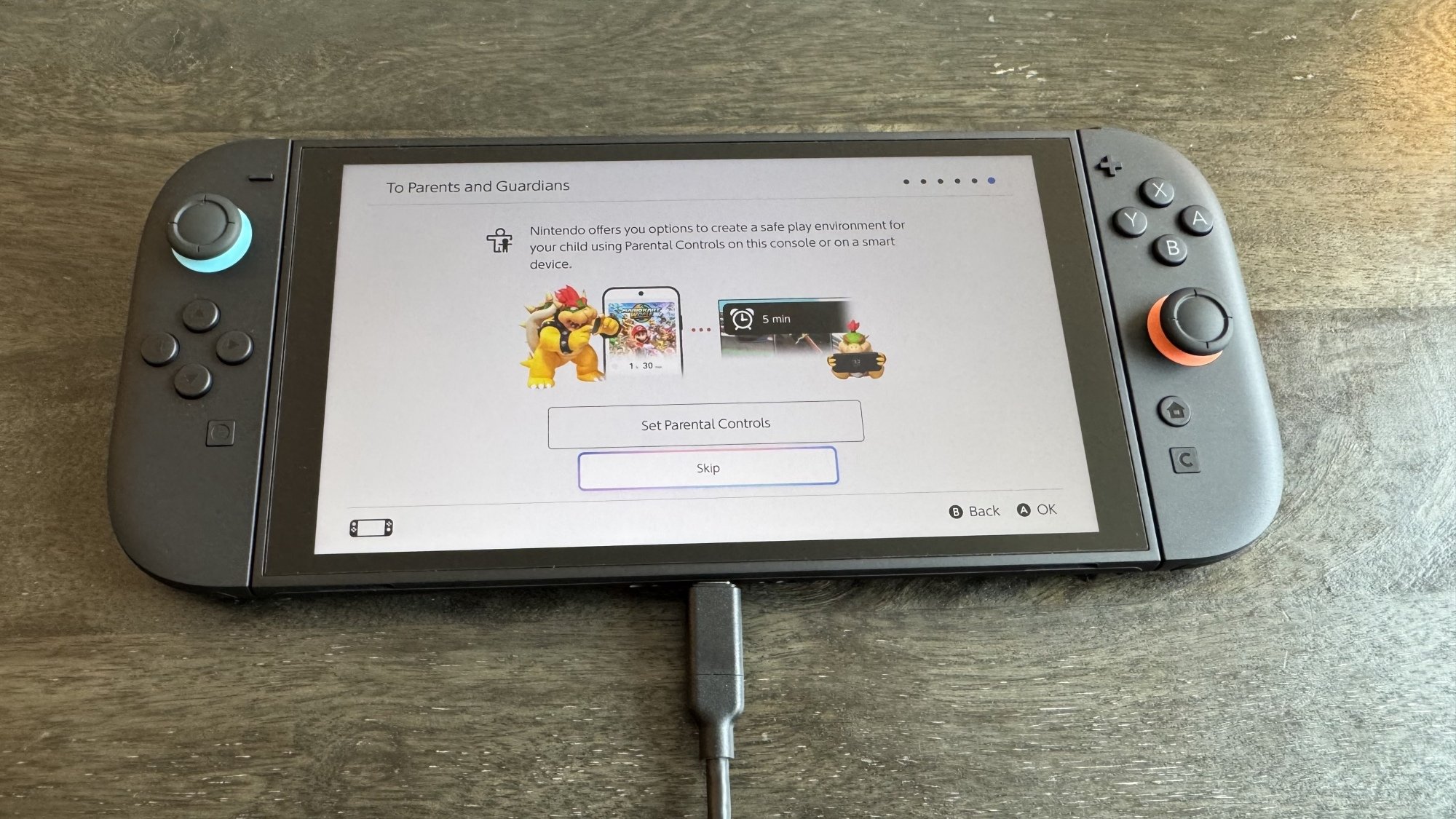
Next up, parental controls. Like with additional users, you can set these up later under System Settings > Parental Controls, but there’s no harm to setting them up now as well. To do so, click Set Parental Controls. 

Switch 2 parental controls

Credit: Michelle Ehrhardt

You’ll have a few options. Most of these will prompt you to use Nintendo’s Parental Controls app, but you can also click the X button on the right-hand joy-con to set up limited parental controls directly on the console. Doing so will allow you to select from a number of presets that will block access to certain games and communication features, but not much else. Using the app, meanwhile, will let you set a daily play time limit, bedtime settings, restrictions on the new GameChat feature, and see reports on play time and games played. It also doesn’t require a Switch Online subscription, so it’s worth using if you have a smart device.

To set up parental controls using the app, first download it for either iOS or Android using the information on the screen, then click the “If You’ve Already Downloaded the App” button. Enter the registration code from your app into your Switch 2 system, then follow the instructions in the app to finish setup. Which buttons you’ll need to click will depend on the controls you’d like to activate, as well as for which users and systems, but it’s fairly straightforward.

MicroSD card limitations

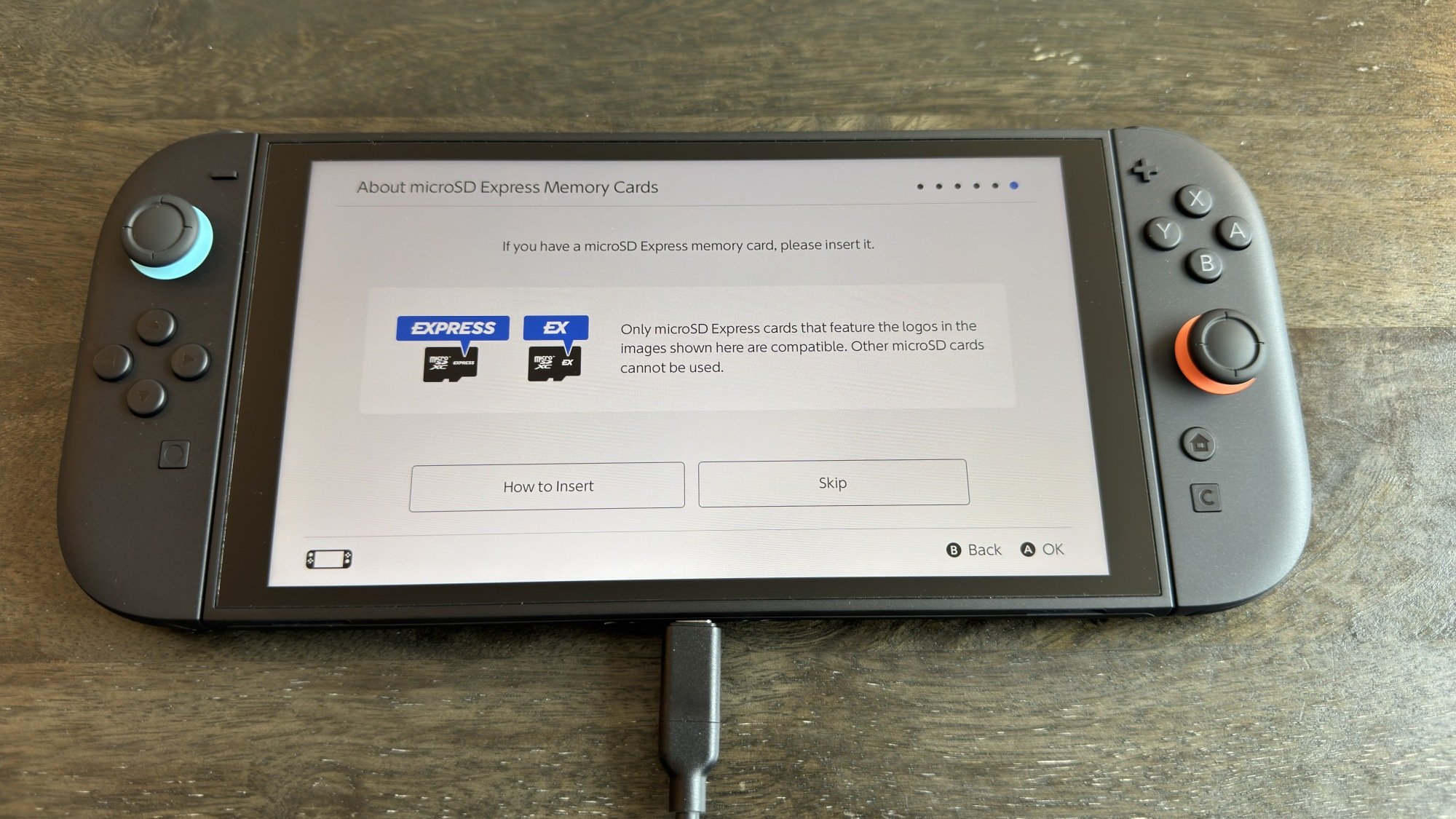
Just a couple more screens. First, a quick warning about microSD cards. Unlike the Switch 1, the Switch 2 is only compatible with microSD Express cards, which are faster, but options for them are also a bit more limited—in other words, there’s a good chance you won’t be able to use the same microSD card from your Switch 1 on your Switch 2. To use a microSD card on Switch 2, it’ll need either of the two logos shown in the image below. A bit of a bummer, but at least a microSD card is optional (it’ll help you store more games, but the included storage on the Switch 2 is more generous than on the Switch 1).

Switch 2 MicroSD card warning

Credit: Michelle Ehrhardt

Oh, and like on the Switch 1, the microSD slot is hidden under the kickstand, in case you’re having trouble finding it.

Virtual Game Cards

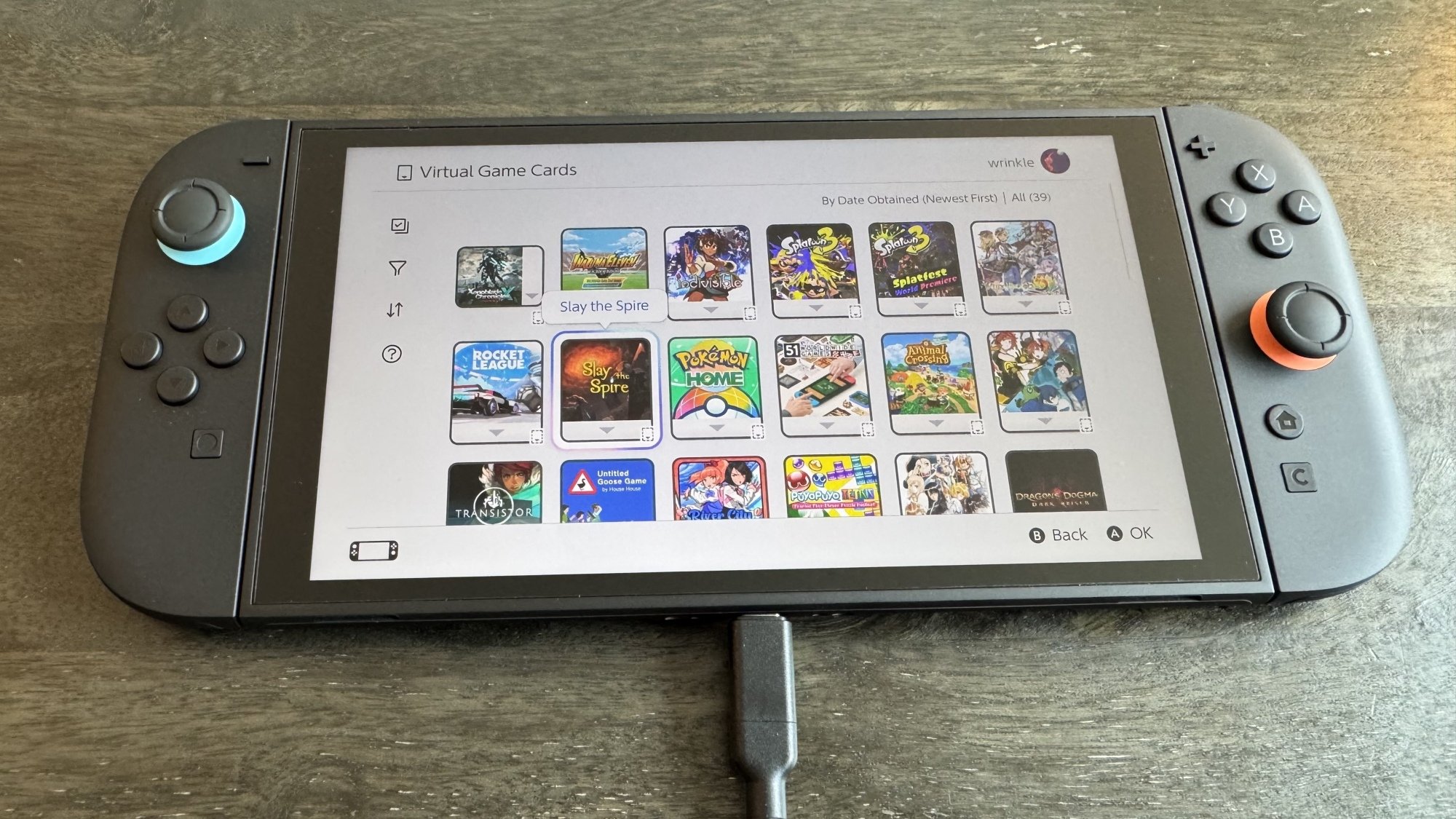
You’re technically through setup at this point, but there are still a few features you’ll probably want to configure before you start gaming. The most obvious of these is Virtual Game Cards, Nintendo’s new system for managing games purchased digitally.

Essentially, like the name implies, these work similarly to physical game cards, but over the internet. This means that, unlike with your Steam library, you can only have a game loaded to one console at a time. “Loading” is what Nintendo calls this, but for the most part, it just means your game is downloaded and ready to play.”(Technically, you can still play the same game on two separate consoles at the same time, but doing so is a bit obtuse—click through here for more details.)

To access your Virtual Game Cards, click the Virtual Game Card icon in the bottom row on your Switch 2’s home screen—it’ll look like a game cartridge. From here, if you’ve signed into your Nintendo account, you’ll see all your digital purchases and will be able to download and play them from here. If you haven’t signed into your Nintendo Account, you’ll have the option to do so.

Switch 2 virtual game cards

Credit: Michelle Ehrhardt

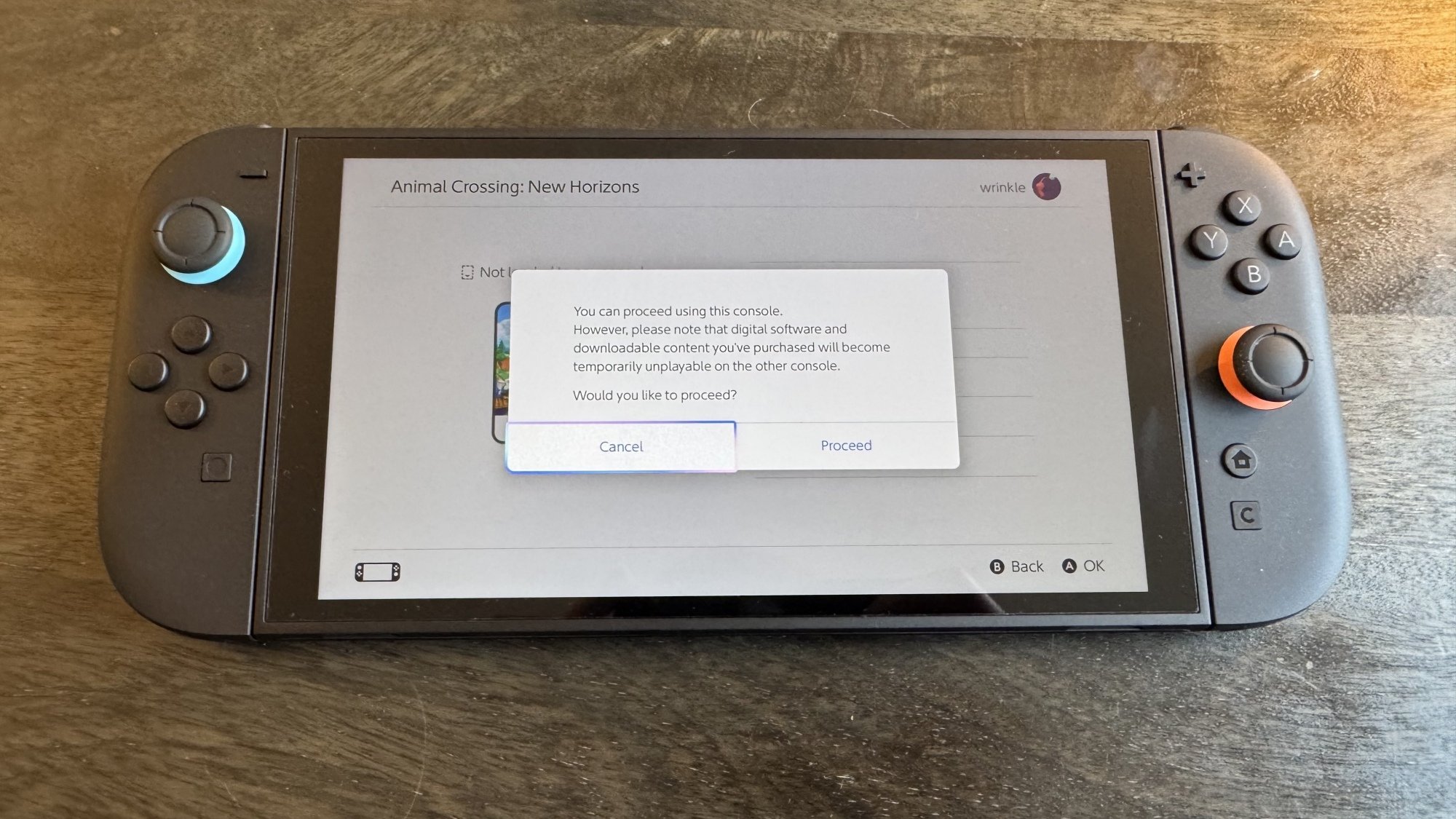
Now, you’ll have a few options. First, if a game isn’t loaded onto your original Switch, you can simply download it to your Switch 2 without issue by clicking Load to This Console. If the console isn’t set as your primary device (likely the case if you didn’t do a transfer), you might see a warning if you try to open a game, but you can click the If You Don’t Have That Console button to download your game anyway. It will simply cease being playable on the other console while you use it on this one, although that’s always the case when moving a Virtual Game Card between systems. Still, you can always change your primary device later by de-registering your original device and connecting your Switch 2 to the eShop. This won’t be necessary for simply accessing your library, but will extend any Nintendo Online benefits to all users on that device, rather than the one associated with your Nintendo Account.

Virtual game cards load screen

Credit: Michelle Ehrhardt

Alternatively, if you do have access to your old console and have it nearby and powered on, you can link it to your new one to directly transfer your digital game to it, without having to re-download it from the internet. You’ll need to be in close proximity for this, and you can only have two consoles linked at a time (although you can freely unlink and link consoles as needed). With that set up, click Load to This Console on the system you want to move the Virtual Game Card to to get started. Transferring a game like this will also remove access to that game from your old device, and if you like, you can initiate this process from the device that’s transferring the game instead, by navigating to the desired Virtual Game Card on it and clicking Load to Another Console.

How to lend a Virtual Game Card to someone else

You’ll also notice that you can lend a Virtual Game Card to members of a “Family Group.” To do this, you’ll first need to set up a Family Group online. On Nintendo’s website, log into your Nintendo Account, then click the Family Group tab on the left hand side of your account page. Here, you can invite members to join your Family Group via email, or create a Family Group account for your child. Note that if you have a Nintendo Switch online Family Plan subscription, members of your Family Group will be able to use its benefits (for up to eight accounts), although accounts that are part of your family group can also still use their individual subscriptions.

With a Family Group set up, on the Virtual Game Card page, click the game you’d like to lend out, then Lend to a Family Group Member. Next, bring your Switch 2 in close proximity with that Family Group Member’s device—this needs to be done in person.

Finally, click Select a User to Lend to. You can lend up to three games to three different accounts at once, and borrowers will be able to play these games for 14 days. During that time, you won’t be able to play the Game Card, and the borrower won’t get access to your save data while borrowing. However, they will keep their own save data for their next borrowing period, or if they choose to buy the game themselves. There are no limits to how often you can lend out a game, and you can re-lend games immediately upon the borrowing period expiring. Also, while you’ll need to lend out your games in person, they’ll return to you remotely.

Transferring save data

Even if you didn’t transfer your Switch 1 data to your Switch 2 during setup, you can still access its save data on your new device. You have a couple of options here.

First, the free option. On your original Switch, go to System Settings > Data Management > Transfer Your Save Data. Click Send Data to Another Console, then pick the user whose saves you want to send to your Switch 2. Pick the saves you want to send over, then click OK. Note that these saves will be deleted from your original console once moved over.

Next, with your Switch 2 in close proximity to your Switch 1 (this also needs to be done in person), navigate to System Settings > Data Management > Transfer Your Save Data. Click Receive Save Data. 

To move data from your Switch 2 to your Switch 1, simply perform these steps in reverse.

Second, the paid option. If you have a Nintendo Switch Online membership, you can also use cloud saves to move save data between devices. By default, these are enabled automatically and will keep both of your systems up to date with the most recent saves. However, you can also manually download cloud saves either from a game’s software menu (press + or – while hovering over it on the Switch home screen) or from System Settings > Data Management > Save Data Cloud. You can also disable automatic save data download from here, if you like.

Lock your home screen behind a passcode

Finally, you can lock your Switch 2 with a PIN for some added security, kind of like a cell phone. To set this up, simply go to Settings > System > Console Lock. Click OK, then follow the instructions on the screen that pops up to enter your PIN.

There’s plenty more to dive into with the Switch 2, which I’ll cover over the following week. For now, though, this should be enough to get you started. Happy gaming!